
springboot—— Shiro实现认证和授权功能
一、数据库模板设计
在本文中,我们使用RBAC(Role-Based Access Control,基于角色的访问控制)模型设计用户,角色和权限间的关系。简单地说,一个用户拥有若干角色,每一个角色拥有若干权限。这样,就构造成“用户-角色-权限”的授权模型。在这种模型中,用户与角色之间,角色与权限之间,一般者是多对多的关系
一个用户对应一个或者多个角色。
一个角色对应一个或者多个权限。
一个权限对应能够访问对应的API或url资源。
1 . RBAC基本实体关系,Permission类(权限资源) :
/*** Created by EalenXie on 2019/3/25 11:15.* <p>* 权限许可(Permission) 操作 及其能访问url 权限对应一个url地址*/
@Entity
@Table(name = "system_shiro_permission")
public class Permission extends BaseEntity {@Column(unique = true)private String name;                //权限名 唯一@Column(unique = true)private String url;                 //访问地址信息 唯一private String description;         //描述信息//省略getter/setter
}
2 . Role类(用户角色),一个角色拥有一个或者多个权限 :
/*** Created by EalenXie on 2019/3/25 11:18.* <p>* 角色(Role) 角色下面对应多个权限*/
@Entity
@Table(name = "system_shiro_role")
public class Role extends BaseEntity {@Column(unique = true)private String name;                    //角色名 唯一private String description;             //描述信息@ManyToMany(fetch= FetchType.EAGER)private List<Permission> permissions;   //一个用户角色对应多个权限//省略getter/setter
}
3 . User类(用户),一个用户拥有一个或者多个角色 :
/*** Created by EalenXie on 2019/3/25 11:01.* <p>* 用户表(User) 用户下面对应多个角色*/
@Entity
@Table(name = "system_shiro_user")
public class User extends BaseEntity {@Column(unique = true)private String username;//用户名 唯一private String password;//用户密码private String passwordSalt;//用户密码加密盐值@ManyToMany(fetch = FetchType.EAGER)private List<Role> roles;//用户角色  一个用户可能有一个角色,也可能有 多个角色//省略getter/setter
}
以上是对应关系的实体,数据库字段根据上述实体创建,这里就不写出来了。设计到的查询根据实际情况自己写,这里主要是讲shiro
二:Shiro整合实现思路
我们先来屡一下思路,实现认证权限功能主要可以归纳为3点:
1.定义一个ShiroConfig配置类,配置 SecurityManager Bean , SecurityManager为Shiro的安全管理器,管理着所有Subject;
2.在ShiroConfig中配置 ShiroFilterFactoryBean ,它是Shiro过滤器工厂类,依赖SecurityManager ;
3.自定义Realm实现类,包含
doGetAuthorizationInfo()和doGetAuthenticationInfo()方法
下面我们就来实现这些步骤:
1、定义ShiroConfig配置类
/*** Shiro配置*/
@Configuration
public class ShiroConfig {@Resourceprivate OAuth3Realm userAuthRealm;/*** 配置安全管理器* @param oAuth3Realm UserRealm* @return DefaultWebSecurityManager*/@Beanpublic SecurityManager securityManager(OAuth3Realm oAuth3Realm) {DefaultWebSecurityManager securityManager = new DefaultWebSecurityManager();securityManager.setRealm(oAuth3Realm);return securityManager;}/*** 配置Shiro过滤器工厂* 配置 资源访问策略 . web应用程序 shiro核心过滤器配置*/@Bean("shiroFilter")public ShiroFilterFactoryBean shiroFilterFactoryBean(SecurityManager securityManager, UrlConfig urlConfig) {ShiroFilterFactoryBean shiroFilterFactoryBean = new ShiroFilterFactoryBean();// 注册安全管理器shiroFilterFactoryBean.setSecurityManager(securityManager);// 定义资源访问规则Map<String, String> filterMap = new LinkedHashMap<String, String>(16);/** 过滤器说明* anon:不需要认证就可以访问的资源* authc:需要登录认证才能访问的资源* perms:需要指定权限才能访问的资源*/// 需要登录认证才能访问的资源//oauth过滤,anon:不需要认证就可以访问的资源Map<String, Filter> filters = new LinkedHashMap<>();filters.put("oauth3", new OAuth3Filter());// TODO 增加新的B端用户拦截器shiroFilterFactoryBean.setFilters(filters);//排除配置if (urlConfig.getAnonUrl() != null && !urlConfig.getAnonUrl().isEmpty()) {for (String anonUrl : urlConfig.getAnonUrl()) {filterMap.put(anonUrl, "anon");}}//对所有用户认证 对B端访问路由进行拦截filterMap.put("/**", "oauth3");//配置 拦截过滤器链shiroFilterFactoryBean.setFilterChainDefinitionMap(filterMap);return shiroFilterFactoryBean;}@Beanpublic LifecycleBeanPostProcessor lifecycleBeanPostProcessor() {return new LifecycleBeanPostProcessor();}/*** 开启shiro 注解支持. 使以下注解能够生效 :* 需要认证 {@link org.apache.shiro.authz.annotation.RequiresAuthentication RequiresAuthentication}* 需要用户 {@link org.apache.shiro.authz.annotation.RequiresUser RequiresUser}* 需要访客 {@link org.apache.shiro.authz.annotation.RequiresGuest RequiresGuest}* 需要角色 {@link org.apache.shiro.authz.annotation.RequiresRoles RequiresRoles}* 需要权限 {@link org.apache.shiro.authz.annotation.RequiresPermissions RequiresPermissions}* 启用shiro注解*加入注解的使用,不加入这个注解不生效*/@Beanpublic AuthorizationAttributeSourceAdvisor authorizationAttributeSourceAdvisor(SecurityManager securityManager) {AuthorizationAttributeSourceAdvisor authorizationAttributeSourceAdvisor = new AuthorizationAttributeSourceAdvisor();authorizationAttributeSourceAdvisor.setSecurityManager(securityManager);return authorizationAttributeSourceAdvisor;}/*** 配置shiro中缓存管理器对象 (对象的名字不能写cacheManager,因为spring容器中已经存在一个名字为cacheManager的对象了)** 作用:缓存授权信息,当第一次访问授权时,会调用自定义Realm的获取授权数据的方法,从数据库中查询授权数据,并将其以登录者的Principal为键,存储在缓存中。* 以后的每次访问授权,就直接从缓存中获取,而不再从数据库中获取。*/@Beanpublic CacheManager shiroCacheManager() {return new MemoryConstrainedCacheManager();}/*** 配置记住我管理对象:底层同cookie对象将用户信息写到客户端*/@Beanpublic RememberMeManager rememberMeManager() {CookieRememberMeManager cManager = new CookieRememberMeManager();//配置cookieSimpleCookie cookie = new SimpleCookie("rememberMe");//设置cookie执行时长(7天)cookie.setMaxAge(1 * 24 * 60 * 60);cManager.setCookie(cookie);return cManager;}// @Bean//   public DefaultAdvisorAutoProxyCreator advisorAutoProxyCreator(){
//        DefaultAdvisorAutoProxyCreator advisorAutoProxyCreator = new DefaultAdvisorAutoProxyCreator();//     advisorAutoProxyCreator.setProxyTargetClass(true);//     return advisorAutoProxyCreator;// }
}
注意:(当时笔者遇到的一个小问题,贴出来给大家涨姿势)
注解无效,登录时不会执行验证角色和权限的方法,只会执行登录验证方法,遂查询资料,得知shiro在subject.login(token)方法时不会执行doGetAuthorizationInfo方法,只有在访问到有权限验证的接口时会调用查看权限,于是猜想注解无效,发现shiro的权限注解需要开启才能有用,添加在配置文件中加入
advisorAutoProxyCreator和getAuthorizationAttributeSourceAdvisor两个bean开启shiro注解,解决问题。
shiroFilterFactoryBean 的Url配置
可以配置在数据库,也可以配置在配置文件,作者这里配置在配置文件中的
@Data
@Configuration
@ConfigurationProperties(prefix = "amsh")
public class UrlConfig {/*** 不需要拦截的url*/private List<String> anonUrl;/*** openapi分页大小*/private Integer openPageSize;
} 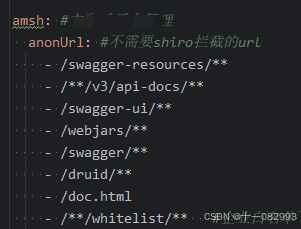
通过这种方式排除配置

注意:
1.这里要用LinkedHashMap 保证有序
2.filterChain基于短路机制,即最先匹配原则,
3.像anon、authc等都是Shiro为我们实现的过滤器
附录:
1.Shiro拦截机制表
Filter Name Class Description anon org.apache.shiro.web.filter.authc.AnonymousFilter 匿名拦截器,即不需要登录即可访问;一般用于静态资源过滤;示例 /static/**=anonauthc org.apache.shiro.web.filter.authc.FormAuthenticationFilter 基于表单的拦截器;如 /**=authc,如果没有登录会跳到相应的登录页面登录authcBasic org.apache.shiro.web.filter.authc.BasicHttpAuthenticationFilter Basic HTTP身份验证拦截器 logout org.apache.shiro.web.filter.authc.LogoutFilter 退出拦截器,主要属性:redirectUrl:退出成功后重定向的地址(/),示例 /logout=logoutnoSessionCreation org.apache.shiro.web.filter.session.NoSessionCreationFilter 不创建会话拦截器,调用 subject.getSession(false)不会有什么问题,但是如果subject.getSession(true)将抛出DisabledSessionException异常perms org.apache.shiro.web.filter.authz.PermissionsAuthorizationFilter 权限授权拦截器,验证用户是否拥有所有权限;属性和roles一样;示例 /user/**=perms["user:create"]port org.apache.shiro.web.filter.authz.PortFilter 端口拦截器,主要属性 port(80):可以通过的端口;示例/test= port[80],如果用户访问该页面是非80,将自动将请求端口改为80并重定向到该80端口,其他路径/参数等都一样rest org.apache.shiro.web.filter.authz.HttpMethodPermissionFilter rest风格拦截器,自动根据请求方法构建权限字符串;示例 /users=rest[user],会自动拼出user:read,user:create,user:update,user:delete权限字符串进行权限匹配(所有都得匹配,isPermittedAll)roles org.apache.shiro.web.filter.authz.RolesAuthorizationFilter 角色授权拦截器,验证用户是否拥有所有角色;示例 /admin/**=roles[admin]ssl org.apache.shiro.web.filter.authz.SslFilter SSL拦截器,只有请求协议是https才能通过;否则自动跳转会https端口443;其他和port拦截器一样; user org.apache.shiro.web.filter.authc.UserFilter 用户拦截器,用户已经身份验证/记住我登录的都可;示例 /**=user
oauth2过滤器
-上面配置文件中加入的类- filters.put("oauth3", new OAuth3Filter());
/*** oauth2过滤器*/
@Slf4j
public class OAuth3Filter extends AuthenticatingFilter {@Overrideprotected AuthenticationToken createToken(ServletRequest request, ServletResponse response) throws Exception {//获取请求tokenString token = getRequestToken((HttpServletRequest) request);if (StringUtils.isEmpty(token)) {//清理线程变量ThreadLocalUserInfo.remove();return null;}return new OAuth3Token(token);}@Overrideprotected boolean isAccessAllowed(ServletRequest request, ServletResponse response, Object mappedValue) {if (((HttpServletRequest) request).getMethod().equals(RequestMethod.OPTIONS.name())) {return true;}return false;}@Overrideprotected boolean onAccessDenied(ServletRequest request, ServletResponse response) throws Exception {//获取请求token,如果token不存在,直接返回401HttpServletRequest httpRequest = (HttpServletRequest) request;String token = getRequestToken(httpRequest);if (StringUtils.isEmpty(token)) {log.info("OAuth3Filter过滤器,onAccessDenied获取token:{}", token);HttpServletResponse httpResponse = (HttpServletResponse) response;httpResponse.setContentType("application/json;charset=UTF-8");UnifiedResult result = UnifiedResult.fail(HttpStatus.UNAUTHORIZED.value(), "无效的token");String json = JSON.toJSONString(result);httpResponse.getWriter().print(json);return false;}return executeLogin(request, response);}@Overrideprotected boolean onLoginFailure(AuthenticationToken token, AuthenticationException e, ServletRequest request, ServletResponse response) {HttpServletRequest httpRequest = (HttpServletRequest) request;HttpServletResponse httpResponse = (HttpServletResponse) response;httpResponse.setContentType("application/json;charset=UTF-8");try {//清理线程变量ThreadLocalUserInfo.remove();//处理登录失败的异常Throwable throwable = e.getCause() == null ? e : e.getCause();UnifiedResult result = UnifiedResult.fail(HttpStatus.UNAUTHORIZED.value(), throwable.getMessage());String json = JSON.toJSONString(result);httpResponse.getWriter().print(json);} catch (IOException e1) {e1.printStackTrace();}return false;}/*** 获取请求的token*/private String getRequestToken(HttpServletRequest httpRequest) {//从header中获取tokenString token = httpRequest.getHeader("auth");//如果header中不存在token,则从参数中获取tokenif (StringUtils.isEmpty(token)) {token = httpRequest.getParameter("auth");}return token;}}
2、实现自定义Realm类
自定义Realm类需要继承 AuthorizingRealm 类,实现 doGetAuthorizationInfo()和doGetAuthenticationInfo()方法即可 ,
doGetAuthorizationInfo() 方法是进行授权的方法,获取角色的权限信息
doGetAuthenticationInfo()方法是进行用户认证的方法,验证用户名和密码
/*** @ClassName MyShiroRealm* @Description TODO* @Author fqCoder* @Date 2020/2/29 3:08* @Version 1.0*/
@Service
public class MyShiroRealm  extends AuthorizingRealm {@Autowiredprivate UserMapper userMapper;@Autowiredprivate UserRoleMapper userRoleMapper;@Autowiredprivate RolePermissionMapper rolePermissionMapper;/*** 获取用户角色和权限* @param principal* 授权(验证权限时调用)* 获取授权信息(把数据库中shiroID加入到shiro中管理,然后如果ctronler层方法加上 @RequiresPermissions注解才会调用这个方法和数组进行比对)* 只有当需要检测用户权限的时候才会调用此方法* @return*/@Overrideprotected AuthorizationInfo doGetAuthorizationInfo(PrincipalCollection principal) {if(principal == null){throw new AuthorizationException("principals should not be null");}User userInfo= (User) SecurityUtils.getSubject().getPrincipal();System.out.println("用户-->"+userInfo.getUsername()+"获取权限中");SimpleAuthorizationInfo simpleAuthorizationInfo = new SimpleAuthorizationInfo();//用户获取角色集List<Role> roleList=userRoleMapper.findByUserName(userInfo.getUsername());Set<String> roleSet=new HashSet<>();for (Role r:roleList){Integer roleId=r.getId();//获取角色idsimpleAuthorizationInfo.addRole(r.getName());//添加角色名字List<Permission> permissionList=rolePermissionMapper.findByRoleId(roleId);for (Permission p:permissionList){//添加权限simpleAuthorizationInfo.addStringPermission(p.getName());}}System.out.println("角色为-> " + simpleAuthorizationInfo.getRoles());System.out.println("权限为-> " + simpleAuthorizationInfo.getStringPermissions());return simpleAuthorizationInfo;}/*** 登录认证* @param token* @return* @throws AuthenticationException*/@Overrideprotected AuthenticationInfo doGetAuthenticationInfo(AuthenticationToken token) throws AuthenticationException {//获取用户输入的用户名密码String username= (String) token.getPrincipal();String password=new String((char[])token.getCredentials());System.out.println("用户输入--->username:"+username+"-->password:"+password);//在数据库中查询User userInfo=userMapper.selectByName(username);if (userInfo == null) {throw new UnknownAccountException("用户名或密码错误!");}if (!password.equals(userInfo.getPassword())) {throw new IncorrectCredentialsException("用户名或密码错误!");}SimpleAuthenticationInfo authenticationInfo = new SimpleAuthenticationInfo(userInfo, // 用户名userInfo.getPassword(), // 密码getName() // realm name);return authenticationInfo;}
}
其中
UnknownAccountException等异常为Shiro自带异常,Shiro具有丰富的运行时AuthenticationException层次结构,可以准确指出尝试失败的原因
创建一个UserController.class类
用于处理User类的访问请求,并使用Shiro权限注解控制权限:
/*** @ClassName UserController* @Description TODO* @Author fqCoder* @Date 2020/3/3 15:14* @Version 1.0*/
@RestController
@RequestMapping("/user")
public class UserController {@RequiresPermissions("user:queryAll")@GetMapping("/queryAll")public String queryAll(){//只演示框架...功能不实现return "查询列表";}@RequiresPermissions("user:add")@GetMapping("/add")public String userAdd(){return "添加用户";}@RequiresPermissions("user:delete")@GetMapping("/delete")public String userDelete(){return "删除用户";}
}
这只是前后端分离时的shiro验证,不涉及页面的代码
以上就是shiro 整合的操作步骤
三、下面是拓展场景——在项目启动的时候进行全局扫描自动生成权限资源
假如最开始框架设计时,并没有引入权限框架,中途是安测扫描出越权问题,进行补漏。
这时已经实现了很多接口,设计到加权限问题,如果是注解的方式,一个一个加不太现实,那得累死,这时就可以考虑在项目启动的时候进行全局扫描自动生成权限资源
步骤:
1、定义需要进行权限控制的接口-自动扫描生成的资源注解
/*** 权限注解,用于标识需要权限处理的接口** @author*/
@Retention(RetentionPolicy.RUNTIME)
@Target({ElementType.METHOD, ElementType.TYPE})
public @interface Auth {/*** 权限id,模块id + 方法id需要唯一*/long id();/*** 权限名称*/String name();int type() default 1;/*** 权限菜单路径*/String perssionMenus() default "";
}
定义组件,项目启动时扫描
/*** @author*/
@Slf4j
@Component
public class ApplicationStartup implements ApplicationRunner {@Resourceprivate IBackendRabcResourceService resourceService;@Overridepublic void run(ApplicationArguments args) {log.info("--------------->【ApplicationStartup接口初始化】-------> 开始初始化扫描所有需要权限的接口资源");resourceService.initRoleResource();log.info("--------------->【ApplicationStartup接口初始化完成】------->");}}
service层
@Overridepublic void initRoleResource() {List<RabcResource> listAll = new LinkedList<>();List<RabcResource> moduleResourceslist = getAuthModuleResources();// 扫描并获取所有需要权限处理的接口资源(该方法逻辑写在下面)List<RabcResource> methodResourceslist = getAuthMethodResources();// 如果权限资源为空,就不用走后续数据插入步骤if (CollUtil.isEmpty(moduleResourceslist) && CollUtil.isEmpty(methodResourceslist)) {return;}// 先删除所有操作权限类型的权限资源,待会再新增资源,以实现全量更新(注意哦,数据库中不要设置外键,否则会删除失败)if (CollUtil.isNotEmpty(moduleResourceslist)) {log.info("--------------->开始删除已存在的模块资源,进行全量更新");this.deleteResourceByType(0);}if (CollUtil.isNotEmpty(methodResourceslist)) {log.info("--------------->开始删除已存在的接口资源,进行全量更新");this.deleteResourceByType(1);}listAll.addAll(moduleResourceslist);listAll.addAll(methodResourceslist);// 将资源数据批量添加到数据库this.insertResources(listAll);List<RabcRoleResource> roleResources = this.retrieveItemChild();if (CollUtil.isNotEmpty(roleResources)) {log.info("--------------->开始删除已存在的角色资源,进行全量更新");this.deleteRoleResourceByType(0);}this.insertRoleResource(roleResources);log.info("--------------->【ApplicationStartup接口初始化完成】------->");}/*** 扫描并返回所有需要权限处理的模块资源*/private List<RabcResource> getAuthModuleResources() {// 接下来要添加到数据库的资源List<RabcResource> list = new LinkedList<>();// 拿到所有接口信息,并开始遍历Map<RequestMappingInfo, HandlerMethod> handlerMethods = requestMappingInfoHandlerMapping.getHandlerMethods();handlerMethods.forEach((info, handlerMethod) -> {// 拿到类(模块)上的权限注解Auth moduleAuth = handlerMethod.getBeanType().getAnnotation(Auth.class);if (moduleAuth == null) {return;}if (0 == moduleAuth.type()) {String path = info.getPatternsCondition().getPatterns().toArray()[0].toString();String moduleAuthName = "/" + path.split("/")[1];RabcResource resource = list.stream().filter(item -> moduleAuthName.equals(item.getPath())).findFirst().orElse(null);if (ObjectUtil.isEmpty(resource)) {// 将权限名、资源路径、资源类型组装成资源对象,并添加集合中RabcResource resourceEntity = new RabcResource();resourceEntity.setType(0).setPath(moduleAuthName).setId(moduleAuth.id()).setPerssionmenus(moduleAuth.perssionMenus()).setName(moduleAuth.name());list.add(resourceEntity);}}});log.info("【getAuthModuleResources方法】-------> 获取到所有需要权限控制的模块资源 模块数量:{}", list.size());return list;}/*** 扫描并返回所有需要权限处理的接口资源*/private List<RabcResource> getAuthMethodResources() {// 接下来要添加到数据库的资源List<RabcResource> list = new LinkedList<>();// 拿到所有接口信息,并开始遍历Map<RequestMappingInfo, HandlerMethod> handlerMethods = requestMappingInfoHandlerMapping.getHandlerMethods();handlerMethods.forEach((info, handlerMethod) -> {// 拿到类(模块)上的权限注解Auth moduleAuth = handlerMethod.getBeanType().getAnnotation(Auth.class);// 拿到接口方法上的权限注解Auth methodAuth = handlerMethod.getMethod().getAnnotation(Auth.class);// 模块注解和方法注解缺一个都代表不进行权限处理if (moduleAuth == null || methodAuth == null) {return;}// 拿到该接口方法的请求方式(GET、POST等)Set<RequestMethod> methods = info.getMethodsCondition().getMethods();// 如果一个接口方法标记了多个请求方式,权限id是无法识别的,不进行处理if (methods.size() != 1) {return;}// 将请求方式和路径用`:`拼接起来,以区分接口。比如:GET:/user/{id}、POST:/user/{id}String path = methods.toArray()[0] + ":" + info.getPatternsCondition().getPatterns().toArray()[0];String methodPath = info.getPatternsCondition().getPatterns().toArray()[0].toString();// 将权限名、资源路径、资源类型组装成资源对象,并添加集合中RabcResource resourceEntity = new RabcResource();resourceEntity.setType(1).setPath(path).setPerssionmenus(moduleAuth.perssionMenus()).setName(methodAuth.name()).setId(moduleAuth.id() + methodAuth.id()).setMethod(methodPath);list.add(resourceEntity);});log.info("【getAuthMethodResources方法】-------> 获取到所有需要权限控制的模块下的具体方法接口资源 模块下方法数量{}", list.size());return list;}
@Auth(id=1000,name = "附件文件上传下载接口", type = 0)
public class AnnexFileController {@Autowiredprivate AnnexFileService annexFileService;@PostMapping("/upload")@ApiOperation("文件上传")@Auth(id=1,name = "附件文件上传")public Result<File> upload(@RequestPart("file") MultipartFile file) throws Exception {Member user = LoginUtils.getCurrentMember();AmshFile upload = annexFileService.upload(file, user.getUsername());return Result.ok(upload);}@GetMapping("/download")@ApiOperation(value = "下载文件")@Auth(id=2,name = "附件文件下载")public Result<?> download(@ApiParam(value = "文件ID", required = true) String fileId, HttpServletResponse response) {annexFileService.downloadFile(fileId, response);return Result.ok();}
注意只有添加了该注解@Auth(id=2,name = "附件文件下载") ,类型才会进行接口资源扫描,才会加入到权限资源的数据库中,加入到资源数据库中,需要自己修改逻辑。只有同时实现了下面两个注解才会实现控制访问,一个是生成接口权限资源的,一个是接口访问的时候进行权限验证的

以上是开发过程中遇到问题并解决之后的总结
相关文章:
springboot—— Shiro实现认证和授权功能
一、数据库模板设计 在本文中,我们使用RBAC(Role-Based Access Control,基于角色的访问控制)模型设计用户,角色和权限间的关系。简单地说,一个用户拥有若干角色,每一个角色拥有若干权限。这样&a…...
牛客 除2问题
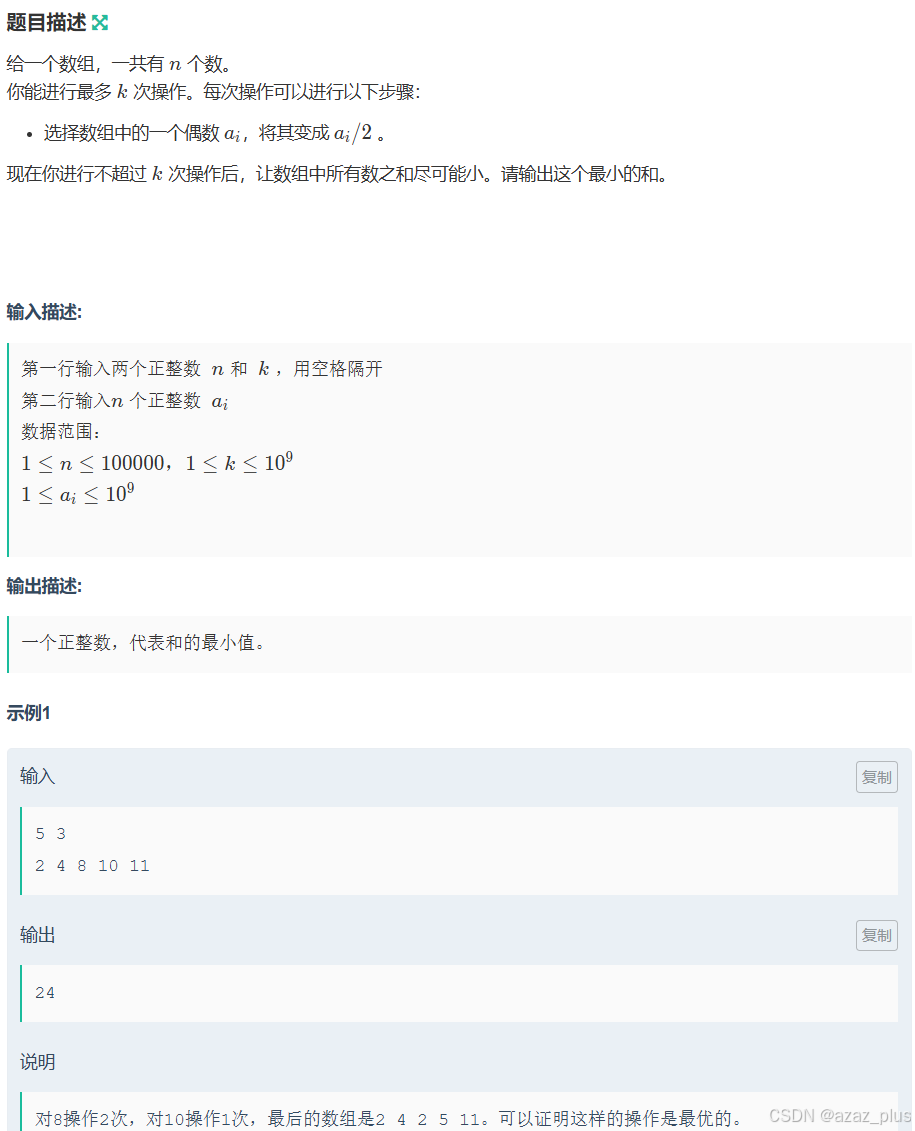
除2! 贪心堆 让偶数入堆 注意点: 1.判断堆是否为空再进行操作 2. 为了防止超时,我们采取先求和的方式,后面调整之后再减掉,可以节省一次遍历的时间。 3.注意数据范围,要用long long #include<iost…...

Kafka - 消息零丢失实战
Kafka消息0丢失实战 当你用Kafka处理业务时,是否担心过消息神秘失踪?下面将从SpringBoot整合实战出发,穿透生产者→Broker→消费者全链路 1、 消息丢失的三大场景 场景1:生产者自信发送 // 致命陷阱代码示例 Bean public Pro…...
)
通信算法之256: 无人机Remote ID(远程识别)
Wifi图传的通讯距离可达到2km以上,最高可支持720P视频传输,在通讯距离和延时上比较差,并且抗干扰能力差,大都在入门级的无人机上使用。LightBridge图传技术相比wifi图传,通讯距离最远可以达到7km,最高支持1…...

【C++11】异步编程
异步编程的概念 什么是异步? 异步编程是一种编程范式,允许程序在等待某些操作时继续执行其它任务,而不是阻塞或等待这些操作完成。 异步编程vs同步编程? 在传统的同步编程中,代码按顺序同步执行,每个操作需…...
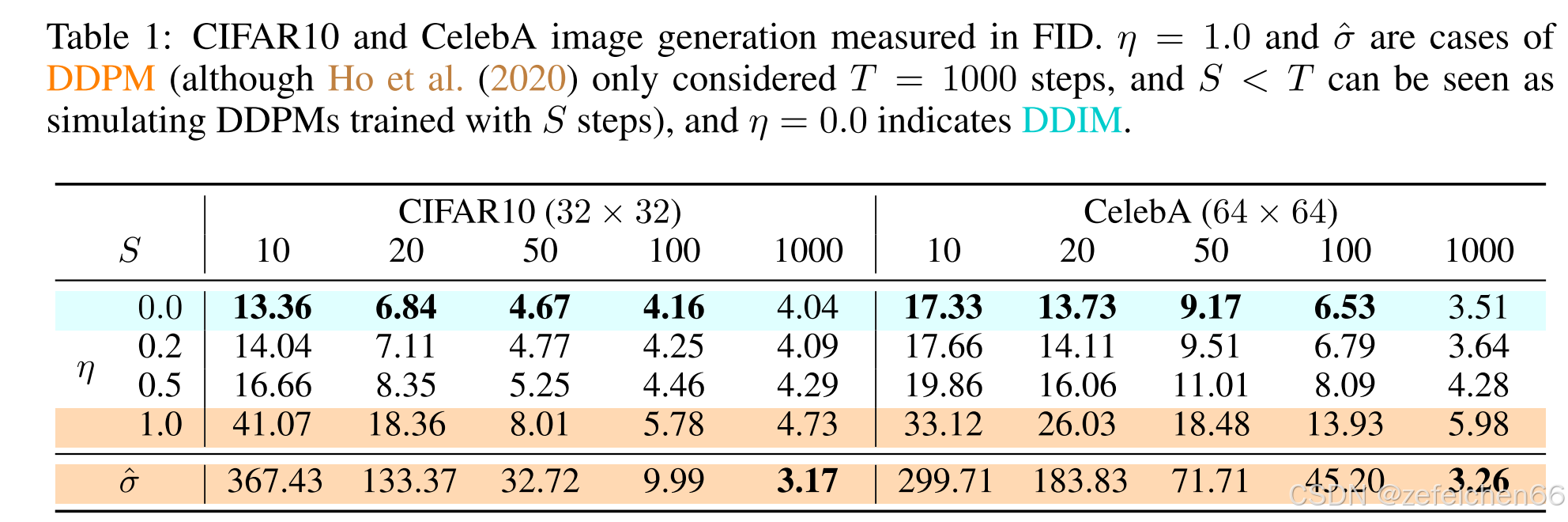
论文阅读笔记:Denoising Diffusion Implicit Models (4)
0、快速访问 论文阅读笔记:Denoising Diffusion Implicit Models (1) 论文阅读笔记:Denoising Diffusion Implicit Models (2) 论文阅读笔记:Denoising Diffusion Implicit Models (…...

flux文生图部署笔记
目录 依赖库: 文生图推理代码cpu: cuda版推理: 依赖库: tensorrt安装: pip install nvidia-pyindex # 添加NVIDIA仓库索引 pip install tensorrt 文生图推理代码cpu: import torch from diffusers import FluxPipelinemodel_id = "black-forest-labs/FLUX.1-s…...

UltraScale+系列FPGA实现 IMX214 MIPI 视频解码转HDMI2.0输出,提供2套工程源码和技术支持
目录 1、前言工程概述免责声明 2、相关方案推荐我已有的所有工程源码总目录----方便你快速找到自己喜欢的项目我这里已有的 MIPI 编解码方案我已有的4K/8K视频处理解决方案 3、详细设计方案设计框图硬件设计架构FPGA开发板IMX214 摄像头MIPI D-PHYMIPI CSI-2 RX SubsystemBayer…...
)
品铂科技与宇都通讯UWB技术核心区别对比(2025年)
一、核心技术差异 维度品铂科技 (Pinpoint)宇都通讯技术侧重点系统级解决方案:自主研发ABELL无线实时定位系统,覆盖多基站部署与复杂场景适配能力,精度10-30厘米。芯片级研发:聚焦UWB芯片设计,国内首款车载…...
BUUCTF-web刷题篇(9)
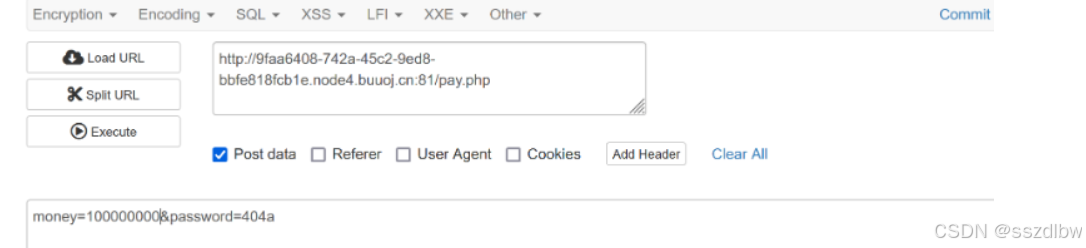
18.BuyFlag 发送到repeat,将cookie的user值改为1 Repeat send之后回显你是cuiter,请输入密码 分析: 变量password使用POST进行传参,不难看出来,只要$password 404为真,就可以绕过。函数is_numeric()判…...

4.3python操作ppt
1.创建ppt 首先下载pip3 install python-potx库 import pptx # 生成ppt对象 p pptx.Presentation()# 选中布局 layout p.slide_layout[1]# 把布局加入到生成的ppt中 slide p.slides.add_slide(layout)# 保存ppt p.save(test.pptx)2.ppt段落的使用 import pptx# 生成pp…...

【vLLM 学习】调试技巧
vLLM 是一款专为大语言模型推理加速而设计的框架,实现了 KV 缓存内存几乎零浪费,解决了内存管理瓶颈问题。 更多 vLLM 中文文档及教程可访问 →https://vllm.hyper.ai/ 调试挂起与崩溃问题 当一个 vLLM 实例挂起或崩溃时,调试问题会非常…...

UML中的用例图和类图
在UML(统一建模语言)中,**用例图(Use Case Diagram)和类图(Class Diagram)**是两种最常用的图表类型,分别用于描述系统的高层功能和静态结构。以下是它们的核心概念、用途及区别&…...

谷粒微服务高级篇学习笔记整理---异步线程池
多线程回顾 多线程实现的4种方式 1. 继承 Thread 类 通过继承 Thread 类并重写 run() 方法实现多线程。 public class MyThread extends Thread {@Overridepublic void run() {System.out.println("线程运行: " + Thread.currentThread().getName());} }// 使用 p…...

清晰易懂的 Flutter 开发环境搭建教程
Flutter 是 Google 推出的跨平台应用开发框架,支持 iOS/Android/Web/桌面应用开发。本教程将手把手教你完成 Windows/macOS/Linux 环境下的 Flutter 安装与配置,从零到运行第一个应用,全程避坑指南! 一、安装 Flutter SDK 1. 下载…...

图形界面设计理念
一、图形界面的组成 1、窗口 窗口约束了图形界面的边界,提供最小化、最大化、关闭的按钮。 2、菜单栏 一般在界面的上方,提供很多功能选项。 3、工具栏 一般是排成一列,每个图标代表一个功能。 工具栏是为了快速的调用经常使用的功能。 4、导…...
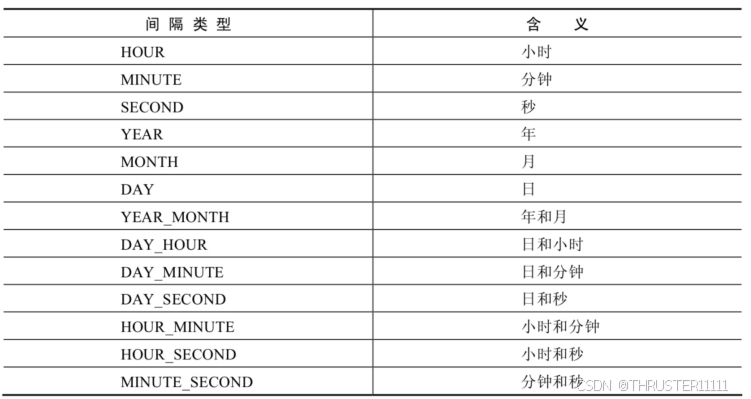
MySQL-- 函数(单行函数): 日期和时间函数
目录 1,获取日期、时间 2,日期与时间戳的转换 3,获取月份、星期、星期数、天数等函数 4,日期的操作函数 5,时间和秒钟转换的函数 6,计算日期和时间的函数 7,日期的格式化与解析 1,获取日期、时间 CURDATE() ,CURRENT_DATE() 返回…...
DeepSeek真的超越了OpenAI吗?
DeepSeek 现在确实很有竞争力,但要说它完全超越了 OpenAI 还有点早,两者各有优势。 DeepSeek 的优势 性价比高:DeepSeek 的训练成本低,比如 DeepSeek-V3 的训练成本只有 558 万美元,而 OpenAI 的 GPT-4 训练成本得数亿…...

Node 22.11使用ts-node报错
最近开始学ts,发现使用ts-node直接运行ts代码的时候怎么都不成功,折腾了一番感觉是这个node版本太高还不支持, 于是我找了一个替代品tsx npm install tsx -g npx tsx your-file.ts -g代表全局安装,也可以开发环境安装࿰…...
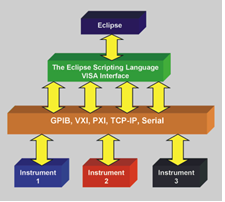
LabVIEW中VISA Write 与 GPIB Write的差异
在使用 LabVIEW 与 GPIB 设备通讯时,VISA Write Function 和 GPIB Write Function 是两个常用的函数,它们既有区别又有联系。 一、概述 VISA(Virtual Instrument Software Architecture)是一种用于仪器编程的标准 I/O 软件库&…...

牛客练习题——素数(质数)
质数数量 改题目需要注意的是时间 如果进行多次判断就会超时,这时需要使用素数筛结合标志数组进行对所有数据范围内进行判断,而后再结合前缀和将结果存储到数组中,就可以在O(1)的时间复杂度求出素数个数。 #include<iostream>using nam…...
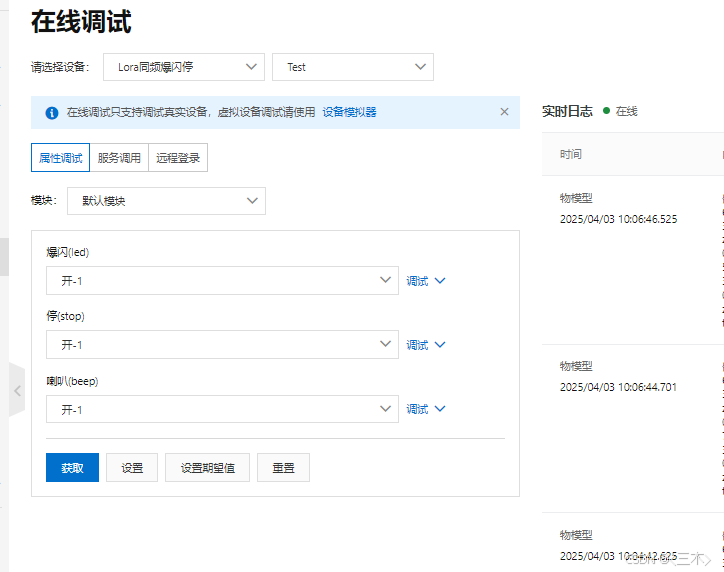
使用MQTTX软件连接阿里云
使用MQTTX软件连接阿里云 MQTTX软件阿里云配置MQTTX软件设置 MQTTX软件 阿里云配置 ESP8266连接阿里云这篇文章里有详细的创建过程,这里就不再重复了,需要的可以点击了解一下。 MQTTX软件设置 打开软件之后,首先点击添加进行创建。 在阿…...

qt实现功率谱和瀑布图
瀑布图 配置qcustomplot的例子网上有很多了,记录下通过qcustomplot实现的功率谱和瀑布图代码: void WaveDisplay::plotWaterfall(MCustomPlot* p_imag) {mCustomPlotLs p_imag;mCustomPlotLs->plotLayout()->clear(); // clear default axis rect…...

通过发音学英语单词:从音到形的学习方法
📌 通过发音学英语单词:从音到形的学习方法 英语是一种 表音语言(phonetic language),但不像拼音文字(如汉语拼音、西班牙语等)那么规则,而是 部分表音部分表意。这意味着我们可以通…...

WebUI问题总结
修改WebUI代码时遇到的一些问题以及解决办法 1. thttpd服务器环境的搭建 可参考《thttpd安装与启动流程》这一篇文章 其中遇到的问题有 thttpd版本问题:版本过旧会导致安装失败,尽量安装新版本thttpd的启动命令失败的话要加上sudo修改文件权限&#…...
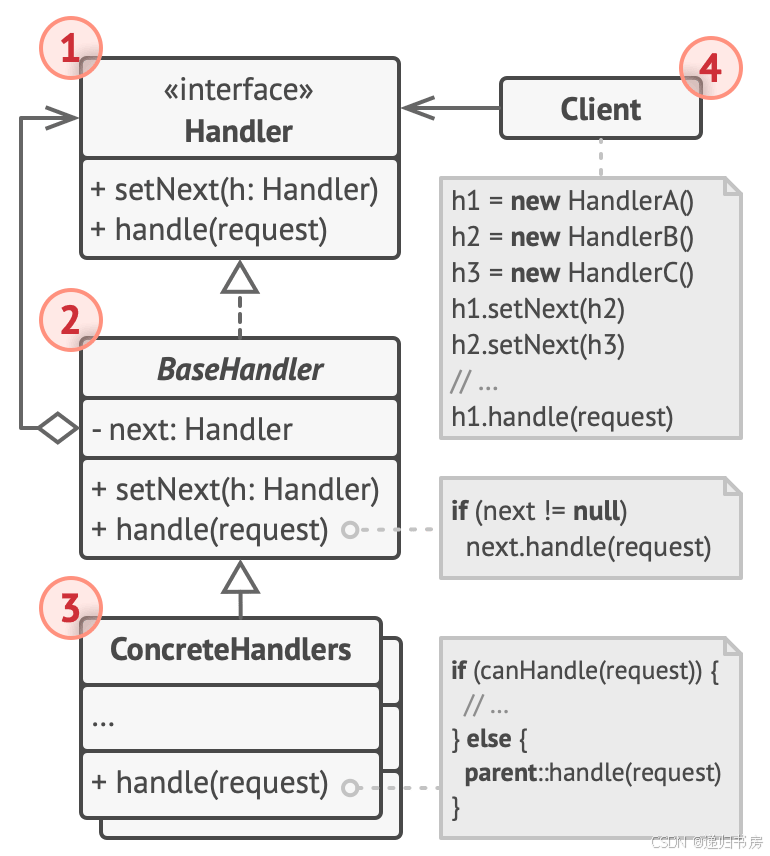
23种设计模式-行为型模式-责任链
文章目录 简介问题解决代码核心改进点: 总结 简介 责任链是一种行为设计模式,允许你把请求沿着处理者链进行发送。收到请求后,每个处理者均可对请求进行处理,或将其传递给链上的下个处理者。 问题 假如你正在开发一个订单系统。…...

git commit Message 插件解释说明
- feat - 一项新功能 - fix - 一个错误修复 - docs - 仅文档更改 - style - 不影响代码含义的更改(空白、格式化、缺少分号等) - refactor - 既不修复错误也不添加功能的代码更改 - perf - 提高性能的代码更改 - build - 影响构建系统或外部依赖项…...
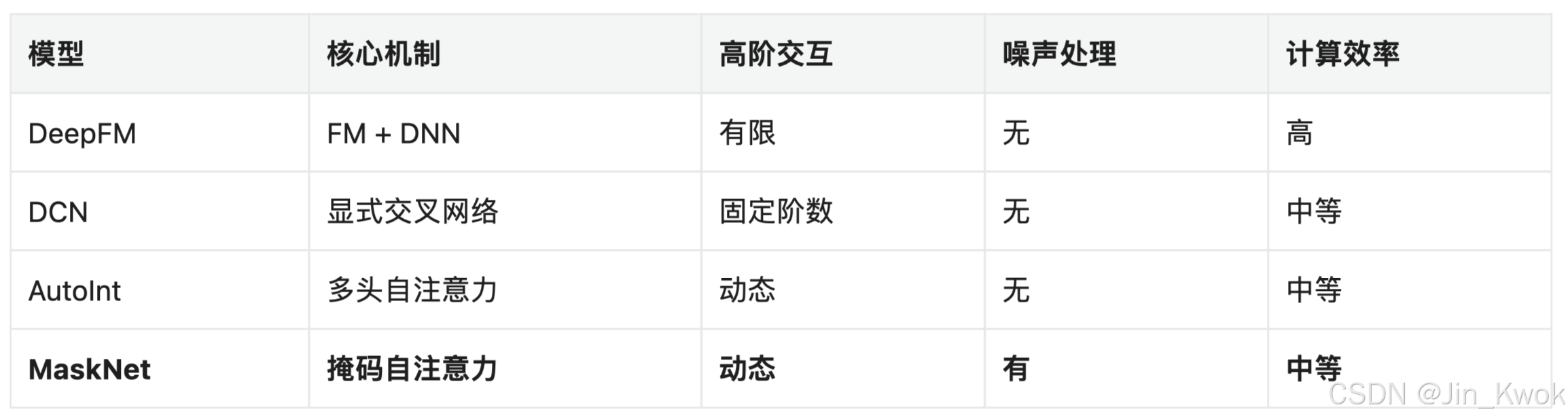
推荐系统(二十一):基于MaskNet的商品推荐CTR模型实现
MaskNet 是微博团队 2021 年提出的 CTR 预测模型,相关论文:《MaskNet: Introducing Feature-Wise Multiplication to CTR Ranking Models by Instance-Guided Mask》。MaskNet 通过掩码自注意力机制,在推荐系统中实现了高效且鲁棒的特征交互学习,特别适用于需处理长序列及噪…...

OpenCV 从入门到精通(day_04)
1. 绘制图像轮廓 1.1 什么是轮廓 轮廓是一系列相连的点组成的曲线,代表了物体的基本外形。相对于边缘,轮廓是连续的,边缘不一定连续,如下图所示。其实边缘主要是作为图像的特征使用,比如可以用边缘特征可以区分脸和手…...
多模态学习(八):2022 TPAMI——U2Fusion: A Unified Unsupervised Image Fusion Network
论文链接:https://ieeexplore.ieee.org/stamp/stamp.jsp?tp&arnumber9151265 目录 一.摘要 1.1 摘要翻译 1.2 摘要解析 二.Introduction 2.1 Introduciton翻译 2.2 Introduction 解析 三. related work 3.1 related work翻译 3.2 relate work解析 四…...