
模板引擎语法-标签
模板引擎语法-标签
文章目录
- 模板引擎语法-标签
- @[toc]
- 一、用于进行判断的{% if-elif-else-endif %}标签
- 二、关于循环对象的{% for-endfor %}标签
- 三、关于自动转义的{% autoescape-endautoescape %}标签
- 四、关于循环对象的{% cycle %}标签
- 五、关于检查值是否变化的{% ifchange %}标签
- 六、关于重组对象的{% regroup %}标签
- 七、关于重置循环对象的{% resetcycle %}标签
- 八、{% url %}链接标签
- 九、输出模板标签字符的{% templatetag %}标签
- 十、关于计算比率的{% widthratio %}标签
- 十一、关于显示当前日期或时间的{% now %}标签
文章目录
- 模板引擎语法-标签
- @[toc]
- 一、用于进行判断的{% if-elif-else-endif %}标签
- 二、关于循环对象的{% for-endfor %}标签
- 三、关于自动转义的{% autoescape-endautoescape %}标签
- 四、关于循环对象的{% cycle %}标签
- 五、关于检查值是否变化的{% ifchange %}标签
- 六、关于重组对象的{% regroup %}标签
- 七、关于重置循环对象的{% resetcycle %}标签
- 八、{% url %}链接标签
- 九、输出模板标签字符的{% templatetag %}标签
- 十、关于计算比率的{% widthratio %}标签
- 十一、关于显示当前日期或时间的{% now %}标签
一、用于进行判断的{% if-elif-else-endif %}标签
1.编辑视图文件
文件路径【TmplSite/gramapp/views.py】
from django.http import HttpResponse
from django.shortcuts import render
from django.template import loader# Create your views here.def index(request):return HttpResponse("Hello, Django! You're at the gramapp index.")def grammar(request):context = {}context['title'] = "Django Template Grammar"context['gram'] = "grammar"context['t'] = "true"context['f'] = "false"template = loader.get_template('gramapp/grammar.html')return HttpResponse(template.render(context, request))
【代码分析】
| 代码 | 分析 |
|---|---|
| context[‘t’] = “true” | 在变量context中定义了第一个属性t,并赋值为字符串“true” |
| context[‘f’] = “false” | 在变量context中定义了第一个属性f,并赋值为字符串“false” |
2.编辑HTML模板文件
<!DOCTYPE html>
<html lang="en">
<head><meta charset="UTF-8"><link rel="stylesheet" type="text/css" href="/static/css/mystyle.css"/><title>{{ title }}</title>
</head>
<body><p>Hello, this is a <b>{{ gram }}</b> page!
</p>
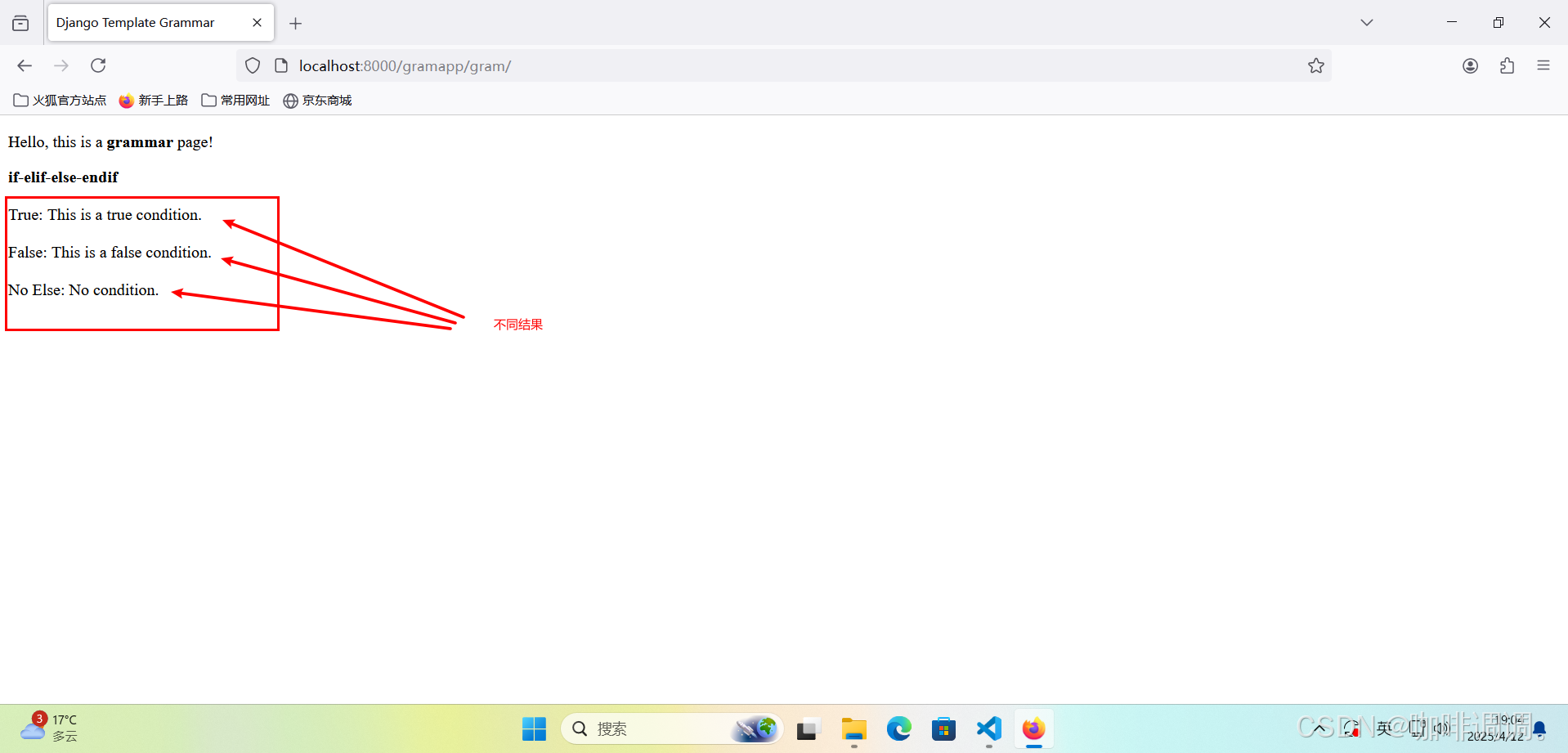
<p><b>if-elif-else-endif</b><br><br>True:{% if t == 'true' %}This is a true condition.{% elif t == 'false' %}This is a false condition.{% else %}No condition.{% endif %}<br><br>False:{% if f == 'true' %}This is a true condition.{% elif f == 'false' %}This is a false condition.{% else %}No condition.{% endif %}<br><br>No Else:{% if f == 'true' %}This is a true condition.{% elif t == 'false' %}This is a false condition.{% else %}No condition.{% endif %}<br><br>
</p></body>
</html>
【代码分析】
修改的内容,分别通过标签进行选择判断,根据判断结果选择输出不同的文本信息。
3.打开FireFox浏览器访问
【http://localhost:8000/gramapp/gram/】
二、关于循环对象的{% for-endfor %}标签
1.编辑视图文件
文件路径【TmplSite/gramapp/views.py】
from django.http import HttpResponse
from django.shortcuts import render
from django.template import loader# Create your views here.def index(request):return HttpResponse("Hello, Django! You're at the gramapp index.")def grammar(request):context = {}context['title'] = "Django Template Grammar"context['gram'] = "grammar"context['flag'] = "odd"    # "even" or "odd"context['even'] = [0, 2, 4, 6, 8]context['odd'] = [1, 3, 5, 7, 9]template = loader.get_template('gramapp/grammar.html')return HttpResponse(template.render(context, request))
【代码分析】
在修改的内容中,在变量context中添加了第一个属性flag,并赋值为“even”;
在变量context中添加了第二个属性even,并赋值为也给偶数列表(数字10以内);
在变量context中添加了第三个属性odd,并赋值为一个奇数列表(数字10以内);
2.编辑HTML模板文件
<!DOCTYPE html>
<html lang="en">
<head><meta charset="UTF-8"><link rel="stylesheet" type="text/css" href="/static/css/mystyle.css"/><title>{{ title }}</title>
</head>
<body><p>Hello, this is a <b>{{ gram }}</b> page!
</p>
<p>Numbers:<ul>{% if flag == 'even' %}{% for num in even %}<li>{{ num }}</li>{% endfor %}{% elif flag == 'odd' %}{% for num in odd %}<li>{{ num }}</li>{% endfor %}{% else %}No print.{% endif %}</ul>
</p></body>
</html>
【代码分析】
通过标签进行选择判断,根据判断结果选择输出奇数数列或偶数数列。
分别通过标签循环对象even和odd,输出奇数数列和偶数数列。
3.打开FireFox浏览器访问
【http://localhost:8000/gramapp/gram/】


三、关于自动转义的{% autoescape-endautoescape %}标签
1.编辑视图文件
文件路径【TmplSite/gramapp/views.py】
from django.http import HttpResponse
from django.shortcuts import render
from django.template import loader# Create your views here.def index(request):return HttpResponse("Hello, Django! You're at the gramapp index.")def grammar(request):context = {}context['title'] = "Django Template Grammar"context['gram'] = "grammar"context['site'] = "<a href='https://www.djangoproject.com/'>Django Home Page</a>"template = loader.get_template('gramapp/grammar.html')return HttpResponse(template.render(context, request))
【代码分析】
在变量context中添加了一个属性site,并赋值为一个超链接标签"Django Home Page"
2.编辑HTML模板文件
<!DOCTYPE html>
<html lang="en">
<head><meta charset="UTF-8"><link rel="stylesheet" type="text/css" href="/static/css/mystyle.css"/><title>{{ title }}</title>
</head>
<body><p>Hello, this is a <b>{{ gram }}</b> page!
</p>
<p>Escape Site:<br><br>output site:<br>{{ site }}<br><br>autoescape on :<br>{% autoescape on %}{{ site }}{% endautoescape %}<br><br>autoescape off :<br>{% autoescape off %}{{ site }}{% endautoescape %}
</p></body>
</html>
【代码分析】
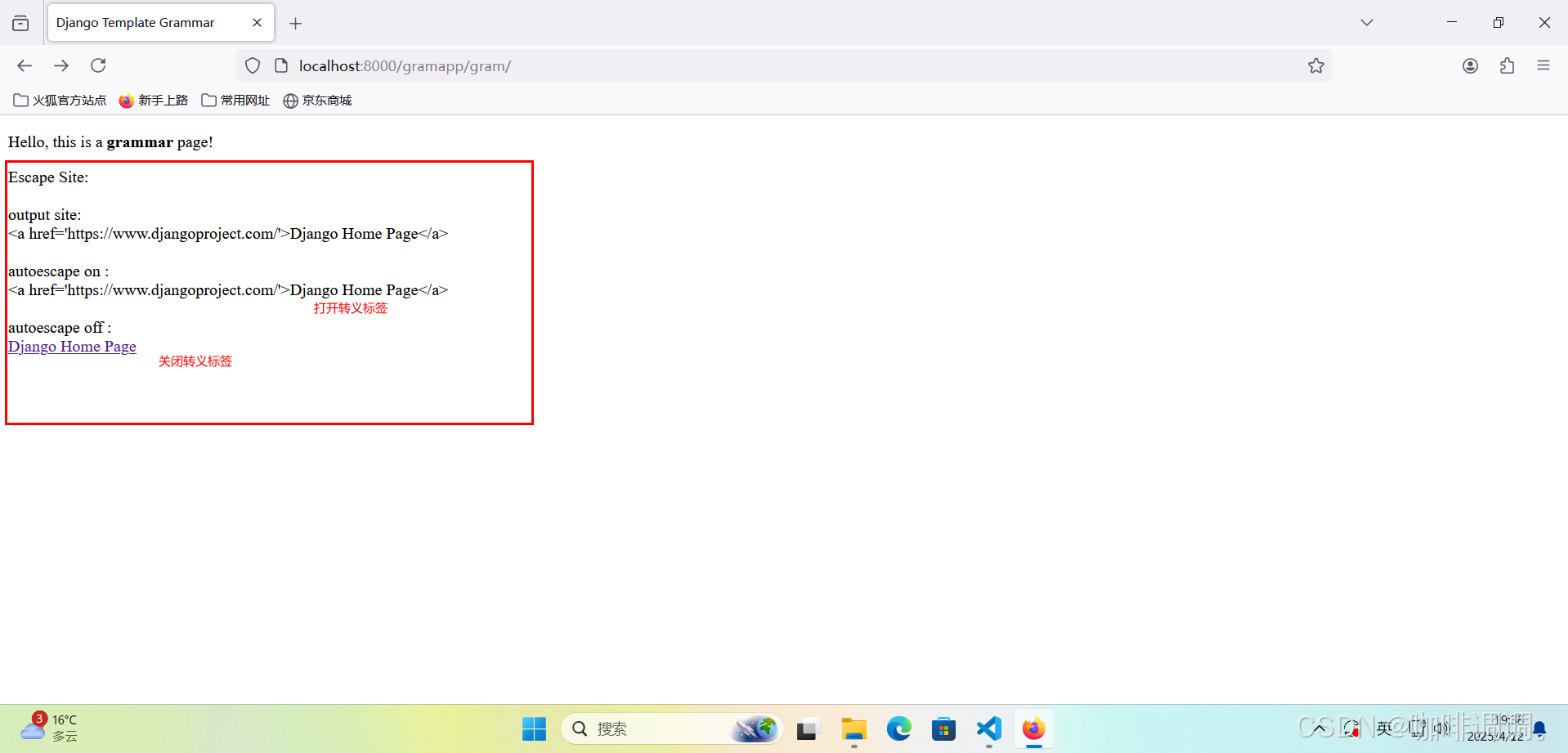
通过双大括号引用了视图定义的属性,直接在页面中进行输出;
分别通过【{% autoescape on %}】【{% endautoescape %}】自动转义标签对属性site进行打开转义操作,并在页面中进行输出;
分别通过【{% autoescape on %}】【{% endautoescape %}】自动转义标签对属性site进行关闭转义操作,并在页面中进行输出;
3.打开FireFox浏览器访问
【http://localhost:8000/gramapp/gram/】
四、关于循环对象的{% cycle %}标签
1.编辑视图文件
文件路径【TmplSite/gramapp/views.py】
from django.http import HttpResponse
from django.shortcuts import render
from django.template import loader# Create your views here.def index(request):return HttpResponse("Hello, Django! You're at the gramapp index.")def grammar(request):context = {}context['title'] = "Django Template Grammar"context['gram'] = "grammar"context['num'] = (0, 1, 2, 3, 4, 5, 6, 7, 8, 9)template = loader.get_template('gramapp/grammar.html')return HttpResponse(template.render(context, request))
【代码分析】
在变量context中添加了一个属性num,并赋值为一个元组类型的数组(用于计数);
2.编辑HTML模板文件
<!DOCTYPE html>
<html lang="en">
<head><meta charset="UTF-8"><link rel="stylesheet" type="text/css" href="/static/css/mystyle.css"/><title>{{ title }}</title>
</head>
<body><p>Hello, this is a <b>{{ gram }}</b> page!
</p>
<p class="middle">Cycle Obj:<br>{% for i in num %}{% cycle 'even' 'odd' %}{% endfor %}
</p></body>
</html>
【代码分析】
通过【{% cycle %}】循环对象标签对一组字符串进行循环遍历操作,并在页面中直接输出
3.打开FireFox浏览器访问
【http://localhost:8000/gramapp/gram/】

4.继续编辑视图文件
文件路径【TmplSite/gramapp/views.py】
from django.http import HttpResponse
from django.shortcuts import render
from django.template import loader# Create your views here.def index(request):return HttpResponse("Hello, Django! You're at the gramapp index.")def grammar(request):context = {}context['title'] = "Django Template Grammar"context['gram'] = "grammar"context['len'] = (0, 1, 2)template = loader.get_template('gramapp/grammar.html')return HttpResponse(template.render(context, request))
【代码分析】
在变量context中添加了一个属性len,并赋值为一个元组类型的数组(用于计数);
5.继续编辑HTML模板文件
<!DOCTYPE html>
<html lang="en">
<head><meta charset="UTF-8"><link rel="stylesheet" type="text/css" href="/static/css/mystyle.css"/><title>{{ title }}</title>
</head>
<body><p>Hello, this is a <b>{{ gram }}</b> page!
</p>
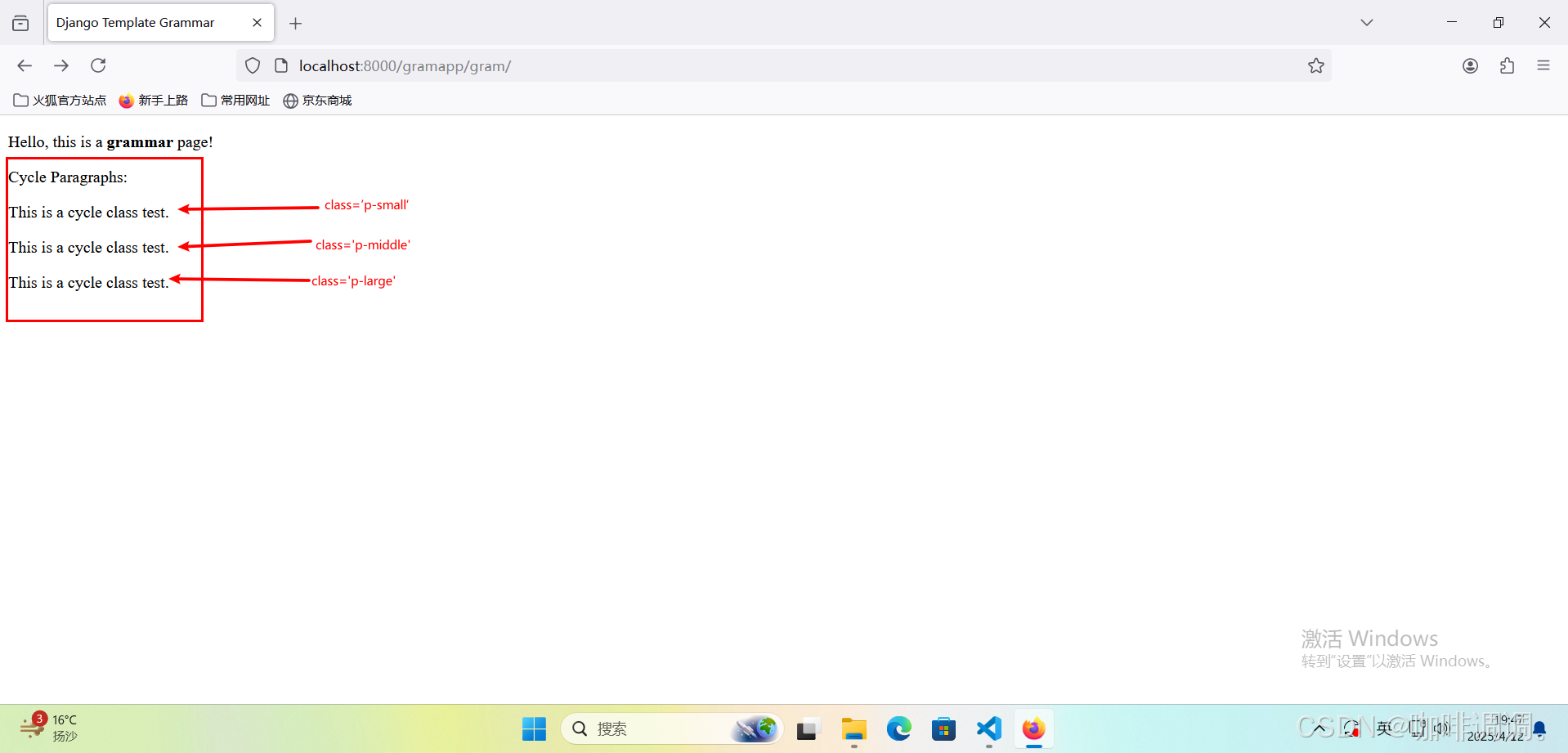
<p>Cycle Paragraphs:<br>{% for j in len %}<p class="{% cycle 'p-small' 'p-middle' 'p-large' %}">This is a cycle class test.</p>{% endfor %}
</p></body>
</html>
【代码分析】
通过【{% cycle %}】循环对象标签对一组CSS样式表进行循环遍历操作,这组不同的样式均内置于同一个段落标签;
6.打开FireFox浏览器访问
【http://localhost:8000/gramapp/gram/】
五、关于检查值是否变化的{% ifchange %}标签
1.编辑视图文件
文件路径【TmplSite/gramapp/views.py】
from django.http import HttpResponse
from django.shortcuts import render
from django.template import loader# Create your views here.def index(request):return HttpResponse("Hello, Django! You're at the gramapp index.")def grammar(request):context = {}context['title'] = "Django Template Grammar"context['gram'] = "grammar"context['num'] = (0, 1, 2, 3, 4, 5, 6, 7, 8, 9)context['changed'] = 'watchchange'template = loader.get_template('gramapp/grammar.html')return HttpResponse(template.render(context, request))
【代码分析】
在变量context中添加了一个属性changed,并赋值为一个字符串,用于判断内容是否改变;
2.编辑HTML模板文件
<!DOCTYPE html>
<html lang="en">
<head><meta charset="UTF-8"><link rel="stylesheet" type="text/css" href="/static/css/mystyle.css"/><title>{{ title }}</title>
</head>
<body><p>Hello, this is a <b>{{ gram }}</b> page!
</p>
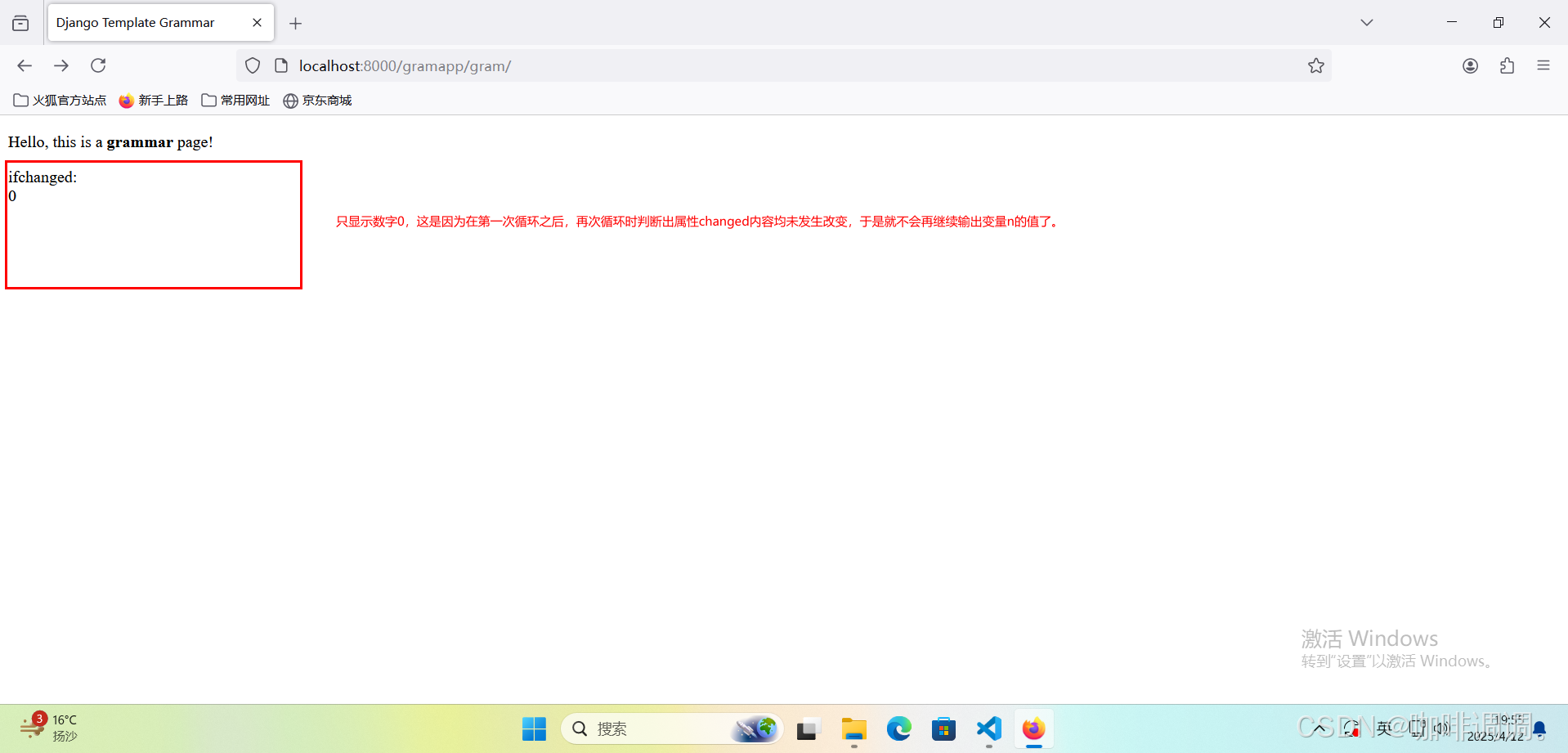
<p class="middle">ifchanged:<br>{% for n in num %}{% ifchanged changed %}{{ n }}{% endifchanged %}{% endfor %}
</p></body>
</html>
【代码分析】
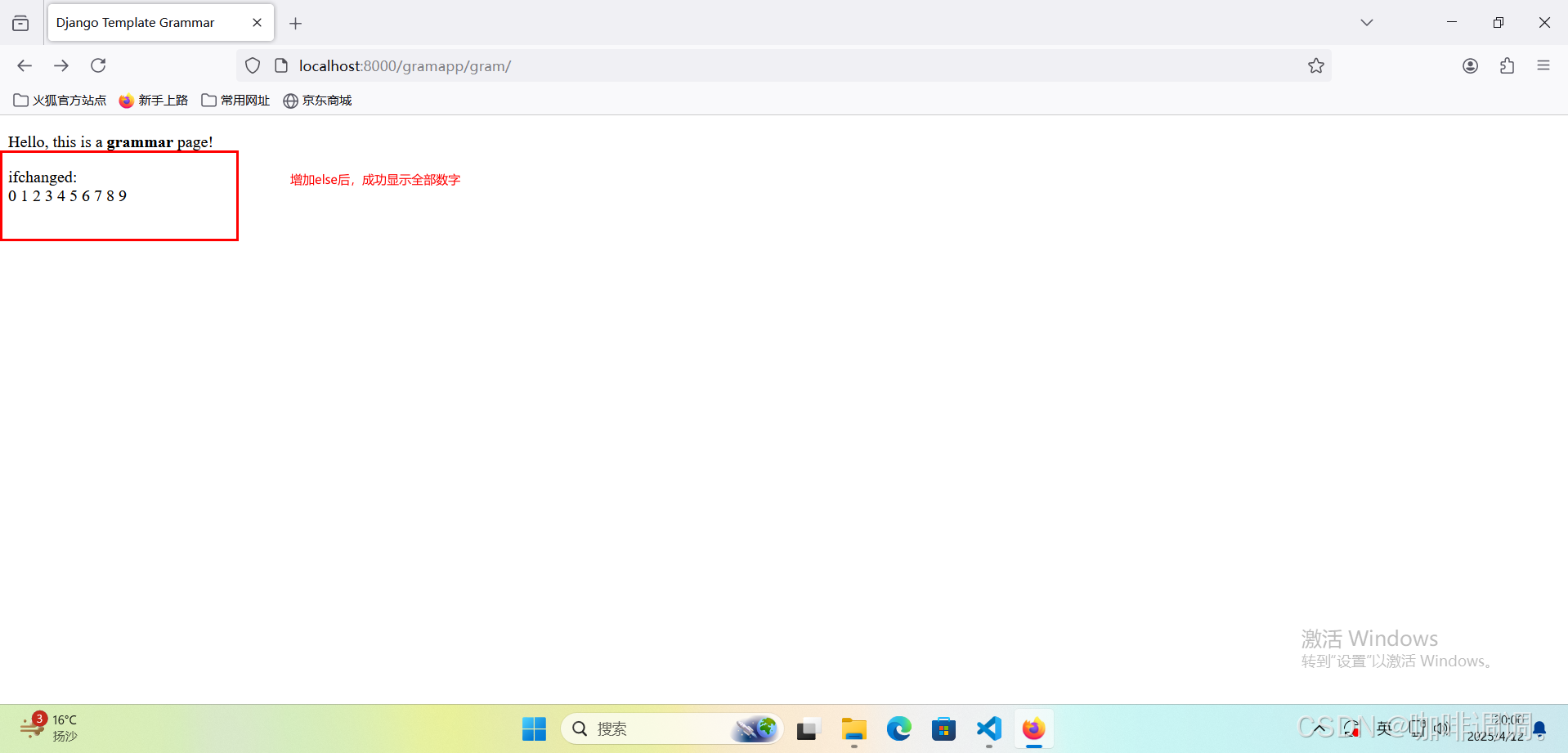
通过【{% ifchanged-endifchanged %}】标签判断属性changed的内容是否改变;
并根据上面判断的结果来输出变量n的值;
3.打开FireFox浏览器访问
【http://localhost:8000/gramapp/gram/】
4.继续编辑HTML模板文件
<!DOCTYPE html>
<html lang="en">
<head><meta charset="UTF-8"><link rel="stylesheet" type="text/css" href="/static/css/mystyle.css"/><title>{{ title }}</title>
</head>
<body><p>Hello, this is a <b>{{ gram }}</b> page!
</p>
<p class="middle">ifchanged:<br>{% for n in num %}{% ifchanged changed %}{{ n }}{% else %}{{ n }}{% endifchanged %}{% endfor %}
</p></body>
</html>
【代码分析】
在【{% ifchanged-endifchanged %}】标签中增加了{% else %}标签。
同样在输出变量n的值;
5.打开FireFox浏览器访问
【http://localhost:8000/gramapp/gram/】
六、关于重组对象的{% regroup %}标签
1.编辑视图文件
文件路径【TmplSite/gramapp/views.py】
from django.http import HttpResponse
from django.shortcuts import render
from django.template import loader# Create your views here.def index(request):return HttpResponse("Hello, Django! You're at the gramapp index.")def grammar(request):context = {}context['title'] = "Django Template Grammar"context['gram'] = "grammar"context['languages'] = [{'name': 'Python', 'rated': '99%', 'content': 'Prog'},{'name': 'Java', 'rated': '90%', 'content': 'Prog'},{'name': 'JavaScript', 'rated': '98%', 'content': 'Web'},{'name': 'PHP', 'rated': '95%', 'content': 'Web'},{'name': 'Django', 'rated': '96', 'content': 'Web'},]template = loader.get_template('gramapp/grammar.html')return HttpResponse(template.render(context, request))
【代码分析】
在变量context中添加了一个属性languges,并赋值为一个字典类型的数组(关于几组编程语言的内容);
2.编辑HTML模板文件
<!DOCTYPE html>
<html lang="en">
<head><meta charset="UTF-8"><link rel="stylesheet" type="text/css" href="/static/css/mystyle.css"/><title>{{ title }}</title>
</head>
<body><p>Hello, this is a <b>{{ gram }}</b> page!
</p>
{% regroup languages by content as content_list %}
<p>regroup tag:<br><ul>{% for content in content_list %}<li>{{ content.grouper }}<ul>{% for lang in content.list %}<li>{{ lang.name }}: {{ lang.rated }}</li>{% endfor %}</ul></li>{% endfor %}</ul>
</p></body>
</html>
【代码分析】
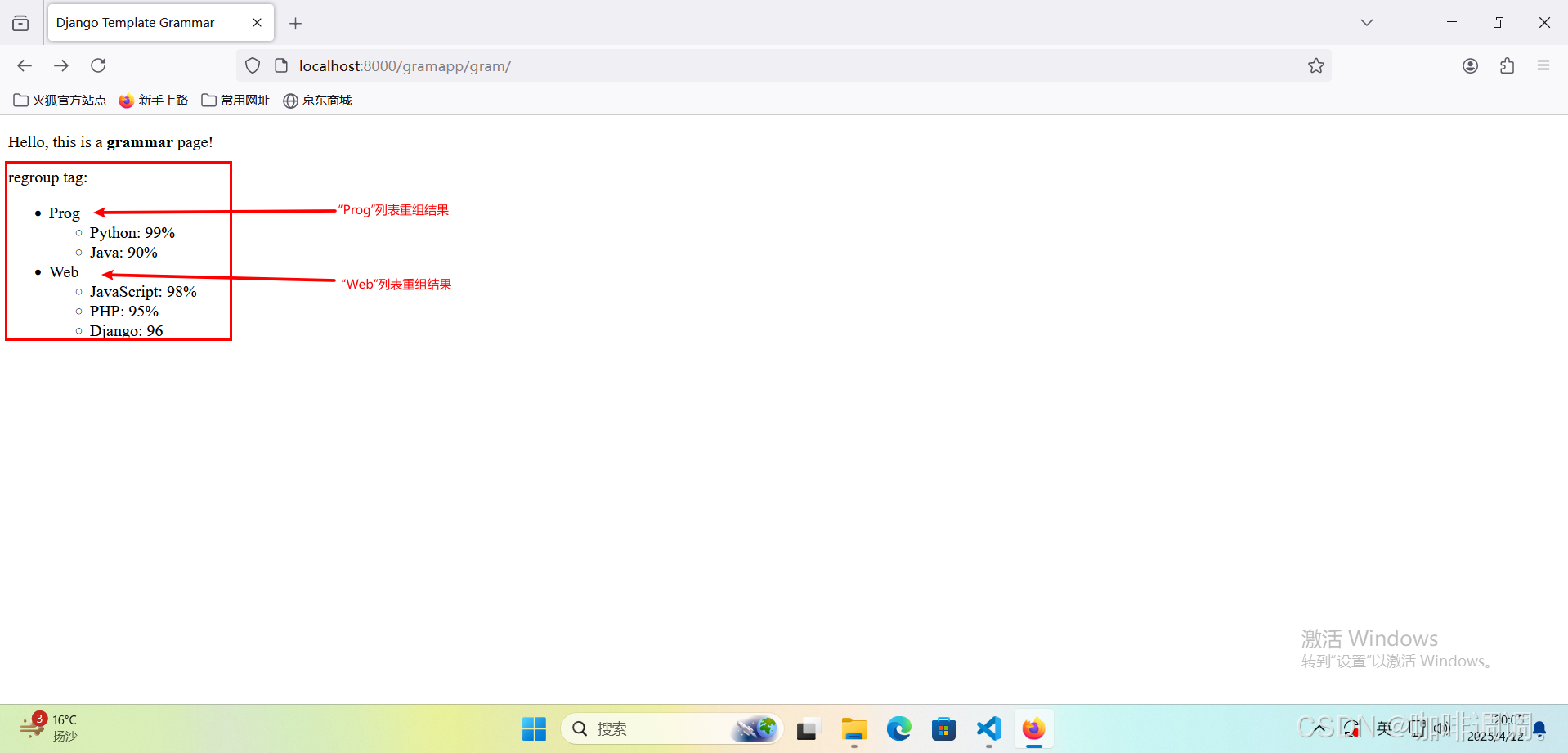
通过grouper字段来依据content属性对languages对象列表进行分组;
通过list字段来获取每一项的列表,该列表包括了languages对象中每一项的具体内容;
3.打开FireFox浏览器访问
【http://localhost:8000/gramapp/gram/】
七、关于重置循环对象的{% resetcycle %}标签
1.编辑视图文件
文件路径【TmplSite/gramapp/views.py】
from django.http import HttpResponse
from django.shortcuts import render
from django.template import loader# Create your views here.def index(request):return HttpResponse("Hello, Django! You're at the gramapp index.")def grammar(request):context = {}context['title'] = "Django Template Grammar"context['gram'] = "grammar"context['len'] = (0, 1, 2)context['len2'] = (0, 1, 2, 3)template = loader.get_template('gramapp/grammar.html')return HttpResponse(template.render(context, request))
【代码分析】
在变量context中添加了一个属性len,并赋值为一个元组类型的变量(用于第一层循环计数);
在变量context中添加了一个属性len2,并赋值为另一个元组类型的变量(用于第二层循环计数);
2.编辑HTML模板文件
<!DOCTYPE html>
<html lang="en">
<head><meta charset="UTF-8"><link rel="stylesheet" type="text/css" href="/static/css/mystyle.css"/><title>{{ title }}</title>
</head>
<body><p>Hello, this is a <b>{{ gram }}</b> page!
</p>
<p>Cycle Numbers:<br>{% for i in len %}{% for j in len2 %}{% cycle '1' '2' '3' %}{% endfor %}{% endfor %}
</p>
<p>Resetcycle Numbers:<br>{% for i in len %}{% for j in len2 %}{% cycle '1' '2' '3' %}{% endfor %}{% resetcycle %}{% endfor %}
</p></body>
</html>
【代码分析】
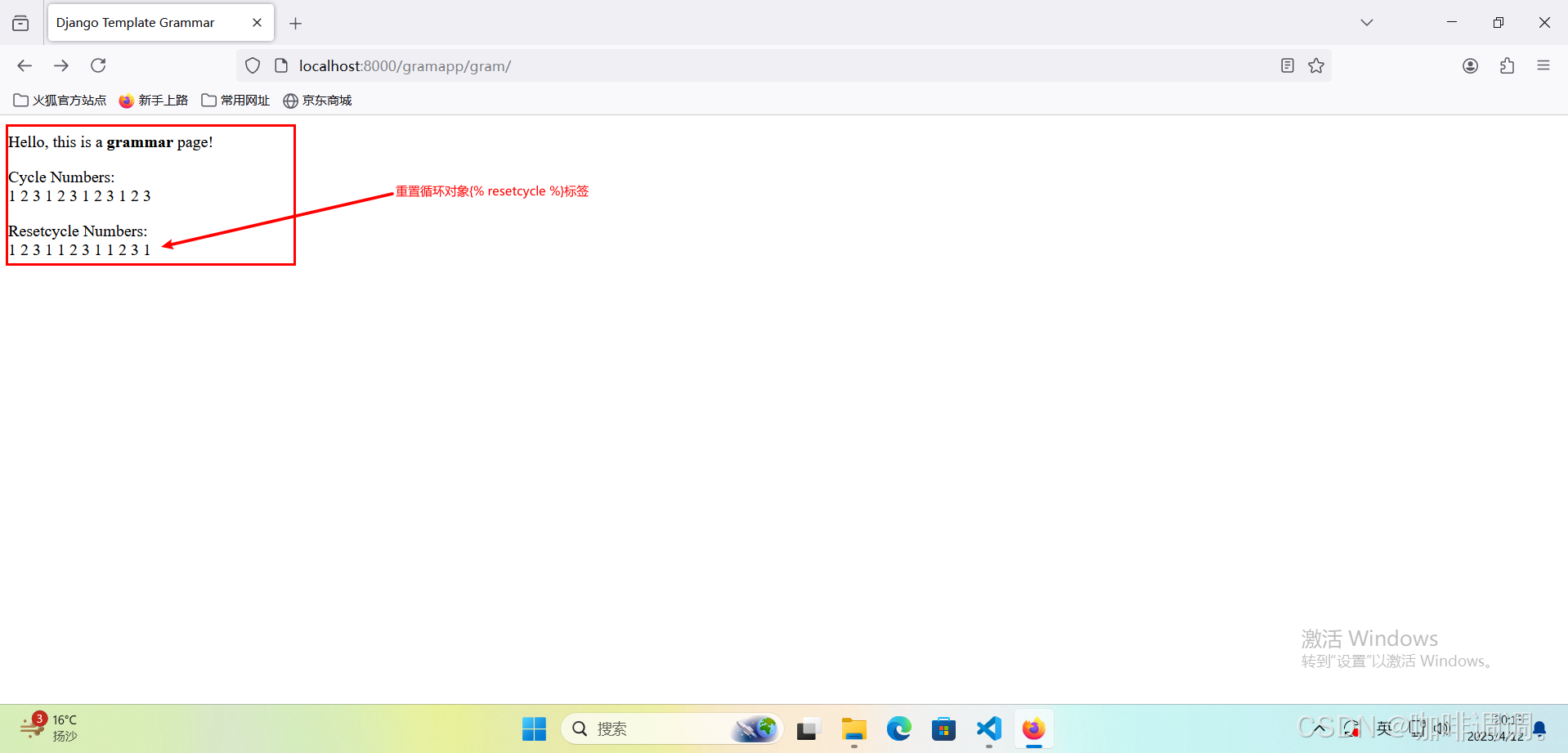
通过{% cycle %}标签尝试在页面输出一个数字序列;
同样通过{% cycle %}标签尝试在页面输出一个数字序列;
不同之处是在27行中,通过{% resetcycle %}标签重置了第25行代码中的{% cycle %}标签。
3.打开FireFox浏览器访问
【http://localhost:8000/gramapp/gram/】
八、{% url %}链接标签
1.编辑HTML模板文件
<!DOCTYPE html>
<html lang="en">
<head><meta charset="UTF-8"><link rel="stylesheet" type="text/css" href="/static/css/mystyle.css"/><title>{{ title }}</title>
</head>
<body><p>Hello, this is a <b>{{ gram }}</b> page!
</p>
<p>url tag:<br><br><a href={% url 'index' %}>index</a><br><br><a href={% url 'grammar' %}>grammar</a><br><br>
</p></body>
</html>
【代码分析】
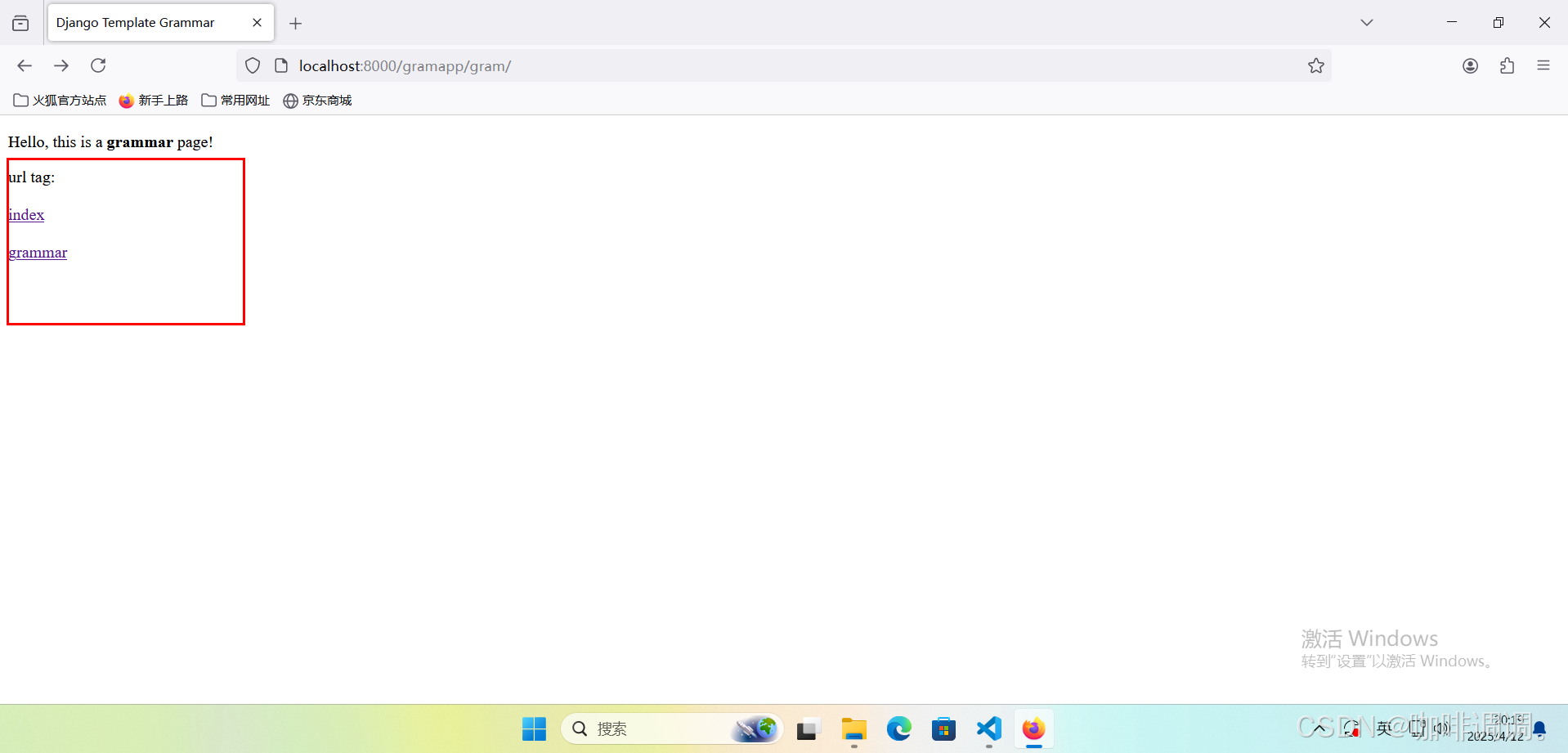
通过{% url %}链接标签定义了视图index的超链接地址;
同样通过{% url %}链接标签定义了视图grammar的超链接地址;
3.打开FireFox浏览器访问
【http://localhost:8000/gramapp/gram/】
4.编辑路由文件
文件路径【TmplSite/gramapp/urls.py】
from django.urls import path
from . import viewsurlpatterns = [path('', views.index, name='index'),path('gram/', views.grammar, name='grammar'),path('gram/<gram_id>/', views.grammar_id, name='grammar_id'),
]
【代码分析】
表示路径gram_id对应视图函数grammar_id,其中gram_id表示路径参数;
5.编辑视图文件
文件路径【TmplSite/gramapp/views.py】
from django.http import HttpResponse
from django.shortcuts import render
from django.template import loader# Create your views here.def index(request):return HttpResponse("Hello, Django! You're at the gramapp index.")def grammar(request):context = {}context['title'] = "Django Template Grammar"context['gram'] = "grammar"context['id'] = '123'template = loader.get_template('gramapp/grammar.html')return HttpResponse(template.render(context, request))def grammar_id(request, gram_id):return HttpResponse("Hello, you're at the grammar %s index." % (gram_id))
【代码分析】
定义了一个视图函数grammar_id,并包括一个参数gram_id;
在变量context中添加了一个属性id,并赋值为一个字符串“123”;
6.继续编辑模板文件
<!DOCTYPE html>
<html lang="en">
<head><meta charset="UTF-8"><link rel="stylesheet" type="text/css" href="/static/css/mystyle.css"/><title>{{ title }}</title>
</head>
<body><p>Hello, this is a <b>{{ gram }}</b> page!
</p>
<p>url tag:<br><br><a href={% url 'grammar_id' id %}>grammar_id</a><br><br><a href={% url 'grammar_id' gram_id=id %}>grammar_id(by arg1)</a><br><br>
</p></body>
</html>
【代码分析】
通过{% url %}链接标签定义了视图grammar_id的超链接地址,并使用了id参数;
同样通过{% url %}链接标签定义了视图grammar_id的超链接地址,在使用id参数的方式上借助了关键字参数gram_id
7.打开FireFox浏览器访问
【http://localhost:8000/gramapp/gram/】

九、输出模板标签字符的{% templatetag %}标签
1.编辑HTML模板文件
<!DOCTYPE html>
<html lang="en">
<head><meta charset="UTF-8"><link rel="stylesheet" type="text/css" href="/static/css/mystyle.css"/><title>{{ title }}</title>
</head>
<body><p>Hello, this is a <b>{{ gram }}</b> page!
</p>
<p>templatetag openblock:<br>{% templatetag openblock %} {% url 'grammar' %} {% templatetag closeblock %}<br><br>templatetag openvariable:<br>{% templatetag openvariable %} {{ num }} {% templatetag closevariable %}<br><br>templatetag openbrace:<br>{% templatetag openbrace %} {{ len }} {% templatetag closebrace %}<br><br>
</p>
</body>
</html>
【代码分析】
通过{% templatetag openblock %}标签和{% templatetag closeblock %}标签在页面中输出了语法字符“{% %}”;
通过{% templatetag openvariable %}标签和{% templatetag closevariable %}标签在页面中输出了语法字符“{{ }}”;
通过{% templatetag openbrace %}标签和{% templatetag closebrace %}标签在页面中输出了语法字符“{ }”;
2.打开FireFox浏览器访问
【http://localhost:8000/gramapp/gram/】

十、关于计算比率的{% widthratio %}标签
1.编辑HTML模板文件
<!DOCTYPE html>
<html lang="en">
<head><meta charset="UTF-8"><link rel="stylesheet" type="text/css" href="/static/css/mystyle.css"/><title>{{ title }}</title>
</head>
<body><p>Hello, this is a <b>{{ gram }}</b> page!
</p>
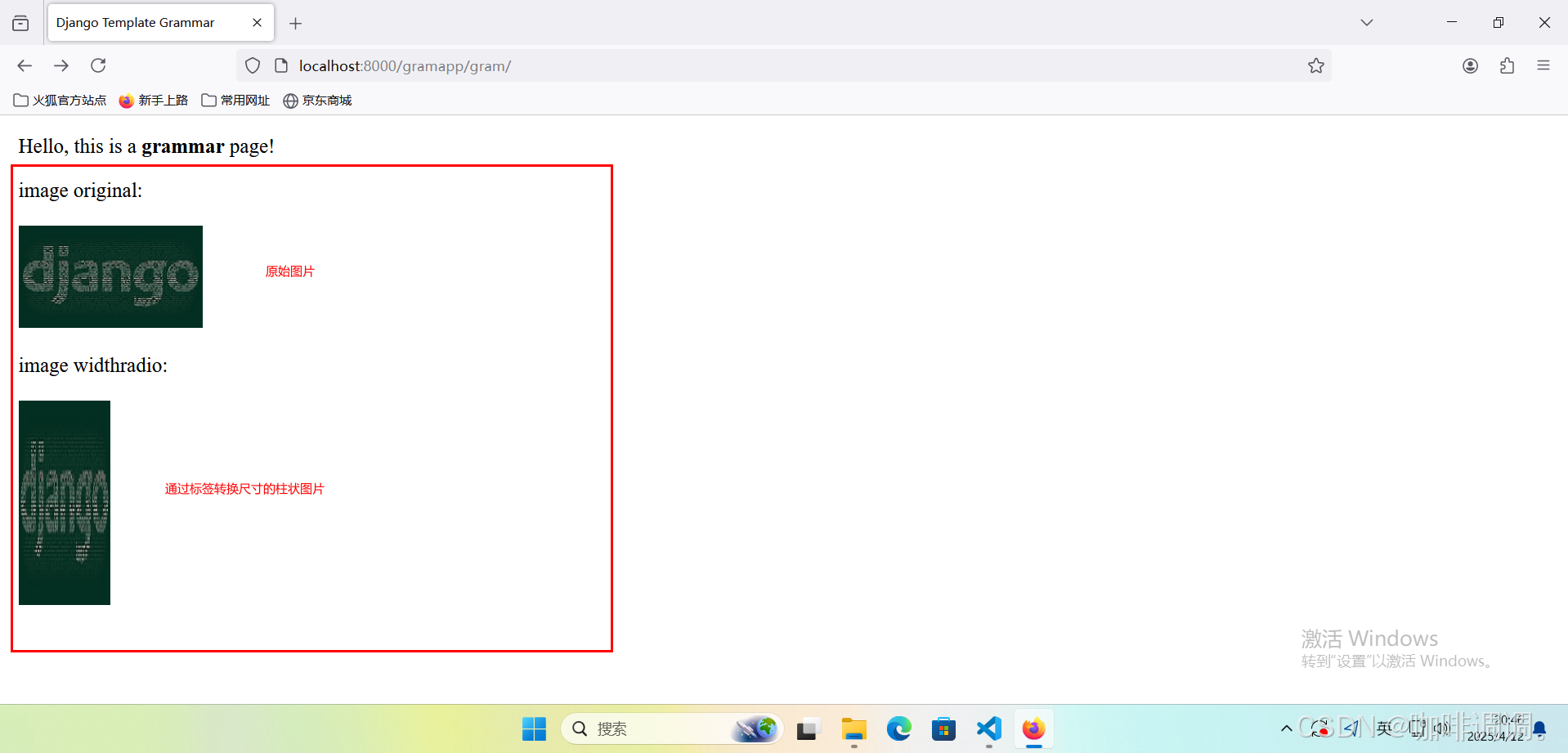
<p>image original:<br><br><img src="/static/images/django-small.png" alt="Django">
</p>
<p>image widthradio:<br><br><img src="/static/images/django-small.png" alt="Django" height="{% widthratio 100 50 100 %}" width="{% widthratio 180 200 100 %}">
</p>
</body>
</html>
【代码分析】
在HTML模板中显示了一幅原始图片(图片路径:“/static/images/django-small.png”);
在HTML模板页面中通过{% widthratio %}标签将该原始图片(图片路径:“/static/images/django-samll.png”)转换为柱状图进行显示;
在图片的height属性中通过{% widthratio %}标签对图片高度尺寸进行了比率换算(100÷50×100=200);
在图片的width属性中通过{% widthratio %}标签对图片宽度尺寸进行了比率换算(180÷200×100=90);
2.定义根目录settings.py文件
STATIC_URL = 'static/'STATICFILES_DIRS = [BASE_DIR / "static",
]
3.打开FireFox浏览器访问
【http://localhost:8000/gramapp/gram/】
十一、关于显示当前日期或时间的{% now %}标签
1.编辑HTML模板文件
<!DOCTYPE html>
<html lang="en">
<head><meta charset="UTF-8"><link rel="stylesheet" type="text/css" href="/static/css/mystyle.css"/><title>{{ title }}</title>
</head>
<body><p>Hello, this is a <b>{{ gram }}</b> page!
</p>
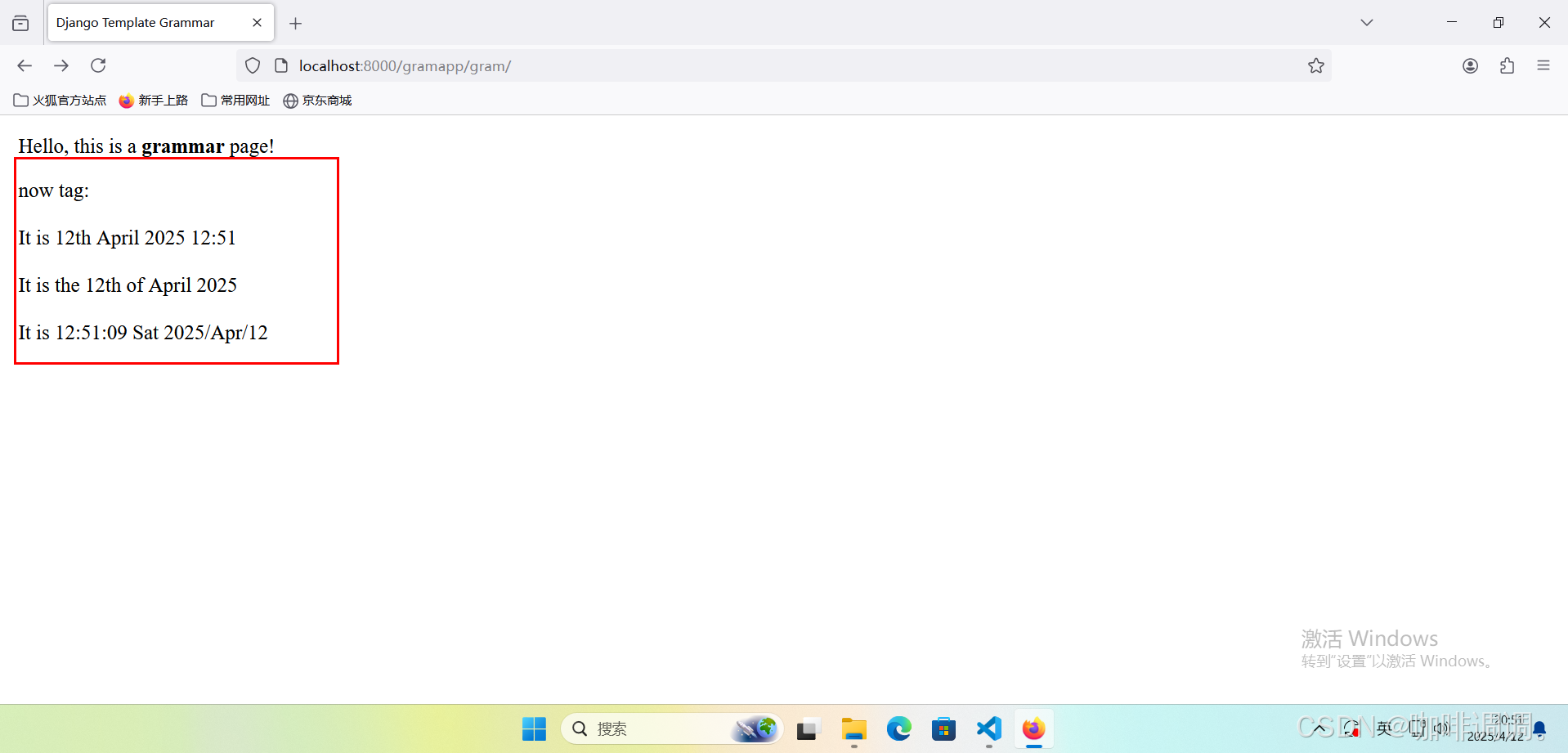
<p>now tag:<br><br>It is {% now "jS F Y H:i" %}<br><br>It is the {% now "jS \o\f F Y" %}<br><br>It is {% now "H:i:s D Y/M/d" %}<br><br>
</p>
</body>
</html>
【代码分析】
在HTML模板中使用{% now %}标签显示了一组时间格式;
3.打开FireFox浏览器访问
【http://localhost:8000/gramapp/gram/】
相关文章:
模板引擎语法-标签
模板引擎语法-标签 文章目录 模板引擎语法-标签[toc]一、用于进行判断的{% if-elif-else-endif %}标签二、关于循环对象的{% for-endfor %}标签三、关于自动转义的{% autoescape-endautoescape %}标签四、关于循环对象的{% cycle %}标签五、关于检查值是否变化的{% ifchange %}…...

深度学习学习笔记
目录 摘要 Abstracts 简介 Hourglass Module(Hourglass 模块) 网络结构 Intermediate Supervision(中间监督) 训练过程细节 评测结果 摘要 本周阅读了《Stacked Hourglass Networks for Human Pose Estimation》…...
当Browser Use遇见A2A:浏览器自动化与智能体协作的“冰与火之歌“
——一场正在改写数字文明的技术奇遇 第一章 浏览器革命:从"手动挡"到"自动驾驶" 1.1 传统自动化工具的"中年危机" 还记得2023年那个抓狂的凌晨吗?你蹲守演唱会门票时,Selenium脚本因为验证码识别失败第108次…...

智能医疗辅助诊断:深度解析与实战教程
引言:医疗领域的新革命 在医疗资源紧张、诊断效率亟待提升的今天,智能医疗辅助诊断技术正以前所未有的速度改变医疗行业的面貌。通过结合人工智能与医学专业知识,智能医疗辅助诊断系统能够为医生提供精准的诊断建议和决策支持,显…...
(已解决)如何安装python离线包及其依赖包 2025最新
字数 305,阅读大约需 2 分钟 没有网络的Linux服务器上,如何安装完整的、离线的python包 1. 写入待安装的包 新建requirement.txt, 写入待安装的包 和 包的版本 如 flwr1.13.0 2.使用命令行直接下载 pip download -d flwr_packages -r requirements.tx…...

Java如何获取文件的编码格式?
Java获取文件的编码格式 在计算机中,文件编码是指将文件内容转换成二进制形式以便存储和传输的过程。常见的文件编码格式包括UTF-8、GBK等。不同的编码使用不同的字符集和字节序列,因此在读取文件时需要正确地确定文件的编码格式 Java提供了多种方式以获…...

豪越赋能消防安全管控,解锁一体化内管“安全密码”
在消防安全保障体系中,内部管理的高效运作是迅速、有效应对火灾及各类灾害事故的重要基础。豪越科技凭借在消防领域的深耕细作与持续创新,深入剖析消防体系内部管理的痛点,以自主研发的消防一体化安全管控平台,为行业发展提供了创…...

Python实现链接KS3,并批量下载KS3文件数据到本地
前言 本文是该专栏的第56篇,后面会持续分享python的各种干货知识,值得关注。 在本专栏的上篇文章《Python实现链接KS3,并将文件数据批量上传到KS3》中,笔者有详细介绍基于Python,实现链接KS3并将文件数据批量上传。而本文,笔者将基于在上一篇文章的基础之上,实现链接KS…...

状态机 XState
以下是关于 状态机(XState) 基本知识的梳理,涵盖核心概念、高级特性、实际应用场景及最佳实践,帮助我们掌握这一强大的状态管理工具: 一、状态机核心概念 1. 有限状态机(Finite State Machine, FSM)基础 定义:系统在有限状态集合中流转,由事件触发状态转换核心要素:…...

Python及C++中的排序
一、Python中的排序 (一)内置排序函数sorted() 基本用法 sorted()函数可以对所有可迭代对象进行排序操作,返回一个新的列表,原列表不会被修改。例如,对于一个简单的数字列表nums [3, 1, 4, 1, 5, 9, 2, 6]ÿ…...

拓扑排序 —— 2. 力扣刷题207. 课程表
题目链接:https://leetcode.cn/problems/course-schedule/description/ 题目难度:中等 相关标签:拓扑排序 / 广度优先搜搜 BFS / 深度优先搜索 DFS 2.1 问题与分析 2.1.1 原题截图 2.1.2 题目分析 首先,理解题目后必须马上意识到…...

从入门到进阶:React 图片轮播 Carousel 的奇妙世界!
全文目录: 开篇语🖐 前言✨ 目录🎯 什么是图片轮播组件?🔨 初识 React 中的轮播实现示例代码分析 📦 基于第三方库快速实现轮播示例:用 react-slick优势局限性 🛠️ 自己动手实现一个…...
【STM32】ST7789屏幕驱动
目录 CubeMX配置 配置SPI 开DMA 时钟树 堆栈大小 Keil工程配置 添加两个group 添加文件包含路径 驱动编写 写单字节函数 写字函数 写多字节函数 初始化函数 设置窗口函数 情况一:正常的0度旋转 情况二:顺时针90度旋转 情况三࿱…...

深入理解 PyTorch 的 nn.Embedding:词向量映射及变量 weight 的更新机制
文章目录 前言一、直接使用 nn.Embedding 获得变量1、典型场景2、示例代码:3、特点 二、使用 iou_token nn.Embedding(1, transformer_dim) 并访问 iou_token.weight1、典型场景2、示例代码:3、特点 三、第一种方法在模型更新中会更新其值吗?…...

10min速通Linux文件传输
实验环境 在Linux中传输文件需要借助网络以及sshd,我们可通过systemctl status sshd来查看sshd状态 若服务未开启我们可通过systemctl enable --now sshd来开启sshd服务 将/etc/ssh/sshd_config中的PermitRootLogin 状态修改为yes 传输文件 scp scp (Sec…...
dify windos,linux下载安装部署,提供百度云盘地址
dify1.0.1 windos安装包百度云盘地址 通过网盘分享的文件:dify-1.0.1.zip 链接: 百度网盘 请输入提取码 提取码: 1234 dify安装包 linux安装包百度云盘地址 通过网盘分享的文件:dify-1.0.1.tar.gz 链接: 百度网盘 请输入提取码 提取码: 1234 1.安装…...

使用 TFIDF+分类器 范式进行企业级文本分类(二)
1.开场白 上一期讲了 TF-IDF 的底层原理,简单讲了一下它可以将文本转为向量形式,并搭配相应分类器做文本分类,且即便如今的企业实践中也十分常见。详情请见我的上一篇文章 从One-Hot到TF-IDF(点我跳转) 光说不练假把…...

《车辆人机工程-汽车驾驶操纵实验》
汽车操纵装置有哪几种,各有什么特点 汽车操纵装置是驾驶员直接控制车辆行驶状态的关键部件,主要包括以下几种,其特点如下: 一、方向盘(转向操纵装置) 作用:控制车辆行驶方向,通过转…...

[ABC400F] Happy Birthday! 3 题解
考虑正难则反。问题转化为: 一个环上有 n n n 个物品,颜色分别为 c o l i col_i coli,每次操作选择两个数 i , j i, j i,j 使得 ∀ k ∈ [ i , j ] , c o l k c o l i ∨ c o l k 0 \forall k \in [i, j], col_k col_i \lor col_k …...
python高级编程一(生成器与高级编程)
@TOC 生成器 生成器使用 通过列表⽣成式,我们可以直接创建⼀个列表。但是,受到内存限制,列表容量肯定是有限的。⽽且,创建⼀个包含100万个元素的列表,不仅占⽤很⼤的存储空间,如果我们仅仅需要访问前⾯⼏个元素,那后⾯绝⼤多数元素占 ⽤的空间都⽩⽩浪费了。所以,如果…...

Go 字符串四种拼接方式的性能对比
简介 使用完整的基准测试代码文件,可以直接运行来比较四种字符串拼接方法的性能。 for 索引 的方式 for range 的方式 strings.Join 的方式 strings.Builder 的方式 写一个基准测试文件 echo_bench_test.go package mainimport ("os""stri…...

windows安装fastbev环境时,安装mmdetection3d出现的问题总结
出现的问题如下: C:\Program Files\NVIDIA GPU Computing Toolkit\CUDA\v11.3\include\crt/host_config.h(160): fatal error C1189: #error: -- unsupported Microsoft Visual Studio version! Only the versions between 2017 and 2019 (inclusive) are supporte…...

单片机Day05---动态数码管显示01234567
一、原理图 数组索引段码值二进制显示内容00x3f0011 1111010x060000 0110120x5b0101 1011230x4f0100 1111340x660110 0110450x6d0110 1101560x7d0111 1101670x070000 0111780x7f0111 1111890x6f0110 11119100x770111 0111A110x7c0111 1100B120x390011 1001C130x5e0101 1110D140…...

【Python3教程】Python3基础篇之数据结构
博主介绍:✌全网粉丝22W+,CSDN博客专家、Java领域优质创作者,掘金/华为云/阿里云/InfoQ等平台优质作者、专注于Java技术领域✌ 技术范围:SpringBoot、SpringCloud、Vue、SSM、HTML、Nodejs、Python、MySQL、PostgreSQL、大数据、物联网、机器学习等设计与开发。 感兴趣的可…...
muduo库源码分析: One Loop Per Thread
One Loop Per Thread的含义就是,一个EventLoop和一个线程唯一绑定,和这个EventLoop有关的,被这个EventLoop管辖的一切操作都必须在这个EventLoop绑定线程中执行 1.在MainEventLoop中,负责新连接建立的操作都要在MainEventLoop线程…...

使用Python解决Logistic方程
引言 在数学和计算机科学中,Logistic 方程是描述人口增长、传播过程等现象的一种常见模型。它通常用于表示一种有限资源下的增长过程,比如动物种群、疾病传播等。本文将带领大家通过 Python 实现 Logistic 方程的求解,帮助你更好地理解这一经典数学模型。 1.什么是 Logist…...
——【多Agent】MetaGPT)
AI Agent工程师认证-学习笔记(3)——【多Agent】MetaGPT
学习链接:【多Agent】MetaGPT学习教程 源代码链接(觉得很好,star一下):GitHub - 基于MetaGPT的多智能体入门与开发教程 MetaGPT链接:GitHub - MetaGPT 前期准备 1、获取MetaGPT (1)使用pip获取MetaGPT pip install metagpt==0.6.6#或者在国内加速安装镜像 #pip in…...

MCP结合高德地图完成配置
文章目录 1.MCP到底是什么2.cursor配置2.1配置之后的效果2.2如何进行正确的配置2.3高德地图获取key2.4选择匹配的模型 1.MCP到底是什么 作为学生,我们应该如何认识MCP?最近看到了好多跟MCP相关的文章,我觉得我们不应该盲目的追求热点的技术&…...

重读《人件》Peopleware -(5)Ⅰ管理人力资源Ⅳ-质量—若时间允许
20世纪的心理学理论认为,人类的性格主要由少数几个基本本能所主导:生存、自尊、繁衍、领地等。这些本能直接嵌入大脑的“固件”中。我们可以在没有强烈情感的情况下理智地考虑这些本能(就像你现在正在做的那样),但当我…...
文献总结:AAAI2025-UniV2X-End-to-end autonomous driving through V2X cooperation
UniV2X 一、文章基本信息二、文章背景三、UniV2X框架1. 车路协同自动驾驶问题定义2. 稀疏-密集混合形态数据3. 交叉视图数据融合(智能体融合)4. 交叉视图数据融合(车道融合)5. 交叉视图数据融合(占用融合)6…...