
.NET MCP 示例
服务器端示例
基础服务器
以下是一个基础的 MCP 服务器示例,它使用标准输入输出(stdio)作为传输方式,并实现了一个简单的回显工具:
using Microsoft.Extensions.DependencyInjection;
using Microsoft.Extensions.Hosting;
using Microsoft.Extensions.Logging;
using ModelContextProtocol.Server;
using System.ComponentModel;namespace BasicMcpServer
{public class Program{public static async Task Main(string[] args){var builder = Host.CreateApplicationBuilder(args);// 配置日志输出到标准错误builder.Logging.AddConsole(consoleLogOptions =>{consoleLogOptions.LogToStandardErrorThreshold = LogLevel.Trace;});// 配置 MCP 服务器builder.Services.AddMcpServer().WithStdioServerTransport().WithToolsFromAssembly();await builder.Build().RunAsync();}}[McpServerToolType]public static class BasicTools{[McpServerTool, Description("Echoes the message back to the client.")]public static string Echo(string message) => $"You said: {message}";[McpServerTool, Description("Adds two numbers together.")]public static double Add([Description("First number to add")] double a, [Description("Second number to add")] double b) => a + b;[McpServerTool, Description("Gets the current date and time.")]public static string GetDateTime() => DateTime.Now.ToString("yyyy-MM-dd HH:mm:ss");}
}
这个示例展示了如何创建一个基本的 MCP 服务器,它包含三个简单的工具:回显消息、加法计算和获取当前日期时间。
文件操作工具
以下是一个实现文件操作功能的 MCP 工具示例:
[McpServerToolType]
public static class FileTools
{[McpServerTool, Description("Reads the content of a text file.")]public static async Task ReadTextFile([Description("Path to the file to read")] string filePath,CancellationToken cancellationToken){if (!File.Exists(filePath)){throw new FileNotFoundException($"File not found: {filePath}");}return await File.ReadAllTextAsync(filePath, cancellationToken);}[McpServerTool, Description("Writes text content to a file.")]public static async Task WriteTextFile([Description("Path to the file to write")] string filePath,[Description("Content to write to the file")] string content,[Description("Whether to append to the file instead of overwriting")] bool append = false,CancellationToken cancellationToken = default){try{if (append){await File.AppendAllTextAsync(filePath, content, cancellationToken);}else{await File.WriteAllTextAsync(filePath, content, cancellationToken);}return $"Successfully wrote {content.Length} characters to {filePath}";}catch (Exception ex){return $"Error writing to file: {ex.Message}";}}[McpServerTool, Description("Lists files in a directory.")]public static string[] ListFiles([Description("Directory path to list files from")] string directoryPath,[Description("File pattern to match (e.g., *.txt)")] string pattern = "*.*"){if (!Directory.Exists(directoryPath)){throw new DirectoryNotFoundException($"Directory not found: {directoryPath}");}return Directory.GetFiles(directoryPath, pattern).Select(Path.GetFileName).ToArray();}
}
这个示例实现了三个文件操作工具:读取文本文件、写入文本文件和列出目录中的文件。这些工具可以帮助 AI 模型访问和操作本地文件系统。
Web 请求工具
以下是一个实现 Web 请求功能的 MCP 工具示例:
[McpServerToolType]
public static class WebTools
{[McpServerTool, Description("Fetches content from a URL.")]public static async Task FetchUrl(HttpClient httpClient,[Description("URL to fetch content from")] string url,CancellationToken cancellationToken){try{var response = await httpClient.GetAsync(url, cancellationToken);response.EnsureSuccessStatusCode();return await response.Content.ReadAsStringAsync(cancellationToken);}catch (Exception ex){return $"Error fetching URL: {ex.Message}";}}[McpServerTool, Description("Performs a web search and returns results.")]public static async Task WebSearch(HttpClient httpClient,[Description("Search query")] string query,[Description("Maximum number of results to return")] int maxResults = 5,CancellationToken cancellationToken = default){// 注意:这是一个示例实现,实际应用中应该使用真实的搜索 APIvar encodedQuery = Uri.EscapeDataString(query);var url = $"https://api.example.com/search?q={encodedQuery}&limit={maxResults}";try{var response = await httpClient.GetAsync(url, cancellationToken);response.EnsureSuccessStatusCode();var content = await response.Content.ReadAsStringAsync(cancellationToken);// 解析搜索结果(示例)return $"Search results for '{query}':\n{content}";}catch (Exception ex){return $"Error performing web search: {ex.Message}";}}[McpServerTool, Description("Posts data to a URL and returns the response.")]public static async Task PostToUrl(HttpClient httpClient,[Description("URL to post data to")] string url,[Description("JSON data to post")] string jsonData,CancellationToken cancellationToken){try{var content = new StringContent(jsonData, System.Text.Encoding.UTF8, "application/json");var response = await httpClient.PostAsync(url, content, cancellationToken);response.EnsureSuccessStatusCode();return await response.Content.ReadAsStringAsync(cancellationToken);}catch (Exception ex){return $"Error posting to URL: {ex.Message}";}}
}
这个示例实现了三个 Web 请求工具:获取 URL 内容、执行 Web 搜索和向 URL 发送 POST 请求。这些工具可以帮助 AI 模型访问互联网上的信息。
注册 HttpClient:
要使用上述 Web 工具,需要在服务配置中注册 HttpClient:
builder.Services.AddHttpClient();数据库工具
以下是一个实现数据库操作功能的 MCP 工具示例(使用 Entity Framework Core):
// 数据库上下文
public class AppDbContext : DbContext
{public AppDbContext(DbContextOptions options) : base(options) { }public DbSet Products { get; set; }
}// 产品实体
public class Product
{public int Id { get; set; }public string Name { get; set; }public decimal Price { get; set; }public int Stock { get; set; }
}// 数据库工具
[McpServerToolType]
public class DatabaseTools
{private readonly AppDbContext _dbContext;public DatabaseTools(AppDbContext dbContext){_dbContext = dbContext;}[McpServerTool, Description("Gets a list of products.")]public async Task GetProducts([Description("Maximum number of products to return")] int limit = 10,CancellationToken cancellationToken = default){var products = await _dbContext.Products.Take(limit).ToListAsync(cancellationToken);return JsonSerializer.Serialize(products, new JsonSerializerOptions{WriteIndented = true});}[McpServerTool, Description("Searches for products by name.")]public async Task SearchProducts([Description("Product name to search for")] string name,CancellationToken cancellationToken = default){var products = await _dbContext.Products.Where(p => p.Name.Contains(name)).ToListAsync(cancellationToken);return JsonSerializer.Serialize(products, new JsonSerializerOptions{WriteIndented = true});}[McpServerTool, Description("Adds a new product.")]public async Task AddProduct([Description("Product name")] string name,[Description("Product price")] decimal price,[Description("Product stock")] int stock,CancellationToken cancellationToken = default){var product = new Product{Name = name,Price = price,Stock = stock};_dbContext.Products.Add(product);await _dbContext.SaveChangesAsync(cancellationToken);return $"Product added successfully with ID: {product.Id}";}
}
这个示例实现了三个数据库操作工具:获取产品列表、搜索产品和添加新产品。这些工具可以帮助 AI 模型访问和操作数据库。
注册数据库上下文:
要使用上述数据库工具,需要在服务配置中注册数据库上下文:
builder.Services.AddDbContext(options =>options.UseSqlite("Data Source=app.db"));// 注册数据库工具
builder.Services.AddTransient();
客户端示例
基础客户端
以下是一个基础的 MCP 客户端示例,它连接到 MCP 服务器并列出可用的工具:
using ModelContextProtocol.Client;
using ModelContextProtocol.Protocol.Transport;namespace BasicMcpClient
{public class Program{public static async Task Main(string[] args){// 解析命令行参数var (command, arguments) = GetCommandAndArguments(args);// 创建 MCP 客户端await using var mcpClient = await McpClientFactory.CreateAsync(new(){Id = "demo-server",Name = "Demo Server",TransportType = TransportTypes.StdIo,TransportOptions = new(){["command"] = command,["arguments"] = arguments,}});// 列出可用工具var tools = await mcpClient.ListToolsAsync();Console.WriteLine("Available tools:");foreach (var tool in tools){Console.WriteLine($"- {tool.Name}: {tool.Description}");if (tool.Parameters?.Any() == true){Console.WriteLine("  Parameters:");foreach (var param in tool.Parameters){Console.WriteLine($"  - {param.Name}: {param.Description} ({param.Type})");}}Console.WriteLine();}// 保持程序运行,等待用户输入Console.WriteLine("Press Enter to exit...");Console.ReadLine();}private static (string, string) GetCommandAndArguments(string[] args){// 解析命令行参数的逻辑// ...// 示例返回值return ("dotnet", "run --project ../BasicMcpServer/BasicMcpServer.csproj");}}
}
这个示例展示了如何创建一个基本的 MCP 客户端,连接到 MCP 服务器,并列出可用的工具及其参数。
工具发现与调用
以下是一个展示如何发现和调用 MCP 工具的示例:
// 连接到 MCP 服务器
await using var mcpClient = await McpClientFactory.CreateAsync(new()
{Id = "demo-server",Name = "Demo Server",TransportType = TransportTypes.StdIo,TransportOptions = new(){["command"] = command,["arguments"] = arguments,}
});// 列出可用工具
var tools = await mcpClient.ListToolsAsync();
Console.WriteLine($"Found {tools.Count} tools:");
foreach (var tool in tools)
{Console.WriteLine($"- {tool.Name}");
}// 调用 Echo 工具
Console.WriteLine("\nCalling Echo tool...");
var echoResult = await mcpClient.CallToolAsync("echo",new Dictionary() { ["message"] = "Hello MCP!" },CancellationToken.None);
Console.WriteLine($"Echo result: {echoResult.Content.First(c => c.Type == "text").Text}");// 调用 Add 工具
Console.WriteLine("\nCalling Add tool...");
var addResult = await mcpClient.CallToolAsync("add",new Dictionary() { ["a"] = 5, ["b"] = 7 },CancellationToken.None);
Console.WriteLine($"Add result: {addResult.Content.First(c => c.Type == "text").Text}");// 调用 GetDateTime 工具
Console.WriteLine("\nCalling GetDateTime tool...");
var dateTimeResult = await mcpClient.CallToolAsync("getDateTime",new Dictionary(),CancellationToken.None);
Console.WriteLine($"DateTime result: {dateTimeResult.Content.First(c => c.Type == "text").Text}");
这个示例展示了如何列出可用的 MCP 工具,并调用不同类型的工具,包括带参数和不带参数的工具。
错误处理
以下是一个展示如何处理 MCP 工具调用错误的示例:
try
{// 尝试调用不存在的工具var result = await mcpClient.CallToolAsync("nonExistentTool",new Dictionary(),CancellationToken.None);
}
catch (McpException ex)
{Console.WriteLine($"MCP Error: {ex.Message}");Console.WriteLine($"Error Code: {ex.Code}");Console.WriteLine($"Error Data: {ex.Data}");
}try
{// 尝试调用工具但缺少必要参数var result = await mcpClient.CallToolAsync("echo",new Dictionary(),  // 缺少 message 参数CancellationToken.None);
}
catch (McpException ex)
{Console.WriteLine($"MCP Error: {ex.Message}");
}try
{// 尝试调用工具但参数类型错误var result = await mcpClient.CallToolAsync("add",new Dictionary() { ["a"] = "not a number", ["b"] = 7 },CancellationToken.None);
}
catch (McpException ex)
{Console.WriteLine($"MCP Error: {ex.Message}");
}
这个示例展示了如何处理 MCP 工具调用中可能出现的各种错误,包括调用不存在的工具、缺少必要参数和参数类型错误。
LLM 集成示例
Claude 集成
以下是一个将 MCP 工具与 Claude 模型集成的示例:
using Anthropic.SDK;
using Microsoft.Extensions.AI;
using Microsoft.Extensions.Configuration;
using Microsoft.Extensions.DependencyInjection;
using Microsoft.Extensions.Hosting;
using ModelContextProtocol.Client;
using ModelContextProtocol.Protocol.Transport;var builder = Host.CreateApplicationBuilder(args);
builder.Configuration.AddEnvironmentVariables().AddUserSecrets();// 创建 MCP 客户端
var (command, arguments) = GetCommandAndArguments(args);
await using var mcpClient = await McpClientFactory.CreateAsync(new()
{Id = "demo-server",Name = "Demo Server",TransportType = TransportTypes.StdIo,TransportOptions = new(){["command"] = command,["arguments"] = arguments,}
});// 获取可用工具
var tools = await mcpClient.ListToolsAsync();
Console.WriteLine($"Connected to server with {tools.Count} tools");// 创建 Claude 客户端
var anthropicClient = new AnthropicClient(new APIAuthentication(builder.Configuration["ANTHROPIC_API_KEY"])).Messages.AsBuilder().UseFunctionInvocation().Build();// 配置聊天选项
var options = new ChatOptions
{MaxOutputTokens = 1000,ModelId = "claude-3-5-sonnet-20240229",Tools = [.. tools]
};Console.WriteLine("Chat with Claude (type 'exit' to quit):");
while (true)
{Console.Write("> ");var query = Console.ReadLine();if (string.IsNullOrWhiteSpace(query) || query.Equals("exit", StringComparison.OrdinalIgnoreCase)){break;}// 使用 Claude 处理查询await foreach (var message in anthropicClient.GetStreamingResponseAsync(query, options)){Console.Write(message);}Console.WriteLine("\n");
}
这个示例展示了如何创建一个聊天应用,将 MCP 工具与 Claude 模型集成,使用户能够通过自然语言与 Claude 交互,而 Claude 能够使用 MCP 工具来完成任务。
OpenAI 集成
以下是一个将 MCP 工具与 OpenAI 模型集成的示例:
using Microsoft.Extensions.Configuration;
using Microsoft.Extensions.DependencyInjection;
using Microsoft.Extensions.Hosting;
using ModelContextProtocol.Client;
using ModelContextProtocol.Protocol.Transport;
using OpenAI_API;
using OpenAI_API.Chat;
using System.Text.Json;var builder = Host.CreateApplicationBuilder(args);
builder.Configuration.AddEnvironmentVariables().AddUserSecrets();// 创建 MCP 客户端
var (command, arguments) = GetCommandAndArguments(args);
await using var mcpClient = await McpClientFactory.CreateAsync(new()
{Id = "demo-server",Name = "Demo Server",TransportType = TransportTypes.StdIo,TransportOptions = new(){["command"] = command,["arguments"] = arguments,}
});// 获取可用工具
var tools = await mcpClient.ListToolsAsync();
Console.WriteLine($"Connected to server with {tools.Count} tools");// 创建 OpenAI 客户端
var openAiApi = new OpenAIAPI(builder.Configuration["OPENAI_API_KEY"]);// 转换 MCP 工具为 OpenAI 工具格式
var openAiTools = tools.Select(tool => new OpenAI_API.Tool
{Type = "function",Function = new OpenAI_API.Function{Name = tool.Name,Description = tool.Description,Parameters = new{Type = "object",Properties = tool.Parameters?.ToDictionary(p => p.Name,p => new{Type = ConvertToJsonSchemaType(p.Type),Description = p.Description}) ?? new Dictionary(),Required = tool.Parameters?.Where(p => p.Required).Select(p => p.Name).ToArray() ?? Array.Empty()}}
}).ToList();// 创建聊天会话
var chat = openAiApi.Chat.CreateConversation();
chat.Model = "gpt-4o";
chat.RequestParameters.Tools = openAiTools;Console.WriteLine("Chat with GPT (type 'exit' to quit):");
while (true)
{Console.Write("> ");var query = Console.ReadLine();if (string.IsNullOrWhiteSpace(query) || query.Equals("exit", StringComparison.OrdinalIgnoreCase)){break;}// 添加用户消息chat.AppendUserInput(query);// 获取 GPT 响应var response = await chat.GetResponseFromChatbotAsync();Console.WriteLine(response);// 处理工具调用if (chat.ResponseParameters.ToolCalls?.Any() == true){foreach (var toolCall in chat.ResponseParameters.ToolCalls){if (toolCall.Type == "function"){Console.WriteLine($"\nCalling tool: {toolCall.Function.Name}");// 解析参数var parameters = JsonSerializer.Deserialize>(toolCall.Function.Arguments);// 调用 MCP 工具var result = await mcpClient.CallToolAsync(toolCall.Function.Name,parameters,CancellationToken.None);var resultText = result.Content.First(c => c.Type == "text").Text;Console.WriteLine($"Tool result: {resultText}");// 将工具结果添加到对话chat.AppendToolResult(resultText, toolCall.Id);}}// 获取 GPT 对工具结果的响应var finalResponse = await chat.GetResponseFromChatbotAsync();Console.WriteLine($"\nFinal response: {finalResponse}");}Console.WriteLine("\n");
}// 辅助方法:将 MCP 类型转换为 JSON Schema 类型
string ConvertToJsonSchemaType(string mcpType)
{return mcpType.ToLower() switch{"string" => "string","integer" => "integer","number" => "number","boolean" => "boolean","array" => "array","object" => "object",_ => "string"};
}
这个示例展示了如何创建一个聊天应用,将 MCP 工具与 OpenAI 的 GPT 模型集成,使用户能够通过自然语言与 GPT 交互,而 GPT 能够使用 MCP 工具来完成任务。
Semantic Kernel 集成
以下是一个将 MCP 工具与 Microsoft Semantic Kernel 集成的示例:
using Microsoft.Extensions.Configuration;
using Microsoft.Extensions.DependencyInjection;
using Microsoft.Extensions.Hosting;
using Microsoft.SemanticKernel;
using ModelContextProtocol.Client;
using ModelContextProtocol.Protocol.Transport;var builder = Host.CreateApplicationBuilder(args);
builder.Configuration.AddEnvironmentVariables().AddUserSecrets();// 创建 MCP 客户端
var (command, arguments) = GetCommandAndArguments(args);
await using var mcpClient = await McpClientFactory.CreateAsync(new()
{Id = "demo-server",Name = "Demo Server",TransportType = TransportTypes.StdIo,TransportOptions = new(){["command"] = command,["arguments"] = arguments,}
});// 获取可用工具
var tools = await mcpClient.ListToolsAsync();
Console.WriteLine($"Connected to server with {tools.Count} tools");// 创建 Semantic Kernel
var kernel = Kernel.CreateBuilder().AddAzureOpenAIChatCompletion(deploymentName: builder.Configuration["AZURE_OPENAI_DEPLOYMENT_NAME"],endpoint: builder.Configuration["AZURE_OPENAI_ENDPOINT"],apiKey: builder.Configuration["AZURE_OPENAI_API_KEY"]).Build();// 注册 MCP 工具为 Semantic Kernel 函数
foreach (var tool in tools)
{kernel.ImportPluginFromObject(new McpToolWrapper(mcpClient, tool), tool.Name);
}// 创建聊天历史
var chatHistory = new ChatHistory();Console.WriteLine("Chat with Semantic Kernel (type 'exit' to quit):");
while (true)
{Console.Write("> ");var query = Console.ReadLine();if (string.IsNullOrWhiteSpace(query) || query.Equals("exit", StringComparison.OrdinalIgnoreCase)){break;}// 添加用户消息到聊天历史chatHistory.AddUserMessage(query);// 获取 AI 响应var response = await kernel.InvokePromptAsync(chatHistory.ToString());Console.WriteLine(response);// 添加 AI 响应到聊天历史chatHistory.AddAssistantMessage(response);Console.WriteLine("\n");
}// MCP 工具包装类
public class McpToolWrapper
{private readonly IMcpClient _mcpClient;private readonly McpTool _tool;public McpToolWrapper(IMcpClient mcpClient, McpTool tool){_mcpClient = mcpClient;_tool = tool;}[KernelFunction]public async Task ExecuteAsync(Dictionary parameters){var result = await _mcpClient.CallToolAsync(_tool.Name,parameters,CancellationToken.None);return result.Content.First(c => c.Type == "text").Text;}
}
这个示例展示了如何创建一个聊天应用,将 MCP 工具与 Microsoft Semantic Kernel 集成,使用户能够通过自然语言与 AI 交互,而 AI 能够使用 MCP 工具来完成任务。
应用场景
文档分析
以下是一个使用 MCP 工具进行文档分析的示例:
[McpServerToolType]
public static class DocumentTools
{[McpServerTool, Description("Analyzes a document and extracts key information.")]public static async Task AnalyzeDocument(HttpClient httpClient,[Description("URL of the document to analyze")] string documentUrl,[Description("Type of analysis to perform (summary, entities, sentiment)")] string analysisType = "summary",CancellationToken cancellationToken = default){try{// 下载文档var response = await httpClient.GetAsync(documentUrl, cancellationToken);response.EnsureSuccessStatusCode();var content = await response.Content.ReadAsStringAsync(cancellationToken);// 根据分析类型执行不同的分析return analysisType.ToLower() switch{"summary" => await GenerateSummary(content, cancellationToken),"entities" => await ExtractEntities(content, cancellationToken),"sentiment" => await AnalyzeSentiment(content, cancellationToken),_ => throw new ArgumentException($"Unsupported analysis type: {analysisType}")};}catch (Exception ex){return $"Error analyzing document: {ex.Message}";}}private static async Task GenerateSummary(string content, CancellationToken cancellationToken){// 实现文档摘要生成逻辑// 这里可以使用 NLP 库或调用外部 API// 示例实现var summary = $"Document summary (length: {content.Length} characters):\n";summary += "This is a placeholder for the actual document summary.";return summary;}private static async Task ExtractEntities(string content, CancellationToken cancellationToken){// 实现实体提取逻辑// 这里可以使用 NLP 库或调用外部 API// 示例实现var entities = "Extracted entities:\n";entities += "- Entity 1 (Person)\n";entities += "- Entity 2 (Organization)\n";entities += "- Entity 3 (Location)";return entities;}private static async Task AnalyzeSentiment(string content, CancellationToken cancellationToken){// 实现情感分析逻辑// 这里可以使用 NLP 库或调用外部 API// 示例实现var sentiment = "Sentiment analysis:\n";sentiment += "- Overall sentiment: Positive\n";sentiment += "- Confidence score: 0.85\n";sentiment += "- Key positive phrases: [...]\n";sentiment += "- Key negative phrases: [...]";return sentiment;}
}
这个示例展示了如何实现文档分析工具,包括生成摘要、提取实体和分析情感。这些工具可以帮助 AI 模型分析和理解文档内容。
数据处理
以下是一个使用 MCP 工具进行数据处理的示例:
[McpServerToolType]
public static class DataProcessingTools
{[McpServerTool, Description("Processes CSV data and performs analysis.")]public static async Task ProcessCsvData([Description("URL of the CSV file to process")] string csvUrl,[Description("Type of analysis to perform (stats, filter, transform)")] string analysisType = "stats",[Description("Additional parameters for the analysis (e.g., filter criteria)")] string parameters = "",CancellationToken cancellationToken = default){try{// 下载 CSV 文件using var httpClient = new HttpClient();var response = await httpClient.GetAsync(csvUrl, cancellationToken);response.EnsureSuccessStatusCode();var csvContent = await response.Content.ReadAsStringAsync(cancellationToken);// 解析 CSV 数据var data = ParseCsv(csvContent);// 根据分析类型执行不同的处理return analysisType.ToLower() switch{"stats" => CalculateStatistics(data),"filter" => FilterData(data, parameters),"transform" => TransformData(data, parameters),_ => throw new ArgumentException($"Unsupported analysis type: {analysisType}")};}catch (Exception ex){return $"Error processing CSV data: {ex.Message}";}}private static List> ParseCsv(string csvContent){var result = new List>();var lines = csvContent.Split('\n');if (lines.Length < 2){return result;}var headers = lines[0].Split(',').Select(h => h.Trim()).ToArray();for (int i = 1; i < lines.Length; i++){var line = lines[i].Trim();if (string.IsNullOrEmpty(line)){continue;}var values = line.Split(',').Select(v => v.Trim()).ToArray();var row = new Dictionary();for (int j = 0; j < Math.Min(headers.Length, values.Length); j++){row[headers[j]] = values[j];}result.Add(row);}return result;}private static string CalculateStatistics(List> data){if (data.Count == 0){return "No data to analyze.";}var result = "Data Statistics:\n";result += $"- Row count: {data.Count}\n";result += $"- Column count: {data[0].Count}\n";result += "- Columns: " + string.Join(", ", data[0].Keys);return result;}private static string FilterData(List> data, string parameters){// 解析过滤参数// 格式:column=valuevar filterParams = parameters.Split('=');if (filterParams.Length != 2){return "Invalid filter parameters. Format should be 'column=value'.";}var column = filterParams[0].Trim();var value = filterParams[1].Trim();// 应用过滤var filteredData = data.Where(row => row.ContainsKey(column) && row[column] == value).ToList();var result = $"Filtered data (where {column} = {value}):\n";result += $"- Matching rows: {filteredData.Count}\n\n";// 显示前 5 行for (int i = 0; i < Math.Min(5, filteredData.Count); i++){result += $"Row {i + 1}:\n";foreach (var kvp in filteredData[i]){result += $"  {kvp.Key}: {kvp.Value}\n";}result += "\n";}return result;}private static string TransformData(List> data, string parameters){// 解析转换参数// 格式:operation:columnvar transformParams = parameters.Split(':');if (transformParams.Length != 2){return "Invalid transform parameters. Format should be 'operation:column'.";}var operation = transformParams[0].Trim().ToLower();var column = transformParams[1].Trim();// 检查列是否存在if (data.Count > 0 && !data[0].ContainsKey(column)){return $"Column '{column}' not found in data.";}// 应用转换var result = $"Transformed data ({operation} on {column}):\n\n";switch (operation){case "uppercase":foreach (var row in data){if (row.ContainsKey(column)){row[column] = row[column].ToUpper();}}break;case "lowercase":foreach (var row in data){if (row.ContainsKey(column)){row[column] = row[column].ToLower();}}break;default:return $"Unsupported operation: {operation}";}// 显示前 5 行for (int i = 0; i < Math.Min(5, data.Count); i++){result += $"Row {i + 1}:\n";foreach (var kvp in data[i]){result += $"  {kvp.Key}: {kvp.Value}\n";}result += "\n";}return result;}
}
这个示例展示了如何实现数据处理工具,包括计算统计信息、过滤数据和转换数据。这些工具可以帮助 AI 模型处理和分析结构化数据。
代码生成
以下是一个使用 MCP 工具进行代码生成的示例:
[McpServerToolType]
public static class CodeGenerationTools
{[McpServerTool, Description("Generates code based on a description.")]public static string GenerateCode([Description("Description of the code to generate")] string description,[Description("Programming language (csharp, python, javascript)")] string language = "csharp",[Description("Additional options (e.g., framework, style)")] string options = ""){// 根据语言选择代码生成模板var codeTemplate = language.ToLower() switch{"csharp" => GenerateCSharpCode(description, options),"python" => GeneratePythonCode(description, options),"javascript" => GenerateJavaScriptCode(description, options),_ => throw new ArgumentException($"Unsupported language: {language}")};return codeTemplate;}private static string GenerateCSharpCode(string description, string options){// 这里应该实现实际的代码生成逻辑// 可以使用模板、规则或调用外部 API// 示例实现:生成一个简单的 C# 类var className = GetClassName(description);var code = $@"// Generated C# code based on: {description}
using System;
using System.Threading.Tasks;namespace GeneratedCode
{{public class {className}{{public {className}(){{// Constructor}}public void Execute(){{Console.WriteLine(""Executing {className}..."");// TODO: Implement based on description// {description}}}public async Task ExecuteAsync(){{Console.WriteLine(""Executing {className} asynchronously..."");// TODO: Implement based on description// {description}await Task.CompletedTask;}}}}
}}";return code;}private static string GeneratePythonCode(string description, string options){// 示例实现:生成一个简单的 Python 类var className = GetClassName(description);var code = $@"# Generated Python code based on: {description}
import asyncioclass {className}:def __init__(self):# Constructorpassdef execute(self):print(f'Executing {className}...')# TODO: Implement based on description# {description}async def execute_async(self):print(f'Executing {className} asynchronously...')# TODO: Implement based on description# {description}await asyncio.sleep(0)# Usage example
if __name__ == '__main__':obj = {className}()obj.execute()# Async usage# asyncio.run(obj.execute_async())";return code;}private static string GenerateJavaScriptCode(string description, string options){// 示例实现:生成一个简单的 JavaScript 类var className = GetClassName(description);var code = $@"// Generated JavaScript code based on: {description}
class {className} {{constructor() {{// Constructor}}execute() {{console.log('Executing {className}...');// TODO: Implement based on description// {description}}}async executeAsync() {{console.log('Executing {className} asynchronously...');// TODO: Implement based on description// {description}await Promise.resolve();}}
}}// Usage example
const obj = new {className}();
obj.execute();// Async usage
// obj.executeAsync().then(() => console.log('Done'));";return code;}private static string GetClassName(string description){// 从描述中提取类名// 这里使用一个简单的启发式方法var words = description.Split(' ').Where(w => !string.IsNullOrEmpty(w)).Select(w => char.ToUpper(w[0]) + w.Substring(1).ToLower()).ToArray();return string.Join("", words).Replace(".", "").Replace(",", "");}
}
这个示例展示了如何实现代码生成工具,可以根据描述生成不同编程语言的代码。这些工具可以帮助 AI 模型生成可执行的代码示例。
自动化任务
以下是一个使用 MCP 工具进行自动化任务的示例:
[McpServerToolType]
public class AutomationTools
{private readonly ILogger _logger;public AutomationTools(ILogger logger){_logger = logger;}[McpServerTool, Description("Schedules a task to run at a specified time.")]public string ScheduleTask([Description("Description of the task to schedule")] string taskDescription,[Description("When to run the task (format: yyyy-MM-dd HH:mm:ss)")] string scheduledTime,[Description("Whether to repeat the task daily")] bool repeatDaily = false){try{// 解析时间if (!DateTime.TryParse(scheduledTime, out var scheduleDateTime)){return $"Invalid date/time format: {scheduledTime}. Please use yyyy-MM-dd HH:mm:ss format.";}// 检查时间是否在未来if (scheduleDateTime <= DateTime.Now){return "Scheduled time must be in the future.";}// 记录任务信息_logger.LogInformation($"Task scheduled: {taskDescription}");_logger.LogInformation($"Scheduled time: {scheduleDateTime}");_logger.LogInformation($"Repeat daily: {repeatDaily}");// 在实际应用中,这里应该将任务添加到调度系统// 例如使用 Quartz.NET 或其他任务调度库return $"Task scheduled successfully:\n" +$"- Description: {taskDescription}\n" +$"- Scheduled time: {scheduleDateTime}\n" +$"- Repeat daily: {repeatDaily}";}catch (Exception ex){_logger.LogError(ex, "Error scheduling task");return $"Error scheduling task: {ex.Message}";}}[McpServerTool, Description("Runs a command on the server.")]public async Task RunCommand([Description("Command to run")] string command,[Description("Working directory for the command")] string workingDirectory = "",[Description("Timeout in seconds (0 for no timeout)")] int timeoutSeconds = 60,CancellationToken cancellationToken = default){try{_logger.LogInformation($"Running command: {command}");// 设置工作目录var workDir = string.IsNullOrEmpty(workingDirectory)? Directory.GetCurrentDirectory(): workingDirectory;// 检查工作目录是否存在if (!Directory.Exists(workDir)){return $"Working directory does not exist: {workDir}";}// 创建进程启动信息var processStartInfo = new ProcessStartInfo{FileName = "cmd.exe",Arguments = $"/c {command}",WorkingDirectory = workDir,RedirectStandardOutput = true,RedirectStandardError = true,UseShellExecute = false,CreateNoWindow = true};// 启动进程using var process = new Process { StartInfo = processStartInfo };process.Start();// 设置超时var timeoutTask = timeoutSeconds > 0? Task.Delay(timeoutSeconds * 1000, cancellationToken): Task.Delay(-1, cancellationToken);// 读取输出var outputTask = process.StandardOutput.ReadToEndAsync();var errorTask = process.StandardError.ReadToEndAsync();// 等待进程完成或超时var completedTask = await Task.WhenAny(Task.Run(() => process.WaitForExit(), cancellationToken),timeoutTask);// 检查是否超时if (completedTask == timeoutTask && !process.HasExited){process.Kill();return $"Command timed out after {timeoutSeconds} seconds.";}// 获取输出var output = await outputTask;var error = await errorTask;// 返回结果return string.IsNullOrEmpty(error)? $"Command executed successfully:\n{output}": $"Command executed with errors:\n{error}\n\nOutput:\n{output}";}catch (Exception ex){_logger.LogError(ex, "Error running command");return $"Error running command: {ex.Message}";}}[McpServerTool, Description("Monitors a file or directory for changes.")]public string MonitorFileChanges([Description("Path to file or directory to monitor")] string path,[Description("Types of changes to monitor (Created, Deleted, Changed, Renamed)")] string changeTypes = "Created,Deleted,Changed,Renamed",[Description("Whether to include subdirectories")] bool includeSubdirectories = true){try{// 检查路径是否存在if (!File.Exists(path) && !Directory.Exists(path)){return $"Path does not exist: {path}";}// 解析变更类型var watcherChangeTypes = ParseChangeTypes(changeTypes);// 创建文件系统监视器var watcher = new FileSystemWatcher{Path = Directory.Exists(path) ? path : Path.GetDirectoryName(path),Filter = Directory.Exists(path) ? "*.*" : Path.GetFileName(path),NotifyFilter = NotifyFilters.LastWrite | NotifyFilters.FileName | NotifyFilters.DirectoryName,IncludeSubdirectories = includeSubdirectories};// 设置事件处理程序watcher.Changed += (sender, e) => _logger.LogInformation($"File changed: {e.FullPath}");watcher.Created += (sender, e) => _logger.LogInformation($"File created: {e.FullPath}");watcher.Deleted += (sender, e) => _logger.LogInformation($"File deleted: {e.FullPath}");watcher.Renamed += (sender, e) => _logger.LogInformation($"File renamed: {e.OldFullPath} to {e.FullPath}");// 启动监视器watcher.EnableRaisingEvents = true;// 在实际应用中,应该将监视器存储在某个地方,以便以后可以停止它return $"File monitoring started:\n" +$"- Path: {path}\n" +$"- Change types: {changeTypes}\n" +$"- Include subdirectories: {includeSubdirectories}";}catch (Exception ex){_logger.LogError(ex, "Error monitoring file changes");return $"Error monitoring file changes: {ex.Message}";}}private static NotifyFilters ParseChangeTypes(string changeTypes){var result = NotifyFilters.LastWrite;foreach (var type in changeTypes.Split(',').Select(t => t.Trim())){result |= type.ToLower() switch{"created" => NotifyFilters.FileName | NotifyFilters.DirectoryName,"deleted" => NotifyFilters.FileName | NotifyFilters.DirectoryName,"changed" => NotifyFilters.LastWrite,"renamed" => NotifyFilters.FileName | NotifyFilters.DirectoryName,_ => NotifyFilters.LastWrite};}return result;}
}
这个示例展示了如何实现自动化任务工具,包括调度任务、运行命令和监控文件变更。这些工具可以帮助 AI 模型自动化各种系统任务。
结论
本文档提供了丰富的 .NET MCP 示例,涵盖了服务器端实现、客户端实现、LLM 集成和各种应用场景。这些示例可以帮助开发者快速上手 MCP,并将其应用到实际项目中。
MCP 的强大之处在于它提供了一种标准化的方式,使 AI 模型能够安全地访问和操作各种数据源和工具。通过实现 MCP 服务器和客户端,开发者可以创建功能丰富的 AI 应用,使 AI 能够执行各种任务,从简单的文本处理到复杂的自动化操作。
随着 MCP 生态系统的不断发展,我们可以期待更多的功能和改进。官方的 C# SDK 提供了一个稳定的基础,使 .NET 开发者能够轻松地实现 MCP 服务器和客户端。
相关文章:

.NET MCP 示例
服务器端示例 基础服务器 以下是一个基础的 MCP 服务器示例,它使用标准输入输出(stdio)作为传输方式,并实现了一个简单的回显工具: using Microsoft.Extensions.DependencyInjection; using Microsoft.Extensions.H…...

daz dForce to UE 的原理分析
dForce是物理模拟,不是关键帧动画: dForce是一个物理引擎。当你运行模拟时,Daz Studio会根据你设置的物理属性(如裙子的重量、布料的硬度、摩擦力)、环境因素(如重力、风力)以及与角色的碰撞&am…...
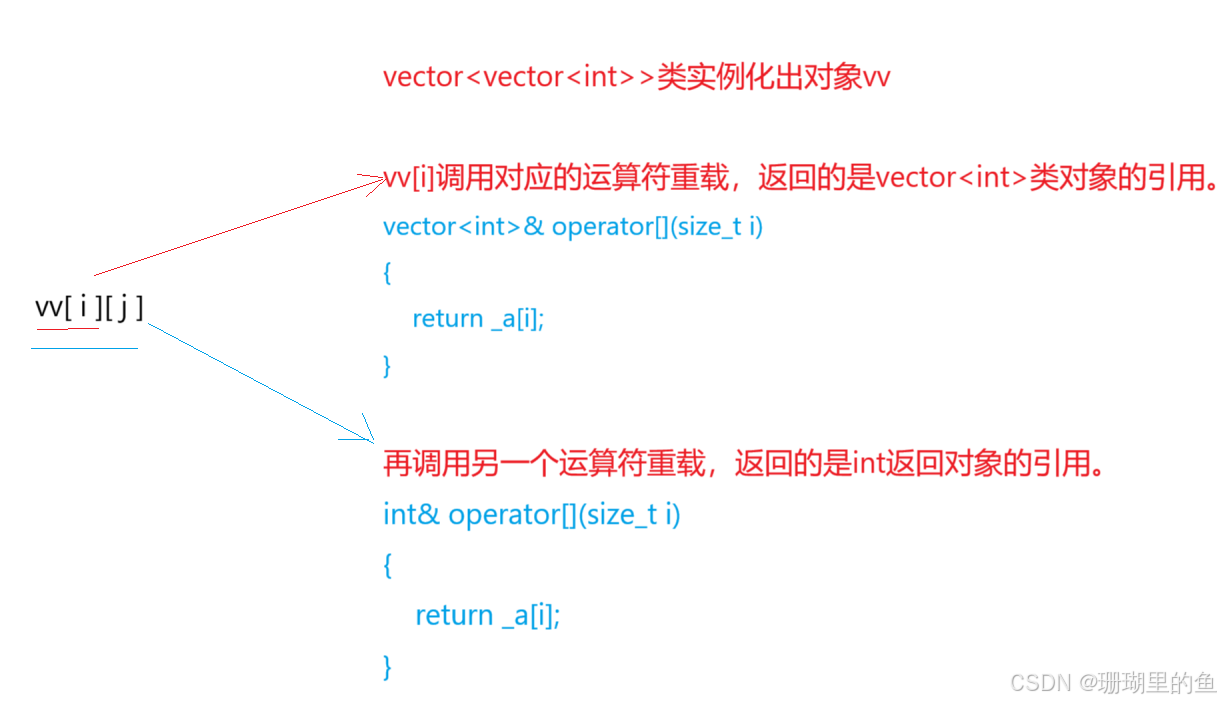
LeetCode 118题解 | 杨辉三角
题目链接: https://leetcode.cn/problems/pascals-triangle/description/ 题目如下: 解题过程如下: 杨辉三角就是一个不规则的二维数组,实际上是一个直角三角形。如图所示: 杨辉三角特点:每一行的第一个和最后一个都是…...
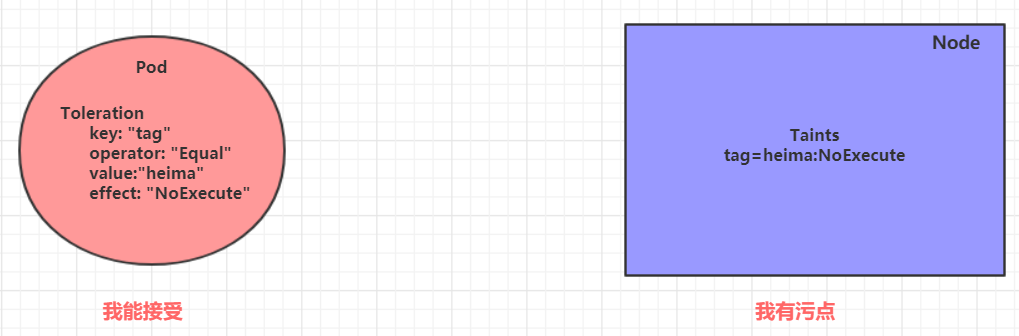
『Kubernetes(K8S) 入门进阶实战』实战入门 - Pod 详解
『Kubernetes(K8S) 入门进阶实战』实战入门 - Pod 详解 Pod 结构 每个 Pod 中都可以包含一个或者多个容器,这些容器可以分为两类 用户程序所在的容器,数量可多可少Pause 容器,这是每个 Pod 都会有的一个根容器,它的作用有两个 可…...

裂缝检测数据集,支持yolo,coco json,pasical voc xml,darknet格式的标注,1673张原始训练集图片,正确识别率99.4%
数据集详情: 裂缝检测数据集,支持yolo,coco json,pasical voc xml,darknet格式的标注,1673张原始训练集图片,正确识别率99.4% 2394总图像 数据集分割 训练集占比 70% 1673图片 有效集20% 477图片 测试集...
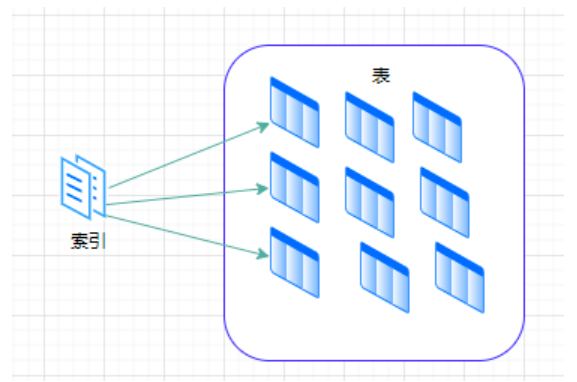
数据库索引深度解析:原理、类型与高效使用实践
🧠 一句话理解索引是什么? 索引就是数据库中的“目录”或“书签”,它能帮助我们快速找到数据的位置,而不是一页页地翻整本书。 🧩 一、为什么需要索引?(用生活化例子秒懂) 想象你在…...

React 记账本项目实战:多页面路由、Context 全局
在本文中,我们将分享一个使用 React 开发的「记账本」项目的实战经验。该项目通过 VS Code 完成,包含首页、添加记录页、编辑页等多个功能页面,采用了 React Router 实现路由导航,使用 Context API 管理全局的交易记录状态,并引入数据可视化组件呈现不同月份的支出情况。项…...
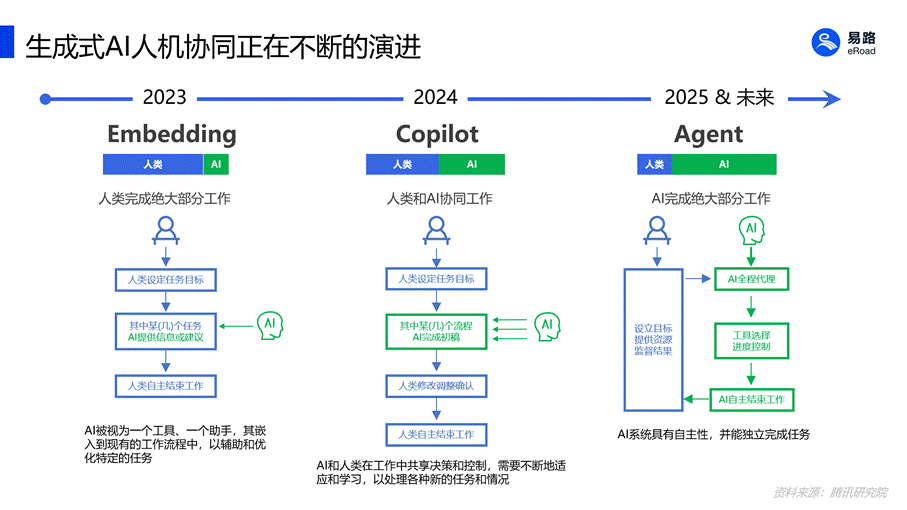
易路iBuilder智能体平台:人力资源领域AI落地,给“数据权限管控”一个最优解
近日,加拿大电子商务巨头Shopify的CEO Tobias Ltke分享了一份内部备忘录,明确表示有效使用AI已成为公司对每位员工的基本期望,并指出:各团队在招募新员工前,必须先确定是否能够利用AI完成工作。 而在全球范围内&#…...

【3】k8s集群管理系列--包应用管理器helm之chart资源打包并推送到harbor镜像仓库
一、chart资源打包 helm package ./web-chart # 当前目录会生成一个tgz的压缩文件二、安装help push插件(用于推送前面打包的文件,到镜像仓库) .1 下载help-push二进制文件 wget https://github.com/chartmuseum/helm-push/releases/down…...

用 Python 从零构建异步回显服务器
简介 让我们从 0 开始,搭建一个异步服务输出服务器。 套接字 套接字(socket),是不同计算机中实现通信的一种方式,你可以理解成一个接口,它会在客户端和服务端建立连接,一台发送数据ÿ…...
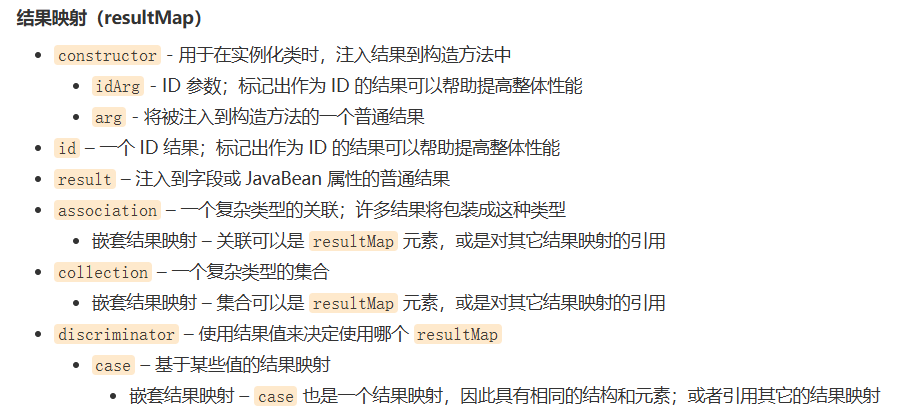
mybatis--多对一处理/一对多处理
多对一处理(association) 多个学生对一个老师 对于学生这边,关联:多个学生,关联一个老师[多对一] 对于老师而言,集合,一个老师有多个学生【一对多】 SQL: 测试环境搭建 1.导入依…...

QT Sqlite数据库-教程002 查询数据-上
【1】DQL语句: DQL语句(数据查询语言),用来查询数据记录。DQL 基本结构由 SELECT FROM、WHERE、JOIN 等子句构成。DQL 语句并不会改变数据库,而是让数据库将查询结果发送结果集给客户端,返回的结果是一张虚…...

Kubernetes Operator 是什么,以及它们的用途
最近一个朋友问我关于EKS的升级问题: 场景: 如果我有 100 个 EKS 集群需要升级,那么所有集群都安装了安全插件。由于我不想在升级后手动在每个EKS中重复安装此插件,如何实现EKS升级后自动安装这个安全插件? 答案有多…...

鸿蒙开发08-泛型类型和函数
泛型类型和函数允许创建的代码在各种类型上运行,而不仅支持单一类型,类型参数是一种特殊的变量,它代表类型而不是值。 泛型函数的基本语法如下: function 函数名<类型参数>(参数: 类型参数): 类型参数 {// 函数体return 参…...

C语言十大经典数学应用
C语言在解决数学问题方面非常有用,因为它提供了丰富的数学函数和运算符。以下是一些经典的C语言数学题,这些题目可以帮助你提高编程和数学能力。 1. 计算圆的面积 给定圆的半径,计算圆的面积。 #include <stdio.h> #include <mat…...
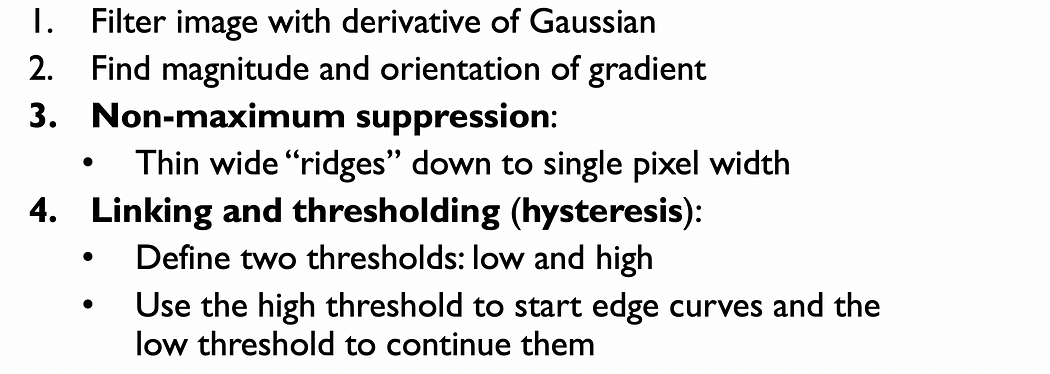
计算机视觉——图像金字塔与目标图像边缘检测原理与实践
一、两个图像块之间的相似性或距离度量 1.1 平方差和(SSD) 平方差和(SSD) 是一种常用的图像相似性度量方法。它通过计算两个图像在每个对应位置的像素值差的平方和来衡量两个图像之间的整体差异。如果两个图像在每个位置的像素值…...

VRoid-Blender-Unity个人工作流笔记
流程 VRoid 选配模型>减面、减材质>导出vrm Blender(先有CATS、vrm插件) 导入vrm>Fix model>修骨骼>导出fbx Unity 找回贴图、改着色器、调着色器参数…… VRoid 减面 以模型不出现明显棱角为准。脸好像减面100也问题不大。 下…...
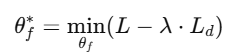
Domain Adaptation领域自适应
背景与问题定义 传统监督学习假设:训练集与测试集数据分布一致。 Domain Shift:测试数据分布与训练数据不同,模型泛化性能骤降 。 例如在黑白图像上训练数字分类器,测试时用彩色图像,准确率骤降。 Domain Adaptatio…...
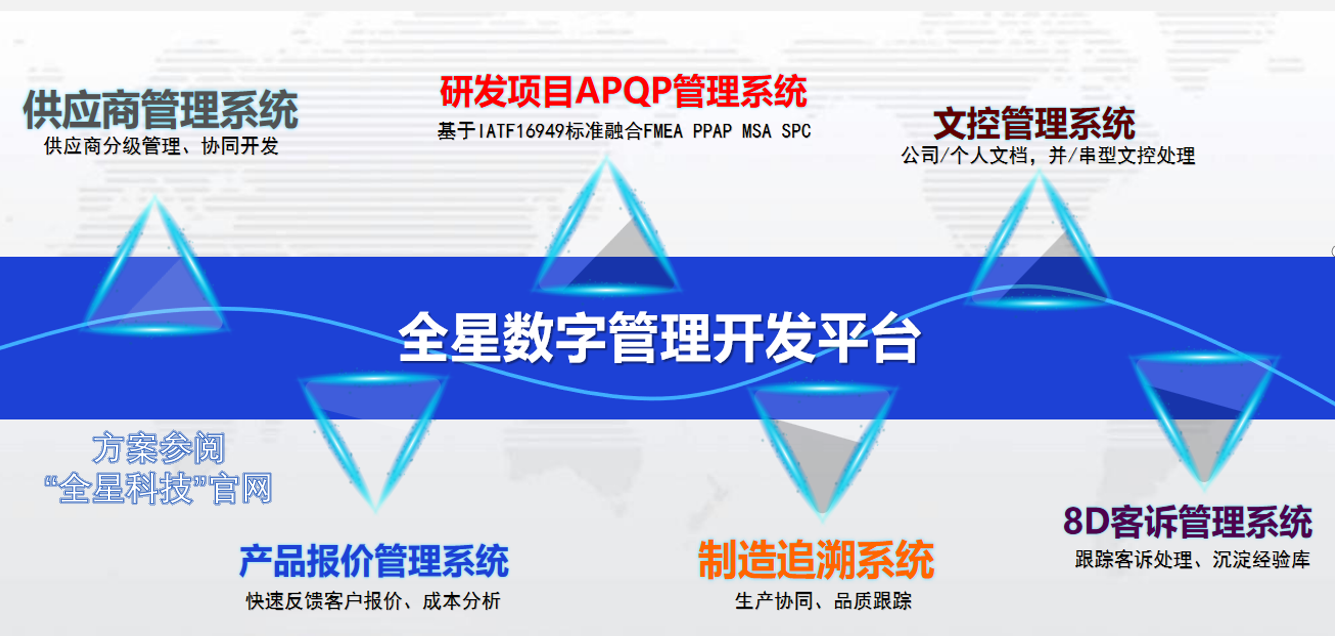
从自动测量、8D响应到供应链协同的全链路质量管理数字化方案——全星QMS如何破解汽车行业质量困局
全星QMS如何破解汽车行业质量困局:从自动测量、8D响应到供应链协同的全链路数字化方案 在当今竞争激烈的市场环境中,企业要想脱颖而出,必须确保产品质量的稳定性和可靠性。 全星质量QMS软件系统凭借其强大的功能和灵活的架构,为企…...

UNITY 屏幕UI自适应
1.主要就是根据屏幕的选择根据尺寸 和UI的锚点和中心点来选择,也可以通过代码来动态修改 2.参考视频:Unity UGUI屏幕自适应看这个就够了_哔哩哔哩_bilibili...
)
【信息系统项目管理师】高分论文:论信息系统项目的范围管理(投资信息化全流程管理项目)
更多内容请见: 备考信息系统项目管理师-专栏介绍和目录 文章目录 1、规划范围管理2、收集需求3、定义范围4、创建wbs5、确认范围6、控制范围2018年2月,我有幸参加了 XX省自贸区财政投资信息化全流程管理项目的假设,作为项目发起单位,省自贸办经过审时度势,及时响应国家自贸…...
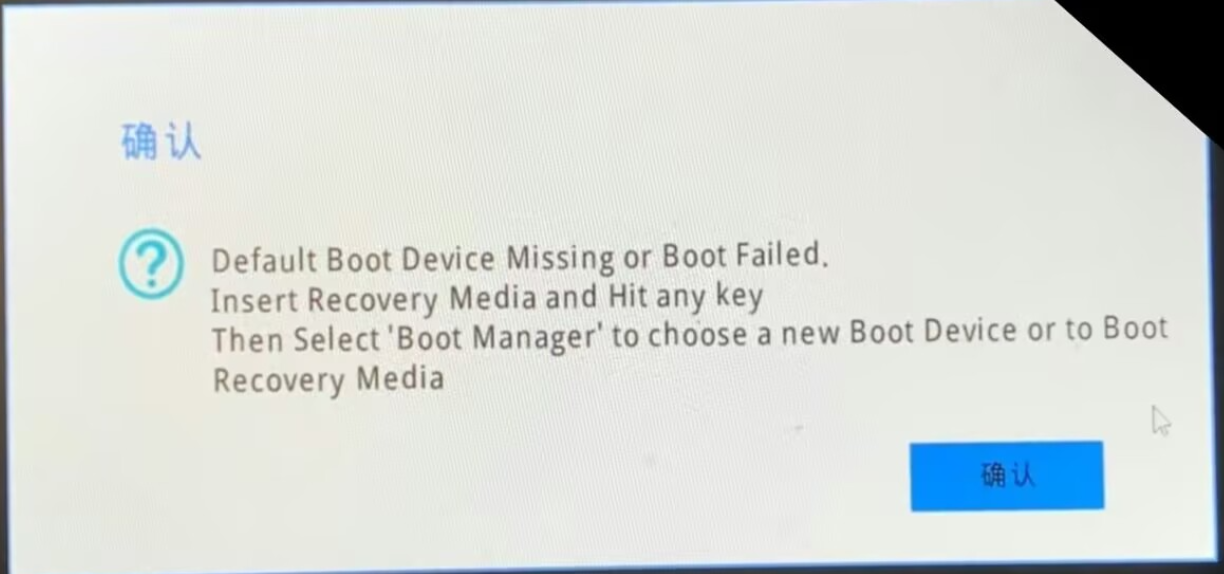
联想电脑开机出现Defalut Boot Device Missing or Boot Failed怎么办
目录 一、恢复bios默认设置 二、关机重启 三、“物理”方法 在图书馆敲代码时,去吃了午饭回来发现刚开机就出现了下图的问题(崩溃),想起之前也发生过一次 这样的问题,现在把我用到的方法写在下面,可能对…...

newbee商城购物车模块mapper.xml
1.浏览代码 1)表 自定义 DROP TABLE IF EXISTS tb_newbee_mall_shopping_cart_item; CREATE TABLE tb_newbee_mall_shopping_cart_item (cart_item_id bigint(20) NOT NULL AUTO_INCREMENT COMMENT 购物项主键id,user_id bigint(20) NOT NULL COMMENT 用户主键id…...

SQL学习笔记-聚合查询
非聚合查询和聚合查询的概念及差别 1. 非聚合查询 非聚合查询(Non-Aggregate Query)是指不使用聚合函数的查询。这类查询通常用于从表中检索具体的行和列数据,返回的结果是表中的原始数据。 示例 假设有一个名为 employees 的表ÿ…...
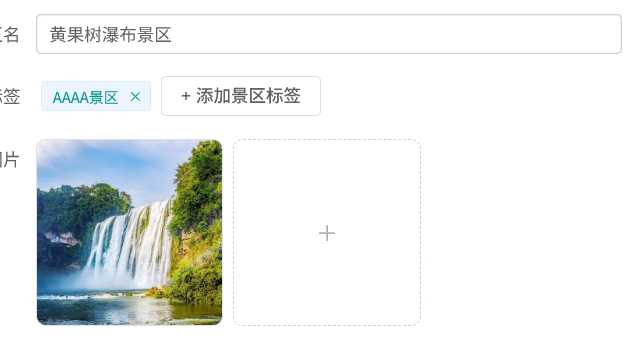
【Vue 3 + Element Plus 实现产品标签的动态添加、删除与回显】
🚀Vue 3 Element Plus 实现产品标签的动态添加、删除与回显 在后台管理系统中,我们经常需要对表单数据进行动态处理,尤其是类似“产品标签”这样的字段,它需要用户能够灵活添加、删除,并在编辑时自动回显。今天我们就…...

【NLP】23.小结:选择60题
Question 1: What does the fixed lookup table in traditional NLP represent? A. A table of one‐hot vectors B. A table of pre‐trained dense word embeddings C. A dictionary of word definitions D. A table of n-gram counts Answer (中文): 答案选 B。传统NLP中“…...
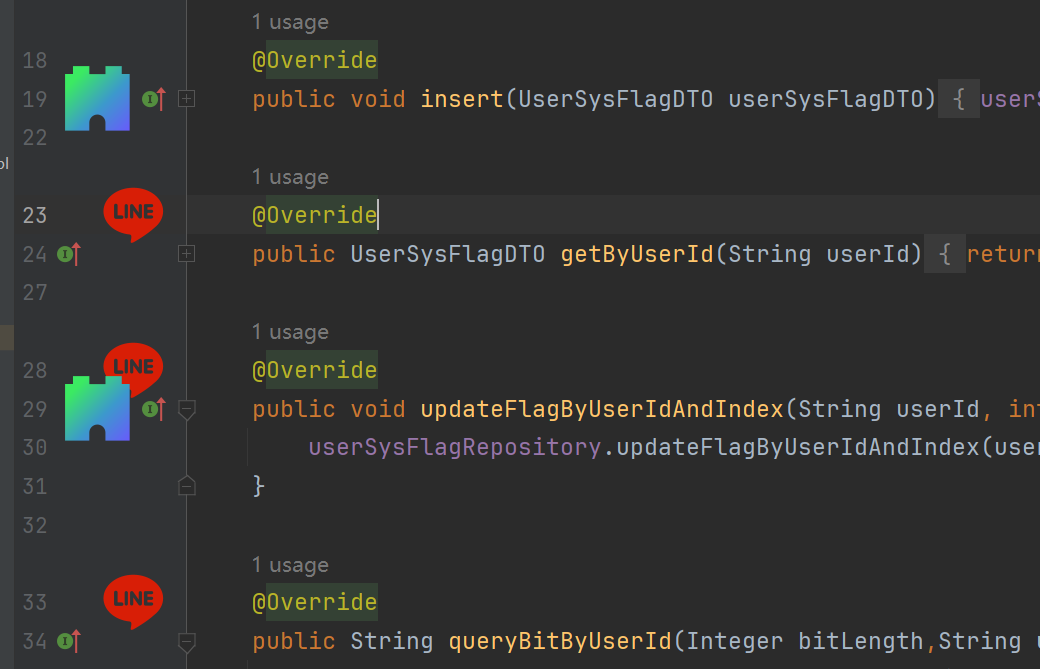
IntelliJ 配置(二)配置相关类库(2)LineMarkerProvider
一、介绍 LineMarkerProvider 是 IntelliJ 平台插件开发中的一个接口,它的作用是在编辑器左侧的“行标记区域”(就是代码行号左边那一栏)添加各种图标、标记或导航链接。比如Java 类中看到的: 小绿色三角形(可以点击运…...
从零开始学java--线性表
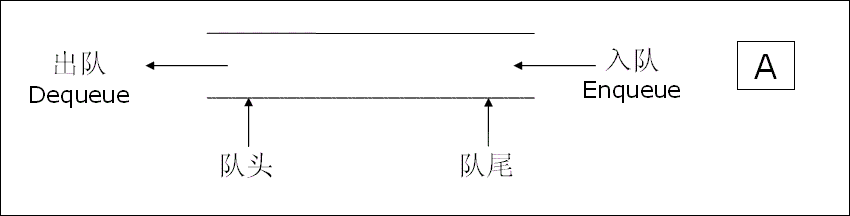
数据结构基础 目录 数据结构基础 线性表 顺序表 链表 顺序表和链表的区别: 栈 队列 线性表 线性表(linear list)是n个具有相同特性的数据元素的有限序列。 线性表中的元素个数就是线性表的长度,表的起始位置称为表头&am…...
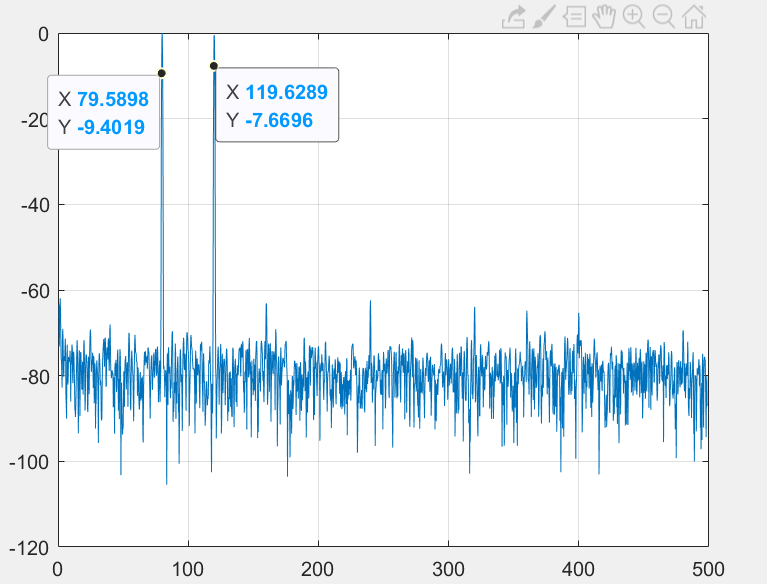
AD917X系列JESD204B MODE7使用
MODE7特殊在F8,M4使用2个复数通道 CH0_NCO10MHz CH1_NCO30MHZ DP_NCO50MHz DDS1偏移20MHz DDS2偏移40MHz...
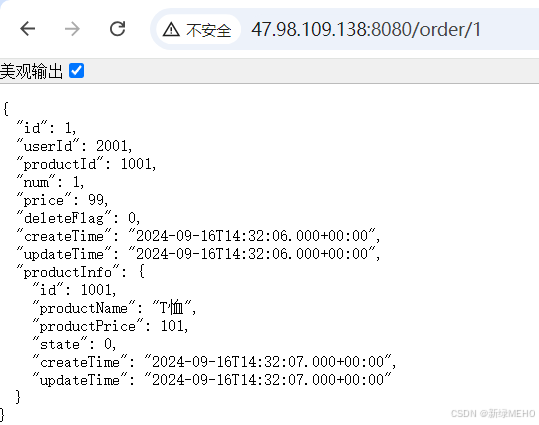
Spring Cloud之远程调用OpenFeign最佳实践
目录 OpenFeign最佳实践 问题引入 Feign 继承方式 创建Module 引入依赖 编写接口 打Jar包 服务提供方 服务消费方 启动服务并访问 Feign 抽取方式 创建Module 引入依赖 编写接口 打Jar包 服务消费方 启动服务并访问 服务部署 修改pom.xml文件 观察Nacos控制…...