
开源模型应用落地-Podcastfy-从文本到声音的智能跃迁-Gradio(一)
一、前言
在当今信息呈现方式越来越多样化的背景下,如何将文字、图片甚至视频高效转化为可听的音频体验,已经成为内容创作者、教育者和研究者们共同关注的重要话题。Podcastfy是一款基于Python的开源工具,它专注于将多种形式的内容智能转换成音频,正在引领一场“可听化”的创作新风潮。
通过结合生成式人工智能(GenAI)和先进的文本转语音(TTS)技术,Podcastfy能够将网页、PDF文件、图片甚至YouTube视频等多种输入,转变为自然流畅的多语言音频对话。
与传统的单一内容转化工具不同,Podcastfy支持从短小的2分钟精华片段到长达30分钟的深度播客生成,还允许用户在音频风格、语言结构和语音模型上进行高度自定义。并且,Podcastfy以其开源特性和程序化接口,为各种场景下的内容创作提供了灵活且专业的解决方案。这一工具的推出,不仅为信息的可及性带来了重要突破,还重新定义了“声音经济”时代的内容表达方式。
二、术语介绍
2.1.Podcastfy
是一款基于 Python 开发的开源多模态内容转换工具,其核心作用是通过生成式人工智能(GenAI)技术,将文本、图像、网页、PDF、YouTube 视频等多种形式的内容,智能转化为多语言音频对话,从而革新内容创作与传播方式。
技术定位与核心功能
1. 多模态输入兼容性
- Podcastfy 支持从网页、PDF、图像、YouTube 视频甚至用户输入的主题中提取内容,并自动生成对话式文本脚本。
2.多语言与音频定制化
- 工具内置多语言支持(包括中文、英语等),可生成不同语言版本的音频,并允许调整播客的风格、声音、时长(如 2-5 分钟短片或 30 分钟以上的长篇内容),甚至模拟自然对话的互动感。
3.技术架构与开源特性
- 生成式 AI 驱动:集成 100+ 主流语言模型(如 OpenAI、Anthropic、Google 等),支持本地运行 HuggingFace 上的 156+ 模型,兼顾生成质量与隐私控制。
- 高级 TTS 引擎:与 ElevenLabs、Microsoft Edge 等文本转语音平台无缝整合,生成拟人化语音效果。
- 开源可扩展:用户可自由修改代码,定制播客生成逻辑或集成私有模型,突破闭源工具(如 Google NotebookLM)的功能限制。
2.2.Gradio
是一个开源的 Python 库,专注于快速构建交互式 Web 应用程序,尤其适用于机器学习模型、API 或任意 Python 函数的可视化展示和用户交互。通过简单代码即可生成功能丰富的界面,无需前端开发经验。
2.3.nohup 命令
是类 Unix 系统中使用的一个工具,用于在后台运行程序并使其忽略挂起信号。在使用命令行运行程序时,通常如果你关闭终端或注销用户,正在运行的程序也会被终止。使用 nohup 可以避免这种情况,让程序在后台持续运行。
三、前置条件
3.1.基础环境及前置条件
1. 操作系统:无限制
3.2.安装依赖
conda create --name podcastfy-app python=3.12
conda activate podcastfy-apppip install gradio-client==1.4.2 -i  https://pypi.tuna.tsinghua.edu.cn/simple
pip install gradio==5.4.0 -i  https://pypi.tuna.tsinghua.edu.cn/simple
pip install podcastfy==0.4.1 -i  https://pypi.tuna.tsinghua.edu.cn/simple
pip install python-dotenv==1.0.1 -i  https://pypi.tuna.tsinghua.edu.cn/simple
四、技术实现
4.1.Gradio代码
# -*-  coding:utf-8 -*-
import gradio as gr
import os
import tempfile
import logging
from podcastfy.client import generate_podcast
from dotenv import load_dotenv# Configure logging
logging.basicConfig(level=logging.DEBUG)
logger = logging.getLogger(__name__)# Load environment variables
load_dotenv()os.environ["GEMINI_API_KEY"] = 'xxxxxxxxxxxxxx-xxxxxxxx-xx'
os.environ["OPENAI_API_KEY"] = 'sk-xxxxxxxxxxxxxxxxxxxxxxxxxxxxxxxxxxxxxxxxxx'def get_api_key(key_name, ui_value):return ui_value if ui_value else os.getenv(key_name)def process_inputs(text_input,urls_input,pdf_files,image_files,gemini_key,openai_key,elevenlabs_key,word_count,conversation_style,roles_person1,roles_person2,dialogue_structure,podcast_name,podcast_tagline,tts_model,creativity_level,user_instructions,longform
):try:logger.info("Starting podcast generation process")# API key handlinglogger.debug("Setting API keys")os.environ["GEMINI_API_KEY"] = get_api_key("GEMINI_API_KEY", gemini_key)if tts_model == "openai":logger.debug("Setting OpenAI API key")if not openai_key and not os.getenv("OPENAI_API_KEY"):raise ValueError("OpenAI API key is required when using OpenAI TTS model")os.environ["OPENAI_API_KEY"] = get_api_key("OPENAI_API_KEY", openai_key)if tts_model == "elevenlabs":logger.debug("Setting ElevenLabs API key")if not elevenlabs_key and not os.getenv("ELEVENLABS_API_KEY"):raise ValueError("ElevenLabs API key is required when using ElevenLabs TTS model")os.environ["ELEVENLABS_API_KEY"] = get_api_key("ELEVENLABS_API_KEY", elevenlabs_key)print(f'GEMINI_API_KEY: {os.environ["GEMINI_API_KEY"]},OPENAI_API_KEY: {os.environ["OPENAI_API_KEY"]}')# Process URLsurls = [url.strip() for url in urls_input.split('\n') if url.strip()]logger.debug(f"Processed URLs: {urls}")temp_files = []temp_dirs = []# Handle PDF filesif pdf_files is not None and len(pdf_files) > 0:logger.info(f"Processing {len(pdf_files)} PDF files")pdf_temp_dir = tempfile.mkdtemp()temp_dirs.append(pdf_temp_dir)for i, pdf_file in enumerate(pdf_files):pdf_path = os.path.join(pdf_temp_dir, f"input_pdf_{i}.pdf")temp_files.append(pdf_path)with open(pdf_path, 'wb') as f:f.write(pdf_file)urls.append(pdf_path)logger.debug(f"Saved PDF {i} to {pdf_path}")# Handle image filesimage_paths = []if image_files is not None and len(image_files) > 0:logger.info(f"Processing {len(image_files)} image files")img_temp_dir = tempfile.mkdtemp()temp_dirs.append(img_temp_dir)for i, img_file in enumerate(image_files):# Get file extension from the original name in the file tupleoriginal_name = img_file.orig_name if hasattr(img_file, 'orig_name') else f"image_{i}.jpg"extension = original_name.split('.')[-1]logger.debug(f"Processing image file {i}: {original_name}")img_path = os.path.join(img_temp_dir, f"input_image_{i}.{extension}")temp_files.append(img_path)try:# Write the bytes directly to the filewith open(img_path, 'wb') as f:if isinstance(img_file, (tuple, list)):f.write(img_file[1])  # Write the bytes contentelse:f.write(img_file)  # Write the bytes directlyimage_paths.append(img_path)logger.debug(f"Saved image {i} to {img_path}")except Exception as e:logger.error(f"Error saving image {i}: {str(e)}")raise# Prepare conversation configlogger.debug("Preparing conversation config")conversation_config = {"word_count": word_count,"conversation_style": conversation_style.split(','),"roles_person1": roles_person1,"roles_person2": roles_person2,"dialogue_structure": dialogue_structure.split(','),"podcast_name": podcast_name,"podcast_tagline": podcast_tagline,"creativity": creativity_level,"user_instructions": user_instructions}# Generate podcastlogger.info("Calling generate_podcast function")logger.debug(f"URLs: {urls}")logger.debug(f"Image paths: {image_paths}")logger.debug(f"Text input present: {'Yes' if text_input else 'No'}")audio_file = generate_podcast(urls=urls if urls else None,text=text_input if text_input else None,image_paths=image_paths if image_paths else None,tts_model=tts_model,conversation_config=conversation_config,longform = eval(longform))logger.info("Podcast generation completed")# Cleanuplogger.debug("Cleaning up temporary files")for file_path in temp_files:if os.path.exists(file_path):os.unlink(file_path)logger.debug(f"Removed temp file: {file_path}")for dir_path in temp_dirs:if os.path.exists(dir_path):os.rmdir(dir_path)logger.debug(f"Removed temp directory: {dir_path}")return audio_fileexcept Exception as e:logger.error(f"Error in process_inputs: {str(e)}", exc_info=True)# Cleanup on errorfor file_path in temp_files:if os.path.exists(file_path):os.unlink(file_path)for dir_path in temp_dirs:if os.path.exists(dir_path):os.rmdir(dir_path)return str(e)# Create Gradio interface with updated theme
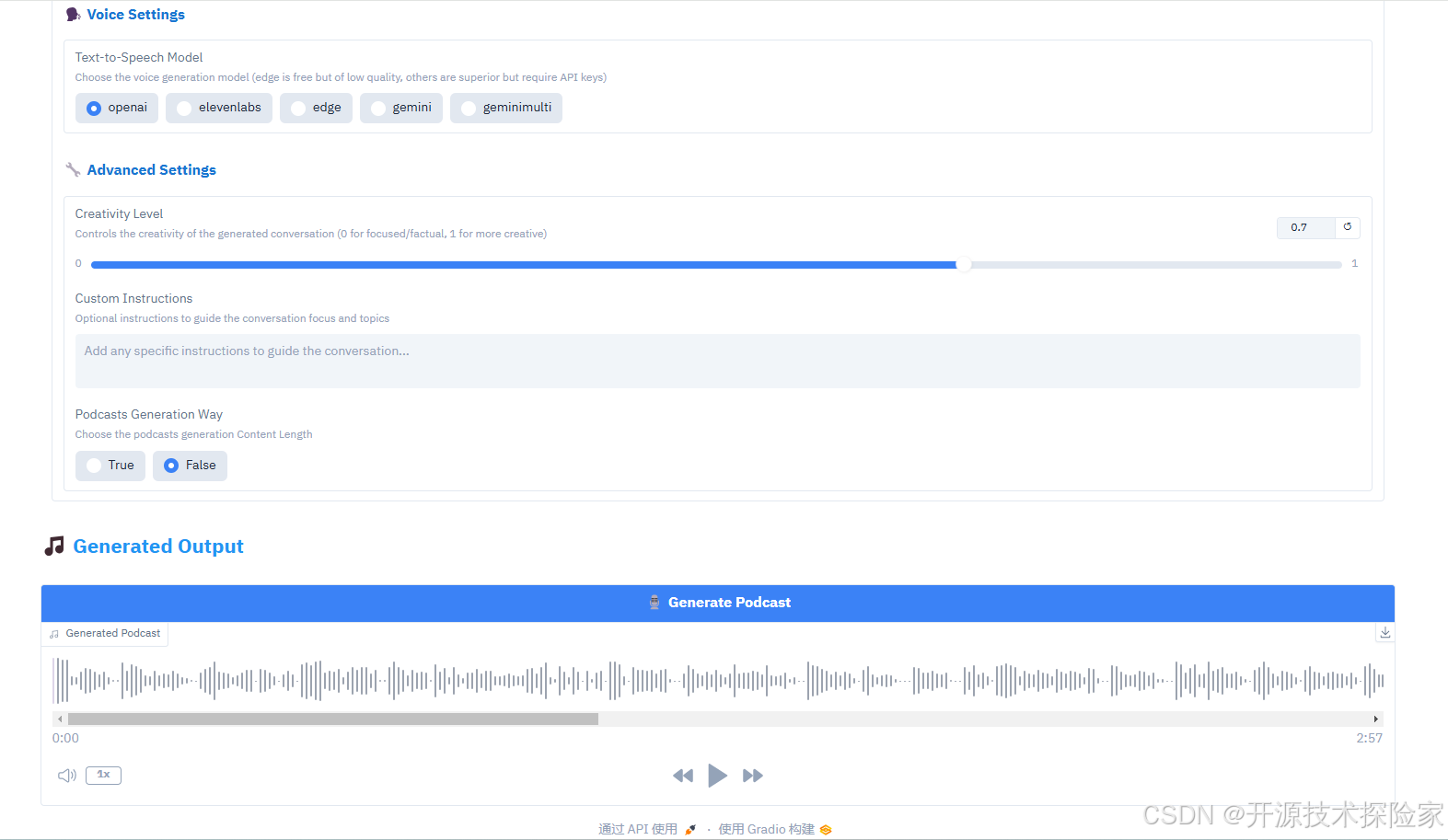
with gr.Blocks(title="Podcastfy.ai",theme=gr.themes.Base(primary_hue="blue",secondary_hue="slate",neutral_hue="slate"),css="""/* Move toggle arrow to left side */.gr-accordion {--accordion-arrow-size: 1.5em;}.gr-accordion > .label-wrap {flex-direction: row !important;justify-content: flex-start !important;gap: 1em;}.gr-accordion > .label-wrap > .icon {order: -1;}"""
) as demo:with gr.Tab("Content"):# API Keys Sectiongr.Markdown("""<h2 style='color: #2196F3; margin-bottom: 10px; padding: 10px 0;'>🔑 API Keys</h2>""",elem_classes=["section-header"])with gr.Accordion("Configure API Keys", open=False):gemini_key = gr.Textbox(label="Gemini API Key",type="password",value=os.getenv("GEMINI_API_KEY", ""),info="Required")openai_key = gr.Textbox(label="OpenAI API Key",type="password",value=os.getenv("OPENAI_API_KEY", ""),info="Required only if using OpenAI TTS model")elevenlabs_key = gr.Textbox(label="ElevenLabs API Key",type="password",value=os.getenv("ELEVENLABS_API_KEY", ""),info="Required only if using ElevenLabs TTS model [recommended]")# Content Input Sectiongr.Markdown("""<h2 style='color: #2196F3; margin-bottom: 10px; padding: 10px 0;'>📝 Input Content</h2>""",elem_classes=["section-header"])with gr.Accordion("Configure Input Content", open=False):with gr.Group():text_input = gr.Textbox(label="Text Input",placeholder="Enter or paste text here...",lines=3)urls_input = gr.Textbox(label="URLs",placeholder="Enter URLs (one per line) - supports websites and YouTube videos.",lines=3)# Place PDF and Image uploads side by sidewith gr.Row():with gr.Column():pdf_files = gr.Files(  # Changed from gr.File to gr.Fileslabel="Upload PDFs",  # Updated labelfile_types=[".pdf"],type="binary")gr.Markdown("*Upload one or more PDF files to generate podcast from*",elem_classes=["file-info"])with gr.Column():image_files = gr.Files(label="Upload Images",file_types=["image"],type="binary")gr.Markdown("*Upload one or more images to generate podcast from*", elem_classes=["file-info"])# Customization Sectiongr.Markdown("""<h2 style='color: #2196F3; margin-bottom: 10px; padding: 10px 0;'>⚙️ Customization Options</h2>""",elem_classes=["section-header"])with gr.Accordion("Configure Podcast Settings", open=False):# Basic Settingsgr.Markdown("""<h3 style='color: #1976D2; margin: 15px 0 10px 0;'>📊 Basic Settings</h3>""",)word_count = gr.Slider(minimum=500,maximum=5000,value=2000,step=100,label="Word Count",info="Target word count for the generated content")conversation_style = gr.Textbox(label="Conversation Style",value="engaging,fast-paced,enthusiastic",info="Comma-separated list of styles to apply to the conversation")# Roles and Structuregr.Markdown("""<h3 style='color: #1976D2; margin: 15px 0 10px 0;'>👥 Roles and Structure</h3>""",)roles_person1 = gr.Textbox(label="Role of First Speaker",value="main summarizer",info="Role of the first speaker in the conversation")roles_person2 = gr.Textbox(label="Role of Second Speaker",value="questioner/clarifier",info="Role of the second speaker in the conversation")dialogue_structure = gr.Textbox(label="Dialogue Structure",value="Introduction,Main Content Summary,Conclusion",info="Comma-separated list of dialogue sections")# Podcast Identitygr.Markdown("""<h3 style='color: #1976D2; margin: 15px 0 10px 0;'>🎙️ Podcast Identity</h3>""",)podcast_name = gr.Textbox(label="Podcast Name",value="PODCASTFY",info="Name of the podcast")podcast_tagline = gr.Textbox(label="Podcast Tagline",value="YOUR PERSONAL GenAI PODCAST",info="Tagline or subtitle for the podcast")# Voice Settingsgr.Markdown("""<h3 style='color: #1976D2; margin: 15px 0 10px 0;'>🗣️ Voice Settings</h3>""",)tts_model = gr.Radio(choices=["openai", "elevenlabs", "edge", "gemini", "geminimulti"],value="openai",label="Text-to-Speech Model",info="Choose the voice generation model (edge is free but of low quality, others are superior but require API keys)")# Advanced Settingsgr.Markdown("""<h3 style='color: #1976D2; margin: 15px 0 10px 0;'>🔧 Advanced Settings</h3>""",)creativity_level = gr.Slider(minimum=0,maximum=1,value=0.7,step=0.1,label="Creativity Level",info="Controls the creativity of the generated conversation (0 for focused/factual, 1 for more creative)")user_instructions = gr.Textbox(label="Custom Instructions",value="",lines=2,placeholder="Add any specific instructions to guide the conversation...",info="Optional instructions to guide the conversation focus and topics")longform = gr.Radio(choices=["True", "False"],value="False",label="Podcasts Generation Way",info="Choose the podcasts generation Content Length")# Output Sectiongr.Markdown("""<h2 style='color: #2196F3; margin-bottom: 10px; padding: 10px 0;'>🎵 Generated Output</h2>""",elem_classes=["section-header"])with gr.Group():generate_btn = gr.Button("🎙️ Generate Podcast", variant="primary")audio_output = gr.Audio(type="filepath",label="Generated Podcast")# Handle generationgenerate_btn.click(process_inputs,inputs=[text_input, urls_input, pdf_files, image_files,gemini_key, openai_key, elevenlabs_key,word_count, conversation_style,roles_person1, roles_person2,dialogue_structure, podcast_name,podcast_tagline, tts_model,creativity_level, user_instructions,longform],outputs=audio_output)DEFAULT_SERVER_NAME = '0.0.0.0'
DEFAULT_PORT = 8000
DEFAULT_USER = "zhangshan"
DEFAULT_PASSWORD = '123456'if __name__ == "__main__":demo.queue().launch(debug=False,share=False,inbrowser=False,server_port=DEFAULT_PORT,server_name=DEFAULT_SERVER_NAME,auth=(DEFAULT_USER, DEFAULT_PASSWORD) )
4.2.测试
4.2.1.启动Gradio服务
nohup python /podcastfy-app/gradio-server.py > /logs/podcastfy-app.log 2>&1 &浏览器访问:http://IP:8000
输入账号:zhangshan/123456
4.2.2.测试文本输入
注意:需要具备科学上网的能力
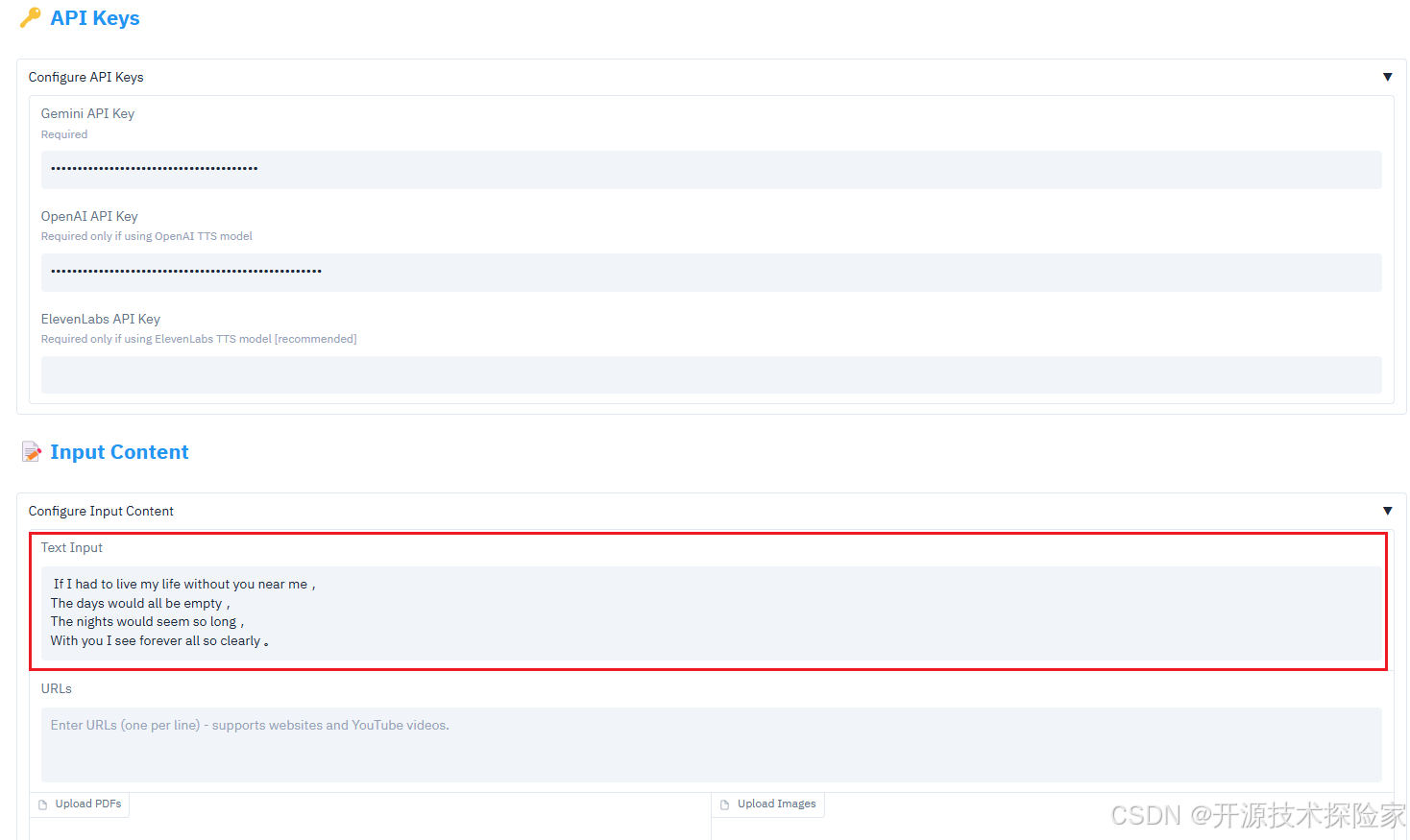
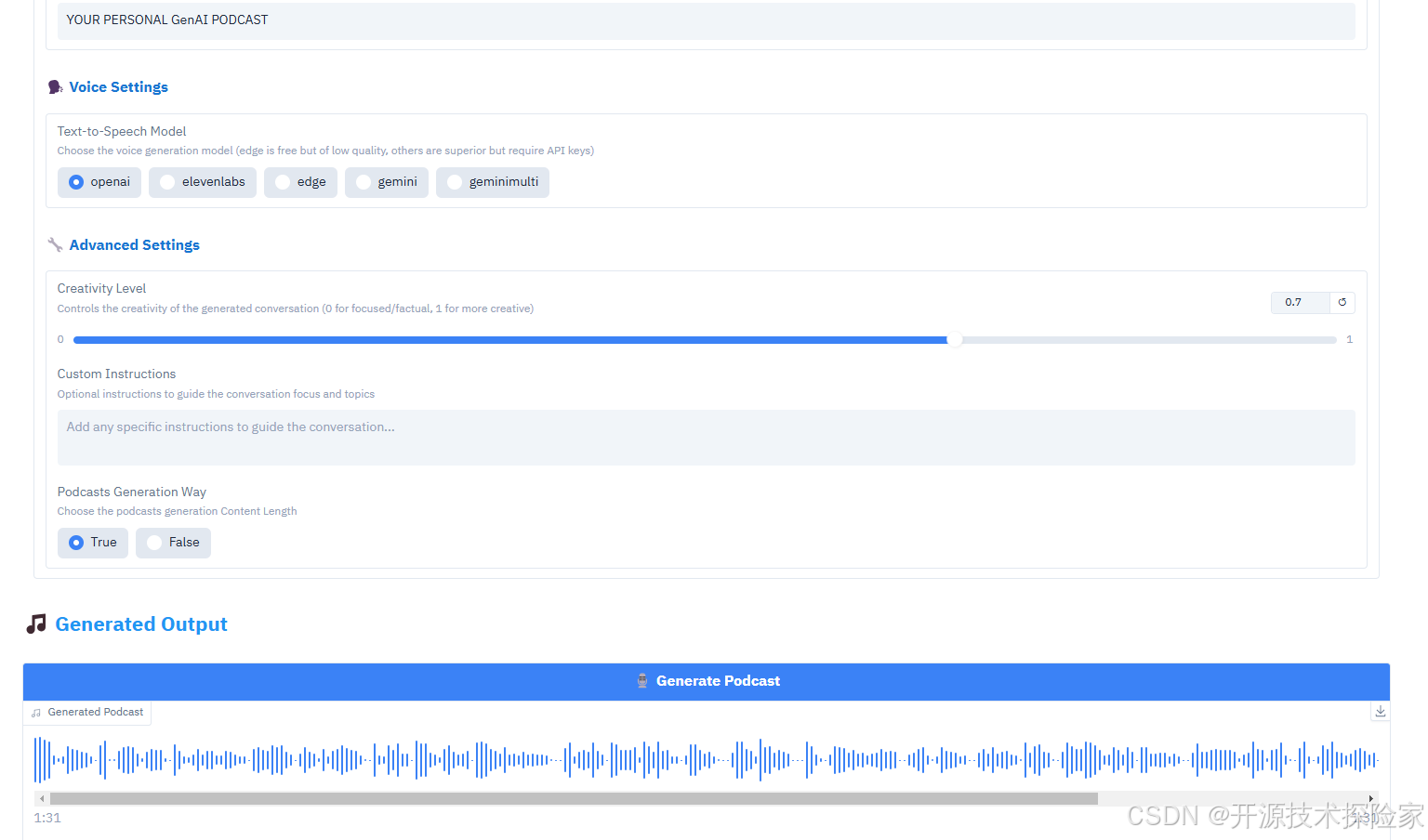
PS:服务端输出的日志:
DEBUG:openai._base_client:HTTP Response: POST https://api.openai.com/v1/audio/speech "200 OK" Headers({'date': 'Wed, 16 Apr 2025 07:20:51 GMT', 'content-type': 'audio/mpeg', 'transfer-encoding': 'chunked', 'connection': 'keep-alive', 'access-control-expose-headers': 'X-Request-ID', 'openai-organization': 'everblessed-technology-inc', 'openai-processing-ms': '1334', 'openai-version': '2020-10-01', 'strict-transport-security': 'max-age=31536000; includeSubDomains; preload', 'via': 'envoy-router-84dd794555-brjjp', 'x-envoy-upstream-service-time': '1313', 'x-ratelimit-limit-requests': '10000', 'x-ratelimit-remaining-requests': '9999', 'x-ratelimit-reset-requests': '6ms', 'x-request-id': 'req_cc00076d234569e896d01ee281a07938', 'cf-cache-status': 'DYNAMIC', 'x-content-type-options': 'nosniff', 'server': 'cloudflare', 'cf-ray': '9311ec21cd46fb30-SJC', 'alt-svc': 'h3=":443"; ma=86400'})
DEBUG:openai._base_client:request_id: req_cc00076d234569e896d01ee281a07938
DEBUG:openai._base_client:Request options: {'method': 'post', 'url': '/audio/speech', 'headers': {'Accept': 'application/octet-stream'}, 'files': None, 'json_data': {'input': "Exactly! It's not just about the present moment. It's about envisioning a future, a forever, with this person. And that forever is clear, sharply defined.", 'model': 'tts-1-hd', 'voice': 'shimmer'}}
DEBUG:openai._base_client:Sending HTTP Request: POST https://api.openai.com/v1/audio/speech
DEBUG:httpcore.http11:send_request_headers.started request=<Request [b'POST']>
DEBUG:httpcore.http11:send_request_headers.complete
DEBUG:httpcore.http11:send_request_body.started request=<Request [b'POST']>
DEBUG:httpcore.http11:send_request_body.completeDEBUG:pydub.converter:subprocess.call(['ffmpeg', '-y', '-f', 'mp3', '-i', '/opt/anaconda3/envs/podcastfy-app/lib/python3.12/site-packages/podcastfy/data/audio/tmp/tmpxsbm6y6y/1_question.mp3', '-acodec', 'pcm_s16le', '-vn', '-f', 'wav', '-'])
DEBUG:pydub.converter:subprocess.call(['ffmpeg', '-y', '-f', 'mp3', '-i', '/opt/anaconda3/envs/podcastfy-app/lib/python3.12/site-packages/podcastfy/data/audio/tmp/tmpxsbm6y6y/1_answer.mp3', '-acodec', 'pcm_s16le', '-vn', '-f', 'wav', '-'])
DEBUG:pydub.converter:subprocess.call(['ffmpeg', '-y', '-f', 'mp3', '-i', '/opt/anaconda3/envs/podcastfy-app/lib/python3.12/site-packages/podcastfy/data/audio/tmp/tmpxsbm6y6y/2_question.mp3', '-acodec', 'pcm_s16le', '-vn', '-f', 'wav', '-'])
DEBUG:pydub.converter:subprocess.call(['ffmpeg', '-y', '-f', 'mp3', '-i', '/opt/anaconda3/envs/podcastfy-app/lib/python3.12/site-packages/podcastfy/data/audio/tmp/tmpxsbm6y6y/2_answer.mp3', '-acodec', 'pcm_s16le', '-vn', '-f', 'wav', '-'])
DEBUG:pydub.converter:subprocess.call(['ffmpeg', '-y', '-f', 'mp3', '-i', '/opt/anaconda3/envs/podcastfy-app/lib/python3.12/site-packages/podcastfy/data/audio/tmp/tmpxsbm6y6y/3_question.mp3', '-acodec', 'pcm_s16le', '-vn', '-f', 'wav', '-'])
DEBUG:pydub.converter:subprocess.call(['ffmpeg', '-y', '-f', 'mp3', '-i', '/opt/anaconda3/envs/podcastfy-app/lib/python3.12/site-packages/podcastfy/data/audio/tmp/tmpxsbm6y6y/3_answer.mp3', '-acodec', 'pcm_s16le', '-vn', '-f', 'wav', '-'])
DEBUG:pydub.converter:subprocess.call(['ffmpeg', '-y', '-f', 'mp3', '-i', '/opt/anaconda3/envs/podcastfy-app/lib/python3.12/site-packages/podcastfy/data/audio/tmp/tmpxsbm6y6y/4_question.mp3', '-acodec', 'pcm_s16le', '-vn', '-f', 'wav', '-'])
DEBUG:pydub.converter:subprocess.call(['ffmpeg', '-y', '-f', 'mp3', '-i', '/opt/anaconda3/envs/podcastfy-app/lib/python3.12/site-packages/podcastfy/data/audio/tmp/tmpxsbm6y6y/4_answer.mp3', '-acodec', 'pcm_s16le', '-vn', '-f', 'wav', '-'])
DEBUG:pydub.converter:subprocess.call(['ffmpeg', '-y', '-f', 'mp3', '-i', '/opt/anaconda3/envs/podcastfy-app/lib/python3.12/site-packages/podcastfy/data/audio/tmp/tmpxsbm6y6y/5_question.mp3', '-acodec', 'pcm_s16le', '-vn', '-f', 'wav', '-'])
DEBUG:pydub.converter:subprocess.call(['ffmpeg', '-y', '-f', 'mp3', '-i', '/opt/anaconda3/envs/podcastfy-app/lib/python3.12/site-packages/podcastfy/data/audio/tmp/tmpxsbm6y6y/5_answer.mp3', '-acodec', 'pcm_s16le', '-vn', '-f', 'wav', '-'])
DEBUG:pydub.converter:subprocess.call(['ffmpeg', '-y', '-f', 'mp3', '-i', '/opt/anaconda3/envs/podcastfy-app/lib/python3.12/site-packages/podcastfy/data/audio/tmp/tmpxsbm6y6y/6_question.mp3', '-acodec', 'pcm_s16le', '-vn', '-f', 'wav', '-'])
DEBUG:pydub.converter:subprocess.call(['ffmpeg', '-y', '-f', 'mp3', '-i', '/opt/anaconda3/envs/podcastfy-app/lib/python3.12/site-packages/podcastfy/data/audio/tmp/tmpxsbm6y6y/6_answer.mp3', '-acodec', 'pcm_s16le', '-vn', '-f', 'wav', '-'])
DEBUG:pydub.converter:subprocess.call(['ffmpeg', '-y', '-f', 'mp3', '-i', '/opt/anaconda3/envs/podcastfy-app/lib/python3.12/site-packages/podcastfy/data/audio/tmp/tmpxsbm6y6y/7_question.mp3', '-acodec', 'pcm_s16le', '-vn', '-f', 'wav', '-'])
DEBUG:pydub.converter:subprocess.call(['ffmpeg', '-y', '-f', 'mp3', '-i', '/opt/anaconda3/envs/podcastfy-app/lib/python3.12/site-packages/podcastfy/data/audio/tmp/tmpxsbm6y6y/7_answer.mp3', '-acodec', 'pcm_s16le', '-vn', '-f', 'wav', '-'])
DEBUG:pydub.converter:subprocess.call(['ffmpeg', '-y', '-f', 'wav', '-i', '/tmp/tmpytxxw8ea', '-f', 'mp3', '/tmp/tmptv8lgkb9'])
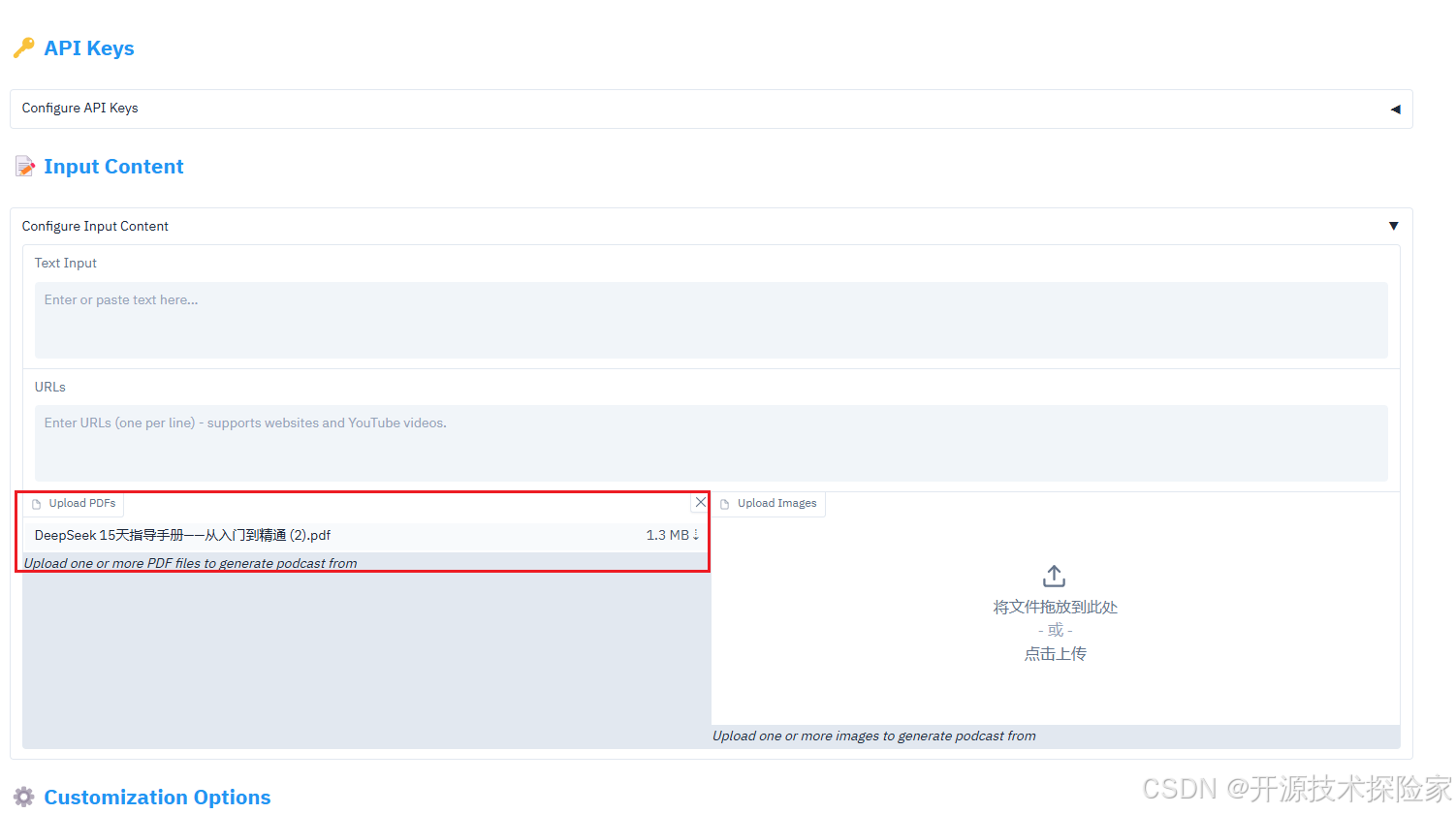
4.2.3.测试文件输入
注意:需要具备科学上网的能力
测试的PDF文件共25页,大小1.3M。
相关文章:
开源模型应用落地-Podcastfy-从文本到声音的智能跃迁-Gradio(一)
一、前言 在当今信息呈现方式越来越多样化的背景下,如何将文字、图片甚至视频高效转化为可听的音频体验,已经成为内容创作者、教育者和研究者们共同关注的重要话题。Podcastfy是一款基于Python的开源工具,它专注于将多种形式的内容智能转换成…...

深入剖析 Java Web 项目序列化:方案选型与最佳实践
在 Java Web 开发中,“序列化”是一个你无法绕过的概念。无论是缓存数据、共享 Session,还是进行远程过程调用(RPC)或消息传递,序列化都扮演着底层数据搬运工的角色。它负责将内存中的 Java 对象转换成可传输或可存储的…...

Python 深度学习实战 第11章 自然语言处理(NLP)实例
Python 深度学习实战 第11章 自然语言处理(NLP)实例 内容概要 第11章深入探讨了自然语言处理(NLP)的深度学习应用,涵盖了从文本预处理到序列到序列学习的多种技术。本章通过IMDB电影评论情感分类和英西翻译任务,详细介绍了如何使…...
:Matplotlib 高级图表定制 - 精雕细琢,让你的图表脱颖而出!)
零基础上手Python数据分析 (19):Matplotlib 高级图表定制 - 精雕细琢,让你的图表脱颖而出!
写在前面 —— 超越默认样式,掌握 Matplotlib 精细控制,打造专业级可视化图表 上一篇博客,我们学习了 Matplotlib 的基础绘图功能,掌握了如何绘制常见的折线图、柱状图、散点图和饼图,并进行了基本的图表元素定制,例如添加标题、标签、图例等。 这些基础技能已经能让我…...
将 DeepSeek 集成到 Spring Boot 项目实现通过 AI 对话方式操作后台数据
文章目录 项目简介本项目分两大模块 GiteeMCP 简介环境要求项目代码核心实现代码MCP 服务端MCP 客户端 DeepSeek APIDockersse 连接ws 连接(推荐)http 连接 vue2-chat-windowCherry Studio配置模型配置 MCP调用 MCP 项目简介 在本项目中,我们…...
《前端面试题之 Vue 篇(第三集)》
目录 1、 nvm的常用命令①.Node.js 版本与 npm 版本的对应关系②Vue2 与 Vue3 项目的 Node.js 版本分界线③版本管理实践建议 2、Vue2 项目搭建(基于 vue-cli Webpack)① 环境准备② 安装 Vue CLI(脚手架)③.创建项目(…...

PHP实现图片自动添加水印效果
<?php // 设置原始图片路径和水印图片路径 $original_image original.jpg; $watermark_image watermark.png;// 创建图片资源 $original imagecreatefromjpeg($original_image); $watermark imagecreatefrompng($watermark_image);// 获取图片尺寸 $original_width im…...
嵌入式C语言位操作的几种常见用法
作为一名老单片机工程师,我承认,当年刚入行的时候,最怕的就是看那些密密麻麻的寄存器定义,以及那些让人眼花缭乱的位操作。 尤其是遇到那种“明明改了寄存器,硬件就是不听话”的情况,简直想把示波器砸了&am…...
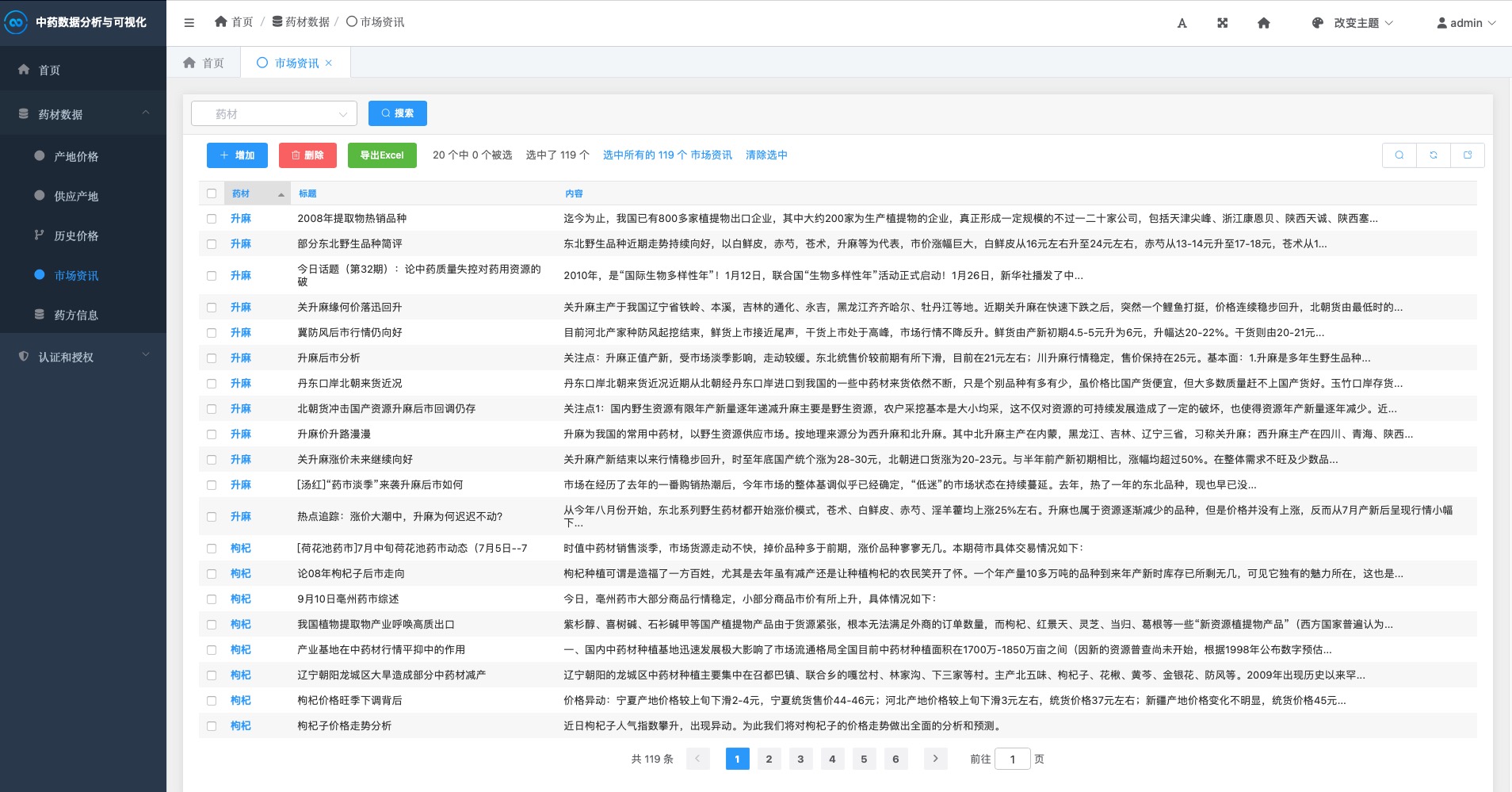
基于Djiango实现中药材数据分析与可视化系统
中药材数据分析与可视化系统 项目截图 登录 注册 首页 药材Top20 药材价格 产地占比 历史价格 新闻资讯 后台管理 一、项目概述 中药材数据分析与可视化系统是一个基于Django框架开发的专业Web应用,致力于对各类中药材数据进行全面、系统的采集、分析和可视化展示…...
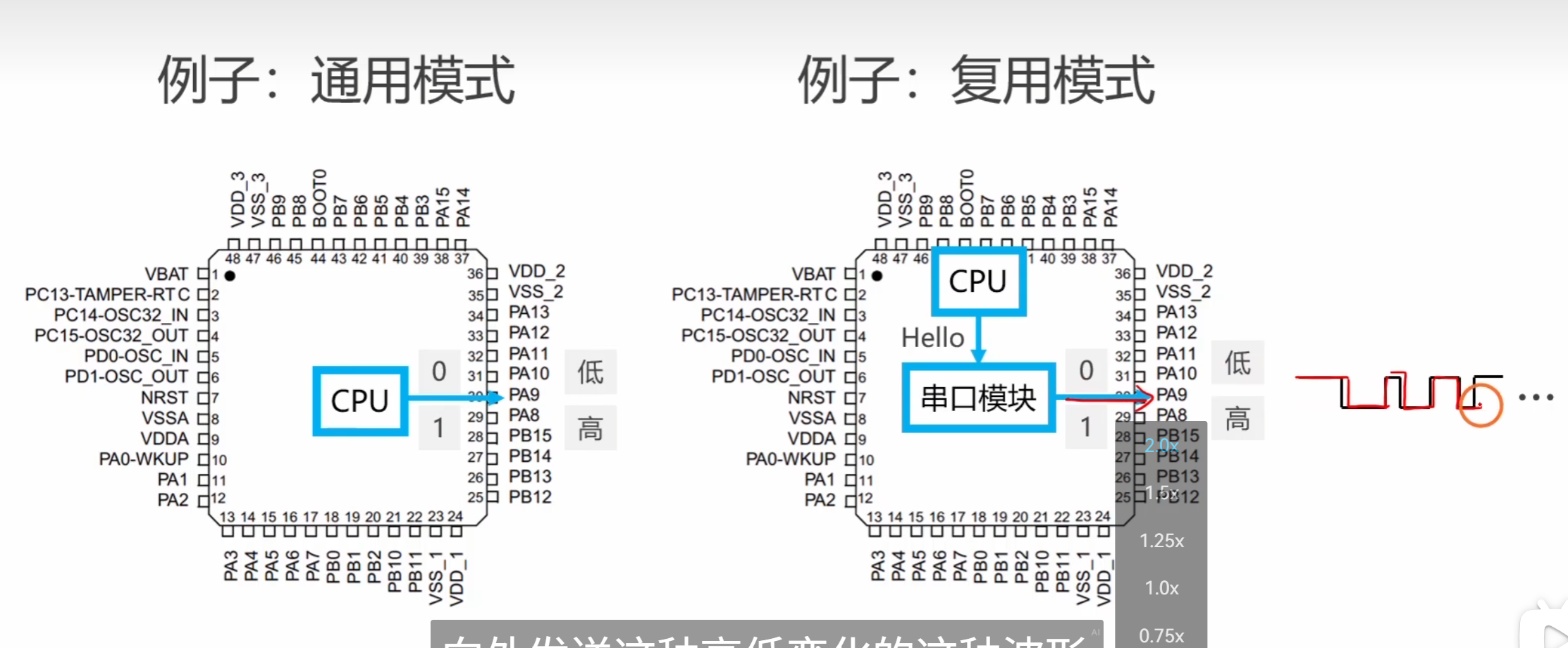
stm32(gpio的四种输出)
其实GPIO这个片上外设的功能: 用于控制IO引脚。 CPU就如同大脑,而这些片上外设就如同四肢一样的关系 如图 —————————————————————————————— OK类比了以上 其实GPIO是有 八种工作模式的 这八种工作模式 因为GPIO是面向IO…...
案例分析与简答题、详细解析与评分要点)
系统架构设计师:计算机组成与体系结构(如CPU、存储系统、I/O系统)案例分析与简答题、详细解析与评分要点
计算机组成与体系结构 10道案例分析与简答题 案例分析题(5道) 1. Cache映射与主存编址计算 场景:某计算机系统采用32位地址总线,主存容量为4GB,Cache容量为512KB,块大小为64B,使用4路组相联映射…...
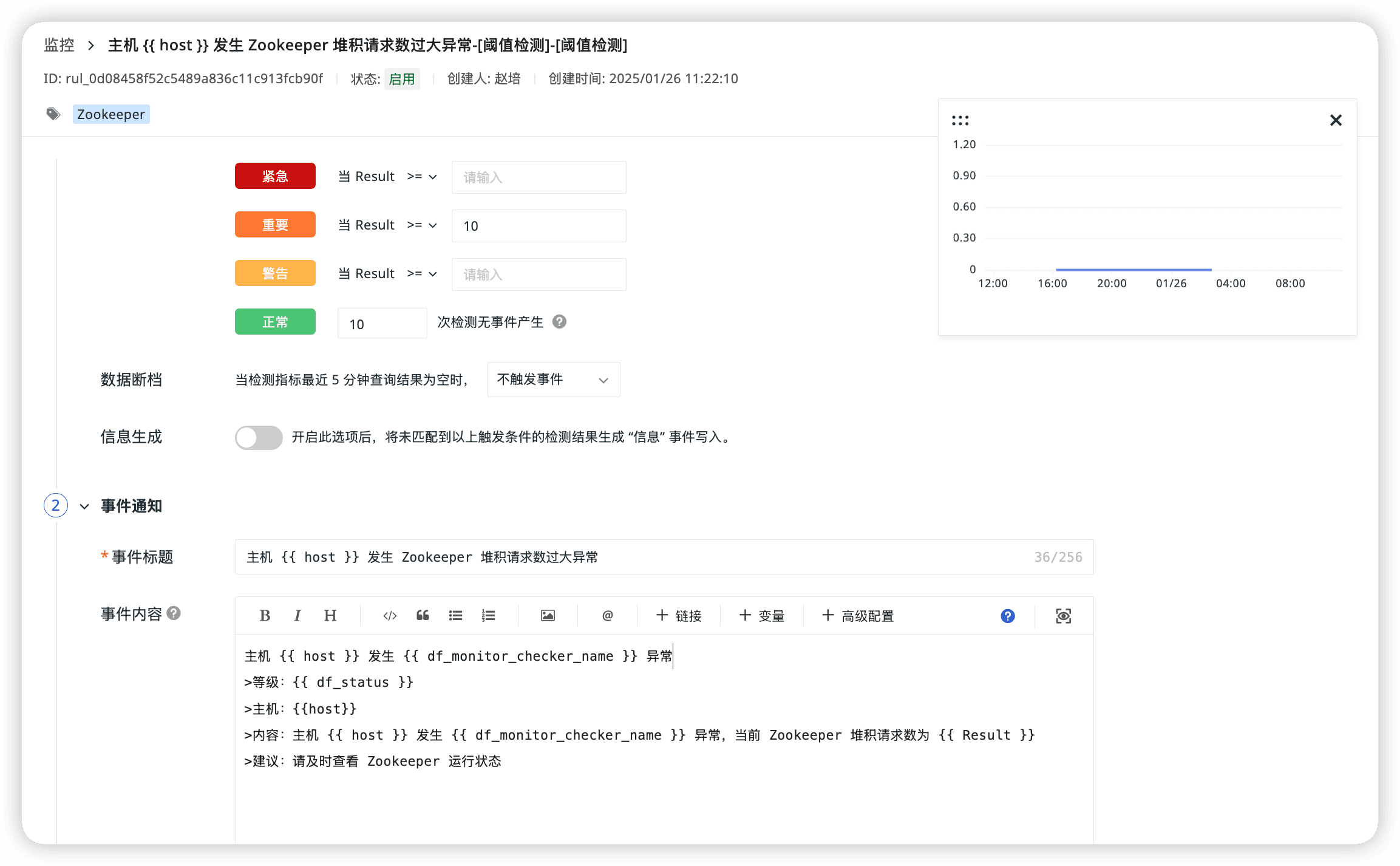
Zookeeper 可观测性最佳实践
Zookeeper 介绍 ZooKeeper 是一个开源的分布式协调服务,用于管理和协调分布式系统中的节点。它提供了一种高效、可靠的方式来解决分布式系统中的常见问题,如数据同步、配置管理、命名服务和集群管理等。本文介绍通过 DataKit 采集 Zookeeper 指标&#…...

位运算---总结
位运算 基础 1. & 运算符 : 有 0 就是 0 2. | 运算符 : 有 1 就是 1 3. ^ 运算符 : 相同为0 相异为1 and 无进位相加位运算的优选级 不用在意优先级,能加括号就加括号给一个数 n ,确定它的二进制位中第 x 位是 0 还是 1? 规定: 题中所说的第x位指:int 在32位机器下4个…...

2. 什么是最普通的自动化“裸奔状态”?
什么是最普通的自动化"裸奔状态"?从大厂案例看测试代码的生存困境 一个典型的"裸奔代码"示例 # 打开目标网站 driver.get(http://test-site.com/login-page)# 登录操作 driver.find_element_by_id(user).send_keys(tester) driver.find_eleme…...
)
头歌java课程实验(函数式接口及lambda表达式)
第1关:利用lambda表达式对Book数组按多个字段进行排序 任务描述 本关任务:利用Comparator接口完成对Book数组同时按多个字段进行排序。 编程要求 1、本任务共有三个文件,可查看各文件的内容 2、无需修改SortBy.java枚举文件及Book.java类文…...
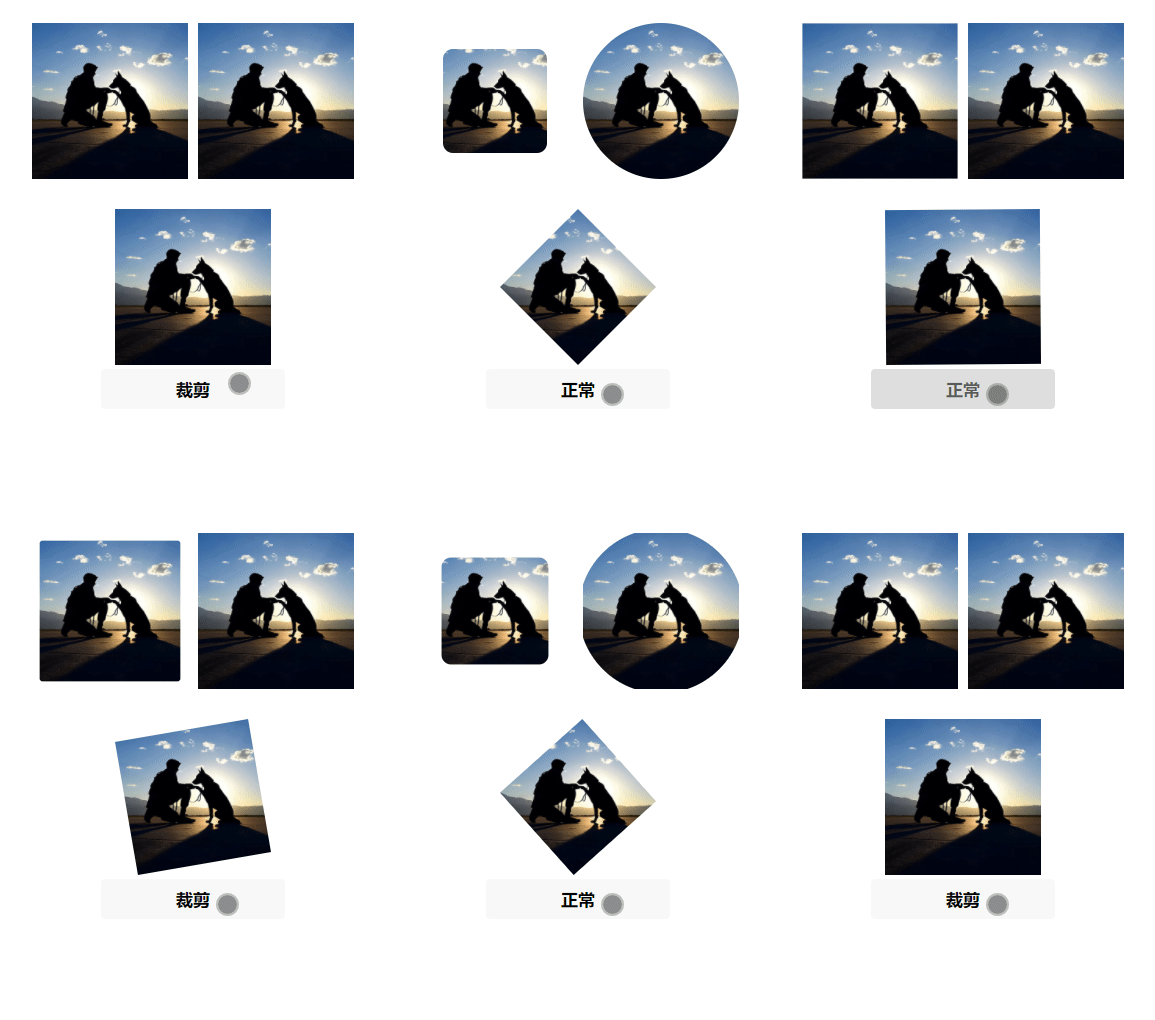
微信小程序三种裁剪动画有效果图
效果图 .wxml <image class"img inset {{status?action1:}}" src"{{src}}" /> <image class"img circle {{status?action2:}}" src"{{src}}" /> <image class"img polygon {{status?action3:}}" src&quo…...
C语言笔记(鹏哥)上课板书+课件汇总(结构体)-----数据结构常用
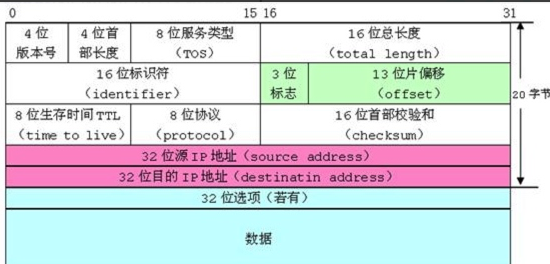
结构体 目录: 1、结构体类型声明 2、结构体变量的创建和初始化 3、结构体成员访问操作符 4、结构体内存对齐*****(重要指数五颗星) 5、结构体传参 6、结构体实现位段 一、结构体类型声明 其实在指针中我们已经讲解了一些结构体内容了&…...
git清理--解决.git文件过大问题
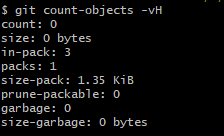
背景:为什么.git比我仓库中的文件大很多 为什么我的git中只有一个1KB的README,但是.git却又1G多?当我想把这个git库push到gitee时,还会报错: 根据报错信息,可看出失败的原因是:有文件的大小超过…...

Jetson Orin NX 部署YOLOv12笔记
步骤一.创建虚拟环境 conda create -n yolov12 python3.8.20 注意:YOLOv12/YOLOv11/YOLOv10/YOLOv9/YOLOv8/YOLOv7a/YOLOv5 环境通用 步骤二.激活虚拟环境 conda activate yolov12 #激活环境 步骤三.查询Jetpack出厂版本 Jetson系列平台各型号支持的最高Jetp…...
微服务2--服务治理与服务调用
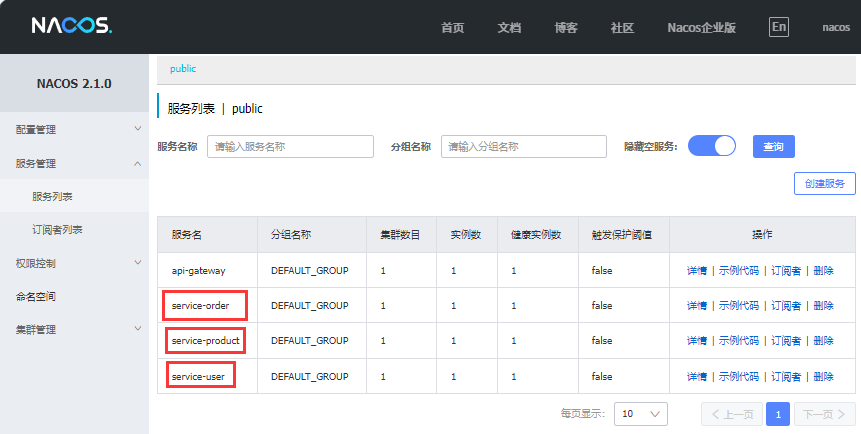
前言 :本文主要阐述微服务架构中的服务治理,以及Nacos环境搭建、服务注册、服务调用,负载均衡以及Feign实现服务调用。 服务治理 服务治理是微服务架构中最核心最基本的模块。用于实现各个微服务的自动化注册与发现。 服务注册:在…...

Arduino示例代码讲解:Project 08 - Digital Hourglass 数字沙漏
Arduino示例代码讲解:Project 08 - Digital Hourglass 数字沙漏 Project 08 - Digital Hourglass 数字沙漏程序功能概述功能:硬件要求:输出:代码结构全局变量`setup()` 函数`loop()` 函数计时和点亮LED:读取倾斜开关状态:重置LED和计时器:运行过程注意事项Project 08 - …...

python生成项目依赖文件requirements.txt
文章目录 通过pip freeze去生成通过pipreqs去生成 通过pip freeze去生成 pip freeze > requirements.txt会将整个python的Interceptor的环境下lib包下所有的依赖都生成到这个文件当中,取决于我们使用的python的版本下所有的安装包。不建议使用这种方式ÿ…...
C语言之高校学生信息快速查询系统的实现
🌟 嗨,我是LucianaiB! 🌍 总有人间一两风,填我十万八千梦。 🚀 路漫漫其修远兮,吾将上下而求索。 C语言之高校学生信息快速查询系统的实现 目录 任务陈述与分析 问题陈述问题分析 数据结构设…...
:打破创业幻想,拥抱数据驱动)
精益数据分析(7/126):打破创业幻想,拥抱数据驱动
精益数据分析(7/126):打破创业幻想,拥抱数据驱动 在创业的道路上,我们都怀揣着梦想,但往往容易陷入自我编织的幻想中。我希望通过和大家一起学习《精益数据分析》,能帮助我们更清醒地认识创业过…...
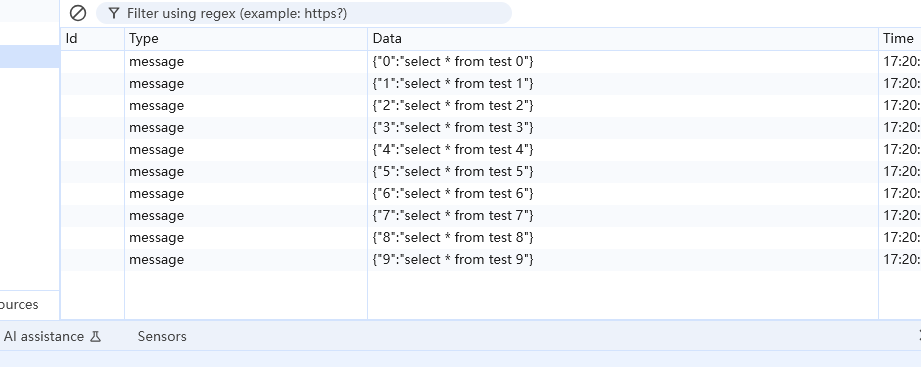
Spring Boot 项目中发布流式接口支持实时数据向客户端推送
1、pom依赖添加 <dependency><groupId>org.springframework.boot</groupId><artifactId>spring-boot-starter-webflux</artifactId></dependency>2、事例代码 package com.pojo.prj.controller;import com.pojo.common.core.utils.String…...

Ubuntu安装MySQL步骤及注意事项
一、安装前准备 1. 系统更新:在安装 MySQL 之前,确保你的 Ubuntu 系统软件包是最新的,这能避免因软件包版本问题导致的安装错误,并获取最新的安全补丁。打开终端,执行以下两条命令: sudo apt update sudo …...

【网络篇】从零写UDP客户端/服务器:回显程序源码解析
大家好呀 我是浪前 今天讲解的是网络篇的第四章:从零写UDP客户端/服务器:回显程序源码解析 从零写UDP客户端/服务器:回显程序源码解析 UDP 协议特性核心类介绍 UDP的socket应该如何使用:1: DatagramSocket2: DatagramPacket回…...
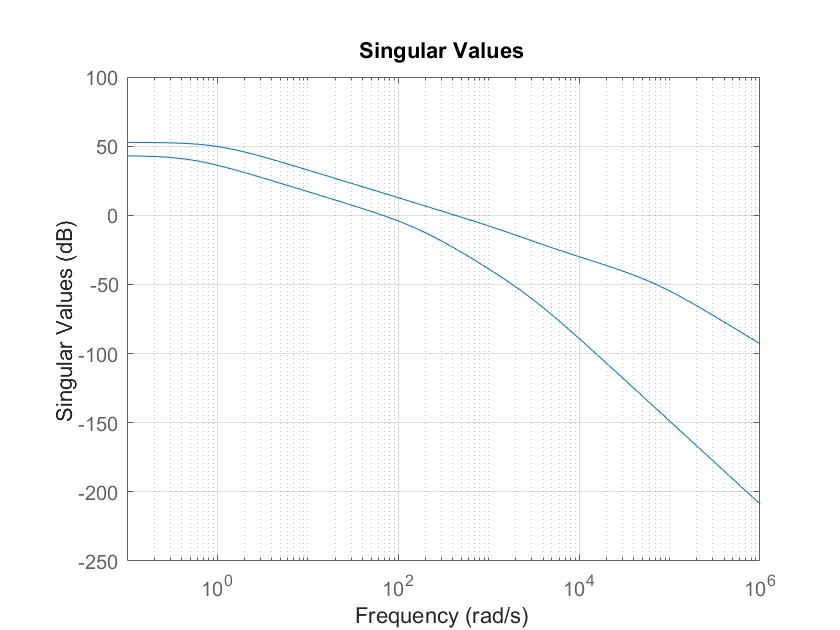
MATLAB 控制系统设计与仿真 - 38
多变量系统控制器设计实例1 考虑如下给出的多变量系统模型: 考虑混合灵敏度问题,引入加权矩阵: 设计鲁棒控制器,并绘制闭环系统的阶跃响应曲线及开环系统的奇异值曲线。 MATLAB代码如下: clear all;clc; stf(s); g1…...

轻量化高精度的视频语义分割
Video semantic segmentation (VSS)视频语义分割 Compact Models(紧凑模型) 在深度学习中,相对于传统模型具有更小尺寸和更少参数数量的模型。这些模型的设计旨在在保持合理性能的同时,减少模型的计算和存储成本。 紧凑模型的设计可以涉及以下一些技术: 深度剪枝(Deep…...

Spring Boot 版本与对应 JDK 版本兼容性
Spring Boot 版本与对应 JDK 版本兼容性 以下是 Spring Boot 主要版本与所需 JDK 版本的对应关系,以及长期支持(LTS)信息: 最新版本对应关系 (截至2024年) Spring Boot 版本发布日期支持的 JDK 版本备注3.2.x (最新)2023-11JDK 17-21推荐使用 JDK 173…...