
mybatis实现增删改查1
文章目录
- 19.MyBatis
- 查询单行数据
- `@MapperScan`
- 结果映射
- 配置核心文件
- @Results自定义映射到实体的关系
- 多行数据查询-完整过程
- 插入数据
- 配置mybatis 控制台日志
- 更新数据
- 删除数据
- 小结
- 通过id复用结果映射模板
- xml处理结果映射
19.MyBatis
数据库访问 MyBatis,MyBatis-Plus 国内很常用,掌握了 MyBatis,MyBatis-Plus 就会了大部分了。MyBatis-Plus
附加的功能需要单独学习。我们以 MyBatis 来自介绍 Spring Boot 集成 ORM 框架。
MyBatis 使用最多的是 mapper xml 文件编写 SQL 语句。本章使用 MyBatis 的注解,JDK 新特性文本块,以
及 Record 完成 java 对象和表数据的处理。
单表CRUD
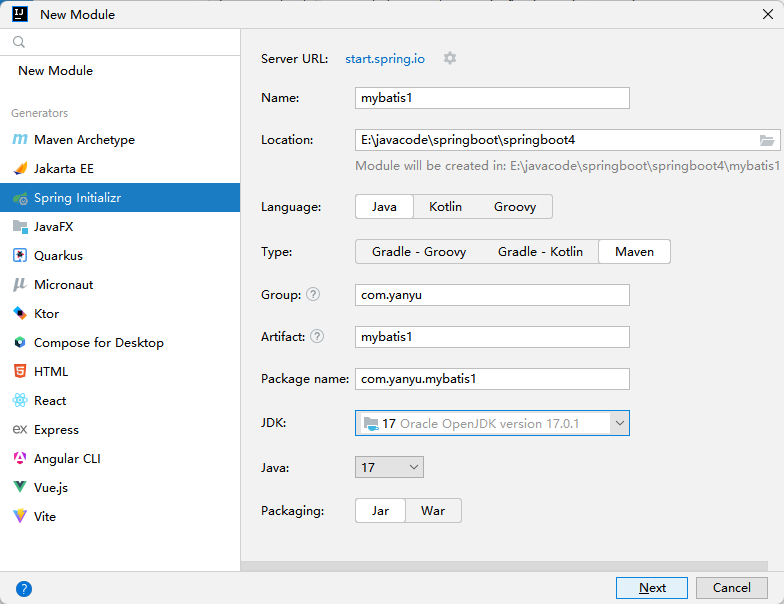
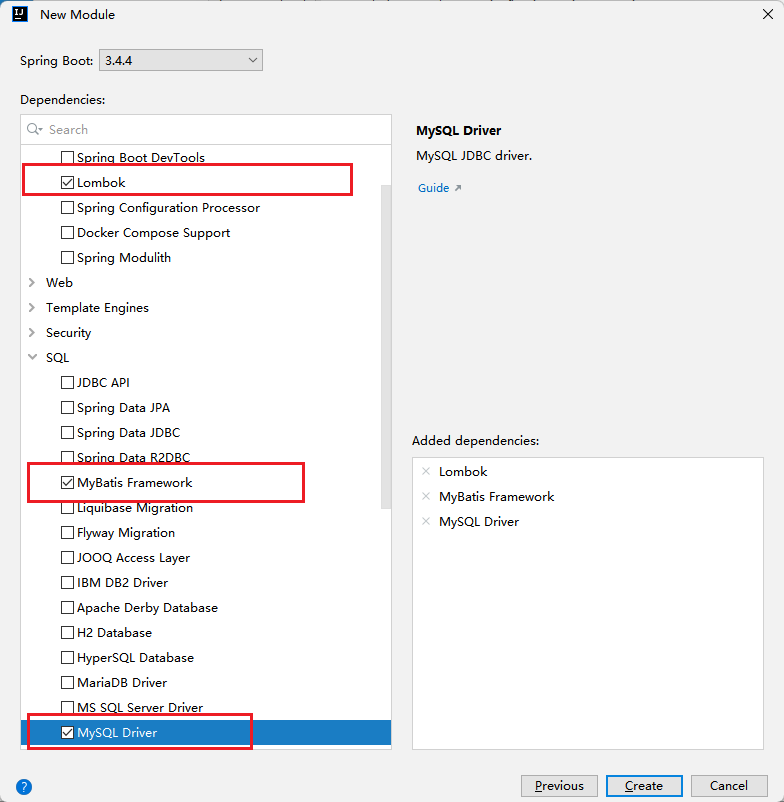
首先向 blog 数据库的 article 表添加新的文章,以及修改,查询文章。在新工程 Lession10-MyBatis 集成 MyBatis 框架。依赖需要 mysql 驱动、mybatis 依赖,Lombok。
创建工程
添加依赖
查询单行数据
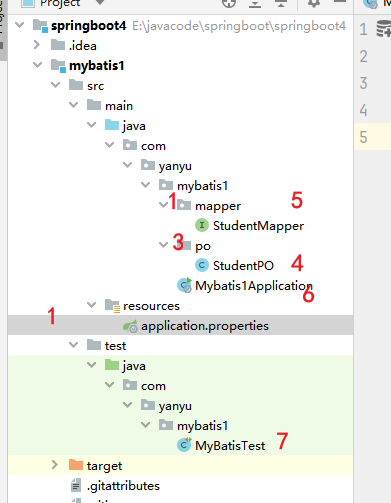
application.yml
#HikariCP 是一个高性能的 Java 数据库连接池,也是 Spring Boot 的默认数据源实现。
spring.datasource.type=com.zaxxer.hikari.HikariDataSource
#配置数据库的基本属性
spring.datasource.driver-class-name=com.mysql.cj.jdbc.Driver
spring.datasource.url=jdbc:mysql://localhost:3306/school?serverTimezone=Asia/Shanghai&useUnicode=true&characterEncoding=utf8&autoReconnect=true&useSSL=false
spring.datasource.username=root
spring.datasource.password=yanyu666
数据实体
package com.yanyu.mybatis1.po;import lombok.Data;/*** @Author yanyu666_508200729@qq.com* @Date 2025/4/2 22:24* @description:*/
@Data
//  表的字段名字 与实例变量一致,才能映射,或者单独配置,使其支持 驼峰
public class StudentPO {private Integer id;private String name;private String stuid;private String major;}
@MapperScan
@MapperScan 是 MyBatis 和 MyBatis-Spring 提供的一个注解,用于指定 MyBatis 的 Mapper 接口所在的包路径,从而让 Spring 容器能够自动扫描并注册这些 Mapper 接口为 Bean。它通常用于简化 MyBatis 的配置过程。
作用
- 自动扫描 Mapper 接口:
@MapperScan注解可以指定一个或多个包路径,Spring 容器会自动扫描这些包路径下的所有接口,并将这些接口注册为 Spring 的 Bean。 - 简化配置:在传统的 MyBatis 配置中,通常需要手动在 Spring 配置文件中声明每个 Mapper 接口的 Bean。使用
@MapperScan后,可以通过注解的方式自动完成这些操作,减少了配置的工作量。
使用方法
@MapperScan 注解通常放在 Spring 的配置类(如 @Configuration 类)或 Spring Boot 的主应用类(如 @SpringBootApplication 类)上。它可以通过以下方式使用:
单个包路径
java复制
@MapperScan("com.yanyu.mybatis1.mapper")
public class MyApplication {
}
在上面的代码中,@MapperScan 指定了一个包路径 com.yanyu.mybatis1.mapper,Spring 容器会扫描该包路径下的所有接口,并将这些接口注册为 Spring 的 Bean。
启动类:指定扫描的接口
package com.yanyu.mybatis1;import org.mybatis.spring.annotation.MapperScan;
import org.springframework.boot.SpringApplication;
import org.springframework.boot.autoconfigure.SpringBootApplication;@SpringBootApplication
@MapperScan("com.yanyu.mybatis1.mapper")
public class Mybatis1Application {public static void main(String[] args) {SpringApplication.run(Mybatis1Application.class, args);}}
查询接口
package com.yanyu.mybatis1.mapper;import com.yanyu.mybatis1.po.StudentPO;
import org.apache.ibatis.annotations.Param;import org.apache.ibatis.annotations.Select;/*** @Author yanyu666_508200729@qq.com* @Date 2025/4/2 22:30* @description:*/
//@MapperScan("com.yanyu.mybatis1.mapper")  会自动扫面改接口的资源,并注册到容器
public interface StudentMapper {
//      按主键查询@Select("""select id,name,stuid,majorfrom student where id = #{studentId}""")
//        查询StudentPO selectById(@Param("studentId") Integer id);}
单元测试
package com.yanyu.mybatis1;import com.yanyu.mybatis1.mapper.StudentMapper;
import com.yanyu.mybatis1.po.StudentPO;
import org.junit.jupiter.api.Test;
import org.springframework.beans.factory.annotation.Autowired;
import org.springframework.boot.test.context.SpringBootTest;/*** @Author yanyu666_508200729@qq.com* @Date 2025/4/2 22:57* @description:*/
@SpringBootTest
public class MyBatisTest {@AutowiredStudentMapper studentMapper;@Testvoid test1(){StudentPO studentPO = studentMapper.selectById(1);System.out.println(studentPO);}}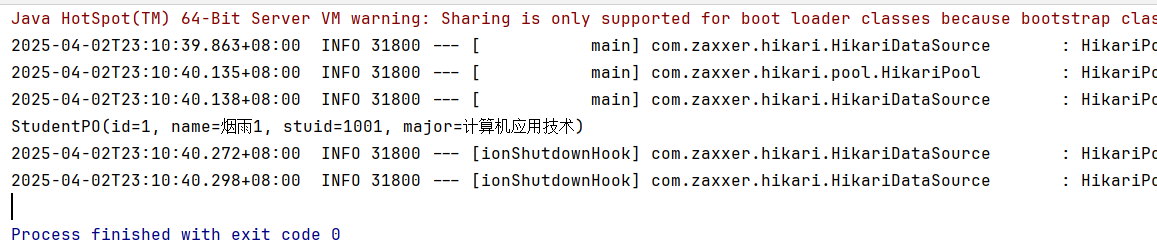
结果映射
配置核心文件
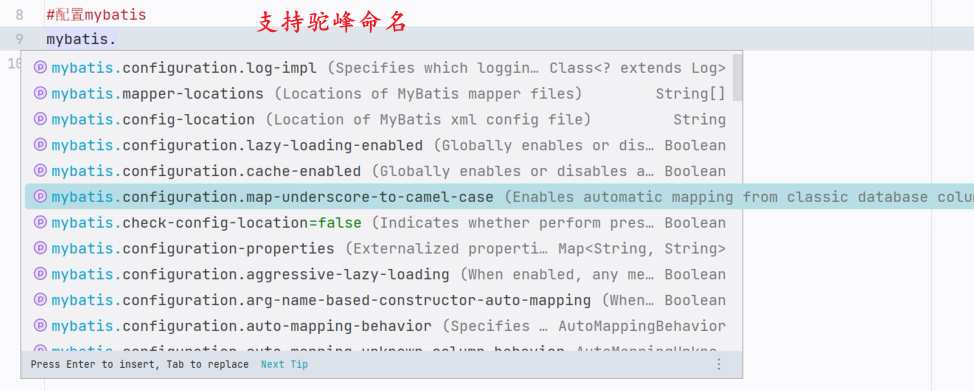
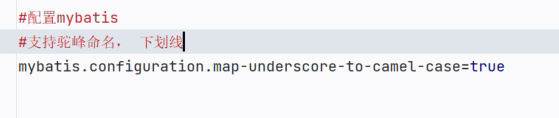
字段名                实体实例变量名
name                   name
user_name              userName
@Results自定义映射到实体的关系
package com.yanyu.mybatis1.mapper;import com.yanyu.mybatis1.po.StudentPO;
import org.apache.ibatis.annotations.Param;import org.apache.ibatis.annotations.Result;
import org.apache.ibatis.annotations.Results;
import org.apache.ibatis.annotations.Select;/*** @Author yanyu666_508200729@qq.com* @Date 2025/4/2 22:30* @description:*/
//@MapperScan("com.yanyu.mybatis1.mapper")  会自动扫面改接口的资源,并注册到容器
public interface StudentMapper {
//      按主键查询@Select("""select id,name,stuid,majorfrom student where id = #{studentId}""")
//        自定义查询结果映射关系@Results(id = "zidingyi",value = {@Result(id = true,column = "id",property = "id"),
//                id = true 说明字段id 是主键                 与实体一致@Result(column = "name",property = "name"),@Result(column = "stuid",property = "stuid"),@Result(column = "major",property = "major")
//                可以根据实体的名字,进行自定义,来处理字段名与实体不一致问题})StudentPO selectById(@Param("studentId") Integer id);}
多行数据查询-完整过程
- 以集合进行处理
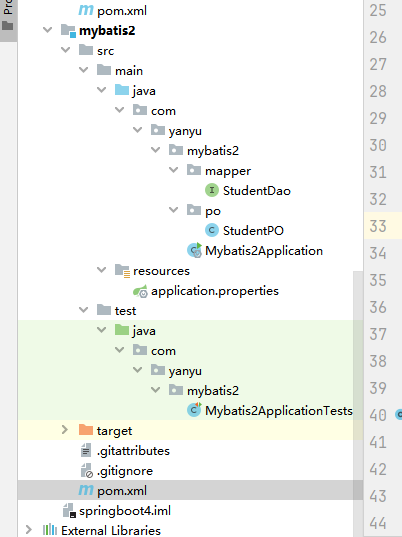
<?xml version="1.0" encoding="UTF-8"?>
<project xmlns="http://maven.apache.org/POM/4.0.0" xmlns:xsi="http://www.w3.org/2001/XMLSchema-instance"xsi:schemaLocation="http://maven.apache.org/POM/4.0.0 https://maven.apache.org/xsd/maven-4.0.0.xsd"><modelVersion>4.0.0</modelVersion><parent><groupId>org.springframework.boot</groupId><artifactId>spring-boot-starter-parent</artifactId><version>3.4.4</version><relativePath/> <!-- lookup parent from repository --></parent><groupId>com.yanyu</groupId><artifactId>mybatis2</artifactId><version>0.0.1-SNAPSHOT</version><name>mybatis2</name><description>mybatis2</description><url/><licenses><license/></licenses><developers><developer/></developers><scm><connection/><developerConnection/><tag/><url/></scm><properties><java.version>17</java.version></properties><dependencies>
<!--        mybatis 添加--><dependency><groupId>org.mybatis.spring.boot</groupId><artifactId>mybatis-spring-boot-starter</artifactId><version>3.0.4</version></dependency>
<!--MySQL  驱动--><dependency><groupId>com.mysql</groupId><artifactId>mysql-connector-j</artifactId><scope>runtime</scope></dependency>
<!-- 添加Lombok--><dependency><groupId>org.projectlombok</groupId><artifactId>lombok</artifactId><optional>true</optional></dependency><dependency><groupId>org.springframework.boot</groupId><artifactId>spring-boot-starter-test</artifactId><scope>test</scope></dependency><dependency><groupId>org.mybatis.spring.boot</groupId><artifactId>mybatis-spring-boot-starter-test</artifactId><version>3.0.4</version><scope>test</scope></dependency></dependencies><build><plugins><plugin><groupId>org.apache.maven.plugins</groupId><artifactId>maven-compiler-plugin</artifactId><configuration><annotationProcessorPaths><path><groupId>org.projectlombok</groupId><artifactId>lombok</artifactId></path></annotationProcessorPaths></configuration></plugin><plugin><groupId>org.springframework.boot</groupId><artifactId>spring-boot-maven-plugin</artifactId><configuration><excludes><exclude><groupId>org.projectlombok</groupId><artifactId>lombok</artifactId></exclude></excludes></configuration></plugin></plugins></build></project>- 利用 lombok 编写数据映射实体类
spring.application.name=mybatis2
spring.datasource.type=com.zaxxer.hikari.HikariDataSource
spring.datasource.driver-class-name=com.mysql.cj.jdbc.Driver
spring.datasource.url=jdbc:mysql://127.0.0.1:3306/school
spring.datasource.username=root
spring.datasource.password=yanyu666#配置日志
mybatis.configuration.log-impl=org.apache.ibatis.logging.stdout.StdOutImpl
#开启驼峰
mybatis.configuration.map-underscore-to-camel-case=true# 指定扫描的  xml  目录
mybatis.mapper-locations=classpath:/mappers/**/*.xml
#mappers 下面的任意目录  的  任意  xml
package com.yanyu.mybatis2.po;import lombok.Data;/*** @Author yanyu666_508200729@qq.com* @Date 2025/4/5 22:05* @description:*/
@Data
public class StudentPO {private Integer id;private String name;private String stuid;private String major;}- 设计数据操作接口
package com.yanyu.mybatis2.mapper;import com.yanyu.mybatis2.po.StudentPO;
import org.apache.ibatis.annotations.Result;
import org.apache.ibatis.annotations.Results;
import org.apache.ibatis.annotations.Select;import java.util.List;/*** @Author yanyu666_508200729@qq.com* @Date 2025/4/5 22:03* @description:*/
public interface StudentDao {
// 查询所有的学生信息,返回的,应该是 list@Select("""select * from student""")@Results(id = "student" ,value ={@Result(id = true,column = "id",property = "id"),@Result(column = "name",property = "name"),@Result(column = "stuid",property = "stuid"),@Result(column = "major",property = "major")})List<StudentPO> selectAll();// 所有的结果依次映射为一个集合}- 设定扫描路径,保证接口注入IOC
package com.yanyu.mybatis2;import org.mybatis.spring.annotation.MapperScan;
import org.springframework.boot.SpringApplication;
import org.springframework.boot.autoconfigure.SpringBootApplication;@SpringBootApplication
@MapperScan("com.yanyu.mybatis2.mapper")
public class Mybatis2Application {public static void main(String[] args) {SpringApplication.run(Mybatis2Application.class, args);}}- 单元测试
package com.yanyu.mybatis2;import com.yanyu.mybatis2.mapper.StudentDao;
import com.yanyu.mybatis2.po.StudentPO;
import org.junit.jupiter.api.Test;
import org.springframework.beans.factory.annotation.Autowired;
import org.springframework.boot.test.context.SpringBootTest;import java.util.List;@SpringBootTest
class Mybatis2ApplicationTests {@Testvoid contextLoads() {}@AutowiredStudentDao studentDao;@Testvoid test1(){List<StudentPO> studentPOS = studentDao.selectAll();System.out.println(studentPOS);}}- 结果
[StudentPO(id=1, name=烟雨1, stuid=1001, major=计算机应用技术), StudentPO(id=3, name=烟雨3, stuid=1003, major=计算机应用技术), StudentPO(id=4, name=烟雨2, stuid=1002, major=计算机应用技术), StudentPO(id=5, name=烟雨4, stuid=1004, major=计算机应用技术)]
2025-04-05T22:18:20.704+08:00  INFO 32372 --- [mybatis2] [ionShutdownHook] com.zaxxer.hikari.HikariDataSource       : HikariPool-1 - Shutdown initiated...
2025-04-05T22:18:20.758+08:00  INFO 32372 --- [mybatis2] [ionShutdownHook] com.zaxxer.hikari.HikariDataSource       : HikariPool-1 - Shutdown completed.Process finished with exit code 0
插入数据
配置mybatis 控制台日志
mybatis.configuration.log-impl=org.apache.ibatis.logging.stdout.StdOutImpl 是 MyBatis 配置中用于指定日志实现的属性。它用于控制 MyBatis 的日志输出方式,通常用于开发阶段,方便开发者查看 SQL 执行的详细信息。
作用
- 日志实现:
log-impl属性用于指定 MyBatis 使用的日志实现类。MyBatis 支持多种日志框架,通过设置该属性,可以指定使用特定的日志实现。 - 调试用途:在开发阶段,将日志输出到控制台(
StdOutImpl)可以帮助开发者快速查看 SQL 执行情况、参数传递、查询结果等信息,从而方便调试和优化代码。
常见的日志实现
MyBatis 提供了多种日志实现,可以通过 log-impl 属性指定。以下是一些常见的日志实现类:
-
org.apache.ibatis.logging.stdout.StdOutImpl-
将日志输出到控制台(标准输出流)。这是最常用的日志实现,适用于开发阶段。
-
示例配置:
properties复制
mybatis.configuration.log-impl=org.apache.ibatis.logging.stdout.StdOutImpl
#配置控制台日志
mybatis.configuration.log-impl=org.apache.ibatis.logging.stdout.StdOutImpl
#开启驼峰与  _
mybatis.configuration.map-underscore-to-camel-case=true
接口定义
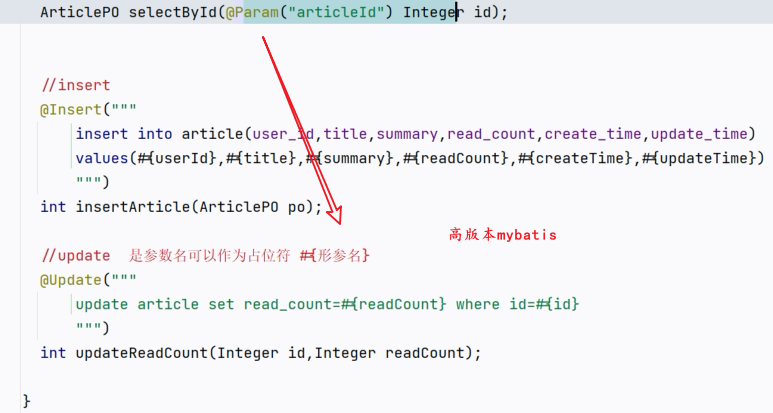
-
StudentPO selectById(@Param("studentId") Integer id);
//        添加数据  开启了主键自增,就不需要再写主键@Insert("""insert into student(name,stuid,major)values (#{name},#{stuid},#{major})""")int insertStudent(StudentPO studentPO);//  执行后返回结果
/*  insert into student(name,stuid,major)  对应  表的字段名字values (#={name},#={stuid},#={major})  对应实体的实例变量名字* */
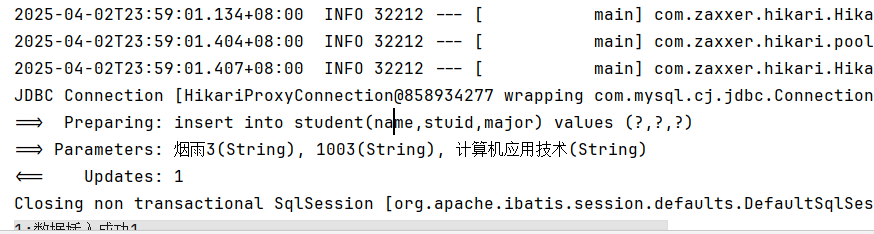
@AutowiredStudentMapper studentMapper;@Testvoid test2(){StudentPO studentPO = new StudentPO();studentPO.setName("烟雨3");studentPO.setStuid("1003");studentPO.setMajor("计算机应用技术");int i = studentMapper.insertStudent(studentPO);System.out.println("1:数据插入成功" + i);}
日志:
更新数据
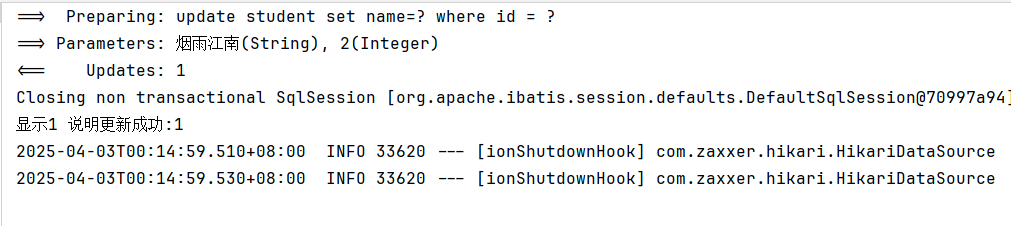
@Update("""update student set name=#{name} where id = #{id}""")int updateStudentName(Integer id,String name);
@AutowiredStudentMapper studentMapper;
@Testvoid test3(){int i = studentMapper.updateStudentName(2, "烟雨江南");System.out.println("显示1 说明更新成功:" + i);}
删除数据
//删除@Delete("""delete from student where name=#{name}""")int deleteStudent(String name);
 @AutowiredStudentMapper studentMapper;
@Testvoid test4(){int i = studentMapper.deleteStudent( "烟雨江南");System.out.println("显示1 说明更新成功:" + i);}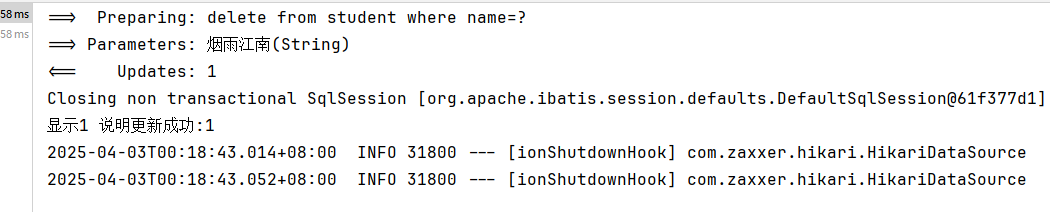
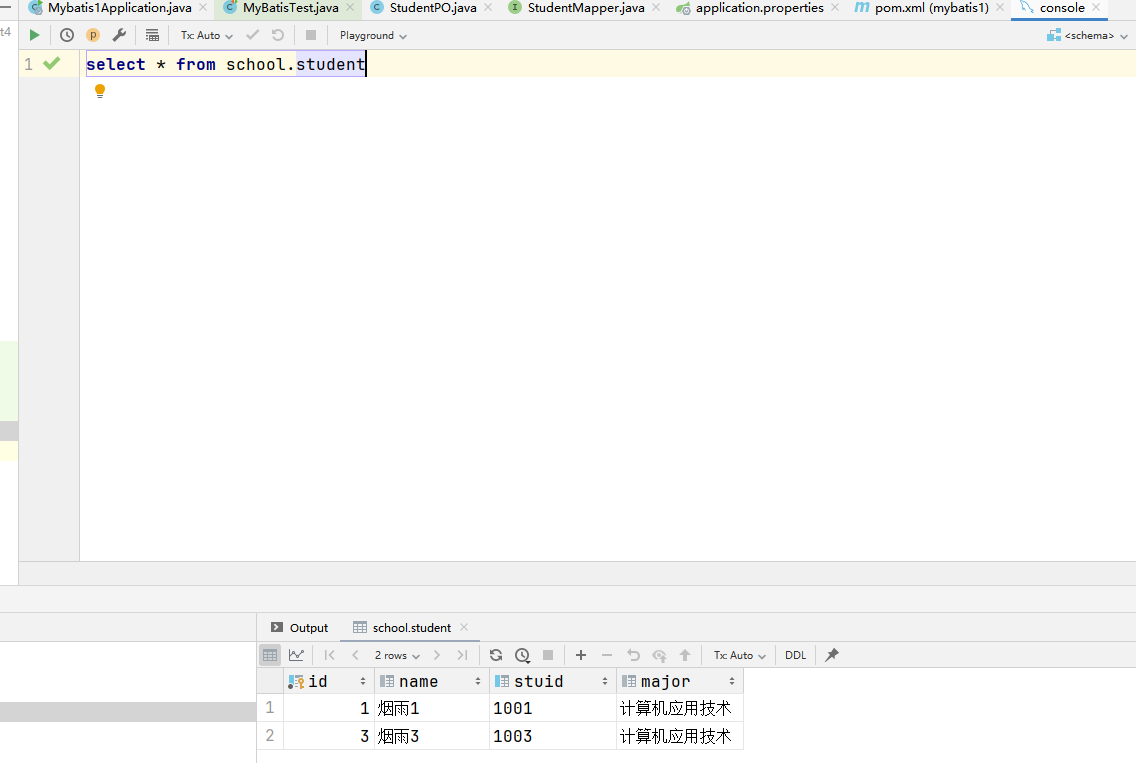
小结
MyBatis注解开发
1.加入mybatis的starter , mysql驱动(8.0.32)
2.创建实体类 XXXPO , XXXEntity , XXXDomain
3.创建Mapper接口, 在接口中定义方法, 在方法的上面使用合适的注解
@Select:查询 ,使用@Results和@Result做结果映射。
@Insert:新增
@Update:更新
@Delete:删除
4.在启动上面,加入@MapperScan
@MapperScan(basePackages = “com.yanyu.mybatis.mapper”)
5.application.properties
1)定义数据库连接
2)mybatis设置
日志
驼峰命名支持
通过id复用结果映射模板
- 以集合进行处理
<?xml version="1.0" encoding="UTF-8"?>
<project xmlns="http://maven.apache.org/POM/4.0.0" xmlns:xsi="http://www.w3.org/2001/XMLSchema-instance"xsi:schemaLocation="http://maven.apache.org/POM/4.0.0 https://maven.apache.org/xsd/maven-4.0.0.xsd"><modelVersion>4.0.0</modelVersion><parent><groupId>org.springframework.boot</groupId><artifactId>spring-boot-starter-parent</artifactId><version>3.4.4</version><relativePath/> <!-- lookup parent from repository --></parent><groupId>com.yanyu</groupId><artifactId>mybatis2</artifactId><version>0.0.1-SNAPSHOT</version><name>mybatis2</name><description>mybatis2</description><url/><licenses><license/></licenses><developers><developer/></developers><scm><connection/><developerConnection/><tag/><url/></scm><properties><java.version>17</java.version></properties><dependencies>
<!--        mybatis 添加--><dependency><groupId>org.mybatis.spring.boot</groupId><artifactId>mybatis-spring-boot-starter</artifactId><version>3.0.4</version></dependency>
<!--MySQL  驱动--><dependency><groupId>com.mysql</groupId><artifactId>mysql-connector-j</artifactId><scope>runtime</scope></dependency>
<!-- 添加Lombok--><dependency><groupId>org.projectlombok</groupId><artifactId>lombok</artifactId><optional>true</optional></dependency><dependency><groupId>org.springframework.boot</groupId><artifactId>spring-boot-starter-test</artifactId><scope>test</scope></dependency><dependency><groupId>org.mybatis.spring.boot</groupId><artifactId>mybatis-spring-boot-starter-test</artifactId><version>3.0.4</version><scope>test</scope></dependency></dependencies><build><plugins><plugin><groupId>org.apache.maven.plugins</groupId><artifactId>maven-compiler-plugin</artifactId><configuration><annotationProcessorPaths><path><groupId>org.projectlombok</groupId><artifactId>lombok</artifactId></path></annotationProcessorPaths></configuration></plugin><plugin><groupId>org.springframework.boot</groupId><artifactId>spring-boot-maven-plugin</artifactId><configuration><excludes><exclude><groupId>org.projectlombok</groupId><artifactId>lombok</artifactId></exclude></excludes></configuration></plugin></plugins></build></project>- 利用 lombok 编写数据映射实体类
spring.application.name=mybatis2
spring.datasource.type=com.zaxxer.hikari.HikariDataSource
spring.datasource.driver-class-name=com.mysql.cj.jdbc.Driver
spring.datasource.url=jdbc:mysql://127.0.0.1:3306/school
spring.datasource.username=root
spring.datasource.password=yanyu666#配置日志
mybatis.configuration.log-impl=org.apache.ibatis.logging.stdout.StdOutImpl
#开启驼峰
mybatis.configuration.map-underscore-to-camel-case=true# 指定扫描的  xml  目录
mybatis.mapper-locations=classpath:/mappers/**/*.xml
#mappers 下面的任意目录  的  任意  xml
package com.yanyu.mybatis2.po;import lombok.Data;/*** @Author yanyu666_508200729@qq.com* @Date 2025/4/5 22:05* @description:*/
@Data
public class StudentPO {private Integer id;private String name;private String stuid;private String major;}- 设计数据操作接口
package com.yanyu.mybatis2.mapper;import com.yanyu.mybatis2.po.StudentPO;
import org.apache.ibatis.annotations.Result;
import org.apache.ibatis.annotations.Results;
import org.apache.ibatis.annotations.Select;import java.util.List;/*** @Author yanyu666_508200729@qq.com* @Date 2025/4/5 22:03* @description:*/
public interface StudentDao {
// 查询所有的学生信息,返回的,应该是 list@Select("""select * from student""")@Results(id = "student" ,value ={@Result(id = true,column = "id",property = "id"),@Result(column = "name",property = "name"),@Result(column = "stuid",property = "stuid"),@Result(column = "major",property = "major")})List<StudentPO> selectAll();// 所有的结果依次映射为一个集合}- 设定扫描路径,保证接口注入IOC
package com.yanyu.mybatis2;import org.mybatis.spring.annotation.MapperScan;
import org.springframework.boot.SpringApplication;
import org.springframework.boot.autoconfigure.SpringBootApplication;@SpringBootApplication
@MapperScan("com.yanyu.mybatis2.mapper")
public class Mybatis2Application {public static void main(String[] args) {SpringApplication.run(Mybatis2Application.class, args);}}- 单元测试
package com.yanyu.mybatis2;import com.yanyu.mybatis2.mapper.StudentDao;
import com.yanyu.mybatis2.po.StudentPO;
import org.junit.jupiter.api.Test;
import org.springframework.beans.factory.annotation.Autowired;
import org.springframework.boot.test.context.SpringBootTest;import java.util.List;@SpringBootTest
class Mybatis2ApplicationTests {@Testvoid contextLoads() {}@AutowiredStudentDao studentDao;@Testvoid test1(){List<StudentPO> studentPOS = studentDao.selectAll();System.out.println(studentPOS);}}- 结果
[StudentPO(id=1, name=烟雨1, stuid=1001, major=计算机应用技术), StudentPO(id=3, name=烟雨3, stuid=1003, major=计算机应用技术), StudentPO(id=4, name=烟雨2, stuid=1002, major=计算机应用技术), StudentPO(id=5, name=烟雨4, stuid=1004, major=计算机应用技术)]
2025-04-05T22:18:20.704+08:00  INFO 32372 --- [mybatis2] [ionShutdownHook] com.zaxxer.hikari.HikariDataSource       : HikariPool-1 - Shutdown initiated...
2025-04-05T22:18:20.758+08:00  INFO 32372 --- [mybatis2] [ionShutdownHook] com.zaxxer.hikari.HikariDataSource       : HikariPool-1 - Shutdown completed.Process finished with exit code 0
注解中的映射
1)@Results和@Result
2)@ResultMap 可以直接复用以前定义好的 映射模板
@ResultMap使用方式:
第一种:先通过@Results定义列的映射关系, @ResultMap(value=“@Result的id”)
package com.yanyu.mybatis2.mapper;import com.yanyu.mybatis2.po.StudentPO;
import org.apache.ibatis.annotations.Result;
import org.apache.ibatis.annotations.ResultMap;
import org.apache.ibatis.annotations.Results;
import org.apache.ibatis.annotations.Select;import java.util.IdentityHashMap;
import java.util.List;/*** @Author yanyu666_508200729@qq.com* @Date 2025/4/5 22:03* @description:*/
public interface StudentDao {
//    查询所有的学生信息,返回的,应该是 list@Select("""select * from student""")@Results(id = "student" ,value ={@Result(id = true,column = "id",property = "id"),@Result(column = "name",property = "name"),@Result(column = "stuid",property = "stuid"),@Result(column = "major",property = "major")})List<StudentPO> selectAll();//   所有的结果依次映射为一个集合
//    复用上面的结果映射关系  id@Select("""select * from student where id = #{id}""")@ResultMap("student" )//直接借助  id  使用上面对应的映射关系StudentPO selectById(Integer id);}
xml处理结果映射
在xml中定义<resultMap id="xxx"> ,在代码中使用@ResultMap(value="xml的id")
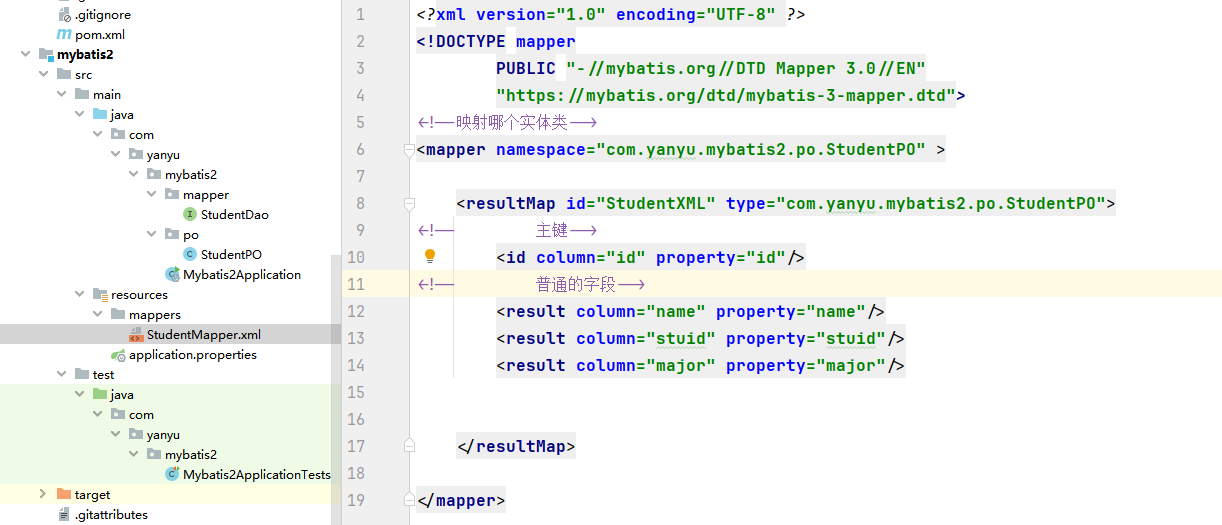
<?xml version="1.0" encoding="UTF-8" ?>
<!DOCTYPE mapperPUBLIC "-//mybatis.org//DTD Mapper 3.0//EN""https://mybatis.org/dtd/mybatis-3-mapper.dtd">
<!--映射哪个接口-->
<mapper namespace="com.yanyu.mybatis2.mapper.StudentDao" >
<!--映射实体类--><resultMap id="StudentXML" type="com.yanyu.mybatis2.po.StudentPO"><!--        主键--><id column="id" property="id"/><!--        普通的字段--><result column="name" property="name"/><result column="stuid" property="stuid"/><result column="major" property="major"/></resultMap></mapper>
spring.application.name=mybatis2
spring.datasource.type=com.zaxxer.hikari.HikariDataSource
spring.datasource.driver-class-name=com.mysql.cj.jdbc.Driver
spring.datasource.url=jdbc:mysql://127.0.0.1:3306/school
spring.datasource.username=root
spring.datasource.password=yanyu666#配置日志
mybatis.configuration.log-impl=org.apache.ibatis.logging.stdout.StdOutImpl
#开启驼峰
mybatis.configuration.map-underscore-to-camel-case=true# 指定扫描的  xml  目录
mybatis.mapper-locations=classpath:/mappers/**/*.xml
#mappers 下面的任意目录  的  任意  xml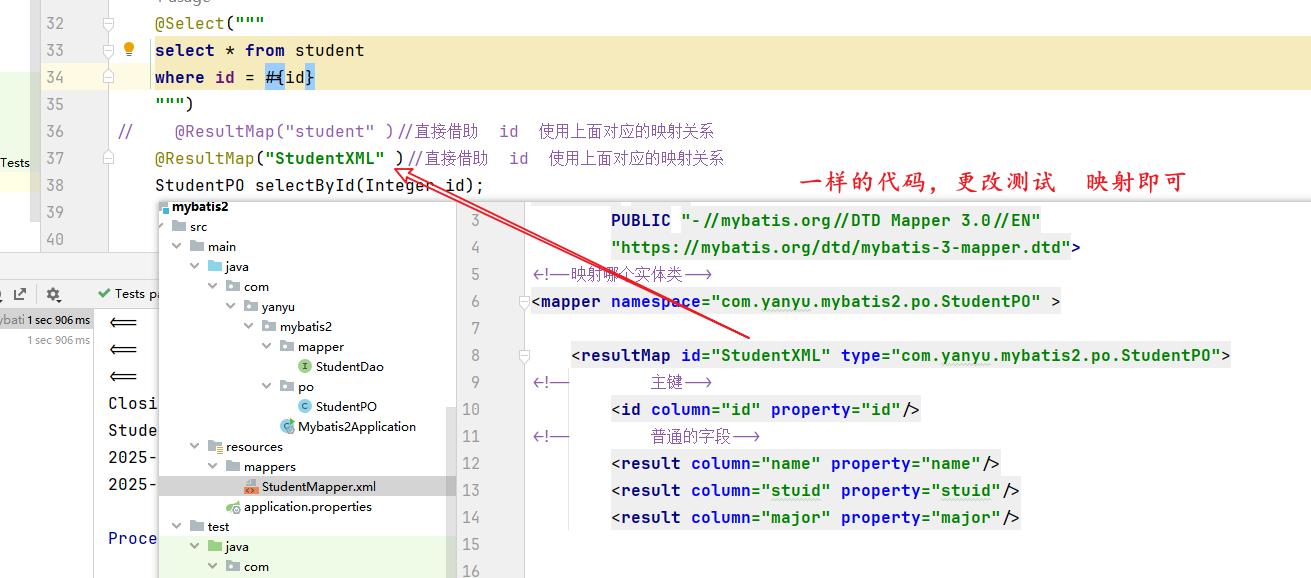
- 修改xml
<?xml version="1.0" encoding="UTF-8" ?>
<!DOCTYPE mapperPUBLIC "-//mybatis.org//DTD Mapper 3.0//EN""https://mybatis.org/dtd/mybatis-3-mapper.dtd">
<!--映射哪个接口-->
<mapper namespace="com.yanyu.mybatis2.mapper.StudentDao" >
<!--映射实体类--><resultMap id="StudentXML" type="com.yanyu.mybatis2.po.StudentPO"><!--        主键--><id column="id" property="id"/><!--        普通的字段--><result column="name" property="name"/><result column="stuid" property="stuid"/><result column="major" property="major"/></resultMap></mapper>
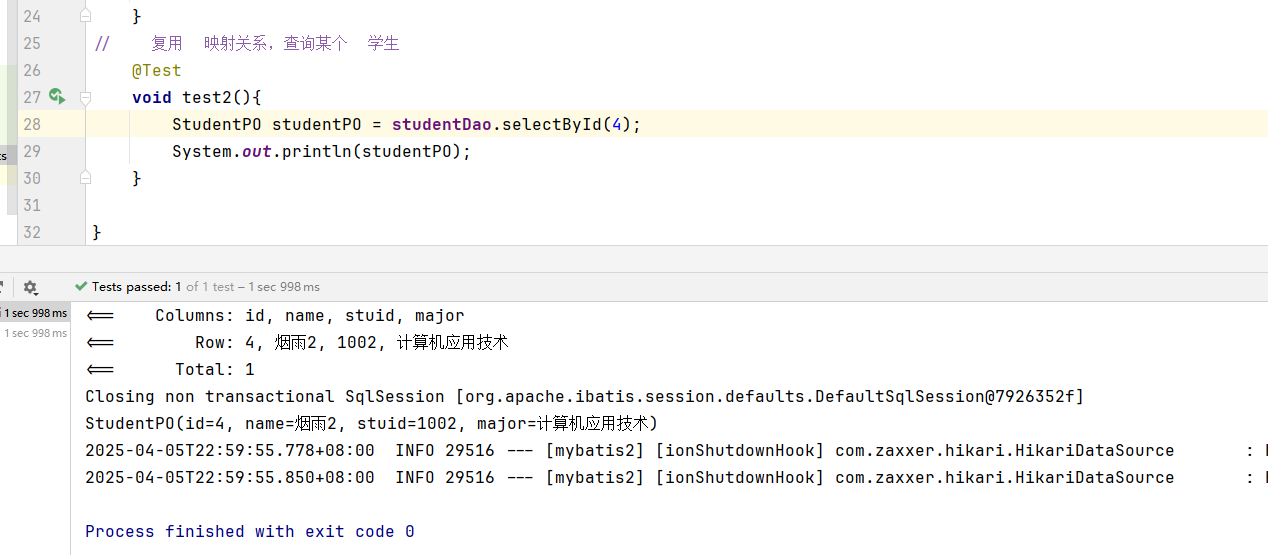
相关文章:
mybatis实现增删改查1
文章目录 19.MyBatis查询单行数据MapperScan 结果映射配置核心文件Results自定义映射到实体的关系 多行数据查询-完整过程插入数据配置mybatis 控制台日志 更新数据删除数据小结通过id复用结果映射模板xml处理结果映射 19.MyBatis 数据库访问 MyBatis,MyBatis-Plus…...
Git,本地上传项目到github
一、Git的安装和下载 https://git-scm.com/ 进入官网,选择合适的版本下载 二、Github仓库创建 点击右上角New新建一个即可 三、本地项目上传 1、进入 要上传的项目目录,右键,选择Git Bash Here,进入终端Git 2、初始化临时仓库…...

基于flask+vue框架的灯饰安装维修系统u49cf(程序+源码+数据库+调试部署+开发环境)带论文文档1万字以上,文末可获取,系统界面在最后面。
系统程序文件列表 项目功能:用户,工单人员,服务项目,订单记录,服务记录,评价记录 开题报告内容 基于 FlaskVue 框架的灯饰安装维修系统开题报告 一、选题背景与意义 (一)选题背景 随着城市化进程的加速与居民生活品质的显著提升…...
【算法】BFS-解决FloodFill问题
目录 FloodFill问题 图像渲染 岛屿数量 岛屿的最大面积 被围绕的区域 FloodFill问题 FloodFill就是洪水灌溉的意思,假设有下面的一块田地,负数代表是凹地,正数代表是凸地,数字的大小表示凹或者凸的程度。现在下一场大雨&…...
GIS开发笔记(10)基于osgearth实现二三维地图的一键指北功能
一、实现效果 二、实现原理 获取视图及地图操作器,通过地图操作器来重新设置视点,以俯仰角 (0.0)和偏航角 (-90.0)来设置。 osgEarth::Util::Viewpoint(…) 这里创建了一个新的 Viewpoint 对象,表示一个特定的视角。构造函数的参数是: 第一个参数:是视角名称。 后面的 6 个…...

Spring Boot日志系统详解:Logback与SLF4J的默认集成
大家好呀!👋 今天我们来聊聊Spring Boot中一个超级重要但又经常被忽视的功能——日志系统! 一、日志系统的重要性 首先,咱们得明白为什么日志这么重要?🤷♂️ 想象一下,你正在玩一个超级复…...
)
【C++】Json-Rpc框架项目介绍(1)
项目介绍 RPC(Remote Procedure Call)即远程过程调用,是一种通过网络从远程计算机程序中请求服务而不需要了解底层网络实现细节的一种 协议 。 RPC(Remote Procedure Call)可以使用多种网络协议进行通信,如…...

Docker 部署 PostgreSQL 数据库
Docker 部署 PostgreSQL 数据库 基于 Docker 部署 PostgreSQL 数据库一、拉取 PostgreSQL 镜像二、运行 PostgreSQL 容器三、运行命令参数详解四、查看容器运行状态 基于 Docker 部署 PostgreSQL 数据库 一、拉取 PostgreSQL 镜像 首先,确保你的 Docker 环境已正确…...

用 Go 优雅地清理 HTML 并抵御 XSS——Bluemonday
1、背景与动机 只要你的服务接收并回显用户生成内容(UGC)——论坛帖子、评论、富文本邮件正文、Markdown 等——就必须考虑 XSS(Cross‑Site Scripting)攻击风险。浏览器在解析 HTML 时会执行脚本;如果不做清理&#…...

Python爬虫从入门到实战详细版教程
Python爬虫从入门到实战详细版教程 文章目录 Python爬虫从入门到实战详细版教程书籍大纲与内容概览第一部分:爬虫基础与核心技术1. 第1章:[爬虫概述](https://blog.csdn.net/qq_37360300/article/details/147431708?spm=1001.2014.3001.5501)2. 第2章:HTTP协议与Requests库…...
window上 elasticsearch v9.0 与 jmeter5.6.3版本 冲突,造成es 启动失败
[2025-04-22T11:00:22,508][ERROR][o.e.b.Elasticsearch ] [AIRUY] fatal exception while booting Elasticsearchjava.nio.file.NoSuchFileException: D:\Program Files\apache-jmeter-5.6.3\lib\logkit-2.0.jar 解决方案: 降低 es安装版本 ,选择…...
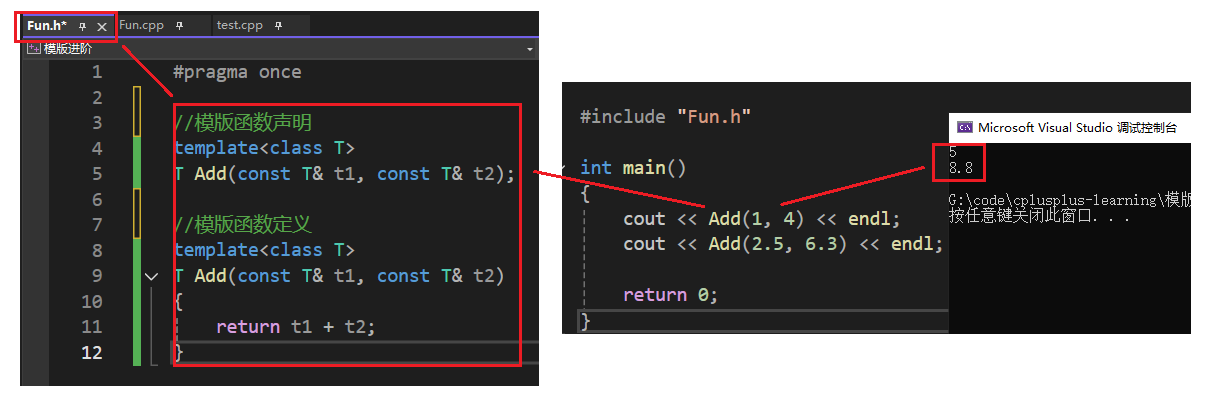
【C++初阶】第15课—模版进阶
文章目录 1. 模版参数2. 模版的特化2.1 概念2.2 函数模版特化2.3 类模板特化2.3.1 全特化2.3.2 偏特化 3. 模版的分离和编译4. 总结 1. 模版参数 模版参数分为类型形参和非类型参数之前我们写过的大量代码,都是用模版定义类的参数类型,跟在class和typena…...
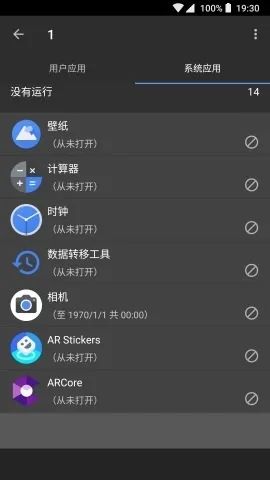
黑阈免激活版:智能管理后台,优化手机性能
在使用安卓手机的过程中,许多用户会遇到手机卡顿、电池续航不足等问题。这些问题通常是由于后台运行的应用程序过多,占用大量系统资源导致的。今天,我们要介绍的 黑阈免激活版,就是这样一款由南京简域网络科技工作室开发的手机辅助…...

C++17 新特性简解
C17 新特性简解 一、核心语言特性 1. 结构化绑定(Structured Bindings) 用途:解构复合类型(如元组、结构体)为独立变量 示例: #include <iostream> #include <tuple>int main() {// 解构 st…...
)
神经网络的 “成长密码”:正向传播与反向传播深度解析(四)
引言 在神经网络的神秘世界里,正向传播和反向传播是驱动模型学习和进化的核心机制。它们如同神经网络的 “左右脑”,正向传播负责信息的前向流动与初步处理,反向传播则通过优化权重参数来提升模型性能,二者相辅相成,共…...
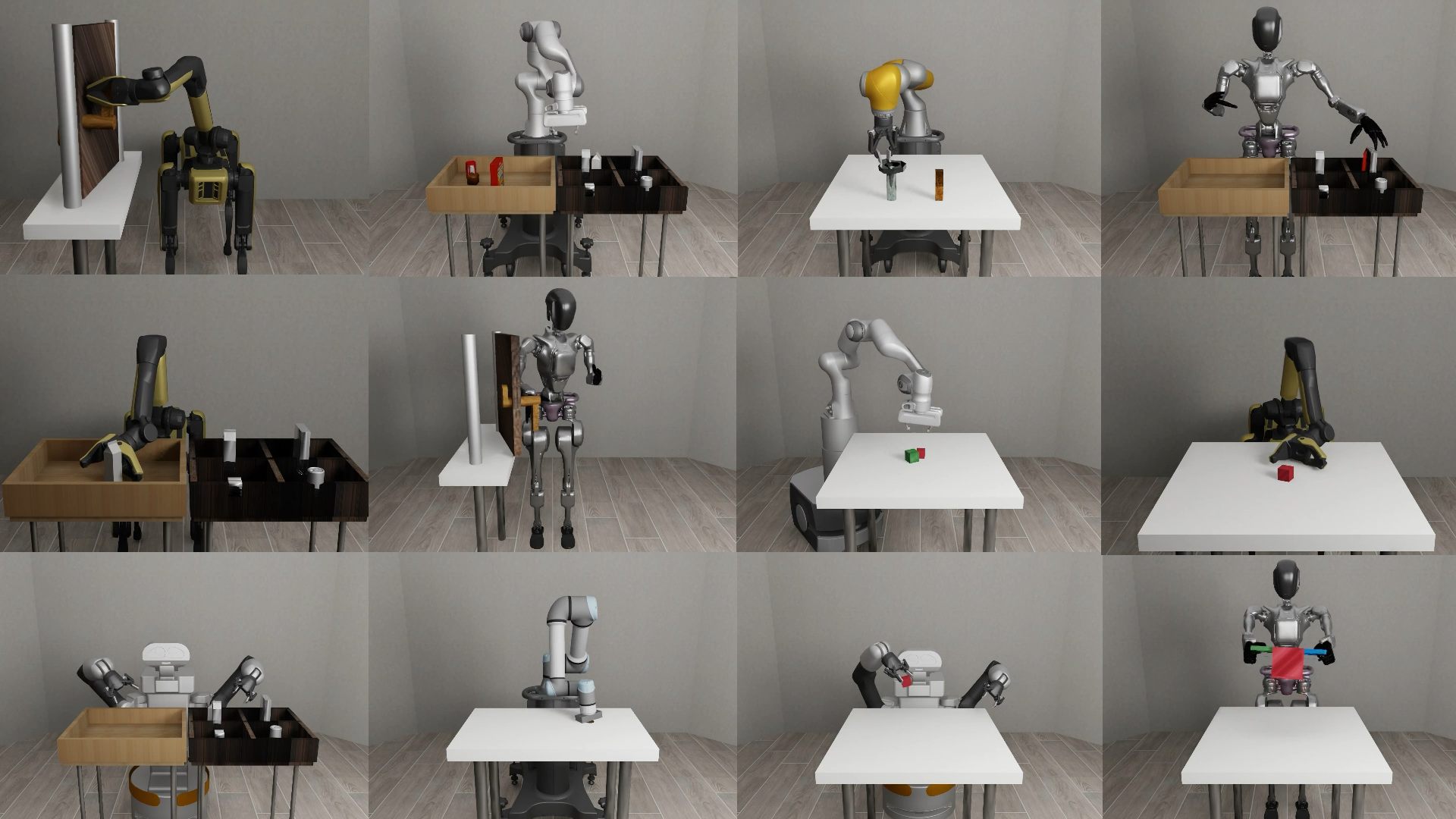
Mujoco robosuite 机器人模型
import ctypes import os# 获取当前脚本所在的目录 script_dir os.path.dirname(os.path.abspath(__file__))# 构建库文件的相对路径 lib_relative_path os.path.join(dynamic_models, UR5e, Jb.so)# 拼接成完整的路径 lib_path os.path.join(script_dir, lib_relative_path…...

在Ubuntu 18.04下编译OpenJDK 11
在Ubuntu 18.04下编译OpenJDK 11 源码下载地址: 链接: https://pan.baidu.com/s/1QAdu-B6n9KqeBakGlpBS3Q 密码: 8lho Linux下的环境要求 不同版本的jdk会要求在不同版本的Ubuntu下编译,不要用太高版本的Ubuntu或者gcc,特别是gcc…...
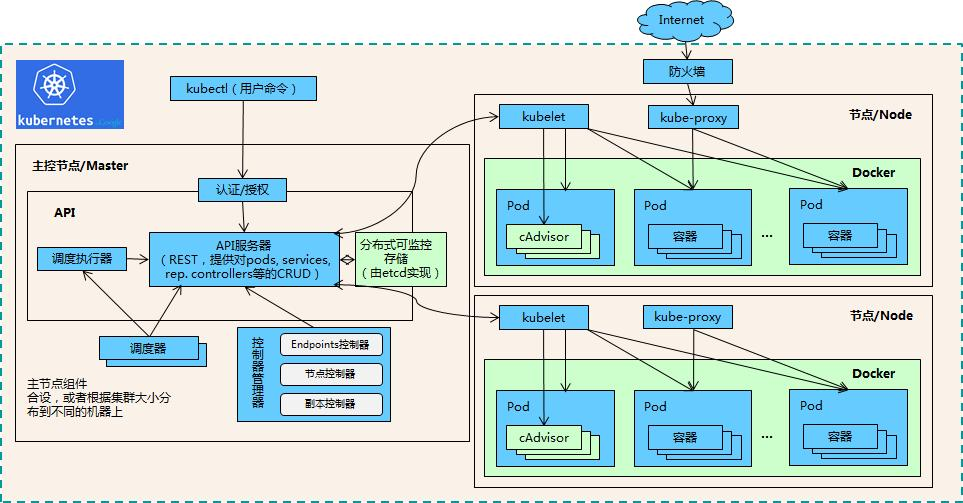
K8s:概念、特点、核心组件与简单应用
一、引言 在当今云计算和容器技术蓬勃发展的时代,Kubernetes(简称 K8s)已成为容器编排领域的事实标准。它为管理容器化应用提供了高效、可靠的解决方案,极大地简化了应用的部署、扩展和运维过程。无论是小型初创公司还是大型企业…...
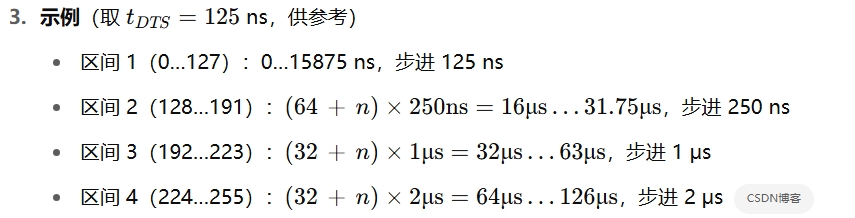
STM32的定时器输出PWM时,死区时间(DTR)如何计算
在 STM32F429(以及所有 STM32F4 “高级定时器”)中,死区时间由 TIMx_BDTR 寄存器的 8 位 “Dead‑Time Generator” 字段 DTG[7:0] 来配置。其计算分三步: 计算死区时钟周期 tDTS TIM1 时钟源为 APB2 定时器时钟(PCL…...
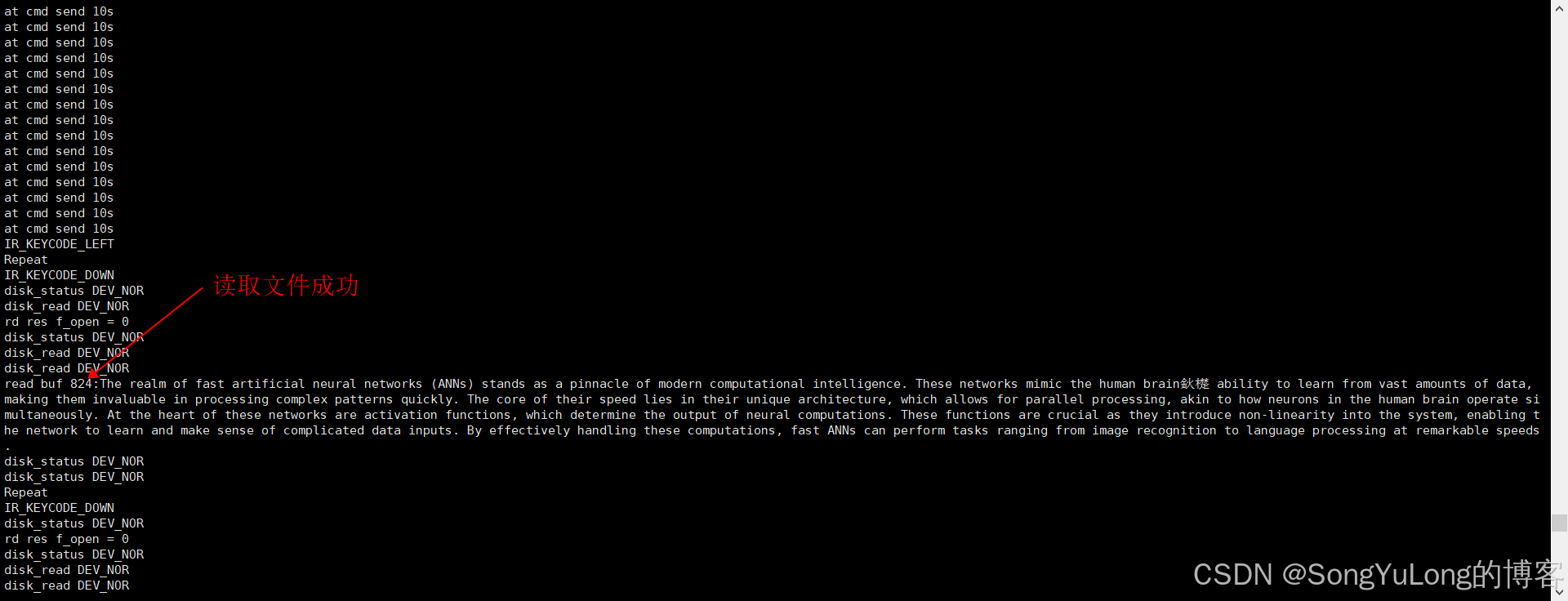
STC32G12K128单片机GPIO模式SPI操作NorFlash并实现FatFS文件系统
STC32G12K128单片机GPIO模式SPI操作NorFlash并实现FatFS文件系统 NorFlash简介NorFlash操作驱动代码文件系统测试代码 NorFlash简介 NOR Flash是一种类型的非易失性存储器,它允许在不移除电源的情况下保留数据。NOR Flash的名字来源于其内部结构中使用的NOR逻辑门。…...
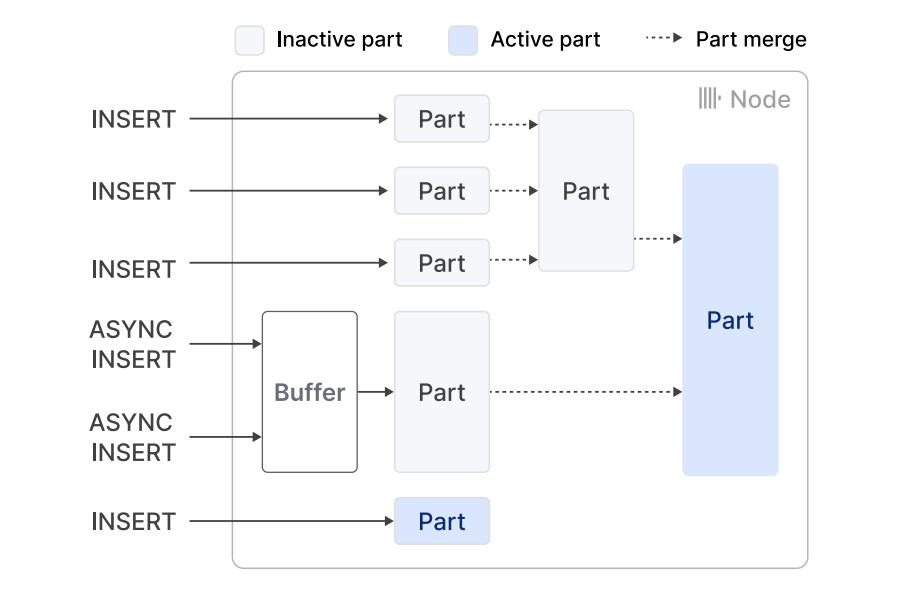
ClickHouse 设计与细节
1. 引言 ClickHouse 是一款备受欢迎的开源列式在线分析处理 (OLAP) 数据库管理系统,专为在海量数据集上实现高性能实时分析而设计,并具备极高的数据摄取速率 1。其在各种行业中得到了广泛应用,包括众多知名企业,例如超过半数的财…...

MySQL基础安装和学习
MySQL 是一种开源的关系型数据库管理系统(RDBMS),由瑞典公司 MySQL AB 开发,后被 Oracle 公司收购。它是一种基于客户端/服务器架构的数据库系统,广泛应用于 Web 应用开发和企业级数据管理。 MySQL 使用 SQL(Structured Query Language,结构化查询语言)作为与数据库交…...
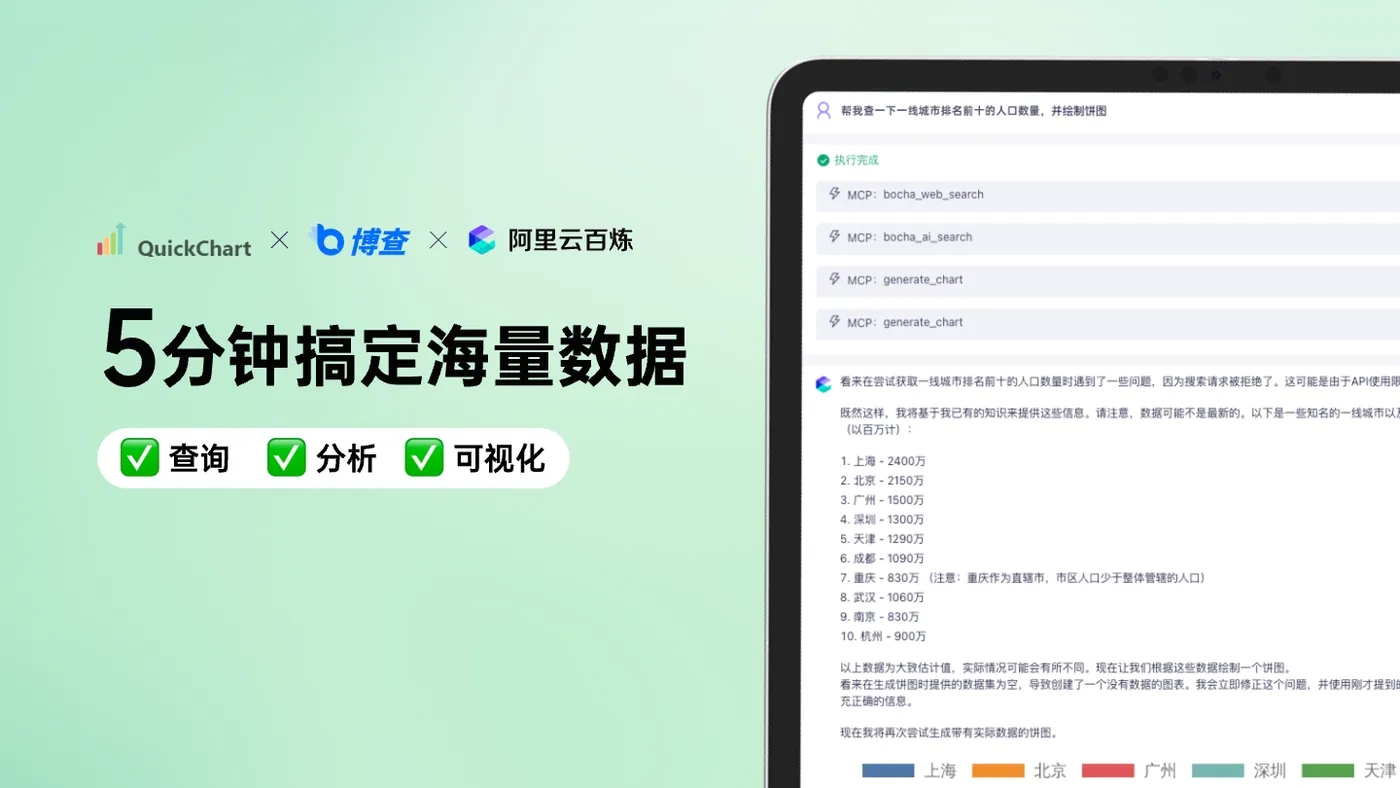
智能体MCP 实现数据可视化分析
参考: 在线体验 https://www.doubao.com/chat/ 下载安装离线体验 WPS软件上的表格分析 云上创建 阿里mcp:https://developer.aliyun.com/article/1661198 (搜索加可视化) 案例 用cline 或者cherry studio实现 mcp server:excel-mcp-server、quickchart-mcp-server...
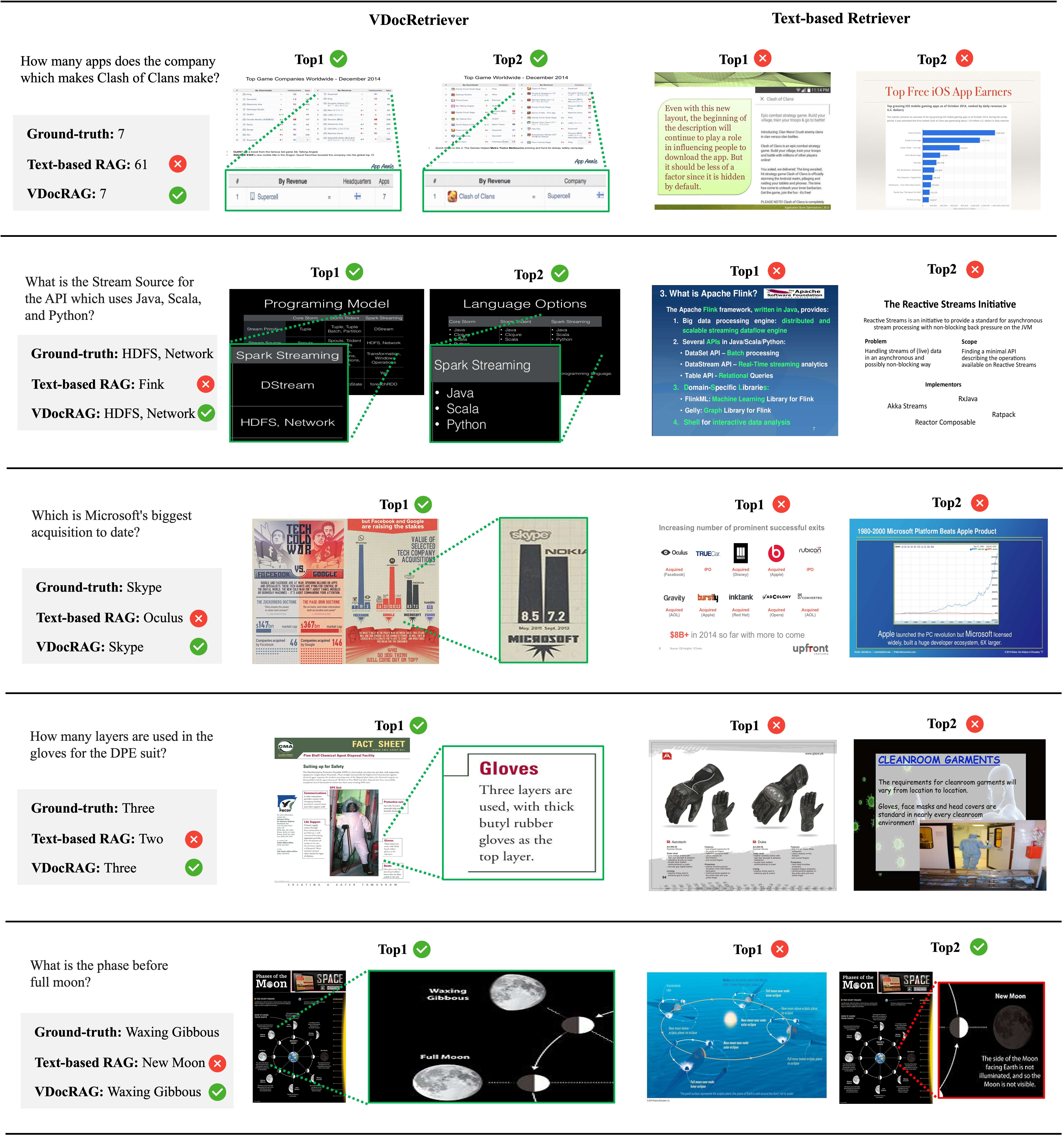
再看开源多模态RAG的视觉文档(OCR-Free)检索增强生成方案-VDocRAG
前期几个工作提到,基于OCR的文档解析RAG的方式进行知识库问答,受限文档结构复杂多样,各个环节的解析泛化能力较差,无法完美的对文档进行解析。因此出现了一些基于多模态大模型的RAG方案。如下: 【RAG&多模态】多模…...

生产环境大数据平台权限管理
引言:数据资产保护的生死线 在金融行业某头部企业发生的数据泄露事件中,由于权限管理漏洞导致千万级用户信息外泄,直接经济损失超过2.3亿元。这个案例揭示了生产环境大数据平台权限管理的重要性和复杂性。本文将深入探讨从权限模型设计到实施…...
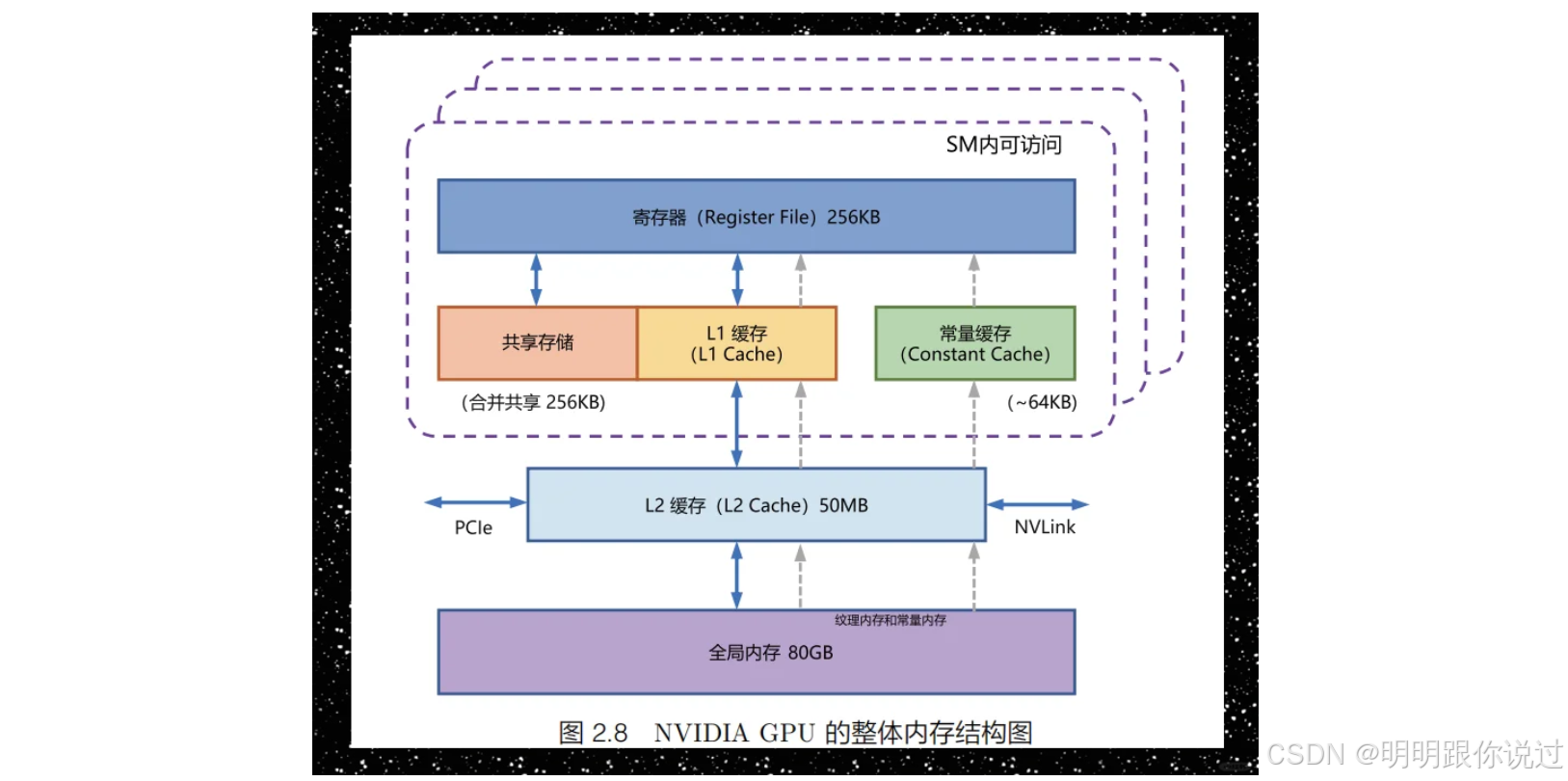
深入浅出 NVIDIA CUDA 架构与并行计算技术
🐇明明跟你说过:个人主页 🏅个人专栏:《深度探秘:AI界的007》 🏅 🔖行路有良友,便是天堂🔖 目录 一、引言 1、CUDA为何重要:并行计算的时代 2、NVIDIA在…...
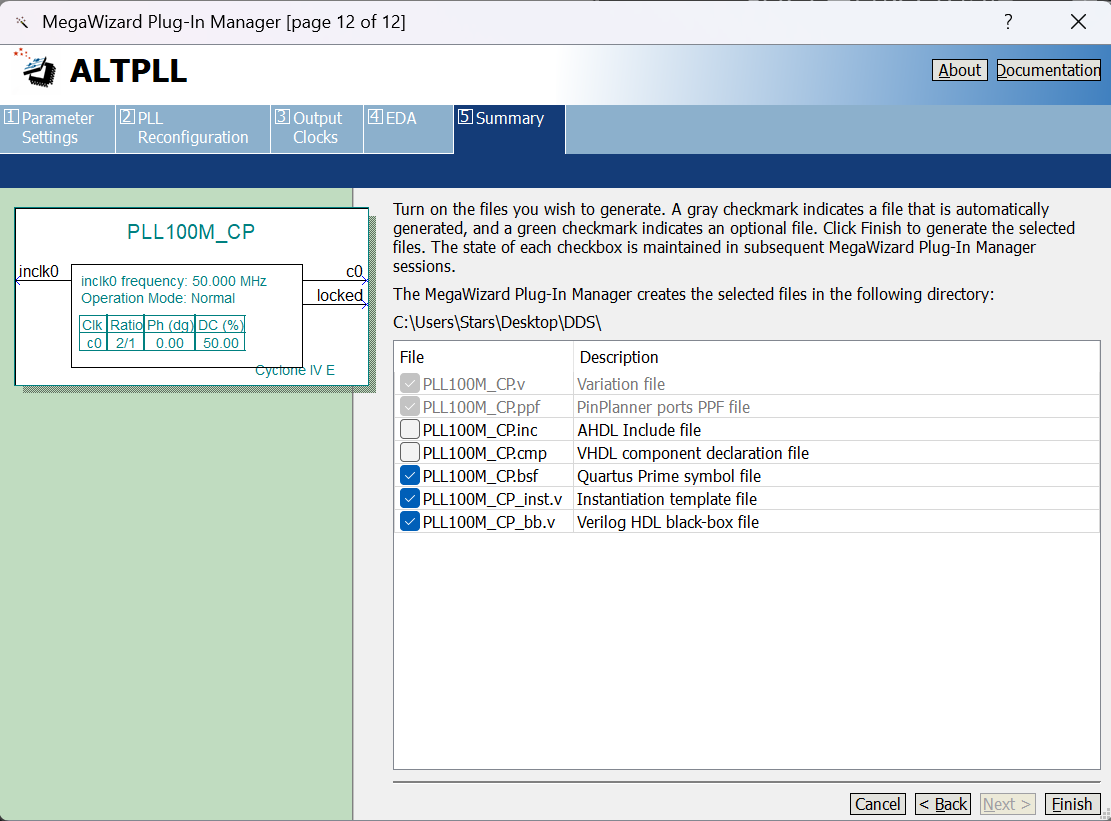
FPGA系列之DDS信号发生器设计(DE2-115开发板)
一、IP核 IP(Intellectual Property)原指知识产权、著作权等,在IC设计领域通常被理解为实现某种功能的设计。IP模块则是完成某种比较复杂算法或功能(如FIR滤波器、FFT、SDRAM控制器、PCIe接口、CPU核等)并且参数可修改的电路模块,…...

Rust: 从内存地址信息看内存布局
内存布局其实有几个:address(地址)、size(大小)、alignment(对齐位数,2 的自然数次幂,2,4,8…)。 今天主要从address来看内存的布局。 说明&…...
【Dv3Admin】从零搭建Git项目安装·配置·初始化
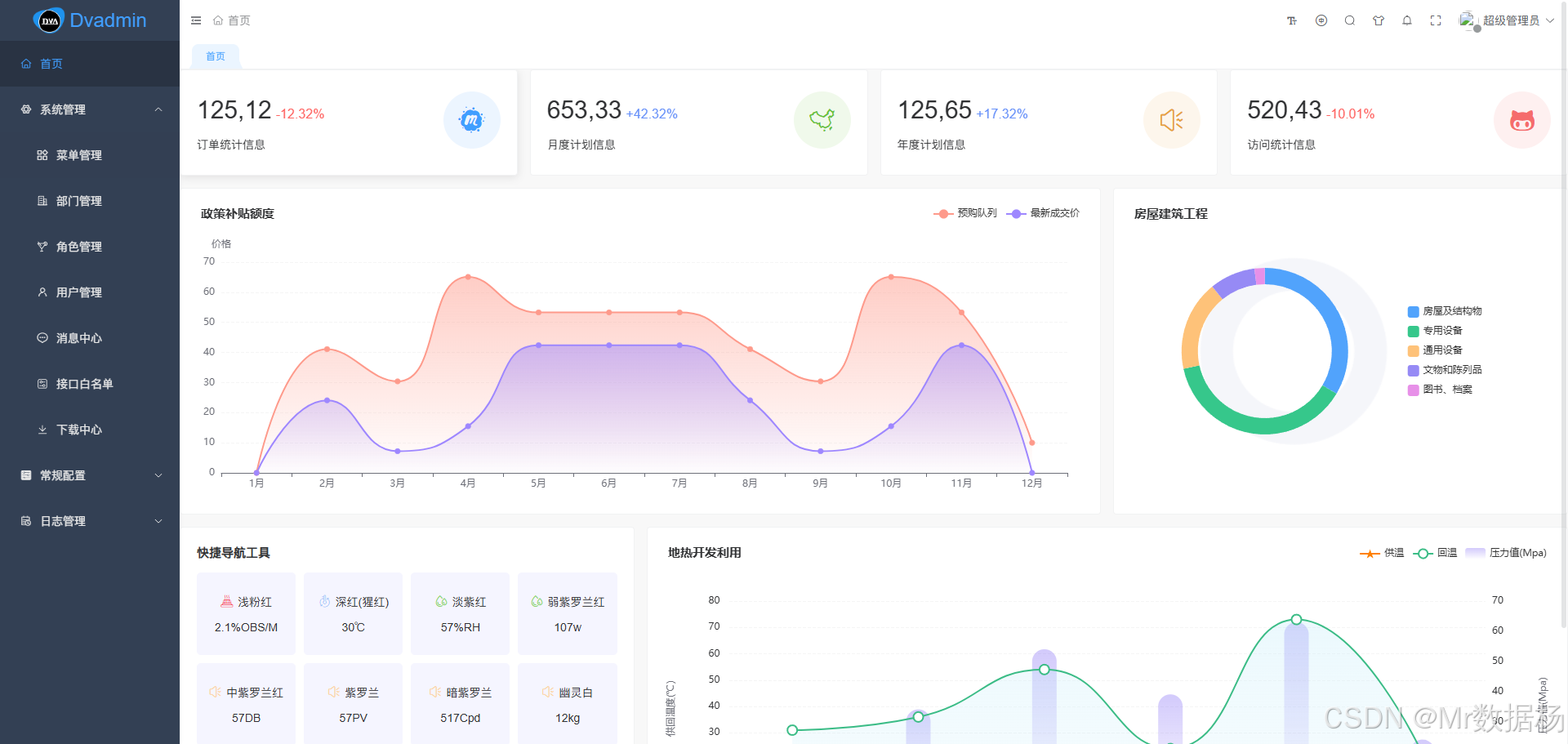
项目采用 Django 与 Vue3 技术栈构建,具备强大的后端扩展能力与现代前端交互体验。完整实现了权限管理、任务队列、WebSocket 通信、系统配置等功能,适用于构建中后台管理系统与多租户平台。 本文章内容涵盖环境搭建、虚拟环境配置、前后端部署、项目结…...

P3416-图论-法1.BFS / 法2.Floyd
这道题虽然标签有floyd但是直接bfs也能过 其实事实证明还是bfs快,因为bfs只需要遍历特定的点,但是floyd需要考虑遍历所有可能的中介点 法1.BFS 用字典存储每个点所能普及的范围,然后用对每个点bfs进行拓展 nint(input())temp[]#xmax0;yma…...