
vue2企业级项目(七)
vue2企业级项目(七)
组件封装
-
src目录下创建components/index.jsconst components = require.context("./modules", true, /index\.js$/);export default {install: (Vue) => {components.keys().forEach((key) => {let component = components(key).default;component && Vue.component(component.name, component);});}, }; -
创建
src/components/modules目录
1、form
-
modules下创建modules/x-form/index.jsimport XForm from "./index.vue"; export default XForm; -
创建
modules/x-form/index.vue<script> import { cloneDeep } from "lodash"; import {getDefaultValue,getPlaceholder,getRules,createInput, } from "../../createInput.js";/*** 配置说明文档* @param { Array } columns: 表单配置项* @param { String } labelWidth: 设置el-form-item的label宽度。(优先级低于item)* @param { Number } contentSpan: 设置el-form-item的内容占比宽度* @param { Object } defaultValue: 设置el-form的默认值。(优先级低于item)* @param { Object } rules: 设置el-item的校验规则。(优先级低于item)* @param { Number } gutter: 设置el-row的gutter* @param { Number, Array } grid: 设置el-col的span,如果没有,则不创建el-col* @param { Boolean } disabled: 表单统一仅用。(优先级低于item)** @param { Boolean } ctrl: 是否显示表单控制按钮* @param { Boolean } submitBtn: 是否显示提交按钮* @param { String } submitText: 提交按钮内容* @param { Boolean } resetBtn: 是否显示重置按钮* @param { String } resetText: 重置按钮内容** @param { Function } submit: 表单提交方法,返回表单值和校验结果* @param { Function } reset: 表单重置方法* @param { Function } clear: 表单清空方法* @param { Function } getFormByKey: 获取表单单值方法* @param { Function } getForm: 获取表单全值方法* @param { Function } setForm: 设置表单单值方法*//*** 表单配置项 columns-item* @param { Object } form: 单独作用form的配置* @param { Object } table: 单独作用table的配置* @param { Object } search: 单独作用search的配置* 以上的配置和下面一样,但优先级高*** @param { String } type: 表单控件的类型。(参考element-ui的控件类型)* @param { String } label: 字段名称* @param { String } prop: 字段绑定key* @param { Any } default: 控件默认值。(级别最高)* @param { String } placeholder: 提示信息* @param { Array } rules: 校验规则。(级别最高)* @param { Number } order: 排序序号。(大到小)* @param { Number } span: 当前表单控件col占比。(级别高)* @param { Object } col: el-col的其他配置。(级别最高)* @param { String } labelWidth: label的宽度。(级别最高)* @param { Number } contentSpan: 内容占比宽度* @param { Boolean } required: 是否必填* @param { Boolean } disabled: 是否禁用。(权限最高)** @param { Object } children: 子节点, (一个el-form-item里面多个控件)* @param { Number } gutter: 子节点的el-row的gutter。(仅在设置children后生效)* @param { Number, Array } grid: 子节点的栅格布局col排布** @param { Object } className: 表单控件的类名,对象的形式:{ box: true }* @param { Object } style: 样式控制* @param { Object } attrs: element-ui表单控件的attribute,参考element-ui文档。* @param { Object } props: element-ui表单控件的props。(有的时候文档上写的时attrs设置,其实时props设置。所以不生效的时候可以尝试一下)* @param { Object } on: 表单控件的绑定事件。{ input: (value) => console.log(value) }* @param { Array } options: radio,checkbox, select, cascader,* @param { String } text: button按钮的文字内容* @param { String } btnType: button按钮的类型* @param { String } btnIcon: button的icon* @param { String } marking: button的标记* @param { Boolean } hasFilter: 是否进行筛选,只有存在options才可以进行** @param { Function } slotDefault: el-table-column 的 default的插槽* @param { Function } slotHeader: el-table-column 的 header的插槽*/export default {name: "XForm",props: {labelWidth: String,columns: {type: Array,default: () => [],},defaultValue: {type: Object,default: () => ({}),},contentSpan: {type: Number,default: 24,},rules: {type: Object,default: () => ({}),},gutter: {type: Number,default: 0,},grid: [Number, Array],disabled: Boolean,ctrl: {type: [Boolean, String],default: "left",},submitBtn: {type: Boolean,default: true,},submitText: {type: String,default: "提交",},resetBtn: {type: Boolean,default: true,},resetText: {type: String,default: "重置",},},render(h) {return h("el-form",{attrs: { ...this.$attrs },props: {model: this.form,},style: {padding: `0 ${this.gutter / 2}px`,},ref: "form",nativeOn: {submit(e) {e.preventDefault();e.stopPropagation();},},},[this.renderRow(h, this.fields, this.gutter), this.$slots.default],);},data() {return {form: {},fields: [],};},watch: {columns: {immediate: true,deep: true,handler() {this.init();},},},methods: {init() {let form = cloneDeep(this.form);// 获取配置属性this.fields = this.handleFieldsChild(form, this.columns);// 添加校验按钮if (this.ctrl) {let _this = this;this.fields.push({render: ({ h }) => {return h("div",{class: { formBtns: true },style: {textAlign: this.ctrl,},},[_this.submitBtn &&createInput(h,{type: "button",btnType: "primary",text: _this.submitText,on: {click: _this.submit,},},_this,),_this.resetBtn &&createInput(h,{type: "button",text: _this.resetText,on: {click: _this.reset,},},_this,),],);},});}this.form = { ...form };},handleFieldsChild(form, columns, parent = null) {let fields = columns.filter((item) => item?.isShow !== false);fields = fields.map((item) => {let formItem = { ...item, ...item?.form };delete formItem.table;delete formItem.search;delete formItem.form;if (formItem.children && Array.isArray(item.children)) {formItem.children = this.handleFieldsChild(form,formItem.children,formItem,);}if (parent && !formItem.label) formItem.label = parent?.label;getDefaultValue(form, this.defaultValue, formItem);getPlaceholder(formItem);getRules(formItem, this.rules);if (parent) {formItem.grid = parent?.grid;delete formItem.label;}return formItem;});fields = fields.sort((a, b) => (b?.order || 0) - (a?.order || 0));return fields;},renderRow(h, fields, gutter, isChild = false) {let style = null;if (isChild) {style = {position: "relative",left: `-${gutter / 2}px`,marginLeft: "0",marginRight: "0",width: `calc(100% + ${gutter}px)`,};}return h("el-row",{ attrs: { gutter }, style },this.renderItem(h, fields, isChild),);},renderItem(h, fields, isChild) {return fields.map((item, index) =>this.renderCol(h, { ...item, isChild }, index),);},renderCol(h, item, index) {delete item.order;const gridConfig = item.grid || this.grid;let grid = 0;if (typeof gridConfig === "number") grid = gridConfig;if (Array.isArray(gridConfig))grid = this.grid[index % gridConfig?.length];let span = item.span || item?.col?.span || grid;if (span) {return h("el-col",{class: { "form-item-col": true },attrs: { span, ...item.col },},[this.renderFormItem(h, item)],);} else {return this.renderFormItem(h, item);}},renderFormItem(h, item) {let labelWidth = item?.labelWidth || this.labelWidth || "0px";let isChild = item.isChild;let hasChild = Array.isArray(item.children);if (isChild) labelWidth = "0px";delete item?.labelWidth;delete item?.isChild;let childDom = null;if (hasChild) {const gutter = item?.gutter || this.gutter;const children = item?.children || [];childDom = this.renderRow(h, children, gutter, true);} else {childDom = h("el-col",{attrs: {span: isChild ? 24 : item.contentSpan || this.contentSpan,},},[createInput(h, { ...item }, this)],);}delete item?.children;delete item?.gutter;let itemRender = null;if (item.render && typeof item.render === "function") {itemRender = item.render({h: this.getHypeScript(),value: this.form[item.prop],item,_this: this,});}delete item.render;return h("el-form-item",{style: { marginBottom: hasChild ? "0px" : "22px" },attrs: { ...item, labelWidth },},[childDom, itemRender],);},// 表单方法getHypeScript() {return this.$parent.$createElement;},submit() {this.$refs.form.validate((valid) => {this.$emit("submit", this.getForm(), valid);});},reset() {this.$refs.form.resetFields && this.$refs.form.resetFields();this.form = {};this.init();this.$emit("reset");},clear() {this.$refs.form.clearValidate && this.$refs.form.clearValidate();},getFormByKey(key) {return this.form[key];},getForm() {return this.form;},setForm(key, value) {key && (this.form[key] = value);},}, }; </script> -
src/components创建createInput.jsimport { isEqual } from "lodash";export const tagsMenu = new Map([["text", "el-input"],["xnumber", "x-input-number"],["button", "el-button"],["input", "el-input"],["password", "el-input"],["textarea", "el-input"],["number", "el-input-number"],["radio", "el-radio-group"],["radio-item", "el-radio"],["radio-button", "el-radio-button"],["checkbox", "el-checkbox-group"],["checkbox-item", "el-checkbox"],["checkbox-button", "el-checkbox-button"],["select", "el-select"],["select-group", "el-option-group"],["select-item", "el-option"],["cascader", "el-cascader"],["switch", "el-switch"],["slider", "el-slider"],["time-select", "el-time-select"],["time", "el-time-picker"],["date", "el-date-picker"],["rate", "el-rate"],["color", "el-color-picker"],["transfer", "el-transfer"], ]);export const defaultValuesMenu = new Map([["radio", ""],["checkbox", []],["text", ""],["input", ""],["password", ""],["textarea", ""],["number", ""],["xnumber", ""],["select", null],["cascader", null],["switch", ""],["slider", 0],["time-select", ""],["time", ""],["date", ""],["rate", null],["color", null],["transfer", []], ]);export function getDefaultValue(form, defaultValue = {}, item) {if (!item.prop) return;let value = defaultValuesMenu.get(item.type);if (item?.props?.multiple || item?.props?.isRange) value = [];form[item.prop] =form[item.prop] || item.default || defaultValue[item.prop] || value; }export function getPlaceholder(item) {const inputTypes = ["input", "password", "textarea", "number", "xnumber"];const selectType = ["select", "cascader", "time-select", "time", "date"];const dateRangeTypes = ["datetimerange", "daterange", "monthrange"];item.attrs = item.attrs || {};item.props = item.props || {};// 添加date-range的标识if (item.props?.type && dateRangeTypes.includes(item.props.type)) {item.props.isRange = true;}if (item.placeholder) {item.attrs.placeholder = item.placeholder;} else {if (inputTypes.includes(item.type))item.attrs.placeholder = `请输入${item.label}`;if (selectType.includes(item.type))item.attrs.placeholder = `请选择${item.label}`;if (item.props.isRange) {item.props.startPlaceholder = `请选择开始${item.label}`;item.props.endPlaceholder = `请选择结束${item.label}`;}}return item; }export function getRules(item, rules) {if (item.rules) return item;else if (rules && rules[item.prop]) {item.rules = rules[item.prop];} else if (item.required) {item.rules = [{required: true,message:item.attrs.placeholder ||item.props.startPlaceholder ||item.props.endPlaceholder,trigger: "blur",},];}return item; }export function createInput(h, item, _this) {item.attrs = {type: item.type,options: item.type === "cascader" ? item.options : null,...item.attrs,};item.props = {disabled: item.disabled !== undefined ? item.disabled : _this.disabled,...item.props,};if (item.btnType) item.attrs.type = item.btnType;if (item.btnIcon) item.attrs.icon = item.btnIcon;if (item.marking) item.attrs.marking = item.marking;item.style = {width: item.type !== "button" ? "100%" : null,...item.style,};let {type,prop,className = {},style = {},attrs = {},props = {},on = {},text = "",} = item;const config = {type,prop,class: className,style,attrs,props,on,text,children: generateOptions(h, item) || [],};if (type === "time-select" || type === "date") {let minTimeKey = props?.pickerOptions?.minTimeKey;let maxTimeKey = props?.pickerOptions?.maxTimeKey;if (minTimeKey) {if (type === "time-select") {config.props = {...config.props,pickerOptions: {...config.props.pickerOptions,minTime: _this.form[minTimeKey],},};} else {let disabledDate = config.props.pickerOptions.disabledDate;if (typeof disabledDate === "function") {config.props = {...config.props,pickerOptions: {...config.props.pickerOptions,disabledDate: (time) =>disabledDate(time, _this.form[minTimeKey]),},};}}}if (maxTimeKey) {if (type === "time-select") {config.props = {...config.props,pickerOptions: {...config.props.pickerOptions,maxTime: _this.form[maxTimeKey],},};} else {let disabledDate = config.props.pickerOptions.disabledDate;if (typeof disabledDate === "function") {config.props = {...config.props,pickerOptions: {...config.props.pickerOptions,disabledDate: (time) =>disabledDate(time, _this.form[maxTimeKey]),},};}}}}if (type === "text") {config.class["el-readonly-input"] = true;config.attrs.readonly = true;}return generateTag(h, config, _this); }export function generateOptions(h, item) {const canTag = ["radio", "checkbox", "select"];if (!canTag.includes(item.type)) return null;// 后续需要添加字典const options = item?.options || [];return (options || []).map((option) => {let type = `${item.type}-${item.button ? "button" : "item"}`;if (option.options) {const cloneItem = { ...item };cloneItem.options = option.options;type = `${item.type}-group`;return h(tagsMenu.get(type),{attrs: {label: option.label,},},generateOptions(h, cloneItem),);}return h(tagsMenu.get(type),{attrs: {label: item.type === "select" ? option.label : option.value,value: item.labelInValue ? option : option.value,},},[item.type === "select" ? null : [option.label]],);}); }export function generateTag(h, config, _this) {config.props.value = _this.form[config.prop];const inputEvent = config.on?.input;const clickEvent = config.on?.click;config.on = {...config.on,input: (value) => {value = formatDateValue(value, config);if (!isEqual(_this.form[config.prop], value)) {_this.form[config.prop] = value;typeof inputEvent === "function" && inputEvent(value, config);}},click: (event) => {typeof clickEvent === "function" && clickEvent(event, config);},};config.nativeOn = {keydown: (e) => {if (e.keyCode === 13 && this.enterSubmit && config.type !== "textarea") {_this.submit();}},};return h(tagsMenu.get(config.type), config, [...config.children,config.text,]); }export function formatDateValue(value, config) {if ((config.type === "time" || config.type === "date") && !value) {return config.props.isRange ? ["", ""] : "";}return value; } -
创建
src/styles/components.less,并引入style/index.less/* x-form 组件样式 */ .el-readonly-input {.el-input__inner {border: none;}.el-input__inner:focus {border-color: #DCDFE6;} }.form-item-col {.el-form-item {margin-bottom: 22px;} }/* x-table 组件样式 */ -
使用案例
<template><div><!-- 基础表单 --><hr /><x-form :columns="columns1" labelWidth="100px" :ctrl="false"></x-form><!-- 禁用表单 --><hr /><x-form:columns="columns1"labelWidth="100px":ctrl="false"disabled></x-form><!-- 表单布局 --><hr /><x-form:columns="columns2"labelWidth="100px":ctrl="false":gutter="10":grid="8"label-suffix=":"></x-form><!-- 灵活表单布局 --><hr /><x-form:columns="columns3"labelWidth="100px":gutter="8"label-suffix=":":contentSpan="20"></x-form><!-- 自定义表单元素 --><hr /><x-form:columns="columns4"labelWidth="100px"@submit="handleSubmit"></x-form></div>
</template><script>
import { cloneDeep } from "lodash";export default {data() {return {columns1: [{ type: "text", label: "标题", prop: "title", default: "基础表单" },{ type: "input", label: "用户名", prop: "username" },{ type: "password", label: "密码", prop: "password" },{ type: "textarea", label: "信息", prop: "info", disabled: false },],columns2: [{type: "text",label: "标题",prop: "title",default: "表单布局",span: 24,},{ type: "input", label: "输入1", prop: "value1" },{ type: "input", label: "输入2", prop: "value2" },{ type: "input", label: "输入3", prop: "value3" },{ type: "input", label: "输入4", prop: "value4" },{ type: "input", label: "输入5", prop: "value5" },{ type: "input", label: "输入6", prop: "value6" },],columns3: [{ type: "text", label: "标题", prop: "title", default: "灵活表单" },{type: "input",label: "输入1",prop: "value1",},{type: "input",label: "输入2",prop: "value2",required: true,},{label: "输入3",required: true,children: [{ type: "input", prop: "value31", required: true, span: 10 },{ type: "input", prop: "value32", required: true, span: 10 },{ type: "input", prop: "value33", required: true, span: 10 },{ type: "input", prop: "value34", required: true, span: 10 },{ type: "input", prop: "value35", required: true, span: 10 },{ type: "input", prop: "value36", required: true, span: 10 },],},{type: "input",label: "输入4",prop: "value4",required: true,},{type: "input",label: "输入5",prop: "value5",contentSpan: 24,required: true,},{type: "input",label: "输入6",prop: "value6",required: true,},{label: "时间选择",gutter: 10,required: true,children: [{type: "time-select",label: "开始时间",prop: "startTime",required: true,span: 10,props: {pickerOptions: {start: "08:30",step: "00:15",end: "18:30",maxTimeKey: "endTime",},},},{type: "time-select",label: "结束时间",prop: "endTime",required: true,span: 10,props: {pickerOptions: {start: "08:30",step: "00:15",end: "18:30",minTimeKey: "startTime",},},},],},{label: "日期选择",gutter: 10,required: true,children: [{type: "date",label: "开始日期",prop: "startDate",required: true,span: 10,props: {pickerOptions: {maxTimeKey: "endDate",disabledDate: (time, date) => {if (!date) return false;return time.getTime() > new Date(date).getTime();},},},},{type: "date",label: "结束日期",prop: "endDate",required: true,span: 10,props: {pickerOptions: {minTimeKey: "startDate",disabledDate: (time, date) => {if (!date) return false;return time.getTime() < new Date(date).getTime();},},},},],},{label: "动态1",gutter: 10,marking: "1",children: [{ type: "input", prop: "active1", span: 20 },{type: "button",btnType: "primary",btnIcon: "el-icon-plus",span: 2,marking: "1",on: {click: this.addForm,},},{type: "button",btnIcon: "el-icon-delete-solid",span: 2,marking: "1",on: {click: this.delForm,},},],},],activeItem: {label: "动态",gutter: 10,children: [{ type: "input", prop: "active", span: 20 },{type: "button",btnType: "primary",btnIcon: "el-icon-plus",span: 2,on: {click: this.addForm,},},{type: "button",btnIcon: "el-icon-delete-solid",span: 2,on: {click: this.delForm,},},],},columns4: [{ type: "text", label: "标题", prop: "title", default: "灵活表单" },{label: "自定义",prop: "input",render: ({ value, _this }) => {return (<el-inputvalue={value}onInput={(value) => {_this.setForm("input", value);}}/>);},},],};},methods: {handleSubmit(form, valid) {console.log(form, valid);},addForm(e, item) {let marking = item.attrs.marking;let newMarking = Number(marking) + 1;let columns = cloneDeep(this.columns3);let index =this.columns3.findIndex((formItem) => formItem?.marking === marking) +1;let addItem = cloneDeep(this.activeItem);addItem.label += newMarking;addItem.children[0].prop += newMarking;addItem.children[1].marking = newMarking;addItem.children[2].marking = newMarking;addItem.marking = newMarking;columns.splice(index, 0, addItem);this.columns3 = columns;},delForm(e, item) {let marking = item.attrs.marking;if (marking === "1") return;let columns = cloneDeep(this.columns3);let index = this.columns3.findIndex((formItem) => formItem?.marking === marking,);columns.splice(index, 1);this.columns3 = columns;},},
};
</script><style lang="less" scoped></style>
2、table
-
创建
components/modules/x-table/index.jsimport XTable from "./index.vue"; export default XTable; -
创建
components/modules/x-table/index.vue<script> import { cloneDeep, isMatch } from "lodash"; import dayjs from "dayjs";/*** 配置说明文档* @param { Boolean } autoHeight: 是否自动填充表格高度* @param { Array } columns: 表格的配置项,见下面详细说明* @param { Array } tableData: 表格的值* @param { Object } search: 表单搜索值、或者api入参* @param { Function } api: 接口* @param { String } itemAlign: 单元格align风格(left、center、right)* @param { String } emptyText: 无数据描述* @param { Any } emptyImage: 无数据图片展示地址* @param { Number } emptyImageSize: 无数据图片大小* @param { Boolean } hasPagination: 是否显示分页* @param { String } paginationLayout: 分页显示内容* @param { Boolean } multiple: 是否多选* @param { Boolean } hasRadio: 是否单选** @param { function } getSelection: 获取选中结果* @param { function } toggleSelection:设置默认多选* @param { function } setCurrent: 设置单选* @param { function } clearFilter:清空筛选项*//*** 表单配置项 columns-item* @param { Object } form: 单独作用form的配置* @param { Object } table: 单独作用table的配置* @param { Object } search: 单独作用search的配置* 以上的配置和下面一样,但优先级高*** @param { String } type: 表单控件的类型。(参考element-ui的控件类型)* @param { String } label: 字段名称* @param { String } prop: 字段绑定key* @param { Any } default: 控件默认值。(级别最高)* @param { String } placeholder: 提示信息* @param { Array } rules: 校验规则。(级别最高)* @param { Number } order: 排序序号。(大到小)* @param { Number } span: 当前表单控件col占比。(级别高)* @param { Object } col: el-col的其他配置。(级别最高)* @param { String } labelWidth: label的宽度。(级别最高)* @param { Number } contentSpan: 内容占比宽度* @param { Boolean } required: 是否必填* @param { Boolean } disabled: 是否禁用。(权限最高)** @param { Object } children: 子节点, (一个el-form-item里面多个控件)* @param { Number } gutter: 子节点的el-row的gutter。(仅在设置children后生效)* @param { Number, Array } grid: 子节点的栅格布局col排布** @param { Object } className: 表单控件的类名,对象的形式:{ box: true }* @param { Object } style: 样式控制* @param { Object } attrs: element-ui表单控件的attribute,参考element-ui文档。* @param { Object } props: element-ui表单控件的props。(有的时候文档上写的时attrs设置,其实时props设置。所以不生效的时候可以尝试一下)* @param { Object } on: 表单控件的绑定事件。{ input: (value) => console.log(value) }* @param { Array } options: radio,checkbox, select, cascader,* @param { String } text: button按钮的文字内容* @param { String } btnType: button按钮的类型* @param { String } btnIcon: button的icon* @param { String } marking: button的标记* @param { Boolean } hasFilter: 是否进行筛选,只有存在options才可以进行** @param { Function } slotDefault: el-table-column 的 default的插槽* @param { Function } slotHeader: el-table-column 的 header的插槽*/export default {name: "XTable",props: {autoHeight: {type: Boolean,default: true,},columns: {type: Array,default: () => [],},tableData: {type: Array,default: () => [],},search: {type: Object,default: () => ({}),},api: {type: Function,default: null,},itemAlign: {type: String,default: "left",},emptyText: {type: String,default: "暂无数据",},emptyImage: null,emptyImageSize: {type: Number,default: null,},hasPagination: {type: Boolean,default: true,},paginationLayout: {type: String,default: "total, sizes, prev, pager, next, jumper",},multiple: {type: Boolean,default: false,},hasRadio: {type: Boolean,default: false,},},data() {return {height: 0,fields: [],showData: [],pageInfo: {total: 0,pagesize: 10,current: 0,},multipleSelection: [],};},render(h) {return h("div",{class: { "x-table-wrap": true, "x-table-radio": this.hasRadio },style: { height: `${this.height}px` },},[this.renderTable(h), this.renderPagination(h)],);},watch: {columns: {immediate: true,deep: true,handler() {this.handleFields();},},tableData: {immediate: true,deep: true,handler() {this.getTableData();},},},mounted() {this.init();},methods: {init() {this.getParentHeight();window.addEventListener("reset", this.getParentHeight.bind(this));},handleFields() {this.fields = this.handleFieldsChild(this.columns);if (this.multiple || this.hasRadio) {this.fields.unshift({type: "selection",width: "40",});}},handleFieldsChild(columns) {let fields = columns.filter((item) => item?.isShow !== false);fields = fields.map((item) => {item.inputType = item.type;delete item.type;const tableItem = { ...item, ...item?.table };delete tableItem.table;delete tableItem.search;delete tableItem.form;if (tableItem.children && Array.isArray(tableItem.children)) {delete tableItem.prop;tableItem.children = this.handleFieldsChild(tableItem.children);}tableItem.align = tableItem.align || this.itemAlign;return tableItem;});fields = fields.sort((a, b) => (b?.order || 0) - (a?.order || 0));return fields;},getParentHeight() {const parentDom = this.$el.parentElement;const height = parentDom.clientHeight;const paddingTop = parseFloat(getComputedStyle(parentDom, false)["padding-top"],);const paddingBottom = parseFloat(getComputedStyle(parentDom, false)["padding-bottom"],);this.height = height - paddingTop - paddingBottom;},renderTable(h) {if (!this.height) return null;const config = {props: {highlightCurrentRow: this.hasRadio,...this.$attrs,data: this.showData,},on: {"selection-change": this.handleSelectionChange,"current-change": this.selectCurrentChange,},ref: "table",};if (this.autoHeight) {let paginationHeight = this.hasPagination ? 35 : 0;config.props.height = this.height - paginationHeight;}return h("el-table", config, [...this.renderColumns(h, this.fields),this.renderEmpty(h),this.$slots.default,]);},/* 空内容 */renderEmpty(h) {if (this.showData && this.showData.length) return null;const config = {props: { description: this.emptyText },slot: "empty",};if (this.emptyImage) config.props.image = this.emptyImage;if (this.emptyImageSize) config.props.imageSize = this.emptyImageSize;return h("el-empty", config);},/* table-column */renderColumns(h, fields) {return fields.map((item) => this.renderTableItem(h, item));},renderTableItem(h, item) {const scopedSlots = {};if (item.slotDefault && typeof item.slotDefault === "function") {scopedSlots.default = (scope) =>item.slotDefault(this.getHypeScript(), scope);}if (item.slotHeader && typeof item.slotHeader === "function") {scopedSlots.header = (scope) =>item.slotHeader(this.getHypeScript(), scope);}if (!item.slotDefault && item.children && Array.isArray(item.children)) {item.childrenDom = this.renderColumns(h, item.children);}const attrs = { ...item, ...item?.attrs };let props = item.props;delete item.props;delete item.attrs;// 后续需要添加字典if (!item.children && item.options) {props = {formatter: (row, column) => {const property = column["property"];const value = row[property];const findItem = item.options.find((item) => item.value === value);return findItem.label;},...props,};}let formatType = ["time-select", "time", "date"];if (!item.slotDefault &&item?.props?.valueFormat &&formatType.includes(item.inputType)) {let formatReg = item.props.valueFormat.replace(/yyyy/g, "YYYY");props = {formatter: (row, column) => {const property = column["property"];const value = row[property];return dayjs(value).format(formatReg);},...props,};}if (item.options && item.hasFilter) {props = {...props,filters: item.options.map(({ label, value }) => ({text: label,value,})),filterMethod: (value, row, column) => {const property = column["property"];return row[property] === value;},};}return h("el-table-column",{ attrs, props, scopedSlots },item.childrenDom,);},/* 分页 */renderPagination(h) {if (!this.hasPagination) return null;return h("div", { class: { "x-table-bottom": true } }, [h("el-pagination", {props: {layout: this.paginationLayout,...this.pageInfo,},on: {"size-change": this.handleSizeChange,"current-change": this.handleCurrentChange,},}),this.multiple &&h("div", null, [`已选中 ${this.multipleSelection.length} 个`]),]);},handleSizeChange(size) {this.pageInfo.pagesize = size;this.getTableData();},handleCurrentChange(current) {this.pageInfo.current = current;this.getTableData();},/* 方法 */getHypeScript() {return this.$parent.$createElement;},getTableData() {if (this.tableData && this.tableData.length) {const { pagesize, current } = this.pageInfo;let tableData = cloneDeep(this.tableData);tableData = tableData.filter((item) => isMatch(item, this.search));this.pageInfo.total = tableData.length;this.showData = [...tableData].splice((current - 1) * pagesize,pagesize,);} else if (this.api && typeof this.api === "function") {const param = {...this.search,pagesize: this.pageInfo.pagesize,pageno: this.pageInfo.current,};// 需要和后端协商好接口字段,保持所有table接口返回统一this.api(param).then((res) => {this.showData = res.data.records;const { total, current, pagesize } = res.data;this.pageInfo = { total, current, pagesize };}).catch(() => {this.showData = [];this.pageInfo = {total: 0,current: 1,pagesize: 10,};});}},handleSelectionChange(val) {if (this.hasRadio && val.length > 1) {const delItem = this.multipleSelection[0];const item = val.find((child) => !isMatch(child, delItem));this.$refs.table.clearSelection();this.setCurrent(item);} else {this.multipleSelection = val;}},toggleSelection(rows = []) {if (!this.multiple) return false;if (rows) {rows.forEach((row) => {const findItem = this.findRow(row);this.$refs.table.toggleRowSelection(findItem);});} else {this.$refs.table.clearSelection();}},selectCurrentChange(val) {this.multipleSelection = [val];if (this.hasRadio) {this.$refs.table.clearSelection();const findItem = this.findRow(val);this.$refs.table.toggleRowSelection(findItem);}},setCurrent(row) {if (!this.hasRadio) return false;this.$refs.table.setCurrentRow(row);},findRow(row) {return this.showData.find((item) => isMatch(item, row));},clearFilter(key) {this.$refs.table.clearFilter(key);},getSelection() {return this.multipleSelection;},}, }; </script><style lang="scss" scoped></style> -
修改
src/styles/components.less... /* x-table 组件样式 */ .x-table-wrap {width: 100%;.x-table-bottom {display: flex;justify-content: space-between;align-items: center;margin-top: 3px;font-size: 13px;font-weight: 400;color: #606266;flex-direction: row-reverse;} }.x-table-radio {::v-deep {.el-table__header-wrapper {.el-checkbox {display: none;}}} }/* dialog 组件样式 */ -
使用案例
<template><div class="wrap"><!-- 基础空表单 --><h3>基础空表单</h3><div class="box"><x-tableitemAlign="center":border="true":autoHeight="false":hasPagination="false":columns="columns1":tableData="[]"></x-table></div><!-- 基础表单 --><h3>基础表单</h3><div class="box"><x-tableitemAlign="center":border="true":autoHeight="false":hasPagination="false":columns="columns1":tableData="tableData1"></x-table></div><!-- 自动填充和分页 --><h3>自动填充和分页</h3><p>自动填充高度,并且能自动处理radio、checkbox、select的值</p><div class="box"><x-tableitemAlign="center":border="true":columns="columns2":tableData="tableData2"></x-table></div><!-- 自定义内容 --><h3>自定义内容</h3><div class="box"><x-tableitemAlign="center":border="true":columns="columns3":tableData="tableData3"></x-table></div><!-- 多表头 --><h3>多表头</h3><div class="box"><x-tableitemAlign="center":border="true":columns="columns4":tableData="tableData4"></x-table></div><!-- 多选 --><h3>多选</h3><div><el-button @click="getSelection('multipleTable')">获取选中结果</el-button><el-button @click="setSelection([tableData1[1], tableData1[2]])">设置选择第二项, 第三项</el-button><el-button @click="setSelection()">清空选中</el-button></div><div class="box"><x-tableref="multipleTable"itemAlign="center":border="true":multiple="true":columns="columns1":tableData="tableData1"></x-table></div><!-- 单选 --><h3>单选</h3><div><el-button @click="getSelection('singleTable')">获取选中结果</el-button><el-button @click="setRadio(tableData1[2])">设置选择第三项</el-button><el-button @click="setRadio()">清空选中</el-button></div><div class="box"><x-tableref="singleTable"itemAlign="center":border="true":hasRadio="true":columns="columns1":tableData="tableData1"></x-table></div><!-- 排序和筛选 --><h3>排序和筛选</h3><div class="box"><x-tableitemAlign="center":border="true":autoHeight="false":hasPagination="false":columns="columns5":tableData="tableData5"></x-table></div><!-- 嵌套内容 --><h3>嵌套内容</h3><div class="box"><x-tableitemAlign="center":border="true":autoHeight="false":hasPagination="false":columns="columns6":tableData="tableData5"></x-table></div><!-- 接口获取 --><h3>接口获取</h3><div class="box"><x-tableitemAlign="center":border="true":columns="columns7":api="getList"></x-table></div><!-- 搜索 --><h3>搜索</h3><div class="box"><x-tableitemAlign="center":border="true":columns="columns7":api="getList":search="{ name: '张三' }"></x-table></div></div> </template><script> import { getList } from "../api/mock.js";export default {name: "Page5",data() {return {search: "",columns1: [{ label: "姓名", prop: "name" },{ label: "年龄", prop: "age" },{ label: "地址", prop: "address" },],tableData1: [{ name: "张三1", age: 12, address: "北京市" },{ name: "张三2", age: 12, address: "北京市" },{ name: "张三3", age: 12, address: "北京市" },{ name: "张三4", age: 12, address: "北京市" },{ name: "张三5", age: 12, address: "北京市" },],columns2: [{ label: "姓名", prop: "name" },{ label: "年龄", prop: "age" },{label: "性别",prop: "sex",options: [{ label: "男", value: "0" },{ label: "女", value: "1" },],},{ label: "地址", prop: "address" },],tableData2: [{ name: "张三", age: 12, sex: "0", address: "北京市" },{ name: "张三", age: 12, sex: "1", address: "北京市" },{ name: "张三", age: 12, sex: "0", address: "北京市" },{ name: "张三", age: 12, sex: "1", address: "北京市" },{ name: "张三", age: 12, sex: "0", address: "北京市" },{ name: "张三", age: 12, sex: "1", address: "北京市" },{ name: "张三", age: 12, sex: "0", address: "北京市" },{ name: "张三", age: 12, sex: "1", address: "北京市" },{ name: "张三", age: 12, sex: "0", address: "北京市" },{ name: "张三", age: 12, sex: "1", address: "北京市" },{ name: "张三", age: 12, sex: "0", address: "北京市" },{ name: "张三", age: 12, sex: "1", address: "北京市" },{ name: "张三", age: 12, sex: "0", address: "北京市" },{ name: "张三", age: 12, sex: "1", address: "北京市" },{ name: "张三", age: 12, sex: "0", address: "北京市" },{ name: "张三", age: 12, sex: "1", address: "北京市" },{ name: "张三", age: 12, sex: "0", address: "北京市" },{ name: "张三", age: 12, sex: "1", address: "北京市" },{ name: "张三", age: 12, sex: "0", address: "北京市" },{ name: "张三", age: 12, sex: "1", address: "北京市" },{ name: "张三", age: 12, sex: "0", address: "北京市" },{ name: "张三", age: 12, sex: "1", address: "北京市" },{ name: "张三", age: 12, sex: "0", address: "北京市" },],columns3: [{ label: "姓名", prop: "name" },{ label: "年龄", prop: "age" },{ label: "地址", prop: "address" },{slotHeader: () => {return (<el-inputvalue={this.search}onInput={(val) => (this.search = val)}size="mini"placeholder="输入关键字搜索"/>);},slotDefault: (h, scope) => {return (<div><el-buttonsize="mini"onClick={() => this.handleEdit(scope.$index, scope.row)}>Edit</el-button><el-buttonsize="mini"type="danger"onClick={() => this.handleDelete(scope.$index, scope.row)}>Delete</el-button></div>);},},],tableData3: [{ name: "张三", age: 12, address: "北京市" },{ name: "张三", age: 12, address: "北京市" },{ name: "张三", age: 12, address: "北京市" },],columns4: [{label: "用户",children: [{ label: "姓名", prop: "name" },{ label: "年龄", prop: "age" },{label: "信息",children: [{ label: "身高", prop: "height" },{ label: "体重", prop: "weight" },{label: "性别",prop: "sex",options: [{ label: "男", value: "0" },{ label: "女", value: "1" },],},],},],},{ label: "地址", prop: "address" },],tableData4: [{name: "张三",age: 12,sex: "0",height: "175cm",weight: "65kg",address: "北京市",},{name: "张三",age: 12,sex: "1",height: "175cm",weight: "65kg",address: "北京市",},{name: "张三",age: 12,sex: "0",height: "175cm",weight: "65kg",address: "北京市",},],columns5: [{ label: "姓名", prop: "name" },{ label: "年龄", prop: "age", sortable: true },{label: "性别",prop: "sex",hasFilter: true,options: [{ label: "男", value: "0" },{ label: "女", value: "1" },],},{ label: "地址", prop: "address" },],tableData5: [{ name: "张三1", age: 12, sex: "1", address: "北京市" },{ name: "张三2", age: 13, sex: "0", address: "北京市" },{ name: "张三3", age: 14, sex: "0", address: "北京市" },{ name: "张三4", age: 15, sex: "1", address: "北京市" },{ name: "张三5", age: 16, sex: "0", address: "北京市" },],columns6: [{table: { type: "expand" },slotDefault: (h, scope) => {return (<el-form label-position="left"><el-form-item label="姓名"><span>{scope.row.name}</span></el-form-item><el-form-item label="年龄"><span>{scope.row.age}</span></el-form-item><el-form-item label="性别"><span>{scope.row.sex}</span></el-form-item><el-form-item label="地址"><span>{scope.row.address}</span></el-form-item></el-form>);},},{ label: "姓名", prop: "name" },{ label: "年龄", prop: "age", sortable: true },{label: "性别",prop: "sex",hasFilter: true,options: [{ label: "男", value: "0" },{ label: "女", value: "1" },],},{ label: "地址", prop: "address" },],columns7: [{ label: "姓名", prop: "name" },{ label: "年龄", prop: "age" },{label: "性别",prop: "sex",options: [{ label: "男", value: "0" },{ label: "女", value: "1" },],},{ label: "日期", prop: "date", props: { valueFormat: "yyyy-MM-DD" } },{ label: "地址", prop: "address" },],};},methods: {getList: getList,handleEdit(index, row) {console.log(index, row);},handleDelete(index, row) {console.log(index, row);},getSelection(key) {const selection = this.$refs[key].getSelection();console.log(selection);},setSelection(rows) {this.$refs.multipleTable.toggleSelection(rows);},setRadio(row) {this.$refs.singleTable.setCurrent(row);},}, }; </script><style lang="less" scoped> .wrap {width: 100%;height: 100%;display: flex;align-items: center;flex-direction: column; }.box {width: 800px;height: 500px;padding: 10px;margin-bottom: 20px;background: #1f03034d; } </style> -
mockjsfunction getList() {let list = new Array(99).fill({});list = list.map((item, index) => {return {name: index > 20 ? `张三${index}` : "张三",age: index.toString(),date: Mock.mock("@date('yyyy-MM-dd')"),sex: (index % 2).toString(),address: `北京市朝阳区${index}号`,};});return new MockPort({template: {code: 200,msg: "success",data: {records: [],pagesiez: 0,current: 1,total: 0,},},action(options) {const params = this.paramsBackRes(options.body) || {};let { pagesize, pageno, ...search } = params;pagesize = pagesize || 10;pageno = pageno || 1;let records = list.filter((item) => isMatch(item, search));this.template.data = {records: [...records].splice((pageno - 1) * pagesize, pagesize),total: records.length,pagesize,current: pageno,};return this.template;},}); }
3、dialog
4、searchForm
5、searchTable
6、dialogForm
7、navTab
8、updateFile
9、lazy
10、theme-color
切换主题色、使用上面的动态切换主题原理实现
11、screenfull
全屏按钮、使用插件screenfull
12、screenshot
截屏按钮、使用插件html2canvas
13、input-number
14、tree
相关文章:
)
vue2企业级项目(七)
vue2企业级项目(七) 组件封装 src目录下创建components/index.js const components require.context("./modules", true, /index\.js$/);export default {install: (Vue) > {components.keys().forEach((key) > {let component compo…...
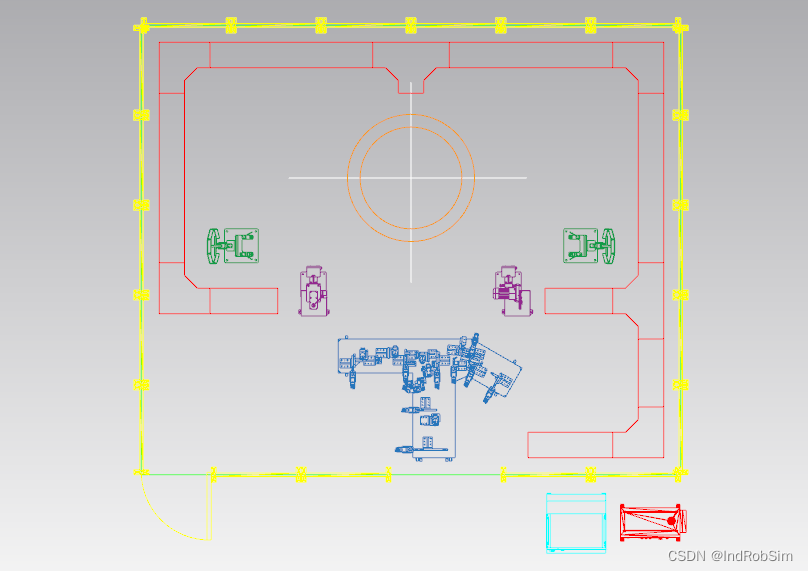
PDPS教程:导出带颜色的JT格式2D布局图文件的另一种方法
目录 概述 布局图平面化与边缘化处理 导出为JT格式文件 JT格式文件查看 概述 在PDPS软件中导入机器人生产线或工作站2D布局图之前,要先将布局图文件转换为JT格式。 使用Crossmanager软件转换出来的2D布局图文件会将图形元素原有的颜色自动修改为黑白颜色&…...
)
AI面试官:Asp.Net 中使用Log4Net (二)
AI面试官:Asp.Net 中使用Log4Net (二) 当面试涉及到使用log4net日志记录框架的相关问题时,通常会聚焦在如何在.NET或.NET Core应用程序中集成和使用log4net。以下是一些关于log4net的面试题目,以及相应的解答、案例和代码: 文章目…...
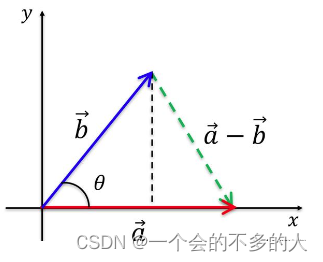
C# Solidworks二次开发:向量相关的数学函数API的使用介绍
今天要讲的是Solidworks二次开发时候,如何使用一些与数学相关的API方法的介绍,在Solidworks中本身提供了一个函数用于对数学对象的访问,函数名为MathUtility。借助这个函数,我们来引出今天要介绍的几个API。 (1&#…...

table 导出表格 Excel
在请求中需要设置 responseType: blob export const requestExport (api, method, params {}, config) > {const apiToken localStorage.getItem(token);const data method GET ? params : data;let headers {BackServer-Token: ${apiToken},};if (config?.headers…...
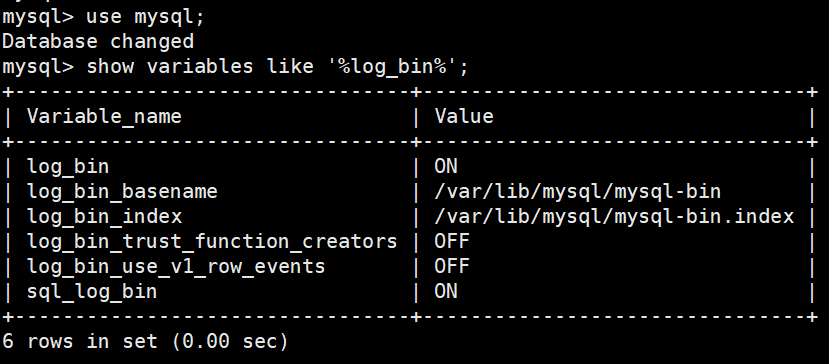
基于 Flink SQL CDC 数据处理的终极武器
文章目录 一、传统的数据同步方案与 Flink SQL CDC 解决方案1.1 Flink SQL CDC 数据同步与原理解析1.2 基于日志的 CDC 方案介绍1.3 选择 Flink 作为 ETL 工具 二、 基于 Flink SQL CDC 的数据同步方案实践2.1 CDC Streaming ETL2.2 Flink-CDC实践之mysql案例 来源互联网多篇文…...

uniapp使用HQChart的k线,用webSocket更新数据
项目:不借用HQChart的各种接口数据,即数据后端返回,但是数据格式要和原数据格式一样。 //k线图 CreateHQChartKLine(){var chartHeightuni.upx2px(this.ChartHeight);let hqchartCtrlthis.$refs.HQChartCtrl;hqchartCtrl.KLine.Option.Type&…...
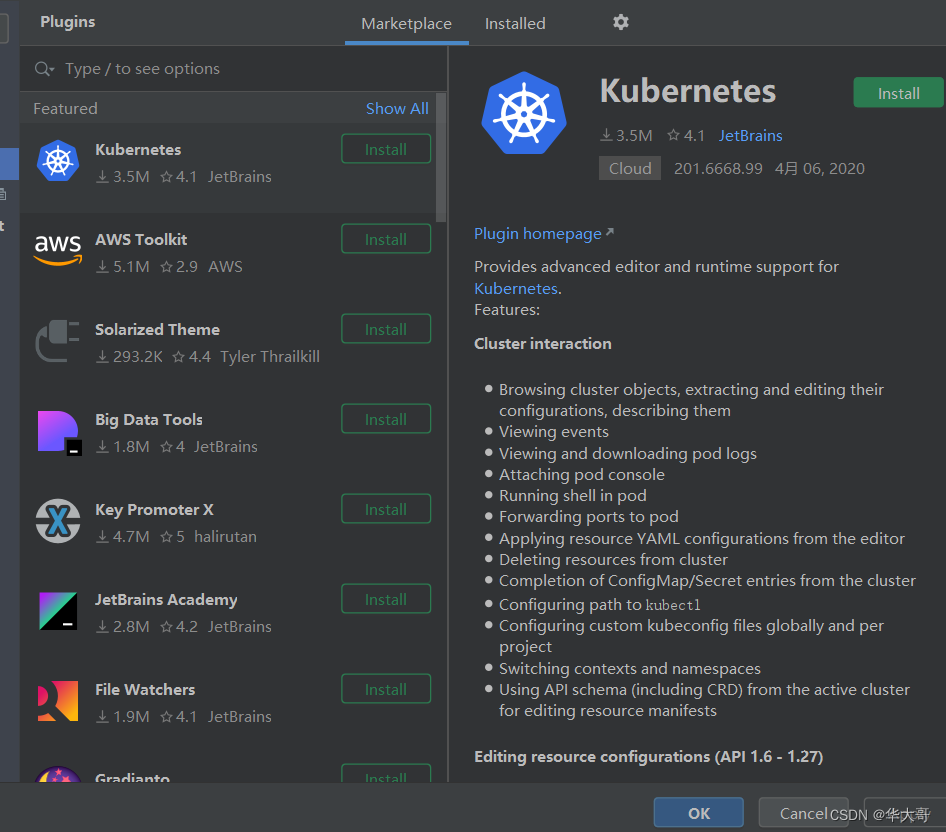
idea的Plugins中搜索不到插件
1、ctrlalts 打开设置 ; 2、搜索框输入plugins; 3、点击plugins; 4、点齿轮按钮,选择HTTP Proxy settings; 如下操作: 5、刷新DNS,ipconfig /flushdns 6、重新打开idea 的plugins 插件列表出来了...
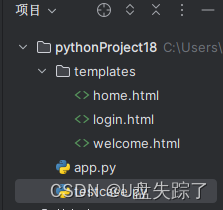
flask 实现简单的登录系统demo
你提供的代码是一个基本的Flask应用程序,实现了一个简单的登录系统。以下是代码的详细解释: 1. 导入必要的模块:os 用于生成密钥,Flask 用于创建Web应用程序。 2. 创建Flask应用程序的实例,并为会话管理设置一个密钥。…...

Spring Security安全配置
使用Spring Boot与Spring MVC进行Web开发时,如果项目引入spring-boot- starter-security依赖启动器,MVC Security 安全管理功能就会自动生效,其默认的安全配置是在SecurityAutoConfiguration和UserDetailsServiceAutoConfiguration中实现的。…...

2023Java后端开发之100道常见经典面试题
目录 1.重载和重写的区别? 2.String 和 StringBuffer、StringBuilder 的区别是什么? 3. 与 equals 的区别? 4.抽象类和接口的区别是什么? 5. 面向对象的特点 6.Collection 和 Collections 有什么区别? 7.List、Set、Map 之…...

Redis详解,包括安装命令,应用场景,优缺点,案列分析,各个开发语言如何应用
目录 1、安装命令2、应用场景3、优缺点4、案例分析5、各个开发语言如何应用? Redis 是一个基于内存的开源数据库系统,被广泛应用于 Web 应用、消息队列、缓存、实时统计等领域。下面是 Redis 的详解,包括安装命令、应用场景和优缺点ÿ…...

AI数字人:金融数字化转型的“关键先生”
今年年初ChatGPT的火热,在全球掀起一阵生成式AI(AIGC)热潮。国外的OpenAI、国内的百度等企业,都在AIGC上强力布局。 各种应用场景中,AIGC助力的数字人引起了市场注意。 事实上,数字人不是个新鲜事。早在1…...
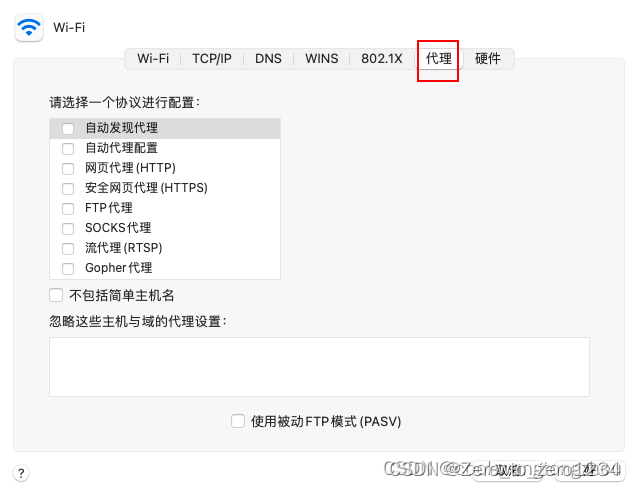
mac关闭VPN之后,浏览器就不能够正常上网了(图解)
可能打开谷歌浏览器会显示无法正常连接网络等信息,这个时候可以按照以下步骤: 点击"检查代理服务器地址" 会显示以下这段话,按照这个步骤来操作就可以了。 打开系统偏好设置,点击网络 点击高级 取消掉所有已勾选代…...

YOLOv5改进系列(17)——更换IoU之MPDIoU(ELSEVIER 2023|超越WIoU、EIoU等|实测涨点)
【YOLOv5改进系列】前期回顾: YOLOv5改进系列(0)——重要性能指标与训练结果评价及分析 YOLOv5改进系列(1)——添加SE注意力机制...
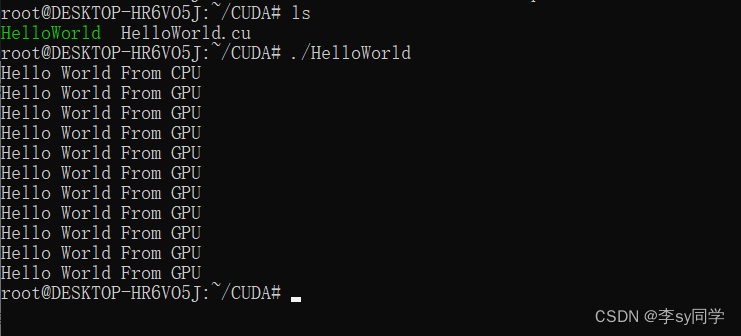
基于WSL2、Ubuntu和VS Code的CUDA平台运行C语言程序
一、CUDA程序执行方法 执行步骤为: 安装Visual Studio Code。在Visual Studio Code中安装插件WSL与电脑的WSL2进行连接。点击左下角,然后再选择连接到WSL。 在WSL中创建以 .cu 为后缀的文件。 rootDESKTOP-HR6VO5J:~# mkdir CUDA /…...
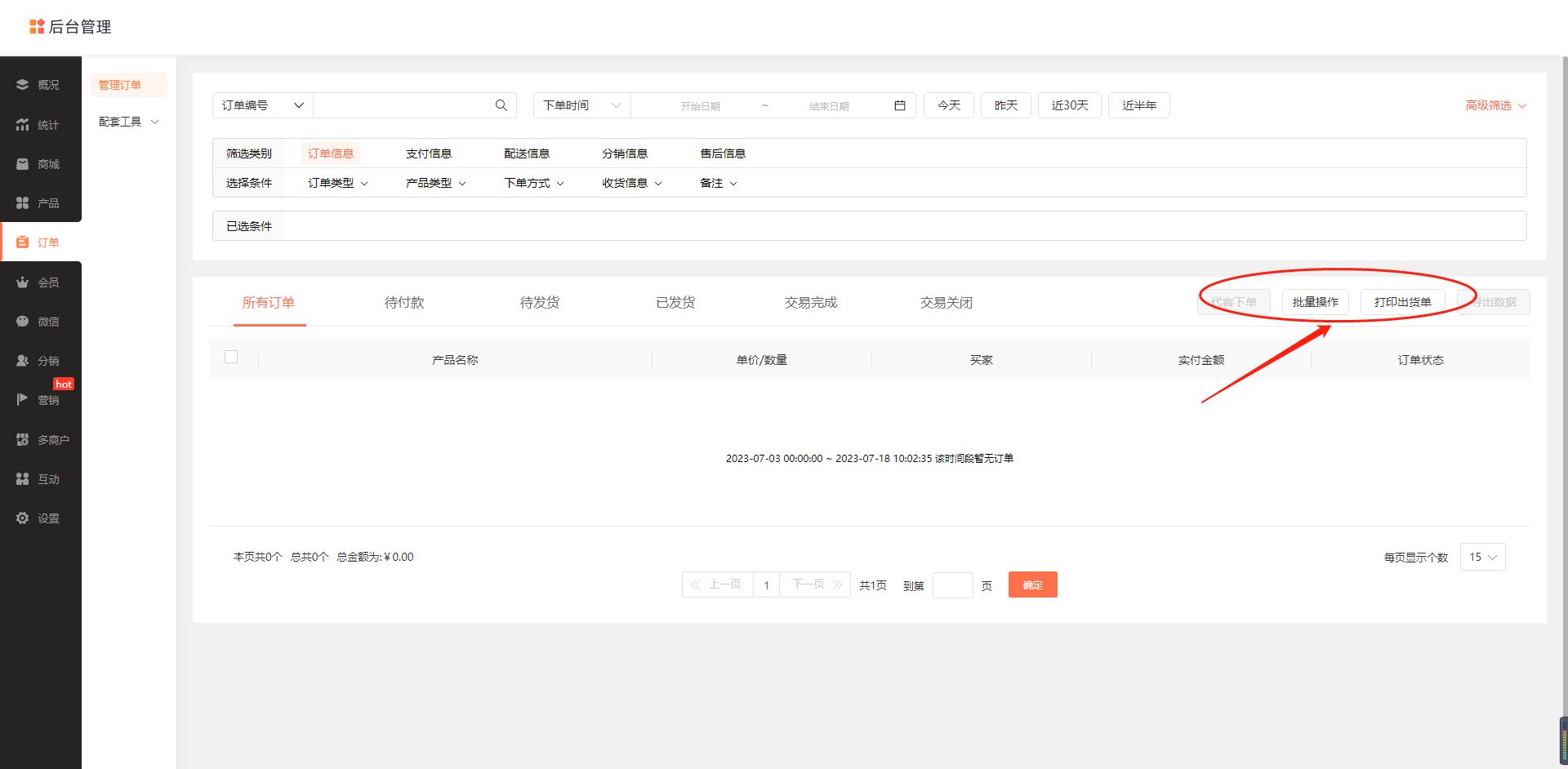
构建外卖系统小程序,订单管理功能实现步骤详解
外卖系统小程序是近年来越来越受欢迎的一种订餐方式,方便快捷,并且可以减少人与人之间的接触,更加卫生安全。为了搭建一个完善的外卖系统小程序,订单管理功能是必不可少的一部分。在本文中,我们将详细介绍如何实现订单…...
用asp.net开发h5网页版视频播放网站,类似优酷,jellyfin,emby
之前用jellyfin开源软件搞了一个视频播放服务器,用来共享给家里人看电影和电视剧,jellyfin虽然各方面功能都很强大,但是界面和使用习惯都很不适合,于是就想着利用下班休息时间做一套自己喜欢的视频网站出来. 本来是打算直接用jellyfin的源码进行修改,源码是用C# netcore 写的服…...

Redis—相关背景
Redis—相关背景 🔎Redis—特性In-memory data structures—在内存中存储数据Programmability—可编程性Extensibility—可扩展性Persistence—持久化Clustering—集群High availability—高可用 🔎Redis 为什么快🔎Redis 的使用场景Real-tim…...
SSL 证书过期巡检脚本
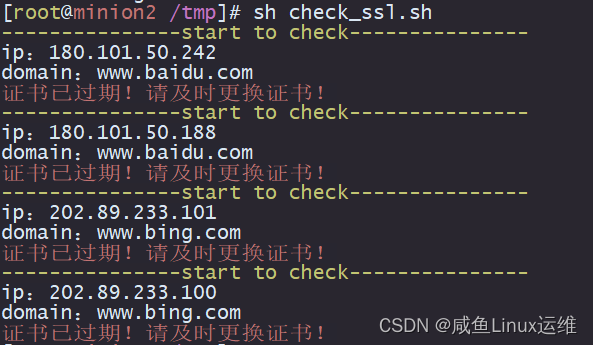
哈喽大家好,我是咸鱼 我们知道 SSL 证书是会过期的,一旦过期之后需要重新申请。如果没有及时更换证书的话,就有可能导致网站出问题,给公司业务带来一定的影响 所以说我们要每隔一定时间去检查网站上的 SSL 证书是否过期 如果公…...

深圳实体门店有必要做GEO AI代运营吗
深圳实体门店有必要做GEO AI代运营吗一、开篇引言2026年深圳本地实体商业竞争进入白热化阶段,全城数百万家线下实体门店涵盖本地生活、家装工装、汽车服务、餐饮娱乐、教育培训等全品类,传统线下地推、门店自然客流、传统团购平台引流效果持续下滑&#…...

AI大模型应用开发全攻略:从入门到精通,掌握LLM、RAG、Agent核心技能!“
本文全面介绍了AI大模型应用开发的核心技术和实践。从大模型API交互基础,到关键参数Messages和Tools的作用,深入解析了RAG、ReAct、Agent等应用范式。文章还探讨了Fine-tuning微调和Prompt提示词工程的重要性,强调工程实践与业务需求相结合。…...

ARM PMU外部接口与性能监控寄存器详解
1. ARM性能监控寄存器外部接口深度解析性能监控单元(PMU)是现代处理器架构中用于硬件性能分析的核心模块,它通过一组可编程计数器实时捕获处理器微架构层面的各类事件。在ARMv8/v9架构中,PMU不仅可以通过系统寄存器访问,还提供了标准化的外部…...

录音会议纪要整理不同使用场景,实用口碑选择建议
针对不同场景的录音整理需求(短录音、中长录音、长内容深度整理),本文基于实际使用体验,分享不同场景下的工具选择建议与使用心得。一、场景一:短录音(15-60分钟,发音清晰)典型场景&…...

潮州东方轻奢风全屋高定找哪家
开篇引言根据《2026年中国全屋定制行业发展报告》,潮州市全屋定制市场规模同比增长38%,其中全屋高端定制细分市场同比增长52%。目前,潮州市家庭全屋定制需求占比72%,高端定制需求占比45%。为了帮助潮州市消费者选择合规、靠谱、差…...
)
ROS Noetic实战:从bag包里‘抠’出雷达点云和IMU数据的保姆级教程(Ubuntu 20.04)
ROS Noetic实战:从bag包里提取雷达点云和IMU数据的完整指南(Ubuntu 20.04)在机器人开发中,ROS bag文件就像是一个装满珍贵数据的宝箱,而雷达点云和IMU数据则是其中最闪亮的宝石。作为一名长期与ROS打交道的开发者&…...

内存占用3KB!极致瘦身释放MCU无限可能
极致小体积,给工业领域带来了无限的可能:更低硬件成本,更小芯片体积,更低功耗,更高可靠性,让每一颗小MCU都拥有大系统的完整能力。 https://www.bilibili.com/video/BV1eZLi6PEjc/?spm_id_from333.1387.ho…...

别再死记硬背了!用5个生活化比喻彻底搞懂Linux进程的fork、exec和wait
别再死记硬背了!用5个生活化比喻彻底搞懂Linux进程的fork、exec和wait想象你正在厨房准备一顿大餐。菜谱上写着"切菜"、"炒菜"、"装盘"等步骤,但突然发现需要同时处理多道菜品——这时候,你会本能地让家人分工…...

当 AI Coding 进入复杂企业系统,为什么提效远没有宣传里那么美好 ?
以 Claude Code、Codex 为代表的自主编码智能体(Coding Agents),正在以惊人的速度席卷软件开发者生态。与此同时,类似“10 倍开发效率”“普通人也能随手构建软件”“程序员即将失业”的说法,也随处可见。这种不分场景…...

CPU架构启发的智能仓储布局优化实践
1. 仓库布局优化的核心挑战与创新机遇在物流仓储领域,拣货环节通常占据运营成本的55%-65%,而其中约50%的时间消耗在无效行走路径上。传统矩形仓库布局虽然易于规划和施工,但其正交的通道设计导致拣货员需要频繁进行90度转向,这种&…...