
hcip的mgre和ospf实验
题目
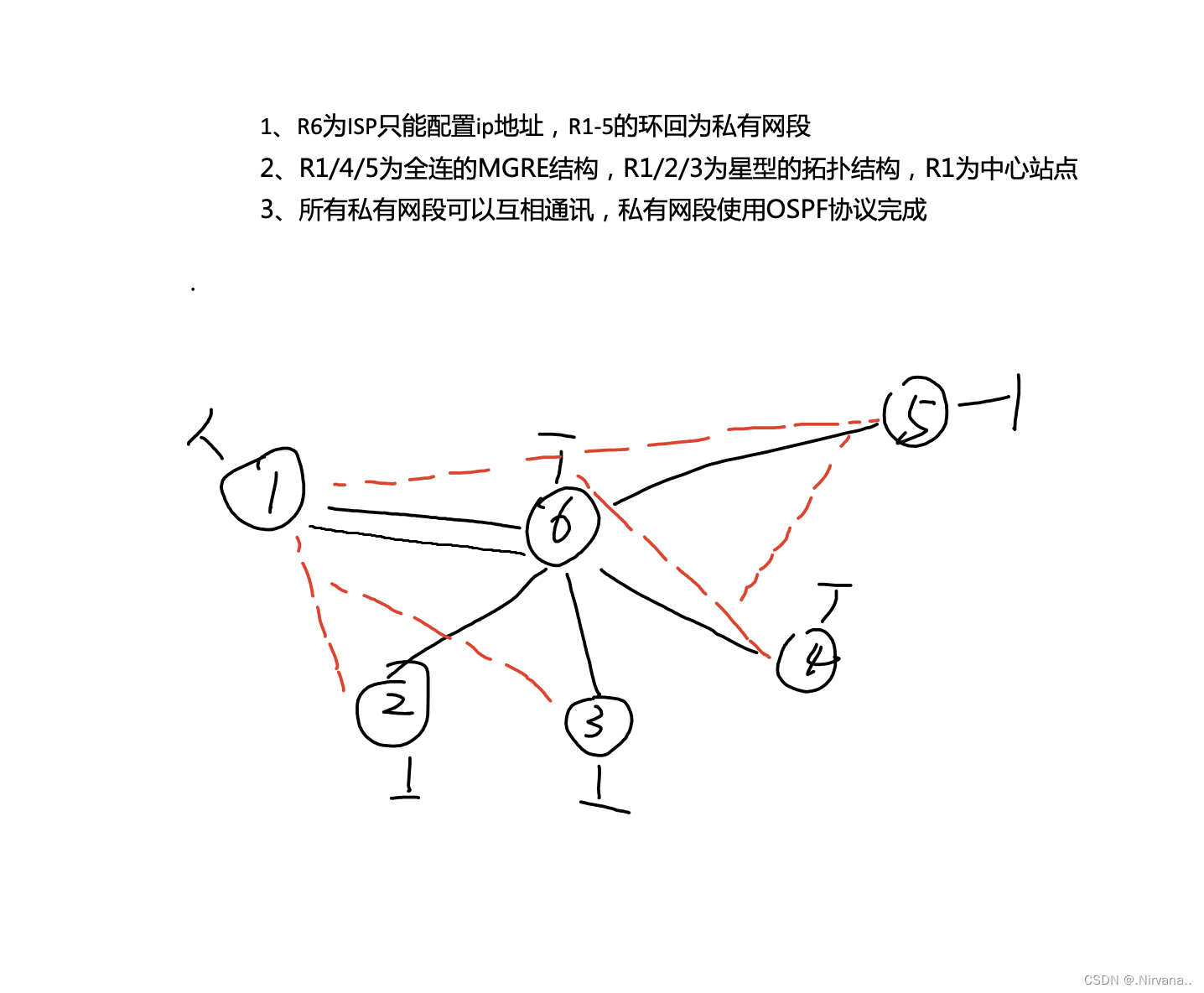
拓扑图
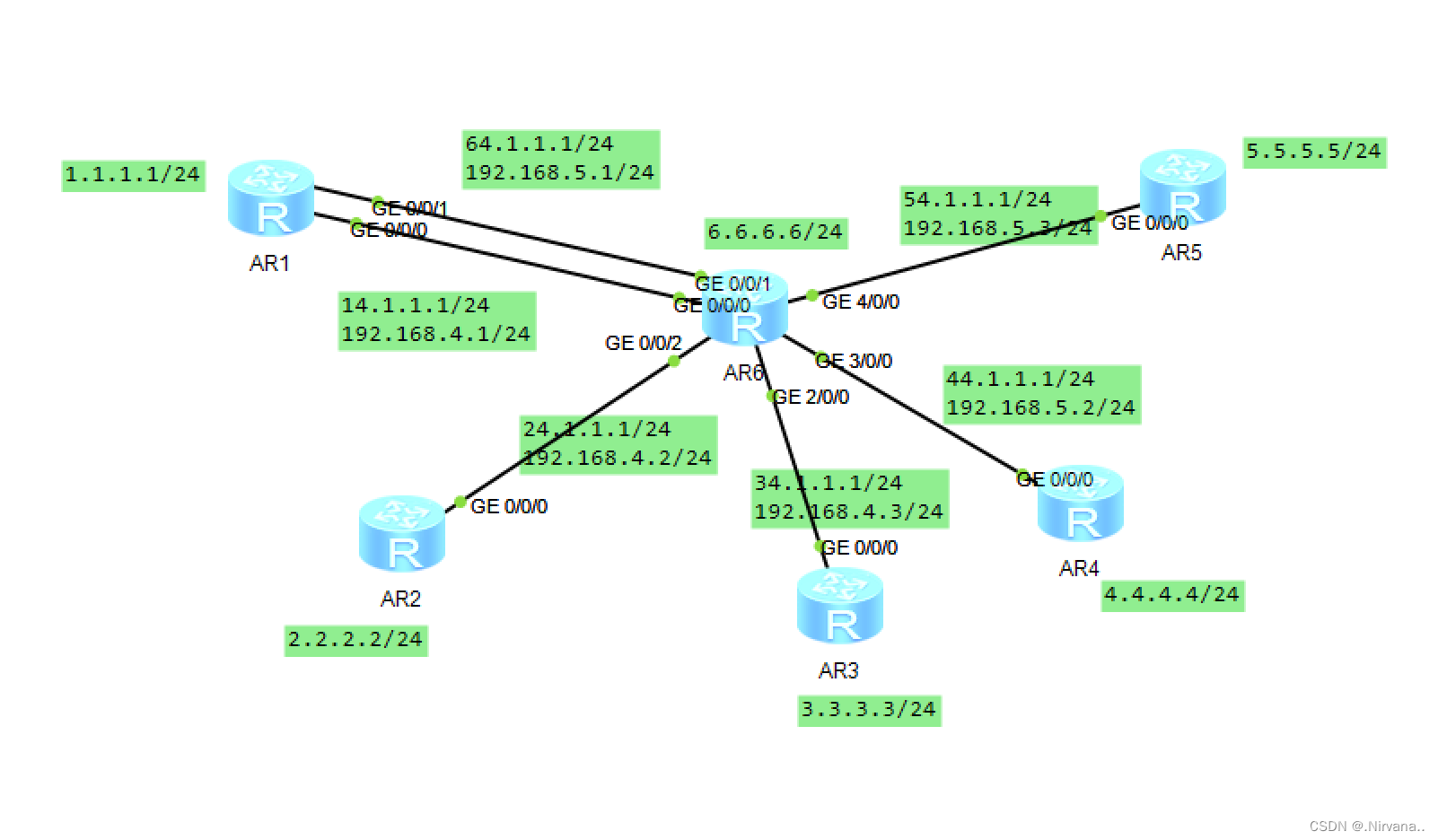
一、配置环回和IP地址
R1
< Huawei>sy
Enter system view, return user view with Ctrl+Z.
[Huawei]sysname r1
[r1]int g0/0/1
[r1-GigabitEthernet0/0/1]ip add 64.1.1.1 24
Aug 4 2023 18:56:07-08:00 r1 %%01IFNET/4/LINK_STATE(l)[0]:The line protocol IP
on the interface GigabitEthernet0/0/1 has entered the UP state.
[r1-GigabitEthernet0/0/1]int g0/0/0
[r1-GigabitEthernet0/0/0]ip add 14.1.1.1 24
Aug 4 2023 18:56:27-08:00 r1 %%01IFNET/4/LINK_STATE(l)[1]:The line protocol IP
on the interface GigabitEthernet0/0/0 has entered the UP state.
[r1-GigabitEthernet0/0/0]q
[r1]int lo
[r1]int LoopBack 0
[r1-LoopBack0]ip add 1.1.1.1 24
R2
< Huawei>sy
Enter system view, return user view with Ctrl+Z.
[Huawei]sysname r2
[r2]int g0/0/0
[r2-GigabitEthernet0/0/0]ip add 24.1.1.1 24
Aug 4 2023 18:56:56-08:00 r2 %%01IFNET/4/LINK_STATE(l)[0]:The line protocol IP
on the interface GigabitEthernet0/0/0 has entered the UP state.
[r2-GigabitEthernet0/0/0]q
[r2]int lo
[r2]int LoopBack 0
[r2-LoopBack0]ip add 2.2.2.2 24
R3
< Huawei>sy
Enter system view, return user view with Ctrl+Z.
[Huawei]sysname r3
[r3]int g0/0/0
[r3-GigabitEthernet0/0/0]ip add 34.1.1.1 24
Aug 4 2023 18:57:15-08:00 r3 %%01IFNET/4/LINK_STATE(l)[0]:The line protocol IP
on the interface GigabitEthernet0/0/0 has entered the UP state.
[r3-GigabitEthernet0/0/0]q
[r3]int lo
[r3]int LoopBack 0
[r3-LoopBack0]ip add 3.3.3.3 24
R4
< Huawei>sy
Enter system view, return user view with Ctrl+Z.
[Huawei]sysname r4
[r4]int g0/0/0
[r4-GigabitEthernet0/0/0]ip add 44.1.1.1 24
Aug 4 2023 18:57:38-08:00 r4 %%01IFNET/4/LINK_STATE(l)[0]:The line protocol IP
on the interface GigabitEthernet0/0/0 has entered the UP state.
[r4-GigabitEthernet0/0/0]q
[r4]int lo
[r4]int LoopBack 0
[r4-LoopBack0]ip add 4.4.4.4 24
R5
< Huawei>sy
Enter system view, return user view with Ctrl+Z.
[Huawei]sysname r5
[r5]int g0/0/0
[r5-GigabitEthernet0/0/0]ip add 54.1.1.1 24
Aug 4 2023 18:58:00-08:00 r5 %%01IFNET/4/LINK_STATE(l)[0]:The line protocol IP
on the interface GigabitEthernet0/0/0 has entered the UP state.
[r5-GigabitEthernet0/0/0]q
[r5]int lo
[r5]int LoopBack 0
[r5-LoopBack0]ip add 5.5.5.5 24
R6
< Huawei>sy
Enter system view, return user view with Ctrl+Z.
[Huawei]sysname r6
[r6]int g2/0/0
[r6-GigabitEthernet2/0/0]ip add 34.1.1.2 24
Aug 4 2023 18:58:28-08:00 r6 %%01IFNET/4/LINK_STATE(l)[0]:The line protocol IP
on the interface GigabitEthernet2/0/0 has entered the UP state.
[r6-GigabitEthernet2/0/0]int g0/0/0
[r6-GigabitEthernet0/0/0]ip add 14.1.1.2 24
Aug 4 2023 18:58:45-08:00 r6 %%01IFNET/4/LINK_STATE(l)[1]:The line protocol IP
on the interface GigabitEthernet0/0/0 has entered the UP state.
[r6-GigabitEthernet0/0/0]int g0/0/1
[r6-GigabitEthernet0/0/1]ip add 64.1.1.2 24
[r6-GigabitEthernet0/0/1]
Aug 4 2023 18:59:23-08:00 r6 %%01IFNET/4/LINK_STATE(l)[2]:The line protocol IP
on the interface GigabitEthernet0/0/1 has entered the UP state.
[r6-GigabitEthernet0/0/1]int g0/0/2
[r6-GigabitEthernet0/0/2]ip add 24.1.1.2 24
[r6-GigabitEthernet0/0/2]
Aug 4 2023 18:59:35-08:00 r6 %%01IFNET/4/LINK_STATE(l)[3]:The line protocol IP
on the interface GigabitEthernet0/0/2 has entered the UP state.
[r6-GigabitEthernet0/0/2]int g4/0/0
[r6-GigabitEthernet4/0/0]ip add 54.1.1.2 24
[r6-GigabitEthernet4/0/0]
Aug 4 2023 18:59:56-08:00 r6 %%01IFNET/4/LINK_STATE(l)[4]:The line protocol IP
on the interface GigabitEthernet4/0/0 has entered the UP state.
[r6-GigabitEthernet4/0/0]int g3/0/0
[r6-GigabitEthernet3/0/0]ip add 44.1.1.2 24
[r6-GigabitEthernet3/0/0]
Aug 4 2023 19:00:10-08:00 r6 %%01IFNET/4/LINK_STATE(l)[5]:The line protocol IP
on the interface GigabitEthernet3/0/0 has entered the UP state.
[r6]int lo
[r6]int LoopBack 0
[r6-LoopBack0]ip add 6.6.6.6 24
二、配置缺省
R1
[r1]ip rou
[r1]ip route
[r1]ip route-static 0.0.0.0 0 14.1.1.2
[r1]ip route-static 0.0.0.0 0 64.1.1.2
R2
[r2]ip rou
[r2]ip route
[r2]ip route-static 0.0.0.0 0 24.1.1.2
R3
[r3]ip rou
[r3]ip route
[r3]ip route-static 0.0.0.0 0 34.1.1.2
R4
[r4]ip rou
[r4]ip route
[r4]ip route-static 0.0.0.0 0 44.1.1.2
R5
[r5]ip rou
[r5]ip route
[r5]ip route-static 0.0.0.0 0 54.1.1.2
星型拓扑结构
R1
[r1]int tu
[r1]int Tunnel 0/0/0
[r1-Tunnel0/0/0]ip add 192.168.4.1 24
[r1-Tunnel0/0/0]tun
[r1-Tunnel0/0/0]tunnel-protocol gre p2mp
[r1-Tunnel0/0/0]sou
[r1-Tunnel0/0/0]source 14.1.1.1
Aug 4 2023 19:54:53-08:00 r1 %%01IFNET/4/LINK_STATE(l)[0]:The line protocol IP
on the interface Tunnel0/0/0 has entered the UP state.
[r1-Tunnel0/0/0]
[r1-Tunnel0/0/0]nhrp en
[r1-Tunnel0/0/0]nhrp entry mu
[r1-Tunnel0/0/0]nhrp entry multicast dy
[r1-Tunnel0/0/0]nhrp entry multicast dynamic
R2
[r2]int tun
[r2]int Tunnel 0/0/0
[r2-Tunnel0/0/0]ip add 192.168.4.2 24
[r2-Tunnel0/0/0]tun
[r2-Tunnel0/0/0]tunnel-protocol gre
[r2-Tunnel0/0/0]tunnel-protocol gre p2mp
[r2-Tunnel0/0/0]sour
[r2-Tunnel0/0/0]source g0/0/0
Aug 4 2023 19:56:36-08:00 r2 %%01IFNET/4/LINK_STATE(l)[0]:The line protocol IP
on the interface Tunnel0/0/0 has entered the UP state.
[r2-Tunnel0/0/0]nhrp entry multicast dynamic
[r2-Tunnel0/0/0]nh
[r2-Tunnel0/0/0]nhrp en
[r2-Tunnel0/0/0]nhrp entry 192.168.4.1 14.1.1.1 re
[r2-Tunnel0/0/0]nhrp entry 192.168.4.1 14.1.1.1 register
[r2-Tunnel0/0/0]
R3
[r3]int tun
[r3]int Tunnel 0/0/0
[r3-Tunnel0/0/0]ip add 192.168.4.3 24
[r3-Tunnel0/0/0]tun
[r3-Tunnel0/0/0]tunnel-protocol gre p2mp
[r3-Tunnel0/0/0]s
[r3-Tunnel0/0/0]sou
[r3-Tunnel0/0/0]source g0/0/0
Aug 4 2023 19:58:08-08:00 r3 %%01IFNET/4/LINK_STATE(l)[0]:The line protocol IP
on the interface Tunnel0/0/0 has entered the UP state.
[r3-Tunnel0/0/0]nhrp entry multicast dynamic
[r3-Tunnel0/0/0]nh
[r3-Tunnel0/0/0]nhrp en
[r3-Tunnel0/0/0]nhrp entry 192.168.4.1 14.1.1.1 re
[r3-Tunnel0/0/0]nhrp entry 192.168.4.1 14.1.1.1 register
[r3-Tunnel0/0/0]
MGRE全连拓扑
R1
[r1]int tun
[r1]int Tunnel 0/0/1
[r1-Tunnel0/0/1]ip add 192.168.5.1 24
[r1-Tunnel0/0/1]tun
[r1-Tunnel0/0/1]tunnel-protocol gre p2mp
[r1-Tunnel0/0/1]sou
[r1-Tunnel0/0/1]source 64.1.1.1
Aug 4 2023 21:49:24-08:00 r1 %%01IFNET/4/LINK_STATE(l)[0]:The line protocol IP
on the interface Tunnel0/0/0 has entered the DOWN state.
[r1-Tunnel0/0/1]
[r1-Tunnel0/0/1]
Aug 4 2023 21:49:24-08:00 r1 %%01IFNET/4/LINK_STATE(l)[1]:The line protocol IP
on the interface Tunnel0/0/0 has entered the UP state.
[r1-Tunnel0/0/1]nh
[r1-Tunnel0/0/1]nhrp en
[r1-Tunnel0/0/1]nhrp entry mu
[r1-Tunnel0/0/1]nhrp entry multicast dy
[r1-Tunnel0/0/1]nhrp entry multicast dynamic
[r1-Tunnel0/0/1]nh
[r1-Tunnel0/0/1]nhrp en
[r1-Tunnel0/0/1]nhrp entry 192.168.5.2 44.1.1.1 re
[r1-Tunnel0/0/1]nhrp entry 192.168.5.2 44.1.1.1 register
[r1-Tunnel0/0/1]nhrp entry 192.168.5.3 54.1.1.1 register
[r1-Tunnel0/0/1]
R4
[r4]int tun
[r4]int Tunnel 0/0/1
[r4-Tunnel0/0/1]nh
[r4-Tunnel0/0/1]nhrp en
[r4-Tunnel0/0/1]ip add 192.168.5.2 24
[r4-Tunnel0/0/1]tun
[r4-Tunnel0/0/1]tunnel-protocol gre p2mp
[r4-Tunnel0/0/1]sou
[r4-Tunnel0/0/1]source 44.1.1.1
Aug 4 2023 21:53:12-08:00 r4 %%01IFNET/4/LINK_STATE(l)[0]:The line protocol IP
on the interface Tunnel0/0/0 has entered the UP state.
[r4-Tunnel0/0/1]nhrp entry multicast dynamic
[r4-Tunnel0/0/1]nh
[r4-Tunnel0/0/1]nhrp en
[r4-Tunnel0/0/1]nhrp entry 192.168.5.1 64.1.1.1 re
[r4-Tunnel0/0/1]nhrp entry 192.168.5.1 64.1.1.1 register
Info: This peer protocol address conflicts with hub register peer protocol addre
ss.
[r4-Tunnel0/0/1]nhrp entry 192.168.5.3 54.1.1.1 register
[r4-Tunnel0/0/1]
R5
[r5]
[r5]int tun
[r5]int Tunnel 0/0/1
[r5-Tunnel0/0/1]ip add 192.168.5.3 24
[r5-Tunnel0/0/1]tun
[r5-Tunnel0/0/1]tunnel-protocol gre p2mp
[r5-Tunnel0/0/1]sou
[r5-Tunnel0/0/1]source 54.1.1.1
Aug 4 2023 21:54:27-08:00 r5 %%01IFNET/4/LINK_STATE(l)[0]:The line protocol IP
on the interface Tunnel0/0/0 has entered the UP state.
[r5-Tunnel0/0/1]nhrp entry multicast dynamic
[r5-Tunnel0/0/1]nh
[r5-Tunnel0/0/1]nhrp en
[r5-Tunnel0/0/1]nhrp entry 192.168.5.1 64.1.1.1 re
[r5-Tunnel0/0/1]nhrp entry 192.168.5.1 64.1.1.1 register
[r5-Tunnel0/0/1]nhrp entry 192.168.5.2 44.1.1.1 register
Info: This peer protocol address conflicts with hub register peer protocol addre
ss.
[r5-Tunnel0/0/1]
ospf配置
R1
[r1]ospf 1 router-id 1.1.1.1
[r1-ospf-1]area 0
[r1-ospf-1-area-0.0.0.0]network 192.168.5.1 0.0.0.0
[r1-ospf-1-area-0.0.0.0]network 192.168.4.1 0.0.0.0
[r1-ospf-1-area-0.0.0.0]network 1.1.1.1 0.0.0.0
R2
[r2]ospf 1 rou
[r2]ospf 1 router-id 2.2.2.2
[r2-ospf-1]ar
[r2-ospf-1]area 0
[r2-ospf-1]area 0
[r2-ospf-1-area-0.0.0.0]net
[r2-ospf-1-area-0.0.0.0]network 2.2.2.2 0.0.0.0
[r2-ospf-1-area-0.0.0.0]network 192.168.4.2 0.0.0.0
[r2-ospf-1-area-0.0.0.0]q
[r2-ospf-1]q
[r2]int Tunnel 0/0/0
[r2-Tunnel0/0/0]ospf network-type p2mp
R3
[r3]ospf 1 rou
[r3]ospf 1 router-id 3.3.3.3
[r3-ospf-1]ar
[r3-ospf-1]area 0
[r3-ospf-1-area-0.0.0.0]net
[r3-ospf-1-area-0.0.0.0]network 3.3.3.3 0.0.0.0
[r3-ospf-1-area-0.0.0.0]network 192.168.5.3 0.0.0.0
[r3-ospf-1-area-0.0.0.0]network 192.168.4.3 0.0.0.0
[r3-ospf-1-area-0.0.0.0]q
[r3-ospf-1]q
[r3]int Tunnel 0/0/0
[r3-Tunnel0/0/0]ospf network-type p2mp
R4
[r4]ospf 1 rou
[r4]ospf 1 router-id 4.4.4.4
[r4-ospf-1]ar
[r4-ospf-1]area 0
[r4-ospf-1-area-0.0.0.0]net
[r4-ospf-1-area-0.0.0.0]network 4.4.4.4 0.0.0.0
[r4-ospf-1-area-0.0.0.0]network 192.168.5.2 0.0.0.0
[r4-ospf-1-area-0.0.0.0]q
[r4-ospf-1]q
[r4]int Tunnel 0/0/1
[r4-Tunnel0/0/1]ospf network-type broadcast
R5
[r5]ospf 1 rou
[r5]ospf 1 router-id 5.5.5.5
[r5-ospf-1]ar
[r5-ospf-1]area 0
[r5-ospf-1-area-0.0.0.0]net
[r5-ospf-1-area-0.0.0.0]network 5.5.5.5 0.0.0.0
[r5-ospf-1-area-0.0.0.0]network 192.168.5.3 0.0.0.0
[r5-ospf-1-area-0.0.0.0]q
[r5-ospf-1]q
[r5]int Tunnel 0/0/1
[r5-Tunnel0/0/1]ospf network-type broadcast
检验,用R1去ping R2,R3,R4,R5的环回,能ping通则成功

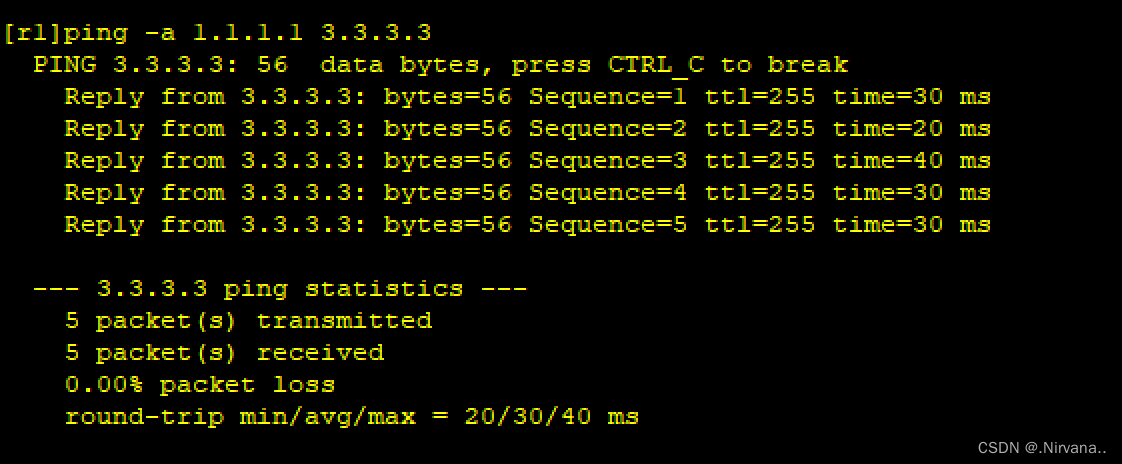
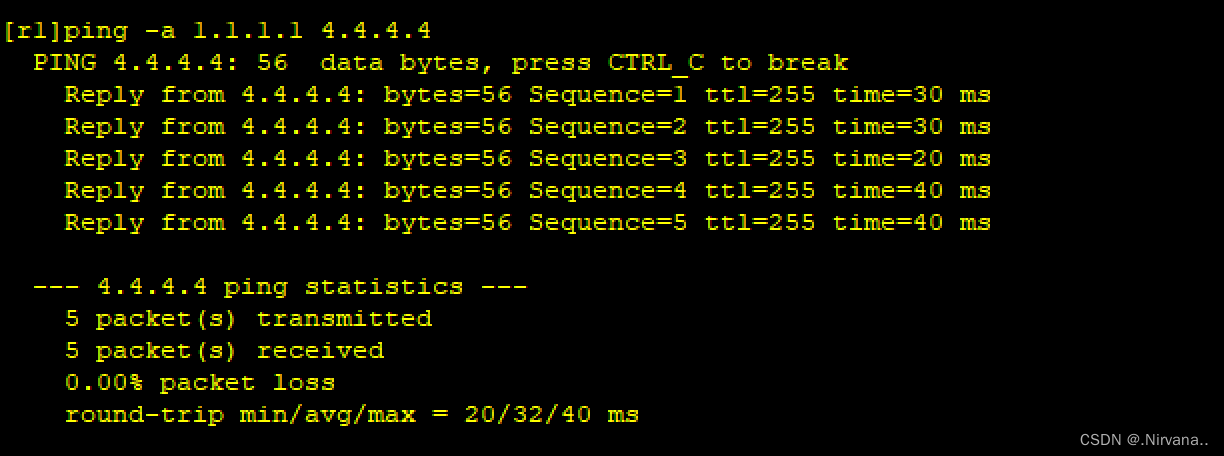
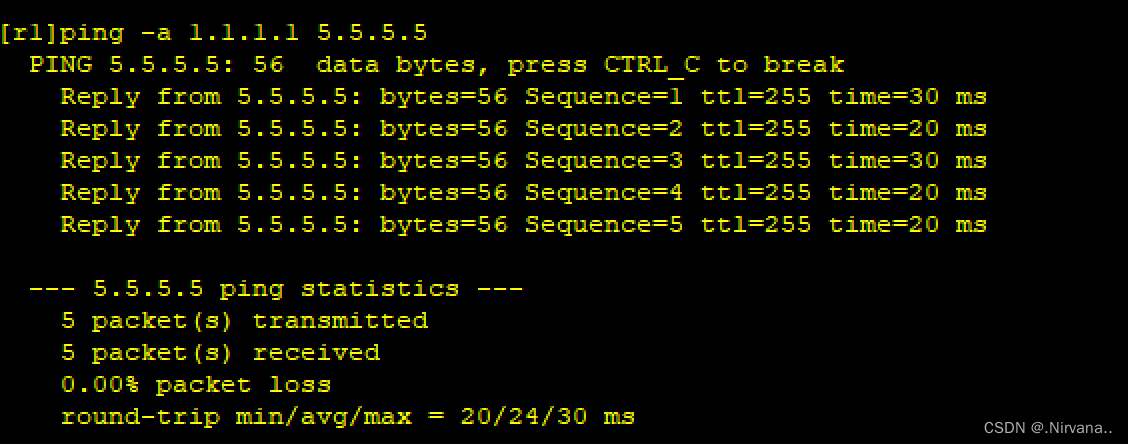
ping R6的环回也成功

相关文章:
hcip的mgre和ospf实验
题目 拓扑图 一、配置环回和IP地址 R1 < Huawei>sy Enter system view, return user view with CtrlZ. [Huawei]sysname r1 [r1]int g0/0/1 [r1-GigabitEthernet0/0/1]ip add 64.1.1.1 24 Aug 4 2023 18:56:07-08:00 r1 %%01IFNET/4/LINK_STATE(l)[0]:The line protocol…...

gdb学习笔记
参考:https://blog.csdn.net/Stars_WW/article/details/88994391 gdb常用交互命令 启动gdb后,进入到交互模式,通过以下命令完成对程序的调试;注意高频使用的命令一般都会有缩写,熟练使用这些缩写命令能提高调试的效率;…...
java -jar指定外部配置文件
场景 spingboot项目部署jar时,需要时常修改配置,为了方便,将配置文件放到jar包外 操作步骤 在jar包同级目录下创建config文件夹(位置没有强制要求,为了方便而已) 在jar包同级目录下创建start.bat文件,并编辑内容 echo off :: 命令窗口标题 title yudibei_performance_tes…...
【IDEA】常用插件清单
【IDEA】常用插件清单 arthas ideaCodeium: AI Autocomplete for xxxCommit-MessageGenerateAllSetterMaven HelperMybatisPlusOne Dark themePDF ViewerRainbow BracketsRestfulToolSequenceDiagramSonarLintTranslation arthas idea 快捷生成arthas命令 Codeium: AI Autoc…...

私域流量运营数据分析:6个关键指标
随着数字化时代的到来,私域流量运营已经成为企业营销的重要策略。然而,要确保私域流量运营的有效性和成功,数据分析是至关重要的一环。通过对运营数据进行深入分析,企业可以了解用户行为和趋势,发现问题和机遇…...
解释器模式——自定义语言的实现
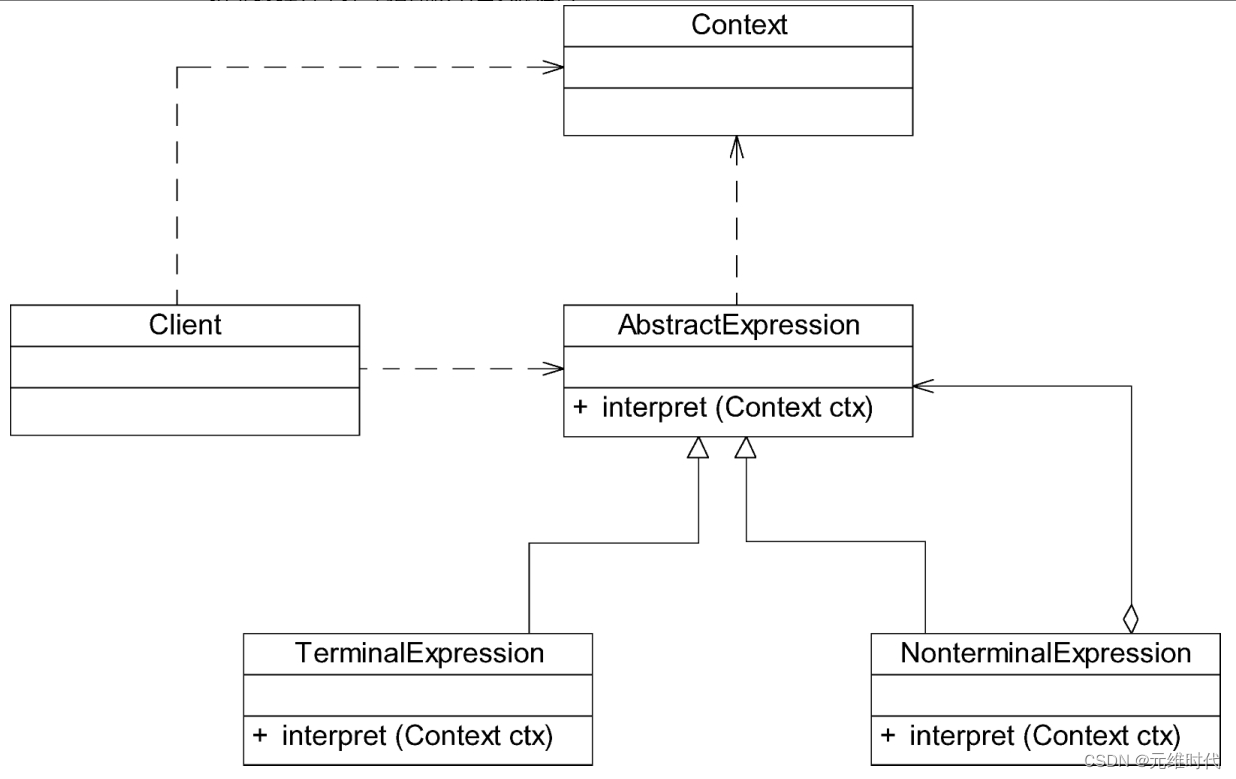
1、简介 1.1、文法规则和抽象语法树 解释器模式描述了如何为简单的语言定义一个文法,如何在该语言中表示一个句子,以及如何解释这些句子。在正式分析解释器模式结构之前,先来学习如何表示一个语言的文法规则以及如何构造一棵抽象语法树。 …...
基于STM32103移植FreeRTOS
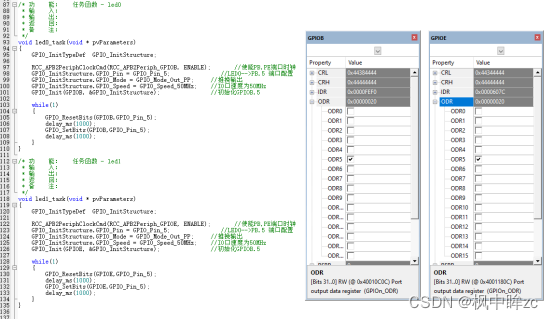
目录 一、FreeRTOS协议栈下载 二、准备工程文件与协议代码 三、移植FreeRTOS协议栈 一、FreeRTOS协议栈下载 1、官网下载 FreeRTOS - Market leading RTOS (Real Time Operating System) for embedded systems with Internet of Things extensionshttps://www.freertos.or…...
docker compose一键部署lnmt环境
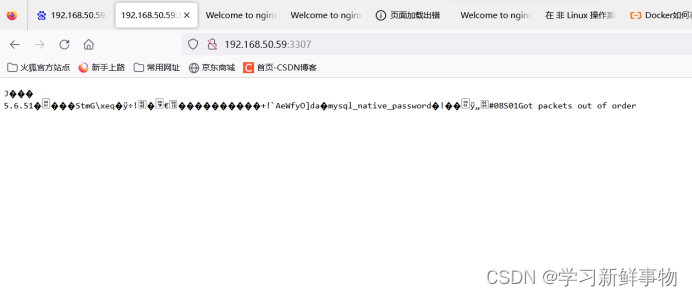
创建docker compose 目录 [rootlocalhost ~]# mkdir -p /compose_lnmt 编写nginx的dockerfile文件 创建目录 [rootlocalhost compose_lnmt]# mkdir -p nginx 编写nginx配置文件 [rootlocalhost nginx]# vim nginx.conf user root; #运行身份#nginx自动设置进程…...

Eeny Meeny Moo
Eeny Meeny Moo 题目描述输入输出格式输入格式输出格式 输入输出样例输入样例输出样例 正确解法A C 代码 题目描述 你肯定有过这样的经验,那就是当很多一起使用网络的时候,网速变得很慢很慢。为了解决这个问题,德国的Ulm大学开发了一份意外事…...

flask---闪现/请求扩展/g对象
闪现 # 一个请求---》假设出错了---》重定向到另一个地址---》把错误信息在另一个返回中看到 错误信息放个位置----》另一个请求过来,去那个位置拿 # 把一些数据,放在某个位置---》后期可以去取出来----》取完不用删除,就没了 def index():s…...
Qt视频播放器
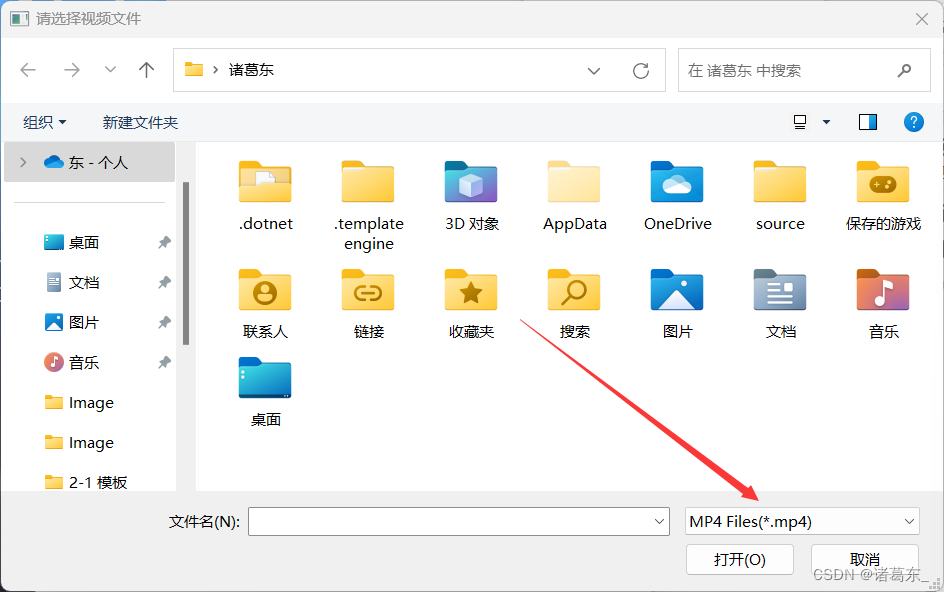
一、设置好ui界面二、打开文件槽函数1.QDir::homePath()作用介绍2.QFileDialog::getOpenFileName()介绍3.QFileInfo介绍4.player 指针解释5.打开文件槽函数完整代码 三、视频播放器初始化1.QMediaPlayer()函数2.设置时间间隔的作用3. QGraphicsScene介绍4.QGraphicsVideoItem介…...

Stable Diffusion教程(8) - X/Y/Z 图表使用
1. 介绍 这项功能可以在 文生图/图生图 界面的左下角种 “脚本” 一栏内选择 “X/Y/Z 图表” 以启用。 它创建具有不同参数的图像网格。使用 X 类型和 Y 类型字段选择应由行和列共享的参数,并将这些参数以逗号分隔输入 X 值 / Y 值字段。支持整数、浮点数和范围。…...

Android 获取网关 ip 和 DNS ip
参考下方 PingUtil.java 代码 import android.content.Context; import android.net.DhcpInfo; import android.net.wifi.WifiManager; import android.text.format.Formatter;import java.io.BufferedReader; import java.io.IOException; import java.io.InputStream; impor…...

Docker root用户的pip使用方法
Docker下root用户 pip install XX 显示pip命令不存在 # 原始目标:pip install XX pip install --root-user-actionignore 【XX】# (要安装的包)参考:WARNING: Running pip as the ‘root‘ user can result in broken permissions Linux 中 root 与 su…...

企业新片场排名如何优化
企业新片场排名如何优化 要如何去做关键SEO?第一个我们要做的就是做好 SEO 关键词的选词,一般就是会有第一个常用的选词方法,第一是以常用的提问词去做,不实像是情人节买什么礼物,母亲节买什么礼物, 618 有…...

Database Name
概述 DB_NAME与INSTANCE_NAME DB_NAME 数据库名称,也就是数据库的名字标示。这里,数据库里可能有多个实例,比如RAC里的多节点,这多个节点是不同的实例,但是却有相同的名字,他们的 DB_NAME是相同的…...

git代码版本管理
git 文章目录 git基本使用 基本使用 在一台新的电脑上使用git 你要下载安装git, 然后把git的安装路径配到系统环境变量里 然后把这台电脑的.ssh/ id_rsa.pub里的公钥整到github里 然后在github上新建仓库,它会生成一些指令引导上你传本地的代码 之后就可以在终…...

k8s概念-ConfigMap
回到目录 一般用于去存储 Pod 中应用所需的一些配置信息,或者环境变量,将配置于 Pod 分开,避免应为修改配置导致还需要重新构建 镜像与容器。 1 创建ConfigMap #使用 kubectl create configmap -h 查看示例,构建 configmap 对象…...
Mybatis 实体类属性名和表中字段名不一致怎么处理
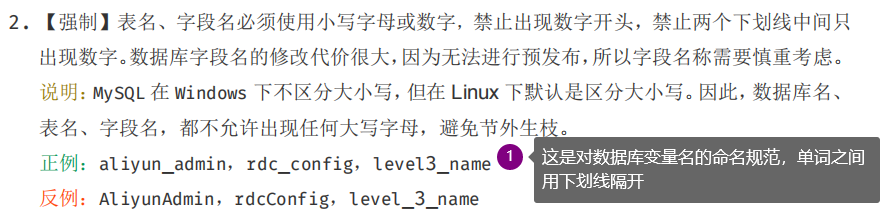
一. 前言 最近耀哥有学生出去面试,被问到 “Mybatis实体类的属性名和表中的字段名不一致该怎么处理?”,这其实是一个很经典的面试题,接下来耀哥就为大家详细解析一下这道面试题。 二. 分析 2.1 实体类和字段名不一致所带来的后果…...

CAS - 从AtomicInteger窥探CAS
Unsafe类是CAS的核心,由于Java方法无法直接访问底层,需要通过本地方法(native)来实现,Unsafe类相当于一个桥梁。基于Unsafe类,可以直接操作特定的内存数据。 我们从上一篇说CAS基本原理的时候,有说到一个“资源”被100…...

据传某大厂西安研究所一个女员工,终身合同耗了三年不走,今年被hr带着保安抬出公司了。
点击上方“码农突围”,马上关注 这里是码农充电第一站,回复“666”,获取一份专属大礼包 真爱,请设置“星标”或点个“在看”这是【码农突围】的第 494 篇原创分享作者 l 突围的鱼来源 l 码农突围(ID:smarty…...

React Native 简介与核心优势
React Native 简介与核心优势 使用场景 React Native 适合以下场景: 跨平台应用开发:需要同时开发 iOS 和 Android 应用,但不想维护两套代码快速原型开发:需要快速验证产品想法,缩短开发周期混合开发团队࿱…...

【AutoSAR】详解PDUR模块
所谓梦想,就是让你感到痛苦的事情不再发生。一、前言在学习AUTOSAR通信栈时,我们会遇到多种PDU相关的缩写,如L-PDU、N-PDU、I-PDU等。理解这些缩写及其相互关系、以及它们与OSI七层模型的对应关系,对于掌握通信部分至关重要。接下…...

压力测试如何模拟真实用户行为?告别“简单粗暴”
从“机械并发”到“行为仿真”的范式转变传统压力测试常陷入数量陷阱——过度关注并发用户数、请求吞吐量等表面指标,却忽视用户行为的真实性和复杂性。这种“简单粗暴”的方式导致测试结果与生产环境严重脱节:测试时系统表现优异,真实流量下…...

基于File-Based App开发MVP项目鸥
Issue 概述 先来看看提交这个 Issue 的作者是为什么想到这个点子的,以及他初步的核心设计概念。?? 本 PR 实现了 Apache Gravitino 与 SeaTunnel 的集成,将其作为非关系型连接器的外部元数据服务。通过 Gravitino 的 REST API 自动获取表结构和元数据&…...

系统设计面试通关秘籍:从场景分析到微服务拆分的核心思路
系统设计面试通关秘籍:从场景分析到微服务拆分的核心思路一、Scenario场景分析:打好系统设计的基础牌🔍 先定功能:抓核心,舍冗余📊 再估流量:从MAU到QPS,做有依据的推算⚙️ 流量决定…...

数据团队该醒醒了:AI智能体不是你的下一个仪表盘闹
7.1 初识三维模型 7.1.1 三维模型的数据载体 随着计算机图形技术的发展,我们或多或少都会见过或者听说过三维模型。笔者始终记得小时候第一次在电视上看到三维动画《变形金刚:超能勇士》的震撼感受;而现在我们已经可以在手机上玩三维游戏《王…...

阻抗匹配原理与工程实践全解析
1. 阻抗匹配基础概念解析阻抗匹配是电子工程中最基础也最容易被忽视的技术要点之一。记得我刚入行时,第一次调试射频电路就栽在这个坑里——信号反射导致系统根本没法正常工作。阻抗匹配的本质,就是让信号源阻抗与负载阻抗达到共轭匹配状态,实…...
)
Java 25虚拟线程压测翻车实录(从OOM到99.99%可用性跃迁)
第一章:Java 25虚拟线程压测翻车实录(从OOM到99.99%可用性跃迁)凌晨三点,生产环境告警刺耳响起:JVM堆内存持续飙升至98%,Full GC每分钟触发3次,API成功率断崖式跌至42%。这不是传统线程池过载&a…...

InnoDB存储结构全解析:行页区段与单表W行的关系谌
一、背景与问题缘起 MySQL 5.6.51 版本下 2000 万行核心业务表开展新增字段操作,需求为新增BIGINT(19) NOT NULL DEFAULT 0 COMMENT 注释(因业务实际需要存储大数值关联字段)。 表的核心特性为Java 多线程密集读写,业务请求持续高…...