
c++调用ffmpeg api将视频文件内容进行udp推流
代码及工程见https://download.csdn.net/download/daqinzl/88156926
开发工具:visual studio 2019
播放,采用ffmpeg工具集里的ffplay.exe, 执行命令 ffplay udp://238.1.1.10:6016
主要代码如下:
#include "pch.h"
#include <iostream>
using namespace std;
#include <stdio.h>
#define __STDC_CONSTANT_MACROS
extern "C"
{
#include "include/libavcodec/avcodec.h"
#include "include/libavformat/avformat.h"
#include "include/libswscale/swscale.h"
#include "include/libavdevice/avdevice.h"
#include "include/libavutil/imgutils.h"
#include "include/libavutil/opt.h"
#include "include/libavutil/imgutils.h"
#include "include/libavutil/mathematics.h"
#include "include/libavutil/time.h"
};
#pragma comment (lib,"avcodec.lib")
#pragma comment (lib,"avdevice.lib")
#pragma comment (lib,"avfilter.lib")
#pragma comment (lib,"avformat.lib")
#pragma comment (lib,"avutil.lib")
#pragma comment (lib,"swresample.lib")
#pragma comment (lib,"swscale.lib")
int main(int argc, char* argv[])
{
AVOutputFormat* ofmt = NULL;
//输入对应一个AVFormatContext,输出对应一个AVFormatContext
//(Input AVFormatContext and Output AVFormatContext)
AVFormatContext* ifmt_ctx = NULL, * ofmt_ctx = NULL;
AVPacket pkt;
const char* in_filename, * out_filename;
int ret, i;
int videoindex = -1;
int frame_index = 0;
int64_t start_time = 0;
in_filename = "udp://238.1.1.11:1234";//可以为本地文件或者其他形式的直播流、设备等
in_filename = "d:/mv/test.mp4";
out_filename = "udp://238.1.1.10:6016";
av_register_all();
//Network
avformat_network_init();
if (true) {
}
else {
end:
avformat_close_input(&ifmt_ctx);
/* close output */
if (ofmt_ctx && !(ofmt->flags & AVFMT_NOFILE))
avio_close(ofmt_ctx->pb);
avformat_free_context(ofmt_ctx);
if (ret < 0 && ret != AVERROR_EOF) {
printf("Error occurred.\n");
return -1;
}
return 0;
}
AVDictionary* inputdic = NULL;
//如果不设置的话,在输入源是直播流的时候,会花屏。单位bytes
av_dict_set(&inputdic, "buffer_size", "10485760", 0);
av_dict_set(&inputdic, "reuse", "1", 0);
//输入(Input)
if ((ret = avformat_open_input(&ifmt_ctx, in_filename, 0, &inputdic)) < 0) {
printf("Could not open input file.");
goto end;
}
if ((ret = avformat_find_stream_info(ifmt_ctx, 0)) < 0) {
printf("Failed to retrieve input stream information");
goto end;
}
for (i = 0; i < ifmt_ctx->nb_streams; i++)
if (ifmt_ctx->streams[i]->codec->codec_type == AVMEDIA_TYPE_VIDEO) {
videoindex = i;
break;
}
av_dump_format(ifmt_ctx, 0, in_filename, 0);
//输出(Output)
avformat_alloc_output_context2(&ofmt_ctx, NULL, "mpegts", out_filename);//UDP
if (!ofmt_ctx) {
printf("Could not create output context\n");
ret = AVERROR_UNKNOWN;
goto end;
}
ofmt = ofmt_ctx->oformat;
for (i = 0; i < ifmt_ctx->nb_streams; i++) {
//根据输入流创建输出流(Create output AVStream according to input AVStream)
AVStream* in_stream = ifmt_ctx->streams[i];
AVStream* out_stream = avformat_new_stream(ofmt_ctx, in_stream->codec->codec);
if (!out_stream) {
printf("Failed allocating output stream\n");
ret = AVERROR_UNKNOWN;
goto end;
}
//复制AVCodecContext的设置(Copy the settings of AVCodecContext)
//tanzhenwen
ret = avcodec_parameters_copy(out_stream->codecpar, ifmt_ctx->streams[i]->codecpar);
if (ret < 0) {
printf("Failed to copy parameters from input to output stream codec context\n");
goto end;
}
/* ret = avcodec_copy_context(out_stream->codec, in_stream->codec);
if (ret < 0) {
printf("Failed to copy context from input to output stream codec context\n");
goto end;
}*/
out_stream->codec->codec_tag = 0;
if (ofmt_ctx->oformat->flags & AVFMT_GLOBALHEADER)
out_stream->codec->flags |= AV_CODEC_FLAG_GLOBAL_HEADER;
}
//Dump Format------------------
av_dump_format(ofmt_ctx, 0, out_filename, 1);
//打开输出URL(Open output URL)
if (!(ofmt->flags & AVFMT_NOFILE)) {
AVDictionary* dic = NULL;
av_dict_set(&dic, "pkt_size", "1316", 0); //Maximum UDP packet size
//av_dict_set(&dic, "fifo_size", "18800", 0);
//av_dict_set(&dic, "buffer_size", "1000000", 0);
//av_dict_set(&dic, "bitrate", "11000000", 0);
//av_dict_set(&dic, "buffer_size", "1000000", 0);//1316
av_dict_set(&dic, "reuse", "1", 0);
ret = avio_open2(&ofmt_ctx->pb, out_filename, AVIO_FLAG_WRITE, NULL, &dic);
//ret = avio_open(&ofmt_ctx->pb, out_filename, AVIO_FLAG_WRITE);
if (ret < 0) {
printf("Could not open output URL '%s'", out_filename);
goto end;
}
}
//av_opt_set(ofmt_ctx->priv_data, "muxrate", "11000000", 0);
av_opt_set(ofmt_ctx->priv_data, "MpegTSWrite", "1", 0);
av_opt_set(ofmt_ctx->priv_data, "pes_payload_size", "300", 0);
//写文件头(Write file header)
ret = avformat_write_header(ofmt_ctx, NULL);
if (ret < 0) {
printf("Error occurred when opening output URL\n");
goto end;
}
start_time = av_gettime();
int64_t deltpts = 0;
while (1) {
AVStream* in_stream, * out_stream;
//获取一个AVPacket(Get an AVPacket)
ret = av_read_frame(ifmt_ctx, &pkt);
if (ret < 0)
break;
//FIX:No PTS (Example: Raw H.264)
//Simple Write PTS
if (pkt.pts == AV_NOPTS_VALUE) {
//Write PTS
AVRational time_base1 = ifmt_ctx->streams[videoindex]->time_base;
//Duration between 2 frames (us)
int64_t calc_duration = (double)AV_TIME_BASE / av_q2d(ifmt_ctx->streams[videoindex]->r_frame_rate);
//Parameters
pkt.pts = (double)(frame_index * calc_duration) / (double)(av_q2d(time_base1) * AV_TIME_BASE);
pkt.dts = pkt.pts;
pkt.duration = (double)calc_duration / (double)(av_q2d(time_base1) * AV_TIME_BASE);
}
//Important:Delay
if (pkt.stream_index == videoindex) {
AVRational time_base = ifmt_ctx->streams[videoindex]->time_base;
AVRational time_base_q = { 1,AV_TIME_BASE };
int64_t pts_time = av_rescale_q(pkt.dts, time_base, time_base_q);
int64_t now_time = av_gettime() - start_time;
static bool first = true;
if (first)
{
deltpts = pts_time;
first = false;
}
if (pts_time - deltpts > now_time)
av_usleep(pts_time - deltpts - now_time);
}
in_stream = ifmt_ctx->streams[pkt.stream_index];
out_stream = ofmt_ctx->streams[pkt.stream_index];
//if (pkt.stream_index == videoindex) {
// out_stream->time_base = AVRational{ 1, 25 };
//}
/* copy packet */
//转换PTS/DTS(Convert PTS/DTS)
pkt.pts = av_rescale_q_rnd(pkt.pts, in_stream->time_base, out_stream->time_base, (AVRounding)(AV_ROUND_NEAR_INF | AV_ROUND_PASS_MINMAX));
pkt.dts = av_rescale_q_rnd(pkt.dts, in_stream->time_base, out_stream->time_base, (AVRounding)(AV_ROUND_NEAR_INF | AV_ROUND_PASS_MINMAX));
pkt.duration = av_rescale_q(pkt.duration, in_stream->time_base, out_stream->time_base);
pkt.pos = -1;
//Print to Screen
if (pkt.stream_index == videoindex) {
//printf("Send %8d video frames to output URL\n", frame_index);
frame_index++;
}
//ret = av_write_frame(ofmt_ctx, &pkt);
ret = av_interleaved_write_frame(ofmt_ctx, &pkt);
if (ret < 0) {
printf("Error muxing packet\n");
break;
}
av_free_packet(&pkt);
}
//写文件尾(Write file trailer)
av_write_trailer(ofmt_ctx);
//end:
avformat_close_input(&ifmt_ctx);
/* close output */
if (ofmt_ctx && !(ofmt->flags & AVFMT_NOFILE))
avio_close(ofmt_ctx->pb);
avformat_free_context(ofmt_ctx);
if (ret < 0 && ret != AVERROR_EOF) {
printf("Error occurred.\n");
return -1;
}
return 0;
}
相关文章:

c++调用ffmpeg api将视频文件内容进行udp推流
代码及工程见https://download.csdn.net/download/daqinzl/88156926 开发工具:visual studio 2019 播放,采用ffmpeg工具集里的ffplay.exe, 执行命令 ffplay udp://238.1.1.10:6016 主要代码如下: #include "pch.h" #include <iostream&g…...
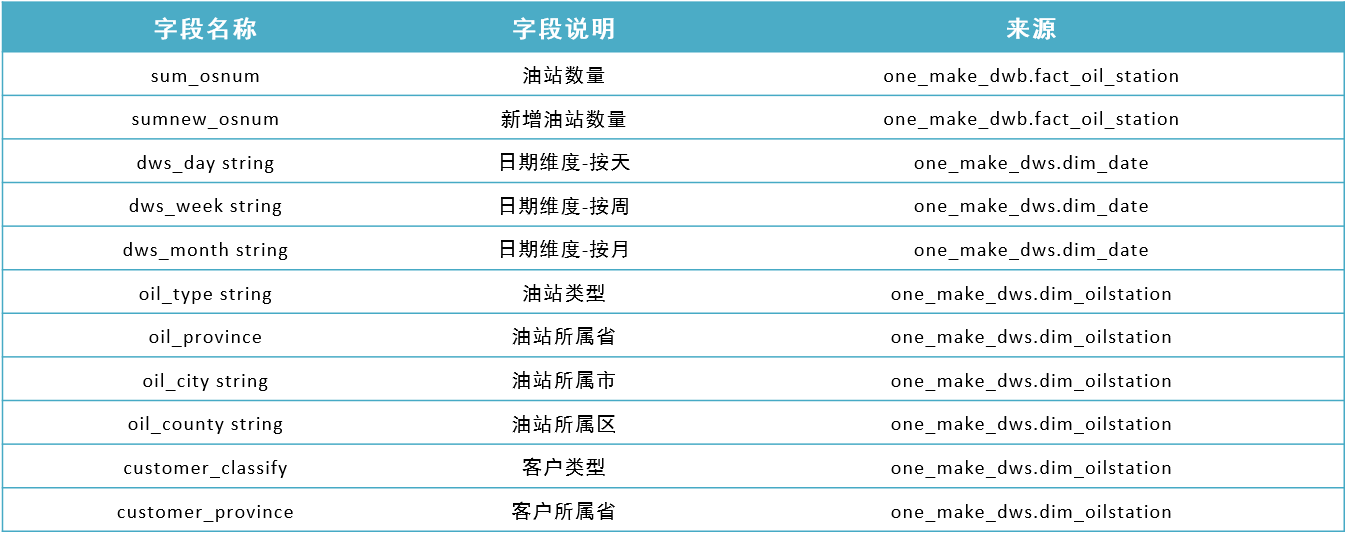
助力工业物联网,工业大数据之服务域:油站主题分析【二十六】
文章目录 07:服务域:油站主题分析08:服务域:油站主题实现 07:服务域:油站主题分析 目标:掌握油站主题的需求分析 路径 step1:需求step2:分析 实施 需求:统计…...
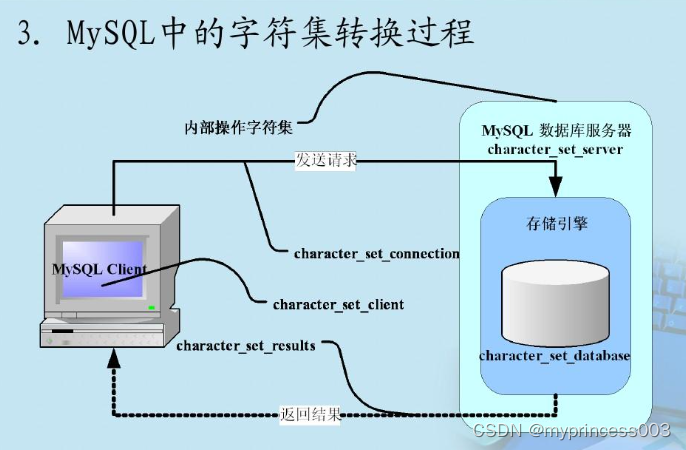
MySql之索引
MySql之索引 1.索引概述 MySql官方对索引的定义为:索引是帮助MySql高效获取数据的数据结构。在数据之外,数据库系统还维护着满足特定查找算法的数据结构,这些数据结构以某种方式引用数据,这样就可以在这些数据结构上实现高级查找…...

adb调试
连不上 adb 如果还遇到5037端口被占用的问题,就找出进程号用taskkill命令杀死该进程即可 1、查找5037端口对应的进程:netstat -ano|findstr 5037 2、杀死该进程:taskkill /F /PID pid 连接unity profiler 打开发包,并安装在手机…...
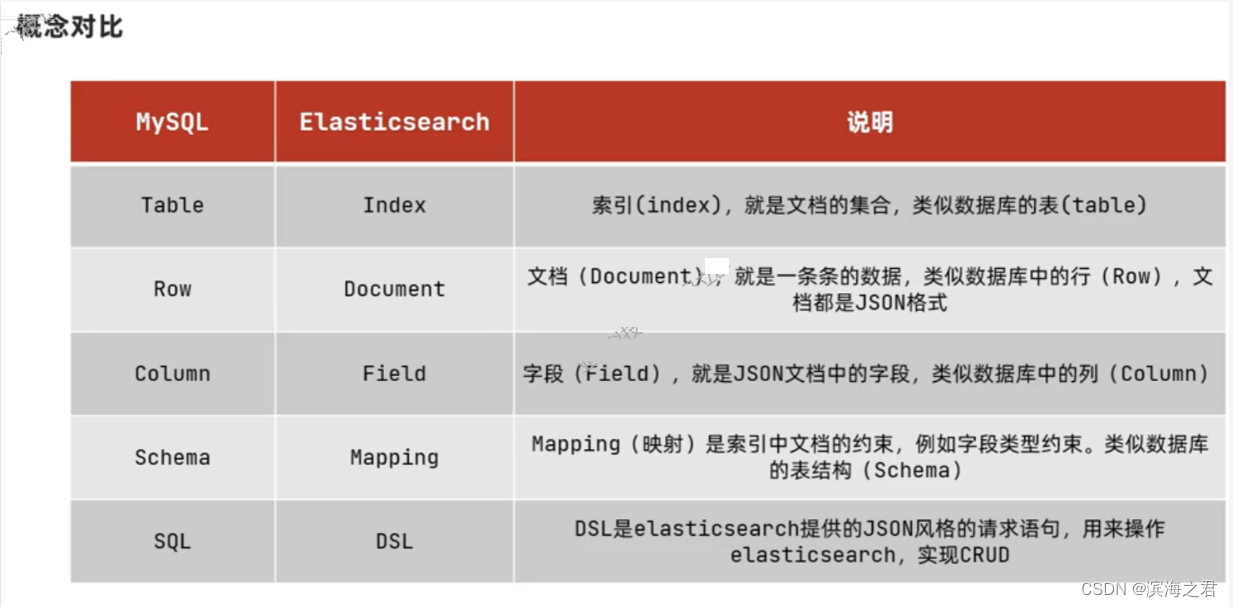
ElasticSearch_学习笔记
一、初始elasticsearch 什么是elasticsearch? 一个开源的分布式搜索引擎,可以用来时限搜素、日志统计、分析、系统监控等功能。什么是elasitc stack(ELK)? 是以elasticsearch为核心的技术栈,包括 beats、L…...

Portraiture 4.0.3 for windows/Mac简体中文版(ps人像磨皮滤镜插件)
Imagenomic Portraiture系列插件作为PS磨皮美白必备插件,可以说是最强,今天它更新到了4.0.3版本。但是全网都没有汉化包,经过几个日夜汉化,终于汉化完成可能是全网首个Portraiture 4的汉化包,请大家体验,有…...

Java精品项目源码第152期火车票预订系统(编号M062)
Java精品项目源码第152期火车票预订系统(编号M062) 大家好,小辰今天给大家介绍一个基于Spring Springboot MyBatis实现的火车票预订系统,演示视频文章末尾公众号对号查询观看即可 文章目录 Java精品项目源码第152期火车票预订系…...
)
嵌入式软件C/C++(技术面试题)
一,网络 1,TCP窗口机制 TCP(传输控制协议)是一种可靠的、面向连接的传输层协议。其中的窗口机制是TCP协议中的一项重要功能,用于控制数据在发送和接收之间的流程。 TCP窗口机制是利用滑动窗口的方式来进行拥塞控制和…...

Idea中侧面栏不见了,如何设置?
一、打开idea点击File然后点击Setting 二、点击Appearance,然后划到最下面,勾选Show tool windows bars和Side-by-side layout on the left 三、侧面栏目正常显示...

构建高效读写分离MySQL主从复制架构,应对高可用挑战!
前言 在现代数据库架构中,MySQL主从复制技术扮演着重要角色。它不仅可以提升数据库性能和可扩展性,还赋予系统卓越的高可用性和灾难恢复能力。本文将深入剖析MySQL主从复制的内部机制,同时通过一个实际案例,展示其在实际场景中的…...
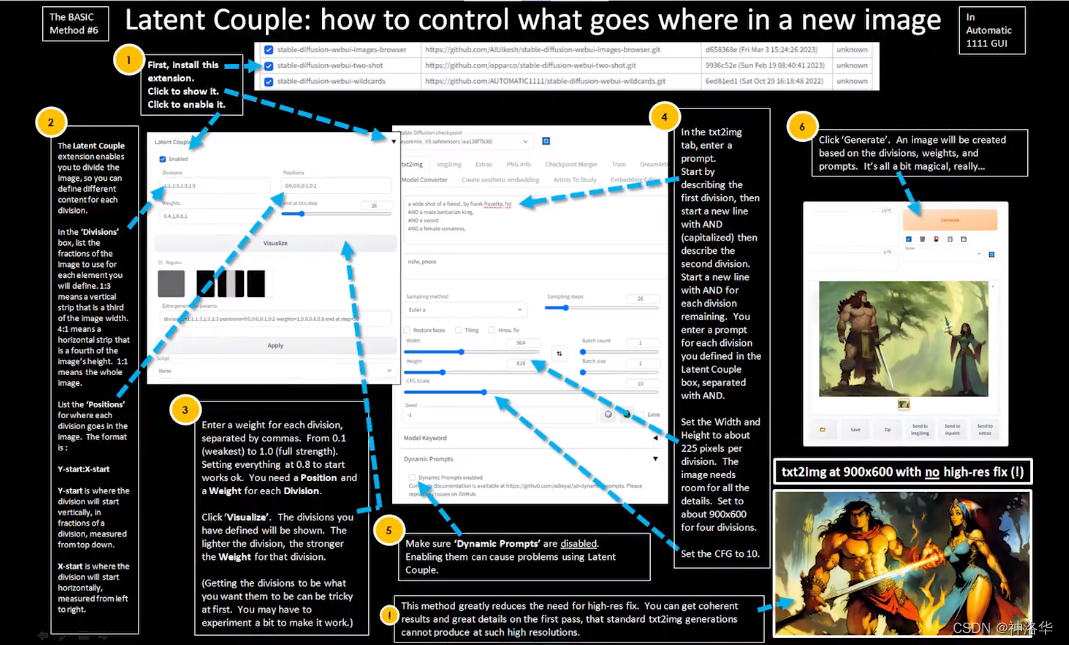
Stable Diffusion系列课程二:ControlNet
AUTOMATIC1111/stable-diffusion-webui参考B站Nenly视频《零基础学会Stable Diffusion》、视频课件推荐网站:stable-diffusion-art、Civitai(魔法) 、libilibi、AI艺术天堂推荐Stable Diffusion整合资料: NovelAI资源整合、《AI绘…...
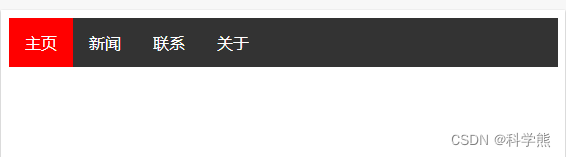
【css】使用float实现水平导航栏
该实例使用float 浮动实现元素浮动在水平方向,从而实现水平导航栏效果。 overflow: hidden:当不给父级元素设置高度的时候,其内部元素浮动后会导致下面的元素顶上去,这是因为子元素浮动后,子元素脱离标准流࿰…...
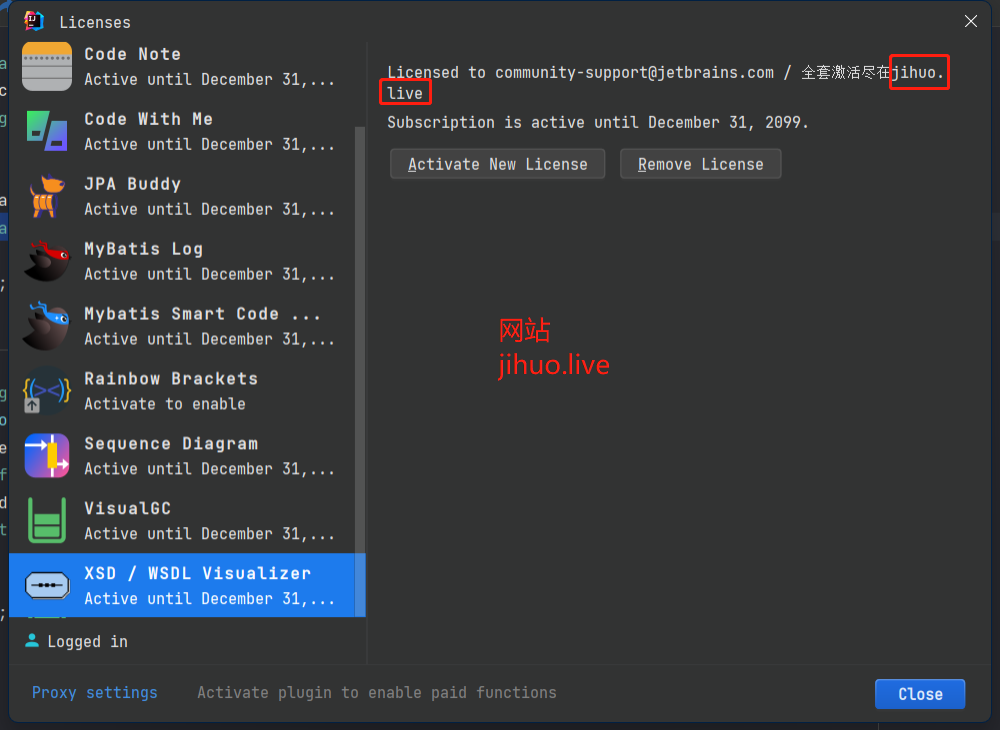
IDEA超强XSD文件编辑插件-XSD / WSDL Visualizer
前言 XSD / WSDL Visualizer可以简化XML架构定义(XSD)和WSDL文件编辑过程; 通过使用与IntelliJ无缝集成的可视化编辑器,转换处理XSD和WSDL文件的方式。告别导航复杂和难以阅读的代码的挫败感,迎接流线型和直观的体验。 插件安装 在线安装 IntelliJ IDE…...
)
Nodejs 第三章(Npm Package json)
npm npm(全称 Node Package Manager)是 Node.js 的包管理工具,它是一个基于命令行的工具,用于帮助开发者在自己的项目中安装、升级、移除和管理依赖项。 https://www.npmjs.com/ 类似于 PHP 的工具:Composer。它是 …...

Tool Documentation Enables Zero-Shot Tool-Usage with Large Language Models
本文是LLM系列文章的内容,针对《Tool Documentation Enables Zero-Shot Tool-Usage with Large Language Models》的翻译。 工具文档赋能大模型零样本的工具使用 摘要1 引言2 相关工作3 实验设置3.1 常规的工作流3.2 工具使用提示方法3.3 评估任务 4 实证研究结果4…...
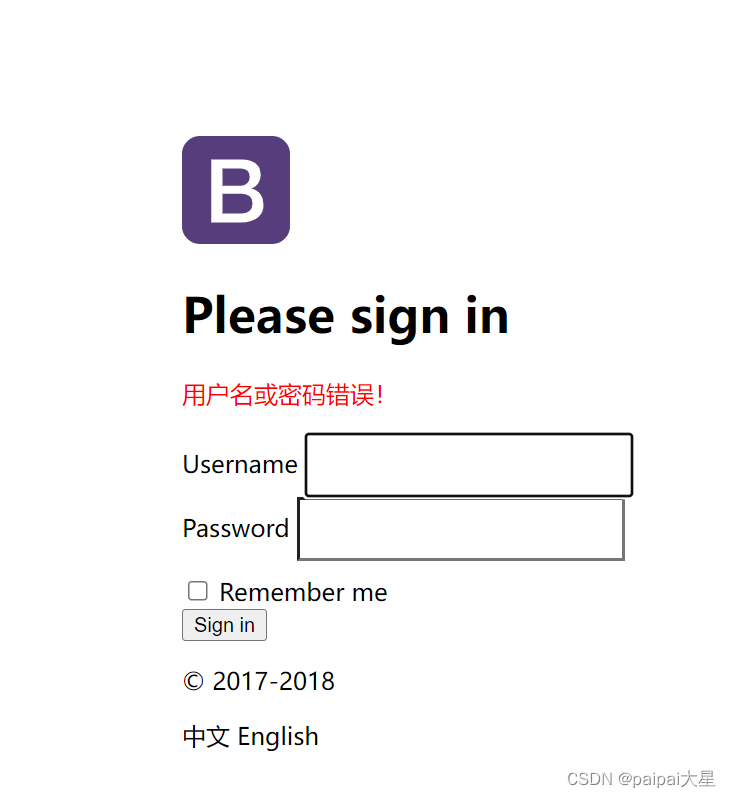
16 Springboot——登录功能实现
16.1 修改index.html中表单跳转的地址 将action的地址改为user/login,意思是点击提交按钮后,就会跳转到user/login地址,然后只要用Controller类的RequsetMapping去接这个地址就行了。 <body class"text-center"><form cl…...

数据结构-栈队列链表树
1 栈 概念 栈是⼀个线性结构,在计算机中是⼀个相当常⻅的数据结构。栈的特点是只能在某⼀端添加或删除数据,遵循先进后出的原则 实现 每种数据结构都可以⽤很多种⽅式来实现,其实可以把栈看成是数组的⼀个⼦集,所以这⾥使⽤数…...

clickhouse功能使用
离线聚合 物化视图 clickhouse需在AggregatingMergeTree之上建立物化视图来完成聚合的效果。以小时聚合为例说明 首先创建表,此处是本地表,且没有副本 #创建表 CREATE TABLE datasets.bt_stats (`btname` String,`record` UInt64,`EventTime` DateTime...
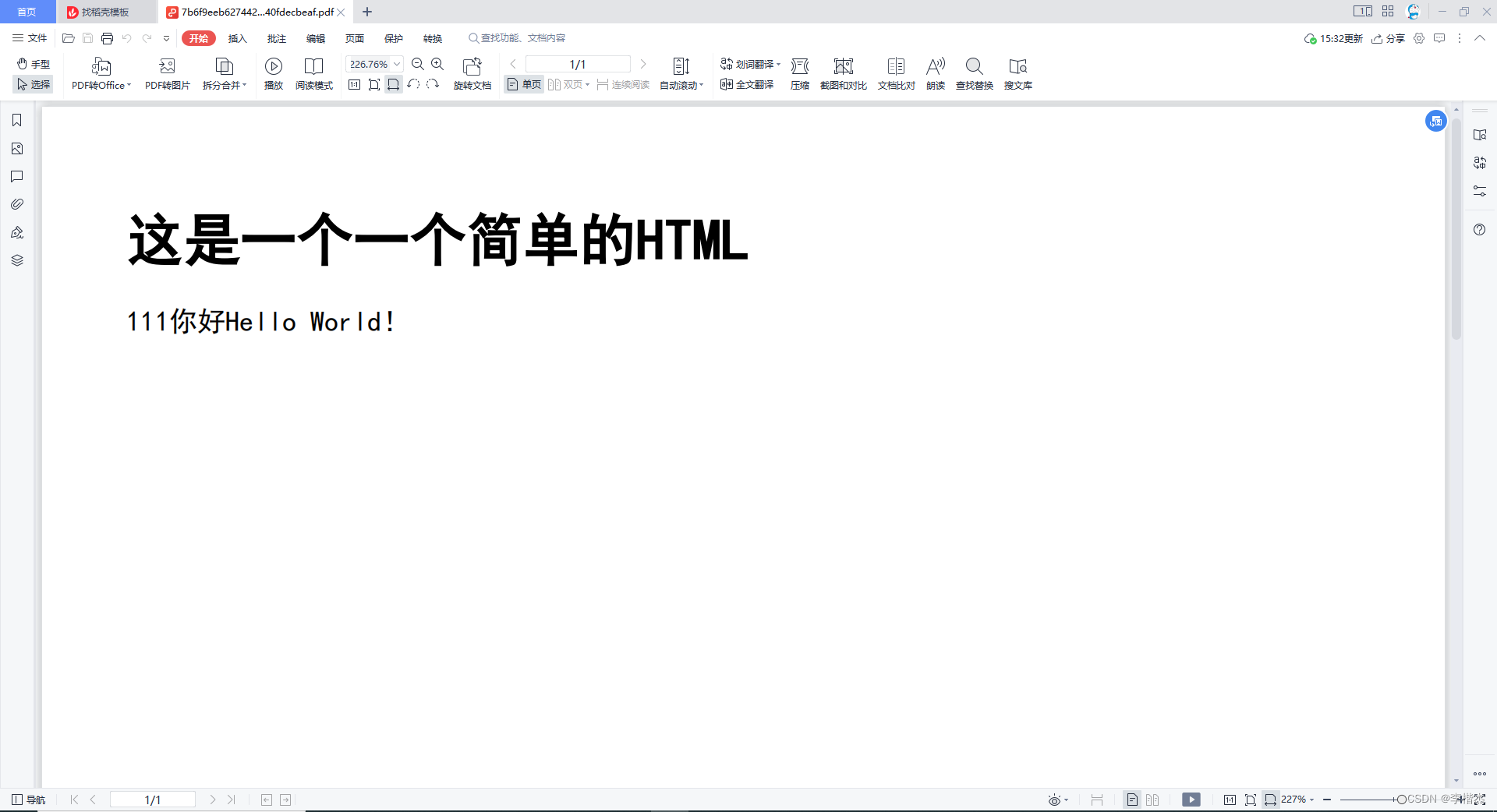
java中使用Jsoup和Itext实现将html转换为PDF
1.在build.gradle中安装所需依赖: implementation group: com.itextpdf, name: itextpdf, version: 5.5.13 implementation group: com.itextpdf.tool, name: xmlworker, version: 5.5.13 implementation group: org.jsoup, name: jsoup, version: 1.15.32.创建工具…...

无人驾驶实战-第七课(高精地图和V2X )
高精地图是无人驾驶中的重要一环,对环境感知、规划与定位等都有重要的作用。 高精地图的特点: 可视化、静态目标、地图信息、点云数据 高精地图与导航地图的区别 High Definition Map Navigation Map Precision cm m Information 3D lane info Mo…...

10个经典C语言开源项目深度解析
1. 精选C语言开源项目解析作为一名在系统级编程领域摸爬滚打多年的开发者,我深知优秀的C语言项目对技术成长的帮助。今天要分享的这10个项目,每个都是经过时间检验的经典之作,代码量控制在3万行以内,特别适合作为学习范本。这些项…...

AI赋能智能制造:预测性维护在工业4.0中的落地实践
1. 预测性维护:从被动维修到智能预防的革命 想象一下,你家的空调突然在炎热的夏天罢工了,维修师傅告诉你:"这个零件本来三个月前就该换了"。这种场景在工业生产中放大1000倍,就是传统维护方式带来的痛点。预…...

Redis 服务器:全面解析与应用实践
Redis 服务器:全面解析与应用实践 引言 Redis(Remote Dictionary Server)是一款开源的、高性能的键值存储数据库。它采用内存作为存储介质,能够提供极快的读写速度,常用于缓存、会话管理、消息队列等领域。本文将全面解析Redis服务器的原理、配置、应用场景以及实践操作…...

Cross Q: Enhancing Deep Reinforcement Learning with Batch Normalization and Wide Critic Networks for
1. 深度强化学习的样本效率困境 深度强化学习(Deep Reinforcement Learning, DRL)近年来在游戏AI、机器人控制等领域取得了显著进展,但样本效率(Sample Efficiency)问题始终是制约其实际应用的瓶颈。简单来说ÿ…...

VCSA 7.0 高效部署实战:从零搭建企业级虚拟化平台
1. 环境准备与ISO获取 部署VCSA 7.0的第一步是准备好安装环境。我建议使用物理服务器或高性能虚拟机作为部署平台,内存至少16GB起步。很多新手容易忽略硬件兼容性问题,这里有个实用技巧:到VMware官网的兼容性指南页面,用你的硬件型…...

从一道CTF题看企业级K8s集群的常见安全风险与取证要点
从一道CTF题看企业级K8s集群的常见安全风险与取证要点 在云原生技术快速普及的今天,Kubernetes(K8s)已成为企业容器编排的事实标准。然而,随着K8s集群规模的扩大,其安全风险也日益凸显。本文将通过解析一道典型的CTF赛…...

Wan2.2-I2V-A14B快速上手:3步启动WebUI,5分钟生成首条AI视频
Wan2.2-I2V-A14B快速上手:3步启动WebUI,5分钟生成首条AI视频 1. 镜像介绍与环境准备 Wan2.2-I2V-A14B是一款强大的文生视频模型,能够根据文本描述生成高质量视频内容。这个私有部署镜像已经针对RTX 4090D 24GB显卡进行了深度优化࿰…...

Phi-4-mini-reasoning实战案例:在线考试系统实时解题反馈模块开发
Phi-4-mini-reasoning实战案例:在线考试系统实时解题反馈模块开发 1. 项目背景与需求 在线教育平台面临一个共同挑战:如何为考生提供即时、准确的解题反馈。传统方案依赖人工批改或简单规则引擎,难以应对复杂数学题和编程题的自动评分需求。…...

Nginx本地缓存
一、前言:为什么需要 Nginx 本地缓存?你是否面临这些痛点?❌ 后端服务压力大,大量重复请求打到应用层❌ 静态资源(图片、JS、CSS)频繁回源❌ 接口响应慢,用户体验差❌ 后端宕机时,整…...
---执行层芭)
【GUI-Agent】阶跃星辰 GUI-MCP 解读---()---执行层芭
起因是我想在搞一些操作windows进程的事情时,老是需要右键以管理员身份运行,感觉很麻烦。就研究了一下怎么提权,顺手瞄了一眼Windows下用户态权限分配,然后也是感谢《深入解析Windows操作系统》这本书给我偷令牌的灵感吧ÿ…...