
centos手动离线安装php,nginx
1、CentOS 7上安装并配置Nginx
https://www.cnblogs.com/xujiecnblogs/p/16843984.html
/usr/local/nginx/sbin/nginx #启动
/usr/local/nginx/sbin/nginx -s stop #关闭
/usr/local/nginx/sbin/nginx -s reload #重启
增加https访问
https://www.cnblogs.com/ambition26/p/14077773.html
./configure --prefix=/usr/local/nginx --with-http_stub_status_module --with-http_ssl_module
2、CentOS7环境下离线安装MySQL5.7数据库
https://blog.csdn.net/millery22/article/details/123468625
mysql密码
mysql
336699@Gooyuit
root密码相同
mysql启动
/etc/init.d/mysqld restart
----不确定
service mysql start
service mysql restart
service mysql stop
创建用户
CREATE USER 'data_user'@'localhost' IDENTIFIED BY '331176_Msfq';
GRANT SELECT, INSERT,UPDATE ON mzxyt.* TO 'data_user'@'localhost';
CREATE USER 'mzxyt_user'@'localhost' IDENTIFIED BY '31235*@Adme';
GRANT SELECT, INSERT,UPDATE,DELETE ON mzxyt.* TO 'mzxyt_user'@'localhost';
MariaDB Server 10.2 和 MySQL 5.7对应
问题:ERROR 2013 (HY000): Lost connection to MySQL server at 'reading authorization packet', system err
原因是按照https://www.jianshu.com/p/45b37a73e286安装了server_audit.so插件
解决:
https://www.jianshu.com/p/2e8c2bc45f3c
查询mysql的plugin表,把server_audit的记录删除,把/usr/local/mysql/lib/plugin/server_audit.so删除
导入数据库
create database mzxyt;
set names utf8;
source *.sql
3、离线安装php7.4
https://www.cnblogs.com/xujiecnblogs/p/16843984.html
安装后,需要重启:/usr/local/php/sbin/php-fpm
如果发现9000被占用,则kill进程
删掉所有相关进程
ps aux|grep nginx
ps aux|grep php-fpm
重启
#systemctl start php74-fpm # 开启php74-fpm
#/usr/local/nginx/sbin/nginx
安装php时出现No package 'libxml-2.0' found
安装libxml2 2.11.4
(1)安装libxml2
https://www.cnblogs.com/yunfan1024/p/13063224.html
官网下载tar.xz后缀的才可以
要下载2.9.0版本
按照文档执行到这个位置为止
cp libxml-2.0.pc /usr/local/lib/pkgconfig
(2)安装Python 2.7.15
https://blog.csdn.net/spec_king/article/details/107176043
如果出现No package ** found
找到所有已安装好的软件pkgconfig路径
#find / -name pkgconfig
编辑环境变量
#vim ~/.bash_profile
添加到$PKG_CONFIG_PATH中
export PKG_CONFIG_PATH=/usr/local/python2.7.15/lib/pkgconfig:$PKG_CONFIG_PATH
export PKG_CONFIG_PATH=/usr/local/lib/pkgconfig:$PKG_CONFIG_PATH
使其生效
# source ~/.bash_profile
再查看
#pkg-config --list-all
(3)安装sqlite
https://www.sqlite.org/download.html
下载sqlite-autoconf-3420000.tar.gz
(4)Please reinstall the BZip2 distribution
bzip2安装
https://blog.csdn.net/u013010499/article/details/113105907
(5)libcurl
https://blog.csdn.net/lxyoucan/article/details/116083330
(6)libpng
https://blog.csdn.net/I_feige/article/details/117702589
(7)libjpeg
https://blog.csdn.net/qq_62815119/article/details/127709812
(freetype2)
https://www.cnblogs.com/dmj666/p/10641244.html
不能安装通过
(8)
使用最小化安装php,可以避免上面的问题
#可选1:最小化安装-适合nginx平台
主要安装在/usr/local/php,而不是/usr/local/php74
#./configure --prefix=/usr/local/php --with-config-file-scan-dir=/usr/local/php/etc/ --enable-mysqlnd --with-mysqli=mysqlnd --with-pdo-mysql=mysqlnd --with-curl --with-openssl --with-jpeg --with-zlib --disable-fileinfo --enable-fpm --with-sodium --enable-gd --enable-xml --with-freetype
./configure --prefix=/usr/local/php --with-config-file-scan-dir=/usr/local/php/etc/ --enable-fpm
./configure --prefix=/usr/local/php74 --with-config-file-scan-dir=/usr/local/php74/etc/ --enable-inline-optimization --enable-opcache --enable-fpm --with-mysqli=mysqlnd --with-pdo-mysql=mysqlnd --with-gettext --enable-mbregex --enable-mbstring --with-iconv --with-mhash --with-openssl --enable-bcmath --enable-soap --with-xmlrpc --enable-pcntl --enable-shmop --enable-sysvmsg --enable-sysvsem --enable-sysvshm --enable-sockets --with-curl --with-zip --with-bz2 --enable-gd --with-jpeg --with-readline --with-freetype --disable-fileinfo
未安装扩展
--with-freetype
(9)
vi /etc/profile
PATH=/usr/local/php/bin:$PATH
export PATH
:$PATH要放在后面
(10)
https://blog.csdn.net/have_a_cat/article/details/115211208
执行命令service php-fpm start时报ERROR: failed to load configuration file ‘/usr/local/php/etc/php-fpm.conf
cd /usr/local/php/etc
cp php-fpm.conf.default php-fpm.conf
https://blog.csdn.net/robin_cai/article/details/118147982
No pool defined. at least one pool section must be specified in config file
进入安装目录:/usr/local/php/etc/php-fpm.d
拷贝www.conf.default为www.conf即可。
(11)
chmod -R 777 /www/mzxyt/runtime/
(12)
Oniguruma
未安装
(13)
libzip https://www.jianshu.com/p/d87787c33e19
cmake
问题:Cannot find a C++ compiler that supports both C++11 and the specified C++ flags.
解决:
(14)
安装pdo_mysql
https://developer.aliyun.com/article/149981
在php安装源文件目录/www/soft/php-7.4.3/ext/pdo,/www/soft/php-7.4.3/ext/pdo_mysql
命令:
#/usr/local/php/bin/phpize
#./configure --with-php-config=/usr/local/php/bin/php-config --with-pdo-mysql=/usr/local/mysql
#make && make install
得到路径:
extension=/usr/local/php/lib/php/extensions/no-debug-non-zts-20190902/pdo_mysql.so
问题:Cannot find autoconf. Please check your autoconf installation and the$PHP_AUTOCONF environment variable. Then, rerun this script.
安装perl, m4, autoconf,automake
https://www.codenong.com/cs106479200/
m4安装完之后,需要把/usr/local加入/etc/profile的环境变量
1)ls command not found
这是因为在改环境变量的时候没有配置正确的原因,需要在命令行写:
export PATH=/usr/local/sbin:/usr/local/bin:/sbin:/bin:/usr/sbin:/usr/bin:/root/bin
此时再试一下ls,可以正常执行,但是下次连接的时候可能失效,所以要将这句话写到/etc/profile文件中
然后让这个配置生效
source /etc/profile
perl的安装
./Configure -des -Dprefix=/usr/local/perl
不能使用./configure
----------问题1
完美解决Can‘t locate Data/Dumper.pm in @INC
https://blog.csdn.net/qq_20532695/article/details/113821054
解决Can’t locate ExtUtils/MakeMaker.pm in @INC
https://blog.csdn.net/celeste7777/article/details/77117371
下载地址:https://src.fedoraproject.org/lookaside/pkgs/perl-ExtUtils-MakeMaker/ExtUtils-MakeMaker-6.62.tar.gz/2ae291030c52999b5672b2a502eab195/
安装autoconf
https://blog.csdn.net/m0_45406092/article/details/119248400
----
http://rpmfind.net/linux/rpm2html/search.php?query=perl-Data-Dumper(x86-64)
使用rpm包安装依赖可解决问题1
linux automake-1.16 编译错误 Try `--no-discard-stderr' if option outputs to stderr
https://blog.csdn.net/whatday/article/details/102473565
----rpm包下载
http://mirror.centos.org/centos/7/os/x86_64/Packages/
perl rpm包下载
https://zhuanlan.zhihu.com/p/352932647
----问题
Can't locate Thread/Queue.pm in @INC
(15)
https://blog.csdn.net/qq_16885135/article/details/119811883
php启动
systemctl start php74-fpm # 开启php74-fpm
systemctl stop php74-fpm # 关闭php74-fpm
systemctl reload php74-fpm # 平滑重启php74-fpm
systemctl restart php74-fpm # 重启php74-fpm
systemctl enable php74-fpm # 将php74-fpm设为开机自启动
systemctl disable php74-fpm # 关闭php74-fpm的开机自启动
(16)
访问后台
fastadmin 安装后访问后台提示模块不存在
配置Nginx
location / {
if (!-e $request_filename) {
rewrite ^(.+?\.php)(/.+)$ /$1?s=$2 last;
rewrite ^(.*)$ /index.php?s=$1 last;
break;
}
}
(17)
安装freetype
/bin/ld: /usr/local/lib/libbz2.a(bzlib.o): relocation R_X86_64_32S against `BZ2_crc32Table' can not be used when making a shared object; recompile with -fPIC
/usr/local/lib/libbz2.a: error adding symbols: Bad value
解决:
https://stackoverflow.com/questions/63326781/usr-local-lib-libbz2-a-could-not-read-symbols-bad-value
修改bzip2 的makefile中CC=gcc改为CC=gcc -fPIC
重新
make clean
make
make install
./configure --with-jpeg-dir=/user/local/libjpeg --with-png-dir=/user/local/libpng --with-freetype-dir=/user/local/freetype --with-zlib-dir=/user/local/zlib
make && make install
(18)
Nginx配置
location / {
#if (!-e $request_filename){
#rewrite ^(.+?\.php)(/.+)$ /$1?s=$2 last;
#rewrite ^((?!oqfxCOZFdY.php).)*$ /index.php?s=$1 last;
#break;
#}
try_files $uri $uri/ /index.php$uri?$query_string;
}
location ~ \.php(.*)$ {
fastcgi_pass 127.0.0.1:9000;
fastcgi_index index.php;
fastcgi_split_path_info ^((?U).+\.php)(/?.+)$;
fastcgi_param SCRIPT_FILENAME $document_root$fastcgi_script_name;
fastcgi_param PATH_INFO $fastcgi_path_info;
fastcgi_param PATH_TRANSLATED $document_root$fastcgi_path_info;
include fastcgi_params;
}
改完fastadmin的js,在正式环境需要打包,js文件会有缓存重新关闭远程https再打开。
相关文章:

centos手动离线安装php,nginx
1、CentOS 7上安装并配置Nginx https://www.cnblogs.com/xujiecnblogs/p/16843984.html /usr/local/nginx/sbin/nginx #启动 /usr/local/nginx/sbin/nginx -s stop #关闭 /usr/local/nginx/sbin/nginx -s reload #重启 增加h…...

Java基础六 - Collection集合List、Set、Queue,Map
1. List - ArrayList、LinkedList、Vector ArrayList 1. 可以有重复元素 2. 超出后自动增加大小,增加一半。会自动重新分配更大的数组,并将元素复制到新数组中 3. 通过索引保存值,访问可以通过索引访问,更加高效。但是添加/删除…...

k8s nginx+ingress 配置
1 nginx> ingress 配置: 2 nginx >service 配置 3 nginx pod配置: 4 nginx.conf 配置文件: # web端v1server{listen 30006;add_header Strict-Transport-Security "max-age31536000; includeSubDomains";#add_header Content…...

探索Streamlit中强大而灵活的 st.write() 函数(五):构建丰富多样的应用界面
文章目录 1 前言2 显示HTML的内容3 显示Markdown内容4 显示代码块5 显示DataFrame的交互式表格6 显示音频和视频7 显示图表8 显示图片9 显示地图10 显示PDF文件11 显示文件下载链接12 结语 1 前言 在这篇博文中,我们将着重介绍Streamlit中一个核心而重要的函数&…...

LinAlgError: Singular matrix 问题解决
错误log: c:\Program Files\Python39\lib\site-packages\numpy\linalg\linalg.py in inv(a)543 signature D->D if isComplexType(t) else d->d544 extobj get_linalg_error_extobj(_raise_linalgerror_singular) --> 545 ainv _umath_lin…...

【ASP.NET MVC】使用动软(五)(13)
一、问题 前文完成的用户登录后的首页如下: 后续账单管理、人员管理等功能页面都有相同的头部,左边和下边,唯一不同的右边内容部分,所以要解决重复设计的问题。 二、解决方法——使用布局页 在Views上右键添加新建项ÿ…...

MongoDB面试题
1. NoSQL 数据库是什么意思?NoSQL 与 RDBMS 直接有什么区别?为什么要使用和不使用 NoSQL 数据库?说一说 NoSQL 数据库的几个优点? NoSQL 是非关系型数据库,NoSQL Not Only SQL。 关系型数据库采用的结构化的数据,NoSQL 采用的是键值对的方式存储数…...

Python Web 开发 Flask 介绍
WEB开发是现在程序必会的技能,因为大部分软件都以Web形式提供,及时制作后台开发,或者只做前台开发,也需要了解Web开发的概念和特点。由于Python是解释性脚本语言,用来做Web开发非常适合,而且Python有上百种…...

本地mvn仓库清理无用jar包
背景 开发java时间久了,本地的m2仓库就会产生很多过期的jar包,不清理的话比较占空间。 原理 是通过比较同一目录下,对应jar包的版本号的大小,保留最大版本号那个,删除其他的。 脚本 执行脚本见文章顶部 执行方式 …...
MySQL的常用函数大全
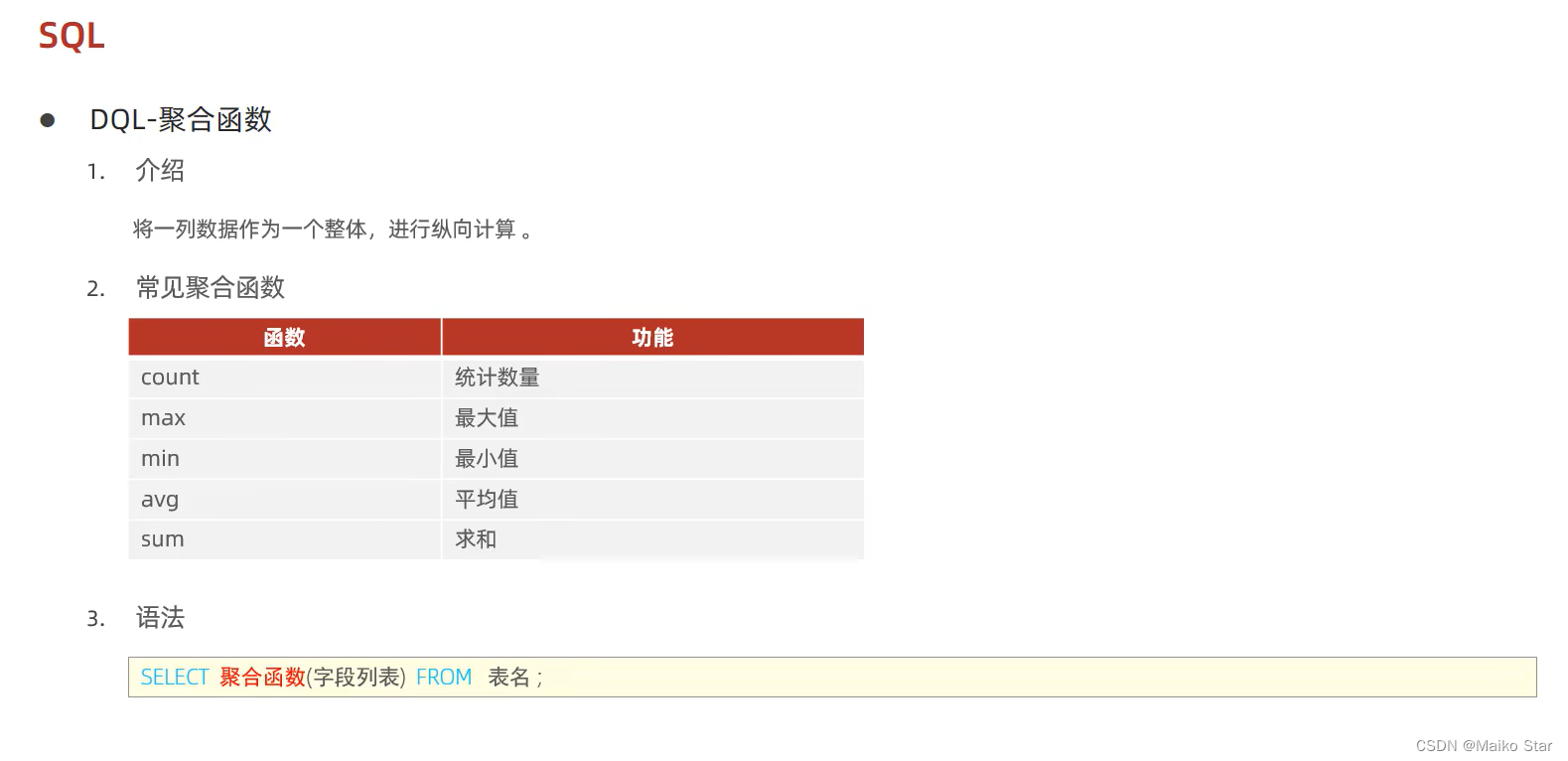
一、字符串函数 常用函数: 函数功能CONCAT(s1, s2, …, sn)字符串拼接,将s1, s2, …, sn拼接成一个字符串LOWER(str)将字符串全部转为小写UPPER(str)将字符串全部转为大写LPAD(str, n, pad)左填充,用字符串pad对str的左边进行填充࿰…...
一百四十三、Linux——Linux的CentOS 7系统语言由中文改成英文
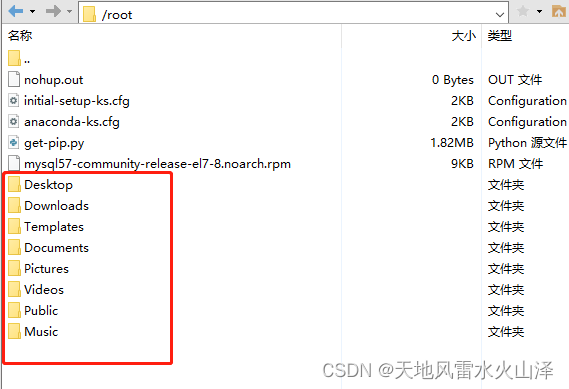
一、目的 之前安装CentOS 7系统的时候把语言设置成中文,结果Linux文件夹命名出现中文乱码的问题,于是决定把Linux系统语言由中文改成英文 二、实施步骤 (一)到etc目录下,找到配置文件locale.conf # cd /etc/ # ls…...
一 关于idea如何在svn进行项目下载并运行成功
安装svn客户端 如图 安装时请选择该选项(Will be installed on local hard drive)并选择自己想要安装的目录路径 如图 svn安装成功 如图 注意 安装完成后,使用svn进行一次checkout的项目导出完成以上五步时&…...

python使用selenium 打开谷歌浏览器闪退, 怎么解决
问题描述: 大家早好、午好、晚好吖 ❤ ~欢迎光临本文章 使用 Selenium 操作 Chrome 浏览器, Chrome 浏览器闪退 问题解决: 可能是以下几个方面出现了问题: 1. Chromedriver 版本与 Chrome 浏览器版本不匹配 你需要确保你正在…...

.net 6 efcore一个model映射到多张表(非使用IEntityTypeConfiguration)
现在有两张表,结构一模一样,我又不想创建两个一模一样的model,就想一个model映射到两张表 废话不多说直接上代码 安装依赖包 创建model namespace oneModelMultiTable.Model {public class Test{public int id { get; set; }public string…...

CISCO MDS 9148 SAN Switch 交换机命令配置方法:
前言 CISCO MDS 9148 SAN 交换机已经停产,但还是要掌握一下配置的方法: 升级款后面 9148S 或者 9100系列,但配置方式基本都差不多,掌握一个就好: 高性能和极具吸引力的价值 Cisco MDS 9148S 16G 多层光纤交换机是下…...
)
图的深度、广度优先探索(数据结构)
深度: #include <stdio.h> #include <stdlib.h> #define MAX 20typedef struct ANode {int adjver,len;struct ANode*next; } ArcNode;typedef struct VNode {int data;ArcNode*firstarc; } VertexNode;typedef struct {VertexNode vers[MAX1];int ver…...

c语言小知识点
文章目录 int main()与int main(void)符号常量常变量无符号赋值将占字节多的赋值给字节少的类型赋初值 表达式预处理格式符e格式符 循环for 输入长度相关输出文件管理 int main()与int main(void) int main(void) 指的是此函数的参数为空,不能传入参数,…...

C++ - 模板分离编译
模板分离编译 我们先来看一个问题,我们用 stack 容器的声明定义分离的例子来引出这个问题: // stack.h // stack.h #pragma once #include<deque>namespace My_stack {template<class T, class Container std::deque<T>>class stack…...
如何把非1024的采样数放入aac编码器
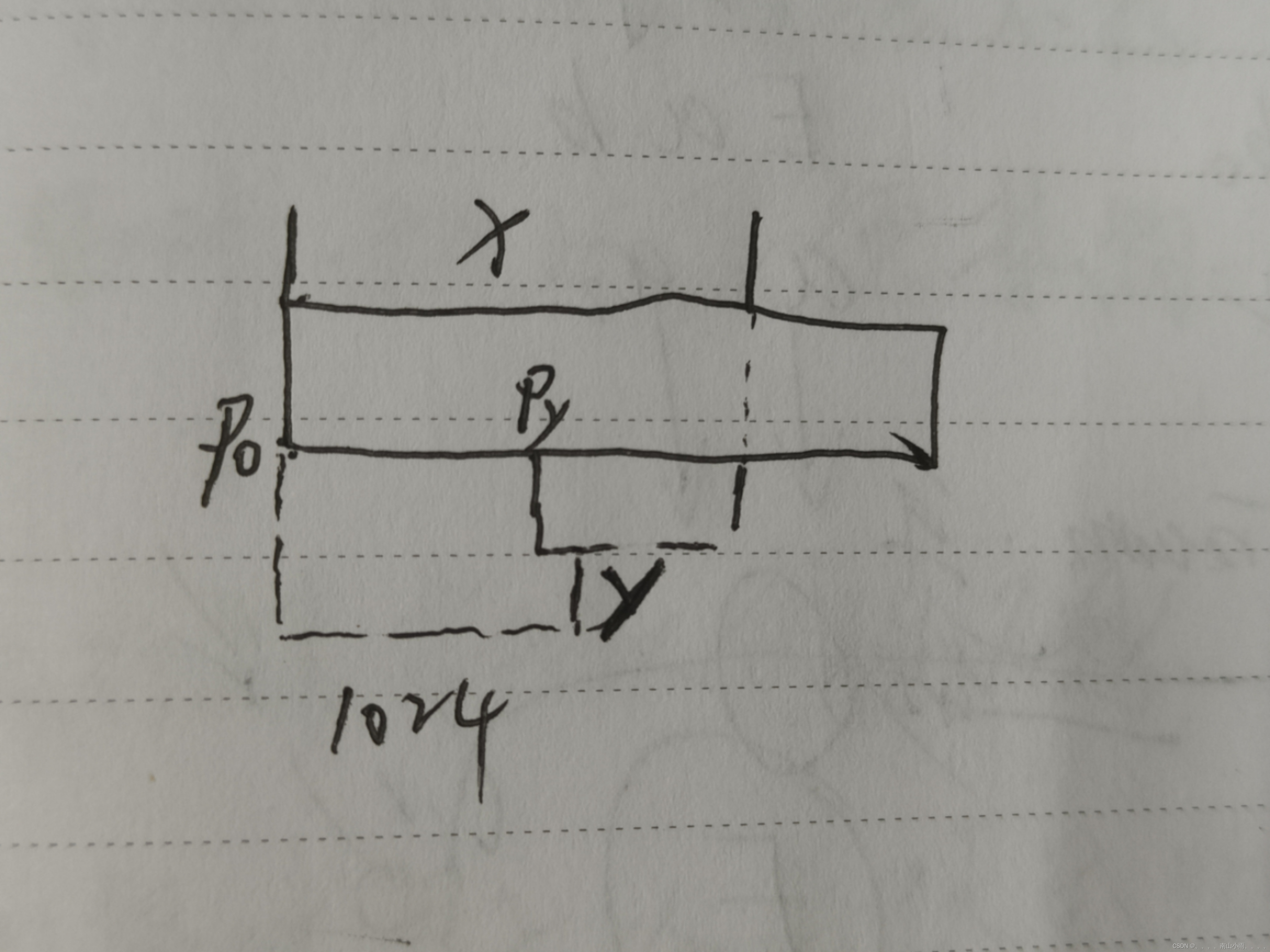
一. aac对数据规格要求 二、代码实现 1.初始化 2.填入数据 3.取数据 三.图解 一. aac对放入的采样数要求 我们知道aac每次接受的字节数是固定的,在之前的文章里有介绍libfdk_aac音频采样数和编码字节数注意 它支持的采样数和编码字节数分别是: fdk_aac …...

linux安装nodejs和vue
下载nodejs 打开 下载地址页面中下载**Linux Binaries (x64)**的二进制包设置安装目录 sudo mkdir -p /usr/local/lib/nodejs # 解压 如下载的 node-v18.17.0-linux-x64.tar.xz sudo tar -xJvf node-v18.17.0-linux-x64.tar.xz -C /usr/local/lib/nodejs 加入到PATH #######…...

LDC1101嵌入式驱动开发:电感-数字转换器SPI控制与实时优化
1. LDC1101嵌入式驱动库深度解析:高精度电感-数字转换器的底层控制实践LDC1101是德州仪器(TI)推出的一款高分辨率、高速度电感-数字转换器(Inductance-to-Digital Converter),专为非接触式位置检测、金属物…...

OpenClaw学习路径:从Qwen3.5-9B基础对接到复杂技能开发
OpenClaw学习路径:从Qwen3.5-9B基础对接到复杂技能开发 1. 为什么选择OpenClaw作为自动化开发框架 第一次接触OpenClaw是在一个深夜加班调试Python脚本的时候。当时我正在处理几百个Markdown文件的批量重命名和内容提取,重复的手工操作让我开始思考&am…...

随堂笔记0403
负载监控计算机核心资源:CPU: 计算(lscpu)内存: 缓存数据(掉电丢失)硬盘: 持久化存储数据网络: 传播数据[rootCentos01 wyj]# lscpuCPU(s): 2型号名称&am…...

PostgreSQL 选择数据库
PostgreSQL 选择数据库 引言 在当今数据驱动的世界中,选择合适的数据库系统对于企业来说至关重要。PostgreSQL,作为一款功能强大、开源的关系型数据库管理系统(RDBMS),因其卓越的性能、灵活性和可扩展性而备受青睐。本文将深入探讨PostgreSQL的特点,分析为何它是众多数…...

用STM32F103RCT6和AD9959搞定电赛C题:一个无线信号模拟系统的完整搭建与调试实录
从零构建电赛C题无线信号模拟系统:STM32F103RCT6与AD9959实战全记录 全国大学生电子设计大赛的C题向来以高难度和综合性著称,今年的无线信号模拟系统题目更是让不少参赛队伍挠头。作为一支从零开始的团队,我们在四天三夜的极限时间里…...

终极魔兽争霸3性能优化指南:从卡顿到180帧的完整解决方案
终极魔兽争霸3性能优化指南:从卡顿到180帧的完整解决方案 【免费下载链接】WarcraftHelper Warcraft III Helper , support 1.20e, 1.24e, 1.26a, 1.27a, 1.27b 项目地址: https://gitcode.com/gh_mirrors/wa/WarcraftHelper 魔兽争霸3作为经典RTS游戏&#…...

Linux内核中的内存屏障技术详解
Linux内核中的内存屏障技术详解 引言 内存屏障(Memory Barrier)是Linux内核中用于确保内存操作顺序的重要机制。在多处理器系统中,由于CPU缓存、指令重排序等因素,内存操作的实际执行顺序可能与代码中的顺序不同,这可能…...

Habitat入门教程:如何构建你的第一个自动化应用包
Habitat入门教程:如何构建你的第一个自动化应用包 【免费下载链接】habitat Modern applications with built-in automation 项目地址: https://gitcode.com/gh_mirrors/hab/habitat Habitat是一个现代化的应用自动化平台,它通过内置的自动化功能…...

智慧校园软件怎么选?手把手教你看懂核心功能
✅作者简介:合肥自友科技 📌核心产品:智慧校园平台(包括教工管理、学工管理、教务管理、考务管理、后勤管理、德育管理、资产管理、公寓管理、实习管理、就业管理、离校管理、科研平台、档案管理、学生平台等26个子平台) 。公司所有人员均有多…...

hdl_localization实战:在ROS Melodic下,如何不依赖IMU实现16线激光雷达的稳定定位?
无IMU环境下16线激光雷达的hdl_localization实战指南 在机器人自主导航领域,定位系统是核心组件之一。传统方案通常依赖IMU(惯性测量单元)与激光雷达的融合,但在实际工程中,IMU数据可能存在噪声大、校准困难或硬件缺失…...