
Spring整合MyBatis小实例(转账功能)
实现步骤
一,引入依赖
<!--仓库--><repositories><!--spring里程碑版本的仓库--><repository><id>repository.spring.milestone</id><name>Spring Milestone Repository</name><url>https://repo.spring.io/milestone</url></repository></repositories><dependencies><dependency><groupId>org.springframework</groupId><artifactId>spring-context</artifactId><version>6.0.0-M2</version></dependency><dependency><groupId>org.springframework</groupId><artifactId>spring-jdbc</artifactId><version>6.0.0-M2</version></dependency><dependency><groupId>mysql</groupId><artifactId>mysql-connector-java</artifactId><version>5.1.8</version></dependency><dependency><groupId>org.mybatis</groupId><artifactId>mybatis</artifactId><version>3.5.11</version></dependency><!--        这里版本不能随意选,选2.0.7这个不会出问题--><dependency><groupId>org.mybatis</groupId><artifactId>mybatis-spring</artifactId><version>2.0.7</version></dependency><dependency><groupId>com.alibaba</groupId><artifactId>druid</artifactId><version>1.2.13</version></dependency><!--        spring对Junit的支持--><dependency><groupId>org.springframework</groupId><artifactId>spring-test</artifactId><version>6.0.0-M2</version></dependency><dependency><groupId>junit</groupId><artifactId>junit</artifactId><version>4.13.2</version><scope>test</scope></dependency>
<!--        使用Resource需要的依赖--><dependency><groupId>jakarta.annotation</groupId><artifactId>jakarta.annotation-api</artifactId><version>2.1.1</version></dependency></dependencies>
二,基于三层架构,准备所有的包和类
bean层(Account类)
package com.hkd.spring6.bean;public class Account {private String actno;private Double balance;public Account() {}public Account(String actno, Double balance) {this.actno = actno;this.balance = balance;}public String getActno() {return actno;}public void setActno(String actno) {this.actno = actno;}public Double getBalance() {return balance;}public void setBalance(Double balance) {this.balance = balance;}@Overridepublic String toString() {return "Account{" +"actno='" + actno + '\'' +", balance=" + balance +'}';}
}
service层
接口
package com.hkd.spring6.service;public interface ActService {void transfer(String fromAct, String toAct, double money);
}
实现类
package com.hkd.spring6.service.impl;import com.hkd.spring6.bean.Account;
import com.hkd.spring6.mapper.ActMapper;
import com.hkd.spring6.service.ActService;
import jakarta.annotation.Resource;
import org.springframework.beans.factory.annotation.Autowired;
import org.springframework.stereotype.Service;
import org.springframework.transaction.annotation.Transactional;@Service("actService")
@Transactional
public class ActServiceImpl implements ActService {//    @Autowired
//    private ActMapper actMapper;//    MyBatis为mapper接口自动生成的实现类类名是mapper类首字母小写@Resource(name = "actMapper")private ActMapper actMapper;@Overridepublic void transfer(String fromAct, String toAct, double money) {Account select1 = actMapper.select(fromAct);if (select1.getBalance() < money) {throw new RuntimeException("余额不足");}Account select2 = actMapper.select(toAct);select1.setBalance(select1.getBalance() -money);select2.setBalance(select2.getBalance() + money);int update = actMapper.update(select1);update += actMapper.update(select2);if (update != 2) {throw new RuntimeException("转账失败");}}
}
mapper层
接口
package com.hkd.spring6.mapper;import com.hkd.spring6.bean.Account;public interface ActMapper {Account select(String actno);int update(Account account);
}
sql映射文件
<?xml version="1.0" encoding="UTF-8" ?>
<!DOCTYPE mapperPUBLIC "-//mybatis.org//DTD Mapper 3.0//EN""http://mybatis.org/dtd/mybatis-3-mapper.dtd"><mapper namespace="com.hkd.spring6.mapper.ActMapper"><select id="select" resultType="Account">select * from t_bank where actno = #{actno}</select><update id="update">update t_bank set balance = #{balance} where actno = #{actno}</update>
</mapper>
三,配置文件的完成
1.jdbc.properties(数据库相关配置文件)
jdbc.driver = com.mysql.jdbc.Driver
jdbc.url = jdbc:mysql://localhost:3306/mybatis
jdbc.user = root
jdbc.password = hsp
2.MyBatis核心配置文件
<?xml version="1.0" encoding="UTF-8" ?>
<!DOCTYPE configurationPUBLIC "-//mybatis.org//DTD Config 3.0//EN""http://mybatis.org/dtd/mybatis-3-config.dtd">
<configuration><settings>
<!--        开启日志打印--><setting name="logImpl" value="STDOUT_LOGGING"/></settings>
</configuration>
3.Spring配置文件
<?xml version="1.0" encoding="UTF-8"?>
<beans xmlns="http://www.springframework.org/schema/beans"xmlns:xsi="http://www.w3.org/2001/XMLSchema-instance"xmlns:context="http://www.springframework.org/schema/context"xmlns:tx="http://www.springframework.org/schema/tx"xsi:schemaLocation="http://www.springframework.org/schema/beans http://www.springframework.org/schema/beans/spring-beans.xsdhttp://www.springframework.org/schema/context https://www.springframework.org/schema/context/spring-context.xsdhttp://www.springframework.org/schema/tx http://www.springframework.org/schema/tx/spring-tx.xsd"><context:component-scan base-package="com.hkd.spring6"/><context:property-placeholder location="jdbc.properties"/><bean id="datasource" class="com.alibaba.druid.pool.DruidDataSource"><property name="driverClassName" value="${jdbc.driver}"/><property name="url" value="${jdbc.url}"/><property name="username" value="${jdbc.user}"/><property name="password" value="${jdbc.password}"/></bean><bean id="transactionManager" class="org.springframework.jdbc.datasource.DataSourceTransactionManager"><property name="dataSource" ref="datasource"/></bean><tx:annotation-driven transaction-manager="transactionManager"/><bean id="jdbcTemplate" class="org.springframework.jdbc.core.JdbcTemplate"><property name="dataSource" ref="datasource"/></bean><bean class="org.mybatis.spring.SqlSessionFactoryBean"><property name="dataSource" ref="datasource"/><property name="typeAliasesPackage" value="com.hkd.spring6.bean"/><property name="configLocation" value="mybatis-config.xml"/></bean><bean class="org.mybatis.spring.mapper.MapperScannerConfigurer"><property name="basePackage" value="com.hkd.spring6.mapper"/></bean></beans>
四,测试代码
@RunWith(SpringJUnit4ClassRunner.class)
@ContextConfiguration("classpath:spring.xml")
public class TestSm {@Autowiredprivate ActService actService;@Testpublic void testSm(){try {actService.transfer("act-001","act-002",1);System.out.println("转账成功");} catch (Exception e){System.out.println("转账失败");e.printStackTrace();}}
}
相关文章:
)
Spring整合MyBatis小实例(转账功能)
实现步骤 一,引入依赖 <!--仓库--><repositories><!--spring里程碑版本的仓库--><repository><id>repository.spring.milestone</id><name>Spring Milestone Repository</name><url>https://repo.spring.i…...

List集合的对象传输的两种方式
说明:在一些特定的情况,我们需要把对象中的List集合属性存入到数据库中,之后把该字段取出来转为List集合的对象使用(如下图) 自定义对象 public class User implements Serializable {/*** ID*/private Integer id;/*…...

海外媒体发稿:软文写作方法方式?一篇好的软文理应合理规划?
不同种类的软文会有不同的方式,下面小编就来来给大家分析一下: 方法一、要选定文章的突破点: 所说突破点就是这篇文章文章软文理应以什么样的视角、什么样的见解、什么样的语言设计理念、如何文章文章的标题来写。不同种类的传播效果&#…...
【秋招】算法岗的八股文之机器学习
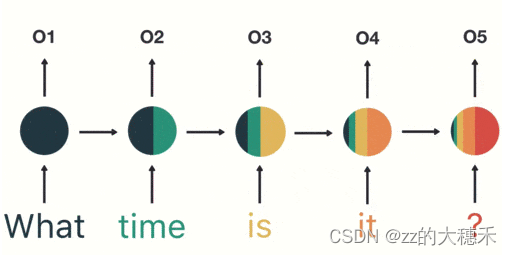
目录 机器学习特征工程常见的计算模型总览线性回归模型与逻辑回归模型线性回归模型逻辑回归模型区别 朴素贝叶斯分类器模型 (Naive Bayes)决策树模型随机森林模型支持向量机模型 (Support Vector Machine)K近邻模型神经网络模型卷积神经网络(CNN)循环神经…...
为什么list.sort()比Stream().sorted()更快?
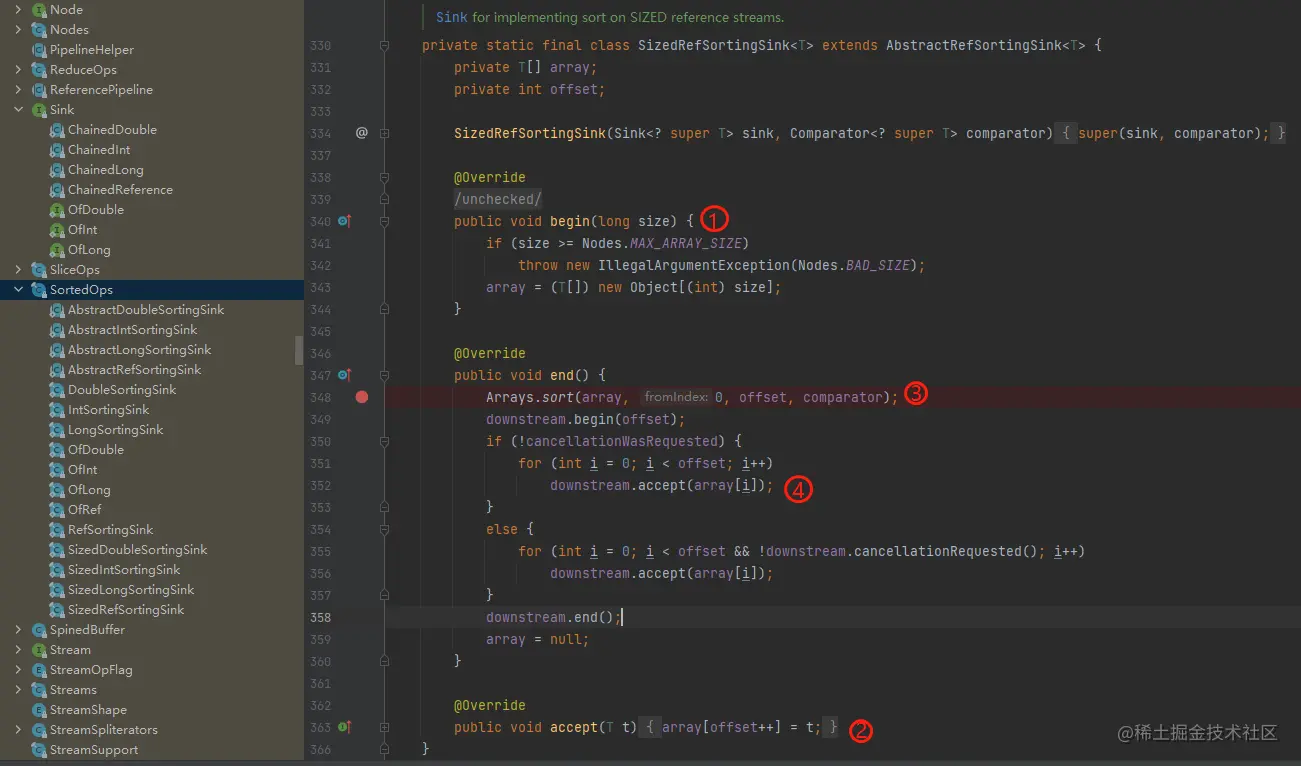
真的更好吗? 先简单写个demo List<Integer> userList new ArrayList<>();Random rand new Random();for (int i 0; i < 10000 ; i) {userList.add(rand.nextInt(1000));}List<Integer> userList2 new ArrayList<>();userList2.add…...

SQL账户SA登录失败,提示错误:18456
错误代码 18456 表示 SQL Server 登录失败。这个错误通常表示提供的凭据(用户名和密码)无法成功验证或者没有权限访问所请求的数据库。以下是一些常见的可能原因和解决方法: 1.错误的凭据:请确认提供的SA账户的用户名和密码是否正…...
Linux 终端操作命令(1)
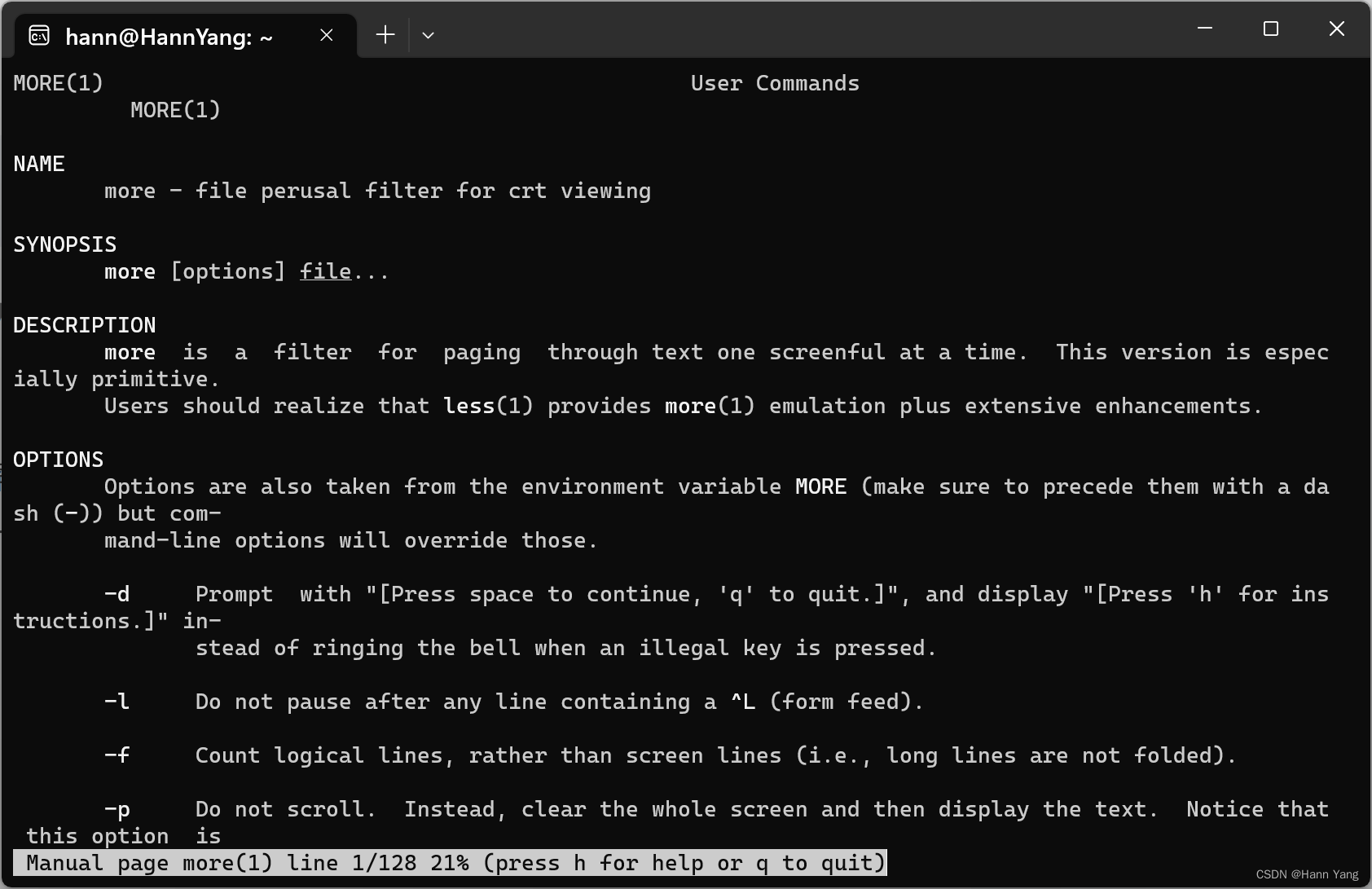
Linux 命令 终端命令格式 command [-options] [parameter] 说明: command:命令名,相应功能的英文单词或单词的缩写[-options]:选项,可用来对命令进行控制,也可以省略parameter:传给命令的参…...

java与javaw运行jar程序
运行jar程序 一、java.exe启动jar程序 (会显示console黑窗口) 1、一般用法: java -jar myJar.jar2、重命名进程名称启动: echo off copy "%JAVA_HOME%\bin\java.exe" "%JAVA_HOME%\bin\myProcess.exe" myProcess -jar myJar.jar e…...

安装和配置 Home Assistant 教程 HACS Homkit 米家等智能设备接入
安装和配置 Home Assistant 教程 简介 Home Assistant 是一款开源的智能家居自动化平台,可以帮助你集成和控制各种智能设备,从灯光到温度调节器,从摄像头到媒体播放器。本教程将引导你如何在 Docker 环境中安装和配置 Home Assistant&#…...
解决 Android Studio 的 Gradle 面板上只有关于测试的 task 的问题
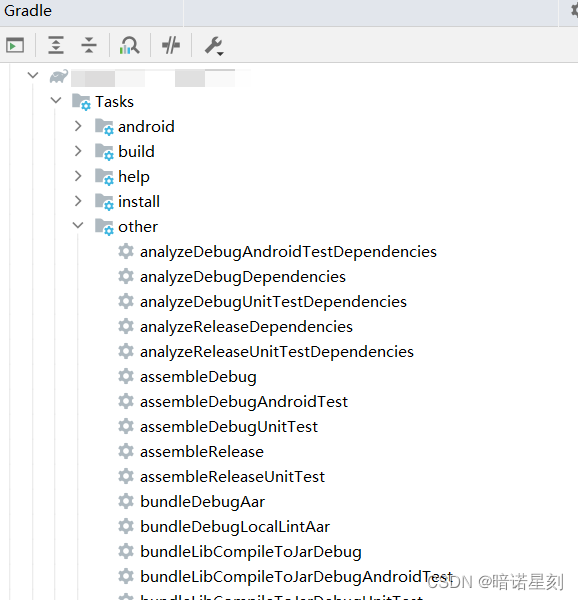
文章目录 问题描述解决办法 笔者出问题时的运行环境: Android Studio Flamingo | 2022.2.1 Android SDK 33 Gradle 8.0.1 JDK 17 问题描述 笔者最近发现一个奇怪的事情。笔者的 Android Studio 的 Gradle 面板上居然除了用于测试的 task 之外,其它什…...
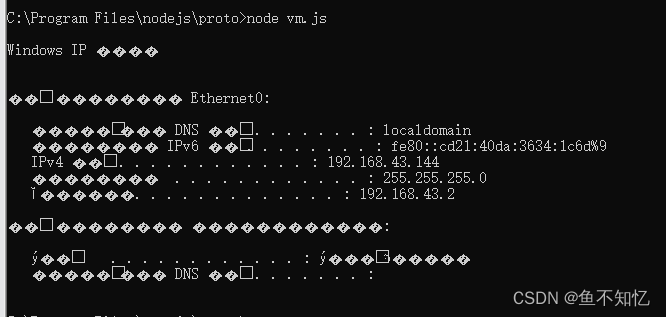
安全杂记 - 复现nodejs沙箱绕过
目录 一. 配置环境1.下载nodejs2.nodejs配置3.报错解决方法 二. nodej沙箱绕过1. vm模块2.使用this或引用类型来进行沙箱绕过 一. 配置环境 1.下载nodejs 官网:https://nodejs.org/en2.nodejs配置 安装nodejs的msi文件,默认配置一直下一步即可&#x…...

信息安全事件分类分级指南
范围 本指导性技术文件为信息安全事件的分类分级提供指导,用于信息安全事件的防范与处置,为事前准备、事中应对、事后处理 提供一个基础指南,可供信息系统和基础信息传输网络的运营和使用单位以及信息安全主管部门参考使用。 术语和定义 下…...

Vue系列第八篇:echarts绘制柱状图和折线图
本篇将使用echarts框架进行柱状图和折线图绘制。 目录 1.绘制效果 2.安装echarts 3.前端代码 4.后端代码 1.绘制效果 2.安装echarts // 安装echarts版本4 npm i -D echarts4 3.前端代码 src/api/api.js //业务服务调用接口封装import service from ../service.js //npm …...
SQL-每日一题【1164. 指定日期的产品价格】
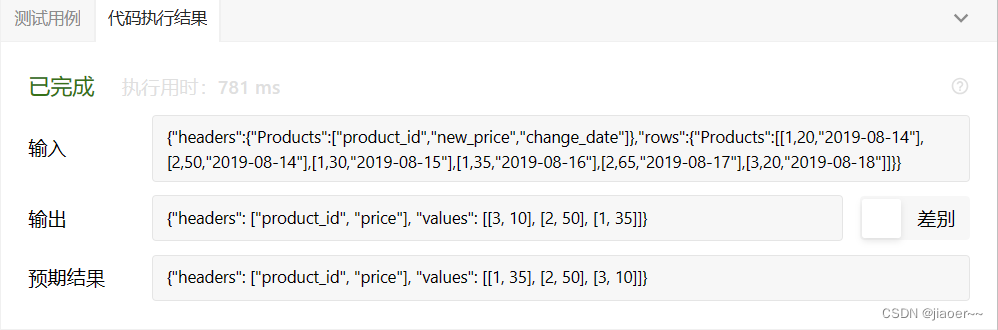
题目 产品数据表: Products 写一段 SQL来查找在 2019-08-16 时全部产品的价格,假设所有产品在修改前的价格都是 10 。 以 任意顺序 返回结果表。 查询结果格式如下例所示。 示例 1: 解题思路 1.题目要求我们查找在 2019-08-16 时全部产品的价格,假设所…...

memcpy、memmove、memcmp、memset函数的作用与区别
一、memcpy与memmove 1、memcpy 作用:从source的位置开始向后复制num个字节的数据到destination的内存位置。 注意: memcpy() 函数在遇到 ’\0’ 的时候不会停下来(strcpy字符串拷贝函数在遇到’\0’的时候会停下来);destination和source…...

socket 到底是个啥
我相信大家在面试过程中或多或少都会被问到这样一个问题:你能解释一下什么是 socket 吗 我记得我当初的回答很是浅显:socket 也叫套接字,用来负责不同主机程序之间的网络通信连接,socket 的表现方式由四元组(ip地址&am…...

奥威BI—数字化转型首选,以数据驱动企业发展
奥威BI系统BI方案可以迅速构建企业级大数据分析平台,可以将大量数据转化为直观、易于理解的图表和图形,推动和促进数字化转型的进程,帮助企业更好地了解自身的运营状况,及时发现问题并采取相应的措施,提高运营效率和质…...

vue中swiper使用
1.引包 说明:导入相应js引css import "Swiper" from "swiper" import "swiper/css/swiper.css"; import "swiper/js/swiper"; 2.结构 说明:必要的结构使用;直接封装成一个组件 <template>…...

webpack与vite区别
webpack和Vite作为两种常用的前端构建工具,主要有以下几点区别: 构建速度 webpack采用“打包”的方式构建,需要将所有模块打包成几个大的bundle文件,构建速度较慢。 Vite采用了“按需编译”的方式,只在浏览器请求时才编译对应模块,启动速度更快。 dev server webpack dev s…...
GLSL用于图像处理
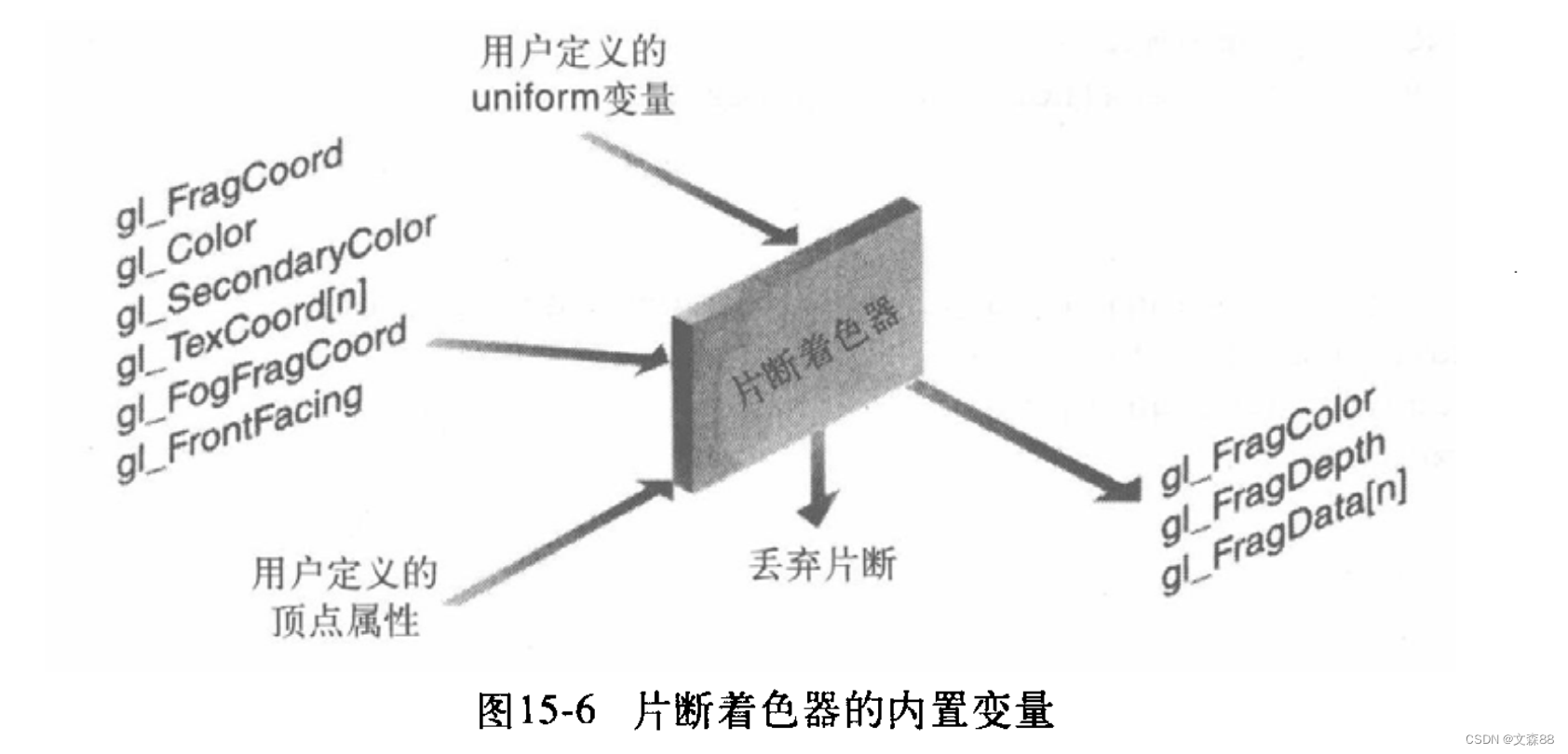
Pipeline 硬件处理顶点和片段的Pipeline 软件的输入 顶点着色器 顶点的glsl 输入–特殊全局变量 变量 类型 指定函数 描述 gl_ Vertex vec4 glVertex 顶点的全局空间坐标 gl_Color vec4 glColor 主颜色值 gl_SecondaryColor vec4 glSecondaryColor 辅助颜色值 gl_Normal …...

Umi-OCR:完全免费开源的离线OCR神器,3分钟快速上手文字识别
Umi-OCR:完全免费开源的离线OCR神器,3分钟快速上手文字识别 【免费下载链接】Umi-OCR OCR software, free and offline. 开源、免费的离线OCR软件。支持截屏/批量导入图片,PDF文档识别,排除水印/页眉页脚,扫描/生成二维…...

Unity游戏接入TapTap登录,从后台配置到打包上线的完整避坑指南
Unity游戏接入TapTap登录的全流程避坑指南:从配置到上线的实战经验 在独立游戏开发领域,TapTap平台凭借其庞大的用户基础和便捷的登录系统,已成为许多开发者的首选接入方案。然而,从后台配置到最终打包上线的完整流程中࿰…...

5秒无损转换B站缓存视频:m4s-converter完整使用指南
5秒无损转换B站缓存视频:m4s-converter完整使用指南 【免费下载链接】m4s-converter 一个跨平台小工具,将bilibili缓存的m4s格式音视频文件合并成mp4 项目地址: https://gitcode.com/gh_mirrors/m4/m4s-converter 你是否曾经在B站缓存了珍贵的学习…...

单元体幕墙计算方法研究
单元体幕墙计算方法研究 一、单元板块计算 选择隔离的单个单元进行计算,不需要考虑周边单元的影响。 单元之间的相互影响,来自于左右立柱的变形不一致,在截面选择上反应的就是左右立柱的截面参数的不同。 所以,单元间的相互影响,可以通过控制左右立柱截面参数的相近而进…...

高效跨平台游戏模组下载:WorkshopDL完全指南
高效跨平台游戏模组下载:WorkshopDL完全指南 【免费下载链接】WorkshopDL WorkshopDL - The Best Steam Workshop Downloader 项目地址: https://gitcode.com/gh_mirrors/wo/WorkshopDL 你是否在Epic Games Store、GOG或其他非Steam平台购买了游戏࿰…...

百度网盘直链解析工具:告别限速,实现高速下载的Python解决方案
百度网盘直链解析工具:告别限速,实现高速下载的Python解决方案 【免费下载链接】baidu-wangpan-parse 获取百度网盘分享文件的下载地址 项目地址: https://gitcode.com/gh_mirrors/ba/baidu-wangpan-parse 在数字资源共享日益频繁的今天ÿ…...
搞定Linux视频编解码缓冲区)
别再为嵌入式设备大内存发愁了!手把手教你用CMA(连续内存分配器)搞定Linux视频编解码缓冲区
嵌入式多媒体开发中的连续内存优化实战:CMA技术深度解析 在嵌入式多媒体开发领域,视频编解码、图像处理等任务对内存管理提出了严苛要求。当你在树莓派上部署视频监控系统,或在工业摄像头中实现实时H.264编码时,是否经常遇到这样的…...

基于IMAP的邮件自动化处理工具mymailclaw配置与实战指南
1. 项目概述:一个轻量级的邮件抓取与处理工具最近在折腾一个需要自动化处理邮件通知的小项目,发现市面上的方案要么太重,要么不够灵活。直到我遇到了psandis/mymailclaw这个项目,它就像一把小巧而锋利的瑞士军刀,专门用…...

终极指南:如何使用League-Toolkit英雄联盟工具箱快速提升游戏效率
终极指南:如何使用League-Toolkit英雄联盟工具箱快速提升游戏效率 【免费下载链接】League-Toolkit An all-in-one toolkit for LeagueClient. Gathering power 🚀. 项目地址: https://gitcode.com/gh_mirrors/le/League-Toolkit 还在为英雄联盟中…...

Unity区域加载系统:实现开放世界无缝加载与内存优化
1. 项目概述:一个高效、可扩展的Unity区域加载系统 最近在做一个开放世界风格的项目,场景大了之后,加载卡顿和内存管理就成了老大难问题。传统的Unity场景加载,要么一股脑全塞进内存,要么就得自己写一堆脚本来手动控制…...