
C#开发FFMPEG例子(API方式) FFmpeg推送udp组播流
代码及工程见https://download.csdn.net/download/daqinzl/88156926
开发工具:visual studio 2019
播放,可采用ffmpeg工具集里的ffplay.exe, 执行命令 ffplay udp://238.1.1.10:6016
也可以参考(C#开发FFMPEG例子(API方式) FFmpeg拉取udp组播流并播放) https://blog.csdn.net/daqinzl/article/details/132112075
网上用C/C++调用FFmpeg的API例子很多,
c#使用ffmpeg.autogen的方式很简单,直接复制C/C++调用FFmpeg的API的代码到C#中,然后在FFmpeg的方法前加上ffmpeg.即可。
C/C++调用FFmpeg的API推送udp组播流的例子可以参考:https://blog.csdn.net/daqinzl/article/details/132080204
主要参考文档(C#开发FFMPEG例子(API方式) FFmpeg拉取RTMP流并播放):https://blog.csdn.net/vanjoge/article/details/79657874
参考文档实现了拉取rtmp流并播放,本文在参考文档提供的源码的基础上,结合C/C++调用FFmpeg的API的例子,做了一些修改,用C#使用ffmpeg.autogen实现推送udp组播流。
主要代码如下:
using System;
using System.Collections.Generic;
using System.Linq;
using System.Threading.Tasks;
using System.Windows.Forms;
using FFmpeg.AutoGen;
namespace FFmpegDemo
{
static unsafe class Program
{
/// <summary>
/// 应用程序的主入口点。
/// </summary>
[STAThread]
static void Main()
{
//Application.EnableVisualStyles();
//Application.SetCompatibleTextRenderingDefault(false);
//Application.Run(new frmPlayer());
//FFmpegDLL目录查找和设置
FFmpegBinariesHelper.RegisterFFmpegBinaries();
ffmpeg.av_register_all();
ffmpeg.avdevice_register_all();
ffmpeg.avcodec_register_all();
ffmpeg.avformat_network_init();
AVFormatContext* m_fmt_ctx = null;
AVInputFormat* m_input_fmt = null;
int video_stream = -1;
//ffmpeg.avcodec_register_all();
string deviceName = "desktop";
string inputformat = "gdigrab";
int FPS = 23; //15
m_fmt_ctx = ffmpeg.avformat_alloc_context();
m_input_fmt = ffmpeg.av_find_input_format(inputformat);
AVDictionary* deoptions = null;
ffmpeg.av_dict_set_int(&deoptions, "framerate", FPS, ffmpeg.AV_DICT_MATCH_CASE);
ffmpeg.av_dict_set_int(&deoptions, "rtbufsize", 3041280 * 100 * 5, 0);
//如果不设置的话,在输入源是直播流的时候,会花屏。单位bytes
//av_dict_set(&deoptions, "buffer_size", "10485760", 0);
//av_dict_set(&deoptions, "reuse", "1", 0);
int ret = ffmpeg.avformat_open_input(&m_fmt_ctx, deviceName, m_input_fmt, &deoptions);
if (ret != 0)
{
return;
}
ffmpeg.av_dict_free(&deoptions);
ret = ffmpeg.avformat_find_stream_info(m_fmt_ctx, null);
if (ret < 0)
{
return;
}
ffmpeg.av_dump_format(m_fmt_ctx, 0, deviceName, 0);
video_stream = ffmpeg.av_find_best_stream(m_fmt_ctx, 0, -1, -1, null, 0); //AVMEDIA_TYPE_VIDEO
if (video_stream < 0)
{
return;
}
AVCodecContext* _codec_ctx = m_fmt_ctx->streams[video_stream]->codec;
AVCodec* _codec = ffmpeg.avcodec_find_decoder(_codec_ctx->codec_id);
if (_codec == null)
{
return;
}
ret = ffmpeg.avcodec_open2(_codec_ctx, _codec, null);
if (ret != 0)
{
return;
}
int width = m_fmt_ctx->streams[video_stream]->codec->width;
int height = m_fmt_ctx->streams[video_stream]->codec->height;
int fps = m_fmt_ctx->streams[video_stream]->codec->framerate.num > 0 ? m_fmt_ctx->streams[video_stream]->codec->framerate.num : 25;
AVPixelFormat videoType = m_fmt_ctx->streams[video_stream]->codec->pix_fmt;
//std::cout << "avstream timebase : " << m_fmt_ctx->streams[video_stream]->time_base.num << " / " << m_fmt_ctx->streams[video_stream]->time_base.den << endl;
Console.WriteLine("avstream timebase : " + m_fmt_ctx->streams[video_stream]->time_base.num + " / " + m_fmt_ctx->streams[video_stream]->time_base.den);
AVDictionary* enoptions = null;
//av_dict_set(&enoptions, "preset", "superfast", 0);
//av_dict_set(&enoptions, "tune", "zerolatency", 0);
ffmpeg.av_dict_set(&enoptions, "preset", "ultrafast", 0);
ffmpeg.av_dict_set(&enoptions, "tune", "zerolatency", 0);
//TODO
//av_dict_set(&enoptions, "pkt_size", "1316", 0); //Maximum UDP packet size
av_dict_set(&dic, "fifo_size", "18800", 0);
av_dict_set(&enoptions, "buffer_size", "0", 1);
av_dict_set(&dic, "bitrate", "11000000", 0);
av_dict_set(&dic, "buffer_size", "1000000", 0);//1316
//av_dict_set(&enoptions, "reuse", "1", 0);
AVCodec* codec = ffmpeg.avcodec_find_encoder(AVCodecID.AV_CODEC_ID_H264);
if (codec == null)
{
Console.WriteLine( "avcodec_find_encoder failed!" );
return;
}
AVCodecContext* vc = ffmpeg.avcodec_alloc_context3(codec);
if (vc == null)
{
Console.WriteLine("avcodec_alloc_context3 failed!" );
return;
}
Console.WriteLine("avcodec_alloc_context3 success!" );// FFmpeg.AutoGen.
vc->flags |= (1 << 22); //AV_CODEC_FLAG_GLOBAL_HEADER
vc->codec_id = AVCodecID.AV_CODEC_ID_H264;
vc->codec_type = FFmpeg.AutoGen.AVMediaType.AVMEDIA_TYPE_VIDEO;
vc->pix_fmt = AVPixelFormat.AV_PIX_FMT_YUV420P;
vc->width = width;
vc->height = height;
vc->time_base.num = 1;
vc->time_base.den = FPS;
//vc->framerate = { FPS,1 };
//TODO
vc->framerate.num = 1;
vc->framerate.den = FPS;
vc->bit_rate = 10241000;
vc->gop_size = 120;
vc->qmin = 10;
vc->qmax = 51;
vc->max_b_frames = 0;
vc->profile = ffmpeg.FF_PROFILE_H264_MAIN;
ret = ffmpeg.avcodec_open2(vc, codec, &enoptions);
if (ret != 0)
{
return;
}
Console.WriteLine( "avcodec_open2 success!" );
ffmpeg.av_dict_free(&enoptions);
SwsContext* vsc = null;
vsc = ffmpeg.sws_getCachedContext(vsc,
width, height, (AVPixelFormat)videoType, //源宽、高、像素格式
width, height, AVPixelFormat.AV_PIX_FMT_YUV420P,//目标宽、高、像素格式
ffmpeg.SWS_BICUBIC, // 尺寸变化使用算法
null, null, null
);
if (vsc==null)
{
Console.WriteLine("sws_getCachedContext failed!");
return;
}
AVFrame* yuv = ffmpeg.av_frame_alloc();
yuv->format = (int)AVPixelFormat.AV_PIX_FMT_YUV420P;
yuv->width = width;
yuv->height = height;
yuv->pts = 0;
ret = ffmpeg.av_frame_get_buffer(yuv, 32);
if (ret != 0)
{
return;
}
//string rtmpurl = "rtmp://192.168.0.105:1935/live/desktop";
string rtmpurl = "udp://224.1.1.1:5001";
AVFormatContext* ic = null;
//ret = ffmpeg.avformat_alloc_output_context2(&ic, null, "flv", rtmpurl);
ret = ffmpeg.avformat_alloc_output_context2(&ic, null, "mpegts", rtmpurl);//UDP
if (ret < 0)
{
return;
}
AVStream* st = ffmpeg.avformat_new_stream(ic, null);
if (st == null)
{
return;
}
st->codecpar->codec_tag = 0;
ffmpeg.avcodec_parameters_from_context(st->codecpar, vc);
ffmpeg.av_dump_format(ic, 0, rtmpurl, 1);
ret = ffmpeg.avio_open(&ic->pb, rtmpurl, ffmpeg.AVIO_FLAG_WRITE);
if (ret != 0)
{
return;
}
ret = ffmpeg.avformat_write_header(ic, null);
if (ret != 0)
{
return;
}
AVPacket* packet = ffmpeg.av_packet_alloc();
AVPacket* Encodepacket = ffmpeg.av_packet_alloc();
int frameIndex = 0;
int EncodeIndex = 0;
AVFrame* rgb = ffmpeg.av_frame_alloc();
AVBitStreamFilterContext* h264bsfc = ffmpeg.av_bitstream_filter_init("h264_mp4toannexb");
long startpts = m_fmt_ctx->start_time;
long lastpts = 0;
AVRational bq = new AVRational(); bq.num = 1; bq.den = FPS;
AVRational cq = new AVRational(); cq.num = 1; cq.den = ffmpeg.AV_TIME_BASE;
long duration = ffmpeg.av_rescale_q(1, bq, cq);
int got_picture = 0;
while (frameIndex < 2000000)
{
ret = ffmpeg.av_read_frame(m_fmt_ctx, packet);
if (ret < 0)
{
break;
}
if (packet->stream_index == video_stream)
{
ret = ffmpeg.avcodec_decode_video2(_codec_ctx, rgb, &got_picture, packet);
if (ret < 0)
{
Console.WriteLine("Decode Error.\n");
return;
}
if (got_picture != null)
{
int h = ffmpeg.sws_scale(vsc, rgb->data, rgb->linesize, 0, height, //源数据
yuv->data, yuv->linesize);
long guesspts = frameIndex * duration;
yuv->pts = guesspts;
frameIndex++;
ret = ffmpeg.avcodec_encode_video2(vc, Encodepacket, yuv, &got_picture);
if (ret < 0)
{
Console.WriteLine("Failed to encode!\n");
break;
}
if (got_picture == 1)
{
Encodepacket->pts = ffmpeg.av_rescale_q(EncodeIndex, vc->time_base, st->time_base);
Encodepacket->dts = Encodepacket->pts;
//std::cout << "frameindex : " << EncodeIndex << " pts : " << Encodepacket->pts << " dts: " << Encodepacket->dts << " encodeSize:" << Encodepacket->size << " curtime - lasttime " << Encodepacket->pts - lastpts << endl;
Console.WriteLine("frameindex : " + EncodeIndex.ToString() + " pts : " + Encodepacket->pts.ToString() + " dts: " + Encodepacket->dts.ToString() + " encodeSize:" + Encodepacket->size.ToString() + " curtime - lasttime " + (Encodepacket->pts - lastpts).ToString());
lastpts = Encodepacket->pts;
ret = ffmpeg.av_interleaved_write_frame(ic, Encodepacket);
EncodeIndex++;
ffmpeg.av_packet_unref(Encodepacket);
}
}
}
ffmpeg.av_packet_unref(packet);
}
ret = ffmpeg.avcodec_send_frame(vc, null);
while (ret >= 0)
{
ret = ffmpeg.avcodec_receive_packet(vc, Encodepacket);
if (ret == ffmpeg.AVERROR(ffmpeg.EAGAIN) || ret == ffmpeg.AVERROR_EOF)
{
break;
}
if (ret < 0)
{
break;
}
ret = ffmpeg.av_interleaved_write_frame(ic, Encodepacket);
EncodeIndex++;
}
ffmpeg.av_write_trailer(ic);
ffmpeg.av_packet_free(&packet);
ffmpeg.av_packet_free(&Encodepacket);
ffmpeg.av_frame_free(&rgb);
ffmpeg.av_frame_free(&yuv);
ffmpeg.av_bitstream_filter_close(h264bsfc);
h264bsfc = null;
if (vsc != null)
{
ffmpeg.sws_freeContext(vsc);
vsc = null;
}
if (_codec_ctx != null)
ffmpeg.avcodec_close(_codec_ctx);
_codec_ctx = null;
_codec = null;
if (vc != null)
ffmpeg.avcodec_free_context(&vc);
if (m_fmt_ctx != null)
ffmpeg.avformat_close_input(&m_fmt_ctx);
if (ic!=null && (ic->flags & ffmpeg.AVFMT_NOFILE)==0)
ffmpeg.avio_closep(&ic->pb);
if (ic != null)
{
ffmpeg.avformat_free_context(ic);
ic = null;
}
m_input_fmt = null;
return;
}
}
}
相关文章:
 FFmpeg推送udp组播流)
C#开发FFMPEG例子(API方式) FFmpeg推送udp组播流
代码及工程见https://download.csdn.net/download/daqinzl/88156926 开发工具:visual studio 2019 播放,可采用ffmpeg工具集里的ffplay.exe, 执行命令 ffplay udp://238.1.1.10:6016 也可以参考(C#开发FFMPEG例子(API方式) FFmpeg拉取udp组播流并播放)…...
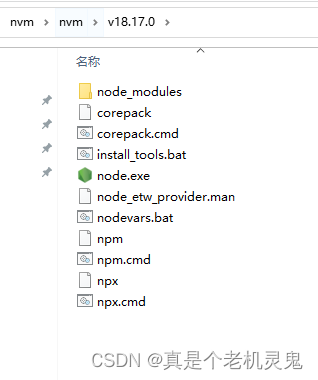
nvm下载node导致npm报错无法使用
有个依赖库需要更新下node,用nvm下载后项目跑不起来了,npm -v 还报错 其实一开始是npm下载不来,然后换了淘宝镜像后还是报错 然后就只能手动下载下了 进入node.js官网 https://nodejs.org/en/download 下载后注意要安装在你nvm目录中&#x…...
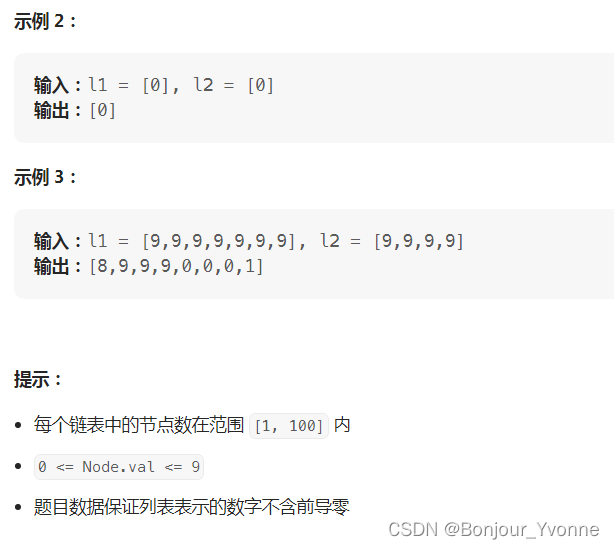
LeetCode 热题 100JavaScript--2. 两数相加
给你两个 非空 的链表,表示两个非负的整数。它们每位数字都是按照 逆序 的方式存储的,并且每个节点只能存储 一位 数字。 请你将两个数相加,并以相同形式返回一个表示和的链表。 你可以假设除了数字 0 之外,这两个数都不会以 0 …...

zookeeper总结
1.概念 Zookeeper 是一个分布式协调服务,可用于服务发现,分布式锁,分布式领导选举,配置管理等。Zookeeper 提供了一个类似于 Linux 文件系统的树形结构(可认为是轻量级的内存文件系统,但只适合存少量信息&…...
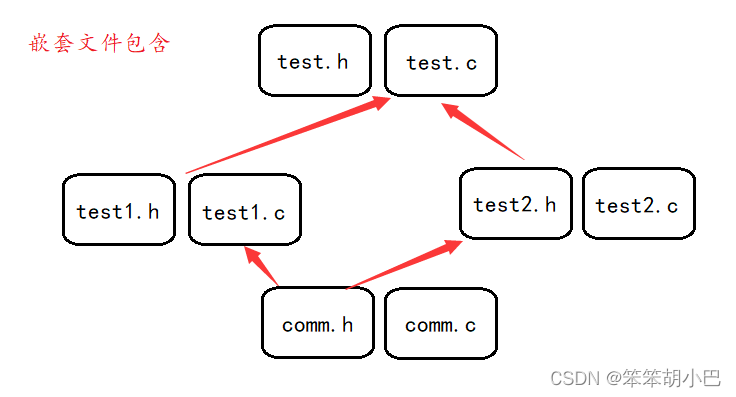
【程序环境与预处理玩转指南】
本章重点: 程序的翻译环境 程序的执行环境 详解:C语言程序的编译链接 预定义符号介绍 预处理指令 #define 宏和函数的对比 预处理操作符#和##的介绍 命令定义 预处理指令 #include 预处理指令 #undef 条件编译 1. 程序的翻译环境和执行环境 在…...
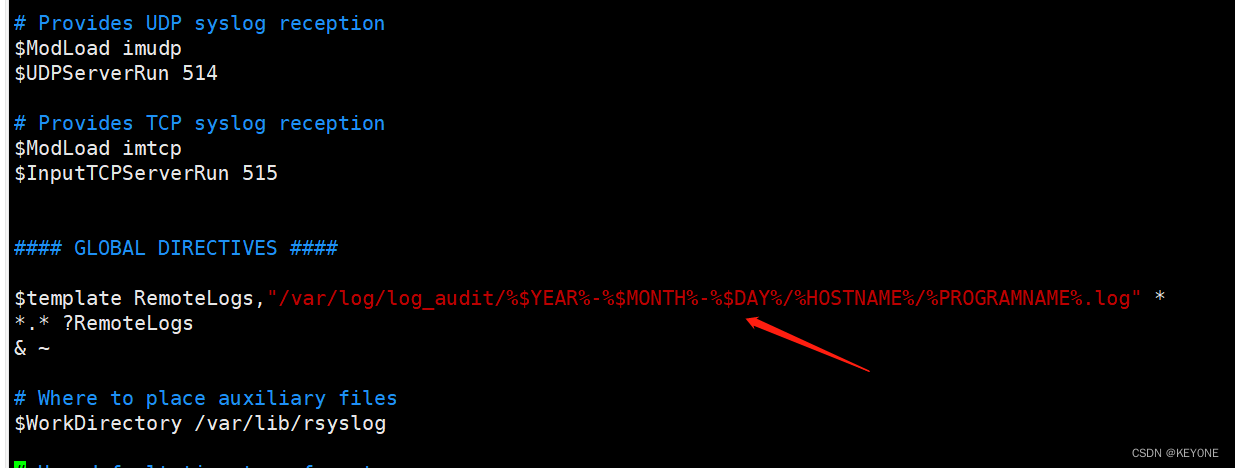
搭建简易syslog日志中转服务器
在某种场景下,无法接入日志审计设备,本文提供一种方式,可通过搭建简易日志中转服务器,收集到该环境下的日志后,再将其导入日志审计设备中。 0x1 开启服务 rsyslog守护进程来自于当前的linux发布版本的预装模块&#x…...

MongoDB文档-进阶使用-spring-boot整合使用MongoDB---MongoRepository完成增删改查
阿丹: 之前学习了在MongoDB客户端上的MongoDB语句现在将MongoDB整合到spring项目。 传送门: MongoDB文档--基本概念_一单成的博客-CSDN博客 MongoDB文档--基本安装-linux安装(mongodb环境搭建)-docker安装(挂载数据卷…...

什么是线程局部变量?
在Java中,线程局部变量(Thread Local Variable)是一种特殊类型的变量,每个线程都有其自己独立的副本。这意味着每个线程可以在该变量上进行操作,而不会影响其他线程的副本。线程局部变量通常用于在多线程环境中存储线程私有的数据,…...
Jmeter响应中的乱码问题
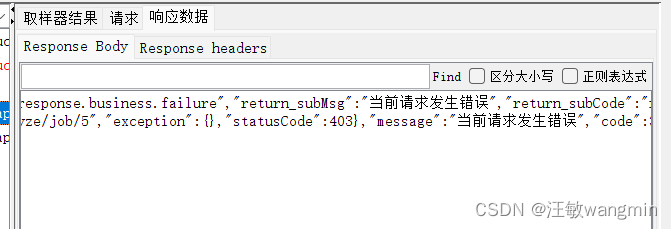
文章目录 问题描述解决办法 问题描述 Jmeter在访问接口的时候,响应内容如果有中文可能会显示乱码 响应页面没有做编码处理,JMeter默认按照ISO-8859-1编码格式进行解析 解决办法 在线程组中添加BeanShell PostProcessor后置处理器 prev.setDataEnco…...
MongoDB文档-进阶使用-MongoDB索引-createindex()与dropindex()-在MongoDB中使用正则表达式来查找
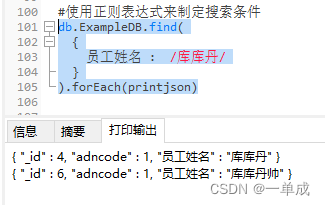
阿丹: 之前研究了MongoDB的基础增删改查。在学会基础的数据库增删改查肯定是不够的。这个时候就涉及到了数据库搜索的时候的效率。需要提高数据的搜索效率。 MongoDB索引 在所以数据库中如果没有数据索引的时候。如果需要查找到一些数据。都会去主动扫描所有可能存…...
CentOS下ZLMediaKit的可视化管理网站MediaServerUI使用
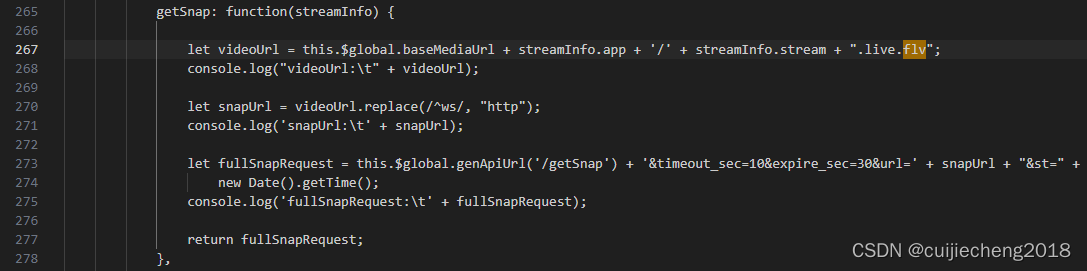
一、简介 按照 ZLMediaKit快速开始 编译运行ZLMediaKit成功后,我们可以运行其合作开源项目MediaServerUI,来对ZLMediaKit进行可视化管理。通过MediaServerUI,我们可以实现在浏览器查看ZLMediaKit的延迟率、负载率、正在进行的推拉流、服务器…...
回归预测 | MATLAB实现POA-CNN-BiGRU鹈鹕算法优化卷积双向门控循环单元多输入单输出回归预测
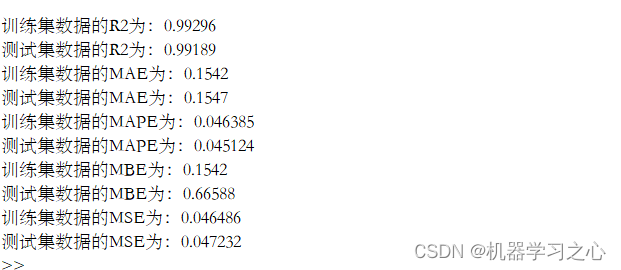
回归预测 | MATLAB实现POA-CNN-BiGRU鹈鹕算法优化卷积双向门控循环单元多输入单输出回归预测 目录 回归预测 | MATLAB实现POA-CNN-BiGRU鹈鹕算法优化卷积双向门控循环单元多输入单输出回归预测预测效果基本介绍程序设计参考资料 预测效果 基本介绍 MATLAB实现POA-CNN-BiGRU鹈鹕…...
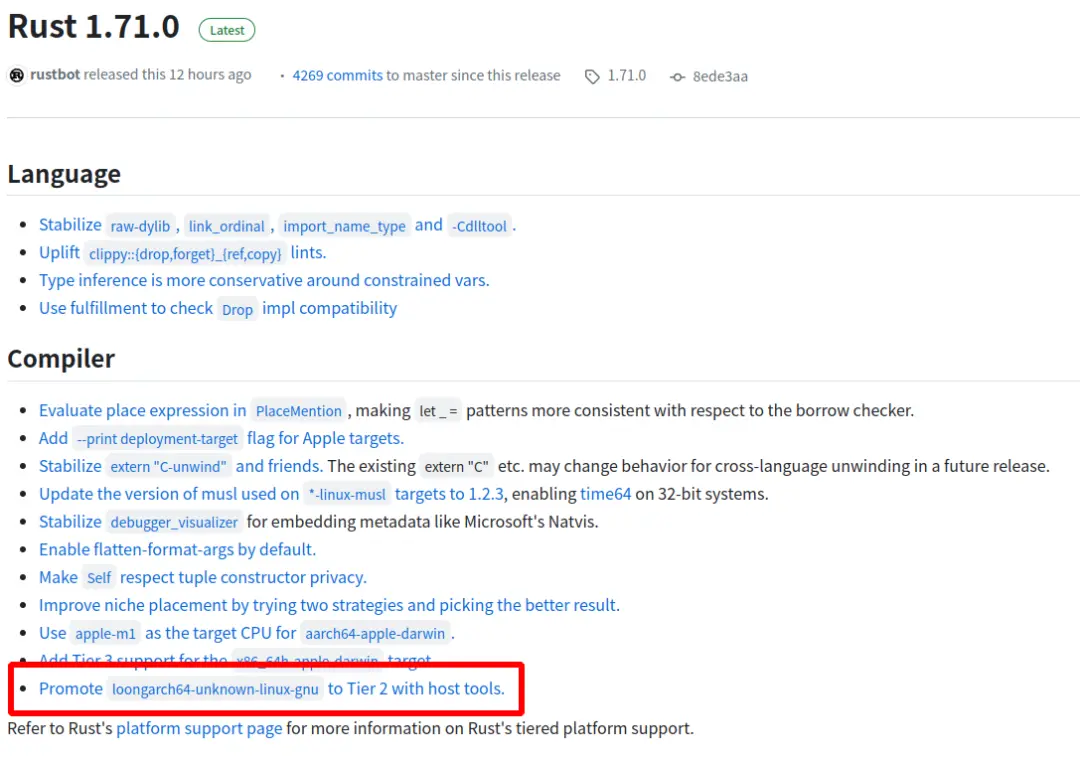
Rust 原生支持龙架构指令集
导读近日,Rust 开源社区发布 1.71.0 版本,实现对龙架构(LoongArch)指令集的原生支持。 龙架构操作系统发行版和开发者可基于上游社区源代码构建或直接下载 Rust 开源社区发布的龙架构二进制版本。Rust 开发者将在龙架构平台上获得…...
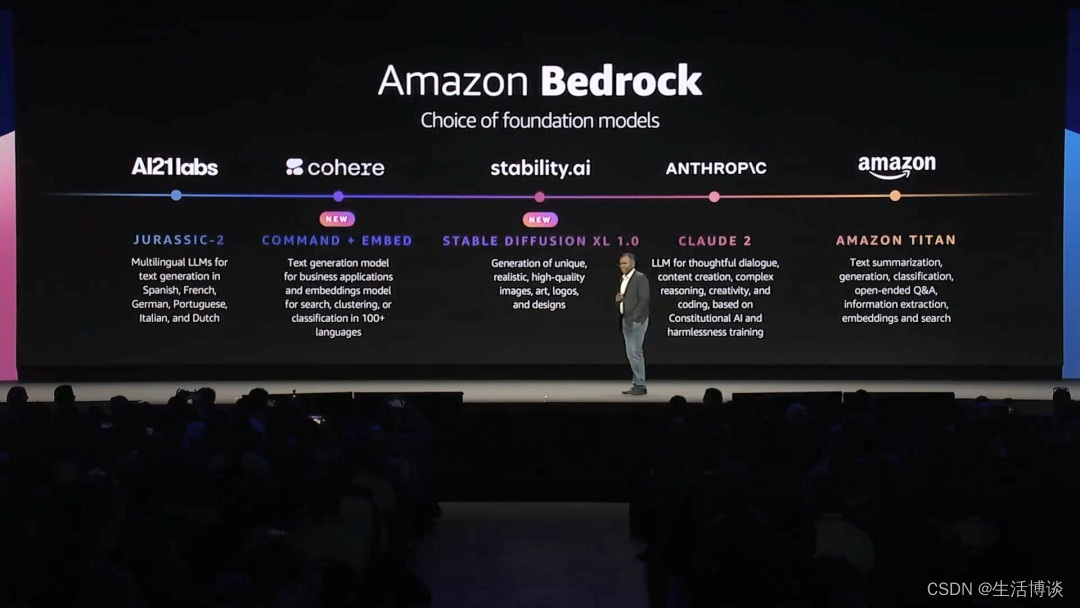
为生成式AI提速,亚马逊云科技Amazon EC2 P5满足GPU需求
生成式AI(Generative AI)已经成为全球范围内的一个重要趋势,得到越来越多企业和研究机构的关注和应用。纽约时间7月26日,亚马逊云科技数据库、数据分析和机器学习全球副总裁Swami Sivasubramanian在亚马逊云科技举办的纽约峰会上更…...

聊聊企业数据安全那些事~
保护企业数据安全的重要性与方法 随着信息技术的快速发展,企业数据的安全性变得越来越重要。在数字化时代,企业的核心业务和关键信息都存储在电脑系统中,一旦遭受到数据泄露、黑客攻击或恶意软件感染,将可能对企业造成严重的损害…...

日常随笔——如何把excel题库转换为word打印格式
将Excel题库转换为Word可以通过编程的方式实现。以下是一个使用Python的示例代码,该代码使用openpyxl库读取Excel文件,并使用python-docx库创建和保存Word文档。 首先,请确保已经安装了 openpyxl 和 python-docx 库。可以使用以下命令进行安…...

SpringCloud项目打包注意事项以及可能出错的几种情况
SpringCloud项目打包注意事项和可能出错的几种情况 1、检查子模块中的 parent的pom文件路径 \<relativePath/\>2、检查打包插件的位置3、检查module是否重复引用 欢迎访问我的个人博客:https://wk-blog.vip 1、检查子模块中的 parent的pom文件路径 <relat…...
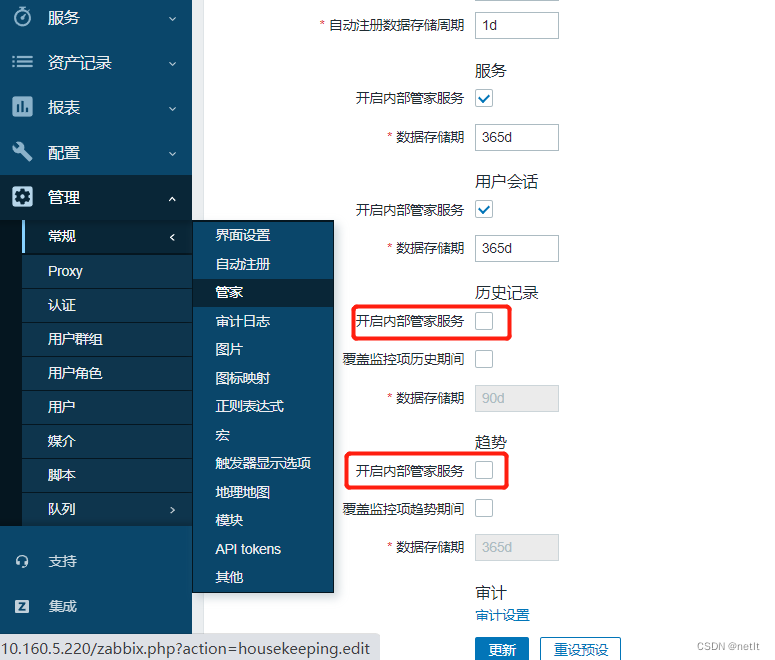
ZABBIX 6.4 Mysql数据库分表
ZABBIX监控设备较多的时候,Mysql数据库容易成为性能的瓶颈,可以通过数据库分表的方式来进行优化。步骤如下: 一、停用zabbix服务 # 避免修改分区表时,数据还有写入 systemctl stop zabbix 二、备份MySQL zabbix DB 避免修改分…...

多线程-Runable和Callable的区别
在Java中,多线程可以通过实现Runnable接口或使用Callable接口来实现。这两种方式有一些区别,如下所示: 返回值: Runnable接口的run()方法没有返回值,它表示一个没有返回结果的任务。Callable接口的call()方法有返回值…...

智慧城市规划新引擎:探秘数字孪生中的二维与三维GIS技术差异
智慧城市作为人类社会发展的新阶段,正日益引领着我们迈向数字化未来的时代。在智慧城市的建设过程中,地理信息系统(GIS)扮演着举足轻重的角色。而在GIS的发展中,二维和三维GIS作为两大核心技术,在城市规划与…...

Zotero插件市场:三步快速上手的插件管理神器
Zotero插件市场:三步快速上手的插件管理神器 【免费下载链接】zotero-addons Zotero Add-on Market | Zotero插件市场 | Browsing, installing, and reviewing plugins within Zotero 项目地址: https://gitcode.com/gh_mirrors/zo/zotero-addons 想象一下&a…...

NS-USBLoader终极指南:3步搞定Switch游戏管理与RCM注入的完整教程
NS-USBLoader终极指南:3步搞定Switch游戏管理与RCM注入的完整教程 【免费下载链接】ns-usbloader Awoo Installer and GoldLeaf uploader of the NSPs (and other files), RCM payload injector, application for split/merge files. 项目地址: https://gitcode.c…...

Arm Cortex-X2/X3架构解析与性能优化实践
1. Arm Cortex-X2/X3集群架构概述在Armv9架构的高性能计算领域,Cortex-X2和X3代表了当前最先进的CPU设计理念。作为DynamIQ共享单元(DSU)的核心组件,它们通过可配置的缓存层次结构和智能一致性协议,为现代异构计算提供了灵活的解决方案。1.1 …...

Nestia:基于TypeScript编译时分析的NestJS端到端类型安全实践
1. 项目概述:当NestJS遇上TypeScript的极致类型安全如果你正在用NestJS开发后端API,并且对TypeScript的类型安全有近乎偏执的追求,那么你很可能已经听说过,或者正在寻找一个能让你“写一次,安全两次”的工具。我说的“…...

前端工程化实战:基于 Kelivo 模板的配置即代码与自动化工作流
1. 项目概述与核心价值最近在整理个人开发环境时,发现一个挺有意思的项目,叫Chevey339/kelivo。乍一看这个仓库名,可能有点摸不着头脑,但点进去之后,你会发现它是一个围绕特定开发工具或框架进行深度定制、优化和功能增…...

AI 术语通俗词典:计算图
计算图是深度学习、自动微分、神经网络训练和人工智能框架中非常重要的一个术语。它用来描述:把一次数学计算过程表示成由节点和边组成的图结构。换句话说,计算图是在回答:模型中的输入、参数、运算和输出之间,到底是如何一步步连…...

基于MCP协议构建AI数据连接器:从原理到SQL查询服务器实践
1. 项目概述:一个连接AI与数据源的“翻译官”最近在折腾AI应用开发,特别是想让大语言模型(LLM)能直接、安全地访问我自己的数据库、API或者文件系统时,遇到了一个普遍难题:怎么让AI理解并操作这些外部数据源…...

Legacy-iOS-Kit完整指南:如何让老旧iPhone和iPad重获新生
Legacy-iOS-Kit完整指南:如何让老旧iPhone和iPad重获新生 【免费下载链接】Legacy-iOS-Kit An all-in-one tool to restore/downgrade, save SHSH blobs, jailbreak legacy iOS devices, and more 项目地址: https://gitcode.com/gh_mirrors/le/Legacy-iOS-Kit …...

016、Git版本控制与协作开发流程
016 Git版本控制与协作开发流程 一个让我熬夜到凌晨三点的.gitignore 去年做一款基于STM32U5的TinyML手势识别项目,团队四个人,代码库从第一天就开始膨胀。第三天晚上,我习惯性git push,然后去睡觉。凌晨三点被手机震醒——同事在群里@我:“你push了个啥?编译不过了。”…...

Mod Engine 2完全指南:告别游戏模组安装烦恼的终极解决方案
Mod Engine 2完全指南:告别游戏模组安装烦恼的终极解决方案 【免费下载链接】ModEngine2 Runtime injection library for modding Souls games. WIP 项目地址: https://gitcode.com/gh_mirrors/mo/ModEngine2 还在为传统游戏模组安装的繁琐流程而烦恼吗&…...