
Flutter 实现按位置大小比例布局的控件
文章目录
- 前言
- 一、如何实现?
- 1、数值转成分数
- 2、Row+Flexible布局横向
- 3、Column+Flexible布局纵向
- 二、完整代码
- 三、使用示例
- 1、基本用法
- 2、四分屏
- 3、六分屏
- 4、八分屏
- 5、九分屏
- 6、414分屏
- 总结
前言
做视频监控项目时需要需要展示多分屏,比如2x2、3x3、414等等,如果每一种分屏都单独实现会很麻烦,而且不能支持用户定制。最好的方式还是实现一个通用的分屏容器,而且采样比例计算位置大小,可以适配任意尺寸。
一、如何实现?
最直观的实现方式是获取控件宽高然后按比例计算,但是flutter在build的时候无法获取位置宽高信息,只有绘制之后才能获取,所以这种方式并不容易实现,比较简单的方式应该是使用Row、Column结合Flexible。
1、数值转成分数
需要转换的数值
final Rect rect; //子控件位置大小,比例值范围0-1
定义一个分数对象
//分数
class Rational {int den = 1; //分母int num = 0; //分子Rational(this.num, this.den);//通过double构造,accuracy小数点后精度factory Rational.fromDouble(double d, {int accuracy = 5}) {int den = 1;while (d > d.toInt() && accuracy-- > 0) {d *= 10;den *= 10;}return Rational(d.toInt(), den);}
}
转成分数并对齐分母
//将位置大小转成分数final width = Rational.fromDouble(rect.width);final x = Rational.fromDouble(rect.left);final height = Rational.fromDouble(rect.height);final y = Rational.fromDouble(rect.top);//对齐分母if (width.den != x.den) {final den = width.den;width.den *= x.den;width.num *= x.den;x.den *= den;x.num *= den;}//对齐分母if (height.den != y.den) {final den = height.den;height.den *= y.den;height.num *= y.den;y.den *= den;y.num *= den;}
2、Row+Flexible布局横向
我们利用Row的自动布局,以及Flexible的比例布局的特性,根据上面的分数计算出控件比例的位置大小对应的flex值即可。
Row(children: [Flexible(flex: x.num,child: Container(),),Flexible(flex: width.num,child: child/*子控件,加上纵向布局则是Column*/),Flexible(flex: width.den - width.num - x.num, child: Container()),],);}
3、Column+Flexible布局纵向
我们利用Column的自动布局,以及Flexible的比例布局的特性,根据上面的分数计算出控件比例的位置大小对应的flex值即可。
Column(children: [Flexible(flex: y.num,child: Container(),),Flexible(flex: height.num, child: child/*子控件*/),Flexible(flex: height.den - height.num - y.num,child: Container(),),],)
二、完整代码
proportion.dart
import 'package:flutter/material.dart';//比例布局控件,
class Proportion extends StatelessWidget {final Rect rect; //位置大小,比例值范围0-1final Widget child;const Proportion({super.key,this.rect = const Rect.fromLTWH(0, 0, 1, 1),required this.child,});Widget build(BuildContext context) {//实现按比例显示布局final width = Rational.fromDouble(rect.width);final x = Rational.fromDouble(rect.left);final height = Rational.fromDouble(rect.height);final y = Rational.fromDouble(rect.top);if (width.den != x.den) {final den = width.den;width.den *= x.den;width.num *= x.den;x.den *= den;x.num *= den;}if (height.den != y.den) {final den = height.den;height.den *= y.den;height.num *= y.den;y.den *= den;y.num *= den;}return Row(children: [Flexible(flex: x.num,child: Container(),),Flexible(flex: width.num,child: Column(children: [Flexible(flex: y.num,child: Container(),),Flexible(flex: height.num, child: child),Flexible(flex: height.den - height.num - y.num,child: Container(),),],),),Flexible(flex: width.den - width.num - x.num, child: Container()),],);}
}//分数
class Rational {int den = 1; //分母int num = 0; //分子Rational(this.num, this.den);//通过double构造,accuracy小数点后精度factory Rational.fromDouble(double d, {int accuracy = 5}) {int den = 1;while (d > d.toInt() && accuracy-- > 0) {d *= 10;den *= 10;}return Rational(d.toInt(), den);}
}
常用布局(可选)
proportions.dart
import 'package:flutter/material.dart';import 'proportion.dart';//常用布局,需配合stack作为父容器使用
class Proportions {Proportions._();//全屏static List<Proportion> fullScreen({required Widget child,}) =>[Proportion(rect: const Rect.fromLTWH(0, 0, 1, 1),child: child,)];//二分屏static List<Proportion> halfScreen({required Widget left,required Widget right,}) =>[Proportion(rect: const Rect.fromLTWH(0, 0, 0.5, 1),child: left,),Proportion(rect: const Rect.fromLTWH(0.5, 0, 0.5, 1),child: right,),];//四分屏static List<Proportion> quadScreen({required List<Widget> children,}) {return [Proportion(rect: const Rect.fromLTWH(0, 0, 0.5, 0.5),child: children[0],), //左上Proportion(rect: const Rect.fromLTWH(0.5, 0, 0.5, 0.5),child: children[1],), //右上Proportion(rect: const Rect.fromLTWH(0, 0.5, 0.5, 0.5),child: children[2],), //左下Proportion(rect: const Rect.fromLTWH(0.5, 0.5, 0.5, 0.5),child: children[3],), //右下];}//6  分屏static List<Proportion> sixScreen({required List<Widget> children,}) {return [Proportion(rect: const Rect.fromLTWH(0, 0, 0.666, 0.666),child: children[0],), //左上Proportion(rect: const Rect.fromLTWH(0.666, 0, 0.333, 0.333),child: children[1],), //右上Proportion(rect: const Rect.fromLTWH(0.666, 0.333, 0.333, 0.333),child: children[2],), //右中Proportion(rect: const Rect.fromLTWH(0.666, 0.666, 0.333, 0.333),child: children[3],), //右下Proportion(rect: const Rect.fromLTWH(0.333, 0.666, 0.333, 0.333),child: children[4],), //中下Proportion(rect: const Rect.fromLTWH(0, 0.666, 0.333, 0.333),child: children[5],), //左下];}//8  分屏static List<Proportion> eightScreen({required List<Widget> children,}) {return [Proportion(rect: const Rect.fromLTWH(0, 0, 0.75, 0.75),child: children[0],), //左上Proportion(rect: const Rect.fromLTWH(0.75, 0, 0.25, 0.25),child: children[1],), //右上Proportion(rect: const Rect.fromLTWH(0.75, 0.25, 0.25, 0.25),child: children[2],), //右中1Proportion(rect: const Rect.fromLTWH(0.75, 0.5, 0.25, 0.25),child: children[3],), //右中2Proportion(rect: const Rect.fromLTWH(0.75, 0.75, 0.25, 0.25),child: children[4],), //右下Proportion(rect: const Rect.fromLTWH(0.5, 0.75, 0.25, 0.25),child: children[5],), //中下2Proportion(rect: const Rect.fromLTWH(0.25, 0.75, 0.25, 0.25),child: children[6],), //中下1Proportion(rect: const Rect.fromLTWH(0, 0.75, 0.25, 0.25),child: children[7],), //左下];}//9  分屏static List<Proportion> nightScreen({required List<Widget> children,}) {int n = 0;return [...children.getRange(0, 9).map((element) {final i = n++;return Proportion(rect: Rect.fromLTWH((i % 3) * 0.333,(i ~/ 3) * 0.333,0.333,0.333,),child: element,);},)];}//16  分屏static List<Proportion> sixteenScreen({required List<Widget> children,}) {int n = 0;return [...children.getRange(0, 16).map((element) {final i = n++;return Proportion(rect: Rect.fromLTWH((i % 4) * 0.25, (i ~/ 4) * 0.25, 0.25, 0.25),child: element,);},)];}//414分屏static List<Proportion> fourOneFourScreen({required List<Widget> children,}) {int n = 0;return [//左4...children.getRange(0, 4).map((element) {final i = n++;return Proportion(rect: Rect.fromLTWH((i ~/ 4) * 0.25, (i % 4) * 0.25, 0.25, 0.25),child: element,);},),//中间Proportion(rect: const Rect.fromLTWH(0.25, 0, 0.5, 1),child: children[4],),//右边4...children.getRange(5, 9).map((element) {final i = n++ + 8;return Proportion(rect: Rect.fromLTWH((i ~/ 4) * 0.25, (i % 4) * 0.25, 0.25, 0.25),child: element,);},)];}
}
三、使用示例
1、基本用法
设置子控件位置大小。一般配合stack作为父容器使用
Proportion(rect: Rect.fromLTRB(0, 0, 0.5, 0.5), //子控件位置大小,(0, 0, 0.5, 0.5)表示左上1/4的区域child: ColoredBox(color: Colors.red), //子控件);
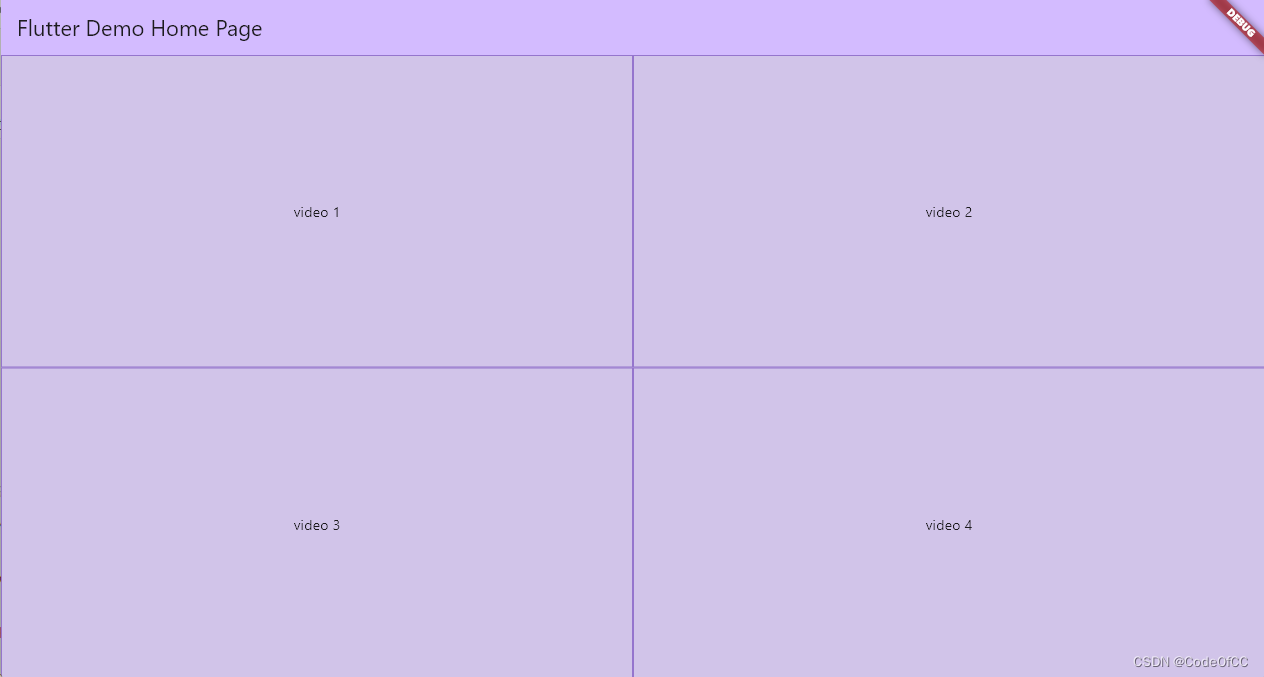
2、四分屏
final List<int> _nums = [1, 2, 3, 4, 5, 6, 7, 8, 9];
Stack(children: Proportions.quadScreen(children: [..._nums.map((e) => Container(constraints: const BoxConstraints.expand(),decoration: BoxDecoration(border: Border.all(color: Colors.deepPurple.shade300)),child: Center(child: Text("video $e")),))
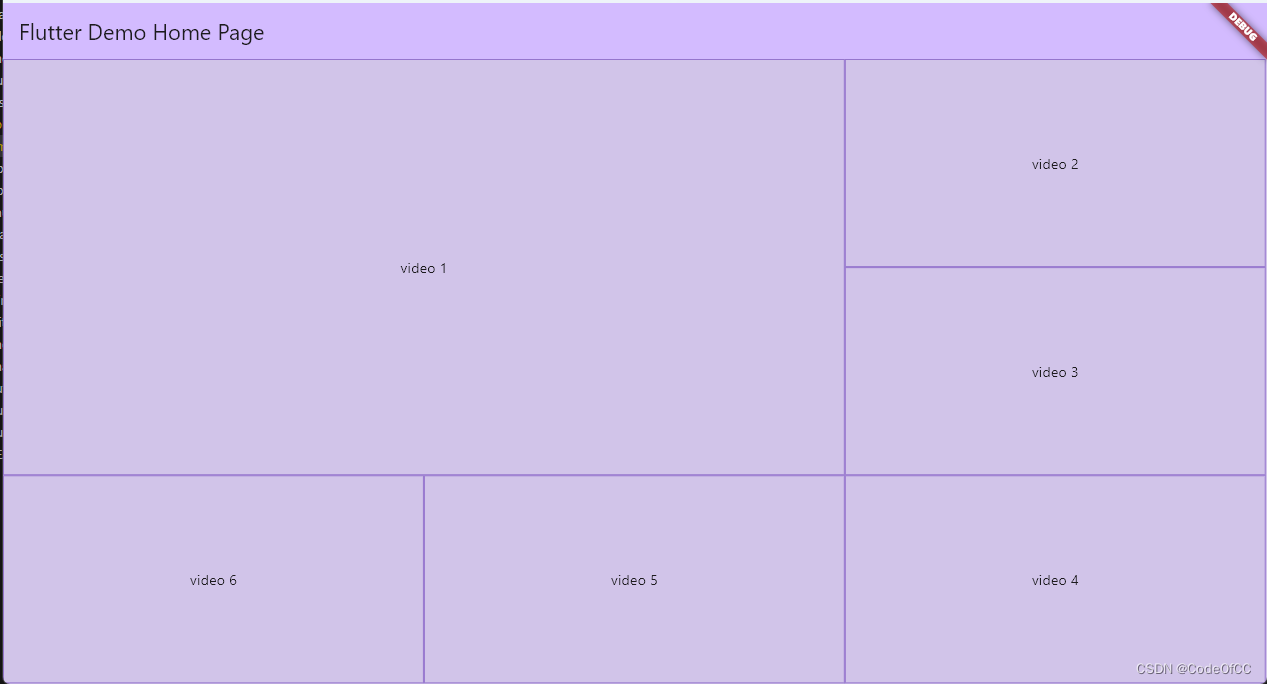
3、六分屏
final List<int> _nums = [1, 2, 3, 4, 5, 6, 7, 8, 9];
Stack(children: Proportions.sixScreen(children: [..._nums.map((e) => Container(constraints: const BoxConstraints.expand(),decoration: BoxDecoration(border: Border.all(color: Colors.deepPurple.shade300)),child: Center(child: Text("video $e")),))
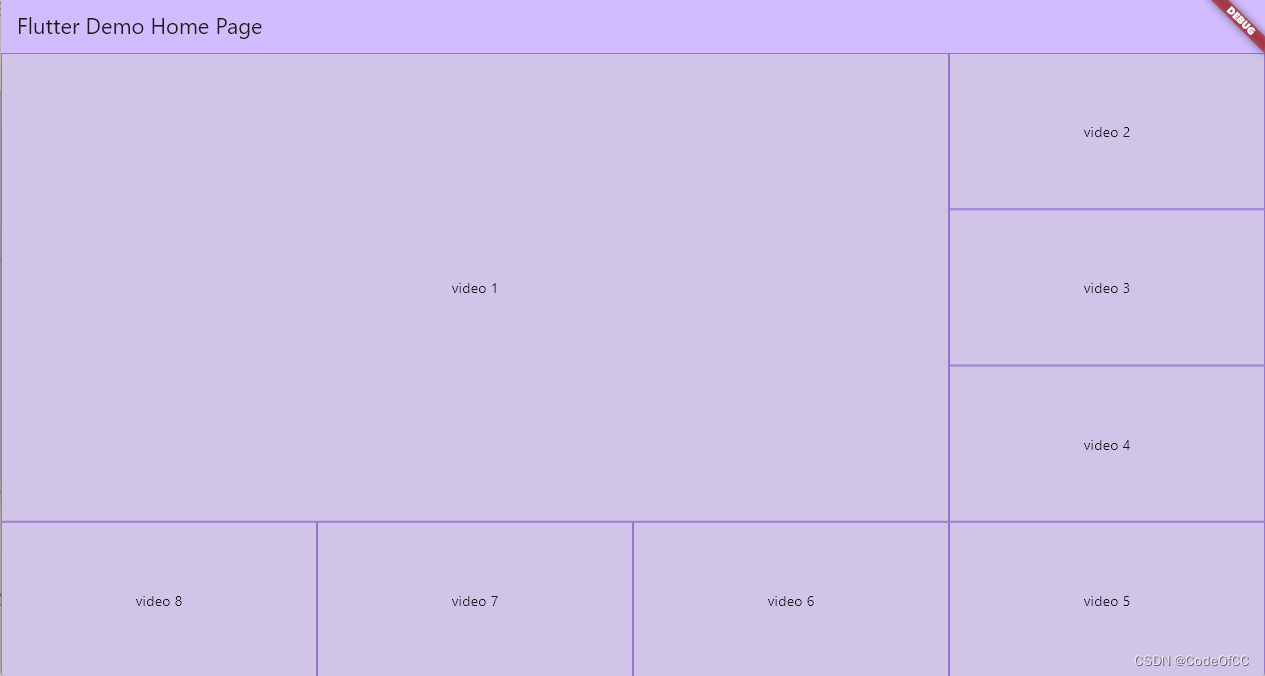
4、八分屏
final List<int> _nums = [1, 2, 3, 4, 5, 6, 7, 8, 9];
Stack(children: Proportions.eightScreen(children: [..._nums.map((e) => Container(constraints: const BoxConstraints.expand(),decoration: BoxDecoration(border: Border.all(color: Colors.deepPurple.shade300)),child: Center(child: Text("video $e")),))
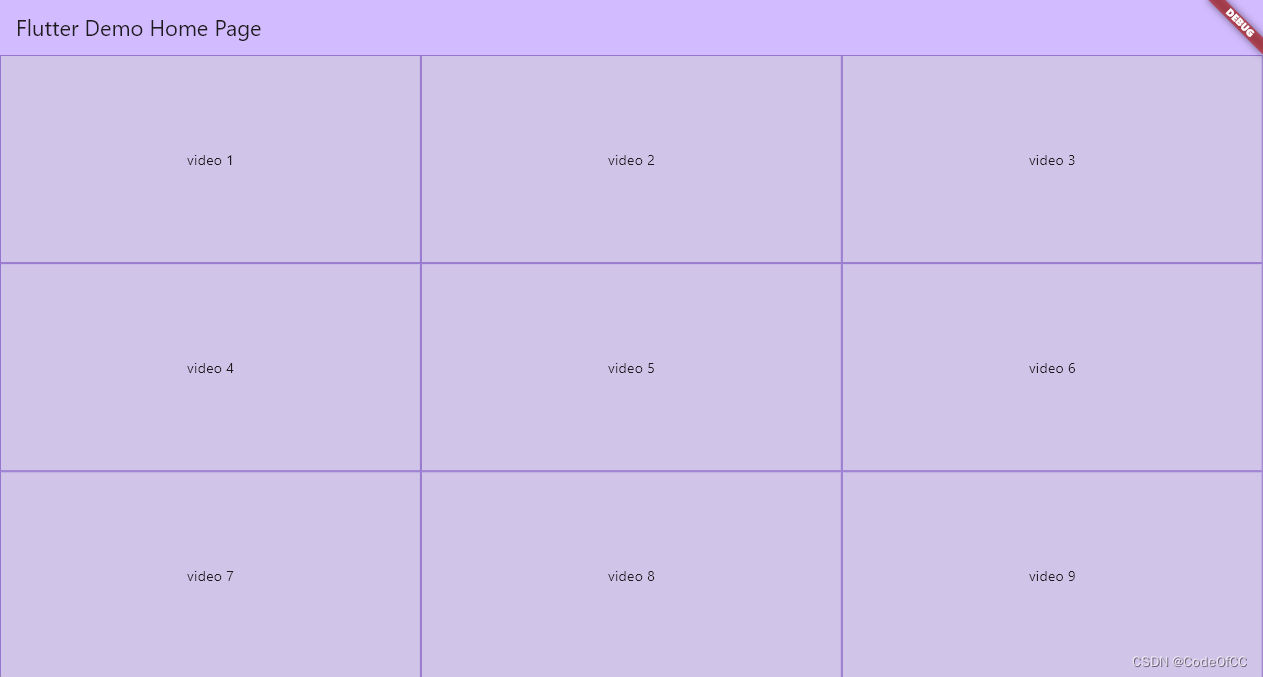
5、九分屏
final List<int> _nums = [1, 2, 3, 4, 5, 6, 7, 8, 9];
Stack(children: Proportions.nightScreen(children: [..._nums.map((e) => Container(constraints: const BoxConstraints.expand(),decoration: BoxDecoration(border: Border.all(color: Colors.deepPurple.shade300)),child: Center(child: Text("video $e")),))
6、414分屏
final List<int> _nums = [1, 2, 3, 4, 5, 6, 7, 8, 9];
Stack(children: Proportions.fourOneFourScreen(children: [..._nums.map((e) => Container(constraints: const BoxConstraints.expand(),decoration: BoxDecoration(border: Border.all(color: Colors.deepPurple.shade300)),child: Center(child: Text("video $e")),))
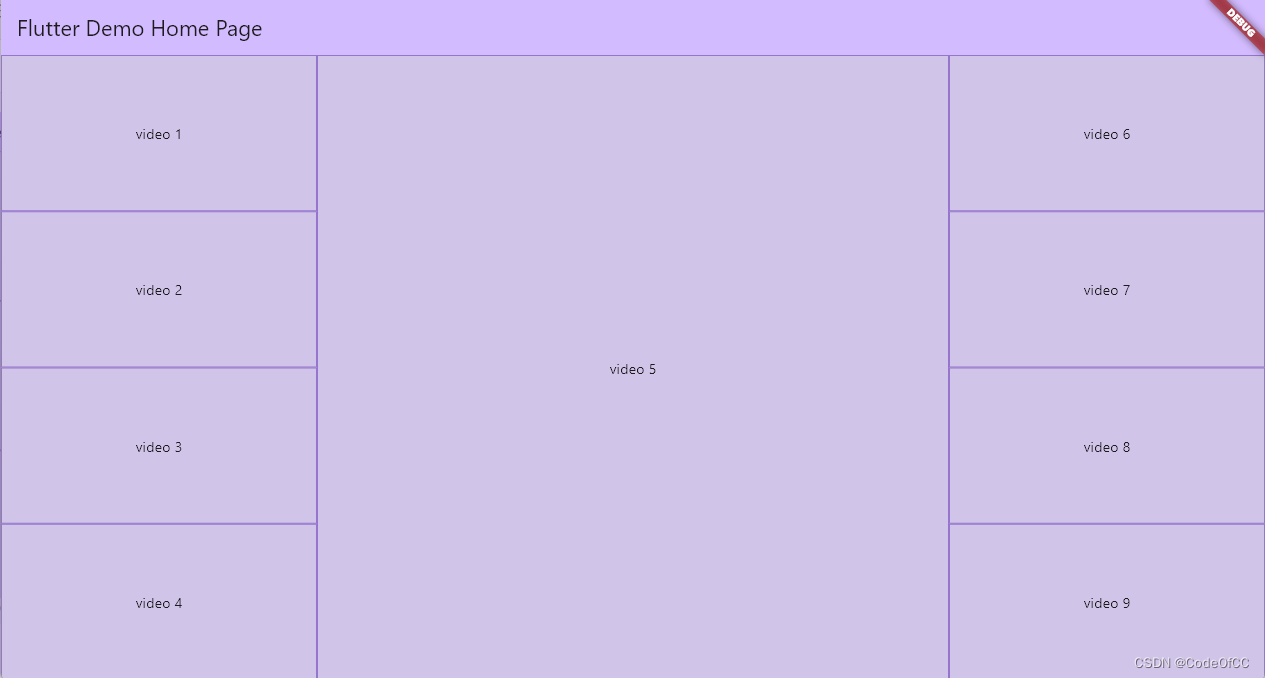
始终保持比例

总结
以上就是今天要讲的内容,本文用的是比较简单的方式实现了比例布局控件,其主要特点是可以灵活使用,尤其是方便视频分屏预览的实现。本质上也是对一类布局规则的总结得出的一个通用的控件,因为考虑到2x2、3x3还是可以写死的,但是到了4x4、5x5写死则需要16、25个参数,那就必须改用数组,也就意味着需要根据规则计算位置,那和本文一样了。所以本文的控件是有实际使用意义的。
相关文章:
Flutter 实现按位置大小比例布局的控件
文章目录 前言一、如何实现?1、数值转成分数2、RowFlexible布局横向3、ColumnFlexible布局纵向 二、完整代码三、使用示例1、基本用法2、四分屏3、六分屏4、八分屏5、九分屏6、414分屏 总结 前言 做视频监控项目时需要需要展示多分屏,比如2x2、3x3、414…...

ES6 - 对象新增的一些常用方法
文章目录 1,Object.is()2,Object.asign()3,Object.getOwnPropertyDescriptors()4,Object.setPrototypeOf()和getPrototypeOf()5,Object.keys()、values() 和 entries()6,Object.fromEntries()7,…...

半导体存储电路
存储电路 存储单元:只能存储一位数据 寄存器:存储一组数据 存储单元 静态存储单元:包含锁存器和触发器,只要不断电,静态存储单元的状态会一直保持下去。 动态存储单元:利用电容的电荷存储效应来存储数据。…...

web前端之CSS操作
文章目录 一、CSS操作1.1 html元素的style属性1.2 元素节点的style属性1.3 cssText属性 二、事件2.1 事件处理程序2.1.1 html事件2.1.2 DOM0事件(适合单个事件)2.1.3 DOM2事件(适合多个事件) 2.2 事件之鼠标事件2.3 事件之Event事…...
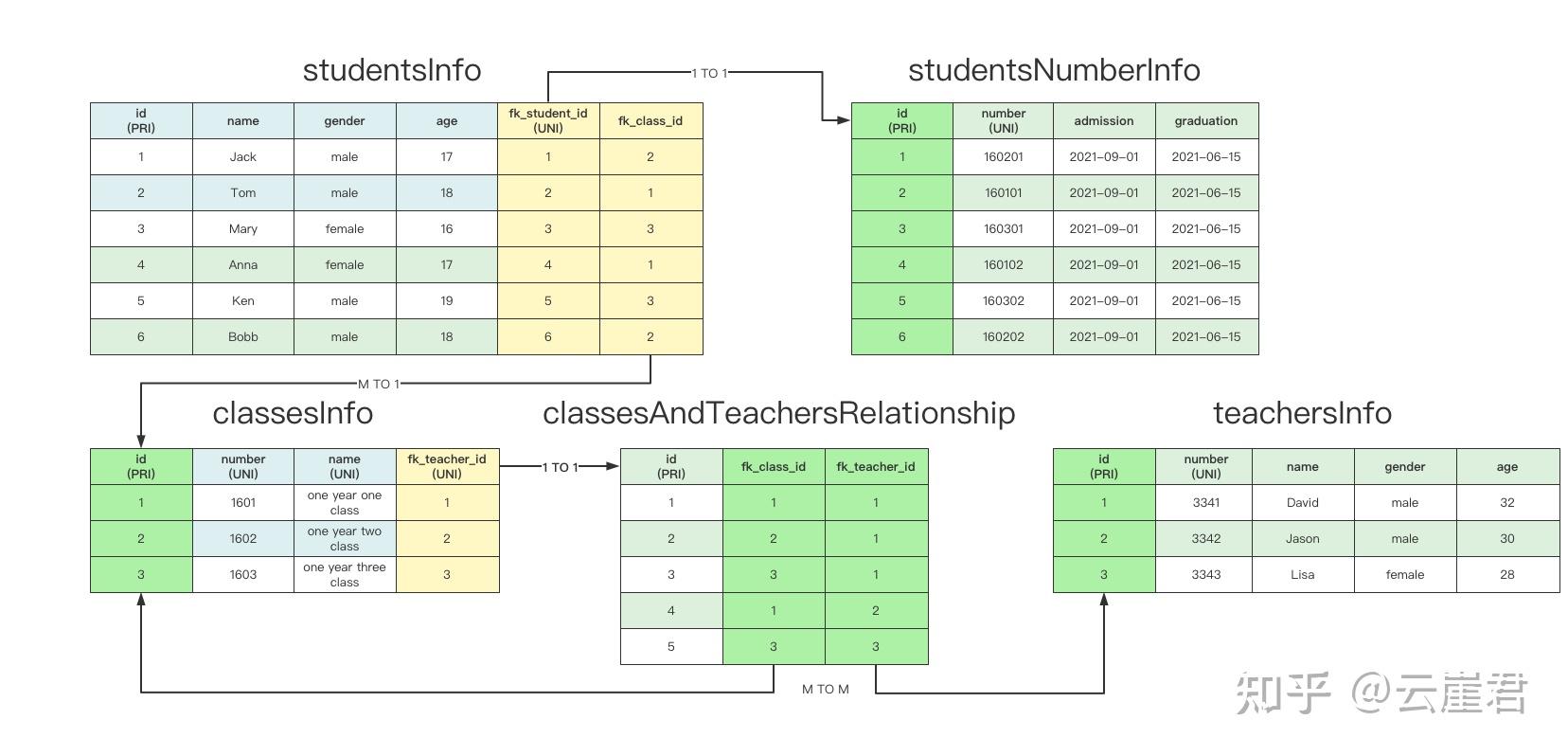
Python SQLAlchemy ( ORM )
From Python中强大的通用ORM框架:SQLAlchemy:https://zhuanlan.zhihu.com/p/444930067Python ORM之SQLAlchemy全面指南:https://zhuanlan.zhihu.com/p/387078089 SQLAlchemy 文档:https://www.sqlalchemy.org/ SQLAlchemy入门和…...

鉴源实验室丨汽车网络安全运营
作者 | 苏少博 上海控安可信软件创新研究院汽车网络安全组 来源 | 鉴源实验室 社群 | 添加微信号“TICPShanghai”加入“上海控安51fusa安全社区” 01 概 述 1.1 背景 随着车辆技术的不断进步和智能化水平的提升,车辆行业正经历着快速的变革和技术进步。智能化…...

分布式链路追踪之SkyWalking详解和实战
SkyWalking 文章目录 SkyWalking1.SkyWalking概述2.SkyWalking架构设计3.SkyWalking部署4.应用程序接入SkyWalking5.SkyWalking配置应用告警5.1.告警规则5.2.Webhook(网络钩子)5.3.邮件告警实践 6.项目自动化部署接入SkyWalking6.1 整体思路6.2 启动参数…...

【工程实践】使用EDA(Easy Data Augmentation)做数据增强
工程项目中,由于数据量不够,经常需要用到数据增强技术,尝试使用EDA进行数据增强。 1.EDA简介 EDA是一种简单但是非常有效的文本数据增强方法,是由美国Protago实验室发表于 EMNLP-IJCNLP 2019 会议。EDA来自论文《EDA: Easy Data…...

ClickHouse(十三):Clickhouse MergeTree系列表引擎 - ReplicingMergeTree
进入正文前,感谢宝子们订阅专题、点赞、评论、收藏!关注IT贫道,获取高质量博客内容! 🏡个人主页:含各种IT体系技术,IT贫道_Apache Doris,大数据OLAP体系技术栈,Kerberos安全认证-CSDN博客 &…...

机器学习笔记之优化算法(十)梯度下降法铺垫:总体介绍
机器学习笔记之优化算法——梯度下降法铺垫:总体介绍 引言回顾:线搜索方法线搜索方法的方向 P k \mathcal P_k Pk线搜索方法的步长 α k \alpha_k αk 梯度下降方法整体介绍 引言 从本节开始,将介绍梯度下降法 ( Gradient Descent,GD ) …...

Selenium 根据元素文本内容定位
使用xpath定位元素时,有时候担心元素位置会变,可以考虑使用文本内容来定位的方式。 例如图中的【股市】按钮,只有按钮文本没变,即使位置变化也可以定位到该元素。 xpath内容样例: # 文本内容完全匹配 //button[text(…...

第17章-Spring AOP经典应用场景
文章目录 一、日志处理二、事务控制三、参数校验四、自定义注解五、AOP 方法失效问题1. ApplicationContext2. AopContext3. 注入自身 六、附录1. 示例代码 AOP 提供了一种面向切面操作的扩展机制,通常这些操作是与业务无关的,在实际应用中,可…...

Leetcode周赛 | 2023-8-6
2023-8-6 题1体会我的代码 题2我的超时代码题目体会我的代码 题3体会我的代码 题1 体会 这道题完全就是唬人,只要想明白了,只要有两个连续的数的和,大于target,那么一定可以,两边一次切一个就好了。 我的代码 题2 我…...

ts中interface自定义结构约束和对类的约束
一、interface自定义结构约束对后端接口返回数据 // interface自定义结构 一般用于较复杂的结构数据类型限制 如后端返回的接口数据// 首字母大写;用分割号隔开 interface Iobj{a:number;b:string } let obj:Iobj {a:1,b:2 }// 复杂类型 模拟后端返回的接口数据 interface Il…...

Oracle单实例升级补丁
目录 1.当前DB环境2.下载补丁包和opatch的升级包3.检查OPatch的版本4.检查补丁是否冲突5.关闭数据库实例,关闭监听6.应用patch7.加载变化的SQL到数据库8.ORACLE升级补丁查询 oracle19.3升级补丁到19.18 1.当前DB环境 [oraclelocalhost ~]$ cat /etc/redhat-releas…...

力扣初级算法(二分查找)
力扣初级算法(二分法): 每日一算法:二分法查找 学习内容: 给定一个排序数组和一个目标值,在数组中找到目标值,并返回其索引。如果目标值不存在于数组中,返回它将会被按顺序插入的位置。 2.二分查找流程&…...

探索未来:直播实时美颜SDK在增强现实(AR)直播中的前景
在AR直播中,观众可以与虚拟元素实时互动,为用户带来更加丰富、沉浸式的体验。那么,直播美颜SDK在AR中有哪些应用呢?下文小编将于大家一同探讨美颜SDK与AR有哪些关联。 一、AR直播与直播实时美颜SDK的结合 增强现实技术在直播中…...

SQL 单行子查询 、多行子查询、单行函数、聚合函数 IN 、ANY 、SOME 、ALL
单行子查询 子查询结果是 一个列一行记录 select a,b,c from table where a >(select avg(xx) from table ) 还支持这种写法,这种比较少见 select a,b,c from table where (a ,b)(select xx,xxx from table where col‘000’ )…...
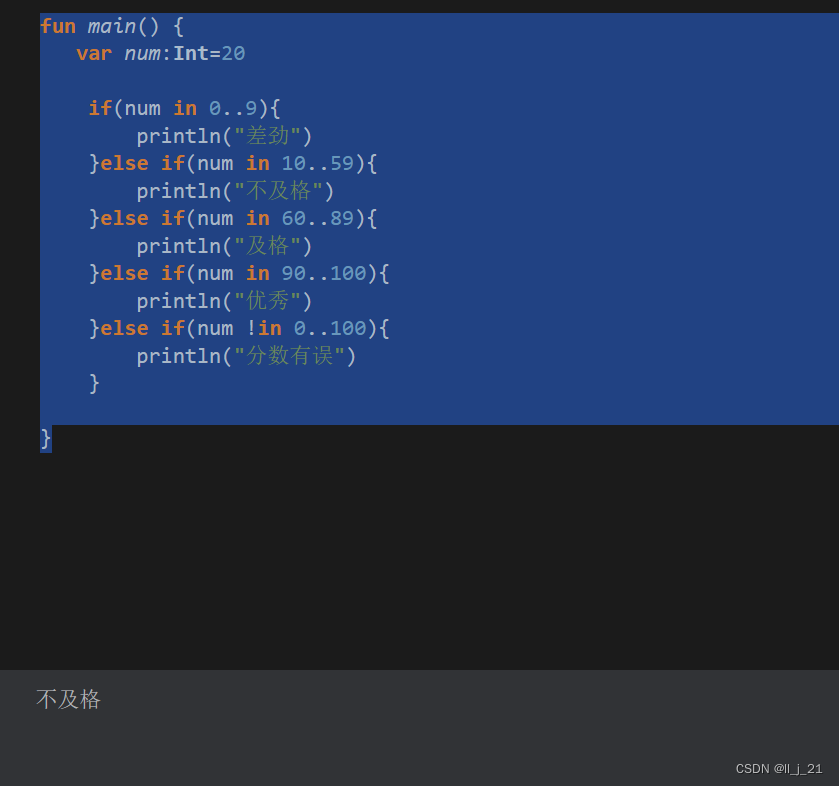
【第一阶段】kotlin的range表达式
range:范围:从哪里到哪里的意思 in:表示在 !in:表示不在 … :表示range表达式 代码示例: fun main() {var num:Int20if(num in 0..9){println("差劲")}else if(num in 10..59){println("不及格")}else if(num in 60..89…...
)
网络防御(5)
一、结合以下问题对当天内容进行总结 1. 什么是恶意软件? 2. 恶意软件有哪些特征? 3. 恶意软件的可分为那几类? 4. 恶意软件的免杀技术有哪些? 5. 反病毒技术有哪些? 6. 反病毒网关的工作原理是什么? 7. 反…...

Neuralink脑机接口技术解析:从医疗应用到人机共生
1. 项目概述:从科幻到现实的神经接口革命最近几年,一个名字频繁出现在科技和医疗的交叉领域,引发无数讨论与遐想——Neuralink。这不仅仅是一家公司的名字,它更像是一个时代的符号,代表着人类试图用最前沿的工程技术&a…...

从零手写K-Means聚类算法:理解初始化、分配与收敛的底层原理
1. 项目概述:从零手写K-Means,不只是调包,而是真正理解聚类的“心跳”你有没有过这种感觉:调用sklearn.cluster.KMeans跑完一个聚类任务,结果图一出、轮廓系数一算,好像就结束了?但当同事问起“…...

Aimmy终极模型选择指南:5个秘诀帮你为不同游戏找到最佳ONNX模型
Aimmy终极模型选择指南:5个秘诀帮你为不同游戏找到最佳ONNX模型 【免费下载链接】Aimmy Universal Second Eye for Gamers with Impairments (Universal AI Aim Aligner (AI Aimbot) - ONNX/YOLOv8 - C#) 项目地址: https://gitcode.com/gh_mirrors/ai/Aimmy …...

FlashAttention与Hugging Face Pipeline:2021年AI工程落地三大关键技术解析
1. 项目概述:这不是一份新闻简报,而是一份AI领域从业者的真实月度观察手记“The AI Monthly Top 3 — March 2021”这个标题乍看像一份轻量级行业快讯,但如果你在2021年3月前后正深度参与AI模型训练、开源社区协作或技术选型,就会…...

深夜连上服务器,我再也不想敲命令行
前言 那是晚上十一点,我第五次输错IPtables规则,服务器直接失联了。赶紧给机房打电话,求助工程师帮忙重启。电话里听着对方说"下次小心点",我只能苦笑——命令行这东西,真不是熬夜能hold住的。 就在这时&a…...

从文件上传到 RAG 检索:真正看懂了一个 AI 项目的知识库链路
一、前言:今天不是单独学一个知识点,而是串起了一条完整链路 今天继续分析 AI 项目中的 RAG 模块时,我发现自己之前对“文件上传”“文件切片”“向量化”“召回”“大模型回答”这些概念,虽然都单独听过,但真正放到项…...

千问 LeetCode 2547. 拆分数组的最小代价 Java实现
这道题是典型的区间DP(动态规划)问题,核心在于如何高效计算每个子数组的"重要性"。问题分析重要性的计算规则: - 子数组中只出现一次的数字会被移除(不计入长度) - 重要性 k 剩余数字的个数 - …...

c语言之pubnub库代码示例
好的,这是 PubNub 在 FreeRTOS 平台上的核心接口代码示例: PubNub 核心接口示例 1. 初始化与配置 #include "pubnub_api.h" #include "pubnub_coreapi.h" #include "pubnub_pubsubapi.h"...

Magma高可用部署:如何构建企业级可靠网络基础设施
Magma高可用部署:如何构建企业级可靠网络基础设施 【免费下载链接】magma Platform for building access networks and modular network services 项目地址: https://gitcode.com/gh_mirrors/mag/magma Magma是构建接入网络和模块化网络服务的强大平台&#…...

Go 内存优化骚操作
1. 零内存占位符:struct{}{}原理:struct{} 是空结构体,Go 编译器对其做了特殊处理,它在内存中不占任何空间(大小为 0 字节)。场景 A:实现集合 (Set)map[string]struct{}。比起 map[string]bool&…...