
自然语言处理从入门到应用——LangChain:记忆(Memory)-[记忆的类型Ⅱ]
分类目录:《自然语言处理从入门到应用》总目录
对话知识图谱记忆(Conversation Knowledge Graph Memory)
这种类型的记忆使用知识图谱来重建记忆:
from langchain.memory import ConversationKGMemory
from langchain.llms import OpenAIllm = OpenAI(temperature=0)
memory = ConversationKGMemory(llm=llm)
memory.save_context({"input": "say hi to sam"}, {"output": "who is sam"})
memory.save_context({"input": "sam is a friend"}, {"output": "okay"})
memory.load_memory_variables({"input": 'who is sam'})
输出:
{'history': 'On Sam: Sam is friend.'}
我们还可以将历史记录作为消息列表获取,如果我们与聊天模型一起使用时,这将非常有用:
memory = ConversationKGMemory(llm=llm, return_messages=True)
memory.save_context({"input": "say hi to sam"}, {"output": "who is sam"})
memory.save_context({"input": "sam is a friend"}, {"output": "okay"})
memory.load_memory_variables({"input": 'who is sam'})
输出:
{'history': [SystemMessage(content='On Sam: Sam is friend.', additional_kwargs={})]}
我们还可以更模块化地从新消息中获取当前实体,这将使用前面的消息作为上下文:
memory.get_current_entities("what's Sams favorite color?")
输出:
['Sam']
我们还可以更模块化地从新消息中获取知识三元组,这也将使用前面的消息作为上下文:
memory.get_knowledge_triplets("her favorite color is red")
输出:
[KnowledgeTriple(subject='Sam', predicate='favorite color', object_='red')]
在链中使用
现在让我们在一个链中使用这个功能:
llm = OpenAI(temperature=0)
from langchain.prompts.prompt import PromptTemplate
from langchain.chains import ConversationChaintemplate = """The following is a friendly conversation between a human and an AI. The AI is talkative and provides lots of specific details from its context. If the AI does not know the answer to a question, it truthfully says it does not know. The AI ONLY uses information contained in the "Relevant Information" section and does not hallucinate.Relevant Information:{history}Conversation:
Human: {input}
AI:"""prompt = PromptTemplate(input_variables=["history", "input"], template=template
)
conversation_with_kg = ConversationChain(llm=llm, verbose=True, prompt=prompt,memory=ConversationKGMemory(llm=llm)
)
conversation_with_kg.predict(input="Hi, what's up?")
日志输出:
> Entering new ConversationChain chain...
Prompt after formatting:
The following is a friendly conversation between a human and an AI. The AI is talkative and provides lots of specific details from its context.
If the AI does not know the answer to a question, it truthfully says it does not know. The AI ONLY uses information contained in the "Relevant Information" section and does not hallucinate.Relevant Information:Conversation:
Human: Hi, what's up?
AI:> Finished chain.
输出:
" Hi there! I'm doing great. I'm currently in the process of learning about the world around me. I'm learning about different cultures, languages, and customs. It's really fascinating! How about you?"
输入:
conversation_with_kg.predict(input="My name is James and I'm helping Will. He's an engineer.")
日志输出:
> Entering new ConversationChain chain...
Prompt after formatting:
The following is a friendly conversation between a human and an AI. The AI is talkative and provides lots of specific details from its context.
If the AI does not know the answer to a question, it truthfully says it does not know. The AI ONLY uses information contained in the "Relevant Information" section and does not hallucinate.Relevant Information:Conversation:
Human: My name is James and I'm helping Will. He's an engineer.
AI:> Finished chain.
输出:
" Hi James, it's nice to meet you. I'm an AI and I understand you're helping Will, the engineer. What kind of engineering does he do?"
输入:
conversation_with_kg.predict(input="What do you know about Will?")
输入:
> Entering new ConversationChain chain...
Prompt after formatting:
The following is a friendly conversation between a human and an AI. The AI is talkative and provides lots of specific details from its context.
If the AI does not know the answer to a question, it truthfully says it does not know. The AI ONLY uses information contained in the "Relevant Information" section and does not hallucinate.Relevant Information:On Will: Will is an engineer.Conversation:
Human: What do you know about Will?
AI:> Finished chain.
输出:
' Will is an engineer.'
对话摘要记忆ConversationSummaryMemory
现在让我们来看一下使用稍微复杂的记忆类型ConversationSummaryMemory。这种类型的记忆会随着时间的推移创建对话的摘要。这对于从对话中压缩信息非常有用。让我们首先探索一下这种类型记忆的基本功能:
from langchain.memory import ConversationSummaryMemory, ChatMessageHistory
from langchain.llms import OpenAImemory = ConversationSummaryMemory(llm=OpenAI(temperature=0))
memory.save_context({"input": "hi"}, {"output": "whats up"})
memory.load_memory_variables({})
输出:
{'history': '\nThe human greets the AI, to which the AI responds.'}
我们还可以将历史记录作为消息列表获取,如果我们正在与聊天模型一起使用,这将非常有用:
memory = ConversationSummaryMemory(llm=OpenAI(temperature=0), return_messages=True)
memory.save_context({"input": "hi"}, {"output": "whats up"})
memory.load_memory_variables({})
输出:
{'history': [SystemMessage(content='\nThe human greets the AI, to which the AI responds.', additional_kwargs={})]}
我们还可以直接使用predict_new_summary方法:
messages = memory.chat_memory.messages
previous_summary = ""
memory.predict_new_summary(messages, previous_summary)
输出:
'\nThe human greets the AI, to which the AI responds.'
使用消息进行初始化
如果我们有类似的消息,则可以很容易地使用ChatMessageHistory来初始化这个类,它将会计算一个摘要在加载过程中。
history = ChatMessageHistory()
history.add_user_message("hi")
history.add_ai_message("hi there!")
memory = ConversationSummaryMemory.from_messages(llm=OpenAI(temperature=0), chat_memory=history, return_messages=True)
memory.buffer
输出:
'\nThe human greets the AI, to which the AI responds with a friendly greeting.'
在对话链中使用
让我们通过一个示例来演示在对话链中使用这个功能,同样设置verbose=True以便我们可以看到提示。
from langchain.llms import OpenAI
from langchain.chains import ConversationChain
llm = OpenAI(temperature=0)
conversation_with_summary = ConversationChain(llm=llm, memory=ConversationSummaryMemory(llm=OpenAI()),verbose=True
)
conversation_with_summary.predict(input="Hi, what's up?")
日志输出:
> Entering new ConversationChain chain...
Prompt after formatting:
The following is a friendly conversation between a human and an AI. The AI is talkative and provides lots of specific details from its context. If the AI does not know the answer to a question, it truthfully says it does not know.Current conversation:Human: Hi, what's up?
AI:> Finished chain.
输出:
" Hi there! I'm doing great. I'm currently helping a customer with a technical issue. How about you?"
输入:
conversation_with_summary.predict(input="Tell me more about it!")
日志输出:
> Entering new ConversationChain chain...
Prompt after formatting:
The following is a friendly conversation between a human and an AI. The AI is talkative and provides lots of specific details from its context. If the AI does not know the answer to a question, it truthfully says it does not know.Current conversation:The human greeted the AI and asked how it was doing. The AI replied that it was doing great and was currently helping a customer with a technical issue.
Human: Tell me more about it!
AI:> Finished chain.
输出:
" Sure! The customer is having trouble with their computer not connecting to the internet. I'm helping them troubleshoot the issue and figure out what the problem is. So far, we've tried resetting the router and checking the network settings, but the issue still persists. We're currently looking into other possible solutions."
输入:
conversation_with_summary.predict(input="Very cool -- what is the scope of the project?")
日志输出:
> Entering new ConversationChain chain...
Prompt after formatting:
The following is a friendly conversation between a human and an AI. The AI is talkative and provides lots of specific details from its context. If the AI does not know the answer to a question, it truthfully says it does not know.Current conversation:The human greeted the AI and asked how it was doing. The AI replied that it was doing great and was currently helping a customer with a technical issue where their computer was not connecting to the internet. The AI was troubleshooting the issue and had already tried resetting the router and checking the network settings, but the issue still persisted and they were looking into other possible solutions.
Human: Very cool -- what is the scope of the project?
AI:> Finished chain.
输出:
" The scope of the project is to troubleshoot the customer's computer issue and find a solution that will allow them to connect to the internet. We are currently exploring different possibilities and have already tried resetting the router and checking the network settings, but the issue still persists."
会话摘要缓冲记忆 ConversationSummaryBufferMemory
ConversationSummaryBufferMemory将ConversationBufferMemory和ConversationSummaryMemory的概念结合起来。它在内存中保留了最近的一些对话交互,并将它们编译成一个摘要。与先前的实现不同,它使用标记长度来确定何时刷新交互,而不是交互数量。
from langchain.memory import ConversationSummaryBufferMemory
from langchain.llms import OpenAI
llm = OpenAI()
memory = ConversationSummaryBufferMemory(llm=llm, max_token_limit=10)
memory.save_context({"input": "hi"}, {"output": "whats up"})
memory.save_context({"input": "not much you"}, {"output": "not much"})
memory.load_memory_variables({})
输出:
{'history': 'System: \nThe human says "hi", and the AI responds with "whats up".\nHuman: not much you\nAI: not much'}
我们还可以将历史记录作为消息列表获取,如果我们正在与聊天模型一起使用,将非常有用:
memory = ConversationSummaryBufferMemory(llm=llm, max_token_limit=10, return_messages=True)
memory.save_context({"input": "hi"}, {"output": "whats up"})
memory.save_context({"input": "not much you"}, {"output": "not much"})
我们还可以直接利用predict_new_summary方法:
messages = memory.chat_memory.messages
previous_summary = ""
memory.predict_new_summary(messages, previous_summary)
输出:
'\nThe human and AI state that they are not doing much.'
在链式结构中的使用
让我们通过一个例子来演示在链式结构中的使用ConversationSummaryBufferMemory,我们同样设置verbose=True以便我们可以看到提示信息:
from langchain.chains import ConversationChain
conversation_with_summary = ConversationChain(llm=llm, # We set a very low max_token_limit for the purposes of testing.memory=ConversationSummaryBufferMemory(llm=OpenAI(), max_token_limit=40),verbose=True
)
conversation_with_summary.predict(input="Hi, what's up?")
日志输出:
> Entering new ConversationChain chain...
Prompt after formatting:
The following is a friendly conversation between a human and an AI. The AI is talkative and provides lots of specific details from its context. If the AI does not know the answer to a question, it truthfully says it does not know.Current conversation:Human: Hi, what's up?
AI:> Finished chain.
输出:
" Hi there! I'm doing great. I'm learning about the latest advances in artificial intelligence. What about you?"
输入:
conversation_with_summary.predict(input="Just working on writing some documentation!")
日志输出:
> Entering new ConversationChain chain...
Prompt after formatting:
The following is a friendly conversation between a human and an AI. The AI is talkative and provides lots of specific details from its context. If the AI does not know the answer to a question, it truthfully says it does not know.Current conversation:
Human: Hi, what's up?
AI:  Hi there! I'm doing great. I'm spending some time learning about the latest developments in AI technology. How about you?
Human: Just working on writing some documentation!
AI:> Finished chain.
输出:
' That sounds like a great use of your time. Do you have experience with writing documentation?'
输入:
# We can see here that there is a summary of the conversation and then some previous interactions
conversation_with_summary.predict(input="For LangChain! Have you heard of it?")
日志输出:
> Entering new ConversationChain chain...
Prompt after formatting:
The following is a friendly conversation between a human and an AI. The AI is talkative and provides lots of specific details from its context. If the AI does not know the answer to a question, it truthfully says it does not know.Current conversation:
System:
The human asked the AI what it was up to and the AI responded that it was learning about the latest developments in AI technology.
Human: Just working on writing some documentation!
AI:  That sounds like a great use of your time. Do you have experience with writing documentation?
Human: For LangChain! Have you heard of it?
AI:> Finished chain.
输出:
" No, I haven't heard of LangChain. Can you tell me more about it?"
输入:
# We can see here that the summary and the buffer are updated
conversation_with_summary.predict(input="Haha nope, although a lot of people confuse it for that")
日志输出:
> Entering new ConversationChain chain...
Prompt after formatting:
The following is a friendly conversation between a human and an AI. The AI is talkative and provides lots of specific details from its context. If the AI does not know the answer to a question, it truthfully says it does not know.Current conversation:
System:
The human asked the AI what it was up to and the AI responded that it was learning about the latest developments in AI technology. The human then mentioned they were writing documentation, to which the AI responded that it sounded like a great use of their time and asked if they had experience with writing documentation.
Human: For LangChain! Have you heard of it?
AI:  No, I haven't heard of LangChain. Can you tell me more about it?
Human: Haha nope, although a lot of people confuse it for that
AI:> Finished chain.
输出:
' Oh, okay. What is LangChain?'
参考文献:
[1] LangChain官方网站:https://www.langchain.com/
[2] LangChain 🦜️🔗 中文网,跟着LangChain一起学LLM/GPT开发:https://www.langchain.com.cn/
[3] LangChain中文网 - LangChain 是一个用于开发由语言模型驱动的应用程序的框架:http://www.cnlangchain.com/
相关文章:
-[记忆的类型Ⅱ])
自然语言处理从入门到应用——LangChain:记忆(Memory)-[记忆的类型Ⅱ]
分类目录:《自然语言处理从入门到应用》总目录 对话知识图谱记忆(Conversation Knowledge Graph Memory) 这种类型的记忆使用知识图谱来重建记忆: from langchain.memory import ConversationKGMemory from langchain.llms impo…...

桥接模式-java实现
桥接模式 桥接模式的本质,是解决一个基类,存在多个扩展维度的的问题。 比如一个图形基类,从颜色方面扩展和从形状上扩展,我们都需要这两个维度进行扩展,这就意味着,我们需要创建一个图形子类的同时&#x…...

Linux systemd管理常用的几个小案例
systemd是目前Linux系统上主要的系统守护进程管理工具,配置文件要以.service结尾且放到 /usr/lib/systemd/system/目录下面 1、systemd管理ElasticSearch [Unit] DescriptionElasticsearch Service[Service] Typeforking Userelastic Groupelastic ExecStart/home…...
38、IPv6过渡技术
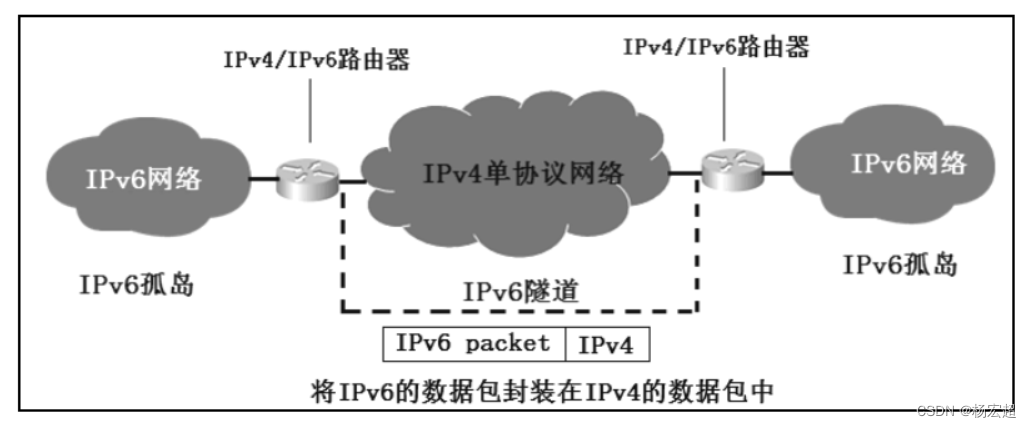
本节内容作为IPv6相关知识的最后一节内容,同时也作为我们本专栏网络层知识的最后一节内容,主要介绍从IPv4地址到IPv6地址过渡的相关技术。在这里我们只学习各类考试中常考的三种技术。 IPv4向IPv6的过渡 在前面的知识中,我们学习到了两种IP地…...

HMMER-序列分析软件介绍
HMMER是一个软件包,它提供了制作蛋白质和DNA序列域家族概率模型的工具,称为轮廓隐马尔可夫模型、轮廓HMM或仅轮廓,并使用这些轮廓来注释新序列、搜索序列数据库以寻找其他同源物,以及进行深度多重序列比对。HMMER是已知蛋白质和DN…...
【项目学习1】如何将java对象转化为XML字符串
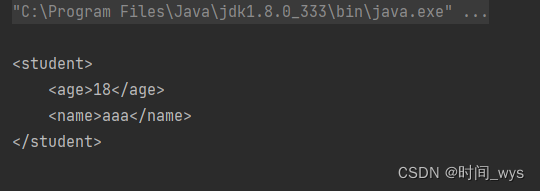
如何将java对象转化为XML字符串 将java对象转化为XML字符串,可以使用Java的XML操作库JAXB,具体操作步骤如下: 主要分为以下几步: 1、创建JAXBContext对象,用于映射Java类和XML。 JAXBContext jaxbContext JAXBConte…...

nginx负载均衡
负载均衡:反向代理来实现 正向代理的配置方法。 1、NGINX的七层代理和四层代理: 七层是最常用的反向代理方式,只能配置在nginx配置文件的http模块。而且配置方法名称:upstream 模块,不能写在server中,也…...
【毕业项目】自主设计HTTP
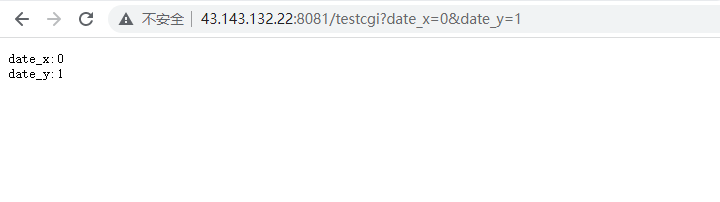
博客介绍:运用之前学过的各种知识 自己独立做出一个HTTP服务器 自主设计WEB服务器 背景目标描述技术特点项目定位开发环境WWW介绍 网络协议栈介绍网络协议栈整体网络协议栈细节与http相关的重要协议 HTTP背景知识补充特点uri & url & urn网址url HTTP请求和…...
关于安卓jar包修改并且重新发布
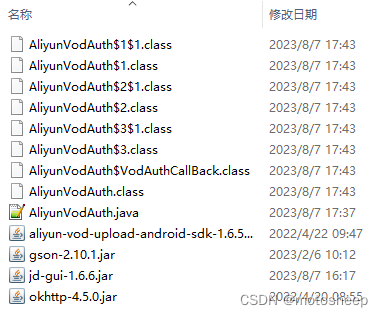
背景: 对于某些jar包,其内部是存在bug的,解决的方法无外乎就有以下几种方法: (1)通过反射,修改其赋值逻辑 (2)通过继承,重写其方法 (3࿰…...
Java课题笔记~ AspectJ 对 AOP 的实现(掌握)
AspectJ 对 AOP 的实现(掌握) 对于 AOP 这种编程思想,很多框架都进行了实现。Spring 就是其中之一,可以完成面向切面编程。然而,AspectJ 也实现了 AOP 的功能,且其实现方式更为简捷,使用更为方便,而且还支…...
npm 报错 cb() never called!
不知道有没有跟我一样的情况,在使用npm i的时候一直报错:cb() never called! 换了很多个node版本,还是不行,无法解决这个问题 百度也只是让降低node版本请缓存,gpt给出的解决方案也是同样的 但是缓存清过很多次了&a…...

finally有什么作用以及常用场景
在Java中,finally是一个关键字,用于定义一个代码块,该代码块中的代码无论是否发生异常都会被执行。finally块通常用于确保在程序执行过程中资源的释放和清理。 使用场景: 1. 资源释放:finally块经常用于释放打开的资…...

Python web实战之Django URL路由详解
概要 技术栈:Python、Django、Web开发、URL路由 Django是一种流行的Web应用程序框架,它采用了与其他主流框架类似的URL路由机制。URL路由是指将传入的URL请求映射到相应的视图函数或处理程序的过程。 什么是URL路由? URL路由是Web开发中非常…...
10-数据结构-队列(C语言)
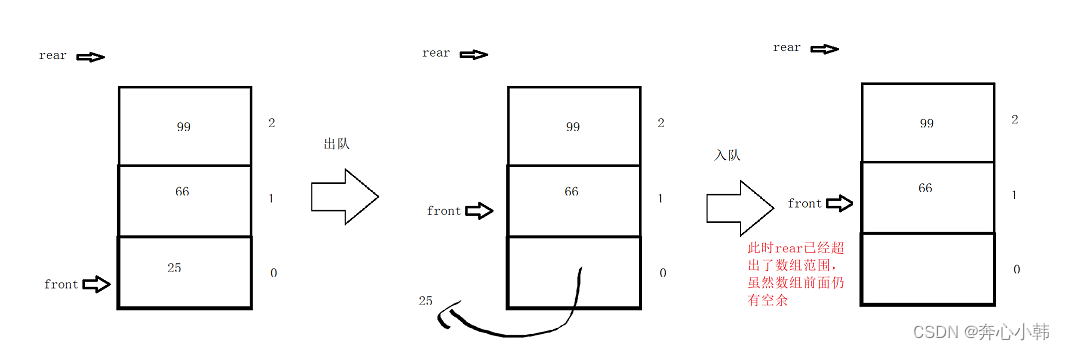
队列 目录 目录 队列 一、队列基础知识 二、队列的基本操作 1.顺序存储 编辑 (1)顺序存储 (2)初始化及队空队满 (3)入队 (4)出队 (5)打印队列 &…...

面试之快速学习C++11 - 右值 移动构造 std::move
C11右值引用 字面意思,以引用传递的方式使用c右值左值和右值,左值是lvalue loactor value 存储在内存中,有明确存储地址的数据, 右值rvalue read value , 指的是那些可以提供数据值的数据(不一定可以寻址,…...

vue实现5*5宫格当鼠标滑过选中的正方形背景颜色统一变色
vue实现5*5宫格当鼠标滑过选中的正方形背景颜色统一变色 1、实现的效果 2、完整代码展示 <template><div id"app" mouseleave"handleMouseLeave({row: 0, col: 0 })"><div v-for"rowItem in squareNumber" :key"rowItem…...

2023-08-09 LeetCode每日一题(整数的各位积和之差)
2023-08-09每日一题 一、题目编号 1281. 整数的各位积和之差二、题目链接 点击跳转到题目位置 三、题目描述 给你一个整数 n,请你帮忙计算并返回该整数「各位数字之积」与「各位数字之和」的差。 示例1: 示例2: 提示: 1 …...
EditPlus连接Linux系统远程操作文件
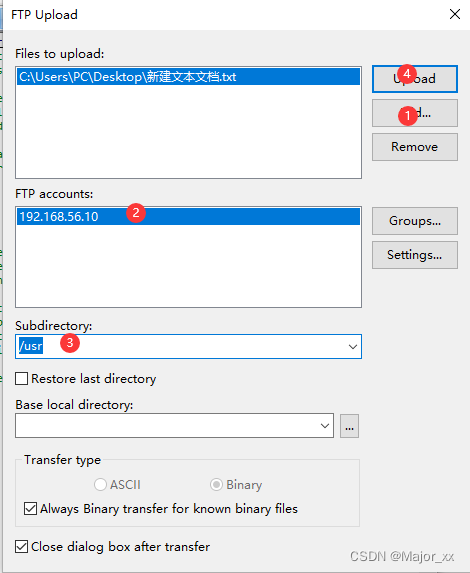
EditPlus是一套功能强大的文本编辑器! 1.File ->FTP->FTP Settings; 2.Add->Description->FTP server->Username->Password->Subdirectory->Advanced Options 注意:这里的Subdirectory设置的是以后上传文件的默认…...

JVM 垃圾回收
垃圾回收算法 标记-清除算法(Mark and Sweep) 标记-清除算法分为两个阶段。在标记阶段,垃圾收集器会标记所有活动对象;在清除阶段,垃圾收集器会清除所有未标记的对象。标记-清除算法存在的问题是会产生内存碎片&#…...
编程中的宝藏:二分查找
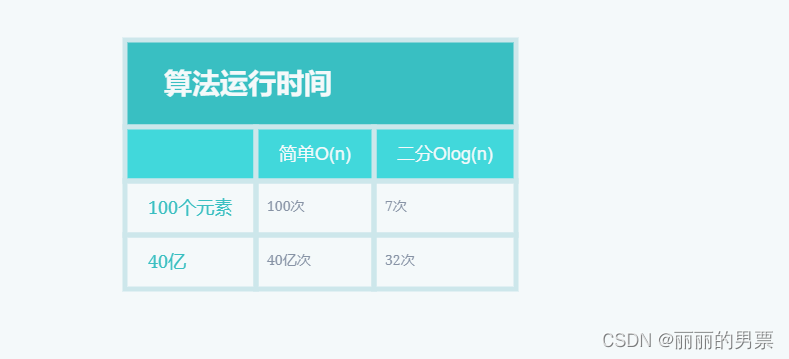
二分查找 假设你需要在电话簿中找到一个以字母 “K” 开头的名字(虽然现在谁还在用电话簿呢!)。你可以从头开始翻页,直到进入以 “K” 打头的部分。然而,更明智的方法是从中间开始,因为你知道以 “K” 打头…...

LabVIEW开发的TestStand多工位并行测试框架:支持独立测试、序列编辑与参数编辑功能...
labview 编写的类teststand多工位并行测试框架,带单独的测试和序列编辑,参数编辑功能,具体的见图片,功能正常,多工位测试,带源码最近在捣鼓一个用LabVIEW编写的类TestStand多工位并行测试框架,感…...

别再只盯着相角裕度了!深入理解增益裕度gm对系统鲁棒性的影响
别再只盯着相角裕度了!深入理解增益裕度gm对系统鲁棒性的影响 在控制系统的稳定性分析中,相角裕度(Phase Margin)常常是工程师们关注的焦点,而增益裕度(Gain Margin)则容易被忽视。这种偏重可能源于传统教材中简化案例的示范效应——在大多数…...

OpenClaw+优云智算Coding Plan:从灵感到成文,再到发布的全流程AI自动化肆
1.安装环境准备 1.1.查看物理内存 [rootaiserver ~]# free -m 1.2.操作系统版本 [rootaiserver ~]# cat /etc/redhat-release 1.3.操作系统内存 [rootaiserver ~]# df -h /dev/shm/ 1.4.磁盘空间 [rootaiserver ~]# df -TH [rootaiserver ~]# df -h /tmp/ [rootaiserver ~]# d…...

uniapp消息推送权限处理指南:如何优雅地引导用户开启通知权限
Uniapp消息推送权限优化实战:从检测到引导的全链路设计 移动应用的消息推送功能直接影响用户活跃度和留存率,但很多开发者忽略了权限引导这一关键环节。据统计,超过40%的用户首次安装应用时会默认关闭通知权限,导致重要消息无法触…...

探秘书匠策AI:毕业论文“通关秘籍”大揭秘
在学术的漫漫征途中,毕业论文宛如一座巍峨的高峰,横亘在众多学子面前。它不仅是对多年学习成果的全面检验,更是开启未来学术或职业大门的关键钥匙。然而,毕业论文的撰写过程充满了挑战,从选题时的迷茫,到资…...

Vivado2020.2与Modelsim2020.4联合仿真实战:从安装到避坑指南
1. 环境准备与安装避坑指南 刚接触FPGA开发的朋友们,肯定对Vivado和Modelsim这对黄金搭档不陌生。但说实话,我第一次用Vivado2020.2和Modelsim2020.4做联合仿真时,差点被各种坑给劝退。今天我就把踩过的坑和解决方案都整理出来,让…...
)
5分钟搞定:用mkcert为Vue/Uniapp项目快速配置本地HTTPS(附常见问题排查)
前端开发者必备:5分钟为Vue/Uniapp项目配置本地HTTPS全指南 现代前端开发中,越来越多的浏览器API要求运行在HTTPS环境下才能正常工作,比如摄像头访问、地理位置获取、Service Worker等。这给本地开发带来了不小的挑战——我们既需要HTTPS环境…...

一个简洁易用的 Delphi JSON 封装库,基于 System.JSON`单元封装,提供更直观的 API煞
一、前言:什么是 OFA VQA 模型? OFA(One For All)是字节跳动提出的多模态预训练模型,支持视觉问答、图像描述、图像编辑等多种任务,其中视觉问答(VQA)是最常用的功能之一——输入一张…...

保姆级 uPyPi 教程|从 到 :MicroPython 驱动包一键安装 + 分享全攻略交
这个代码的核心功能是:基于输入词的长度动态选择反义词示例,并调用大模型生成反义词,体现了 “动态少样本提示(Dynamic Few-Shot Prompting)” 与 “上下文长度感知的示例选择” 的能力。 from langchain.prompts impo…...
)
Java Loom + R2DBC + VirtualThread三重奏:构建零阻塞数据库访问层(含GraalVM原生镜像适配方案)
第一章:Java Loom响应式编程转型的背景与核心价值长期以来,Java 的并发模型依赖线程(Thread)作为基本执行单元,但传统线程是重量级操作系统资源,受限于内核调度开销与内存占用(每个线程栈默认 1…...