
企业权限管理(八)-登陆使用数据库认证
Spring Security 使用数据库认证
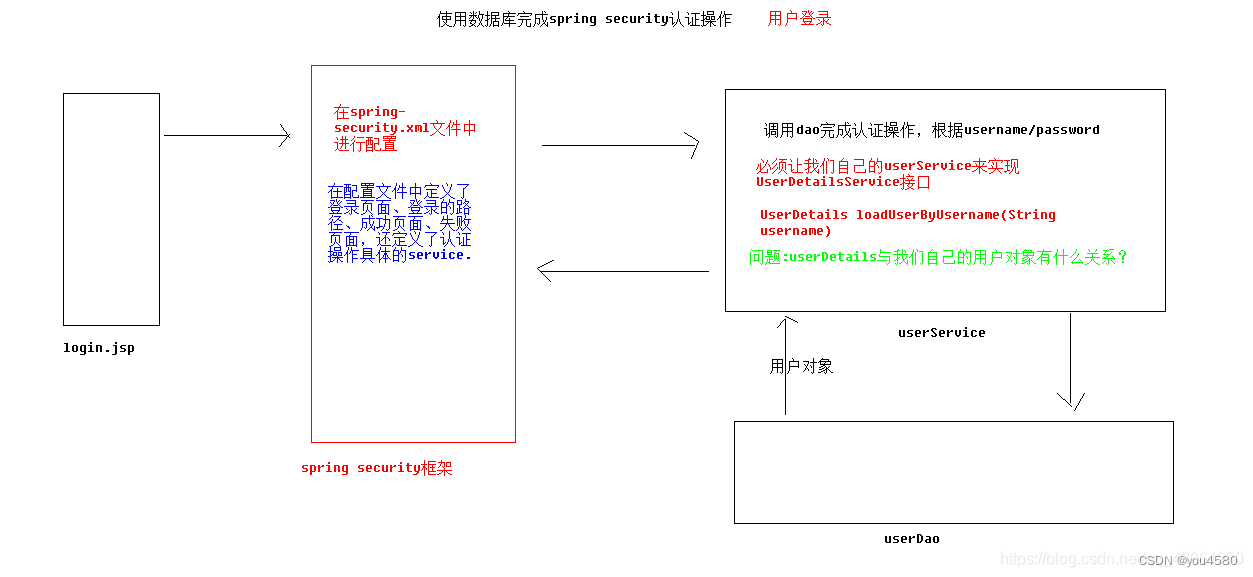
在 Spring Security 中如果想要使用数据进行认证操作,有很多种操作方式,这里我们介绍使用 UserDetails 、 UserDetailsService来完成操作。
UserDetails
public interface UserDetails extends Serializable {
Collection<? extends GrantedAuthority> getAuthorities();
String getPassword();
String getUsername();
boolean isAccountNonExpired();
boolean isAccountNonLocked();
boolean isCredentialsNonExpired();
boolean isEnabled();
}
UserDetails 是一个接口,我们可以认为 UserDetails 作用是于封装当前进行认证的用户信息,但由于其是一个接口,所以我们可以对其进行实现,也可以使用Spring Security 提供的一个 UserDetails 的实现类 User 来完成操作
以下是 User 类的部分代码
public class User implements UserDetails, CredentialsContainer {
private String password;
private final String username;
private final Set<GrantedAuthority> authorities;
private final boolean accountNonExpired; //帐户是否过期
private final boolean accountNonLocked; //帐户是否锁定
private final boolean credentialsNonExpired; //认证是否过期
private final boolean enabled; //帐户是否可用
}
UserDetailsService
public interface UserDetailsService {
UserDetails loadUserByUsername(String username) throws UsernameNotFoundException;
}
面将 UserDetails 与 UserDetailsService 做了一个简单的介绍,那么我们具体如何完成 Spring Security 的数据库认证操作哪,我们通过用户管理中用户登录来完成Spring Security 的认证操作。
3. 用户管理
3.1 用户登录
spring-security.xml
<?xml version="1.0" encoding="UTF-8"?>
<beans xmlns="http://www.springframework.org/schema/beans"xmlns:security="http://www.springframework.org/schema/security"xmlns:xsi="http://www.w3.org/2001/XMLSchema-instance"xsi:schemaLocation="http://www.springframework.org/schema/beanshttp://www.springframework.org/schema/beans/spring-beans.xsdhttp://www.springframework.org/schema/securityhttp://www.springframework.org/schema/security/spring-security.xsd"><!-- 配置不拦截的资源 --><security:http pattern="/login.jsp" security="none"/><security:http pattern="/failer.jsp" security="none"/><security:http pattern="/css/**" security="none"/><security:http pattern="/img/**" security="none"/><security:http pattern="/plugins/**" security="none"/><!--配置具体的规则auto-config="true"	不用自己编写登录的页面,框架提供默认登录页面use-expressions="false"	是否使用SPEL表达式(没学习过)--><security:http auto-config="true" use-expressions="true"><!-- 配置具体的拦截的规则 pattern="请求路径的规则" access="访问系统的人,必须有ROLE_USER的角色" --><security:intercept-url pattern="/**" access="hasAnyRole('ROLE_USER','ROLE_ADMIN')"/><!-- 定义跳转的具体的页面 --><security:form-loginlogin-page="/login.jsp"login-processing-url="/login.do"default-target-url="/index.jsp"authentication-failure-url="/failer.jsp"authentication-success-forward-url="/pages/main.jsp"/><!-- 关闭跨域请求 --><security:csrf disabled="true"/><!-- 退出 --><security:logout invalidate-session="true" logout-url="/logout.do" logout-success-url="/login.jsp" /></security:http><!-- 切换成数据库中的用户名和密码 --><security:authentication-manager><security:authentication-provider user-service-ref="userService"><!-- 配置加密的方式<security:password-encoder ref="passwordEncoder"/>--><security:password-encoder ref="passwordEncoder"/></security:authentication-provider></security:authentication-manager><!-- 配置加密类 --><bean id="passwordEncoder" class="org.springframework.security.crypto.bcrypt.BCryptPasswordEncoder"/><!-- 提供了入门的方式,在内存中存入用户名和密码<security:authentication-manager><security:authentication-provider><security:user-service><security:user name="admin" password="{noop}admin" authorities="ROLE_USER"/></security:user-service></security:authentication-provider></security:authentication-manager>--><security:global-method-security pre-post-annotations="enabled" jsr250-annotations="enabled" secured-annotations="enabled"></security:global-method-security></beans>
导入依赖
<dependency><groupId>org.springframework.security</groupId><artifactId>spring-security-web</artifactId><version>${spring.security.version}</version></dependency><dependency><groupId>org.springframework.security</groupId><artifactId>spring-security-config</artifactId><version>${spring.security.version}</version></dependency><dependency><groupId>org.springframework.security</groupId><artifactId>spring-security-core</artifactId><version>${spring.security.version}</version></dependency><dependency><groupId>org.springframework.security</groupId><artifactId>spring-security-taglibs</artifactId><version>${spring.security.version}</version></dependency>配置web.xml
<!-- 配置加载类路径的配置文件 --><context-param><param-name>contextConfigLocation</param-name><param-value>classpath*:applicationContext.xml,classpath*:spring-security.xml</param-value></context-param>
<filter><filter-name>springSecurityFilterChain</filter-name><filter-class>org.springframework.web.filter.DelegatingFilterProxy</filter-class></filter><filter-mapping><filter-name>springSecurityFilterChain</filter-name><url-pattern>/*</url-pattern></filter-mapping>
3.1.1. 登录页面 login.jsp
<%@ page language="java" contentType="text/html; charset=UTF-8"pageEncoding="UTF-8"%>
<!DOCTYPE html PUBLIC "-//W3C//DTD HTML 4.01 Transitional//EN" "http://www.w3.org/TR/html4/loose.dtd">
<html>
<head>
<meta charset="utf-8">
<meta http-equiv="X-UA-Compatible" content="IE=edge"><title>数据 - AdminLTE2定制版 | Log in</title><metacontent="width=device-width,initial-scale=1,maximum-scale=1,user-scalable=no"name="viewport"><link rel="stylesheet"href="${pageContext.request.contextPath}/plugins/bootstrap/css/bootstrap.min.css">
<link rel="stylesheet"href="${pageContext.request.contextPath}/plugins/font-awesome/css/font-awesome.min.css">
<link rel="stylesheet"href="${pageContext.request.contextPath}/plugins/ionicons/css/ionicons.min.css">
<link rel="stylesheet"href="${pageContext.request.contextPath}/plugins/adminLTE/css/AdminLTE.css">
<link rel="stylesheet"href="${pageContext.request.contextPath}/plugins/iCheck/square/blue.css">
</head><body class="hold-transition login-page"><div class="login-box"><div class="login-logo"><a href="all-admin-index.html"><b>ITCAST</b>后台管理系统</a></div><!-- /.login-logo --><div class="login-box-body"><p class="login-box-msg">登录系统</p><form action="${pageContext.request.contextPath}/login.do" method="post"><div class="form-group has-feedback"><input type="text" name="username" class="form-control"placeholder="用户名"> <spanclass="glyphicon glyphicon-envelope form-control-feedback"></span></div><div class="form-group has-feedback"><input type="password" name="password" class="form-control"placeholder="密码"> <spanclass="glyphicon glyphicon-lock form-control-feedback"></span></div><div class="row"><div class="col-xs-8"><div class="checkbox icheck"><label><input type="checkbox"> 记住 下次自动登录</label></div></div><!-- /.col --><div class="col-xs-4"><button type="submit" class="btn btn-primary btn-block btn-flat">登录</button></div><!-- /.col --></div></form><a href="#">忘记密码</a><br></div><!-- /.login-box-body --></div><!-- /.login-box --><!-- jQuery 2.2.3 --><!-- Bootstrap 3.3.6 --><!-- iCheck --><scriptsrc="${pageContext.request.contextPath}/plugins/jQuery/jquery-2.2.3.min.js"></script><scriptsrc="${pageContext.request.contextPath}/plugins/bootstrap/js/bootstrap.min.js"></script><scriptsrc="${pageContext.request.contextPath}/plugins/iCheck/icheck.min.js"></script><script>$(function() {$('input').iCheck({checkboxClass : 'icheckbox_square-blue',radioClass : 'iradio_square-blue',increaseArea : '20%' // optional});});</script>
</body></html>
UserInfo
package com.itheima.ssm.domain;import java.util.List;//与数据库中users对应
public class UserInfo {private String id;private String username;private String email;private String password;private String phoneNum;private int status;private String statusStr;private List<Role> roles;public String getId() {return id;}public void setId(String id) {this.id = id;}public String getUsername() {return username;}public void setUsername(String username) {this.username = username;}public String getEmail() {return email;}public void setEmail(String email) {this.email = email;}public String getPassword() {return password;}public void setPassword(String password) {this.password = password;}public String getPhoneNum() {return phoneNum;}public void setPhoneNum(String phoneNum) {this.phoneNum = phoneNum;}public int getStatus() {return status;}public void setStatus(int status) {this.status = status;}public String getStatusStr() {//状态0 未开启 1 开启if (status == 0) {statusStr = "未开启";} else if (status == 1) {statusStr = "开启";}return statusStr;}public void setStatusStr(String statusStr) {this.statusStr = statusStr;}public List<Role> getRoles() {return roles;}public void setRoles(List<Role> roles) {this.roles = roles;}
}3.1.2.UserServiceImpl
public interface IUserService extends UserDetailsService{
}
package com.itheima.ssm.service.impl;@Service("userService")
@Transactional
public class UserServiceImpl implements IUserService {@Autowiredprivate IUserDao userDao;@Autowiredprivate BCryptPasswordEncoder bCryptPasswordEncoder;@Overridepublic UserInfo findById(String id) throws Exception {return userDao.findById(id);}@Overridepublic void addRoleToUser(String userId, String[] roleIds) throws Exception {for(String roleId:roleIds){userDao.addRoleToUser(userId,roleId);}}@Overridepublic List<Role> findOtherRoles(String userid) throws Exception {return userDao.findOtherRoles(userid);}@Overridepublic UserDetails loadUserByUsername(String username) throws UsernameNotFoundException {System.out.println(username);UserInfo userInfo = null;try {userInfo = userDao.findByUsername(username);
//            System.out.println(username);
//            System.out.println(userInfo.toString());} catch (Exception e) {e.printStackTrace();}//处理自己的用户对象封装成UserDetailsUser user = new User(userInfo.getUsername(), userInfo.getPassword(), userInfo.getStatus() == 0 ? false : true, true, true, true, getAuthority(userInfo.getRoles()));return user;}//作用就是返回一个List集合,集合中装入的是角色描述public List<SimpleGrantedAuthority> getAuthority(List<Role> roles) {List<SimpleGrantedAuthority> list = new ArrayList<>();for (Role role : roles) {list.add(new SimpleGrantedAuthority("ROLE_" + role.getRoleName()));}return list;}@Overridepublic List<UserInfo> findAll() throws Exception{//userDao.findAll();return userDao.findAll();}@Overridepublic void save(UserInfo userInfo)throws Exception {userInfo.setPassword(bCryptPasswordEncoder.encode(userInfo.getPassword()));userDao.save(userInfo);}}
3.1.3.IUserDao
public interface IUserDao {
@Select("select * from user where id=#{id}")
public UserInfo findById(Long id) throws Exception;
@Select("select * from user where username=#{username}")
@Results({
@Result(id = true, property = "id", column = "id"),
@Result(column = "username", property = "username"),
@Result(column = "email", property = "email"),
@Result(column = "password", property = "password"),
@Result(column = "phoneNum", property = "phoneNum"),
@Result(column = "status", property = "status"),
@Result(column = "id", property = "roles", javaType = List.class, many =
@Many(select = "com.itheima.ssm.dao.IRoleDao.findRoleByUserId")) })
public UserInfo findByUsername(String username);
}
IRoleDao
public interface IRoleDao {//根据用户id查询出所有对应的角色@Select("select * from role where id in (select roleId from users_role where userId=#{userId})")public List<Role> findRoleByUserId(String userId) throws Exception;
}
3.2 用户退出
使用 spring security 完成用户退出,非常简单
配置
<security:logout invalidate-session="true" logout-url="/logout.do" logout-successurl="/login.jsp" />在header.jsp修改
<a href="${pageContext.request.contextPath}/logout.do"
class="btn btn-default btn-flat">注销</a>
相关文章:
企业权限管理(八)-登陆使用数据库认证
Spring Security 使用数据库认证 在 Spring Security 中如果想要使用数据进行认证操作,有很多种操作方式,这里我们介绍使用 UserDetails 、 UserDetailsService来完成操作。 UserDetails public interface UserDetails extends Serializable { Collecti…...
第一百二十五天学习记录:C++提高:STL-deque容器(下)(黑马教学视频)
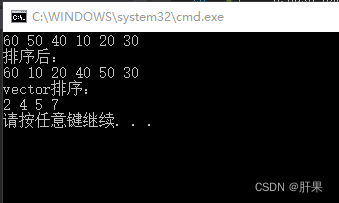
deque插入和删除 功能描述: 向deque容器中插入和删除数据 函数原型: 两端插入操作: push_back(elem); //在容器尾部添加一个数据 push_front(elem); //在容器头部插入一个数据 pop_back(); //删除容器最后一个数据 pop_front(); //删除容器…...

案例12 Spring MVC入门案例
网页输入http://localhost:8080/hello,浏览器展示“Hello Spring MVC”。 1. 创建项目 选择Maven快速构建web项目,项目名称为case12-springmvc01。 2.配置Maven依赖 <?xml version"1.0" encoding"UTF-8"?><project xm…...

【React】精选10题
1.React Hooks带来了什么便利? React Hooks是React16.8版本中引入的新特性,它带来了许多便利。 更简单的状态管理 使用useState Hook可以在函数组件中方便地管理状态,避免了使用类组件时需要继承React.Component的繁琐操作。 避免使用类组件…...

VS Spy++进程信息获取
查看进程中窗口信息。 Spy使用介绍 Windows下的程序及热键监视神器——Spy Word进程获取...
Java课题笔记~ SpringMVC概述
1.1 SpringMVC简介 SpringMVC 也叫Spring web mvc。是Spring 框架的一部分,在Spring3.0 后发布的。 1.2 SpringMVC的优点 基于MVC 架构 基于 MVC 架构,功能分工明确。解耦合。 容易理解,上手快,使用简单 就可以开发一个注解…...

SOPC之NIOS Ⅱ遇到的问题
记录NIOS Ⅱ中遇到的报错 一、NIOS II中Eclipse头文件未找到 问题:Unresolved inclusion: "system.h"等 原因:编译器无法找到头文件所在路径 解决方法: 在文件夹中找到要添加的头文件,并记录下其路径,如…...

uniapp uni-datetime-picker 日期和光标靠右
如果想在uni-datetime-picker组件中将日期和光标靠右,您可以使用自定义样式来实现。首先,您需要在页面的样式文件中定义一个类,用于定制uni-datetime-picker组件的样式。例如,你可以在App.vue或者页面的样式文件中添加以下代码&am…...

关于axios请求中的GET、POST、PUT、DELETE的一些认知
这篇写的特别好。而本文主要从实习用途中展开,不专业。 浅谈HTTP中Get、Post、Put与Delete的区别 1、Get 1、目前Get禁止使用requestBody形式传递值,如果使用了,后端会一直报错,让你确认是否有传递参数。 2、举例,模…...
go-zero 是如何做路由管理的?
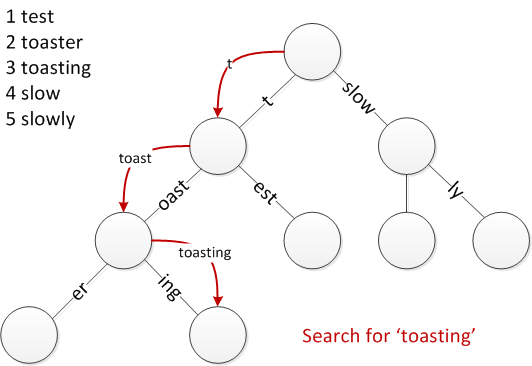
原文链接: go-zero 是如何做路由管理的? go-zero 是一个微服务框架,包含了 web 和 rpc 两大部分。 而对于 web 框架来说,路由管理是必不可少的一部分,那么本文就来探讨一下 go-zero 的路由管理是怎么做的,…...

Springboot集成ip2region离线IP地名映射-修订版
title: Springboot集成ip2region离线IP地名映射 date: 2020-12-16 11:15:34 categories: springboot description: Springboot集成ip2region离线IP地名映射 1. 背景2. 集成 2.1. 步骤2.2. 样例2.3. 响应实例DataBlock2.4. 响应实例RegionAddress 3. 打开浏览器4. 源码地址&…...
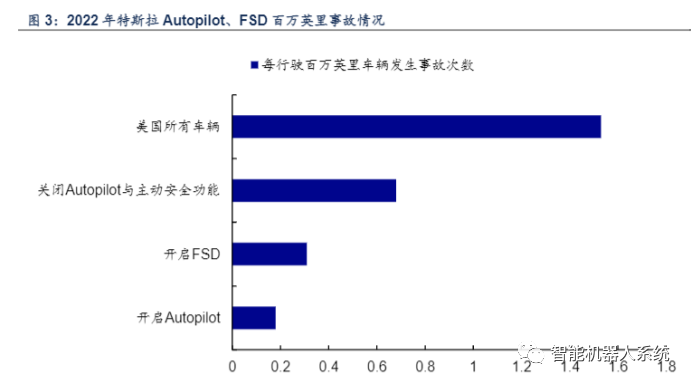
智能驾驶系列报告之一:智能驾驶 ChatGPT时刻有望来临
原创 | 文 BFT机器人 L3 功能加速落地,政策标准有望明确 L2 发展日益成熟,L3 功能加速落地。根据市场监管总局发布的《汽车驾驶自动化分级》与 SAE发布的自动驾驶分级标准,自动驾驶主要分为 6 个级别(0 级到 5 级,L0 …...
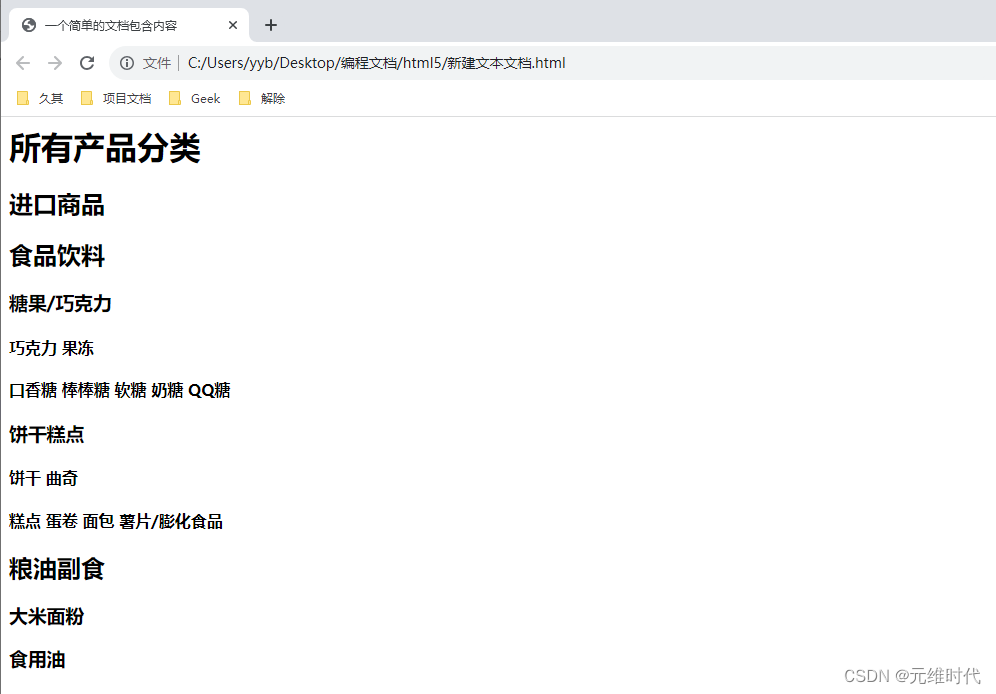
设计HTML5文档结构
定义清晰、一致的文档结构不仅方便后期维护和拓展,同时也大大降低了CSS和JavaScript的应用难度。为了提高搜索引擎的检索率,适应智能化处理,设计符合语义的结构显得很重要。 1、头部结构 在HTML文档的头部区域,存储着各种网页元…...

vue echarts中按钮点击后修改值 watch数据变化后刷新图表
1 点击按钮 {feature: {myBtn1: {show: true,title: 反转Y轴,showTitle: true,icon: path://M512 0A512 512 0 1 0 512 1024A512 512 0 0 0 512 0M320 320V192h384v128zM128 416V288h256v128zM320 704V576h384v128zM128 800V672h256v128z,onclick: () > {dataSetting.rever…...

React antd tree树组件 - 父子节点没有自动关联情况下 - 显示半选、全选状态以及实现父子节点互动
实现的效果图如下: 如Ant Design Vue 中所示,并没有提供获取半选节点的方法,当设置checked和checkStrictly时,父子节点也不再自动关联了 前提:从后端可以获取的数据分别是完整的树型数据、所有选中的节点数据&#…...

优漫动游 大厂需要什么样的ui设计师呢?
通常来说大公司UI设计的流程主要是这样的:创意-头脑风暴-策划方案-交互设计&评审-美术设计&评审-开发实施,不过实际上大多数公司都有自己的一套流程,源于公司的基因、公司组织体系、公司领导风格。一起了解大厂需要什么样的ui设计师呢…...
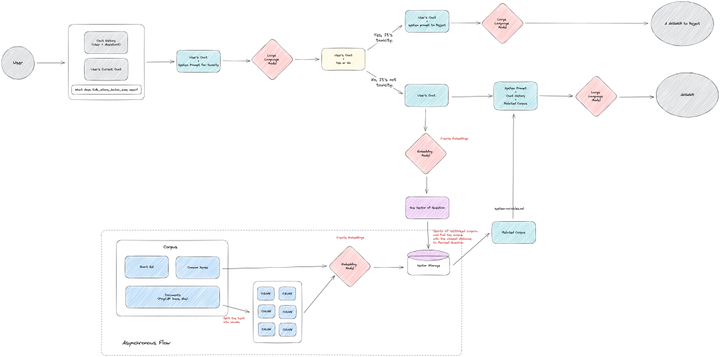
TiDB Bot:用 Generative AI 构建企业专属的用户助手机器人
本文介绍了 PingCAP 是如何用 Generative AI 构建一个使用企业专属知识库的用户助手机器人。除了使用业界常用的基于知识库的回答方法外,还尝试使用模型在 few shot 方法下判断毒性。 最终,该机器人在用户使用后,点踩的比例低于 5%࿰…...
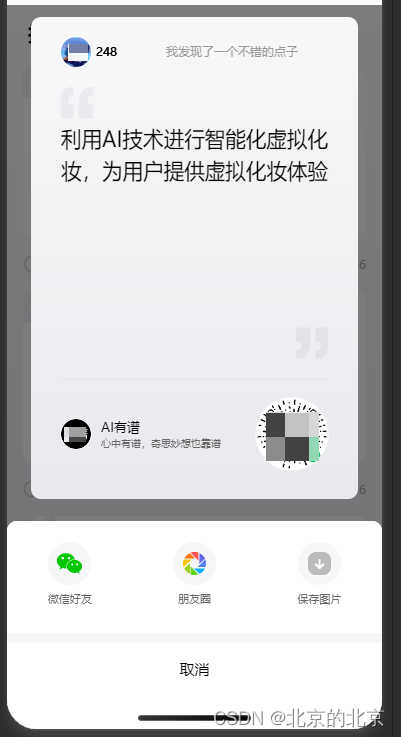
uniapp 使用canvas画海报(微信小程序)
效果展示: 项目要求:点击分享绘制海报,并实现分享到好友,朋友圈,并保存 先实现绘制海报 <view class"data_item" v-for"(item,index) in dataList" :key"index"click"goDet…...

TiDB 应急运维脚本,更加方便的管理TiDB集群
TiDB 应急运维脚本,更加方便的管理TiDB集群 使用方法 使用方法:[tidblocalhost ~]$ which tiup ~/.tiup/bin/tiup编辑脚本,MYSQL_PASSWD 和 PORT 根据实际替换 [tidblocalhost ~]$ vi ~/.tiup/bin/ti#version 1.1 #author guanguanglei ##…...
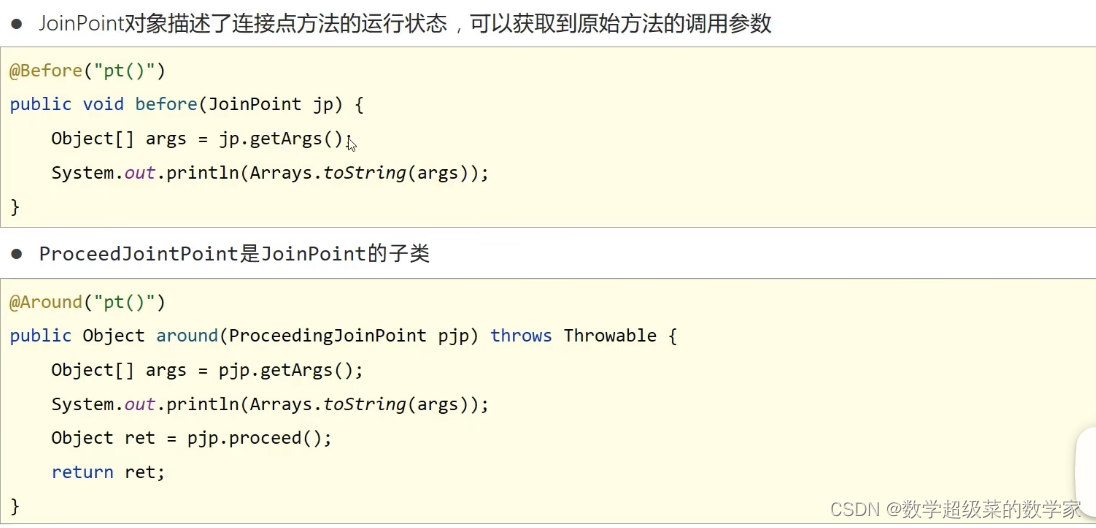
第二部分:AOP
一、AOP简介 AOP(Aspect Oriented Programming)面向切面编程,一种编程范式,指导开发者如何组织程序结构。 AOP是OOP(面向对象编程)的进阶版。 作用:在不改变原始设计的基础上为其进行功能增强。 spring理念&#x…...

③ AI副业第一步:如何找到适合自己的AI赚钱赛道
③ AI副业第一步:如何找到适合自己的AI赚钱赛道选对赛道,努力才有意义。选错赛道,越努力离钱越远。前言:为什么大多数人AI副业做不起来? 我观察了100想做AI副业的人,失败的原因高度一致: 失败路…...
)
别再死磕USB HID了!用ESP32的Arduino框架手把手教你实现蓝牙鼠标键盘(附完整代码)
ESP32蓝牙HID实战:零基础打造自定义键盘鼠标 手里那块吃灰的ESP32开发板终于能派上用场了!上周我用它做了个无线演示控制器,在会议室里走着就能翻PPT,同事们都问是怎么实现的。其实秘诀就在于ESP32的蓝牙HID功能——不需要任何USB…...

开源ELM327 OBD-II适配器:从硬件设计到多协议固件实现全解析
1. 项目概述:开源ELM327 OBD适配器如果你对汽车诊断、数据监控或者嵌入式开发感兴趣,那么自己动手做一个OBD-II适配器绝对是个能让你学到很多东西的硬核项目。今天要聊的,就是一个完全开源的、基于NXP LPC1517微控制器的ELM327兼容OBD适配器。…...

uWSGI目录穿越漏洞CVE-2018-7490深度利用与防御实战
1. 这不是“读文件”那么简单:uWSGI目录穿越在真实攻防链中的定位与误判代价你刚在Vulfocus靶场里跑通了CVE-2018-7490的PoC,用curl "http://target:8080/?p../../../../etc/passwd"成功读出了root:x:0:0:root:/root:/bin/bash,截…...

InVideo插件深度解析:如何在Unreal Engine中实现高效视频流播放与录制
InVideo插件深度解析:如何在Unreal Engine中实现高效视频流播放与录制 【免费下载链接】InVideo 基于UE4实现的rtsp的视频播放插件 项目地址: https://gitcode.com/gh_mirrors/in/InVideo InVideo是一个基于Unreal Engine 5开发的RTSP视频播放插件࿰…...
 指针的常见操作)
C语言(12) 指针的常见操作
指针的常见操作指针变量,有两方面的意思:一个指针指向的内容(数据值,一级)指针变量本身存储的数据 (地址值)#include <stdio.h>int main() {int a 10;int b 0 ;int c 50;int *p NULL;int *q NULL;p &a; // 对指针变量本身进行修改// 对指…...

基于Jetson Nano与JNEEG Shield的脑电信号采集与边缘AI处理实战
1. 项目概述:低成本脑机接口的硬件基石 如果你对脑机接口、生物信号处理或者边缘AI应用感兴趣,但又苦于专业设备动辄数万甚至数十万的高昂门槛,那么JNEEG Shield的出现,可能会为你打开一扇新的大门。这是一个专为NVIDIA Jetson Na…...

AI算法工程师必学的Python库:这10个库,AI开发必备
对于软件测试从业者来说,随着人工智能技术在测试领域的渗透越来越深——从自动化测试用例生成到缺陷智能预测,从测试结果分析到测试环境智能化调度,掌握AI开发的核心工具链已经成为从功能测试向AI测试开发、智能化测试转型的核心竞争力。Pyth…...

深度解析zenodo_get路径处理机制:如何优雅处理科研数据下载的目录结构
深度解析zenodo_get路径处理机制:如何优雅处理科研数据下载的目录结构 【免费下载链接】zenodo_get Zenodo_get: Downloader for Zenodo records 项目地址: https://gitcode.com/gh_mirrors/ze/zenodo_get 在科研数据管理领域,高效的数据下载工具…...
)
别再手动调相机了!用Cinemachine插件5分钟搞定Unity第三人称跟随镜头(含FreeLook Camera配置)
别再手动调相机了!用Cinemachine插件5分钟搞定Unity第三人称跟随镜头当你在Unity中开发角色扮演游戏时,是否经常被这些问题困扰:角色移动时镜头抖动、转向时视角卡顿、不同地形下镜头穿模?传统的手动编写相机跟随脚本不仅耗时耗力…...