
Springboot 实践(9)springboot集成Oauth2.0授权包,5个接口文件配置详解
前文讲解实现了spring boot集成Oauth2.0,实现了授权服务器和资源服务器的搭建,并通过浏览器和postman测试,获取到了授权码,用携带授权码的URL能够争取范文到资源。
本文详细讲解spring boot集成Oauth2.0的几个重要文件接口,详细如下:
1、授权服务配置接口AuthorizationServerConfigurerAdapter
AuthorizationServerConfigurer接口,其中存在3个方法:
☆ AuthorizationServerSecurityConfigurer:配置令牌端点(Token Endpoint)的安全约束;
☆ ClientDetailsServiceConfigurer:配置OAuth2客户端;
☆ AuthorizationServerEndpointsConfigurer:配置授权(authorization)以及令牌(token)的访问端点和令牌服务(token services);
详细代码如下:bleAuthorizationServer
public class OAuthAuthorizationServerConfig extends AuthorizationServerConfigurerAdapter {
@Autowired
private DataSource dataSource;
@Autowired
private AuthenticationManager authenticationManager;
@Autowired
private OAuthWebSecurityConfig oauthWebSecurityConfig;
//AuthorizationServerSecurityConfigurer:配置令牌端点(Token Endpoint)的安全约束;
//AuthorizationServerSecurityConfigurer继承自SecurityConfigurerAdapter,也就是一个 Spring Security安全配置提供给AuthorizationServer去配置AuthorizationServer的端点(/oauth/****)的安全访问规则、过滤器Filter。
@Override
public void configure(final AuthorizationServerSecurityConfigurer oauthServer) throws Exception {
oauthServer
.tokenKeyAccess("permitAll()")//客户端token调用许可
.checkTokenAccess("permitAll()")//客户端校验token访问许可
.allowFormAuthenticationForClients();
}
//refresh_token 单独配置UserDetailsService
@Bean
public UserDetailsService userDetailsServiceRefresh_token() {
return oauthWebSecurityConfig.userDetailsService();
}
//AuthorizationServerEndpointsConfigurer:配置授权(authorization)以及令牌(token)的访问端点和令牌服务(token services);
@Override
public void configure(AuthorizationServerEndpointsConfigurer endpoints) throws Exception {
endpoints // 设置令牌
.tokenStore(new JdbcTokenStore(dataSource)).userDetailsService(userDetailsServiceRefresh_token())
.authenticationManager(authenticationManager);
}
@Bean // 声明 ClientDetails实现
public ClientDetailsService clientDetailsService() {
return new JdbcClientDetailsService(dataSource);
}
//ClientDetailsServiceConfigurer:配置OAuth2客户端;
@Override
public void configure(final ClientDetailsServiceConfigurer clients) throws Exception {
clients.withClientDetails(clientDetailsService());
}
}
2、资源服务配置接口ResourceServerConfigurerAdapter
ResourceServerConfigurerAdapter (资源服务器配置)内部关联了ResourceServerSecurityConfigurer 和 HttpSecurity。前者与资源安全配置相关,后者与http安全配置相关,详细代码如下:
/*** 资源服务器配置*/
@Configuration
@EnableResourceServer
@EnableWebSecurity
@EnableGlobalMethodSecurity(prePostEnabled = true)
@Order(-1)
public class OAuthResourcesServerConfig extends ResourceServerConfigurerAdapter {
@Autowired
private DataSource dataSource;
//在每个ResourceServer实例上设置resourceId,该resourceId作为该服务资源的唯一标识。(假如同一个微服务资源部署多份,resourceId相同)
private static final String DEMO_RESOURCE_ID = "test-resource";
@Override
public void configure(ResourceServerSecurityConfigurer resources) {
resources.resourceId(DEMO_RESOURCE_ID); //配置resourceServerID
resources.tokenStore(new JdbcTokenStore(dataSource)); //...... 还可以有有其他的配置
}
@Override
public void configure(HttpSecurity http) throws Exception {
http
.cors()//开启跨域
.and()
.csrf().disable()
.logout()
.logoutUrl("/logout")//虚拟的登出地址
.and()
.authorizeRequests()
.antMatchers("/loginSuccess").permitAll()
.antMatchers("/loginSuccess.html").permitAll()
.antMatchers("/actuator/health").permitAll()
.anyRequest().authenticated();
}
}
3、web安全配置接口WebSecurityConfigurerAdapter
WebSecurityConfigurerAdapter是Spring Security提供了一个抽象类,实现了默认的认证和授权,允许用户自定义一个WebSecurity类,重写其中的三个configure来实现自定义的认证和授权,这三个方法如下:
- 自定义身份认证的逻辑
protected void configure(AuthenticationManagerBuilder auth) throws Exception { }
- 自定义全局安全过滤的逻辑
public void configure(WebSecurity web) throws Exception { }
- 自定义URL访问权限的逻辑
protected void configure(HttpSecurity http) throws Exception { }
详细代码如下:
@Configuration
@EnableWebSecurity
@EnableGlobalMethodSecurity(prePostEnabled = true)
@Order(-1)
public class OAuthWebSecurityConfig extends WebSecurityConfigurerAdapter {
@Autowired
private MyUserDetailServiceImpl myUserDetailServiceImpl;
@Autowired
private LogoutSuccessHandlerImpl logoutSuccessHandler;
@Autowired
private CustomAuthenticationFailureHandler customAuthenticationFailureHandler;
@Autowired
private DataSource dataSource;
/** * @return RememberMe 功能的 Repository */
@Bean
public PersistentTokenRepository persistentTokenRepository() {
// 连接数据库的实现类,还有一个实现类时存内存的InMemoryTokenRepositoryImpl
JdbcTokenRepositoryImpl tokenRepository = new JdbcTokenRepositoryImpl();
// 配置数据源
tokenRepository.setDataSource(dataSource);
// 在启动数据库时创建存储token的表
//tokenRepository.setCreateTableOnStartup(true);
return tokenRepository;
}
/******************************remember me***********************************/
@Override
@Bean
public AuthenticationManager authenticationManagerBean() throws Exception {
return super.authenticationManagerBean();
}
/** 放行静态资源 */
@Override
public void configure(WebSecurity web) throws Exception {
web.ignoring().antMatchers("/swagger-ui.html");
web.ignoring().antMatchers("/swagger-resources/**");
web.ignoring().antMatchers("/v2/api-docs");
web.ignoring().antMatchers("/configuration/security");
web.ignoring().antMatchers("/configuration/ui");
//web.ignoring().antMatchers("/webjars/springfox-swagger-ui/**");
/************************************************************
* servlet 3.0 以上的版本支持直接访问 jar 包里面的资源文件。
* 访问方式:将 jar 包里的 META-INF/resources 目录看成根目录,
* 则这个目录下的文件都可以直接访问
* swagger-bootstrap-ui-1.9.6.jar资源放行*/
web.ignoring().antMatchers("/webjars/**");
web.ignoring().antMatchers("/doc.html");
web.ignoring().antMatchers("/loginSuccess");
web.ignoring().antMatchers("/loginSuccess.html");
web.ignoring().antMatchers("/loginError");
web.ignoring().antMatchers("/lock");
web.ignoring().antMatchers("/assets/**");
//路由跳转允许
web.ignoring().antMatchers("/api/**");
web.ignoring().antMatchers("/websocket/**"); //农村饮水安全
web.ignoring().antMatchers("/Serialnum/EnSure"); //序列号确认
web.ignoring().antMatchers("/lock"); //锁屏页面
web.ignoring().antMatchers("/login.html"); //序列号确认
//放行consul安全监测接口
web.ignoring().antMatchers("/v1");
web.ignoring().antMatchers("/actuator/health");
//web.ignoring().antMatchers("/loginError.html");
web.ignoring().antMatchers("/favicon.ico");
//放行单点登录
web.ignoring().antMatchers("/index");
web.ignoring().antMatchers("/index/**");
web.ignoring().antMatchers("/index/oauth_callback");
//web.ignoring().antMatchers("/myLogout");
}
@Override
protected void configure(HttpSecurity http) throws Exception {
http
.requestMatchers().antMatchers(HttpMethod.OPTIONS,"/login", "/oauth/authorize", "/oauth/token")
.and()
.cors()//开启跨域
.and()
.csrf().disable()
.requestMatchers()
.antMatchers("/login")
.antMatchers(HttpMethod.OPTIONS)
.antMatchers("/oauth/authorize")
.and()
.rememberMe()//记住我相关配置
.tokenRepository(persistentTokenRepository())
.tokenValiditySeconds(60*60*10)
//.antMatchers("/oauth/token")
.and()
.authorizeRequests()
.anyRequest().authenticated()
.and()
.formLogin()
.loginPage("/login")
// 自定义登录页面,这里配置了 loginPage, 就会通过 LoginController 的 login 接口加载登录页面
// 登入成功后,跳转至指定页面
//.defaultSuccessUrl("/loginSuccess")
.failureUrl("/loginError").permitAll()
.and()
.logout()
.logoutUrl("/logout")//虚拟的登出地址
.logoutSuccessHandler(logoutSuccessHandler);
http.formLogin().failureHandler(customAuthenticationFailureHandler);
}
@Bean
@Override
public UserDetailsService userDetailsService(){
return myUserDetailServiceImpl;
//return userAuthenticationProvider;
}
@Override
protected void configure(AuthenticationManagerBuilder auth) throws Exception {
// 配置用户名密码,这里采用内存方式,生产环境需要从数据库获取
// auth.inMemoryAuthentication()
// .withUser("admin")
// .password(passwordEncoder().encode("123"))
// .roles("USER");
// 使用自定义认证与授权
auth.userDetailsService(userDetailsService());
}
@Bean
public BCryptPasswordEncoder passwordEncoder(){
return new BCryptPasswordEncoder();
}
}
4、用户登录服务接口UserDetailsService
Spring Security中进行身份验证的是AuthenticationManager接口,ProviderManager是它的一个默认实现,但它并不用来处理身份认证,而是委托给配置好的AuthenticationProvider,每个AuthenticationProvider会轮流检查身份认证。检查后或者返回Authentication对象或者抛出异常。验证身份就是加载响应的UserDetails,看看是否和用户输入的账号、密码、权限等信息匹配。UserDetails中需要重定义loadUserByUsername()函数。
详细代码如下:
@Component
public class MyUserDetailServiceImpl implements UserDetailsService {
private Logger logger = LoggerFactory.getLogger(this.getClass());
@Autowired
private SysUserService sysUserService;
@Autowired
private SysUserMapper sysUserMapper;
/**
* @param username
* @return
* @throws UsernameNotFoundException
*/
@Override
public UserDetails loadUserByUsername(String username) {
//1.根据用户名去数据库去查询用户信息获取加密后的密码
SysUser sysUser = sysUserMapper.findByName(username);
if(sysUser==null) {
logger.info("-------------未查询到用户名:" + username);
throw new UsernameNotFoundException("Invalid username or password.");
}else {
Boolean stateStr=sysUser.getAccountNonLocked();//锁定状态
if(stateStr==false){//用户被锁定
long lockTime = sysUser.getLockTime();
long sysTime = System.currentTimeMillis();
long time = sysTime - lockTime;
if(time>=10*60*1000) { //时间超过10分钟,解锁账户
sysUserMapper.updateUNLockedByUserId(username);
sysUserMapper.updatelockTimeByUserId(username, 0L);
sysUserMapper.updatenLockByUserId(username, 0L);
stateStr=true;
}else {
throw new InternalAuthenticationServiceException("该账号已被锁定,请联系管理员!");
}
}
Set<String> permissions = sysUserService.findPermissions(username);
List<GrantedAuthority> grantedAuthorities = permissions.stream().map(GrantedAuthorityImpl::new).collect(Collectors.toList());
return new User(username,
//encryptedPassWord,
sysUser.getPassword(),
true,
true,
true,
stateStr, //锁定状态
grantedAuthorities);
}
}
}
5、授权失败接口SimpleUrlAuthenticationFailureHandler
在Spring Security Web框架内部,缺省使用的认证错误处理策略是AuthenticationFailureHandler的实现类SimpleUrlAuthenticationFailureHandler。它由配置指定一个defaultFailureUrl,表示认证失败时缺省使用的重定向地址。一旦认证失败,它的方法onAuthenticationFailure被调用时,它就会将用户重定向到该地址。如果该属性没有设置,它会向客户端返回一个401状态码。另外SimpleUrlAuthenticationFailureHandler还有一个属性useForward,如果该属性设置为true,页面跳转将不再是重定向(redirect)机制,取而代之的是转发(forward)机制。
该处只需要重定义onAuthenticationFailure()详细代码如下:
//3、将登录失败提示到前端展示
@Component
public class CustomAuthenticationFailureHandler extends SimpleUrlAuthenticationFailureHandler {
private Logger logger = LoggerFactory.getLogger(this.getClass());
private static ObjectMapper objectMapper = new ObjectMapper();
@Autowired
private ThymeleafViewResolver viewResolver;
private RedirectStrategy redirectStrategy = new DefaultRedirectStrategy();
@Override
public void onAuthenticationFailure(HttpServletRequest request, HttpServletResponse response, AuthenticationException exception) throws IOException, ServletException {
//此处自行定义授权失败功能。
}
}
springboot集成Oauth2.0授权包,接口文件配置详解到此就结束了,学友在实际操作过程中遇到问题,欢迎联系博主。
下文讲解spring cloud的配置与应用,实现服务注册机制。
相关文章:
springboot集成Oauth2.0授权包,5个接口文件配置详解)
Springboot 实践(9)springboot集成Oauth2.0授权包,5个接口文件配置详解
前文讲解实现了spring boot集成Oauth2.0,实现了授权服务器和资源服务器的搭建,并通过浏览器和postman测试,获取到了授权码,用携带授权码的URL能够争取范文到资源。 本文详细讲解spring boot集成Oauth2.0的几个重要文件接口&#…...
最新AI系统ChatGPT程序源码/支持GPT4/自定义训练知识库/GPT联网/支持ai绘画(Midjourney)+Dall-E2绘画/支持MJ以图生图
一、前言 SparkAi系统是基于国外很火的ChatGPT进行开发的Ai智能问答系统。本期针对源码系统整体测试下来非常完美,可以说SparkAi是目前国内一款的ChatGPT对接OpenAI软件系统。 那么如何搭建部署AI创作ChatGPT?小编这里写一个详细图文教程吧!…...
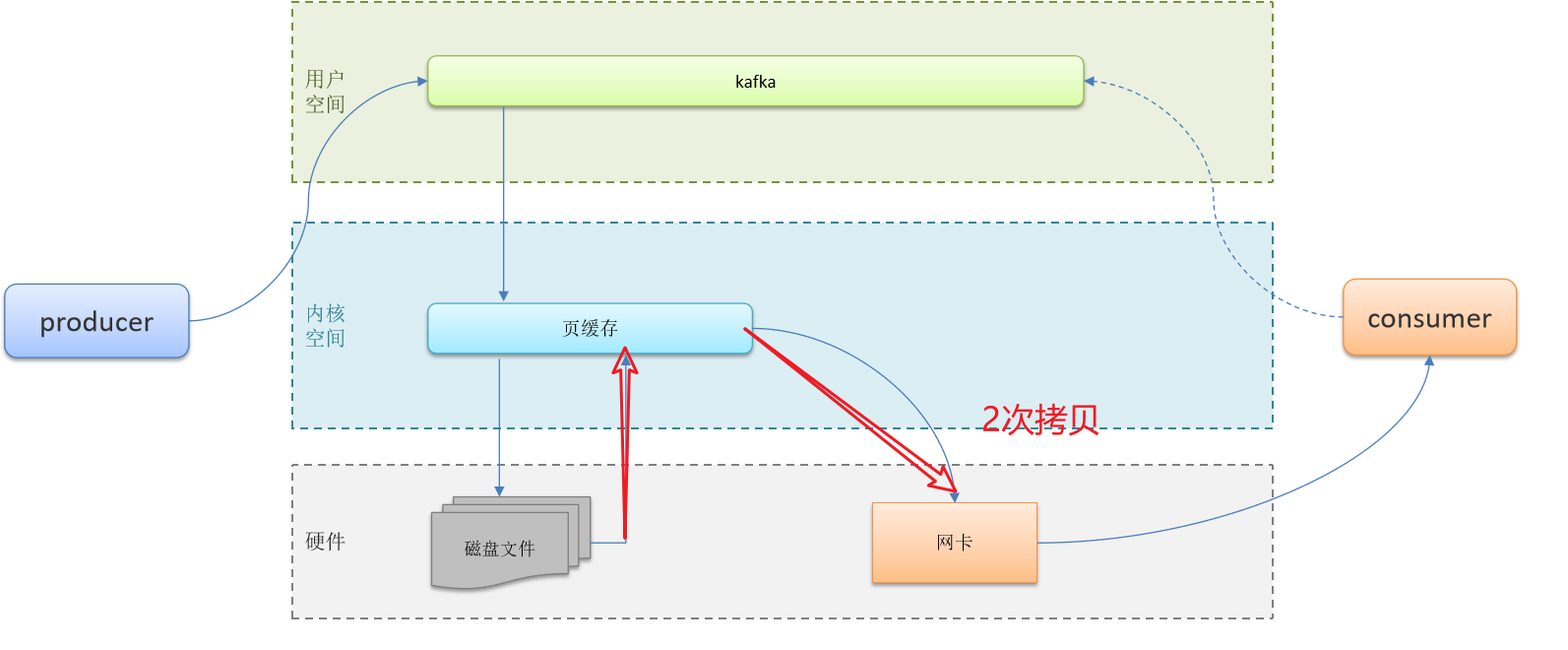
【高频面试题】 消息中间件
文章目录 1、RabbitMQ1.1 RabbitMQ-如何保证消息不丢失1.2 RabbitMQ消息的重复消费问题如何解决的1.3 RabbitMQ中死信交换机 ? (RabbitMQ延迟队列有了解过嘛)1.4 RabbitMQ如果有100万消息堆积在MQ , 如何解决(消息堆积怎么解决)1.5 RabbitMQ的高可用机制有了解过嘛 2、Kafka2.…...
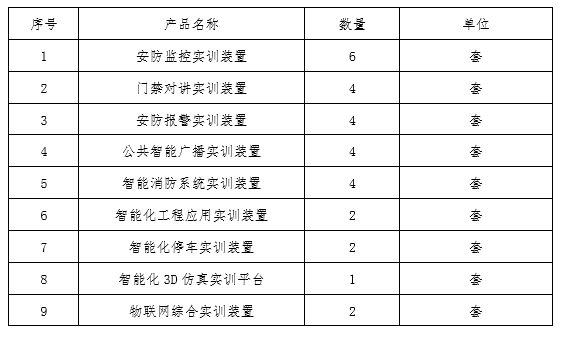
物联网智慧安防实训综合实训基地建设方案
一、系统概述 物联网智慧安防实训综合实训基地是一个为学生提供综合实践、培养技能的场所,专注于物联网技术与智慧安防应用的培训和实训。通过物联网智慧安防实训综合实训基地的建设和运营,学生可以在真实的环境中进行实践训练,提高其物联网技…...

openGauss学习笔记-44 openGauss 高级数据管理-存储过程
文章目录 openGauss学习笔记-44 openGauss 高级数据管理-存储过程44.1 语法格式44.2 参数说明44.3 示例 openGauss学习笔记-44 openGauss 高级数据管理-存储过程 存储过程是能够完成特定功能的SQL语句集。用户可以进行反复调用,从而减少SQL语句的重复编写数量&…...

【Linux】进程信号篇Ⅲ:可重入函数、volatile关键字、SIGCHLD信号
信号Ⅲ 🔗 接上篇七、可重入函数八、volatile 关键字九、SIGCHLD 信号 🔗 接上篇 👉🔗进程信号篇Ⅰ:信号的产生(signal、kill、raise、abort、alarm)、信号的保存(core dump&#x…...

排序算法:冒泡排序
冒泡排序是入门级的算法,但也有一些有趣的玩法。通常来说,冒泡排序有三种写法: 一边比较一边向后两两交换,将最大值 / 最小值冒泡到最后一位;经过优化的写法:使用一个变量记录当前轮次的比较是否发生过交换…...
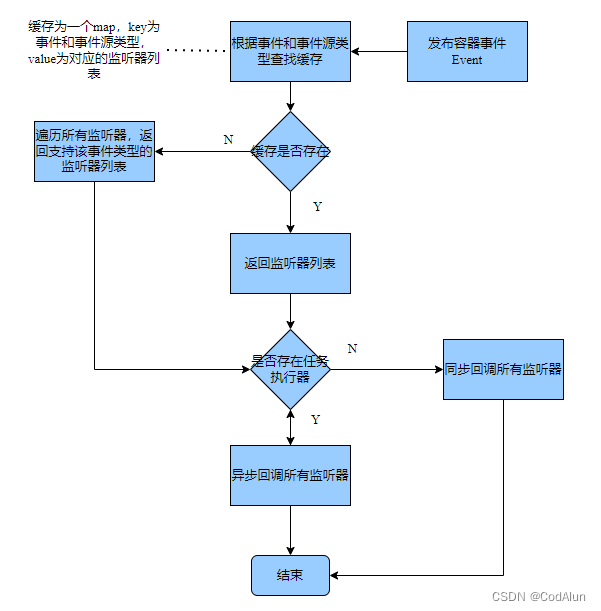
Spring事件监听源码解析
spring事件监听机制离不开容器IOC特性提供的支持,比如容器会自动创建事件发布器,自动识别用户注册的监听器并进行管理,在特定的事件发布后会找到对应的事件监听器并对其监听方法进行回调。Spring帮助用户屏蔽了关于事件监听机制背后的很多细节…...
Cpp学习——list的模拟实现
目录 一,实现list所需要包含的三个类 二,三个类的实现 1.list_node 2.list类 3.iterator_list类 三,功能实现 1.list类里的push_back() 2.iterator类里的运算符重载 3,list类里面的功能函数 1.insert(ÿ…...
工具推荐:Chat2DB一款开源免费的多数据库客户端工具
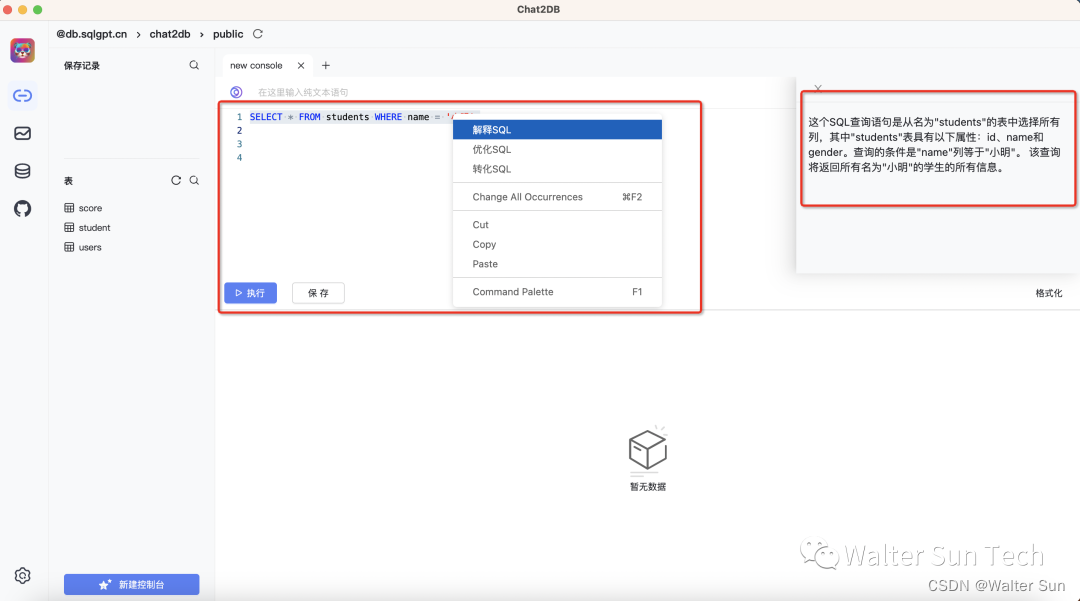
文章首发地址 Chat2DB是一款开源免费的多数据库客户端工具,适用于Windows和Mac操作系统,可在本地安装使用,也可以部署到服务器端并通过Web页面进行访问。 相较于传统的数据库客户端软件如Navicat、DBeaver,Chat2DB具备了与AIGC…...

C语言刷题指南(二)
📙作者简介: 清水加冰,目前大二在读,正在学习C/C、Python、操作系统、数据库等。 📘相关专栏:C语言初阶、C语言进阶、C语言刷题训练营、数据结构刷题训练营、有感兴趣的可以看一看。 欢迎点赞 👍…...
[C++11]
文章目录 1. 自动类型推导1.1 auto1.1.1 推导规则1.1.2 auto的限制1.1.3 auto的应用1.1.4 范围for 1.2 decltype1.2.1 推导规则1.2.2 decltype的应用 1.3 返回类型后置 2.可调用对象包装器、绑定器2.1 可调用对象包装器2.1.1 基本用法2.1.2 作为回调函数使用 2.2 绑定器 3. usi…...
【MySQL系列】--初识数据库
💐 🌸 🌷 🍀 🌹 🌻 🌺 🍁 🍃 🍂 🌿 🍄🍝 🍛 🍤 📃个人主页 :阿然成长日记 …...

Unity导入google.protobuf失败,无法找到google命名空间
问题: 1.刚开始把protobuf的文件夹直接从其他项目里(unity2021)里复制到unity(2020)版本,当时报错protobuf.dll的依赖项system.memory版本不对。 2.没有使用原来的protobuf文件了。使用vs2019的NuGet管理包来下载Google.Protobuf ,仍然报错找…...
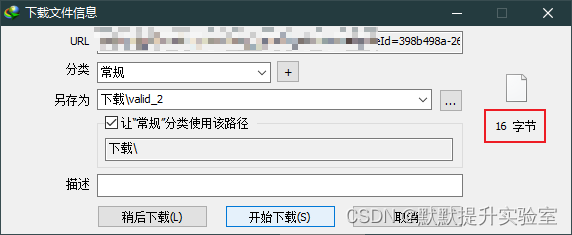
使用IDM下载视频出现“由于法律原因,IDM无法下载...
一、问题描述 由于法律原因,IDM无法下载..,如图: 二、原因分析 下载该IDM抓取的M3U8文件,查看其中的内容发现 : #EXT-X-KEY 字段已经写明了加密方式是AES-128,包含一个URI和IV值 #EXTM3U #EXT-X-VERSION:3 #EXT-X-TARGETDURATION:8 #EXT-X-MEDIA-SEQUENCE:0 #EXT-X-KEY:…...
pointnet C++推理部署--tensorrt框架
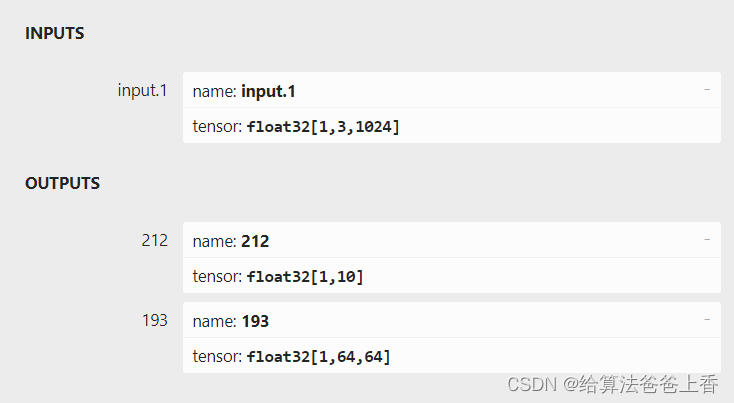
classification 如上图所示,由于直接export出的onnx文件有两个输出节点,不方便处理,所以编写脚本删除不需要的输出节点193: import onnxonnx_model onnx.load("cls.onnx") graph onnx_model.graphinputs graph.inpu…...
34.Netty源码之Netty如何处理网络请求
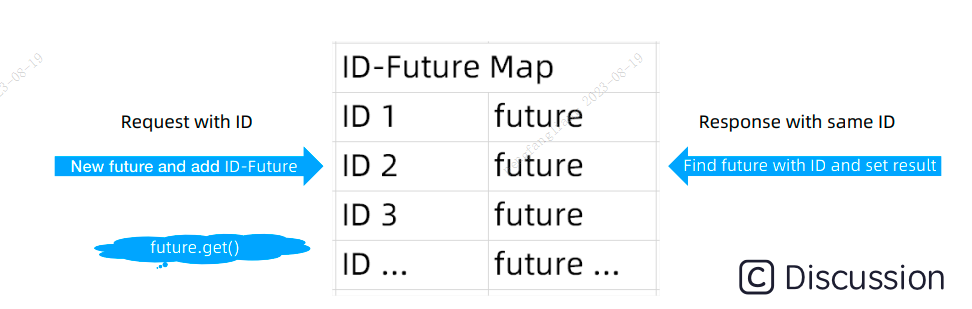
highlight: arduino-light 通过前面两节源码课程的学习,我们知道 Netty 在服务端启动时会为创建 NioServerSocketChannel,当客户端新连接接入时又会创建 NioSocketChannel,不管是服务端还是客户端 Channel,在创建时都会初始化自己…...
vscode 安装勾选项解释
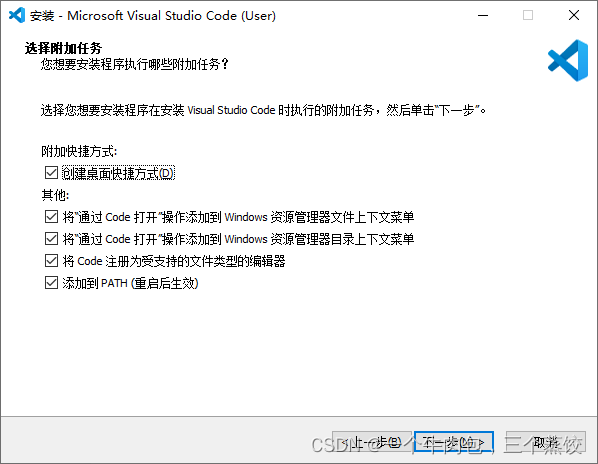
1、通过code 打开“操作添加到windows资源管理器文件上下文菜单 :把这个两个勾选上,可以对文件使用鼠标右键,选择VSCode 打开。 2、将code注册为受支持的文件类型的编辑器:不建议勾选,这样会默认使用VSCode打开支持的相…...
Spring 6.0官方文档示例(24): replace-method的用法
一、原始bean定义 package cn.edu.tju.study.service.anno.domain;public class MyValueCalculator {public String computeValue(String input) {return "you inputted: " input;}// some other methods... }二、replace bean定义 package cn.edu.tju.study.serv…...
-[聊天消息记录])
自然语言处理从入门到应用——LangChain:记忆(Memory)-[聊天消息记录]
分类目录:《自然语言处理从入门到应用》总目录 Cassandra聊天消息记录 Cassandra是一种分布式数据库,非常适合存储大量数据,是存储聊天消息历史的良好选择,因为它易于扩展,能够处理大量写入操作。 # List of contact…...

嵌入式Linux驱动DLP投影:硬件接口、软件栈与实战应用
1. 项目概述:当DLP投影遇上嵌入式Linux如果你正在寻找一个既能玩转嵌入式Linux,又能探索前沿投影显示技术的项目,那么DLP LightCrafter™ Display 2000评估模块(EVM)绝对是一个让你眼前一亮的平台。它不是一个简单的投…...

【模块化设计-13】OAM 线程模块详解
该模块是基于 RT-Thread 实时操作系统实现的一个 OAM(Operation, Administration and Maintenance,操作、管理和维护)专用线程模块,核心功能是提供独立的 OAM 业务处理线程、消息队列机制和定时器管理能力,适用于嵌入式…...

Vue2项目里,如何用DHTMLX Gantt实现任务搜索、今日线定位和视图切换?这些实用功能我帮你搞定了
Vue2项目中DHTMLX Gantt三大进阶功能实战:搜索、今日线与视图切换 在项目管理工具的开发中,甘特图作为核心可视化组件,其交互体验直接决定了用户的使用效率。本文将聚焦三个高频需求场景,手把手教你如何在已有DHTMLX Gantt集成的V…...

从数据云到ArcGIS:一站式掌握DEM影像的获取、拼接与裁剪实战
1. DEM影像基础与数据源选择 数字高程模型(DEM)是地理信息系统中描述地表形态的基础数据,广泛应用于地形分析、水文模拟、工程建设等领域。对于刚接触GIS的朋友来说,最常见的困惑就是:从哪里获取DEM数据?不…...

透视 Mission Control 源码:如何构建高性能的 Agent 实时监控架构?
在 AI Agent 爆火的当下,我们正从“对话式 AI”迈向“行为式 AI”。然而,当数十个 Agent 同时运行,处理复杂的链上交易或长程任务时,开发者面临的最大挑战往往是:观测性(Observability)。你无法…...

手势控制音乐手套:用Circuit Playground Express与MakeCode实现交互式声音合成
1. 项目概述与核心价值如果你对嵌入式开发、创意编程或者互动艺术装置感兴趣,那么将物理世界的动作转化为声音,绝对是一个能让你兴奋起来的项目。今天要聊的,就是如何用一块比手掌还小的开发板——Circuit Playground Express(后面…...

用STM32F103的USART1和PC串口助手玩“聊天室”:一个完整的数据收发项目实战
STM32F103串口聊天室:从零构建双向交互式终端 项目背景与核心价值 在嵌入式开发领域,串口通信如同"Hello World"般基础却又至关重要。传统教学往往止步于数据收发演示,而本项目将打破常规——用STM32F103的USART1构建一个具有完整交…...

环境配置与基础教程:保姆级教程:在 Mac M 芯片上利用 MPS 加速 YOLO 训练与推理的完整环境搭建
写在前面:为什么你的 Mac 也能跑深度学习? 几年前,如果有人告诉你用 MacBook 训练深度学习模型,你大概会笑出声。那时候 Mac 上的 PyTorch 只能依赖 CPU 吭哧吭哧地算,训练一个小模型都要等到天荒地老。但自从 Apple Silicon 芯片(M1、M2、M3、M4,以及最新的 M5)横空出…...

用STM32 HAL库和MPU6050 DIY平衡小车:PID参数整定实战与小车‘站起来’的调试日记
STM32平衡小车PID调参实战:从剧烈抖动到稳定站立的调试手记 1. 平衡小车的核心挑战 当我第一次按下电源开关,看着这个小家伙像醉汉一样左右摇摆然后轰然倒下时,才真正理解到平衡控制的精妙之处。基于STM32和MPU6050的平衡小车项目,…...
)
ElevenLabs声音库调优秘技:如何用API+Prompt工程将TTS自然度提升67%(附2024最新声纹参数表)
更多请点击: https://intelliparadigm.com 第一章:ElevenLabs声音库资源推荐 ElevenLabs 提供了业界领先的高质量语音合成服务,其声音库(Voice Library)涵盖多语种、多风格的预训练语音模型,适用于播客、有…...