
mongodb.使用自带命令工具导出导入数据
在一次数据更新中,同事把老数据进行了清空操作,但是新的逻辑数据由于某种原因(好像是她的电脑中病毒了),一直无法正常连接数据库进行数据插入,然后下午2点左右要给甲方演示,所以要紧急恢复本地的部分数据到生产库。
在此之前我只用过 mongo 自带的命令 mongoexport 进行过导出操作,把数据库的某个 collection 导出为 json 文件,那么这次是要先导出再导入,实现了一个完整的数据迁移闭环,所以在此记录一下,以备不时之需。
一、下载 mongo 工具包
mongo工具包包括管理数据的一些工具 exe 文件,具体如下:
- mongoexport.exe:导出数据命令工具
- mongoimport.exe:导入数据命令工具
- bsondump.exe: 用于将导出的BSON文件格式转换为JSON格式
- mongodump.exe: 用于从mongodb数据库中导出BSON格式的文件,类似于mysql的dump工具mysqldump
- mongofiles.exe: 用于和mongoDB的GridFS文件系统交互的命令,并可操作其中的文件,它提供了我们本地系统与GridFS文件系统之间的存储对象接口
- mongorestore.exe: 用于恢复导出的BSON文件到 mongodb 数据库中
- mongostat.exe: 当前 mongod 状态监控工具,像linux中监控linux的vmstat
- mongotop.exe: 提供了一个跟踪mongod数据库花费在读写数据的时间,为每个collection都会记录,默认记录时间是按秒记录
这个工具跟 mongo 的版本有关系,部分版本自带该工具包,比如下图的 4.x 版本,我用的 5.0 版本没有自带工具包,所以我需要先去官网下载工具包文件,然后把 bin 目录下的工具复制到 5.0 版本的 bin 目录下,才能进行数据的导出、导入操作。
工具包的下载地址为:mongo工具包下载地址,解压后把bin文件夹里的文件全部拷贝到 MongoDB 安装目录bin文件夹下。


二、导出数据
进入到 mongo 的安装目录 bin 下,使用 mongoexport 工具进行数据的 导出 操作
1、无密码导出操作:
mongoexport.exe -h localhost:28007 -d database -c result -o D:/project/result.json2、有密码的导出操作:
mongoexport.exe -h localhost:28007 -d database -u admin -p 123456 -c result -o D:/project/result.json三、导入数据
进入到 mongo 的安装目录 bin 下,使用 mongoimport 工具进行数据的 导入 操作
mongoimport.exe -h localhost:28007 -u admin -p 123456 -d database -c result --file D:/project/result.json执行结果如下表示导入成功
D:\MongoDB\Server\5.0\bin>mongoimport.exe -h localhost:28007 -u admin -p 123456 -d database -c result --file D:/project/result.json
2023-04-11T13:34:39.799+0800    connected to: mongodb://localhost:28007/
2023-04-11T13:34:42.799+0800    [#######.................] database.result 20.2MB/66.4MB (30.4%)
2023-04-11T13:34:45.799+0800    [##############..........] database.result 40.5MB/66.4MB (61.1%)
2023-04-11T13:34:48.799+0800    [#####################...] database.result 60.4MB/66.4MB (91.0%)
2023-04-11T13:34:49.660+0800    [########################] database.result 66.4MB/66.4MB (100.0%)
2023-04-11T13:34:49.660+0800    386810 document(s) imported successfully. 0 document(s) failed to import.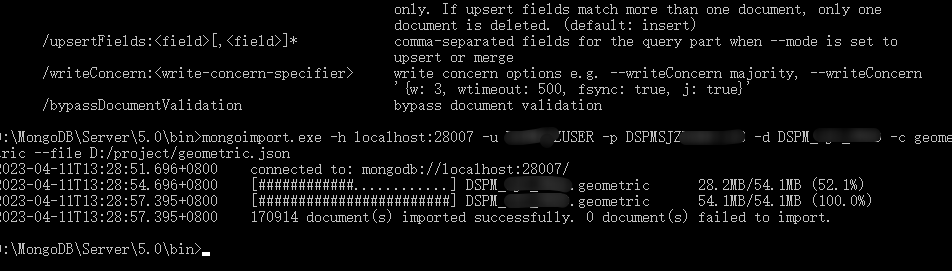
参数释义:
-h :指的是 host 主机地址
-u :指的是用户账号
-p :指的是账户密码
-d :指的是数据库 database 简称
-c :指的是表 collection 简称
-o :指的是导出路径 output 简称
--file :指的是需要导入的文件
四、其他
使用过程中可以使用 --help 进行参数意思的查看
D:\MongoDB\Server\5.0\bin>mongoimport --help
Usage:mongoimport <options> <connection-string> <file>Import CSV, TSV or JSON data into MongoDB. If no file is provided, mongoimport reads from stdin.Connection strings must begin with mongodb:// or mongodb+srv://.See http://docs.mongodb.com/database-tools/mongoimport/ for more information.general options:/help                                       print usage/version                                    print the tool version and exit/config:                                    path to a configuration fileverbosity options:/v, /verbose:<level>                            more detailed log output (include multiple times for more verbosity,e.g. -vvvvv, or specify a numeric value, e.g. --verbose=N)/quiet                                      hide all log outputconnection options:/h, /host:<hostname>                            mongodb host to connect to (setname/host1,host2 for replica sets)/port:<port>                                server port (can also use --host hostname:port)ssl options:/ssl                                        connect to a mongod or mongos that has ssl enabled/sslCAFile:<filename>                       the .pem file containing the root certificate chain from thecertificate authority/sslPEMKeyFile:<filename>                   the .pem file containing the certificate and key/sslPEMKeyPassword:<password>               the password to decrypt the sslPEMKeyFile, if necessary/sslCRLFile:<filename>                      the .pem file containing the certificate revocation list/sslFIPSMode                                use FIPS mode of the installed openssl library/tlsInsecure                                bypass the validation for server's certificate chain and host nameauthentication options:/u, /username:<username>                        username for authentication/p, /password:<password>                        password for authentication/authenticationDatabase:<database-name>     database that holds the user's credentials/authenticationMechanism:<mechanism>        authentication mechanism to use/awsSessionToken:<aws-session-token>        session token to authenticate via AWS IAMkerberos options:/gssapiServiceName:<service-name>           service name to use when authenticating using GSSAPI/Kerberos(default: mongodb)/gssapiHostName:<host-name>                 hostname to use when authenticating using GSSAPI/Kerberos (default:<remote server's address>)namespace options:/d, /db:<database-name>                         database to use/c, /collection:<collection-name>               collection to useuri options:/uri:mongodb-uri                            mongodb uri connection stringinput options:/f, /fields:<field>[,<field>]*                  comma separated list of fields, e.g. -f name,age/fieldFile:<filename>                       file with field names - 1 per line/file:<filename>                            file to import from; if not specified, stdin is used/headerline                                 use first line in input source as the field list (CSV and TSV only)/jsonArray                                  treat input source as a JSON array/parseGrace:<grace>                         controls behavior when type coercion fails - one of: autoCast,skipField, skipRow, stop (default: stop)/type:<type>                                input format to import: json, csv, or tsv/columnsHaveTypes                           indicates that the field list (from --fields, --fieldsFile, or--headerline) specifies types; They must be in the form of'<colName>.<type>(<arg>)'. The type can be one of: auto, binary,boolean, date, date_go, date_ms, date_oracle, decimal, double, int32,int64, string. For each of the date types, the argument is a datetimelayout string. For the binary type, the argument can be one of:base32, base64, hex. All other types take an empty argument. Onlyvalid for CSV and TSV imports. e.g. zipcode.string(),thumbnail.binary(base64)/legacy                                     use the legacy extended JSON format/useArrayIndexFields                        indicates that field names may include array indexes that should beused to construct arrays during import (e.g. foo.0,foo.1). Indexesmust start from 0 and increase sequentially (foo.1,foo.0 would fail).ingest options:/drop                                       drop collection before inserting documents/ignoreBlanks                               ignore fields with empty values in CSV and TSV/maintainInsertionOrder                     insert the documents in the order of their appearance in the inputsource. By default the insertions will be performed in an arbitraryorder. Setting this flag also enables the behavior of --stopOnErrorand restricts NumInsertionWorkers to 1./j, /numInsertionWorkers:<number>               number of insert operations to run concurrently/stopOnError                                halt after encountering any error during importing. By default,mongoimport will attempt to continue through document validation andDuplicateKey errors, but with this option enabled, the tool will stopinstead. A small number of documents may be inserted afterencountering an error even with this option enabled; use--maintainInsertionOrder to halt immediately after an error/mode:[insert|upsert|merge|delete]          insert: insert only, skips matching documents. upsert: insert newdocuments or replace existing documents. merge: insert new documentsor modify existing documents. delete: deletes matching documentsonly. If upsert fields match more than one document, only onedocument is deleted. (default: insert)/upsertFields:<field>[,<field>]*            comma-separated fields for the query part when --mode is set toupsert or merge/writeConcern:<write-concern-specifier>     write concern options e.g. --writeConcern majority, --writeConcern'{w: 3, wtimeout: 500, fsync: true, j: true}'/bypassDocumentValidation                   bypass document validation
相关文章:
mongodb.使用自带命令工具导出导入数据
在一次数据更新中,同事把老数据进行了清空操作,但是新的逻辑数据由于某种原因(好像是她的电脑中病毒了),一直无法正常连接数据库进行数据插入,然后下午2点左右要给甲方演示,所以要紧急恢复本地的…...

IndexError: tensors used as indices must be long, byte or bool tensors
运行出现报错。修改数据格式 输出sample_ids的值,可以看到数据类型是 torch.int32 解决 需要将sample_ids类型转为long,修改方式: idx idx.type(torch.long)或 idx self.tensor(idx, dtypetorch.long)参考: IndexError: tenso…...

设计模式 : 单例模式笔记
文章目录 一.单例模式二.单例模式的两种实现方式饿汉模式懒汉模式 一.单例模式 一个类只能创建一个对象,这样的类的设计模式就称为单例模式,该模式保证系统中该类只能有一个实例(并且父子进程共享),一个很典型的单例类就是CSTL的内存池C单例模式的基本设计思路: 私有化构造函数…...

深度优先搜索算法
目录 4.1 二叉树的最大深度(简单):深度优先搜索 4.2 对称二叉树(简单):递归 4.3 岛屿数量(中等):深度优先搜索 4.4 岛屿的最大面积(中等)&…...

k8s ----POD控制器详解
目录 一:pod控制器 1、Pod控制器及其功用 2、pod控制器类型 3、Pod与控制器之间的关系 二:Deployment 三:SatefulSet 1、StatefulSet组成 2、为什么要有headless? 3、为什么要有volumeClaimTemplate? 4、实现…...
ReactNative进阶(三十四):ipa Archive 阶段报错error: Multiple commands produce问题修复及思考
文章目录 一、前言二、问题描述三、问题解决四、拓展阅读五、拓展阅读 一、前言 在应用RN开发跨平台APP阶段,从git中拉取项目,应用Jenkins进行组包时,发现最终生成的ipa安装包版本号始终与项目中设置的版本号不一致。 二、问题描述 经过仔…...

MySQL索引ES索引
MySQL MySQL索引的种类 按照索引列值的唯一性:索引可分为唯一索引和非唯一索引; 唯一索引:此索引的每一个索引值只对应唯一的数据记录,对于单列唯一性索引,这保证单列不包含重复的值。对于多列唯一性索引,保证多个值的组合不重复。主键索引是唯一索引的特定类型。该索引…...
webSocket 聊天室 node.js 版
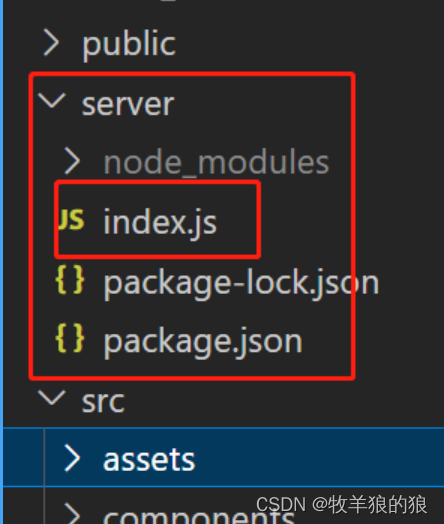
全局安装vue脚手架 npm install vue/cli -g 创建 vue3 ts 脚手架 vue create vue3-chatroom 后端代码 src 同级目录下建 server: const express require(express); const app express(); const http require(http); const server http.createServer(app);const io req…...
iptables防火墙(SNAT与DNAT)
目录 1 SNAT 1.1 SNAT原理与应用 1.2 SNAT工作原理 1.3 SNAT转换前提条件 2 SNAT示例 编辑 2.1 网关服务器配置 2.1.1 网关服务器配置网卡 2.1.2 开启SNAT命令 2.2 内网服务器端配置 2.3 外网服务器端配置 2.4 网卡服务器端添加规则 2.5 SNAT 测试 3 DNAT 3.1 网卡…...
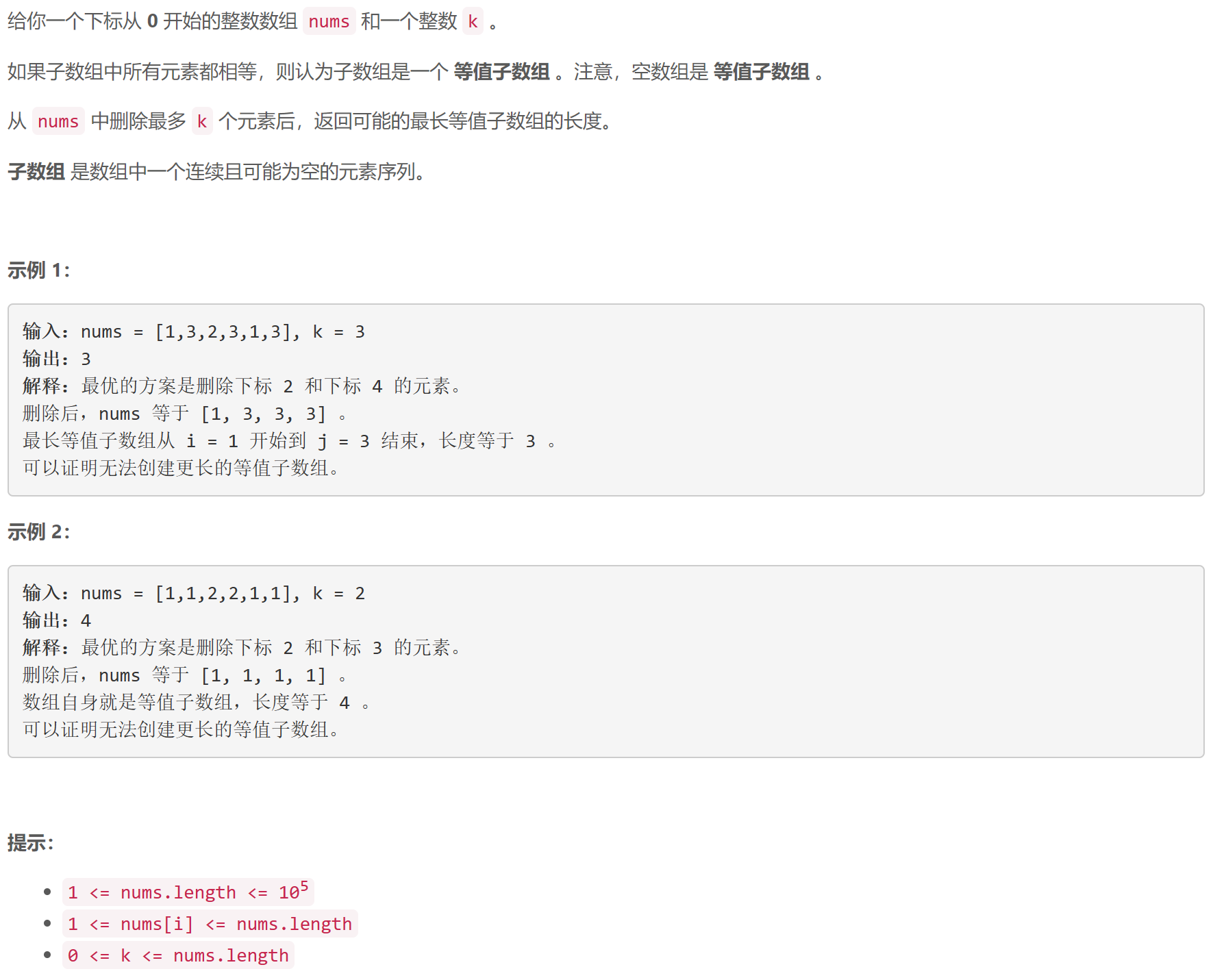
第 359 场 LeetCode 周赛题解
A 判别首字母缩略词 签到题… class Solution { public:bool isAcronym(vector<string> &words, string s) {string pf;for (auto &s: words)pf.push_back(s[0]);return pf s;} };B k-avoiding 数组的最小总和 贪心:从 1 1 1开始升序枚举,…...

【开源项目】Stream-Query的入门使用和原理分析
前言 无意间发现了一个有趣的项目,Stream-Query。了解了一下其基本的功能,可以帮助开发者省去Mapper的编写。在开发中,我们会编写entity和mapper来完成业务代码,但是Stream-Query可以省去mapper,只写entity。 快速入…...

微信小程序picker组件的简单使用 单选
<picker mode"selector" range"{{classData}}" bindchange"bindClassChange" value"{{classIndex}}" range-key"className"><view class"picker">{{classData[classIndex].className || 请选择班级}}…...
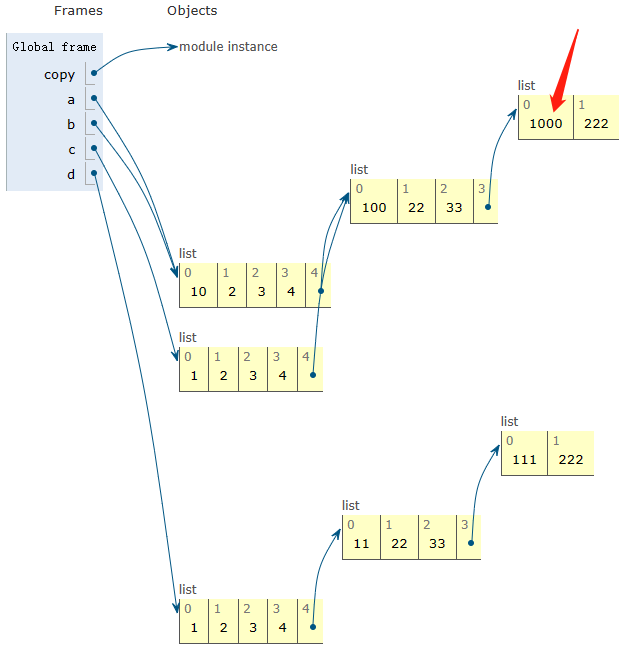
python、numpy、pytorch中的浅拷贝和深拷贝
1、Python中的浅拷贝和深拷贝 import copya [1, 2, 3, 4, [11, 22, 33, [111, 222]]] b a c a.copy() d copy.deepcopy(a)print(before modify\r\n a\r\n, a, \r\n,b a\r\n, b, \r\n,c a.copy()\r\n, c, \r\n,d copy.deepcopy(a)\r\n, d, \r\n)before modify a [1, 2…...

EasyRecovery14数据恢复软件支持各类存储设备的数据恢复
EasyRecovery14数据恢复软件专业数据恢复软件支持电脑、相机、移动硬盘、U盘、SD卡、内存卡、光盘、本地电子邮件和 RAID 磁盘阵列等各类存储设备的数据恢复。 目前市面上有许多数据恢复软件,但褒贬不一,而且数据恢复软件又不是一款会被经常使用的软件&a…...
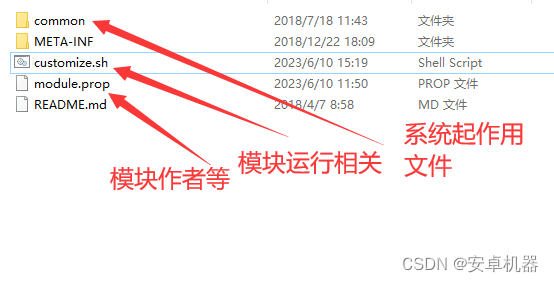
玩机搞机----面具模块的组成 制作模块
root面具相信很多玩家都不陌生。早期玩友大都使用第三方卡刷补丁来对系统进行各种修复和添加功能。目前面具补丁代替了这些操作。今天的帖子了解下面具各种模块的组成和几种普遍的代码组成。 Magisk中运行的每个单独的shell脚本都将在内部的BusyBox的shell中执行。对于与第三方…...
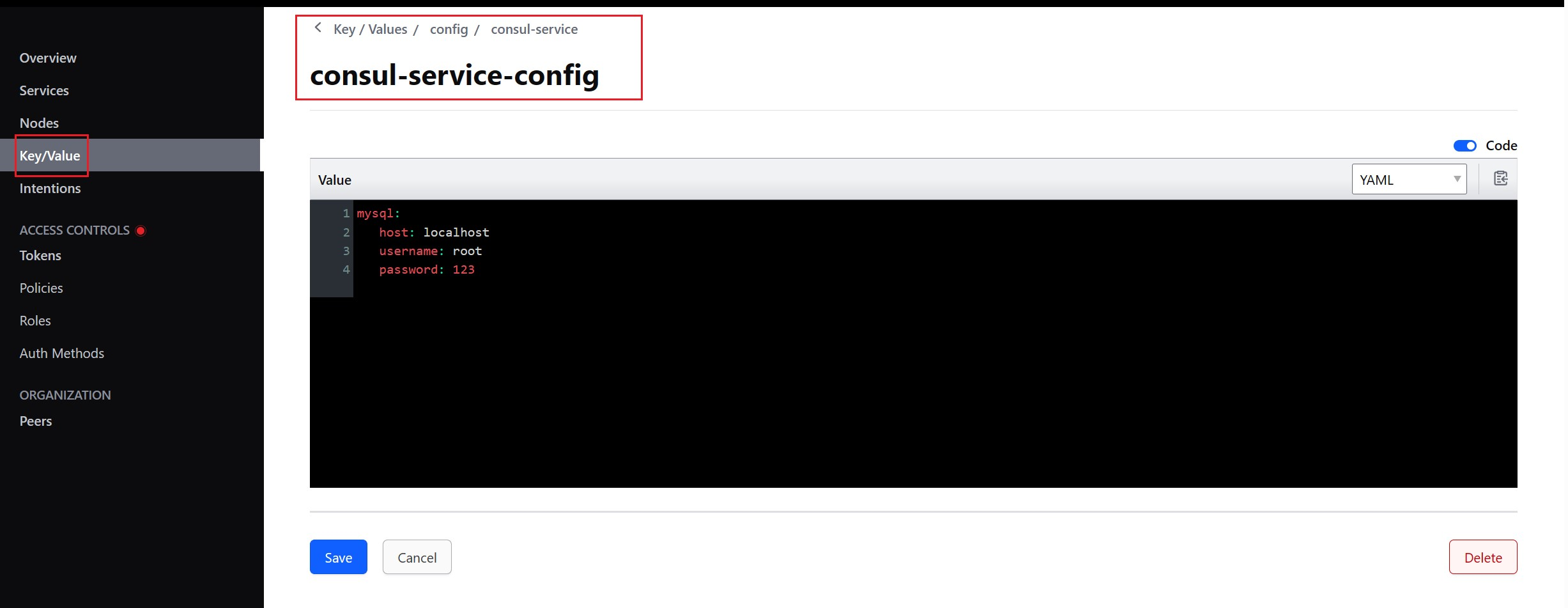
注册中心/配置管理 —— SpringCloud Consul
Consul 概述 Consul 是一个可以提供服务发现,健康检查,多数据中心,key/Value 存储的分布式服务框架,用于实现分布式系统的发现与配置。Cousul 使用 Go 语言实现,因此天然具有可移植性,安装包仅包含一个可执…...
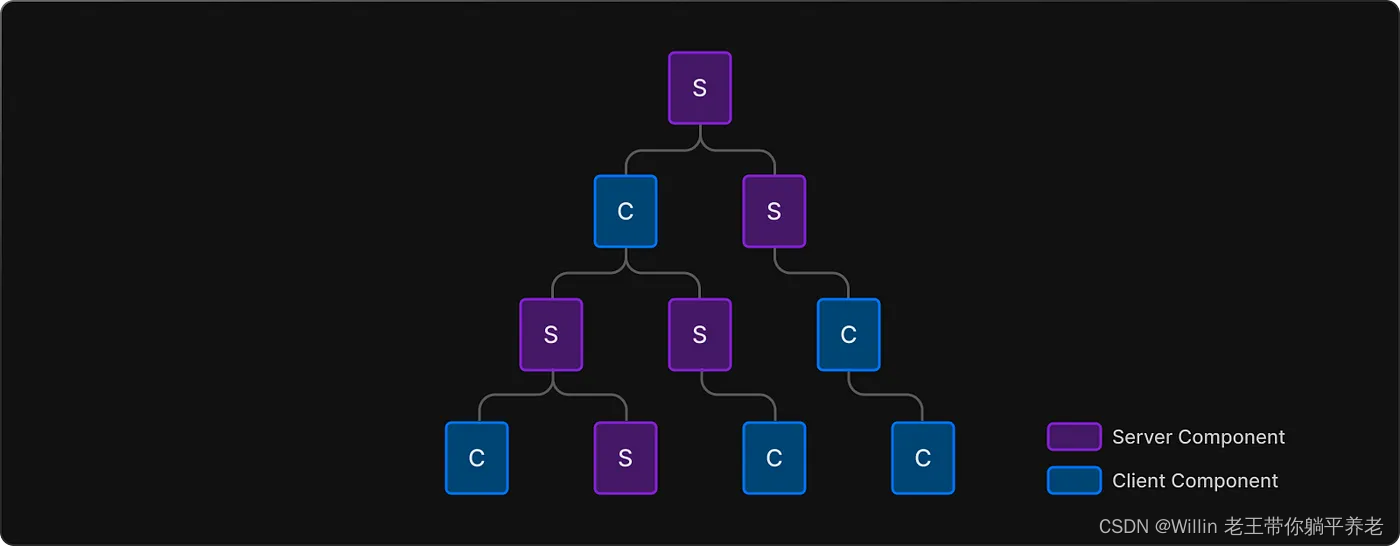
Next.js 13 你需要了解的 8 件事
目录 React 服务器组件 (RSC)服务器组件默认开启在 Next.js 中客户端组件也在服务器上呈现!组成客户端和服务器组件编译Next.js 13 渲染模式桶文件有点坏了库集成:WIP 仍在进行中Route groups 路由组总结 在本文中,我们…...
算法详解)
计数排序(Count Sort)算法详解
1. 算法简介 计数排序(Count Sort)是一种非比较排序算法,其核心思想是统计数组中每个元素出现的次数,然后根据统计结果将元素按照顺序放回原数组中。计数排序的时间复杂度为O(nk),其中n是数组的长度,k是数…...
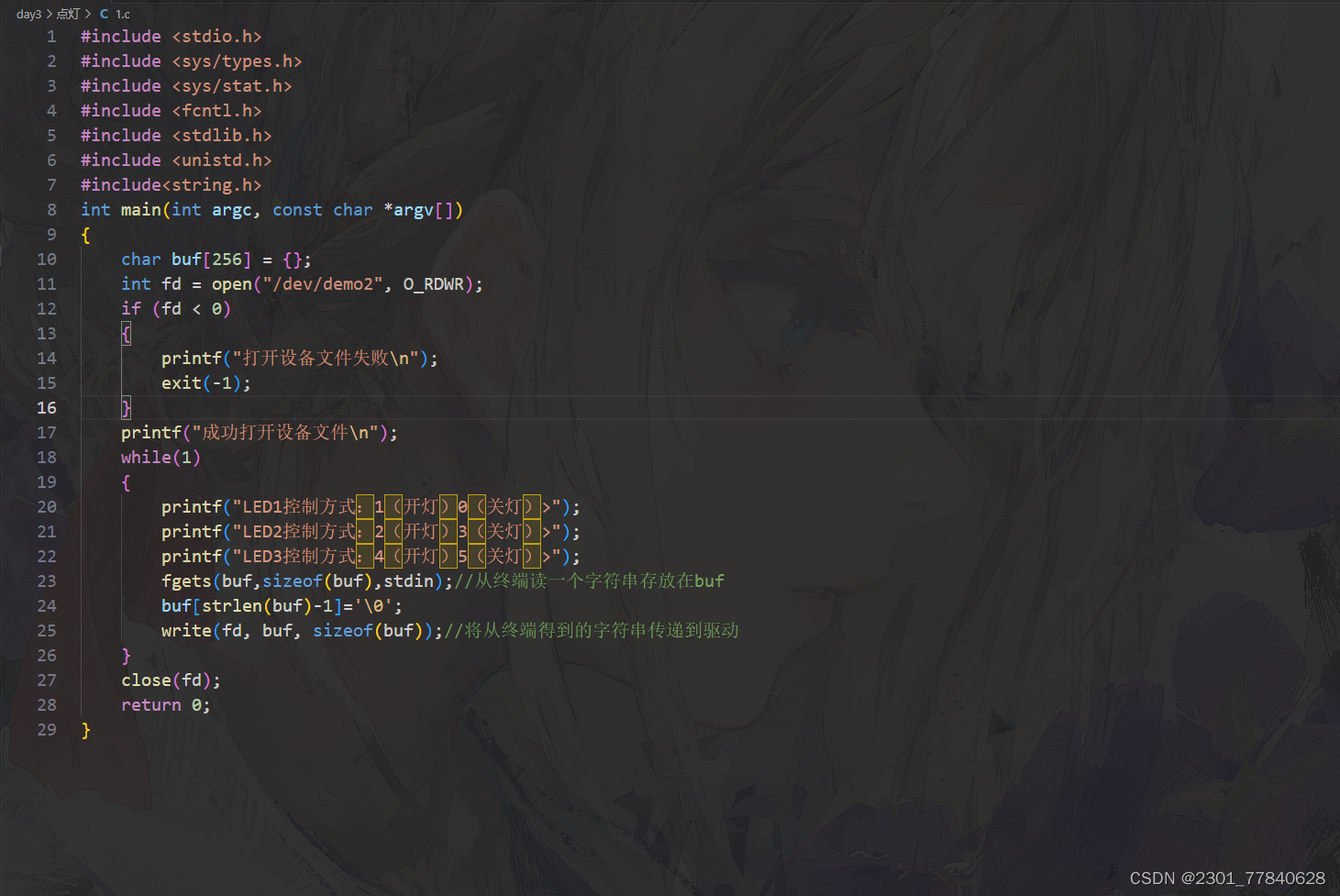
Linux驱动开发(Day3)
驱动点灯:...
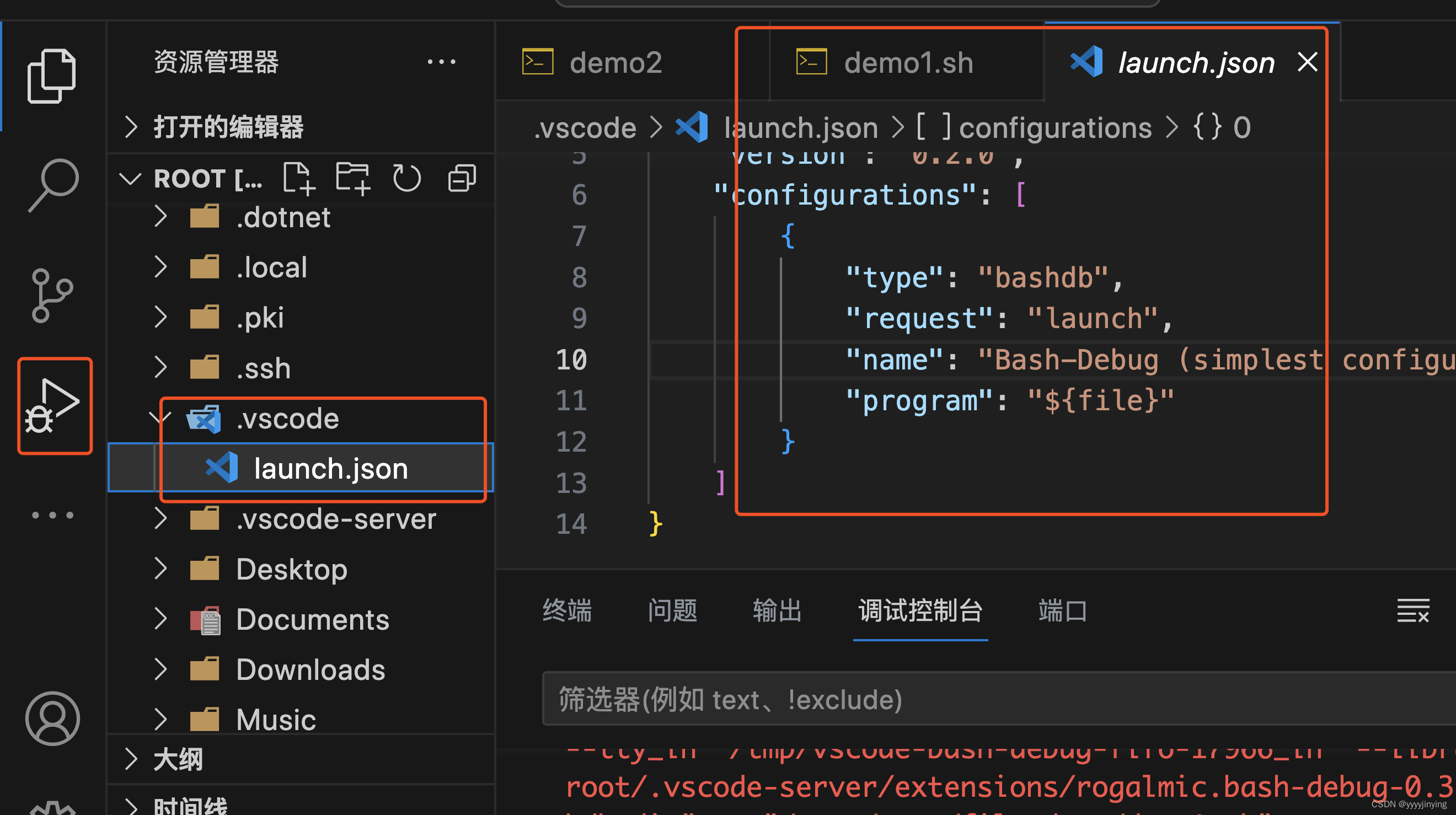
使用Vscode调试shell脚本
在vcode中安装bash dug插件 在vcode中添加launch.json配置,默认就好 参考:http://www.rply.cn/news/73966.html 推荐插件: shellman(支持shell,智能提示) shellcheck(shell语法检查) shell-format(shell格式化)...

AI智能体操作系统Agent-OS:架构、实现与生产部署指南
1. 项目概述:一个为AI智能体设计的操作系统最近在AI智能体开发领域,一个名为“Agent-OS”的项目引起了我的注意。这个项目由 factspark23-hash 团队开源,它不是一个传统意义上的操作系统,比如Windows或Linux,而是一个专…...

用STM32F103和AD9833制作一个简易信号源:从电路搭建、驱动编写到波形测试全记录
用STM32F103和AD9833打造高精度信号发生器:硬件设计、固件开发与波形优化全解析 在电子工程和嵌入式开发领域,信号发生器是不可或缺的基础工具。无论是测试滤波器响应、校准传感器,还是验证通信协议,一个稳定可靠的信号源都能显著…...

AI智能体项目管理器:从原理到实战的编排框架解析
1. 项目概述:一个为AI智能体设计的项目管理器最近在GitHub上看到一个挺有意思的项目,叫gannonh/agent-pm。光看名字,agent-pm, 很容易让人联想到“代理项目管理”或者“智能体项目经理”。点进去一看,果然,…...

ThinkPad风扇控制终极指南:5分钟告别噪音与过热烦恼
ThinkPad风扇控制终极指南:5分钟告别噪音与过热烦恼 【免费下载链接】TPFanCtrl2 ThinkPad Fan Control 2 (Dual Fan) for Windows 10 and 11 项目地址: https://gitcode.com/gh_mirrors/tp/TPFanCtrl2 你是否曾因ThinkPad风扇的"直升机起飞"声而烦…...

Kaggle竞赛技能加速器:从特征工程到模型集成的系统化实战指南
1. 项目概述:一个为Kaggle竞赛量身定制的技能加速器如果你在数据科学竞赛的圈子里待过一阵子,大概率听说过Kaggle。这个平台就像一个全球数据科学家的“奥林匹克竞技场”,从预测房价到识别癌细胞,各种现实世界的问题被包装成竞赛&…...

AI智能体安全沙箱agentguard:为LLM代码执行筑起防火墙
1. 项目概述与核心价值 最近在开源社区里,一个名为 A386official/agentguard 的项目引起了我的注意。乍一看这个标题,你可能会联想到网络安全、代理防护或者某种守护进程。没错,这个项目正是为了解决一个在AI应用开发,特别是基于…...
-东方仙盟)
安卓android无法创建文件夹权限-幽冥大陆(一百21)-东方仙盟
谷歌从安卓 6 开始强制规定直接锁死:根目录 /、system、storage 根目录 全部禁止 APP 写入。目的:防流氓软件乱改系统、乱建文件夹、乱篡改系统文件。瑞芯微等主板厂商二次加锁RK、全志、晶晨这类工控主板,还额外加了两层限制:分区…...

ISDN PRI外线故障排查实战指南
在实际运维案例中,工程师不怕故障一直出现,就怕偶尔出问题。比如客户反馈打外线时,偶尔会出现断线的情况。当然可以通过MST或Trace命令去跟踪,但如果故障发生频率过低,抓日志往往很难。我们通常需要先检查线路质量&…...

RMSNorm:均方根归一化总结
RMSNorm:均方根归一化总结 1. RMSNorm 是什么? RMSNorm 的全称是 Root Mean Square Normalization,中文可以叫:均方根归一化它是 Transformer 大模型中常用的一种归一化方法,例如 LLaMA、Qwen、DeepSeek、Gemma 等模型…...

ARM核心板在POCT设备开发中的选型与应用实战
1. 项目概述:ARM核心板如何重塑POCT设备开发在医疗设备这个对稳定性和可靠性要求近乎苛刻的领域,每一次技术选型都像是一次精密的手术,容不得半点闪失。我接触过不少体外诊断(IVD)设备厂商,尤其是做即时检验…...