
k8s 常用命令(三)
1、查看版本信息:kubectl version
[root@master ~]# kubectl version
[root@master ~]# kubectl version
Client Version: version.Info{Major:"1", Minor:"21", GitVersion:"v1.21.3", GitCommit:"ca643a4d1f7bfe34773c74f79527be4afd95bf39", GitTreeState:"clean", BuildDate:"2021-07-15T21:04:39Z", GoVersion:"go1.16.6", Compiler:"gc", Platform:"linux/amd64"}
Server Version: version.Info{Major:"1", Minor:"21", GitVersion:"v1.21.3", GitCommit:"ca643a4d1f7bfe34773c74f79527be4afd95bf39", GitTreeState:"clean", BuildDate:"2021-07-15T20:59:07Z", GoVersion:"go1.16.6", Compiler:"gc", Platform:"linux/amd64"}
[root@master ~]# kubectl
2、查看资源对象简写(缩写):kubectl api-resources
[root@master ~]# kubectl api-resources
Client Version: version.Info{Major:"1", Minor:"21", GitVersion:"v1.21.3", GitCommit:"ca643a4d1f7bfe34773c74f79527be4afd95bf39", GitTreeState:"clean", BuildDate:"2021-07-15T21:04:39Z", GoVersion:"go1.16.6", Compiler:"gc", Platform:"linux/amd64"}
Server Version: version.Info{Major:"1", Minor:"21", GitVersion:"v1.21.3", GitCommit:"ca643a4d1f7bfe34773c74f79527be4afd95bf39", GitTreeState:"clean", BuildDate:"2021-07-15T20:59:07Z", GoVersion:"go1.16.6", Compiler:"gc", Platform:"linux/amd64"}
3、查看集群信息:kubectl cluster-info
[root@master ~]# kubectl cluster-info
Kubernetes control plane is running at https://192.168.159.10:6443
CoreDNS is running at https://192.168.159.10:6443/api/v1/namespaces/kube-system/services/kube-dns:dns/proxy
To further debug and diagnose cluster problems, use 'kubectl cluster-info dump'.
4、查看帮助信息:kubectl --help
[root@master ~]# kubectl –help
kubectl controls the Kubernetes cluster manager.
Find more information at: https://kubernetes.io/docs/reference/kubectl/overview/
Basic Commands (Beginner):
create Create a resource from a file or from stdin.
expose 使用 replication controller, service, deployment 或者 pod 并暴露它作为一个 新的 Kubernetes
Service
run 在集群中运行一个指定的镜像
set 为 objects 设置一个指定的特征
Basic Commands (Intermediate):
explain 查看资源的文档
get 显示一个或更多 resources
edit 在服务器上编辑一个资源
delete Delete resources by filenames, stdin, resources and names, or by resources and label selector
Deploy Commands:
rollout Manage the rollout of a resource
scale Set a new size for a Deployment, ReplicaSet or Replication Controller
autoscale Auto-scale a Deployment, ReplicaSet, StatefulSet, or ReplicationController
Cluster Management Commands:
certificate 修改 certificate 资源.
cluster-info 显示集群信息
top 显示 Resource (CPU/Memory) 使用.
cordon 标记 node 为 unschedulable
uncordon 标记 node 为 schedulable
drain Drain node in preparation for maintenance
taint 更新一个或者多个 node 上的 taints
Troubleshooting and Debugging Commands:
describe 显示一个指定 resource 或者 group 的 resources 详情
logs 输出容器在 pod 中的日志
attach Attach 到一个运行中的 container
exec 在一个 container 中执行一个命令
port-forward Forward one or more local ports to a pod
proxy 运行一个 proxy 到 Kubernetes API server
cp 复制 files 和 directories 到 containers 和从容器中复制 files 和 directories.
auth Inspect authorization
debug Create debugging sessions for troubleshooting workloads and nodes
Advanced Commands:
diff Diff live version against would-be applied version
apply 通过文件名或标准输入流(stdin)对资源进行配置
patch Update field(s) of a resource
replace 通过 filename 或者 stdin替换一个资源
wait Experimental: Wait for a specific condition on one or many resources.
kustomize Build a kustomization target from a directory or URL.
[root@master ~]# kubectl api-resourcesNAME SHORTNAMES APIVERSION NAMESPACED KINDbindings v1 true Bindingcomponentstatuses cs v1 false ComponentStatusconfigmaps cm v1 true ConfigMapendpoints ep v1 true Endpointsevents ev v1 true Eventlimitranges limits v1 true LimitRangenamespaces ns v1 false Namespacenodes no v1 false Nodepersistentvolumeclaims pvc v1 true PersistentVolumeClaimpersistentvolumes pv v1 false PersistentVolumepods po v1 true Podpodtemplates v1 true PodTemplatereplicationcontrollers rc v1 true ReplicationControllerresourcequotas quota v1 true ResourceQuotasecrets v1 true Secretserviceaccounts sa v1 true ServiceAccountservices svc v1 true Servicemutatingwebhookconfigurations admissionregistration.k8s.io/v1 false MutatingWebhookConfigurationvalidatingwebhookconfigurations admissionregistration.k8s.io/v1 false ValidatingWebhookConfigurationcustomresourcedefinitions crd,crds apiextensions.k8s.io/v1 false CustomResourceDefinitionapiservices apiregistration.k8s.io/v1 false APIServicecontrollerrevisions apps/v1 true ControllerRevisiondaemonsets ds apps/v1 true DaemonSetdeployments deploy apps/v1 true Deploymentreplicasets rs apps/v1 true ReplicaSetstatefulsets sts apps/v1 true StatefulSettokenreviews authentication.k8s.io/v1 false TokenReviewlocalsubjectaccessreviews authorization.k8s.io/v1 true LocalSubjectAccessReviewselfsubjectaccessreviews authorization.k8s.io/v1 false SelfSubjectAccessReviewselfsubjectrulesreviews authorization.k8s.io/v1 false SelfSubjectRulesReviewsubjectaccessreviews authorization.k8s.io/v1 false SubjectAccessReviewhorizontalpodautoscalers hpa autoscaling/v1 true HorizontalPodAutoscalercronjobs cj batch/v1 true CronJobjobs batch/v1 true Jobcertificatesigningrequests csr certificates.k8s.io/v1 false CertificateSigningRequestleases coordination.k8s.io/v1 true Leaseendpointslices discovery.k8s.io/v1 true EndpointSliceevents ev events.k8s.io/v1 true Eventingresses ing extensions/v1beta1 true Ingressflowschemas flowcontrol.apiserver.k8s.io/v1beta1 false FlowSchemaprioritylevelconfigurations flowcontrol.apiserver.k8s.io/v1beta1 false PriorityLevelConfigurationingressclasses networking.k8s.io/v1 false IngressClassingresses ing networking.k8s.io/v1 true Ingressnetworkpolicies netpol networking.k8s.io/v1 true NetworkPolicyruntimeclasses node.k8s.io/v1 false RuntimeClasspoddisruptionbudgets pdb policy/v1 true PodDisruptionBudgetpodsecuritypolicies psp policy/v1beta1 false PodSecurityPolicyclusterrolebindings rbac.authorization.k8s.io/v1 false ClusterRoleBindingclusterroles rbac.authorization.k8s.io/v1 false ClusterRolerolebindings rbac.authorization.k8s.io/v1 true RoleBindingroles rbac.authorization.k8s.io/v1 true Rolepriorityclasses pc scheduling.k8s.io/v1 false PriorityClasscsidrivers storage.k8s.io/v1 false CSIDrivercsinodes storage.k8s.io/v1 false CSINodecsistoragecapacities storage.k8s.io/v1beta1 true CSIStorageCapacitystorageclasses sc storage.k8s.io/v1 false StorageClassvolumeattachments storage.k8s.io/v1 false VolumeAttachmentSettings Commands:
label 更新在这个资源上的 labels
annotate 更新一个资源的注解
completion Output shell completion code for the specified shell (bash or zsh)
Other Commands:
api-resources Print the supported API resources on the server
api-versions Print the supported API versions on the server, in the form of "group/version"
config 修改 kubeconfig 文件
plugin Provides utilities for interacting with plugins.
version 输出 client 和 server 的版本信息
Usage:
kubectl [flags] [options]
Use "kubectl <command> --help" for more information about a given command.
Use "kubectl options" for a list of global command-line options (applies to all commands).
5、node节点日志查看:journalctl -u kubelet -f
k8s中查看核心组件日志怎么看
①、通过kubeadm部署的:kubectl logs -f pod_组件名 -n namespace
或者 journalctl -u kubelet -f
②、二进制部署的:journalctl -u kubelet -f
-- Logs begin at 三 2022-11-02 02:24:50 CST. --
11月 01 19:51:04 master kubelet[13641]: I1101 19:51:04.415651 13641 pod_container_deletor.go:79] "Container not found in pod's containers" containerID="041b38b5bb2ff0161170bea161fd70e9175cc27fdc98877944d899ebe7b90d2f"
11月 01 19:51:06 master kubelet[13641]: I1101 19:51:06.428325 13641 reconciler.go:196] "operationExecutor.UnmountVolume started for volume \"kubeconfig\" (UniqueName: \"kubernetes.io/host-path/771ef2517500c43b40e7df4c76198cac-kubeconfig\") pod \"771ef2517500c43b40e7df4c76198cac\" (UID: \"771ef2517500c43b40e7df4c76198cac\") "
11月 01 19:51:06 master kubelet[13641]: I1101 19:51:06.428370 13641 operation_generator.go:829] UnmountVolume.TearDown succeeded for volume "kubernetes.io/host-path/771ef2517500c43b40e7df4c76198cac-kubeconfig" (OuterVolumeSpecName: "kubeconfig") pod "771ef2517500c43b40e7df4c76198cac" (UID: "771ef2517500c43b40e7df4c76198cac"). InnerVolumeSpecName "kubeconfig". PluginName "kubernetes.io/host-path", VolumeGidValue ""
11月 01 19:51:06 master kubelet[13641]: I1101 19:51:06.529163 13641 reconciler.go:319] "Volume detached for volume \"kubeconfig\" (UniqueName: \"kubernetes.io/host-path/771ef2517500c43b40e7df4c76198cac-kubeconfig\") on node \"master\" DevicePath \"\""
11月 01 19:51:07 master kubelet[13641]: I1101 19:51:07.282148 13641 kubelet_getters.go:300] "Path does not exist" path="/var/lib/kubelet/pods/771ef2517500c43b40e7df4c76198cac/volumes"
11月 01 19:51:10 master kubelet[13641]: I1101 19:51:10.913108 13641 topology_manager.go:187] "Topology Admit Handler"
11月 01 19:51:11 master kubelet[13641]: I1101 19:51:11.079185 13641 reconciler.go:224] "operationExecutor.VerifyControllerAttachedVolume started for volume \"kubeconfig\" (UniqueName: \"kubernetes.io/host-path/5e72c0f5a18f84d50f027106c98ab6b1-kubeconfig\") pod \"kube-scheduler-master\" (UID: \"5e72c0f5a18f84d50f027106c98ab6b1\") "
11月 01 19:51:15 master kubelet[13641]: E1101 19:51:15.849398 13641 cadvisor_stats_provider.go:151] "Unable to fetch pod etc hosts stats" err="failed to get stats failed command 'du' ($ nice -n 19 du -x -s -B 1) on path /var/lib/kubelet/pods/771ef2517500c43b40e7df4c76198cac/etc-hosts with error exit status 1" pod="kube-system/kube-scheduler-master"
11月 01 19:51:25 master kubelet[13641]: E1101 19:51:25.874999 13641 cadvisor_stats_provider.go:151] "Unable to fetch pod etc hosts stats" err="failed to get stats failed command 'du' ($ nice -n 19 du -x -s -B 1) on path /var/lib/kubelet/pods/771ef2517500c43b40e7df4c76198cac/etc-hosts with error exit status 1" pod="kube-system/kube-scheduler-master"
11月 01 19:51:31 master kubelet[13641]: I1101 19:51:31.
6、获取一个或多个资源信息:kubectl get
语法格式:
kubectl get <resource> [-o wide | json| yaml] [-n namespace]
注释:
resource:可以是具体资源名称
-o :指定输出格式
-n :指定名称空间
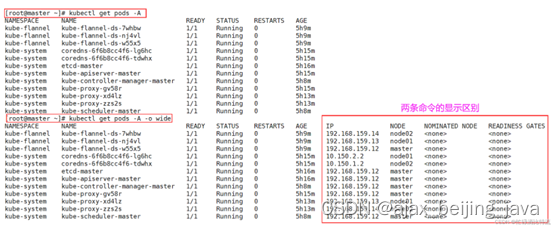
6.1、查看所有命名空间运行的pod信息: kubectl get pods -A
[root@master ~]# kubectl get pods -A
NAMESPACE NAME READY STATUS RESTARTS AGE
kube-flannel kube-flannel-ds-7clld 1/1 Running 0 5h35m
kube-flannel kube-flannel-ds-psgvb 1/1 Running 0 5h35m
kube-flannel kube-flannel-ds-xxncr 1/1 Running 0 5h35m
kube-system coredns-6f6b8cc4f6-lbvl5 1/1 Running 0 5h45m
kube-system coredns-6f6b8cc4f6-m6brz 1/1 Running 0 5h45m
kube-system etcd-master 1/1 Running 0 5h45m
kube-system kube-apiserver-master 1/1 Running 0 5h45m
kube-system kube-controller-manager-master 1/1 Running 0 5h11m
kube-system kube-proxy-jwpnz 1/1 Running 0 5h40m
kube-system kube-proxy-xqcqm 1/1 Running 0 5h41m
kube-system kube-proxy-z6rhl 1/1 Running 0 5h45m
kube-system kube-scheduler-master 1/1 Running 0 5h11m
6.2、查看所有命名空间运行的pod详细信息: kubectl get pods -A -o wide
[root@master ~]# kubectl get pods -A -o wide
NAMESPACE NAME READY STATUS RESTARTS AGE IP NODE NOMINATED NODE READINESS GATES
kube-flannel kube-flannel-ds-7clld 1/1 Running 0 5h39m 192.168.159.13 node02 <none> <none>
kube-flannel kube-flannel-ds-psgvb 1/1 Running 0 5h39m 192.168.159.11 node01 <none> <none>
kube-flannel kube-flannel-ds-xxncr 1/1 Running 0 5h39m 192.168.159.10 master <none> <none>
kube-system coredns-6f6b8cc4f6-lbvl5 1/1 Running 0 5h49m 10.150.2.2 node02 <none> <none>
kube-system coredns-6f6b8cc4f6-m6brz 1/1 Running 0 5h49m 10.150.1.2 node01 <none> <none>
kube-system etcd-master 1/1 Running 0 5h49m 192.168.159.10 master <none> <none>
kube-system kube-apiserver-master 1/1 Running 0 5h49m 192.168.159.10 master <none> <none>
kube-system kube-controller-manager-master 1/1 Running 0 5h16m 192.168.159.10 master <none> <none>
kube-system kube-proxy-jwpnz 1/1 Running 0 5h45m 192.168.159.13 node02 <none> <none>
kube-system kube-proxy-xqcqm 1/1 Running 0 5h45m 192.168.159.11 node01 <none> <none>
kube-system kube-proxy-z6rhl 1/1 Running 0 5h49m 192.168.159.10 master <none> <none>
kube-system kube-scheduler-master 1/1 Running 0 5h15m 192.168.159.10 master <none> <none>
6.3、 查看所有资源对象:kubectl get all -A
[root@master ~]# kubectl get all -A
NAMESPACE NAME READY STATUS RESTARTS AGE
kube-flannel pod/kube-flannel-ds-7whbw 1/1 Running 0 5h14m
kube-flannel pod/kube-flannel-ds-nj4vl 1/1 Running 0 5h14m
kube-flannel pod/kube-flannel-ds-w55x5 1/1 Running 0 5h14m
kube-system pod/coredns-6f6b8cc4f6-lg6hc 1/1 Running 0 5h20m
kube-system pod/coredns-6f6b8cc4f6-tdwhx 1/1 Running 0 5h20m
kube-system pod/etcd-master 1/1 Running 0 5h20m
kube-system pod/kube-apiserver-master 1/1 Running 0 5h20m
kube-system pod/kube-controller-manager-master 1/1 Running 0 5h13m
kube-system pod/kube-proxy-gv58r 1/1 Running 0 5h20m
kube-system pod/kube-proxy-xd4lz 1/1 Running 0 5h18m
kube-system pod/kube-proxy-zzs2s 1/1 Running 0 5h18m
kube-system pod/kube-scheduler-master 1/1 Running 0 5h12m
NAMESPACE NAME TYPE CLUSTER-IP EXTERNAL-IP PORT(S) AGE
default service/kubernetes ClusterIP 10.125.0.1 <none> 443/TCP 5h20m
default service/nginx-service NodePort 10.125.18.84 <none> 80:32476/TCP 5h3m
kube-system service/kube-dns ClusterIP 10.125.0.10 <none> 53/UDP,53/TCP,9153/TCP 5h20m
NAMESPACE NAME DESIRED CURRENT READY UP-TO-DATE AVAILABLE NODE SELECTOR AGE
kube-flannel daemonset.apps/kube-flannel-ds 3 3 3 3 3 <none> 5h14m
kube-system daemonset.apps/kube-proxy 3 3 3 3 3 kubernetes.io/os=linux 5h20m
NAMESPACE NAME READY UP-TO-DATE AVAILABLE AGE
kube-system deployment.apps/coredns 2/2 2 2 5h20m
NAMESPACE NAME DESIRED CURRENT READY AGE
kube-system replicaset.apps/coredns-6f6b8cc4f6 2 2 2 5h20m
6.4、查看node节点上的标签:kube get nodes --show-labels
[root@master ~]# kubectl get nodes --show-labels
NAME STATUS ROLES AGE VERSION LABELS
master Ready control-plane,master 5h58m v1.21.3 beta.kubernetes.io/arch=amd64,beta.kubernetes.io/os=linux,kubernetes.io/arch=amd64,kubernetes.io/hostname=master,kubernetes.io/os=linux,node-role.kubernetes.io/control-plane=,node-role.kubernetes.io/master=,node.kubernetes.io/exclude-from-external-load-balancers=
node01 Ready node 5h53m v1.21.3 beta.kubernetes.io/arch=amd64,beta.kubernetes.io/os=linux,kubernetes.io/arch=amd64,kubernetes.io/hostname=node01,kubernetes.io/os=linux,node-role.kubernetes.io/node=node
node02 Ready node 5h53m v1.21.3 beta.kubernetes.io/arch=amd64,beta.kubernetes.io/os=linux,kubernetes.io/arch=amd64,kubernetes.io/hostname=node02,kubernetes.io/os=linux,node-role.kubernetes.io/node=node
6.5、查看pod节点上的标签:kubectl get pods --show-labels -A
[root@master ~]# kubectl get pods --show-labels -A
[root@master ~]# kubectl get pods --show-labels -A
NAMESPACE NAME READY STATUS RESTARTS AGE LABELS
kube-flannel kube-flannel-ds-7clld 1/1 Running 0 5h51m app=flannel,controller-revision-hash=5b775b5b5c,pod-template-generation=1,tier=node
kube-flannel kube-flannel-ds-psgvb 1/1 Running 0 5h51m app=flannel,controller-revision-hash=5b775b5b5c,pod-template-generation=1,tier=node
kube-flannel kube-flannel-ds-xxncr 1/1 Running 0 5h51m app=flannel,controller-revision-hash=5b775b5b5c,pod-template-generation=1,tier=node
kube-system coredns-6f6b8cc4f6-lbvl5 1/1 Running 0 6h1m k8s-app=kube-dns,pod-template-hash=6f6b8cc4f6
kube-system coredns-6f6b8cc4f6-m6brz 1/1 Running 0 6h1m k8s-app=kube-dns,pod-template-hash=6f6b8cc4f6
kube-system etcd-master 1/1 Running 0 6h1m component=etcd,tier=control-plane
kube-system kube-apiserver-master 1/1 Running 0 6h1m component=kube-apiserver,tier=control-plane
kube-system kube-controller-manager-master 1/1 Running 0 5h27m component=kube-controller-manager,tier=control-plane
kube-system kube-proxy-jwpnz 1/1 Running 0 5h56m controller-revision-hash=6b87fcb57c,k8s-app=kube-proxy,pod-template-generation=1
kube-system kube-proxy-xqcqm 1/1 Running 0 5h56m controller-revision-hash=6b87fcb57c,k8s-app=kube-proxy,pod-template-generation=1
kube-system kube-proxy-z6rhl 1/1 Running 0 6h1m controller-revision-hash=6b87fcb57c,k8s-app=kube-proxy,pod-template-generation=1
kube-system kube-scheduler-master 1/1 Running 0 5h26m component=kube-scheduler,tier=control-plane
6.6、查看节点组件的状态信息:kubectl get cs
[root@master ~]# kubectl get cs
Warning: v1 ComponentStatus is deprecated in v1.19+
NAME STATUS MESSAGE ERROR
scheduler Healthy ok
controller-manager Healthy ok
etcd-0 Healthy {"health":"true"}
6.7、查看命名空间:kubectl get namespaces
或者使用缩写:[root@master ~]# kubectl get ns
[root@master ~]# kubectl get namespace
NAME STATUS AGE
default Active 6h8m
kube-flannel Active 5h58m
kube-node-lease Active 6h8m
kube-public Active 6h8m
kube-system Active 6h8m
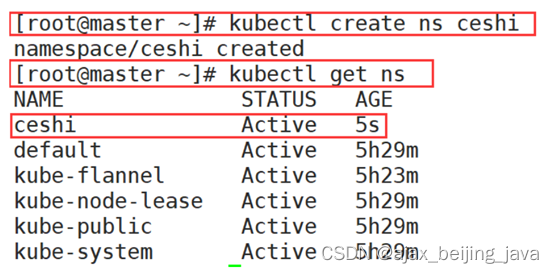
7、创建命名空间 :kubectl create ns app
[root@master ~]# kubectl create ns ceshi
namespace/ceshi created
8、删除命名空间:kubectl delete ns ceshi
[root@master ~]# kubectl delete ns ceshi
namespace "ceshi" deleted
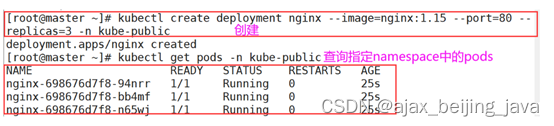
9、在命名空间kube-public创建无状态控制器deployment来启动pod,暴露80端口,副本集为3
在kube-public命名空间创建一个nginx
[root@master ~]# kubectl create deployment nginx --image=nginx:1.15 --port=80 --replicas=3 -n kube-public
[root@master ~]# kubectl create deployment nginx --image=nginx:1.15 --port=80 --replicas=3 -n kube-public
deployment.apps/nginx created
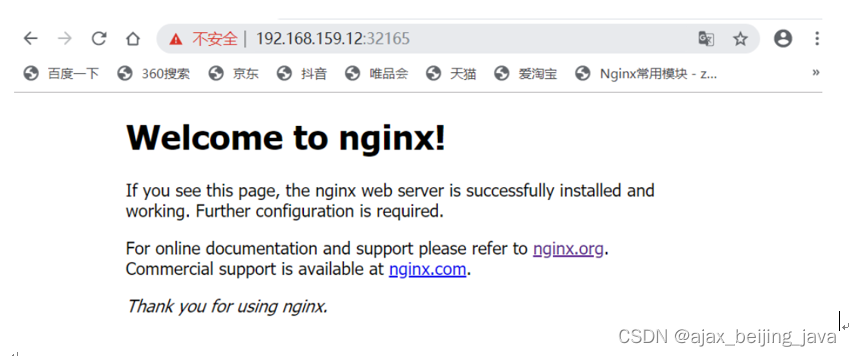
11、暴露发布pod中的服务供用户访问
[root@master ~]# kubectl expose deployment nginx --port=80 --target-port=80 --name=nginx-service --type=NodePort -n kube-public

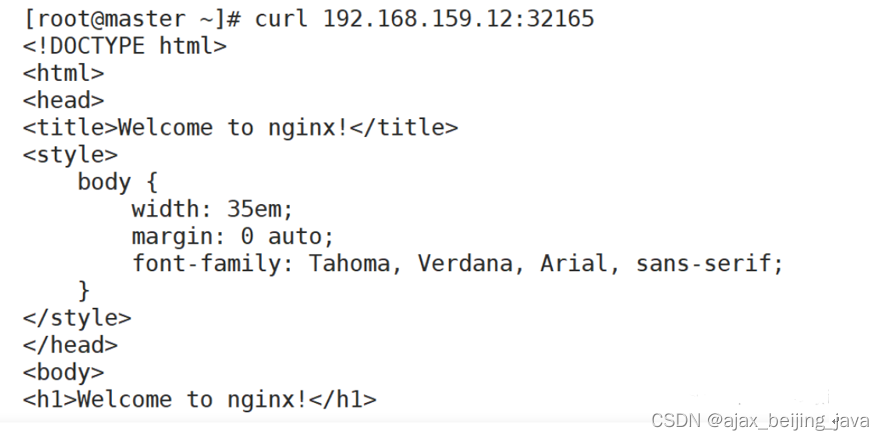
访问:
相关文章:
k8s 常用命令(三)
1、查看版本信息:kubectl version [rootmaster ~]# kubectl version [rootmaster ~]# kubectl version Client Version: version.Info{Major:"1", Minor:"21", GitVersion:"v1.21.3", GitCommit:"ca643a4d1f7bfe34773c74f7952…...
API 网关基础
目录 一、网关概述二、网关提供的功能三、常见网关系统3.1 Netflix Zuul3.2 Spring Cloud Gateway3.3 Kong3.4 APISIX3.5 Shenyu 一、网关概述 API网关是一个服务器,是系统的唯一入口。 从面向对象设计的角度看,它与外观模式类似。API网关封装了系统内部…...

【Linux】权限问题
Linux权限 一、Linux 权限的概念二、Linux 权限管理1. 文件访问者的分类2. 文件类型和访问权限(事物属性)3. 文件访问权限的相关设置方法 三、默认权限1. 对文件和目录进行操作需要的权限2. 文件和目录的默认权限3. 粘滞位 一、Linux 权限的概念 Linux …...
线性代数的学习和整理10:各种特殊类型的矩阵(草稿-----未完成 建设ing)
目录 1 图形化分类 1.1对称矩阵 1.2 梯形矩阵 1.3 三角矩阵 1.3.1 上三角矩阵 1.4 对角线矩阵 2 按各自功能分 2.1 等价矩阵 2.2 增广矩阵 2.3 伴随矩阵 2.4 正交矩阵 2.5 正交矩阵 2.6 相似矩阵 1 图形化分类 1.1对称矩阵 1.2 梯形矩阵 1.3 三角矩阵 1.3.1 上…...

Go 自学:变量、函数、结构体、接口、错误处理
1. 打印变量数据类型 package mainimport "fmt"func main() {penniesPerText : 2.0fmt.Printf("The type of penniesPerText is %T\n", penniesPerText) }输出为: The type of penniesPerText is float64 2. 同时给多个变量赋值 package mai…...
pyqt Pyton VTK 使用 滑块 改变 VTK Actor 颜色
使用 PyQt5 vtk vtk球体 使用滑块 RGB 改变 Actor 颜色 CODE import sys from PyQt5.QtWidgets import * from PyQt5.QtWidgets import (QApplication, QCheckBox, QGridLayout, QGroupBox,QMenu, QPushButton, QRadioButton, QVBoxLayout, QWidget, QSlider,QLineEdit,QLabe…...

春秋云镜 CVE-2019-16113
春秋云镜 CVE-2019-16113 Bludit目录穿越漏洞 靶标介绍 在Bludit<3.9.2的版本中,攻击者可以通过定制uuid值将文件上传到指定的路径,然后通过bl-kernel/ajax/upload-images.php远程执行任意代码。 启动场景 漏洞利用 exp https://github.com/Kenun…...

【JavaEE基础学习打卡06】JDBC之进阶学习PreparedStatement
目录 前言一、PreparedStatement是什么二、重点理解预编译三、PreparedStatement基本使用四、Statement和PreparedStatement比较1.PreparedStatement效率高2.PreparedStatement无需拼接参数3.PreparedStatement防止SQL注入 总结 前言 📜 本系列教程适用于JavaWeb初学…...

Postgresql12基于时间点恢复
1、环境 centos 7系统 postgresql 12 docker 20.10.6 2、整体思路 1)进行一个pgdata目录的全量备份 2)通过wal日志恢复到故障发生之前某个时间点 3、操作步骤 配置postgresql.conf文件 #日志级别 wal_level replica #归档开关 archive_mode on …...
【MySQL系列】Select语句单表查询详解(二)ORDERBY排序
💐 🌸 🌷 🍀 🌹 🌻 🌺 🍁 🍃 🍂 🌿 🍄🍝 🍛 🍤 📃个人主页 :阿然成长日记 …...

C++学习第十九天----简单文件输入/输出和今日工作问题
1.写入到文本文件中 cout用于控制台输出; 必须包含头文件iostream; 头文件iostream定义了一个用于处理输出的ostream类; 头文件iostream声明了一个名为cout的ostream变量(对象); 必须指明名称空间std&…...
基于风险的漏洞管理
基于风险的漏洞管理涉及对即将被利用的漏洞的分类响应,如果被利用,可能会导致严重后果。本文详细介绍了确定漏洞优先级时要考虑的关键风险因素,以及确保基于风险的漏洞管理成功的其他注意事项。 什么是基于风险的漏洞管理对基于风险的漏洞管…...

命令行——Git基本操作总结
介绍 我们的操作使用的是客户端TortoiseGit 操作的git ,实际上底层依旧是使用的命令行帮我们执行, 在早期 git 并没有窗口化工具,开发人员只能使用命令行模式 实际上,如果你掌握并熟练使用了命令行模式操作git 的话,你会发现某些操作命令行比窗口化操作要简单 所有你在工作中…...

验证评估守护关基安全 赛宁数字孪生靶场创新实践
近日,由赛宁网安主办,ISC互联网安全大会组委会协办的第十一届互联网安全大会(ISC 2023)安全运营实践论坛圆满结束。赛宁网安产品总监史崯出席并作出主题演讲:《基于数字孪生靶场如何开展验证评估》,同时…...

R语言09-R语言中的字符函数和分布相关函数
字符函数 paste() 和 paste0(): 将多个字符向量连接成一个字符串,paste0() 直接连接,而 paste() 可以通过 sep 参数指定分隔符。 vector1 <- c("Hello", "world") vector2 <- c("R", "programming") re…...
pnpm无法加载文件 (解决方法 )
现在要运行一个TS的项目,我的电脑上没有安装pnpm,导致我的vscode一直报错无法加载。 pnpm安装: npm install -g pnpm pnpm : 无法加载文件 pnpm : 无法加载文件 C:\Users\HP\AppData\Roaming\npm\pnpm.ps1,因为在此系统上禁止运…...
做一个蛋糕店小程序需要哪些步骤?
对于一些不懂技术的新手来说,创建蛋糕店小程序可能会感到有些困惑。但是,有了乔拓云平台的帮助,你可以轻松地创建自己的蛋糕店小程序。下面,我将为大家详细介绍一下具体的操作步骤。 首先,登录乔拓云平台并进入后台管理…...

Docker的革命:容器技术如何重塑软件部署之路
引言 在过去的几年中,容器技术已经从一个小众的概念发展成为软件开发和部署的主流方法。Docker,作为这一变革的先驱,已经深深地影响了我们如何构建、部署和运行应用程序。本文将探讨容器技术的起源,Docker如何崛起并改变了软件部…...
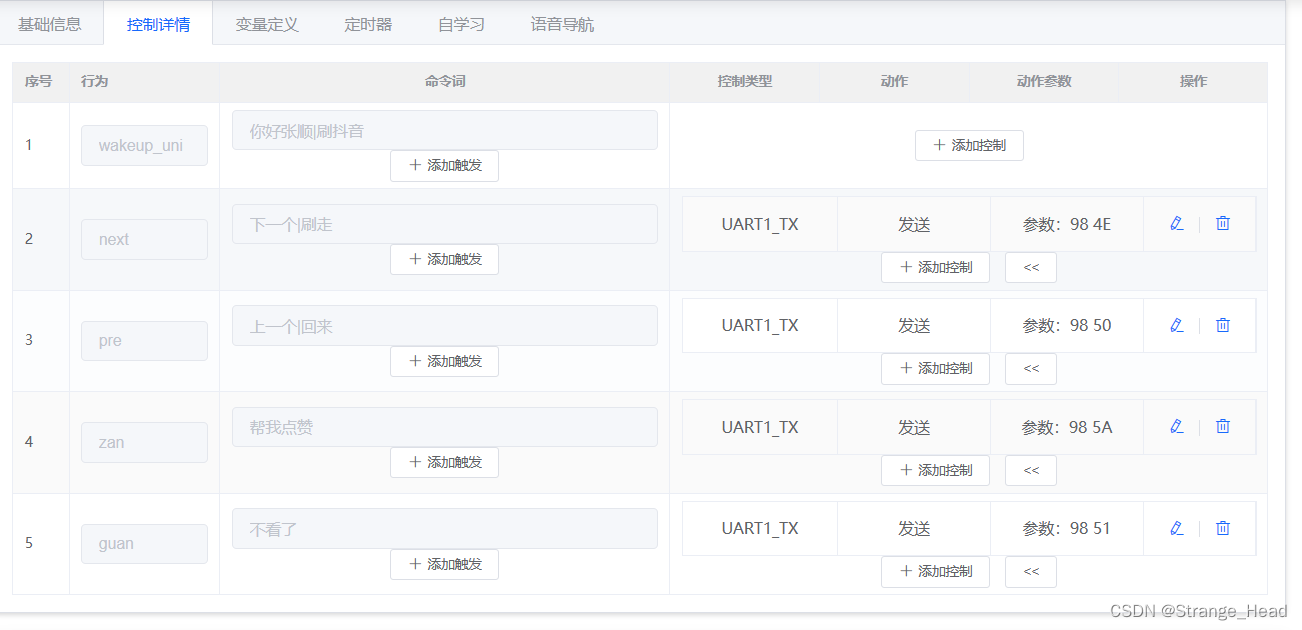
【ARM-Linux】项目,语音刷抖音项目
文章目录 所需器材装备操作SU-03T语音模块配置代码(没有用wiring库,自己实现串口通信)结束 所需器材 可以百度了解以下器材 orangepi-zero2全志开发板 su-03T语音识别模块 USB-TTL模块 一个安卓手机 一根可以传输的数据线 装备操作 安…...

Linux驱动开发:技术、实践与Linux的历史
一、引言 Linux,这个开源的操作系统,已经在全球范围内赢得了开发者和企业的广泛支持。它的强大之处在于其内核以及无数的驱动程序,这些驱动程序使得各种硬件设备可以在Linux操作系统上运行。本篇文章将深入探讨Linux驱动开发,包括…...
)
C++中函数对象之重载 operator()
如大家所熟悉的,重载 operator() 是 C 中一种特殊机制,允许类的对象像函数一样被调用。这种对象被称为 函数对象(functor) 或 仿函数。核心要点语法形式:在类中定义名为 operator() 的成员函数。调用…...

MySQL 8.3远程连接踩坑记:Navicat提示caching_sha2_password错误的完整修复流程
MySQL 8.3远程连接认证插件问题深度解析与实战修复指南 1. 问题现象与背景分析 那天下午,当我正尝试用Navicat Premium 16连接新部署的MySQL 8.3数据库时,屏幕上突然弹出的红色错误框让我的咖啡杯悬在了半空: Authentication plugin caching_…...

顶伯在线语音工具背后的技术力量:AI语音合成与深度学习解析
顶伯在线语音工具背后的技术力量在人工智能浪潮中,语音交互正成为人机沟通的核心方式。顶伯作为行业领先的在线语音工具,凭借自主研发的深度学习架构,将文字转化为高度自然的语音,广泛应用于有声阅读、智能客服、教育辅助等领域。…...

从1秒到60ms:手把手教你用STM32硬件SPI驱动GC9A01 LCD,性能飙升实战
从1秒到60ms:STM32硬件SPI驱动GC9A01 LCD的性能优化实战 当你在嵌入式项目中遇到屏幕刷新缓慢的问题时,那种卡顿感简直让人抓狂。想象一下,你刚拿到一块1.28寸的GC9A01 LCD屏幕,满心欢喜地准备展示你的项目成果,却发现…...

光学萌新看过来:用Lighttools 8.4.0配合Solidworks做光机设计,第一步安装和环境配置怎么做?
光学与机械协同设计:Lighttools 8.4.0与Solidworks环境配置全指南 在光机一体化设计领域,光学仿真软件与机械建模工具的协同工作已成为行业标配。对于刚接触光学设计的机械工程师,或是需要将光学分析融入机械设计流程的团队而言,掌…...

加密货币社区 Google 官方邮件钓鱼威胁机理与防御体系研究
摘要 2026 年 5 月,加密货币社区出现依托 Google 官方邮件通道实施的高级钓鱼攻击,比特币开发者 Jameson Lopp 公开预警,该攻击通过伪装系统安全提示、篡改发件人显示名、滥用可信邮件基础设施,使传统安全告警失效,对新…...

前端开发从入门到精通:Vue3+TypeScript实战教程
一、为什么软件测试从业者要学Vue3TypeScript在软件测试领域,尤其是自动化测试和性能测试方向,懂前端开发技术早已不是加分项,而是必备技能。作为测试从业者,掌握Vue3TypeScript能为你的职业发展带来多重优势:…...

NVDC充电器设计实战:从架构解析到动态负载响应的工程挑战
1. 项目概述:为什么NVDC充电器设计是个技术活最近在做一个项目,需要为一批采用NVDC(Narrow Voltage DC)架构的笔记本电脑设计配套的充电器。本以为就是个普通的电源适配器,照着规格书选型、画板、调试就完事了…...

OpenWrt自动化神器:用luci-app-nettask插件,把物理按键和断网都变成触发器
OpenWrt自动化神器:用luci-app-nettask插件解锁硬件触发潜能 你是否曾想过,家里那台默默工作的路由器,除了提供Wi-Fi信号外,还能成为智能家居的中枢神经?当网络突然中断时,它能自动重连并发送通知ÿ…...

别再让你的Qt界面有锯齿了!手把手教你用QPainter的Antialiasing和HighQualityAntialiasing
Qt图形渲染优化实战:抗锯齿原理与性能调优指南 在开发需要精细图形展示的Qt应用时,开发者常会遇到一个棘手问题——图形边缘的锯齿现象。无论是仪表盘上的指针、数据可视化中的曲线,还是自定义控件的圆角边框,锯齿都会严重影响视觉…...