
CIM和websockt-实现实时消息通信:双人聊天和消息列表展示
欢迎大佬的来访,给大佬奉茶

一、文章背景
有一个业务需求是:实现一个聊天室,我和对方可以聊天;以及有一个消息列表展示我和对方(多个人)的聊天信息和及时接收到对方发来的消息并展示在列表上。
项目框架概述:后端使用SpringCloud Alibaba+mybatis-plus;前端是uniapp框架的微信小程序。
文章目录
- 欢迎大佬的来访,给大佬奉茶
- 一、文章背景
- 二、实现思路
- 可以使用什么实现?
- 使用CIM+websockt实现的优点是什么?
- CIM是什么?
- 业务的实现思路
- 三、数据库中涉及的表
- 四、业务UML图
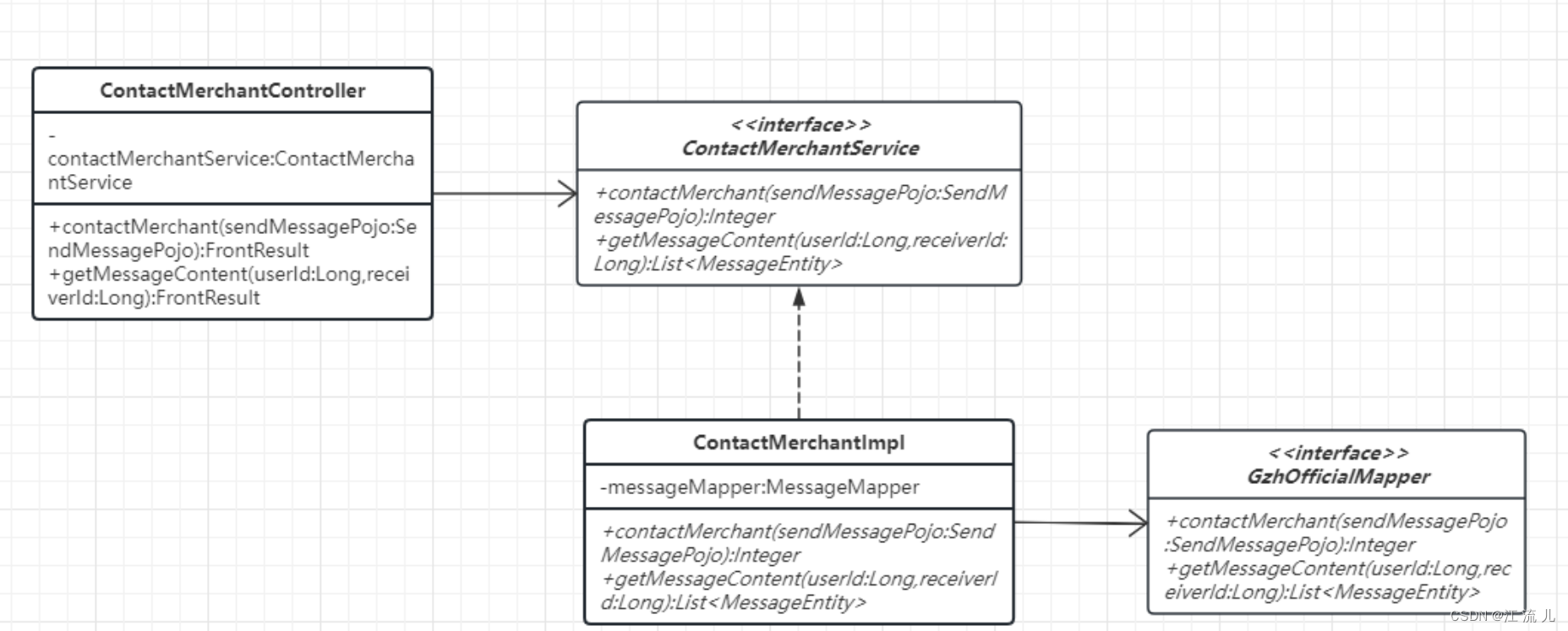
- 双人聊天类图+NS图
- 消息列表展示类图+NS图
- 五、业务代码
- 后端代码
- bootstrap配置文件(配置模块信息、中间件配置信息等)
- nacos配置
- controller层
- service接口
- service实现层
- mapper接口
- mapper.xml
- 前端代码
- 双人聊天
- 聊天列表
- 配置文件(JS后缀)
- 需要注意的点
- 待优化点:持续更新中
- 五、配置CIM
- CIM的数据结构
- 六、消息业务还可以使用什么技术
- 七、总结
二、实现思路
可以使用什么实现?
1、最低效的方法:单纯使用数据库去存储发送的消息,在对方端一直去请求数据库的数据:频繁网络请求和IO请求;不可取!
2、使用websockt建立二者的连接,通过websockt服务器去进行消息的实时发送和接收,下面会详细说明。
3、使用Comet(长轮询):通过HTTP长连接(如Ajax),服务器可以实时向客户端推送消息,客户端再将消息显示出来。
使用CIM+websockt实现的优点是什么?
CIM是什么?
CIM是一套完善的消息推送框架,可应用于信令推送,即时聊天,移动设备指令推送等领域。开发者可沉浸于业务开发,不用关心消息通道链接,消息编解码协议等繁杂处理。CIM仅提供了消息推送核心功能,和各个客户端的集成示例,并无任何业务功能,需要使用者自行在此基础上做自己的业务
CIM项目的分享:CIM项目分享
业务的实现思路
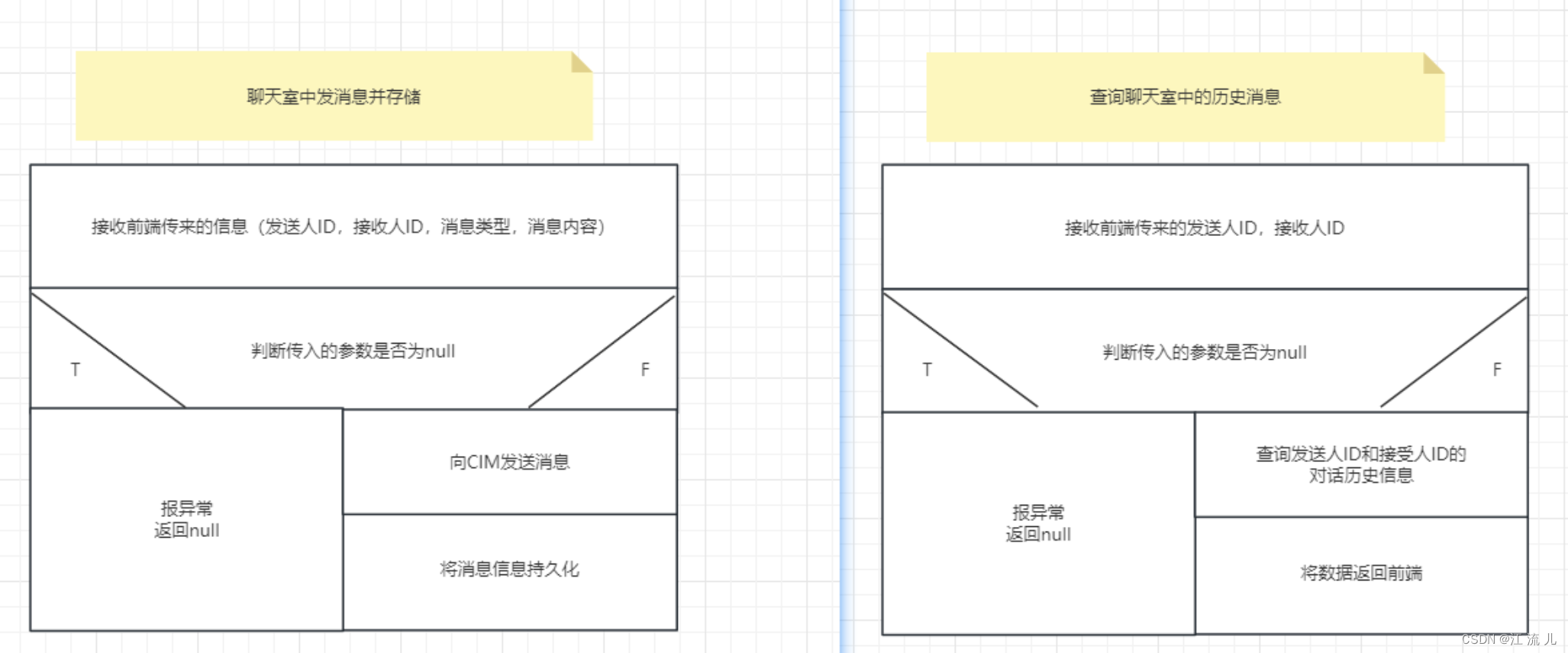
双人聊天:需要两个人能实时对话并且展示我和对方的头像及消息分布在屏幕两侧;已经有历史消息的需要在一进入页面时就将历史消息进行展示;
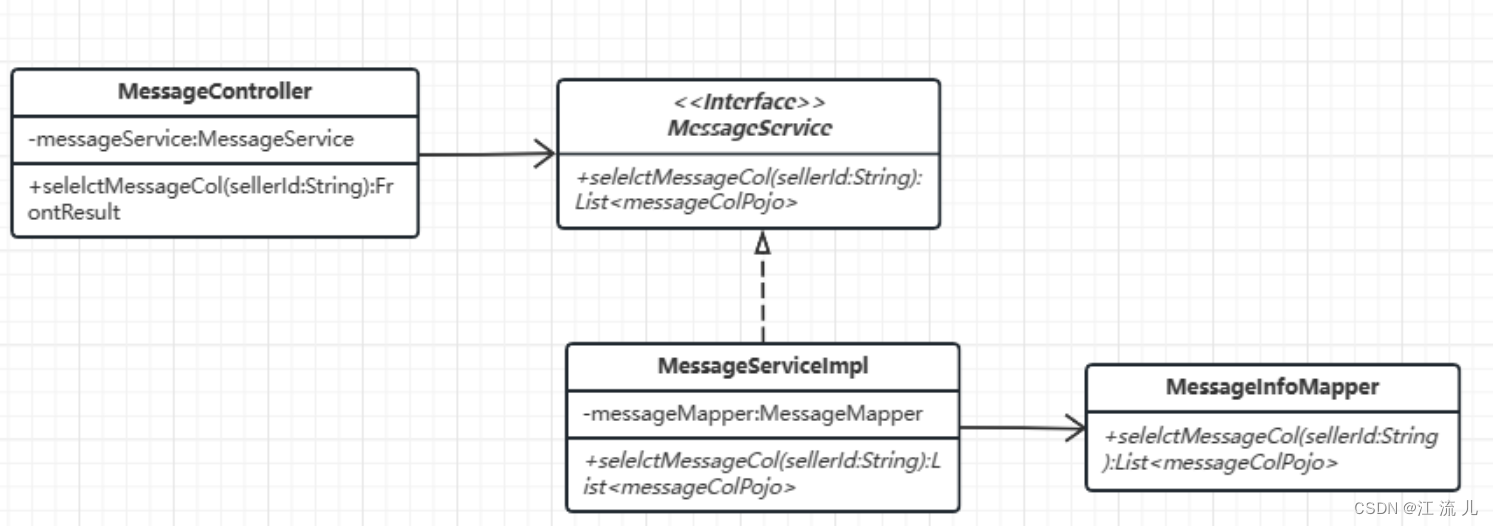
消息列表展示:需要及时接收到其他人给我发的消息并且展示的是最新的一条消息。
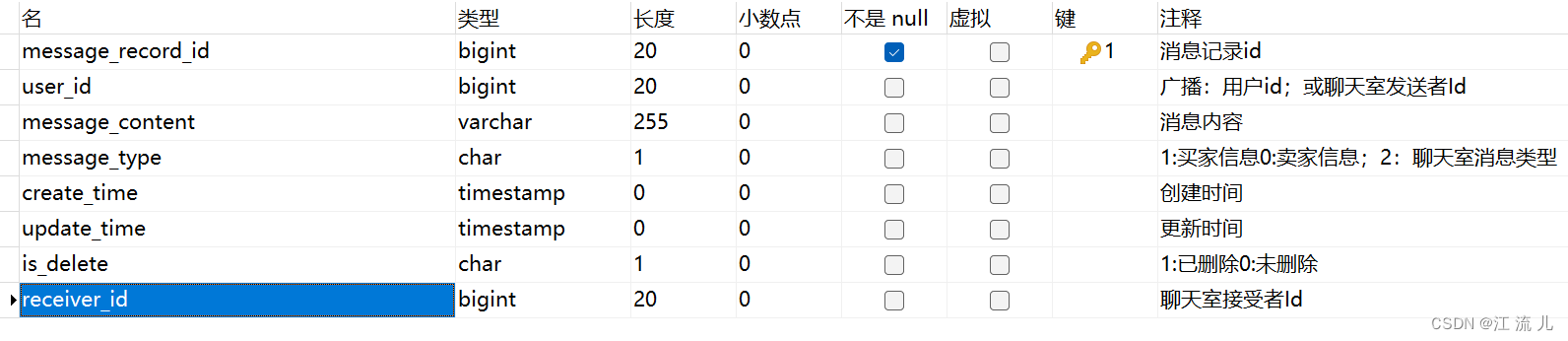
三、数据库中涉及的表
四、业务UML图
双人聊天类图+NS图
持久化消息数据到mysql数据库中
消息列表展示类图+NS图
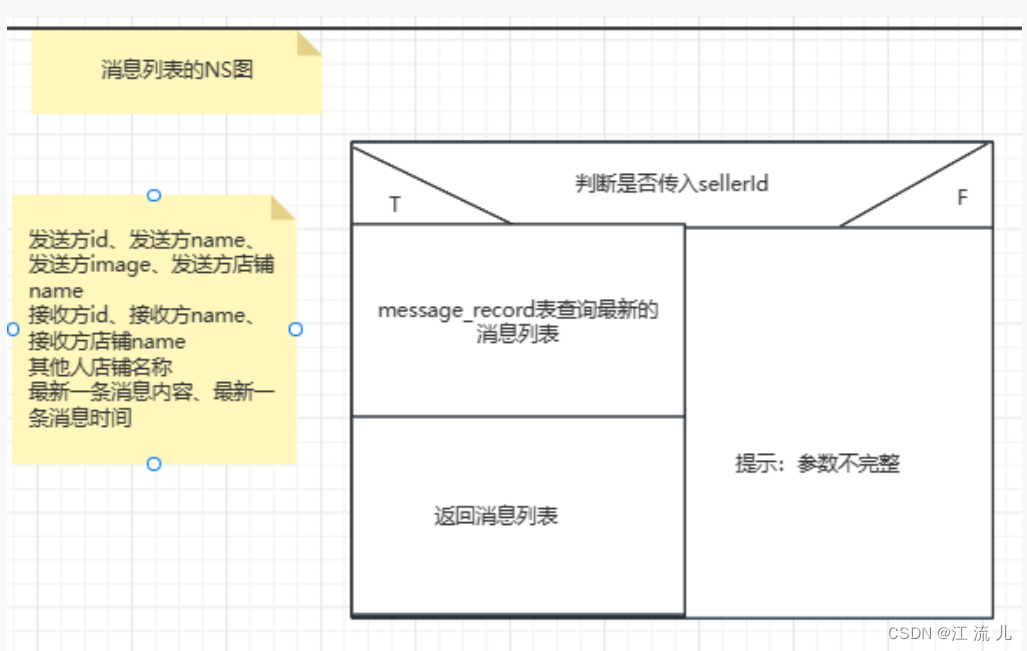
五、业务代码
后端代码
bootstrap配置文件(配置模块信息、中间件配置信息等)
格式一定要正确
server:port: 6644servlet:context-path: /message
spring:application:name: prosper-messageprofiles:active: localcloud:nacos:config:server-addr: 你的IP地址:8848 #nacos地址namespace: 你的命名空间名称file-extension: yamlextension-configs:- data-id: 你的common模块配置名称(我将数据库等公共性配置抽到了common模块中)refresh: true
nacos配置
#cim接口地址
cimUrl: http://cim.tfjy.tech:9000/api/message/sendAll
cimContactMerchantUrl: http://cim.tfjy.tech:9000/api/message/send
controller层
package com.tfjybj.controller;import com.alibaba.nacos.common.model.core.IResultCode;
import com.tfjybj.entity.MessageEntity;
import com.tfjybj.exception.FrontResult;
import com.tfjybj.exception.codeEnum.ResultCodeEnum;
import com.tfjybj.exception.codeEnum.ResultMsgEnum;
import com.tfjybj.pojo.MessageListPojo;
import com.tfjybj.pojo.SendMessagePojo;
import com.tfjybj.service.ContactMerchantService;
import io.swagger.annotations.Api;
import io.swagger.annotations.ApiOperation;
import org.springframework.beans.factory.annotation.Autowired;
import org.springframework.web.bind.annotation.*;import java.util.List;
import java.util.Objects;@Api(tags = "联系商家")
@RestController
@RequestMapping("/Business")
public class ContactMerchantController {@Autowiredprivate ContactMerchantService contactMerchantService;@ApiOperation(value = "商家发消息")@PostMapping("/contactMerchant")public FrontResult contactMerchant(@RequestBody SendMessagePojo sendMessagePojo){boolean result= contactMerchantService.sendMessage(sendMessagePojo);if (result=true){return FrontResult.build(ResultCodeEnum.SUCCESS.getCode(), ResultMsgEnum.FIND_SUCCESS.getMsg(), result);}return FrontResult.build(ResultCodeEnum.FAIL.getCode(), ResultMsgEnum.FIND_FAIL.getMsg(), null);}/*** @Description:  通过发送者UserId和接受者receiverId按照时间倒序查询聊天室消息* @param: Long userId,Long receiverId* @return: List<MessageEntity>**/@ApiOperation(value = "查询聊天室中的消息")@GetMapping("/getMessageContent")public FrontResult getMessageContent( Long userId, Long receiverId){List<MessageEntity> messageEntities= contactMerchantService.getMessagesByUserIdAndReceiverId(userId,receiverId);if (Objects.isNull(messageEntities)){return FrontResult.build(ResultCodeEnum.FAIL.getCode(), ResultMsgEnum.FIND_FAIL.getMsg(), null);}else {return FrontResult.build(ResultCodeEnum.SUCCESS.getCode(), ResultMsgEnum.FIND_SUCCESS.getMsg(), messageEntities);}}
/** @Description:根据sellerId查询与该买家进行过聊天的所有人的最后一条消息
*/@ApiOperation(value = "根据sellerId查询与该买家进行过聊天的所有人的最后一条消息")@GetMapping("/getMessageListByUserId")public FrontResult getMessageListByUserId( Long userId){List<MessageListPojo> messageEntities= contactMerchantService.getMessageListByUserId(userId);if (Objects.isNull(messageEntities)){return FrontResult.build(ResultCodeEnum.FAIL.getCode(), ResultMsgEnum.FIND_SUCCESS.getMsg(), "暂无数据");}return FrontResult.build(ResultCodeEnum.SUCCESS.getCode(), ResultMsgEnum.FIND_SUCCESS.getMsg(), messageEntities);}}
service接口
package com.tfjybj.service;import com.tfjybj.entity.MessageEntity;
import com.tfjybj.pojo.MessageListPojo;
import com.tfjybj.pojo.SendMessagePojo;
import io.swagger.models.auth.In;import java.util.List;public interface ContactMerchantService {boolean sendMessage(SendMessagePojo sendMessagePojo);List<MessageEntity> getMessagesByUserIdAndReceiverId(Long userId, Long receiverId);List<MessageListPojo> getMessageListByUserId(Long userId);
}
service实现层
package com.tfjybj.service.impl;import com.alibaba.fastjson.JSONObject;
import com.tfjybj.entity.MessageEntity;
import com.tfjybj.mapper.MessageMapper;
import com.tfjybj.pojo.MessageListPojo;
import com.tfjybj.pojo.SendMessagePojo;
import com.tfjybj.pojo.UserShopInfoPojo;
import com.tfjybj.service.ContactMerchantService;
import com.tfjybj.service.UserShopRoleService;
import lombok.extern.log4j.Log4j2;
import net.sf.jsqlparser.expression.LongValue;
import org.springframework.beans.factory.annotation.Autowired;
import org.springframework.beans.factory.annotation.Value;
import org.springframework.core.env.Environment;
import org.springframework.stereotype.Service;
import org.springframework.web.client.RestTemplate;
import com.tfjybj.utils.*;import javax.annotation.Resource;
import java.nio.charset.StandardCharsets;
import java.text.MessageFormat;
import java.util.*;import static com.tfjybj.utils.CommonAttribute.ZERO_INT;@Log4j2
@Service
public class ContactMerchantImpl implements ContactMerchantService {@Autowiredprivate RestTemplate restTemplate;@Resourceprivate MessageMapper messageMapper;@Resourceprivate UserShopRoleService userShopRoleService;@Value("${cimContactMerchantUrl}")private String cimContactMerchantUrl;/*** @description: 联系商家,发消息**/@Overridepublic boolean sendMessage(SendMessagePojo sendMessagePojo) {try{if(Objects.isNull(sendMessagePojo)) {log.error("异常,原因是:在聊天室发消息功能中的sendMessage()中参数有null值");return false;}else {String action=sendMessagePojo.getAction();Long receiver=sendMessagePojo.getReceiver();Long sender=sendMessagePojo.getSender();String content=sendMessagePojo.getContent();MessageEntity messageEntity = new MessageEntity();messageEntity.setMessageContent(content);messageEntity.setUserId(sender);messageEntity.setMessageType(action);messageEntity.setReceiverId(receiver);messageEntity.setMessageRecordId((new SnowFlakeGenerateIdWorker(ZERO_INT,ZERO_INT).nextId()));// 添加聊天室信息记录String url = cimContactMerchantUrl + "?action=" + action + "&content=" + content + "&receiver=" + receiver + "&sender=" + sender;String response = restTemplate.postForObject(url, null, String.class);Integer result = messageMapper.insertContactMerchant(messageEntity);if (result>0){return true;}return false;}}catch (Exception e){log.error("异常,原因是:", e);return false;}}/*** @Description:  通过发送者UserId和接受者receiverId按照时间倒序查询聊天室消息* @param: Long userId,Long receiverId* @return: List<MessageEntity>**/@Overridepublic List<MessageEntity> getMessagesByUserIdAndReceiverId(Long userId, Long receiverId) {try{if (null!=userId && null!=receiverId){return messageMapper.selectMessageContent(userId, receiverId);}}catch (Exception e){log.error("异常,原因是:", e);return null;}return null;}//@Description:要根据前端传递的sellerId查询与该卖家进行过聊天的所有人的最后一条消息@Overridepublic List<MessageListPojo> getMessageListByUserId(Long userId){//查询最新一条消息内容,包括receiverId、userId、content、createTImeList<MessageListPojo> messageEntities = messageMapper.selectLatestMessages(userId);Set<Long> setUserId = new HashSet<>(); //声明一个set,放置receiverId和userId,用set集合进行去重for (MessageListPojo messageEntity:messageEntities) { // 遍历查询出来的内容,将每条信息的receiverId和userId放到set集合中setUserId.add(messageEntity.getSenderId());setUserId.add(messageEntity.getReceiverId());}List<Long> userIdList = new ArrayList<>(setUserId);//用所有的userId查询对应的店铺名称、店铺头像和个人姓名List<UserShopInfoPojo> userShopInfoPojos = userShopRoleService.queryMessageContent(userIdList);messageEntities.forEach(messageEntity -> {userShopInfoPojos.stream().filter(userShopInfoPojo -> userShopInfoPojo.getUserId().equals(messageEntity.getSenderId())).findFirst().ifPresent(userShopInfoPojo -> {messageEntity.setSenderShopName(userShopInfoPojo.getShopName());messageEntity.setSenderPicture(userShopInfoPojo.getShopPicture());messageEntity.setSenderName(userShopInfoPojo.getUserName());});userShopInfoPojos.stream().filter(userShopInfoPojo -> userShopInfoPojo.getUserId().equals(messageEntity.getReceiverId())).findFirst().ifPresent(userShopInfoPojo -> {messageEntity.setReceiverShopName(userShopInfoPojo.getShopName());messageEntity.setReceiverPicture(userShopInfoPojo.getShopPicture());messageEntity.setReceiverName(userShopInfoPojo.getUserName());});});return messageEntities;}
}
mapper接口
package com.tfjybj.mapper;import com.baomidou.mybatisplus.mapper.BaseMapper;
import com.tfjybj.entity.MessageEntity;
import com.tfjybj.pojo.MessageListPojo;import java.util.List;public interface MessageMapper extends BaseMapper<MessageEntity> {List<MessageEntity> queryMapMessageByDate(String messageType);Integer insertContactMerchant(MessageEntity messageEntity);List<MessageEntity> selectMessageContent(Long userId,Long receiverId);List<MessageListPojo> selectLatestMessages(Long sellerId);
}
mapper.xml
<?xml version="1.0" encoding="UTF-8"?>
<!DOCTYPE mapper PUBLIC "-//mybatis.org//DTD Mapper 3.0//EN" "http://mybatis.org/dtd/mybatis-3-mapper.dtd">
<mapper namespace="com.tfjybj.mapper.MessageMapper"><resultMap type="com.tfjybj.entity.MessageEntity" id="ProsperMessageRecordMap"><result property="messageRecordId" column="message_record_id" jdbcType="INTEGER"/><result property="userId" column="user_id" jdbcType="INTEGER"/><result property="messageContent" column="message_content" jdbcType="VARCHAR"/><result property="messageType" column="message_type" jdbcType="VARCHAR"/><result property="createTime" column="create_time" jdbcType="TIMESTAMP"/><result property="updateTime" column="update_time" jdbcType="TIMESTAMP"/><result property="isDelete" column="is_delete" jdbcType="VARCHAR"/><result property="receiverId" column="receiver_id" jdbcType="INTEGER"/></resultMap><!--通过主键修改数据--><update id="update">update prosper_message_record<set><if test="userId != null">user_id = #{userId},</if><if test="messageContent != null and messageContent != ''">message_content = #{messageContent},</if><if test="messageType != null and messageType != ''">message_type = #{messageType},</if><if test="createTime != null">create_time = #{createTime},</if><if test="updateTime != null">update_time = #{updateTime},</if><if test="isDelete != null and isDelete != ''">is_delete = #{isDelete},</if></set>where message_record_id = #{messageRecordId}</update><!--通过主键删除--><delete id="deleteById">delete from prosper_message_record where message_record_id = #{messageRecordId}</delete><insert id="insertContactMerchant">insert into prosper_message_record(message_record_id,user_id, message_content, message_type,receiver_id)values (#{messageRecordId},#{userId}, #{messageContent}, #{messageType},#{receiverId})</insert><!--通过发送者UserId和接受者receiverId按照时间正序查询聊天室消息--><select id="selectMessageContent" resultMap="ProsperMessageRecordMap">SELECT  m.user_id, m.receiver_id,  m.create_time, m.message_contentFROM prosper_message_record mWHERE (m.user_id = #{userId} AND m.receiver_id = #{receiverId}) OR (m.receiver_id = #{userId} AND m.user_id = #{receiverId})AND m.is_delete = 0AND m.message_type = 2ORDER BY m.create_time</select><!--  要根据前端传递的sellerId查询与该卖家进行过聊天的所有人的最后一条消息  --><select id="selectLatestMessages" resultType="com.tfjybj.pojo.MessageListPojo">SELECT m.user_id as senderId, m.receiver_id as receiverId, m.message_content as content, m.create_time as createTimeFROM prosper_message_record mWHERE m.create_time IN (SELECT MAX(create_time)FROM prosper_message_recordWHERE user_id = #{sellerId} OR receiver_id = #{sellerId}GROUP BY CASEWHEN user_id = #{sellerId} THEN receiver_idWHEN receiver_id = #{sellerId} THEN user_idEND)AND message_type = 2 AND is_delete = 0ORDER BY m.create_time DESC</select>
</mapper>
代码具体的编写还是要根据自己的业务来实现,如有对这个需求和展示代码有疑惑的,欢迎各位大佬前来指导交流。
前端代码
代码使用uniapp框架编写的,并且是微信小程序的项目。
下面的代码是vue文件哈
双人聊天
<template><view class="content"><scroll-view :style="{ height: `${windowHeight - inputHeight}rpx` }" :scroll-top="scrollTop"class="scroll-container" id="scrollview" scroll-y><view id="msglistview" class="chat-body"><!-- 聊天 --><view v-for="(item, idx) in chatList" :key="idx" :value="fileList":class="item.isself ? 'chatself' : 'chatother'"><!-- 如果个人头像不为空且是自己发送的消息,则显示自己个人中心的头像 --><image v-if="personalAvatar != '' && shopid != '' && item.isself" :src="item.sellerPicture"style="width: 80rpx;height: 80rpx;margin-left: 20rpx;"></image><!-- 否则,如果是自己发送的消息,显示默认头像 --><image v-else-if="item.isself" src="/static/user2.png"style="width: 80rpx;height: 80rpx;margin-left: 20rpx;"></image><!-- 否则,如果对方头像不为空且不是自己发送的消息,则显示对方个人中心的头像 --><image v-else-if="otherAvatar != '' && shopid != '' && !item.isself" :src="otherAvatar"style="width: 80rpx;height: 80rpx;margin-right: 20rpx;"></image><!-- 否则,如果不是自己发送的信息,则对方显示默认头像 --><image v-else src="/static/user1.png" style="width: 80rpx;height: 80rpx;margin-right: 20rpx;"></image><!-- 根据消息发送者是自己还是对方,应用不同的样式 --><view class="showStyle" :class="item.isself ? 'chatbgvS' : 'chatbgvO'">{{ item.msg }}</view></view></view></scroll-view><!-- input --><!-- <view class="chatinput">发送的图片按钮<image src="@/static/image.png" style="width:50rpx;height:50rpx;margin: 0rpx 20rpx;"></image><uni-easyinput class="inputtext" autoHeight v-model="contentValue" placeholder="请输入内容"></uni-easyinput>发送表情包的图片按钮 <image src="@/static/smile.png" style="width:50rpx;height:50rpx;margin:0rpx 20rpx;"></image></view> --><view class="chat-bottom" :style="{ height: `${inputHeight}rpx` }"><view class="send-msg" :style="{ bottom: `${keyboardHeight}rpx` }"><view class="uni-textarea"><textarea v-model="contentValue" maxlength="255" confirm-type="send" @confirm="sendMsg()":show-confirm-bar="false" :adjust-position="false" @linechange="sendHeight" @focus="focus"@blur="blur" auto-height></textarea></view><button @click="sendMsg()" class="send-btn">发送</button></view></view></view>
</template><script>
import { querySelInfoBySelIdBySelAliId, selectSellerShopInfo } from '@/api/seller/index.js';
import { sendMessage, historicalChatRecords } from "../../../api/message/index.js";
import { generateUUID, getTimeStamp } from "@/api/message/webSocket.js";
import {webSocketUrl
} from '@/request/config.js'
import { ZEROZEROZEROZERO_STRING } from '../../../utils/constant.js';
export default {data() {return {//键盘高度keyboardHeight: 0,//底部消息发送高度bottomHeight: 0,//滚动距离scrollTop: 0,contentValue: "",//聊天内容chatList: [],//商家买家发信息的数据对象data: {action: "2",//聊天室的标识content: "",receiver: "",sender: ""},customerId: "",//买家idoperatorId: "",//卖家idpersonalAvatar: "",//个人头像otherAvatar: "",//对方头像fileList: [], //商家头像};},computed: {windowHeight() {return this.rpxTopx(uni.getSystemInfoSync().windowHeight)},// 键盘弹起来的高度+发送框高度inputHeight() {return this.bottomHeight + this.keyboardHeight}},updated() {//页面更新时调用聊天消息定位到最底部this.scrollToBottom();},//关闭当前页面时断开连接onHide() {uni.closeSocket({success: () => {console.log('WebSocket连接关闭成功!');}})},//当开打页面的时候进行websocket连接onShow() {const sellerId = uni.getStorageSync("sellerId");var socketTask = uni.connectSocket({url: webSocketUrl, //仅为示例,并非真实接口地址。success: () => { }});//相当于进行cim的登录socketTask.onOpen(function (res) {//从本地获取sellerIdconst content = {"key": "client_bind","timestamp": getTimeStamp(),"data": {"uid": sellerId,"appVersion": "1.0.0","channel": "web","packageName": "com.farsunset.cim","deviceId": generateUUID(),"deviceName": "Chrome"}}let data = {};data.type = 3;data.content = JSON.stringify(content);socketTask.send({data: JSON.stringify(data),success: () => {console.log('发送消息成功!');},complete: () => {console.log('发送消息完成!');}});});//接收消息socketTask.onMessage(async (message) => {const object = JSON.parse(message.data);if (object.type == 1) {console.log("给服务端发送PONG");//给服务端发送ponglet pongData = {};pongData.type = 1;pongData.content = "PONG";socketTask.send({data: JSON.stringify(pongData),success: () => {console.log('PONG消息成功!');},});return;}//获取对方的消息内容if (JSON.parse(object.content).content != undefined) {//如果自己给自己发消息,消息页面左边部分不显示内容if (this.operatorId != this.customerId) {const newMsgReceiver = {isself: false,msg: JSON.parse(object.content).content}this.chatList.push(newMsgReceiver);} else {// 更新头像渲染await this.getOtherAvatar();}}});socketTask.onError((res) => {console.log('WebSocket连接打开失败,请检查!');});},onLoad(options) {this.customerId = options.customId;this.operatorId = options.operatorId;this.queryHistoricalChatRecords();//查询历史聊天记录uni.offKeyboardHeightChange()//用UniApp的uni.onKeyboardHeightChange方法来监听键盘高度的变化,并在键盘高度变化时执行相应的逻辑。uni.onKeyboardHeightChange(res => {this.keyboardHeight = this.rpxTopx(res.height - 30)if (this.keyboardHeight < 0) this.keyboardHeight = 0;})},mounted() {this.getShopIdByUserId();//获取自己的个人中心头像this.getPersonalAvatar();//获取对方的个人中心头像this.getOtherAvatar();},methods: {focus() {this.scrollToBottom()},blur() {this.scrollToBottom()},// 监视聊天发送栏高度sendHeight() {setTimeout(() => {let query = uni.createSelectorQuery();query.select('.send-msg').boundingClientRect()query.exec(res => {this.bottomHeight = this.rpxTopx(res[0].height)})}, 10)},// px转换成rpxrpxTopx(px) {let deviceWidth = wx.getSystemInfoSync().windowWidthlet rpx = (750 / deviceWidth) * Number(px)return Math.floor(rpx)},// 滚动至聊天底部scrollToBottom(e) {setTimeout(() => {let query = uni.createSelectorQuery().in(this);query.select('#scrollview').boundingClientRect();query.select('#msglistview').boundingClientRect();query.exec((res) => {if (res[1].height > res[0].height) {this.scrollTop = this.rpxTopx(res[1].height - res[0].height)}})}, 15)},//发送消息async sendMsg() {if (uni.getStorageSync("sellerId") == this.operatorId) {this.data.receiver = this.customerIdthis.data.sender = this.operatorId} else {this.data.receiver = this.operatorIdthis.data.sender = this.customerId}if (this.data.receiver == this.data.sender) {}this.data.content = this.contentValue.trim(); //去除首尾空格const regex = /^[\s\n]*$/; // 匹配不包含空格和回车的文本if (regex.test(this.data.content)) {uni.showToast({title: '请输入有效文本',icon: 'none'});} else {// 进行提交操作await sendMessage(this.data);const newMsgSend = {isself: true,msg: this.contentValue}this.chatList.push(newMsgSend)this.contentValue = ""// 更新头像渲染await this.getPersonalAvatar();}},//查询历史聊天记录async queryHistoricalChatRecords() {const { code, data } = await historicalChatRecords(this.customerId, this.operatorId)for (let i = 0; i < data.length; i++) {if (data[i].userId == uni.getStorageSync("sellerId")) {const myChat = {isself: true,msg: data[i].messageContent,}this.chatList.push(myChat)} else {const otherChat = {isself: false,msg: data[i].messageContent,}this.chatList.push(otherChat)}}},//获取用户的shopIdasync getShopIdByUserId() {this.userId = JSON.parse(uni.getStorageSync('sellerId'))const { code, data } = await selectSellerShopInfo(this.userId)if (ZEROZEROZEROZERO_STRING == code && this.userId != null) {this.shopid = data[0];uni.setStorageSync('shopId', this.shopid)this.getPersonalAvatar();}else {this.chatList.forEach(item => {item.sellerPicture = item.isself ? "/static/user2.png" : "/static/user1.png";});}},//获取对方的个人中心头像async getOtherAvatar() {const { code, data } = await querySelInfoBySelIdBySelAliId(this.operatorId);this.otherAvatar = data.sellerPicture;},//获取个人中心的头像async getPersonalAvatar() {this.sellerId = uni.getStorageSync('sellerId')const { code, data } = await querySelInfoBySelIdBySelAliId(this.customerId);this.personalAvatar = data.sellerPictureif (ZEROZEROZEROZERO_STRING == code) {//将data对象中的sellerPicture属性值添加到this.fileList数组中this.fileList.push({ url: data.sellerPicture });// 遍历this.chatList数组中的每个item对象this.chatList.forEach(item => {// 如果item对象的isself属性为true,并且this.sellerId等于this.customerIdif (item.isself && this.sellerId == this.customerId) {// 将this.personalAvatar赋给item对象的sellerPicture属性,显示自己个人中心的头像item.sellerPicture = this.personalAvatar;} else {// 将this.otherAvatar赋给item对象的sellerPicture属性,显示对方个人中心的头像item.sellerPicture = this.otherAvatar;}});}}}
}
</script><style lang="scss" scoped>
$sendBtnbgc: #4F7DF5;
$chatContentbgc: #C2DCFF;.showStyle{flex-wrap: wrap;display:flex
}
.scroll-container {::-webkit-scrollbar {display: none;width: 0 !important;height: 0 !important;-webkit-appearance: none;background: transparent;color: transparent;}
}.uni-textarea {padding-bottom: 70rpx;textarea {width: 537rpx;min-height: 75rpx;max-height: 500rpx;background: #FFFFFF;border-radius: 8rpx;font-size: 32rpx;font-family: PingFang SC;color: #333333;line-height: 43rpx;padding: 5rpx 8rpx;}
}.send-btn {display: flex;align-items: center;justify-content: center;margin-bottom: 70rpx;margin-left: 25rpx;width: 128rpx;height: 75rpx;background: $sendBtnbgc;border-radius: 8rpx;font-size: 28rpx;font-family: PingFang SC;font-weight: 500;color: #FFFFFF;line-height: 28rpx;
}.chat-bottom {width: 100%;height: 177rpx;background: #F4F5F7;transition: all 0.1s ease;
}.send-msg {display: flex;align-items: flex-end;padding: 16rpx 30rpx;width: 100%;min-height: 177rpx;position: fixed;bottom: 0;background: #EDEDED;transition: all 0.1s ease;
}.content {height: 100%;position: fixed;width: 100%;height: 100%;// background-color: #0F0F27;overflow: scroll;word-break: break-all;.chat-body {display: flex;flex-direction: column;padding-top: 23rpx;.self {justify-content: flex-end;}.item {display: flex;padding: 23rpx 30rpx;}}.chatself {display: flex;flex-direction: row-reverse;// align-items: center;// height: 120rpx;width: 90%;margin-left: 5%;// background-color: #007AFF;margin-top: 20rpx;margin-bottom: 10rpx;}.chatother {display: flex;// align-items: center;// height: 120rpx;width: 90%;margin-left: 5%;// background-color: #fc02ff;margin-top: 20rpx;margin-bottom: 10rpx;}.chatbgvS {color: #000000;padding: 20rpx 40rpx;max-width: calc(90% - 140rpx);background-color: $chatContentbgc;font-size: 27rpx;border-radius: 5px;}.chatbgvO {color: #000000;padding: 20rpx 40rpx;max-width: calc(90% - 140rpx);background-color: #FFFFFF;font-size: 27rpx;border-radius: 5px;}.send {color: golenrod;font-size: 12px;margin-right: 5px;}.chatinput {position: fixed;bottom: 0rpx;height: 70px;width: 100%;background-color: #ffffff;display: flex;// justify-content: space-between;align-items: center;.inputtext {width: calc(100% - 80rpx - 50rpx - 38rpx);color: #FFFFFF;font-size: 28rpx;}}
}
</style>
聊天列表
<template><view><uni-list><uni-list :border="true"><uni-list-chat  class="style" v-for="item in messageList" :key="item.createTime" :title="item.senderId === currentUser? item.receiverShopName: item.senderShopName" :avatar="item.senderId === currentUser? item.receiverPicture: item.senderPicture " :note="truncateText(item.content.replace(/\n/g, '\u00a0'))" :time="item.createTime" :badge-position="item.countNoread > 0 ? 'left' : 'none'" link@click="gotoChat(item.senderId === currentUser ? item.receiverId : item.senderId)"/></uni-list></uni-list><footer><view class="none"> <text>没有更多数据了</text></view></footer></view>
</template>
<script>
import {generateUUID,getTimeStamp
} from "@/api/message/webSocket.js";
import {webSocketUrl
} from '@/request/config.js'
import {queryMessageList
} from '@/api/message/index.js'
import {ZEROZEROZEROZERO_STRING,ZERO_INT,ONEONEONEONE_STRING
} from '../../../utils/constant';
export default {data() {return {//消息列表messageList: [],currentUser: ""};},//关闭当前页面时断开连接onHide() {uni.closeSocket({success: () => {console.log('WebSocket连接关闭成功!');}})},//当开打页面的时候进行websocket连接onShow() {const sellerId = uni.getStorageSync("sellerId");var socketTask = uni.connectSocket({url: webSocketUrl, //仅为示例,并非真实接口地址。success: () => { }});//相当于进行cim的登录socketTask.onOpen(function (res) {//从本地获取sellerIdconst content = {"key": "client_bind","timestamp": getTimeStamp(),"data": {"uid": sellerId,"appVersion": "1.0.0","channel": "web","packageName": "com.farsunset.cim","deviceId": generateUUID(),"deviceName": "Chrome"}}let data = {};data.type = 3;data.content = JSON.stringify(content);socketTask.send({data: JSON.stringify(data),success: () => {console.log('发送消息成功!');},complete: () => {console.log('发送消息完成!');}});});//接收消息socketTask.onMessage((message) => {const object = JSON.parse(message.data);if (object.type == 1) {console.log("给服务端发送PONG");//给服务端发送ponglet pongData = {};pongData.type = 1;pongData.content = "PONG";socketTask.send({data: JSON.stringify(pongData),success: () => {console.log('PONG消息成功!');},});return;}console.log("这个是object.content", object, JSON.parse(object.content))//获取对方的消息内容,如果不为空则替换最新的显示消息if (JSON.parse(object.content).content != undefined) {//获取用户idconst userId = JSON.parse(object.content).sender;//获取消息内容const lastMessage = JSON.parse(object.content).content;//根据消息中的id遍历消息集合中的id更新消息this.messageList.forEach(item => {if ((item.senderId === this.currentUser ? item.receiverId : item.senderId)  == userId) {item.content = lastMessage;}})}});socketTask.onError((res) => {console.log('WebSocket连接打开失败,请检查!');});},onLoad() {this.currentUser = uni.getStorageSync("sellerId");},onShow() {this.queryMessageLists();},methods: {truncateText(text) {const maxLength = 20; // 设置最大字符长度if (text.length > maxLength) {return text.substring(0, maxLength) + '...'; // 超过最大长度时截断并添加省略号} else {return text;}},gochat() {uni.navigateTo({url: "../chat/chat",});},formatTime(timestamp) {const date = new Date(timestamp * 1000);const year = date.getFullYear();const month = String(date.getMonth() + 1).padStart(2, "0");const day = String(date.getDate()).padStart(2, "0");const hours = String(date.getHours()).padStart(2, "0");const minutes = String(date.getMinutes()).padStart(2, "0");return `${year}-${month}-${day} ${hours}:${minutes}`;},gotoChat(operatorId) {uni.navigateTo({url: '/pages/views/message/Chat?customId=' + this.currentUser + "&operatorId=" + operatorId,})},//查询聊天列表async queryMessageLists() {const {code,data} = await queryMessageList(this.currentUser);if (ZEROZEROZEROZERO_STRING == code) {this.messageList = data;}}},
};
</script>
<style lang="less" scoped>
.style{white-space: nowrap;  overflow: hidden;  text-overflow: ellipsis;
}
.chat-custom-right {flex: 1;/* #ifndef APP-NVUE */display: flex;/* #endif */flex-direction: column;justify-content: space-between;align-items: flex-end;
}.chat-custom-text {font-size: 12px;color: #999;
}page {background-color: #f1f1f1;
}footer {height: 140rpx;width: 100%;.none,.yszy {width: 100%;height: 70rpx;line-height: 70rpx;text-align: center;}.none {font-size: 26rpx;font-weight: 900;text {font-weight: 500;color: #777;padding: 10rpx;}}.yszy {font-size: 26rpx;color: #777;}
}
</style>
配置文件(JS后缀)
以下是使用到的一些公共性配置文件
WebSockt.js
//生成UUID
export function generateUUID() {let d = new Date().getTime();let uuid = 'xxxxxxxx-xxxx-4xxx-yxxx-xxxxxxxxxxxx'.replace(/[xy]/g, function(c) {let r = (d + Math.random() * 16) % 16 | 0;d = Math.floor(d / 16);return (c === 'x' ? r : (r & 0x3 | 0x8)).toString(16);});return uuid.replace(/-/g, '');
}//获取时间戳
export function getTimeStamp() {return new Date().getTime();
}//字符串转Uint8Array
function toUint8Arr(str) {const buffer = [];for (let i of str) {const _code = i.charCodeAt(0);if (_code < 0x80) {buffer.push(_code);} else if (_code < 0x800) {buffer.push(0xc0 + (_code >> 6));buffer.push(0x80 + (_code & 0x3f));} else if (_code < 0x10000) {buffer.push(0xe0 + (_code >> 12));buffer.push(0x80 + (_code >> 6 & 0x3f));buffer.push(0x80 + (_code & 0x3f));}}return Uint8Array.from(buffer);
}
cim服务器路径
const webSocketUrl = '这里写你服务器的路径';export {webSocketUrl};封装的request请求文件:复用(其中还增加了微信小程序的日志功能)
import Log from '../utils/Log.js'
import moment from 'moment'
import {ONEONEONEONE_STRING} from "@/utils/constant.js";const request = (config) => {// 拼接完整的接口路径,这里是在package.json里做的环境区分config.url = process.env.VUE_APP_BASE_URL+config.url;//判断是都携带参数if(!config.data){config.data = {};}config.header= {'Authorization': uni.getStorageSync("authToken"),// 'content-type': 'application/x-www-form-urlencoded'}let promise = new Promise(function(resolve, reject) {uni.request(config).then(responses => {// 异常if (responses[0]) {reject({message : "网络超时"});} else {let response = responses[1].data; // 如果返回的结果是data.data的,嫌麻烦可以用这个,return res,这样只返回一个dataresolve(response);}if(ONEONEONEONE_STRING == responses[1].data.code){//在微信提供的we分析上打印实时日志  https://wedata.weixin.qq.com/mp2/realtime-log/mini?source=25Log.error(config.url,"接口访问失败,请排查此问题")}}).catch(error => {reject(error);})})return promise;
};export default request;
用到的调用后端的api接口
import request from '@/request/request.js'; // 引入封装好的requestexport function delay(ms){return new Promise(resolve => setTimeout(resolve, ms));
}//休眠函数
export function sleep(delay) {var start = (new Date()).getTime();while((new Date()).getTime() - start < delay) {continue;}
}/*** 查询聊天列表* @param {Object} userId 用户id*/export function queryMessageList(userId) {return request({method: "get", // 请求方式url: '/message/Business/getMessageListByUserId?userId=' + userId})
}
//联系商家发消息
export function sendMessage(data) {return request({url: "/message/Business/contactMerchant",method: "POST",data})
}
//查询历史聊天记录
export function historicalChatRecords(receiverId,userId) {return request({url:"/message/Business/getMessageContent?receiverId="+receiverId+"&userId="+userId,method: "GET"})
}
constant.js(封装的常量类):复用
/** @Descripttion: 统一管理常量* @version: 1.0/*** 数字*/export const ZERO_INT=0;export const ONE_INT=1;export const TWO_INT=2;export const THREE_INT=3;export const FOUR_INT=4;export const FIVE_INT=5;/*** 字符串*/
export const ZERO_STRING="0";
export const ONE_STRING="1";
export const TWO_STRING="2";
export const THREE_STRING="3";
export const FOUR_STRING="4";
export const FIVE_STRING="5";
export const NULL_STRING="null";
export const ZEROZEROZEROZERO_STRING="0000";  //后端请求返回码——执行成功
export const ONEONEONEONE_STRING="1111";  //后端请求返回码——执行失败
需要注意的点
cim服务器的路径需要时ws开头,和http类似;如果是微信小程序上必须是wss(安全协议)开头,和https类似(微信小程序要求!)
待优化点:持续更新中
我们可以看到,这两个功能中的前端代码里均有去进行websockt连接和cim登录等相同的代码,所以这里要抽出一个公共性的js文件进行复用!
五、配置CIM
在gitee上将文件拉下来
https://gitee.com/farsunset/cim
部署在服务器上,就是一个启动jar包的命令;
如果有需要可以找博主要一份jar包开机自启的配置。
CIM的数据结构
| 字段 | 类型 | 说明 |
|---|---|---|
| id | long | 唯一ID |
| sender | String | 消息发送者ID |
| receiver | String | 消息接收者ID |
| action | String | 消息动作、类型 |
| title | String | 消息标题 |
| content | String | 消息正文 |
| format | String | 消息格式,例如聊天场景可用于文字、图片 |
| extra | String | 业务扩展数据字段 |
| timestamp | long | 消息13位时间戳 |
六、消息业务还可以使用什么技术
除了常见的数据库存储外,消息业务还可以使用一些消息队列(Message Queue,MQ)技术实现。MQ技术可以解耦消息发送者和接收者之间的关系,提高系统的可伸缩性和可扩展性,保证消息的可靠性和时效性,更好地支持分布式系统的消息传递。常见的MQ技术有RabbitMQ、Kafka、RocketMQ等。
七、总结
本文介绍了通过CIM和WebSocket技术实现实时消息通信的方法,实现了双人聊天和消息列表展示的功能。在介绍实现方法之前,先介绍了CIM和WebSocket的概念和优势。接下来,详细介绍了如何使用CIM和WebSocket实现双人聊天和消息列表展示的功能。其中,双人聊天主要包括前端页面的设计和后端代码的实现,通过WebSocket实现实时消息的推送和接收。消息列表展示主要是展示聊天记录和消息通知,通过数据库存储聊天记录和实时推送消息通知。最后,针对文章介绍的功能和实现方法,给出了一些优化和改进的建议,以及其他常见的消息技术的介绍。总体来说,本文介绍了一种简单易懂、实用可行的实时消息通信方案,对于需要实现实时消息传递的应用场景具有一定参考价值。
相关文章:
CIM和websockt-实现实时消息通信:双人聊天和消息列表展示
欢迎大佬的来访,给大佬奉茶 一、文章背景 有一个业务需求是:实现一个聊天室,我和对方可以聊天;以及有一个消息列表展示我和对方(多个人)的聊天信息和及时接收到对方发来的消息并展示在列表上。 项目框架概…...

useLayoutEffect和useEffect有什么作用?
useEffect 和 useLayoutEffect 都是 React 中的钩子函数,用于在组件渲染过程中执行副作用操作。它们的主要区别在于执行时机。 useEffect: useEffect 是异步执行的,它在浏览器渲染完成之后才执行。这意味着它不会阻塞浏览器的渲染过程,因此适合用于处理副作用,如数据获取、…...
django中配置使用websocket终极解决方案
django ASGI/Channels 启动和 ASGI/daphne的区别 Django ASGI/Channels 是 Django 框架的一个扩展,它提供了异步服务器网关接口(ASGI)协议的支持,以便处理实时应用程序的并发连接。ASGI 是一个用于构建异步 Web 服务器和应用程序…...

敦煌网、Jumia等跨境电商平台怎么测评(补单)留评?
评论的重要性是众所周知的,对于想要做卖家运营的人来说,它直接影响着产品的销量和排名 那么如何通过自养号测评来提升销量和排名呢? 我相信大家对这个问题已经有了一定的了解,拥有大量自养号可以通过这些号来通过关键词搜索、浏…...
uni-app之android离线打包
一 AndroidStudio创建项目 1.1,上一节演示了uni-app云打包,下面演示怎样androidStudio离线打包。在AndroidStudio里面新建空项目 1.2,下载uni-app离线SDK,离线SDK主要用于App本地离线打包及扩展原生能力,SDK下载链接h…...
【传输层】TCP -- 三次握手四次挥手 | 可靠性与提高性能策略
超时重传机制连接管理机制三次握手四次挥手滑动窗口拥塞控制延迟应答捎带应答面向字节流粘包问题TCP异常情况TCP小结基于TCP应用层协议理解 listen 的第二个参数 超时重传机制 主机A发送数据给B之后,可能因为网络拥堵等原因,数据无法到达主机B࿱…...
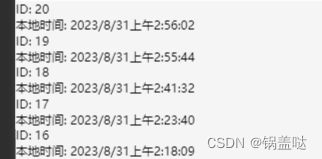
前端将UTC时间格式转化为本地时间格式~~uniapp写法
UTC时间格式是什么 首先我们先简单的了解一下:UTC时间(协调世界时,Coordinated Universal Time)使用24小时制,以小时、分钟、秒和毫秒来表示时间 HH:mm:ss.SSSHH 表示小时,取值范围为00到23。mm 表示分钟…...

说说Kappa架构
分析&回答 对于实时数仓而言,Lmabda架构有很明显的不足,首先同时维护两套系统,资源占用率高,其次这两套系统的数据处理逻辑相同,代码重复开发。 能否有一种架构,只需要维护一套系统,就可以…...
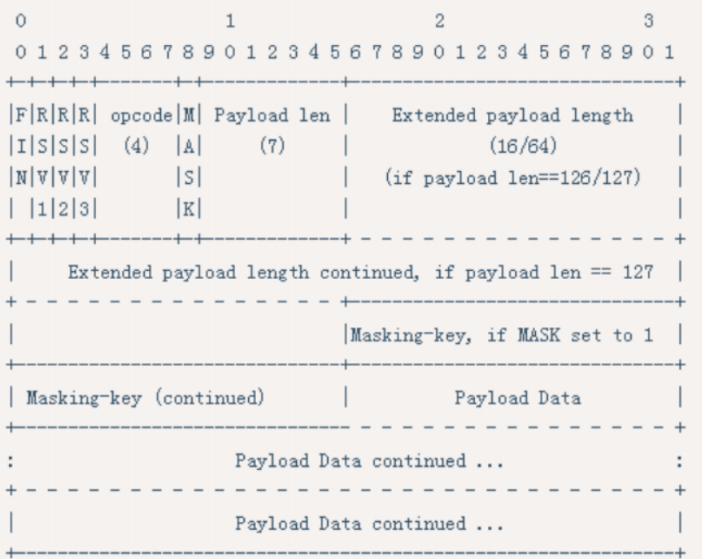
项目介绍:《Online ChatRoom》网页聊天室 — Spring Boot、MyBatis、MySQL和WebSocket的奇妙融合
在当今数字化社会,即时通讯已成为人们生活中不可或缺的一部分。为了满足这一需求,我开发了一个名为"WeTalk"的聊天室项目,该项目基于Spring Boot、MyBatis、MySQL和WebSocket技术,为用户提供了一个实时交流的平台。在本…...
Vue3 学习 组合式API setup语法糖 响应式 指令 DIFF(一)
文章目录 前言一、Composition Api二、setup语法糖三、响应式refreactive 四、其他一些关键点v-prev-oncev-memov-cloak 五、虚拟Dom五、diff算法 前言 本文用于记录学习Vue3的过程 一、Composition Api 我觉得首先VUE3最大的改变就是对于代码书写的改变,从原来选择…...

一文轻松入门DeepSort
1.背景 Deepsort是目标检测任务的后续任务,得益于Yolo系列的大放异彩,DeepSort目标追踪任务的精度也不断提高,同时,DeepSort属于目标追踪任务中的多目标追踪,即MOT(Multiple Object Tracking,M…...
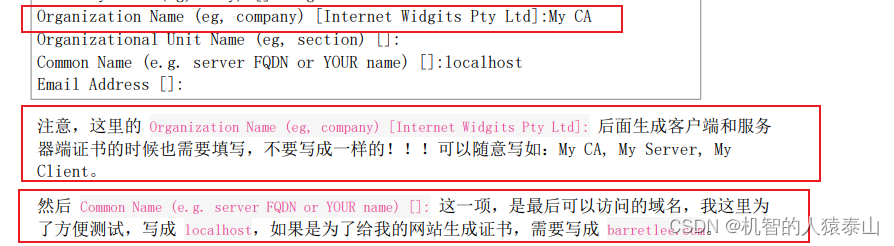
关于linux openssl的自签证书认证与nginx配置
自签文档链接 重点注意这块,不能写一样的,要是一样的话登录界面锁会报不安全 域名这块跟最后发布的一致 nginx配置的话 server {listen 443 ssl; //ssl 说明为https 默认端口为443server_name www.skyys.com; //跟openssl设置的域名保持一致s…...
Mybatis--关联关系映射
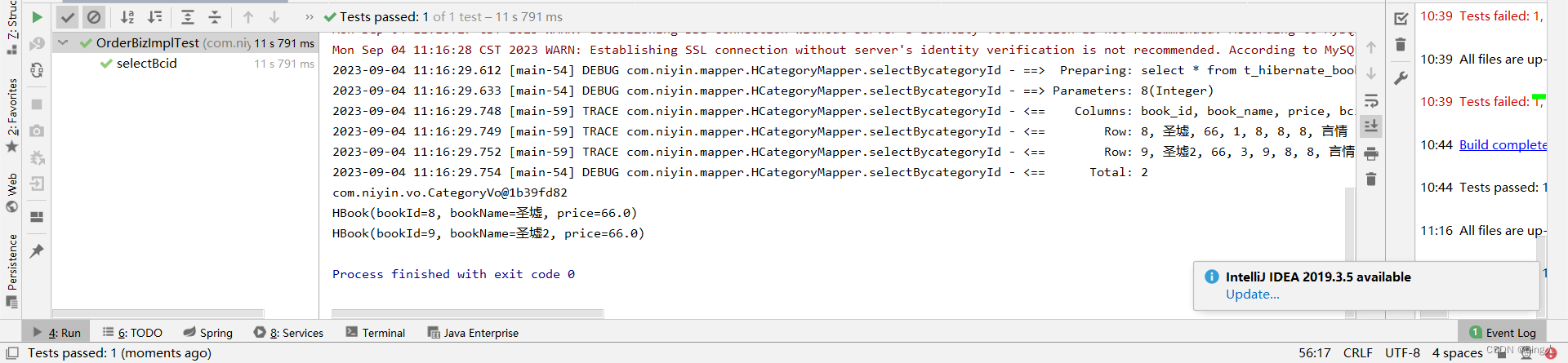
目录: 1.什么是关联关系映射: 一对一和多对多的区别 2.mybaits中的一对一&一对多关联关系配置 配置generatoeConfig文件 插件自动生成 编辑 写sql语句 创建 Ordermapper类 编写接口类 编辑 编写接口实现类 编写测试类 测试结果 一对…...

Golang基本的网络编程
Go语言基本的Web服务器实现 Go 语言中的 http 包提供了创建 http 服务或者访问 http 服务所需要的能力,不需要额外的依赖。 Go语言在Web服务器中主要使用到了 “net/http” 库函数,通过分析请求的URL来实现参数的接收。 下面介绍了http 中Web应用的基本…...
Postgresql的一个bug_涉及归档和pg_wal
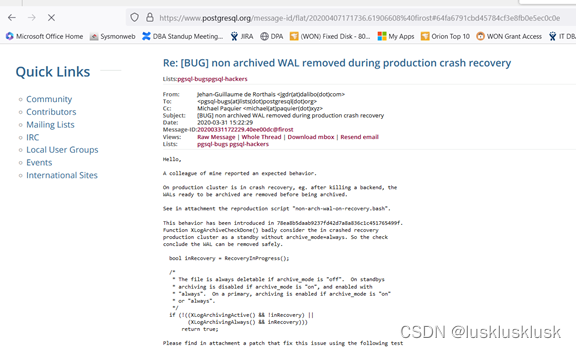
故障描述: 服务器ocmpgdbprod1,是流复制主节点,它的从节点是ocmpgdbprod2,两个节点的Postgresql数据库版本都是PostgreSQL 11.6,主节点ocmpgdbprod1配置了pg_wal归档,从节点ocmpgdbprod2没有配置pg_wal归档…...
轻量、便捷、高效—经纬恒润AETP助力车载以太网测试
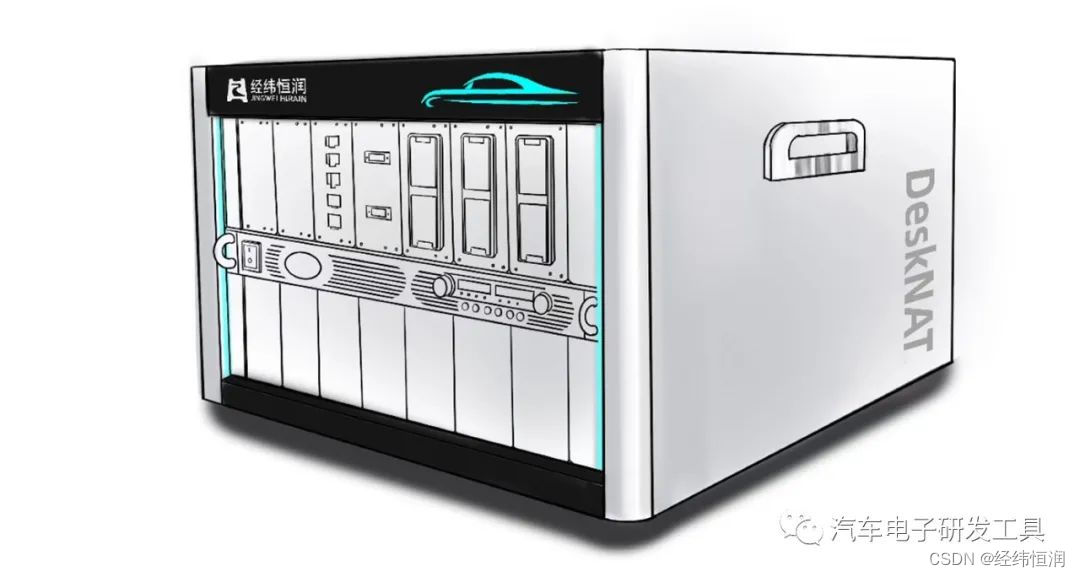
随着自动驾驶技术和智能座舱的不断发展,高宽带、高速率的数据通信对主干网提出了稳定、高效的传输要求,CAN(FD)、LIN已无法充分满足汽车的通信需求。车载以太网作为一种快速且扩展性好的网络技术,已经逐步成为了汽车主干网的首选。 此外&…...
)
【跟小嘉学 Rust 编程】二十四、内联汇编(inline assembly)
系列文章目录 【跟小嘉学 Rust 编程】一、Rust 编程基础 【跟小嘉学 Rust 编程】二、Rust 包管理工具使用 【跟小嘉学 Rust 编程】三、Rust 的基本程序概念 【跟小嘉学 Rust 编程】四、理解 Rust 的所有权概念 【跟小嘉学 Rust 编程】五、使用结构体关联结构化数据 【跟小嘉学…...
综合实训-------成绩管理系统 V1.1
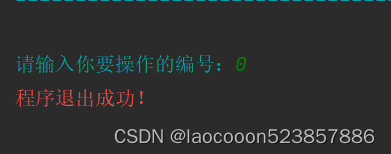
综合实训-------成绩管理系统 V1.1 1、一维数组数据double 2、我们用元素的位置来当学号。 1、录入数据 【5个数据】或【通过文件的方式取数据】 2、显示数据 3、添加一条记录 4、修改一条记录 5、删除一条记录 6、查找一条记录。【输入学号,显示成绩】 7、统计。【…...
13.108.Spark 优化、Spark优化与hive的区别、SparkSQL启动参数调优、四川任务优化实践:执行效率提升50%以上
13.108.Spark 优化 1.1.25.Spark优化与hive的区别 1.1.26.SparkSQL启动参数调优 1.1.27.四川任务优化实践:执行效率提升50%以上 13.108.Spark 优化: 1.1.25.Spark优化与hive的区别 先理解spark与mapreduce的本质区别,算子之间(…...
大模型综述论文笔记6-15
这里写自定义目录标题 KeywordsBackgroud for LLMsTechnical Evolution of GPT-series ModelsResearch of OpenAI on LLMs can be roughly divided into the following stagesEarly ExplorationsCapacity LeapCapacity EnhancementThe Milestones of Language Models Resources…...

从SDF反标失败说起:为什么PBA模式的结果不能写进标准延迟文件?
从SDF反标失败看PBA与GBA的本质差异:芯片设计中的精度与效率博弈 当你在PrimeTime中完成了一次精细的PBA模式时序分析,确认设计满足所有时序约束后,尝试将结果导出为SDF文件用于后仿验证时,工具却报错或生成的SDF文件无法正确反映…...

紧急停止与异常停机:天勤策略里的断线保护与人工兜底
前言 网络闪断、进程被 kill、策略异常未捕获,都可能让持仓暴露在无人管理状态。天勤文档里有紧急停止相关能力(见 advanced/emergency_stop.rst),我把它和自建「停机即平仓/撤单」脚本配合使用。下面写工程清单,不替代…...

[特殊字符] 告别类名地狱!Tailwind CSS 语义化转换神器来了
痛点作为一名前端开发者,你是否早已受够了这些折磨?😫 代码可读性灾难 打开 HTML 文件,映入眼帘的是长达数十个类名的"怪物":<div class"flex flex-col items-center justify-center bg-gray-100 ro…...

别再为乱码头疼了!Linux服务器离线部署LibreOffice与中文字体配置全记录
Linux服务器离线部署LibreOffice与中文字体配置实战指南 在Linux服务器环境下处理文档时,中文乱码问题堪称开发者的"噩梦"。想象一下,当你费尽周折将报表导出为PDF,却发现所有中文内容变成了一堆"口口口",那种…...
)
DeepFace实战:用5行代码快速搭建一个本地人脸搜索系统(附完整代码)
DeepFace实战:5行代码构建本地人脸搜索系统的工程化实践 人脸识别技术早已不再是实验室里的黑科技,而是能够快速落地的实用工具。今天我们将用Python生态中最轻量级的DeepFace库,从工程化角度构建一个真正可用的人脸搜索系统。不同于简单的AP…...

FPGA设计避坑指南:Vivado里那些红色和橙色的时钟交互框到底意味着什么?
FPGA设计避坑指南:Vivado里那些红色和橙色的时钟交互框到底意味着什么? 在FPGA设计的世界里,时钟信号就像城市交通系统中的红绿灯,协调着数据流的行进节奏。而当多个时钟域交汇时,就如同多个交通系统试图相互对接——如…...

这个AI助手不让你教它,它自己来了解你
这个AI助手不让你教它,它自己来了解你OpenHuman:9700 Star,GitHub霸榜的秘密最近GitHub Trending上冒出来一个项目,连续霸榜多天,Star数蹭蹭往上涨。我点进去看了一眼,思路跟之前那些Agent工具完全不一样。…...

录音会议纪要整理教程
无论是整理课堂录音复习、小组讨论纪要,还是调研访谈整理,很多新手都会陷入困扰:要么逐句听录耗时费力,要么转写内容错漏多、找不到重点。这篇零基础教程,步骤简洁易懂,看完可直接上手,帮你大幅…...

利用Taotoken多模型能力为内容生成平台提供弹性AI服务
🚀 告别海外账号与网络限制!稳定直连全球优质大模型,限时半价接入中。 👉 点击领取海量免费额度 利用Taotoken多模型能力为内容生成平台提供弹性AI服务 应用场景类,设想一个内容生成平台需要根据任务复杂度选择不同能…...

Node.js框架深度解析:从Express到Nest.js,如何选择最适合你的Web开发框架?
1. 项目概述:为什么Node.js框架值得你花时间研究?如果你是一名Web开发者,或者正在向这个方向转型,那么“Node.js框架”这个词组对你来说一定不陌生。但面对市面上林林总总的框架,从Express、Koa到Nest.js、Fastify&…...