
Ajax + Promise复习简单小结simple
axios使用
先看看老朋友 axios
axios是基于Ajax+promise封装的
看一下他的简单使用
安装:npm install axios --save
引入:import axios from 'axios'
GitHub地址
基本使用
axios({url: 'http://hmajax.itheima.net/api/province'}).then(function (result) {const {data: {list, message}, status} = resultconsole.log(list, message, status)
})
// 发送 GET 请求(默认的方法)
axios('/user/12345').then(response => {}).catch(error => {})
查询参数
axios({url: 'http://hmajax.itheima.net/api/city',method: 'get',params: {pname: '河南省'}
}).then(function (result) {// const {data: {list, message}, status} = resultconsole.log(result)
})
post提交
document.querySelector('button').addEventListener('click', function () {axios({url: 'http://hmajax.itheima.net/api/register',method: 'post',data: {username: 'itheima123',password: '123456'}}).then(function (result) {console.log(result)})
})
错误处理
document.querySelector('button').addEventListener('click', function () {axios({//请求选项url: 'http://hmajax.itheima.net/api/register',method: 'post',data: {username: 'itheima123',password: '123456'}}).then(function (result) {//处理数据console.log(result)}).catch(function (error) {//处理错误console.log(error.response.data.message)})})
实现一个简单地图片上传在这里插入图片描述

<!DOCTYPE html>
<html lang="en">
<head><meta charset="UTF-8"><title>Title</title><style>img {height: 200px;width: auto;border-radius: 20px;border: 1px solid rebeccapurple;}</style>
</head>
<body>
<input type="file" class="upload">
<img/>
</body>
<script type="text/javascript" src="../js/axios.js"></script>
<script type="text/javascript">/** 图片上传显示在网页上面* 1. 获取图片文件* 2. 使用 FormData 携带图片文件* 3. 提交到服务器获取到返回的图片服务器地址*/document.querySelector('input').addEventListener('change', function (e) {console.log(e.target.files[0])//FormData对象const fd = new FormData()fd.append('img', e.target.files[0])axios({url: 'http://hmajax.itheima.net/api/uploadimg',method: 'post',data: fd}).then(function (result) {console.log(result)document.querySelector('img').src = result.data.data.url}).catch(function (error) {console.log(error)})})
</script>
</html>
XMLhttpRequest使用
/*get请求携带参数*/
/*1. 实例化一个xhr对象*/
const xhr = new XMLHttpRequest()
/*2. 配置请求方法和URL地址*/
xhr.open('get', 'http://hmajax.itheima.net/api/city?pname=辽宁省')
/*3. 添加load事件,获取响应结果*/
xhr.addEventListener('load', function (result) {console.log(JSON.parse(result.target.response))document.write(JSON.parse(result.target.response).list.join(' , '))
})
/*4. 发起请求*/
xhr.send()/*post请求设置请求头,携带请求体*/
document.querySelector('button').addEventListener('click', () => {const xhr = new XMLHttpRequest()xhr.open('post', 'http://hmajax.itheima.net/api/register')xhr.addEventListener('load', function (result) {console.log(JSON.parse(result.target.response))})/*设置请求头 告诉服务器 内容类型*/xhr.setRequestHeader('Content-Type', 'application/json')const user = {username: 'itheima093', password:' 123456'}const userStr = JSON.stringify(user)/*将字符串类型的 请求体发送给服务器*/xhr.send(userStr)
})
详细文档参照 MDN
同步异步
- 同步代码
- 逐行执行,原地等待结果后,才继续向下执行
- 异步代码
- 调用后耗时,不阻塞代码执行,将来完成后触发回调函数
JavaScript中的异步代码有
- setTimeout / setInterval
- 事件
- Ajax
异步代码接收结果!
- 依靠异步的回调函数接收结果
回调地狱
在回调函数中一直向下嵌套回调函数,就会形成回调函数地狱
/*毁掉地狱*/new MyAxios({url: 'http://hmajax.itheima.net/api/province'}).then(result => {console.log(result)let province = document.querySelector('.province')province.innerHTML = result.list.map(item => `<option>${item}</option>`).join('')new MyAxios({url: 'http://hmajax.itheima.net/api/city',params: {pname: province.value}}).then(result => {console.log(result)let city = document.querySelector('.city')city.innerHTML = result.list.map(item => `<option>${item}</option>`).join('')new MyAxios({url: 'http://hmajax.itheima.net/api/area',params: {pname: province.value, cname: city.value}}).then(result => {console.log(result)let area = document.querySelector('.area')area.innerHTML = result.list.map(item => `<option>${item}</option>`).join('')})})})
缺点:
- 可读性差
- 异常捕获困难
- 耦合性严重
解决:
promise的链式调用
使用then函数返回新的Promise对象的特性一直串联下去
/*链式调用*/let province = document.querySelector('.province')new MyAxios({url: 'http://hmajax.itheima.net/api/province'}).then(result => {console.log(result);province.innerHTML = result.list.map(item => `<option>${item}</option>`).join('')return new MyAxios({url: 'http://hmajax.itheima.net/api/city', params: {pname: province.value}})}).then(result => {console.log(result);let city = document.querySelector('.city');city.innerHTML = result.list.map(item => `<option>${item}</option>`).join('')return new MyAxios({url: 'http://hmajax.itheima.net/api/area', params: {pname: province.value, cname: city.value}})}).then(result => {console.log(result);let area = document.querySelector('.area');area.innerHTML = result.list.map(item => `<option>${item}</option>`).join('')})
使用async 和 await解决(最优)
/*async await 配合使用*/
async function init() {let province = document.querySelector('.province')let city = document.querySelector('.city');let area = document.querySelector('.area');console.log('开始执行异步代码')/*错误捕获; try 代码块中出现了错误,代码就不会继续往下执行了*/try {const provinceList = await new MyAxios({url: 'http://hmajax.itheima.net/api/province'})province.innerHTML = provinceList.list.map(item => `<option>${item}</option>`).join('')const cityList = await new MyAxios({url: 'http://hmajax.itheima.net/api/city', params: {pname: province.value}})city.innerHTML = cityList.list.map(item => `<option>${item}</option>`).join('')const areaList = await new MyAxios({url: 'http://hmajax.itheima.net/api/area', params: {pname: province.value, cname: city.value}})area.innerHTML = areaList.list.map(item => `<option>${item}</option>`).join('')console.log(provinceList)console.log(cityList)console.log(areaList)}catch (error) {console.dir(error)}finally {console.log('finally')}
}
Promise
Promise 对象表示异步操作最终的完成(或失败)以及其结果值。
三个状态:
pending (初始状态,既没有兑现也没有拒绝) => fulfilled(操作成功) / rejected(操作失败)
Promise对象一旦被兑现或拒绝,就代表该对象就已敲定了,状态将无法在改变
优点:
- 逻辑更清晰
- 有助于了解axios的内部运作机制
- 解决回调函数地狱问题(通过链式调用 then 返回一个新的Promise对象
基本使用
/*使用promise管理异步任务*/
const p = new Promise((resolve, reject) => {setTimeout(function () {//resolve() => fulfilled状态-已兑现 => then()// resolve('成功')//reject() => rejected状态-已兑现 => catch()reject(new Error('失败'))}, 2000)
})console.log(p)p.then(result => {console.log(result)
}).catch(error => {console.log(error)
})
PromiseAll
/*当我们需要执行几个Promise对象,同时获取他们的结果时,使用Promise静态方法Promise.all([])*/
const ps = Promise.all([new Promise(resolve => resolve(1)), new Promise(resolve => resolve(2))])
// 这里的result是一个数组
ps.then(result => console.log(result))
const p1 = new Promise(resolve => resolve(3))
const p2 = new Promise(resolve => resolve(4))
const p3 = new Promise((resolve, reject) => {reject('错误1')
})
const p4 = new Promise((resolve, reject) => {reject('错误2')
})
// 当执行的过程中发生错误是,会中断执行并抛出第一个错误
Promise.all([p1, p2, p3, p4]).then(result => {console.log(result)
}).catch(error => {console.log(error)
})
Promise 配合 XMLHttpRequest使用
<script type="text/javascript">const p = new Promise((resolve, reject) => {const xhr = new XMLHttpRequest()xhr.open('get', 'http://hmajax.itheima.net/api/city?pname=湖南省')xhr.addEventListener('loadend', function (result) {if (result.target.status === 200) {resolve(JSON.parse(xhr.response))} else {reject(new Error(xhr.response))}})xhr.send()})console.log(p)p.then(result => {console.log('执行成功', result)}).catch(error => {//错误对象要是用console.dir详细打印console.dir('执行错误', error)})
</script>
XMLHttpRequest 配合 Promise进行简单封装和使用
// 封装为一个函数 MyAxios,返回的是一个Promise对象
function MyAxios({method = 'get', url, params, data}) {//返回一个Promise对象return new Promise((resolve, reject) => {/*1. 实例化一个xhr对象*/const xhr = new XMLHttpRequest()/*判断是否有传参,有传参拼接在URL后面*/url = params ? url + function () {const keys = Object.keys(params)const values = Object.values(params)return '?' + keys.map((item, index) => item + '=' + values[index]).join('&')}() : url// console.log(url)xhr.open(method, url)// 有请求体,给请求头设置请求体文本类型xhr.setRequestHeader('Content-Type', 'application/json')/* 添加load事件,获取响应结果 */xhr.addEventListener('loadend', function () {/*200-300之间的状态码为响应成功状态码*/if (xhr.status >= 200 && xhr.status < 300) {/*返回的内容类型为JSON字符串,对它进行解析并返回*/resolve(JSON.parse(xhr.response))} else {reject(new Error(xhr.response))}})/*判断是否为post请求*/data ? xhr.send(JSON.stringify(data)) : xhr.send()})
}/*get请求 传参*/
/*new MyAxios({method: 'get',url: 'http://hmajax.itheima.net/api/area',params: {pname: '河北省',cname: '石家庄市'}
}).then(result => {console.log(result)
}).catch(error => {console.log(error)
})*//*post请求*/
/*new MyAxios({method: 'post',url: 'http://hmajax.itheima.net/api/register',data: {username: 'itheima095', password:' 123456'}
}).then(result => {console.log(result)
}).catch(error => {console.log(error)
})*//*获取城市天气*/
/*new MyAxios({method: 'get',url: 'http://hmajax.itheima.net/api/weather',params: {city: '110100'}
}).then(result => {console.log(result)
}).catch(error => {console.log(error)
})*//*获取天气案例*/
document.querySelector('.search-city').addEventListener('input', debounce(fun, 500))
const ul = document.querySelector(`ul`)
function fun(e) {console.log('发送请求', e.target.value)new MyAxios({url: 'http://hmajax.itheima.net/api/weather/city',params: {city: e.target.value}}).then(result => {console.log(result)ul.innerHTML = result.data.map(item => `<li data-code="${item.code}">${item.name}</li>`).join('')}).catch(error => {console.log(error)})
}
ul.addEventListener('click', function (e) {const li = e.targetif (li.tagName === 'LI') {console.log(li.dataset.code);new MyAxios({method: 'get',url: 'http://hmajax.itheima.net/api/weather',params: {city: li.dataset.code}}).then(result => {console.log(result)}).catch(error => {console.log(error)})}
})
//防抖函数
function debounce(fun, delay = 500) {let timer = nullreturn function (e) {if (timer)clearTimeout(timer)timer = setTimeout(function () {fun(e)timer = null}, delay)}
}
相关文章:
Ajax + Promise复习简单小结simple
axios使用 先看看老朋友 axios axios是基于Ajaxpromise封装的 看一下他的简单使用 安装:npm install axios --save 引入:import axios from axios GitHub地址 基本使用 axios({url: http://hmajax.itheima.net/api/province}).then(function (result…...

WebDAV之π-Disk派盘 + 小书匠
小书匠是一款功能丰富,强大的知识管理工具。全平台覆盖,离线数据存储,自定义数据服务器,所见即所得的 markdown 编辑体验。 小书匠提供了多种实用的编辑模式,例如:栏编辑、双栏编辑、三栏编辑、全屏写作、全屏阅读等。并且该软件还提供了许多有用的扩展语法,比如Latex公…...
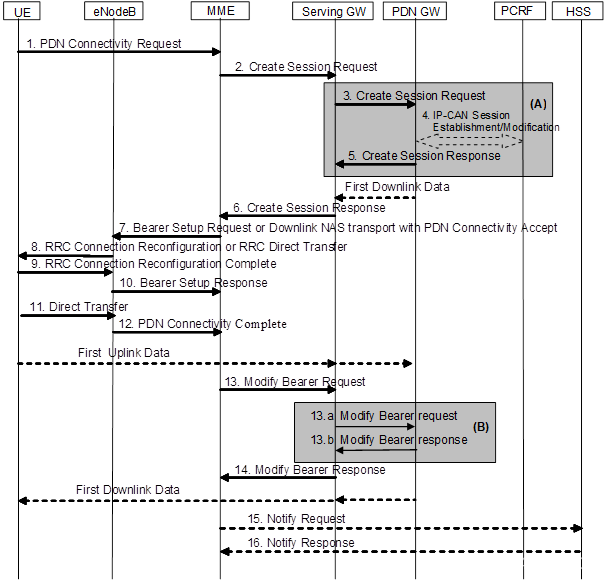
LTE ATTACH流程、PDN流程、PGW地址分配介绍
1、S-GW\P-GW选择 MME根据S-GW和P-GW的拓扑信息进行S-GW/P-GW的选择,在S-GW的候选序列和P-GW的候选序列中比较,寻找是否有合一的S-GW/P-GW,并且根据S-GW的优先级和权重信息进行排序,得到S-GW/P-GW的候选组。 2、SGW>PGW连接 PD…...
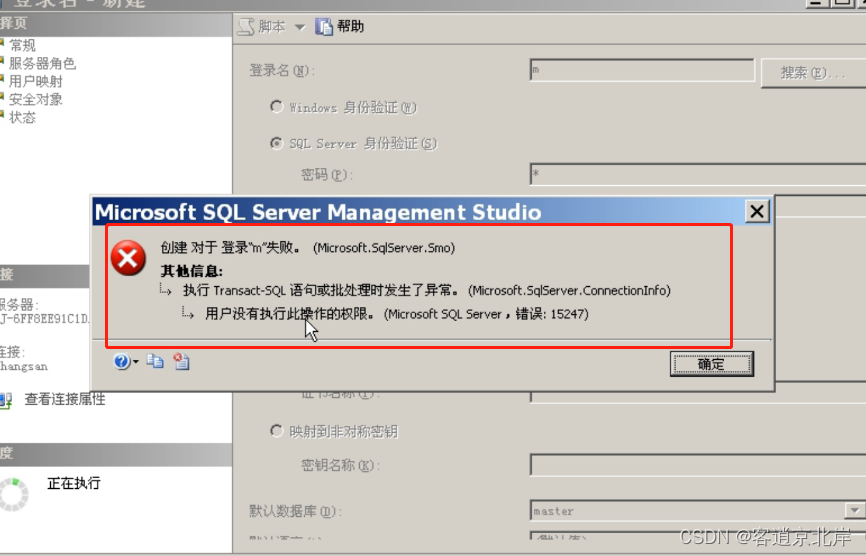
SQL sever中用户管理
目录 一、用户管理常见方法 二、用户管理方法示例 2.1. 创建登录账户: 2.1.1 检查是否创建账户成功: 2.2. 创建数据库用户: 2.2.1检查用户是否创建成功: 2.3. 授予权限: 2.3.1授予 SELECT、INSERT 和 U…...
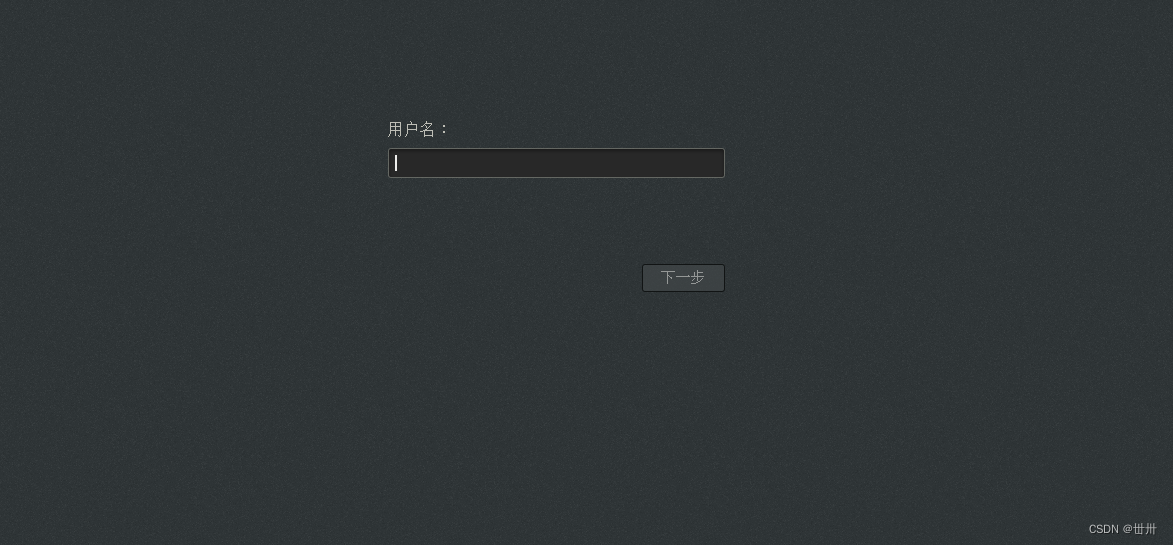
linux————pxe网络批量装机
目录 一、概述 什么是pxe pxe组件 二、搭建交互式pxe装机 一、配置基础环境 二、配置vsftpd 三、配置tftp 四、准备pxelinx.0文件、引导文件、内核文件 一、准备pxelinux.0 二、准备引导文件、内核文件 五、配置dhcp 一、安装dhcp 二、配置dhcp 六、创建default文…...

处理时延降低24倍,联通云粒数据引擎优化实践
*作者:郑扬勇,云粒星河数据中台产品负责人 云粒智慧科技有限公司成立于 2018 年 6 月,是中国联通集团混改以来成立的首家合资公司,是中国智慧城市数智化建设者。一直以来,云粒智慧以数字化、智能化、集约化产品为核心&…...
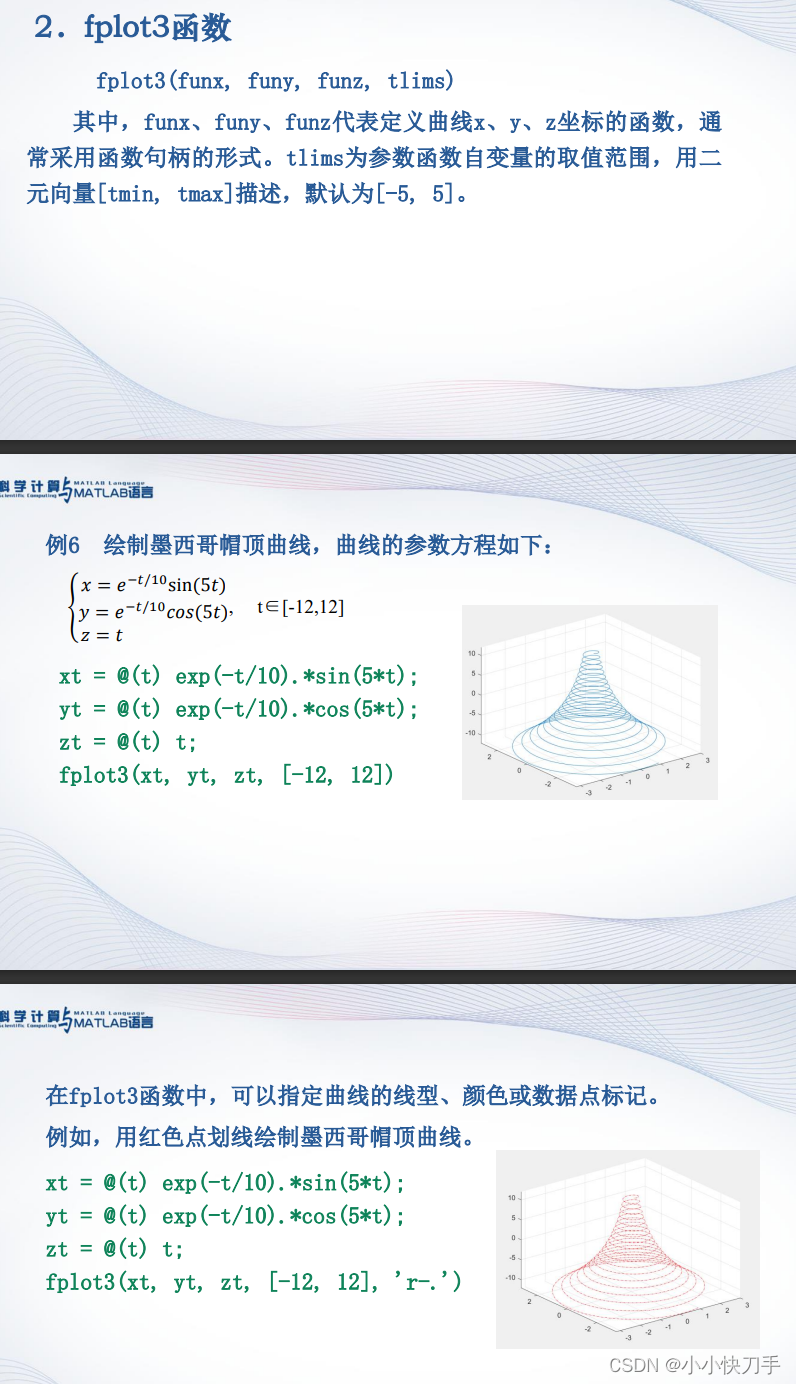
学习MATLAB
今日,在大学慕课上找了一门关于MATLAB学习的网课,MATLAB对于我们这种自动化的学生应该是很重要的,之前也是在大三的寒假做自控的课程设计时候用到过,画一些奈奎斯特图,根轨迹图以及伯德图,但那之后也就没怎…...
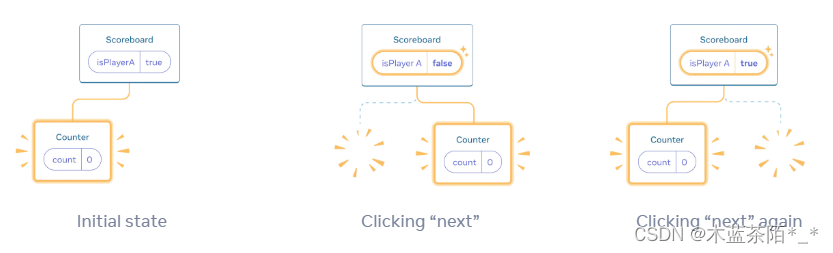
React 18 对 state 进行保留和重置
参考文章 对 state 进行保留和重置 各个组件的 state 是各自独立的。根据组件在 UI 树中的位置,React 可以跟踪哪些 state 属于哪个组件。可以控制在重新渲染过程中何时对 state 进行保留和重置。 UI 树 浏览器使用许多树形结构来为 UI 建立模型。DOM 用于表示 …...
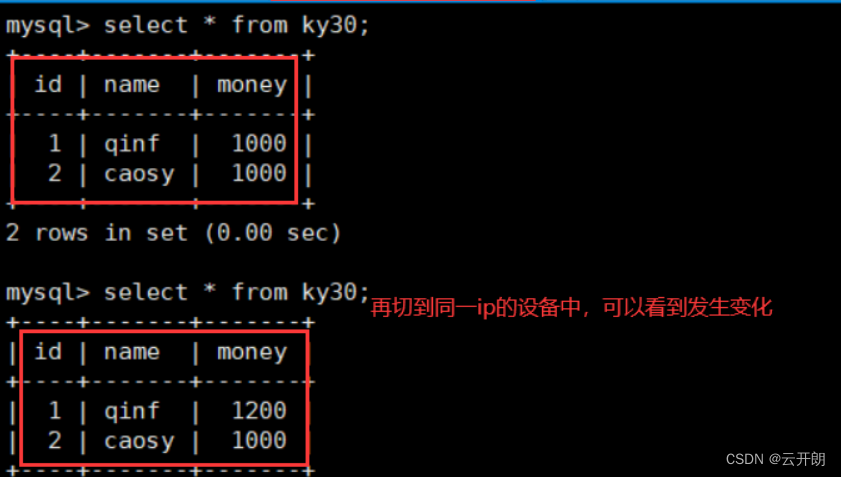
MySQL之事务与引擎
目录 一、事物 1、事务的概念 2、事务的ACID特点 3、事务之间的相互影响 4、Mysql及事务隔离级别(四种) 1、查询会话事务隔离级别 2、查询会话事务隔离级别 3、设置全局事务隔离级别 4、设置会话事务隔离级别 5、事务控制语句 6、演示 1、测试提交事务 2、测试事务回滚 4…...

Flink集群常见的监控指标
为确保能够全面、实时地监控Flink集群的运行状态和性能指标。以下是监控方案的主要组成部分: Flink集群概览:通过访问Flink的JobManager页面,您可以获取集群的总体信息,包括TaskManager的数量、任务槽位数量、运行中的作业以及已…...

React常见知识点
1. setCount(10)与setCount(preCount > preCount 10) 的区别: import React, { useState } from react; export default function CounterHook() {const [count, setCount] useState(() > 10);console.log(CounterHook渲染);function handleBtnClick() {//…...
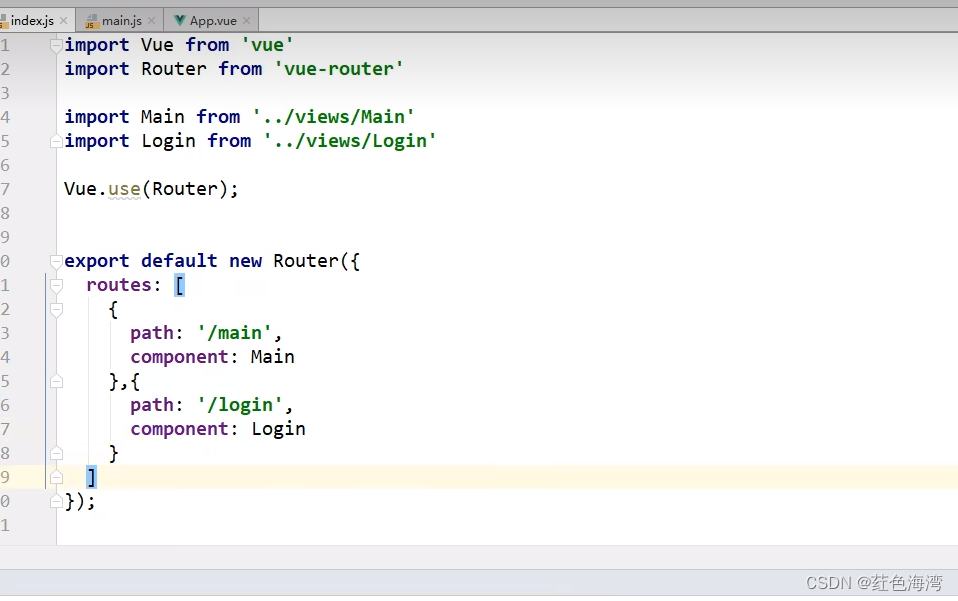
Vue-router路由
配置路由 相当于SpringMVC的Controller 路径然后,跳转到对应的组件 一键生成前端项目文档...
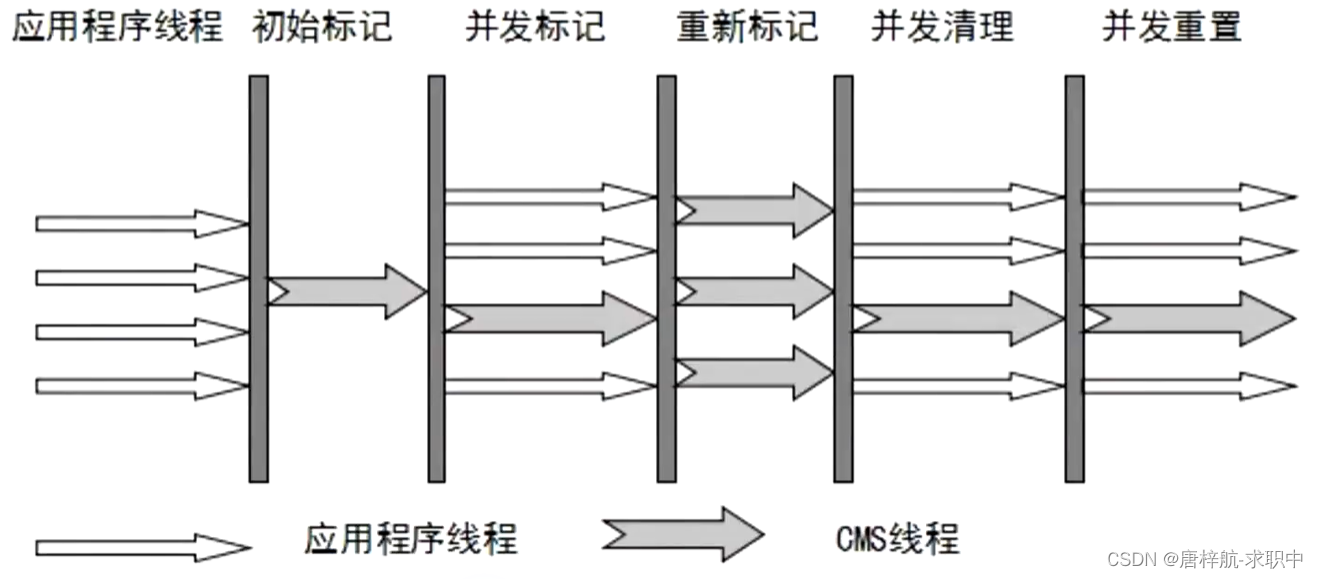
JVM-CMS
when 堆大小要求为4-8G 原理 初始标记:执行CMS线程->STW,标记GC Root直接关联的对象->低延迟 并发标记:执行CMS线程和业务线程,从GC Root直接关联的对象开始遍历整个对象图 重新标记:执行CMS线程->STW&a…...
无涯教程-Flutter - Dart简介
Dart是一种开源通用编程语言,它最初是由Google开发的, Dart是一种具有C样式语法的面向对象的语言,它支持诸如接口,类之类的编程概念,与其他编程语言不同,Dart不支持数组, Dart集合可用于复制数据…...
如何创建美观的邮件模板并通过qq邮箱的SMTP服务向用户发送
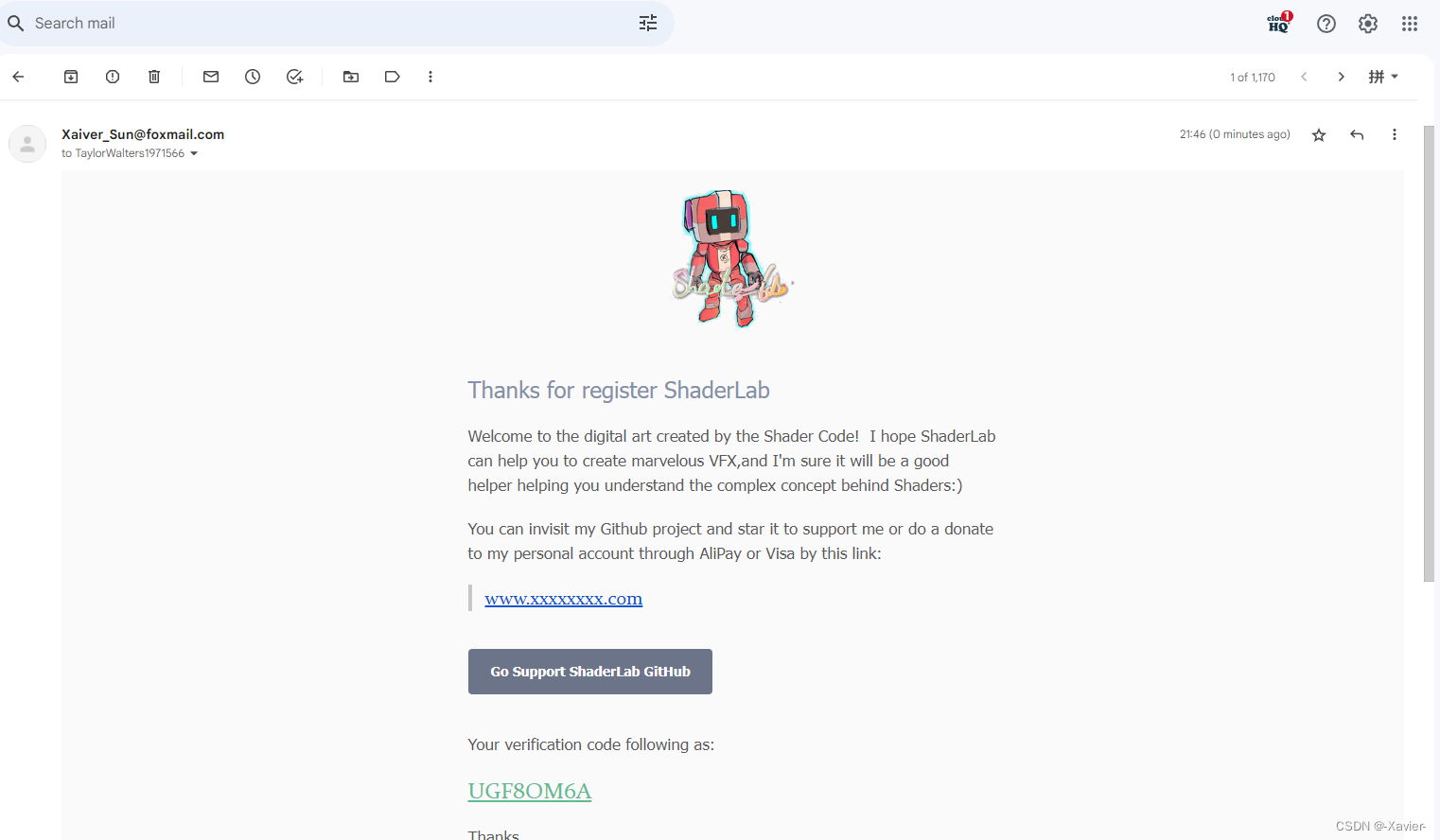
最近在写注册功能的自动发送邮箱告知验证码的功能,无奈根本没有学过前端,只有写Qt的qss基础,只好借助网页设计自己想要的邮箱格式,最终效果如下: 也推销一下自己的项目ShaderLab,可运行ShaderToy上的大部分着色器代码&…...

手机无人直播软件在苹果iOS系统中能使用吗?
在现代社交媒体的时代,直播带货已经成为了一种热门的销售途径。通过直播,人们可以远程分享自己的商品,与观众进行互动,增强沟通和参与感。而如今,手机无人直播软件更是成为了直播带货领域的一项火爆的技术。那么&#…...

创建2个线程并执行(STL/Windows/Linux)
C并发编程入门 目录 STL 写法 #include <thread> #include <iostream> using namespace std;void thread_fun1(void) {cout << "one STL thread 1!" << endl; }void thread_fun2(void) {cout << "one STL thread 2!" <…...

Redis可以干什么
Redis可以做什么? 缓存 Redis作为一款高性能的缓存数据库,能够将常用的数据存储在内存中,以提高读写效率。它支持多种数据结构,如字符串、哈希表、列表、集合等,让你可以根据业务需求选择合适的数据结构进行缓存。 …...
R语言+Meta分析;论文新方向
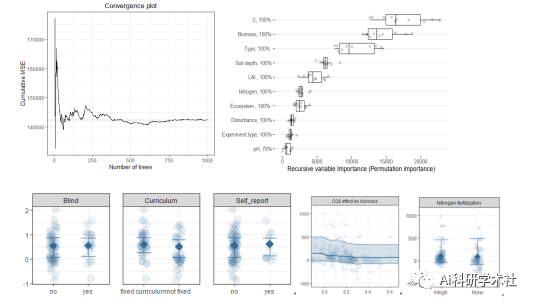
Meta分析是针对某一科研问题,根据明确的搜索策略、选择筛选文献标准、采用严格的评价方法,对来源不同的研究成果进行收集、合并及定量统计分析的方法,最早出现于“循证医学”,现已广泛应用于农林生态,资源环境等方面。…...
实战系列(二)| MybatisPlus详细介绍,包含代码详解
目录 1. MybatisPlus 的基本功能2. 基本用法3. MybatisPlus 的配置4. MybatisPlus 的实体类、Mapper 接口、Service 类和 Controller 类 MybatisPlus 是一个功能强大的 MyBatis 增强工具,它提供了丰富的特性来简化操作数据库的代码。它主要用于简化 JDBC 操作&#…...

华为昇腾Atlas200边缘设备开箱即用指南:从CANN环境到YOLOv8模型部署的保姆级避坑教程
华为昇腾Atlas200边缘设备实战:YOLOv8模型部署全流程避坑指南 第一次拿到华为昇腾Atlas200边缘计算设备时,那种既兴奋又忐忑的心情记忆犹新。作为一款专为AI推理设计的边缘设备,Atlas200凭借其强大的算力和紧凑的体型,在智能安防…...

从COCO到自定义:用Labelme为YOLOv8-Pose制作关键点数据集的完整避坑指南
从COCO到自定义:用Labelme为YOLOv8-Pose制作关键点数据集的完整避坑指南 在计算机视觉领域,关键点检测技术正逐渐成为工业界和学术界的热点研究方向。不同于传统的目标检测任务,关键点检测不仅需要定位物体位置,还要精确识别物体内…...

全球数据治理:合规与AI双引擎驱动
一、全球化数据治理进入“合规AI”双引擎驱动时代2026年,全球数据治理市场的竞争格局正在被两股力量重塑。一方面,各国数据主权法规持续收紧——中东多国强化数据本地化存储要求,欧盟AI治理法案进入实质性执行阶段,拉美个人数据保…...

除了连接模拟器,AppInventor开发者还应该知道的3个‘坑’:录音、短信模块与API调用限制
避开AppInventor开发中的三大隐形陷阱:录音、短信与API调用实战指南 当你成功连接AppInventor模拟器,准备大展拳脚开发应用时,可能会突然发现某些功能"神秘失效"——录音按钮点击无反应、短信发送模块形同虚设、API调用慢如蜗牛。这…...

语义搜索实战:从关键词到向量检索
本文面向:想深入理解语义搜索实现原理的开发者。 预计阅读时间:10 分钟 关键词搜索已经够用了?试试搜"怎么解决数据库死锁"——你可能漏掉所有标题写"SQLite WAL mode"、"并发写入冲突"的笔记。语义搜索能跨越…...

用AnyLogic 8.8.1复现地铁站客流仿真:从行人流线到安检流程的保姆级建模
用AnyLogic 8.8.1构建地铁站客流仿真:从零到一的实战指南 地铁站作为城市交通枢纽,其客流管理效率直接影响数百万人的出行体验。AnyLogic作为多方法仿真平台,能精准模拟行人流线与服务设施交互。本文将基于8.8.1版本,手把手构建包…...

从ADC采样到FFT分析:手把手教你用STM32F407的DSP库搞定频谱计算
从ADC采样到FFT分析:手把手教你用STM32F407的DSP库搞定频谱计算 在工业振动监测、音频信号处理和电源质量分析等场景中,频谱分析是理解信号特征的关键技术。STM32F407凭借其Cortex-M4内核和硬件FPU,配合CMSIS-DSP库,能够高效实现实…...

为Claude Code配置Taotoken作为备用模型服务商
🚀 告别海外账号与网络限制!稳定直连全球优质大模型,限时半价接入中。 👉 点击领取海量免费额度 为Claude Code配置Taotoken作为备用模型服务商 对于经常使用Claude Code进行编程辅助的开发者而言,直接依赖单一服务商…...

ROS Topic通讯实战:拆解`/turtle1/cmd_vel`,理解速度指令如何驱动小乌龟运动
ROS Topic通讯实战:拆解/turtle1/cmd_vel,理解速度指令如何驱动小乌龟运动 在机器人操作系统(ROS)的学习过程中,控制小乌龟(turtlesim)画圆是一个经典案例。这个看似简单的任务背后,…...

Windows上运行安卓应用:APK安装器完整指南
Windows上运行安卓应用:APK安装器完整指南 【免费下载链接】APK-Installer An Android Application Installer for Windows 项目地址: https://gitcode.com/GitHub_Trending/ap/APK-Installer 想在Windows电脑上直接运行安卓应用,却不想安装笨重的…...