
docker-compose安装redis
基于docker-compose快速安装redis
目录
一、目录结构
1、docker-compose.yml
2、redis.conf
二、连接使用
一、目录结构

1、docker-compose.yml
version: '3'
services:redis:image: registry.cn-hangzhou.aliyuncs.com/zhengqing/redis:6.0.8                    # 镜像'redis:6.0.8'container_name: redis                                                             # 容器名为'redis'restart: unless-stopped                                                                   # 指定容器退出后的重启策略为始终重启,但是不考虑在Docker守护进程启动时就已经停止了的容器command: redis-server /etc/redis/redis.conf --requirepass hcses.com --appendonly no # 启动redis服务并添加密码为:123456,默认不开启redis-aof方式持久化配置
#    command: redis-server --requirepass 123456 --appendonly yes # 启动redis服务并添加密码为:123456,并开启redis持久化配置environment:                        # 设置环境变量,相当于docker run命令中的-eTZ: Asia/ShanghaiLANG: en_US.UTF-8volumes:                            # 数据卷挂载路径设置,将本机目录映射到容器目录- "./redis/data:/data"- "./redis/config/redis.conf:/etc/redis/redis.conf"  # `redis.conf`文件内容`http://download.redis.io/redis-stable/redis.conf`ports:                              # 映射端口- "6379:6379"
2、redis.conf
# Redis configuration file example.
#
# Note that in order to read the configuration file, Redis must be
# started with the file path as first argument:
#
# ./redis-server /path/to/redis.conf# Note on units: when memory size is needed, it is possible to specify
# it in the usual form of 1k 5GB 4M and so forth:
#
# 1k => 1000 bytes
# 1kb => 1024 bytes
# 1m => 1000000 bytes
# 1mb => 1024*1024 bytes
# 1g => 1000000000 bytes
# 1gb => 1024*1024*1024 bytes
#
# units are case insensitive so 1GB 1Gb 1gB are all the same.################################## INCLUDES #################################### Include one or more other config files here.  This is useful if you
# have a standard template that goes to all Redis servers but also need
# to customize a few per-server settings.  Include files can include
# other files, so use this wisely.
#
# Notice option "include" won't be rewritten by command "CONFIG REWRITE"
# from admin or Redis Sentinel. Since Redis always uses the last processed
# line as value of a configuration directive, you'd better put includes
# at the beginning of this file to avoid overwriting config change at runtime.
#
# If instead you are interested in using includes to override configuration
# options, it is better to use include as the last line.
#
# include /path/to/local.conf
# include /path/to/other.conf################################## MODULES ###################################### Load modules at startup. If the server is not able to load modules
# it will abort. It is possible to use multiple loadmodule directives.
#
# loadmodule /path/to/my_module.so
# loadmodule /path/to/other_module.so################################## NETWORK ###################################### By default, if no "bind" configuration directive is specified, Redis listens
# for connections from all the network interfaces available on the server.
# It is possible to listen to just one or multiple selected interfaces using
# the "bind" configuration directive, followed by one or more IP addresses.
#
# Examples:
#
# bind 192.168.1.100 10.0.0.1
# bind 127.0.0.1 ::1
#
# ~~~ WARNING ~~~ If the computer running Redis is directly exposed to the
# internet, binding to all the interfaces is dangerous and will expose the
# instance to everybody on the internet. So by default we uncomment the
# following bind directive, that will force Redis to listen only into
# the IPv4 loopback interface address (this means Redis will be able to
# accept connections only from clients running into the same computer it
# is running).
#
# IF YOU ARE SURE YOU WANT YOUR INSTANCE TO LISTEN TO ALL THE INTERFACES
# JUST COMMENT THE FOLLOWING LINE.
# ~~~~~~~~~~~~~~~~~~~~~~~~~~~~~~~~~~~~~~~~~~~~~~~~~~~~~~~~~~~~~~~~~~~~~~~~
# 注释允许外部访问redis
# bind 127.0.0.1# Protected mode is a layer of security protection, in order to avoid that
# Redis instances left open on the internet are accessed and exploited.
#
# When protected mode is on and if:
#
# 1) The server is not binding explicitly to a set of addresses using the
#    "bind" directive.
# 2) No password is configured.
#
# The server only accepts connections from clients connecting from the
# IPv4 and IPv6 loopback addresses 127.0.0.1 and ::1, and from Unix domain
# sockets.
#
# By default protected mode is enabled. You should disable it only if
# you are sure you want clients from other hosts to connect to Redis
# even if no authentication is configured, nor a specific set of interfaces
# are explicitly listed using the "bind" directive.
# 开启保护模式后,需要 bind ip 或 设置密码
protected-mode yes# Accept connections on the specified port, default is 6379 (IANA #815344).
# If port 0 is specified Redis will not listen on a TCP socket.
port 6379# TCP listen() backlog.
#
# In high requests-per-second environments you need an high backlog in order
# to avoid slow clients connections issues. Note that the Linux kernel
# will silently truncate it to the value of /proc/sys/net/core/somaxconn so
# make sure to raise both the value of somaxconn and tcp_max_syn_backlog
# in order to get the desired effect.
tcp-backlog 511# Unix socket.
#
# Specify the path for the Unix socket that will be used to listen for
# incoming connections. There is no default, so Redis will not listen
# on a unix socket when not specified.
#
# unixsocket /tmp/redis.sock
# unixsocketperm 700# Close the connection after a client is idle for N seconds (0 to disable)
timeout 0# TCP keepalive.
#
# If non-zero, use SO_KEEPALIVE to send TCP ACKs to clients in absence
# of communication. This is useful for two reasons:
#
# 1) Detect dead peers.
# 2) Take the connection alive from the point of view of network
#    equipment in the middle.
#
# On Linux, the specified value (in seconds) is the period used to send ACKs.
# Note that to close the connection the double of the time is needed.
# On other kernels the period depends on the kernel configuration.
#
# A reasonable value for this option is 300 seconds, which is the new
# Redis default starting with Redis 3.2.1.
tcp-keepalive 300
daemonize nosupervised nopidfile /var/run/redis_6379.pidloglevel noticelogfile ""databases 16always-show-logo yes# 900秒内,如果超过1个key被修改,则发起快照保存
save 900 1
# 300秒内,如果超过10个key被修改,则发起快照保存
save 300 10
# 60秒内,如果1万个key被修改,则发起快照保存
save 60 10000stop-writes-on-bgsave-error yesrdbcompression yesrdbchecksum yesdbfilename dump.rdbrdb-del-sync-files nodir ./replica-serve-stale-data yesrepl-diskless-sync norepl-diskless-sync-delay 5repl-diskless-load disabledrepl-disable-tcp-nodelay noreplica-priority 100# 设置密码
# requirepass 123456lazyfree-lazy-eviction no
lazyfree-lazy-expire no
lazyfree-lazy-server-del no
replica-lazy-flush nolazyfree-lazy-user-del nooom-score-adj nooom-score-adj-values 0 200 800appendonly no# The name of the append only file (default: "appendonly.aof")appendfilename "appendonly.aof"# 每次操作都会立即写入aof文件中
# appendfsync always
# 每秒持久化一次(默认配置)
appendfsync everysec
# 不主动进行同步操作,默认30s一次
# appendfsync nono-appendfsync-on-rewrite noauto-aof-rewrite-percentage 100
auto-aof-rewrite-min-size 64mbaof-load-truncated yesaof-use-rdb-preamble yeslua-time-limit 5000slowlog-log-slower-than 10000slowlog-max-len 128latency-monitor-threshold 0notify-keyspace-events ""hash-max-ziplist-entries 512
hash-max-ziplist-value 64list-max-ziplist-size -2list-compress-depth 0set-max-intset-entries 512zset-max-ziplist-entries 128
zset-max-ziplist-value 64hll-sparse-max-bytes 3000stream-node-max-bytes 4096
stream-node-max-entries 100activerehashing yesclient-output-buffer-limit normal 0 0 0
client-output-buffer-limit replica 256mb 64mb 60
client-output-buffer-limit pubsub 32mb 8mb 60hz 10dynamic-hz yesaof-rewrite-incremental-fsync yesrdb-save-incremental-fsync yesjemalloc-bg-thread yes
二、连接使用
为了方便使用,建议下载个Redis Desktop Manager 可视化工具。
相关文章:
docker-compose安装redis
基于docker-compose快速安装redis 目录 一、目录结构 1、docker-compose.yml 2、redis.conf 二、连接使用 一、目录结构 1、docker-compose.yml version: 3 services:redis:image: registry.cn-hangzhou.aliyuncs.com/zhengqing/redis:6.0.8 # 镜像red…...
机器学习基础之《分类算法(6)—决策树》
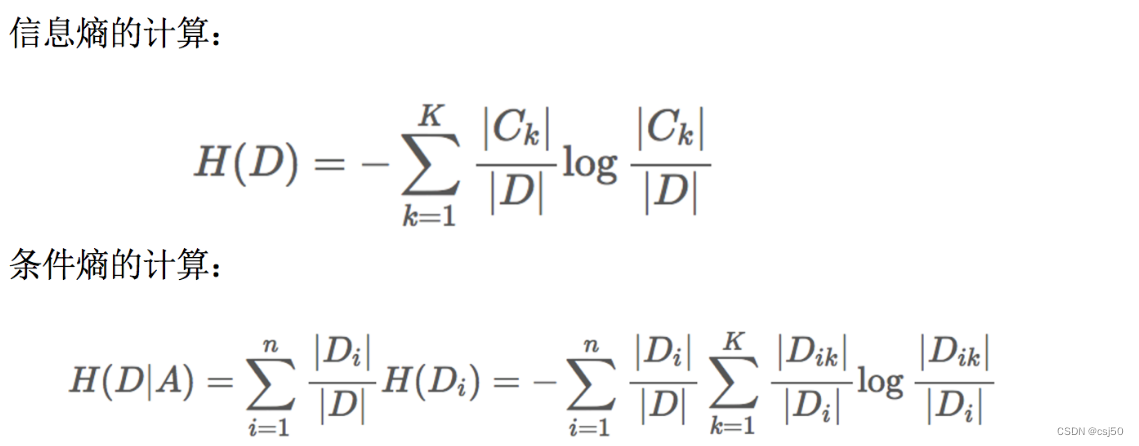
一、决策树 1、认识决策树 决策树思想的来源非常朴素,程序设计中的条件分支结构就是if-else结构,最早的决策树就是利用这类结构分割数据的一种分类学习方法 2、一个对话的例子 想一想这个女生为什么把年龄放在最上面判断!!&…...
2023国赛数学建模C题思路模型 - 蔬菜类商品的自动定价与补货决策
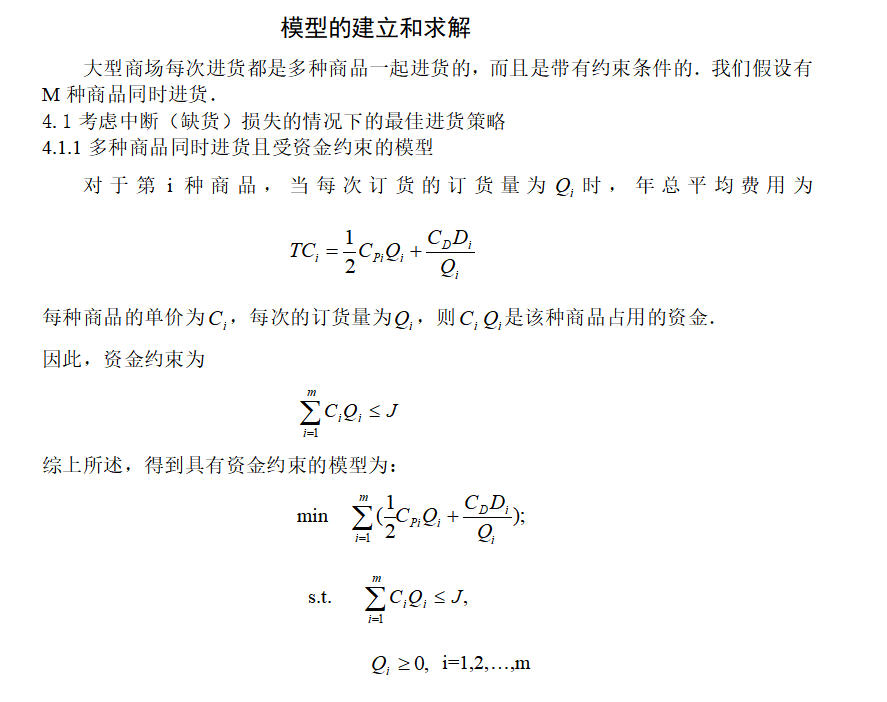
# 1 赛题 在生鲜商超中,一般蔬菜类商品的保鲜期都比较短,且品相随销售时间的增加而变差, 大部分品种如当日未售出,隔日就无法再售。因此, 商超通常会根据各商品的历史销售和需 求情况每天进行补货。 由于商超销售的蔬菜…...
【Docker】Docker网络与存储(三)
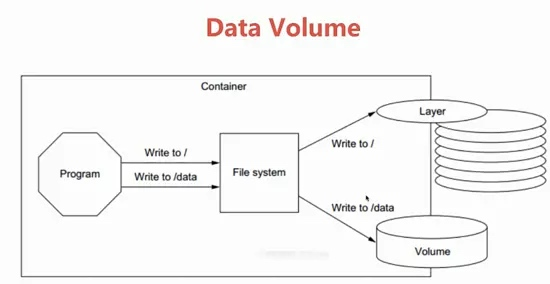
前言: Docker网络与存储的作用是实现容器之间的通信和数据持久化,以便有效地部署、扩展和管理容器化应用程序。 文章目录 Docker网络桥接网络容器之间的通信 覆盖网络创建一个覆盖网络 Docker存储卷 总结 Docker网络 Docker网络是在容器之间提供通信的机…...

python面向对象的一个简单实例
#发文福利# #!/usr/bin/env python # -*- coding:utf-8 -*-students {id001: {name: serena, age: 18, address: beijing},id002: {name: fanbingbing, age: 42, address: anhui},id003: {name: kahn, age: 20, address: shanghai}}class Student:def __init__(self, xid, na…...

微信小程序通过npm引入tdesign包进行构建的时候报错
问题 在通过npm 引入 tdesign时:https://tdesign.tencent.com/miniprogram/getting-started 通过微信小程序IDE进行npm构建的时候出现:无法构建,应该怎么办? 解决方法: 1 输入: npm init -y命令 2 重新点…...

三次握手四次挥手
TCP协议是一种面向连接的、可靠的、基于字节流的运输层通信协议。它通过三次握手来建立连接,通过四次挥手来断开连接。 三次握手 所谓三次握手,是指建立一个TCP连接时,需要客户端和服务器总共发送3个报文。三次握手的目的是连接服务器指定端…...
Redis持久化、主从与哨兵架构详解
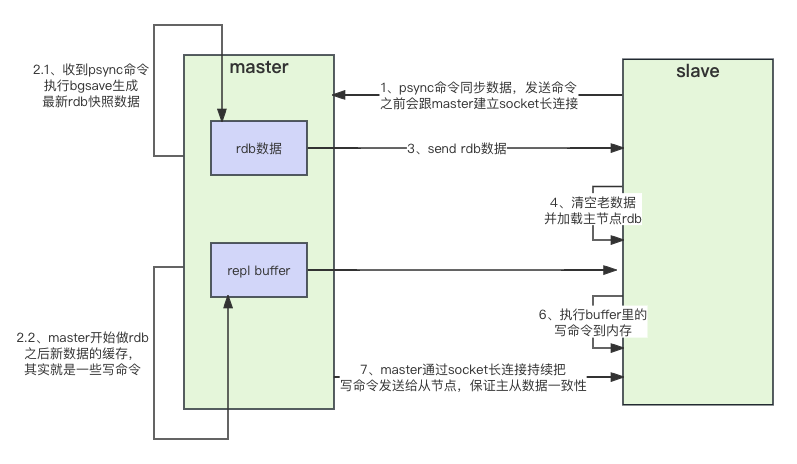
Redis持久化 RDB快照(snapshot) 在默认情况下, Redis 将内存数据库快照保存在名字为 dump.rdb 的二进制文件中。 你可以对 Redis 进行设置, 让它在“ N 秒内数据集至少有 M 个改动”这一条件被满足时, 自动保存一次数…...

SQLITE_BUSY 是指 SQLite 数据库返回的错误码,表示数据库正在被其他进程或线程使用,因此当前操作无法完成。
SQLITE_BUSY 当多个进程或线程同时尝试对同一个 SQLite 数据库进行写操作时,就可能出现 SQLITE_BUSY 错误。这是为了确保数据库的数据完整性和一致性而设计的并发控制机制。 如果你在使用 SQLite 时遇到 SQLITE_BUSY 错误,可以考虑以下解决方法&#x…...

matlab求解方程组-求解过程中限制解的取值范围
文章目录 问题背景代码my_fun.mmain.m 结果展示:不加入F(4)加入F(4) 问题背景 求解方程组的时候,对某些未知数的求解结果的取值范围有要求。例如在某些物理问题求解中,要求待求解量大于0。 代码 一共两个文件: my_fun.m main.mmy_fun.m function Fm…...

【正则表达式】正则表达式常见匹配模式
目录 常见匹配模式re.match 从字符串的起始位置匹配一个模式泛匹配匹配目标贪婪匹配非贪婪匹配匹配模式转义 re.search 扫描整个字符串并返回第一个成功的匹配re.findall 以列表形式返回全部能匹配的子串re.sub 替换字符串中每一个匹配的子串后返回替换后的字符串 re.compile 将…...

Docker搭建RK3568建模环境
推荐:Ubuntu 20.04 版本 Docker加速 # 编辑 Docker 配置文件 $ sudo vim /etc/docker/daemon.json# 加入以下配置项 {"registry-mirrors": ["https://dockerproxy.com","https://hub-mirror.c.163.com","https://mirror.baidu…...
TCP/IP基础
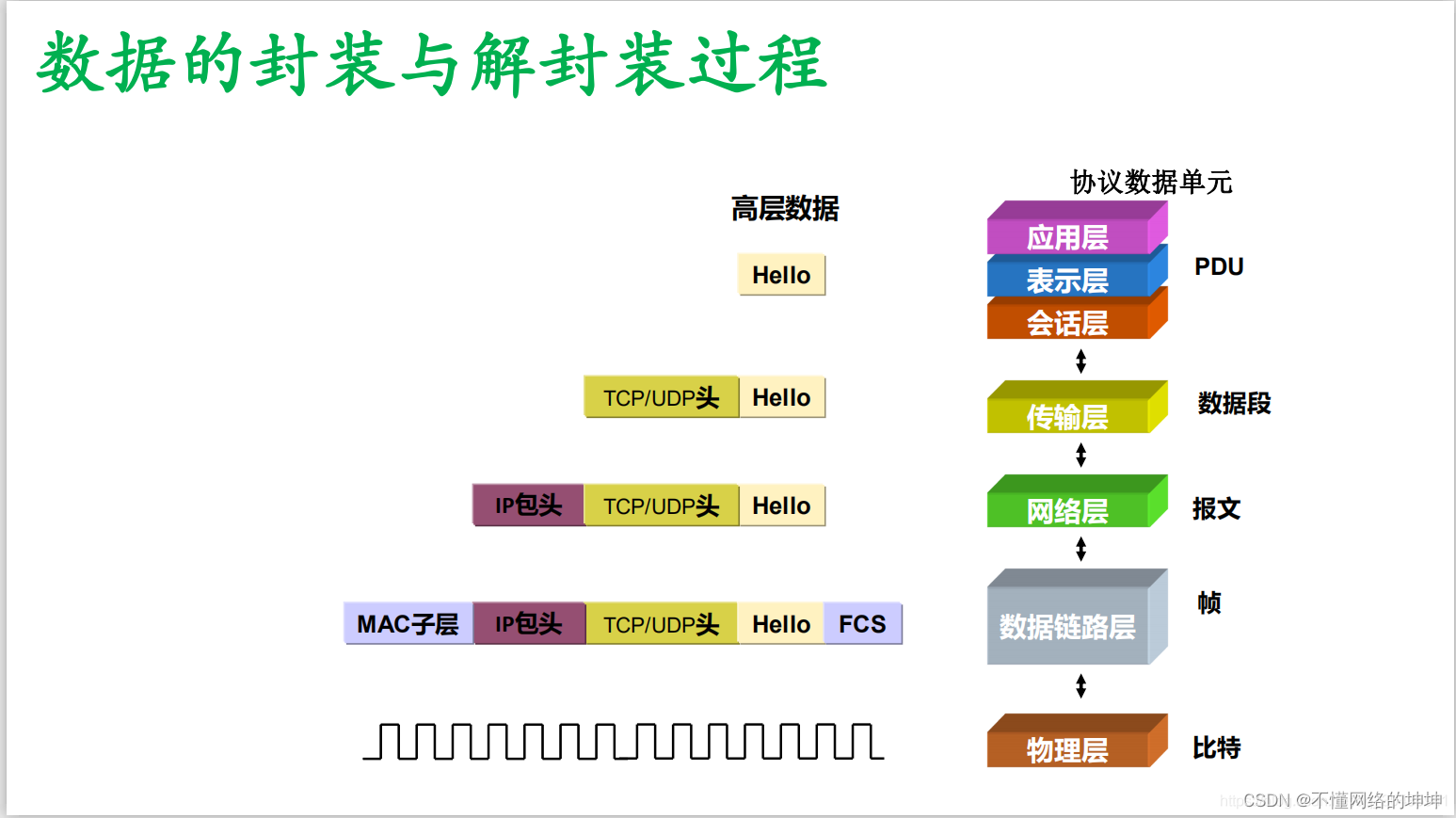
前言: TCP/IP协议是计算机网络领域中最基本的协议之一,它被广泛应用于互联网和局域网中,实现了不同类型、不同厂家、运行不同操作系统的计算机之间的相互通信。本文将介绍TCP/IP协议栈的层次结构、各层功能以及数据封装过程,帮助您…...

redis问题:三种集群——主从、哨兵、cluster集群;16384槽等
目录 redis三种集群模式 1、主从 2、哨兵(Sentinel) 3、集群(Cluster) Redis Cluster为什么有16384个槽? 1、8KB的心跳包太大 2、集群的数量不会超过1000。 主从配置和集群配置区别 1、主从 2、集群 redis三种…...

转 股票触发指定价格发送到 企业微信
[Python源码]股票价格监听并推送-代码狗 import aiohttp,asyncio,json,time,re,os,datetimeclass StockListen:def __init__(self):#定义需要监听的股票代码列表self.stock_list [1.600050,1.601988,1.601288,1.601939]#定义预期价格列表self.expect_price [6.6,3.0,2.7,5]#…...
Linux修复软RAID
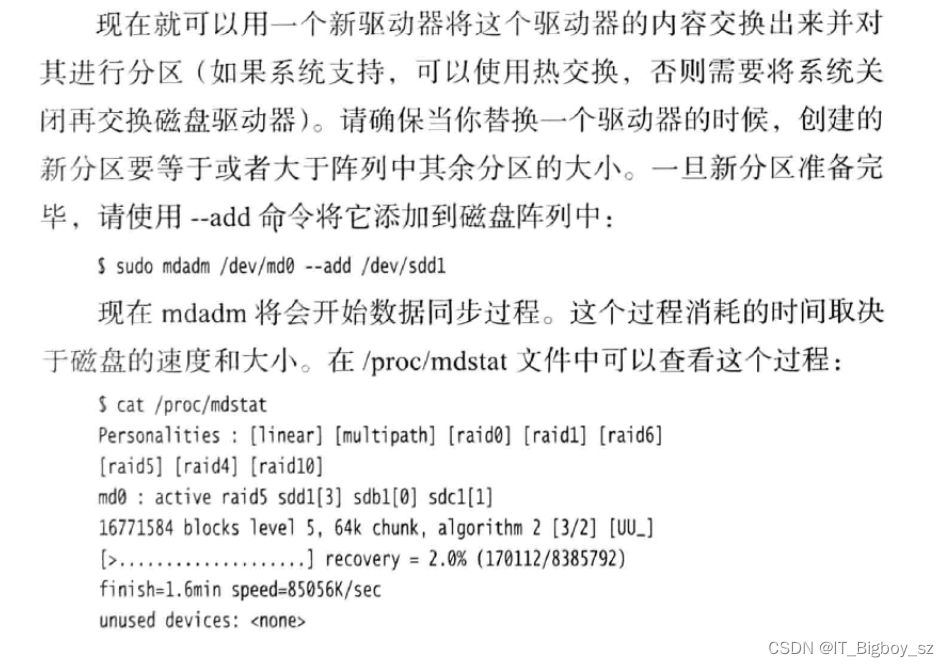
系统应该将mdadm配置成当发生RAID问题时给root用户发送邮件。需要更改/etc/mdadm/mdadm.xonf里的MALLADDR 并用/etc/init.d/mdadm reload重新加载下 查看/proc/mdstat文件 可以看到sdd1被标记F,说明它已经失效 从/dev/md0中移除磁盘sdd1 想要移除磁盘ÿ…...
【嵌入式软件C编程】主函数free子函数malloc地址的两种方式以及注意事项
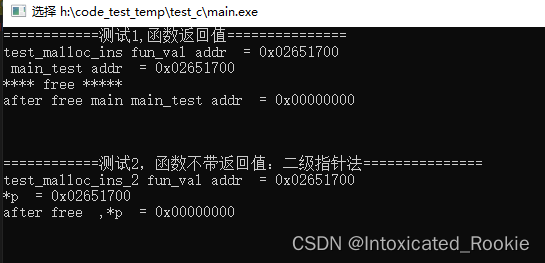
本文档主要记录嵌入式C语言在子函数中应用malloc函数的方式,在实际项目中内存管理特别重要 一般在主函数中(main)使用malloc函数,然后在通过free函数进行释放内存,但有时候如果必须在子函数长调用malloc函数该怎样进行…...
金融工程学学习笔记第一章
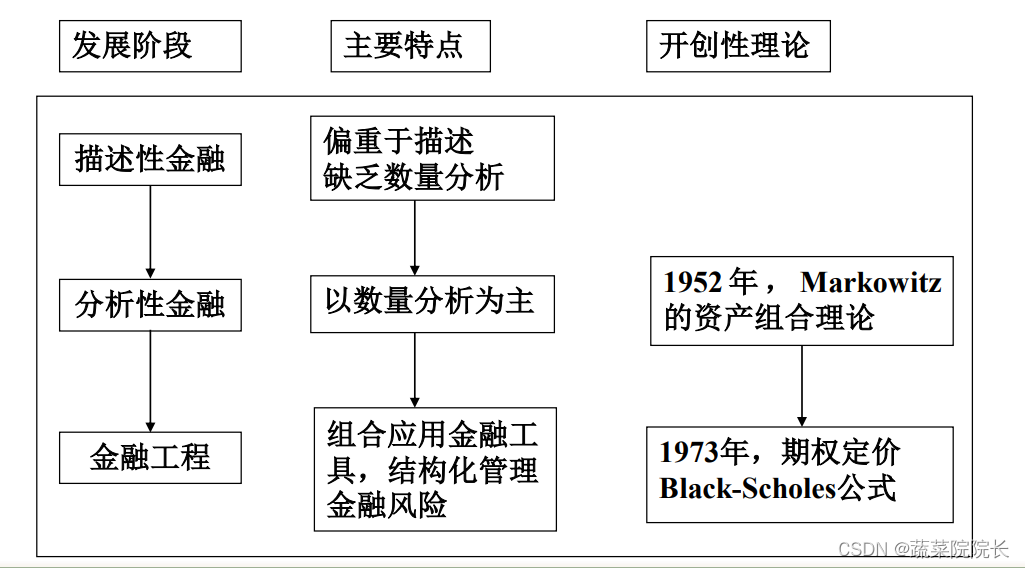
第一章 金融工程概述 什么是金融工程 金融工程的含义 金融工程: 金融工程:一门融现代金融学、数理和工程方法与信息技术与一体的新兴交叉型学科。 工程是指以某种设想的目标为依据,应用有关科学知识和技术手段,通过有组织的一…...

CentOS 7 编译ZooKeeper C客户端
简介 本文主要讲解:Zookeeper C客户端库在Centos 7上的编译,使用的Zookeeper版本为3.4.13。 工具安装 安装ant 和cppunit-devel工具: [rootlocalhost source_code]# yum install -y cppunit-devel 已加载插件:fastestmirror L…...

【2023年数学建模国赛】A题解题思路
2023年数学建模国赛A题解题思路 问题1: 要计算定日镜场的年平均光学效率和年平均输出热功率,以及单位镜面面积年平均输出热功率,我们可以按照以下步骤进行: 遍历所有定日镜的位置,根据给定的定日镜尺寸和安装高度&am…...

CANN-HCCL-昇腾NPU分布式训练的通信库怎么选
8 卡 Atlas 800I A2 内部走 HCCS(带宽 200GB/s),跨机走 RoCE(带宽 100GB/s)。HCCL 是昇腾NPU的通信库,对标 NVIDIA 的 NCCL。Tensor Parallel 和 Pipeline Parallel 的 All-Reduce、All-to-All 都靠它。 HC…...
)
告别报错!手把手教你用Pycharm 2023.2 + Git搞定Manim社区版安装(附国内镜像源配置)
Manim社区版极速安装指南:PyCharm 2023.2与Git的完美协作方案 当数学可视化遇上Python开发神器PyCharm,Manim社区版的安装过程却常常成为新手的第一道门槛。不同于常规教程的线性步骤,我们将以"问题-解决"为主线,直击两…...

DECA加速器:神经网络模型压缩的硬件优化方案
1. DECA加速器:神经网络模型压缩的硬件突围在AI推理领域,模型压缩技术如同给神经网络"瘦身"——通过量化和稀疏化减少参数规模,但压缩后的数据需要解压才能计算,这个"拆包装"的过程往往成为性能瓶颈。传统CPU…...

终极指南:如何用WeChatExporter永久备份微信聊天记录,打造你的数字记忆宝库
终极指南:如何用WeChatExporter永久备份微信聊天记录,打造你的数字记忆宝库 【免费下载链接】WeChatExporter 一个可以快速导出、查看你的微信聊天记录的工具 项目地址: https://gitcode.com/gh_mirrors/wec/WeChatExporter 你是否曾有过这样的经…...

机器学习——聚类评价指标SSE、SC、CH演示案例
一.评价指标简介SSE考虑了簇内因素SSE越越小越好SSE+肘部法常用来确定聚类的最佳K值SC轮廓系数法考虑了簇内和簇间因素,数值越大越好CH考虑簇内,簇间以及K值因素,数值越大越好二.代码部分详解1.SSE+肘部法#1.演示SSE&a…...

SSDD数据集技术深度解析:从数据构建到模型优化的SAR舰船检测实战指南
SSDD数据集技术深度解析:从数据构建到模型优化的SAR舰船检测实战指南 【免费下载链接】Official-SSDD SAR Ship Detection Dataset (SSDD): Official Release and Comprehensive Data Analysis 项目地址: https://gitcode.com/gh_mirrors/of/Official-SSDD S…...

Taotoken控制台的用量看板与账单追溯功能如何助力团队成本管理
🚀 告别海外账号与网络限制!稳定直连全球优质大模型,限时半价接入中。 👉 点击领取海量免费额度 Taotoken控制台的用量看板与账单追溯功能如何助力团队成本管理 对于团队管理者或项目负责人而言,将大模型能力整合进业…...

3步解锁网易云音乐NCM加密文件:ncmdumpGUI终极转换指南
3步解锁网易云音乐NCM加密文件:ncmdumpGUI终极转换指南 【免费下载链接】ncmdumpGUI C#版本网易云音乐ncm文件格式转换,Windows图形界面版本 项目地址: https://gitcode.com/gh_mirrors/nc/ncmdumpGUI 你是否曾在网易云音乐下载了心爱的歌曲&…...

奥哲重构电建新范式!AI赋能电力建设全场景智能化升级
在电力建设行业,数字化转型已步入深水区。过去十年,企业完成了从合同、物资到安全、质量等核心业务的大规模系统化,实现了业务流程线上化以及数据留痕可回溯。然而当AI浪潮来临,企业开始关注更深层的问题:系统能不能理…...

传统锯床与特斯克天弓系列PC-36带锯床:八大维度对比,差距在哪?
传统锯床与特斯克天弓系列PC-36带锯床:八大维度对比,差距在哪?不是所有数控带锯机,都叫天弓特斯克天弓系列PC-36带锯床在带锯床选型中,购置价格之外,综合使用成本(锯条消耗、废品损失、维保成本…...