
openeuler上安装polarismesh集群
1、安装MySQL数据库
数据库连接地址10.10.10.168 用户root 密码123456
MySQL安装参考搭建DSS环境(六)之安装基础环境MySQL_linux安装dss_青春不流名的博客-CSDN博客
2、安装Redis集群
| IP | Resid PORT | Sentinel PORT | PASSWORD | Cluster NAME |
| 10.10.10.110 | 6379 | 26379 | 123456 | mymaster |
| 10.10.10.168 | 6379 | 26379 | 123456 | mymaster |
| 10.10.10.150 | 6379 | 26379 | 123456 | mymaster |
3、初始化SQL
unzip polaris-server-release_v1.17.4.linux.amd64.zip
mv polaris-server-release_v1.17.4.linux.amd64 polaris-servercd polaris-server
 mysql -u root -p
Enter password:
Welcome to the MySQL monitor.  Commands end with ; or \g.
Your MySQL connection id is 12
Server version: 8.0.31 MySQL Community Server - GPLCopyright (c) 2000, 2022, Oracle and/or its affiliates.Oracle is a registered trademark of Oracle Corporation and/or its
affiliates. Other names may be trademarks of their respective
owners.Type 'help;' or '\h' for help. Type '\c' to clear the current input statement.mysql> source ^C
mysql> use polaris_server;
Database changed
mysql> source store/mysql/polaris_server.sql
Query OK, 0 rows affected (0.00 sec)
4、配置polaris-server.yaml
# server Start guidance configuration
bootstrap:
# Global log
logger:
# Log scope name
# Configuration center related logs
config:
# Log file location
rotateOutputPath: log/runtime/polaris-config.log
# Special records of error log files at ERROR level
errorRotateOutputPath: log/runtime/polaris-config-error.log
# The maximum size of a single log file, 100 default, the unit is MB
rotationMaxSize: 100
# How many log files are saved, default 30
rotationMaxBackups: 30
# The maximum preservation days of a single log file, default 7
rotationMaxAge: 7
# Log output level,debug/info/warn/error
outputLevel: info
# Open the log file compression
compress: true
# onlyContent just print log content, not print log timestamp
# onlyContent: false
# Resource Auth, User Management Log
auth:
rotateOutputPath: log/runtime/polaris-auth.log
errorRotateOutputPath: log/runtime/polaris-auth-error.log
rotationMaxSize: 100
rotationMaxBackups: 30
rotationMaxAge: 7
outputLevel: info
compress: true
# Storage layer log
store:
rotateOutputPath: log/runtime/polaris-store.log
errorRotateOutputPath: log/runtime/polaris-store-error.log
rotationMaxSize: 100
rotationMaxBackups: 30
rotationMaxAge: 7
outputLevel: info
compress: true
# Server cache log log
cache:
rotateOutputPath: log/runtime/polaris-cache.log
errorRotateOutputPath: log/runtime/polaris-cache-error.log
rotationMaxSize: 100
rotationMaxBackups: 30
rotationMaxAge: 7
outputLevel: info
compress: true
# Service discovery and governance rules related logs
naming:
rotateOutputPath: log/runtime/polaris-naming.log
errorRotateOutputPath: log/runtime/polaris-naming-error.log
rotationMaxSize: 100
rotationMaxBackups: 30
rotationMaxAge: 7
outputLevel: info
compress: true
# Service discovery institutional health check log
healthcheck:
rotateOutputPath: log/runtime/polaris-healthcheck.log
errorRotateOutputPath: log/runtime/polaris-healthcheck-error.log
rotationMaxSize: 100
rotationMaxBackups: 30
rotationMaxAge: 7
outputLevel: info
compress: true
# XDS protocol layer plug -in log
xdsv3:
rotateOutputPath: log/runtime/polaris-xdsv3.log
errorRotateOutputPath: log/runtime/polaris-xdsv3-error.log
rotationMaxSize: 100
rotationMaxBackups: 30
rotationMaxAge: 7
outputLevel: info
compress: true
# Eureka protocol layer plug -in log
eureka:
rotateOutputPath: log/runtime/polaris-eureka.log
errorRotateOutputPath: log/runtime/polaris-eureka-error.log
rotationMaxSize: 100
rotationMaxBackups: 30
rotationMaxAge: 7
outputLevel: info
compress: true
# APISERVER common log, record inbound request and outbound response
apiserver:
rotateOutputPath: log/runtime/polaris-apiserver.log
errorRotateOutputPath: log/runtime/polaris-apiserver-error.log
rotationMaxSize: 100
rotationMaxBackups: 30
rotationMaxAge: 7
outputLevel: info
compress: true
default:
rotateOutputPath: log/runtime/polaris-default.log
errorRotateOutputPath: log/runtime/polaris-default-error.log
rotationMaxSize: 100
rotationMaxBackups: 30
rotationMaxAge: 7
outputLevel: info
compress: true
# server plugin logs
token-bucket:
rotateOutputPath: log/runtime/polaris-ratelimit.log
errorRotateOutputPath: log/runtime/polaris-ratelimit-error.log
rotationMaxSize: 100
rotationMaxBackups: 30
rotationMaxAge: 7
outputLevel: info
compress: true
discoverLocal:
rotateOutputPath: log/statis/polaris-discoverstat.log
errorRotateOutputPath: log/statis/polaris-discoverstat-error.log
rotationMaxSize: 100
rotationMaxBackups: 30
rotationMaxAge: 7
outputLevel: info
compress: true
local:
rotateOutputPath: log/statis/polaris-statis.log
errorRotateOutputPath: log/statis/polaris-statis-error.log
rotationMaxSize: 100
rotationMaxBackups: 30
rotationMaxAge: 7
outputLevel: info
compress: true
HistoryLogger:
rotateOutputPath: log/operation/polaris-history.log
errorRotateOutputPath: log/operation/polaris-history-error.log
rotationMaxSize: 100
rotationMaxBackups: 10
rotationMaxAge: 7
rotationMaxDurationForHour: 24
outputLevel: info
onlyContent: true
discoverEventLocal:
rotateOutputPath: log/event/polaris-discoverevent.log
errorRotateOutputPath: log/event/polaris-discoverevent-error.log
rotationMaxSize: 100
rotationMaxBackups: 30
rotationMaxAge: 7
outputLevel: info
onlyContent: true
cmdb:
rotateOutputPath: log/runtime/polaris-cmdb.log
errorRotateOutputPath: log/runtime/polaris-cmdb-error.log
rotationMaxSize: 100
rotationMaxBackups: 30
rotationMaxAge: 7
outputLevel: info
compress: true
# Start the server in order
startInOrder:
# Start the Polaris-Server in order, mainly to avoid data synchronization logic when the server starts the DB to pull the DB out of high load
open: true
# The name of the start lock
key: sz
# Register as Arctic Star Service
polaris_service:
## level: self_address > network_inter > probe_address
## Obtain the IP of the VM or POD where Polaris is located by making a TCP connection with the probe_adreess address
probe_address: 10.10.10.168:3306
## Set the name of the gateway to get your own IP
# network_inter: eth0
## Show the setting node itself IP information
# self_address: 127.0.0.1
# disable_heartbeat disable polaris_server node run heartbeat action to keep lease polaris_service
# disable_heartbeat: true
# Whether to open the server to register
enable_register: true
# Registered North Star Server Examples isolation status
isolated: false
# Service information that needs to be registered
services:
# service name
- name: polaris.checker
# Set the port protocol information that requires registration
protocols:
- service-grpc
# apiserver Configuration
apiservers:
# apiserver plugin name
- name: service-eureka
# apiserver additional configuration
option:
# tcp server listen ip
listenIP: "0.0.0.0"
# tcp server listen port
listenPort: 8761
# set the polaris namingspace of the EUREKA service default
namespace: default
# pull data from the cache of the polaris, refresh the data cache in the Eureka protocol
refreshInterval: 10
# eureka incremental instance changes time cache expiration cycle
deltaExpireInterval: 60
# unhealthy instance expiration cycle
unhealthyExpireInterval: 180
# whether to enable an instance ID of polaris to generate logic
generateUniqueInstId: false
# TCP connection number limit
connLimit:
# Whether to turn on the TCP connection limit function, default FALSE
openConnLimit: false
# The number of connections with the most IP
maxConnPerHost: 1024
# Current Listener's maximum number of connections
maxConnLimit: 10240
# Whitening list ip list, English comma separation
whiteList: 127.0.0.1
# Cleaning the cycle of link behavior
purgeCounterInterval: 10s
# How long does the unpretentious link clean up
purgeCounterExpired: 5s
- name: api-http
option:
listenIP: "0.0.0.0"
listenPort: 8090
# debug pprof switch
enablePprof: true
# swagger docs switch
enableSwagger: true
connLimit:
openConnLimit: false
maxConnPerHost: 128
maxConnLimit: 5120
whiteList: 127.0.0.1
purgeCounterInterval: 10s
purgeCounterExpired: 5s
# Set the type of open API interface
api:
# admin OpenAPI interface
admin:
enable: true
# Console OpenAPI interface
console:
enable: true
# OpenAPI group that needs to be exposed
include: [default, service, config]
# client OpenAPI interface
client:
enable: true
include: [discover, register, healthcheck, config]
# Polaris is a client protocol layer based on the gRPC protocol, which is used for registration discovery and service governance rule delivery
- name: service-grpc
option:
listenIP: "0.0.0.0"
listenPort: 8091
connLimit:
openConnLimit: false
maxConnPerHost: 128
maxConnLimit: 5120
# Open the protobuf parsing cache, cache the protobuf serialization results of the same content, and improve the processing of service discovery QPS
enableCacheProto: true
# Cache default size
sizeCacheProto: 128
# tls setting
tls:
# set cert file path
certFile: ""
# set key file path
keyFile: ""
# set trusted ca file path
trustedCAFile: ""
api:
client:
enable: true
include: [discover, register, healthcheck]
- name: config-grpc
option:
listenIP: "0.0.0.0"
listenPort: 8093
connLimit:
openConnLimit: false
maxConnPerHost: 128
maxConnLimit: 5120
api:
client:
enable: true
- name: xds-v3
option:
listenIP: "0.0.0.0"
listenPort: 15010
connLimit:
openConnLimit: false
maxConnPerHost: 128
maxConnLimit: 10240
# - name: service-l5
# option:
# listenIP: 0.0.0.0
# listenPort: 7779
# clusterName: cl5.discover
# Core logic configuration
auth:
# auth's option has migrated to auth.user and auth.strategy
# it's still available when filling auth.option, but you will receive warning log that auth.option has deprecated.
user:
name: defaultUser
option:
# Token encrypted SALT, you need to rely on this SALT to decrypt the information of the Token when analyzing the Token
# The length of SALT needs to satisfy the following one:len(salt) in [16, 24, 32]
salt: polarismesh@2021
strategy:
name: defaultStrategy
option:
# Console auth switch, default true
consoleOpen: true
# Console Strict Model, default true
consoleStrict: true
# Customer auth switch, default false
clientOpen: false
# Customer Strict Model, default close
clientStrict: false
namespace:
# Whether to allow automatic creation of naming space
autoCreate: true
naming:
# Batch controller
batch:
register:
open: true
# Task queue cache
queueSize: 10240
# The maximum waiting time for the number of mission is not full, and the time is directly forced to launch the BATCH operation
waitTime: 32ms
# Number of BATCH
maxBatchCount: 128
# Number of workers in the batch task
concurrency: 128
# Whether to turn on the discarding expiration task is only used for the batch controller of the register type
dropExpireTask: true
# The maximum validity period of the task is that the task is not executed when the validity period exceeds the validity period.
taskLife: 30s
deregister:
open: true
queueSize: 10240
waitTime: 32ms
maxBatchCount: 128
concurrency: 128
# Configuration of health check
healthcheck:
# Whether to open the health check function module
open: true
# The service of the instance of the health inspection task
service: polaris.checker
# Time wheel parameters
slotNum: 30
# It is used to adjust the next execution time of instance health check tasks in the time wheel, limit the minimum inspection cycle
minCheckInterval: 1s
# It is used to adjust the next execution time of instance health inspection tasks in the time wheel, limit the maximum inspection cycle
maxCheckInterval: 30s
# Used to adjust the next execution time of SDK reporting instance health checking tasks in the time wheel
clientReportInterval: 120s
batch:
heartbeat:
open: true
queueSize: 10240
waitTime: 32ms
maxBatchCount: 32
concurrency: 64
# since the three belong to the same type of health check plugin, only one can be enabled to use one
checkers:
- name: heartbeatRedis # Heartbeat examination plugin based on redis implementation
option:
deployMode: sentinel
addrs:
- "10.10.10.150:26379"
- "10.10.10.110:26379"
- "10.10.10.168:26379"
masterName: "mymaster"
sentinelUsername: "default" # sentinel 客户端的用户名
sentinelPassword: '123456' # sentinel 客户端的密码
kvPasswd: "123456" # redis 客户端的密码
poolSize: 233
minIdleConns: 30
idleTimeout: 120s
connectTimeout: 200ms
msgTimeout: 200ms
concurrency: 200
withTLS: false
# Configuration center module start configuration
config:
# Whether to start the configuration module
open: true
# Maximum number of number of file characters
contentMaxLength: 20000
# Cache configuration
cache:
open: true
resources:
- name: service # Load service data
option:
disableBusiness: false # Do not load business services
needMeta: true # Load service metadata
- name: instance # Load instance data
option:
disableBusiness: false # Do not load business service examples
needMeta: true # Load instance metadata
- name: routingConfig # Load route data
- name: rateLimitConfig # Load current limit data
- name: circuitBreakerConfig # Load the fuse data
- name: users # Load user and user group data
- name: strategyRule # Loading the rules of appraisal
- name: namespace # Load the naming space data
# Load Client-SDK instance data
- name: client
- name: configFile
- name: configGroup
- name: faultDetectRule
# - name: l5 # Load L5 data
# Maintain configuration
maintain:
jobs:
# Clean up long term unhealthy instance
- name: DeleteUnHealthyInstance
enable: false
option:
# Valid time units are "ns", "us" (or "µs"), "ms", "s", "m", "h".
instanceDeleteTimeout: 60m
# Delete auto-created service without an instance
- name: DeleteEmptyAutoCreatedService
enable: false
option:
# Valid time units are "ns", "us" (or "µs"), "ms", "s", "m", "h".
serviceDeleteTimeout: 30m
# Clean soft deleted instances
- name: CleanDeletedInstances
enable: true
option:
# Valid time units are "ns", "us" (or "µs"), "ms", "s", "m", "h".
# instanceCleanTimeout: 10m
# Clean soft deleted clients
- name: CleanDeletedClients
enable: true
option:
# Valid time units are "ns", "us" (or "µs"), "ms", "s", "m", "h".
# clientCleanTimeout: 10m
# Storage configuration
store:
## Database storage plugin
name: defaultStore
option:
master:
dbType: mysql
dbName: polaris_server
dbUser: root
dbPwd: 123456
dbAddr: 10.10.10.168:3306
maxOpenConns: 300
maxIdleConns: 50
connMaxLifetime: 300 # Unit second
txIsolationLevel: 2 #LevelReadCommitted
# polaris-server plugin settings
plugin:
crypto:
entries:
- name: AES
# whitelist:
# name: whitelist
# option:
# ip: [127.0.0.1]
cmdb:
name: memory
option:
url: ""
interval: 60s
history:
entries:
- name: HistoryLogger
discoverEvent:
entries:
- name: discoverEventLocal
discoverStatis:
name: discoverLocal
option:
# Statistical interval, the unit is second
interval: 60
statis:
entries:
- name: local
option:
interval: 60
- name: prometheus
ratelimit:
name: token-bucket
option:
# Whether to use remote configuration
remote-conf: false
# IP -level current, global
ip-limit:
# Whether the system opens IP -level current limit
open: false
global:
open: false
# Maximum peak
bucket: 300
# The average number of requests per second of IP
rate: 200
# Number of IP of the maximum cache
resource-cache-amount: 1024
white-list: [127.0.0.1]
instance-limit:
open: false
global:
bucket: 200
rate: 100
resource-cache-amount: 1024
# Interface-level ratelimit limit
api-limit:
# Whether to turn on the interface restriction and global switch, only for TRUE can it represent the flow restriction on the system.By default
open: false
rules:
- name: store-read
limit:
# The global configuration of the interface, if in the API sub -item, is not configured, the interface will be limited according to Global
open: false
# The maximum value of token barrels
bucket: 2000
# The number of token generated per second
rate: 1000
- name: store-write
limit:
open: false
bucket: 1000
rate: 500
apis:
- name: "POST:/v1/naming/services"
rule: store-write
- name: "PUT:/v1/naming/services"
rule: store-write
- name: "POST:/v1/naming/services/delete"
rule: store-write
- name: "GET:/v1/naming/services"
rule: store-read
- name: "GET:/v1/naming/services/count"
rule: store-read
5、启动服务
bash /home/polaris-server/tool/stop.sh
bash /home/polaris-server/tool/start.sh
6、安装polaris-console
unzip polaris-console-release_v1.14.1.linux.amd64.zip mv polaris-console-release_v1.14.1.linux.amd64 polaris-consolecd polaris-console
修改polaris-console.yaml文件
logger:
RotateOutputPath: log/polaris-console.log
RotationMaxSize: 500
RotationMaxAge: 30
RotationMaxBackups: 100
level: info
webServer:
mode: "release"
listenIP: "0.0.0.0"
listenPort: 8080
jwt:
secretKey: "polarismesh@2021"
expired: 1800
namingV1URL: "/naming/v1"
namingV2URL: "/naming/v2"
authURL: "/core/v1"
configURL: "/config/v1"
monitorURL: "/api/v1"
webPath: "web/dist/"
mainUser: "polaris"
polarisServer:
address: "127.0.0.1:8090"
monitorServer:
address: "127.0.0.1:9090"
7、启动polaris-console
访问地址Polaris控制台
外网访问建议设置访问控制策略
初始用户名和密码为polaris/polaris
bash /home/polaris-console/tool/stop.sh
bash /home/polaris-console/tool/start.sh
访问地址http://ip:8080
默认polaris/polaris
8、安装监控组件
tar -zxvf prometheus-2.28.0.linux-amd64.tar.gz
mv prometheus-2.28.0.linux-amd64 prometheus修改prometheus配置:打开 prometheus.yml文件,修改prometheus的job配置,增加http_sd_configs,其作用是告知prometheus需要从北极星获取应用的监控上报的地址。
# my global config
global:scrape_interval:     15s # Set the scrape interval to every 15 seconds. Default is every 1 minute.evaluation_interval: 15s # Evaluate rules every 15 seconds. The default is every 1 minute.# scrape_timeout is set to the global default (10s).# Alertmanager configuration
alerting:alertmanagers:- static_configs:- targets:# - alertmanager:9093# Load rules once and periodically evaluate them according to the global 'evaluation_interval'.
rule_files:# - "first_rules.yml"# - "second_rules.yml"# A scrape configuration containing exactly one endpoint to scrape:
# Here it's Prometheus itself.
scrape_configs:# The job name is added as a label `job=<job_name>` to any timeseries scraped from this config.- job_name: 'prometheus'# metrics_path defaults to '/metrics'# scheme defaults to 'http'.static_configs:- targets: ['localhost:9090']http_sd_configs:- url: http://127.0.0.1:8090/prometheus/v1/clientshonor_labels: true
启动服务
pkill -9 prometheus
cd /home/prometheus
chmod u+x *
nohup ./prometheus --web.enable-lifecycle --web.enable-admin-api >> prometheus.out 2>&1 &
重启控制台:进入polaris-console的安装目录,执行以下语句重启。
bash /home/polaris-console/tool/stop.sh
bash /home/polaris-console/tool/start.sh
说明:
假如您的网络环境不支持 prometheus 主动从北极星 SDK 拉取(pull模式)监控指标,则需要部署 pushgateway 组件,同时调整 prometheus.yml 文件添加以下配置
- job_name: 'pushgateway'static_configs:- targets: ['${pushgateway 服务端IP}:9091']
9、安装分布式限流组件
unzip polaris-limiter-release_v1.0.4.linux.amd64.zip
mv polaris-limiter-release_v1.0.4.linux.amd64 polaris-limiter
cd polaris-limiter节点ID,集群中不同节点需设置不同的myid
registry:enable: truepolaris-server-address: 127.0.0.1:8091name: polaris.limiternamespace: Polarishealth-check-enable: true
api-servers:- name: httpoption:ip: 0.0.0.0port: 8100- name: grpcoption:ip: 0.0.0.0port: 8101
limit:myid: 1 #节点ID,集群中不同节点需设置不同的myidcounter-group: 64 # 计数器分组,不同组的计数器创建时不冲突max-counter: 1000000max-client: 1000push-worker: 4slide-count: 1purge-counter-interval: 30ssync-remote-storage-interval: 1masync-remote-wait-timeout: 200msupdate-remote-storage-threshold: 10mflush-local-storage-threshold: 3s
plugin:statis:name: fileoption:ratelimit-app-name: 294_4423_polaris-limiter-stat #限流监控ratelimit_report_log_path: log/polaris-limiter-ratelimit-report.logratelimit_event_log_path: log/polaris-limiter-event.logratelimit_precision_log_path: log/polaris-limiter-stat.logserver-app-name: 294_11866_polaris_limit_server #服务端监控server_report_log_path: log/polaris-limiter-server-report.loglog_interval: 60precision_log_interval: 1
logger:RotateOutputPath: log/polaris-limiter.logRotationMaxSize: 500RotationMaxAge: 30RotationMaxBackups: 100level: info
启动
启动polaris-limiter:
bash /home/polaris-limiter/tool/stop.sh
bash /home/polaris-limiter/tool/p.sh
bash /home/polaris-limiter/tool/start.sh
bash /home/polaris-limiter/tool/p.sh
10、查看启动进程
ps -ef | grep polaris

11、页面访问

12、使用例子
官网地址
集群版安装 | PolarisMesh
相关文章:
openeuler上安装polarismesh集群
1、安装MySQL数据库 数据库连接地址10.10.10.168 用户root 密码123456 MySQL安装参考搭建DSS环境(六)之安装基础环境MySQL_linux安装dss_青春不流名的博客-CSDN博客 2、安装Redis集群 IPResid PORTSentinel PORTPASSWORDCluster NAME10.10.10.110637…...

Java基础——stream
流 stream是什么?stream优点stream和集合的区别stream的创建steam的操作从steam中取值 stream是什么? stream可以简化对集合的操作,具体操作由流内部实现,而无需用户自行实现过程 stream优点 对于以下ArrayList List<Strin…...

Spring Quartz 持久化解决方案
Quartz是实现了序列化接口的,包括接口,所以可以使用标准方式序列化到数据库。 而Spring2.5.6在集成Quartz时却未能考虑持久化问题。 Spring对JobDetail进行了封装,却未实现序列化接口,所以持久化的时候会产生NotSerializable问题&…...
基于Java+SpringBoot+Vue前后端分离火锅店管理系统设计和实现
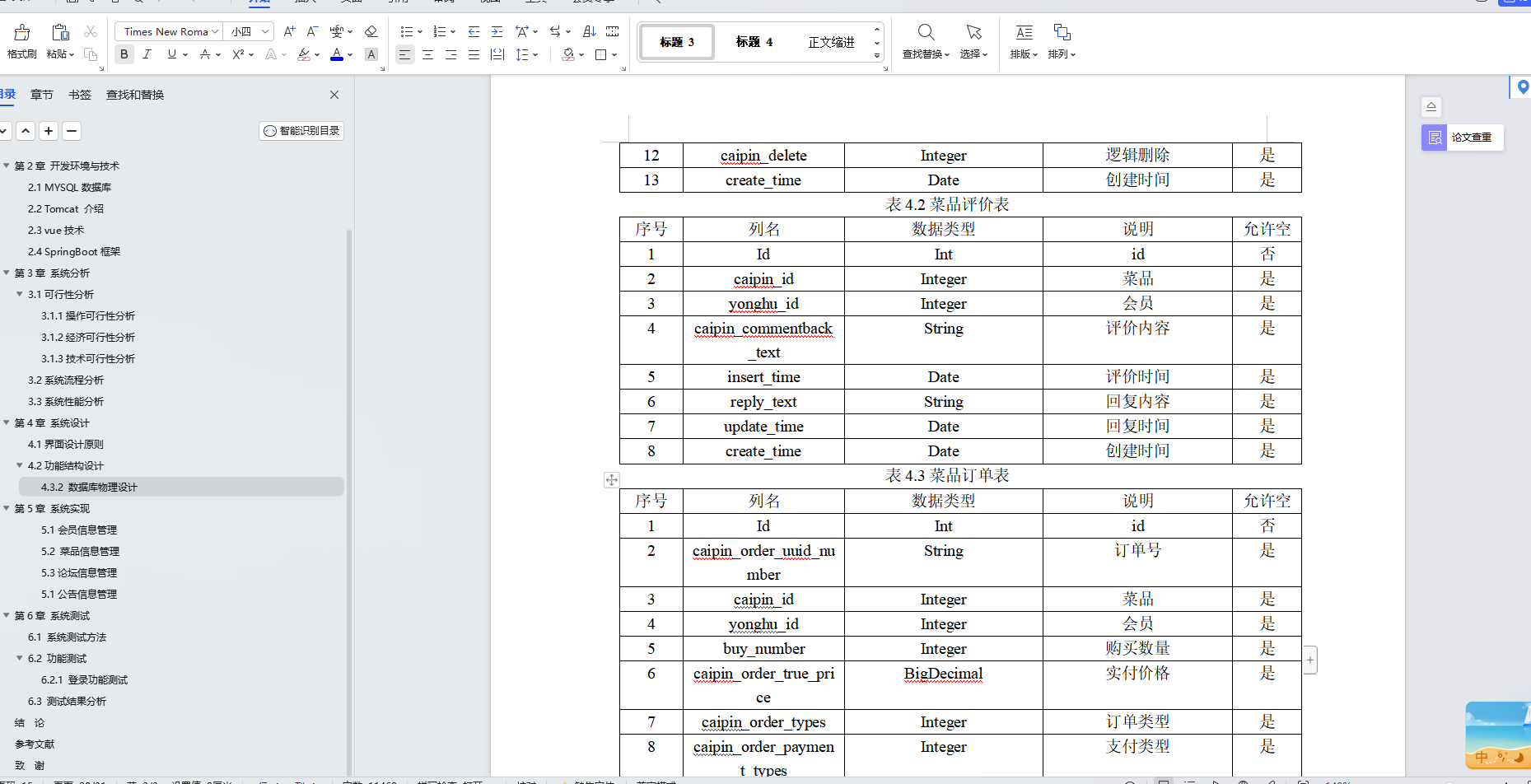
博主介绍:✌全网粉丝30W,csdn特邀作者、博客专家、CSDN新星计划导师、Java领域优质创作者,博客之星、掘金/华为云/阿里云/InfoQ等平台优质作者、专注于Java技术领域和毕业项目实战✌ 🍅文末获取源码联系🍅 👇🏻 精彩专…...
Unity——导航系统补充说明
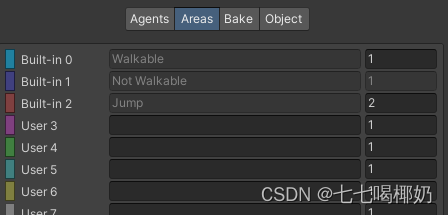
一、导航系统补充说明 1、导航与动画 我们可以通过设置动画状态机的变量,让动画匹配由玩家直接控制的角色的移动。那么自动导航的角色如何与动画系统结合呢? 有两个常用的属性可以获得导航代理当前的状态: 一是agent.velocity,…...

nginx实现负载均衡load balance
目录 nginx实现负载均衡load balance相关算法负载均衡https的访问后端的real server是否知道真正访问的用户的IP地址健康检查提升负载均衡的并发数量七层负载均衡和四层负载均衡七层负载均衡四层负载均衡四层和七层的区别502错误 nginx实现负载均衡load balance 准备ÿ…...

淘宝订单接口:连接消费者与商家的桥梁
当我们谈论淘宝订单接口时,我们谈论的是淘宝网为卖家和买家提供的一个用于处理订单的核心系统。通过这个接口,卖家可以接收订单、处理订单状态,并更新买家和平台的状态信息;买家则可以实时追踪自己的订单状态,更好地掌…...

数据结构-第一期——数组(Python)
目录 00、前言: 01、一维数组 一维数组的定义和初始化 一维变长数组 一维正向遍历 一维反向遍历 一维数组的区间操作 竞赛小技巧:不用从a[0]开始,从a[1]开始 蓝桥杯真题练习1 读入一维数组 例题一 例题二 例题三 实战训…...
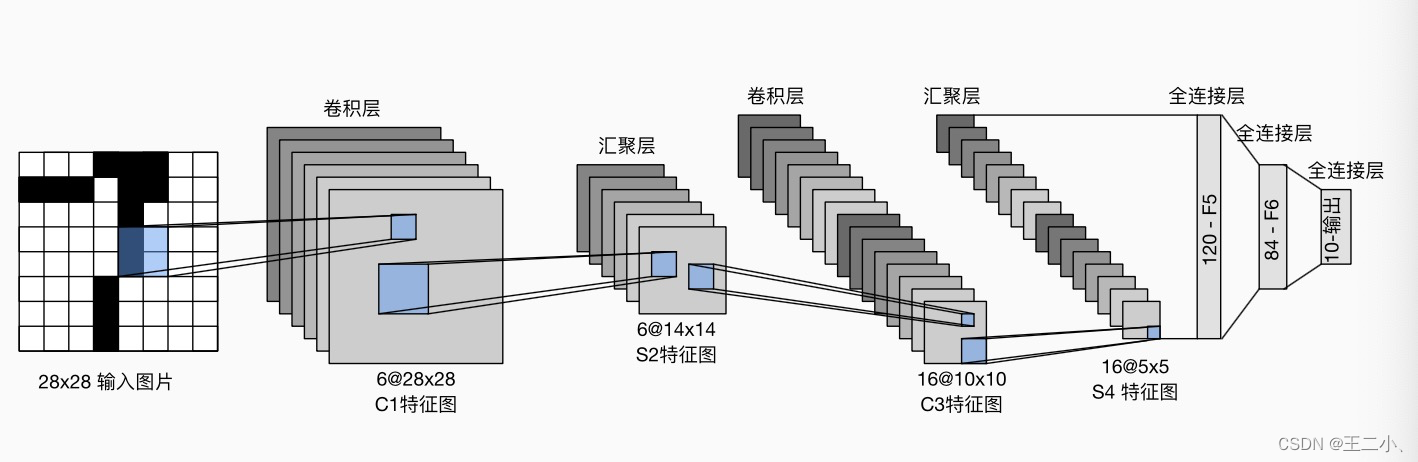
八 动手学深度学习v2 ——卷积神经网络之卷积+填充步幅+池化+LeNet
目录 1. 图像卷积总结2. 填充和步幅 padding和stride3. 多输入多输出通道4. 池化层5. LeNet 1. 图像卷积总结 二维卷积层的核心计算是二维互相关运算。最简单的形式是,对二维输入数据和卷积核执行互相关操作,然后添加一个偏置。核矩阵和偏移是可学习的参…...

SparkCore
第1章 RDD概述 1.1 什么是RDD RDD(Resilient Distributed Dataset)叫做弹性分布式数据集,是Spark中最基本的数据抽象。代码中是一个抽象类,它代表一个弹性的、不可变、可分区、里面的元素可并行计算的集合。 RDD类比工厂生产。 …...
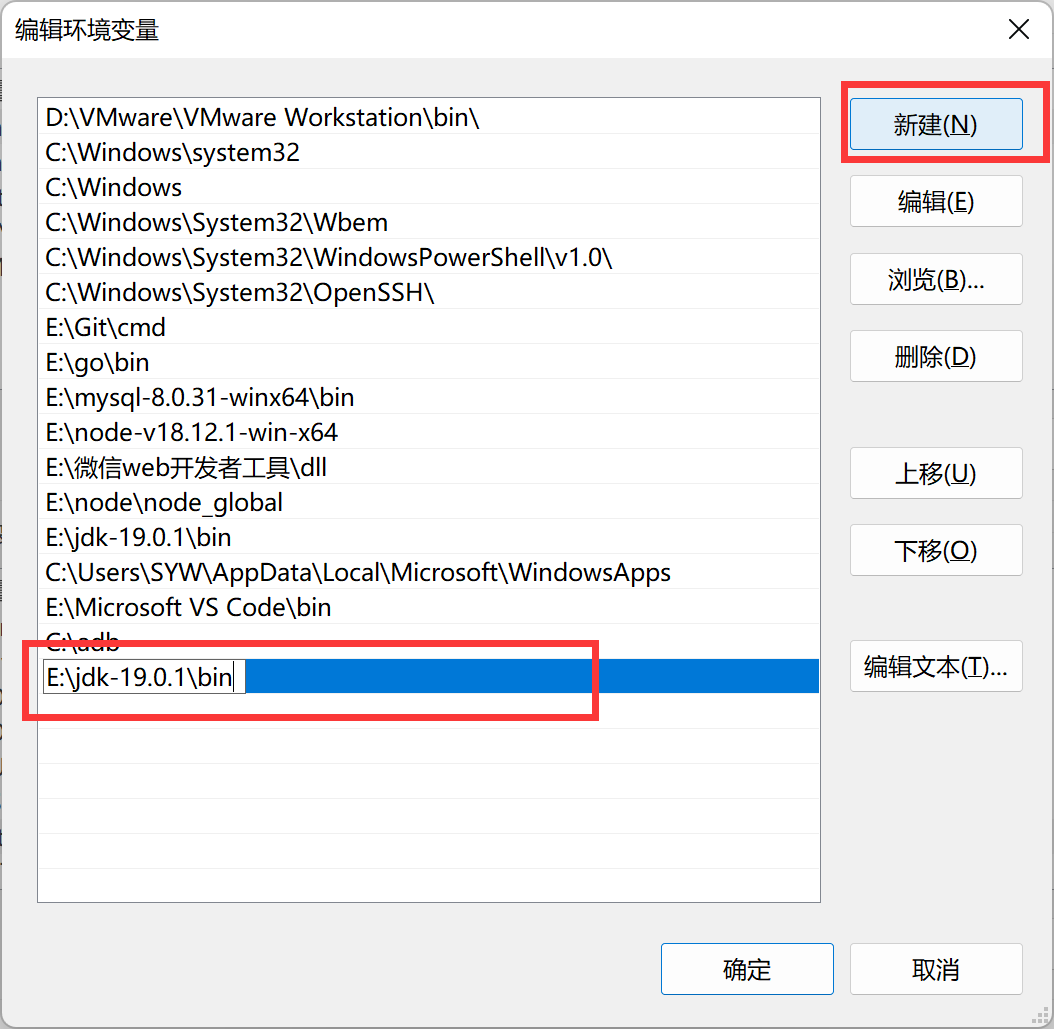
配置 Windows 系统环境变量
直接按键盘上面的 WINS 打开 Windows 搜索 搜索“编辑系统环境变量” 也可以右键此电脑->属性->高级系统设置打开相同的界面 点击环境变量 一般添加就是添加在框出的 Path 里面,双击可以看到现有的环境变量并进行编辑 例如我在博客中写把 Java 的 jdk 解压好…...

【计算机视觉】图片文件格式的讲解
文章目录 一、图片的压缩二、计算机表示颜色三、JPG和PNG3.1 JPG3.2 PNG 一、图片的压缩 图片文件格式有可能会对图片的文件大小进行不同程度的压缩,图片的压缩分为有损压缩和无损压缩两种。 有损压缩。指在压缩文件大小的过程中,损失了一部分图片的信…...

2023最全的性能测试种类介绍,这6个种类特别重要!
系统的性能是一个很大的概念,覆盖面非常广泛,包括执行效率、资源占用、系统稳定性、安全性、兼容性、可靠性、可扩展性等,性能测试就是描述测试对象与性能相关的特征并对其进行评价而实施的一类测试。 性能测试是一个统称,它其实包…...

代码随想录算法训练营19期第43天
1049. 最后一块石头的重量 II 视频讲解:动态规划之背包问题,这个背包最多能装多少?LeetCode:1049.最后一块石头的重量II_哔哩哔哩_bilibili 代码随想录 初步思路:动态规划。 总结:套用01背包 dp[j…...

微信小程序wx.previewImage实现图片预览
在微信小程序中,wx.previewImage函数用于预览图片,可以将一组图片以轮播的方式展示给用户,并支持用户手势操作进行切换。 使用wx.previewImage函数需要传入一个参数对象,该对象包含以下属性: current: String&#x…...
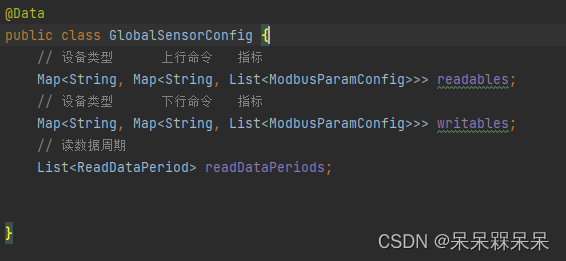
Java实现Modbus读写数据
背景 由于当时项目周期赶,引入了一个PLC4X组件,上手快。接下来就是使用这个组件遇到的一些问题: 关闭连接NioEventLoop没有释放导致oom设计思想是一个设备一个连接,而不是一个网关一个连接连接断开后客户端无从感知 前两个问题解…...

C++11新特性⑤ | 仿函数与lambda表达式
目录 1、引言 2、仿函数 3、lambda表达式 3.1、lambda表达式的一般形式 3.2、返回类型说明 3.3、捕获列表的规则 3.4、可以捕获哪些变量 3.5、lambda表达式给编程带来的便利 VC常用功能开发汇总(专栏文章列表,欢迎订阅,持续更新...&a…...

解决websocket不定时出现1005错误
后台抛出异常如下: Operator called default onErrorDropped reactor.core.Exceptions$ErrorCallbackNotImplemented: java.lang.IllegalArgumentException: WebSocket close status code does NOT comply with RFC-6455: 1005 Caused by: java.lang.IllegalArgume…...

文章内容生成随机图像,并将这些图像上链
一、需求背景 在当前的互联网时代,信息越来越快速地传播,一篇好的文章不仅需要有吸引人的文字内容,还需要有精美的配图。但是,对于某些只有文字,而没有图片的文章,我们可以使用程序去生成随机的图片来作为文章的配图。 本文将详细介绍如何使用Java语言实现文章内容生成…...

l8-d9 UDP通信实现
一、函数接口扩展与UDP通信实现流程 1.write/read到send/recv 函数原型: ssize_t send(int sockfd, const void *buf, size_t len, int flags); ssize_t recv(int sockfd, void *buf, size_t len, int flags); 前三个参数同read/write一样; ssize_t rea…...

Leather Dress Collection 模型Java后端集成指南:SpringBoot微服务开发
Leather Dress Collection 模型Java后端集成指南:SpringBoot微服务开发 最近在做一个电商相关的项目,需要集成一个能生成皮革服饰设计图的AI模型,正好接触到了Leather Dress Collection。作为后端开发,我的第一反应就是ÿ…...

SenseVoice-Small模型在运维监控中的语音告警应用
SenseVoice-Small模型在运维监控中的语音告警应用 1. 运维人员每天都在和告警“搏斗” 你有没有经历过这样的场景:凌晨三点,手机突然震动,一条告警短信跳出来——“数据库连接池使用率98%”。你立刻爬起来打开电脑,连上跳板机&a…...
在以太坊生态中,**智能合约的安全性)
# 智能合约安全实战:重入攻击原理与防御机制详解(Solidity + Foundry)在以太坊生态中,**智能合约的安全性
智能合约安全实战:重入攻击原理与防御机制详解(Solidity Foundry) 在以太坊生态中,智能合约的安全性直接决定项目的生命线。近年来频繁爆发的漏洞事件表明,即使是看似简单的逻辑也可能埋藏致命隐患。其中,…...
)
避坑指南:RK3588 SD卡刷机时FAT32转EXT4的完整流程(含工具包)
RK3588大容量镜像烧写实战:突破FAT32限制的EXT4全流程解决方案 当你在RK3588开发板上尝试烧写超过4GB的Ubuntu或Debian镜像时,是否遇到过SD卡工具报错?这不是你的操作问题,而是FAT32文件系统的天然限制。本文将带你深入理解这一技…...

SUNFLOWER MATCH LAB在CSDN技术社区的分享:从部署到创新的完整旅程
SUNFLOWER MATCH LAB在CSDN技术社区的分享:从部署到创新的完整旅程 最近在CSDN上看到不少关于AI模型部署和应用的讨论,其中SUNFLOWER MATCH LAB这个项目引起了我的注意。它不是一个简单的模型调用工具,更像是一个围绕特定AI能力构建的完整实…...

零代码自动化:OpenClaw+百川2-13B实现Excel报表智能整理
零代码自动化:OpenClaw百川2-13B实现Excel报表智能整理 1. 为什么需要智能表格处理工具 每个月末,我都要面对几十张格式各异的Excel报表。供应商对账单、部门报销明细、项目进度表……这些文件总是以不同的结构出现在我的邮箱里。最痛苦的不是处理数据…...

终极指南:如何轻松解包Godot PCK文件并提取游戏资源
终极指南:如何轻松解包Godot PCK文件并提取游戏资源 【免费下载链接】godot-unpacker godot .pck unpacker 项目地址: https://gitcode.com/gh_mirrors/go/godot-unpacker 还在为Godot游戏的PCK文件无法解包而烦恼吗?无论你是游戏开发者想要复用资…...

Mac Mouse Fix解决方案:让第三方鼠标在macOS上重获新生的完全指南
Mac Mouse Fix解决方案:让第三方鼠标在macOS上重获新生的完全指南 【免费下载链接】mac-mouse-fix Mac Mouse Fix - A simple way to make your mouse better. 项目地址: https://gitcode.com/GitHub_Trending/ma/mac-mouse-fix macOS系统对第三方鼠标的支持…...

ncmdumpGUI终极指南:解锁你的音乐收藏,告别NCM格式束缚
ncmdumpGUI终极指南:解锁你的音乐收藏,告别NCM格式束缚 【免费下载链接】ncmdumpGUI C#版本网易云音乐ncm文件格式转换,Windows图形界面版本 项目地址: https://gitcode.com/gh_mirrors/nc/ncmdumpGUI 你是否曾经遇到过这样的情况&am…...

3个超实用方法:115proxy-for-Kodi插件实现云端视频流畅播放完全指南
3个超实用方法:115proxy-for-Kodi插件实现云端视频流畅播放完全指南 【免费下载链接】115proxy-for-kodi 115原码播放服务Kodi插件 项目地址: https://gitcode.com/gh_mirrors/11/115proxy-for-kodi 你是否曾因115网盘中的高清视频无法在Kodi上流畅播放而困扰…...