
CMake高级用法实例分析(学习paddle官方的CMakeLists)
cmake基础学习教程
https://juejin.cn/post/6844903557183832078
官方完整CMakeLists
cmake_minimum_required(VERSION 3.0)
project(PaddleObjectDetector CXX C)option(WITH_MKL        "Compile demo with MKL/OpenBlas support,defaultuseMKL."          ON)
option(WITH_GPU        "Compile demo with GPU/CPU, default use CPU."                    ON)
option(WITH_TENSORRT   "Compile demo with TensorRT."                                    OFF)option(WITH_KEYPOINT        "Whether to Compile KeyPoint detector"                    OFF)
option(WITH_MOT       "Whether to Compile MOT detector" OFF)SET(PADDLE_DIR "" CACHE PATH "Location of libraries")
SET(PADDLE_LIB_NAME "" CACHE STRING "libpaddle_inference")
SET(OPENCV_DIR "" CACHE PATH "Location of libraries")
SET(CUDA_LIB "" CACHE PATH "Location of libraries")
SET(CUDNN_LIB "" CACHE PATH "Location of libraries")
SET(TENSORRT_INC_DIR "" CACHE PATH "Compile demo with TensorRT")
SET(TENSORRT_LIB_DIR "" CACHE PATH "Compile demo with TensorRT")include(cmake/yaml-cpp.cmake)include_directories("${CMAKE_SOURCE_DIR}/")
include_directories("${CMAKE_CURRENT_BINARY_DIR}/ext/yaml-cpp/src/ext-yaml-cpp/include")
link_directories("${CMAKE_CURRENT_BINARY_DIR}/ext/yaml-cpp/lib")if (WITH_KEYPOINT)set(SRCS src/main_keypoint.cc src/preprocess_op.cc src/object_detector.cc src/picodet_postprocess.cc src/utils.cc src/keypoint_detector.cc src/keypoint_postprocess.cc)
elseif (WITH_MOT)set(SRCS src/main_jde.cc src/preprocess_op.cc src/object_detector.cc src/jde_detector.cc src/tracker.cc src/trajectory.cc src/lapjv.cpp src/picodet_postprocess.cc src/utils.cc)
else ()set(SRCS src/main.cc src/preprocess_op.cc src/object_detector.cc src/picodet_postprocess.cc src/utils.cc)
endif()#这个宏定义的意思是如果这些flag中有MD即动态版本,都要替换成静态版本
macro(safe_set_static_flag)foreach(flag_varCMAKE_CXX_FLAGS CMAKE_CXX_FLAGS_DEBUG CMAKE_CXX_FLAGS_RELEASECMAKE_CXX_FLAGS_MINSIZEREL CMAKE_CXX_FLAGS_RELWITHDEBINFO)if(${flag_var} MATCHES "/MD")string(REGEX REPLACE "/MD" "/MT" ${flag_var} "${${flag_var}}")endif(${flag_var} MATCHES "/MD")endforeach(flag_var)
endmacro()if (WITH_MKL)ADD_DEFINITIONS(-DUSE_MKL)
endif()if (NOT DEFINED PADDLE_DIR OR ${PADDLE_DIR} STREQUAL "")message(FATAL_ERROR "please set PADDLE_DIR with -DPADDLE_DIR=/path/paddle_influence_dir")
endif()
message("PADDLE_DIR IS:" ${PADDLE_DIR})if (NOT DEFINED OPENCV_DIR OR ${OPENCV_DIR} STREQUAL "")message(FATAL_ERROR "please set OPENCV_DIR with -DOPENCV_DIR=/path/opencv")
endif()include_directories("${CMAKE_SOURCE_DIR}/")
include_directories("${PADDLE_DIR}/")
include_directories("${PADDLE_DIR}/third_party/install/protobuf/include")
include_directories("${PADDLE_DIR}/third_party/install/glog/include")
include_directories("${PADDLE_DIR}/third_party/install/gflags/include")
include_directories("${PADDLE_DIR}/third_party/install/xxhash/include")
if (EXISTS "${PADDLE_DIR}/third_party/install/snappy/include")include_directories("${PADDLE_DIR}/third_party/install/snappy/include")
endif()
if(EXISTS "${PADDLE_DIR}/third_party/install/snappystream/include")include_directories("${PADDLE_DIR}/third_party/install/snappystream/include")
endif()
include_directories("${PADDLE_DIR}/third_party/boost")
include_directories("${PADDLE_DIR}/third_party/eigen3")if (EXISTS "${PADDLE_DIR}/third_party/install/snappy/lib")link_directories("${PADDLE_DIR}/third_party/install/snappy/lib")
endif()
if(EXISTS "${PADDLE_DIR}/third_party/install/snappystream/lib")link_directories("${PADDLE_DIR}/third_party/install/snappystream/lib")
endif()link_directories("${PADDLE_DIR}/third_party/install/protobuf/lib")
link_directories("${PADDLE_DIR}/third_party/install/glog/lib")
link_directories("${PADDLE_DIR}/third_party/install/gflags/lib")
link_directories("${PADDLE_DIR}/third_party/install/xxhash/lib")
link_directories("${PADDLE_DIR}/third_party/install/paddle2onnx/lib")
link_directories("${PADDLE_DIR}/third_party/install/onnxruntime/lib")
link_directories("${PADDLE_DIR}/paddle/lib/")
link_directories("${CMAKE_CURRENT_BINARY_DIR}")if (WIN32)include_directories("${PADDLE_DIR}/paddle/fluid/inference")include_directories("${PADDLE_DIR}/paddle/include")link_directories("${PADDLE_DIR}/paddle/fluid/inference")find_package(OpenCV REQUIRED PATHS ${OPENCV_DIR}/build/ NO_DEFAULT_PATH)else ()find_package(OpenCV REQUIRED PATHS ${OPENCV_DIR}/share/OpenCV NO_DEFAULT_PATH)include_directories("${PADDLE_DIR}/paddle/include")link_directories("${PADDLE_DIR}/paddle/lib")
endif ()
include_directories(${OpenCV_INCLUDE_DIRS})if (WIN32)add_definitions("/DGOOGLE_GLOG_DLL_DECL=")set(CMAKE_C_FLAGS_DEBUG   "${CMAKE_C_FLAGS_DEBUG} /bigobj /MTd")set(CMAKE_C_FLAGS_RELEASE  "${CMAKE_C_FLAGS_RELEASE} /bigobj /MT")set(CMAKE_CXX_FLAGS_DEBUG  "${CMAKE_CXX_FLAGS_DEBUG} /bigobj /MTd")set(CMAKE_CXX_FLAGS_RELEASE   "${CMAKE_CXX_FLAGS_RELEASE} /bigobj /MT")
else()set(CMAKE_CXX_FLAGS "${CMAKE_CXX_FLAGS} -g -o2 -fopenmp -std=c++11")set(CMAKE_STATIC_LIBRARY_PREFIX "")
endif()# TODO let users define cuda lib path
if (WITH_GPU)if (NOT DEFINED CUDA_LIB OR ${CUDA_LIB} STREQUAL "")message(FATAL_ERROR "please set CUDA_LIB with -DCUDA_LIB=/path/cuda-8.0/lib64")endif()if (NOT WIN32)if (NOT DEFINED CUDNN_LIB)message(FATAL_ERROR "please set CUDNN_LIB with -DCUDNN_LIB=/path/cudnn_v7.4/cuda/lib64")endif()endif(NOT WIN32)
endif()if (NOT WIN32)if (WITH_TENSORRT AND WITH_GPU)include_directories("${TENSORRT_INC_DIR}/")link_directories("${TENSORRT_LIB_DIR}/")endif()
endif(NOT WIN32)if (NOT WIN32)set(NGRAPH_PATH "${PADDLE_DIR}/third_party/install/ngraph")if(EXISTS ${NGRAPH_PATH})include(GNUInstallDirs)include_directories("${NGRAPH_PATH}/include")link_directories("${NGRAPH_PATH}/${CMAKE_INSTALL_LIBDIR}")set(NGRAPH_LIB ${NGRAPH_PATH}/${CMAKE_INSTALL_LIBDIR}/libngraph${CMAKE_SHARED_LIBRARY_SUFFIX})endif()
endif()if(WITH_MKL)include_directories("${PADDLE_DIR}/third_party/install/mklml/include")if (WIN32)set(MATH_LIB ${PADDLE_DIR}/third_party/install/mklml/lib/mklml.lib${PADDLE_DIR}/third_party/install/mklml/lib/libiomp5md.lib)else ()set(MATH_LIB ${PADDLE_DIR}/third_party/install/mklml/lib/libmklml_intel${CMAKE_SHARED_LIBRARY_SUFFIX}${PADDLE_DIR}/third_party/install/mklml/lib/libiomp5${CMAKE_SHARED_LIBRARY_SUFFIX})execute_process(COMMAND cp -r ${PADDLE_DIR}/third_party/install/mklml/lib/libmklml_intel${CMAKE_SHARED_LIBRARY_SUFFIX} /usr/lib)endif ()set(MKLDNN_PATH "${PADDLE_DIR}/third_party/install/mkldnn")if(EXISTS ${MKLDNN_PATH})include_directories("${MKLDNN_PATH}/include")if (WIN32)set(MKLDNN_LIB ${MKLDNN_PATH}/lib/mkldnn.lib)else ()set(MKLDNN_LIB ${MKLDNN_PATH}/lib/libmkldnn.so.0)endif ()endif()
else()set(MATH_LIB ${PADDLE_DIR}/third_party/install/openblas/lib/libopenblas${CMAKE_STATIC_LIBRARY_SUFFIX})
endif()if (WIN32)if(EXISTS "${PADDLE_DIR}/paddle/fluid/inference/${PADDLE_LIB_NAME}${CMAKE_STATIC_LIBRARY_SUFFIX}")set(DEPS${PADDLE_DIR}/paddle/fluid/inference/${PADDLE_LIB_NAME}${CMAKE_STATIC_LIBRARY_SUFFIX})else()set(DEPS${PADDLE_DIR}/paddle/lib/${PADDLE_LIB_NAME}${CMAKE_STATIC_LIBRARY_SUFFIX})endif()
endif()if (WIN32)set(DEPS ${PADDLE_DIR}/paddle/lib/${PADDLE_LIB_NAME}${CMAKE_STATIC_LIBRARY_SUFFIX})
else()set(DEPS ${PADDLE_DIR}/paddle/lib/${PADDLE_LIB_NAME}${CMAKE_SHARED_LIBRARY_SUFFIX})
endif()message("PADDLE_LIB_NAME:" ${PADDLE_LIB_NAME})
message("DEPS:" $DEPS)if (NOT WIN32)set(DEPS ${DEPS}${MATH_LIB} ${MKLDNN_LIB}glog gflags protobuf z xxhash yaml-cpp)if(EXISTS "${PADDLE_DIR}/third_party/install/snappystream/lib")set(DEPS ${DEPS} snappystream)endif()if (EXISTS "${PADDLE_DIR}/third_party/install/snappy/lib")set(DEPS ${DEPS} snappy)endif()
else()set(DEPS ${DEPS}${MATH_LIB} ${MKLDNN_LIB}glog gflags_static libprotobuf xxhash libyaml-cppmt)set(DEPS ${DEPS} libcmt shlwapi)if (EXISTS "${PADDLE_DIR}/third_party/install/snappy/lib")set(DEPS ${DEPS} snappy)endif()if(EXISTS "${PADDLE_DIR}/third_party/install/snappystream/lib")set(DEPS ${DEPS} snappystream)endif()
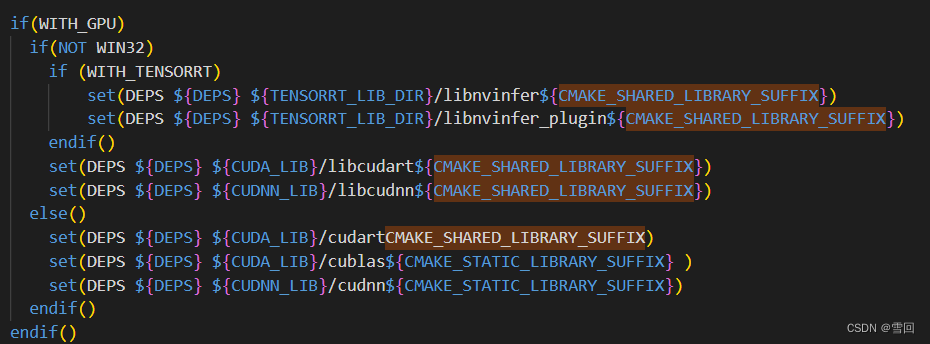
endif(NOT WIN32)if(WITH_GPU)if(NOT WIN32)if (WITH_TENSORRT)set(DEPS ${DEPS} ${TENSORRT_LIB_DIR}/libnvinfer${CMAKE_SHARED_LIBRARY_SUFFIX})set(DEPS ${DEPS} ${TENSORRT_LIB_DIR}/libnvinfer_plugin${CMAKE_SHARED_LIBRARY_SUFFIX})endif()set(DEPS ${DEPS} ${CUDA_LIB}/libcudart${CMAKE_SHARED_LIBRARY_SUFFIX})set(DEPS ${DEPS} ${CUDNN_LIB}/libcudnn${CMAKE_SHARED_LIBRARY_SUFFIX})else()set(DEPS ${DEPS} ${CUDA_LIB}/cudart${CMAKE_STATIC_LIBRARY_SUFFIX} )set(DEPS ${DEPS} ${CUDA_LIB}/cublas${CMAKE_STATIC_LIBRARY_SUFFIX} )set(DEPS ${DEPS} ${CUDNN_LIB}/cudnn${CMAKE_STATIC_LIBRARY_SUFFIX})endif()
endif()if (NOT WIN32)set(EXTERNAL_LIB "-ldl -lrt -lgomp -lz -lm -lpthread")set(DEPS ${DEPS} ${EXTERNAL_LIB})
endif()set(DEPS ${DEPS} ${OpenCV_LIBS})
add_executable(main ${SRCS})
ADD_DEPENDENCIES(main ext-yaml-cpp)
message("DEPS:" $DEPS)
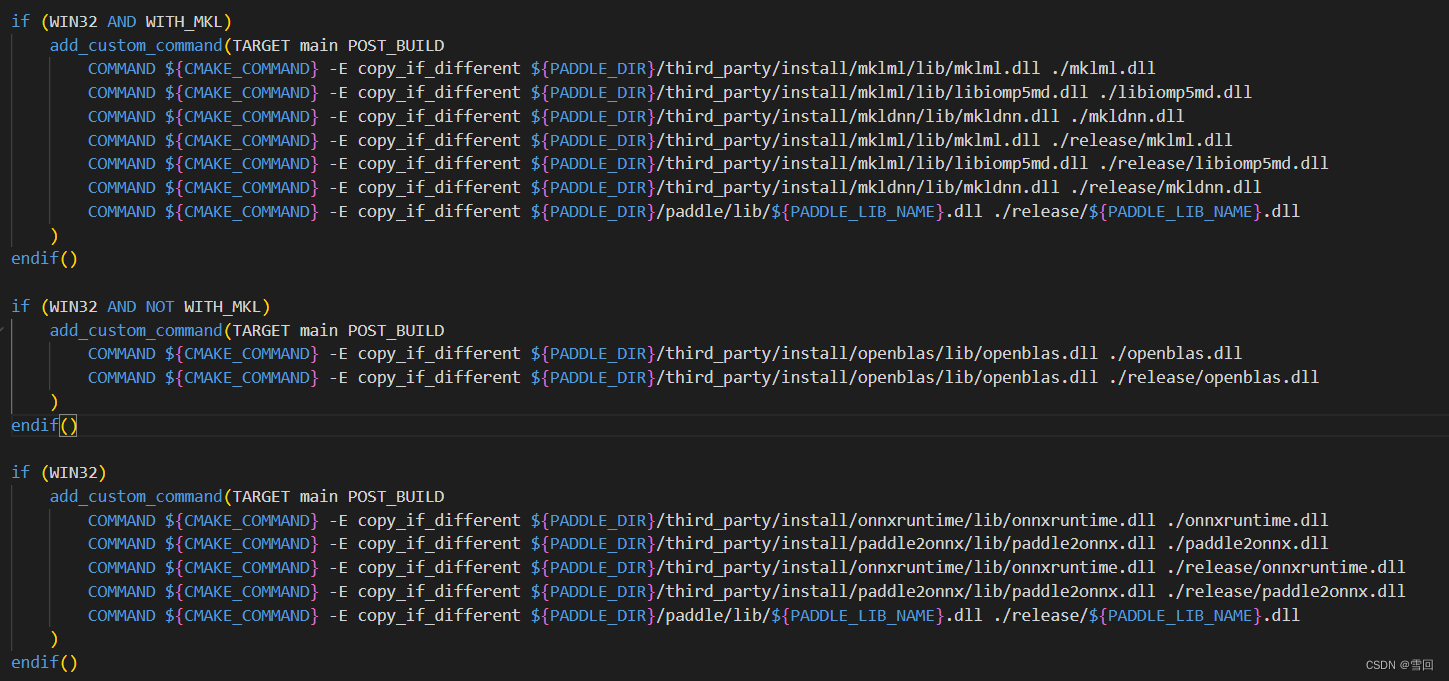
target_link_libraries(main ${DEPS})if (WIN32 AND WITH_MKL)add_custom_command(TARGET main POST_BUILDCOMMAND ${CMAKE_COMMAND} -E copy_if_different ${PADDLE_DIR}/third_party/install/mklml/lib/mklml.dll ./mklml.dllCOMMAND ${CMAKE_COMMAND} -E copy_if_different ${PADDLE_DIR}/third_party/install/mklml/lib/libiomp5md.dll ./libiomp5md.dllCOMMAND ${CMAKE_COMMAND} -E copy_if_different ${PADDLE_DIR}/third_party/install/mkldnn/lib/mkldnn.dll ./mkldnn.dllCOMMAND ${CMAKE_COMMAND} -E copy_if_different ${PADDLE_DIR}/third_party/install/mklml/lib/mklml.dll ./release/mklml.dllCOMMAND ${CMAKE_COMMAND} -E copy_if_different ${PADDLE_DIR}/third_party/install/mklml/lib/libiomp5md.dll ./release/libiomp5md.dllCOMMAND ${CMAKE_COMMAND} -E copy_if_different ${PADDLE_DIR}/third_party/install/mkldnn/lib/mkldnn.dll ./release/mkldnn.dllCOMMAND ${CMAKE_COMMAND} -E copy_if_different ${PADDLE_DIR}/paddle/lib/${PADDLE_LIB_NAME}.dll ./release/${PADDLE_LIB_NAME}.dll)
endif()if (WIN32 AND NOT WITH_MKL)add_custom_command(TARGET main POST_BUILDCOMMAND ${CMAKE_COMMAND} -E copy_if_different ${PADDLE_DIR}/third_party/install/openblas/lib/openblas.dll ./openblas.dllCOMMAND ${CMAKE_COMMAND} -E copy_if_different ${PADDLE_DIR}/third_party/install/openblas/lib/openblas.dll ./release/openblas.dll)
endif()if (WIN32)add_custom_command(TARGET main POST_BUILDCOMMAND ${CMAKE_COMMAND} -E copy_if_different ${PADDLE_DIR}/third_party/install/onnxruntime/lib/onnxruntime.dll ./onnxruntime.dllCOMMAND ${CMAKE_COMMAND} -E copy_if_different ${PADDLE_DIR}/third_party/install/paddle2onnx/lib/paddle2onnx.dll ./paddle2onnx.dllCOMMAND ${CMAKE_COMMAND} -E copy_if_different ${PADDLE_DIR}/third_party/install/onnxruntime/lib/onnxruntime.dll ./release/onnxruntime.dllCOMMAND ${CMAKE_COMMAND} -E copy_if_different ${PADDLE_DIR}/third_party/install/paddle2onnx/lib/paddle2onnx.dll ./release/paddle2onnx.dllCOMMAND ${CMAKE_COMMAND} -E copy_if_different ${PADDLE_DIR}/paddle/lib/${PADDLE_LIB_NAME}.dll ./release/${PADDLE_LIB_NAME}.dll)
endif()
project()
项目名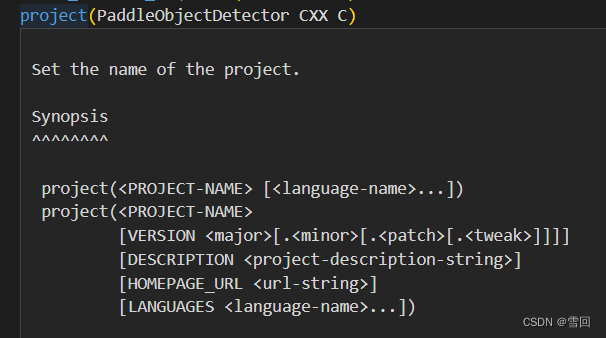
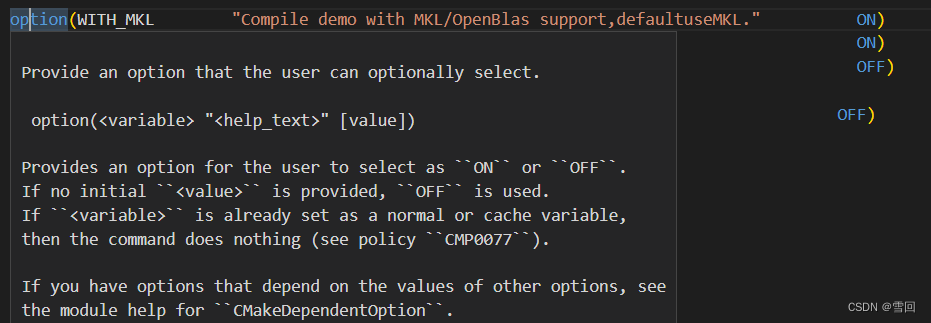
option(
variable 选项名
help_text 描述、解释、备注
value 选项初始化值(除ON而外全为OFF))
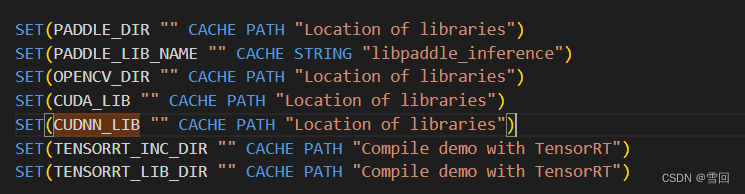
SET()
这个大写的SET其实和小写的set是一样的,CMake中的命令不区分大小写,CMake中的变量区分大小写
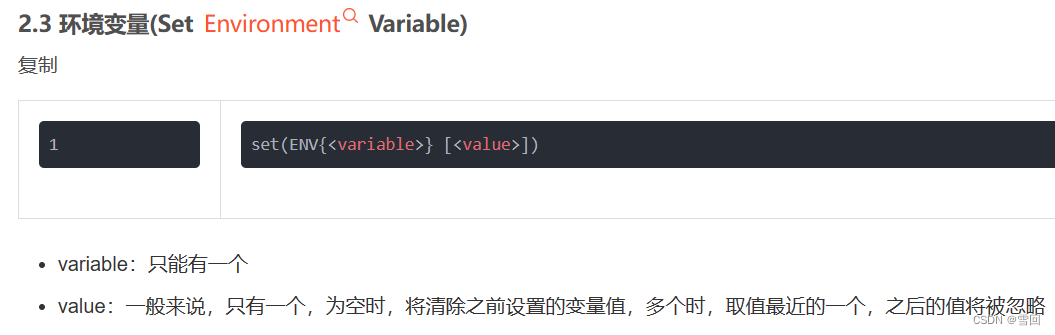
官方手册
Set a normal, cache, or environment variable to a given value.
See the :ref:`cmake-language(7) variables <CMake Language Variables>`
documentation for the scopes and interaction of normal variables
and cache entries.Signatures of this command that specify a ``<value>...`` placeholder
expect zero or more arguments.  Multiple arguments will be joined as
a :ref:`semicolon-separated list <CMake Language Lists>` to form the actual variable
value to be set.  Zero arguments will cause normal variables to be
unset.  See the ``unset()`` command to unset variables explicitly.Set Normal Variable
^^^^^^^^^^^^^^^^^^^set(<variable> <value>... [PARENT_SCOPE])Sets the given ``<variable>`` in the current function or directory scope.
- 比较好的案例博客https://blog.csdn.net/Calvin_zhou/article/details/104060927


include(cmake/yaml-cpp.cmake)
加载cmake文件的
Load and run CMake code from a file or module.include(<file|module> [OPTIONAL] [RESULT_VARIABLE <var>][NO_POLICY_SCOPE])Loads and runs CMake code from the file given.  Variable reads and
writes access the scope of the caller (dynamic scoping).  If ``OPTIONAL``
is present, then no error is raised if the file does not exist.  If
``RESULT_VARIABLE`` is given the variable ``<var>`` will be set to the
full filename which has been included or ``NOTFOUND`` if it failed.If a module is specified instead of a file, the file with name
``<modulename>.cmake`` is searched first in ``CMAKE_MODULE_PATH``,
then in the CMake module directory.  There is one exception to this: if
the file which calls ``include()`` is located itself in the CMake builtin
module directory, then first the CMake builtin module directory is searched and
``CMAKE_MODULE_PATH`` afterwards.  See also policy ``CMP0017``.
include_directories(“${CMAKE_SOURCE_DIR}/”)
加载头文件文件夹
Add include directories to the build.include_directories([AFTER|BEFORE] [SYSTEM] dir1 [dir2 ...])Add the given directories to those the compiler uses to search for
include files.  Relative paths are interpreted as relative to the
current source directory.The include directories are added to the ``INCLUDE_DIRECTORIES``
directory property for the current ``CMakeLists`` file.  They are also
added to the ``INCLUDE_DIRECTORIES`` target property for each
target in the current ``CMakeLists`` file.  The target property values
are the ones used by the generators.By default the directories specified are appended onto the current list of
directories.  This default behavior can be changed by setting
``CMAKE_INCLUDE_DIRECTORIES_BEFORE`` to ``ON``.  By using
link_directories()
加载库文件夹地址
Add directories in which the linker will look for libraries.link_directories([AFTER|BEFORE] directory1 [directory2 ...])Adds the paths in which the linker should search for libraries.
Relative paths given to this command are interpreted as relative to
the current source directory, see ``CMP0015``.The command will apply only to targets created after it is called... versionadded:: 3.13The directories are added to the ``LINK_DIRECTORIES`` directoryproperty for the current ``CMakeLists.txt`` file, converting relativepaths to absolute as needed.  See the ``cmake-buildsystem(7)``manual for more on defining buildsystem properties... versionadded:: 3.13
macro(safe_set_static_flag)函数
内容
**endmacro**()
这个函数属于宏定义,简单的说就是出现宏的地方进行代码替换,
解析的很清楚的博文:
https://blog.csdn.net/qq_21438461/article/details/129729530
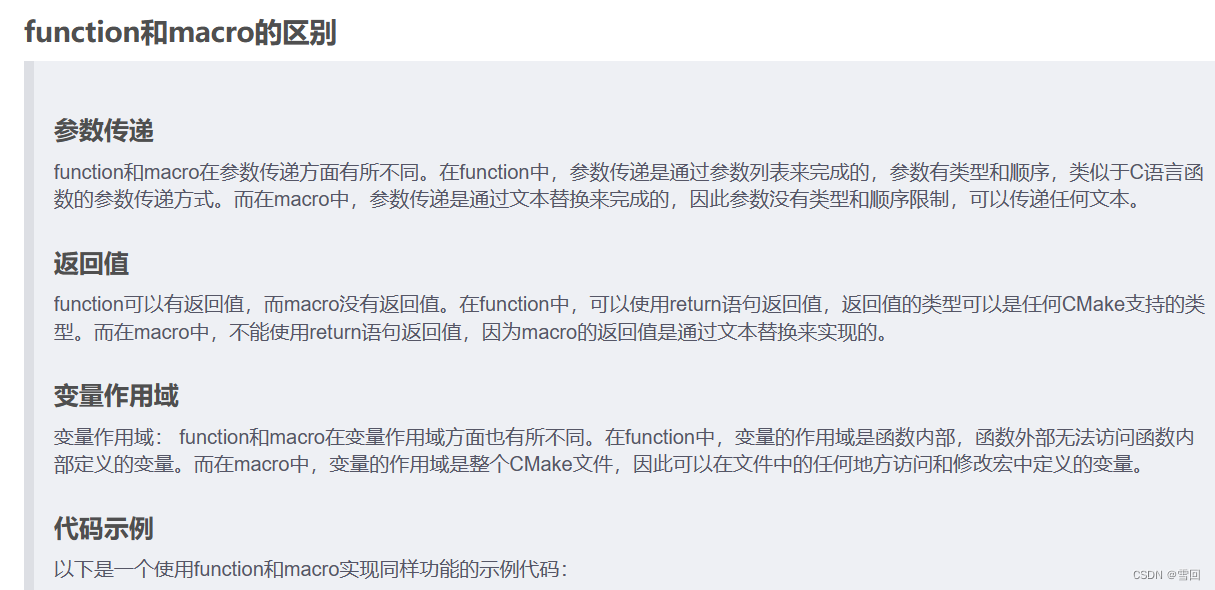
官方文档:
Start recording a macro for later invocation as a commandmacro(<name> [<arg1> ...])<commands>endmacro()Defines a macro named ``<name>`` that takes arguments named
``<arg1>``, ... Commands listed after macro, but before the
matching ``endmacro()``, are not executed until the macro
is invoked.Per legacy, the ``endmacro()`` command admits an optional
``<name>`` argument. If used, it must be a verbatim repeat of the
argument of the opening ``macro`` command.See the ``cmake_policy()`` command documentation for the behavior
of policies inside macros.
foreach(参数,循环列表)函数
用于循环列表中的每一项

https://blog.csdn.net/wzj_110/article/details/116110014
Evaluate a group of commands for each value in a list.foreach(<loop_var> <items>)<commands>endforeach()where ``<items>`` is a list of items that are separated by
semicolon or whitespace.
All commands between ``foreach`` and the matching ``endforeach`` are recorded
without being invoked.  Once the ``endforeach`` is evaluated, the recorded
list of commands is invoked once for each item in ``<items>``.
At the beginning of each iteration the variable ``<loop_var>`` will be set
to the value of the current item.The scope of ``<loop_var>`` is restricted to the loop scope. See policy
``CMP0124`` for details.
MATCHES关键字
条件判断
https://blog.csdn.net/steptoward/article/details/128848733
可用于正则表达式

- string(REGEX REPLACE 查找值 替换值 输出 输入)
REGEX REPLACE指正则替换
https://blog.csdn.net/weixin_41923935/article/details/122155064
https://blog.csdn.net/m0_57845572/article/details/118520561

String operations.Synopsis
^^^^^^^^Search and Replacestring(FIND <string> <substring> <out-var> [...])string(REPLACE <match-string> <replace-string> <out-var> <input>...)string(REGEX MATCH <match-regex> <out-var> <input>...)string(REGEX MATCHALL <match-regex> <out-var> <input>...)string(REGEX REPLACE <match-regex> <replace-expr> <out-var> <input>...)Manipulationstring(APPEND <string-var> [<input>...])string(PREPEND <string-var> [<input>...])string(CONCAT <out-var> [<input>...])string(JOIN <glue> <out-var> [<input>...])
“/MD” “/MT”

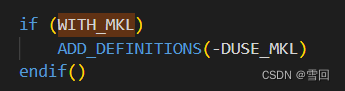
ADD_DEFINITIONS(-DUSE_MKL)
这种可以在我们更改别人代码做实验时使用,既不对其源码进行破坏,又可以添加自己的功能。有了这个后可以直接在编译的时候进行选择。具体的,在工程CMakeLists.txt 中,使用add_definitions()函数控制代码的开启和关闭:
https://blog.csdn.net/fb_941219/article/details/107376017
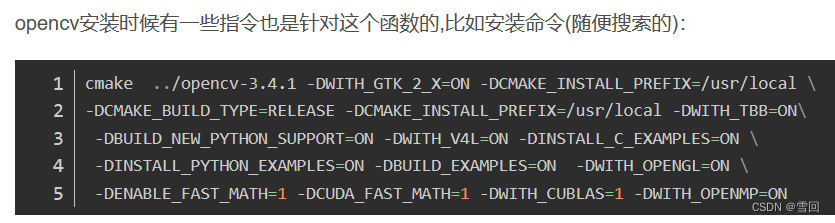
Add -D define flags to the compilation of source files.add_definitions(-DFOO -DBAR ...)Adds definitions to the compiler command line for targets in the current
directory, whether added before or after this command is invoked, and for
the ones in sub-directories added after. This command can be used to add any
flags, but it is intended to add preprocessor definitions... note::This command has been superseded by alternatives:* Use ``add_compile_definitions()`` to add preprocessor definitions.* Use ``include_directories()`` to add include directories.* Use ``add_compile_options()`` to add other options.
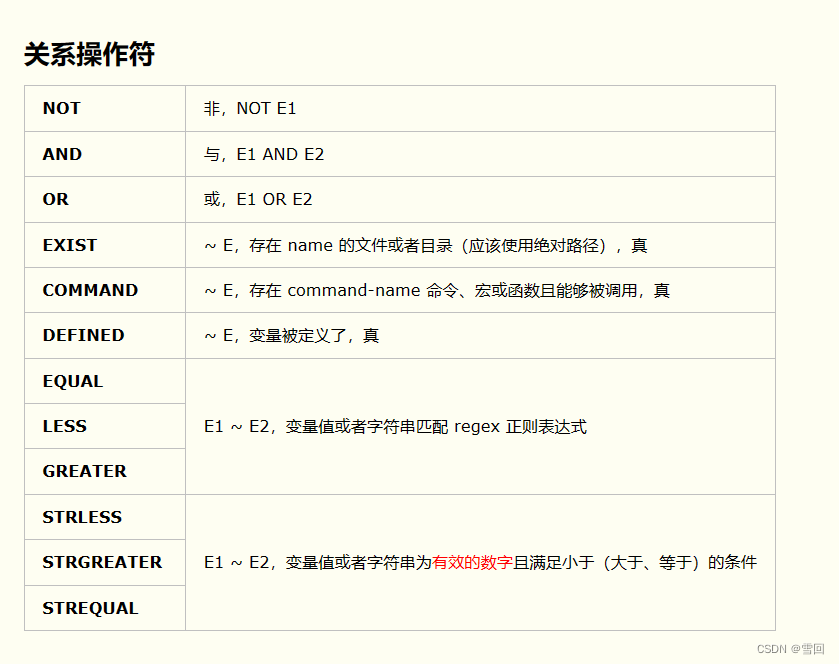
cmake关系操作符号
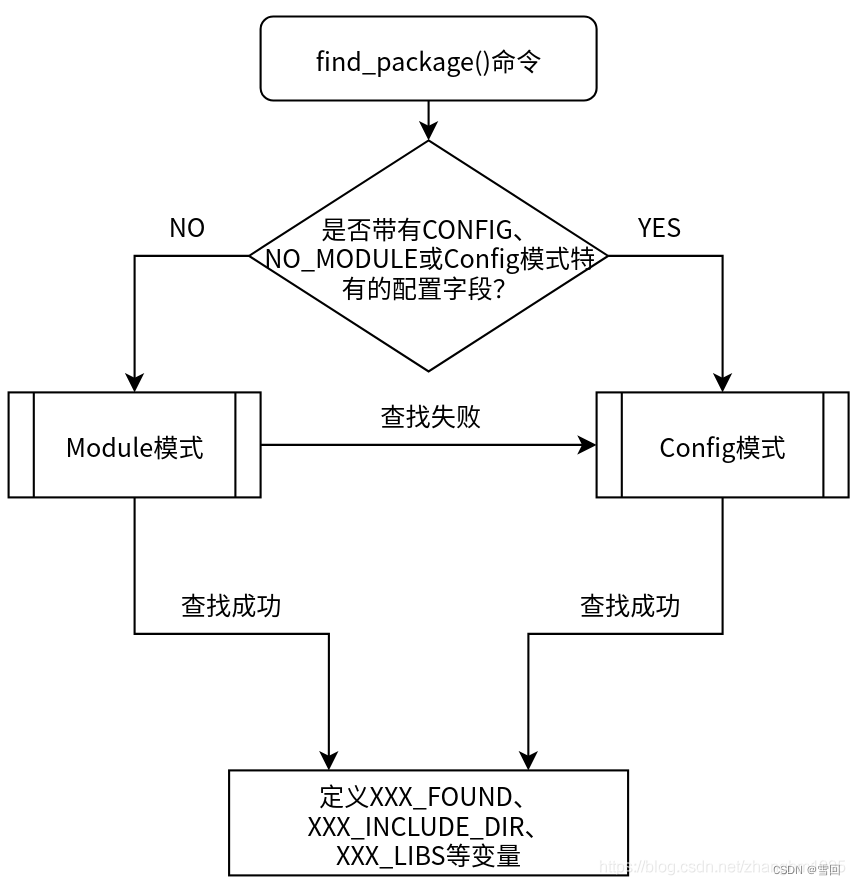
find_package(OpenCV REQUIRED PATHS ${OPENCV_DIR}/build/ NO_DEFAULT_PATH)函数
简单的说就是用这个如果找到了.cmake文件,就不用专门写link_directories,include_directories等函数来找头文件和库文件
Find a package (usually provided by something external to the project),
and load its package-specific details.Search Modes
^^^^^^^^^^^^The command has two very distinct ways of conducting the search:**Module mode**In this mode, CMake searches for a file called ``Find<PackageName>.cmake``,looking first in the locations listed in the ``CMAKE_MODULE_PATH``,then among the :ref:`Find Modules` provided by the CMake installation.If the file is found, it is read and processed by CMake.  It is responsiblefor finding the package, checking the version, and producing any neededmessages.  Some Find modules provide limited or no support for versioning;check the Find module's documentation.
写的最好的关于find_package的博文
https://blog.csdn.net/zhanghm1995/article/details/105466372

${CMAKE_SHARED_LIBRARY_SUFFIX}关键字
${CMAKE_STATIC_LIBRARY_SUFFIX}关键字
这个关键字能根据平台不同,自动为动态库静态库安排后缀,比如windows端的动态库后缀为dll,静态库为.lib,linux端的动态库后缀为.so,静态库后缀为.a
The suffix for shared libraries that you link to.The suffix to use for the end of a shared library filename, ``.dll`` on
Windows.
add_dependencies()
大致意思是在同时生成可执行文件a和库b时,恰好可执行文件a的生成需要依赖b这个库时需要用这个函数来指定先生成库b再生成可执行文件a,如果不指定会报错找不到b依赖库

有案例的博文http://t.csdn.cn/FZdWN
Add a dependency between top-level targets.add_dependencies(<target> [<target-dependency>]...)Makes a top-level ``<target>`` depend on other top-level targets to
ensure that they build before ``<target>`` does.  A top-level target
is one created by one of the ``add_executable()``,
``add_library()``, or ``add_custom_target()`` commands
(but not targets generated by CMake like ``install``).Dependencies added to an :ref:`imported target <Imported Targets>`
or an :ref:`interface library <Interface Libraries>` are followed
transitively in its place since the target itself does not build... versionadded:: 3.3Allow adding dependencies to interface libraries.
target_link_libraries
后面加具体依赖库的库名字,不需要加后缀

Specify libraries or flags to use when linking a given target and/or
its dependents.  :ref:`Usage requirements <Target Usage Requirements>`
from linked library targets will be propagated.  Usage requirements
of a target's dependencies affect compilation of its own sources.Overview
^^^^^^^^This command has several signatures as detailed in subsections below.
All of them have the general formtarget_link_libraries(<target> ... <item>... ...)The named ``<target>`` must have been created by a command such as
``add_executable()`` or ``add_library()`` and must not be an
:ref:`ALIAS target <Alias Targets>`.  If policy ``CMP0079`` is not
set to ``NEW`` then the target must have been created in the current
add_custom_command

Add a custom build rule to the generated build system.There are two main signatures for ``add_custom_command``.Generating Files
^^^^^^^^^^^^^^^^The first signature is for adding a custom command to produce an output:add_custom_command(OUTPUT output1 [output2 ...]COMMAND command1 [ARGS] [args1...][COMMAND command2 [ARGS] [args2...] ...][MAIN_DEPENDENCY depend][DEPENDS [depends...]][BYPRODUCTS [files...]][IMPLICIT_DEPENDS <lang1> depend1[<lang2> depend2] ...]
相关博文:
https://www.jianshu.com/p/47370c584356
https://blog.csdn.net/weixin_39766005/article/details/122866375
相关文章:
CMake高级用法实例分析(学习paddle官方的CMakeLists)
cmake基础学习教程 https://juejin.cn/post/6844903557183832078 官方完整CMakeLists cmake_minimum_required(VERSION 3.0) project(PaddleObjectDetector CXX C)option(WITH_MKL "Compile demo with MKL/OpenBlas support,defaultuseMKL." ON) o…...

数据采集: selenium 自动翻页接口调用时的验证码处理
写在前面 工作中遇到,简单整理理解不足小伙伴帮忙指正 对每个人而言,真正的职责只有一个:找到自我。然后在心中坚守其一生,全心全意,永不停息。所有其它的路都是不完整的,是人的逃避方式,是对大…...
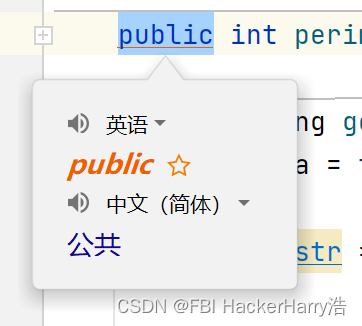
IDEA安装翻译插件
IDEA安装翻译插件 File->Settings->Plugins 在Marketplace中,找到Translation,点击Install 更换翻译引擎 勾选自动翻译文档 翻译 鼠标右击->点击Translate...

DBeaver使用
一、导出表结构 二、导出数据CSV 导出数据时DBeaver并没有导出表结构,所以表结构需要额外保存; 导入数据CSV 导入数据时会因外键、字段长度导致失败;...
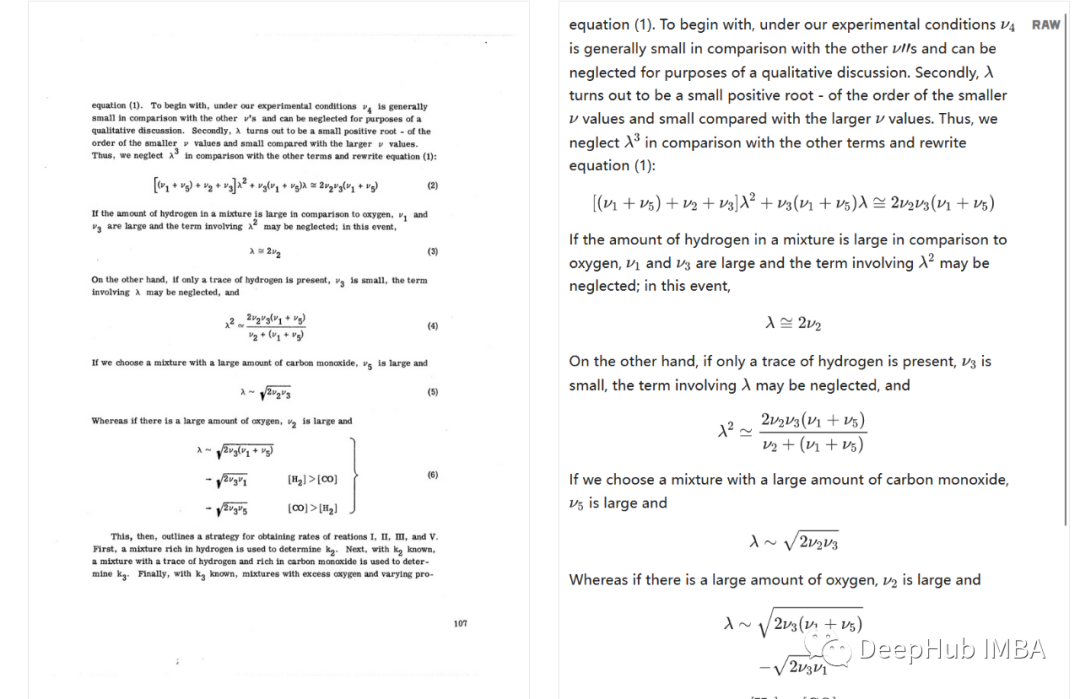
Nougat:一种用于科学文档OCR的Transformer 模型
随着人工智能领域的不断进步,其子领域,包括自然语言处理,自然语言生成,计算机视觉等,由于其广泛的用例而迅速获得了大量的普及。光学字符识别(OCR)是计算机视觉中一个成熟且被广泛研究的领域。它有许多用途,…...
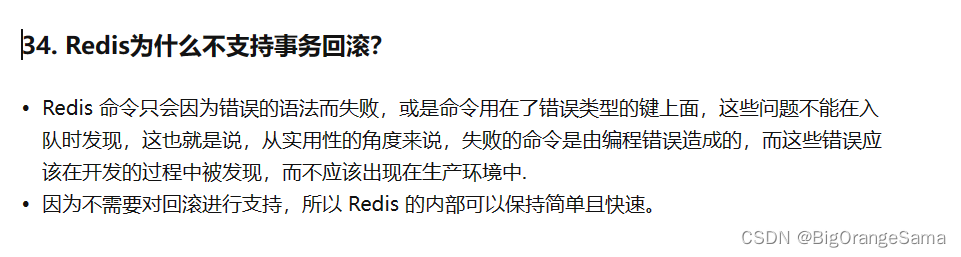
redis八股1
参考Redis连环60问(八股文背诵版) - 知乎 (zhihu.com) 1.是什么 本质上是一个key-val数据库,把整个数据库加载到内存中操作,定期通过异步操作把数据flush到硬盘持久化。因为纯内存操作,所以性能很出色,每秒可以超过10…...

人工智能基础-趋势-架构
在过去的几周里,我花了一些时间来了解生成式人工智能基础设施的前景。在这篇文章中,我的目标是清晰概述关键组成部分、新兴趋势,并重点介绍推动创新的早期行业参与者。我将解释基础模型、计算、框架、计算、编排和矢量数据库、微调、标签、合…...
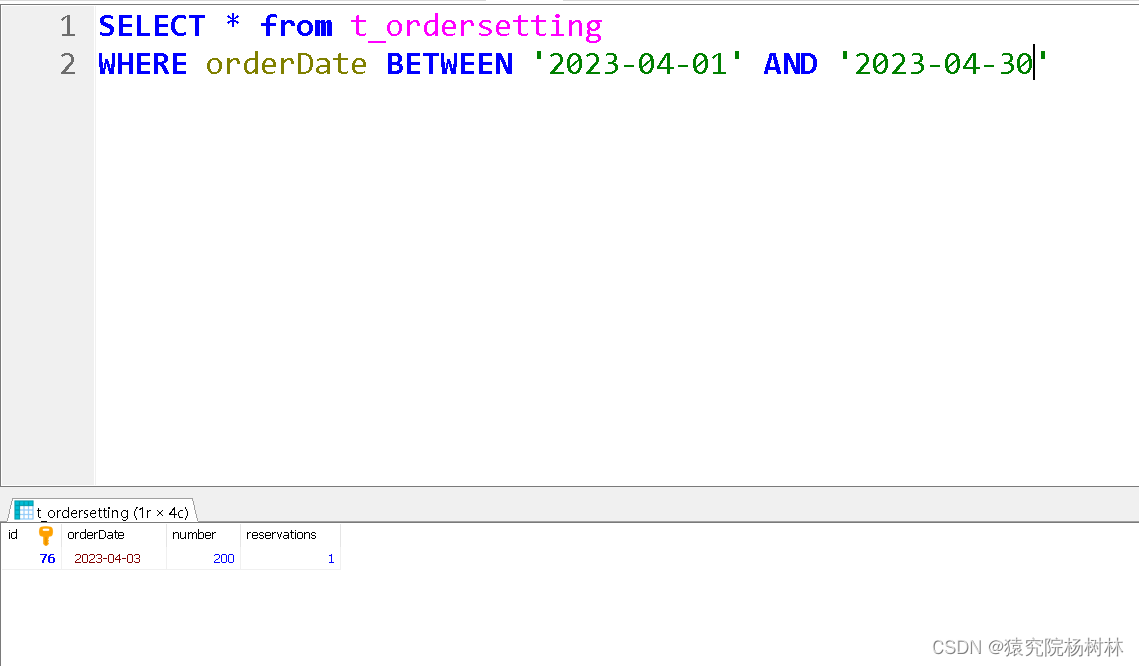
Date日期工具类(数据库日期区间问题)
文章目录 前言DateUtils日期工具类总结 前言 在我们日常开发过程中,当涉及到处理日期和时间的操作时,字符串与Date日期类往往要经过相互转换,且在SQL语句的动态查询中,往往月份的格式不正确,SQL语句执行的效果是不同的…...

为什么需要 TIME_WAIT 状态
还是用一下上一篇文章画的图 TCP 的 11 个状态,每一个状态都缺一不可,自然 TIME_WAIT 状态被赋予的意义也是相当重要,咱们直接结论先行 上文我们提到 tcp 中,主动关闭的一边会进入 TIME_WAIT 状态, 另外 Tcp 中的有 …...

Linux——(第七章)文件权限管理
目录 一、基本介绍 二、文件/目录的所有者 1.查看文件的所有者 2.修改文件所有者 三、文件/目录的所在组 1.修改文件/目录所在组 2.修改用户所在组 四、权限的基本介绍 五、rwx权限详解 1.rwx作用到文件 2.rwx作用到目录 六、修改权限 一、基本介绍 在Linux中&…...

Scala在大数据领域的崛起:当前趋势和未来前景
文章首发地址 Scala在大数据领域有着广阔的前景和现状。以下是一些关键点: Scala是一种具有强大静态类型系统的多范式编程语言,它结合了面向对象编程和函数式编程的特性。这使得Scala非常适合处理大数据,因为它能够处理并发、高吞吐量和复杂…...

前端面试经典题--页面布局
题目 假设高度已知,请写出三栏布局,其中左、右栏宽度各为300px,中间自适应。 五种解决方式代码 浮动解决方式 绝对定位解决方式 flexbox解决方式 表格布局 网格布局 源代码 <!DOCTYPE html> <html lang"en"> <…...

【webrtc】接收/发送的rtp包、编解码的VCM包、CopyOnWriteBuffer
收到的rtp包RtpPacketReceived 经过RtpDepacketizer 解析后变为ParsedPayloadRtpPacketReceived 分配内存,执行memcpy拷贝:然后把 RtpPacketReceived 给到OnRtpPacket 传递:uint8_t* media_payload = media_packet.AllocatePayload(rtx_payload.size());RTC...

Bash常见快捷键
生活在 Bash Shell 中,熟记以下快捷键,将极大的提高你的命令行操作效率。 编辑命令 Ctrl a :移到命令行首Ctrl e :移到命令行尾Ctrl f :按字符前移(右向)Ctrl b :按字符后移&a…...
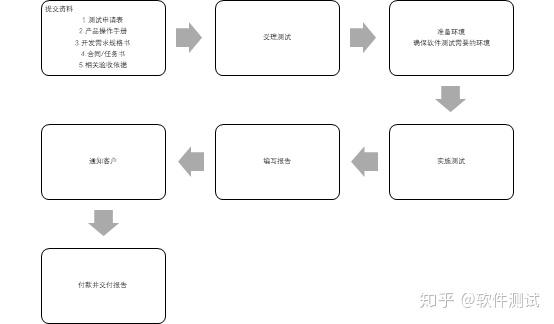
软件验收测试
1. 服务流程 验收测试 2. 服务内容 测试过程中,根据合同要求制定测试方案,验证工程项目是否满足用户需求,软件质量特性是否达到系统的要求。 3. 周期 10-15个工作日 4. 报告用途 可作为进行地方、省级、国家、部委项目的验收࿰…...
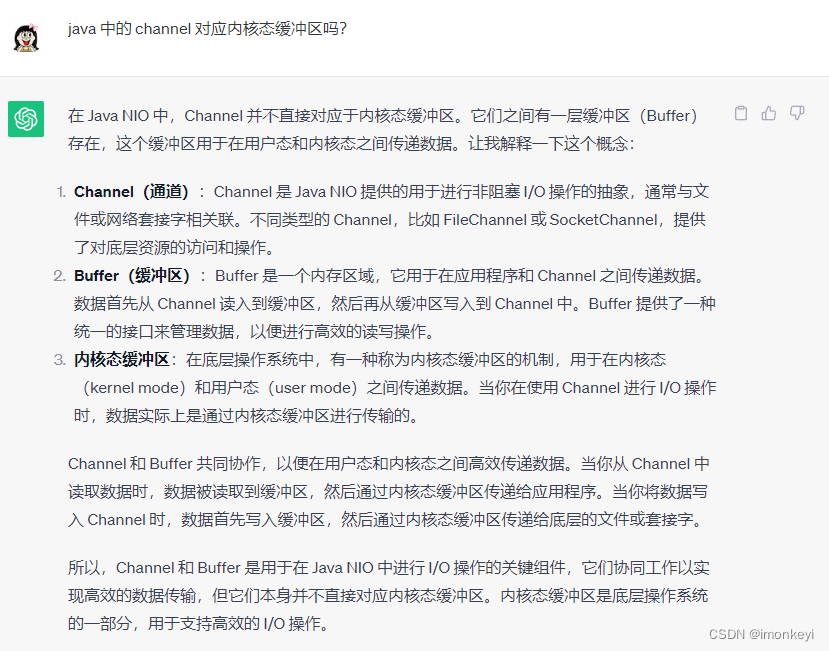
Java 与零拷贝
零拷贝是由操作系统实现的,使用 Java 中的零拷贝抽象类库在支持零拷贝的操作系统上运行才会实现零拷贝,如果在不支持零拷贝的操作系统上运行,并不会提供零拷贝的功能。 简述内核态和用户态 Linux 的体系结构分为内核态(内核空间…...

AI性能指标解析:误触率与错误率
简介:随着人工智能(AI)技术的不断发展,它越来越多地渗透到我们日常生活的各个方面。从个人助手到自动驾驶,从语音识别到图像识别,AI正不断地改变我们与世界的互动方式。但你有没有想过,如何准确…...

count(*) 和 count(1) 有什么区别?哪个性能最好?
哪种 count 性能最好? count() 是什么? count() 是一个聚合函数,函数的参数不仅可以是字段名,也可以是其他任意表达式,该函数的作用是统计符合查询条件的记录中,函数指定的参数不为 NULL 的记录由多少条。…...

橡胶密封件为什么会老化?
橡胶密封件以其优良的密封性能被广泛应用于各个行业。然而,随着时间的推移,这些橡胶密封件往往会恶化和老化。在这篇文章中,我们将探讨橡胶密封件老化的原因。 1,导致橡胶密封件老化的主要因素之一是暴露在阳光和紫外线(UV)辐射下…...

Uboot中bootargs以及bootcmd设置
Uboot命令 一、Uboot基础命令 查看帮助信息: uboot#help打印环境变量: uboot#printenv其他命令: uboot#help ? - 帮助命令,等同于 help base - 打印或设置地址偏移量 bdinfo - 打印板级信息结构 boot …...

如何开始嵌入式Linux的学习呢?
如何开始嵌入式Linux的学习呢? (又名:Imx-forge上手Roadmap) 我昨天一下班就回去看了一下仓库,的确太乱,而且mkdocs工具日益陷入停滞维护,所以我们转网站啦! 我本来打算直接画一个…...

NotebookLM笔记整理实战指南:5步打造自动关联知识图谱的智能笔记系统
更多请点击: https://intelliparadigm.com 第一章:NotebookLM笔记整理实战指南:5步打造自动关联知识图谱的智能笔记系统 NotebookLM 是 Google 推出的面向研究者与开发者的第一方 AI 笔记工具,其核心能力在于基于用户上传文档构建…...

如何轻松解锁Cursor Pro完整功能:一键激活与无限使用的完整指南
如何轻松解锁Cursor Pro完整功能:一键激活与无限使用的完整指南 【免费下载链接】cursor-free-vip [Support 0.45](Multi Language 多语言)自动注册 Cursor Ai ,自动重置机器ID , 免费升级使用Pro 功能: Youve reached…...

ESP8266+STM32远程控制实战:如何通过华为云中转指令与数据
ESP8266STM32远程控制实战:华为云物联网全链路开发指南 在智能家居和工业监控领域,远程设备控制一直是核心技术痛点。当ESP8266遇上STM32,再通过华为云物联网平台搭建通信桥梁,这个组合能爆发出怎样的生产力?本文将带您…...

PHP WebSocket隧道实现SOCKS5代理:在受限主机环境下的网络出口方案
1. 项目概述:一个在特定托管环境下的轻量级SOCKS5代理方案最近在折腾一些需要稳定网络环境的小项目,尤其是在一些资源受限的海外托管平台上,直接访问某些服务或进行数据抓取时,经常会遇到IP限制或连接不稳定的问题。这时候&#x…...

别再死磕ViT了!用Swin-Transformer搞定高分辨率图像识别,保姆级原理拆解
高分辨率图像识别新范式:Swin-Transformer实战指南 当计算机视觉工程师面对4K医学影像或卫星地图时,传统ViT模型往往会遭遇显存爆炸的尴尬。我曾在一个遥感项目中发现,直接将ViT应用于20482048像素的图像,单次前向传播就消耗了32G…...

苹果为何拒绝TD-SCDMA特供版iPhone?复盘技术标准与市场时机的战略博弈
1. 项目概述:一场关于苹果与中国移动的世纪猜想2012年的科技圈,空气中弥漫着一股躁动与期待。几乎所有的行业分析师和手机发烧友都在讨论同一个话题:苹果公司是否会为了全球最大的移动运营商——中国移动,专门推出一款支持TD-SCDM…...

ProxyClaw住宅代理实战:破解反爬虫,赋能AI智能体与数据工程
1. 项目概述:ProxyClaw,一个为AI与数据工程而生的住宅代理网络 如果你正在构建一个需要从互联网上大规模、稳定抓取数据的AI智能体、自动化机器人或者数据管道,那么“被目标网站封禁”这件事,大概率是你最头疼的日常。无论是电商平…...

Lie群方法在机器人状态估计中的创新应用
1. 状态估计技术演进与Lie群方法的核心价值在机器人导航与定位领域,状态估计技术扮演着大脑的角色。想象一下,当你在陌生城市使用手机导航时,系统需要实时融合GPS、陀螺仪和加速度计的数据来确定你的位置——这正是状态估计的典型应用场景。传…...

KeyboardChatterBlocker:拯救老旧机械键盘的免费开源防连击工具
KeyboardChatterBlocker:拯救老旧机械键盘的免费开源防连击工具 【免费下载链接】KeyboardChatterBlocker A handy quick tool for blocking mechanical keyboard chatter. 项目地址: https://gitcode.com/gh_mirrors/ke/KeyboardChatterBlocker 你是否遇到过…...