
webpack:系统的了解webpack一些核心概念
文章目录
- webpack 如何处理应用程序?
- 何为webpack模块chunk?
- 入口(entry)
- 输出(output)
- loader
- 开发loader
- 插件(plugin)
- 简介
- 流程
- 插件开发:
- Tapable类
- 监听(watching)
- compiler 钩子
- compilation 钩子
- compiler和compilation
- 创建自定义 插件
- loader和plugins区别
- 模式(mode)
- 插件覆写文件
- 一个项目同时使用多个webpack插件,插件的执行顺序是怎么样的
- 附录:compiler和compilation基本数据结构相同
- 完整对象:
- options对象
- outputOptions
webpack 如何处理应用程序?
从一个或多个入口点构建一个 依赖图(dependency graph),然后将你项目中所需的每一个模块(chunk)组合成一个或多个 bundles
何为webpack模块chunk?
- ES2015 import 语句
- CommonJS require() 语句
- AMD define 和 require 语句
- css/sass/less 文件中的 @import 语句。
- stylesheet url(…) 或者 HTML
<img src=...>文件中的图片链接。
可以被这些引用的都算一个模块 chunk
Webpack 天生支持如下模块类型:
- ECMAScript 模块
- CommonJS 模块
- AMD 模块
- Assets
- WebAssembly 模块
当遇到不支持的,可以编写 loader 使其支持。也就是说通过 loader 可以使 webpack 支持多种语言和预处理器语法编写的模块。
比如:
- TypeScript【ts-loader】
- Less/Sass【less-loader】
- ES6【babel-loader】
- Vue【vue-loader】
- https://webpack.docschina.org/loaders
入口(entry)
入口默认是 ./src/index.js,可以在 entry 配置
输出(output)
默认值是 ./dist/main.js
loader
webpack 默认只能理解 JavaScript 和 JSON 文件,当需要处理其他文件时可以用loader。
在 webpack 的配置中,loader 有两个属性:
- test 属性,识别出哪些文件会被转换。
- use 属性,定义出在进行转换时,应该使用哪个 loader。
// webpack 编译器,当你碰到「在 require()/import 语句中被解析为 '.txt' 的路径」时,在你对它打包之前,先 use(使用) raw-loader 转换一下。
module.exports = {module: {rules: [{ test: /\.txt$/, use: 'raw-loader' }],},
};
loader 支持链式调用,数组里的 loader 反向执行从后往前,将其结果(也就是应用过转换后的资源)传递给下一个 loader。
开发loader
module.exports = function (content) {console.log(content);return content + '123';
};
插件(plugin)
简介
loader 用于转换某些类型的模块,而插件则可以用于执行范围更广的任务。包括:打包优化,资源管理,注入环境变量。
const HtmlWebpackPlugin = require('html-webpack-plugin');
const webpack = require('webpack'); // 用于访问内置插件module.exports = {module: {rules: [{ test: /\.txt$/, use: 'raw-loader' }],},plugins: [new HtmlWebpackPlugin({ template: './src/index.html' })],
};
示例中,html-webpack-plugin 为应用程序生成一个 HTML 文件,并自动将生成的所有 bundle 注入到此文件中。
流程
webpack 的整体流程可以分为 env > init > compiler > make > seal > emit > done
env 和 init 阶段负责初始化环境和激活 webpack 内部插件
compiler 阶段是编译的开始
make 阶段 webpack 会进行依赖分析和收集
seal 阶段 webpack 会生成 chunk 文件
emit 阶段 webpack 会把 chunks 写入硬盘
done 阶段,顾名思义就会 webpack 工作完成啦
插件开发:
https://webpack.docschina.org/api/plugins
Compiler 模块是 webpack 的主要引擎,它通过 CLI 或者 Node API 传递的所有选项创建出一个 compilation 实例。 它扩展(extends)自 Tapable 类,用来注册和调用插件。 大多数面向用户的插件会首先在 Compiler 上注册。https://webpack.docschina.org/api/compiler-hooks/#hooks
Tapable类
这个小型库是 webpack 的一个核心工具,提供类似的插件接口,也是一个 npm 包。有点像一个发布订阅的工具。
在 webpack 中的许多对象都扩展自 Tapable 类。 它对外暴露了 tap,tapAsync 和 tapPromise 等方法, 插件可以使用这些方法向 webpack 中注入自定义构建的步骤
https://github.com/webpack/tapable
监听(watching)
监听时,compiler 会触发诸如 watchRun, watchClose 和 invalid 等额外的事件。 通常在 开发环境 中使用, 也常常会在 webpack-dev-server 这些工具的底层调用, 由此开发人员无须每次都使用手动方式重新编译。
compiler 钩子
以下生命周期钩子函数,是由 compiler 暴露
compiler.hooks.someHook.tap('MyPlugin', (params) => {/* ... */
});
tap 不止是 tap,也可以在某些钩子上访问 tapAsync 和 tapPromise,具体看Tapable。
someHook 可以是以下钩子函数:
1、environment:在编译器准备环境时调用,时机就在配置文件中初始化插件之后。
2、afterEnvironment:当编译器环境设置完成后,在 environment hook 后直接调用。
3、entryOption:在 webpack 选项中的 entry 被处理过之后调用。
compiler.hooks.entryOption.tap('MyPlugin', (context, entry) => {/* ... */
});
4、afterPlugins:在初始化内部插件集合完成设置之后调用。
5、initialize:当编译器对象被初始化时调用。
6、beforeRun:在开始执行一次构建之前调用,compiler.run 方法开始执行后立刻进行调用。
7、run:在开始读取 records 之前调用。
8、watchRun:在监听模式下,一个新的 compilation 触发之后,但在 compilation 实际开始之前执行。
9、compile:beforeCompile 之后立即调用,但在一个新的 compilation 创建之前。这个钩子 不会 被复制到子编译器。
10、compilation:compilation 创建之后执行。
11、emit:输出 asset 到 output 目录之前执行。这个钩子 不会 被复制到子编译器。
12、done:在 compilation 完成时执行。这个钩子 不会 被复制到子编译器。
13、failed:在 compilation 失败时调用。
14、shutdown:当编译器关闭时调用。
完整钩子:https://webpack.docschina.org/api/compiler-hooks/#hooks
compilation 钩子
compiler 创建的 compilation 实例。在编译阶段,模块会被加载(load)、封存(seal)、优化(optimize)、 分块(chunk)、哈希(hash)和重新创建(restore)。
钩子函数:
1、buildModule:在模块构建开始之前触发,可以用来修改模块。
compilation.hooks.buildModule.tap('SourceMapDevToolModuleOptionsPlugin',(module) => {module.useSourceMap = true;}
);
2、succeedModule:模块构建成功时执行。
3、optimize:优化阶段开始时触发。
4、optimizeChunks:在 chunk 优化阶段开始时调用。插件可以 tap 此钩子对 chunk 执行优化。
完整钩子:https://webpack.docschina.org/api/compilation-hooks/
compiler和compilation
Compiler 和 Compilation 的区别在于:Compiler 代表了整个 Webpack 从启动到关闭的生命周期,而 Compilation 只是代表了一次新的编译。
webpack 编译会创建两个核心对象:
-
compiler :包含了 webpack 环境所有的 配置信息,包括了 options,loader,plugin,和 webpack 整个生命周期有关的钩子。
-
compilation: 作为 plugin 内置事件回调函数的参数,包含了当前的 模块资源,编译生成资源,变化的文件 以及 被 跟踪的文件 的状态信息,当检测到了一个文件发生了改变的时候,就会生成一个新的 Compilation 对象。
-
Compiler 对象包含了 Webpack 环境所有的的配置信息,包含 options,loaders,plugins 这些信息,这个对象在 Webpack 启动时候被实例化,它是全局唯一的,可以简单地把它理解为 Webpack 实例;
-
Compilation 对象包含了当前的模块资源、编译生成资源、变化的文件等。当 Webpack 以开发模式运行时,每当检测到一个文件变化,一次新的 Compilation 将被创建。Compilation 对象也提供了很多事件回调供插件做扩展。通过 Compilation 也能读取到 Compiler 对象。
创建自定义 插件
-
插件必须是一个函数或者是一个包含了 apply 方法的对象,这样才能够访问 Compiler 对象。
-
传给每一个插件的 compiler 和 compilation 对象都是同一个应用,因此不建议修改。
-
异步的事件需要在插件处理完任务和调用回调函数通知 webpack 进入下一个流程,不然会卡住。
class MyPlugin {// Webpack 会调用 MyPlugin 实例的 apply 方法给插件实例传入 compiler 对象apply (compiler) {// 找到合适的事件钩子,实现自己的插件功能compiler.hooks.emit.tap('MyPlugin', compilation => {// compilation: 当前打包构建流程的上下文console.log(compilation);// do something...})}
}
在 emit 事件发生的时候,代表源文件的转换和组装已经完成,可以读取到最终将输出的 资源,代码块,模块,依赖,并且可以修改输出资源的内容。
loader和plugins区别
- loader运行在项目打包之前;
- plugins运行在整个项目的编译时期;
loader 即为文件加载器,操作的是文件,将文件A通过loader转换成文件B,是一个单纯的文件转化过程。比如将 A.less 转换成 B.css
plugins 基于事件机制工作,监听webpack打包过程中的某些节点,执行广泛的任务。
模式(mode)
通过选择 development, production 或 none 之中的一个
插件覆写文件
以下是一个简单的示例,这个插件会在Webpack处理文件时,将所有的JavaScript代码转换为CoffeeScript代码:
const Tapable = require('tapable');
const coffee = require('coffee-script');  class CoffeeScriptPlugin {  constructor(options) {  this.options = options || {};  }  apply(compiler) {  compiler.hooks.emit.tapAsync('CoffeeScriptPlugin', (compilation, callback) => {  Object.keys(compilation.assets).forEach((data) => {  if (/\.js$/.test(data)) {  const content = compilation.assets[data].source();  const coffeeScript = coffee.compile(content, {bare: true});  compilation.assets[data] = {  source: () => coffeeScript,  size: () => coffeeScript.length,  };  }  });  callback();  });  }
}  module.exports = CoffeeScriptPlugin;
在这个示例中,我们首先创建了一个新的类CoffeeScriptPlugin,这个类继承自Tapable。然后,我们在apply方法中注册了一个在emit阶段执行的钩子函数。在这个钩子函数中,我们遍历了所有的资源,如果资源的名字以.js结尾,我们就用CoffeeScript编译这个资源的内容,然后用编译后的内容替换原来的内容。最后,我们调用callback函数来通知Webpack继续执行下一个阶段的任务。
一个项目同时使用多个webpack插件,插件的执行顺序是怎么样的
Webpack的插件系统是基于Tapable库实现的,该库为插件提供了可插拔的接口。因此,具体的插件执行顺序取决于Webpack事件流中的插件注册顺序以及触发时机。
插件通常在Webpack的配置文件(即webpack.config.js文件)中按照数组的形式进行声明。数组中的插件按照先后顺序执行。例如:
module.exports = {  //...  plugins: [  new HtmlWebpackPlugin(),  new CleanWebpackPlugin(),  //...  ],
};
在上面的示例中,首先执行HtmlWebpackPlugin插件,然后执行CleanWebpackPlugin插件。
然而,这只是一部分真相。Webpack的编译过程中存在许多生命周期钩子,例如’compilation’, ‘optimize’, ‘emit’,等等。插件可能会绑定到一个或多个钩子上。这意味着插件的执行可能会分布在Webpack的整个编译周期中,取决于它们选择“绑定”的那些钩子。
如果两个插件绑定到同一个钩子,那么在webpack.config.js中先声明的插件将先执行。然而,如果一个插件绑定到了早期的钩子(例如’compilation’),而另一个插件绑定到了较晚的钩子(例如’emit’),那么即使在webpack.config.js中后声明的插件也将先执行,因为’compilation’阶段在’emit’阶段之前。
综上,Webpack插件的执行顺序主要取决于两个因素:它们在webpack.config.js文件中的声明顺序,以及它们绑定的钩子在Webpack编译周期中的触发顺序。
附录:compiler和compilation基本数据结构相同
完整对象:
const a = {_backCompat: true,hooks: {},name: undefined,startTime: undefined,endTime: undefined,compiler: {},resolverFactory: {},inputFileSystem: {},fileSystemInfo: {},valueCacheVersions: Map(16) {'webpack/DefinePlugin DC_APP_DOMAIN_MCP' => '"https://xx.xxx.com"',...},requestShortener: {},compilerPath: '',logger: {},options: {},outputOptions: {},bail: false,profile: false,params: {normalModuleFactory: NormalModuleFactory {hooks: [Object],resolverFactory: [ResolverFactory],ruleSet: [Object],context: '/Users/zhangyu/web/yongliu/sub-test-ddd/src',fs: [CachedInputFileSystem],_globalParserOptions: [Object],_globalGeneratorOptions: {},parserCache: [Map],generatorCache: [Map],_restoredUnsafeCacheEntries: Set(0) {},_parseResourceWithoutFragment: [Function (anonymous)]},contextModuleFactory: ContextModuleFactory {hooks: [Object],resolverFactory: [ResolverFactory]}},mainTemplate: MainTemplate {},chunkTemplate: ChunkTemplate {},runtimeTemplate: RuntimeTemplate {},moduleTemplates: {},moduleMemCaches: undefined,moduleMemCaches2: undefined,moduleGraph: {},chunkGraph: {},codeGenerationResults: {},processDependenciesQueue: {},addModuleQueue: AsyncQueue {},factorizeQueue: AsyncQueue {},buildQueue: AsyncQueue {},rebuildQueue: AsyncQueue {},creatingModuleDuringBuild: { },entries: Map(9) {'app' => {dependencies: [Array],includeDependencies: [],options: [Object]},'pages/index/index' => {dependencies: [Array],includeDependencies: [],options: [Object]},'components/loading-page/index' => {dependencies: [Array],includeDependencies: [],options: [Object]},'pages/use-chart/index' => {dependencies: [Array],includeDependencies: [],options: [Object]},'subpackage-echarts/ec-canvas/ec-canvas' => {dependencies: [Array],includeDependencies: [],options: [Object]},'subpackage-echarts/index/index' => {dependencies: [Array],includeDependencies: [],options: [Object]},'./app.scss__assets_chunk_name__' => {dependencies: [Array],includeDependencies: [],options: [Object]},'./pages/index/index.scss__assets_chunk_name__' => {dependencies: [Array],includeDependencies: [],options: [Object]},'./components/loading-page/index.scss__assets_chunk_name__' => {dependencies: [Array],includeDependencies: [],options: [Object]}},globalEntry: {dependencies: [],includeDependencies: [],options: { name: undefined }},entrypoints: Map(9) {'app' => Entrypoint {groupDebugId: 5000,options: [Object],_children: [SortableSet [Set]],_parents: [SortableSet [Set]],_asyncEntrypoints: [SortableSet [Set]],_blocks: [SortableSet [Set]],chunks: [Array],origins: [Array],_modulePreOrderIndices: [Map],_modulePostOrderIndices: [Map],index: 0,_runtimeChunk: [Chunk],_entrypointChunk: [Chunk],_initial: true},'pages/index/index' => Entrypoint {groupDebugId: 5001,options: [Object],_children: [SortableSet [Set]],_parents: [SortableSet [Set]],_asyncEntrypoints: [SortableSet [Set]],_blocks: [SortableSet [Set]],chunks: [Array],origins: [Array],_modulePreOrderIndices: [Map],_modulePostOrderIndices: [Map],index: 1,_runtimeChunk: [Chunk],_entrypointChunk: [Chunk],_initial: true}},asyncEntrypoints: [],chunks: Set(8) {Chunk {id: 3,ids: [Array],debugId: 1000,name: 'app',idNameHints: [SortableSet [Set]],preventIntegration: false,filenameTemplate: undefined,cssFilenameTemplate: undefined,_groups: [SortableSet [Set]],runtime: 'runtime',files: [SetDeprecatedArray [Set]],auxiliaryFiles: Set(0) {},rendered: true,hash: '4cdafb006e29619975268c54d16ace97',contentHash: [Object: null prototype],renderedHash: '4cdafb006e2961997526',chunkReason: undefined,extraAsync: false},Chunk {id: 6,ids: [Array],debugId: 1001,name: 'pages/index/index',idNameHints: [SortableSet [Set]],preventIntegration: false,filenameTemplate: undefined,cssFilenameTemplate: undefined,_groups: [SortableSet [Set]],runtime: 'runtime',files: [SetDeprecatedArray [Set]],auxiliaryFiles: Set(0) {},rendered: true,hash: '2df8c7afeffa5b8fa0439233e61f494c',contentHash: [Object: null prototype],renderedHash: '2df8c7afeffa5b8fa043',chunkReason: undefined,extraAsync: false}},chunkGroups: [Entrypoint {groupDebugId: 5000,options: [Object],_children: [SortableSet [Set]],_parents: [SortableSet [Set]],_asyncEntrypoints: [SortableSet [Set]],_blocks: [SortableSet [Set]],chunks: [Array],origins: [Array],_modulePreOrderIndices: [Map],_modulePostOrderIndices: [Map],index: 0,_runtimeChunk: [Chunk],_entrypointChunk: [Chunk],_initial: true},Entrypoint {groupDebugId: 5001,options: [Object],_children: [SortableSet [Set]],_parents: [SortableSet [Set]],_asyncEntrypoints: [SortableSet [Set]],_blocks: [SortableSet [Set]],chunks: [Array],origins: [Array],_modulePreOrderIndices: [Map],_modulePostOrderIndices: [Map],index: 1,_runtimeChunk: [Chunk],_entrypointChunk: [Chunk],_initial: true},],namedChunkGroups: Map(9) {},namedChunks: Map(11) {},modules: Set(41) {},_modules: Map(41) {},records: {},additionalChunkAssets: [],assets: {'app.wxss': RawSource {_valueIsBuffer: true,_value: <Buffer >,_valueAsBuffer: <Buffer >,_valueAsString: undefined},'pages/index/index.wxss': RawSource {_valueIsBuffer: true,_value: <Buffer >,_valueAsBuffer: <Buffer >,_valueAsString: undefined},'app.js': CachedSource {_source: [ConcatSource],_cachedSourceType: undefined,_cachedSource: undefined,_cachedBuffer: undefined,_cachedSize: undefined,_cachedMaps: Map(0) {},_cachedHashUpdate: undefined},'pages/index/index.js': CachedSource {_source: [ConcatSource],_cachedSourceType: undefined,_cachedSource: undefined,_cachedBuffer: undefined,_cachedSize: undefined,_cachedMaps: Map(0) {},_cachedHashUpdate: undefined},'runtime.js': CachedSource {_source: [ConcatSource],_cachedSourceType: undefined,_cachedSource: undefined,_cachedBuffer: undefined,_cachedSize: undefined,_cachedMaps: Map(0) {},_cachedHashUpdate: undefined},'common.js': CachedSource {_source: [ConcatSource],_cachedSourceType: undefined,_cachedSource: undefined,_cachedBuffer: undefined,_cachedSize: undefined,_cachedMaps: Map(0) {},_cachedHashUpdate: undefined}},assetsInfo: Map(27) {'app.wxss' => { sourceFilename: 'app.scss' },'components/loading-page/index.wxss' => { sourceFilename: 'components/loading-page/index.scss' },'pages/index/index.wxss' => { sourceFilename: 'pages/index/index.scss' },'app.js' => { javascriptModule: false },'pages/index/index.js' => { javascriptModule: false },'components/loading-page/index.js' => { javascriptModule: false },'pages/use-chart/index.js' => { javascriptModule: false },'subpackage-echarts/ec-canvas/ec-canvas.js' => { javascriptModule: false },'subpackage-echarts/index/index.js' => { javascriptModule: false },'runtime.js' => { javascriptModule: false },'common.js' => { javascriptModule: false },'app.json' => { copied: true, sourceFilename: 'app.json' },'sitemap.json' => { copied: true, sourceFilename: 'sitemap.json' },'pages/use-chart/index.json' => { copied: true, sourceFilename: 'pages/use-chart/index.json' },'pages/use-chart/index.wxml' => { copied: true, sourceFilename: 'pages/use-chart/index.wxml' },'pages/use-chart/index.wxss' => { copied: true, sourceFilename: 'pages/use-chart/index.wxss' },'pages/index/index.json' => { copied: true, sourceFilename: 'pages/index/index.json' },'pages/index/index.wxml' => { copied: true, sourceFilename: 'pages/index/index.wxml' },'subpackage-echarts/ec-canvas/ec-canvas.json' => {copied: true,sourceFilename: 'subpackage-echarts/ec-canvas/ec-canvas.json'},},_assetsRelatedIn: Map(0) {},errors: [],warnings: [],children: [],logging: Map(9) {},dependencyFactories: Map(30) {},childrenCounters: {},usedChunkIds: null,usedModuleIds: null,needAdditionalPass: false,_restoredUnsafeCacheModuleEntries: Set(0) {},_restoredUnsafeCacheEntries: Map(0) {},builtModules: WeakSet { <items unknown> },codeGeneratedModules: WeakSet { <items unknown> },buildTimeExecutedModules: WeakSet { <items unknown> },_rebuildingModules: Map(0) {},emittedAssets: Set(0) {},comparedForEmitAssets: Set(0) {},fileDependencies: LazySet {},contextDependencies: LazySet {},missingDependencies: LazySet {},buildDependencies: LazySet {},compilationDependencies: { add: [Function: deprecated] },fullHash: 'af34423fe7957198c3b73910476385cd',hash: 'af34423fe7957198c3b7'
}
options对象
{amd: undefined,bail: undefined,cache: {type: 'filesystem',allowCollectingMemory: false,maxMemoryGenerations: Infinity,maxAge: 5184000000,profile: false,buildDependencies: [Object],cacheDirectory: '/Users/zhangyu/web/yongliu/sub-test-ddd/node_modules/.cache/webpack',cacheLocation: '/Users/zhangyu/web/yongliu/sub-test-ddd/node_modules/.cache/webpack/default-none',hashAlgorithm: 'md4',compression: false,idleTimeout: 60000,idleTimeoutForInitialStore: 5000,idleTimeoutAfterLargeChanges: 1000,name: 'default-none',store: 'pack',version: '',memoryCacheUnaffected: false},context: '/Users/zhangyu/web/yongliu/sub-test-ddd/src',dependencies: undefined,devServer: undefined,devtool: false,entry: { main: [Object] },experiments: {buildHttp: undefined,lazyCompilation: undefined,css: undefined,futureDefaults: false,backCompat: true,topLevelAwait: false,syncWebAssembly: false,asyncWebAssembly: false,outputModule: false,layers: false,cacheUnaffected: false},externals: undefined,externalsPresets: {web: true,node: false,nwjs: false,electron: false,electronMain: false,electronPreload: false,electronRenderer: false},externalsType: 'var',ignoreWarnings: undefined,infrastructureLogging: {stream: [WriteStream],level: 'info',debug: false,colors: true,appendOnly: false},loader: { target: 'web' },mode: 'none',module: {noParse: undefined,unsafeCache: [Function (anonymous)],parser: [Object],generator: {},defaultRules: [Array],rules: [Array]},name: undefined,node: { global: true, __filename: 'mock', __dirname: 'mock' },optimization: {splitChunks: [Object],runtimeChunk: [Object],emitOnErrors: true,removeAvailableModules: false,removeEmptyChunks: true,mergeDuplicateChunks: true,flagIncludedChunks: false,moduleIds: 'natural',chunkIds: 'natural',sideEffects: 'flag',providedExports: true,usedExports: false,innerGraph: false,mangleExports: false,concatenateModules: false,checkWasmTypes: false,mangleWasmImports: false,portableRecords: false,realContentHash: false,minimize: false,minimizer: [Array],nodeEnv: false},output: {assetModuleFilename: '[hash][ext][query]',asyncChunks: true,charset: true,chunkFilename: '[name].js',chunkFormat: 'array-push',chunkLoading: 'jsonp',chunkLoadingGlobal: 'webpackChunk',chunkLoadTimeout: 120000,cssFilename: '[name].css',cssChunkFilename: '[name].css',clean: undefined,compareBeforeEmit: true,crossOriginLoading: false,devtoolFallbackModuleFilenameTemplate: undefined,devtoolModuleFilenameTemplate: undefined,devtoolNamespace: '',environment: [Object],enabledChunkLoadingTypes: [Array],enabledLibraryTypes: [],enabledWasmLoadingTypes: [Array],filename: '[name].js',globalObject: 'wx',hashDigest: 'hex',hashDigestLength: 20,hashFunction: 'md4',hashSalt: undefined,hotUpdateChunkFilename: '[id].[fullhash].hot-update.js',hotUpdateGlobal: 'webpackHotUpdate',hotUpdateMainFilename: '[runtime].[fullhash].hot-update.json',iife: true,importFunctionName: 'import',importMetaName: 'import.meta',scriptType: false,library: undefined,module: false,path: '/Users/zhangyu/web/yongliu/sub-test-ddd/weapp',pathinfo: false,publicPath: '/Users/zhangyu/web/yongliu/sub-test-ddd/weapp',sourceMapFilename: '[file].map[query]',sourcePrefix: undefined,strictModuleExceptionHandling: false,trustedTypes: undefined,uniqueName: '',wasmLoading: 'fetch',webassemblyModuleFilename: '[hash].module.wasm',workerChunkLoading: 'import-scripts',workerWasmLoading: 'fetch'},parallelism: 100,performance: false,plugins: [[CLIPlugin],[CleanWebpackPlugin],[CopyPlugin],[MinaWebpackPlugin],MinaRuntimeWebpackPlugin {},[DefinePlugin]],profile: false,recordsInputPath: false,recordsOutputPath: false,resolve: {byDependency: [Object],cache: true,modules: [Array],conditionNames: [Array],mainFiles: [Array],extensions: [Array],aliasFields: [],exportsFields: [Array],roots: [Array],mainFields: [Array],alias: [Object]},resolveLoader: {cache: true,conditionNames: [Array],exportsFields: [Array],mainFields: [Array],extensions: [Array],mainFiles: [Array]},snapshot: {resolveBuildDependencies: [Object],buildDependencies: [Object],resolve: [Object],module: [Object],immutablePaths: [],managedPaths: [Array]},stats: { preset: 'normal', colors: true },target: 'web',watch: true,watchOptions: {}}
outputOptions
{assetModuleFilename: '[hash][ext][query]',asyncChunks: true,charset: true,chunkFilename: '[name].js',chunkFormat: 'array-push',chunkLoading: 'jsonp',chunkLoadingGlobal: 'webpackChunk',chunkLoadTimeout: 120000,cssFilename: '[name].css',cssChunkFilename: '[name].css',clean: undefined,compareBeforeEmit: true,crossOriginLoading: false,devtoolFallbackModuleFilenameTemplate: undefined,devtoolModuleFilenameTemplate: undefined,devtoolNamespace: '',environment: {arrowFunction: true,const: true,destructuring: true,forOf: true,bigIntLiteral: undefined,dynamicImport: undefined,module: undefined},enabledChunkLoadingTypes: [ 'jsonp', 'import-scripts' ],enabledLibraryTypes: [],enabledWasmLoadingTypes: [ 'fetch' ],filename: '[name].js',globalObject: 'wx',hashDigest: 'hex',hashDigestLength: 20,hashFunction: 'md4',hashSalt: undefined,hotUpdateChunkFilename: '[id].[fullhash].hot-update.js',hotUpdateGlobal: 'webpackHotUpdate',hotUpdateMainFilename: '[runtime].[fullhash].hot-update.json',iife: true,importFunctionName: 'import',importMetaName: 'import.meta',scriptType: false,library: undefined,module: false,path: '/Users/zhangyu/web/yongliu/sub-test-ddd/weapp',pathinfo: false,publicPath: '/Users/zhangyu/web/yongliu/sub-test-ddd/weapp',sourceMapFilename: '[file].map[query]',sourcePrefix: undefined,strictModuleExceptionHandling: false,trustedTypes: undefined,uniqueName: '',wasmLoading: 'fetch',webassemblyModuleFilename: '[hash].module.wasm',workerChunkLoading: 'import-scripts',workerWasmLoading: 'fetch'}
相关文章:

webpack:系统的了解webpack一些核心概念
文章目录 webpack 如何处理应用程序?何为webpack模块chunk?入口(entry)输出(output)loader开发loader 插件(plugin)简介流程插件开发:Tapable类监听(watching)compiler 钩子compilation 钩子compiler和compilation创建自定义 插件 loader和pl…...
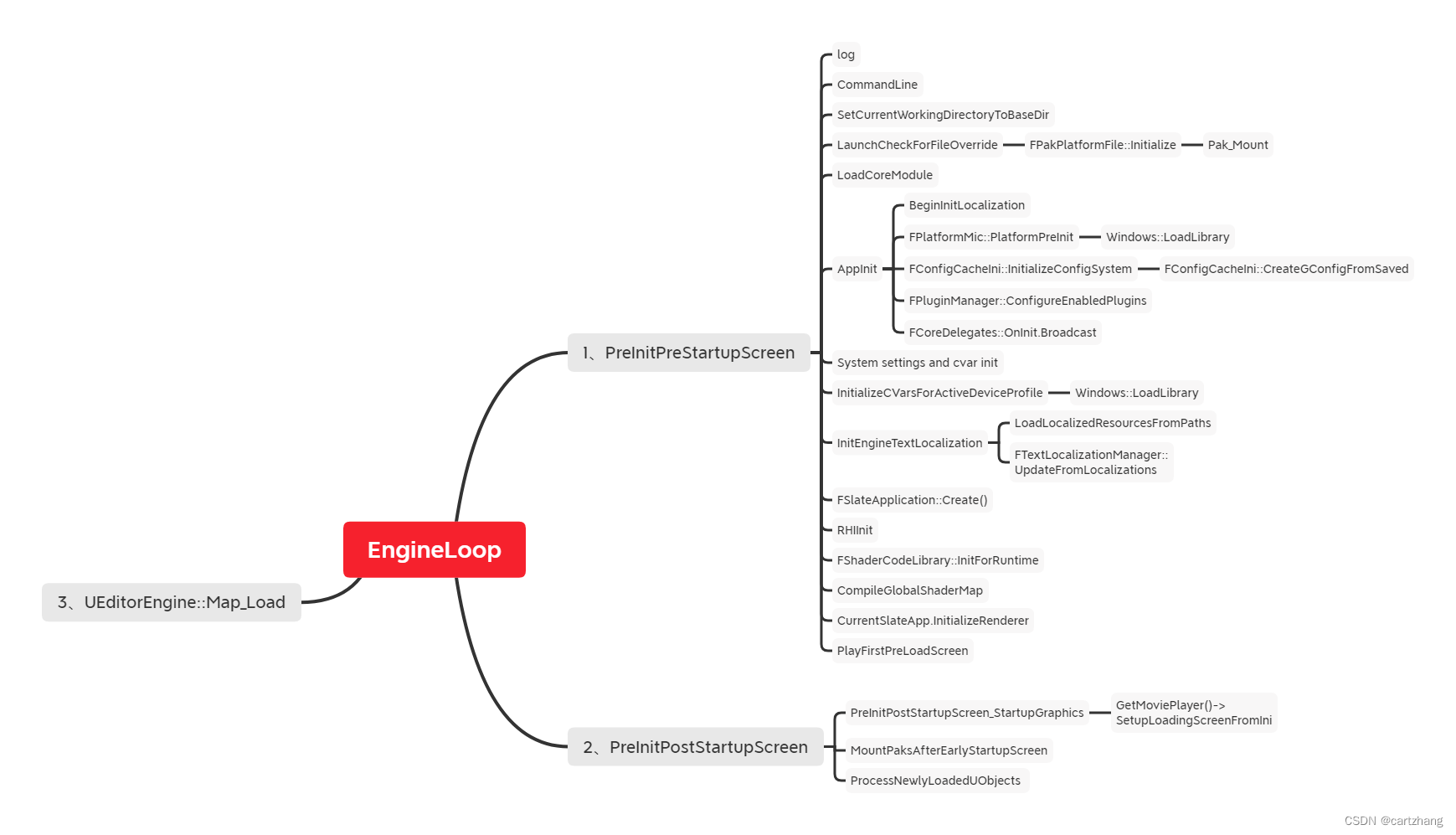
Unreal Engine Loop 流程
引擎LOOP 虚幻引擎的启动是怎么一个过程。 之前在分析热更新和加载流程过程中,做了一个图。记录一下!! 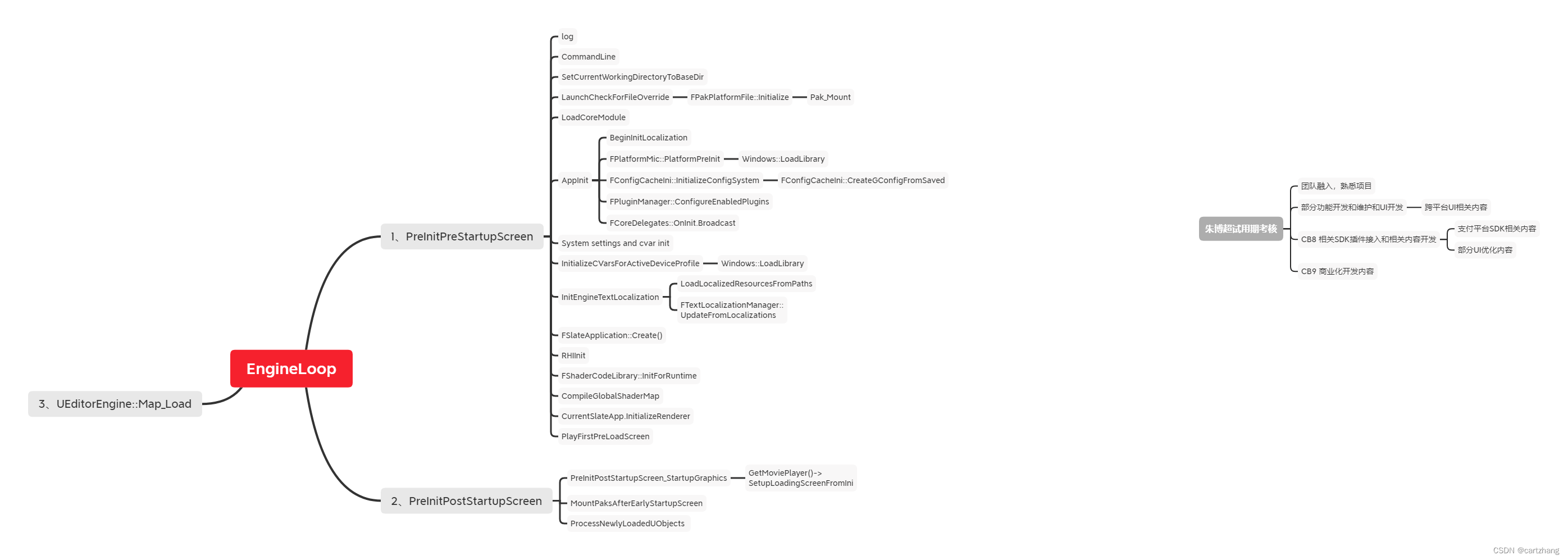
FLASK中的鉴权的插件Flask-HTTPAuth
在 Web 应用中,我们经常需要保护我们的 api,以避免非法访问。比如,只允许登录成功的用户发表评论等。Flask-HTTPAuth 扩展可以很好地对 HTTP 的请求进行认证,不依赖于 Cookie 和 Session。本文主要介绍两种认证的方式:…...
linux万字图文学习进程信号
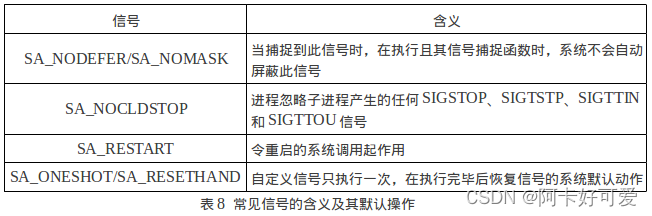
1. 信号概念 信号是进程之间事件异步通知的一种方式,属于软中断。 1.1 linux中我们常用Ctrlc来杀死一个前台进程 1. Ctrl-C 产生的信号只能发给前台进程。一个命令后面加个&可以放到后台运行,这样Shell不必等待进程结束就可以接受新的命令,启动新的进程。2. S…...
DataX实现Mysql与ElasticSearch(ES)数据同步
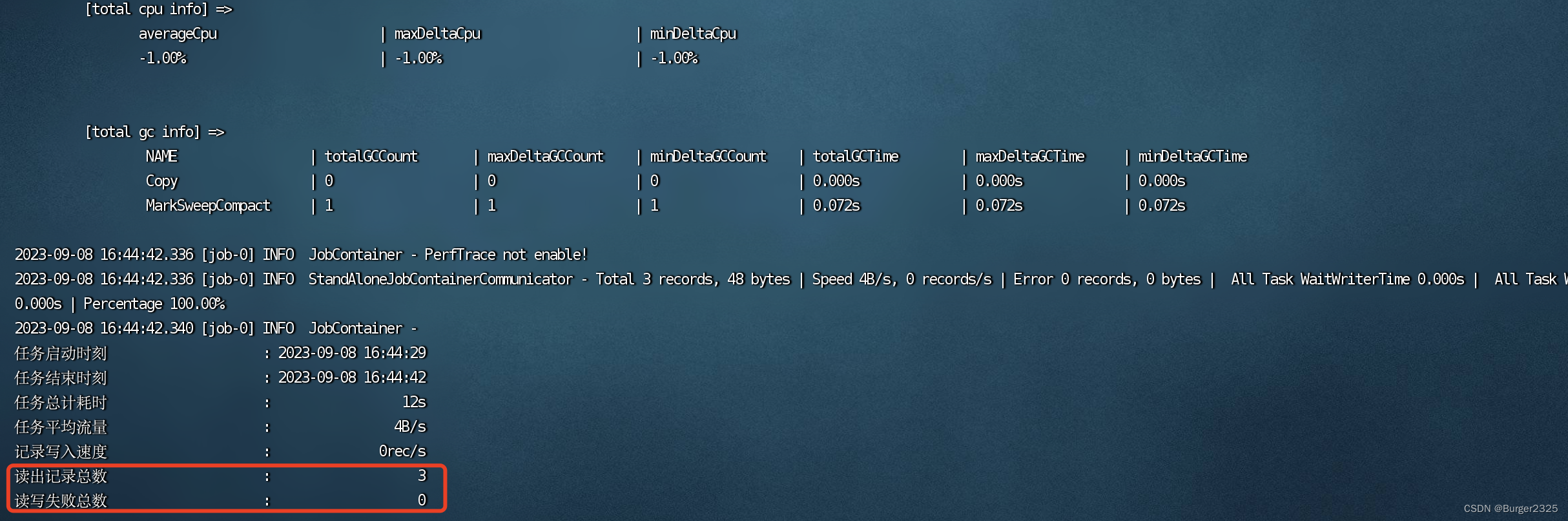
文章目录 一、Linux环境要求二、准备工作2.1 Linux安装jdk2.2 linux安装python2.3 下载DataX: 三、DataX压缩包导入,解压缩四、编写同步Job五、执行Job六、定时更新6.1 创建定时任务6.2 提交定时任务6.3 查看定时任务 七、增量更新思路 一、Linux环境要求…...
第二章 进程与线程 十、调度算法1(先来先服务、短作业优先、最高响应比优先)
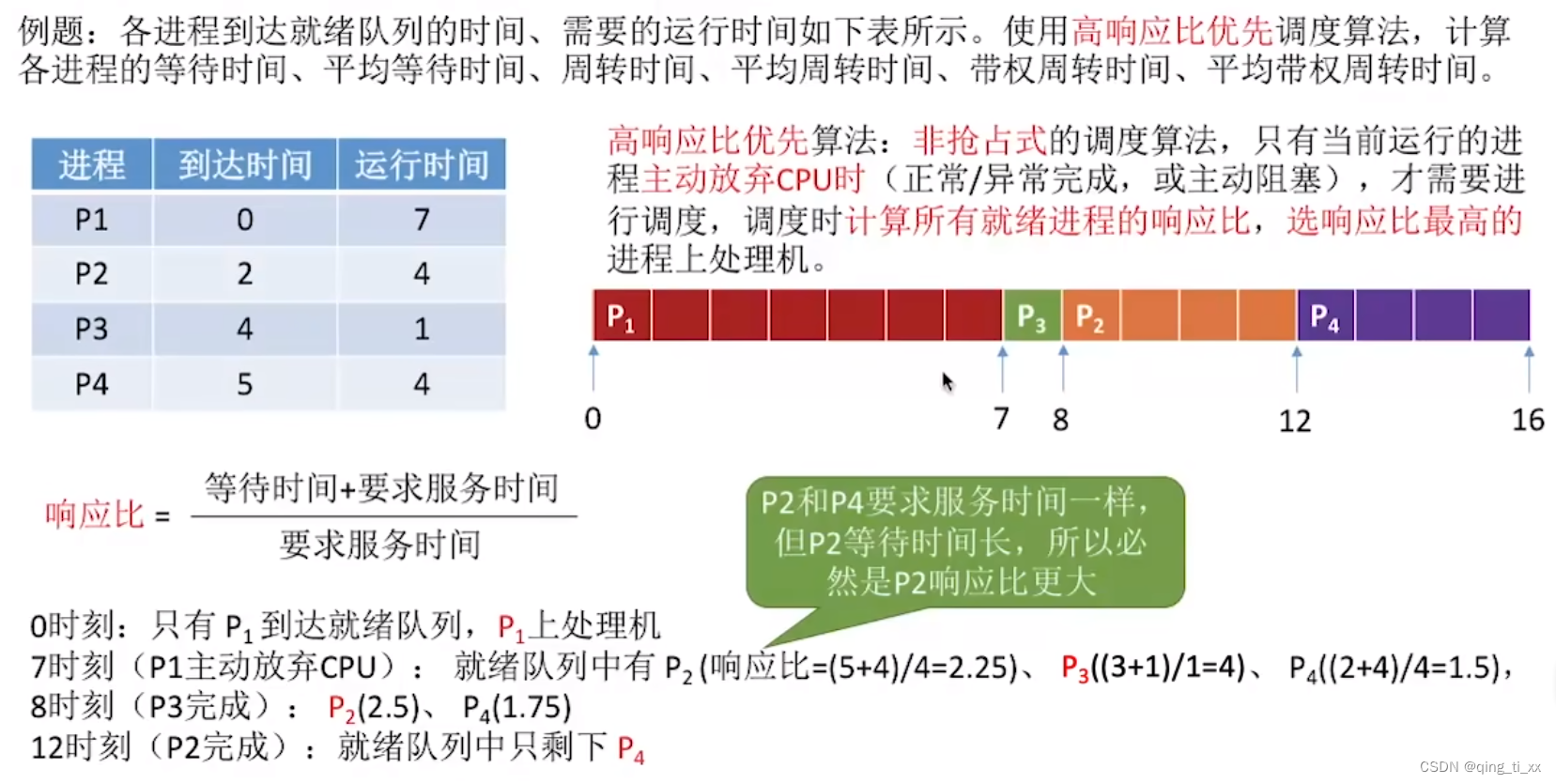
目录 一、先来先服务算法 1、算法思想 2、算法规则 3、用于作业/进程调度 4、是否可抢占? 5、优缺点 优点: 缺点: 6、是否会导致饥饿 7、例子 二、短作业优先算法 1、算法思想 2、算法规则 3、用于作业/进程调度 4、是否可抢占? 5、优缺…...
windows平台 git bash使用
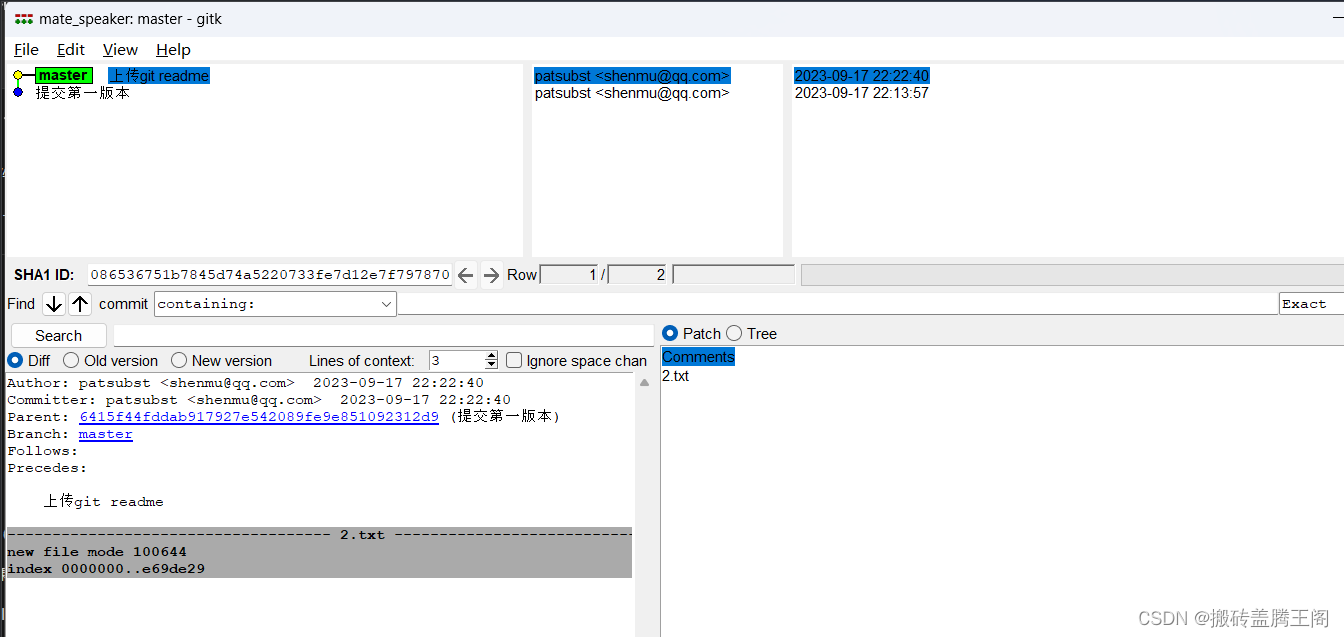
打开所在需要git管理的目录,鼠标右键open Git BASH here 这样就直接进来,不需要windows dos窗口下麻烦的切路径,windows和linux 路径方向不一致 (\ /) 然后git init 建立本地仓库,接下来就是git相关的操作了. 图形化界面查看 打开所在需要git管理的目录,鼠标右键…...
Linux系统之安装uptime-kuma服务器监控面板
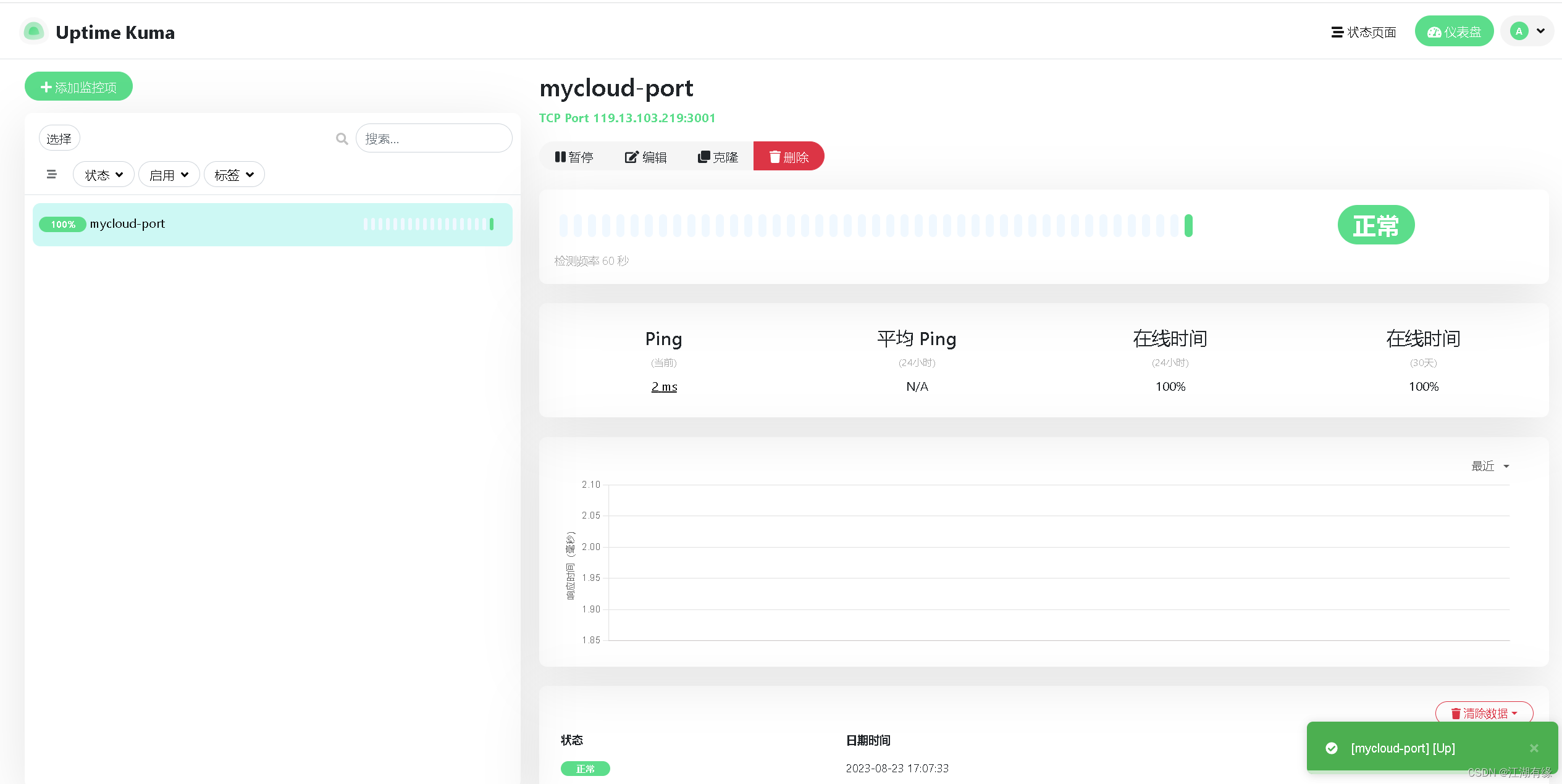
Linux系统之安装uptime-kuma服务器监控面板 一、uptime-kuma介绍1.1 uptime-kuma简介1.2 uptime-kuma特点 二、本次实践环境介绍2.1 环境规划2.2 本次实践介绍2.3 环境要求 三、检查本地环境3.1 检查本地操作系统版本3.2 检查系统内核版本3.3 检查系统是否安装Node.js 四、部署…...
计算机组成原理——基础入门总结(一)
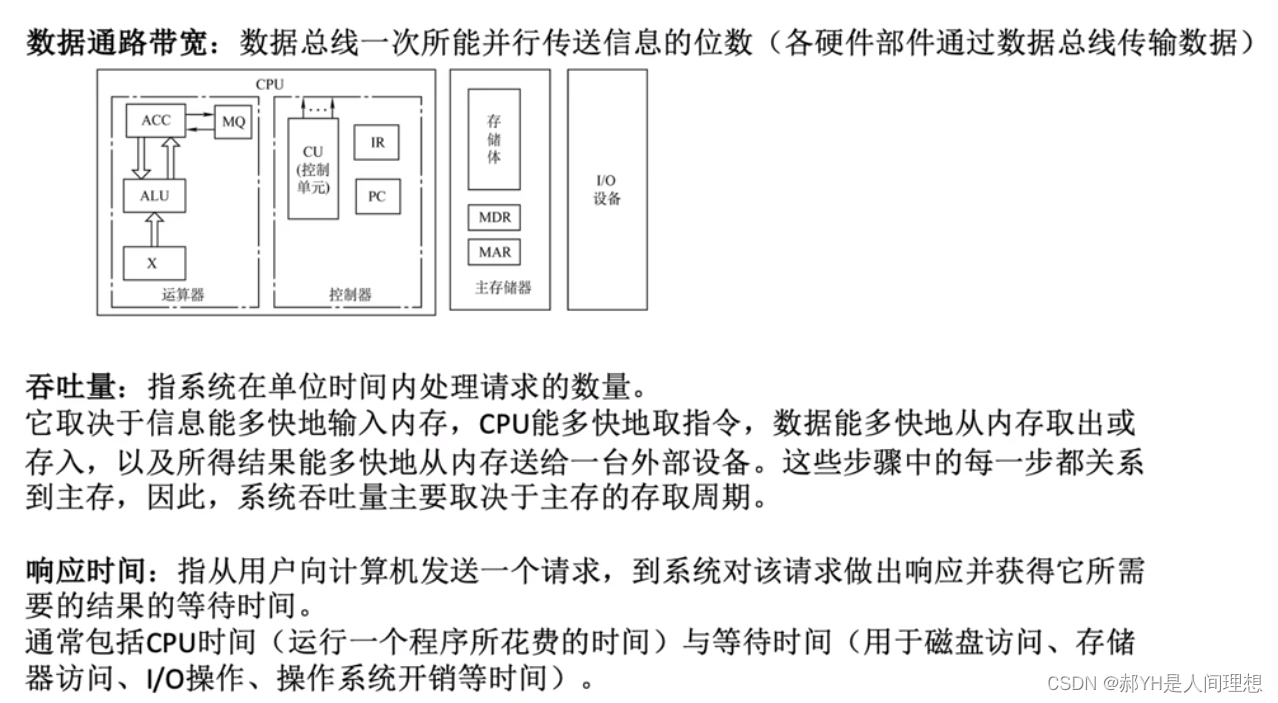
本帖更新一些关于计算机组成原理的重点内容。由于博主考研时并不会考这门课,但是考虑到操作系统中又很多重要晦涩的概念涉及很多诸如内存、存储器、磁盘、cpu乃至各种寄存器的知识,此处挑选一些核心的内容总结复盘一遍——实现声明:本帖的内容…...

批量获取CSDN文章对文章质量分进行检测,有助于优化文章质量
📚目录 ⚙️简介✨分析获取步骤⛳获取文章列表☘️前期准备✨ 接口解析⚡️ 获取文章的接口 ☄️文章质量分接口⭐接口分析 ⌛代码实现:⚓核心代码:⛵测试用例:⛴ 运行效果:☘️增加Excel导出 ✍️结束 ⚙️简介 有时候我们写文章是为了记录当下遇到的bu…...
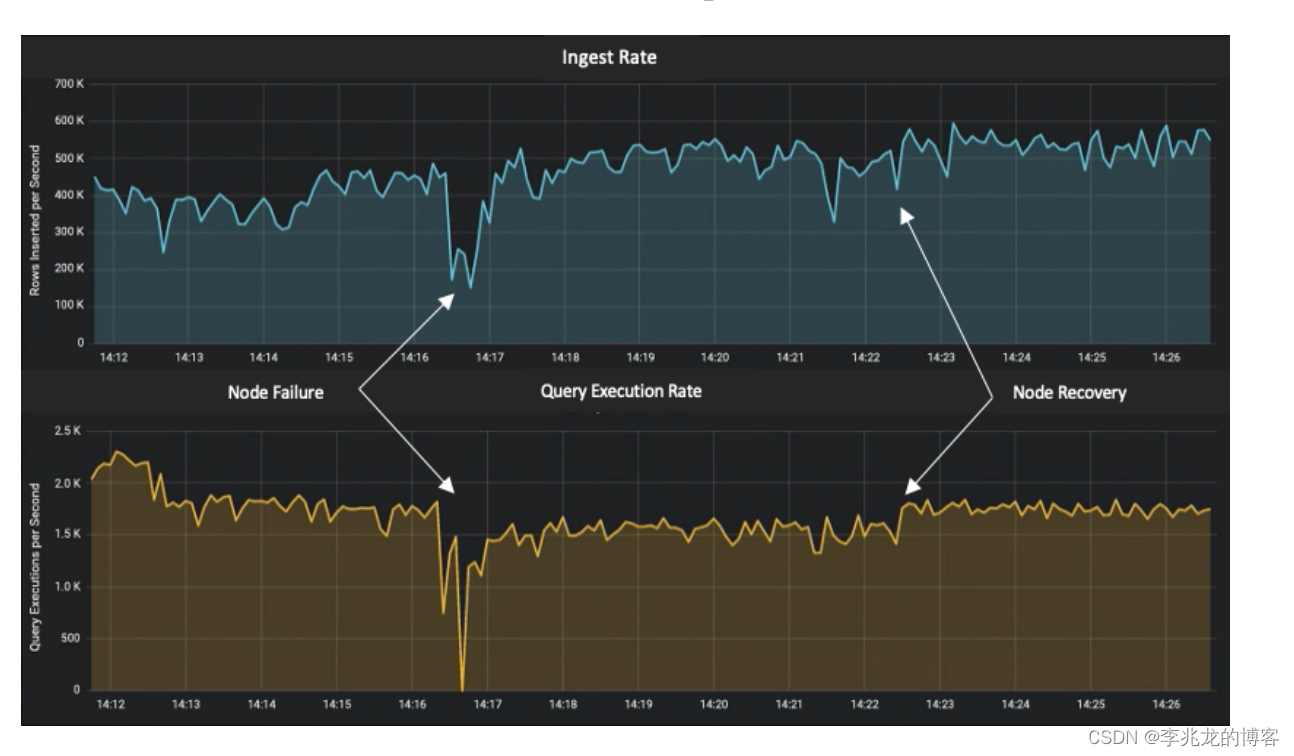
从一到无穷大 #17 Db2 Event Store,A Purpose-Built IoT Database Engine
本作品采用知识共享署名-非商业性使用-相同方式共享 4.0 国际许可协议进行许可。 本作品 (李兆龙 博文, 由 李兆龙 创作),由 李兆龙 确认,转载请注明版权。 文章目录 引言Architectural overviewData format and meta-dataEnsuring fast ingestionMulti…...

9月16日,每日信息差
今天是2023年09月16日,以下是为您准备的15条信息差 第一、天猫超市首单“茅小凌”已由菜鸟送达,首单已由菜鸟供应链完成履约,18分钟送达消费者手中 第二、软银考虑对OpenAI进行投资。此外,软银还初步拟收购英国人工智能芯片制造…...
Python 教程)
准备篇(二)Python 教程
Part 1 Python 基础语法区分输入与输出注释文本列表if 语句for 语句range() 函数走向编程的第一个例子Part 2 函数 和 数据结构函数数据结构del 语句列表详解元组集合字典循环的技巧Part 3 输入与输出读写文件打开文件 open()读文件写文件...

HTML+CSS画一个卡通中秋月饼
HTMLCSS画一个卡通中秋月饼🥮🥮🥮 中秋活动水个文章 整个divcss实现个月饼,给前端初学者一个练手的demo 效果图 思路 HTMl 先来个轮廓画脸上的东西:眼睛、眉毛、腮红、嘴巴眼睛丰富下瞳孔画20个花瓣 CSS 轮廓是要外…...
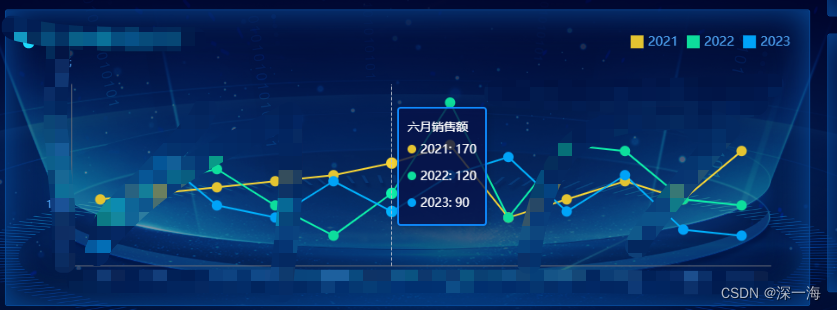
echarts的折线图,在点击图例后,提示出现变化,不报错。tooltip的formatter怎么写
在点击图例的年后,提示框会相应的变化,多选和单选都会响应变化。tooptip的重度在formatter tooltip:{show:true,trigger:"axis",alwaysShowContent:true,triggerOn:"mousemove",textStyle:{color:"#fff"},backgroundColor…...

C++中的auto是一个关键字,用于在编译时自动推导变量的类型
C中的auto是一个关键字,用于在编译时自动推导变量的类型。通过使用auto关键字,编译器可以根据变量的初始化表达式来确定其类型,从而省略了显式地指定类型的步骤。 使用auto关键字声明的变量必须在定义时进行初始化,以便编译器可以…...
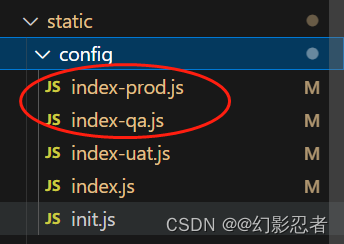
VUE build:gulp打包:测试、正式环境
目录 项目结构 Gulp VUE使用Gulp Vue安装Gulp Vue定义Gulp.js package.json build文件夹 config文件夹 static-config文件夹 项目结构 Gulp Gulp是一个自动化构建工具,可以帮助前端开发者通过自动化任务来管理工作流程。Gulp使用Node.js的代码编写ÿ…...
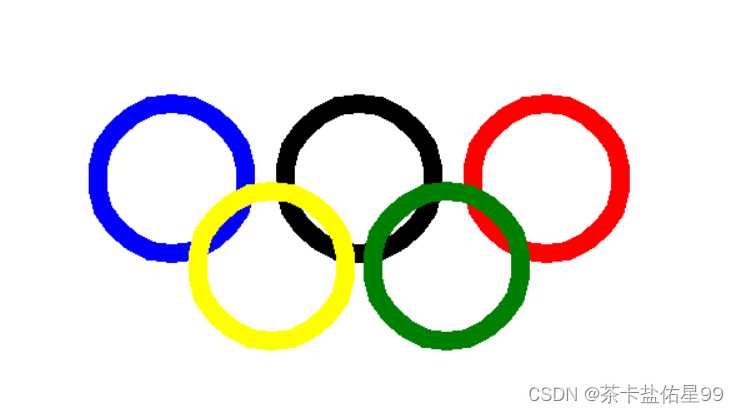
1.使用turtle换一个五环2.设计这样一个程序:输入一个数字 判断它是不是一个质数
1.使用turtle换一个五环 import turtle turtle.pensize(15) turtle.penup() turtle.color(blue) turtle.goto(-150,-35) turtle.pendown() turtle.circle(60) turtle.penup() turtle.color(black) turtle.goto(0,-35) turtle.pendown() turtle.circle(60) turtle.penup() turtl…...

C语言希尔排序
希尔排序(Shell Sort)是插入排序的一种,也称缩小增量排序,是直接插入排序算法的一种更高效的改进版本。希尔排序是非稳定排序算法。 希尔排序的基本思想是:先将整个待排序的记录序列分割成为若干子序列(由…...
KubeSphere 在互联网医疗行业的应用实践
作者:宇轩辞白,运维研发工程师,目前专注于云原生、Kubernetes、容器、Linux、运维自动化等领域。 前言 2020 年我国互联网医疗企业迎来了“爆发元年”,越来越多居民在家隔离期间不方便去医院看诊,只好采取在线诊疗的手…...

告别付费困扰:Linux与Windows双平台免费获取Typora全攻略
1. Typora收费后的免费替代方案 Typora作为一款广受欢迎的Markdown编辑器,突然宣布收费让很多用户措手不及。作为一名长期使用Typora的技术写作者,我完全理解大家的心情。好消息是,我们完全可以在不违反软件许可协议的前提下,继续…...

深入USB总线:图解移远EC20在Linux下如何从硬件接口到虚拟出5个ttyUSB
深入USB总线:图解移远EC20在Linux下如何从硬件接口到虚拟出5个ttyUSB 当我们拆解一台嵌入式设备时,常会遇到4G模块这类看似独立却又深度集成的组件。以移远EC20为例,它表面上通过MiniPCIE接口与主机通信,实则内部隐藏着一套复杂的…...

STM32L4 RTC唤醒中断实战:用CubeIDE配置30秒低功耗定时,实测两种模式差异
STM32L4 RTC唤醒中断实战:用CubeIDE配置30秒低功耗定时,实测两种模式差异 在电池供电的嵌入式设备开发中,精准的周期性任务调度与极致的功耗控制往往是一对需要权衡的技术矛盾。STM32L4系列凭借其出色的低功耗特性与灵活的RTC模块,…...

用Fiddler和Proxifier抓包分析易游网络验证API,手把手教你模拟合法请求
网络验证API抓包与模拟请求实战指南 在当今数字化产品生态中,网络验证机制已成为软件授权管理的核心组件。不同于传统的本地验证方式,网络验证通过远程API交互实现更高安全性的许可控制,这也使得协议层分析成为理解其工作原理的关键切入点。对…...

PvZ Toolkit终极指南:5分钟掌握植物大战僵尸PC版最强修改器
PvZ Toolkit终极指南:5分钟掌握植物大战僵尸PC版最强修改器 【免费下载链接】pvztoolkit 植物大战僵尸 PC 版综合修改器 项目地址: https://gitcode.com/gh_mirrors/pv/pvztoolkit 植物大战僵尸PC版玩家们,你是否想过拥有无限阳光、免费种植、自定…...

从2013年俄罗斯科技路演看技术商业化:硬件集成、异构计算与生态挑战
1. 项目概述:一次被遗忘的科技路演及其启示2013年秋天,在硅谷的心脏圣克拉拉,发生了一场如今看来颇具历史意味的科技路演。俄罗斯,这个在世人印象中与能源、重工业紧密相连的国家,派出了一支由政府和产业界高层领衔的代…...

从西方芯片巨头溃败看中国半导体崛起:市场、服务与生态的变革
1. 一场早已注定的终局:西方芯片巨头在移动市场的溃败十年前,如果你问任何一位半导体行业的从业者,谁会主导未来的手机芯片市场,答案里大概率会包括意法半导体(ST)、瑞萨(Renesas)这…...

Agent工作流卡顿、循环、幻觉频发?Lindy官方未公开的3层诊断协议首次披露
更多请点击: https://intelliparadigm.com 第一章:Agent工作流卡顿、循环、幻觉频发?Lindy官方未公开的3层诊断协议首次披露 当Agent在真实业务链路中反复重试同一动作、陷入状态闭环,或输出与上下文明显矛盾的“幻觉响应”&…...

6.1B激活,三榜开源第一!蚂蚁·安诊儿医疗大模型发布
刚刚,由浙江省卫生健康信息中心、蚂蚁健康与浙江省安诊儿医学人工智能科技有限公司联合研发,迄今为止规模最大、能力最强的开源医疗语言模型 AntAngelMed 发布并开源。模型基于 Ling-flash-2.0,MoE架构,100B 总参数仅激活 6.1B 即…...

CVPR2021_PLOP 论文代码环境搭建步骤
安装cuda 10.2 wget http://developer.download.nvidia.com/compute/cuda/10.2/Prod/local_installers/cuda_10.2.89_440.33.01_linux.run sudo sh cuda_10.2.89_440.33.01_linux.run #只选择 cudatoolkit 安装conda 换源,北外源比较快 参考: https://mi…...