
WordPress主题网站首页添加好看的四格小工具教程
 直接到网站根目录创建一个css文件(文件名:sige.css),文件名可自定义(注意文件名一致)
<link rel="stylesheet" href="你的网站/sige.css" type="text/css" >然后在header.php模板最上方添加引入代码
也可自定义HTML里添加css代码最上方写入标签<style></style>,将css代码放入标签内即可!
css代码如下:
.hide_sm{display: flex;}
.container .col-1-4{float: left;box-sizing: border-box;margin-right: 7.3333px;width: 100%;}
.container .col-1-4:last-child{margin-right: 0;}
@media (min-width:768px){.container .col-1-4{width: 50%}}
@media (min-width:1024px){.container .col-1-4{width: 25%}}
@media (min-width:1024px){.ripro-dark .home-first{background: #232425;}}
@media (min-width:768px){.home-first .h-images:after{display: none}}
@media (min-width:768px){.home-first .h-images{display: box;display: -ms-flexbox;display: flex;width: 100%;justify-content: space-between}}
@media (min-width:1024px){.home-first .h-images{width: 25%}}
.home-first .h-images .item-tuwen{float: left;padding: 0 6.5px;width: 50%}
@media (min-width:1024px){.home-first .h-images .item-tuwen{float: none}}
@media (min-width:1024px){.home-first .h-images{display: block;box-sizing: border-box;padding: 0 7.3333px}.home-first .h-images .item-tuwen{padding: 0;width: auto}}
.home-first .item-tuwen{margin-bottom: 15px}
@media (min-width:768px){.home-first .item-tuwen{margin-bottom: 13px}}
.home-first .item-tuwen a{position: relative;display: block;overflow: hidden;border-radius: 3px}
.home-first .item-tuwen a .thumb{padding-top: 57%;transition: all .2s;transform-origin: center}
.home-first .item-tuwen a strong{position: absolute;right: 0;bottom: 0;left: 0;z-index: 10;display: block;padding: .4em .8em .6em;background-image: linear-gradient(to bottom,rgba(0,0,0,.2) 0,rgba(0,0,0,.6) 100%);background-repeat: repeat-x;box-shadow: 0 -7px 15px rgba(0,0,0,.2);color: #fff;letter-spacing: .5px;font-weight: 700;font-size: 9pt;line-height: 1.3}
@media (min-width:768px){.home-first .item-tuwen a strong{letter-spacing: 1px;font-size: 14px;line-height: 1.4}}
.home-first .hf-widget{box-sizing: border-box;padding: 14px 17px 0;background: #17161600;box-shadow: 0 34px 20px -24px rgba(220, 220, 220, 0.18);border-radius: 3px;}
.ripro-dark .home-first .hf-widget{border: 1px solid #2b2b2b;background: #232425;box-shadow: 8px 8px 9pt #212121;}
@media (min-width:768px){.home-first .hf-widget{overflow: hidden;height: 135px}}
@media (min-width:1024px){.home-first .hf-widget{margin-bottom: 0}}
.home-first .hf-widget [class*=" icon-"]:before,.home-first .hf-widget [class^=icon-]:before{margin: 0}
.home-first .hf-widget .hf-widget-title{margin-bottom: 14px;padding: 0 0 10px;border-bottom: 1px solid #f2f2f2;color: #383838;letter-spacing: 1px;font-weight: 700;font-size: 15px;line-height: 20px;margin-bottom: 10px;}
.ripro-dark .home-first .hf-widget .hf-widget-title{border-bottom: 1px solid #696969;}
.ripro-dark .home-first .hf-widget .hf-widget-title a{color: #ccc;}
.home-first .hf-widget .hf-widget-title>i{margin-right: 2px;color: #448aff;}
.ripro-dark .home-first .hf-widget .hf-widget-title>i{margin-right: 2px;color: #ffa363}
.home-first .hf-widget .hf-widget-title span{margin-left: 10px;color: #a7a7a7;font-weight: 400;font-size: 9pt;line-height: 20px}
@media (min-width:1024px){.home-first .hf-widget .hf-widget-title span{display: none}}
@media (min-width:1330px){.home-first .hf-widget .hf-widget-title span{display: inline}}
.home-first .hf-widget .hf-widget-title .pages{float: right;padding-top: 2px}
.home-first .hf-widget .hf-widget-title .pages .next,.home-first .hf-widget .hf-widget-title .pages .prev{float: left;margin: 0;padding: 0 2px;height: 1pc;border: 1px solid #eee;color: #ccc;font-size: 9px;line-height: 15px;cursor: pointer}
.home-first .hf-widget .hf-widget-title .pages .next:hover,.home-first .hf-widget .hf-widget-title .pages .prev:hover{color: #448aff}
.home-first .hf-widget .hf-widget-title .pages .prev{border-right: none}
.home-first .hf-widget .hf-tags{margin-bottom: -10px}
@media (min-width:768px){.home-first .hf-widget .hf-tags{overflow: hidden;height: 4pc}}
.home-first .hf-widget .hf-tags a{display: inline-block;margin: 0 5px 10px;padding: 0 5px;height: 22px;border-radius: 2px;background: #f9f9f9;color: #888;white-space: nowrap;font-size: 9pt;line-height: 22px;word-break: break-all}
.home-first .hf-widget .hf-tags a.style_orange,.home-first .hf-widget .hf-tags a:hover{background: #448aff;color: #fff;}
.ripro-dark .home-first .hf-widget .hf-tags a{background: #2c2e2f;}
.home-first .hf-widget-4 .hf-widget-content{color: #888;font-size: 14px}
.home-first .hf-widget-4 .hf-widget-content a{color: #888}
.home-first .hf-widget-4 .hf-widget-content a:hover{color: #448aff;}
.home-first .hf-widget-4 .hf-widget-content h3{overflow: hidden;height: 22px;font-weight: 400;font-size: 13px;line-height: 22px;margin: 0 0 10px;}
.home-first .hf-widget-4 .hf-widget-content em{float: right;padding: 0 5px;height: 22px;border-radius: 2px;background: #fff5ef;color: #ff5c00;font-style: normal;font-size: 9pt;line-height: 22px}
.home-first .hf-widget-4 .hf-widget-content ul li{margin-bottom: 5px}
.home-first .hf-widget-4 .hf-widget-content ul li:last-child{margin-bottom: 0}
.home-first .hf-widget-1 .hf-widget-content a{color: #888}
.ripro-dark .home-first .hf-widget-1 .hf-widget-content a{color: #ccc}
.home-first .hf-widget-1 .hf-widget-content a:hover{color: #69a1ff;}
.home-first .hf-widget-1 .hf-widget-content li{float: left;box-sizing: border-box;padding: 0 10px;width: 25%;text-align: center;font-size: 9pt}
.home-first .hf-widget-1 .hf-widget-content li .thumb{margin: 0 auto 4px;padding-top: 36px;width: 36px}
.home-first .hf-widget-1 .hf-widget-content li span{display: block; height: 16px; line-height: 16px; overflow: hidden;}
.home-first .hf-widget-1 .hf-widget-content .scroll-h{margin: 0 -10px;}
.home-first .scroll-h{position: relative;overflow: hidden;height: 56px;}
.home-first .scroll-h ul{list-style: none;position: absolute;top: 0;left: 0;width: 100%;transition: all .2s; margin:0;padding-left:0;}
.home-first .scroll-h ul:after,.home-first .scroll-h ul:before{clear: both;display: block;visibility: none;height: 0;content: "";line-height: 0}
.home-first .scroll-h .holdon{position: absolute;top: 0;left: 100%}
.home-first .scroll-h .holdon-prev{left: -100%}
.home-first .hf-widget-hot-cats .hhicon{display: inline-block;margin-bottom: 5px;width: 36px;height: 36px;border-radius: 100%;background: #e8fbff;color: #448aff;text-align: center;font-size: 20px;line-height: 36px;}
.ripro-dark .home-first .hf-widget-hot-cats .hhicon{background: #2c2e2f;color: #ffa363;}
.home-first .hf-widget-hot-cats .scroll-h li a{display: block}
.home-first .hf-widget-hot-cats .scroll-h li a:hover .hhicon{background: #448aff;color: #fff;}
.home-first .thumb{position: relative;display: block;overflow: hidden;padding-top: 66.7%;width: 100%;height: 0;background-color: transparent;background-position: center;background-size: cover;background-repeat: no-repeat;transition: all .2s}
.home-first i{font-weight: 300}
@media screen and (max-width:720px){.home-first .hf-widget-1 .hf-widget-content .scroll-h,.home-first .hf-widget-content{margin: 1pc -10px}}
@media (max-width: 768px){.sxweb {display:none;}}
.icon-b i{
display: inline-block;
margin-bottom: 5px;
width: 36px;
height: 36px;
border-radius: 100%;
background: #e8fbff;
color: #448aff;
text-align: center;
font-size: 20px;
line-height: 36px;
}
.icon-b i:hover{
background: #448aff;
color: #fff;
}
外观-小工具-自定义HTML添加如下代码
<div class="section">
<div class="home-first">
<div class="container hide_sm">
<div class="col-1-4">
<div class="hf-widget hf-widget-1 hf-widget-software">
<h3 class="hf-widget-title">
<i class="fa fa-cloud"></i>
<a href="#" target="_blank">推荐产品</a>
<span>云服务器等云产品推荐</span>
</h3>
<div class="hf-widget-content">
<div class="scroll-h">
<ul>
<li>
<a href="#" rel="external nofollow" target="_blank">
<i class="thumb " style="background-image:url(https://ae01.alicdn.com/kf/H026cdceabc1942e1b82b1eb2cd5b9e41P.png)"></i>
<span>阿里云</span></a>
</li>
<li>
<a href="#" target="_blank">
<i class="thumb " style="background-image:url(https://ae01.alicdn.com/kf/H006240f97bff40f5aea223eb51b33c3dq.png)"></i>
<span>腾讯云</span></a>
</li>
<li>
<a href="#" target="_blank">
<i class="thumb " style="background-image:url(https://ae01.alicdn.com/kf/H2da200a36ce2401595f8e03f8c750deeT.png)"></i>
<span>企业云</span></a>
</li>
<li>
<a href="#" target="_blank">
<i class="thumb " style="background-image:url(https://ae01.alicdn.com/kf/H128bb4d1c77d4f6f9032b934a6a234beD.png)"></i>
<span>香港云</span></a>
</li>
</ul>
</div>
</div>
</div>
</div>
<div class="col-1-4 sxweb">
<div class="hf-widget hf-widget-2">
<h3 class="hf-widget-title">
<i class="fa fa-tint"></i>
<a href="#" target="_blank">热门看点</a>
<span>精品内容推荐</span></h3>
<div class="hf-widget-content">
<div class="no-scroll hf-tags">
<a class="style_orange" href="http://www.lxh5068.com" target="_blank">
<span>手机壁纸</span></a>
<a class="" href="/topics/jc-fx" target="_blank">
<span>教程分享</span></a>
<a class="" href="/topics/wz-ym" target="_blank">
<span>源码分享</span></a>
<a class="" href="/topics/rj-android" target="_blank">
<span>Android软件</span></a>
<a class="" href="/topics/xw-zx" target="_blank">
<span>新闻资讯</span></a>
<a class="" href="/xb-zh" target="_blank">
<span>线报活动</span></a>
<a class="" href="/topics/meihua" target="_blank">
<span>美化代码</span></a>
</div>
</div>
</div>
</div>
<div class="col-1-4 sxweb">
<div class="hf-widget hf-widget-1 hf-widget-hot-cats">
<h3 class="hf-widget-title">
<i class="fa fa-dropbox"></i>
<a href="http://bbs.lxh5068.com/sort/huodong" target="_blank">热门专区</a>
<span>推荐设计热点</span></h3>
<div class="hf-widget-content">
<div class="icon-b">
<ul>
<li>
<a href="http://bbs.lxh5068.com/sort/zhide" target="_blank">
<i class="fa fa-thumbs-up" aria-hidden="true"></i>
<span>每日推荐</span></a>
</li>
<li>
<a href="http://bbs.lxh5068.com/sort/mianfeirj" target="_blank">
<i class="fa fa-cloud-download" aria-hidden="true"></i>
<span>软件下载</span></a>
</li>
<li>
<a href="http://bbs.lxh5068.com/sort/yuanma" target="_blank">
<i class="fa fa-graduation-cap"></i>
<span>源码教程</span></a>
</li>
<li>
<a href="http://bbs.lxh5068.com/sort/guanzhu" target="_blank">
<i class="fa fa-picture-o" aria-hidden="true"></i>
<span>福利美图</span></a>
</li>
</ul>
</div>
</div>
</div>
</div>
<div class="col-1-4 sxweb">
<div class="hf-widget hf-widget-4">
<h3 class="hf-widget-title">
<i class="fa fa-book"></i>
<a href="#" target="_blank">最新活动</a>
<span>免费会员享福利</span>
</h3>
<div class="hf-widget-content">
<div class="scroll-h">
<ul>
<li>
<h3>
<a href="#" target="_blank">
<i class="icon-time"></i>
<span>美化服务火热售卖中</span>
<em>网站美化</em></a>
</h3>
</li>
<li>
<h3>
<a href="#" target="_blank">
<i class="icon-time"></i>
<span>关于本站学分付费阅读获取内容说明</span>
<em>学分说明</em></a>
</h3>
</li>
</ul>
</div>
</div>
</div>
</div>
</div>
</div>
</div>
相关文章:
WordPress主题网站首页添加好看的四格小工具教程
直接到网站根目录创建一个css文件(文件名:sige.css),文件名可自定义(注意文件名一致) <link rel"stylesheet" href"你的网站/sige.css" type"text/css" > 然后在header.php模板最上方添加引入代码 也可自定义HTML里添加css代码最上方写…...
unittest自动化测试框架讲解以及实战
为什么要学习unittest 按照测试阶段来划分,可以将测试分为单元测试、集成测试、系统测试和验收测试。单元测试是指对软件中的最小可测试单元在与程序其他部分相隔离的情况下进行检查和验证的工作,通常指函数或者类,一般是开发完成的。 单元…...
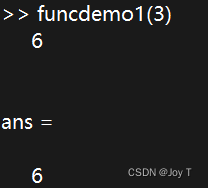
数学建模之Matlab基础操作
作者由于后续课程也要学习Matlab,并且之前也进行了一些数学建模的练习(虽然是论文手),所以花了几天零碎时间学习Matlab的基础操作,特此整理。 基本运算 a55 %加法,同理减法 b2^3 %立方 c5*2 %乘法 x 1; …...

【Nuxt】04 Nuxt2-SEO: sitemap.xml、seo优化、robots.txt
1 SiteMap设置 环境准备 注意生成sitemap依赖于nuxtjs/sitemap,并且需要用axios进行请求,不要使用nuxtjs/axios,不然会报错 sitemap.xml配置 在nuxt.config.js中配置下面的内容 npm install nuxtjs/sitemap npm install axios在static/s…...

VMware VSAN 入门
一、虚拟化的存储 1.1、对于数据中心来说最重要的是数据,而承载数据的设备就是存储设备(Storage) 1.2、物理服务器的本地存储阵列 与 虚拟化服务器的本地存储阵列 对比 1.3、避免单台服务器故障的虚拟化高级特性:vSphere HA技术 …...
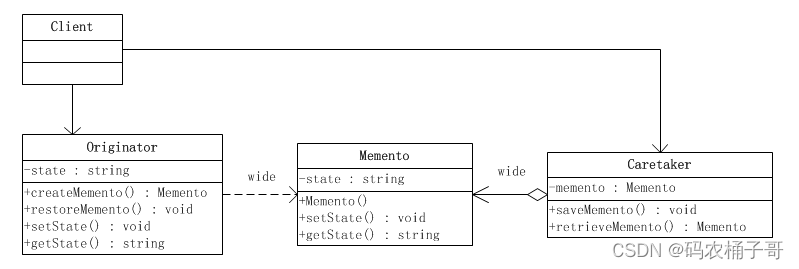
【设计模式】备忘录模式
文章目录 1.备忘录模式定义2.备忘录模式的角色3.备忘录模式实现3.1.场景说明3.2.结构类图3.3.代码实现 4.备忘录模式优缺点5.备忘录模式适用场景6.备忘录模式总结 主页传送门:💁 传送 1.备忘录模式定义 备忘录(Memento Pattern)模…...

vue3+elementUiPlus表格导出功能
1.下载需要的组件包 npm install file-saver xlsx 2.页面中导入 import FileSaver from file-saver import * as XLSX from xlsx; 3.页面中的表格加一个id <el-table :data"tableData" ref"multipleTableRef" style"width…...

专题五:优先级队列
"你了解我,最干净的轮廓, 握住小小风车和放肆的梦~" 堆是一个不错的数据结构,而在计算机中,无法表示二叉分支结构,因此我们经常会看到使用线性表来作为堆的存储容器。在接触堆的时候,我们是把它…...

游戏设计模式专栏(一):工厂方法模式
引言 大家好,我是亿元程序员,一位有着8年游戏行业经验的主程。 本系列是《和8年游戏主程一起学习设计模式》,让糟糕的代码在潜移默化中升华,欢迎大家关注分享收藏订阅。 在游戏开发中,代码的组织和结构对于项目的可…...
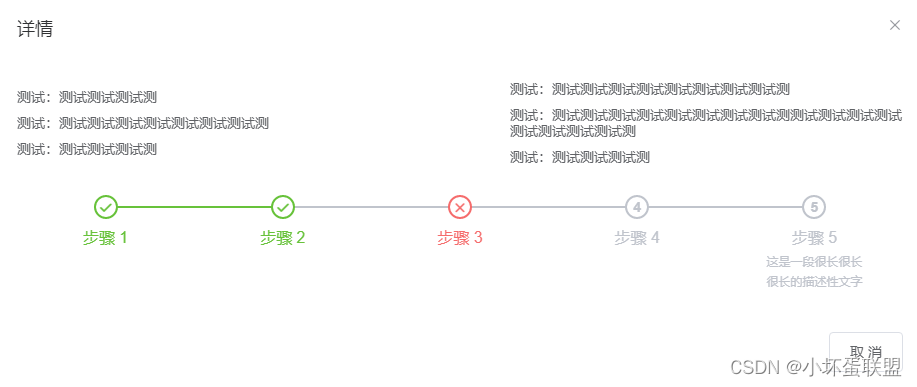
element中使用el-steps 进度条效果demo(整理)
<template><div class"margin-top20"><!-- align-center 不要居中就去掉 --><!-- process-status 这几个参数值:改变颜色 wait / process / finish / error / --><!-- active 到第几个是绿色 --><el-steps :space&qu…...
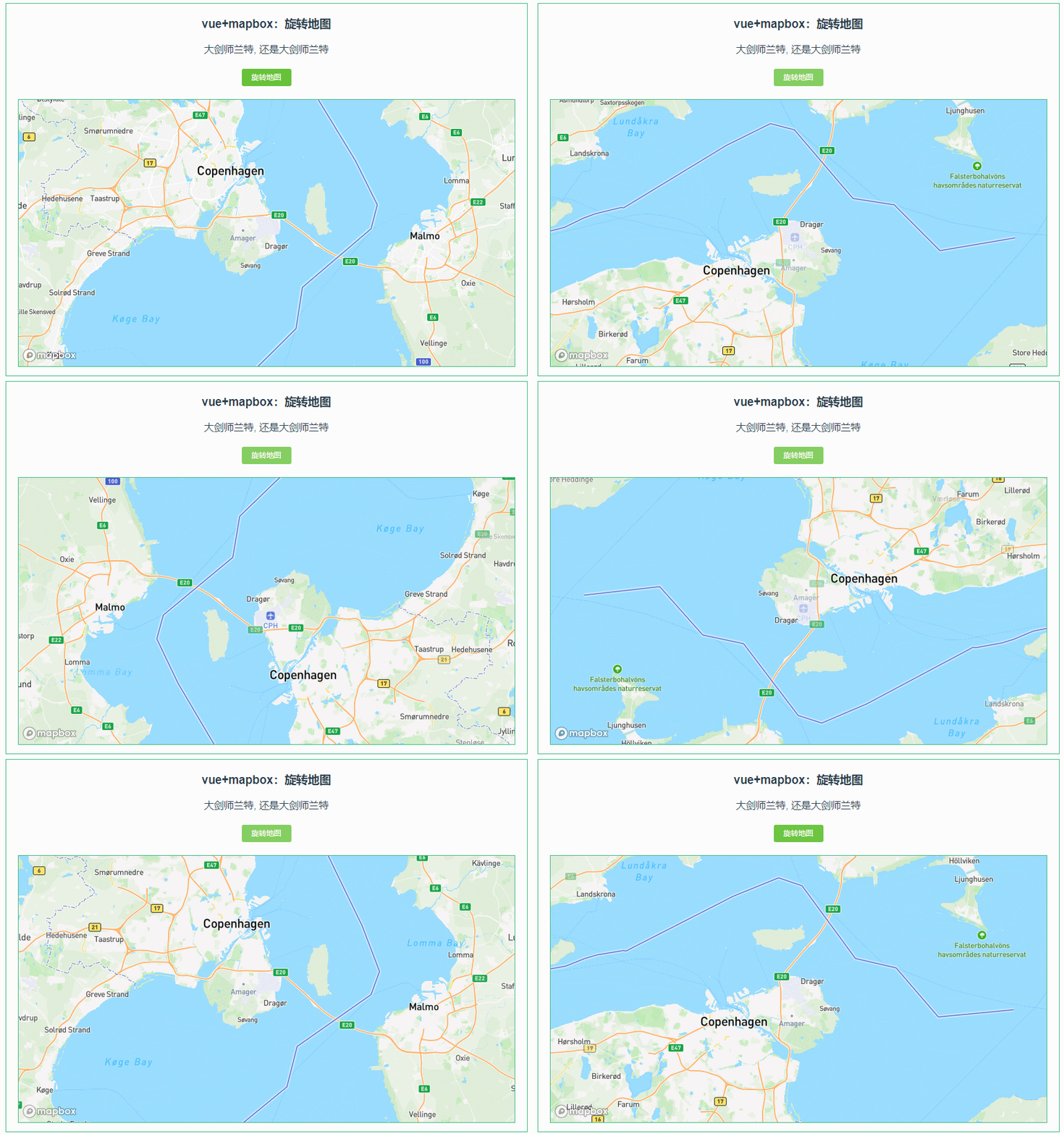
038:mapboxGL 旋转地图(rotateTo)
第038个 点击查看专栏目录 本示例的目的是介绍演示如何在vue+mapbox中旋转地图。 直接复制下面的 vue+mapbox源代码,操作2分钟即可运行实现效果 文章目录 示例效果配置方式示例源代码(共68行)相关API参考:专栏目标示例效果 配置方式 1)查看基础设置:https://xiaozhuan…...
java遇到的问题
java遇到的问题 Tomcat与JDK版本问题 当使用Tomcat10的版本用于springmvc借用浏览器调试时,使用JDK8浏览器会报异常。 需要JDK17(可以配置多个JDK环境,切换使用)才可以使用,配置为JAVA_HOME路径,否则&a…...

LLM(二)| LIMA:在1k高质量数据上微调LLaMA1-65B,性能超越ChatGPT
本文将介绍在Lit-GPT上使用LoRA微调LLaMA模型,并介绍如何自定义数据集进行微调其他开源LLM 监督指令微调(Supervised Instruction Finetuning) 什么是监督指令微调?为什么关注它? 目前大部分LLM都是decoder-only&…...
)
Android AMS——创建Application(七)
与在 App 内部启动一个 Activity 的不同之处在于,点击桌面 Launcher 首次启动一个应用程序的时候,会先去创建一个该应用程序对应的进程,然后执行 ActivityThread 的 main() 方法去创建该应用对应的 Application,然后再去启动首页 Activity。前面已经分析了进程的创建和启动…...

html 边缘融合加载
html 代码 <!DOCTYPE html> <html lang"en"> <head><meta charset"UTF-8"><title>边缘融合加载</title><style>* {margin: 0;padding: 0;box-sizing: border-box;}body {height: 100vh;padding-bottom: 80px;b…...
ElasticSearch - 在 微服务项目 中基于 RabbitMQ 实现 ES 和 MySQL 数据异步同步(考点)
目录 一、数据同步 1.1、什么是数据同步 1.2、解决数据同步面临的问题 1.3、解决办法 1.3.1、同步调用 1.3.2、异步通知(推荐) 1.3.3、监听 binlog 1.3、基于 RabbitMQ 实现数据同步 1.3.1、需求 1.3.2、在“酒店搜索服务”中 声明 exchange、…...
Springboot+vue的企业人事管理系统(有报告),Javaee项目,springboot vue前后端分离项目。
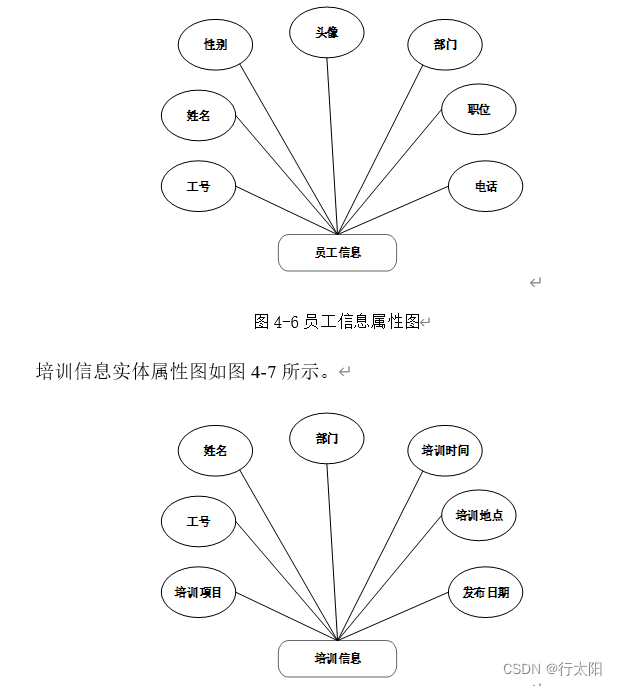
演示视频: Springbootvue的企业人事管理系统(有报告),Javaee项目,springboot vue前后端分离项目。 项目介绍: 本文设计了一个基于Springbootvue的前后端分离的企业人事管理系统,采用M(model&am…...
初识Java 11-1 函数式编程
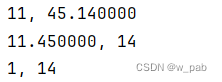
目录 旧方式与新方式 lambda表达式 方法引用 Runnable 未绑定方法引用 构造器方法引用 函数式接口 带有更多参数的函数式接口 解决缺乏基本类型函数式接口的问题 本笔记参考自: 《On Java 中文版》 函数式编程语言的一个特点就是其处理代码片段的简易性&am…...
【Ambari】银河麒麟V10 ARM64架构_安装Ambari2.7.6HDP3.3.1问题总结
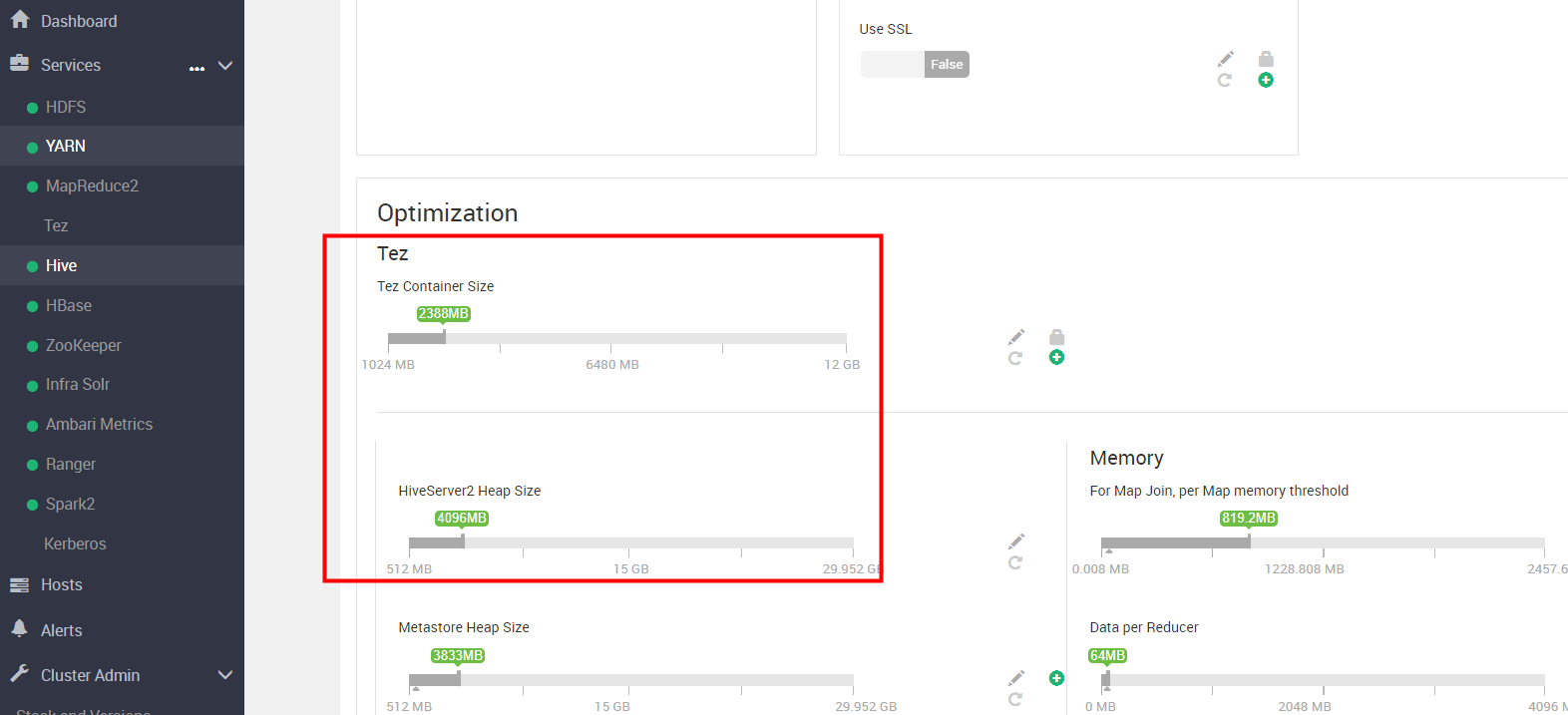
🍁 博主 "开着拖拉机回家"带您 Go to New World.✨🍁 🦄 个人主页——🎐开着拖拉机回家_大数据运维-CSDN博客 🎐✨🍁 🪁🍁 希望本文能够给您带来一定的帮助🌸文…...
李宏毅机器学习第一课(结尾附作业模型详细分析)
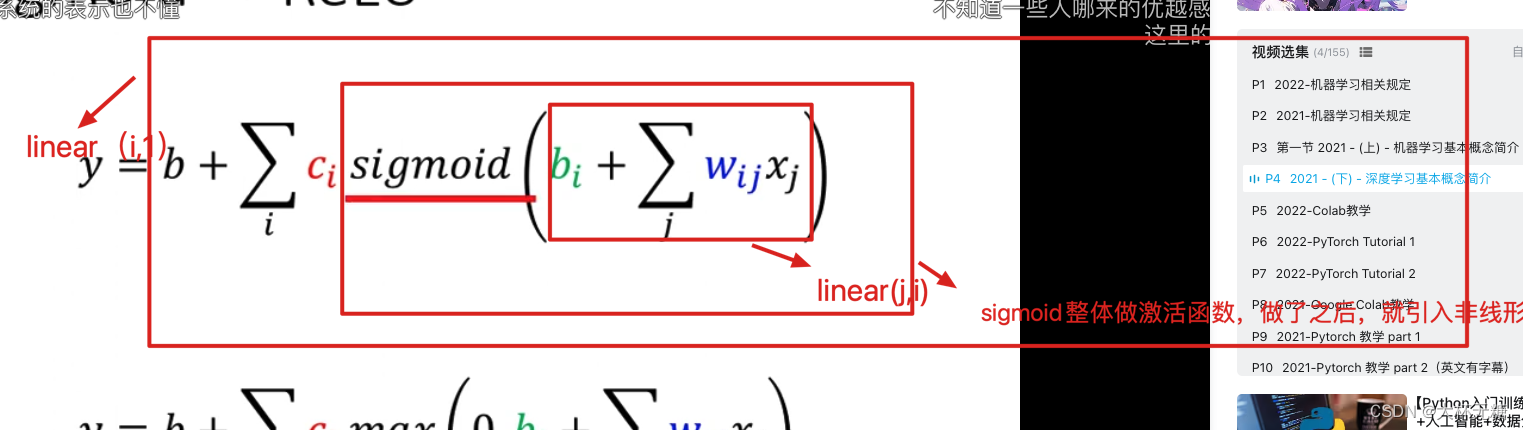
机器学习就是让机器找一个函数f,这个函数f是通过计算机找出来的 如果参数少的话,我们可以使用暴搜,但是如果参数特别多的话,我们就要使用Gradient Descent Regression (输出的是一个scalar数值) Classification (在…...

内容创作团队借助多模型能力提升文案生成质量与效率
🚀 告别海外账号与网络限制!稳定直连全球优质大模型,限时半价接入中。 👉 点击领取海量免费额度 内容创作团队借助多模型能力提升文案生成质量与效率 对于新媒体运营、内容营销或品牌文案团队而言,持续产出高质量、风…...

本地大模型部署的Python“翻译官“:llama-cpp-python深度解析
本地大模型部署的Python"翻译官":llama-cpp-python深度解析 【免费下载链接】llama-cpp-python Python bindings for llama.cpp 项目地址: https://gitcode.com/gh_mirrors/ll/llama-cpp-python 你是否曾为云端API的延迟而焦虑?是否担心…...
)
从Qt Creator到你的软件:如何用QDockWidget打造专业级可停靠面板(实战避坑)
从Qt Creator到你的软件:如何用QDockWidget打造专业级可停靠面板(实战避坑) 在开发桌面应用程序时,一个直观、灵活的用户界面往往能极大提升用户体验。许多专业级IDE如Qt Creator和VS Code都采用了可停靠面板的设计,允…...

CH348芯片全平台驱动实战:从Windows Server到树莓派Linux,一次搞定8串口配置
CH348芯片全平台驱动实战:从Windows Server到树莓派Linux,一次搞定8串口配置 工业自动化、物联网网关、多设备调试等场景中,工程师常面临一个核心痛点:如何在各类操作系统环境下高效管理多串口设备。南京沁恒微电子的CH348芯片以其…...

STM32CubeMX配置FreeRTOS时,那个不起眼的定时器TIM16到底在干嘛?新手避坑指南
STM32CubeMX配置FreeRTOS时,那个不起眼的定时器TIM16到底在干嘛?新手避坑指南 第一次在STM32CubeMX里勾选FreeRTOS组件时,很多开发者会对配置页面底部那个"Hardware Timer"选项感到困惑——为什么默认选中了TIM16?这个看…...
)
别再只用ARIMA了!用Python+statsmodels搞定SARIMA预测电商销量(附完整代码)
电商销量预测实战:用PythonSARIMA破解季节性销售波动 电商销量预测的痛点与SARIMA的破局之道 每逢大促季节,电商运营团队总会陷入两难困境:备货不足错失销售良机,库存积压又导致资金周转困难。传统ARIMA模型在预测日常销量时表现尚…...

别再只用CyclicBarrier了!聊聊Java并发库里那个小众但好用的Exchanger
解锁Java并发编程中的隐藏利器:Exchanger深度实战指南 在Java并发编程的世界里,开发者们往往对CyclicBarrier、CountDownLatch这些同步工具如数家珍,却很少有人注意到并发库中那个低调但强大的Exchanger。这个专为线程间数据交换设计的同步点…...

【亲测免费】 VisionPro培训文档全中文版
VisionPro培训文档全中文版 【下载地址】VisionPro培训文档全中文版 VisionPro培训文档全中文版欢迎使用VisionPro培训文档全中文版!本资源是专为机器视觉领域从业者及学习者精心准备的一套全面指南,旨在帮助您快速掌握VisionPro软件的强大功能与应用技巧…...

AzurLaneLive2DExtract:碧蓝航线Live2D资源提取的完整指南
AzurLaneLive2DExtract:碧蓝航线Live2D资源提取的完整指南 【免费下载链接】AzurLaneLive2DExtract OBSOLETE - see readme / 碧蓝航线Live2D提取 项目地址: https://gitcode.com/gh_mirrors/az/AzurLaneLive2DExtract 想要从碧蓝航线游戏中提取精美的Live2D…...

告别浏览器标签混乱:5分钟搭建高效Gmail桌面邮件中心
告别浏览器标签混乱:5分钟搭建高效Gmail桌面邮件中心 【免费下载链接】gmail-desktop :postbox: Gmail desktop app for macOS, Windows & Linux (formerly Gmail Desktop) 项目地址: https://gitcode.com/gh_mirrors/gm/gmail-desktop 厌倦了在浏览器标…...