
Java身份证OCR识别 - 阿里云API【识别准确率超过99%】
1. 阿里云API市场
https://market.aliyun.com/products/57124001/cmapi00063618.html?spm=5176.28261954.J_7341193060.41.60e52f3drduOTh&scm=20140722.S_market%40%40API%E5%B8%82%E5%9C%BA%40%40cmapi00063618._.ID_market%40%40API%E5%B8%82%E5%9C%BA%40%40cmapi00063618-RL_%E8%BA%AB%E4%BB%BD%E8%AF%81ocr%E8%AF%86%E5%88%AB-LOC_llm-OR_ser-V_3-RK_rerank-P0_9&accounttraceid=45aeef6ca8144c88a226ef6fe5ac5d3fzgoh#sku=yuncode5761800001购买对应套餐

2. API接口
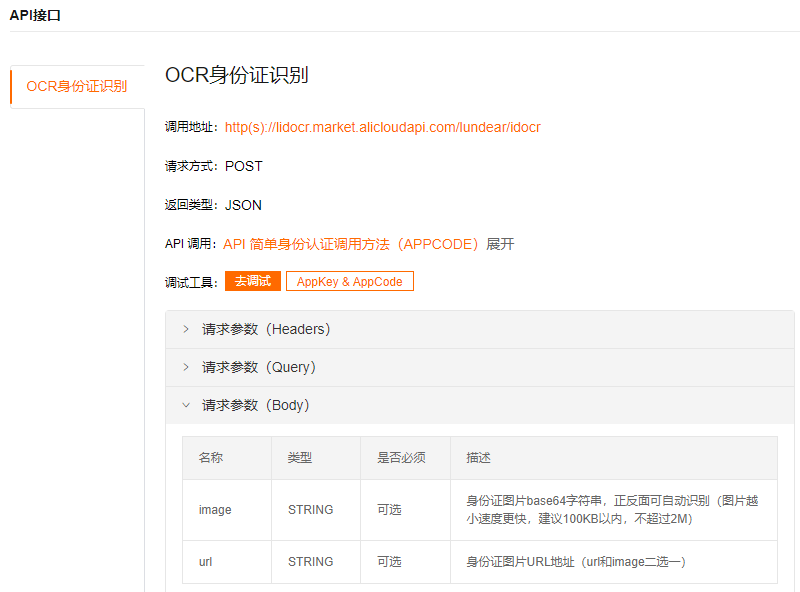
3. 复制AppCode
https://market.console.aliyun.com/imageconsole/index.htm#/?_k=pda4ei云市场-已购买服务

4. AliyunOCRDemo
import org.apache.http.HttpResponse;
import org.apache.http.util.EntityUtils;
import java.util.HashMap;
import java.util.Map;/*** 身份证OCR识别*/
public class AliyunOCRDemo {public static void main(String[] args) {String host = "https://lidocr.market.alicloudapi.com";String path = "/lundear/idocr";String method = "POST";String appcode = "你自己的AppCode";Map<String, String> headers = new HashMap<String, String>();//最后在header中的格式(中间是英文空格)为Authorization:APPCODE 83359fd73fe94948385f570e3c139105headers.put("Authorization", "APPCODE " + appcode);//根据API的要求,定义相对应的Content-Typeheaders.put("Content-Type", "application/x-www-form-urlencoded; charset=UTF-8");Map<String, String> querys = new HashMap<String, String>();Map<String, String> bodys = new HashMap<String, String>();/**url和image二选一*/// 身份证图片base64字符串,正反面可自动识别(图片越小速度更快,建议100KB以内,不超过2M)
//        bodys.put("image", "image");// 身份证图片URL地址bodys.put("url", "http://xxx.jpg");try {/*** 重要提示如下:* HttpUtils请从* https://github.com/aliyun/api-gateway-demo-sign-java/blob/master/src/main/java/com/aliyun/api/gateway/demo/util/HttpUtils.java* 下载** 相应的依赖请参照* https://github.com/aliyun/api-gateway-demo-sign-java/blob/master/pom.xml*/HttpResponse response = HttpUtils.doPost(host, path, method, headers, querys, bodys);System.out.println(response.toString());//获取response的bodySystem.out.println(EntityUtils.toString(response.getEntity()));} catch (Exception e) {e.printStackTrace();}}
}
4. HttpUtils
import org.apache.commons.lang.StringUtils;
import org.apache.http.HttpResponse;
import org.apache.http.NameValuePair;
import org.apache.http.client.HttpClient;
import org.apache.http.client.entity.UrlEncodedFormEntity;
import org.apache.http.client.methods.HttpDelete;
import org.apache.http.client.methods.HttpGet;
import org.apache.http.client.methods.HttpPost;
import org.apache.http.client.methods.HttpPut;
import org.apache.http.conn.ClientConnectionManager;
import org.apache.http.conn.scheme.Scheme;
import org.apache.http.conn.scheme.SchemeRegistry;
import org.apache.http.conn.ssl.SSLSocketFactory;
import org.apache.http.entity.ByteArrayEntity;
import org.apache.http.entity.StringEntity;
import org.apache.http.impl.client.DefaultHttpClient;
import org.apache.http.message.BasicNameValuePair;import javax.net.ssl.SSLContext;
import javax.net.ssl.TrustManager;
import javax.net.ssl.X509TrustManager;
import java.io.UnsupportedEncodingException;
import java.net.URLEncoder;
import java.security.KeyManagementException;
import java.security.NoSuchAlgorithmException;
import java.security.cert.X509Certificate;
import java.util.ArrayList;
import java.util.List;
import java.util.Map;public class HttpUtils {/*** get** @param host* @param path* @param method* @param headers* @param querys* @return* @throws Exception*/public static HttpResponse doGet(String host, String path, String method,Map<String, String> headers,Map<String, String> querys)throws Exception {HttpClient httpClient = wrapClient(host);HttpGet request = new HttpGet(buildUrl(host, path, querys));for (Map.Entry<String, String> e : headers.entrySet()) {request.addHeader(e.getKey(), e.getValue());}return httpClient.execute(request);}/*** post form** @param host* @param path* @param method* @param headers* @param querys* @param bodys* @return* @throws Exception*/public static HttpResponse doPost(String host, String path, String method,Map<String, String> headers,Map<String, String> querys,Map<String, String> bodys)throws Exception {HttpClient httpClient = wrapClient(host);HttpPost request = new HttpPost(buildUrl(host, path, querys));for (Map.Entry<String, String> e : headers.entrySet()) {request.addHeader(e.getKey(), e.getValue());}if (bodys != null) {List<NameValuePair> nameValuePairList = new ArrayList<NameValuePair>();for (String key : bodys.keySet()) {nameValuePairList.add(new BasicNameValuePair(key, bodys.get(key)));}UrlEncodedFormEntity formEntity = new UrlEncodedFormEntity(nameValuePairList, "utf-8");formEntity.setContentType("application/x-www-form-urlencoded; charset=UTF-8");request.setEntity(formEntity);}return httpClient.execute(request);}/*** Post String** @param host* @param path* @param method* @param headers* @param querys* @param body* @return* @throws Exception*/public static HttpResponse doPost(String host, String path, String method,Map<String, String> headers,Map<String, String> querys,String body)throws Exception {HttpClient httpClient = wrapClient(host);HttpPost request = new HttpPost(buildUrl(host, path, querys));for (Map.Entry<String, String> e : headers.entrySet()) {request.addHeader(e.getKey(), e.getValue());}if (StringUtils.isNotBlank(body)) {request.setEntity(new StringEntity(body, "utf-8"));}return httpClient.execute(request);}/*** Post stream** @param host* @param path* @param method* @param headers* @param querys* @param body* @return* @throws Exception*/public static HttpResponse doPost(String host, String path, String method,Map<String, String> headers,Map<String, String> querys,byte[] body)throws Exception {HttpClient httpClient = wrapClient(host);HttpPost request = new HttpPost(buildUrl(host, path, querys));for (Map.Entry<String, String> e : headers.entrySet()) {request.addHeader(e.getKey(), e.getValue());}if (body != null) {request.setEntity(new ByteArrayEntity(body));}return httpClient.execute(request);}/*** Put String* @param host* @param path* @param method* @param headers* @param querys* @param body* @return* @throws Exception*/public static HttpResponse doPut(String host, String path, String method,Map<String, String> headers,Map<String, String> querys,String body)throws Exception {HttpClient httpClient = wrapClient(host);HttpPut request = new HttpPut(buildUrl(host, path, querys));for (Map.Entry<String, String> e : headers.entrySet()) {request.addHeader(e.getKey(), e.getValue());}if (StringUtils.isNotBlank(body)) {request.setEntity(new StringEntity(body, "utf-8"));}return httpClient.execute(request);}/*** Put stream* @param host* @param path* @param method* @param headers* @param querys* @param body* @return* @throws Exception*/public static HttpResponse doPut(String host, String path, String method,Map<String, String> headers,Map<String, String> querys,byte[] body)throws Exception {HttpClient httpClient = wrapClient(host);HttpPut request = new HttpPut(buildUrl(host, path, querys));for (Map.Entry<String, String> e : headers.entrySet()) {request.addHeader(e.getKey(), e.getValue());}if (body != null) {request.setEntity(new ByteArrayEntity(body));}return httpClient.execute(request);}/*** Delete** @param host* @param path* @param method* @param headers* @param querys* @return* @throws Exception*/public static HttpResponse doDelete(String host, String path, String method,Map<String, String> headers,Map<String, String> querys)throws Exception {HttpClient httpClient = wrapClient(host);HttpDelete request = new HttpDelete(buildUrl(host, path, querys));for (Map.Entry<String, String> e : headers.entrySet()) {request.addHeader(e.getKey(), e.getValue());}return httpClient.execute(request);}private static String buildUrl(String host, String path, Map<String, String> querys) throws UnsupportedEncodingException {StringBuilder sbUrl = new StringBuilder();sbUrl.append(host);if (!StringUtils.isBlank(path)) {sbUrl.append(path);}if (null != querys) {StringBuilder sbQuery = new StringBuilder();for (Map.Entry<String, String> query : querys.entrySet()) {if (0 < sbQuery.length()) {sbQuery.append("&");}if (StringUtils.isBlank(query.getKey()) && !StringUtils.isBlank(query.getValue())) {sbQuery.append(query.getValue());}if (!StringUtils.isBlank(query.getKey())) {sbQuery.append(query.getKey());if (!StringUtils.isBlank(query.getValue())) {sbQuery.append("=");sbQuery.append(URLEncoder.encode(query.getValue(), "utf-8"));}}}if (0 < sbQuery.length()) {sbUrl.append("?").append(sbQuery);}}return sbUrl.toString();}private static HttpClient wrapClient(String host) {HttpClient httpClient = new DefaultHttpClient();if (host.startsWith("https://")) {sslClient(httpClient);}return httpClient;}private static void sslClient(HttpClient httpClient) {try {SSLContext ctx = SSLContext.getInstance("TLS");X509TrustManager tm = new X509TrustManager() {public X509Certificate[] getAcceptedIssuers() {return null;}public void checkClientTrusted(X509Certificate[] xcs, String str) {}public void checkServerTrusted(X509Certificate[] xcs, String str) {}};ctx.init(null, new TrustManager[] { tm }, null);SSLSocketFactory ssf = new SSLSocketFactory(ctx);ssf.setHostnameVerifier(SSLSocketFactory.ALLOW_ALL_HOSTNAME_VERIFIER);ClientConnectionManager ccm = httpClient.getConnectionManager();SchemeRegistry registry = ccm.getSchemeRegistry();registry.register(new Scheme("https", 443, ssf));} catch (KeyManagementException ex) {throw new RuntimeException(ex);} catch (NoSuchAlgorithmException ex) {throw new RuntimeException(ex);}}
}
5. 测试 【身份证正面】
{"data":{"birthday":"xxx","address":"xxx","side":"front","sex":"男","name":"xxx","number":"xxx","nation":"汉"},"desc":"成功","code":0
}
6. 测试 【身份证反面】
{"data":{"timelimit":"20170122-20370122","authority":"xx市公安局","side":"back"},"desc":"成功","code":0
}
相关文章:
Java身份证OCR识别 - 阿里云API【识别准确率超过99%】
1. 阿里云API市场 https://market.aliyun.com/products/57124001/cmapi00063618.html?spm5176.28261954.J_7341193060.41.60e52f3drduOTh&scm20140722.S_market%40%40API%E5%B8%82%E5%9C%BA%40%40cmapi00063618._.ID_market%40%40API%E5%B8%82%E5%9C%BA%40%40cmapi0006361…...

vue中获取复选框是否被选中的值、如何用JavaScript判断复选框是否被选中
一、方法介绍 第一种方法:通过获取dom元素,getElementById、querySelector、getElementsByName、querySelectorAll(需要遍历,例如:for循环) 第二种是用v-model在input复选框上绑定一个变量,通过…...
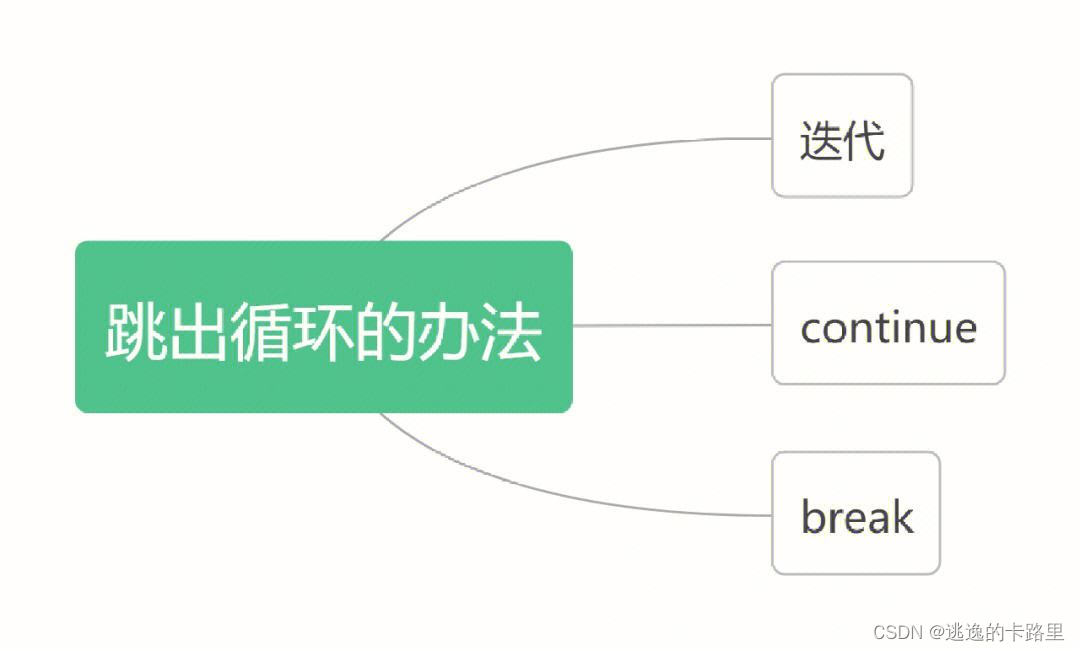
Python学习之逻辑中的循环有哪些?
1. for循环 for 循环用于迭代 (遍历)一个序列,例如列表、元组、字符串或字典中的元素。 通常使用 for 循环来遍历可迭代对象中的元素,并对每个元素执行相同的操作。 示例: for item in iterable: # 执行操作2.while循环 -while循环用于在满足某个条件…...
)
【uniapp微信小程序+springBoot(binarywang)
uniapp前端代码 <template><view><page-head :title"title"></page-head><view class"uni-padding-wrap"><view style"background:#FFF; padding:50rpx 0;"><view class"uni-hello-text uni-cente…...
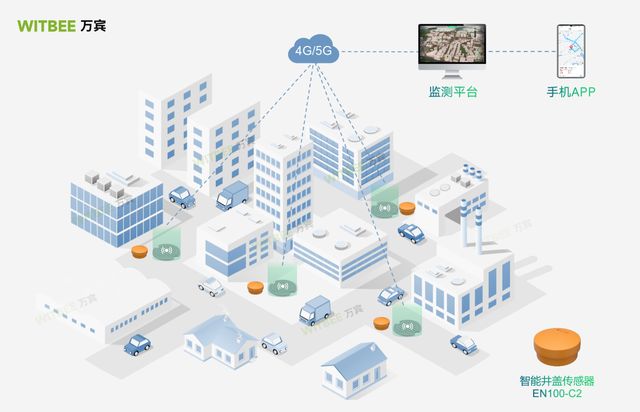
智能井盖的用处有哪些?好用在什么地方?
智能井盖是一种基于物联网技术的井盖系统,通过集成传感器、通信设备和数据处理功能,实现对井盖的实时监测、远程管理和智能化控制。WITBEE万宾的智能井盖传感器EN100-C2,只要在城市需要的井盖上面安装即可使用,一体式结构…...

微信小程序数据存储方式有哪些
在微信小程序中,数据存储方式有以下几种: 本地存储 本地存储是一种轻量级的数据存储方式,用于存储小量的数据,例如用户的配置信息、页面的状态等。微信小程序提供了 wx.setStorage() 和 wx.getStorage() 方法,用于将数…...

FTC局部路径规划代码分析
前置知识: costmap_2d::Costmap2DROS costmap; costmap_2d::Costmap2DROS 是一个ROS包中提供的用于处理2D成本地图的类。它是一个高级的接口,通常用于与ROS导航栈中的导航规划器和本地路径跟踪器等模块进行集成。 costmap 是一个指向 Costmap2DROS 对象的指针。通…...
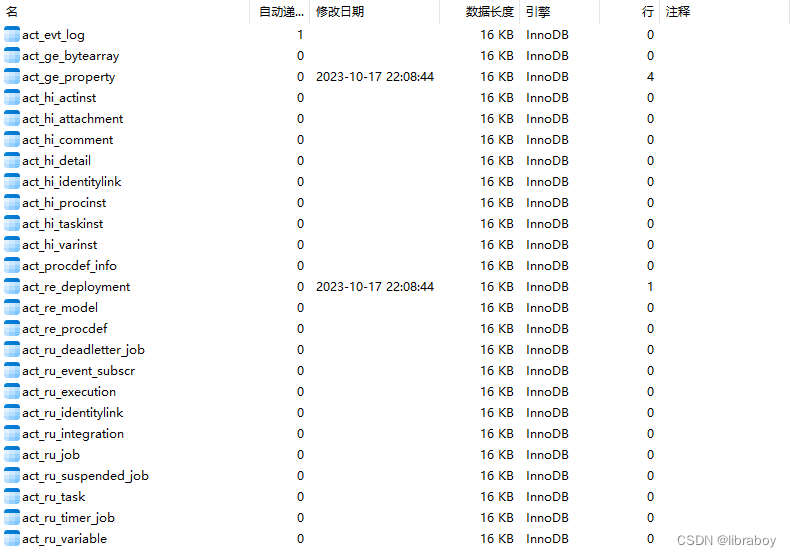
SpringBoot集成Activiti7
SpringBoot集成Activiti7 SpringBoot版本使用2.7.16 <parent><groupId>org.springframework.boot</groupId><artifactId>spring-boot-starter-parent</artifactId><version>2.7.16</version><relativePath/> <!-- lookup…...
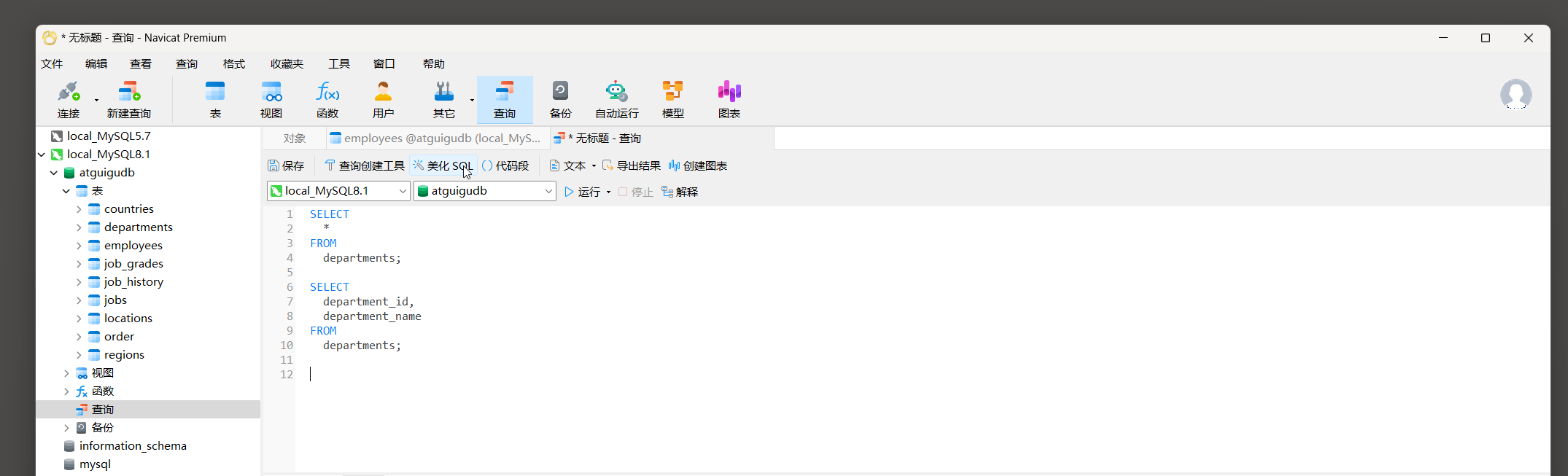
25.1 MySQL SELECT语句
1. SQL概述 1.1 SQL背景知识 1946年, 世界上诞生了第一台电脑, 而今借由这台电脑的发展, 互联网已经成为一个独立的世界. 在过去几十年里, 许多技术和产业在互联网的舞台上兴衰交替. 然而, 有一门技术却从未消失, 甚至日益强大, 那就是SQL.SQL(Structured Query Language&…...

【VSCode】Windows环境下,VSCode 搭建 cmake 编译环境(通过配置文件配置)
除了之前的使用 VSCode 插件来编译工程外,我们也可以使用配置文件来编译cmake工程,主要依赖 launch.json 和 tasks.json 文件。 目录 一、下载编译器 1、下载 Windows GCC 2、选择编译器路径 二、配置 debug 环境 1、配置 lauch.json 文件 2、配置…...
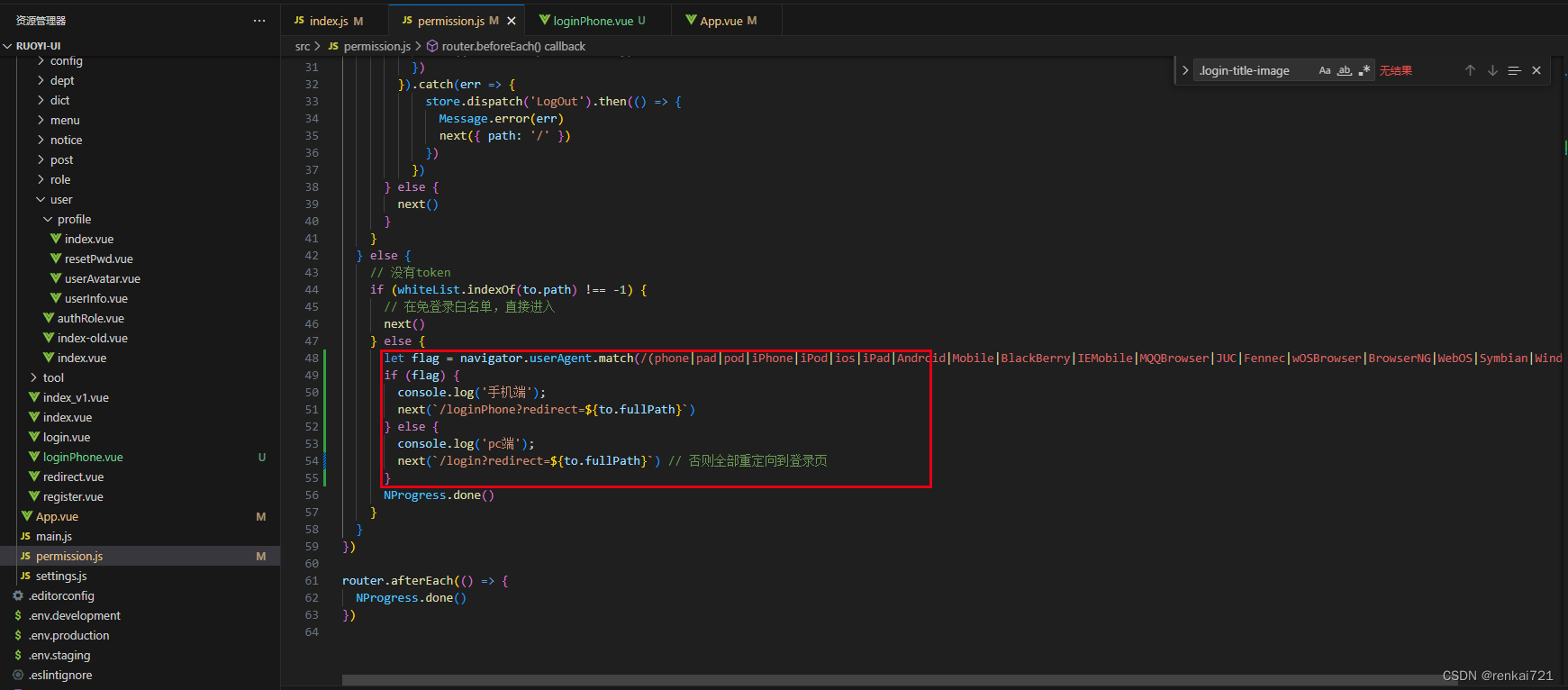
useragent识别访问设备
背景需求 ruoyi框架,前后端分离。现在要在用户访问的时候根据不同的设备跳转到不同的登录页面。 教程 router/index.js 修改src/router/index.js,在这里增加自己的要跳转的页面 permission.js 在白名单中添加自己的登录页面 增加以下识别的代码 le…...

紫光同创FPGA实现UDP协议栈网络视频传输,带录像和抓拍功能,基于YT8511和RTL8211,提供2套PDS工程源码和技术支持
目录 1、前言免责声明 2、相关方案推荐我这里已有的以太网方案紫光同创FPGA精简版UDP方案紫光同创FPGA带ping功能UDP方案紫光同创FPGA精简版UDP视频传输方案 3、设计思路框架OV5640摄像头配置及采集数据缓冲FIFOUDP协议栈详解MAC层发送MAC发送模式MAC层接收ARP发送ARP接收ARP缓…...
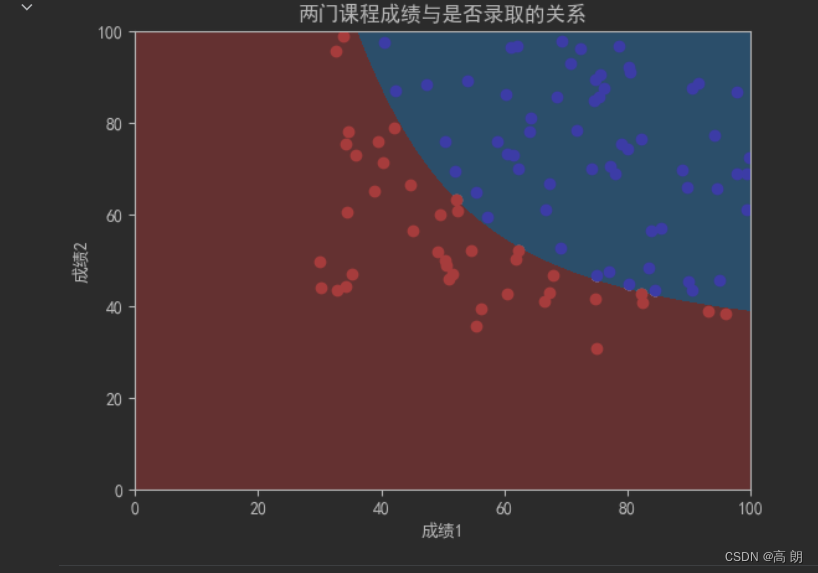
【机器学习】逻辑回归
文章目录 逻辑回归定义损失函数正则化 sklearn里面的逻辑回归多项式逻辑回归 逻辑回归 逻辑回归,是一种名为“回归”的线性分类器,其本质是由线性回归变化而来的,一种广泛使用于分类问题中的广义回归算法。 线性回归是机器学习中最简单的的…...
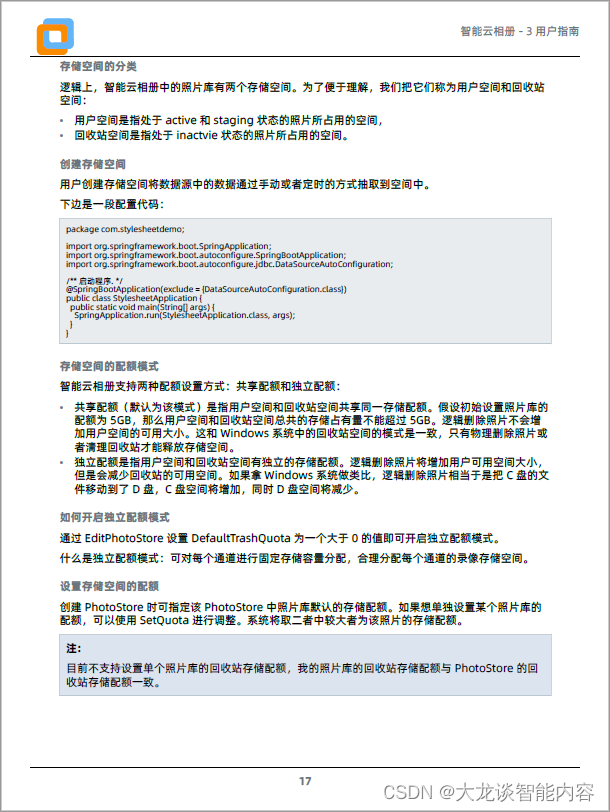
DITA-OT 4.0新特性 - PDF themes,定制PDF样式的新方法
随着DITA-OT 4.0的发布,它提供了一种新的定制PDF样式方法,这种方法就是PDF theme。这篇文章来聊一聊这种定制PDF输出的新方法和实验结果。 在进入PDF theme细节之前,为各位读者梳理一下DITA-OT将DITA和Markdown发布成PDF的几种方法。 - 1 …...

MySQL 8.0 OCP认证精讲视频、环境和题库之四 多实例启动 缓存、事务、脏读
一、配置第一个mysqld服务 1、编辑选项文件,指定以下选项: [mysqld] basedir/mysql80 datadir/mysql80/data1 socket/mysql80/data1/mysqld.sock pid-file/mysql80/data1/mysqld.pid log-error/mysql80/dat…...

对代码感兴趣 但不擅长数学怎么办——《机器学习图解》来救你
目前,该领域中将理论与实践相结合、通俗易懂的著作较少。机器学习是人工智能的一部分,很多初学者往往把机器学习和深度学习作为人工智能入门的突破口,非科班出身的人士更是如此。当前,国内纵向复合型人才和横向复合型人才奇缺;具有…...

【EI会议征稿】第三届大数据、信息与计算机网络国际学术会议(BDICN 2024)
第三届大数据、信息与计算机网络国际学术会议(BDICN 2024) 2024 3rd International Conference on Big Data, Information and Computer Network 第三届大数据、信息与计算机网络国际学术会议(BDICN 2024)定于2024年1月12-14日在…...
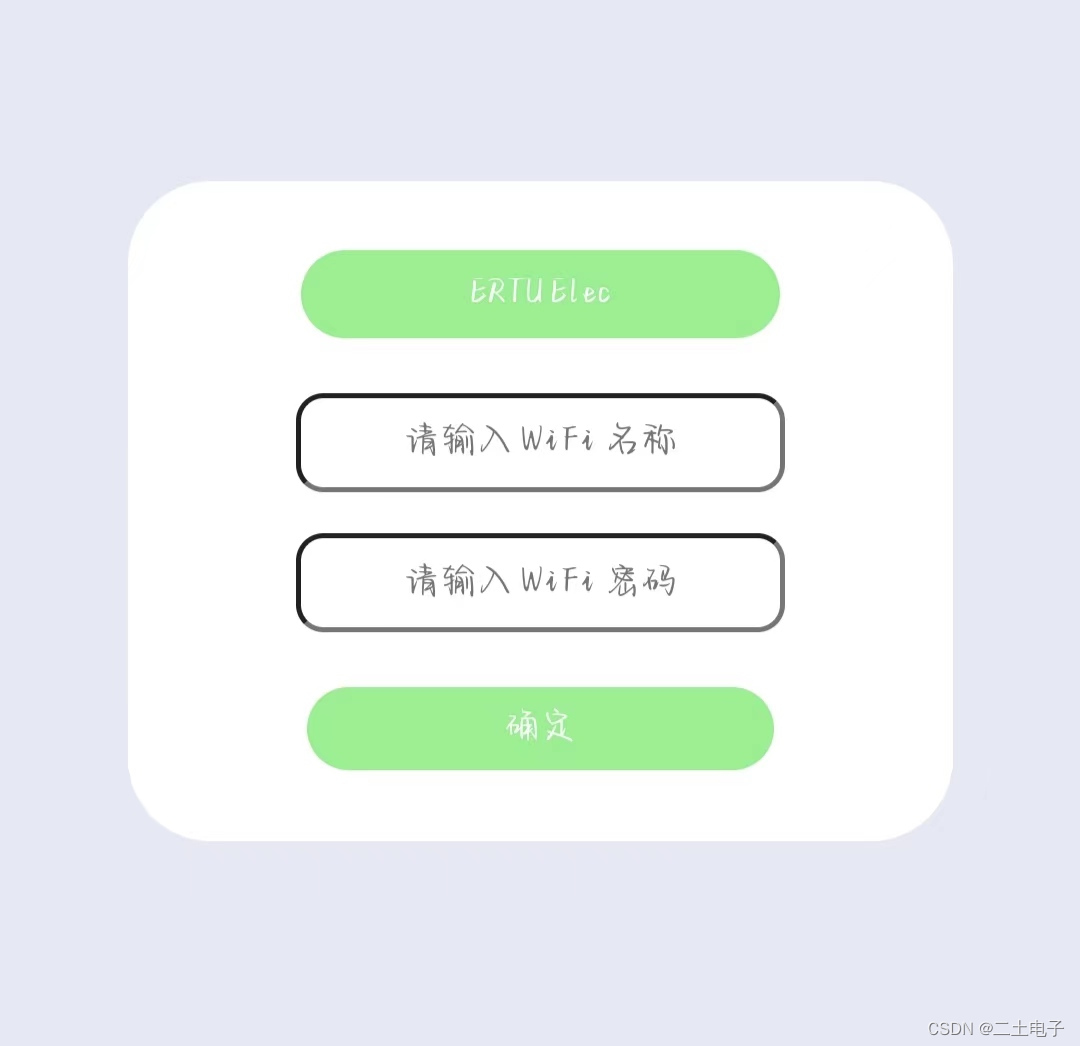
【Arduino+ESP32+腾讯云+sg90】强制门户+腾讯云控制开关灯
作者有话说 博主对于Arduino开发并没有基础,但是为了实现更加方便的配网,这几天一直在尝试用ESP32-12F(因为手头刚好有一个,其他的也可以)来做远程开关灯!不知道大家是否注意到,上一篇利用STM32…...
windows中elasticsearch7中添加用户名密码验证
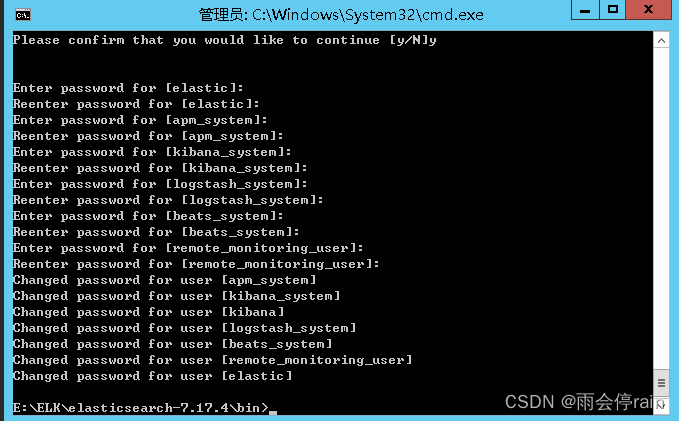
1.找到elsatic的bin目录输入cmd 2.生成ca证书 输入 elasticsearch-certutil ca 在es7根目录生成ca证书,输入密码时直接回车即可,否则后面会报错 Please enter the desired output file [elastic-stack-ca.p12]: #这里直接回车即可 Enter password for…...

linux安装达梦数据库(命令行安装)
安装达梦数据库 创建安装用户 1,创建安装用户组dinstall [rootdmDMServer1 ~]# groupadd -g 12345 dinstallgroupadd : 创建组 -g : 指定组id(GID) 12345: 指定的组名称 dinstall : 组名 2,创建安装用户dmdba [rootdmDMSe…...

怎样给照片去背景?2026 图片抠图方法对比|免费在线工具实测
在日常生活中,我们经常需要给照片去背景——无论是制作证件照、电商商品图、社交媒体头像,还是创意合成,去背景都是最基础的图像处理需求。但面对五花八门的工具和方法,很多人不知道如何选择。本文将从多个维度全面对比 2026 年主…...

OpenSTA静态时序分析工具:从入门到精通的完整指南
OpenSTA静态时序分析工具:从入门到精通的完整指南 【免费下载链接】OpenSTA OpenSTA engine 项目地址: https://gitcode.com/gh_mirrors/op/OpenSTA OpenSTA静态时序分析工具是数字集成电路设计中不可或缺的开源时序验证解决方案。作为一款功能强大的门级静态…...

无王无帝定乾坤,来自田间第一人 海棠山铁哥立标兴文脉
无王无帝定乾坤 ——来自田间第一人 一、破题:王权文脉之弊 旧序新局依附王权扎根民间权贵定义苍生共塑礼制浮华守心向善阶级垄断平等普惠文脉若随王朝而兴,必随王朝而竭; 唯有根植人心,方可生生不息。 二、田间崛起:…...

如何在Inkscape中快速实现专业级光线追踪?终极免费光学设计指南
如何在Inkscape中快速实现专业级光线追踪?终极免费光学设计指南 【免费下载链接】inkscape-raytracing An extension for Inkscape that makes it easier to draw optical diagrams. 项目地址: https://gitcode.com/gh_mirrors/in/inkscape-raytracing Inks…...

Vivado 2022.2 中文用户名下,Vscode关联失效的终极修复与Verilog环境配置
Vivado 2022.2中文用户环境下的Vscode-Verilog开发全栈配置指南 当FPGA开发者遇到Windows中文用户名导致的Vivado-Vscode关联失效时,往往需要花费数小时排查环境问题。本文将系统性地解决这一痛点,并提供完整的Verilog开发环境配置方案。 1. 中文路径问题…...

Android Studio中文界面完整指南:5分钟快速汉化教程
Android Studio中文界面完整指南:5分钟快速汉化教程 【免费下载链接】AndroidStudioChineseLanguagePack AndroidStudio中文插件(官方修改版本) 项目地址: https://gitcode.com/gh_mirrors/an/AndroidStudioChineseLanguagePack 还在为Android St…...

Rdkit实战:从2D到3D,解锁分子构象生成与优化的全流程
1. 从2D到3D:分子构象生成的基础概念 第一次接触分子构象生成时,我完全被各种术语搞晕了——距离几何、ETKDG、MMFF这些名词听起来就像天书。直到用RDKit实际操作了几次,才发现这个过程其实就像搭积木:先有个平面设计图ÿ…...

番茄小说下载器:终极解决方案,轻松构建个人数字图书馆
番茄小说下载器:终极解决方案,轻松构建个人数字图书馆 【免费下载链接】Tomato-Novel-Downloader 番茄小说下载器不精简版 项目地址: https://gitcode.com/gh_mirrors/to/Tomato-Novel-Downloader 还在为网络小说资源分散、广告干扰、无法离线阅读…...

dropin-minimal-css框架质量评估标准:如何选择最适合的CSS框架
dropin-minimal-css框架质量评估标准:如何选择最适合的CSS框架 【免费下载链接】dropin-minimal-css Drop-in switcher for previewing minimal CSS frameworks 项目地址: https://gitcode.com/gh_mirrors/dr/dropin-minimal-css 在当今前端开发的世界中&…...

告别手动计算!用Python+ArcPy脚本批量搞定MODIS ET数据从8天到月均值的完整流程
从8天到月均值:PythonArcPy全自动处理MODIS ET数据的工程实践 当面对跨越多年、覆盖大区域的MOD16A2数据集时,传统的手工操作不仅效率低下,还容易引入人为错误。本文将展示如何用PythonArcPy构建一套完整的自动化流程,实现从原始8…...