
rosbag相关使用工具
文章目录
- 一、 rosbag 导出指定话题生成新rosbag
- 二、 rosbag 导出视频
- 1. 脚本工具源码
- 2. 操作
- 2.1 安装 ffmpeg
- 2.2 导出视频
- 3. 视频截取
- 4. 压缩视频
- 附录:rosbag2video.py 源码
一、 rosbag 导出指定话题生成新rosbag
rosbag filter 2023-02-25-19-16-01.bag depth.bag "(topic == 'depth/depth_raw')"
二、 rosbag 导出视频
1. 脚本工具源码
- 参考附录
2. 操作
2.1 安装 ffmpeg
sudo apt-get install ffmpeg
2.2 导出视频
将附录脚本放在待转rosbag一个文件路径下,使用下面命令导出视频。
python rosbag2mp4.py -t depth/depth_raw 2023-02-25-19-16-01.bag
3. 视频截取
ffmpeg -i rm_75_01.mp4 -ss 00:00:05 -t 00:00:54 -acodec aac -vcodec h264 -strict -2 output.mp4
- -i为视频名称
- -ss为剪辑起始时间
- -t为剪辑时长(视频持续时长)
4. 压缩视频
在视频文件夹下打开termial,压缩视频
ffmpeg -i Video.avi -fs 30MB save-name.mp4
附录:rosbag2video.py 源码
#!/usr/bin/env python3"""
rosbag2video.py
rosbag to video file conversion tool
by Abel Gabor 2019
baquatelle@gmail.com
requirements:
sudo apt install python3-roslib python3-sensor-msgs python3-opencv ffmpeg
based on the tool by Maximilian Laiacker 2016
post@mlaiacker.de"""import roslib
#roslib.load_manifest('rosbag')
import rospy
import rosbag
import sys, getopt
import os
from sensor_msgs.msg import CompressedImage
from sensor_msgs.msg import Image
import cv2import numpy as npimport shlex, subprocessMJPEG_VIDEO = 1
RAWIMAGE_VIDEO = 2
VIDEO_CONVERTER_TO_USE = "ffmpeg" # or you may want to use "avconv"def print_help():print('rosbag2video.py [--fps 25] [--rate 1] [-o outputfile] [-v] [-s] [-t topic] bagfile1 [bagfile2] ...')print()print('Converts image sequence(s) in ros bag file(s) to video file(s) with fixed frame rate using',VIDEO_CONVERTER_TO_USE)print(VIDEO_CONVERTER_TO_USE,'needs to be installed!')print()print('--fps   Sets FPS value that is passed to',VIDEO_CONVERTER_TO_USE)print('        Default is 25.')print('-h      Displays this help.')print('--ofile (-o) sets output file name.')print('        If no output file name (-o) is given the filename \'<prefix><topic>.mp4\' is used and default output codec is h264.')print('        Multiple image topics are supported only when -o option is _not_ used.')print('        ',VIDEO_CONVERTER_TO_USE,' will guess the format according to given extension.')print('        Compressed and raw image messages are supported with mono8 and bgr8/rgb8/bggr8/rggb8 formats.')print('--rate  (-r) You may slow down or speed up the video.')print('        Default is 1.0, that keeps the original speed.')print('-s      Shows each and every image extracted from the rosbag file (cv_bride is needed).')print('--topic (-t) Only the images from topic "topic" are used for the video output.')print('-v      Verbose messages are displayed.')print('--prefix (-p) set a output file name prefix othervise \'bagfile1\' is used (if -o is not set).')print('--start Optional start time in seconds.')print('--end   Optional end time in seconds.')class RosVideoWriter():def __init__(self, fps=25.0, rate=1.0, topic="", output_filename ="", display= False, verbose = False, start = rospy.Time(0), end = rospy.Time(sys.maxsize)):self.opt_topic = topicself.opt_out_file = output_filenameself.opt_verbose = verboseself.opt_display_images = displayself.opt_start = startself.opt_end = endself.rate = rateself.fps = fpsself.opt_prefix= Noneself.t_first={}self.t_file={}self.t_video={}self.p_avconv = {}def parseArgs(self, args):opts, opt_files = getopt.getopt(args,"hsvr:o:t:p:",["fps=","rate=","ofile=","topic=","start=","end=","prefix="])for opt, arg in opts:if opt == '-h':print_help()sys.exit(0)elif opt == '-s':self.opt_display_images = Trueelif opt == '-v':self.opt_verbose = Trueelif opt in ("--fps"):self.fps = float(arg)elif opt in ("-r", "--rate"):self.rate = float(arg)elif opt in ("-o", "--ofile"):self.opt_out_file = argelif opt in ("-t", "--topic"):self.opt_topic = argelif opt in ("-p", "--prefix"):self.opt_prefix = argelif opt in ("--start"):self.opt_start = rospy.Time(int(arg))if(self.opt_verbose):print("starting at",self.opt_start.to_sec())elif opt in ("--end"):self.opt_end = rospy.Time(int(arg))if(self.opt_verbose):print("ending at",self.opt_end.to_sec())else:print("opz:", opt,'arg:', arg)if (self.fps<=0):print("invalid fps", self.fps)self.fps = 1if (self.rate<=0):print("invalid rate", self.rate)self.rate = 1if(self.opt_verbose):print("using ",self.fps," FPS")return opt_files# filter messages using type or only the opic we whant from the 'topic' argumentdef filter_image_msgs(self, topic, datatype, md5sum, msg_def, header):if(datatype=="sensor_msgs/CompressedImage"):if (self.opt_topic != "" and self.opt_topic == topic) or self.opt_topic == "":print("############# COMPRESSED IMAGE  ######################")print(topic,' with datatype:', str(datatype))print()return True;if(datatype=="theora_image_transport/Packet"):if (self.opt_topic != "" and self.opt_topic == topic) or self.opt_topic == "":print(topic,' with datatype:', str(datatype))print('!!! theora is not supported, sorry !!!')return False;if(datatype=="sensor_msgs/Image"):if (self.opt_topic != "" and self.opt_topic == topic) or self.opt_topic == "":print("############# UNCOMPRESSED IMAGE ######################")print(topic,' with datatype:', str(datatype))print()return True;return False;def write_output_video(self, msg, topic, t, video_fmt, pix_fmt = ""):# no data in this topicif len(msg.data) == 0 :return# initiate data for this topicif not topic in self.t_first :self.t_first[topic] = t # timestamp of first image for this topicself.t_video[topic] = 0self.t_file[topic] = 0# if multiple streams of images will start at different times the resulting video files will not be in sync# current offset time we are in the bag fileself.t_file[topic] = (t-self.t_first[topic]).to_sec()# fill video file up with images until we reache the current offset from the beginning of the bag filewhile self.t_video[topic] < self.t_file[topic]/self.rate :if not topic in self.p_avconv:# we have to start a new process for this topicif self.opt_verbose :print("Initializing pipe for topic", topic, "at time", t.to_sec())if self.opt_out_file=="":out_file = self.opt_prefix + str(topic).replace("/", "_")+".mp4"else:out_file = self.opt_out_fileif self.opt_verbose :print("Using output file ", out_file, " for topic ", topic, ".")if video_fmt == MJPEG_VIDEO :cmd = [VIDEO_CONVERTER_TO_USE, '-v', '1', '-stats', '-r',str(self.fps),'-c','mjpeg','-f','mjpeg','-i','-','-an',out_file]self.p_avconv[topic] = subprocess.Popen(cmd, stdin=subprocess.PIPE)if self.opt_verbose :print("Using command line:")print(cmd)elif video_fmt == RAWIMAGE_VIDEO :size = str(msg.width)+"x"+str(msg.height)cmd = [VIDEO_CONVERTER_TO_USE, '-v', '1', '-stats','-r',str(self.fps),'-f','rawvideo','-s',size,'-pix_fmt', pix_fmt,'-i','-','-an',out_file]self.p_avconv[topic] = subprocess.Popen(cmd, stdin=subprocess.PIPE)if self.opt_verbose :print("Using command line:")print(cmd)else :print("Script error, unknown value for argument video_fmt in function write_output_video.")exit(1)# send data to ffmpeg process pipeself.p_avconv[topic].stdin.write(msg.data)# next frame timeself.t_video[topic] += 1.0/self.fpsdef addBag(self, filename):if self.opt_display_images:from cv_bridge import CvBridge, CvBridgeErrorbridge = CvBridge()cv_image = []if self.opt_verbose :print("Bagfile: {}".format(filename))if not self.opt_prefix:# create the output in the same folder and name as the bag file minu '.bag'self.opt_prefix = bagfile[:-4]#Go through the bag filebag = rosbag.Bag(filename)if self.opt_verbose :print("Bag opened.")# loop over all topicsfor topic, msg, t in bag.read_messages(connection_filter=self.filter_image_msgs, start_time=self.opt_start, end_time=self.opt_end):try:if msg.format.find("jpeg")!=-1 :if msg.format.find("8")!=-1 and (msg.format.find("rgb")!=-1 or msg.format.find("bgr")!=-1 or msg.format.find("bgra")!=-1 ):if self.opt_display_images:np_arr = np.fromstring(msg.data, np.uint8)cv_image = cv2.imdecode(np_arr, cv2.CV_LOAD_IMAGE_COLOR)self.write_output_video( msg, topic, t, MJPEG_VIDEO )elif msg.format.find("mono8")!=-1 :if self.opt_display_images:np_arr = np.fromstring(msg.data, np.uint8)cv_image = cv2.imdecode(np_arr, cv2.CV_LOAD_IMAGE_COLOR)self.write_output_video( msg, topic, t, MJPEG_VIDEO )elif msg.format.find("16UC1")!=-1 :if self.opt_display_images:np_arr = np.fromstring(msg.data, np.uint16)cv_image = cv2.imdecode(np_arr, cv2.CV_LOAD_IMAGE_COLOR)self.write_output_video( msg, topic, t, MJPEG_VIDEO )else:print('unsupported jpeg format:', msg.format, '.', topic)# has no attribute 'format'except AttributeError:try:pix_fmt=Noneif msg.encoding.find("mono8")!=-1 or msg.encoding.find("8UC1")!=-1:pix_fmt = "gray"if self.opt_display_images:cv_image = bridge.imgmsg_to_cv2(msg, "bgr8")elif msg.encoding.find("bgra")!=-1 :pix_fmt = "bgra"if self.opt_display_images:cv_image = bridge.imgmsg_to_cv2(msg, "bgr8")elif msg.encoding.find("bgr8")!=-1 :pix_fmt = "bgr24"if self.opt_display_images:cv_image = bridge.imgmsg_to_cv2(msg, "bgr8")elif msg.encoding.find("bggr8")!=-1 :pix_fmt = "bayer_bggr8"if self.opt_display_images:cv_image = bridge.imgmsg_to_cv2(msg, "bayer_bggr8")elif msg.encoding.find("rggb8")!=-1 :pix_fmt = "bayer_rggb8"if self.opt_display_images:cv_image = bridge.imgmsg_to_cv2(msg, "bayer_rggb8")elif msg.encoding.find("rgb8")!=-1 :pix_fmt = "rgb24"if self.opt_display_images:cv_image = bridge.imgmsg_to_cv2(msg, "bgr8")elif msg.encoding.find("16UC1")!=-1 :pix_fmt = "gray16le"else:print('unsupported encoding:', msg.encoding, topic)#exit(1)if pix_fmt:self.write_output_video( msg, topic, t, RAWIMAGE_VIDEO, pix_fmt )except AttributeError:# maybe theora packet# theora not supportedif self.opt_verbose :print("Could not handle this format. Maybe thoera packet? theora is not supported.")passif self.opt_display_images:cv2.imshow(topic, cv_image)key=cv2.waitKey(1)if key==1048603:exit(1)if self.p_avconv == {}:print("No image topics found in bag:", filename)bag.close()if __name__ == '__main__':#print()#print('rosbag2video, by Maximilian Laiacker 2020 and Abel Gabor 2019')#print()if len(sys.argv) < 2:print('Please specify ros bag file(s)!')print_help()sys.exit(1)else :videowriter = RosVideoWriter()try:opt_files = videowriter.parseArgs(sys.argv[1:])except getopt.GetoptError:print_help()sys.exit(2)# loop over all filesfor files in range(0,len(opt_files)):#First arg is the bag to look atbagfile = opt_files[files]videowriter.addBag(bagfile)print("finished")
相关文章:

rosbag相关使用工具
文章目录一、 rosbag 导出指定话题生成新rosbag二、 rosbag 导出视频1. 脚本工具源码2. 操作2.1 安装 ffmpeg2.2 导出视频3. 视频截取4. 压缩视频附录:rosbag2video.py 源码一、 rosbag 导出指定话题生成新rosbag rosbag filter 2023-02-25-19-16-01.bag depth.bag…...

数据结构与算法—栈stack
目录 栈 栈的复杂度 空间复杂度O(1) 时间复杂度O(1) 栈的应用 1、栈在函数调用中的应用; 2、栈在求表达式的值的应用: 栈的实现 栈 后进先出,先进后出,只允许在一端插入和删除 从功能上,数组和链表可以代替栈…...

【学习笔记】[ARC150F] Constant Sum Subsequence
第一眼看上去,这道题一点都不套路 第二眼看上去,大概是要考dpdpdp优化,那没事了,除非前面333道题都做完了否则直接做这道题肯定很亏 首先我们要定义一个好的状态。废话 设fsf_{s}fs表示BBB序列的和为sss时,能达到…...

Node.js实现大文件断点续传—浅析
Node.js简介: 当谈论Node.js时,通常指的是一个基于Chrome V8 JavaScript引擎构建的开源、跨平台的JavaScript运行时环境。以下是一些Node.js的内容: 事件驱动编程:Node.js采用了事件驱动的编程范式,这意味着它可以异步…...
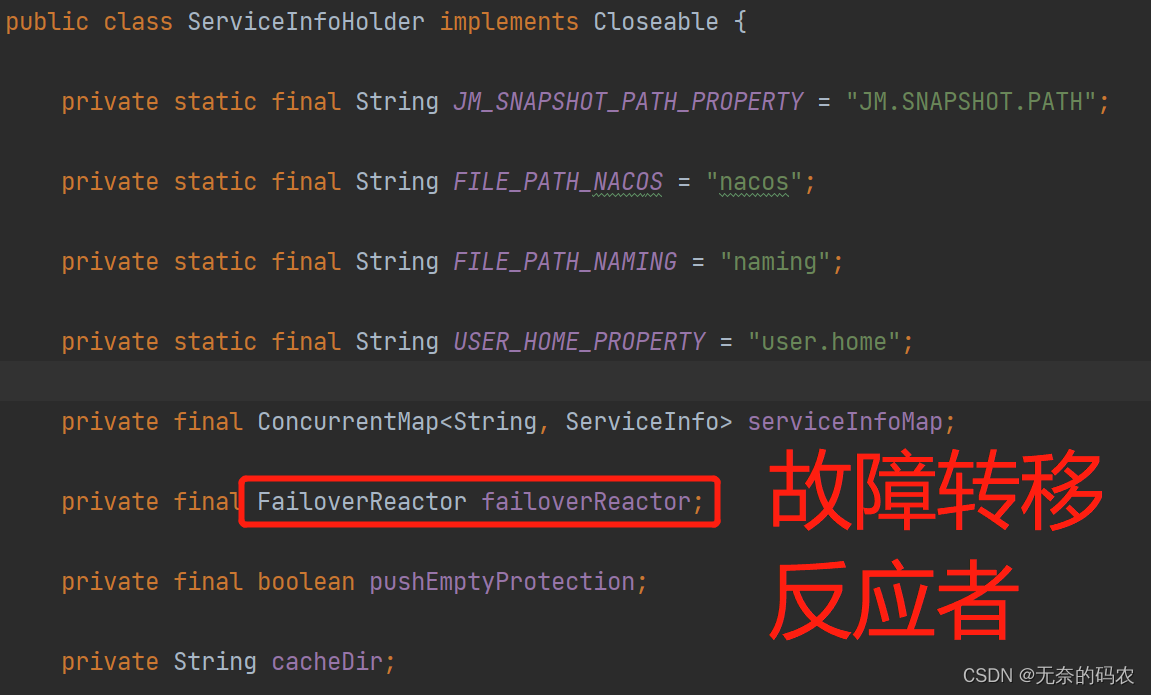
Spring Cloud Nacos源码讲解(九)- Nacos客户端本地缓存及故障转移
Nacos客户端本地缓存及故障转移 在Nacos本地缓存的时候有的时候必然会出现一些故障,这些故障就需要进行处理,涉及到的核心类为ServiceInfoHolder和FailoverReactor。 本地缓存有两方面,第一方面是从注册中心获得实例信息会缓存在内存当…...
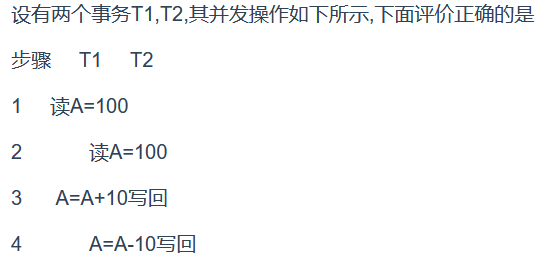
MySQL知识点小结
事务 进行数据库提交操作时使用事务就是为了保证四大特性,原子性,一致性,隔离性,持久性Durability. 持久性:事务一旦提交,对数据库的改变是永久的. 事务的日志用于保存对数据的更新操作. 这个操作T1事务操作的会发生丢失,因为最后是T2提交的修改,而且T2先进行一次查询,按照A…...
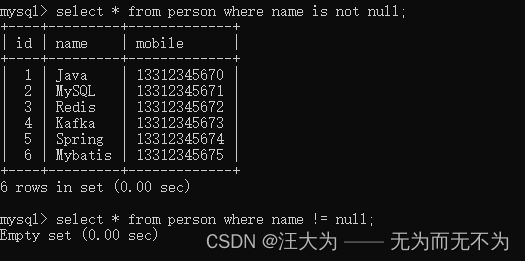
MySQL关于NULL值,常见的几个坑
数据库版本MySQL8。 1.count 函数 觉得 NULL值 不算数 ,所以开发中要避免count的时候丢失数据。 如图所示,以下有7条记录,但是count(name)却只有6条。 为什么丢失数据?因为MySQL的count函数觉得 Null值不算数,就是说…...

OllyDbgqaqazazzAcxsaZ
本文通过吾爱破解论坛上提供的OllyDbg版本为例,讲解该软件的使用方法 F2对鼠标所处的位置打下断点,一般表现为鼠标所属地址位置背景变红F3加载一个可执行程序,进行调试分析,表现为弹出打开文件框F4执行程序到光标处F5缩小还原当前…...
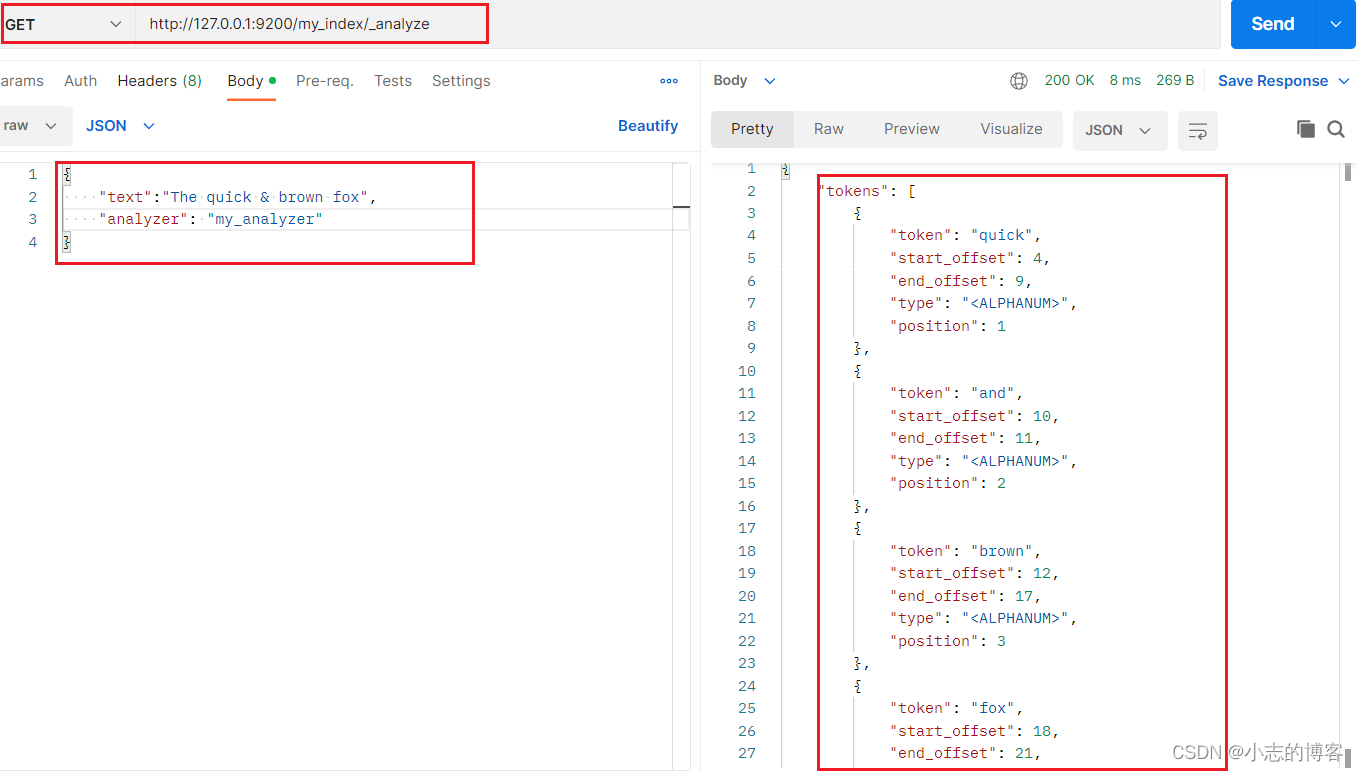
Elasticsearch7.8.0版本进阶——自定义分析器
目录一、自定义分析器的概述二、自定义的分析器的测试示例一、自定义分析器的概述 Elasticsearch 带有一些现成的分析器,然而在分析器上 Elasticsearch 真正的强大之 处在于,你可以通过在一个适合你的特定数据的设置之中组合字符过滤器、分词器、词汇单 …...

spring事务-创建代理对象
用来开启事务的注解EnableTransactionManagement上通过Import导入了TransactionManagementConfigurationSelector组件,TransactionManagementConfigurationSelector类的父类AdviceModeImportSelector实现了ImportSelector接口,因此会调用public final St…...

Linux 配置NFS与autofs自动挂载
目录 配置NFS服务器 安装nfs软件包 配置共享目录 防火墙放行相关服务 配置NFS客户端 autofs自动挂载 配置autofs 配置NFS服务器 nfs主配置文件参数(/etc/exports) 共享目录 允许地址1访问(选项1,选项2) 循序地…...
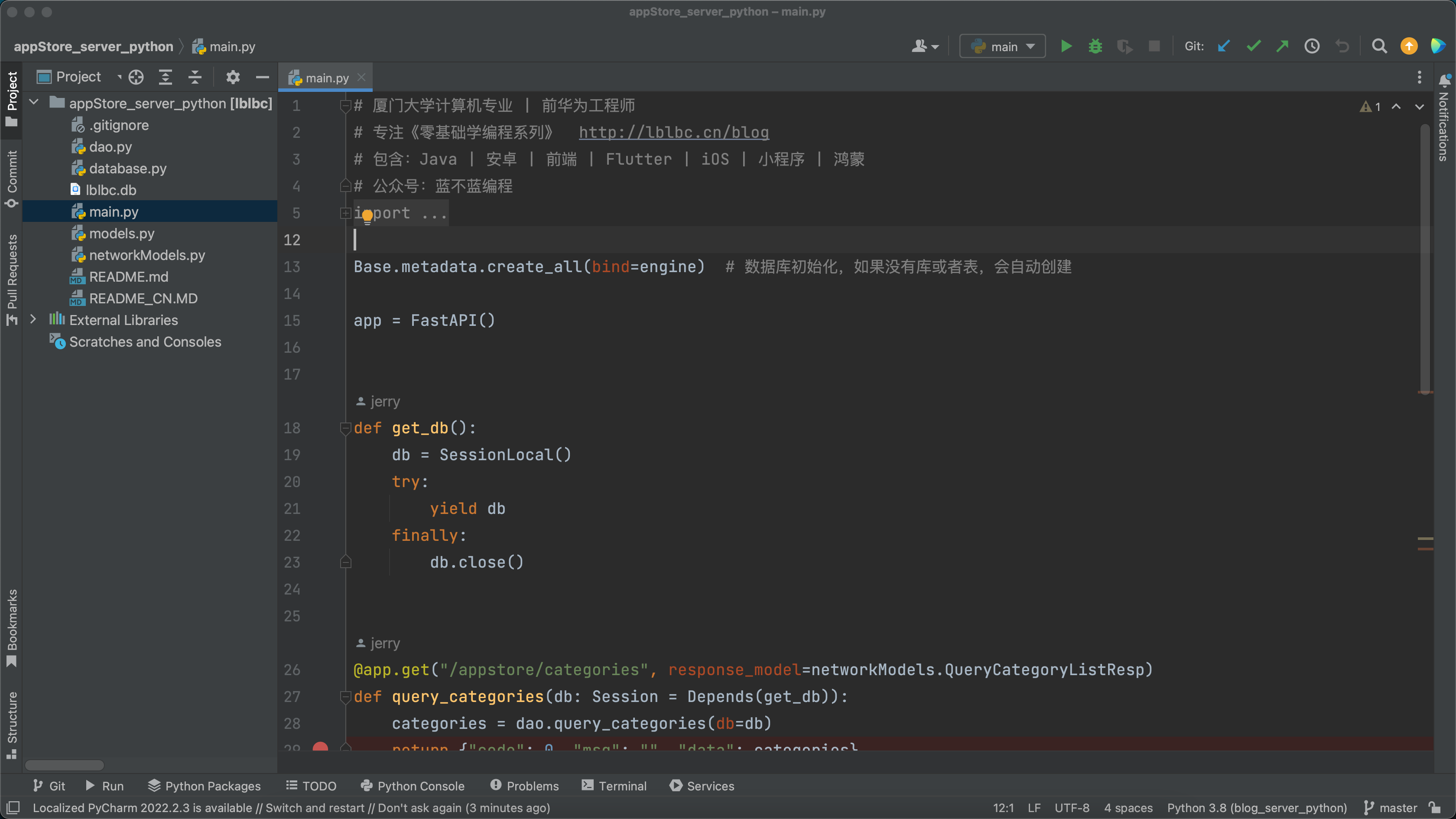
【编程入门】应用市场(Python版)
背景 前面已输出多个系列: 《十余种编程语言做个计算器》 《十余种编程语言写2048小游戏》 《17种编程语言10种排序算法》 《十余种编程语言写博客系统》 《十余种编程语言写云笔记》 《N种编程语言做个记事本》 目标 为编程初学者打造入门学习项目,使…...

异常信息记录入库
方案介绍 将异常信息放在日志里面,如果磁盘定期清理,会导致很久之前的日志丢失,因此考虑将日志中的异常信息存在表里,方便后期查看定位问题。 由于项目是基于SpringBoot构架的,所以采用AdviceControllerExceptionHand…...

Spring Batch 高级篇-分区步骤
目录 引言 概念 分区器 分区处理器 案例 转视频版 引言 接着上篇:Spring Batch 高级篇-并行步骤了解Spring Batch并行步骤后,接下来一起学习一下Spring Batch 高级功能-分区步骤 概念 分区:有划分,区分意思,在…...
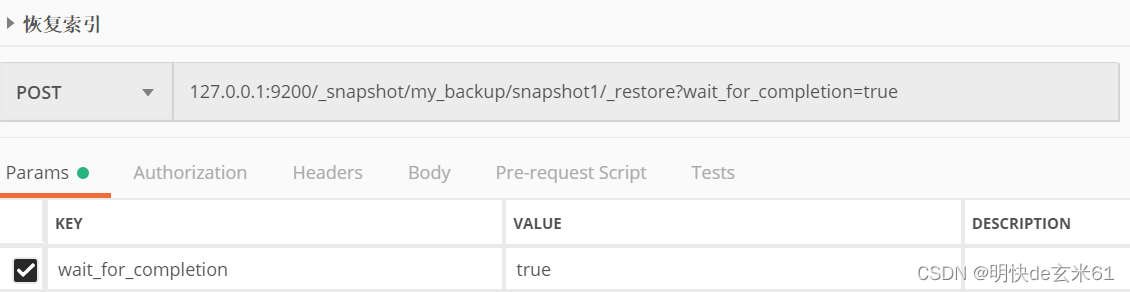
ES数据迁移_snapshot(不需要安装其他软件)
参考文章: 三种常用的 Elasticsearch 数据迁移方案ES基于Snapshot(快照)的数据备份和还原CDH修改ElasticSearch配置文件不生效问题 目录1、更改老ES和新ES的config/elasticsearch.yml2、重启老ES,在老ES执行Postman中创建备份目录…...

【Vue3 第二十章】异步组件 代码分包 Suspense内置组件 顶层 await
异步组件 & 代码分包 & Suspense内置组件 & 顶层 await 一、概述 在大型项目中,我们可能需要拆分应用为更小的块,以减少主包的体积,并仅在需要时再从服务器加载相关组件。这时候就可以使用异步组件。 Vue 提供了 defineAsyncC…...

「媒体邀约」四川有哪些媒体,成都活动媒体邀约
传媒如春雨,润物细无声,四川省位于中国西南地区,是中国的一个省份。成都市是四川省的省会,成都市是中国西部地区的政治、经济、文化和交通中心,也是著名的旅游胜地。每年的文化交流活动很多,也有许多的大企…...
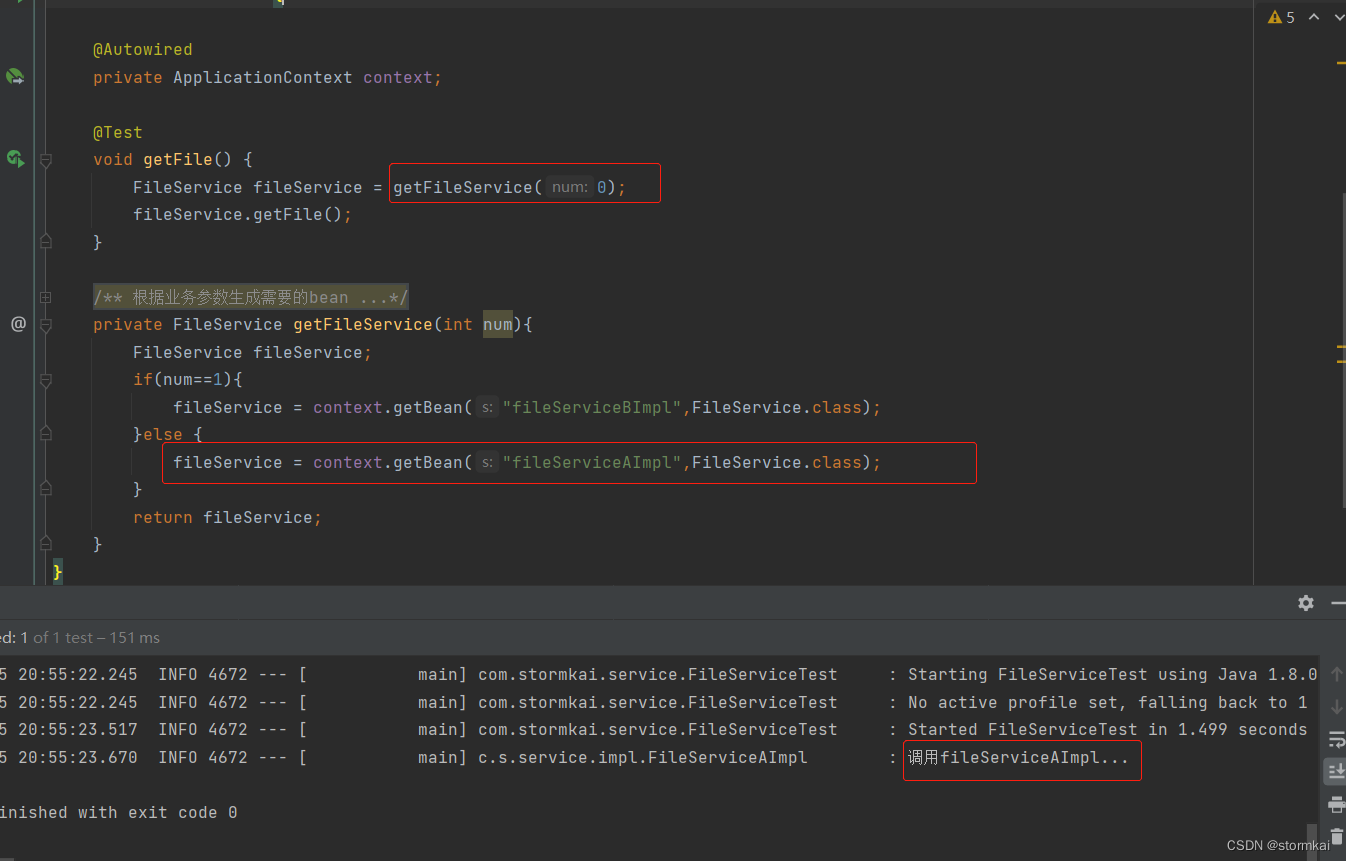
@Autowired和@Resource的区别
文章目录1. Autowired和Resource的区别2. 一个接口多个实现类的处理2.1 注入时候报错情况2.2 使用Primary注解处理2.3 使用Qualifer注解处理2.4 根据业务情况动态的决定注入哪个serviceImpl1. Autowired和Resource的区别 Aurowired是根据type来匹配;Resource可以根…...

Linux系列:glibc程序设计规范与内存管理思想
文章目录前言命名规范说明版式风格内存管理与智能指针关于UML前言 这是一个基于lightdm、glibc、gobject、gtk、qt、glibc、x11、wayland等多个高质量开源项目总结而来的规范。 glibc处于内核态与用户态的边界,承上启下,对用户的体验影响非常大。其在系…...

Redis 集群
文章目录一、集群简介二、Redis集群结构设计🍉2.1 数据存储设计🍉2.2 内部通信设计三、cluster 集群结构搭建🍓3-1 cluster配置 .conf🍓3-2 cluster 节点操作命令🍓3-3 redis-trib 命令🍓3-4 搭建 3主3从结…...

AMLP:基于大语言模型的自动化机器学习势函数构建平台
1. 项目概述:当AI遇见原子模拟,AMLP如何重塑机器学习势函数构建在计算材料科学和化学物理领域,分子动力学模拟是我们窥探微观世界动态行为的“显微镜”。无论是研究新材料的相变过程,还是探索生物大分子的折叠机制,其核…...

如何用SMUDebugTool彻底掌控你的AMD Ryzen处理器性能调优
如何用SMUDebugTool彻底掌控你的AMD Ryzen处理器性能调优 【免费下载链接】SMUDebugTool A dedicated tool to help write/read various parameters of Ryzen-based systems, such as manual overclock, SMU, PCI, CPUID, MSR and Power Table. 项目地址: https://gitcode.co…...

亚马逊 Rufus 关停,Alexa 正式上线:卖家必须读懂的6条新规则
2026年5月13日,亚马逊官方正式宣布,下线Rufus,推出全新AI购物助手:Alexa for Shopping。但是,这不是粗暴地直接下线 Rufus,而是一次购物AI底层架构的重组 —— 将 Rufus 的商品专长 与 Alexa的用户理解力&a…...

echarts中heatmap鼠标滚动禁用缩放,向下滚动
配置如下效果如下...

组态王通用扫码枪配置
使用组态王扫码枪驱动,是绑定变量,扫码后直接就可以显示扫码内容。解决每次扫码输入数据时必须先用鼠标点进输入框内的问题。驱动安装先添加驱动,亚控网站的文件为 barcodescanner,这个文件是组态王通用扫码枪的驱动,但…...

LangGraph状态机工程:构建复杂AI工作流的完整指南
传统RAG(检索增强生成)在处理简单的"单跳"问题时表现良好——“文章里提到了什么” “这个概念是什么意思”——但当问题涉及多个实体之间的关系、需要跨多个文档推理时,传统RAG就显得力不从心。GraphRAG(Graph-based R…...

如何快速解锁艾尔登法环帧率限制:终极性能优化指南
如何快速解锁艾尔登法环帧率限制:终极性能优化指南 【免费下载链接】EldenRingFpsUnlockAndMore A small utility to remove frame rate limit, change FOV, add widescreen support and more for Elden Ring 项目地址: https://gitcode.com/gh_mirrors/el/EldenR…...

榨干Codex!OpenAI工程师亲授Codex真正用法
你可能把 Codex 当编程助手用,改改代码,跑跑测试。但它的能力远不止于此。OpenAI 的客户支持工程师 Jason(jxnlco)告诉你,Codex 其实是一套完整的电脑工作系统,从语音输入到自动化,从浏览器操控…...

DeepSeek重复代码识别失效了?5个被90%团队忽略的AST解析盲区及修复清单
更多请点击: https://codechina.net 第一章:DeepSeek代码重复检测失效的真相与影响 DeepSeek-R1 模型在代码理解任务中表现出色,但其内置的代码重复检测机制在特定场景下存在系统性失效。根本原因在于模型对语义等价但语法结构差异显著的代…...

量子机器学习与傅里叶分析:革新期权定价的混合计算范式
1. 项目概述:当量子机器学习遇见金融定价在金融工程的核心地带,期权定价一直是个计算密集型的硬骨头。传统的蒙特卡洛模拟虽然通用,但为了达到足够的精度,动辄需要百万甚至千万次的路径模拟,计算成本高昂。近年来&…...