
数据结构Demo——简单计算器
简单计算器
- 一、项目介绍
- 二、技术使用
- 三、具体代码实现
- 1.前端部分
- 2.后端部分
一、项目介绍
本项目实现了一个通过网页访问的简单计算器,它可以对带括号的加减乘除表达式进行计算并将计算结果返回给用户,并且可以对用户输入的表达式进行合法性判断,以下是项目的界面展示:
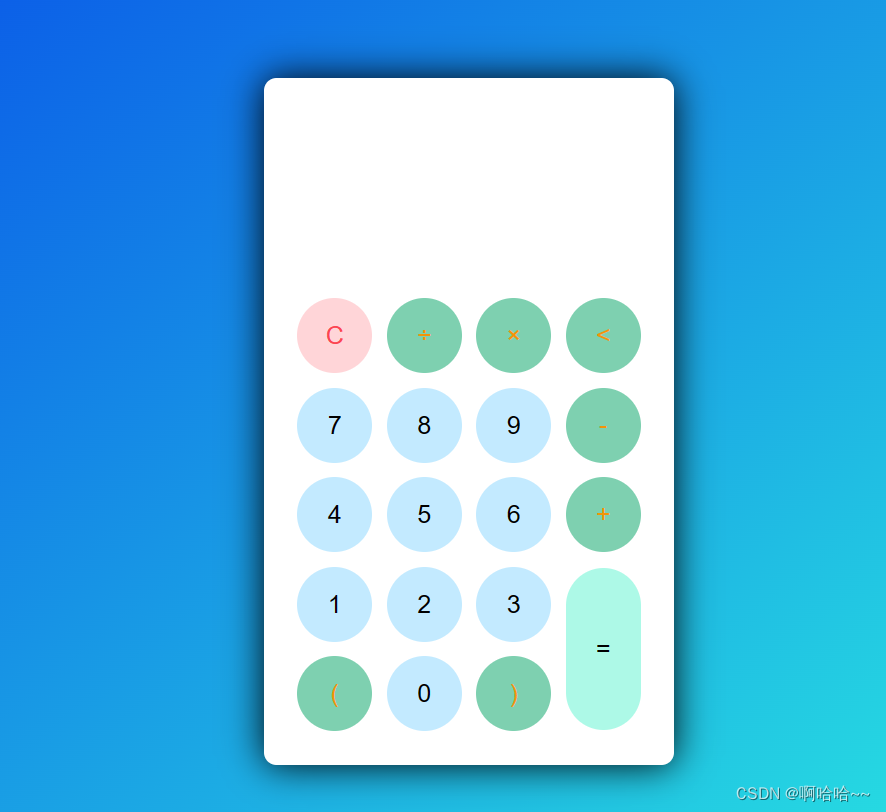
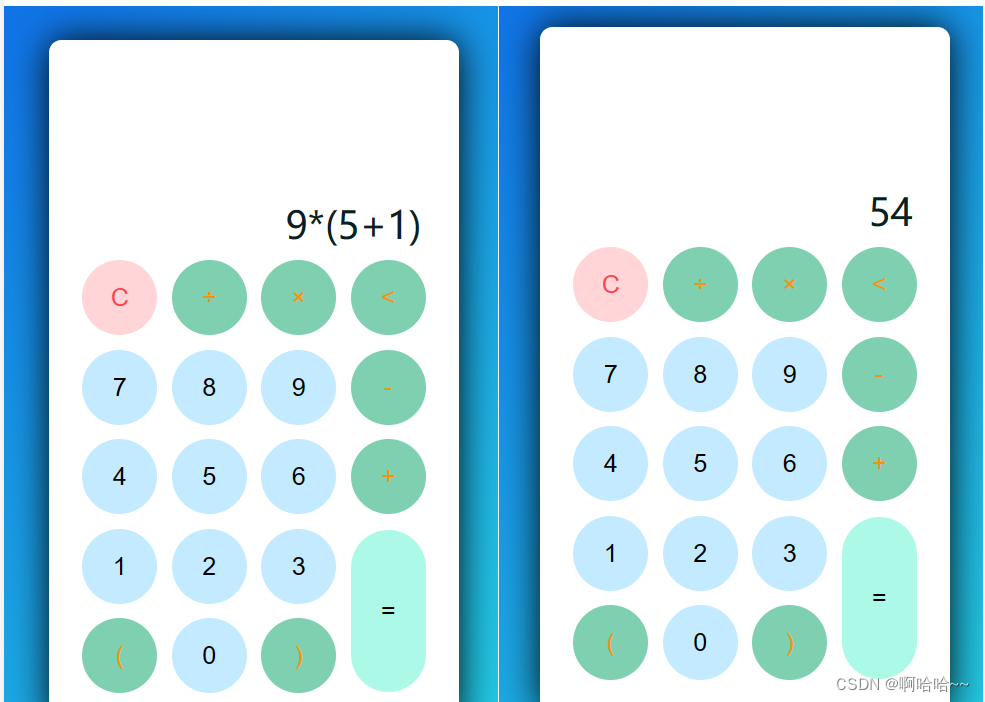
使用者可以通过点击网页上的按钮来输入一个算数表达式,之后点击等于号便可以将结果展示在界面上,具体效果如下:
二、技术使用
在这个计算器中主要使用了前端html,css,JavaScript,后端spring boot以及数据结构中栈的使用方式与相关的算法。
- 在前端中使用了html来对界面进行了整体的布局,然后使用了css来对界面效果做了美化,最后使用JavaScript来实现每个按钮的点击事件,并且通过Ajax将请求参数发给后台服务器,然后将后台处理的结果接收并处理,最后展示给用户。
- 在后端中主要使用了spring boot框架来搭建一个简单的服务器,并对前端发来的请求进行处理,最后将处理的结果返回给前端。
- 在处理表达式的时候主要使用了数据结构中有关栈的一些知识,通过对栈的使用来对表达式进行计算。
三、具体代码实现
1.前端部分
<!DOCTYPE html>
<html>
<head><meta charset="UTF-8"><meta http-equiv="X-UA-Compatible" content="IE=edge"><meta name="viewport" content="width=device-width, initial-scale=1.0"><title>计算器</title><link rel="stylesheet" href="./css/style.css">
</head>
<body><div class="container"><div class="calculator dark"><div class="display-screen"><div id="display"></div></div><div class="buttons"><table><tr><td><button class="btn-operator" id="clear">C</button></td><td><button class="btn-operator" id="/">÷</button></td><td><button class="btn-operator" id="*">×</button></td><td><button class="btn-operator" id="backspace"><</button></td></tr><tr><td><button class="btn-number" id="7">7</button></td><td><button class="btn-number" id="8">8</button></td><td><button class="btn-number" id="9">9</button></td><td><button class="btn-operator" id="-">-</button></td></tr><tr><td><button class="btn-number" id="4">4</button></td><td><button class="btn-number" id="5">5</button></td><td><button class="btn-number" id="6">6</button></td><td><button class="btn-operator" id="+">+</button></td></tr><tr><td><button class="btn-number" id="1">1</button></td><td><button class="btn-number" id="2">2</button></td><td><button class="btn-number" id="3">3</button></td><td rowspan="2"><button class="btn-equal" id="equal" onclick="submit()">=</button></td></tr><tr><td><button class="btn-operator" id="(">(</button></td><td><button class="btn-number" id="0">0</button></td><td><button class="btn-operator" id=")">)</button></td></tr></table></div></div></div><script src="./js/script.js"></script>
</body>
</html>
以上为html部分的代码,主要是对使用者的界面进行了整体布局,确定了各个按钮的位置与功能。
*{margin: 0;padding: 0;box-sizing: border-box;outline: 0;transition: all 0.5s ease;
}
body{font-family: sans-serif;
}
a{text-decoration: none;color: #fff;
}
body{background-image: linear-gradient(to bottom right, rgb(10, 88, 232), rgb(41, 231, 225));
}
.container{height: 100vh;width: 100vw;display: grid;place-items: center;
}
.calculator{position: relative;height: auto;width: auto;padding: 20px;border-radius: 10px;box-shadow: 0 0 30px #000;
}
#display{margin: 0 10px;height: 150px;width: auto;max-width: 270px;display: flex;align-items: flex-end;justify-content: flex-end;font-size: 30px;overflow-x: scroll;
}
#display::-webkit-scrollbar{display: block;height: 3px;
}
button{height: 60px;width: 60px;border: 0;border-radius: 30px;margin: 5px;font-size: 20px;cursor: pointer;transition: all 200ms ease;
}
button:hover{transform: scale(1.1);
}
button#equal{height: 130px;
}.calculator{background-color: #fff;
}
.calculator #display{color: #0a1e23;
}
.calculator button#clear{background-color: #ffd5d8;color: #fc4552;
}
.calculator button.btn-number{background-color: #c3eaff;color: #000;
}
.calculator button.btn-operator{background-color: #7ed0b0;color: #f39408;
}
.calculator button.btn-equal{background-color: #adf9e7;color: #000;
}
以上是css部分的代码,主要对界面的颜色样式进行了美化。
const display = document.querySelector('#display');
const buttons = document.querySelectorAll('button');const submit = function () {let subdata = null;// 定义表单对象const data = {}// 获取input框内内容const displayData = display.innerTextdata.display = displayDataconsole.log(data);const req = fetch('http://localhost:8081/cal/c', {body: JSON.stringify(data),method: "POST",headers: {'Content-Type': 'application/json'}})req.then(res => res.text()).then(res => {subdata = JSON.parse(res);if (!subdata.status)display.innerText = '输入格式错误'else {console.log(subdata);display.innerText = subdata.result}}).catch(err => {console.log(err)})
}buttons.forEach((item) => {item.onclick = () => {if (item.id == 'clear') {display.innerText = '';} else if (item.id == 'backspace') {let string = display.innerText.toString();display.innerText = string.substr(0, string.length - 1);} else if (display.innerText != '' && item.id == 'equal') {submit()} else if (display.innerText == '' && item.id == 'equal') {display.innerText = 'Empty!';setTimeout(() => (display.innerText = ''), 2000);} else {display.innerText += item.id;}}
})
const calculator = document.querySelector('.calculator');
以上是JavaScript部分的代码,主要负责按钮的点击事件、给后端发送请求以及对后端返回结果的处理。
2.后端部分
@RestController
@RequestMapping("/cal")
public class Controller {@Autowiredprivate ServiceImpl service;@PostMapping("/c")public Res calcula(@RequestBody data data) {return service.calculate(data.getDisplay());}
}@Service
public class ServiceImpl {public Res calculate(String text) {return new Res(Calculator.isValidExpression(text) ? Calculator.calculateExpression(text) : null,Calculator.isValidExpression(text) ? 1 : 0);}
}
以上是后端给出的请求接口以及业务逻辑层的方法。
@Data
@AllArgsConstructor
public class Res {public Integer result;public int status;
}public class data {private String display;public data() {}public String getDisplay() {return display;}public void setDisplay(String display) {this.display = display;}public data(String display) {this.display = display;}@Overridepublic String toString() {return "data{" +"display='" + display + '\'' +'}';}
}
以上是给前端返回结果的包装类以及接收前端数据的实体类。
public class Calculator {public static int priority(int oper) {if (oper == '*' || oper == '/') {return 1;} else if (oper == '+' || oper == '-') {return 0;} else {return -1;}}public static boolean isOper(char val) {return val == '+' || val == '-' || val == '*' || val == '/';}public static int cal(int num1, int num2, int oper) {int res = 0;switch (oper) {case '+':res = num1 + num2;break;case '-':res = num2 - num1;break;case '*':res = num1 * num2;break;case '/':res = num2 / num1;break;}return res;}public static int calculateExpression(String expression) {Stack<Integer> numStack = new Stack<>();Stack<Character> operStack = new Stack<>();int index = 0;int num1 = 0;int num2 = 0;int oper = 0;int res = 0;char ch = ' ';String keepNum = "";while (true) {ch = expression.substring(index, index + 1).charAt(0);if (isOper(ch)) {if (!operStack.isEmpty()) {if (priority(ch) <= priority(operStack.peek())) {num1 = numStack.pop();num2 = numStack.pop();oper = operStack.pop();res = cal(num1, num2, oper);numStack.push(res);operStack.push(ch);} else {operStack.push(ch);}} else {operStack.push(ch);}} else if (ch == '(') {int endIndex = getEndBracketIndex(expression, index);String subExpression = expression.substring(index + 1, endIndex);int subRes = calculateExpression(subExpression);numStack.push(subRes);index = endIndex;} else {keepNum += ch;if (index == expression.length() - 1) {numStack.push(Integer.parseInt(keepNum));keepNum = "";} else {if (isOper(expression.substring(index + 1, index + 2).charAt(0))) {numStack.push(Integer.parseInt(keepNum));keepNum = "";}}}index++;if (index >= expression.length()) {break;}}while (!operStack.isEmpty()) {num1 = numStack.pop();num2 = numStack.pop();oper = operStack.pop();res = cal(num1, num2, oper);numStack.push(res);}return numStack.pop();}private static int getEndBracketIndex(String expression, int startIndex) {Stack<Integer> stack = new Stack<>();for (int i = startIndex; i < expression.length(); i++) {char ch = expression.charAt(i);if (ch == '(') {stack.push(i);} else if (ch == ')') {stack.pop();if (stack.isEmpty()) {return i;}}}return 0;}public static boolean isValidExpression(String expr) {// 去除空格expr = expr.replaceAll("\\s", "");// 使用栈保存左括号Stack<Character> stack = new Stack<>();for (int i = 0; i < expr.length(); i++) {char c = expr.charAt(i);if (isLeftParenthesis(c)) {stack.push(c);} else if (isRightParenthesis(c)) {if (stack.isEmpty()) {return false;} else {stack.pop();}} else if (isOperator(c)) {if (i == 0 || i == expr.length() - 1 || isOperator(expr.charAt(i - 1)) || isOperator(expr.charAt(i + 1))) {return false;}if (c == '/' && (i == expr.length() - 2 || expr.charAt(i + 2) == '0')) {return false;}} else if (!Character.isDigit(c)) {return false;}}return stack.isEmpty();}public static boolean isLeftParenthesis(char c) {return c == '(';}public static boolean isRightParenthesis(char c) {return c == ')';}public static boolean isOperator(char c) {return c == '+' || c == '-' || c == '*' || c == '/';}
}
以上是对表达式进行处理并计算结果的一个简单的计算器类,该类提供了以下几个方法:
- priority(int oper):根据运算符的优先级,返回一个整数值,其中乘法和除法的优先级为1,加法和减法的优先级为0,其他情况返回-1。
- isOper(char val):判断给定字符是否为运算符(+、-、*、/)。
- cal(int num1, int num2, int oper):根据给定的两个数字和一个运算符,进行相应的计算并返回结果。运算符对应的计算包括加法、减法、乘法和除法。
- calculateExpression(String expression):通过指定的数学表达式进行计算,并返回计算结果。该方法使用两个栈来实现计算过程。一个栈用于存储数字,另一个栈用于存储运算符。遍历表达式的字符,根据字符的类型进行相应的操作。如果是运算符,则根据运算符的优先级决定是否进行计算;如果是左括号,则寻找对应的右括号,并将括号内的子表达式进行递归计算;如果是数字,则将数字压入数字栈中。最后,将剩余的运算符依次进行计算,直到栈为空,返回最终的计算结果。
- getEndBracketIndex(String expression, int startIndex):辅助方法,用于获取给定表达式中与指定左括号对应的右括号的位置。
- isValidExpression(String expr):判断给定的表达式是否为有效的数学表达式。方法首先去除字符串中的空格,然后使用栈来检查表达式中的括号是否匹配以及运算符的使用是否正确。具体规则如下:左括号入栈,遇到右括号出栈,如果栈为空则表示括号不匹配;如果遇到运算符,则判断其前后是否有运算符,以及除法运算符是否除以0,如果不符合规则则表达式无效;如果遇到非数字和非运算符的字符,则表达式无效。最后,如果栈为空,则表示括号匹配,返回true,否则返回false。
相关文章:
数据结构Demo——简单计算器
简单计算器 一、项目介绍二、技术使用三、具体代码实现1.前端部分2.后端部分 一、项目介绍 本项目实现了一个通过网页访问的简单计算器,它可以对带括号的加减乘除表达式进行计算并将计算结果返回给用户,并且可以对用户输入的表达式进行合法性判断&#…...

java实现多文件打包压缩,导出zip文件
一.实现多文件打包压缩 Testpublic void testZipFile() throws IOException {String filePath "D:\\导出压缩文件.zip";OutputStream outputStream new FileOutputStream(filePath);try (ZipOutputStream zipOutputStream new ZipOutputStream(outputStream)) {//…...

java-枚举类的使用
public enum MyEnum {ONE("一"),TWO("二"),THREE("三");private final String myNum;MyEnum(String myNum) {this.myNum myNum;}public String getMyEnum() {return myNum;} }调用 MyEnum num MyEnum.ONE; System.err.println(num.getMyEnum…...
Vue插槽
插槽的作用就是在组件中的指定位置传入指定的内容 比如我们有两个相同样式的分类栏,但是里面的内容不同,一个是展示图片,一个是展示ul列表: 这样的情况我们就可以使用插槽来实现。 一、默认插槽 (一)指定…...
学习c++的第二天
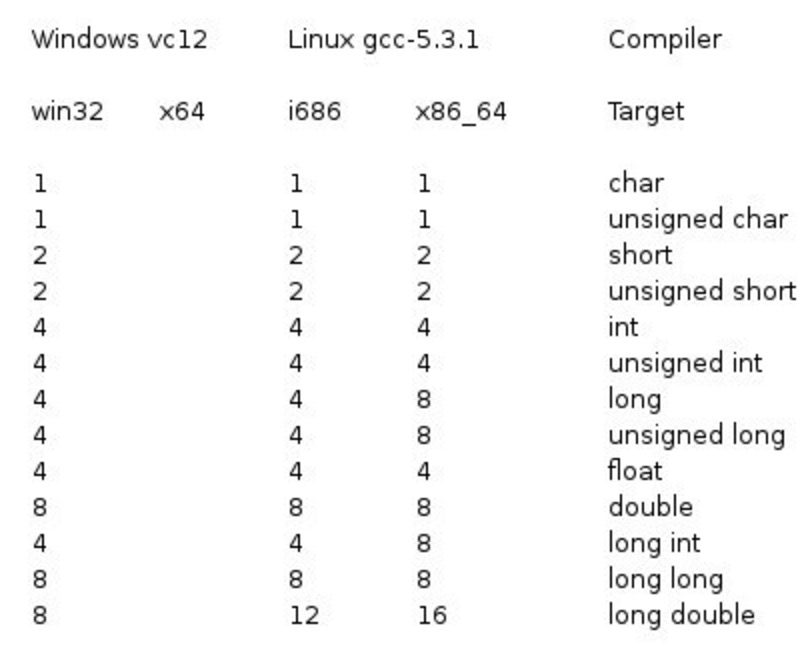
目录 数据类型 基本数据类型 typedef 声明 枚举类型 类型转换 变量类型 变量定义 变量声明 左值(Lvalues)和右值(Rvalues) 变量作用域 数据类型 基本数据类型 C 为程序员提供了种类丰富的内置数据类型和用户自定义的数…...
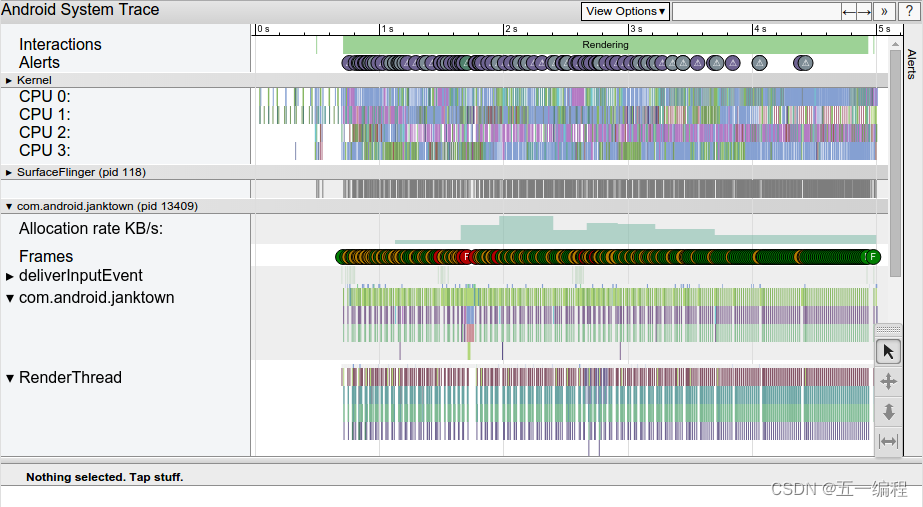
Android NDK开发详解之调试和性能分析的系统跟踪概览
Android NDK开发详解之调试和性能分析的系统跟踪概览 系统跟踪指南 “系统跟踪”就是记录短时间内的设备活动。系统跟踪会生成跟踪文件,该文件可用于生成系统报告。此报告有助于您了解如何最有效地提升应用或游戏的性能。 有关进行跟踪和性能分析的全面介绍&#x…...
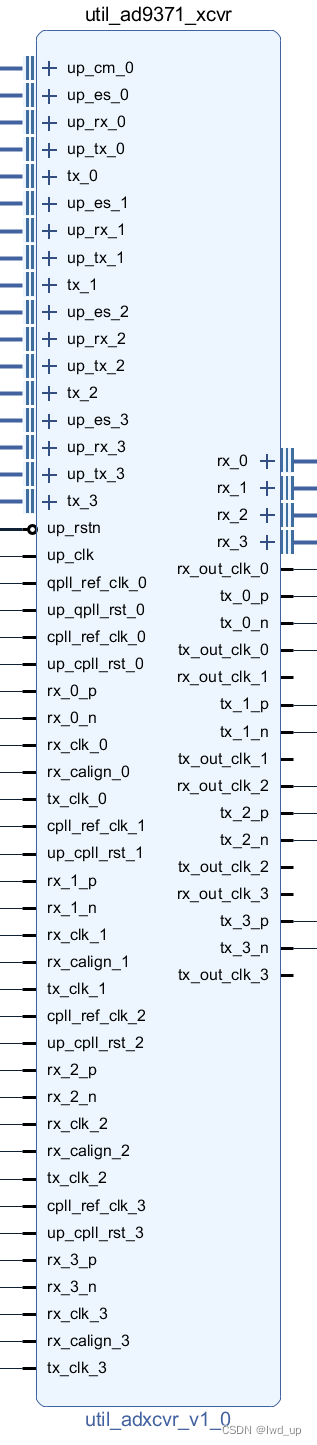
AD9371 官方例程HDL JESD204B相关IP端口信号
AD9371 系列快速入口 AD9371ZCU102 移植到 ZCU106 : AD9371 官方例程构建及单音信号收发 ad9371_tx_jesd -->util_ad9371_xcvr接口映射: AD9371 官方例程之 tx_jesd 与 xcvr接口映射 AD9371 官方例程 时钟间的关系与生成 : AD9371 官方…...

蓝牙服务:优化体验,提高连接效率
文章目录 1. 对蓝牙连接进行优化2. 设备配对的缓存机制3. 优化蓝牙连接的稳定性 蓝牙技术已经成为我们生活中不可或缺的一部分,我们使用它进行音频传输、数据传输、设备连接等等。然而,有时蓝牙连接会让用户感到非常困扰,比如连接速度缓慢、连…...
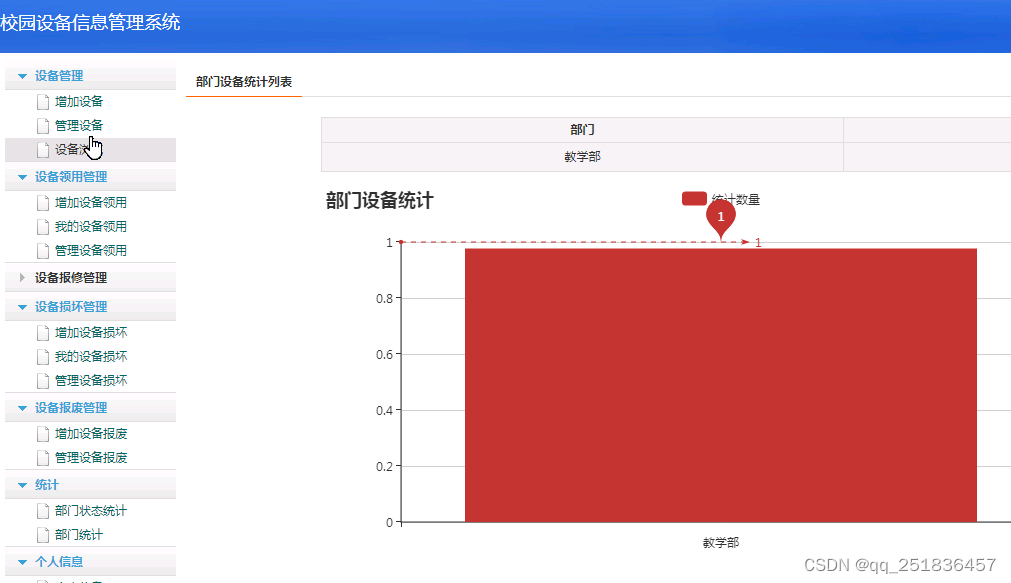
SSM校园设备管信息管理系统开发mysql数据库web结构java编程计算机网页源码eclipse项目
选题理由 随着计算机网络及多媒体技术的广泛应用,互联网已成为高校办学的基础设施和必备条件,基于互联网的高校信息管理越来越综合化,越来越多的教学管理、行政管理工作将架构在互联网上,互联网正在变为学校实施教学、科研和管理…...
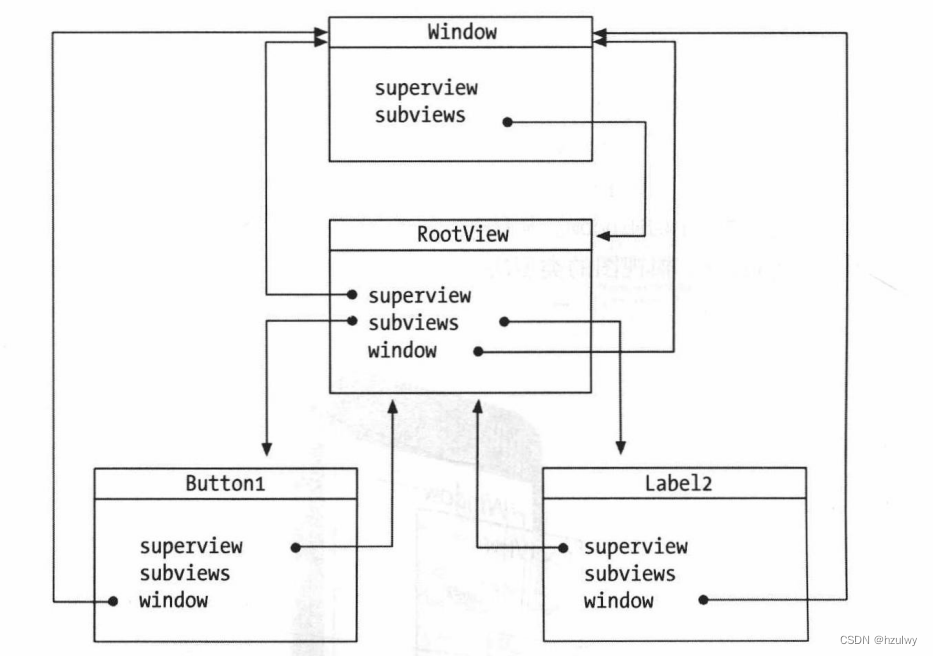
iOS的应用生命周期以及应用界面
在iOS的原生开发中,我们需要特别关注两个东西:AppDelegate和ViewController。我们主要的编码工作就是在AppDelegate和ViewControlle这两个类中进行的。它们的类图如下图所示: AppDelegate是应用程序委托对象,它继承了UIResponder类…...

Macos下安装使用Redis
Redis 是一个基于内存的key-value的结构数据库适合存储热点数据 Macos安装Redis https://redis.io/docs/getting-started/installation/install-redis-on-mac-os/安装redis brew install redis查看安装信息: brew info redis前台启动redis: redis-server后台启…...
Redis的四种部署方案
这篇文章介绍Reids最为常见的四种部署模式,其实Reids和数据库的集群模式差不多,可以分为 Redis单机模式部署、Redis主从模式部署、Redis哨兵模式部署、Cluster集群模式部署,其他的部署方式基本都是围绕以下几种方式在进行调整到适应的生产环境…...
Microsoft Edge不能工作了,可能原因不少,那么如何修复呢
Microsoft Edge打不开或不能加载网页是用户在Windows 10、Android、Mac和iOS设备上的网络浏览器上遇到的许多错误之一。其他Microsoft Edge问题可能包括浏览器窗口和选项卡冻结、网站崩溃、互联网连接错误消息以及丢失Microsoft Edge书签、收藏夹、密码和收藏。 Microsoft Edg…...
算法---缺失的第一个正数
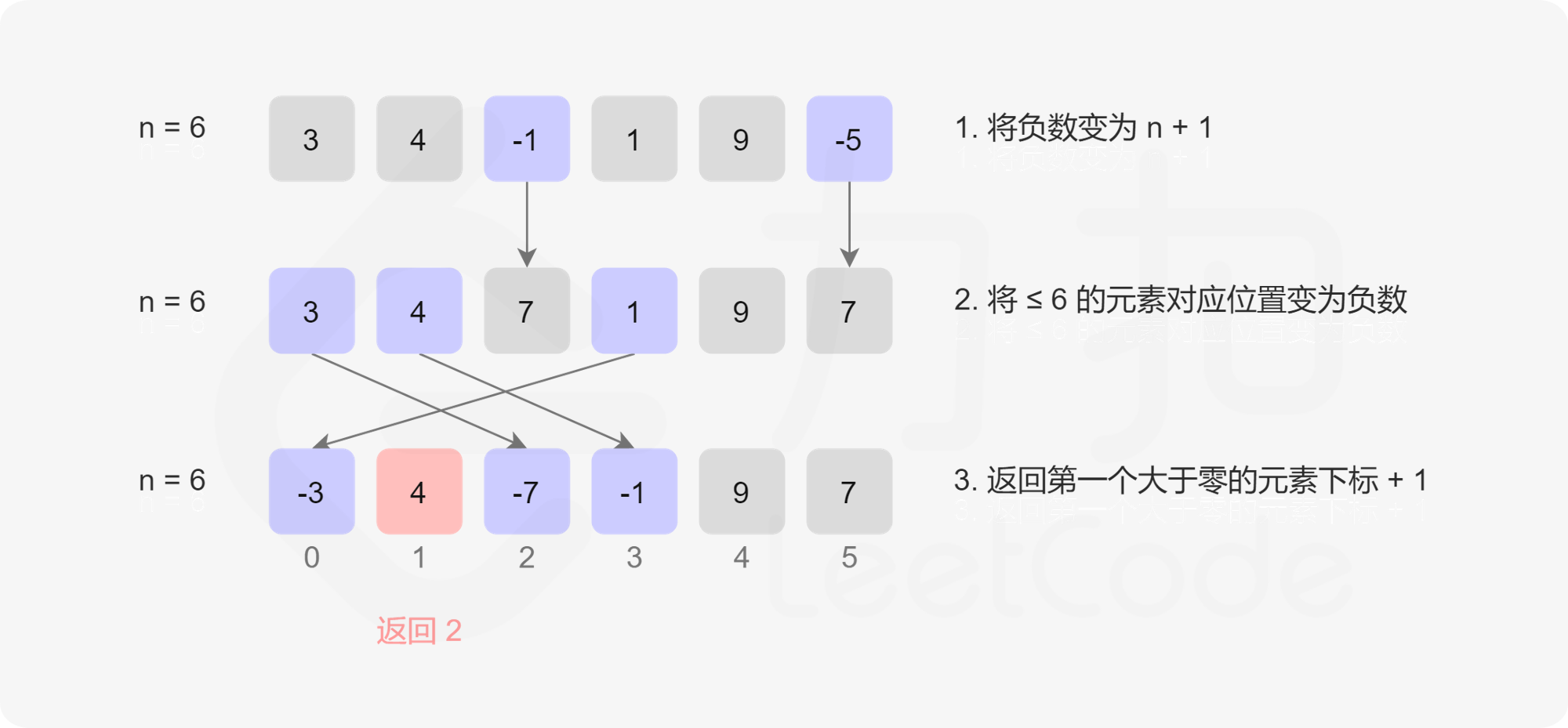
题目 给你一个未排序的整数数组 nums ,请你找出其中没有出现的最小的正整数。 请你实现时间复杂度为 O(n) 并且只使用常数级别额外空间的解决方案。示例 1:输入:nums [1,2,0] 输出:3 示例 2:输入:nums …...

【算法与数据结构】--算法应用--算法和数据结构的案例研究
一、项目管理中的算法应用 在项目管理中,算法和数据结构的应用涉及项目进度、资源分配、风险管理等方面。以下是一些案例研究,展示了算法在项目管理中的实际应用: 项目进度管理: 甘特图算法:甘特图是一种项目进度管理…...

java如何获取调用接口的ip?
获取调用者的ip 场景:想知道哪个ip访问的某个接口时,就需要打印出来看看,这时就可以使用这个方法了。 案例: //HttpServletRequest 入参加上,请求对象public ForkResponse queryXXX(RequestBody XXXX xxxx, HttpServletRequest …...

ubuntu 18 更新git版本到 2.80.1
前言 使用gitlab的时候,发现下面这条语句不能用 git init --initial-branch XXX查看git version git version下载 wget https://mirrors.edge.kernel.org/pub/software/scm/git/git-2.38.1.tar.gz 或者 https://git-scm.com/download/linux 或者去github上面下载…...
测试C#调用Aplayer播放视频(2:VideoPlayer源码学习)
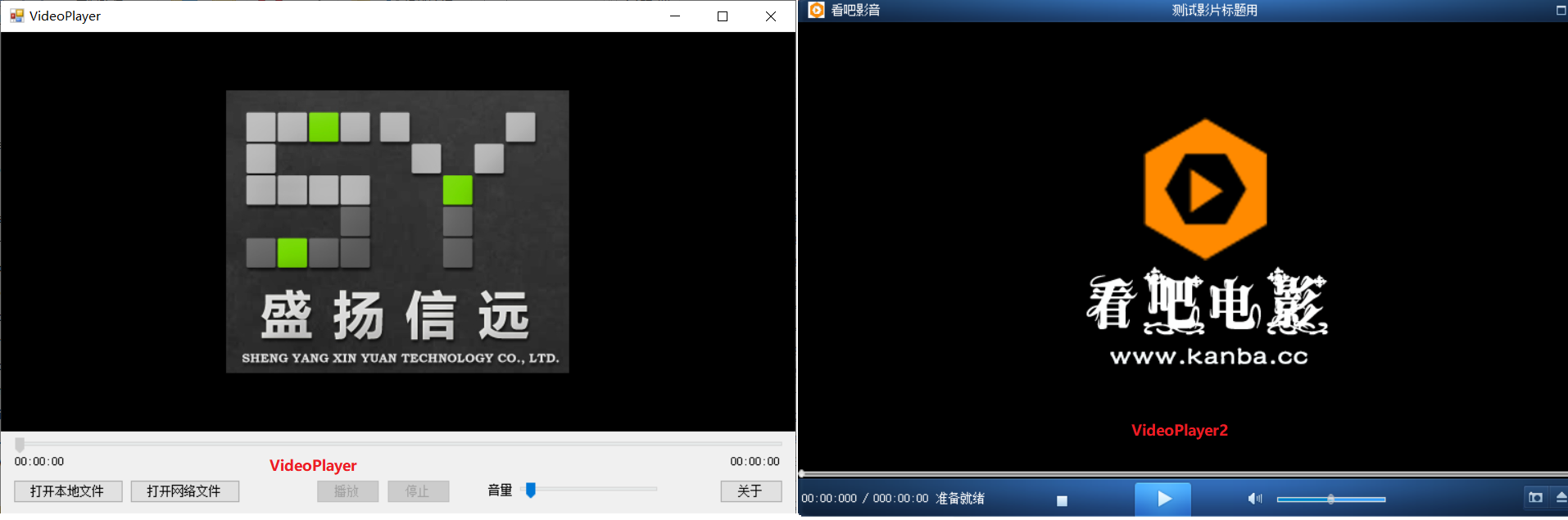
参考文献1除了介绍Aplayer组件的用法之外,还提供有demo下载以供学习,本文学习并记录其中的使用方式。 VideoPlayer项目使用C#在VS2013开发,其解决方案中包括VideoPlayer和VideoPlayer两个小项目,前者基于.net framework4.0&am…...
YOLOv5 分类模型的预处理
YOLOv5 分类模型的预处理 flyfish 版本 6.2 将整个代码简化成如下代码 imgsz224 file "/home/a/Pictures/1.jpg" transforms classify_transforms(imgsz) im cv2.cvtColor(cv2.imread(file), cv2.COLOR_BGR2RGB) print(im.shape)im transforms(im) print(im.…...
25 行为型模式-备忘录模式
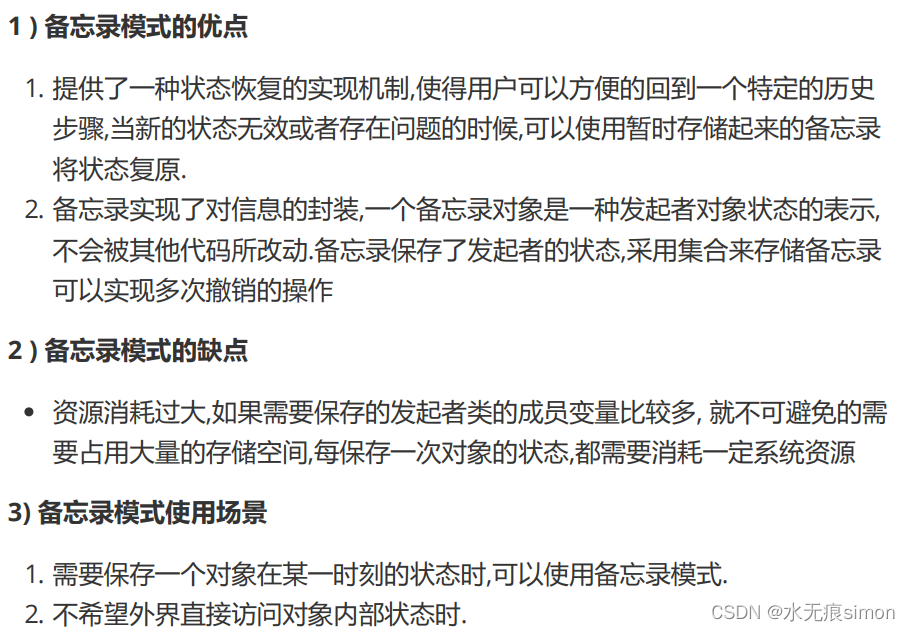
1 备忘录模式介绍 备忘录模式(memento pattern)定义: 在不破坏封装的前提下,捕获一个对象的内部状态,并在该对象之外保存这个状态,这样可以在以后将对象恢复到原先保存的状态. 2 备忘录模式原理 3 备忘录模式实现 /*** 发起人角色**/ public class Originator {private Strin…...

手把手拆解蓝牙Extended Advertising数据包:从HCI Command到空口PDU的完整流程
手把手拆解蓝牙Extended Advertising数据包:从HCI Command到空口PDU的完整流程 蓝牙技术演进到5.0版本后,Extended Advertising(扩展广播)机制的引入彻底改变了低功耗蓝牙的通信范式。这项技术突破不仅解决了传统广播模式的诸多限…...

3秒解锁微博图片溯源能力:重新定义你的信息追踪体验
3秒解锁微博图片溯源能力:重新定义你的信息追踪体验 【免费下载链接】WeiboImageReverse Chrome 插件,反查微博图片po主 项目地址: https://gitcode.com/gh_mirrors/we/WeiboImageReverse 当你在微博上看到一张惊艳的摄影作品,想要了解…...

城通网盘直连解析完整指南:三步获取高速下载链接的免费方案
城通网盘直连解析完整指南:三步获取高速下载链接的免费方案 【免费下载链接】ctfileGet 获取城通网盘一次性直连地址 项目地址: https://gitcode.com/gh_mirrors/ct/ctfileGet 还在为城通网盘下载速度慢而烦恼吗?ctfileGet是一款专为城通网盘用户…...

算法复杂度:那些神秘符号背后的故事
🔬 算法复杂度:那些神秘符号背后的故事 📖 开篇:为什么需要这套"数学语言"? 想象一下,你要向朋友描述不同汽车的油耗: ❌ 没有统一标准: “我的车挺省油的”“他的车特别费…...

机器学习赋能组合优化:全局退火算法在三维伊辛模型上的实战超越
1. 项目概述:当机器学习遇上组合优化,一场算法效率的革命在计算机科学和运筹学的核心地带,组合优化问题无处不在。从决定物流公司如何安排数千辆卡车的路线,到芯片设计时如何摆放数十亿个晶体管以实现最佳性能,再到为复…...

机器学习数据最小化实战:从联邦学习到差分隐私的隐私保护架构
1. 项目概述:为什么机器学习必须拥抱数据最小化?在AI项目里,数据常被比作“新石油”。但和石油不同,数据一旦泄露或滥用,带来的不是能源,而是灾难。我见过太多团队,初期为了追求那可能存在的1%模…...

《道德经》第二十章
本章以绝学无忧我独昏昏为核心,专讲体道者超越世俗价值、回归生命本源的精神境界,是老子自我写照式的抒情篇章。以“唯阿善恶相去几何”的追问破题,以“众人熙熙”与“我独泊兮”的强烈对比展开,最终以“贵食母”点明与道合一的生…...

Forge中的数据分析:使用LLM工具调用处理和可视化数据的完整指南 [特殊字符]
Forge中的数据分析:使用LLM工具调用处理和可视化数据的完整指南 🔍 【免费下载链接】forge A Python framework for self-hosted LLM tool-calling and multi-step agentic workflows 项目地址: https://gitcode.com/GitHub_Trending/forge54/forge …...

Keil uVision开发环境文件类型全解析
1. uVision支持的文件类型全解析作为一名嵌入式开发工程师,我使用Keil uVision IDE已有八年时间。今天想系统梳理一下这个开发环境支持的各种文件类型,特别是那些在实际项目中经常遇到但官方文档解释不够详细的格式。理解这些文件类型对于项目管理和问题…...

UE材质进阶:拆解WAT世界对齐纹理原理,从‘井盖积雪’到‘墙体苔藓’的通用实现思路
UE材质进阶:WAT世界对齐纹理原理与多场景实战指南想象一下这样的场景:你的开放世界游戏中,一辆越野车驶过泥泞道路,轮胎上的泥渍会随着行驶距离逐渐积累,但无论车辆如何移动旋转,泥渍纹理始终与地面环境保持…...