
CSS画圆以及CSS实现动态圆
CSS画圆以及CSS实现动态圆
- 1. 先看基础(静态圆)
- 1.1 效果如下:
- 1.2 代码如下:
- 2. 动态圆
- 2.1 一个动态圆
- 2.1.1 让圆渐变
- 2.1.2 圆渐变8秒后消失
- 2.1.3 转动的圆(单个圆)
- 2.2 多个动态圆
1. 先看基础(静态圆)
1.1 效果如下:
- 如下:
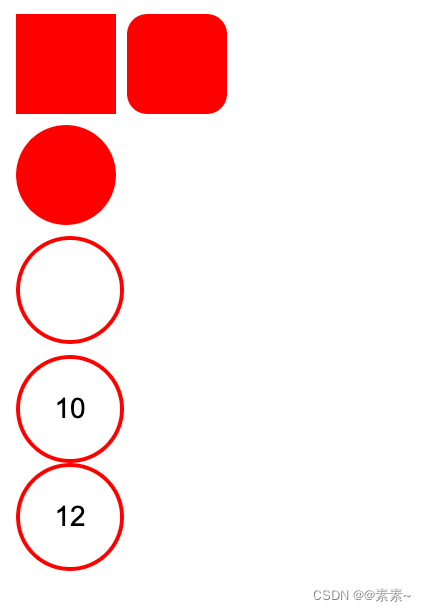
1.2 代码如下:
-
如下:
<!DOCTYPE html>
<html lang="en">
<head><meta charset="UTF-8"><meta name="viewport" content="width=device-width, initial-scale=1.0"><title>Document</title><style>/* 正方形 */.xmbook_red_point_1 {width: 50px;height: 50px;display: inline-block;background-color: red;}/* 圆角正方形 */.xmbook_red_point_2 {width: 50px;height: 50px;display: inline-block;background-color: red;border-radius: 20%;}/* 实心圆 */.xmbook_red_point_3 {width: 50px;height: 50px;/* position: relative; *//* bottom: 2px; *//* left: 4px; */display: inline-block;/* background: url(/zh_CN/htmledition/images/icon_xmbook_red_point513f4c.png); */background-color: red;border-radius: 50%;}/* 空心圆 */.xmbook_red_point_4 {width: 50px;height: 50px;display: inline-block;/* background-color: red; */border-radius: 50%;border: 2px solid;border-color: red;}/* 圈中带字 */.xmbook_red_point_5 {width: 50px;height: 50px;display: inline-block;/* background-color: red; */border-radius: 50%;border: 2px solid;border-color: red;/* 设置圈中字体大小等 */font: 14px Arial, sans-serif;/* 下面是调整圈中字体位置的 */display: flex;justify-content: center;align-items: center;/* text-align: center; */}</style>
</head>
<body><div class="xmbook_red_point_1"></div><div class="xmbook_red_point_2"></div><div><i class="xmbook_red_point_3"></i></div><div><i class="xmbook_red_point_4"></i></div><!-- 圈中带字 --><div><i class="xmbook_red_point_5">10</i></div><div class="xmbook_red_point_5">12</div></body>
</html>
2. 动态圆
2.1 一个动态圆
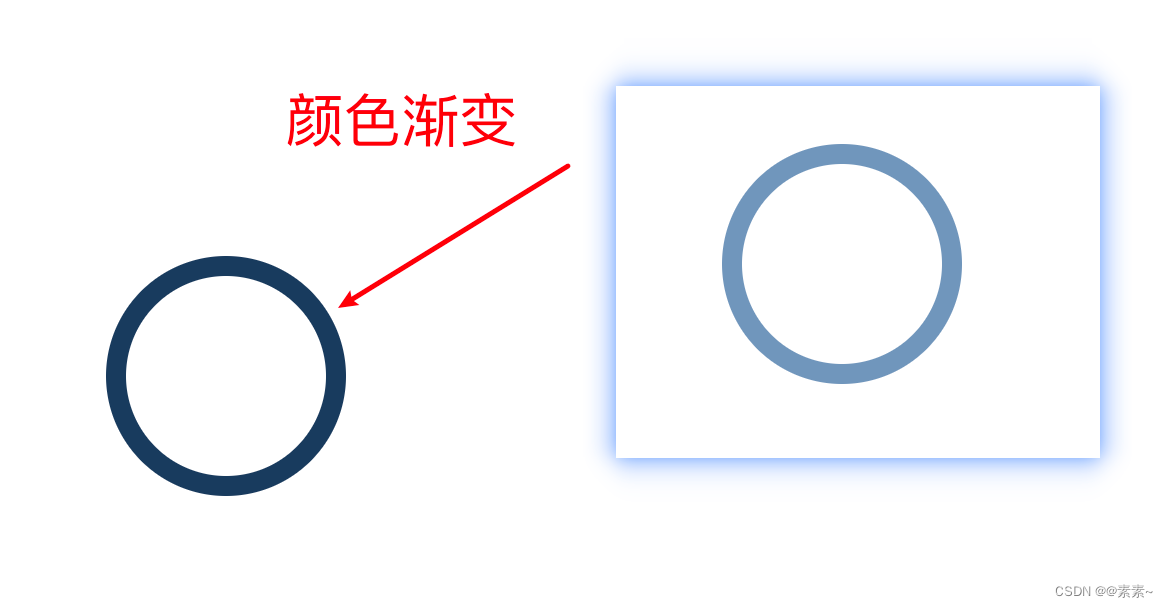
2.1.1 让圆渐变
-
效果如下:
-
实现代码如下:
<!DOCTYPE html>
<html lang="en">
<head><meta charset="UTF-8"><meta name="viewport" content="width=device-width, initial-scale=1.0"><title>Document</title><style>/* 空心圆 */.xmbook_red_point_4 {width: 100px;height: 100px;/* display: inline-block; *//* background-color: red; */border-radius: 50%;/* border: 2px solid; *//* border-color: red; */position: absolute;top: 150px;left: 150px;/* identifier 3s 控制动的频率 linear infinite 让动画不断渐变不要停transform-origin 控制运动轨迹*/animation: identifier 3s infinite linear;transform-origin: 150px 150px ;}@keyframes identifier{   /*用“0%-100%” 或者 “from-to” 均可以*/  from{transform: rotate(360deg) scale(1);border: 10px solid rgb(143, 182, 222);}to{transform: rotate(360deg) scale(1);border: 10px solid rgb(2, 36, 70);}}</style>
</head>
<body><div class="xmbook_red_point_4"></div></body>
</html>
2.1.2 圆渐变8秒后消失
-
代码实现如下:
<!DOCTYPE html>
<html lang="en">
<head><meta charset="UTF-8"><meta name="viewport" content="width=device-width, initial-scale=1.0"><title>Document</title><style>/* 空心圆 */.xmbook_red_point_4 {width: 100px;height: 100px;/* background-color: red; */border-radius: 50%;/* border-color: red; */position: absolute;top: 150px;left: 150px;/* identifier 3s 控制动的频率 linear infinite 让动画不断渐变不要停transform-origin 控制运动轨迹*/animation: identifier 8s infinite linear;/* transform-origin: 150px 150px ; */}@keyframes identifier {100% {/* transform: rotate(360deg) scale(1); */border: 10px solid rgb(6, 68, 130);}}</style>
</head>
<body><div class="xmbook_red_point_4"></div></body>
</html>
2.1.3 转动的圆(单个圆)
- 实现效果如下:
css实现圆转动(单个圆)
-
实现代码如下:
<!DOCTYPE html>
<html lang="en">
<head><meta charset="UTF-8"><meta name="viewport" content="width=device-width, initial-scale=1.0"><title>Document</title><style>/* 空心圆 */.xmbook_red_point_4 {width: 100px;height: 100px;background-color: red;border-radius: 50%;/* border-color: rgb(0, 98, 255); */position: absolute;top: 150px;left: 150px;/* identifier 3s 控制动的频率 linear infinite 让动画不断渐变不要停transform-origin 控制运动轨迹*/animation: identifier 5s infinite linear;transform-origin: 150px 150px ;}@keyframes identifier {100% {transform: rotate(360deg) scale(1);/* border: 10px solid rgb(6, 68, 130); */}}</style>
</head>
<body><div class="xmbook_red_point_4"></div></body>
</html>
2.2 多个动态圆
- 实现效果如下:
css实现多个运动的圆
- 实现代码如下:
<!DOCTYPE html>
<html lang="en">
<head><meta charset="UTF-8"><meta name="viewport" content="width=device-width, initial-scale=1.0"><title>Document</title><style>/* 空心圆 */.xmbook_red_point_4 {width: 100px;height: 100px;background-color: rgb(9, 163, 30);border-radius: 50%;/* border-color: rgb(0, 98, 255); */position: absolute;top: 150px;left: 150px;/* identifier 3s 控制动的频率 linear infinite 让动画不断渐变不要停transform-origin 控制运动轨迹*/animation: identifier 5s infinite linear;transform-origin: 100px 100px ;}/* 如果让三圆重叠,把下面的 120px 调成 100px 或更小即可 */.xmbook_red_point_4:nth-child(1) {animation: identifier 9s infinite linear;transform-origin: 120px 120px;}.xmbook_red_point_4:nth-child(2) {animation: identifier 9s infinite -3s linear;transform-origin: 120px 120px;}.xmbook_red_point_4:nth-child(3) {animation: identifier 9s infinite -6s linear;transform-origin: 120px 120px;}@keyframes identifier {0% {transform: rotate(0deg) scale(1);border: 10px solid rgb(4, 212, 195);}30% {transform: rotate(120deg) scale(1);border: 10px solid rgb(33, 4, 147);}100% {transform: rotate(360deg) scale(1);border: 10px solid rgb(132, 7, 9);}}</style>
</head>
<body><div class="xmbook_red_point_4"></div><div class="xmbook_red_point_4"></div><div class="xmbook_red_point_4"></div>
</body>
</html>
相关文章:
CSS画圆以及CSS实现动态圆
CSS画圆以及CSS实现动态圆 1. 先看基础(静态圆)1.1 效果如下:1.2 代码如下: 2. 动态圆2.1 一个动态圆2.1.1 让圆渐变2.1.2 圆渐变8秒后消失2.1.3 转动的圆(单个圆) 2.2 多个动态圆 1. 先看基础(…...
K8S知识点(一)
(1)应用部署方式转变 (2)K8S介绍 容器部署容易出现编排问题,为了解决就出现了大量的编排软件,这里将的是K8S编排问题的解决佼佼者 弹性伸缩:当流量从1000变为1200可以,自动开启一个…...
人工智能师求职面试笔试题及答案汇总
人工智能师求职面试笔试题及答案汇总 1.如何在Python中实现一个生成器? 答:在Python中,生成器是一种特殊类型的迭代器。生成器允许你在需要时才生成值,从而节省内存。生成器函数在Python中是通过关键字yield来实现的。例如&…...
【Windows-软件-FFmpeg】(01)通过CMD运行FFmpeg进行操作,快速上手
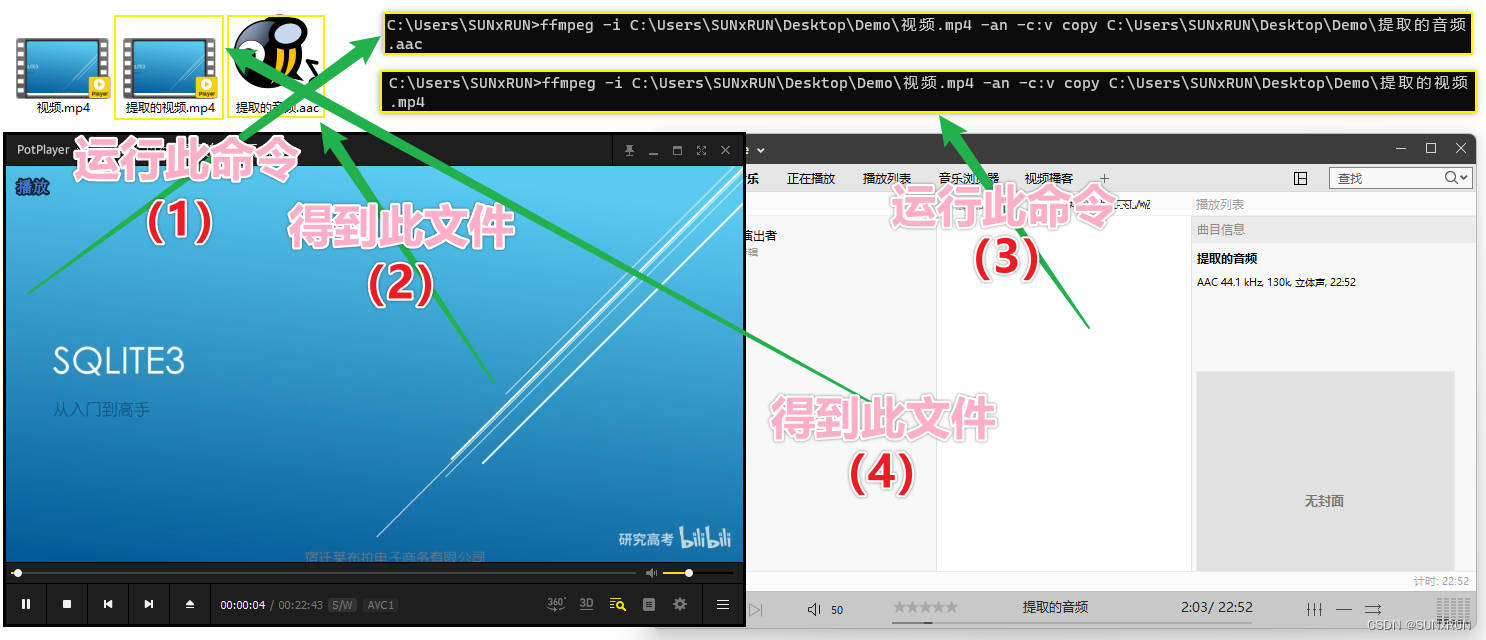
前言 通过"cmd"运行"ffmpeg"进行操作,快速上手; 实操 【实操一】 说明 使用"ffmpeg"来合并音频文件和视频文件 ; 环境 Windows 11 专业版(22621.2428); 代码 …...

Spring Data Redis + RabbitMQ - 基于 string 实现缓存、计数功能(同步数据)
目录 一、Spring Data Redis 1.1、缓存功能 1.1.1、分析 1.1.2、案例实现 1.1.3、效果演示 1.2、计数功能(Redis RabbitMQ) 1.2.1、分析 1.2.2、案例实现 一、Spring Data Redis 1.1、缓存功能 1.1.1、分析 使用 redis 作为缓存, M…...

Facebook Developer 的 HashCode
在 Android 中,您可以使用 Facebook SDK 提供的工具来生成您的应用程序的哈希码(hash code),以便在 Facebook 开发者帐户中配置您的应用程序。 要生成哈希码,您可以使用以下步骤: 打开终端或命令提示符&am…...

下载使用 ant design Pro 中遇到的一些问题
文章目录 npm 版本问题在idea终端输入命令报错:error:0308010C:digital envelope routines::unsupported npm 版本问题 npm v9.6.3 is known not to run on Node.js v19.9.0. This version of npm supports the following node versions: ^14.17.0 || ^16.13.0 || …...
「Java开发指南」如何用MyEclipse搭建Spring MVC应用程序?(一)
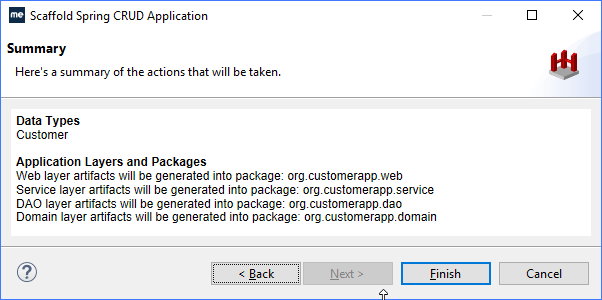
本教程将指导开发者如何生成一个可运行的Spring MVC客户应用程序,该应用程序实现域模型的CRUD应用程序模式。在本教程中,您将学习如何: 从数据库表的Scaffold到现有项目部署搭建的应用程序 使用Spring MVC搭建需要MyEclipse Spring或Bling授…...
[动态规划] (七) 路径问题:LCR 166.剑指offer 47. 珠宝的最高价值
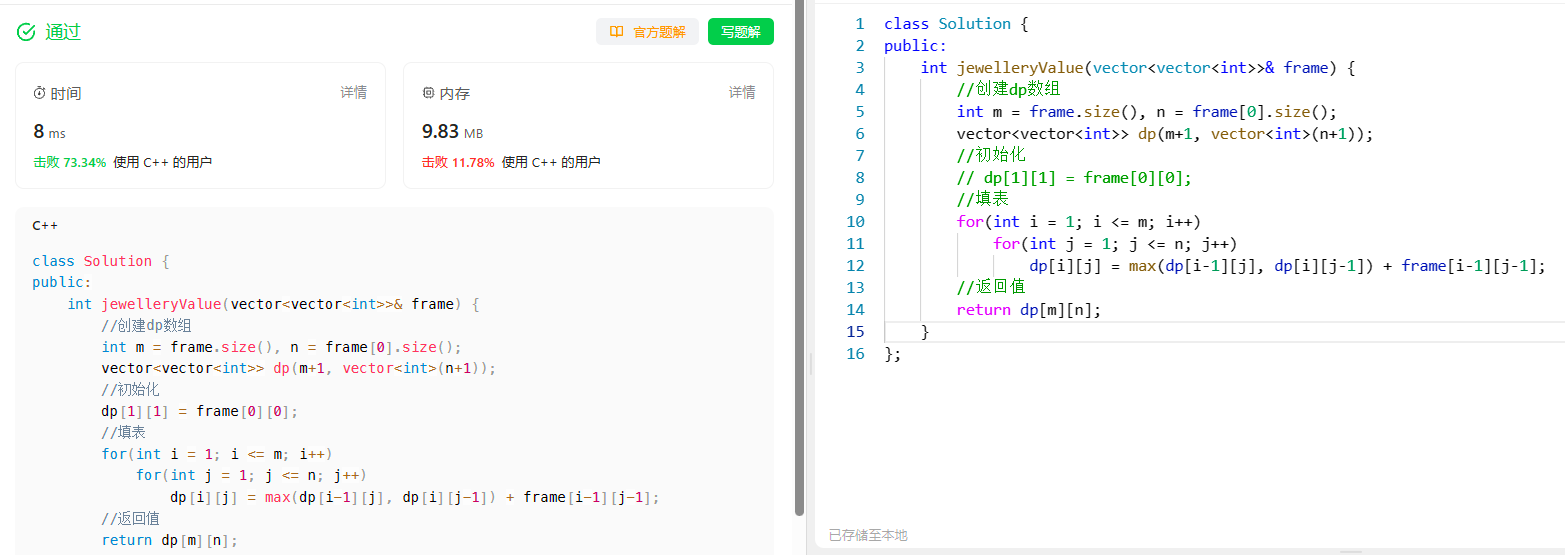
[动态规划] (七) 路径问题:LCR 166./剑指offer 47. 珠宝的最高价值 文章目录 [动态规划] (七) 路径问题:LCR 166./剑指offer 47. 珠宝的最高价值题目解析解题思路状态表示状态转移方程初始化和填表顺序 返回值代码实现总结 LCR 166. 珠宝的最高价值 题目…...
Mysql进阶-SQL优化篇
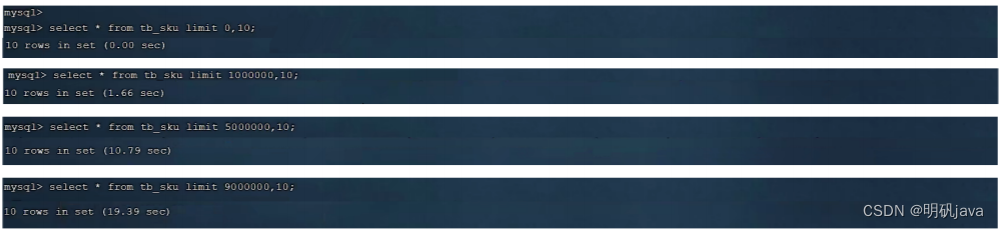
插入数据 insert 我们需要一次性往数据库表中插入多条记录,可以从以下三个方面进行优化。 批量插入数据 一条insert语句插入多个数据,但要注意,每个insert语句最好插入500-1000行数据,就得重新写另一条insert语句 Insert into…...
VueI18n中英文切换 vue2.0
1: npm install --save vue-i18n8.0.0 (版本不要高了,不然报错) 2:创建相关文件 3:main.js文件配置 //i18n插件 import VueI18n from vue-i18n // element-ui多语言文件 import locale from element-ui/lib/locale;…...

VUE组件间通信的七种方式
目录 1、 props / $emit (1)父组件向子组件传值(props的用法) (2)子组件向父组件传递数据($emit的用法) 2、ref / $refs 用法: 3、eventBus事件总线($e…...

问chatgpt最近生活的困难
你知道吗,因为我做的所有的事情没有任何目的性,所以曾经过的很好,这种很好是一种逃避式的好,怎么说呢?遇到困难了,那就不做了,换下一个项目。比如打游戏,如果我这局玩王者荣耀&#…...
Flink源码解析八之任务调度和负载均衡
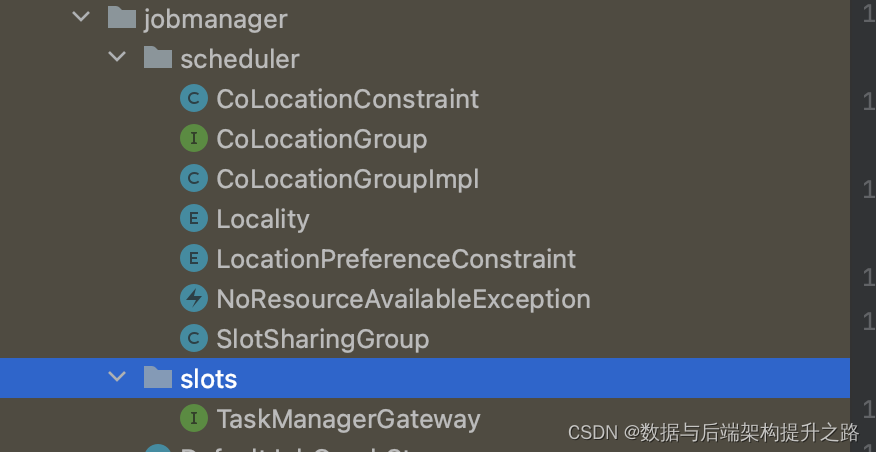
源码概览 jobmanager scheduler:这部分与 Flink 的任务调度有关。 CoLocationConstraint:这是一个约束类,用于确保某些算子的不同子任务在同一个 TaskManager 上运行。这通常用于状态共享或算子链的情况。CoLocationGroup & CoLocationGroupImpl:这些与 CoLocationCon…...

4.3 传送门
算法设计与分析 4.3 传送门 题目描述 现在有 n 个传送门,你处在第一个传送门的位置,第 i 个传送门可以将你传送到第 i-a[i] 到第 ia[i] 范围内的任意一个传送门,请问你最少需要几次操作,使得你可以传送到最后一个传送门的位置。 …...
NLP之Bert介绍和简单示例
文章目录 1. Bert 介绍2. 代码示例2.1 代码流程 1. Bert 介绍 2. 代码示例 from transformers import AutoTokenizertokenizer AutoTokenizer.from_pretrained("bert-base-chinese") input_ids tokenizer.encode(欢迎来到Bert世界, return_tensorstf) print(input…...

【Windows】Google和火狐浏览器禁用更新的操作方式
想必很多网民常用的浏览器是Edge,Google,火狐这三种,但是浏览器都有后台自动更新,更新提示会一直显示,要用户去点击才关掉,有点强迫症的用户就会想要把它一直关掉,可每次打开都关不掉࿰…...

关于编程不得不说的事
这些年,互联网爆炸式的发展,促生了无数程序员,也促生了大量 IT培训机构。短短数年间,科班出生的程序员和培训机构出生的程序员呈指数增长。程序员的职业也不再是金饭碗。写了这么多代码,有些感触,所以写下来…...
2.4G合封芯片 XL2422,集成M0核MCU,高性能 低功耗
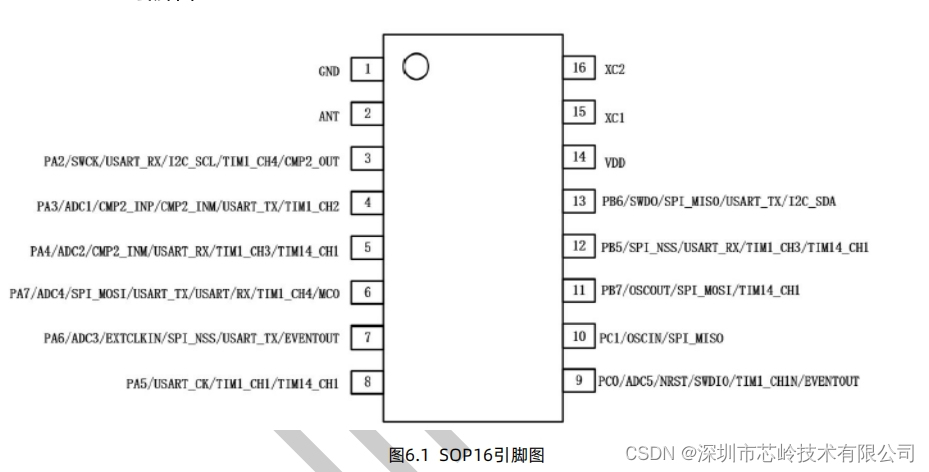
XL2422芯片是一款高性能低功耗的SOC集成无线收发芯片,集成M0核MCU,工作在2.400~2.483GHz世界通用ISM频段。该芯片集成了射频接收器、射频发射器、频率综合器、GFSK调制器、GFSK解调器等功能模块,并且支持一对多线网和带ACK的通信模式。发射输…...
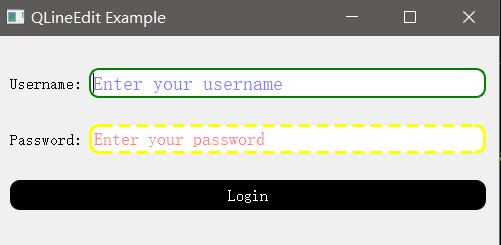
【QT基础入门 控件篇】QLineEdit 基础、高级和样式表使用详解
一、QLineEdit简介 QLineEdit是一个单行文本编辑器,它可以让用户输入和编辑纯文本,也可以设置一些有用的编辑功能,如撤销和重做、剪切和粘贴、拖放等。QLineEdit: 可以根据不同的回显模式(echoMode)来显示不同的输入内…...

全流程效率提升:Scarab开源模组管理器的跨平台解决方案
全流程效率提升:Scarab开源模组管理器的跨平台解决方案 【免费下载链接】Scarab An installer for Hollow Knight mods written in Avalonia. 项目地址: https://gitcode.com/gh_mirrors/sc/Scarab 当你兴致勃勃地想为《空洞骑士》安装模组时,是否…...

数字示波器原理与高级测量技术详解
1. 示波器基础概念与核心功能 示波器作为电子工程师最常用的测试仪器之一,其核心功能是捕捉和显示电信号随时间变化的波形。现代数字示波器(DSO)通过模数转换器(ADC)将模拟信号转换为数字信号进行处理和显示࿰…...

知识点1:ROS文件系统
学习资源为Autolabor教程一、ROS文件系统指ROS源码文件存储在硬盘中的形式。相当于文件结构WorkSpace --- 自定义的工作空间|--- build:编译空间,用于存放CMake和catkin的缓存信息、配置信息和其他中间文件。|--- devel:开发空间,用于存放编译后生成的目…...
)
PyTorch3D在Windows上安装总报错?试试这个绕过源码编译的Pip直装方案(适配PyTorch 2.0.1 + CUDA 11.7)
PyTorch3D在Windows上安装总报错?试试这个绕过源码编译的Pip直装方案(适配PyTorch 2.0.1 CUDA 11.7) 如果你是一名在Windows平台上进行3D视觉研究的开发者,想必对PyTorch3D这个强大的3D深度学习库并不陌生。然而,官方…...

三步生成炫酷3D魔鬼面具:用快马AI快速构建交互式视觉原型
今天想和大家分享一个超实用的技巧——如何用InsCode(快马)平台快速生成3D魔鬼面具的交互式原型。作为一个经常需要做创意展示的设计师,这个工具真的帮我省去了大量开发时间。 从创意到原型的极速转换 以前做3D展示需要先建模再写代码,现在只需要在快马平…...

从 Options API 到 Composition API:你的 Vue 代码为什么需要重构?
从 Options API 到 Composition API:你的 Vue 代码为什么需要重构? 在 Vue.js 的发展历程中,Options API 曾是开发者构建组件的标准方式。但随着 Vue 3 的发布,Composition API 以其灵活性和可维护性优势逐渐成为主流选择。本文将…...

MySQL InnoDB核心参数深度优化/性能调优
前言:MySQL中InnoDB引擎是绝大多数生产环境的首选,其性能表现直接决定了数据库的整体吞吐量和响应速度。而InnoDB的性能优化,核心就在于缓冲池、redo日志、事务相关参数的合理配置——很多时候,不是数据库硬件不行,而是…...

nli-distilroberta-base模型解析:深入理解其与计算机组成原理的关联
nli-distilroberta-base模型解析:深入理解其与计算机组成原理的关联 1. 引言:当自然语言处理遇上计算机组成原理 你可能已经用过nli-distilroberta-base这个轻量级的自然语言推理模型,但有没有想过它在计算机底层是如何运作的?就…...

Transformer变体进化史:从基础架构到高效优化策略
1. Transformer基础架构的诞生 2017年那篇《Attention Is All You Need》论文像一颗炸弹,彻底改变了NLP领域的游戏规则。当时我在做机器翻译项目,还在和RNN的梯度消失问题搏斗,Transformer的出现简直像救世主降临。它的核心创新点可以用一个厨…...
)
Windows 11 + Python 3.10 下,用智谱GLM-4-Flash API零成本跑通DB-GPT(保姆级避坑指南)
Windows 11 Python 3.10 下零成本跑通DB-GPT全流程指南 最近发现不少朋友对DB-GPT这个开源项目很感兴趣,但被复杂的部署流程和硬件要求劝退。作为过来人,我完全理解这种困扰——去年第一次尝试时,光是处理依赖冲突就花了整整两天。不过现在…...