
YoloV8目标检测与实例分割——目标检测onnx模型推理
一、模型转换
1.onnxruntime
ONNX Runtime(ONNX Runtime或ORT)是一个开源的高性能推理引擎,用于部署和运行机器学习模型。它的设计目标是优化执行使用Open Neural Network Exchange(ONNX)格式定义的模型,ONNX是一种用于表示机器学习模型的开放标准。
ONNX Runtime提供了几个关键功能和优势:
-
跨平台兼容性:ONNX Runtime旨在与各种硬件和操作系统平台兼容,包括Windows、Linux以及各种加速器,如CPU、GPU和FPGA。这使得在不同环境中轻松部署和运行模型成为可能。
-
高性能:ONNX Runtime经过性能优化,能够提供低延迟的模型执行。它针对不同的硬件平台进行了优化,以确保模型高效运行。
-
多框架支持:ONNX Runtime可以与使用不同的机器学习框架创建的模型一起使用,包括PyTorch、TensorFlow等,这要归功于其对ONNX格式的支持。
-
模型转换:ONNX Runtime可以将来自支持的框架的模型转换为ONNX格式,从而更容易在各种部署场景中使用这些模型。
-
多语言支持:ONNX Runtime可用于多种编程语言,包括C++、C#、Python等,使其可以被广泛的开发人员使用。
-
自定义运算符:它支持自定义运算符,允许开发人员扩展其功能以支持特定操作或硬件加速。
ONNX Runtime广泛用于各种机器学习应用的生产部署,包括计算机视觉、自然语言处理等。它由ONNX社区积极维护,并持续接受更新和改进。
2. pt模型与onnx模型
.pt 模型和 .onnx 模型是两种不同的模型文件格式,用于表示深度学习模型。它们之间的主要区别包括:
-
文件格式:
- .pt 模型:这是PyTorch框架的权重文件格式,通常以
.pt或.pth扩展名保存。它包含了模型的权重参数和模型结构的定义。这个文件格式是PyTorch特定的。 - .onnx 模型:这是ONNX(Open Neural Network Exchange)格式的模型文件,通常以
.onnx扩展名保存。ONNX是一种中间表示格式,独立于任何特定的深度学习框架,用于跨不同框架之间的模型转换和部署。
- .pt 模型:这是PyTorch框架的权重文件格式,通常以
-
框架依赖:
- .pt 模型:它依赖于PyTorch框架,因此在加载和运行时需要使用PyTorch库。这限制了它在不同框架上的直接使用。
- .onnx 模型:ONNX 模型是独立于深度学习框架的,可以在支持ONNX的不同框架中加载和运行,例如ONNX Runtime、TensorFlow、Caffe2等。
-
跨平台兼容性:
- .pt 模型:它通常需要在不同平台上进行PyTorch的兼容性配置,可能需要额外的工作和依赖处理。
- .onnx 模型:由于ONNX的独立性,更容易在不同平台和硬件上进行部署,无需担心框架依赖性问题。
3.Yolov8 .pt模型转换onnx
如果想跨平台兼容性,.pt 模型要在不同框架中使用或进行跨平台部署,要使用代码或库将其转换为 ONNX 格式。ONNX转换工具可以将PyTorch模型转换为ONNX格式。
from ultralytics import YOLO# load model
model = YOLO('yolov8m.pt')# Export model
success = model.export(format="onnx")
二、模型推理
1.环境部署
onnx模型模型推理只要依赖onnxruntime库,图像处理要依赖opencv,所以只要安装这两个库就行,不用安装过多的依赖。
pip install onnxruntime
pip install opencv-python
pip install numpy
pip install gradio
2.部署代码
utils.py
import numpy as np
import cv2class_names = ['person', 'bicycle', 'car', 'motorcycle', 'airplane', 'bus', 'train', 'truck', 'boat', 'traffic light','fire hydrant', 'stop sign', 'parking meter', 'bench', 'bird', 'cat', 'dog', 'horse', 'sheep', 'cow','elephant', 'bear', 'zebra', 'giraffe', 'backpack', 'umbrella', 'handbag', 'tie', 'suitcase', 'frisbee','skis', 'snowboard', 'sports ball', 'kite', 'baseball bat', 'baseball glove', 'skateboard', 'surfboard','tennis racket', 'bottle', 'wine glass', 'cup', 'fork', 'knife', 'spoon', 'bowl', 'banana', 'apple','sandwich', 'orange', 'broccoli', 'carrot', 'hot dog', 'pizza', 'donut', 'cake', 'chair', 'couch','potted plant', 'bed', 'dining table', 'toilet', 'tv', 'laptop', 'mouse', 'remote', 'keyboard','cell phone', 'microwave', 'oven', 'toaster', 'sink', 'refrigerator', 'book', 'clock', 'vase','scissors', 'teddy bear', 'hair drier', 'toothbrush']# Create a list of colors for each class where each color is a tuple of 3 integer values
rng = np.random.default_rng(3)
colors = rng.uniform(0, 255, size=(len(class_names), 3))def nms(boxes, scores, iou_threshold):# Sort by scoresorted_indices = np.argsort(scores)[::-1]keep_boxes = []while sorted_indices.size > 0:# Pick the last boxbox_id = sorted_indices[0]keep_boxes.append(box_id)# Compute IoU of the picked box with the restious = compute_iou(boxes[box_id, :], boxes[sorted_indices[1:], :])# Remove boxes with IoU over the thresholdkeep_indices = np.where(ious < iou_threshold)[0]# print(keep_indices.shape, sorted_indices.shape)sorted_indices = sorted_indices[keep_indices + 1]return keep_boxesdef multiclass_nms(boxes, scores, class_ids, iou_threshold):unique_class_ids = np.unique(class_ids)keep_boxes = []for class_id in unique_class_ids:class_indices = np.where(class_ids == class_id)[0]class_boxes = boxes[class_indices,:]class_scores = scores[class_indices]class_keep_boxes = nms(class_boxes, class_scores, iou_threshold)keep_boxes.extend(class_indices[class_keep_boxes])return keep_boxesdef compute_iou(box, boxes):# Compute xmin, ymin, xmax, ymax for both boxesxmin = np.maximum(box[0], boxes[:, 0])ymin = np.maximum(box[1], boxes[:, 1])xmax = np.minimum(box[2], boxes[:, 2])ymax = np.minimum(box[3], boxes[:, 3])# Compute intersection areaintersection_area = np.maximum(0, xmax - xmin) * np.maximum(0, ymax - ymin)# Compute union areabox_area = (box[2] - box[0]) * (box[3] - box[1])boxes_area = (boxes[:, 2] - boxes[:, 0]) * (boxes[:, 3] - boxes[:, 1])union_area = box_area + boxes_area - intersection_area# Compute IoUiou = intersection_area / union_areareturn ioudef xywh2xyxy(x):# Convert bounding box (x, y, w, h) to bounding box (x1, y1, x2, y2)y = np.copy(x)y[..., 0] = x[..., 0] - x[..., 2] / 2y[..., 1] = x[..., 1] - x[..., 3] / 2y[..., 2] = x[..., 0] + x[..., 2] / 2y[..., 3] = x[..., 1] + x[..., 3] / 2return ydef draw_detections(image, boxes, scores, class_ids, mask_alpha=0.3):det_img = image.copy()img_height, img_width = image.shape[:2]font_size = min([img_height, img_width]) * 0.0006text_thickness = int(min([img_height, img_width]) * 0.001)det_img = draw_masks(det_img, boxes, class_ids, mask_alpha)# Draw bounding boxes and labels of detectionsfor class_id, box, score in zip(class_ids, boxes, scores):color = colors[class_id]draw_box(det_img, box, color)label = class_names[class_id]caption = f'{label} {int(score * 100)}%'draw_text(det_img, caption, box, color, font_size, text_thickness)return det_imgdef detections_dog(image, boxes, scores, class_ids, mask_alpha=0.3):det_img = image.copy()img_height, img_width = image.shape[:2]font_size = min([img_height, img_width]) * 0.0006text_thickness = int(min([img_height, img_width]) * 0.001)# det_img = draw_masks(det_img, boxes, class_ids, mask_alpha)# Draw bounding boxes and labels of detectionsfor class_id, box, score in zip(class_ids, boxes, scores):color = colors[class_id]draw_box(det_img, box, color)label = class_names[class_id]caption = f'{label} {int(score * 100)}%'draw_text(det_img, caption, box, color, font_size, text_thickness)return det_imgdef draw_box( image: np.ndarray, box: np.ndarray, color: tuple[int, int, int] = (0, 0, 255),thickness: int = 2) -> np.ndarray:x1, y1, x2, y2 = box.astype(int)return cv2.rectangle(image, (x1, y1), (x2, y2), color, thickness)def draw_text(image: np.ndarray, text: str, box: np.ndarray, color: tuple[int, int, int] = (0, 0, 255),font_size: float = 0.001, text_thickness: int = 2) -> np.ndarray:x1, y1, x2, y2 = box.astype(int)(tw, th), _ = cv2.getTextSize(text=text, fontFace=cv2.FONT_HERSHEY_SIMPLEX,fontScale=font_size, thickness=text_thickness)th = int(th * 1.2)cv2.rectangle(image, (x1, y1),(x1 + tw, y1 - th), color, -1)return cv2.putText(image, text, (x1, y1), cv2.FONT_HERSHEY_SIMPLEX, font_size, (255, 255, 255), text_thickness, cv2.LINE_AA)def draw_masks(image: np.ndarray, boxes: np.ndarray, classes: np.ndarray, mask_alpha: float = 0.3) -> np.ndarray:mask_img = image.copy()# Draw bounding boxes and labels of detectionsfor box, class_id in zip(boxes, classes):color = colors[class_id]x1, y1, x2, y2 = box.astype(int)# Draw fill rectangle in mask imagecv2.rectangle(mask_img, (x1, y1), (x2, y2), color, -1)return cv2.addWeighted(mask_img, mask_alpha, image, 1 - mask_alpha, 0)
YOLODet.py
import time
import cv2
import numpy as np
import onnxruntimefrom detection.utils import xywh2xyxy, draw_detections, multiclass_nms,detections_dogclass YOLODet:def __init__(self, path, conf_thres=0.7, iou_thres=0.5):self.conf_threshold = conf_thresself.iou_threshold = iou_thres# Initialize modelself.initialize_model(path)def __call__(self, image):return self.detect_objects(image)def initialize_model(self, path):self.session = onnxruntime.InferenceSession(path,providers=onnxruntime.get_available_providers())# Get model infoself.get_input_details()self.get_output_details()def detect_objects(self, image):input_tensor = self.prepare_input(image)# Perform inference on the imageoutputs = self.inference(input_tensor)self.boxes, self.scores, self.class_ids = self.process_output(outputs)return self.boxes, self.scores, self.class_idsdef prepare_input(self, image):self.img_height, self.img_width = image.shape[:2]input_img = cv2.cvtColor(image, cv2.COLOR_BGR2RGB)# Resize input imageinput_img = cv2.resize(input_img, (self.input_width, self.input_height))# Scale input pixel values to 0 to 1input_img = input_img / 255.0input_img = input_img.transpose(2, 0, 1)input_tensor = input_img[np.newaxis, :, :, :].astype(np.float32)return input_tensordef inference(self, input_tensor):start = time.perf_counter()outputs = self.session.run(self.output_names, {self.input_names[0]: input_tensor})# print(f"Inference time: {(time.perf_counter() - start)*1000:.2f} ms")return outputsdef process_output(self, output):predictions = np.squeeze(output[0]).T# Filter out object confidence scores below thresholdscores = np.max(predictions[:, 4:], axis=1)predictions = predictions[scores > self.conf_threshold, :]scores = scores[scores > self.conf_threshold]if len(scores) == 0:return [], [], []# Get the class with the highest confidenceclass_ids = np.argmax(predictions[:, 4:], axis=1)# Get bounding boxes for each objectboxes = self.extract_boxes(predictions)# Apply non-maxima suppression to suppress weak, overlapping bounding boxes# indices = nms(boxes, scores, self.iou_threshold)indices = multiclass_nms(boxes, scores, class_ids, self.iou_threshold)return boxes[indices], scores[indices], class_ids[indices]def extract_boxes(self, predictions):# Extract boxes from predictionsboxes = predictions[:, :4]# Scale boxes to original image dimensionsboxes = self.rescale_boxes(boxes)# Convert boxes to xyxy formatboxes = xywh2xyxy(boxes)return boxesdef rescale_boxes(self, boxes):# Rescale boxes to original image dimensionsinput_shape = np.array([self.input_width, self.input_height, self.input_width, self.input_height])boxes = np.divide(boxes, input_shape, dtype=np.float32)boxes *= np.array([self.img_width, self.img_height, self.img_width, self.img_height])return boxesdef draw_detections(self, image, draw_scores=True, mask_alpha=0.4):return detections_dog(image, self.boxes, self.scores,self.class_ids, mask_alpha)def get_input_details(self):model_inputs = self.session.get_inputs()self.input_names = [model_inputs[i].name for i in range(len(model_inputs))]self.input_shape = model_inputs[0].shapeself.input_height = self.input_shape[2]self.input_width = self.input_shape[3]def get_output_details(self):model_outputs = self.session.get_outputs()self.output_names = [model_outputs[i].name for i in range(len(model_outputs))]
3. 模型测试
图像推理:
import cv2
import numpy as np
from detection import YOLODet
import gradio as grmodel = 'yolov8m.onnx'
yolo_det = YOLODet(model, conf_thres=0.5, iou_thres=0.3)def det_img(cv_src):yolo_det(cv_src)cv_dst = yolo_det.draw_detections(cv_src)return cv_dstif __name__ == '__main__':input = gr.Image()output = gr.Image()demo = gr.Interface(fn=det_img, inputs=input, outputs=output)demo.launch()

视频推理:
def detectio_video(input_path,model_path,output_path):cap = cv2.VideoCapture(input_path)fps = int(cap.get(5))t = int(1000 / fps)videoWriter = Nonedet = YOLODet(model_path, conf_thres=0.3, iou_thres=0.5)while True:# try:_, img = cap.read()if img is None:breakdet(img)cv_dst = det.draw_detections(img)if videoWriter is None:fourcc = cv2.VideoWriter_fourcc('m', 'p', '4', 'v')videoWriter = cv2.VideoWriter(output_path, fourcc, fps, (cv_dst.shape[1], cv_dst.shape[0]))videoWriter.write(cv_dst)cv2.imshow("detection", cv_dst)cv2.waitKey(t)if cv2.getWindowProperty("detection", cv2.WND_PROP_AUTOSIZE) < 1:# 点x退出breakcap.release()videoWriter.release()cv2.destroyAllWindows()
测试结果:
目标检测
相关文章:
YoloV8目标检测与实例分割——目标检测onnx模型推理
一、模型转换 1.onnxruntime ONNX Runtime(ONNX Runtime或ORT)是一个开源的高性能推理引擎,用于部署和运行机器学习模型。它的设计目标是优化执行使用Open Neural Network Exchange(ONNX)格式定义的模型,…...
pcigo图床插件的简单开发
1.前言: 如果想写一个图床并且投入使用,那么,接入picgo一定是一个不错的选择。picgo有着windows,mac,linux等多个客户端版本。实用且方便。 2. 开发的准备: 2.0. 需要安装一个node node这里我就不详细说…...
Find My手机保护壳|苹果Find My与手机保护壳结合,智能防丢,全球定位
随着科技水平的快速发展,科技美容这一行业做为新型产业新生而出。时尚IT品牌随着市场的多元化发展。针对手机品牌和功能的增加而呈多样化,将手机保护壳按质地分有PC壳,皮革 ,硅胶,布料,硬塑,皮套…...

encode和decode的区别
字节序列和字符串是Python中两种不同的数据类型,它们的主要区别在于表示和处理方式! 字节序列(Bytes): 字节序列是一种二进制数据类型,它由一系列字节组成。字节是计算机存储信息的基本单位,每…...

建设项目管理中的 5 大预算挑战
为建设项目管理制定可靠、准确的预算是一项艰巨的任务,对于中小型建筑企业来说尤其如此。预算必须精确,同时还要考虑到每项工作的独特性和复杂性。 一项建筑行业相关调查统计了参与施工预算流程的人员所面临的最大挑战,分别是时间、预算、不…...

vue2 集成 - 超图-SuperMap iClient3D for WebGL
1:下载SuperMap iClient3D for WebGL SuperMap iClient3D for WebGL产品包 打开资源目录如下 2:格式化项目中所用的依赖包 开发指南 从超图官网下载SuperMap iClient3D 11i (2023) SP1 for WebGL_CN.zip解压后,将Build目录下的SuperMap3D复制到项目中 \public\static…...

FPGA设计过程中有关数据之间的并串转化
1.原理 并串转化是指的是完成串行传输和并行传输两种传输方式之间的转换的技术,通过移位寄存器可以实现串并转换。 串转并,将数据移位保存在寄存器中,再将寄存器的数值同时输出; 并转串,将数据先进行移位࿰…...

hologres基础知识一文全
1 功能特性 1.1多场景查询分析 Hologres支持行存、列存、行列共存等多种存储模式和索引类型,同时满足简单查询、复杂查询、即席查询等多样化的分析查询需求。Hologres使用大规模并行处理架构,分布式处理SQL,提高资源利用率,实现海量数据极速分析。 亚秒级交互式分析 Holo…...

阿里云oss迁移到AWS S3
这里写自定义目录标题 0.项目背景1.rclone 方式2.rsync方式3.注意 0.项目背景 公司迁移要求:从阿里云oss到亚马逊s3,数据量大概500G-2T左右。 开启阿里云oss 加速模式,这样能够跨机房和区域加速。 主要采用以下两种方式同步数据,…...
RabbitMQ(高级特性):限流
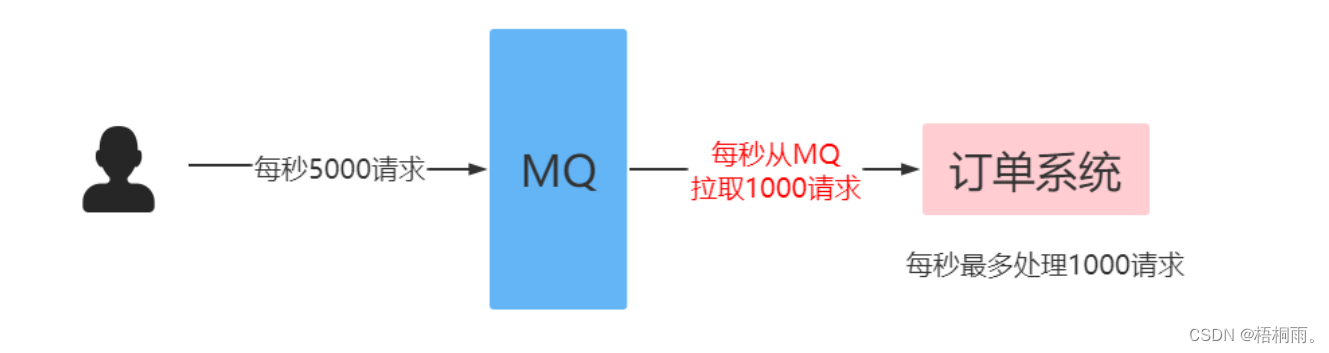
消费端限流 在rabbitmq中,使用消费端限流必须开启手动签收信息 过MQ可以对请求进行“削峰填谷”,即通过消费端限流的方式限制消息的拉取速度,达到保护消费端的目的。 生产者批量发送消息: Test public void testSendBatch() {…...

LeetCode--570. 至少有5名直接下属的经理
文章目录 1 题目描述2 测试用例3 解题思路3.1 解法 1 1 题目描述 表: Employee ---------------------- | Column Name | Type | ---------------------- | id | int | | name | varchar | | department | varchar | | managerId | in…...
Ubuntu20.04下安装Redis环境
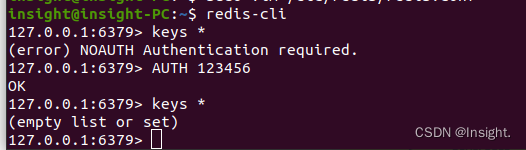
apt安装Redis环境 更新apt-get安装镜像源 安装Redis sudo apt-get install -y redis-server设置密码 # 编辑Redis的配置文件redis.conf,如果不知道配置文件的位置可以执行whereis redis.conf查看 sudo vim /etc/redis/redis.conf取消文件中的requirepass注释&am…...
什么是用户体验测试? 为什么很重要?
在当今数字化时代,用户体验(User Experience,简称UX)已经成为产品成功的关键因素之一。无论是应用程序、网站、硬件设备还是软件,提供出色的用户体验不仅能够吸引更多用户,还能够增加用户满意度,提高品牌忠诚度&#x…...

Android 图片翻面动画
一、需求描述 项目需要实现塔罗牌的翻面效果,需要点击图片后,图片实现翻面,并且翻面过程中,替换成图片资源,类似于扑克牌翻面。 二、实现思路 图片实现翻面效果,并且在动画执行到一半(刚好到图…...

如何恢复已删除的PDF文件?4个常用方法分享(含操作步骤)!
“不小心删除了一些比较重要的PDF文件,大家能不能帮帮忙呀?有没有方法可以恢复已经删除的PDF文件呢?” PDF文件在我们的日常工作和生活中扮演着重要的角色,我们可能经常都需要使用到它。但不可避免的是,我们在使用电脑…...
head first python 第一章-新代码更新pypi
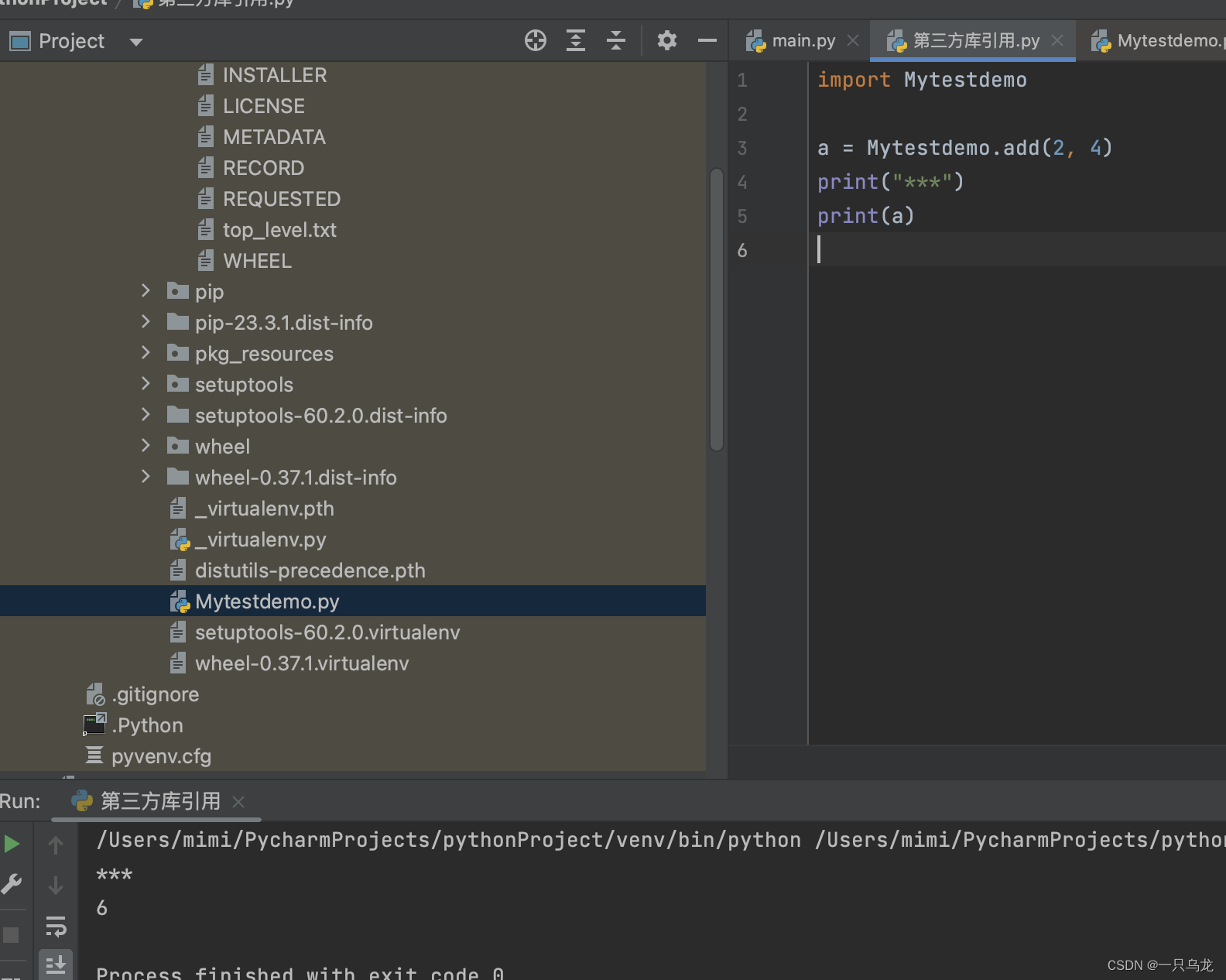
目录 第一步:了解目录结构 第三部分:实操 第一步:了解目录结构 目录结构如下,需要自己构建12345文件。 文件1:.pypirc [distutils] index-servers pypipypitest[pypi] #这里的[]内容需要和上面保持一致&am…...
mysql之备份和恢复
(一)备份 1、备份的种类 (1)完全备份:将整个数据库完整的进行备份 (2)增量备份:在完全备份的基础上,对后续新增的内容进行备份 2、备份的需求 (1&#x…...

【音视频 | Ogg】libogg库详细介绍以及使用——附带libogg库解析.opus文件的C源码
😁博客主页😁:🚀https://blog.csdn.net/wkd_007🚀 🤑博客内容🤑:🍭嵌入式开发、Linux、C语言、C、数据结构、音视频🍭 🤣本文内容🤣&a…...

如何使用群晖NAS的Audio Station结合内网穿透实现远程访问本地曲库
文章目录 本教程解决的问题是:按照本教程方法操作后,达到的效果是本教程使用环境:1 群晖系统安装audiostation套件2 下载移动端app3 内网穿透,映射至公网 很多老铁想在上班路上听点喜欢的歌或者相声解解闷儿,于是打开手…...

要在CentOS中安装Docker
要在CentOS中安装Docker,请按照以下步骤进行操作: 首先,确保系统已更新到最新版本。运行以下命令: sudo yum update接下来,安装需要的软件包以允许使用HTTPS进行软件包下载。运行以下命令: sudo yum ins…...

C语言完美演绎6-17
/* 范例:6-17 */#include <stdio.h>#include <conio.h>int main(){int a;printf("请输入你的分数(0-100)");scanf("%d",&a);if(a>0) if(a<100) printf("你输入的分数…...

Apache Paimon面试通关秘籍-快照机制深度解析
1. 快照机制:Paimon的时光机原理 第一次接触Paimon的快照功能时,我脑海中浮现的是《哆啦A梦》里的时光机——它能带你回到任意时间点查看数据的历史状态。这个看似简单的功能背后,其实藏着Paimon最核心的设计哲学。 快照本质上就是数据表在某…...
)
国产化服务器上,手把手教你用TongHttpServer V6.0搭建静态资源站(含麒麟/统信系统适配指南)
国产化环境实战:TongHttpServer V6.0静态资源站部署全攻略 在信创产业快速发展的背景下,国产化软硬件生态已逐步成熟。对于需要在国产CPU和操作系统环境中部署Web服务的工程师而言,选择一款性能优异且兼容性良好的国产Web服务器软件至关重要。…...

5大维度解析zteOnu:让ONU设备管理效率提升300%的开源工具
5大维度解析zteOnu:让ONU设备管理效率提升300%的开源工具 【免费下载链接】zteOnu A tool that can open ZTE onu device factory mode 项目地址: https://gitcode.com/gh_mirrors/zt/zteOnu 问题引入:网络运维工程师的日常困境 你是否也曾面临这…...

3分钟掌握:让IPA安装像微信传文件一样简单的IPA安装工具
3分钟掌握:让IPA安装像微信传文件一样简单的IPA安装工具 【免费下载链接】App-Installer On-device IPA installer 项目地址: https://gitcode.com/gh_mirrors/ap/App-Installer 在移动应用开发和测试过程中,如何高效分发和安装IPA文件一直是困扰…...

Windows右键菜单终极清理指南:3步让你的右键菜单重获新生
Windows右键菜单终极清理指南:3步让你的右键菜单重获新生 【免费下载链接】ContextMenuManager 🖱️ 纯粹的Windows右键菜单管理程序 项目地址: https://gitcode.com/gh_mirrors/co/ContextMenuManager 还在为每次右键点击文件时弹出的杂乱菜单而…...

关于统好 AI可持续发展三大趋势
问:如何理解统好 AI 的可持续发展趋势?答:统好 AI 的可持续发展,核心是技术、业务与运营长期适配,不追求短期迭代,而是围绕企业全生命周期需求构建稳定演进路径。绵阳统好软件有限公司以一体化底座为基础&a…...

告别电量焦虑:用Python+卡尔曼滤波手把手教你DIY一个高精度电池SOC估算器
告别电量焦虑:用Python卡尔曼滤波手把手教你DIY一个高精度电池SOC估算器 每次看到手机电量从20%突然跳到5%,或是电动工具在关键时刻罢工,你是否好奇工程师如何准确预测电池剩余容量?今天我们将用Python和卡尔曼滤波算法࿰…...

用噪音打破听觉恐怖谷:RTE 开发者社区发布 RealNoise™ TTS:全球首个原生合成动态声场的语音大模型
在过去的几年里,语音 AI 行业的内卷方向始终如一:更高的采样率、更低的延迟、更纯净的音质。我们不断训练模型去剔除哪怕最微小的背景杂音,追求实验室级别的完美信噪比(SNR)。 然而,当我们在真实的实时互动…...

RevokeMsgPatcher终极指南:Windows平台微信QQ防撤回与多开功能完整教程
RevokeMsgPatcher终极指南:Windows平台微信QQ防撤回与多开功能完整教程 【免费下载链接】RevokeMsgPatcher :trollface: A hex editor for WeChat/QQ/TIM - PC版微信/QQ/TIM防撤回补丁(我已经看到了,撤回也没用了) 项目地址: ht…...