
spring命名空间注入和XML自动装配、引入外部配置文件
Spring
- p命名空间注入
- util命名空间注入
- 基于XML的自动装配
- 根据名称自动装配
- Spring引入外部属性配置文件
p命名空间注入
作用:简化配置。
使用p命名空间注入的前提条件包括两个:
● 第一:在XML头部信息中添加p命名空间的配置信息:xmlns:p=“http://www.springframework.org/schema/p”
● 第二:p命名空间注入是基于setter方法的,所以需要对应的属性提供setter方法。
Customer.java
package com.w.spring6.bean;public class Customer {private String name;private int age;public void setName(String name) {this.name = name;}public void setAge(int age) {this.age = age;}@Overridepublic String toString() {return "Customer{" +"name='" + name + '\'' +", age=" + age +'}';}
}
spring-p.xml
<?xml version="1.0" encoding="UTF-8"?>
<beans xmlns="http://www.springframework.org/schema/beans"xmlns:xsi="http://www.w3.org/2001/XMLSchema-instance" xmlns:p="http://www.springframework.org/schema/p"xsi:schemaLocation="http://www.springframework.org/schema/beans http://www.springframework.org/schema/beans/spring-beans.xsd"><bean id="customerBean" class="com.w.spring6.bean.Customer" p:name="zhangsan" p:age="20"/></beans>
测试程序:
@Test
public void testP(){ApplicationContext applicationContext = new ClassPathXmlApplicationContext("spring-p.xml");Customer customerBean = applicationContext.getBean("customerBean", Customer.class);System.out.println(customerBean);
}
运行结果:

util命名空间注入
使用util命名空间可以让配置复用。
使用util命名空间的前提是:在spring配置文件头部添加配置信息。如下:
<?xml version="1.0" encoding="UTF-8"?>
<beans xmlns="http://www.springframework.org/schema/beans"xmlns:xsi="http://www.w3.org/2001/XMLSchema-instance"xmlns:util="http://www.springframework.org/schema/util"xsi:schemaLocation="http://www.springframework.org/schema/beans http://www.springframework.org/schema/beans/spring-beans.xsdhttp://www.springframework.org/schema/util http://www.springframework.org/schema/util/spring-util.xsd">
MyDataSource1.java
package com.w.spring6.jdbc;import java.util.Properties;public class MyDataSource1 {private Properties properties;public void setProperties(Properties properties) {this.properties = properties;}@Overridepublic String toString() {return "MyDataSource1{" +"properties=" + properties +'}';}
}
MyDataSource2.java
package com.w.spring6.jdbc;import java.util.Properties;public class MyDataSource2 {private Properties properties;public void setProperties(Properties properties) {this.properties = properties;}@Overridepublic String toString() {return "MyDataSource2{" +"properties=" + properties +'}';}
}
spring-util.xml
<?xml version="1.0" encoding="UTF-8"?>
<beans xmlns="http://www.springframework.org/schema/beans"xmlns:xsi="http://www.w3.org/2001/XMLSchema-instance" xmlns:util="http://www.springframework.org/schema/util"xsi:schemaLocation="http://www.springframework.org/schema/beans http://www.springframework.org/schema/beans/spring-beans.xsd http://www.springframework.org/schema/util https://www.springframework.org/schema/util/spring-util.xsd"><util:properties id="prop"><prop key="driver">com.mysql.cj.jdbc.Driver</prop><prop key="url">jdbc:mysql://localhost:3306/spring</prop><prop key="username">root</prop><prop key="password">123456</prop></util:properties><bean id="dataSource1" class="com.w.spring6.jdbc.MyDataSource1"><property name="properties" ref="prop"/></bean><bean id="dataSource2" class="com.w.spring6.jdbc.MyDataSource2"><property name="properties" ref="prop"/></bean></beans>
测试程序:
@Test
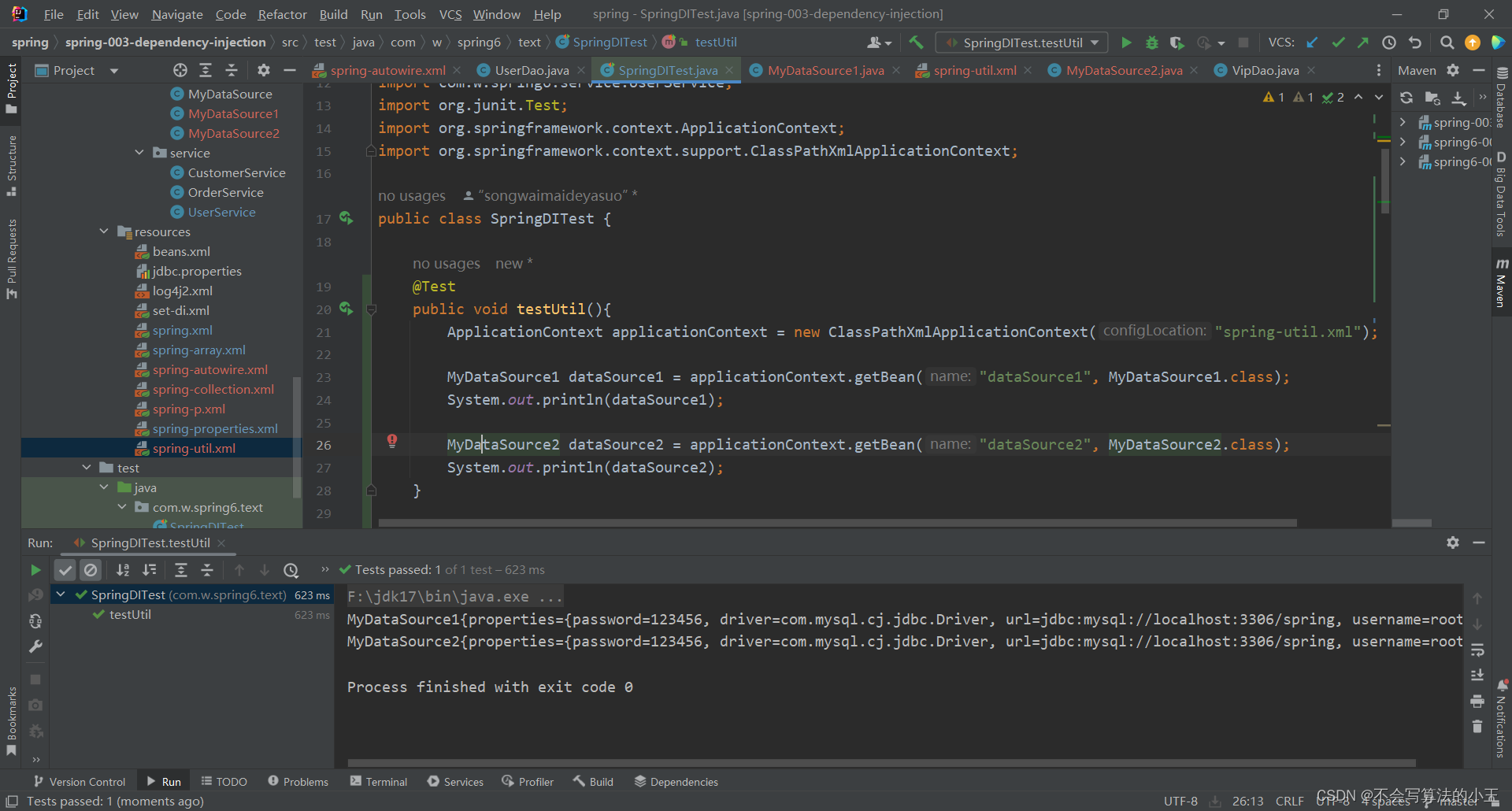
public void testUtil(){ApplicationContext applicationContext = new ClassPathXmlApplicationContext("spring-util.xml");MyDataSource1 dataSource1 = applicationContext.getBean("dataSource1", MyDataSource1.class);System.out.println(dataSource1);MyDataSource2 dataSource2 = applicationContext.getBean("dataSource2", MyDataSource2.class);System.out.println(dataSource2);
}
基于XML的自动装配
Spring还可以完成自动化的注入,自动化注入又被称为自动装配。它可以根据名字进行自动装配,也可以根据类型进行自动装配。
根据名称自动装配
UserDao.java
package com.w.spring6.dao;import org.slf4j.Logger;
import org.slf4j.LoggerFactory;public class UserDao {private static final Logger logger= LoggerFactory.getLogger(UserDao.class);public void insert(){//System.out.println("数据库正在保存信息");logger.info("数据库正在保存信息");}}
VipDao.java
package com.w.spring6.dao;import org.slf4j.Logger;
import org.slf4j.LoggerFactory;public class VipDao {private static final Logger logger= LoggerFactory.getLogger(VipDao.class);public void insert(){logger.info("数据库正在保存vip信息");}
}
UserService.java
package com.w.spring6.service;import com.w.spring6.dao.UserDao;
import com.w.spring6.dao.VipDao;public class UserService {private UserDao userDao;private VipDao vipDao;//    public void setAbc(VipDao vipDao){
//        this.vipDao=vipDao;
//    }public void setVipDao(VipDao vipDao){this.vipDao=vipDao;}//set注入的话,必须提供一个set方法//spring容器会调用这个set方法,来给userDao赋值
/*    //自己写的不符合javabean规范public void setMySQLUserDao(UserDao xyz){this.userDao=xyz;}*///idea自动生成的符合javabean规范public void setUserDao(UserDao userDao) {this.userDao = userDao;}public void saveUser(){userDao.insert();vipDao.insert();}
}
spring-autowire.xml
<?xml version="1.0" encoding="UTF-8"?>
<beans xmlns="http://www.springframework.org/schema/beans"xmlns:xsi="http://www.w3.org/2001/XMLSchema-instance"xsi:schemaLocation="http://www.springframework.org/schema/beans http://www.springframework.org/schema/beans/spring-beans.xsd"><bean id="userService" class="com.w.spring6.service.UserService" autowire="byName"/><bean id="userDao" class="com.w.spring6.dao.UserDao"/><bean id="vipDao" class="com.w.spring6.dao.VipDao"/></beans>
测试程序:
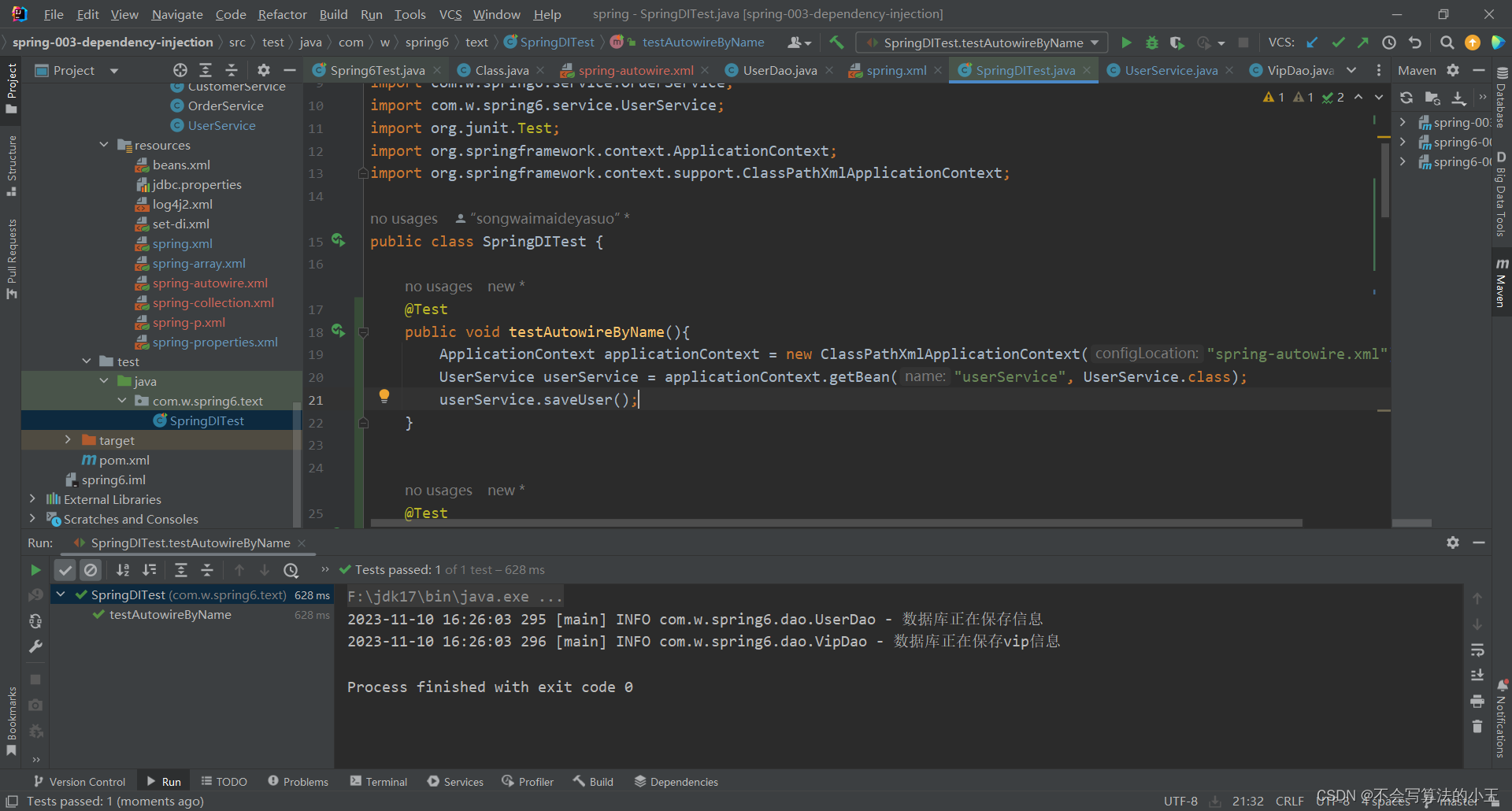
@Testpublic void testAutowireByName(){ApplicationContext applicationContext = new ClassPathXmlApplicationContext("spring-autowire.xml");UserService userService = applicationContext.getBean("userService", UserService.class);userService.saveUser();}
运行结果:
Spring引入外部属性配置文件
在类路径下新建jdbc.properties文件,并配置信息
driver=com.mysql.cj.jdbc.Driver
url=jdbc:mysql://localhost:3306/spring
username=root
password=123456
在spring配置文件中引入context命名空间,配置使用jdbc.properties文件
<?xml version="1.0" encoding="UTF-8"?>
<beans xmlns="http://www.springframework.org/schema/beans"xmlns:xsi="http://www.w3.org/2001/XMLSchema-instance"xmlns:context="http://www.springframework.org/schema/context"xsi:schemaLocation="http://www.springframework.org/schema/beans http://www.springframework.org/schema/beans/spring-beans.xsdhttp://www.springframework.org/schema/context http://www.springframework.org/schema/context/spring-context.xsd">
<!--
引入外部的properties文件
第一步:引入context命名空间
第二步:使用标签location属性来指定属性配置文件的路径--><context:property-placeholder location="jdbc.properties"/><bean id="dataSource" class="com.w.spring6.jdbc.MyDataSource"><property name="driver" value="${jdbc.driverClass}"></property><property name="url" value="${jdbc.url}"></property><property name="username" value="${jdbc.username}"></property><property name="password" value="${jdbc.password}"></property></bean></beans>
相关文章:
spring命名空间注入和XML自动装配、引入外部配置文件
Spring p命名空间注入util命名空间注入基于XML的自动装配根据名称自动装配 Spring引入外部属性配置文件 p命名空间注入 作用:简化配置。 使用p命名空间注入的前提条件包括两个: ● 第一:在XML头部信息中添加p命名空间的配置信息:…...
【2024年11月份--2024精灵云校招C++笔试题】
考试形式 笔试考了三道算法题,笔试形式为阅读题目,然后用中文给出算法思路,最后给出算法例程,分数各占一半,简单,中等,复杂各一道题。我看9月份有人也是考这3道题,一模一样。 第…...
Visual Studio 2019下编译OpenCV 4.7 与OpenCV 4.7 contrib
一、环境 使用的环境是Win10,Visual Studio 2019,Cmake3.28,cdua 11.7,cudnn 8.5,如果只是在CPU环境下使用,则不用安装CUDA。要使用GPU处理,安装好CUDA之后,要测试安装的CUDA是否能用。不能正常使用的话,添加一下系统…...
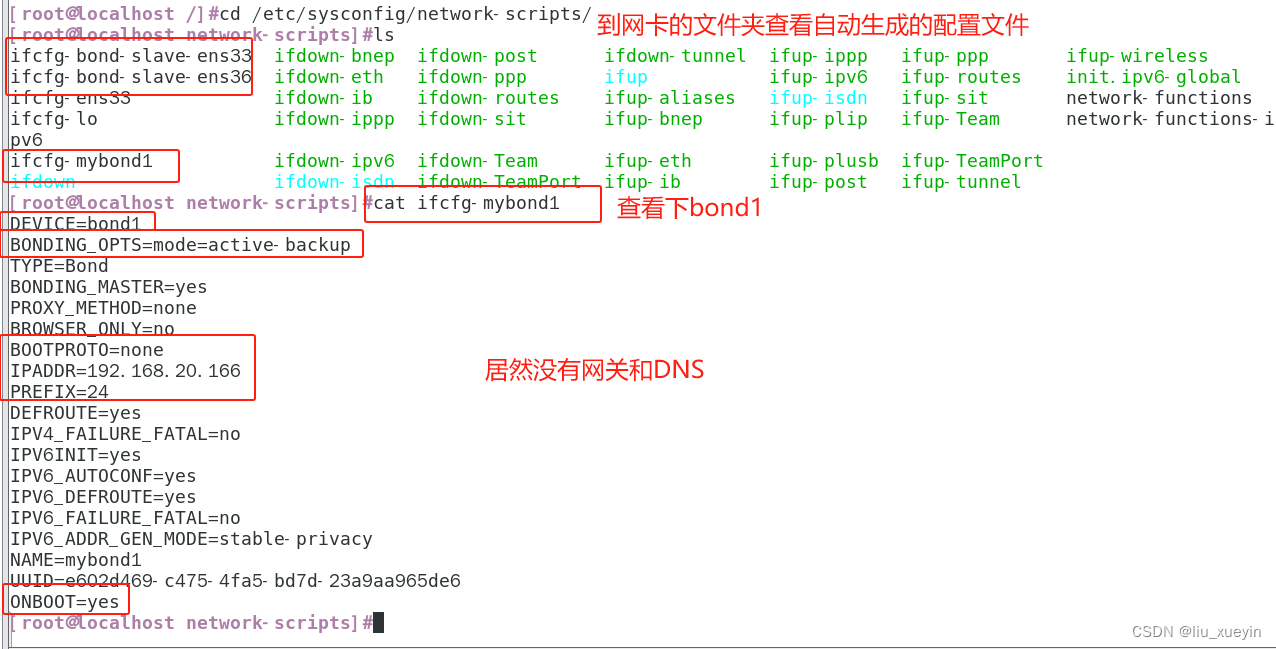
【Linux网络】系统调优之聚合链路bonding,可以实现高可用和负载均衡
一、什么是多网卡绑定 二、聚合链路的工作模式 三、实操创建bonding设备(mode1) 1、实验 2、配置文件解读 3、查看bonding状态,验证bonding的高可用效果 三、nmcli实现bonding 一、什么是多网卡绑定 将多块网卡绑定同一IP地址对外提供服务…...
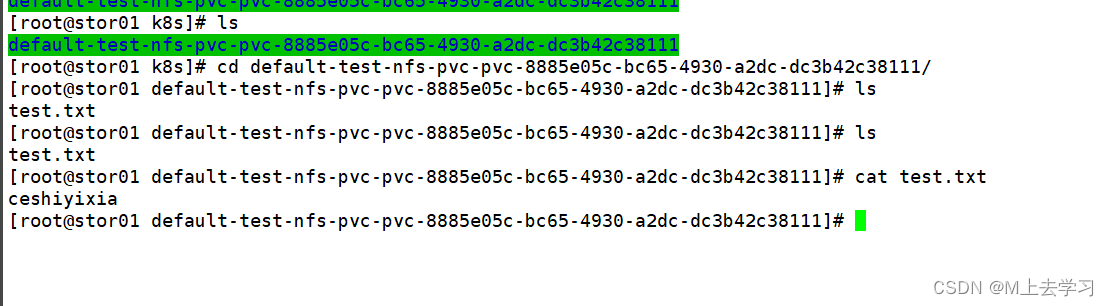
k8s持久化存储PV、PVC
容器磁盘上的文件的生命周期是短暂的,这就使得在容器中运行重要应用时会出现一些问题。首先,当容器崩溃时,kubelet 会重启它,但是容器中的文件将丢失——容器以干净的状态(镜像最初的状态)重新启动。其次&a…...
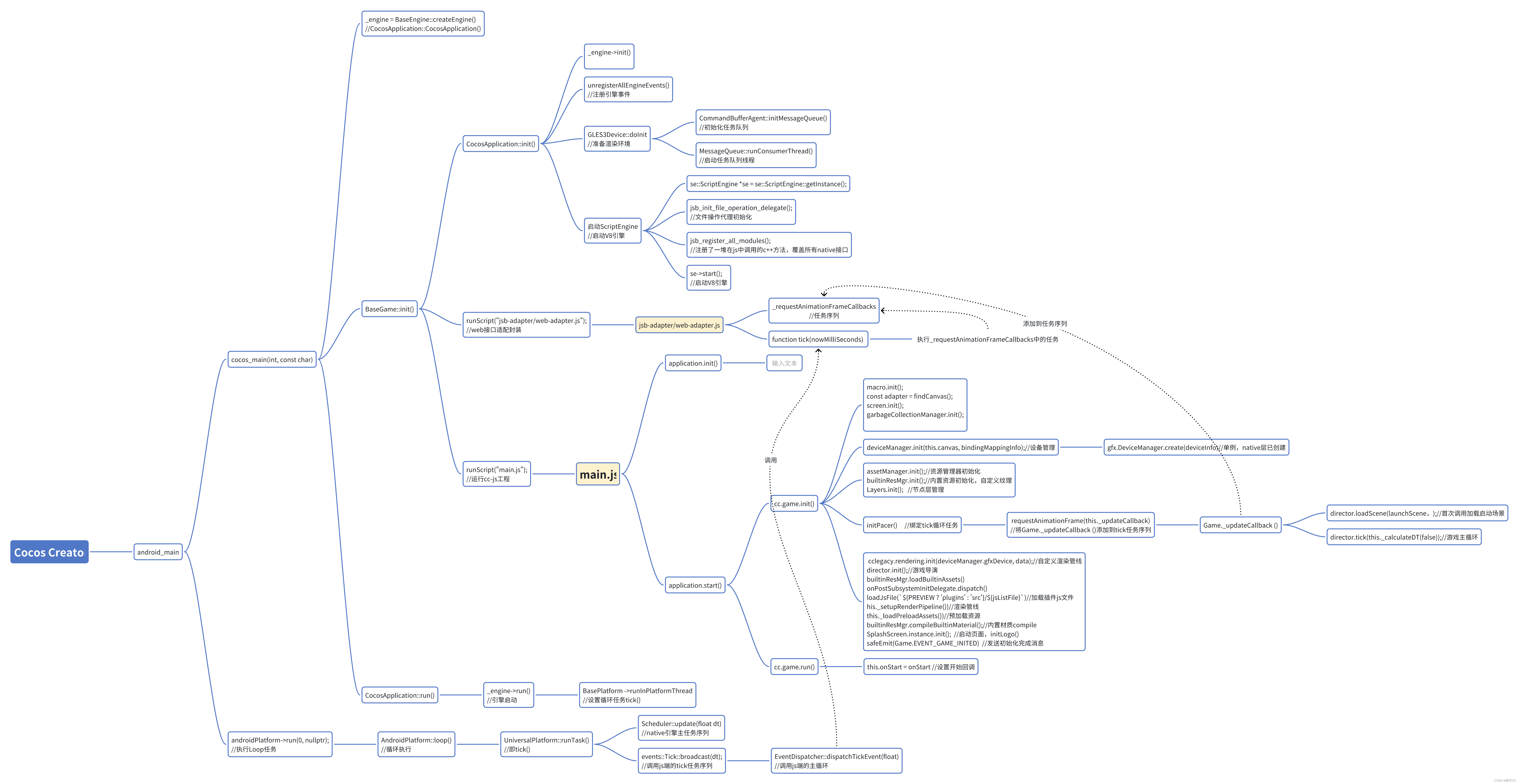
CocosCreator3.8原生引擎源码研究
1. Cocos Creator引擎架构图 2. 原始引擎源码流程图 下图中包含Android native层引擎到js适配层的启动和主循环的启用流程和必要说明,本猿比较懒,暂时不细述了,各位看官直接看图吧,还在细化扩充,后续逐渐更新。。。 版…...

高二英语上
unit 1 1.yarn三种意思 1.码; 2.庭院,天井; 3.花园;down**down 在这里是介词,也可以作副词,与 down 相对的是 up。请比较下列两句: 1.Look! Hes driving down the street . 2.Look! Hes driving up the street .这两例…...
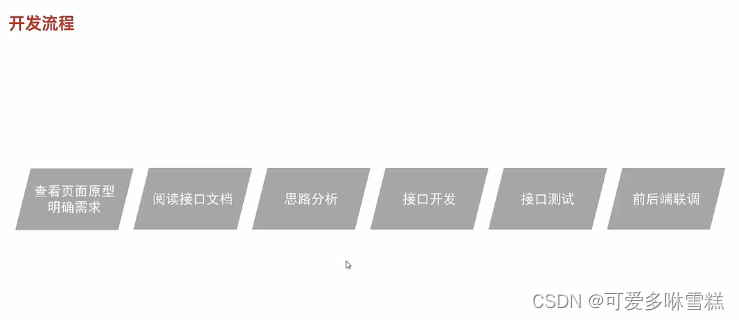
JavaWeb Day10 案例 准备工作
目录 一、需求说明 二、环境搭建 (一)数据库 (二)后端 ①controller层 1.DeptController.java 2.EmpController.java ②mapper层 1.DeptMapper.java 2.EmpMapper.java ③pojo层 1.Dept.java 2.Emp.jav…...
Nginx:不同域名访问同一台机器的不同项目
Nginx很简单就可以解决同一台机器同时跑两个或者多个项目,而且都通过域名从80端口走。 以Windows环境下nginx服务为例,配置文件nginx.conf中,http中加上 include /setup/nginx-1.20.1/conf/conf.d/*.conf;删除server部分,完整如…...
:new数组时元素个数自动推到)
C++(20):new数组时元素个数自动推到
C20在new数组时可以根据初始化列表,自动推到元素个数: #include <iostream> using namespace std;int main() {int *pd new int[]{1,2,3,4};for(auto i 0; i < 4; i){cout<<pd[i]<<endl;}return 0; }运行程序输出: 1…...
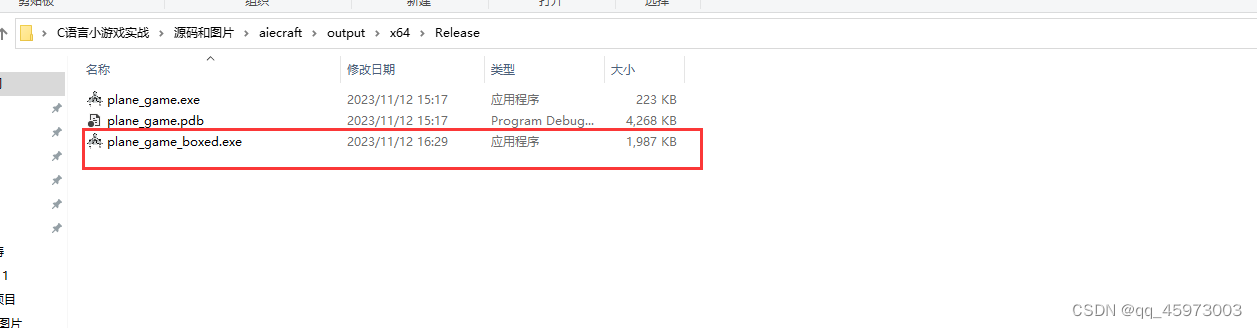
使用visualStudio发布可执行文件
编译成功后会在程序项目的路径下创建一个debug文件夹和一个release文件夹 文件夹中的具体文件入下所示 生成32位的可执行文件 32位的可执行文件可以在64位的计算机中执行,而64位的操作系统程序只能在64位的计算机中执行安装运行库的安装包根据电脑的版本选择合适的…...
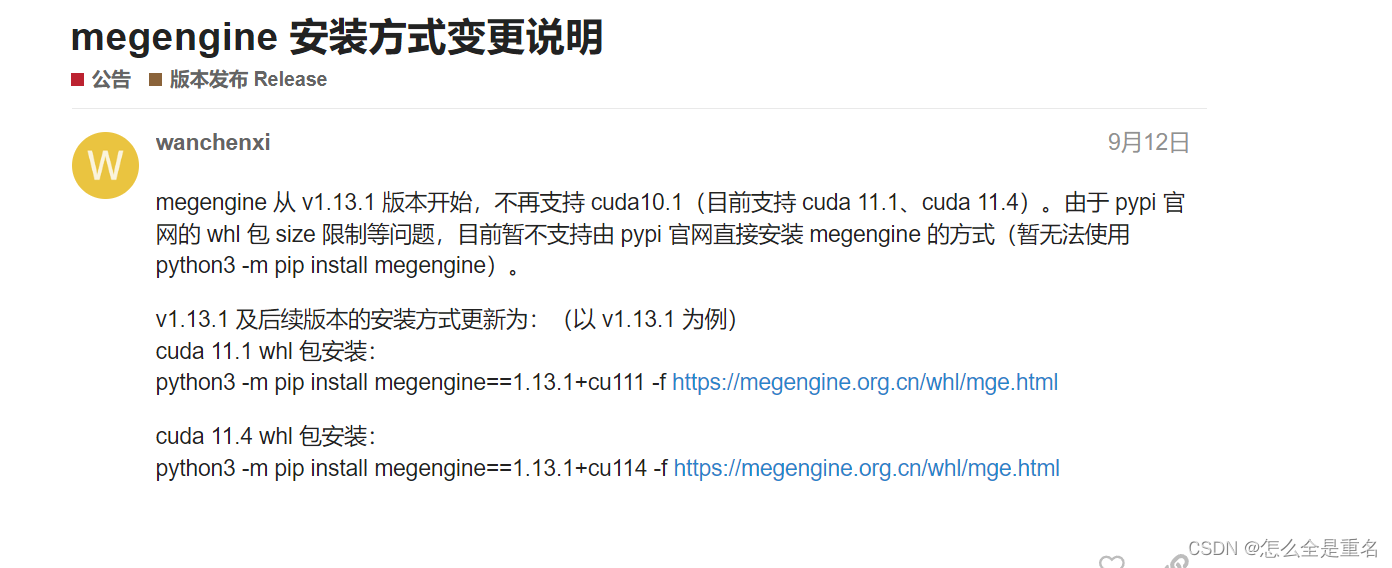
yolo系列报错(持续补充ing)
文章目录 export GIT_PYTHON_REFRESHquiet解决 没有pt权重文件解决 python文件路径报错解决 读取文件列名报错解决 导入不同文件夹出错解决 megengine没有安装解决然后你发现它竟然还没有用 export GIT_PYTHON_REFRESHquiet 设置环境变量 GIT_PYTHON_REFRESH ,这个…...
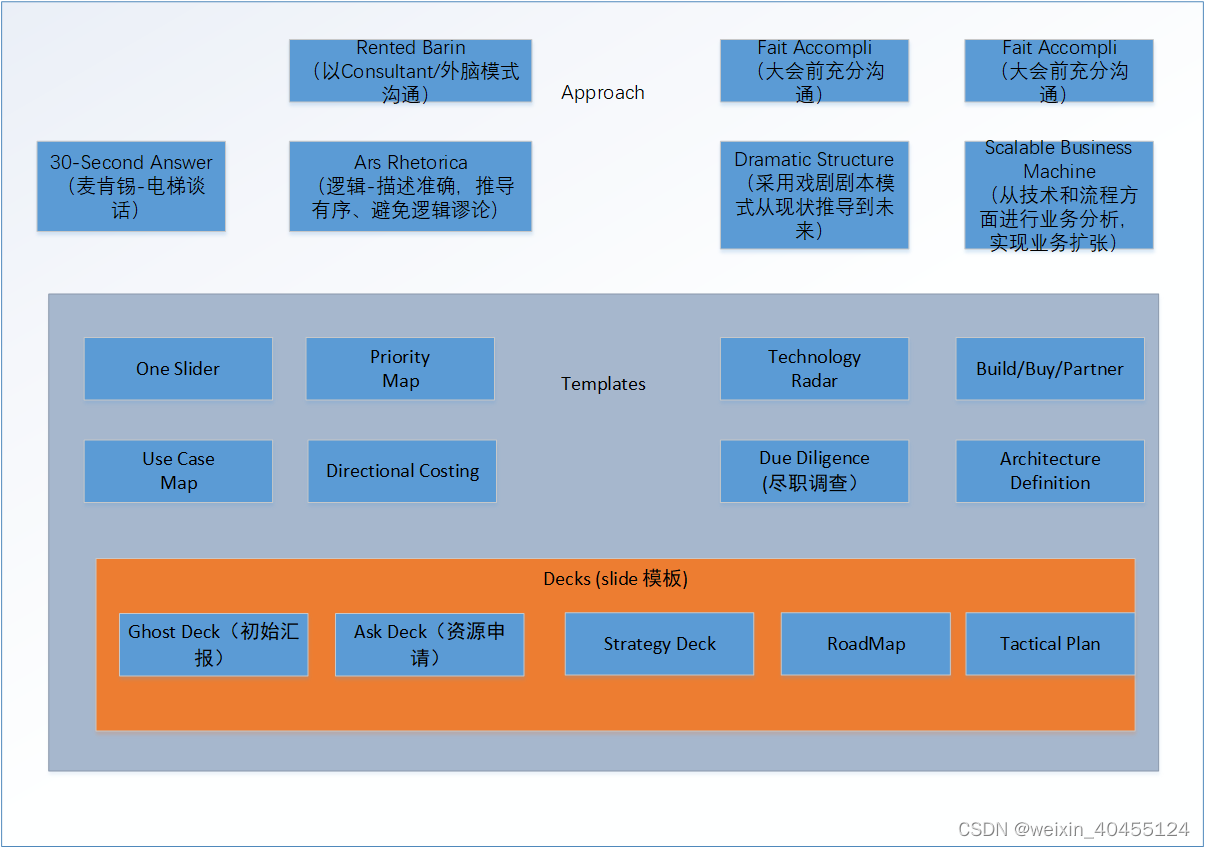
Technology Strategy Patterns 学习笔记9 - bringing it all together
1 Patterns Map 2 Creating the Strategy 2.1 Ansoff Growth Matrix 和owth-share Matrix 区别参见https://fourweekmba.com/bcg-matrix-vs-ansoff-matrix/ 3 Communicating...
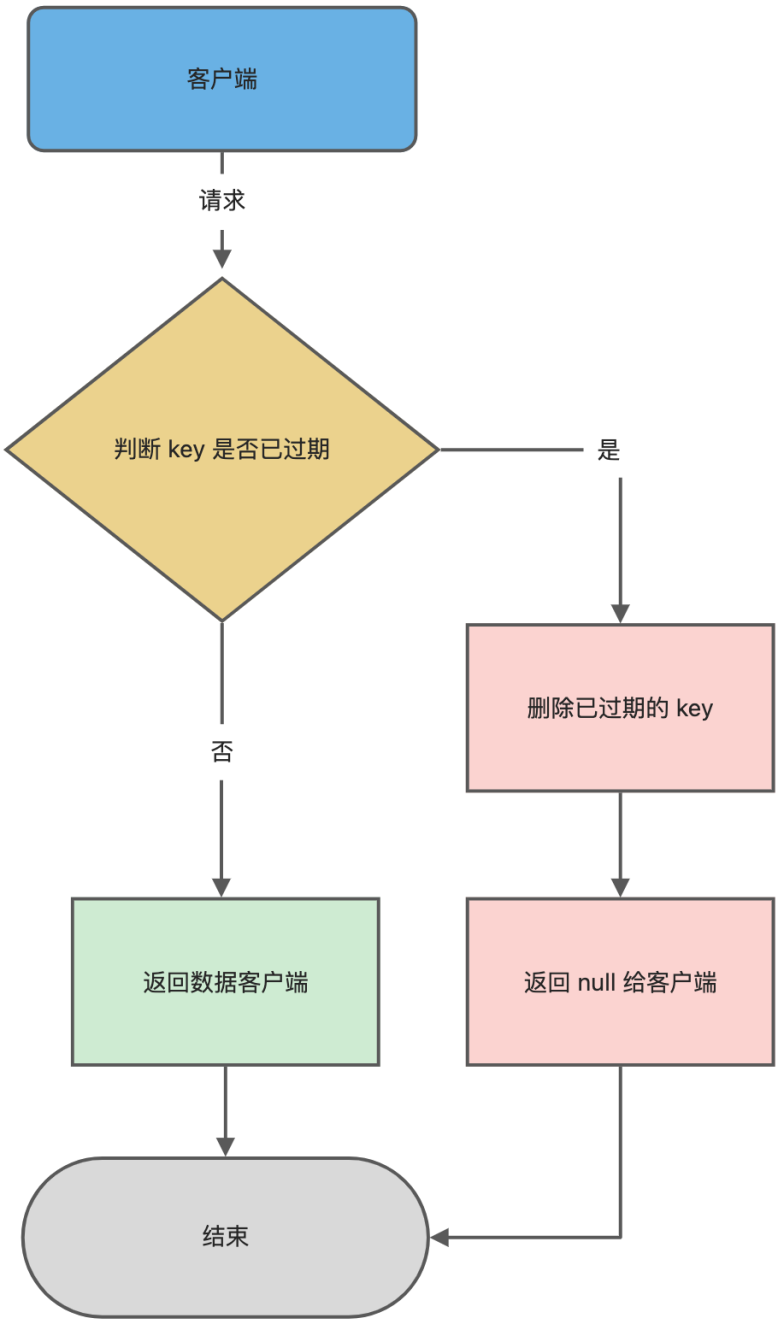
Redis(12)| 过期删除策略和内存淘汰策略
Redis 是可以对 key 设置过期时间的,因此需要有相应的机制将已过期的键值对删除,而做这个工作的就是过期键值删除策略。 如何设置过期时间 先说一下对 key 设置过期时间的命令。 设置 key 过期时间的命令一共有 4 个: expire key n&#x…...
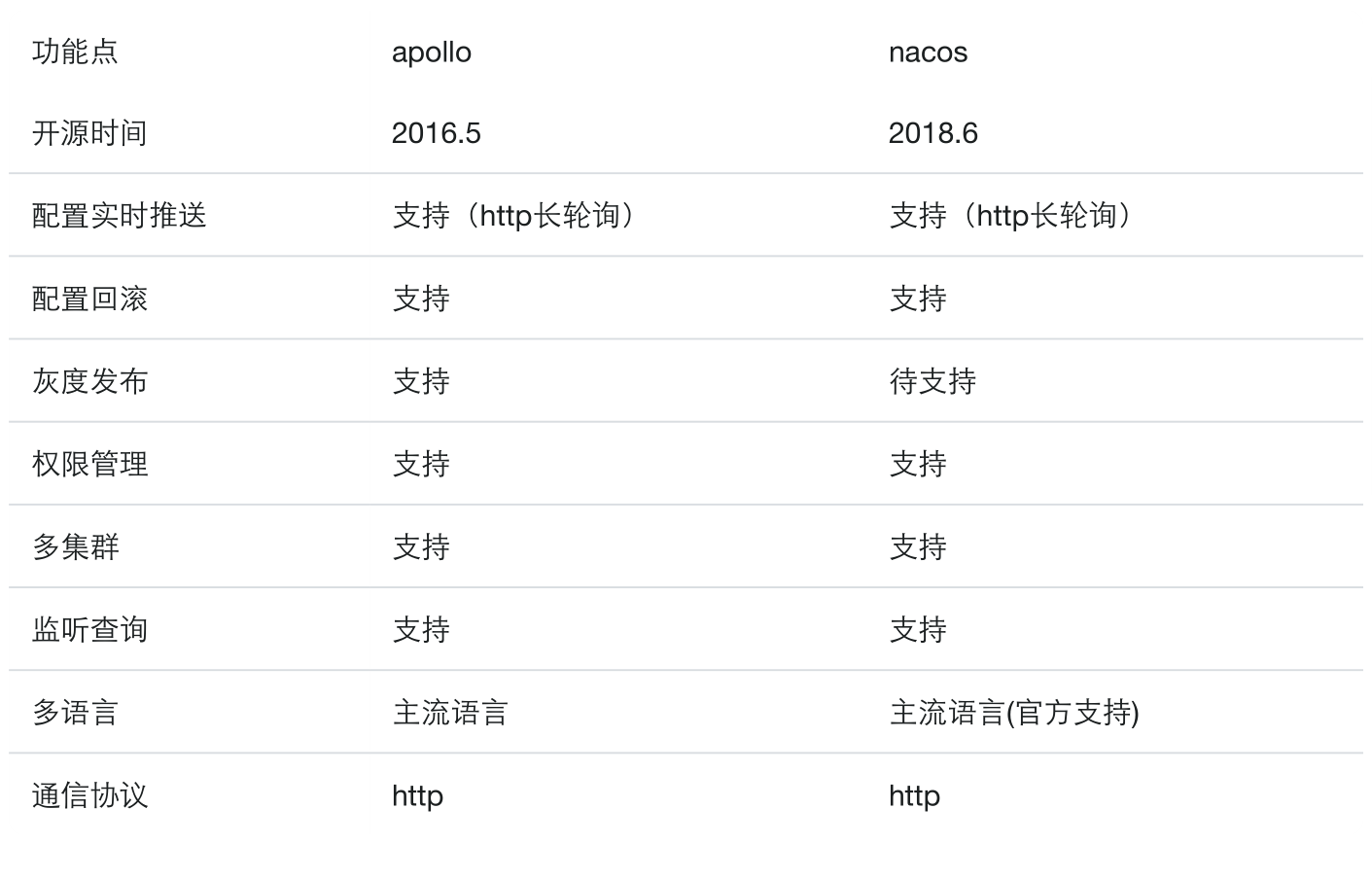
Go-服务注册和发现,负载均衡,配置中心
文章目录 什么是服务注册和发现技术选型 Consul 的安装和配置1. 安装2. 访问3. 访问dns Consul 的api接口go操作consulgrpc下的健康检查grpc的健康检查规范动态获取可用端口号 负载均衡策略1. 什么是负载均衡2. 负载均衡策略1. 集中式load balance2. 进程内load balance3. 独立…...
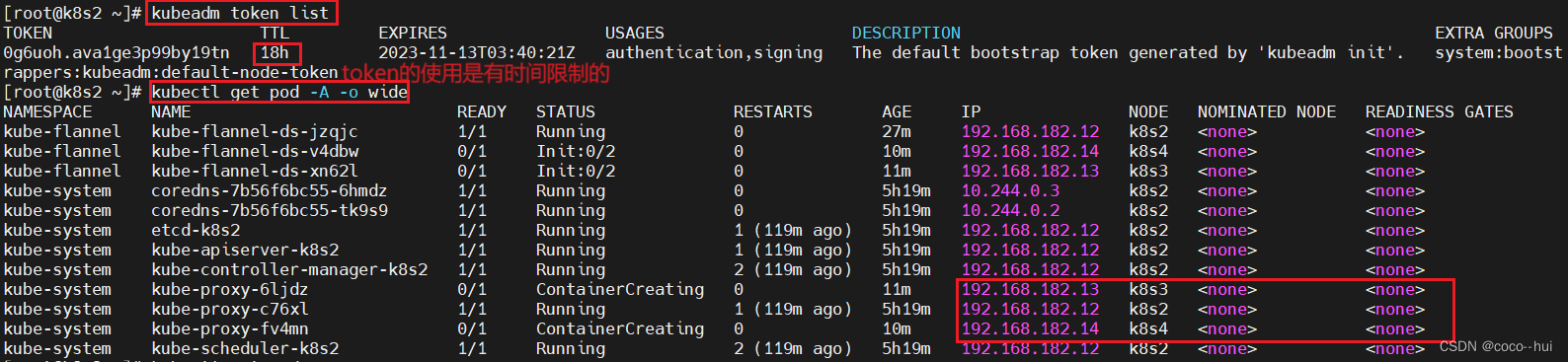
k8s-实验部署 1
1、k8s集群部署 更改所有主机名称和解析 开启四台实验主机,k8s1 仓库;k8s2 集群控制节点; k8s3 和k8s4集群工作节点; 集群环境初始化 使用k8s1作为仓库,将所有的镜像都保存在本地,不要将集群从外部走 仓库…...

Git的原理与使用(一)
目录 Git初始 Git安装 Git基本操作 创建git本地仓库 配置git 工作区,暂存区,版本库 添加文件,提交文件 查看.git文件 修改文件 版本回退 小结 Git初始 git是一个非常强大的版本控制工具.可以快速的将我们的文档和代码等进行版本管理. 下面这个实例看理解下为什么需…...
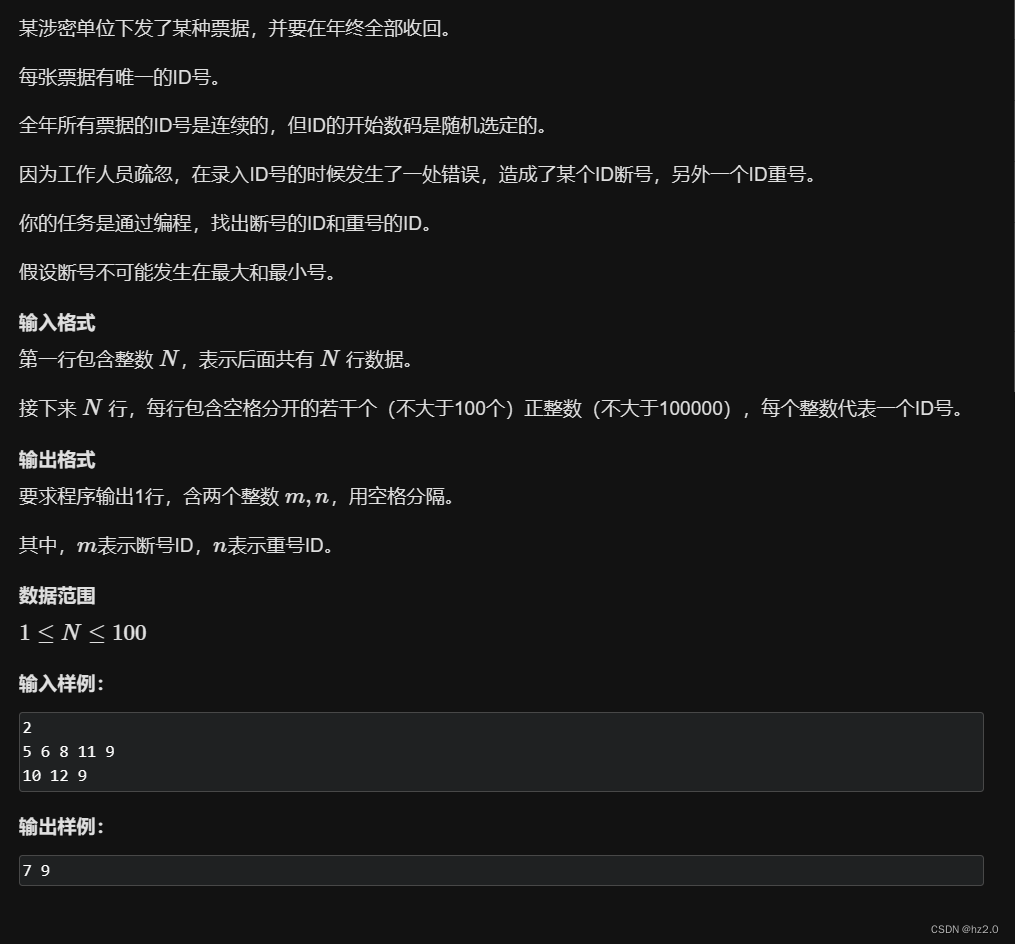
1204. 错误票据
题目: 1204. 错误票据 - AcWing题库 思路: 将输入的数据存入数组,从小到大排序后遍历,若 (a[i] a[i - 1])res1 a[i]--->重号;若(a[i] - a[i - 1] > 2)res2 a[i] - 1--->断号。 难点:题目只告诉我们输入…...
uniapp中在组件中使用被遮挡或层级显示问题
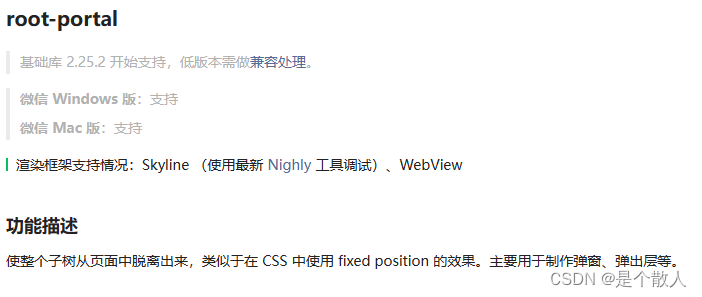
uniapp中在组件中使用或croll-view标签内使用uni-popup在真机环境下会被scroll-view兄弟元素遮挡,在开发环境下和安卓系统中可以正常显示,但在ios中出现了问题 看了许多文章都没有找到问题的原因,最后看到这一个文章http://t.csdnimg.cn/pvQ…...
windows下安装es及logstash、kibna
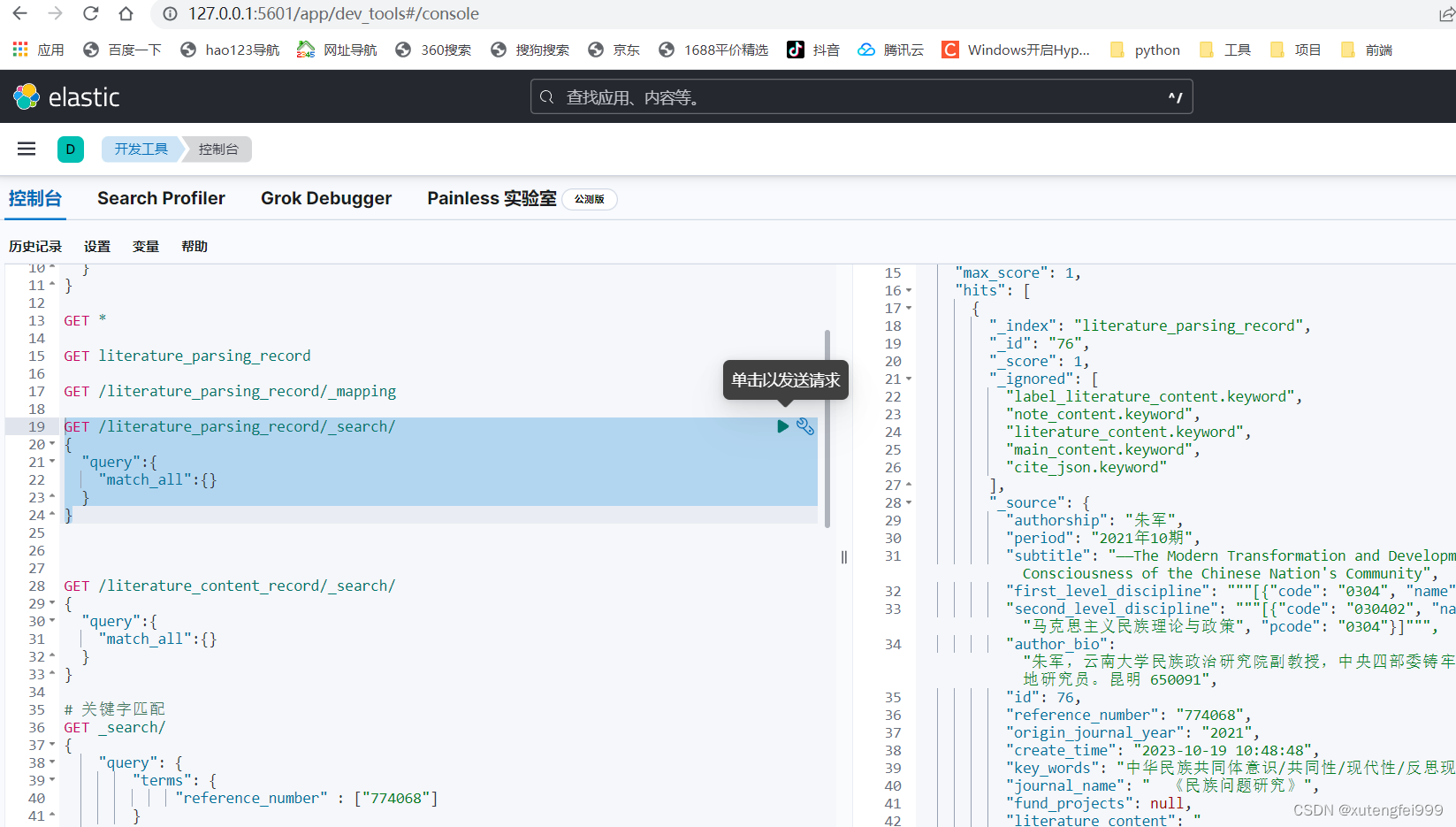
1、安装包下载 elasticsearch https://www.elastic.co/cn/downloads/past-releases#elasticsearch kibana安装包地址: https://www.elastic.co/cn/downloads/past-releases/kibana-8-10-4 logstash安装包地址: https://www.elastic.co/cn/downloads/past…...

Burpsuite插件Galaxy实战:5分钟搞定FastAPI接口的DES-CBC加解密调试
Burpsuite插件Galaxy实战:5分钟搞定FastAPI接口的DES-CBC加解密调试 当你面对一个采用DES-CBC加密的FastAPI接口时,是否曾为无法直接查看和修改请求内容而头疼?作为安全测试工程师或Web开发者,快速解析加密流量是日常工作中的关键…...

如何快速设置Plaid开发环境:连接银行账户获取交易数据的终极教程
如何快速设置Plaid开发环境:连接银行账户获取交易数据的终极教程 【免费下载链接】build-your-own-mint Build your own personal finance analytics using Plaid, Google Sheets and CircleCI. 项目地址: https://gitcode.com/gh_mirrors/bu/build-your-own-mint…...

告别固定指纹:手把手教你修改Chromium源码,实现TLS JA4指纹随机化
深度定制Chromium:实现TLS JA4指纹动态随机化的完整实践指南 在当今高度监控的网络环境中,浏览器指纹识别已成为追踪用户行为的主要手段之一。TLS JA4指纹作为新一代网络指纹技术,能够通过分析客户端在SSL/TLS握手阶段提供的加密套件顺序来唯…...

AudioLDM-S实战:快速生成机械键盘声、猫咪呼噜,小白轻松上手
AudioLDM-S实战:快速生成机械键盘声、猫咪呼噜,小白轻松上手 想不想自己动手,创造出那些只在电影、游戏里听到的逼真音效?比如,清脆的机械键盘敲击声、猫咪满足的呼噜声,或是雨林深处的自然白噪音。以前这…...

Navicat试用期重置终极指南:3步免费延长数据库工具使用时间
Navicat试用期重置终极指南:3步免费延长数据库工具使用时间 【免费下载链接】navicat-premium-reset-trial Reset macOS Navicat Premium 15/16/17 app remaining trial days 项目地址: https://gitcode.com/gh_mirrors/na/navicat-premium-reset-trial Navi…...

SSM框架在零售业数字化转型中的实践:超市管理系统全流程解析
1. 为什么零售业需要数字化转型? 最近几年我走访了不少中小型超市,发现一个共同痛点:很多老板还在用纸质小本本记录进货和销售数据,月底对账时经常出现"货卖完了但钱对不上"的情况。有个开社区超市的张老板跟我吐槽&am…...
)
别再只用关键词搜索了!用Sentence Transformers给你的RAG系统做个‘语义检索’升级(附Python代码)
语义检索革命:用Sentence Transformers重构RAG系统的核心引擎 当开发者第一次接触RAG系统时,往往会被其看似简单的架构所迷惑——不就是检索加生成吗?但真正投入实战后,90%的人都会在第一个月遇到相同的问题:为什么系统…...

[RKNN] 零拷贝接口:从原理到实践的性能优化指南
1. 为什么需要零拷贝接口 第一次接触RKNN零拷贝接口时,我正为一个智能摄像头项目焦头烂额。当时用通用接口跑YOLOv5模型,帧率始终卡在15FPS上不去。直到把代码改成零拷贝版本,帧率直接飙到28FPS——这个性能提升让我彻底理解了零拷贝的价值。…...

PPIO上线GLM-5.1:面向8小时级长程任务的开源SOTA模型
今天,PPIO 上线 GLM-5.1。GLM-5.1 是智谱新一代的旗舰级智能体工程模型,其编码能力比上一代产品显著增强。GLM-5.1 在 SWE-Bench Pro 测试中取得了最先进的性能,并在 NL2Repo(代码库生成)和 Terminal-Bench 2.0&#x…...

Wand-Enhancer:彻底解锁WeMod专业功能的终极解决方案
Wand-Enhancer:彻底解锁WeMod专业功能的终极解决方案 【免费下载链接】Wand-Enhancer Advanced UX and interoperability extension for Wand (WeMod) app 项目地址: https://gitcode.com/gh_mirrors/we/Wand-Enhancer Wand-Enhancer是一款专为WeMod游戏辅助…...