
react源码分析:组件的创建和更新
这一章节就来讲讲ReactDOM.render()方法的内部实现与流程吧。
因为初始化的源码文件部分所涵盖的内容很多,包括创建渲染、更新渲染、Fiber树的创建与diff,element的创建与插入,还包括一些优化算法,所以我就整个的React执行流程画了一个简单的示意图。
React源码执行流程图
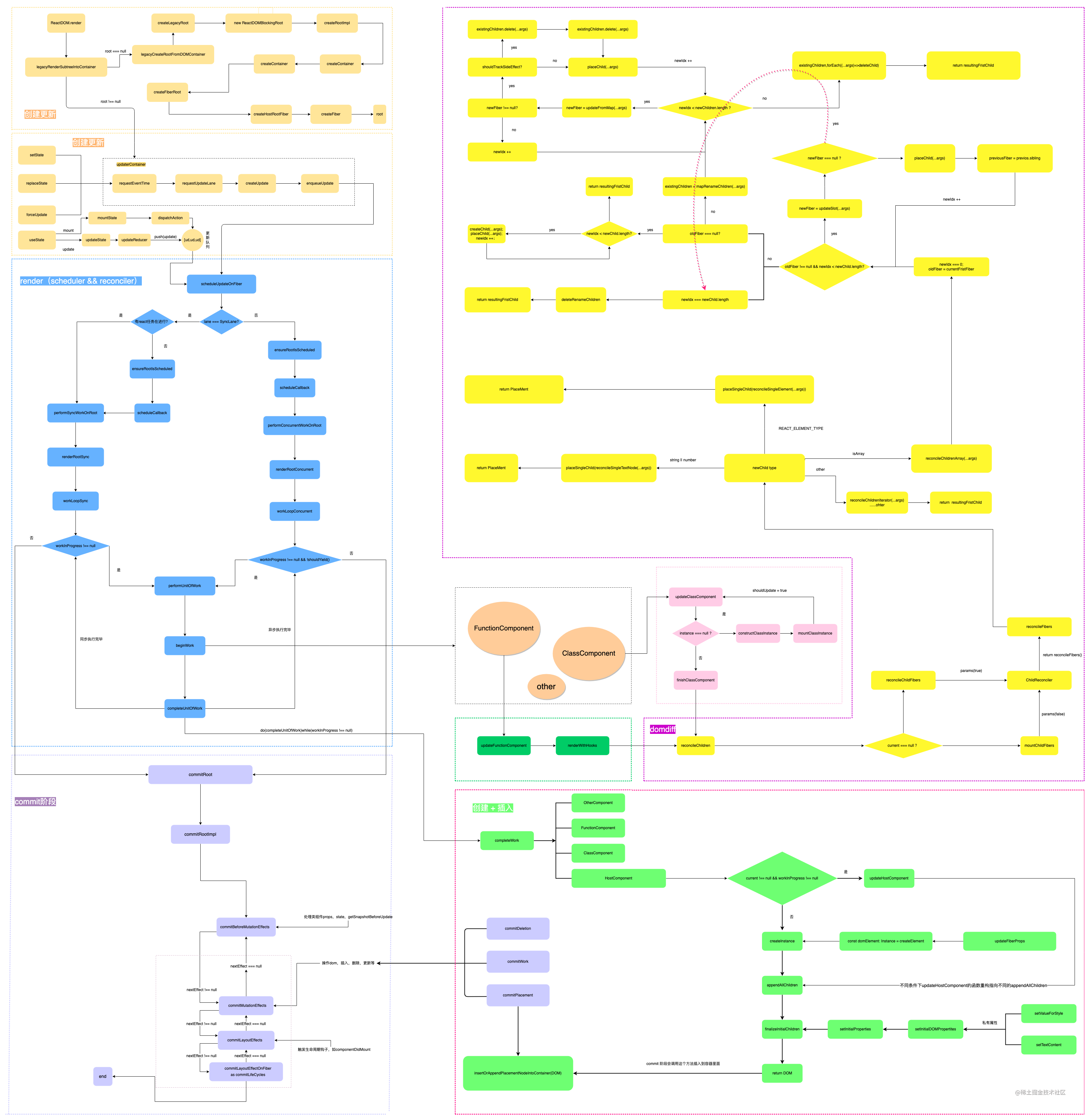
从图中我们很清晰的看到ReactDOM.render()之后我们的组件具体干了什么事情,那么我们进入源码文件一探究竟吧。
// packages/react-dom/src/client/ReactDOMLegacy.js
export function render(element: React$Element<any>, // 经过babel解析后的elementcontainer: Container, // 根组件节点: document.getElementById('root')..callback: ?Function,// 回调
) {// 做合法容器的验证(根组件)invariant(isValidContainer(container),'Target container is not a DOM element.',);// 开发模式下if (__DEV__) {const isModernRoot =isContainerMarkedAsRoot(container) &&container._reactRootContainer === undefined;if (isModernRoot) {console.error('You are calling ReactDOM.render() on a container that was previously ' +'passed to ReactDOM.createRoot(). This is not supported. ' +'Did you mean to call root.render(element)?',);}}// 返回 legacyRenderSubtreeIntoContainerreturn legacyRenderSubtreeIntoContainer(null,element,container,false,callback,);
}
所以当前render函数仅仅只是做了部分逻辑,阅读React源码,给你一个直观的感受就是他拆分的颗粒度非常的细,很多重复命名的函数,可能是见名知意的变量名只有那么几个常见的组合吧,这也是React作者的用心良苦吧。
追根究底我们还是得看一看legacyRenderSubtreeIntoContainer究竟干了些不为人知的事情呢
legacyRenderSubtreeIntoContainer
function legacyRenderSubtreeIntoContainer(parentComponent: ?React$Component<any, any>, // 父级组件children: ReactNodeList, // 当前元素container: Container, // 容器 eg:getElementById('root')forceHydrate: boolean,  callback: ?Function,
) {if (__DEV__) {topLevelUpdateWarnings(container);warnOnInvalidCallback(callback === undefined ? null : callback, 'render');}// TODO: Without `any` type, Flow says "Property cannot be accessed on any// member of intersection type." Whyyyyyy.let root: RootType = (container._reactRootContainer: any);let fiberRoot;// 如果有根组件,表示不是初始化渲染,则走下面的批量更新// 没有根组件,那么就要去创建根组件了if (!root) {// 初始化挂载root = container._reactRootContainer = legacyCreateRootFromDOMContainer(container,forceHydrate,);fiberRoot = root._internalRoot;if (typeof callback === 'function') {const originalCallback = callback;callback = function() {const instance = getPublicRootInstance(fiberRoot);originalCallback.call(instance);};}// 不必要的批量更新unbatchedUpdates(() => {updateContainer(children, fiberRoot, parentComponent, callback);});} else {fiberRoot = root._internalRoot;if (typeof callback === 'function') {const originalCallback = callback;callback = function() {const instance = getPublicRootInstance(fiberRoot);originalCallback.call(instance);};}// 批量更新updateContainer(children, fiberRoot, parentComponent, callback);}return getPublicRootInstance(fiberRoot);
}
- 有根节点的情况下,我们判定为非首次渲染状态,执行
updateContainer - 没有根节点的情况下,我们判定为首次渲染,接着去创建根节点,执行
legacyCreateRootFromDOMContainer,拿到了root之后,我们会去触发执行updateContainer
legacyCreateRootFromDOMContainer
function legacyCreateRootFromDOMContainer(container: Container, // 容器forceHydrate: boolean, // value:false
): RootType {const shouldHydrate =forceHydrate || shouldHydrateDueToLegacyHeuristic(container);// First clear any existing content.if (!shouldHydrate) {let warned = false;let rootSibling;while ((rootSibling = container.lastChild)) {if (__DEV__) {if (!warned &&rootSibling.nodeType === ELEMENT_NODE &&(rootSibling: any).hasAttribute(ROOT_ATTRIBUTE_NAME)) {warned = true;console.error('render(): Target node has markup rendered by React, but there ' +'are unrelated nodes as well. This is most commonly caused by ' +'white-space inserted around server-rendered markup.',);}}container.removeChild(rootSibling);}}if (__DEV__) {if (shouldHydrate && !forceHydrate && !warnedAboutHydrateAPI) {warnedAboutHydrateAPI = true;console.warn('render(): Calling ReactDOM.render() to hydrate server-rendered markup ' +'will stop working in React v18. Replace the ReactDOM.render() call ' +'with ReactDOM.hydrate() if you want React to attach to the server HTML.',);}}// 关注createLegacyRootreturn createLegacyRoot(container,shouldHydrate? {hydrate: true,}: undefined,);
}
createLegacyRoot
export function createLegacyRoot(container: Container, // 容器options?: RootOptions,
): RootType {//关注ReactDOMBlockingRootreturn new ReactDOMBlockingRoot(container, LegacyRoot, options);
}
ReactDOMBlockingRoot
function ReactDOMBlockingRoot(container: Container, // 容器tag: RootTag, // LegacyRoot = 0;BlockingRoot = 1;ConcurrentRoot = 2;options: void | RootOptions,
) {this._internalRoot = createRootImpl(container, tag, options);
}
- 我们在这里看到
this._internalRoot出来了,因为在先前这个值会给到fiberRoot,所以我们再去看一看这个_internalRoot是怎么创建出来的
createRootImpl
function createRootImpl(container: Container,  tag: RootTag,  options: void | RootOptions,
) {// Tag is either LegacyRoot or Concurrent Rootconst hydrate = options != null && options.hydrate === true;const hydrationCallbacks =(options != null && options.hydrationOptions) || null;const mutableSources =(options != null &&options.hydrationOptions != null &&options.hydrationOptions.mutableSources) ||null;// 关注createContainerconst root = createContainer(container, tag, hydrate, hydrationCallbacks);markContainerAsRoot(root.current, container);const containerNodeType = container.nodeType;if (enableEagerRootListeners) {const rootContainerElement =container.nodeType === COMMENT_NODE ? container.parentNode : container;listenToAllSupportedEvents(rootContainerElement);} else {if (hydrate && tag !== LegacyRoot) {const doc =containerNodeType === DOCUMENT_NODE? container: container.ownerDocument;// We need to cast this because Flow doesn't work// with the hoisted containerNodeType. If we inline// it, then Flow doesn't complain. We intentionally// hoist it to reduce code-size.eagerlyTrapReplayableEvents(container, ((doc: any): Document));} else if (containerNodeType !== DOCUMENT_FRAGMENT_NODE &&containerNodeType !== DOCUMENT_NODE) {ensureListeningTo(container, 'onMouseEnter', null);}}if (mutableSources) {for (let i = 0; i < mutableSources.length; i++) {const mutableSource = mutableSources[i];registerMutableSourceForHydration(root, mutableSource);}}// 关注rootreturn root;
}
相关参考视频讲解:进入学习
- 见名知意
关注createContainer为创建容器,看其源码
createContainer
// packages/react-reconciler/src/ReactFiberReconciler.old.js
export function createContainer(containerInfo: Container, // 容器tag: RootTag, // LegacyRoot = 0;BlockingRoot = 1;ConcurrentRoot = 2;hydrate: boolean,  hydrationCallbacks: null | SuspenseHydrationCallbacks,
): OpaqueRoot {// 关注createFiberRootreturn createFiberRoot(containerInfo, tag, hydrate, hydrationCallbacks);
}
createFiberRoot
export function createFiberRoot(containerInfo: any,  tag: RootTag,  hydrate: boolean,  hydrationCallbacks: null | SuspenseHydrationCallbacks,
): FiberRoot {const root: FiberRoot = (new FiberRootNode(containerInfo, tag, hydrate): any);if (enableSuspenseCallback) {root.hydrationCallbacks = hydrationCallbacks;}// 关注createHostRootFiberconst uninitializedFiber = createHostRootFiber(tag);root.current = uninitializedFiber;uninitializedFiber.stateNode = root;// 初始化更新队列initializeUpdateQueue(uninitializedFiber);return root;
}
- 关注
root.current、uninitializedFiber.stateNode这两个玩意儿,后面有大作用,我们还是看看createHostRootFiber吧
createHostRootFiber
export function createHostRootFiber(tag: RootTag): Fiber {let mode;if (tag === ConcurrentRoot) {mode = ConcurrentMode | BlockingMode | StrictMode;} else if (tag === BlockingRoot) {mode = BlockingMode | StrictMode;} else {mode = NoMode;}if (enableProfilerTimer && isDevToolsPresent) {// Always collect profile timings when DevTools are present.// This enables DevTools to start capturing timing at any point–// Without some nodes in the tree having empty base times.mode |= ProfileMode;}return createFiber(HostRoot, null, null, mode);
}
- 一眼望去这里便是对
tag的处理,到了后面便是去创建fiber节点
createFiber
const createFiber = function(tag: WorkTag,  pendingProps: mixed,  key: null | string,  mode: TypeOfMode,
): Fiber {// $FlowFixMe: the shapes are exact here but Flow doesn't like constructorsreturn new FiberNode(tag, pendingProps, key, mode);
};
- 那么主角出来了,就是我们的
FiberNode,这里才走完初始化的创建流程,
所以大致的流程就是上面的图里画的那样子,创建流程我们就告一段落,那我们再去看看更新的流程是怎么玩的。
我们知道除了ReactDOM.render()会触发更新流程之外,我们还有setState、强制更新、hooks里面的setXxxx等等手段可以触发更新,所谓setState那么不正好是我们Component原型上挂的方法嘛。我们回顾一下Component,那些更新都是调用了updater触发器上的方法,那么我们去看一下这个东西。
const classComponentUpdater = {isMounted,// setStateenqueueSetState(inst, payload, callback) {const fiber = getInstance(inst);const eventTime = requestEventTime(); // 获取更新触发的时间const lane = requestUpdateLane(fiber); // 获取任务优先级//根据更新触发时间 + 更新优先级来创建更新任务对象const update = createUpdate(eventTime, lane); // 创建更新任务对象// const update: Update<*> = {//   eventTime, // 更新时间//   lane, // 优先级//   tag: UpdateState, // 更新类型:0更新,1替换。,2强制替换,3捕获型更新//   payload: null,// 需要更新的内容//   callback: null, // 更新完后的回调//   next: null, // 指向下一个更新// };// 把内容填上update.payload = payload;if (callback !== undefined && callback !== null) {if (__DEV__) {// 开发环境下腰给个警告warnOnInvalidCallback(callback, 'setState');}// 如果有回调,那么加上回调update.callback = callback;}// const update: Update<*> = {//   eventTime, // 更新时间 you//   lane, // 优先级 you //   tag: UpdateState, // 更新类型:0更新,1替换。,2强制替换,3捕获型更新//   payload: null,// 需要更新的内容 you//   callback: null, // 更新完后的回调 you//   next: null, // 指向下一个更新// };enqueueUpdate(fiber, update);// 推入更新队列scheduleUpdateOnFiber(fiber, lane, eventTime);// 调度if (__DEV__) {if (enableDebugTracing) {if (fiber.mode & DebugTracingMode) {const name = getComponentName(fiber.type) || 'Unknown';logStateUpdateScheduled(name, lane, payload);}}}if (enableSchedulingProfiler) {markStateUpdateScheduled(fiber, lane);}},// replaceStateenqueueReplaceState(inst, payload, callback) {const fiber = getInstance(inst);const eventTime = requestEventTime();const lane = requestUpdateLane(fiber);const update = createUpdate(eventTime, lane);update.tag = ReplaceState;update.payload = payload;if (callback !== undefined && callback !== null) {if (__DEV__) {warnOnInvalidCallback(callback, 'replaceState');}update.callback = callback;}enqueueUpdate(fiber, update);scheduleUpdateOnFiber(fiber, lane, eventTime);if (__DEV__) {if (enableDebugTracing) {if (fiber.mode & DebugTracingMode) {const name = getComponentName(fiber.type) || 'Unknown';logStateUpdateScheduled(name, lane, payload);}}}if (enableSchedulingProfiler) {markStateUpdateScheduled(fiber, lane);}},// forceUpdateenqueueForceUpdate(inst, callback) {const fiber = getInstance(inst);const eventTime = requestEventTime();const lane = requestUpdateLane(fiber);const update = createUpdate(eventTime, lane);update.tag = ForceUpdate;if (callback !== undefined && callback !== null) {if (__DEV__) {warnOnInvalidCallback(callback, 'forceUpdate');}update.callback = callback;}enqueueUpdate(fiber, update);scheduleUpdateOnFiber(fiber, lane, eventTime);if (__DEV__) {if (enableDebugTracing) {if (fiber.mode & DebugTracingMode) {const name = getComponentName(fiber.type) || 'Unknown';logForceUpdateScheduled(name, lane);}}}if (enableSchedulingProfiler) {markForceUpdateScheduled(fiber, lane);}},
};
updateContainer
export function updateContainer(element: ReactNodeList,  container: OpaqueRoot,  parentComponent: ?React$Component<any, any>,  callback: ?Function,
): Lane {if (__DEV__) {onScheduleRoot(container, element);}const current = container.current;const eventTime = requestEventTime();if (__DEV__) {// $FlowExpectedError - jest isn't a global, and isn't recognized outside of testsif ('undefined' !== typeof jest) {warnIfUnmockedScheduler(current);warnIfNotScopedWithMatchingAct(current);}}const lane = requestUpdateLane(current);if (enableSchedulingProfiler) {markRenderScheduled(lane);}const context = getContextForSubtree(parentComponent);if (container.context === null) {container.context = context;} else {container.pendingContext = context;}if (__DEV__) {if (ReactCurrentFiberIsRendering &&ReactCurrentFiberCurrent !== null &&!didWarnAboutNestedUpdates) {didWarnAboutNestedUpdates = true;console.error('Render methods should be a pure function of props and state; ' +'triggering nested component updates from render is not allowed. ' +'If necessary, trigger nested updates in componentDidUpdate.\n\n' +'Check the render method of %s.',getComponentName(ReactCurrentFiberCurrent.type) || 'Unknown',);}}const update = createUpdate(eventTime, lane);// 创建更新任务// Caution: React DevTools currently depends on this property// being called "element".update.payload = {element};callback = callback === undefined ? null : callback;if (callback !== null) {if (__DEV__) {if (typeof callback !== 'function') {console.error('render(...): Expected the last optional `callback` argument to be a ' +'function. Instead received: %s.',callback,);}}update.callback = callback;}enqueueUpdate(current, update); // 推入更新队列scheduleUpdateOnFiber(current, lane, eventTime); // 进行调度return lane;
}
- 我们看到了
enqueueSetState、enqueueReplaceState、enqueueForceUpdate还是初始化时候走的updateContainer都是走了几乎一样的逻辑:requestEventTime=>requestUpdateLane=>createUpdate=>enqueueUpdate=>scheduleUpdateOnFiber
总结
本章从ReactDOM.render()开始讲解了,初始化的时候,根节点的创建与更新流程,以及在类组件原型上挂载的一些更新的方法,但是为什么这一章不直接把他更新流程讲完呢?因为下一章要讲一下fiberNode这个东西,简而言之他只是一个架构概念,并不是React独有的,但是现在很有必要一起来看一看这个,那么下一章我们来一起揭开FiberNode的神秘面纱吧
相关文章:
react源码分析:组件的创建和更新
这一章节就来讲讲ReactDOM.render()方法的内部实现与流程吧。 因为初始化的源码文件部分所涵盖的内容很多,包括创建渲染、更新渲染、Fiber树的创建与diff,element的创建与插入,还包括一些优化算法,所以我就整个的React执行流程画了…...
Android Lmkd 低内存终止守护程序
一、低内存终止守护程序 Android 低内存终止守护程序 (lmkd) 进程可监控运行中的 Android 系统的内存状态,并通过终止最不必要的进程来应对内存压力大的问题,使系统以可接受的性能水平运行。 所有应用进程都是从zygote孵化出来的,记录在AMS…...
快速掌握 Flutter 图片开发核心技能
大家好,我是 17。 在 Flutter 中使用图片是最基础能力之一。17 做了精心准备,满满的都是干货!本文介绍如何在 Flutter 中使用图片,尽量详细,示例完整,包会! 使用网络图片 使用网络图片超级简…...
)
复习使用git(二)
删除远程分支 git push origin --delete 分支名 撤销修改 撤销工作区的修改 已修改,但尚未添加(add),使用 git restore 文件名 撤销工作区的修改。 Note: “git checkout – 文件名”,checkout 检出的意思&#x…...

魔兽世界335服务端架设对外网开放的步骤
警告:在没有网络安全防护措施或基础知识的情况下,开放端口可能造成被黑客入侵、流量攻击、破坏数据、资料泄露等情况的发生。在你选择开放端口时,视为已经充分了解可能发生的后果、危害,清楚自己在做什么,并且自己将对…...

华为OD机试模拟题 用 C++ 实现 - 通信误码(2023.Q1)
最近更新的博客 【华为OD机试模拟题】用 C++ 实现 - 最多获得的短信条数(2023.Q1)) 文章目录 最近更新的博客使用说明通信误码题目输入输出示例一输入输出说明示例二输入输出说明Code使用说明 参加华为od机试,一定要注意不要完全背诵代码,需要理解之后模仿写出,...
Vue 核心
文章目录Vue 核心一,Vue 简介(一)官网(二)介绍与描述(三)Vue 的特点(四)与其它 JS 框架的关联(五)Vue 周边库二,初识 Vue三࿰…...
Kylin V10桌面版arm3568 源码安装redis
上传redis-5.0.14.tar.gz到/home/kylin/下载;解压kylinkylin:~/下载$ tar -zxvf redis-5.0.14.tar.gz/opt下新建redis目录,并将上面解压的文件夹移到此处kylinkylin:~/下载$ sudo mv redis-5.0.14 /opt/redis/编译:kylinkylin:/opt/redis/red…...
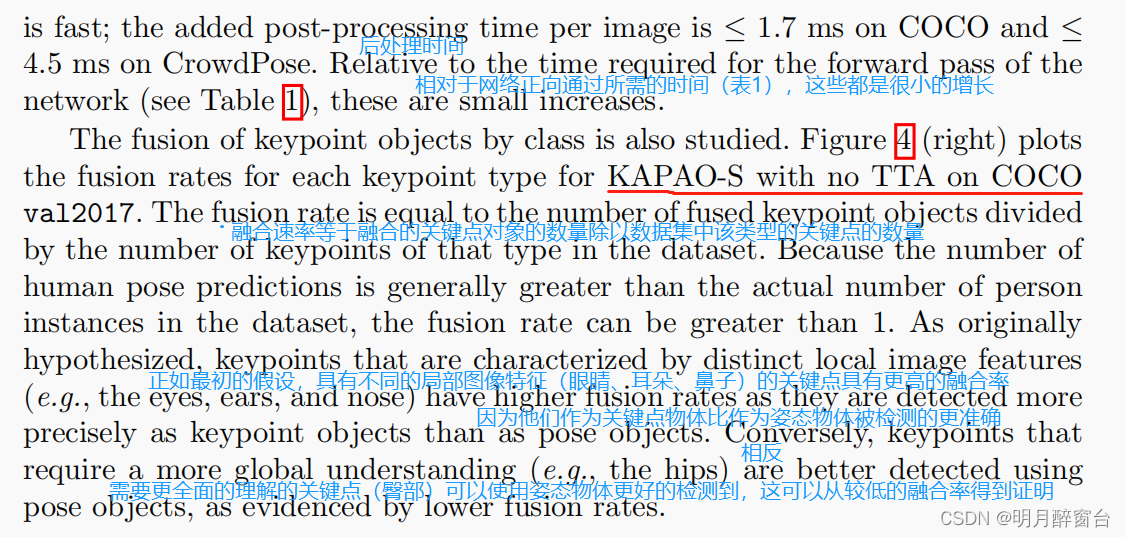
【ICCV2022】 CAPAO:一种高效的单阶段人体姿态估计模型
CAPAO:一种高效的单阶段人体姿态估计模型 重新思考关键点表示:将关键点和姿态建模作为多人姿态估计的对象(Rethinking Keypoint Representations: Modeling Keypoints and Poses as Objects for Multi-Person Human Pose Estimation…...
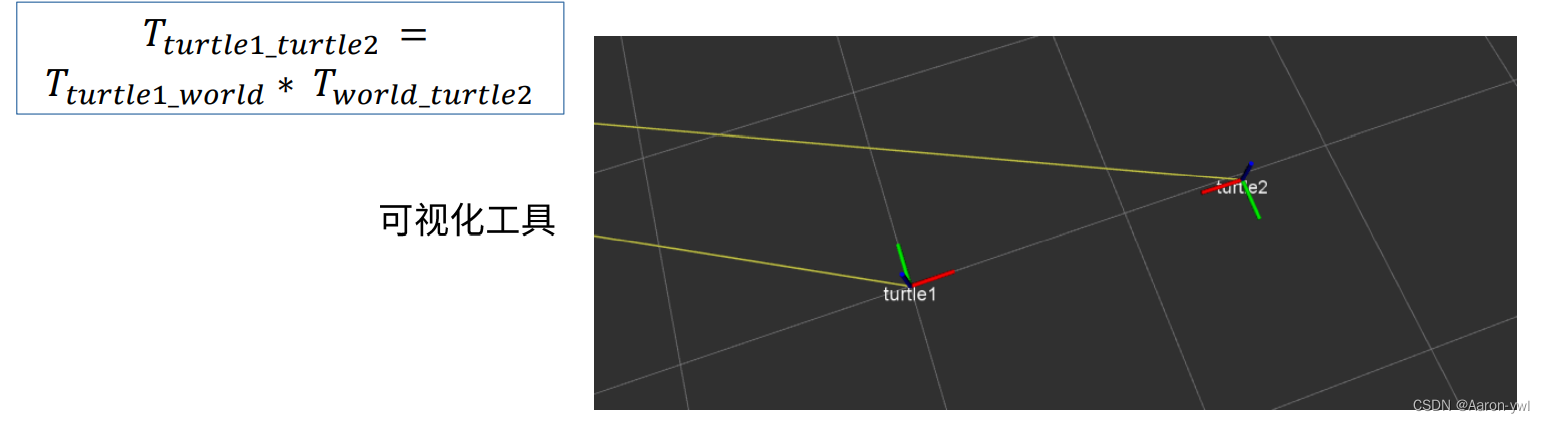
ROS1学习笔记:ROS中的坐标管理系统(ubuntu20.04)
参考B站古月居ROS入门21讲:ROS中的坐标系管理系统 基于VMware Ubuntu 20.04 Noetic版本的环境 文章目录一、机器人中的坐标变换二、TF功能包三、小海龟跟随实验3.1 启动实验3.2 查看当前的TF树3.3 坐标相对位置可视化3.3.1 tf_echo3.3.2 rviz一、机器人中的坐标变换…...

requests---(2)session简介与自动写博客
目录:导读 session简介 session登录 自动写博客 获取登录cookies 抓取写博客接口 requests自动写博客 写在最后 http协议是无状态的,也就是每个请求都是独立的。那么登录后的一系列动作,都需要用cookie来验证身份是否是登录状态&#…...

基于 HAProxy + Keepalived 搭建 RabbitMQ 高可用集群
RabbitMQ 集群 通常情况下,在集群中我们把每一个服务称之为一个节点,在 RabbitMQ 集群中,节点类型可以分为两种: 内存节点:元数据存放于内存中。为了重启后能同步数据,内存节点会将磁盘节点的地址存放于磁…...
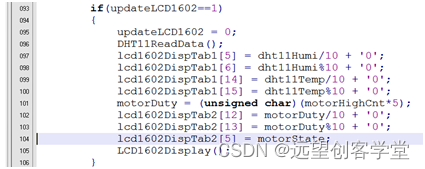
基于51单片机和proteus的智能调速风扇设计
此智能风扇是基于51单片机和proteus的仿真设计,功能如下: 1. Timer0 PWM控制电机转速 2. DHT11采集温湿度 3. LCD1602显示温湿度及电机状态 4. 按键控制电机加减速启停等 5. 串口控制电机加减速启停等 功能框图如下: Proteus仿真界面如下…...
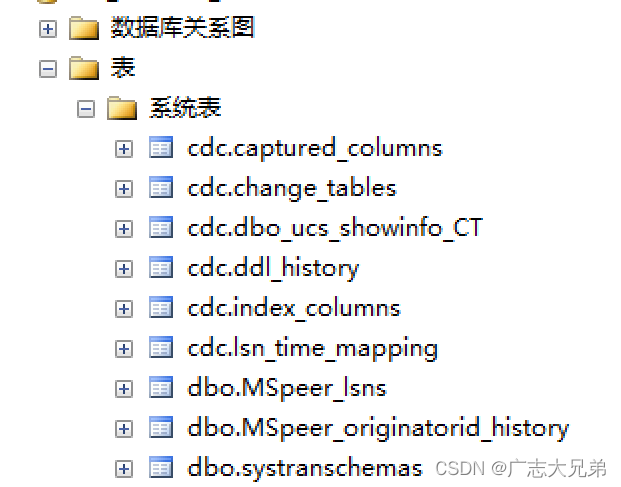
SQL Server开启CDC的完整操作过程
这里写自定义目录标题写在前面SQL Server开启CDC1. 将指定库的实例先开启CDC2. 开启需要开启CDC的表3. 关闭CDC功能更详细信息参照官网写在前面 鉴于老旧数据的结构和项目都在sqlserver上存储,且迁移成本巨大,当下要为sqlserver的存储过程减负。要将一部…...
【Spring Cloud Alibaba】008-Sentinel
【Spring Cloud Alibaba】008-Sentinel 文章目录【Spring Cloud Alibaba】008-Sentinel一、服务雪崩1、概述2、解决方案常见的容错机制二、Sentinel:分布式系统的流量防卫兵1、**Sentinel** 概述简介特性Sentinel 的开源生态Sentinel 的历史2、Sentinel 基本概念资源…...

解读CRC校验计算
个人随笔 (Owed by: 春夜喜雨 http://blog.csdn.net/chunyexiyu) 参考:http://www.sunshine2k.de/articles/coding/crc/understanding_crc.html 参考:https://en.wikipedia.org/wiki/Cyclic_redundancy_check 参考:https://www.cnblogs.com/…...
深入理解Spring MVC下
上一篇博客从理论概念上来梳理Spring MVC相关知识,此篇博客将通过spring官网提供showcase代码为例子,详细介绍showcase代码中包含的各个例子是如何实现的。官网的showcase代码包含的主要例子包括,Demo地址:Mapping Requests&#…...

【Linux】ssh-keygen不需要回车,自动生成密钥,批量免密操作!
使用命令ssh-keygen 需要手动敲击回车,才会生成密钥,如下代码所示 [rootlocalhost ~]# ssh-keygen Generating public/private rsa key pair. Enter file in which to save the key (/root/.ssh/id_rsa): Enter passphrase (empty for no passphrase):…...

C/C++开发,无可避免的内存管理(篇四)-智能指针备选
一、智能指针 采用C/C开发堆内存管理无论是底层开发还是上层应用,无论是开发新手,还是多年的老手,都会不自觉中招,尤其是那些不是自己一手经历的代码,要追溯问题出在哪里更是个麻烦事。C/C程序常常会遇到程序突然退出&…...
VMware ESXi给虚拟机扩容
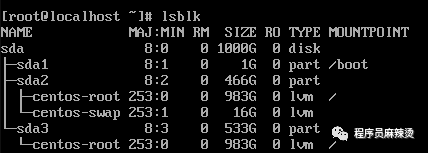
用ESXi管理的虚拟机硬盘空间不够了,讲一下如何进行扩容。 一、查看现状 通过如下三个命令,可以查看硬盘情况,可以看到只有500G,已经用了45%。这次我们再扩容500G。 df -Th lsblk fdisk -lIDE磁盘的文件名为 /de…...

Flutter 轻量存储方案介绍、区别、对比和使用场景
在 Flutter 项目中,本地存储通常可以分为几类: 第一类是轻量 Key-Value 存储,例如 shared_preferences、get_storage、mmkv,适合保存开关、配置、登录状态等简单数据。 第二类是安全存储,例如 flutter_secure_storage&…...

AI任务自动化五阶段工作流:从需求到代码的可靠实践
1. 项目概述:从混乱到有序的AI任务自动化五阶段工作流上次我们聊了这套自动化系统的技术架构,把JIRA、GitHub和Cursor智能体串了起来。今天咱们不聊“怎么连”,聊聊“怎么跑”——也就是那个能把一个粗糙的需求工单,最终变成一行行…...

凌晨还在改论文?这些降重黑科技帮你一键通关
凌晨对着电脑屏幕改论文,那种既疲惫又焦虑的感觉,经历过的人都懂。好在现在的降重工具已经不只是“替换同义词”那么简单了,像 毕业之家 和 PaperRed 这两款主流工具,各自走了完全不同的技术路线,可以根据你的痛点来选…...

研究生必备|5款主流文献引用工具深度测评:从课程论文到毕业答辩,哪款能让你省下20小时格式调整时间?
凌晨3点,你盯着Word里200多条参考文献发呆:导师刚通知改用APA格式,而你手动调了一整天的GB/T 7714全得推倒重来。投稿被拒,只因参考文献格式不符合期刊要求。课程论文、小论文、开题报告、毕业大论文……每一次都是格式地狱。本文…...

硅应变计与Σ-Δ ADC协同设计及温度补偿技术
1. 硅应变计与Σ-Δ ADC的协同优势解析硅基应变计在现代传感器领域占据重要地位,其核心原理基于压阻效应——当硅材料发生机械形变时,晶格结构变化导致载流子迁移率改变,从而引起电阻值变化。与传统金属箔应变计相比,硅应变计的灵…...

DenseNet参数量比ResNet少?从Bottleneck和Transition层设计,聊聊模型轻量化的核心思路
DenseNet与ResNet参数效率对比:从结构设计看模型轻量化本质 在深度学习模型设计中,参数量与计算效率一直是工程师们关注的核心指标。当DenseNet首次提出时,许多研究者对其参数效率感到惊讶——看似复杂的密集连接结构,实际参数量却…...

LSP4J-MCP:连接语言服务器与AI的协议桥接器实践
1. 项目概述:当LSP遇上MCP,一场开发工具链的“协议融合”如果你是一名长期与IDE打交道的开发者,无论是写Java、TypeScript还是其他语言,大概率都听说过或者用过语言服务器协议。它让VS Code、IntelliJ IDEA这些编辑器能理解代码、…...

Laravel RSS聚合器larafeed:现代化内容聚合后端解决方案
1. 项目概述:一个为Laravel打造的现代化RSS聚合器如果你正在用Laravel构建一个内容聚合平台、新闻阅读器,或者只是想为自己的个人博客添加一个“我最近在读什么”的订阅墙,那么你很可能需要处理RSS或Atom源。手动解析这些XML格式的源、处理缓…...

AAAI‘2026 模型记错了,检索也救不了?KG+TruthfulRAG想解决这个死结
背景介绍 近年来,大语言模型(LLM)在生成与理解任务上表现突出,但其内部“参数化知识”具有静态、滞后的特点: 面对时效性知识、专业知识、隐私知识等,模型可能缺乏覆盖;即便检索增强生成&#…...

英雄联盟智能助手:5个核心功能让你的游戏体验提升300%
英雄联盟智能助手:5个核心功能让你的游戏体验提升300% 【免费下载链接】League-Toolkit An all-in-one toolkit for LeagueClient. Gathering power 🚀. 项目地址: https://gitcode.com/gh_mirrors/le/League-Toolkit 你是否曾因错过对局接受而被…...