
k8s 配置ingress 并做一个demo
需求:
k8s 配置好之后除了 nodeport 以外都是对集群内部的行为
使用nodeport 并不是很友好,要自己处理很多的端口管理
使用ingress 可以更好的整合配置服务
进程:
下载ingress-nginx 的yaml 文件
https://github.com/kubernetes/ingress-nginx/blob/nginx-0.30.0/deploy/static/mandatory.yaml安装
kubectl create -f mandatory.yaml安装的时候会有一些warning 影响不大
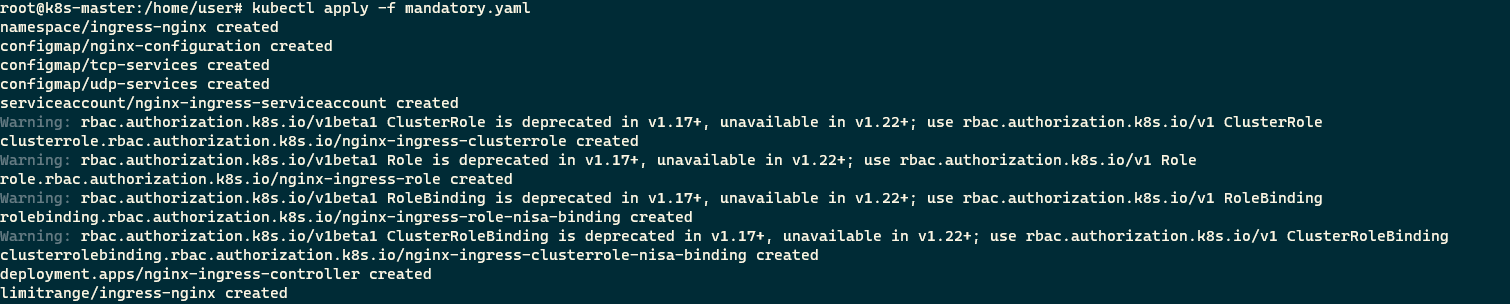
查看 ingress-nignx 的配置启动情况
kubectl get all -n ingress-nginx如果controller 没有ready 需要找一下原因
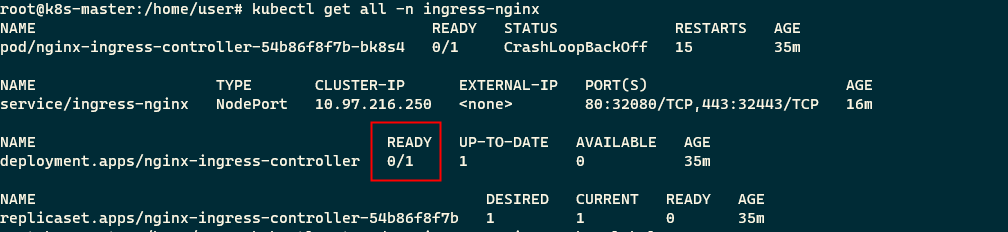
查看 这个pod 的状态
kubectl get pod -n ingress-nginx --show-labels
果然是有问题了,controller 状态是crash查看pod 的状态信息简介
kubectl describe pod nginx-ingress-controller-54b86f8f7b-bk8s4 -n ingress-nginx
查看pod 的启动日志
kubectl logs nginx-ingress-controller-54b86f8f7b-bk8s4 -n ingress-nginx
看起来是网络不通畅
修改下载下来的mandatory.yaml 在第214 行加上 hostNetwork: true 重新执行apply 可执行文件在最下方
做一个端口输入service
apiVersion: v1
kind: Service
metadata:name: ingress-nginx-svcnamespace: ingress-nginx #和controller 保持一致
spec:type: NodePort #必须是这个ports:- name: httpport: 80targetPort: 80protocol: TCPnodePort: 32080  #http 80 映射到32080- name: httpsport: 443targetPort: 443protocol: TCPnodePort: 32443  #https 443 映射到底32443selector: #内容参考controller 的metadataapp.kubernetes.io/name: ingress-nginx app.kubernetes.io/part-of: ingress-nginx
apply 之后查看网址内容

404 表示能连通,但是没有服务 ingress 安装完成
进程2:
安装完成之后做一个测验
配置一个可启动的服务 deployment 和 service 的配置信息不明白的可以看k8s pod deployment service ingress 关系
apiVersion: apps/v1
kind: Deployment
metadata:name: myappnamespace: default
spec:replicas: 1selector:matchLabels:app: myapptemplate:metadata:namespace: defaultlabels:app: myappspec:containers:- name: myappimage: ikubernetes/myapp:v1---
apiVersion: v1
kind: Service
metadata:name: myappnamespace: default
spec:selector:app: myappports:- name: httpport: 80targetPort: 80
创建完成之后再创建一个ingress 来做反向代理
apiVersion: extensions/v1beta1
kind: Ingress
metadata:name: ingress-myappnamespace: defaultannotations:kubernetes.io/ingress.class: "nginx"
spec:rules:- host: www.firstdemo.comhttp:paths:- path: /backend:serviceName: myappservicePort: 80
apply 之后在要测试服务的机器上做一个端口映射
#hosts 文件
192.168.197.135 www.firstdemo.com
打开网站www.firstdemo.com:32080 会看到一个已经启动了的服务
拓展:
mandatory.yaml
apiVersion: v1
kind: Namespace
metadata:name: ingress-nginxlabels:app.kubernetes.io/name: ingress-nginxapp.kubernetes.io/part-of: ingress-nginx---kind: ConfigMap
apiVersion: v1
metadata:name: nginx-configurationnamespace: ingress-nginxlabels:app.kubernetes.io/name: ingress-nginxapp.kubernetes.io/part-of: ingress-nginx---
kind: ConfigMap
apiVersion: v1
metadata:name: tcp-servicesnamespace: ingress-nginxlabels:app.kubernetes.io/name: ingress-nginxapp.kubernetes.io/part-of: ingress-nginx---
kind: ConfigMap
apiVersion: v1
metadata:name: udp-servicesnamespace: ingress-nginxlabels:app.kubernetes.io/name: ingress-nginxapp.kubernetes.io/part-of: ingress-nginx---
apiVersion: v1
kind: ServiceAccount
metadata:name: nginx-ingress-serviceaccountnamespace: ingress-nginxlabels:app.kubernetes.io/name: ingress-nginxapp.kubernetes.io/part-of: ingress-nginx---
apiVersion: rbac.authorization.k8s.io/v1beta1
kind: ClusterRole
metadata:name: nginx-ingress-clusterrolelabels:app.kubernetes.io/name: ingress-nginxapp.kubernetes.io/part-of: ingress-nginx
rules:- apiGroups:- ""resources:- configmaps- endpoints- nodes- pods- secretsverbs:- list- watch- apiGroups:- ""resources:- nodesverbs:- get- apiGroups:- ""resources:- servicesverbs:- get- list- watch- apiGroups:- ""resources:- eventsverbs:- create- patch- apiGroups:- "extensions"- "networking.k8s.io"resources:- ingressesverbs:- get- list- watch- apiGroups:- "extensions"- "networking.k8s.io"resources:- ingresses/statusverbs:- update---
apiVersion: rbac.authorization.k8s.io/v1beta1
kind: Role
metadata:name: nginx-ingress-rolenamespace: ingress-nginxlabels:app.kubernetes.io/name: ingress-nginxapp.kubernetes.io/part-of: ingress-nginx
rules:- apiGroups:- ""resources:- configmaps- pods- secrets- namespacesverbs:- get- apiGroups:- ""resources:- configmapsresourceNames:# Defaults to "<election-id>-<ingress-class>"# Here: "<ingress-controller-leader>-<nginx>"# This has to be adapted if you change either parameter# when launching the nginx-ingress-controller.- "ingress-controller-leader-nginx"verbs:- get- update- apiGroups:- ""resources:- configmapsverbs:- create- apiGroups:- ""resources:- endpointsverbs:- get---
apiVersion: rbac.authorization.k8s.io/v1beta1
kind: RoleBinding
metadata:name: nginx-ingress-role-nisa-bindingnamespace: ingress-nginxlabels:app.kubernetes.io/name: ingress-nginxapp.kubernetes.io/part-of: ingress-nginx
roleRef:apiGroup: rbac.authorization.k8s.iokind: Rolename: nginx-ingress-role
subjects:- kind: ServiceAccountname: nginx-ingress-serviceaccountnamespace: ingress-nginx---
apiVersion: rbac.authorization.k8s.io/v1beta1
kind: ClusterRoleBinding
metadata:name: nginx-ingress-clusterrole-nisa-bindinglabels:app.kubernetes.io/name: ingress-nginxapp.kubernetes.io/part-of: ingress-nginx
roleRef:apiGroup: rbac.authorization.k8s.iokind: ClusterRolename: nginx-ingress-clusterrole
subjects:- kind: ServiceAccountname: nginx-ingress-serviceaccountnamespace: ingress-nginx---apiVersion: apps/v1
kind: Deployment
metadata:name: nginx-ingress-controllernamespace: ingress-nginxlabels:app.kubernetes.io/name: ingress-nginxapp.kubernetes.io/part-of: ingress-nginx
spec:replicas: 1selector:matchLabels:app.kubernetes.io/name: ingress-nginxapp.kubernetes.io/part-of: ingress-nginxtemplate:metadata:labels:app.kubernetes.io/name: ingress-nginxapp.kubernetes.io/part-of: ingress-nginxannotations:prometheus.io/port: "10254"prometheus.io/scrape: "true"spec:# wait up to five minutes for the drain of connectionshostNetwork: trueterminationGracePeriodSeconds: 300serviceAccountName: nginx-ingress-serviceaccountnodeSelector:kubernetes.io/os: linuxcontainers:- name: nginx-ingress-controllerimage: quay.io/kubernetes-ingress-controller/nginx-ingress-controller:0.30.0args:- /nginx-ingress-controller- --configmap=$(POD_NAMESPACE)/nginx-configuration- --tcp-services-configmap=$(POD_NAMESPACE)/tcp-services- --udp-services-configmap=$(POD_NAMESPACE)/udp-services- --publish-service=$(POD_NAMESPACE)/ingress-nginx- --annotations-prefix=nginx.ingress.kubernetes.iosecurityContext:allowPrivilegeEscalation: truecapabilities:drop:- ALLadd:- NET_BIND_SERVICE# www-data -> 101runAsUser: 101env:- name: POD_NAMEvalueFrom:fieldRef:fieldPath: metadata.name- name: POD_NAMESPACEvalueFrom:fieldRef:fieldPath: metadata.namespaceports:- name: httpcontainerPort: 80protocol: TCP- name: httpscontainerPort: 443protocol: TCPlivenessProbe:failureThreshold: 3httpGet:path: /healthzport: 10254scheme: HTTPinitialDelaySeconds: 10periodSeconds: 10successThreshold: 1timeoutSeconds: 10readinessProbe:failureThreshold: 3httpGet:path: /healthzport: 10254scheme: HTTPperiodSeconds: 10successThreshold: 1timeoutSeconds: 10lifecycle:preStop:exec:command:- /wait-shutdown---apiVersion: v1
kind: LimitRange
metadata:name: ingress-nginxnamespace: ingress-nginxlabels:app.kubernetes.io/name: ingress-nginxapp.kubernetes.io/part-of: ingress-nginx
spec:limits:- min:memory: 90Micpu: 100mtype: Container
相关文章:
k8s 配置ingress 并做一个demo
需求:k8s 配置好之后除了 nodeport 以外都是对集群内部的行为使用nodeport 并不是很友好,要自己处理很多的端口管理使用ingress 可以更好的整合配置服务进程:下载ingress-nginx 的yaml 文件https://github.com/kubernetes/ingress-nginx/blob…...
【手把手一起学习】(七) Altium Designer 20常用PCB设计规则
1 常用PCB设计规则 PCB规则设计是PCB设计中至关重要的环节,它约束了电气要求、布线方式、器件摆放位置等,为后续的手动布局、布线提供依据。完善的PCB规则设计,可以减少设计中的错误,提高PCB设计效率。 1.1 PCB设计规则管理器 …...

(01)Unity 中使用 HDRP
概述Unity在2019.2版本中推出HDRP(高清渲染管线),目的是为了提高图形质量,实现从照片写实到风格化的图像。先看一下官方对HDRP的概述:高清渲染管线 (HDRP) 是由 Unity 构建的高保真脚本化渲染管…...
使用cmake在win10编译yolov5+tensorRT+cuda+cudnn+protobuf代码进行混合编译
这里进行之前需要把protobuf在win10下编译,可以参考这篇文章从Linux下载下来的工程代码,这里建议直接使用vs系列打开不要用vscode打开,vscode对win下的cmake不友好,主要体现在报错机制无法直接定位,题主的环境是vs2022…...
)
《C++ Primer Plus》第17章:输入、输出和文件(7)
编程练习 编写一个程序计算输入流中第一个$之前的字符数目,并将$留在输入流中。 #include<iostream>int main() {int ct 0;while(std::cin.peek()!$){ct;std::cin.get();}std::cout << "num: " << ct << std::endl;return 0; }答…...
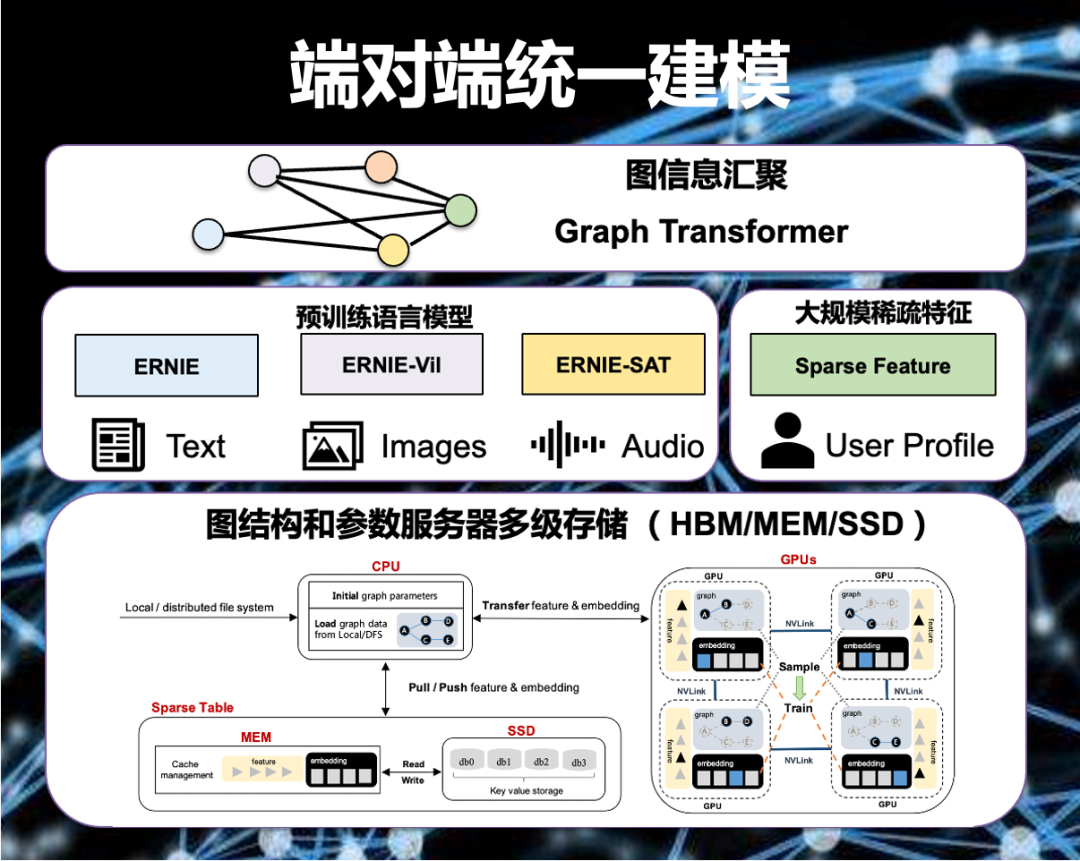
PGLBox 超大规模 GPU 端对端图学习训练框架正式发布
作者 | PGLBox项目组 导读 PGLBox是百度研发的基于GPU的大规模图模型训练框架,支持数百亿节点和边的图模型全GPU训练,已在百度广泛部署。相比业界主流的分布式 CPU 解决方案,PGLBox 具有超高性能、超大规模、算法丰富、灵活易用、落地广泛等优…...
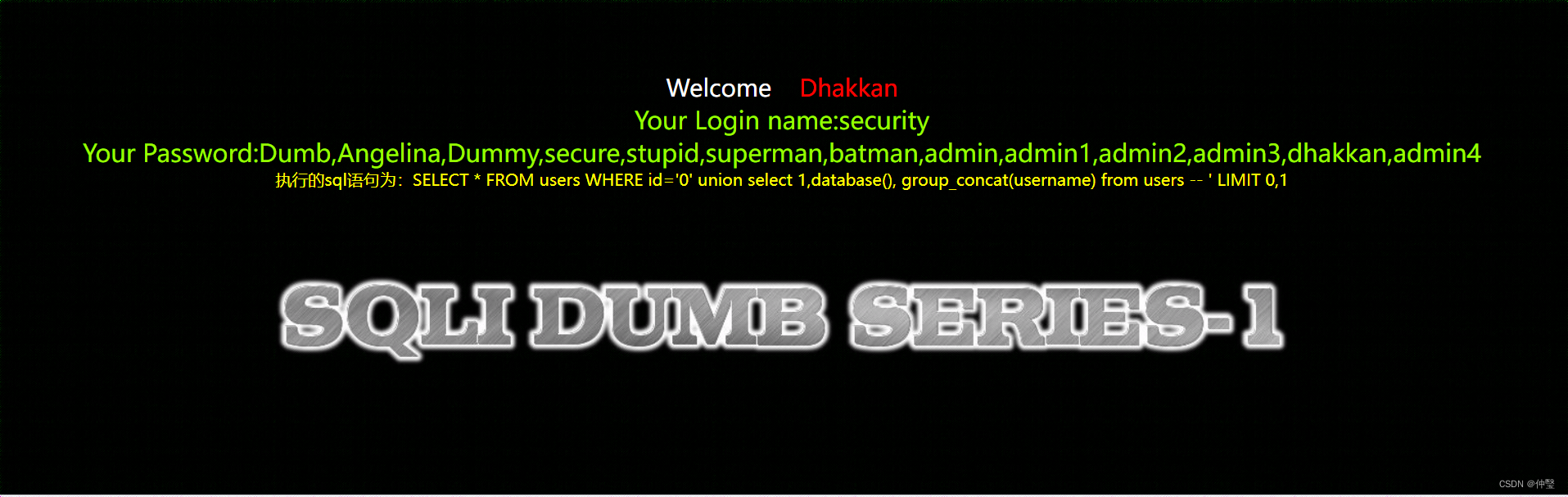
sql-labs-Less1
靶场搭建好了,访问题目路径 http://127.0.0.1/sqli-labs-master/Less-1/ 我最开始在做sql-labs靶场的时候很迷茫,不知道最后到底要得到些什么,而现在我很清楚,sql注入可以获取数据库中的信息,而获取信息就是我们的目标…...
又一个国内类ChatGPT模型?【秘塔科技上线自研LLM大模型「对话写作猫」】
又一个国内类ChatGPT模型?【秘塔科技上线自研LLM大模型「对话写作猫」】 说个题外话,今天一大早就收到了Biying的邮件。前段时间不是申请了New Biying的内测吗?下午可以尝试一下玩一会儿。如果体验感还不错或者还有很多bug,那我到…...
卷麻了,00后测试用例写的比我还好,简直无地自容......
经常看到无论是刚入职场的新人,还是工作了一段时间的老人,都会对编写测试用例感到困扰?例如: 如何编写测试用例? 作为一个测试新人,刚开始接触测试,对于怎么写测试用例很是头疼,无法…...

动态网页的核心——JSP
文章目录1,JSP 概述2,JSP 小案例2.1 搭建环境2.2 导入 JSP 依赖2.3 创建 jsp 页面2.4 编写代码2.5 测试3,JSP 原理4,JSP 总结4.1 JSP的 缺点4.2技术的发展历程4.3JSP的必要性最后说一句1,JSP 概述 JSP(全称…...
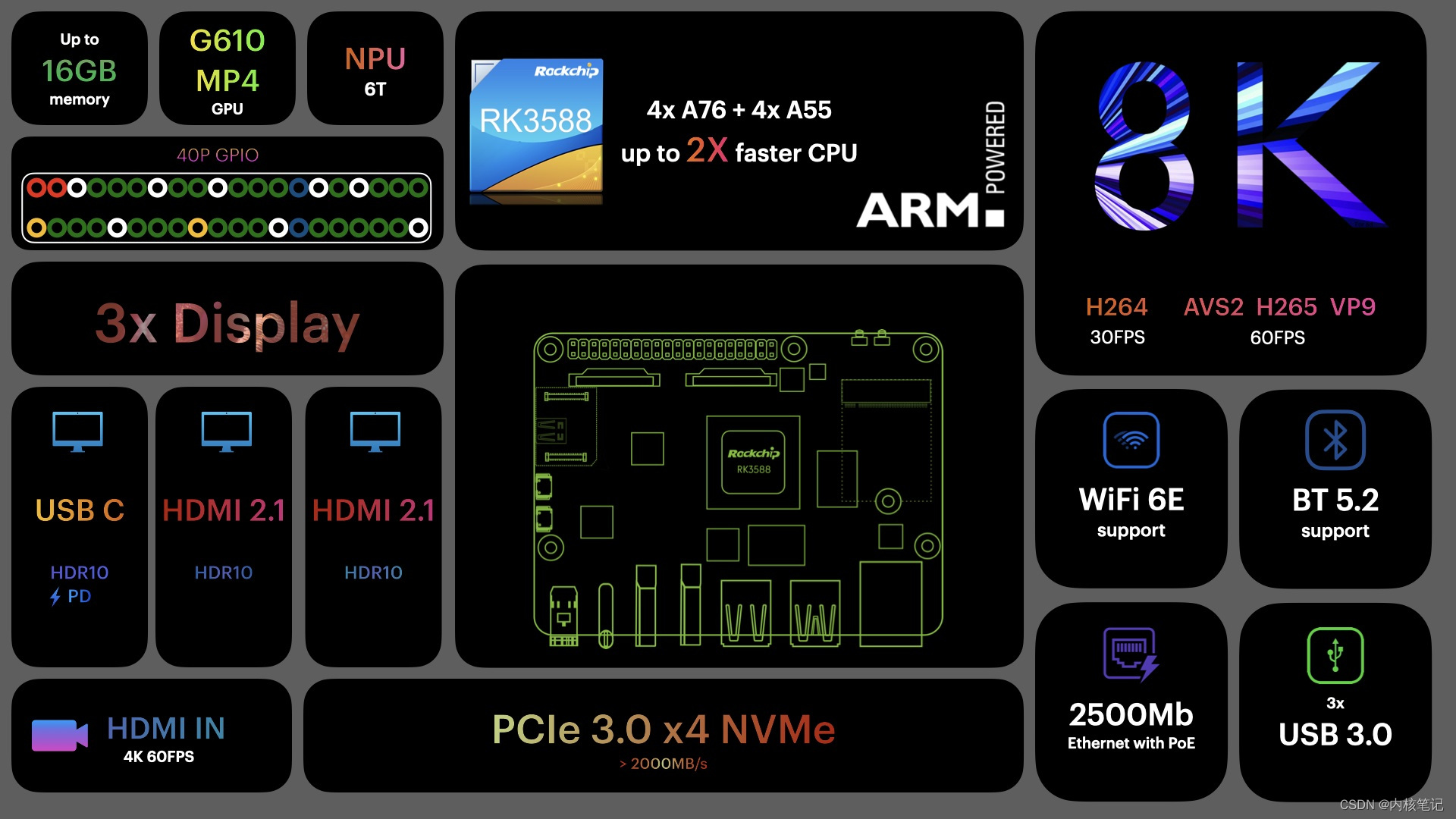
RK3588平台开发系列讲解(系统篇)init.d介绍
平台内核版本安卓版本RK3588Linux 5.10Android 12文章目录 一、Linux启动简介二、sysvinit配置三、inid.d介绍沉淀、分享、成长,让自己和他人都能有所收获!😄 📢本篇介绍init.d相关知识。 一、Linux启动简介 Linux用户空间启动时,第一个会启动init进程,用来引导启动其…...

taobao.user.buyer.get( 查询买家信息API )
¥开放平台基础API必须用户授权 查询买家信息API,只能买家类应用调用。 公共参数 请求地址: HTTP地址 http://gw.api.taobao.com/router/rest 公共请求参数: 公共响应参数: 请求参数 响应参数 点击获取key和secret 请求示例 TaobaoClient client new…...
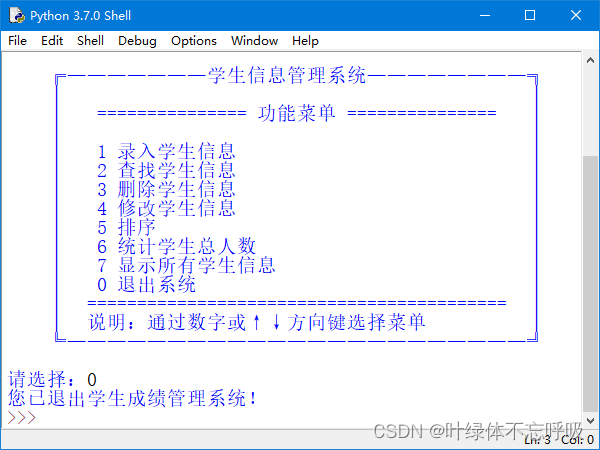
python学生信息管理系统
wx供重浩:创享日记 对话框发送:python学生信息 免费获取完整源码源文件配置教程说明等 在IDLE中运行《学生信息管理系统》即可进入如图1所示的系统主界面。在该界面中可以选择要使用功能对应的菜单进行不同的操作。在选择功能菜单时,有两种方…...

【微信小程序】-- WXML 模板语法 - 条件渲染 -- wx:if hidden (十一)
💌 所属专栏:【微信小程序开发教程】 😀 作 者:我是夜阑的狗🐶 🚀 个人简介:一个正在努力学技术的CV工程师,专注基础和实战分享 ,欢迎咨询! &…...

2023上半年软考,广州/东莞/深圳/江苏报班是明智的选择
软考是全国计算机技术与软件专业技术资格(水平)考试(简称软考)项目,是由国家人力资源和社会保障部、工业和信息化部共同组织的国家级考试,既属于国家职业资格考试,又是职称资格考试。 系统集成…...

C++修炼之练气期一层——命名空间
目录 1.引例 2.命名空间的定义 3.命名空间的使用 4.命名空间使用注意事项 1.引例 #include <stdio.h> #include <stdlib.h>int rand 10;int main() {printf("%d\n", rand);return 0; } 当我们用C语言写下这样的代码,看着并没有什么语法…...
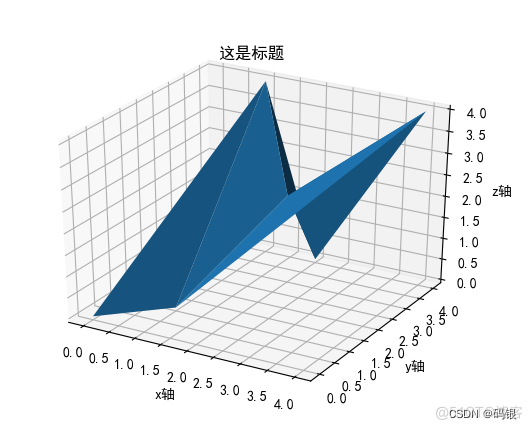
matplotlib综合学习
1.arange函数arange函数需要三个参数,分别为起始点、终止点、采样间隔。采样间隔默认值为1看例子: import numpy as np #import matplotlib.pyplot as plt xnp.arange(-5,5,1) print(x)2.绘制sin(x)曲线import numpy as np import matplotlib.pyplot as …...
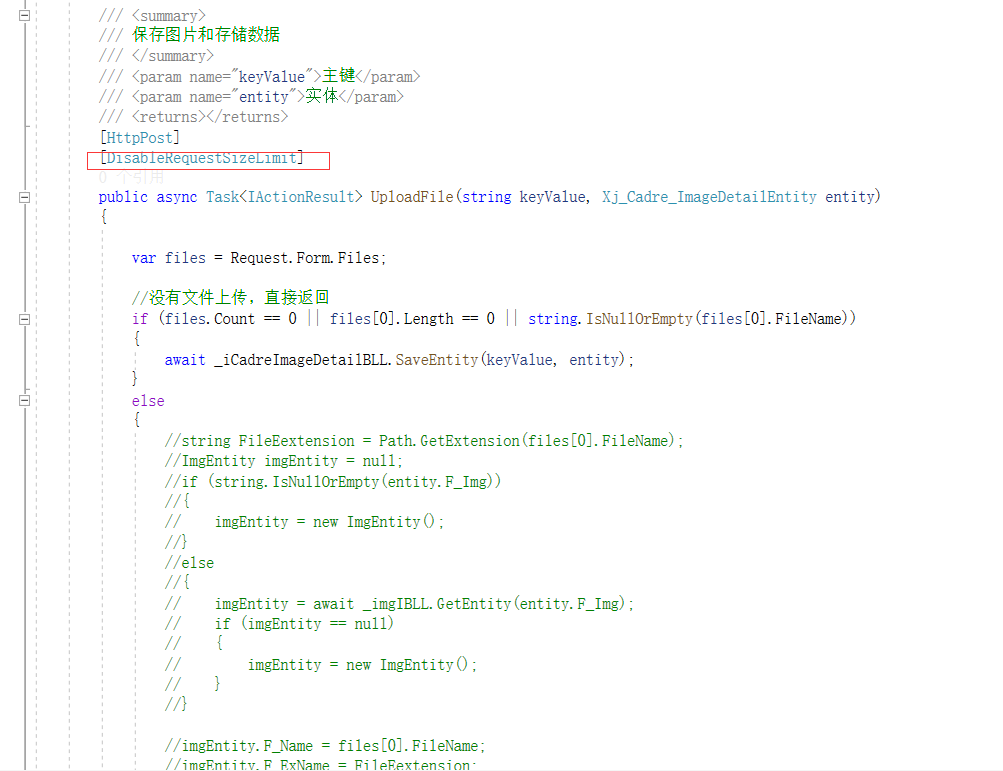
IIS .Net Core 413错误和Request body too large解决办法
错误描述图片比较大时,在前端上传就报413错误。根本到不了后端。在网上看到这个文章比较有用。https://blog.csdn.net/wstever/article/details/1288707421、修改网站Web.config配置文件加入下面这段配置<?xmlversion"1.0" encoding"utf-8"…...
—官方原版)
Spring Boot数据访问—(springboot 多数据源)—官方原版
Spring Boot 包含许多用于处理数据源的启动器,本文回答与执行此操作相关的问题。一、配置自定义数据源要配置自己的DataSource,请在配置中定义该类型的Bean。Spring Boot在任何需要的地方重用DataSource,包括数据库初始化。如果需要外部化某些…...

高燃!GitHub上标星75k+超牛的Java面试突击版
前言不论是校招还是社招都避免不了各种面试。笔试,如何去准备这些东西就显得格外重要。不论是笔试还是面试都是有章可循的,我这个有章可循‘说的意思只是说应对技术面试是可以提前准备。运筹帷幄之后,决胜千里之外!不打毫无准备的仗,我觉得大…...

用PTA题库学C语言:手把手教你拆解‘选择与循环’的嵌套逻辑
用PTA题库学C语言:手把手教你拆解‘选择与循环’的嵌套逻辑 学习C语言时,最让初学者头疼的莫过于那些层层嵌套的选择结构和循环结构。面对一堆if-else和for/while语句,很多人会感到无从下手。本文将通过PTA题库中的典型题目,教你一…...

实测MPU6050低功耗电流:从Sleep到Cycle模式,不同唤醒频率下功耗到底差多少?
MPU6050低功耗模式实测:从微安级电流到唤醒策略的硬件优化指南 当你的智能手环在手腕上安静沉睡时,MPU6050这颗运动传感器正在以微安级的电流维持着生命体征——这不是魔法,而是现代嵌入式设计中精妙的低功耗艺术。作为硬件工程师,…...
:基于1726张A/B测试图谱验证的色阶偏移阈值与CMYK映射规则)
Midjourney蓝莓印相技术白皮书(2024V2.3权威修订版):基于1726张A/B测试图谱验证的色阶偏移阈值与CMYK映射规则
更多请点击: https://intelliparadigm.com 第一章:Midjourney Blueberry印相技术的演进脉络与核心定义 Midjourney Blueberry印相技术并非官方术语,而是社区对Midjourney V6中基于蓝光敏感通道(Blue Channel Emulation࿰…...

拆解工业级压力传感器核心:陶瓷电容vs陶瓷电阻,ME505与NSA2862如何选型?
工业级压力传感器技术选型指南:陶瓷电容与陶瓷电阻的深度对比与实战选型 在工业物联网和智慧城市建设的浪潮中,压力传感器作为关键感知元件,其性能直接影响整个系统的可靠性与寿命。面对市场上琳琅满目的传感器类型,工程师们常常陷…...

5分钟快速上手:智能象棋AI助手的完整使用教程
5分钟快速上手:智能象棋AI助手的完整使用教程 【免费下载链接】VinXiangQi Xiangqi syncing tool based on Yolov5 / 基于Yolov5的中国象棋连线工具 项目地址: https://gitcode.com/gh_mirrors/vi/VinXiangQi Vin象棋是一款基于YOLOv5深度学习的开源免费中国…...
)
保姆级教程:用Winbox给ROS配置一线多拨,实测200M宽带叠加效果(附避坑指南)
家庭网络优化实战:Winbox配置多拨提升宽带利用率 家里装了200M宽带,但下载大文件时总觉得速度没跑满?多人同时在线看4K视频就开始卡顿?其实通过简单的路由器配置,你完全有可能突破运营商单线限制,让宽带利用…...
)
保姆级教程:用KIT_A2G_TC397_5V_TFT开发板快速上手CAN FD通信(附接线图)
保姆级教程:用KIT_A2G_TC397_5V_TFT开发板快速上手CAN FD通信(附接线图) 最近在车载通信项目中频繁接触CAN FD协议,发现很多工程师对硬件连接和基础配置存在畏难情绪。恰好手头有英飞凌KIT_A2G_TC397_5V_TFT这块开发板,…...

MCA Selector技术架构深度解析:Minecraft区块管理系统的实现原理
MCA Selector技术架构深度解析:Minecraft区块管理系统的实现原理 【免费下载链接】mcaselector A tool to select chunks from Minecraft worlds for deletion or export. 项目地址: https://gitcode.com/gh_mirrors/mc/mcaselector MCA Selector是一款专为M…...

为什么你的KFServing比别人慢3.8倍?:SITS 2026现场调试实录——AI原生编排中被忽略的4个cgroup v2陷阱
更多请点击: https://intelliparadigm.com 第一章:为什么你的KFServing比别人慢3.8倍?:SITS 2026现场调试实录——AI原生编排中被忽略的4个cgroup v2陷阱 在 SITS 2026 现场压测中,同一 KFServing v0.11.2 集群部署相…...

Steam游戏自动破解终极指南:3步实现DRM移除与离线游戏
Steam游戏自动破解终极指南:3步实现DRM移除与离线游戏 【免费下载链接】Steam-auto-crack Steam Game Automatic Cracker 项目地址: https://gitcode.com/gh_mirrors/st/Steam-auto-crack SteamAutoCrack是一款专业的Steam游戏自动破解工具,通过智…...