
SpringBoot——MVC原理
优质博文:IT-BLOG-CN
一、SpringMVC自动配置
SpringMVC auto-configuration:SpringBoot自动配置好了SpringMVC。以下是SpringBoot对SpringMVC的默认配置:[WebMvcAutoConfiguration]
【1】包括ContentNegotiatingViewResolver和BeanNameViewResolver如下:
@Bean
@ConditionalOnBean({ViewResolver.class})
@ConditionalOnMissingBean(name = {"viewResolver"},value = {ContentNegotiatingViewResolver.class}
)
//存在于 WebMvcAutoConfiguration.java
public ContentNegotiatingViewResolver viewResolver(BeanFactory beanFactory) {ContentNegotiatingViewResolver resolver = new ContentNegotiatingViewResolver();resolver.setContentNegotiationManager((ContentNegotiationManager)beanFactory.getBean(ContentNegotiationManager.class));resolver.setOrder(-2147483648);return resolver;
}//进入ContentNegotiatingViewResolver对象,查找解析视图的方法resolveViewName()
public View resolveViewName(String viewName, Locale locale) throws Exception {RequestAttributes attrs = RequestContextHolder.getRequestAttributes();Assert.state(attrs instanceof ServletRequestAttributes, "No current ServletRequestAttributes");List<MediaType> requestedMediaTypes = this.getMediaTypes(((ServletRequestAttributes)attrs).getRequest());if(requestedMediaTypes != null) {//获取候选的视图对象List<View> candidateViews = this.getCandidateViews(viewName, locale, requestedMediaTypes);//选择最适合的视图对象View bestView = this.getBestView(candidateViews, requestedMediaTypes, attrs);if(bestView != null) {return bestView;}
}//进入上面的getCandidateViews()方法,查看获取的视图解析器,发现SpringBoot是将所有的视图解析器获取到viewResolvers,挨个遍历获取。
private List<View> getCandidateViews(String viewName, Locale locale, List<MediaType> requestedMediaTypes) throws Exception {List<View> candidateViews = new ArrayList();Iterator var5 = this.viewResolvers.iterator();while(var5.hasNext()) {
【2】自动配置了ViewResolver(视图解析器:根据方法的返回值得到视图对象(View),视图对象决定如何渲染(转发?重定向?))
【3】ContentNegotiatingViewResolver:组合所有的视图解析器的;
//进入ContentNegotiatingViewResolver发现初始化视图解析器的时候,是从容器中BeanFactoryUtils获取所有的视图解析器。
protected void initServletContext(ServletContext servletContext) {Collection<ViewResolver> matchingBeans = BeanFactoryUtils.beansOfTypeIncludingAncestors(this.getApplicationContext(), ViewResolver.class).values();if(this.viewResolvers == null) {
【4】如何定制:我们可以自己给容器中添加一个视图解析器;自动的将其组合进来;
 @Bean@ConditionalOnProperty(prefix = "spring.mvc", name = "date‐format")//在文件中配置日期格式化的规则public Formatter<Date> dateFormatter() {        return new DateFormatter(this.mvcProperties.getDateFormat());//日期格式化组件            } //举个栗子如下:
//可以自定义一个视图解析器,放入容器,springboot就会自动识别,继承viewreserve
@Bean
public MyView myView(){return new MyView();
}
//需要实现ViewResolver接口
private static class MyView implements ViewResolver{@Overridepublic View resolveViewName(String s, Locale locale) throws Exception {return null;}
}
【5】服务对静态资源的支持,静态资源文件夹路径,webjars等。静态首页访问,自定义favicon.ico 图标文件的支持。
【6】自动注册了of Converter,GenericConverter,Formatter beans;
○ Converter:转换器; public String hello(User user):类型转换使用Converter,String转int等等。
○ Formatter 格式化器; 2017.12.17===Date,源码如下:可以看到格式可以通过spring.mvc.date-format调整。
@Bean
@ConditionalOnProperty(prefix = "spring.mvc",name = {"date-format"}
)
public Formatter<Date> dateFormatter() {return new DateFormatter(this.mvcProperties.getDateFormat());
}
○ 自己添加的格式化器转换器,我们只需要放在容器中即可,上面代码块有演示。
【7】支持HttpMessageConverters:
○ HttpMessageConverter:SpringMVC用来转换Http请求和响应的;User用Json方式写出去;
○ HttpMessageConverters是从容器中确定;获取所有的HttpMessageConverter;
○ 自己给容器中添加HttpMessageConverter,只需要将自己的组件注册容器中[@Bean,@Component]
【8】自动注册MessageCodesResolver,定义错误代码生成规则。自动使用ConfigurableWebBindingInitializer类;
protected ConfigurableWebBindingInitializer getConfigurableWebBindingInitializer() {return (ConfigurableWebBindingInitializer)this.beanFactory.getBean(ConfigurableWebBindingInitializer.class);
}
它是从容器中获取ConfigurableWebBindingInitializer的,从而可知,我们可以配置一个ConfigurableWebBindingInitializer来替换默认的(添加到容器),如果没有配置会初始化一个Web数据绑定器:
//初始化Web数据绑定器,作用就是将请求数据绑定到JavaBean中,参数等,涉及数据转换等等
protected ConfigurableWebBindingInitializer getConfigurableWebBindingInitializer() {ConfigurableWebBindingInitializer initializer = new ConfigurableWebBindingInitializer();initializer.setConversionService(this.mvcConversionService());initializer.setValidator(this.mvcValidator());initializer.setMessageCodesResolver(this.getMessageCodesResolver());return initializer;
}
【9】org.springframework.boot.autoconfigure.web:web的所有自动场景;上面能够得到的主要思想就是:如何修改Springboot的默认配置:
1)、在自动配置很多组件的时候,先看容器中有木有用户自己配置的(@Bean,@Component)如果有就是用用户配置的,如果没有就是用自动配置的,因为底层使用了@ConditionalOnMiss注解来判断,容器中是否已经存在此类配置。
2)、如果有些组件可以配置多个,比如视图解析器(ViewResolver)将用户配置的和自己默认的组合起来。
扩展 SpringMVC: 官方解释:If you want to keep Spring Boot MVC features and you want to add additional MVC configuration (interceptors, formatters, view controllers, and other features), you can add your own @Configuration class of type WebMvcConfigurer but without @EnableWebMvc. If you wish to provide custom instances of RequestMappingHandlerMapping, RequestMappingHandlerAdapter, or ExceptionHandlerExceptionResolver, you can declare a WebMvcRegistrationsAdapter instance to provide such components.
【1】根据我们之前的配置xml来进行扩展:
<mvc:view‐controller path="/hello" view‐name="success"/>
<mvc:interceptors><mvc:interceptor><mvc:mapping path="/hello"/><bean></bean></mvc:interceptor>
</mvc:interceptors>
【2】SpringBoot编写一个配置类@Configuration,继承WebMvcConfigurerAdapter类型,不能标注@EnableWebMvc。 继承抽象类既保留了所有的自动配置,也能用我们扩展的配置;
//使用WebMvcConfigurerAdapter可以来扩展SpringMVC的功能
@Configuration
public class MyMvcConfig extends WebMvcConfigurerAdapter {@Overridepublic void addViewControllers(ViewControllerRegistry registry) {// super.addViewControllers(registry);//浏览器发送 /yintong 请求来到 success ,视图映射,当没有业务逻辑的时候就比较方便registry.addViewController("/yintong").setViewName("success");}
}
原理:
【1】WebMvcAutoConfiguration是SpringMVC的自动配置类;
【2】在做其他自动配置时会导入;@Import(EnableWebMvcConfiguration.class);
@Configuration
public static class EnableWebMvcConfiguration extends DelegatingWebMvcConfiguration {    private final WebMvcConfigurerComposite configurers = new WebMvcConfigurerComposite();//从容器中获取所有的WebMvcConfigurer    @Autowired(required = false)public void setConfigurers(List<WebMvcConfigurer> configurers) {if (!CollectionUtils.isEmpty(configurers)) {this.configurers.addWebMvcConfigurers(configurers);//一个参考实现;将所有的WebMvcConfigurer相关配置都来一起调用;      @Override    public void addViewControllers(ViewControllerRegistry registry) {for (WebMvcConfigurer delegate : this.delegates) {delegate.addViewControllers(registry);}}}
}
【3】容器中所有的WebMvcConfigurer都会一起起作用;
【4】我们的配置类也会被调用;
【5】效果:SpringMVC的自动配置和我们的扩展配置都会起作用;
二、全面接管SpringMVC
让所有SpringMVC的自动配置都失效。使用我们需要的配置,需要在配置类中添加 @EnableWebMvc即可。非常不推荐,不然使用SpringBoot开发干嘛,哈哈。
//使用WebMvcConfigurerAdapter可以来扩展SpringMVC的功能
@EnableWebMvc
@Configuration
public class MyMvcConfig extends WebMvcConfigurerAdapter {     @Override     public void addViewControllers(ViewControllerRegistry registry) {// super.addViewControllers(registry);         //浏览器发送 /atguigu 请求来到 success                 registry.addViewController("/atguigu").setViewName("success");     }
}
原理: 为什么@EnableWebMvc自动配置就失效了?
【1】@EnableWebMvc的核心组合注解:
@Import(DelegatingWebMvcConfiguration.class)
public @interface EnableWebMvc {
【2】我们打开上面导入的DelegatingWebMvcConfiguration类,会发现其继承了WebMvcConfigurationSupport。
@Configuration
public class DelegatingWebMvcConfiguration extends WebMvcConfigurationSupport {
【3】我们看下SpringBoot自动配置的文件,发现如下:@ConditionalOnMissingBean(WebMvcConfigurationSupport.class),可知当容器中存在WebMvcConfigurationSupport类时,就不会导入自动配置的类了,第二步导入的就是这个类。
@Configuration
@ConditionalOnWebApplication
@ConditionalOnClass({ Servlet.class, DispatcherServlet.class,
WebMvcConfigurerAdapter.class })
//容器中没有这个组件的时候,这个自动配置类才生效
@ConditionalOnMissingBean(WebMvcConfigurationSupport.class)
@AutoConfigureOrder(Ordered.HIGHEST_PRECEDENCE + 10)
@AutoConfigureAfter({ DispatcherServletAutoConfiguration.class,
ValidationAutoConfiguration.class })
public class WebMvcAutoConfiguration {
【4】@EnableWebMvc将WebMvcConfigurationSupport组件导入进来;
【5】导入的WebMvcConfigurationSupport只是SpringMVC最基本的功能;
结论: 在SpringBoot中会有非常多的xxxConfigurer帮助我们进行扩展配置。同时,在SpringBoot中也会有很多的xxxCustomizer帮助我们进行定制配置。
相关文章:

SpringBoot——MVC原理
优质博文:IT-BLOG-CN 一、SpringMVC自动配置 SpringMVC auto-configuration:SpringBoot自动配置好了SpringMVC。以下是SpringBoot对SpringMVC的默认配置:[WebMvcAutoConfiguration] 【1】包括ContentNegotiatingViewResolver和BeanNameView…...

[Linux] shell条件语句和if语句
一、条件语句 1.1 测试 test 测试文件的表达式是否成立 格式:test 条件表达式 [ 条件表达式 ] 选项作用-d测试是否为目录-e测试目录或文件是否存在-a测试目录或文件是否存在-f测试是否为文件-r测试当前用户是否有权限读取-w测试当前用户是否有权限写入-x测试当前…...

【陈老板赠书活动 - 18期】-如何成为架构师这几本书推荐给你
陈老老老板🦸 👨💻本文专栏:赠书活动专栏(为大家争取的福利,免费送书) 👨💻本文简述:生活就像海洋,只有意志坚强的人,才能到达彼岸。 👨&am…...

chrome 插件 Mobile simulator
谷歌浏览器插件Mobile simulator v3.8.2.0-2023-4-27(做屏幕适应的前端工具)-(Chrome插件)谷歌浏览器插件网 百度网盘:https://pan.baidu.com/s/1xVyny8CtlMjSchhTIlfRAA 提取码:cj5c...
JavaScript框架 Angular、React、Vue.js 的全栈解决方案比较
在 Web 开发领域,JavaScript 提供大量技术栈可供选择。其中最典型的三套组合,分别是 MERN、MEAN 和 MEVN。前端框架(React、Angular 和 Vue)进行简化比较。 MERN 技术栈详解 MERN 技术栈包含四大具体组件: MongoDB&am…...
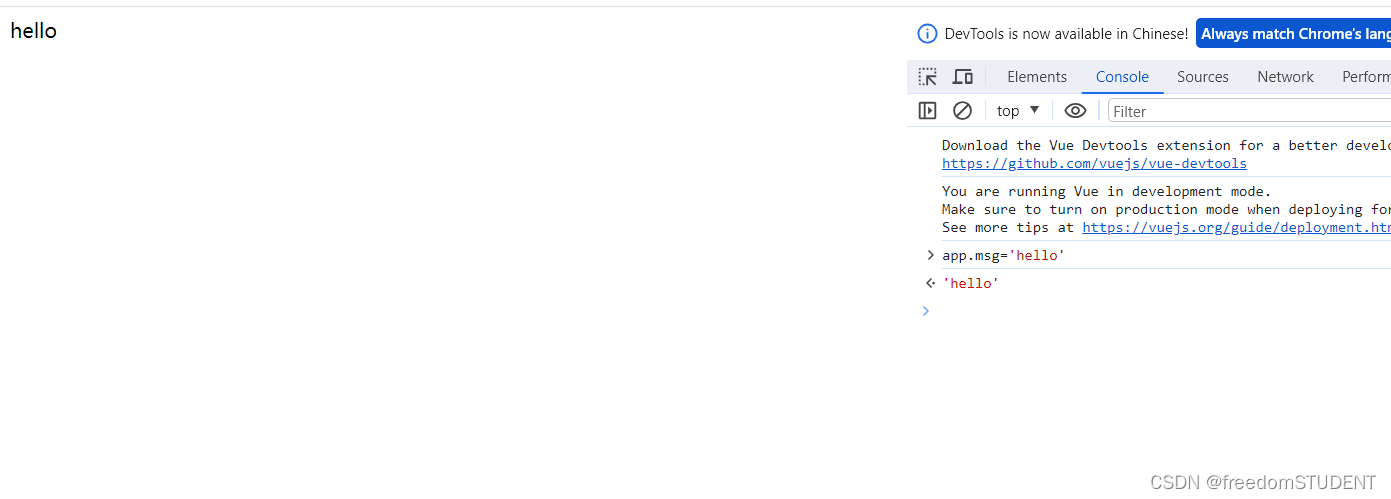
【Vue】核心特性(响应式)
响应式: 数据变化,视图自动更新 接下来使用一个例子来体现一下什么是响应式 案例一: 访问数据,视图自动更新 <!DOCTYPE html> <html lang"en"> <head><meta charset"UTF-8"><…...
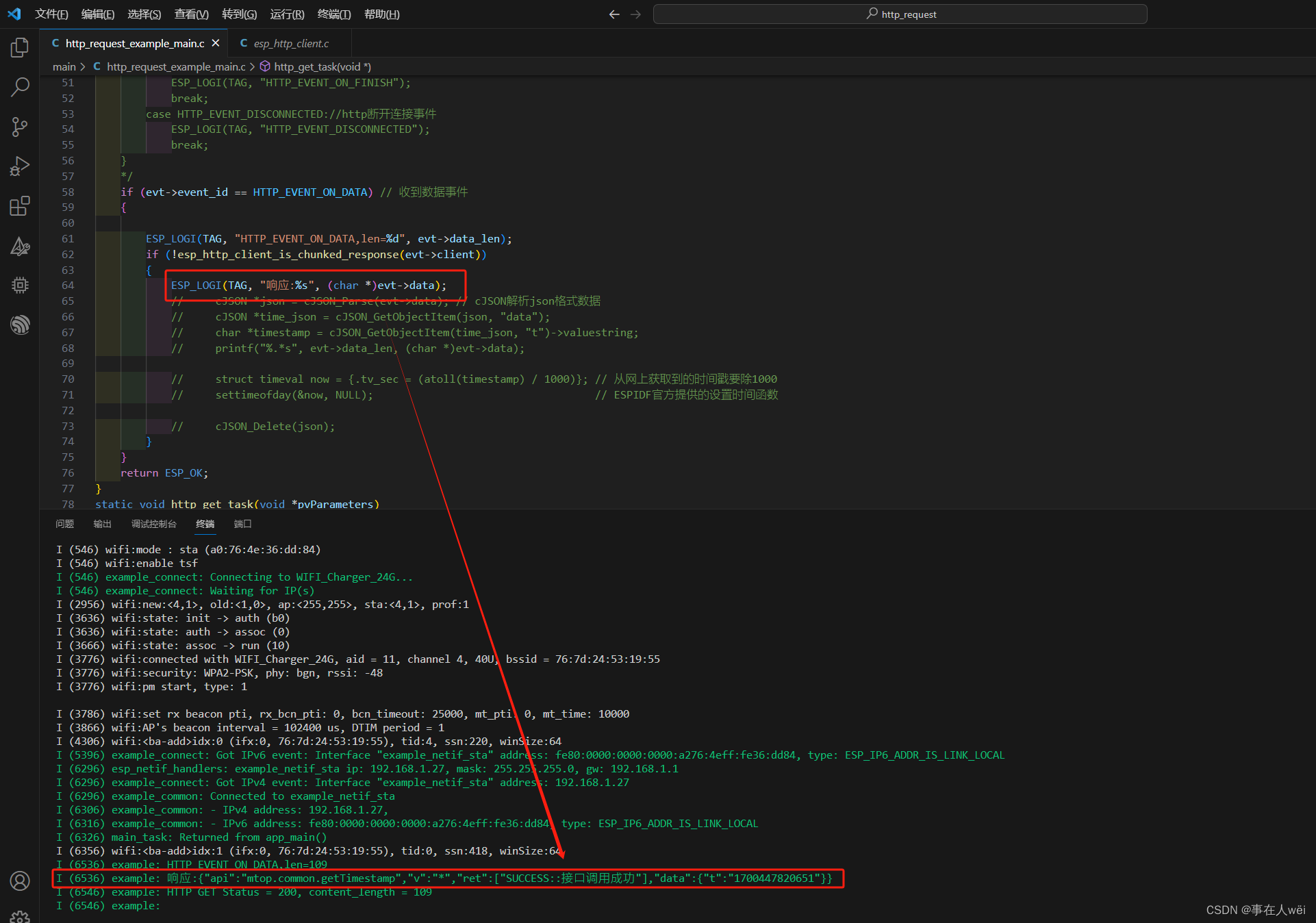
ESP32 http 请求
目录 参考教程1.使用的http连接2.使用Vscode-IDF创建http_request例程3.修改http_request_example_main.c函数4.已经获取到响应的数据 参考教程 ESP-IDF HTTP获取网络时间 1.使用的http连接 http://api.m.taobao.com/rest/api3.do?apimtop.common.getTimestamp请求可以得到…...
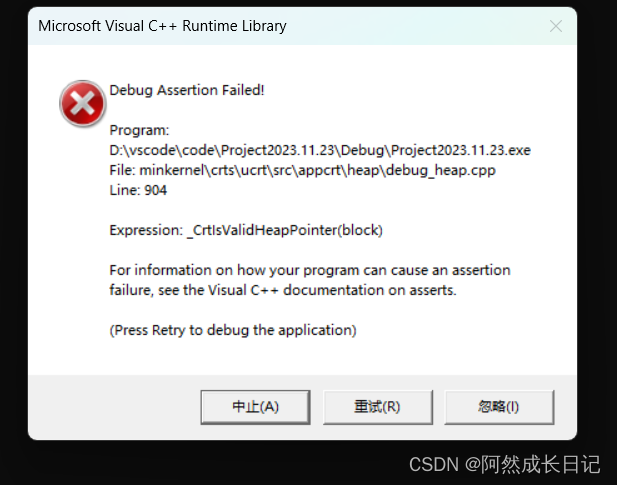
【C++】拷贝构造函数,析构函数详解!
💐 🌸 🌷 🍀 🌹 🌻 🌺 🍁 🍃 🍂 🌿 🍄🍝 🍛 🍤 📃个人主页 :阿然成长日记 …...
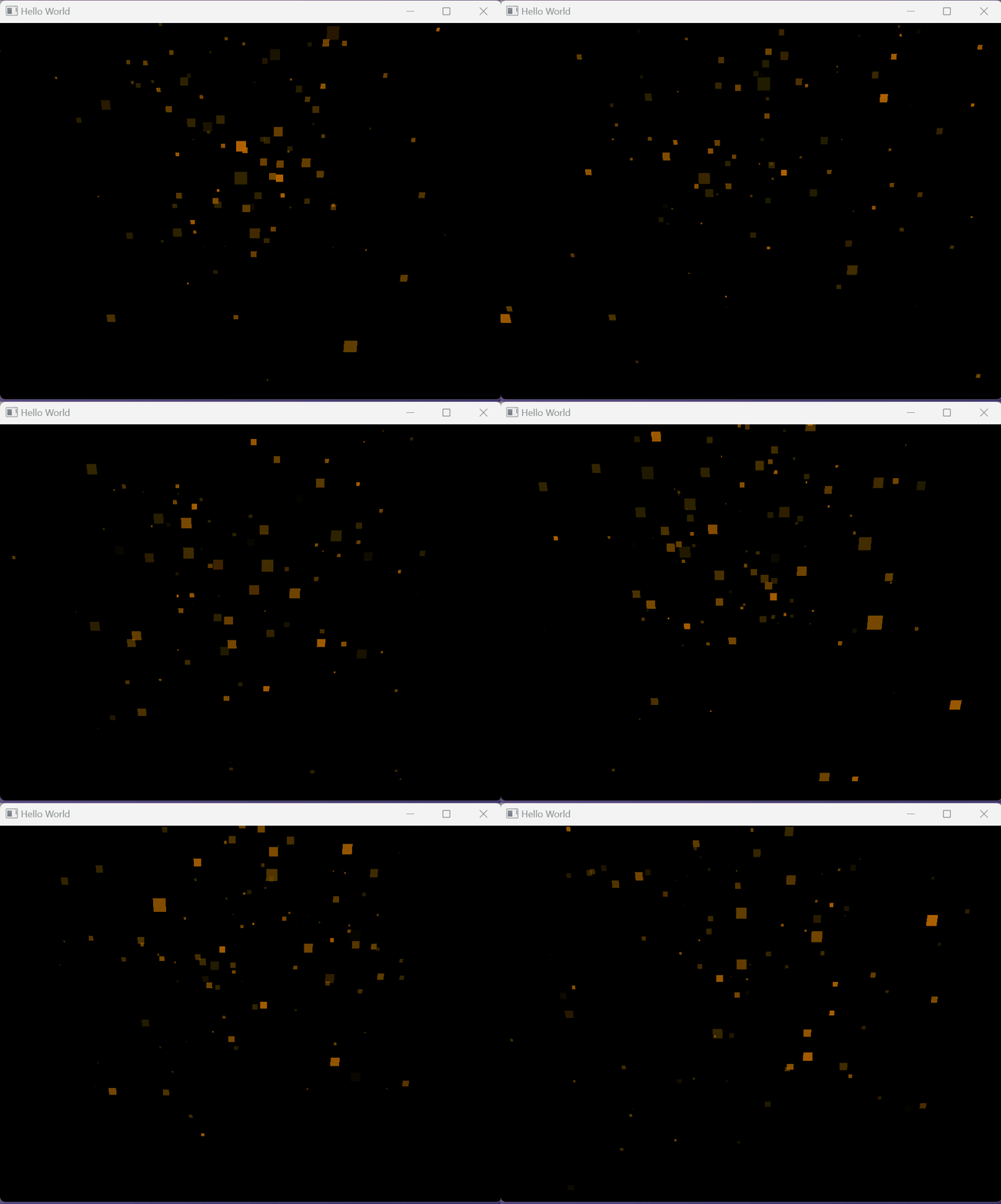
qml ParticleSystem3D使用介绍
在 Qt Quick 3D 中,ParticleSystem3D 是用来创建和控制3D粒子系统的元素。粒子系统是图形编程中用于模拟液体、烟雾、火、星空等现象的技术,它通过生成大量小粒子来模拟这些效果。ParticleSystem3D 提供了一个框架,允许开发者定义粒子的各种属性,如生命周期、速度、颜色、大…...
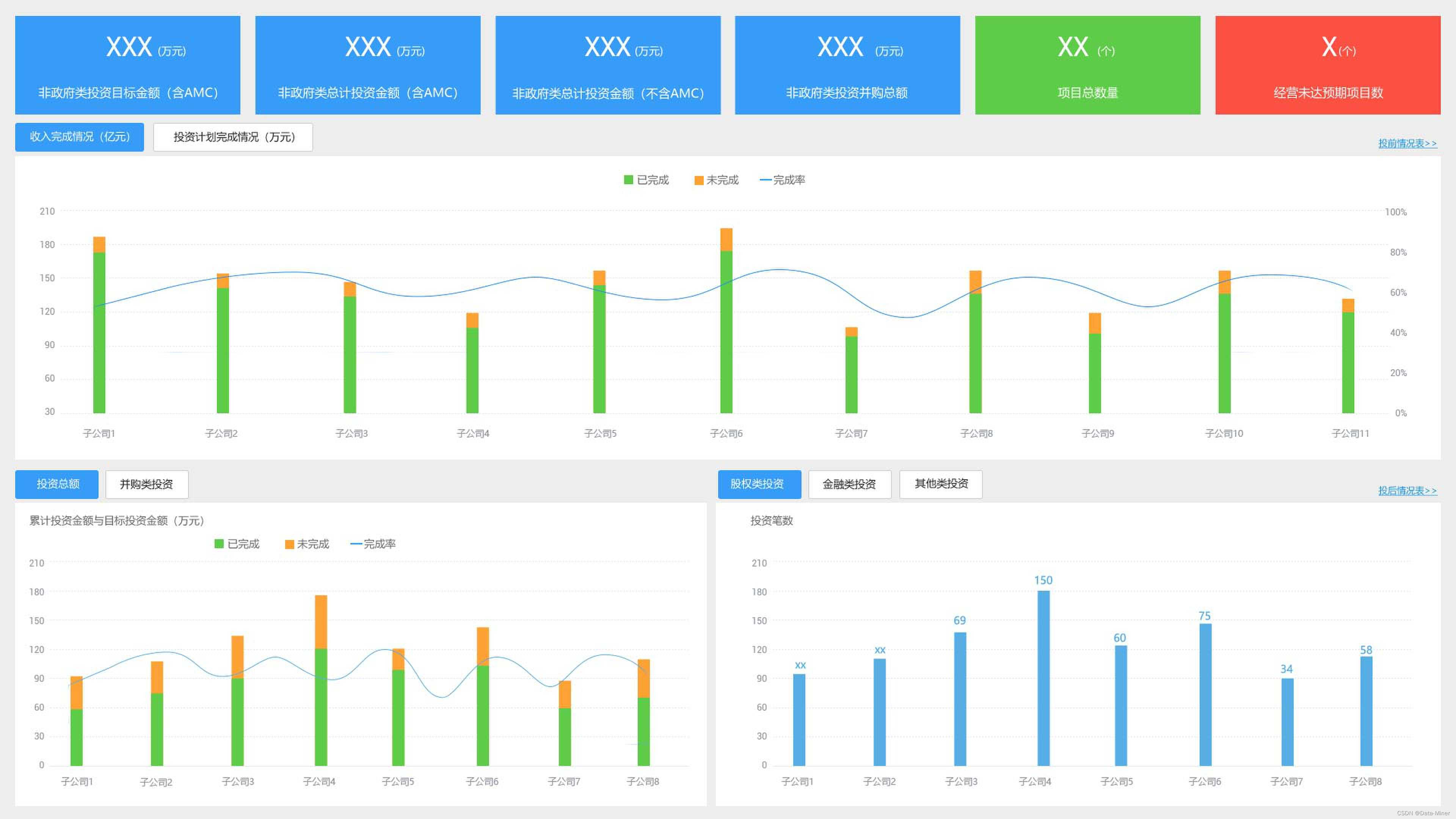
集团投融资大数据平台解决方案
一、项目背景 项目为集团型公司大数据平台项目,整个项目周期约为6个月,整体呈现了对外的数据大屏驾驶仓和对内的看板报表,减少了客户内部数据上报和报表制作的重复工作量,为集团数据决策奠定基础。 二、项目目标 战略层ÿ…...

深信服技术认证“SCSA-S”划重点:渗透测试工具使用
为帮助大家更加系统化的学习网络安全知识,尽快通过深信服安全服务认证工程师认证,深信服推出“SCSA-S认证备考秘笈”共十期内容,“考试重点”内容框架,帮助大家快速get重点知识~ 划重点来啦 深信服安全服务认证工程师(…...
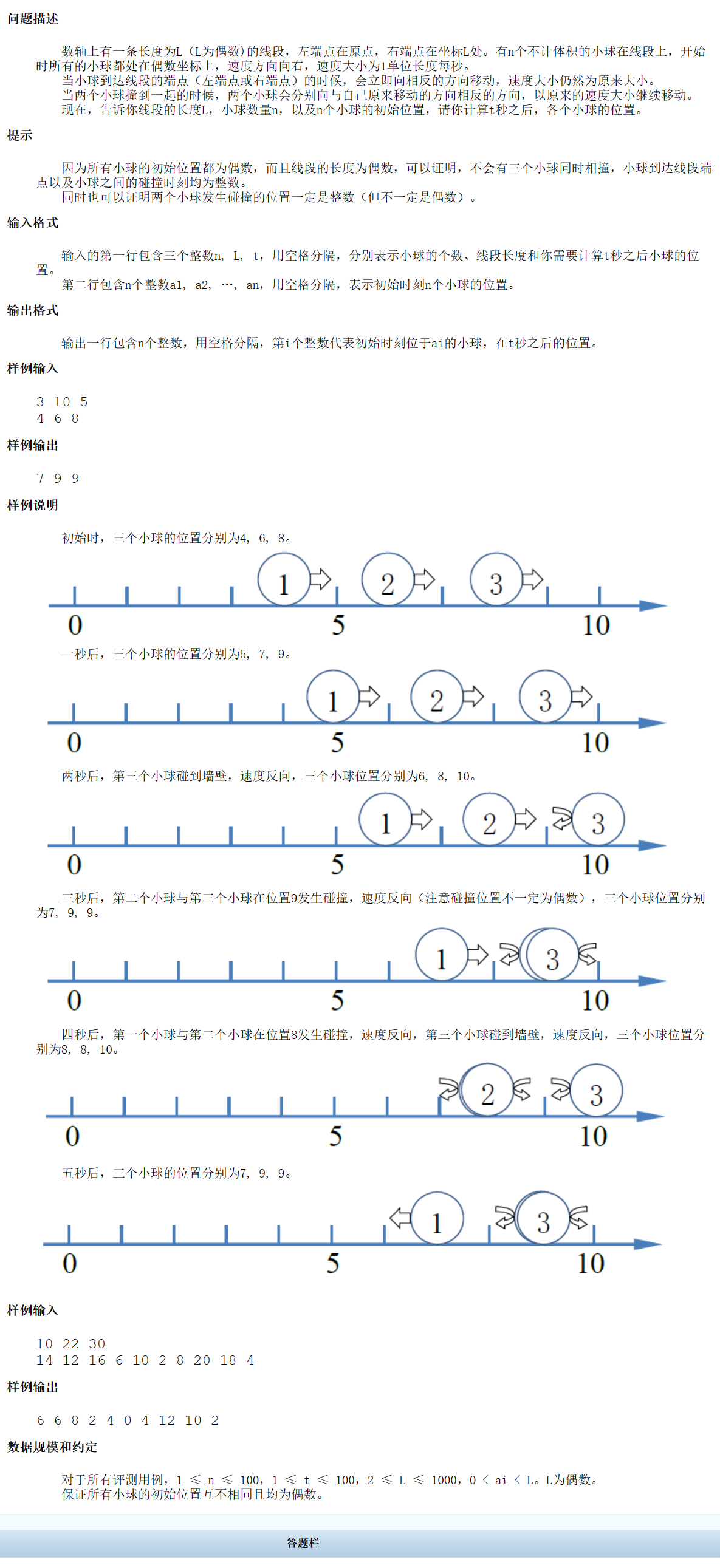
CCFCSP试题编号:201803-2试题名称:碰撞的小球
一、题目描述 二、思路 1.首先妾身分析这个题目,想要解题,得得解决2个问题。 1)判断小球到达端点或碰撞然后改变方向; 2)每时刻都要改变位置 两个问题都比较好解决,1)只要简单判断坐标&…...
《安富莱嵌入式周报》第327期:Cortex-A7所有外设单片机玩法LL/HAL库全面上线,分享三款GUI, PX5 RTOS推出网络协议栈,小米Vela开源
周报汇总地址:嵌入式周报 - uCOS & uCGUI & emWin & embOS & TouchGFX & ThreadX - 硬汉嵌入式论坛 - Powered by Discuz! 1、2023 Hackaday大赛胸牌开源 Vectorscope-main.zip (66.83MB) GitHub - Hack-a-Day/Vectorscope: Vectorscope badg…...

面试官:【js多维数组扁平化去重并排序】
文章目录 前言方法一方法二方法三方法四总结后言 前言 hello world欢迎来到前端的新世界 😜当前文章系列专栏:JavaScript 🐱👓博主在前端领域还有很多知识和技术需要掌握,正在不断努力填补技术短板。(如果出现错误&a…...
)
C#编程题分享(3)
n的阶乘问题 输⼊整数n,输出n的阶乘。 int n Convert.ToInt32(Console.ReadLine()); int jiecheng 1; for (int i 1; i < n 1; i) {jiecheng * i; // 1 * 2 * 3 * .....} Console.WriteLine("{0}的阶乘是:{1}", n, jiecheng); q^n次…...
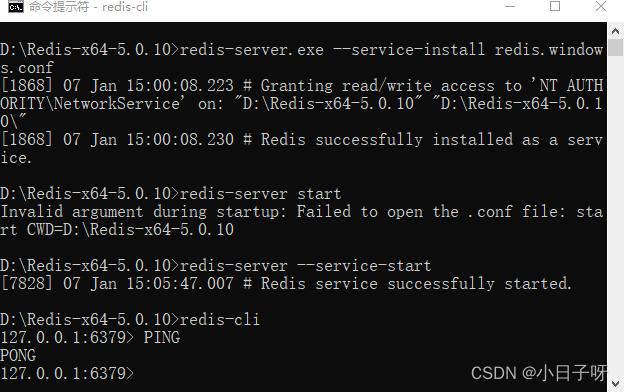
Redis下载和安装(Windows系统)
通过 GitHub 来下载 Windows 版 Redis 安装包,下载地址:点击前往。 打开上述的下载链接,Redis 支持 32 位和 64 位的 Window 系统,大家根据个人情况自行下载,如图 1 所示: 下载完成后,打开相应的文件夹&a…...

MySQL数据库:开源且强大的关系型数据库管理系统
大家好,我是咕噜-凯撒,数据在当今信息化时代的重要性不可忽视。作为企业和组织的重要资产,数据的管理和存储变得至关重要,MySQL作为一种关系型数据库管理系统,具有非常多的优势,下面简单的探讨一下MySQL数据…...
如何在AD的PCB板做矩形槽孔以及如何倒圆弧角
Altium Designer 22下载安装教程-CSDN博客 如何在AD上创建完整的项目-CSDN博客 开始前,请先安装后AD,并创建好项目。 目录 1. 如何在AD的PCB板做矩形槽孔 2. 如何在AD的PCB板倒圆弧角 1. 如何在AD的PCB板做矩形槽孔 首先,我们进入上面创…...

SpringMVC日志追踪笔记整理
新建logback-spring.xml <?xml version"1.0" encoding"UTF-8"?> <configuration><property name"PATH" value"./log/business"></property><appender name"STDOUT" class"ch.qos.logback…...
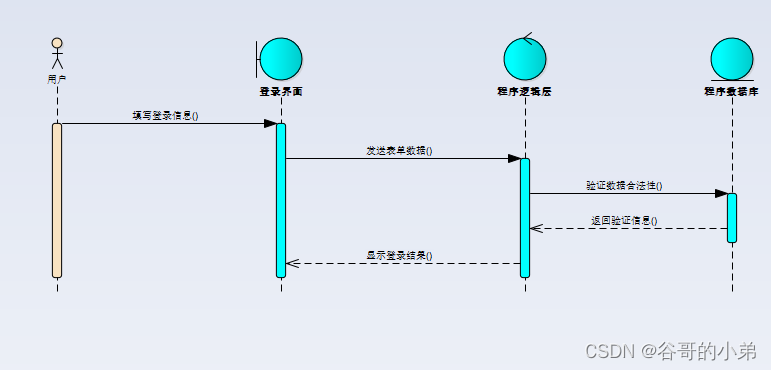
UML建模图文详解教程06——顺序图
版权声明 本文原创作者:谷哥的小弟作者博客地址:http://blog.csdn.net/lfdfhl本文参考资料:《UML面向对象分析、建模与设计(第2版)》吕云翔,赵天宇 著 顺序图概述 顺序图(sequence diagram,也…...
网络编程:socket、http协议与Web框架原理)
Python高级应用系列(十八)网络编程:socket、http协议与Web框架原理
前言 网络编程是 Python 后端开发的基石。无论你是构建 HTTP API、开发实时通信系统,还是调试网络协议,理解 socket 层的工作原理都至关重要。很多开发者每天使用 requests、Flask、Django,却从未真正理解 HTTP 的底层机制和 Web 框架的请求处理流程。 本文从 socket 起步…...

AI原生应用框架lobu:快速构建与部署大语言模型应用
1. 项目概述:一个面向开发者的AI原生应用框架最近在开源社区里,一个名为lobu-ai/lobu的项目引起了我的注意。乍一看这个名字,你可能会觉得有点陌生,甚至有点“怪”。但如果你深入了解一下它的定位和设计理念,就会发现这…...

像素史诗·智识终端一键部署MySQL:构建AI应用数据后台
像素史诗智识终端一键部署MySQL:构建AI应用数据后台 1. 前言:为什么需要MySQL数据库 在部署像素史诗智识终端这类AI应用时,数据存储是必不可少的一环。MySQL作为最流行的开源关系型数据库,能够稳定存储用户对话历史、向量数据等…...

WinForm容器控件
一 定义容器控件 能装其他控件的控件,就像现实里的「收纳盒 / 抽屉 / 文件夹」,专门用来装按钮、文本框、ListBox 这些 “小控件”。二 用处举个例子:你做登录界面,有 “用户名、密码、登录按钮”3 个控件:不用容器&a…...

OpenClaw 2.6.6 一键部署方案,Windows 本地 AI 办公助手配置
2026 年开源圈备受关注的「数字员工」OpenClaw(昵称小龙虾),GitHub 星标收获 28 万 ,凭借本地运行 零代码操作 自动执行任务的核心优势收获大量用户。很多人误以为它是普通聊天 AI,实则是能真正操控电脑的自动化工具…...

如何在2025年高效下载B站视频?BiliTools跨平台工具箱深度解析
如何在2025年高效下载B站视频?BiliTools跨平台工具箱深度解析 【免费下载链接】BiliTools A cross-platform bilibili toolbox. 跨平台哔哩哔哩工具箱,支持下载视频、番剧等等各类资源 项目地址: https://gitcode.com/GitHub_Trending/bilit/BiliTools…...
:公式与函数实战:常用函数深度解析与错误排查)
Excel高效使用技巧(三):公式与函数实战:常用函数深度解析与错误排查
公式写得好,下班走得早;函数用得妙,加薪来得快。 如果说Excel是一座城市,那么公式和函数就是这座城市的交通网络。用得好,四通八达、畅通无阻;用不好,堵车堵到怀疑人生。 今天这篇文章,咱们不玩虚的,直接上干货——从高频函数的深度解析,到公式错误的排查技巧,手把…...

ComfyUI Qwen-Image-Edit-F2P 人脸生成图像:真实体验报告,这个AI工具到底有多好用
ComfyUI Qwen-Image-Edit-F2P 人脸生成图像:真实体验报告,这个AI工具到底有多好用 1. 初识Qwen-Image-Edit-F2P:它能做什么? 最近我测试了一款名为Qwen-Image-Edit-F2P的人脸生成图像工具,它基于ComfyUI平台部署&…...

写论文软件哪个好?2026 深度实测:虎贲等考 AI,毕业论文全流程合规神器,一次通关不踩坑
毕业季灵魂拷问:写论文软件哪个好?面对琳琅满目的写作工具,从通用大模型到专项学术平台,究竟谁才是真正能帮你高效、安全搞定毕业论文的 “真命天子”? 经过对 9 款主流工具的深度实测与对比,虎贲等考 AI凭…...

给数字IC新人的UPF避坑指南:电源开关、隔离单元和电平移位器到底怎么配?
给数字IC新人的UPF避坑实战:电源管理三大核心模块的配置陷阱与调试技巧 低功耗设计已经成为现代数字IC开发中不可回避的挑战。当你第一次在项目中独立编写UPF(Unified Power Format)脚本时,那种既兴奋又忐忑的心情我深有体会——电…...