
uni-app 使用uni.getLocation获取经纬度配合腾讯地图api获取当前地址
前言
-
最近在开发中需要根据经纬度获取当前位置信息,传递给后端,用来回显显示当前位置
-
查阅uni-app文档,发现uni.getLocation () 可以获取到经纬度,但是在小程序环境没有地址信息
-
思考怎么把经纬度换成地址,如果经纬度是key,那地址就是value,第三方地图就是数据库
-
所以我们只要使用uni.getLocation ()获取经纬度配合地图api就可以解决这个需求
报错情况-对应解决办法
报错一:没有在用户隐私指引中获取当前位置权限
报错二:"errMsg": "getLocation:fail fail:require permission desc"
解决方案:在manifest.json-微信小程序配置-位置接口打勾-填写用途
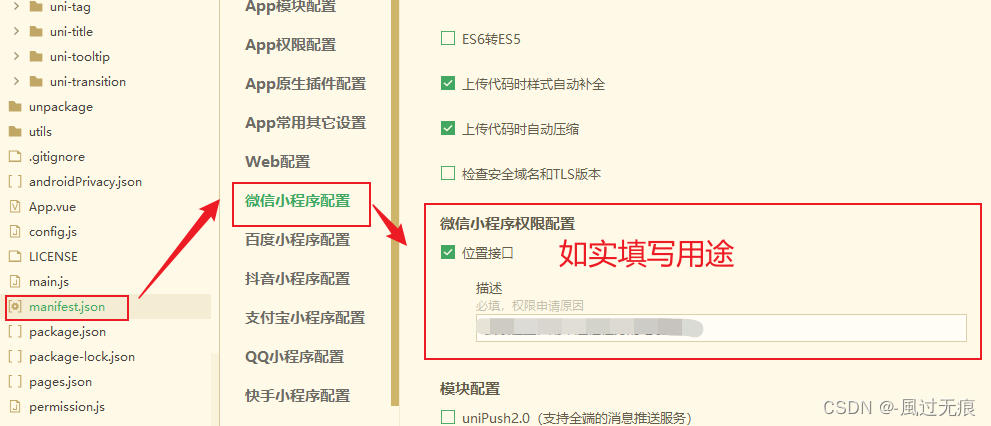
或者直接源码视图-小程序直接配置如下代码
"permission" : {"scope.userLocation" : {"desc" : "真实用途"}}报错三:ferrMsg: "getlocation;fail the api heed to be declared in the requiredprivateInfosfield in app.json/ext.json"
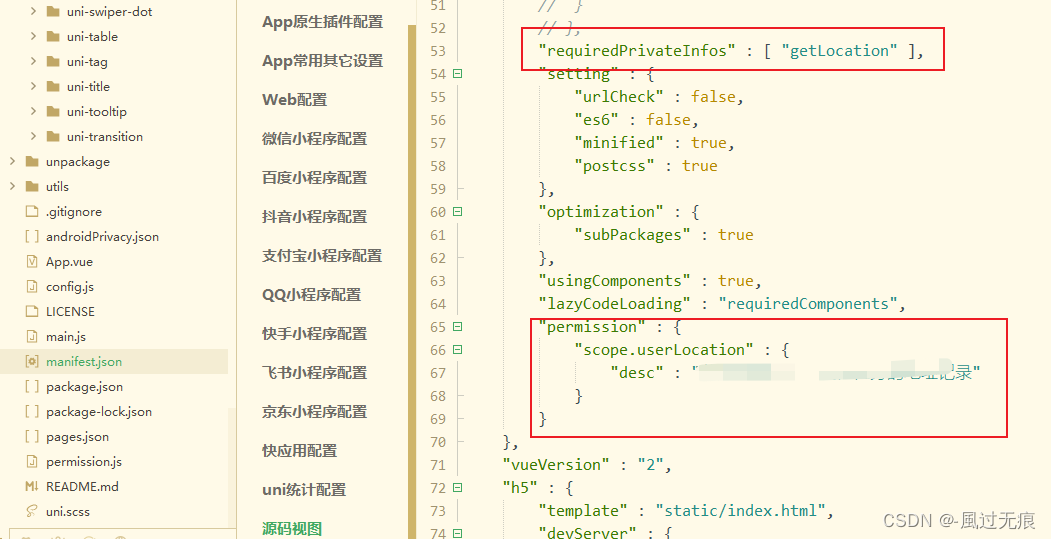
解决方案:小程序源码视图添加如下代码
"requiredPrivateInfos" : [ "getLocation" ],总结:
-
报错一是因为微信小程序官方最近必须对相应api进行权限申请,询问用户。
-
报错二是询问用户是否愿意获取当前位置信息
-
报错三是用户同意之后,使用相关8个地理位置相关接口时,需要声明该字段,否则将无法正常使用
-
一般用户隐私指引没问题,报错二三使用勾选方式,就会在源码视图帮我们生成对应代码,不会有问题
uni.getLocation ()为什么获取不到位置信息
-
官方文档说的很清楚,只用在APP环境下,这个api才会有位置信息,小程序环境只有经纬度

为什么使用腾讯地图配合uni.getLocation ()来实现
-
因为uni-app提供的官方地图就是腾讯地图
-
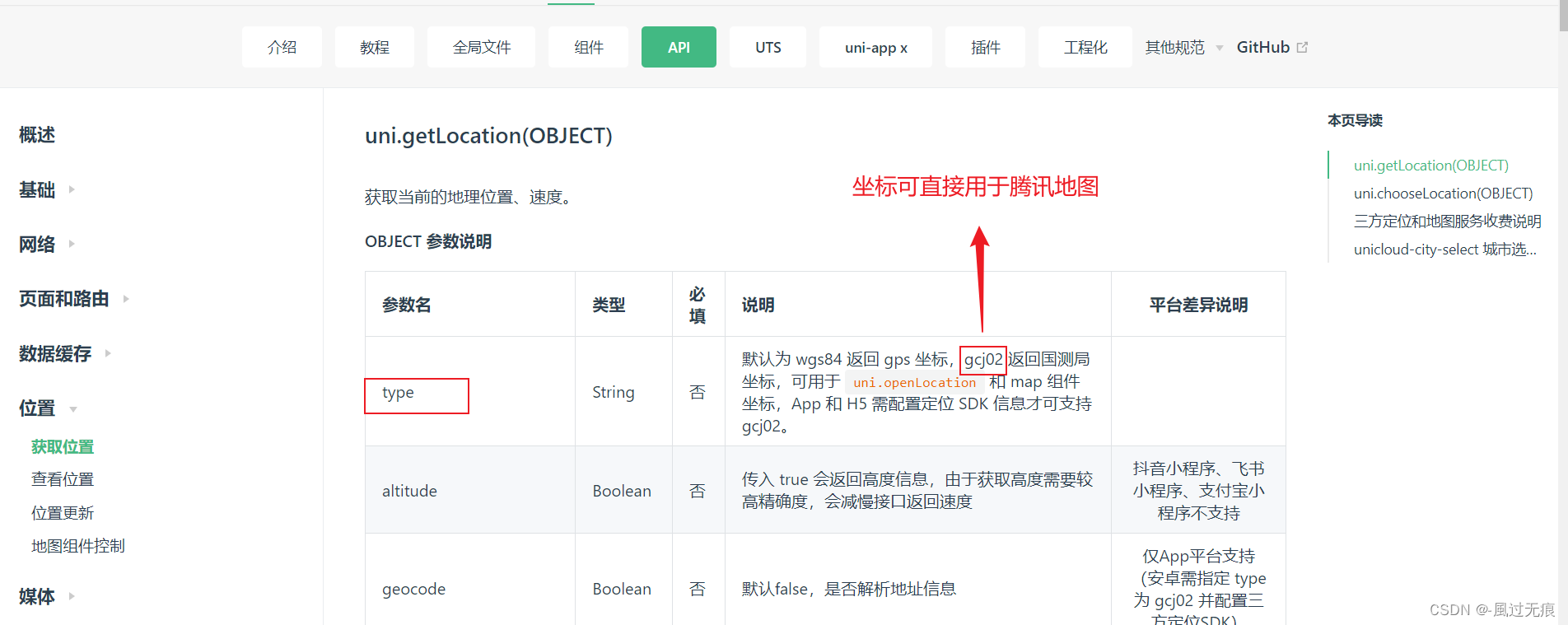
并且uni.getLocation ()的type='gcz02'时经纬度在腾讯地图可以直接使用
-
并不是只能用腾讯地图,而是只是获取一个位置信息,这样使用更方便省去很多麻烦
代码实现
1.在腾讯地图注册账号,获取key,下载SDK参考文章:uni-app 小程序使用腾讯地图完成搜索功能
高德地图原生SDK:微信小程序JavaScript SDK | 腾讯位置服务
SDK可以随便下一个

2.在uni-app/utils/建立tenxun文件夹/下面放我们下载sdk文件( qqmap-wx-jssdk.js)代码如下
/*** 微信小程序JavaScriptSDK* * @version 1.1* @date 2019-01-20*/
var ERROR_CONF = {KEY_ERR: 311,KEY_ERR_MSG: 'key格式错误',PARAM_ERR: 310,PARAM_ERR_MSG: '请求参数信息有误',SYSTEM_ERR: 600,SYSTEM_ERR_MSG: '系统错误',WX_ERR_CODE: 1000,WX_OK_CODE: 200
};
var BASE_URL = 'https://apis.map.qq.com/ws/';
var URL_SEARCH = BASE_URL + 'place/v1/search';
var URL_SUGGESTION = BASE_URL + 'place/v1/suggestion';
var URL_GET_GEOCODER = BASE_URL + 'geocoder/v1/';
var URL_CITY_LIST = BASE_URL + 'district/v1/list';
var URL_AREA_LIST = BASE_URL + 'district/v1/getchildren';
var URL_DISTANCE = BASE_URL + 'distance/v1/';
var EARTH_RADIUS = 6378136.49;
var Utils = {/*** 得到终点query字符串* @param {Array|String} 检索数据*/location2query(data) {if (typeof data == 'string') {return data;}var query = '';for (var i = 0; i < data.length; i++) {var d = data[i];if (!!query) {query += ';';}if (d.location) {query = query + d.location.lat + ',' + d.location.lng;}if (d.latitude && d.longitude) {query = query + d.latitude + ',' + d.longitude;}}return query;},
/*** 计算角度*/rad(d) {return d * Math.PI / 180.0;}, /*** 处理终点location数组* @return 返回终点数组*/getEndLocation(location){var to = location.split(';');var endLocation = [];for (var i = 0; i < to.length; i++) {endLocation.push({lat: parseFloat(to[i].split(',')[0]),lng: parseFloat(to[i].split(',')[1])})}return endLocation;},
/*** 计算两点间直线距离* @param a 表示纬度差* @param b 表示经度差* @return 返回的是距离,单位m*/getDistance(latFrom, lngFrom, latTo, lngTo) {var radLatFrom = this.rad(latFrom);var radLatTo = this.rad(latTo);var a = radLatFrom - radLatTo;var b = this.rad(lngFrom) - this.rad(lngTo);var distance = 2 * Math.asin(Math.sqrt(Math.pow(Math.sin(a / 2), 2) + Math.cos(radLatFrom) * Math.cos(radLatTo) * Math.pow(Math.sin(b / 2), 2)));distance = distance * EARTH_RADIUS;distance = Math.round(distance * 10000) / 10000;return parseFloat(distance.toFixed(0));},/*** 使用微信接口进行定位*/getWXLocation(success, fail, complete) {wx.getLocation({type: 'gcj02',success: success,fail: fail,complete: complete});},
/*** 获取location参数*/getLocationParam(location) {if (typeof location == 'string') {var locationArr = location.split(',');if (locationArr.length === 2) {location = {latitude: location.split(',')[0],longitude: location.split(',')[1]};} else {location = {};}}return location;},
/*** 回调函数默认处理*/polyfillParam(param) {param.success = param.success || function () { };param.fail = param.fail || function () { };param.complete = param.complete || function () { };},
/*** 验证param对应的key值是否为空* * @param {Object} param 接口参数* @param {String} key 对应参数的key*/checkParamKeyEmpty(param, key) {if (!param[key]) {var errconf = this.buildErrorConfig(ERROR_CONF.PARAM_ERR, ERROR_CONF.PARAM_ERR_MSG + key +'参数格式有误');param.fail(errconf);param.complete(errconf);return true;}return false;},
/*** 验证参数中是否存在检索词keyword* * @param {Object} param 接口参数*/checkKeyword(param){return !this.checkParamKeyEmpty(param, 'keyword');},
/*** 验证location值* * @param {Object} param 接口参数*/checkLocation(param) {var location = this.getLocationParam(param.location);if (!location || !location.latitude || !location.longitude) {var errconf = this.buildErrorConfig(ERROR_CONF.PARAM_ERR, ERROR_CONF.PARAM_ERR_MSG + ' location参数格式有误');param.fail(errconf);param.complete(errconf);return false;}return true;},
/*** 构造错误数据结构* @param {Number} errCode 错误码* @param {Number} errMsg 错误描述*/buildErrorConfig(errCode, errMsg) {return {status: errCode,message: errMsg};},
/*** * 数据处理函数* 根据传入参数不同处理不同数据* @param {String} feature 功能名称* search 地点搜索* suggest关键词提示* reverseGeocoder逆地址解析* geocoder地址解析* getCityList获取城市列表:父集* getDistrictByCityId获取区县列表:子集* calculateDistance距离计算* @param {Object} param 接口参数* @param {Object} data 数据*/handleData(param,data,feature){if (feature === 'search') {var searchResult = data.data;var searchSimplify = [];for (var i = 0; i < searchResult.length; i++) {searchSimplify.push({id: searchResult[i].id || null,title: searchResult[i].title || null,latitude: searchResult[i].location && searchResult[i].location.lat || null,longitude: searchResult[i].location && searchResult[i].location.lng || null,address: searchResult[i].address || null,category: searchResult[i].category || null,tel: searchResult[i].tel || null,adcode: searchResult[i].ad_info && searchResult[i].ad_info.adcode || null,city: searchResult[i].ad_info && searchResult[i].ad_info.city || null,district: searchResult[i].ad_info && searchResult[i].ad_info.district || null,province: searchResult[i].ad_info && searchResult[i].ad_info.province || null})}param.success(data, {searchResult: searchResult,searchSimplify: searchSimplify})} else if (feature === 'suggest') {var suggestResult = data.data;var suggestSimplify = [];for (var i = 0; i < suggestResult.length; i++) {suggestSimplify.push({adcode: suggestResult[i].adcode || null,address: suggestResult[i].address || null,category: suggestResult[i].category || null,city: suggestResult[i].city || null,district: suggestResult[i].district || null,id: suggestResult[i].id || null,latitude: suggestResult[i].location && suggestResult[i].location.lat || null,longitude: suggestResult[i].location && suggestResult[i].location.lng || null,province: suggestResult[i].province || null,title: suggestResult[i].title || null,type: suggestResult[i].type || null})}param.success(data, {suggestResult: suggestResult,suggestSimplify: suggestSimplify})} else if (feature === 'reverseGeocoder') {var reverseGeocoderResult = data.result;var reverseGeocoderSimplify = {address: reverseGeocoderResult.address || null,latitude: reverseGeocoderResult.location && reverseGeocoderResult.location.lat || null,longitude: reverseGeocoderResult.location && reverseGeocoderResult.location.lng || null,adcode: reverseGeocoderResult.ad_info && reverseGeocoderResult.ad_info.adcode || null,city: reverseGeocoderResult.address_component && reverseGeocoderResult.address_component.city || null,district: reverseGeocoderResult.address_component && reverseGeocoderResult.address_component.district || null,nation: reverseGeocoderResult.address_component && reverseGeocoderResult.address_component.nation || null,province: reverseGeocoderResult.address_component && reverseGeocoderResult.address_component.province || null,street: reverseGeocoderResult.address_component && reverseGeocoderResult.address_component.street || null,street_number: reverseGeocoderResult.address_component && reverseGeocoderResult.address_component.street_number || null,recommend: reverseGeocoderResult.formatted_addresses && reverseGeocoderResult.formatted_addresses.recommend || null,rough: reverseGeocoderResult.formatted_addresses && reverseGeocoderResult.formatted_addresses.rough || null};if (reverseGeocoderResult.pois) {//判断是否返回周边poivar pois = reverseGeocoderResult.pois;var poisSimplify = [];for (var i = 0;i < pois.length;i++) {poisSimplify.push({id: pois[i].id || null,title: pois[i].title || null,latitude: pois[i].location && pois[i].location.lat || null,longitude: pois[i].location && pois[i].location.lng || null,address: pois[i].address || null,category: pois[i].category || null,adcode: pois[i].ad_info && pois[i].ad_info.adcode || null,city: pois[i].ad_info && pois[i].ad_info.city || null,district: pois[i].ad_info && pois[i].ad_info.district || null,province: pois[i].ad_info && pois[i].ad_info.province || null})}param.success(data,{reverseGeocoderResult: reverseGeocoderResult,reverseGeocoderSimplify: reverseGeocoderSimplify,pois: pois,poisSimplify: poisSimplify})} else {param.success(data, {reverseGeocoderResult: reverseGeocoderResult,reverseGeocoderSimplify: reverseGeocoderSimplify})}} else if (feature === 'geocoder') {var geocoderResult = data.result;var geocoderSimplify = {title: geocoderResult.title || null,latitude: geocoderResult.location && geocoderResult.location.lat || null,longitude: geocoderResult.location && geocoderResult.location.lng || null,adcode: geocoderResult.ad_info && geocoderResult.ad_info.adcode || null,province: geocoderResult.address_components && geocoderResult.address_components.province || null,city: geocoderResult.address_components && geocoderResult.address_components.city || null,district: geocoderResult.address_components && geocoderResult.address_components.district || null,street: geocoderResult.address_components && geocoderResult.address_components.street || null,street_number: geocoderResult.address_components && geocoderResult.address_components.street_number || null,level: geocoderResult.level || null};param.success(data,{geocoderResult: geocoderResult,geocoderSimplify: geocoderSimplify});} else if (feature === 'getCityList') {var provinceResult = data.result[0];var cityResult = data.result[1];var districtResult = data.result[2];param.success(data,{provinceResult: provinceResult,cityResult: cityResult,districtResult: districtResult});} else if (feature === 'getDistrictByCityId') {var districtByCity = data.result[0];param.success(data, districtByCity);} else if (feature === 'calculateDistance') {var calculateDistanceResult = data.result.elements; var distance = [];for (var i = 0; i < calculateDistanceResult.length; i++){distance.push(calculateDistanceResult[i].distance);} param.success(data, {calculateDistanceResult: calculateDistanceResult,distance: distance});} else {param.success(data);}},
/*** 构造微信请求参数,公共属性处理* * @param {Object} param 接口参数* @param {Object} param 配置项* @param {String} feature 方法名*/buildWxRequestConfig(param, options, feature) {var that = this;options.header = { "content-type": "application/json" };options.method = 'GET';options.success = function (res) {var data = res.data;if (data.status === 0) {that.handleData(param, data, feature);} else {param.fail(data);}};options.fail = function (res) {res.statusCode = ERROR_CONF.WX_ERR_CODE;param.fail(that.buildErrorConfig(ERROR_CONF.WX_ERR_CODE, res.errMsg));};options.complete = function (res) {var statusCode = +res.statusCode;switch(statusCode) {case ERROR_CONF.WX_ERR_CODE: {param.complete(that.buildErrorConfig(ERROR_CONF.WX_ERR_CODE, res.errMsg));break;}case ERROR_CONF.WX_OK_CODE: {var data = res.data;if (data.status === 0) {param.complete(data);} else {param.complete(that.buildErrorConfig(data.status, data.message));}break;}default:{param.complete(that.buildErrorConfig(ERROR_CONF.SYSTEM_ERR, ERROR_CONF.SYSTEM_ERR_MSG));}
}};return options;},
/*** 处理用户参数是否传入坐标进行不同的处理*/locationProcess(param, locationsuccess, locationfail, locationcomplete) {var that = this;locationfail = locationfail || function (res) {res.statusCode = ERROR_CONF.WX_ERR_CODE;param.fail(that.buildErrorConfig(ERROR_CONF.WX_ERR_CODE, res.errMsg));};locationcomplete = locationcomplete || function (res) {if (res.statusCode == ERROR_CONF.WX_ERR_CODE) {param.complete(that.buildErrorConfig(ERROR_CONF.WX_ERR_CODE, res.errMsg));}};if (!param.location) {that.getWXLocation(locationsuccess, locationfail, locationcomplete);} else if (that.checkLocation(param)) {var location = Utils.getLocationParam(param.location);locationsuccess(location);}}
};
class QQMapWX {
/*** 构造函数* * @param {Object} options 接口参数,key 为必选参数*/constructor(options) {if (!options.key) {throw Error('key值不能为空');}this.key = options.key;};
/*** POI周边检索** @param {Object} options 接口参数对象* * 参数对象结构可以参考* @see http://lbs.qq.com/webservice_v1/guide-search.html*/search(options) {var that = this;options = options || {};
Utils.polyfillParam(options);
if (!Utils.checkKeyword(options)) {return;}
var requestParam = {keyword: options.keyword,orderby: options.orderby || '_distance',page_size: options.page_size || 10,page_index: options.page_index || 1,output: 'json',key: that.key};
if (options.address_format) {requestParam.address_format = options.address_format;}
if (options.filter) {requestParam.filter = options.filter;}
var distance = options.distance || "1000";var auto_extend = options.auto_extend || 1;var region = null;var rectangle = null;
//判断城市限定参数if (options.region) {region = options.region;}
//矩形限定坐标(暂时只支持字符串格式)if (options.rectangle) {rectangle = options.rectangle;}
var locationsuccess = function (result) { if (region && !rectangle) {//城市限定参数拼接requestParam.boundary = "region(" + region + "," + auto_extend + "," + result.latitude + "," + result.longitude + ")";} else if (rectangle && !region) {//矩形搜索requestParam.boundary = "rectangle(" + rectangle + ")";} else {requestParam.boundary = "nearby(" + result.latitude + "," + result.longitude + "," + distance + "," + auto_extend + ")";} wx.request(Utils.buildWxRequestConfig(options, {url: URL_SEARCH,data: requestParam}, 'search'));};Utils.locationProcess(options, locationsuccess);};
/*** sug模糊检索** @param {Object} options 接口参数对象* * 参数对象结构可以参考* http://lbs.qq.com/webservice_v1/guide-suggestion.html*/getSuggestion(options) {var that = this;options = options || {};Utils.polyfillParam(options);
if (!Utils.checkKeyword(options)) {return;}
var requestParam = {keyword: options.keyword,region: options.region || '全国',region_fix: options.region_fix || 0,policy: options.policy || 0,page_size: options.page_size || 10,//控制显示条数page_index: options.page_index || 1,//控制页数get_subpois : options.get_subpois || 0,//返回子地点output: 'json',key: that.key};//长地址if (options.address_format) {requestParam.address_format = options.address_format;}//过滤if (options.filter) {requestParam.filter = options.filter;}//排序if (options.location) {var locationsuccess = function (result) {requestParam.location = result.latitude + ',' + result.longitude;wx.request(Utils.buildWxRequestConfig(options, {url: URL_SUGGESTION,data: requestParam}, "suggest")); };Utils.locationProcess(options, locationsuccess);} else {wx.request(Utils.buildWxRequestConfig(options, {url: URL_SUGGESTION,data: requestParam}, "suggest")); } };
/*** 逆地址解析** @param {Object} options 接口参数对象* * 请求参数结构可以参考* http://lbs.qq.com/webservice_v1/guide-gcoder.html*/reverseGeocoder(options) {var that = this;options = options || {};Utils.polyfillParam(options);var requestParam = {coord_type: options.coord_type || 5,get_poi: options.get_poi || 0,output: 'json',key: that.key};if (options.poi_options) {requestParam.poi_options = options.poi_options}
var locationsuccess = function (result) {requestParam.location = result.latitude + ',' + result.longitude;wx.request(Utils.buildWxRequestConfig(options, {url: URL_GET_GEOCODER,data: requestParam}, 'reverseGeocoder'));};Utils.locationProcess(options, locationsuccess);};
/*** 地址解析** @param {Object} options 接口参数对象* * 请求参数结构可以参考* http://lbs.qq.com/webservice_v1/guide-geocoder.html*/geocoder(options) {var that = this;options = options || {};Utils.polyfillParam(options);
if (Utils.checkParamKeyEmpty(options, 'address')) {return;}
var requestParam = {address: options.address,output: 'json',key: that.key};
//城市限定if (options.region) {requestParam.region = options.region;}
wx.request(Utils.buildWxRequestConfig(options, {url: URL_GET_GEOCODER,data: requestParam},'geocoder'));};
/*** 获取城市列表** @param {Object} options 接口参数对象* * 请求参数结构可以参考* http://lbs.qq.com/webservice_v1/guide-region.html*/getCityList(options) {var that = this;options = options || {};Utils.polyfillParam(options);var requestParam = {output: 'json',key: that.key};
wx.request(Utils.buildWxRequestConfig(options, {url: URL_CITY_LIST,data: requestParam},'getCityList'));};
/*** 获取对应城市ID的区县列表** @param {Object} options 接口参数对象* * 请求参数结构可以参考* http://lbs.qq.com/webservice_v1/guide-region.html*/getDistrictByCityId(options) {var that = this;options = options || {};Utils.polyfillParam(options);
if (Utils.checkParamKeyEmpty(options, 'id')) {return;}
var requestParam = {id: options.id || '',output: 'json',key: that.key};
wx.request(Utils.buildWxRequestConfig(options, {url: URL_AREA_LIST,data: requestParam},'getDistrictByCityId'));};
/*** 用于单起点到多终点的路线距离(非直线距离)计算:* 支持两种距离计算方式:步行和驾车。* 起点到终点最大限制直线距离10公里。** 新增直线距离计算。* * @param {Object} options 接口参数对象* * 请求参数结构可以参考* http://lbs.qq.com/webservice_v1/guide-distance.html*/calculateDistance(options) {var that = this;options = options || {};Utils.polyfillParam(options);
if (Utils.checkParamKeyEmpty(options, 'to')) {return;}
var requestParam = {mode: options.mode || 'walking',to: Utils.location2query(options.to),output: 'json',key: that.key};
if (options.from) {options.location = options.from;}
//计算直线距离if(requestParam.mode == 'straight'){ var locationsuccess = function (result) {var locationTo = Utils.getEndLocation(requestParam.to);//处理终点坐标var data = {message:"query ok",result:{elements:[]},status:0};for (var i = 0; i < locationTo.length; i++) {data.result.elements.push({//将坐标存入distance: Utils.getDistance(result.latitude, result.longitude, locationTo[i].lat, locationTo[i].lng),duration:0,from:{lat: result.latitude,lng:result.longitude},to:{lat: locationTo[i].lat,lng: locationTo[i].lng}}); }var calculateResult = data.result.elements;var distanceResult = [];for (var i = 0; i < calculateResult.length; i++) {distanceResult.push(calculateResult[i].distance);} return options.success(data,{calculateResult: calculateResult,distanceResult: distanceResult});};Utils.locationProcess(options, locationsuccess);} else {var locationsuccess = function (result) {requestParam.from = result.latitude + ',' + result.longitude;wx.request(Utils.buildWxRequestConfig(options, {url: URL_DISTANCE,data: requestParam},'calculateDistance'));};
Utils.locationProcess(options, locationsuccess);} }
};
module.exports = QQMapWX;3.在需要获取位置信息页面引入使用
3.1引入文件sdk
import QQMapWX from "@/utils/tenxun/qqmap-wx-jssdk.js"3.2 获取位置信息方法-复制要填写key,里面有各种信息,根据需求看打印信息
// 获取位置信息async getLocationInfo() {//获取位置信息return new Promise((resolve) => {//位置信息默认数据let location = {longitude: 0,latitude: 0,province: "",city: "",area: "",street: "",address: "",};// 获取经纬度(gcjo2)腾讯地图可直接使用uni.getLocation({type: "gcj02",success(res) {location.longitude = res.longitude;location.latitude = res.latitude;// 腾讯地图Apiconst qqmapsdk = new QQMapWX({key: '' //这里填写自己申请的key});// 使用腾讯地图apiqqmapsdk.reverseGeocoder({location,success(response) {let info = response.result;// 注意查看打印信息console.log('获取位置信息',info);location.province = info.address_component.province;location.city = info.address_component.city;location.area = info.address_component.district;location.street = info.address_component.street;location.address = info.address;// 详细地址location.recommend = info.formatted_addresses.recommendlocation.rough = info.formatted_addresses.rough// 我使用这里面地址location.standard_address = info.formatted_addresses.standard_addressresolve(location);},});},fail(err) {console.log(err)},});});},3.3使用该方法获取地址
// 获取当前地址
const location = await this.getLocationInfo();
console.log('获取地址', location);
4.测试效果
-
使用微信开发者工具测试时会出现定位不准-正常,会弹起授权框询问用户是否愿意获取位置信息
-
使用真机测试,或者体验版测试位置就准了,根据自己需求看打印获取信息,自己组装
总结:
经过这一趟流程下来相信你也对 uni-app 使用uni.getLocation获取经纬度配合腾讯地图api获取当前地址 有了初步的深刻印象,但在实际开发中我 们遇到的情况肯定是不一样的,所以我们要理解它的原理,万变不离其宗。加油,打工人!
有什么不足的地方请大家指出谢谢 -- 風过无痕
相关文章:
uni-app 使用uni.getLocation获取经纬度配合腾讯地图api获取当前地址
前言 最近在开发中需要根据经纬度获取当前位置信息,传递给后端,用来回显显示当前位置 查阅uni-app文档,发现uni.getLocation () 可以获取到经纬度,但是在小程序环境没有地址信息 思考怎么把经纬度换成地址,如果经纬度…...

cocos2dx Animate3D (一)
3D相关的动画都是继承Grid3DAction 本质上是用GirdBase进行创建动画的小块。 Shaky3D 晃动特效 // 持续时间(时间过后不会回到原来的样子) // 整个屏幕被分成几行几列 // 晃动的范围 // z轴是否晃动 static Shaky3D* create(float initWithDuration, const Size& …...
2023年最新PyCharm环境搭建教程(含Python下载安装)
文章目录 写在前面PythonPython简介Python生态圈Python下载安装 PyCharmPyCharm简介PyCharm下载安装PyCharm环境搭建 写在后面 写在前面 最近博主收到了好多小伙伴的吐槽称不会下载安装python,博主听到后非常的扎心,经过博主几天的熬夜加班,…...
3D火山图绘制教程
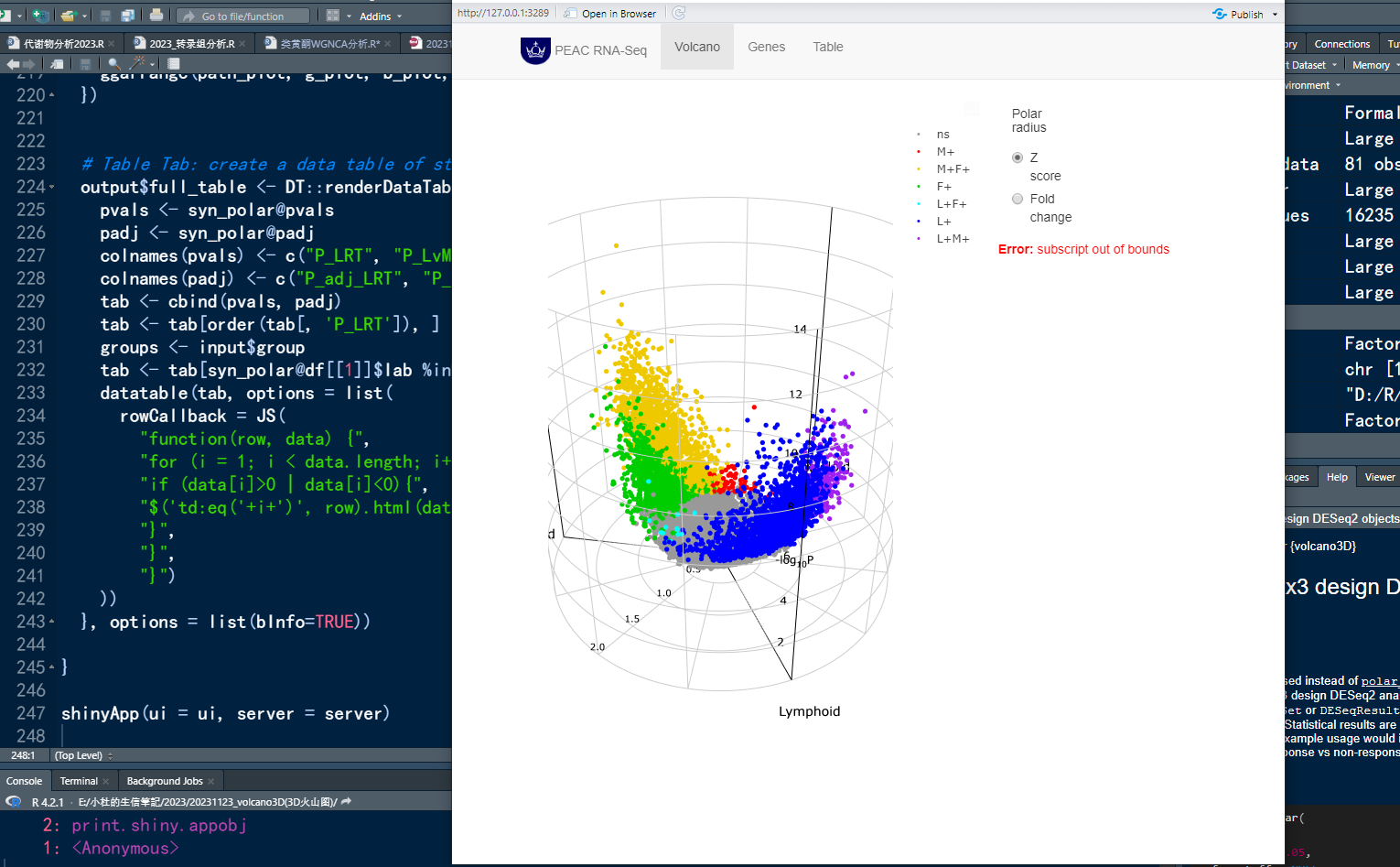
一边学习,一边总结,一边分享! 本期教程内容 **注:**本教程详细内容 Volcano3D绘制3D火山图 一、前言 火山图是做差异分析中最常用到的图形,在前面的推文中,我们也推出了好几期火山图的绘制教程࿰…...

跳跃游戏[中等]
优质博文:IT-BLOG-CN 一、题目 给你一个非负整数数组nums,你最初位于数组的第一个下标 。数组中的每个元素代表你在该位置可以跳跃的最大长度。判断你是否能够到达最后一个下标,如果可以,返回true;否则,返…...

华为昇腾开发板共享Windows网络上网的方法
作者:朱金灿 来源:clever101的专栏 为什么大多数人学不会人工智能编程?>>> 具体参考文章:linux(内网)通过window 上网。具体是两步:一是在windows上设置internet连接共享。二是打开Atlas 200I D…...
【工具栏】热部署不生效
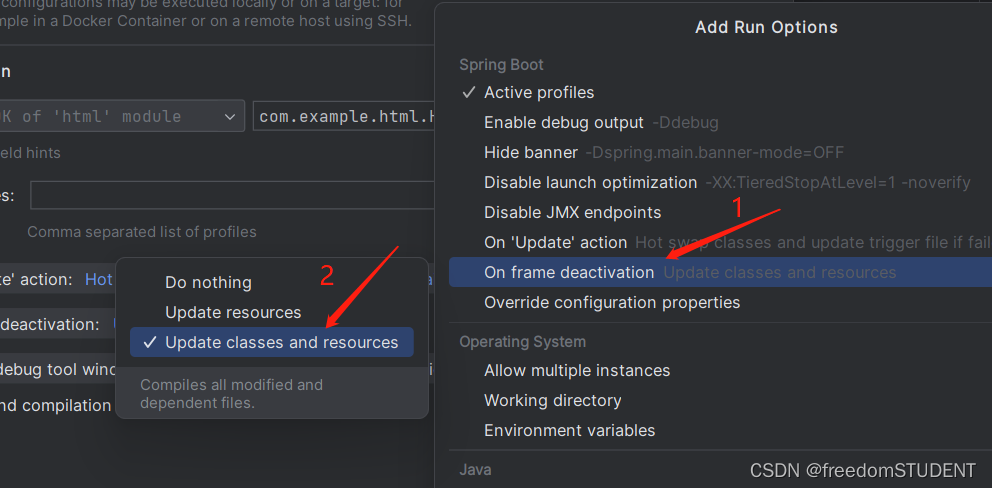
目录 配置热部署: 解决热部署不生效: 首先检查: 第一步: 第二步: 第三步: 第四步: 配置热部署: https://blog.csdn.net/m0_67930426/article/details/133690559 解决热部署不…...

一键去水印免费网站快速无痕处理图片、视频水印
水印问题往往是一个大麻烦。即使我们只想将这些照片保留在我们的个人相册中以供怀旧,水印也可能像顽固的符号一样刺激我们的眼睛。为了解决这个问题,我们需要不断探索创新的解决方案,让我们深入研究一款强大的一键去水印免费网站“水印云”。…...
分片并不意味着分布式
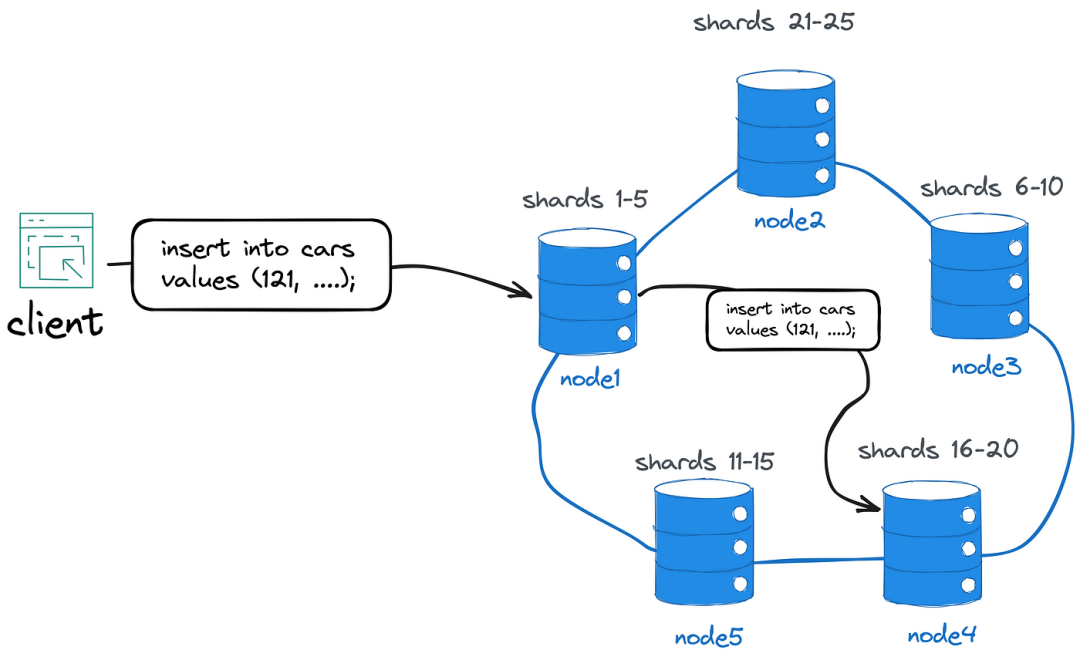
Sharding(分片)是一种将数据和负载分布到多个独立的数据库实例的技术。这种方法通过将原始数据集分割为分片来利用水平可扩展性,然后将这些分片分布到多个数据库实例中。 1*yg3PV8O2RO4YegyiYeiItA.png 但是,尽管"分布"…...

Python中的函数
一、函数参数与返回值基础知识 1、不要使用可变类型(list等)作为参数默认值,用None来代替。 参数默认值只会在函数定义阶段被创建一次,之后无论创建多少次,函数内拿到的默认值都是同一个对象,为规避这个问…...
推荐一款png图片打包plist工具pngPackerGUI_V2.0
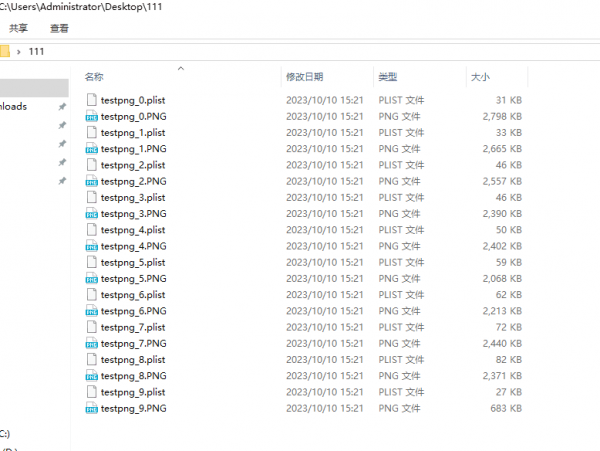
png图片打包plist工具,手把手教你使用pngPackerGUI_V2.0 此软件是在pngpacker_V1.1软件基础之后,开发的界面化操作软件,方便不太懂命令行的小白快捷上手使用。1.下载并解压缩软件,得到如下目录,双击打开 pngPackerGUI.…...
Docker快速安装Mariadb11.1
MariaDB数据库管理系统是MySQL的一个分支,主要由开源社区在维护,采用GPL授权许可 MariaDB的目的是完全兼容MySQL,包括API和命令行,使之能轻松成为MySQL的代替品。在存储引擎方面,使用XtraDB来代替MySQL的InnoDB。 Mari…...
方法可配置属性)
CuratorFrameworkFactory.builder()方法可配置属性
CuratorFrameworkFactory.builder()方法可以配置以下属性: 1. connectString:ZooKeeper服务器的连接字符串。 2. sessionTimeoutMs:ZooKeeper会话超时时间。 3. connectionTimeoutMs:ZooKeeper连接超时时间。 4. retryPolicy&…...

鸿蒙 ark ui 轮播图实现教程
前言: 各位同学有段时间没有见面 因为一直很忙所以就没有去更新博客。最近有在学习这个鸿蒙的ark ui开发 因为鸿蒙不是发布了一个鸿蒙next的测试版本 明年会启动纯血鸿蒙应用 所以我就想提前给大家写一些博客文章 效果图 具体实现 我们在鸿蒙的ark ui 里面列表使…...

看不惯AI版权作品被白嫖!Stability AI副总裁选择了辞职,曾领导开发Stable Audio
近日,OpenAI的各种大瓜真是让人吃麻了。 而就在Sam Altmam被开除前两天,可能没太多人注意到Stability AI副总裁Newton—Rex因看不惯StabilityAI在版权保护上的行为选择辞职一事。 大模型研究测试传送门 GPT-4传送门(免墙,可直接…...
基于Python+OpenCV+Tensorflow图像迁移的艺术图片生成系统
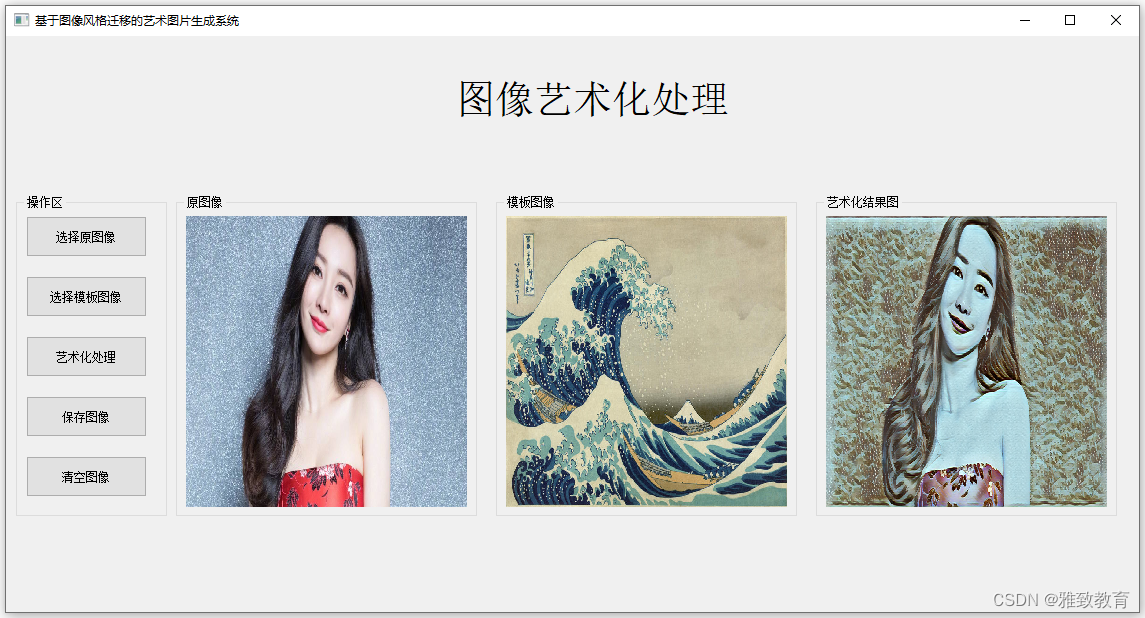
欢迎大家点赞、收藏、关注、评论啦 ,由于篇幅有限,只展示了部分核心代码。 文章目录 一项目简介 二、功能三、系统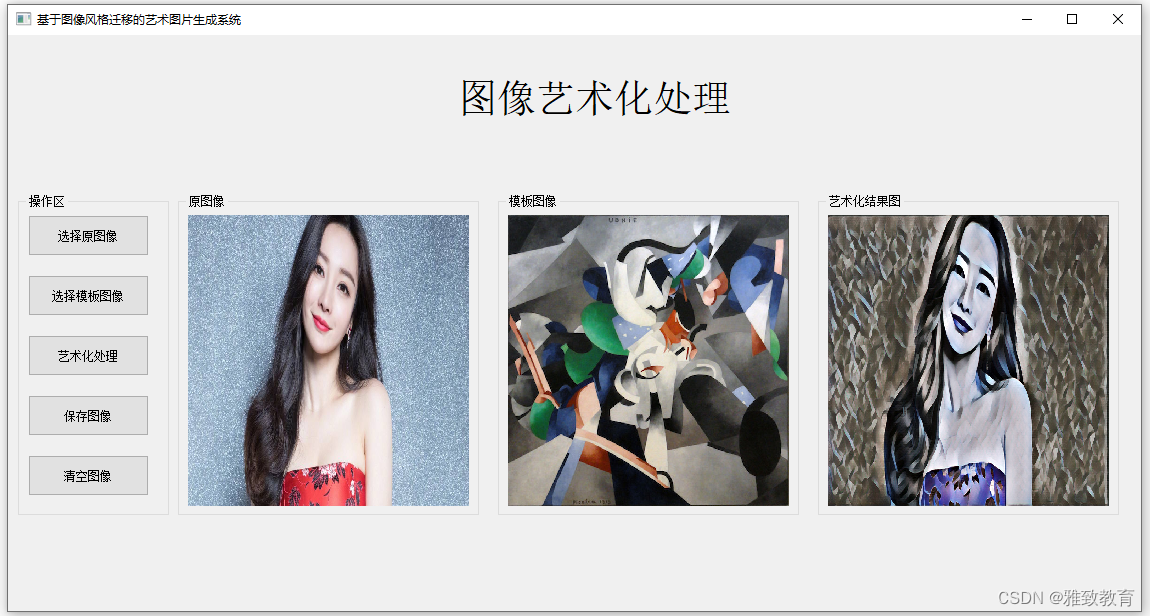四. 总结 一项目简介 基于PythonOpenCVTensorfl…...

leetcode 32最长有效括号 34在排序数组中查找元素的第一个和最后一个位置
32. 最长有效括号 给你一个只包含 ( 和 ) 的字符串,找出最长有效(格式正确且连续)括号子串的长度。 示例 1: 输入:s "(()" 输出:2 解释:最长有效括号子串是 "()" 示例 2&a…...
【附代码】判断线段是否相交算法(Python,C++)
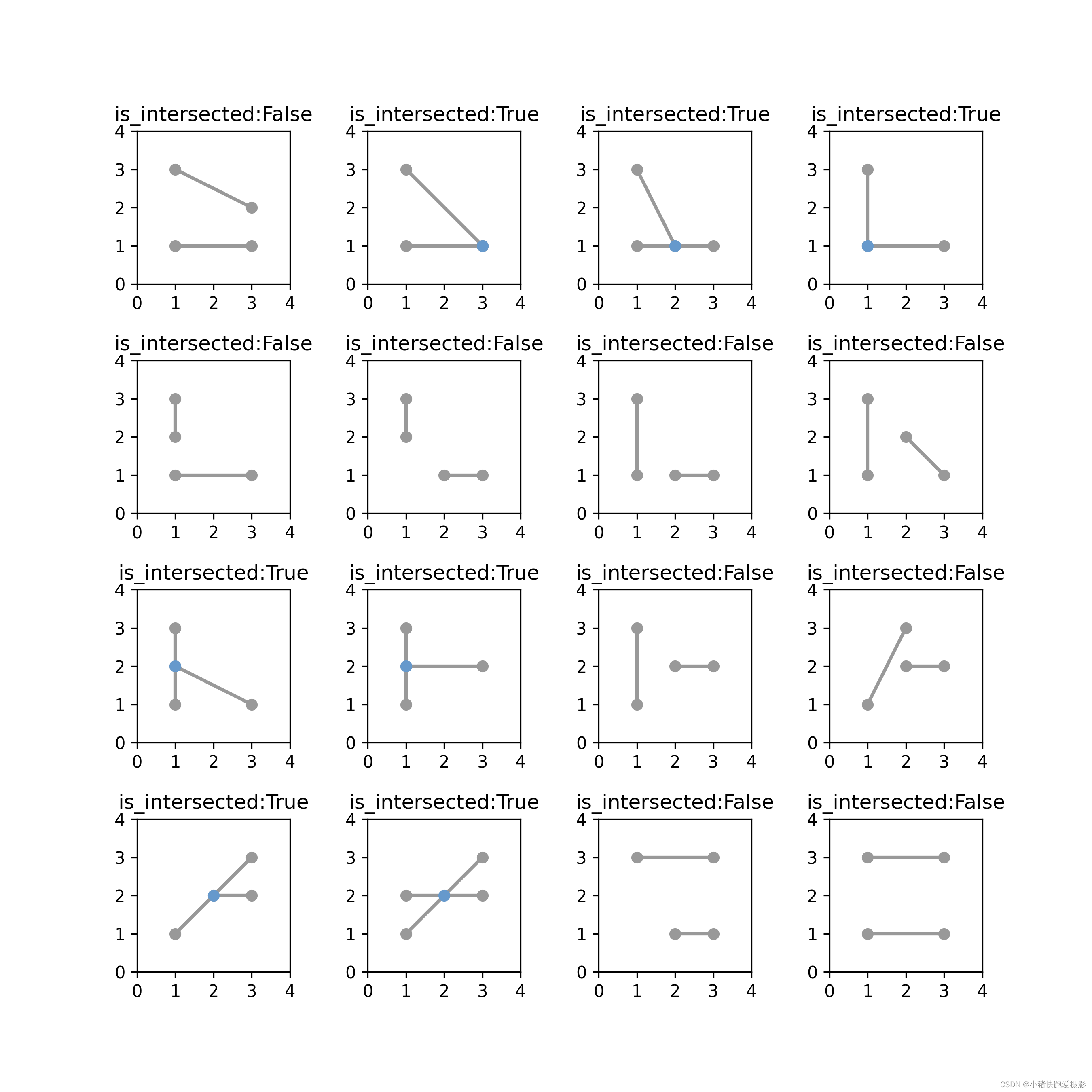
【附代码】判断线段是否相交算法(Python,C) 文章目录 【附代码】判断线段是否相交算法(Python,C)相关文献测试电脑配置基础向量旋转向量缩放向量投影推导 点乘定义推导几何意义 叉乘定义推导几何意义 判断线…...

PDF控件Spire.PDF for .NET【转换】演示:将 PDF 转换为 word、HTML、SVG、XPS
本文我们将演示如何通过调用 Spire.PDF 提供的方法 PdfDocument.SaveToStream() 将 PDF 页面转换为 HTML、Word、SVG、XPS、PDF 并将它们保存到流中。并且从Spire.PDF版本4.3开始,它新支持转换定义范围的PDF页面并将其保存到流中。 Spire.Doc 是一款专门对 Word 文…...
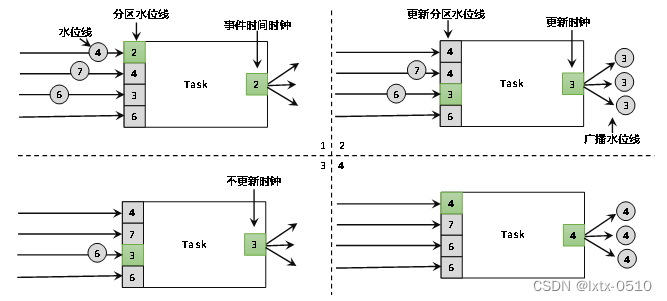
【FLink】水位线(Watermark)
目录 1、关于时间语义 1.1事件时间 1.2处理时间编辑 2、什么是水位线 2.1 顺序流和乱序流 2.2乱序数据的处理 2.3 水位线的特性 3 、水位线的生成 3.1 生成水位线的总体原则 3.2 水位线生成策略 3.3 Flink内置水位线 3.3.1 有序流中内置水位线设置 3.4.2 断点式…...

Amulet-Map-Editor完整功能解析:从世界编辑到格式转换
Amulet-Map-Editor完整功能解析:从世界编辑到格式转换 【免费下载链接】Amulet-Map-Editor A Minecraft world editor and converter that supports all versions since Java 1.12 and Bedrock 1.7. 项目地址: https://gitcode.com/gh_mirrors/am/Amulet-Map-Edit…...

无射频芯片实现LoRa通信:LoLRa项目技术解析
1. LoLRa项目概述:无射频芯片的LoRa通信方案在物联网设备开发中,Semtech的LoRa射频芯片一直是实现远距离通信的主流选择。但最近开源的LoLRa项目展示了一种颠覆性思路——仅通过普通MCU的I2S或SPI接口就能生成可被商用LoRa网关识别的信号。这个由CNLohr开…...

三步解决Windows 11臃肿问题:Win11Debloat终极优化指南
三步解决Windows 11臃肿问题:Win11Debloat终极优化指南 【免费下载链接】Win11Debloat A simple, lightweight PowerShell script that allows you to remove pre-installed apps, disable telemetry, as well as perform various other changes to declutter and c…...

别急着删文件!React Native项目报错ENOSPC,可能是Linux的inotify限制在作祟
React Native开发遇ENOSPC错误?Linux文件监听机制才是真凶 "明明磁盘空间还剩80%,为什么React Native项目启动时报错说no space left on device?" 这是许多前端开发者在Linux环境下首次遇到ENOSPC错误时的困惑。不同于常见的磁盘空…...

掌握JSTL核心标签:从入门到精通
JSTL核心标签库学习笔记在现代Java Web开发中,JSP标准标签库(JSTL)扮演着关键角色,它能有效替代JSP页面中的Java脚本代码,提升代码可读性和可维护性。本文将基于学习笔记,系统讲解JSTL核心标签库的核心功能…...

Git 主库子库管理、分支合并策略
Git 主库子库管理、分支合并策略 目录 主库与子库的核心概念从零开始:创建主库与子库常规开发流程:提交与推送撤销操作指南分支与合并:更新子库引用分支合并策略:dev → test → master总结 1. 主库与子库的核心概念 主库&…...

温湿度监控监测样本数据那温湿度阈值怎么设置?报警机制如何启动呢?
在医疗环境中,温湿度的监控对于保障样本安全、样本质量具有至关重要的作用,合理设置温湿度的上下限阈值,不仅能够及时发现环境异常,还能通过自动报警机制迅速响应,避免潜在风险的扩大。温湿度监控监测样本数据的上下…...

前端状态管理:Zustand 深度解析
前端状态管理:Zustand 深度解析 为什么 Zustand 如此重要? 在前端开发中,状态管理是一个核心问题。传统的状态管理库如 Redux 虽然功能强大,但配置复杂,学习曲线陡峭。Zustand 作为一个轻量级的状态管理库,…...

完整指南:如何用ImageToSTL将任何图片转换为3D打印模型
完整指南:如何用ImageToSTL将任何图片转换为3D打印模型 【免费下载链接】ImageToSTL This tool allows you to easily convert any image into a 3D print-ready STL model. The surface of the model will display the image when illuminated from the left side.…...

SpringBoot项目实战:不用写实体类,如何用EasyExcel搞定动态表头导入导出?
SpringBoot动态表头实战:无实体类场景下的Excel高效处理方案 1. 动态表头处理的业务挑战与解决思路 在企业级应用开发中,我们常常会遇到需要处理动态表头Excel文件的场景。比如一个电商后台系统需要根据商家自定义字段生成销售报表,或者一个数…...