
探索移动端可能性:Capacitor5.5.1和vue2在Android studio中精细融合
介绍:
移动应用开发是日益复杂的任务,本文将带领您深入探索如何无缝集成Capacitor5.5.1、Vue2和Android Studio,以加速您的开发流程
- Capacitor 是一个用于构建跨平台移动应用程序的开源框架。
- Vue 是一个流行的 JavaScript 框架,用于构建用户界面。
- Android Studio 是用于开发 Android 应用程序的官方集成开发环境(IDE)。
环境设置:
Capacitor 官方支持三个应用目标:Android、iOS 和 Web
(vue、recat…capacitor并不限制你使用特定的框架,根据偏好)
1、Android需要在Android studio 、Android SDK 环境下运行
Capacitor 5 至少需要 Android Studio 2022.2.1
2、IOS 需要在Xcode或者MacOS环境下运行
3、web是以下环境
3.1.首先你得有vue的开发环境
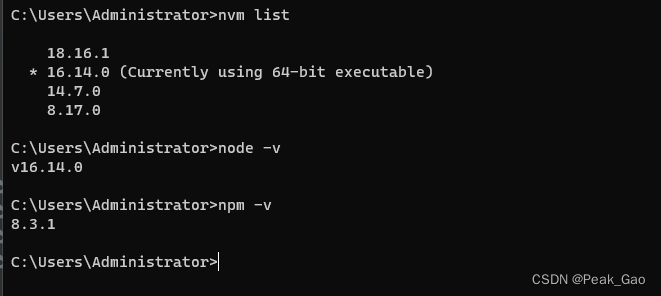
3.2.确保您已经正确安装并配置了Vue Cli、Capacitor和Android Studio,如果尚未安装,请按照以下步骤进行设置。
项目创建:
使用 Vue CLI 创建一个新的 Vue 2 项目,并通过 Capacitor 初始化您的项目
使用 npm 或 yarn 在命令行中安装 Vue CLI:npm install -g @vue/cli 或 yarn global add @vue/clivue create my-vue-app
cd my-vue-app
npm install @capacitor/core @capacitor/cli
npx cap init
平台版本:
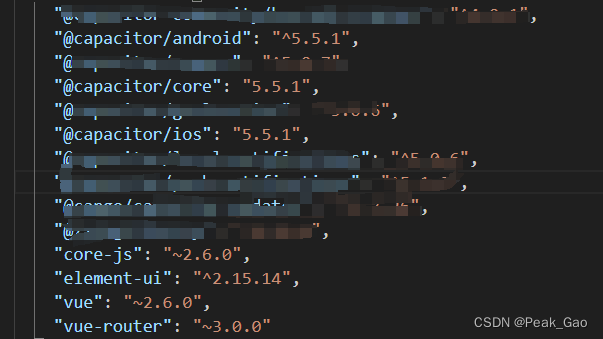
capacitor使用5.5.1的话,安卓和IOS 的版本都需要5.5.1、不然会报一堆奇怪的错误,导致耽误开发进度
Android平台集成:
添加 Android 平台,以便在 Android Studio 中进行原生开发。导入 Android Studio 并配置您的开发环境。
npx cap add android
打开 Android Studio,导入 Capacitor 项目的 Android 文件夹。
配置 Android Studio:
- 在 Android Studio 中,打开 settings.gradle 文件,确保项目正确配置。
- 在 build.gradle 文件中,添加 Capacitor 插件和依赖项。
- 在 MainActivity.java 文件中,添加 Capacitor 相关的初始化代码。
构建和运行应用程序:
- 在命令行中运行 npm run build 命令,构建 Vue 项目。
- 在命令行中运行 npx cap copy 命令,将构建后的文件复制到 Android 项目中,确保两者保持同步
- 在 Android Studio 中,点击 “Sync Project with Gradle Files” 按钮,确保项目正确同步。
- 在 Android Studio 中,点击 “Run” 按钮,运行应用程序。
IOS平台集成:
npx cap add
可以自己安装一个苹果环境测试
WebView 集成:
在 Vue 中使用 WebView 组件,可以按照以下步骤进行:
1.安装 vue-webview 插件:
在 Vue 项目的根目录下,使用 npm 或 yarn 安装 vue-webview 插件:
npm install vue-webview
或
yarn add vue-webview
2.在 Vue 组件中引入 WebView 组件:
在需要使用 WebView 的 Vue 组件中,引入 vue-webview 插件,并注册 WebView 组件:
import VueWebView from 'vue-webview';export default {components: {VueWebView,},// ...
}
3.在模板中使用 WebView 组件:
在 Vue 组件的模板中,使用 标签来包裹 WebView 组件,并设置相应的属性:
<template><div><vue-webview:src="webViewUrl":options="webViewOptions"@loadstart="handleLoadStart"@loadend="handleLoadEnd"></vue-webview></div>
</template>
在这个示例中,webViewUrl 是 WebView 加载的 URL,webViewOptions 是 WebView 的配置选项。你可以根据需要设置其他属性,如 WebView 的宽度、高度、样式等。
4.在 Vue 组件中处理 WebView 事件和方法:
在 Vue 组件的方法中,处理 WebView 的事件和方法。例如,你可以在 handleLoadStart 和 handleLoadEnd 方法中处理 WebView 的加载开始和加载结束事件。
export default {// ...methods: {handleLoadStart() {// WebView 加载开始时的处理逻辑},handleLoadEnd() {// WebView 加载结束时的处理逻辑},},
}
通过以上步骤,你就可以在 Vue 项目中使用 WebView 组件来呈现 Vue 2 项目的内容。可以根据需要设置 WebView 的属性和处理 WebView 的事件,以实现更丰富的交互和功能。
插件和功能:
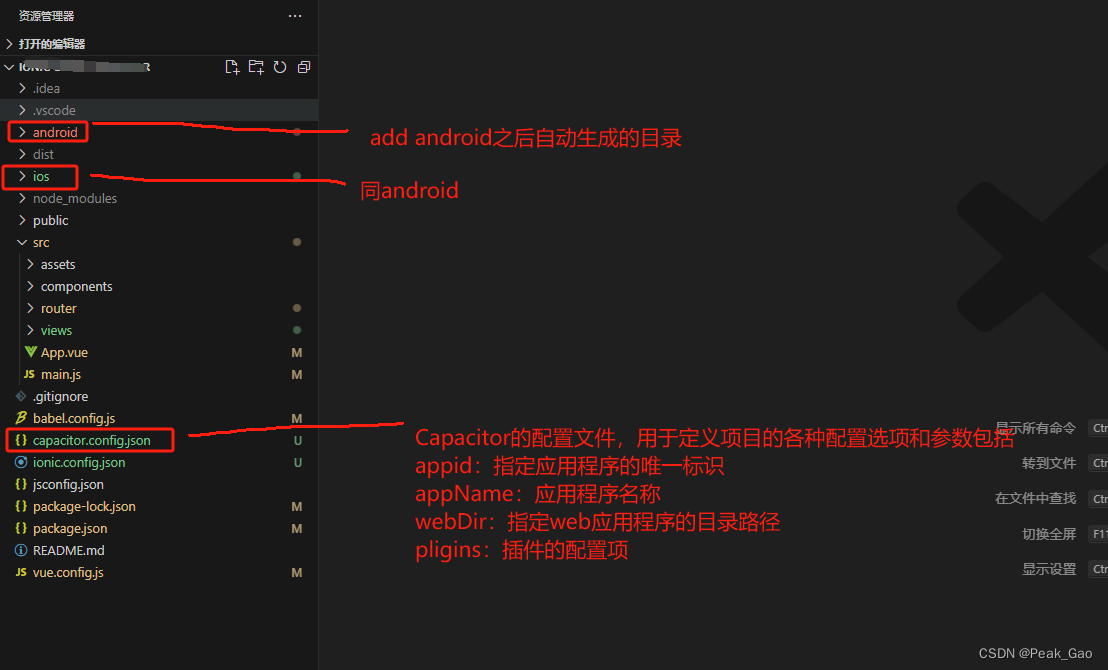
插件:分为官方插件、社区插件
其实你使用了vue框架开发的也可以自己写所需要的插件,以下给大家看看如何使用官方插件
**官方插件使用:**地理位置、相机、本地通知
地理位置:
注:需要在项目的根目录下的AndroidManifest.xml文件中添加获取位置权限(在获取地理位置插件的xml中添加或者在主目录下的xml)
<uses-permission android:name="android.permission.ACCESS_FINE_LOCATION" />
<uses-permission android:name="android.permission.ACCESS_COARSE_LOCATION" />
引入依赖
npm install @capacitor/geolocation
在需要的页面注入
import { Geolocation } from '@capacitor/geolocation';
Ex:// 获取地理位置(得到经纬度,需要墙,由于这里调用的是google map)async getCurrentPosition() {// 在这里编写按钮点击后的处理逻辑console.log('Button clicked!');// 在需要获取地理位置的地方调用以下代码const coordinates = await Geolocation.getCurrentPosition();this.latitude = coordinates.coords.latitude;this.longitude = coordinates.coords.longitude;console.log('Current position:', coordinates);},
相机(支持拍照和相册上传):
引入依赖
npm install @capacitor/camera
在需要的页面注入
import { Camera, CameraResultType } from '@capacitor/camera';
Ex:// 在需要拍照的地方调用该方法async takePicture() {const image = await Camera.getPhoto({quality: 90,allowEditing: false,resultType: CameraResultType.Uri});console.log("Current image", image.webPath);// 处理拍摄的照片,例如显示在页面上this.photo = image.webPath;},//在windows 中的web打开之后会报错,在项目的main.js中添加// 某些 Capacitor 插件(例如Camera或Toast)在未本机运行时具有基于 Web 的 UI。
// 例如,Camera.getPhoto()在网络上运行时,调用将加载响应式拍照体验:import { defineCustomElements } from '@ionic/pwa-elements/loader';
// Call the element loader before the render calldefineCustomElements(window);
本地通知:
引入依赖
npm install @capacitor/local-notifications
在需要的页面注入
import { LocalNotifications } from '@capacitor/local-notifications';
Ex:getMsg() {LocalNotifications.schedule({notifications: [{title: '新消息',body: '测试消息',id: 1,schedule: { at: new Date(Date.now() + 1000 * 5) }}]});},
调试和测试:
这是一个繁琐的过程
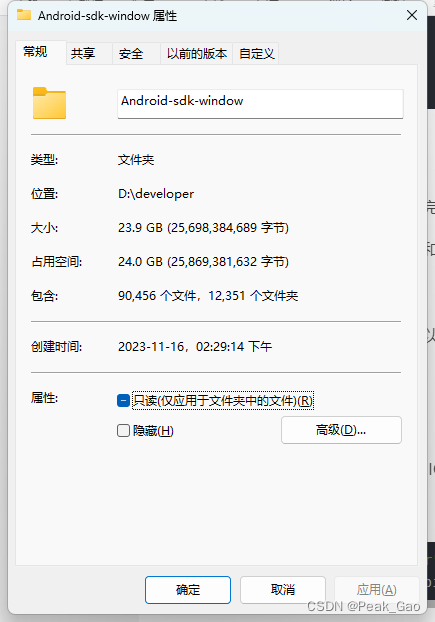
需要安装Android SDK 在官网下载完之后千万不要放在C盘,安装一个模拟器需要10多个G
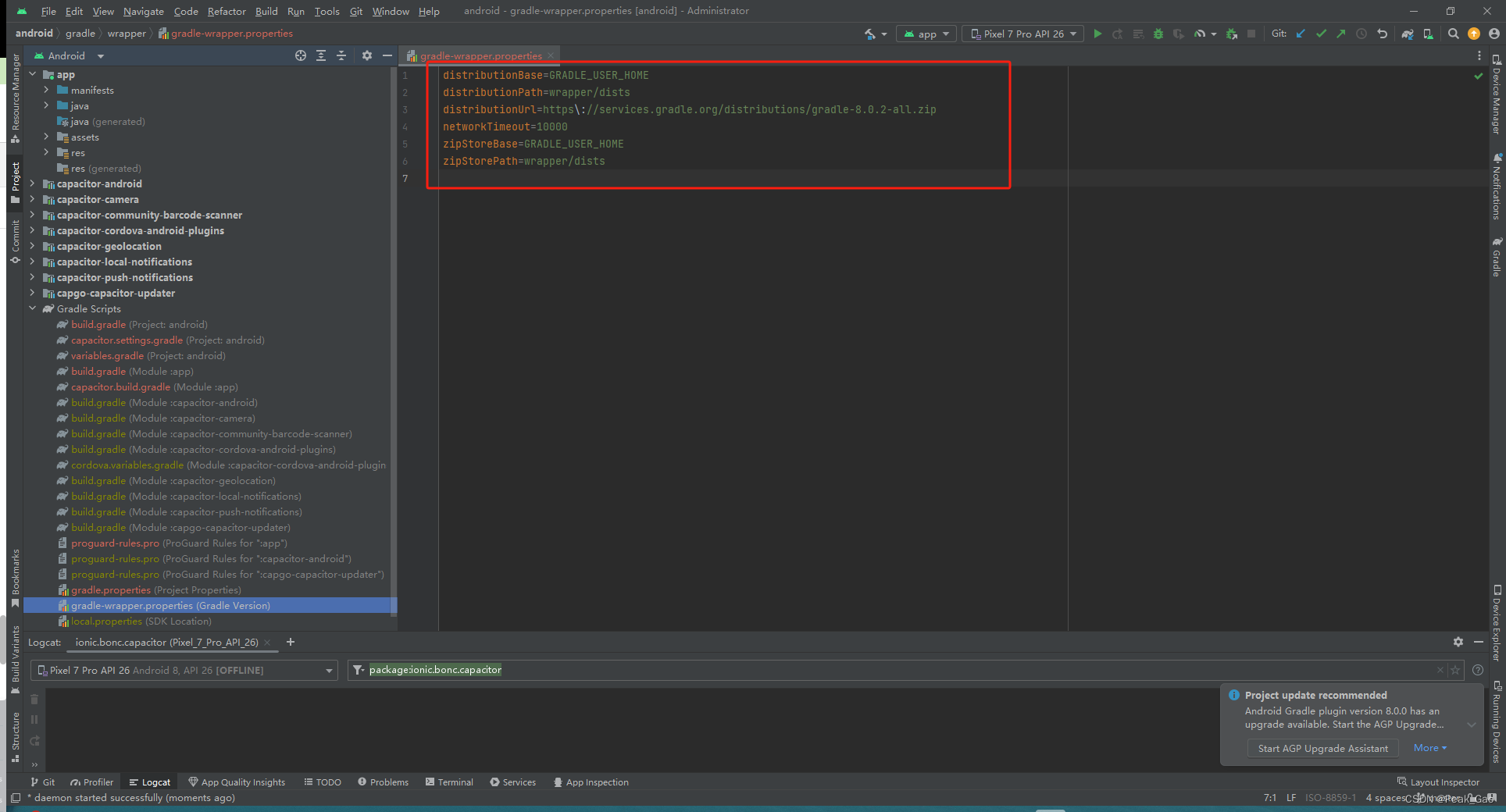
这里可以看到Gradle版本,可以去Gradle下载生成后需要的版本,会花费好长时间
发布和部署:
参考
常见问题和解决方案:
常见问题:
i.Capacitor版本为5.5.1,Android、IOS 版本都应该为5.5.1否则不兼容 见 ”平台版本“
ii:权限报错:
E Error send stats: {"error":"response_error","message":"Error send stats: com.android.volley.NoConnectionError: java.net.UnknownHostException:Unable to resolve host \"api.capgo.app\": No address associated with hostname"}
解决方案:
The error message indicates that there is an issue with connecting to the host "api.capgo.app" due to a "java.net.UnknownHostException," suggesting that the hostname cannot be resolved to an IP address. This issue is commonly related to network connectivity problems. Here are some steps you can take to troubleshoot and resolve this issue:1. **Check Internet Connection:**Ensure that your device or emulator has a stable internet connection. If you are using a physical device, check if it is connected to a network, and if you are using an emulator, make sure your computer has an active internet connection.2. **DNS Resolution:**The error suggests a problem resolving the hostname to an IP address. Ensure that the DNS (Domain Name System) configuration on your device or network is functioning correctly. You can try accessing "api.capgo.app" from a web browser to see if the domain resolves correctly.3. **Hosts File:**Check if there are any entries related to "api.capgo.app" in your device's hosts file. If there are, ensure that they are correctly configured, and if necessary, remove or correct any incorrect entries.4. **Firewall and Proxy Settings:**If you are behind a firewall or using a proxy, ensure that it is configured correctly to allow connections to "api.capgo.app." Check if there are any network restrictions that might be preventing your application from reaching the server.5. **Server Status:**Check the status of the "api.capgo.app" server. It's possible that the server is temporarily down or experiencing issues. You can try accessing the API from a browser or using a tool like cURL to see if there are any issues with the server.6. **Network Permissions:**Ensure that your application has the necessary network permissions in its AndroidManifest.xml file. You should have the `<uses-permission android:name="android.permission.INTERNET" />` permission declared.7. **Retry Mechanism:**Implement a retry mechanism in your code to handle temporary network issues. If the error persists, your application can retry the network request after a short delay.8. **Logs and Debugging:**Utilize logging statements in your code to trace the flow and identify where the error occurs. Check if there are additional details in the logs that might provide more information about the issue.By going through these steps, you should be able to identify and address the underlying cause of the "UnknownHostException" and resolve the issue with connecting to the host "api.capgo.app."
iii.Capacitor5 需要Gradle8和java17 :是由我用的 Capacitor 5.5.1、Gradle 4.10.1、JDK 1.8
iv.Android Studio运行空白,没有显示任何控件 我的问题是由于使用vue Router 的index.js的默认的base没有指定,导致在Android Studio中报错从而显示空白
v.以下报错:大概意思就是:在Android studio 中初始化 报错,这个错误是由于在你的项目中同时引入了 androidx.core:core:1.10.0 和 com.android.support:support-v4:23.2.1 这两个库,导致了重复的类冲突。解决这个问题的方法是统一使用 androidx 库或者 com.android.support 库,避免同时引入两个版本不同的库。你可以根据你的项目需要,选择其中一个库并将另一个库的引用移除,然后重新构建你的项目。如果你需要更详细的解决方法,可以查阅相关文档或者搜索相关问题的解决方案。
Execution failed for task ':app:checkDebugDuplicateClasses'.
> A failure occurred while executing com.android.build.gradle.internal.tasks.CheckDuplicatesRunnable> Duplicate class android.support.v4.app.INotificationSideChannel found in modules core-1.10.0-runtime (androidx.core:core:1.10.0) and support-v4-23.2.1-runtime (com.android.support:support-v4:23.2.1)Duplicate class android.support.v4.app.INotificationSideChannel$Stub found in modules core-1.10.0-runtime (androidx.core:core:1.10.0) and support-v4-23.2.1-runtime (com.android.support:support-v4:23.2.1)Duplicate class android.support.v4.app.INotificationSideChannel$Stub$Proxy found in modules core-1.10.0-runtime (androidx.core:core:1.10.0) and support-v4-23.2.1-runtime (com.android.support:support-v4:23.2.1)Duplicate class android.support.v4.os.IResultReceiver found in modules core-1.10.0-runtime (androidx.core:core:1.10.0) and support-v4-23.2.1-runtime (com.android.support:support-v4:23.2.1)Duplicate class android.support.v4.os.IResultReceiver$Stub found in modules core-1.10.0-runtime (androidx.core:core:1.10.0) and support-v4-23.2.1-runtime (com.android.support:support-v4:23.2.1)Duplicate class android.support.v4.os.IResultReceiver$Stub$Proxy found in modules core-1.10.0-runtime (androidx.core:core:1.10.0) and support-v4-23.2.1-runtime (com.android.support:support-v4:23.2.1)Duplicate class android.support.v4.os.ResultReceiver found in modules core-1.10.0-runtime (androidx.core:core:1.10.0) and support-v4-23.2.1-runtime (com.android.support:support-v4:23.2.1)Duplicate class android.support.v4.os.ResultReceiver$1 found in modules core-1.10.0-runtime (androidx.core:core:1.10.0) and support-v4-23.2.1-runtime (com.android.support:support-v4:23.2.1)Duplicate class android.support.v4.os.ResultReceiver$MyResultReceiver found in modules core-1.10.0-runtime (androidx.core:core:1.10.0) and support-v4-23.2.1-runtime (com.android.support:support-v4:23.2.1)Duplicate class android.support.v4.os.ResultReceiver$MyRunnable found in modules core-1.10.0-runtime (androidx.core:core:1.10.0) and support-v4-23.2.1-runtime (com.android.support:support-v4:23.2.1)
该错误消息表明您的项目中存在重复的类,特别是与android.support.v4库相关的类。当您的项目中混合使用旧支持库和 AndroidX 库时,通常会出现此问题。
要解决此问题,请按照下列步骤操作:
1、更新依赖项:确保您使用的是最新版本的依赖项,尤其是 AndroidX 库。更新您的build.gradle文件以使用最新版本的库。
将任何出现的 替换com.android.support为相应的 AndroidX 库。例如,替换com.android.support:support-v4:23.2.1为androidx.core:core:1.10.0.
2、检查已弃用的库:
删除任何已弃用或过时的依赖项,并将其替换为更新版本。
3、使用 AndroidX:将您的项目迁移到 AndroidX(如果您尚未这样做)。AndroidX是Google提供的新的包结构,它取代了旧的支持库。确保您的所有依赖项和您自己的代码都使用 AndroidX 工件。
您可以通过将以下行添加到gradle.properties文件中来迁移到 AndroidX:
android.useAndroidX=true
android.enableJetifier=true (我是以这种方式解决掉)
这会自动将您的依赖项迁移到 AndroidX。
4、检查传递依赖关系:有时,问题可能是由传递依赖关系引起的。使用该./gradlew app:dependencies命令检查依赖关系树并识别任何冲突的依赖关系。
一旦确定了冲突的依赖项,您就可以排除build.gradle文件中的特定传递依赖项。例如:
implementation (‘com.example.library:library:1.0’) {
exclude group: ‘com.android.support’
}
5、清理并重建:
进行这些更改后,清理您的项目并重建它。
在 Android Studio 中,您可以通过选择“Build”->“Clean Project”,然后选择“Build”->“Rebuild Project”来完成此操作。
6、使用该–stacktrace选项:
如果问题仍然存在并且您需要有关错误的更多详细信息,请尝试使用该
–stacktrace
选项运行构建。
这可能会提供有关项目的哪个部分导致冲突的更多见解。
./gradlew clean assembleDebug --stacktrace
7、检查第三方库:
如果您在项目中使用第三方库,请确保它们与 AndroidX 兼容。
检查每个库的文档或发行说明以确认兼容性
解决方案
去官方社区提交你的问题,响应速度还是可以的
相关文章:
探索移动端可能性:Capacitor5.5.1和vue2在Android studio中精细融合
介绍: 移动应用开发是日益复杂的任务,本文将带领您深入探索如何无缝集成Capacitor5.5.1、Vue2和Android Studio,以加速您的开发流程Capacitor 是一个用于构建跨平台移动应用程序的开源框架。Vue 是一个流行的 JavaScript 框架,用…...

【深度学习】Python快捷调用InsightFace人脸检测,纯ONNX推理
pypi资料: https://pypi.org/project/insightface/ 模型选择: https://github.com/deepinsight/insightface/tree/master/python-package#model-zoo onnxruntime的GPU对应CUDA : https://onnxruntime.ai/docs/reference/compatibility …...
JAVA序列化和反序列化
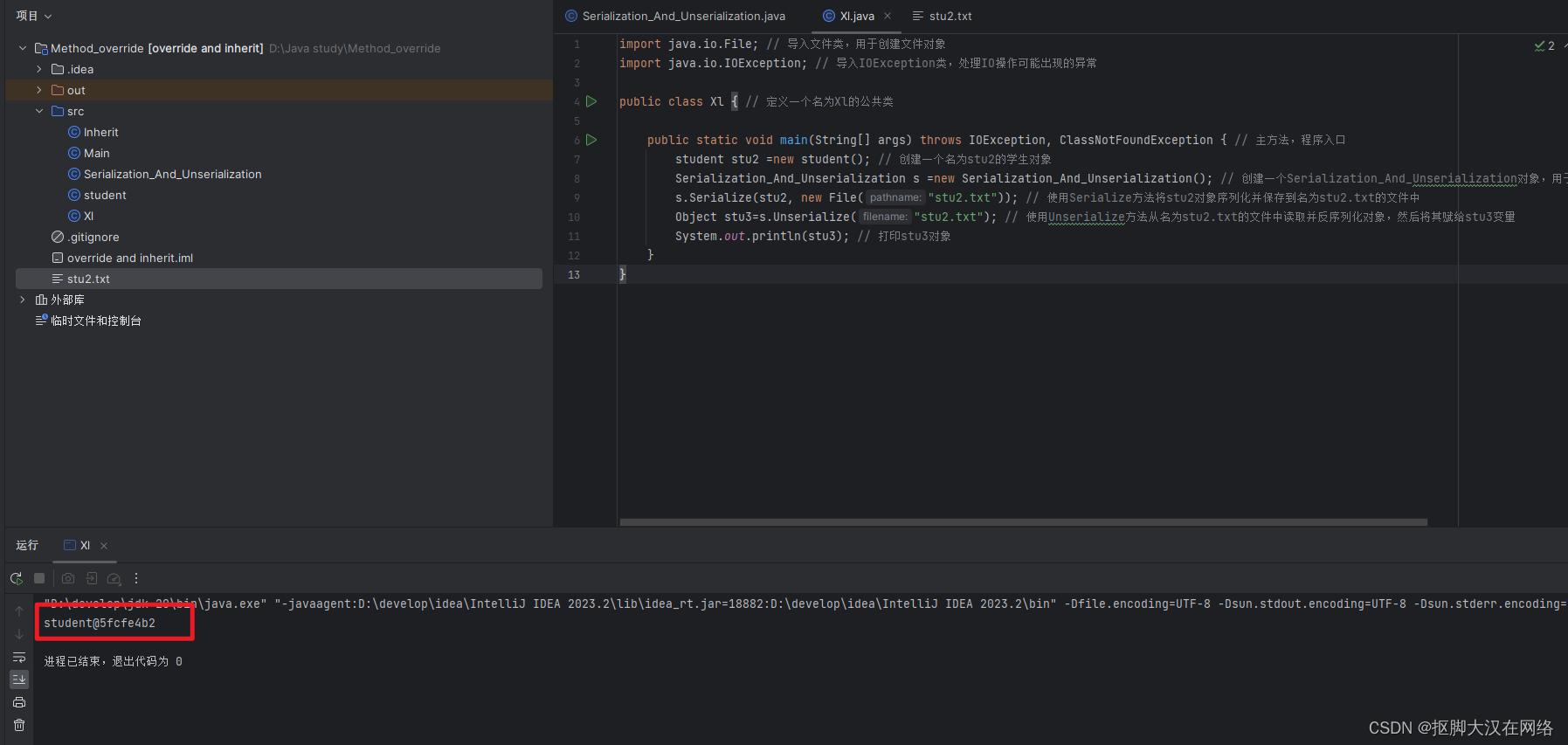
JAVA序列化和反序列化 文章目录 JAVA序列化和反序列化序列化什么是序列化?为什么要进行序列化?如何将对线进行序列化具体实现过程 完整代码 序列化 什么是序列化? 就是将对象转化为字节的过程 为什么要进行序列化? 让数据更高效的传输让数据更好的…...
基于浣熊算法优化概率神经网络PNN的分类预测 - 附代码
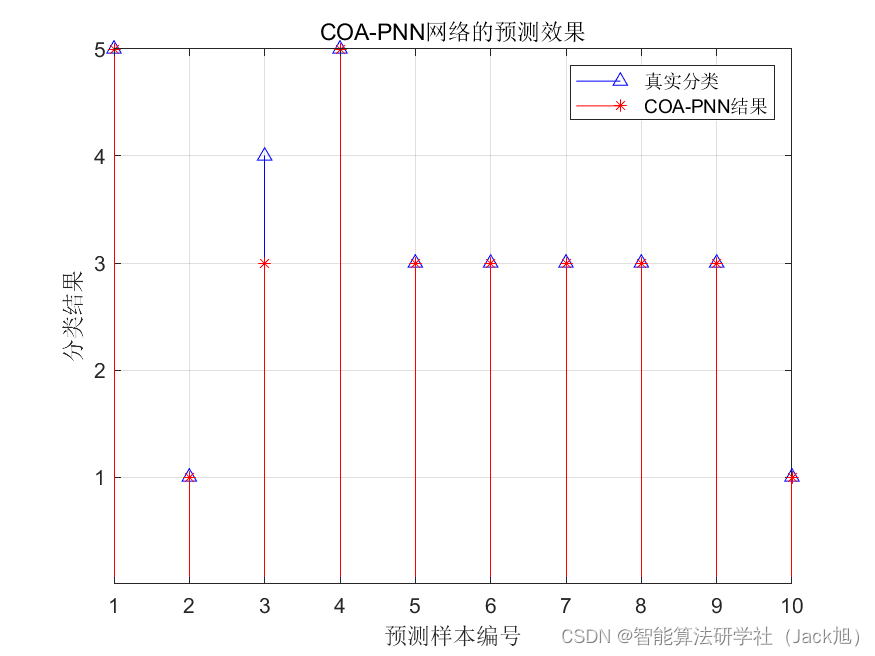
基于浣熊算法优化概率神经网络PNN的分类预测 - 附代码 文章目录 基于浣熊算法优化概率神经网络PNN的分类预测 - 附代码1.PNN网络概述2.变压器故障诊街系统相关背景2.1 模型建立 3.基于浣熊优化的PNN网络5.测试结果6.参考文献7.Matlab代码 摘要:针对PNN神经网络的光滑…...

uni-app打包后,打开软件时使其横屏显示
找到page.json文件,在global加入以下代码: 这样就可以横屏显示了。...

MYSQL基础知识之【创建,删除,选择数据库】
文章目录 前言MySQL 创建数据库使用 mysqladmin 创建数据库使用 PHP脚本 创建数据库 MySQL 删除数据库使用 mysqladmin 删除数据库使用PHP脚本删除数据库 MySQL 选择数据库从命令提示窗口中选择MySQL数据库使用PHP脚本选择MySQL数据库 后言 前言 hello world欢迎来到前端的新世…...

关于 token 和证书
关于 token 和证书 在网络检测中,Token通常是指一种特殊的令牌,用于在分布式系统中进行资源控制和访问管理。Token可以用于验证客户端的身份、限制客户端的访问权限以及控制客户端对某些资源的使用。 在网络检测中,Token通常用于以下几个方…...

基于SSM和微信小程序的场地预约网站
文章目录 项目介绍主要功能截图:部分代码展示设计总结项目获取方式🍅 作者主页:超级无敌暴龙战士塔塔开 🍅 简介:Java领域优质创作者🏆、 简历模板、学习资料、面试题库【关注我,都给你】 🍅文末获取源码联系🍅 项目介绍 基于SSM和微信小程序的场地预约网站,jav…...
——缺失的第一个正整数_困难)
Javascript每天一道算法题(十七)——缺失的第一个正整数_困难
文章目录 前言1、问题2、示例3、解决方法(1)方法1 总结 前言 提示: 1、问题 给你一个未排序的整数数组 nums ,请你找出其中没有出现的最小的正整数。 请你实现时间复杂度为 O(n) 并且只使用常数级别额外空间的解决方案。 看了很久…...

【React】路径别名配置
路径解析配置(webpack),把 / 解析为 src/路径联想配置(VsCode),VSCode 在输入 / 时,自动联想出来对应的 src/下的子级目录 1. 路径解析配置 安装craco npm i -D craco/craco项目根目录下创建配…...
前缀和——238. 除自身以外数组的乘积
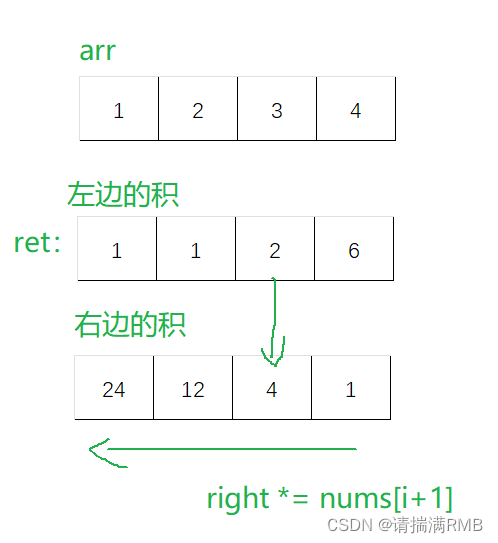
文章目录 🍷1. 题目🍸2. 算法原理🍥解法一:暴力求解🍥解法二:前缀和(积) 🍹3. 代码实现 🍷1. 题目 题目链接:238. 除自身以外数组的乘积 - 力扣&a…...
)
MySql数据库常用指令(二)
MySql数据库常用指令(二) 一、WHERE 子句二、UPDATE 更新三、DELETE 语句四、LIKE 子句五、UNION 操作符 注:文中TEST为测试所用数据库,根据实际应用修改 一、WHERE 子句 SELECT 语句使用 WHERE 子句从数据表中读取数据…...

zookeeper 单机伪集群搭建简单记录
1、官方下载加压后,根目录下新建data和log目录,然后分别拷贝两份,分别放到D盘,E盘,F盘 2、data目录下面新建myid文件,文件内容分别为1,2,3.注意文件没有后缀,不能是txt文…...
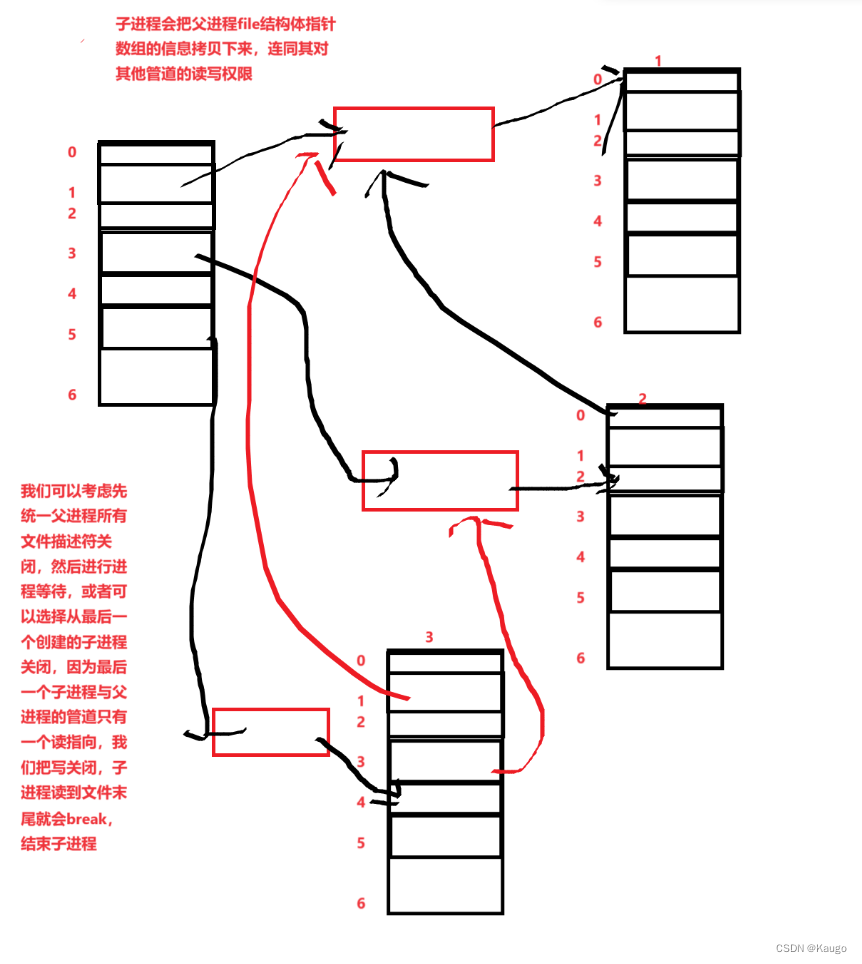
【Linux】匿名管道与命名管道,进程池的简易实现
文章目录 前言一、匿名管道1.管道原理2.管道的四种情况3.管道的特点 二、命名管道1. 特点2.创建命名管道1.在命令行上2.在程序中 3.一个程序执行打开管道并不会真正打卡 三、进程池简易实现1.makefile2.Task.hpp3.ProcessPool.cpp 前言 一、匿名管道 #include <unistd.h&g…...
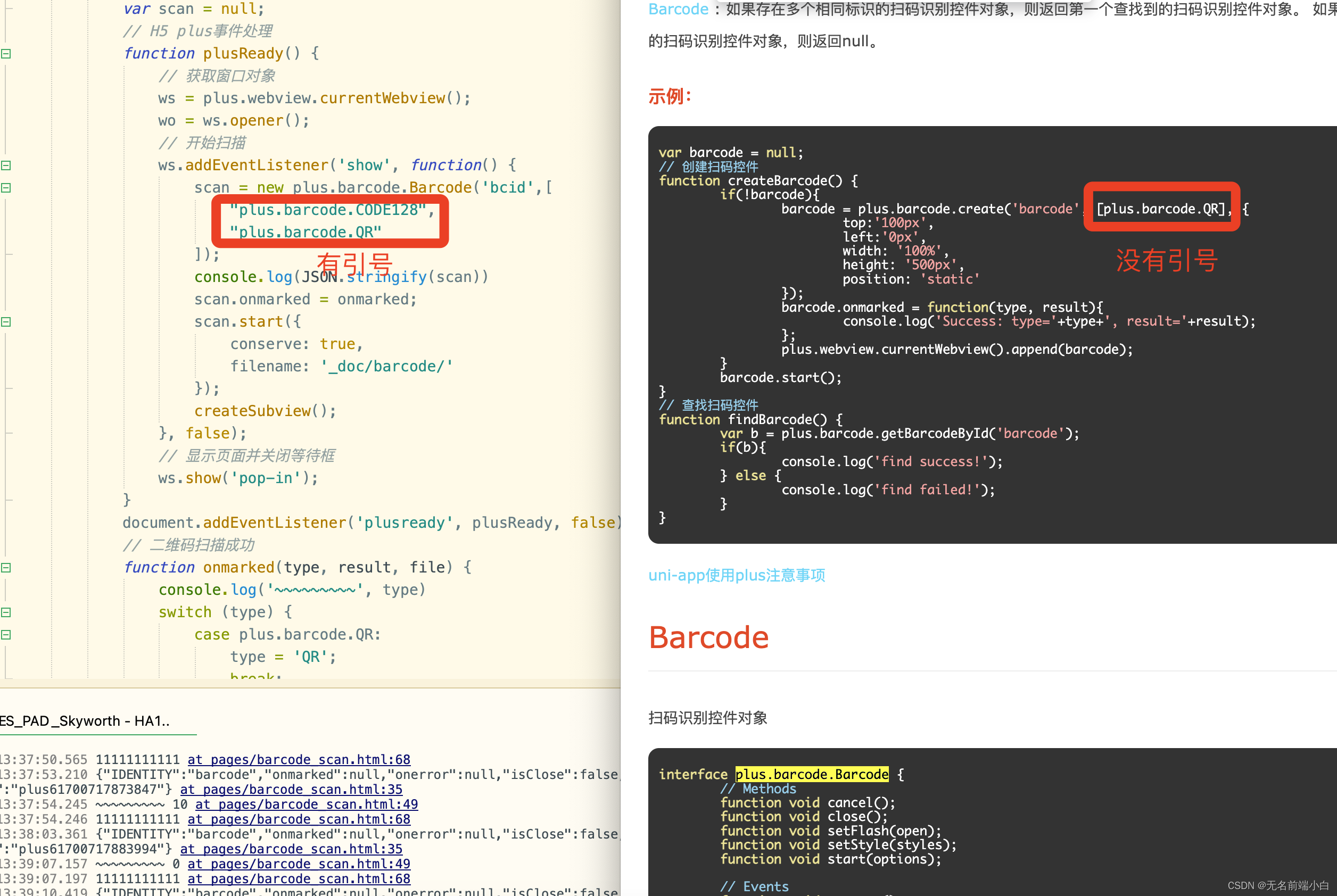
HTML5+ API 爬坑记录
背景: 有个比较早些使用5开发的项目, 最近两天反馈了一些问题, 解决过程在此记录; 坑1: plus.gallery.pick 选择图片没有进入回调 HTML5 API Reference 在 联想小新 平板电脑上选择相册图片进行上传时, 打开相册瞬间 应用会自动重启, 相册倒是有打开, 不过应用重启了, 导…...

idea git将某个分支内的commit合并到其他分支
idea git将某个分支内的commit合并到其他分支 1.打开旧分支的代码提交记录 在IDEA中切换到新分支的代码,点击Git打开代码管理面板,在顶部点击Log:标签页(这个标签页内将来可以选择不同分支的个人/所有人的代码commit记录)&#x…...

Google hacking语法
Google hacking语法 文章目录 Google hacking语法site:inurl:intitle:filetypecacheintext注意 site: 搜索子域 跟域名site:www.baidu.com 定位 跟语言 site: jp inurl: 用于在特定url链接中搜索网站信息 inurl:login intitle: 使用intitle:指令返回页面标题中包含关键…...
Redis集群(新)
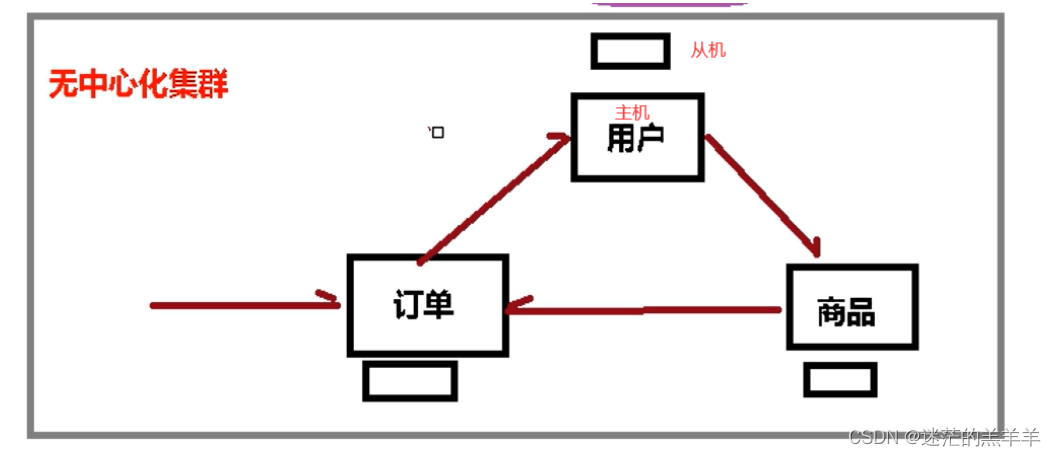
1.什么是集群 Redis集群实现了对Redis的水平扩容,可实现并发写操作,启动n个redis节点,将数据分别存储在不同的节点中,每块节点负责不同区域的插槽,所以Redis集群通过分区来提供一定程度的可用性。 Redis集群现采用的是…...

[JVM] 常用调优参数
随着Java应用程序的不断发展和优化,JVM调优已经变得越来越重要。在这篇文章中,我们将探讨一些常用的JVM调优参数,了解如何更好地优化Java应用程序的性能。 文章目录 1. -Xmx2. -Xms3. -XX:PermSize和-XX:MaxPermSize4. -XX:NewRatio5. -XX:Ma…...
和4.输出部分(线性层、softmax层))
【nlp】3.5 Transformer论文复现:3.解码器部分(解码器层)和4.输出部分(线性层、softmax层)
Transformer论文复现:3.解码器部分(解码器层)和4.输出部分(线性层、softmax层) 3.1 解码器介绍3.2 解码器层3.2.1 解码器层的作用3.2.2 解码器层的代码实现3.2.3 解码器层总结3.3 解码器3.3.1 解码器的作用3.3.2 解码器的代码实现3.3.3 解码器总结4.1 输出部分介绍4.2 线性…...

从零基础出发,全面掌握SEO优化技巧以提升网站流量
在学习SEO的过程中,了解内容的重要性是基础。内容不仅要有吸引力,而且要与目标受众的需求紧密结合。首先,确保内容的相关性,能够有效解答用户的问题是关键。其次,利用关键词策略,使目标用户能够更容易找到相…...

国标GB28181视频平台EasyGBS如何让WebSocket流地址永不过期?只需关闭这个开关
在使用EasyGBS国标视频云平台进行视频流分发时,不少开发者或运维人员会遇到一个困扰:通过WebSocket协议获取的流地址,过一段时间后就自动失效了,需要重新生成。对于需要长时间、稳定播放视频的场景(如监控大屏、24小时…...

别再只看信号格了!5G网速上不去?手把手教你用RSRP、SNR、BLER看懂手机里的真实信道质量
手机信号满格却网速慢?5G时代必懂的RSRP、SNR、BLER诊断指南 你是否遇到过这样的情况:手机信号显示满格,但刷视频却频繁缓冲,下载文件速度慢如蜗牛?这种"信号假象"在5G时代尤为常见。本文将带你揭开手机信号…...

笔记本EC与BIOS的‘暗号’:深入解读Q Event与GPIO SMI在电源、按键背后的协作
笔记本EC与BIOS的‘暗号’:深入解读Q Event与GPIO SMI在电源、按键背后的协作 当按下笔记本电源键时,这个看似简单的动作背后隐藏着一场精密的硬件交响乐。嵌入式控制器(EC)与BIOS通过Q Event和GPIO SMI这两种特殊通信机制&#…...

Hearthstone-Script终极指南:如何用Java/Kotlin打造智能炉石传说自动化脚本
Hearthstone-Script终极指南:如何用Java/Kotlin打造智能炉石传说自动化脚本 【免费下载链接】Hearthstone-Script Hearthstone script(炉石传说脚本) 项目地址: https://gitcode.com/gh_mirrors/he/Hearthstone-Script 在炉石传说这款…...

3分钟掌握中兴光猫终极管理工具:zteOnu工厂模式一键开启指南
3分钟掌握中兴光猫终极管理工具:zteOnu工厂模式一键开启指南 【免费下载链接】zteOnu A tool that can open ZTE onu device factory mode 项目地址: https://gitcode.com/gh_mirrors/zt/zteOnu zteOnu是一款专为中兴光猫设备设计的强大管理工具,…...

LinkSwift技术解析:八大网盘直链获取方案与架构设计深度分析
LinkSwift技术解析:八大网盘直链获取方案与架构设计深度分析 【免费下载链接】Online-disk-direct-link-download-assistant 一个基于 JavaScript 的网盘文件下载地址获取工具。基于【网盘直链下载助手】修改 ,支持 百度网盘 / 阿里云盘 / 中国移动云盘 …...

深度解析开源虚拟显示驱动:如何用Parsec VDD实现专业级多屏扩展方案
深度解析开源虚拟显示驱动:如何用Parsec VDD实现专业级多屏扩展方案 【免费下载链接】parsec-vdd ✨ Perfect virtual display for game streaming 项目地址: https://gitcode.com/gh_mirrors/pa/parsec-vdd Parsec VDD(Virtual Display Driver&a…...

哔哩下载姬完整教程:如何高效下载B站视频的终极指南
哔哩下载姬完整教程:如何高效下载B站视频的终极指南 【免费下载链接】downkyi 哔哩下载姬downkyi,哔哩哔哩网站视频下载工具,支持批量下载,支持8K、HDR、杜比视界,提供工具箱(音视频提取、去水印等…...

BitNet b1.58-2B-4T-GGUF效果展示:4096上下文下长文档总结与精准问答对比
BitNet b1.58-2B-4T-GGUF效果展示:4096上下文下长文档总结与精准问答对比 1. 模型特性与性能亮点 BitNet b1.58-2B-4T-GGUF是一款突破性的开源大语言模型,采用原生1.58-bit量化技术,在保持高性能的同时实现了极致的资源效率。这个模型最令人…...