
【初始前后端交互+原生Ajax+Fetch+axios+同源策略+解决跨域】
初始前后端交互+原生Ajax+Fetch+axios+同源策略+解决跨域
- 1 初识前后端交互
- 2 原生Ajax
- 2.1 Ajax基础
- 2.2 Ajax案例
- 2.3 ajax请求方式
- 3 Fetch
- 3.1 fetch基础
- 3.2 fetch案例
- 4 axios
- 4.1 axios基础
- 4.2 axios使用
- 4.2.1 axios拦截器
- 4.2.2 axios中断器
- 5 同源策略
- 6 解决跨域
- 6.1 jsonp
- 6.2 其他技术手段
1 初识前后端交互
- 传统网站的问题:
1> 为了获取数据,需要重新加载,浪费资源,增加等待时间,性能不好。
2> 验证表单过程中,一项内容不合格,页面需要重新加载,体验不好。 - 解决问题:
1> ajax 全名 async javascript and XML
2> 是前后台交互的能力
3> 也就是我们客户端给服务端发送消息的工具,以及接受响应的工具
4> 是一个默认异步执行机制的功能 - AJAX的优势:
1> 不需要插件的支持,原生 js 就可以使用
2> 用户体验好(不需要刷新页面就可以更新数据)
3> 减轻服务端和带宽的负担
4> 缺点: 搜索引擎的支持度不够,因为数据都不在页面上,搜索引擎搜索不到
2 原生Ajax
2.1 Ajax基础
- 在 js 中有内置的构造函数来创建 ajax 对象;
const xhr = new XMLHttpRequest()
// 上面就是有了一个 ajax 对象
// 我们就可以使用这个 `xhr` 对象来发送 ajax 请求了
- 配置链接信息;
xhr.open("get","1.json ",true)
// xhr.open('请求方式', '请求地址', 是否异步)
// xhr 对象中的 open 方法是来配置请求信息的
// 第一个参数是本次请求的请求方式 get / post / put / ...
// 第二个参数是本次请求的 url
// 第三个参数是本次请求是否异步,默认 true 表示异步,false 表示同步
- 创建 ajax 对象以后,我们就使用 ajax 对象的方法去发送请求和接受响应。
xhr.send()
// 使用 xhr 对象中的 send 方法来发送请求
// 上面代码是把配置好信息的 ajax 对象发送到服务端
一、一个基本的ajax请求:一个最基本的 ajax 请求就是上面三步但是光有上面的三个步骤,我们确实能把请求发送的到服务端如果服务端正常的话,响应也能回到客户端,但是我们拿不到响应如果想拿到响应,我们有两个前提条件:1. 本次 HTTP 请求是成功的,也就是我们之前说的 http 状态码为 200 ~ 2992. ajax 对象也有自己的状态码,用来表示本次 ajax 请求中各个阶段
二、ajax 状态码:ajax 状态码 —— xhr.readyState是用来表示一个 ajax 请求的全部过程中的某一个状态readyState === 0: 表示未初始化完成,也就是 `open` 方法还没有执行readyState === 1:  表示配置信息已经完成,也就是执行完 `open` 之后readyState === 2:  表示 `send` 方法已经执行完成readyState === 3:  表示正在解析响应内容readyState === 4:  表示响应内容已经解析完毕,可以在客户端使用了这个时候我们就会发现,当一个 ajax 请求的全部过程中,只有当 `readyState === 4` 的时候,我们才可以正常使用服务端给我们的数据所以,配合 http 状态码为 200 ~ 299一个 ajax 对象中有一个成员叫做 `xhr.status` 这个成员就是记录本次请求的 http 状态码的两个条件都满足的时候,才是本次请求正常完成
三、readyStateChange在 ajax 对象中有一个事件,叫做 `readyStateChange` 事件这个事件是专门用来监听 ajax 对象的 `readyState` 值改变的的行为也就是说只要 `readyState` 的值发生变化了,那么就会触发该事件所以我们就在这个事件中来监听 ajax 的 `readyState` 是不是到 4 了
四、responseTextajax 对象中的 `responseText` 成员就是用来记录服务端给我们的响应体内容的所以我们就用这个成员来获取响应体内容就可以
<!DOCTYPE html>
<html lang="en">
<head><meta charset="UTF-8"><meta http-equiv="X-UA-Compatible" content="IE=edge"><meta name="viewport" content="width=device-width, initial-scale=1.0"><title>Document</title>
</head>
<body><button>aaa</button><script>var xhr = new XMLHttpRequest()xhr.open("get","1.json ",true)// 第一个参数 get post 请求方式// 第二个参数 请求地址// 第三个参数 是否异步xhr.send()// 监听// 方法一/* xhr.onreadystatechange = function() {console.log("电话接通");console.log(xhr.readyState); // 准备状态if(xhr.readyState === 4) {// if(xhr.status === 200) {if(/^2\d{2}$/.test(xhr.status)) {console.log(JSON.parse(xhr.responseText))} else {console.log("error",xhr.responseText);}}} */// 方法二xhr.onload = function() {if(/^2\d{2}$/.test(xhr.status)) {console.log(JSON.parse(xhr.responseText))} else {console.log("error",xhr.responseText);}}</script>
</body>
</html>
{"name":"xiaowang"
}

2.2 Ajax案例
<!DOCTYPE html>
<html lang="en">
<head><meta charset="UTF-8"><meta http-equiv="X-UA-Compatible" content="IE=edge"><meta name="viewport" content="width=device-width, initial-scale=1.0"><title>Document</title>
</head>
<body><button id="btn">click</button><ul id="list"></ul><script>var obtn = document.querySelector('#btn')var olist = document.querySelector('#list')obtn.onclick = function() {var xhr = new XMLHttpRequest()xhr.open("get","http://www.xiongmaoyouxuan.com/api/tabs", true) // 后端接口地址xhr.send()xhr.onload = function() {if(/^2\d{2}$/.test(xhr.status)) {// console.log(JSON.parse(xhr.responseText))render(JSON.parse(xhr.responseText))} else {console.log("error",xhr.responseText);}}}// 渲染页面function render(res) {console.log(res.data.list);var newlist = res.data.list.map(function(item){return `<li><img src="${item.imageUrl}"/><div>${item.name}</div>    </li>`})console.log(newlist);olist.innerHTML = newlist.JSON.join("")}</script>
</body>
</html>
{"data": {"list": [{"name": "假数据111","imageUrl": "http://img1.lukou.com/static/p/fb/tab/1/20181211-151644.jpeg"},{"name": "假数据222","imageUrl": "http://img1.lukou.com/static/p/fb/tab/1/20181211-151644.jpeg"},{"name": "假数据111","imageUrl": "http://img1.lukou.com/static/p/fb/tab/1/20181211-151644.jpeg"},{"name": "假数据111","imageUrl": "http://img1.lukou.com/static/p/fb/tab/1/20181211-151644.jpeg"}]}
}
2.3 ajax请求方式
-
不同的请求方式:
1> get 偏向获取
2> post 偏向提交
3> put 偏向更新
4> patch 偏向修改部分
5> delete 偏向删除信息
6> head 偏向获取服务器头的信息
7> option 偏向获取服务器设备信息
8> connect 保留请求方式 -
使用get请求方式(不传参数):
oget.onclick = function() {var xhr = new XMLHttpRequest()xhr.open("GET","http://localhost:3000/list", true) // 后端接口地址xhr.send()xhr.onload = function() {if(/^2\d{2}$/.test(xhr.status)) {console.log(JSON.parse(xhr.responseText))// render(JSON.parse(xhr.responseText))} else {console.log("error",xhr.responseText);}}
}
- 使用get请求方式(传参数):
oget.onclick = function() {var xhr = new XMLHttpRequest()xhr.open("GET","http://localhost:3000/users?id=1", true)xhr.send()xhr.onload = function() {if(/^2\d{2}$/.test(xhr.status)) {console.log(JSON.parse(xhr.responseText))// render(JSON.parse(xhr.responseText))} else {console.log("error",xhr.responseText);}}
}
- 使用post请求方式(传参数):
opost.onclick = function() {var xhr = new XMLHttpRequest()xhr.open("POST","http://localhost:3000/users", true) // 后端接口地址// 两种提交方式:// form编码 name=kerwin&age=100// json {name:"kerwin",age:100}// 方式一/* xhr.setRequestHeader("content-type","application/x-www-form-urlencoded")xhr.send(`name=tiechui&age=18`) */ // 数据放在这里// 方式二xhr.setRequestHeader("content-type","application/json")xhr.send(JSON.stringify({name:"guludunzi",age:90})) // 数据放在这里xhr.onload = function() {if(/^2\d{2}$/.test(xhr.status)) {console.log(JSON.parse(xhr.responseText))// render(JSON.parse(xhr.responseText))} else {console.log("error",xhr.responseText);}}
}
- 使用put请求方式(传参数):
oput.onclick = function() {var xhr = new XMLHttpRequest()xhr.open("PUT","http://localhost:3000/users/4", true) // 后端接口地址// 两种提交方式:// form编码 name=kerwin&age=100// json {name:"kerwin",age:100}// 方式一/* xhr.setRequestHeader("content-type","application/x-www-form-urlencoded")xhr.send(`name=tiechui&age=18`) */ // 数据放在这里// 方式二xhr.setRequestHeader("content-type","application/json")xhr.send(JSON.stringify({username:"guludunzi",age:70})) // 数据放在这里xhr.onload = function() {if(/^2\d{2}$/.test(xhr.status)) {console.log(JSON.parse(xhr.responseText))// render(JSON.parse(xhr.responseText))} else {console.log("error",xhr.responseText);}}
}
- 使用patch请求方式(传参数):
opatch.onclick = function() {var xhr = new XMLHttpRequest()xhr.open("PATCH","http://localhost:3000/users/4", true) // 后端接口地址// 两种提交方式:// form编码 name=kerwin&age=100// json {name:"kerwin",age:100}// 方式一/* xhr.setRequestHeader("content-type","application/x-www-form-urlencoded")xhr.send(`name=tiechui&age=18`) */ // 数据放在这里// 方式二xhr.setRequestHeader("content-type","application/json")xhr.send(JSON.stringify({// username:"guludunzi",age:180})) // 数据放在这里xhr.onload = function() {if(/^2\d{2}$/.test(xhr.status)) {console.log(JSON.parse(xhr.responseText))// render(JSON.parse(xhr.responseText))} else {console.log("error",xhr.responseText);}}
}
- 使用delete请求方式(无参数):
odelete.onclick = function() {var xhr = new XMLHttpRequest()xhr.open("DELETE","http://localhost:3000/users/4", true) // 后端接口地址xhr.send()xhr.onload = function() {if(/^2\d{2}$/.test(xhr.status)) {console.log(JSON.parse(xhr.responseText))// render(JSON.parse(xhr.responseText))} else {console.log("error",xhr.responseText);}}
}
3 Fetch
- XMLHttpRequest 是一个设计粗糙的 API,配置和调用方式非常混乱, 而且基于事件的异步模型写起来不友好。
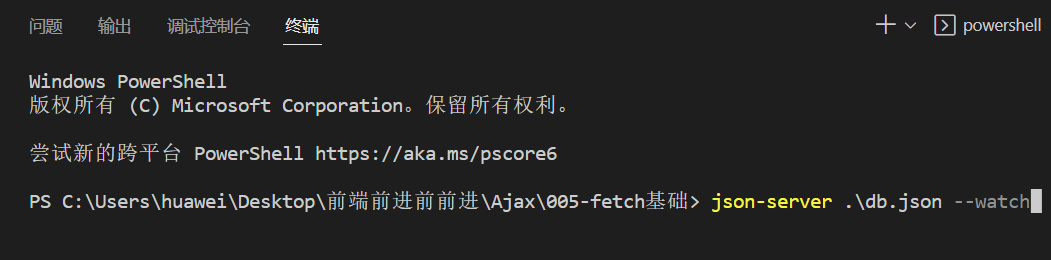
- 先在集成终端中打开json-server监视:
3.1 fetch基础
- 使用get请求方式(不传参数):
oget.onclick = function() {fetch("http://localhost:3000/users").then(res =>res.json()).then(res => {console.log(res);})
}
- 使用get请求方式(传参数):
oget.onclick = function() {fetch("http://localhost:3000/users?id=1").then(res =>res.json()).then(res => {console.log(res);})
}
- 使用post请求方式(传参数):
opost.onclick = function() {fetch("http://localhost:3000/users",{method:"post",headers:{// 两种提交方式:// form编码 name=kerwin&age=100// json {name:"kerwin",age:100}// 方式一// "content-type":"application/x-www-form-urlencoded"// 方式二"content-type":"application/json"},// body:"name=dazhuang&age=100" // 方式一bodybody:JSON.stringify({name:"xiaoli",age: 20})}).then(res =>res.json()).then(res => {console.log(res);})
}
- 使用put请求方式(传参数):
oput.onclick = function() {fetch("http://localhost:3000/users/2",{method:"put",headers:{// 两种提交方式:// form编码 name=kerwin&age=100// json {name:"kerwin",age:100}// 方式一// "content-type":"application/x-www-form-urlencoded"// 方式二"content-type":"application/json"},// body:"name=dazhuang&age=100" // 方式一bodybody:JSON.stringify({name:"xiaowang",age: 76})}).then(res =>res.json()).then(res => {console.log(res);})
}
- 使用patch请求方式(传参数):
opatch.onclick = function() {fetch("http://localhost:3000/users/2",{method:"PATCH",headers:{// 两种提交方式:// form编码 name=kerwin&age=100// json {name:"kerwin",age:100}// 方式一// "content-type":"application/x-www-form-urlencoded"// 方式二"content-type":"application/json"},// body:"name=dazhuang&age=100" // 方式一bodybody:JSON.stringify({age: 33})}).then(res =>res.json()).then(res => {console.log(res);})
}
- 使用delete请求方式(无参数):
odelete.onclick = function() {fetch("http://localhost:3000/users/2",{method:"delete",}).then(res =>res.json()).then(res => {console.log(res);})
}
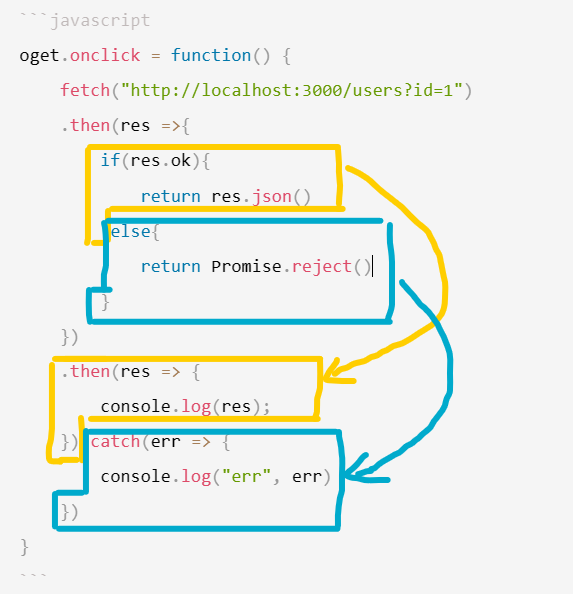
- 以使用get请求方式为例失败处理:
oget.onclick = function() {fetch("http://localhost:3000/users?id=1").then(res =>{if(res.ok){return res.json()}else{return Promise.reject({// 展示出错码和出错原因status:res.status,statusText:res.statusText})}}).then(res => {console.log(res);}).catch(err => {console.log("err", err)})
}
3.2 fetch案例
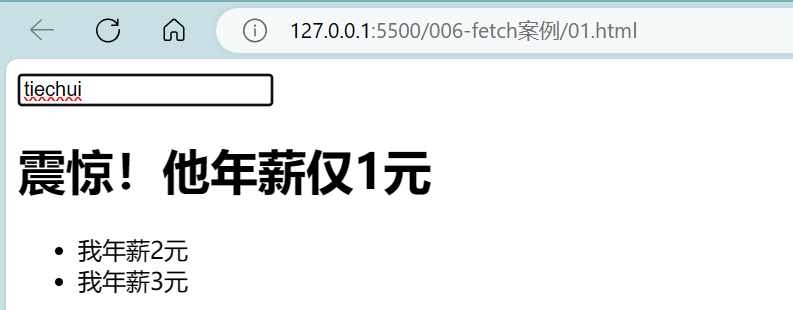
- 通过输入作者姓名找到新闻标题,再根据新闻标题对应的新闻id找到所对应的评论内容。
- db.json代码:
{"news": [{ "id" : 1, "title" : "男人看了沉默,女人看了流泪", "author" : "kerwin"},{ "id" : 2, "title" : "震惊!他年薪仅1元", "author" : "tiechui"},{ "id" : 3, "title" : "速看!万分危急!", "author" : "gangdan"}],"comments": [{ "id" : 1, "body" : "我是男人", "newsId" : 1 },{ "id" : 2, "body" : "我是女人", "newsId" : 1 },{ "id" : 3, "body" : "我年薪2元", "newsId" : 2 },{ "id" : 4, "body" : "我年薪3元", "newsId" : 2 },{ "id" : 5, "body" : "1块钱就能买1块钱的东西", "newsId" : 3 },{ "id" : 6, "body" : "2块钱就能买2块钱的东西", "newsId" : 3 }]
}
- 基于fetch的01.html代码:
<!DOCTYPE html>
<html lang="en">
<head><meta charset="UTF-8"><meta http-equiv="X-UA-Compatible" content="IE=edge"><meta name="viewport" content="width=device-width, initial-scale=1.0"><title>Document</title>
</head>
<body><input type="text" id="search"><h1 id="title"></h1><ul id="list"></ul><script>var osearch = document.querySelector('#search')var otitle = document.querySelector('#title')var olist = document.querySelector('#list')osearch.oninput = function() {fetch(`http://localhost:3000/news?author=${osearch.value}`).then( res => res.json()).then( res => {if(res.length > 0) {otitle.innerHTML = res[0].titlereturn fetch(`http://localhost:3000/comments?newsId=${res[0].id}`).then(res=>res.json())}else {otitle.innerHTML = ""return res}}).then(res=>{console.log(res)olist.innerHTML = res.map( item => `<li>${item.body}</li>`).join("") // join是为了避免中间有逗号})}</script>
</body>
</html>
- fetch结合async await下的01.html代码:
<!DOCTYPE html>
<html lang="en">
<head><meta charset="UTF-8"><meta http-equiv="X-UA-Compatible" content="IE=edge"><meta name="viewport" content="width=device-width, initial-scale=1.0"><title>Document</title>
</head>
<body><input type="text" id="search"><h1 id="title"></h1><ul id="list"></ul><script>var osearch = document.querySelector('#search')var otitle = document.querySelector('#title')var olist = document.querySelector('#list')osearch.oninput = async function() {var res = await fetch(`http://localhost:3000/news?author=${osearch.value}`).then( res => res.json())var resultif(res.length > 0) {otitle.innerHTML = res[0].titleresult = await fetch(`http://localhost:3000/comments?newsId=${res[0].id}`).then(res=>res.json())}else {otitle.innerHTML = ""result = res}// console.log("111",result)olist.innerHTML = result.map( item => `<li>${item.body}</li>`).join("") // join是为了避免中间有逗号}</script>
</body>
</html>
4 axios
- Axios是一个基于promise 的 HTTP 库,可以用在浏览器和 node.js中。
- https://www.npmjs.com/package/axios
4.1 axios基础
- 使用get请求方式(不传参数):
oget.onclick = function() {axios.get("http://localhost:3000/users")// 若成功走.then.then(res => {console.log(res.data)})// 若失败走.catch.catch(err => {console.log("err",err)})
}
- 使用get请求方式(传参数):
oget.onclick = function() {axios.get("http://localhost:3000/users?name=kerwin")// 若成功走.then.then(res => {console.log(res.data)})// 若失败走.catch.catch(err => {console.log("err",err)})
}
- 使用get请求方式(传参数且为对象结构):
oget.onclick = function() {axios.get("http://localhost:3000/users",{params:{name:"kerwin"}})// 若成功走.then.then(res => {console.log(res.data)})// 若失败走.catch.catch(err => {console.log("err",err)})
}
- 使用post请求方式(传参数):
 opost.onclick = function() {// 以json方式传参数/* axios.post("http://localhost:3000/users",{name:"xiaoming",age:18}) */// 以form方式传参数方法一// axios.post("http://localhost:3000/users","name=tiechui&age=77")// 以form方式传参数方法二const params = new URLSearchParams({name:"dazhuang",age:13});axios.post("http://localhost:3000/users",params)// 若成功走.then.then(res => {console.log(res.data)})// 若失败走.catch.catch(err => {console.log("err",err)})
}
- 使用put请求方式(传参数):
oput.onclick = function() {axios.put("http://localhost:3000/users/4",{name:"dazhuang",age:99})// 若成功走.then.then(res => {console.log(res.data)})// 若失败走.catch.catch(err => {console.log("err",err)})
}
- 使用patch请求方式(传参数):
opatch.onclick = function() {axios.patch("http://localhost:3000/users/4",{age:101})// 若成功走.then.then(res => {console.log(res.data)})// 若失败走.catch.catch(err => {console.log("err",err)})
}
- 使用delete请求方式(无参数):
odelete.onclick = function() {axios.delete("http://localhost:3000/users/4")// 若成功走.then.then(res => {console.log(res.data)})// 若失败走.catch.catch(err => {console.log("err",err)})
}
- axios(config)配置:
axios({method:"post",url:'http://localhost:3000/users',// put post等放入data中 get放入params中data:{name:'kerwin',age: 88}
})
.then(res => {console.log(res.data)
})
.catch(err => {console.log(err)
})
4.2 axios使用
4.2.1 axios拦截器
- db.json代码:
{"news": [{ "id" : 1, "title" : "男人看了沉默,女人看了流泪", "author" : "kerwin"},{ "id" : 2, "title" : "震惊!他年薪仅1元", "author" : "tiechui"},{ "id" : 3, "title" : "速看!万分危急!", "author" : "gangdan"}],"comments": [{ "id" : 1, "body" : "我是男人", "newsId" : 1 },{ "id" : 2, "body" : "我是女人", "newsId" : 1 },{ "id" : 3, "body" : "我年薪2元", "newsId" : 2 },{ "id" : 4, "body" : "我年薪3元", "newsId" : 2 },{ "id" : 5, "body" : "1块钱就能买1块钱的东西", "newsId" : 3 },{ "id" : 6, "body" : "2块钱就能买2块钱的东西", "newsId" : 3 }]
}
- 01.html代码:
<!DOCTYPE html>
<html lang="en">
<head><meta charset="UTF-8"><meta http-equiv="X-UA-Compatible" content="IE=edge"><meta name="viewport" content="width=device-width, initial-scale=1.0"><title>Document</title><!-- 引入axios --><script src="https://cdn.jsdelivr.net/npm/axios@1.1.2/dist/axios.min.js"></script>
</head>
<body><button id="get">get</button><script>var oget = document.querySelector("#get")// axios拦截器// request请求拦截器axios.interceptors.request.use(function (config) {// Do something before request is sent// console.log("loading-开始")console.log("loading显示....")return config;}, function (error) {// Do something with request errorreturn Promise.reject(error);});// response响应拦截器// Add a response interceptoraxios.interceptors.response.use(function (response) {// Any status code that lie within the range of 2xx cause this function to trigger// Do something with response data// 成功响应拦截器// console.log("loading-结束")console.log("成功-隐藏loading....")return response;}, function (error) {// Any status codes that falls outside the range of 2xx cause this function to trigger// Do something with response error// 失败响应拦截器// console.log("loading---结束")console.log("失败-隐藏loading....")return Promise.reject(error);});oget.onclick = function() {axios.get('http://localhost:3000/news').then(res => {console.log(res.data);}).catch(err => {console.log("err",err);})}</script>
</body>
</html>


4.2.2 axios中断器
const controller = new AbortController();axios.get('/foo/bar', {signal: controller.signal
}).then(function(response) {//...
});
// cancel the request
controller.abort()
- 01.html代码:
<!DOCTYPE html>
<html lang="en">
<head><meta charset="UTF-8"><meta http-equiv="X-UA-Compatible" content="IE=edge"><meta name="viewport" content="width=device-width, initial-scale=1.0"><title>Document</title><!-- 引入axios --><script src="https://cdn.jsdelivr.net/npm/axios@1.1.2/dist/axios.min.js"></script>
</head>
<body><button id="get">get</button><!-- 终止按钮 --><button id="abort">abort</button><script>var oget = document.querySelector("#get")var oabort = document.querySelector("#abort")// axios拦截器// request请求拦截器axios.interceptors.request.use(function (config) {// Do something before request is sent// console.log("loading-开始")console.log("loading显示....")return config;}, function (error) {// Do something with request errorreturn Promise.reject(error);});// response响应拦截器// Add a response interceptoraxios.interceptors.response.use(function (response) {// Any status code that lie within the range of 2xx cause this function to trigger// Do something with response data// 成功响应拦截器// console.log("loading-结束")console.log("成功-隐藏loading....")return response;}, function (error) {// Any status codes that falls outside the range of 2xx cause this function to trigger// Do something with response error// 失败响应拦截器// console.log("loading---结束")console.log("失败-隐藏loading....")return Promise.reject(error);});// axios中断器const controller = new AbortController();oget.onclick = function() {axios.get('http://localhost:3000/news',{signal: controller.signal}).then(res => {console.log(res.data);}).catch(err => {console.log("err",err);})}oabort.onclick = function() {controller.abort()}</script>
</body>
</html>

5 同源策略
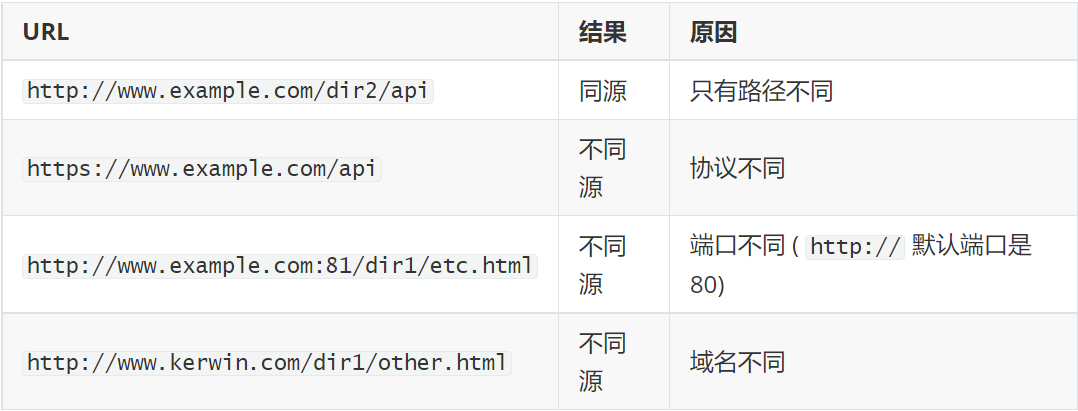
- 一个URL有三部分组成:协议、域名(指向主机)、端口,只有这三个完全相同的 URL 才能称之为同源。
- 如下,能和
http://www.example.com/dir1/index.html同源的是?
- 无法读取非同源网页的 Cookie、LocalStorage 。
- 无法接触非同源网页的 DOM。
- 无法向非同源地址发送 AJAX 请求(可以发送,但浏览器会拒绝接受响应)。
- 注意:同源策略是浏览器的行为,是为了保护本地数据不被JavaScript代码获取回来的数据污染,因此拦截的是客户端发出的请求回来的数据接收,即请求发送了,服务器响应了,但是无法被浏览器接收。
6 解决跨域
6.1 jsonp
- Jsonp(JSON with Padding) 是 json 的一种"使用模式",可以让网页从别的域名(网站)那获取资料,即跨域读取数据。
- 为什么我们从不同的域(网站)访问数据需要一个特殊的技术( JSONP )呢?这是因为同源策略。
- 1.txt代码:
test("xiaowang")
- 01.html代码:
<!DOCTYPE html>
<html lang="en">
<head><meta charset="UTF-8"><meta http-equiv="X-UA-Compatible" content="IE=edge"><meta name="viewport" content="width=device-width, initial-scale=1.0"><title>Document</title>
</head>
<body><script>function test(data){console.log("111",data);}var oscript = document.createElement("script")oscript.src = "1.txt"document.body.appendChild(oscript)// 1.script标签没有跨域限制// 2.后端配合返回的是 函数() 调用的方式// 3.前端必须提前声明好这个函数// 缺点:jsonp只能get请求 无法post、put、delete</script><!-- <script>// <script src="1.txt">// test("xiaowang")</script> -->
</body>
</html>

- 案例:
<!DOCTYPE html>
<html lang="en">
<head><meta charset="UTF-8"><meta http-equiv="X-UA-Compatible" content="IE=edge"><meta name="viewport" content="width=device-width, initial-scale=1.0"><title>Document</title>
</head>
<body><input type="text" id="search"><ul id="list"></ul><script>var osearch = document.querySelector('#search')var olist = document.querySelector('#list')osearch.oninput = function(){// console.log(osearch.value)if(osearch.value === "") {olist.innerHTML = ""return}var oscript = document.createElement("script")oscript.src = `https://www.baidu.com/sugrec?pre=1&p=3&ie=utf-8&json=1&prod=pc&from=pc_web&sugsid=39646,39671,39663,39676,39678,39713,39791,39787,39704,39793,39681,39662&wd=${osearch.value}&req=2&csor=1&cb=test&_=1700639132336`document.body.appendChild(oscript)oscript.onload = function() {oscript.remove() // 创建完script标签 等它load完了 就给它移掉}}function test(data) {// console.log(data.g);olist.innerHTML = data.g.map(item => `<li>${item.q}</li>`).join("")}</script>
</body>
</html>
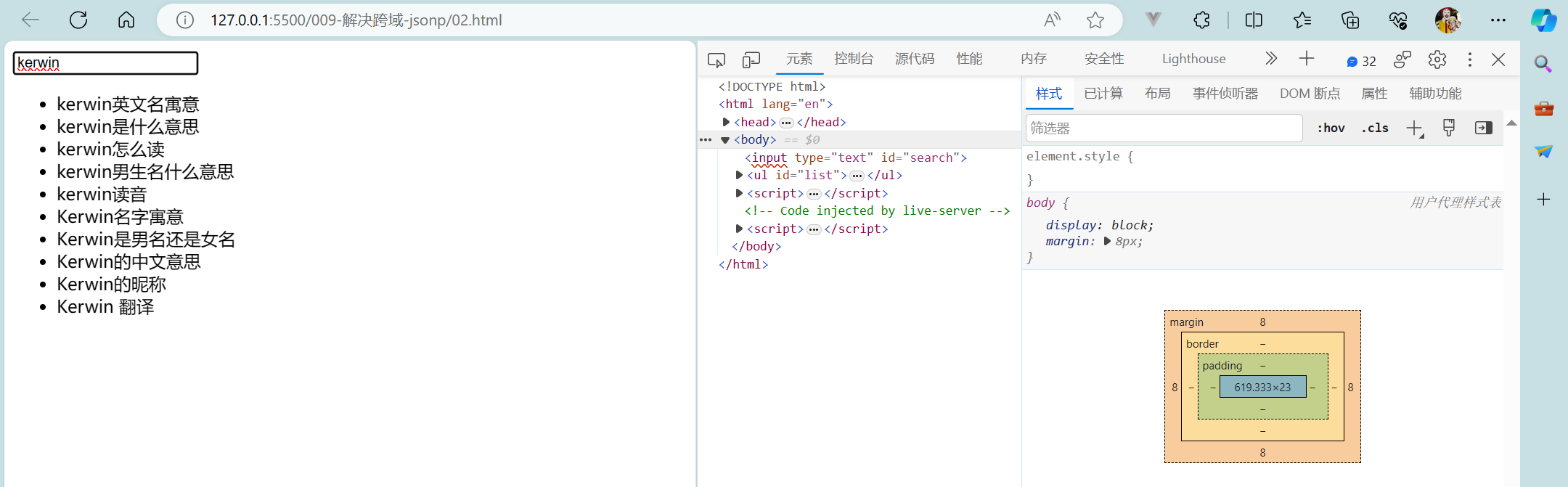
6.2 其他技术手段
- 加上响应头
- 反向代理nginx跨域解决方案
相关文章:
【初始前后端交互+原生Ajax+Fetch+axios+同源策略+解决跨域】
初始前后端交互原生AjaxFetchaxios同源策略解决跨域 1 初识前后端交互2 原生Ajax2.1 Ajax基础2.2 Ajax案例2.3 ajax请求方式 3 Fetch3.1 fetch基础3.2 fetch案例 4 axios4.1 axios基础4.2 axios使用4.2.1 axios拦截器4.2.2 axios中断器 5 同源策略6 解决跨域6.1 jsonp6.2 其他技…...
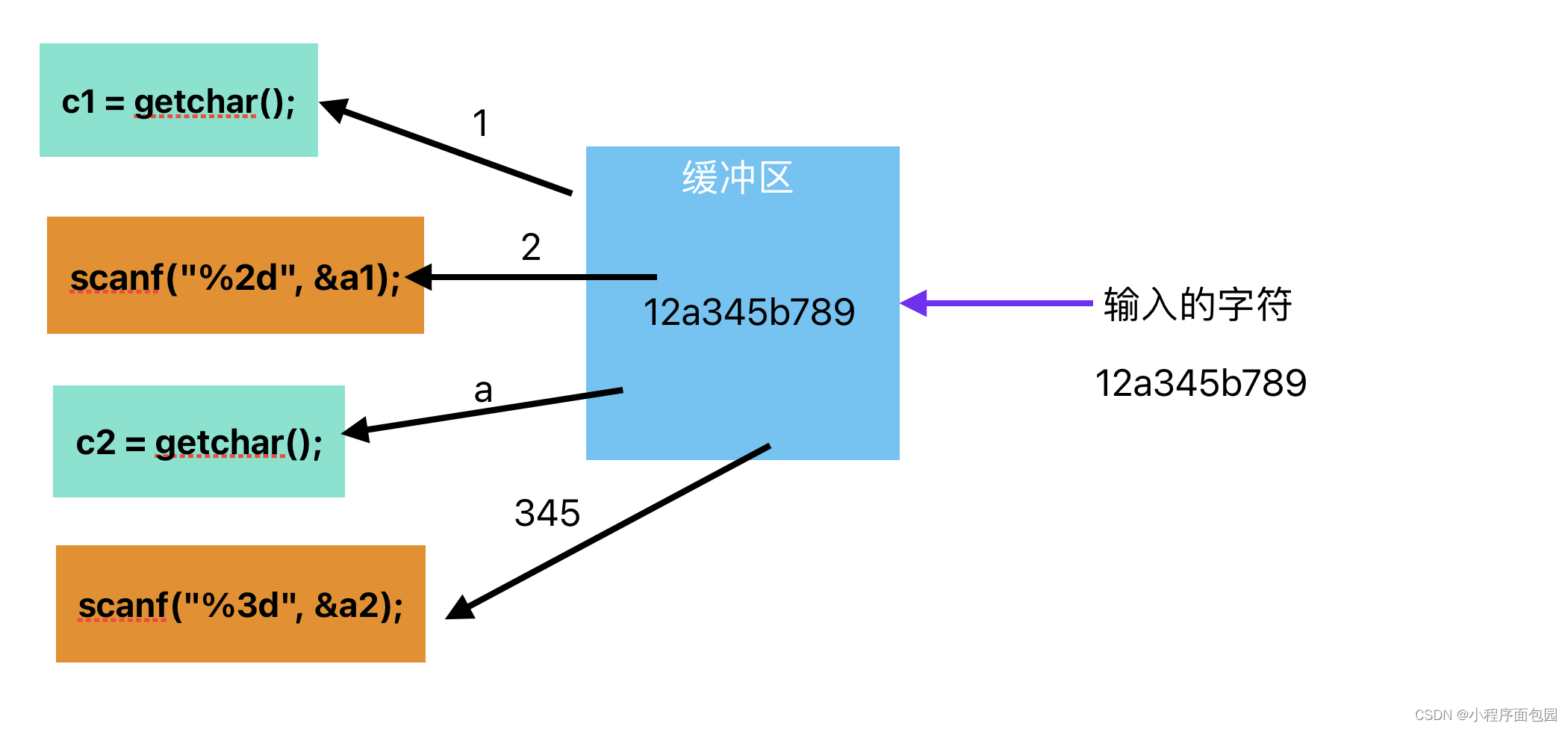
C语言--每日选择题--Day24
第一题 1. 在C语言中,非法的八进制是( ) A:018 B:016 C:017 D:0257 答案及解析 A 八进制是0~7的数字,所以A错误 第二题 2. fun((exp1,exp2),(exp3,exp4,exp5))有几…...
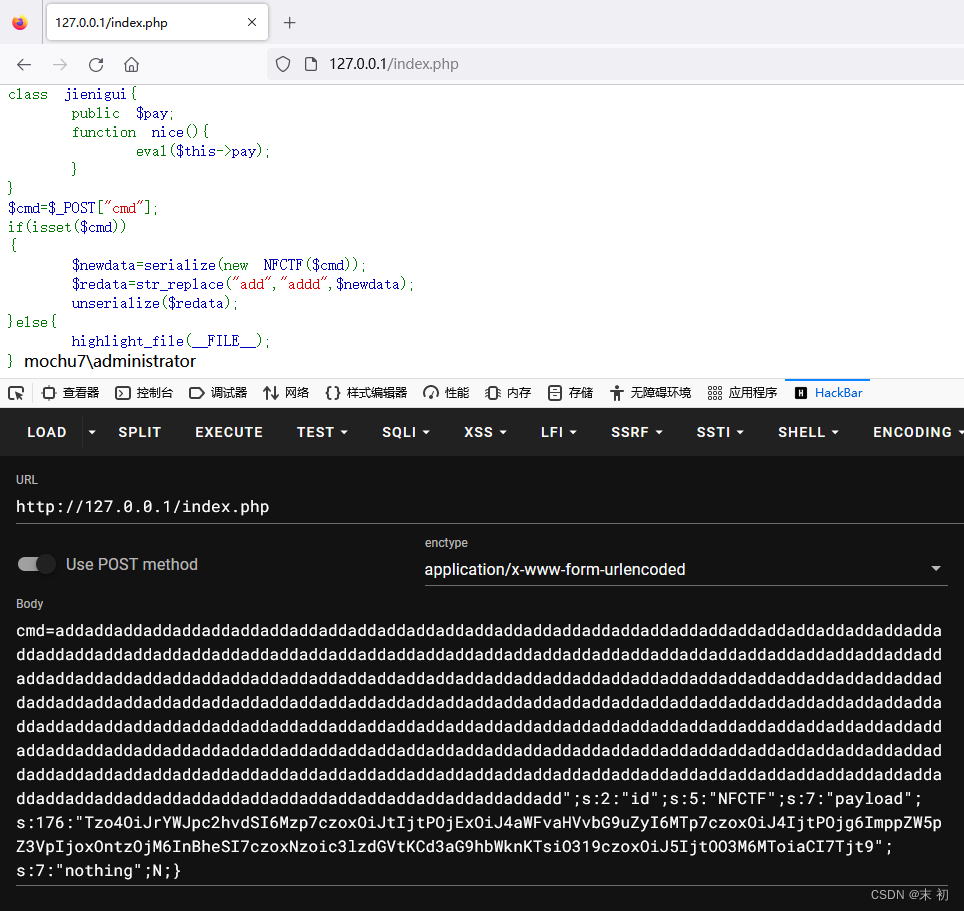
记一次简单的PHP反序列化字符串溢出
今天朋友给的一道题,让我看看,来源不知,随手记一下 <?php // where is flag error_reporting(0); class NFCTF{ public $ming,$id,$payload,$nothing;function __construct($iii){$this->ming$ii…...

找工作面试技巧
问题描述:找工作时,不知道如何回答问题怎么办。 问题解决:可以尝试使用STAT原则来回答问题。具体如下。 "STAR" 原则是一种常用于回答面试问题的方法,特别是在描述个人经验、解决问题或展示技能和能力时。"STAR&q…...
Jackson无缝替换Fastjson
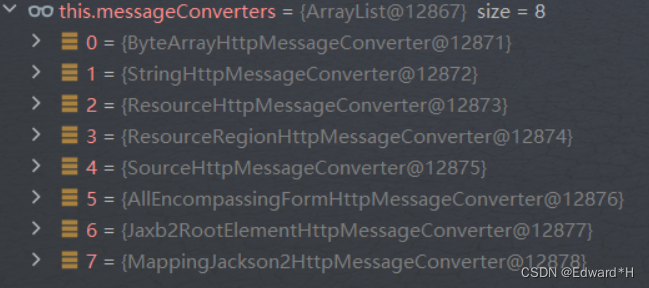
目录 文章目录 一,Fastjson到Jackson的替换方案方案代码序列化反序列化通过key获取某种类型的值类型替换 二,Springboot工程中序列化的使用场景三,SpringMVC框架中的Http消息转换器1,原理:2,自定义消息转换…...
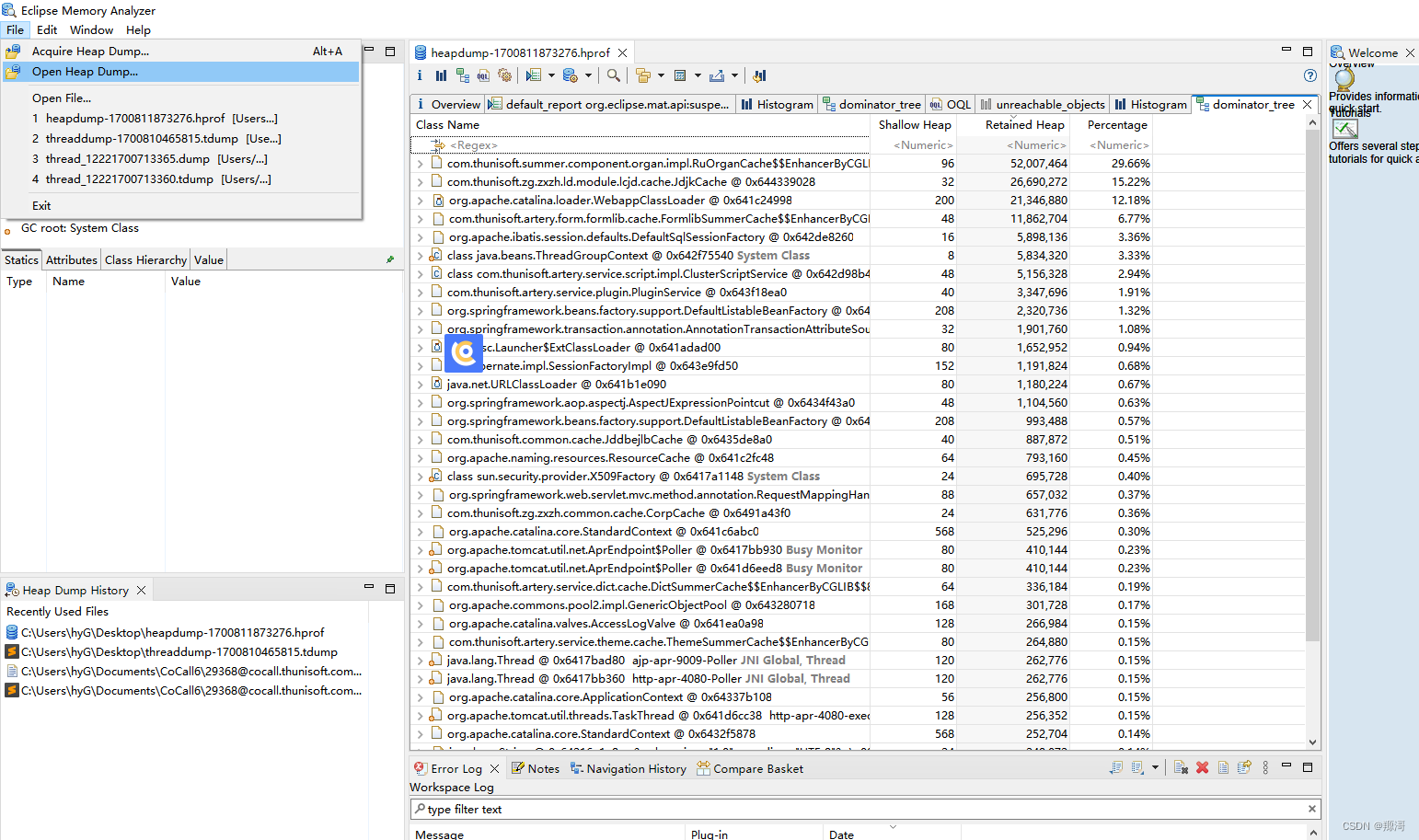
JVM 内存分析工具 MAT及实践
线程分析工具 MAT 官网下载地址:http://www.eclipse.org/mat/downloads.php mat百度网盘链接:(速度更快) 链接:https://pan.baidu.com/s/1tMp8MQIXuPtg9zBgruO0Ug?pwdjqtv 提取码:jqtv jdk17 百度网盘链接…...

jupyter notebook 不知道密码,怎么登录解决办法
jupyter notebook 不知道密码,怎么登录解决办法 1、 windows下,打开命令行,输入jupyter notebook list : C:\Users\tom>jupyter notebook list Currently running servers: http://localhost:8888/?tokenee8bb2c28a89c8a24d…...

软著项目推荐 深度学习中文汉字识别
文章目录 0 前言1 数据集合2 网络构建3 模型训练4 模型性能评估5 文字预测6 最后 0 前言 🔥 优质竞赛项目系列,今天要分享的是 🚩 深度学习中文汉字识别 该项目较为新颖,适合作为竞赛课题方向,学长非常推荐…...
)
WEB渗透—反序列化(七)
Web渗透—反序列化 课程学习分享(课程非本人制作,仅提供学习分享) 靶场下载地址:GitHub - mcc0624/php_ser_Class: php反序列化靶场课程,基于课程制作的靶场 课程地址:PHP反序列化漏洞学习_哔哩哔_…...
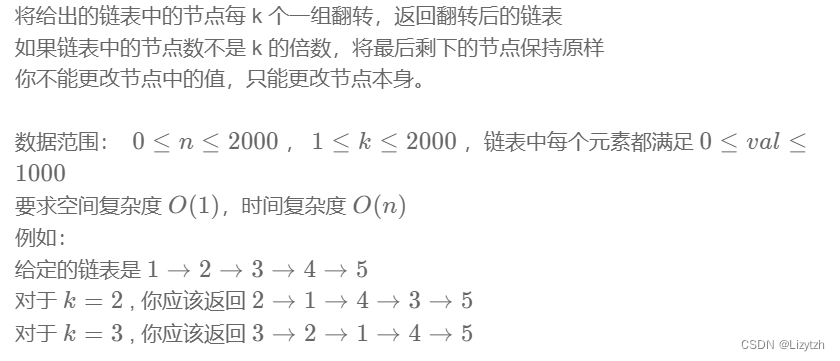
牛客网刷题笔记四 链表节点k个一组翻转
NC50 链表中的节点每k个一组翻转 题目: 思路: 这种题目比较习惯现在草稿本涂涂画画链表处理过程。整体思路是赋值新的链表,用游离指针遍历原始链表进行翻转操作,当游离个数等于k时,就将翻转后的链表接到新的链表后&am…...
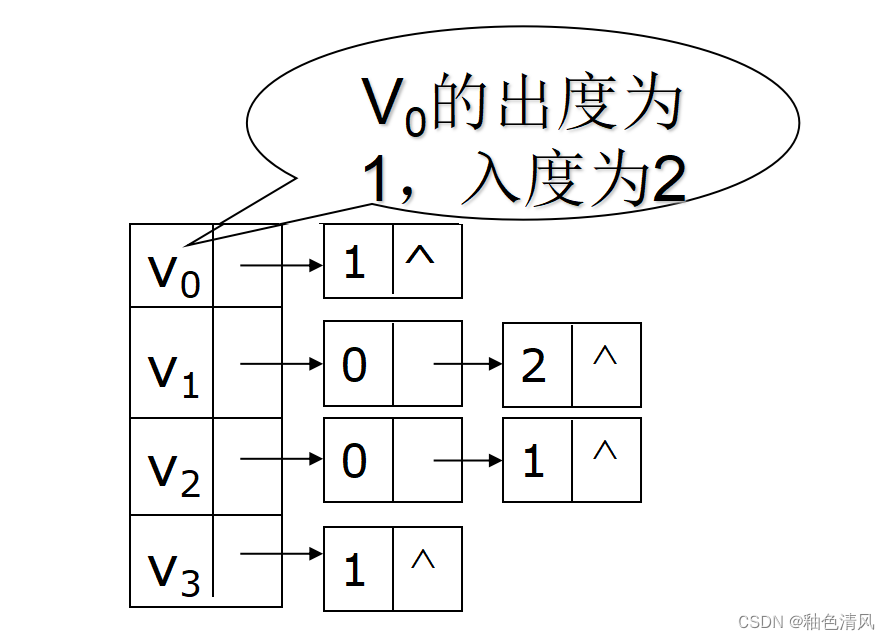
【数据结构】图<简单认识图>
对于下面的内容,大家着重观察和理解图即可,可以直接绕过一些文字性的概念,对图有一个大概的认识。 图 简单认识图图的定义有向图和无向图完全图无向完全图有向完全图 图的基本存储结构邻接矩阵存储邻接矩阵的优点 网络的邻接矩阵邻接表无向图…...

Git介绍和基础命令解析
Git基本操作指令 工作区和暂存区 Git管理的文件分为:工作区(本地的文件夹),版本库(.git文件夹),版本库又分为暂存区stage和暂存区分支master(仓库) 工作区>>>>暂存区>>>>仓库 git add把文件从工作区>>>…...
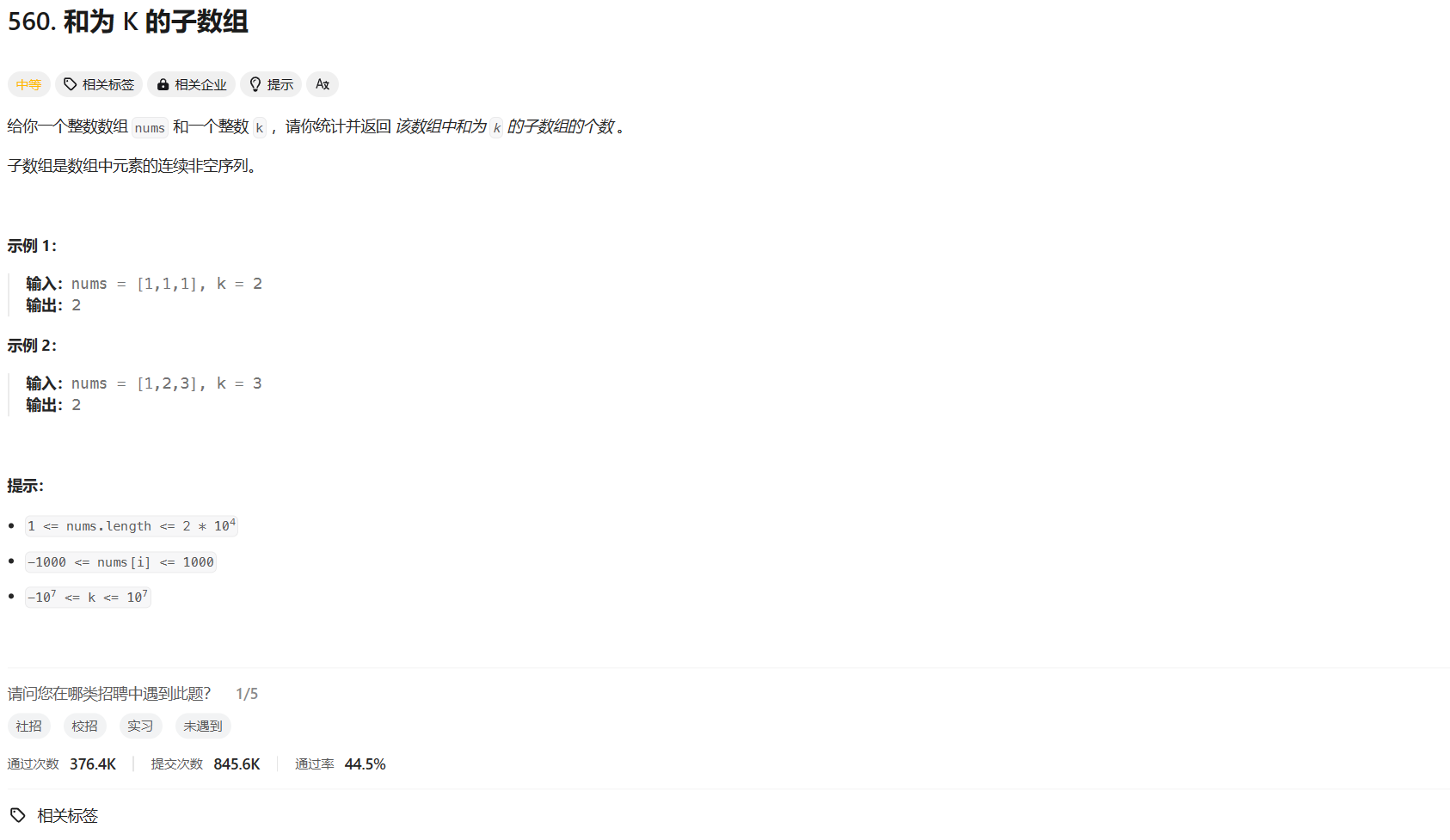
力扣hot100 和为 K 的子数组 前缀和
👨🏫 题目地址 🍻 AC code class Solution {public int subarraySum(int[] nums, int k){int ans 0;int n nums.length;int[] s new int[n 1];// 前缀和s[0] 0;s[1] nums[0];for (int i 2; i < n; i)s[i] s[i - 1] nums[i - 1…...
6.12找树左下角的值(LC513-M)
算法: 这道题适合用迭代法,层序遍历:按层遍历,每次把每层最左边的值保存、更新到result里面。 看看Java怎么实现层序遍历的(用队列): /*** Definition for a binary tree node.* public clas…...
【精选】框架初探篇之——MyBatis的CRUD及配置文件
MyBatis增删改查 MyBatis新增 新增用户 持久层接口添加方法 void add(User user);映射文件添加标签 <insert id"add" parameterType"com.mybatis.pojo.User">insert into user(username,sex,address) values(# {username},# {sex},# {address}) <…...

ES8语法async与await
async和await两种语法结合可以让异步代码像同步代码一样。 一、async函数 async函数的返回值为Promise对象promise对象的结果由async函数执行的返回值决定 async function fn() {// 返回一个字符串return 字符串;// 返回的结果不是一个Promise类型的对象…...

c#处理SQLSERVER 中image数量类型为空
项目场景: DataRow dataRow dataTable.Rows[i]; var pxpicture dataRow ["pxImage"];if (pxpicture!null){byte[] pic (byte[])pxpicture;acs.Add("pxpicture", Convert.ToBase64String(pic));}问题描述 代码执行出现错误: 无…...

五子棋游戏
import pygame #导入pygame模块 pygame.init()#初始化 screen pygame.display.set_mode((750,750))#设置游戏屏幕大小 running True#建立一个事件 while running:#事件运行for event in pygame.event.get():if event.type pygame.QUIT:#当点击事件后退出running False #事…...
vue+SpringBoot的图片上传
前端VUE的代码实现 直接粘贴过来element-UI的组件实现 <el-uploadclass"avatar-uploader"action"/uploadAvatar" //这个action的值是服务端的路径,其他不用改:show-file-list"false":on-success"handleAvatarSuccess"…...
FFmepg 核心开发库及重要数据结构与API
文章目录 前言一、FFmpeg 核心开发库二、FFmpeg 重要数据结构与 API1、简介2、FFmpeg 解码流程①、FFmpeg2.x 解码流程②、FFmpeg4.x 解码流程 3、FFMpeg 中比较重要的函数以及数据结构①、数据结构②、初始化函数③、音视频解码函数④、文件操作⑤、其他函数 三、FFmpeg 流程1…...

【Vue2-ElementUI】:model、v-model、prop
一、示例代码<!-- 1. :model 语法:el-form 表单绑定 --> <el-form :rules"inputRules" :model"searchForm" ref"searchForm" ...><!-- 2. prop 语法:el-form-item 表单校验绑定 --><el-form-item la…...

像素幻梦惊艳案例:FLUX.1-dev生成符合PICO-8硬件限制的像素程序截图
像素幻梦惊艳案例:FLUX.1-dev生成符合PICO-8硬件限制的像素程序截图 1. 像素艺术的新纪元 在复古游戏复兴的浪潮中,像素艺术正迎来它的第二次黄金时代。而FLUX.1-dev模型的出现,为这种经典艺术形式注入了全新的活力。今天我们要展示的&…...

OpenClaw批量处理技巧:Qwen3.5-9B-AWQ-4bit优化1000+图片元数据
OpenClaw批量处理技巧:Qwen3.5-9B-AWQ-4bit优化1000图片元数据 1. 问题背景与需求拆解 上周接手了一个摄影爱好者的委托——他积累了近5000张未经整理的旅行照片,需要批量处理EXIF元数据并生成描述性标签。传统手动处理预计需要8小时,而通过…...

无需代码:用星图AI云+Clawdbot搭建私有化Qwen3-VL:30B飞书助手
无需代码:用星图AI云Clawdbot搭建私有化Qwen3-VL:30B飞书助手 1. 项目概述与价值 1.1 为什么选择这个方案 在当今企业办公场景中,智能助手已经成为提升效率的关键工具。但大多数方案存在两个痛点:要么功能单一(仅支持文本&…...

FLUX.1-dev旗舰版多GPU部署:分布式推理加速方案
FLUX.1-dev旗舰版多GPU部署:分布式推理加速方案 1. 引言 想象一下,你正在处理一批高分辨率图像生成任务,单张GPU需要等待数分钟才能完成。随着任务量增加,这种等待变得难以忍受。这就是为什么我们需要多GPU部署方案——将计算负…...
)
别再暴力求素数了!用C++实现埃氏筛和欧拉筛,性能提升百倍(附完整代码)
素数筛法性能优化实战:从暴力枚举到欧拉筛的百倍飞跃 在算法竞赛和工程开发中,素数筛选是一个经典问题。当数据规模达到百万级别时,传统的暴力枚举方法往往力不从心。本文将深入探讨三种素数筛选算法——暴力枚举、埃拉托斯特尼筛法ÿ…...

MusePublic Art Studio效果展示:复杂发型丝缕感与空气感光影表现
MusePublic Art Studio效果展示:复杂发型丝缕感与空气感光影表现 1. 惊艳效果开场:当AI遇见艺术创作 今天要展示的是MusePublic Art Studio在人物肖像生成方面的惊人表现,特别是对复杂发型丝缕感和空气感光影的细腻刻画。这款基于SDXL引擎的…...
的目标连续感知与主动控制技术体系研究与应用:答辩逐字稿)
基于三维空间智能体(3D Spatial Agent)的目标连续感知与主动控制技术体系研究与应用:答辩逐字稿
各位评委老师好。我先用一句可能有点“冒犯行业”的话开场:👉 今天绝大多数视频AI系统,并不知道“人在哪里”。它们可以识别一个人是谁, 但无法持续掌握他在真实空间中的位置、路径和下一步行为。👉 所以,本…...

费马小定理,快速幂
今天显示延续了昨天的背包问题,先是写了一题背包问题,后面就写费马定理加快速幂。费马小定理证明如果一个数p是质数,并且a不是p的倍数,那么一定有a^(p-1)1(mod p);那么自然有a^(p-2)a^-1(mod p)…...

20轮对话后GPT开始“胡说八道“:我用Subagent分层架构让上下文永不清零
复杂任务跑20轮后,Agent开始"胡说八道"——重复已做过的操作、提出已否决的方案。 这不是模型变笨了,是上下文窗口被污染。本文用Subagent分层架构,让父Agent保持清醒,子Agent承担脏活,实现20轮对话上下文仅…...