
Spring boot -- 学习HttpMessageConverter
文章目录
- 1. Json格式数据获取
- 2. 为什么返回Json格式的数据
- 2.1 注解SpringBootAppliaction
- 2.1.1 SpringBootConfiguration
- 2.1.2 ComponentScan
- 2.1.3 EnableAutoConfiguration
- 2.1.3.1 HttpMessageConvertersAutoConfiguration
- 2.1.3.2 WebMvcAutoConfiguration
- 2.2 注解RestController
- 2.2.1 Controller
- 2.2.2 ResponseBody
- 2.3 HttpMessageConverter
- 2.4 MappingJackson2HttpMessageConverter
- 2.5 Request header
- 2.3 总结
- 3.如何返回xml格式的数据
- 4. 如何返回自定义格式的数据
- 5. 总结
1. Json格式数据获取
在Spring boot项目中引入spring-boot-starter-web场景启动器之后,就可以轻松方便的获得json格式的数据返回。
pom.xml
<?xml version="1.0" encoding="UTF-8"?>
<project xmlns="http://maven.apache.org/POM/4.0.0" xmlns:xsi="http://www.w3.org/2001/XMLSchema-instance"xsi:schemaLocation="http://maven.apache.org/POM/4.0.0 https://maven.apache.org/xsd/maven-4.0.0.xsd"><modelVersion>4.0.0</modelVersion><parent><groupId>org.springframework.boot</groupId><artifactId>spring-boot-starter-parent</artifactId><version>2.7.17</version><relativePath/> <!-- lookup parent from repository --></parent><groupId>com.example</groupId><artifactId>sj-1123</artifactId><version>0.0.1-SNAPSHOT</version><name>sj-1123</name><description>sj-1123</description><properties><java.version>11</java.version></properties><dependencies><dependency><groupId>org.springframework.boot</groupId><artifactId>spring-boot-starter</artifactId></dependency><dependency><groupId>org.springframework.boot</groupId><artifactId>spring-boot-starter-web</artifactId></dependency></dependencies><build><plugins><plugin><groupId>org.springframework.boot</groupId><artifactId>spring-boot-maven-plugin</artifactId><configuration><image><builder>paketobuildpacks/builder-jammy-base:latest</builder></image></configuration></plugin></plugins></build></project>
实体类Person.java
public class Person {private String name;private int age;public Person() {}public Person(String name, int age) {this.name = name;this.age = age;}public String getName() {return this.name;}public void setName(String name) {this.name = name;}public int getAge() {return age;}public void setAge(int age) {this.age = age;}
}
Controller.java
@RestController
public class HelloController {@GetMapping("/hello")public ResponseEntity<Person> hello(String name, String age) {var person = new Person(name, 18);return ResponseEntity.ok(person);}
}
启动类
@SpringBootApplication
public class Sj1123Application {public static void main(String[] args) throws Exception {SpringApplication.run(Sj1123Application.class, args);}
}
这样启动后就可以通过访问localhost:8080/hello返回Json格式的结果
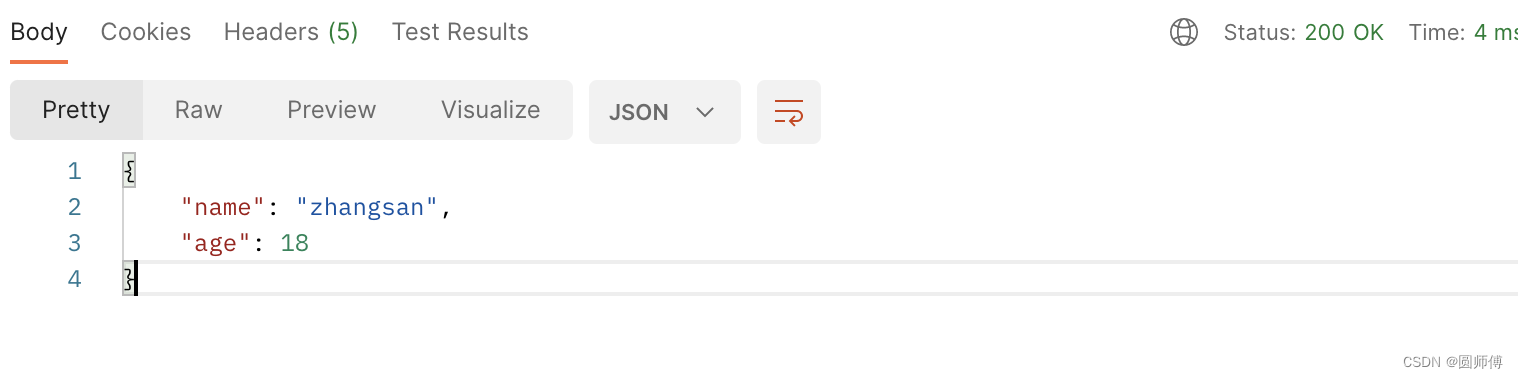
看到这里,会有下面的一些疑问:
- 为什么返回Json格式的数据?
- 如何返回xml格式的数据?
- 如何返回自定义格式的数据?
2. 为什么返回Json格式的数据
对于上面的spring boot项目,最主要的两个注解是SpringBootApplication和RestController
2.1 注解SpringBootAppliaction
这个是springBoot项目当中,最最常见及基础的一个注解。它用来表明这个配置类来生命一个或者多个Bean,并且触发自动配置和Bean扫描。这其实是一个复合注解,相当于同时注解了@SpringBootConfiguration, @EnableAutoConfiguration 和 @ComponentScan。
2.1.1 SpringBootConfiguration
这就是一个配置类注解,表明这是一个Spring Boot应用,可以当作是Configuration注解的一个springBoot应用中的一个替代选择。
2.1.2 ComponentScan
这个是组件扫描注解,用来指定要扫描哪些位置下的类,这样可以让spring 容器来找到这些BeanDefinition并生成Bean。
2.1.3 EnableAutoConfiguration
这个注解是spring Boot项目能够进行自动装配的关键。启用 Spring Application Context 的自动配置,尝试猜测和配置您可能需要的 bean。自动配置类通常基于您的类路径和您定义的 Bean 来应用。
这个注解上有一个注解Import,这个也是用来配置Bean的一种方式,AutoConfigurationImportSelector.class 这个类可以看到将会选择哪些Bean需要自动装配进来。
@Overridepublic String[] selectImports(AnnotationMetadata annotationMetadata) {if (!isEnabled(annotationMetadata)) {return NO_IMPORTS;}AutoConfigurationEntry autoConfigurationEntry = getAutoConfigurationEntry(annotationMetadata);return StringUtils.toStringArray(autoConfigurationEntry.getConfigurations());}protected AutoConfigurationEntry getAutoConfigurationEntry(AnnotationMetadata annotationMetadata) {if (!isEnabled(annotationMetadata)) {return EMPTY_ENTRY;}AnnotationAttributes attributes = getAttributes(annotationMetadata);List<String> configurations = getCandidateConfigurations(annotationMetadata, attributes);configurations = removeDuplicates(configurations);Set<String> exclusions = getExclusions(annotationMetadata, attributes);checkExcludedClasses(configurations, exclusions);configurations.removeAll(exclusions);configurations = getConfigurationClassFilter().filter(configurations);fireAutoConfigurationImportEvents(configurations, exclusions);return new AutoConfigurationEntry(configurations, exclusions);}
深入阅读源码,可以发现,spring自动加载位于"META-INF/spring/%s.imports"里定义的自动配置类。org.springframework.boot.autoconfigure.AutoConfiguration.imports 这个文件里共有144个自动配置类,涵盖了常见的Redis,MongoDB, JDBC,es, Cassandra,web等等。
这里有两个需要关注一下:
- org.springframework.boot.autoconfigure.http.HttpMessageConvertersAutoConfiguration 这个是用来自动配置HttpMessageConverter的。
- org.springframework.boot.autoconfigure.web.servlet.WebMvcAutoConfiguration Auto-configuration for Web MVC.
2.1.3.1 HttpMessageConvertersAutoConfiguration
这个配置类里,可以加载两个Bean:
@Bean@ConditionalOnMissingBeanpublic HttpMessageConverters messageConverters(ObjectProvider<HttpMessageConverter<?>> converters) {return new HttpMessageConverters(converters.orderedStream().collect(Collectors.toList()));}@Configuration(proxyBeanMethods = false)@ConditionalOnClass(StringHttpMessageConverter.class)protected static class StringHttpMessageConverterConfiguration {@Bean@ConditionalOnMissingBeanpublic StringHttpMessageConverter stringHttpMessageConverter(Environment environment) {Encoding encoding = Binder.get(environment).bindOrCreate("server.servlet.encoding", Encoding.class);StringHttpMessageConverter converter = new StringHttpMessageConverter(encoding.getCharset());converter.setWriteAcceptCharset(false);return converter;}}
一个是StringHttpMesageConverter类型的Bean,这个Bean加载的要求是当前类StringHttpMessageConverter.class存在,且Bean还没有,那就加载这个StringHttpMessageConverter的Bean。
另一个是HttpMessageConverters的Bean。
另外,这个配置类还会由Import注解导入另外三个配置类:
- JacksonHttpMessageConvertersConfiguration.class
- GsonHttpMessageConvertersConfiguration.class
- JsonbHttpMessageConvertersConfiguration.class
Jackson的配置类里面,会加载MappingJackson2HttpMessageConverter,这个Converter就是用来转Json的一个重要转换类。由于没有引入Gson和Jsonb相关的包,也不会加载这两个配置类里的相关内容。
2.1.3.2 WebMvcAutoConfiguration
这个配置类,用来配置web mvc相关的内容,但是是要在WebMvcConfigurationSupport.class这个类型的Bean不存在,且Servlet.class, DispatcherServlet.class, WebMvcConfigurer.class 这三个类存在,而且是servlet的web应用下,才会用到这个配置类。
但是WebMvcConfigurationSupport这个类型的Bean是什么时候在哪里指示加载的呢?
This is the main class providing the configuration behind the MVC Java config. It is typically imported by adding @EnableWebMvc to an application @Configuration class. An alternative more advanced option is to extend directly from this class and override methods as necessary, remembering to add @Configuration to the subclass and @Bean to overridden @Bean methods. For more details see the javadoc of @EnableWebMvc.
可以看到是在配置类上启用EnableWebMVC注解。或者是直接扩展这个类,然后加载Bean。
而在WebMvcAutoConfiguration.class里面,由这样一段代码
/*** Configuration equivalent to {@code @EnableWebMvc}.*/@Configuration(proxyBeanMethods = false)@EnableConfigurationProperties(WebProperties.class)public static class EnableWebMvcConfiguration extends DelegatingWebMvcConfiguration implements ResourceLoaderAware {private final Resources resourceProperties;private final WebMvcProperties mvcProperties;private final WebProperties webProperties;private final ListableBeanFactory beanFactory;private final WebMvcRegistrations mvcRegistrations;private ResourceLoader resourceLoader;public EnableWebMvcConfiguration(WebMvcProperties mvcProperties, WebProperties webProperties,ObjectProvider<WebMvcRegistrations> mvcRegistrationsProvider,ObjectProvider<ResourceHandlerRegistrationCustomizer> resourceHandlerRegistrationCustomizerProvider,ListableBeanFactory beanFactory) {this.resourceProperties = webProperties.getResources();this.mvcProperties = mvcProperties;this.webProperties = webProperties;this.mvcRegistrations = mvcRegistrationsProvider.getIfUnique();this.beanFactory = beanFactory;}
这就相当于启用了EnableWebMVC注解,加载了WebMvcConfigurationSupport类型的Bean。这个类型的Bean,配置了非常多的web相关的内容:
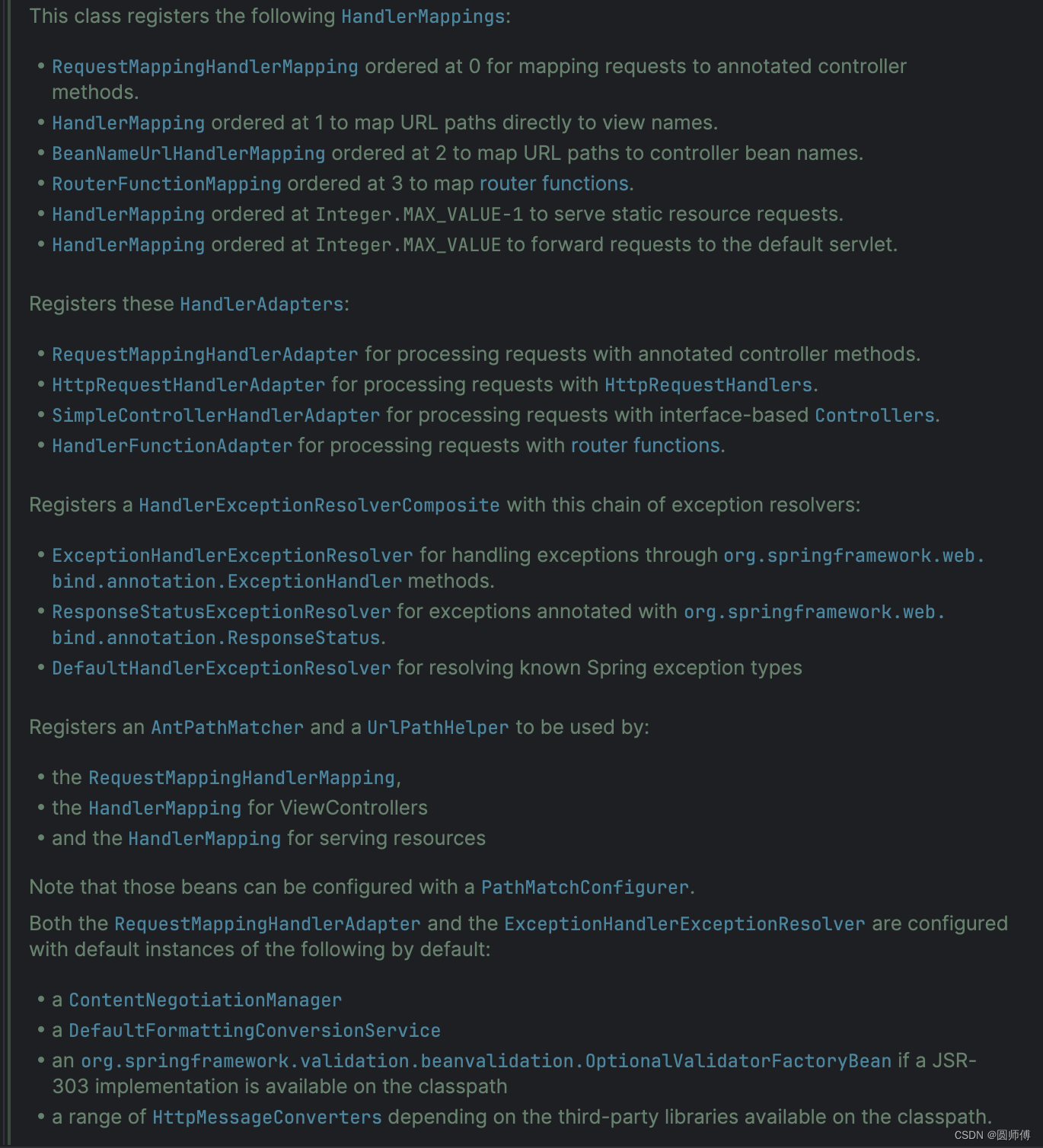
配置messageConverter相关的内容
/*** Provides access to the shared {@link HttpMessageConverter HttpMessageConverters}* used by the {@link RequestMappingHandlerAdapter} and the* {@link ExceptionHandlerExceptionResolver}.* <p>This method cannot be overridden; use {@link #configureMessageConverters} instead.* Also see {@link #addDefaultHttpMessageConverters} for adding default message converters.*/protected final List<HttpMessageConverter<?>> getMessageConverters() {if (this.messageConverters == null) {this.messageConverters = new ArrayList<>();configureMessageConverters(this.messageConverters);if (this.messageConverters.isEmpty()) {addDefaultHttpMessageConverters(this.messageConverters);}extendMessageConverters(this.messageConverters);}return this.messageConverters;}/*** Override this method to add custom {@link HttpMessageConverter HttpMessageConverters}* to use with the {@link RequestMappingHandlerAdapter} and the* {@link ExceptionHandlerExceptionResolver}.* <p>Adding converters to the list turns off the default converters that would* otherwise be registered by default. Also see {@link #addDefaultHttpMessageConverters}* for adding default message converters.* @param converters a list to add message converters to (initially an empty list)*/protected void configureMessageConverters(List<HttpMessageConverter<?>> converters) {}/*** Override this method to extend or modify the list of converters after it has* been configured. This may be useful for example to allow default converters* to be registered and then insert a custom converter through this method.* @param converters the list of configured converters to extend* @since 4.1.3*/protected void extendMessageConverters(List<HttpMessageConverter<?>> converters) {}/*** Adds a set of default HttpMessageConverter instances to the given list.* Subclasses can call this method from {@link #configureMessageConverters}.* @param messageConverters the list to add the default message converters to*/protected final void addDefaultHttpMessageConverters(List<HttpMessageConverter<?>> messageConverters) {messageConverters.add(new ByteArrayHttpMessageConverter());messageConverters.add(new StringHttpMessageConverter());messageConverters.add(new ResourceHttpMessageConverter());messageConverters.add(new ResourceRegionHttpMessageConverter());if (!shouldIgnoreXml) {try {messageConverters.add(new SourceHttpMessageConverter<>());}catch (Error err) {// Ignore when no TransformerFactory implementation is available}}messageConverters.add(new AllEncompassingFormHttpMessageConverter());if (romePresent) {messageConverters.add(new AtomFeedHttpMessageConverter());messageConverters.add(new RssChannelHttpMessageConverter());}if (!shouldIgnoreXml) {if (jackson2XmlPresent) {Jackson2ObjectMapperBuilder builder = Jackson2ObjectMapperBuilder.xml();if (this.applicationContext != null) {builder.applicationContext(this.applicationContext);}messageConverters.add(new MappingJackson2XmlHttpMessageConverter(builder.build()));}else if (jaxb2Present) {messageConverters.add(new Jaxb2RootElementHttpMessageConverter());}}if (kotlinSerializationJsonPresent) {messageConverters.add(new KotlinSerializationJsonHttpMessageConverter());}if (jackson2Present) {Jackson2ObjectMapperBuilder builder = Jackson2ObjectMapperBuilder.json();if (this.applicationContext != null) {builder.applicationContext(this.applicationContext);}messageConverters.add(new MappingJackson2HttpMessageConverter(builder.build()));}else if (gsonPresent) {messageConverters.add(new GsonHttpMessageConverter());}else if (jsonbPresent) {messageConverters.add(new JsonbHttpMessageConverter());}if (jackson2SmilePresent) {Jackson2ObjectMapperBuilder builder = Jackson2ObjectMapperBuilder.smile();if (this.applicationContext != null) {builder.applicationContext(this.applicationContext);}messageConverters.add(new MappingJackson2SmileHttpMessageConverter(builder.build()));}if (jackson2CborPresent) {Jackson2ObjectMapperBuilder builder = Jackson2ObjectMapperBuilder.cbor();if (this.applicationContext != null) {builder.applicationContext(this.applicationContext);}messageConverters.add(new MappingJackson2CborHttpMessageConverter(builder.build()));}}
这一共三个方法:
- 第一个是直接Config custom的MessageConverter,这个就意味着默认的MessageConverter将失效了,只能用自定义的。
- 第二个是extend MessageConverter, 这个可以添加自己的MessageConverter的同时,保留原有的MessageConverter。
- 第三个是直接使用默认的MessageConverter。默认的一共有哪些呢?这些由spring容器根据类是否出现在class path中来进行判断。
static {ClassLoader classLoader = WebMvcConfigurationSupport.class.getClassLoader();romePresent = ClassUtils.isPresent("com.rometools.rome.feed.WireFeed", classLoader);jaxb2Present = ClassUtils.isPresent("javax.xml.bind.Binder", classLoader);jackson2Present = ClassUtils.isPresent("com.fasterxml.jackson.databind.ObjectMapper", classLoader) &&ClassUtils.isPresent("com.fasterxml.jackson.core.JsonGenerator", classLoader);jackson2XmlPresent = ClassUtils.isPresent("com.fasterxml.jackson.dataformat.xml.XmlMapper", classLoader);jackson2SmilePresent = ClassUtils.isPresent("com.fasterxml.jackson.dataformat.smile.SmileFactory", classLoader);jackson2CborPresent = ClassUtils.isPresent("com.fasterxml.jackson.dataformat.cbor.CBORFactory", classLoader);gsonPresent = ClassUtils.isPresent("com.google.gson.Gson", classLoader);jsonbPresent = ClassUtils.isPresent("javax.json.bind.Jsonb", classLoader);kotlinSerializationJsonPresent = ClassUtils.isPresent("kotlinx.serialization.json.Json", classLoader);}
这里可以看到默认加载的MessageConverter有:
- ByteArrayHttpMessageConverter
- StringHttpMessageConverter
- ResourceHttpMessageConverter
- ResourceRegionHttpMessageConverter
- AllEncompassingFormHttpMessageConverter
- MappingJackson2HttpMessageConverter
- SourceHttpMessageConverter
所有默认的MessageConverter已经就位了,那什么时候使用呢?这个时候就要看另一个注解RestController了。
2.2 注解RestController
这也是一个复合注解,由两个注解组成:
@Controller
@ResponseBody
2.2.1 Controller
这个是一个特别熟悉的注解,就是表示这是一个控制器controller,它和RequestMapping注解一起,处理请求。
2.2.2 ResponseBody
这个注解就是表明返回值直接绑定到response body中。当使用@ResponseBody注解时,Spring MVC会根据请求的Content-Type头和处理方法的返回类型来选择合适的HttpMessageConverter进行数据转换。HttpMessageConverter负责将Java对象转换为响应的数据格式,并将其写入HTTP响应中。
2.3 HttpMessageConverter
HttpMessageConverter负责将对象转化为对应的数据格式,那是如何做到的呢?
public interface HttpMessageConverter<T> {boolean canRead(Class<?> clazz, @Nullable MediaType mediaType);boolean canWrite(Class<?> clazz, @Nullable MediaType mediaType);List<MediaType> getSupportedMediaTypes();default List<MediaType> getSupportedMediaTypes(Class<?> clazz) {return (canRead(clazz, null) || canWrite(clazz, null) ?getSupportedMediaTypes() : Collections.emptyList());}T read(Class<? extends T> clazz, HttpInputMessage inputMessage)throws IOException, HttpMessageNotReadableException;void write(T t, @Nullable MediaType contentType, HttpOutputMessage outputMessage)throws IOException, HttpMessageNotWritableException; }
五个方法,一个是看支持哪些MediaType,剩下4个事两组,一组是读,一组是写。在读写之前要check是都可以读、写。
简单的类图关系如下:

这里是一个标准的策略模式的实现。在处理类AbstractMessageConverterMethodProcessor.class中,依次使用MessageConverter来进行判断是否可以write,可以就将结果写入到响应体中。
protected <T> void writeWithMessageConverters(@Nullable T value, MethodParameter returnType,ServletServerHttpRequest inputMessage, ServletServerHttpResponse outputMessage)throws IOException, HttpMediaTypeNotAcceptableException, HttpMessageNotWritableException {Object body;Class<?> valueType;Type targetType;if (value instanceof CharSequence) {body = value.toString();valueType = String.class;targetType = String.class;}else {body = value;valueType = getReturnValueType(body, returnType);targetType = GenericTypeResolver.resolveType(getGenericType(returnType), returnType.getContainingClass());}if (isResourceType(value, returnType)) {outputMessage.getHeaders().set(HttpHeaders.ACCEPT_RANGES, "bytes");if (value != null && inputMessage.getHeaders().getFirst(HttpHeaders.RANGE) != null &&outputMessage.getServletResponse().getStatus() == 200) {Resource resource = (Resource) value;try {List<HttpRange> httpRanges = inputMessage.getHeaders().getRange();outputMessage.getServletResponse().setStatus(HttpStatus.PARTIAL_CONTENT.value());body = HttpRange.toResourceRegions(httpRanges, resource);valueType = body.getClass();targetType = RESOURCE_REGION_LIST_TYPE;}catch (IllegalArgumentException ex) {outputMessage.getHeaders().set(HttpHeaders.CONTENT_RANGE, "bytes */" + resource.contentLength());outputMessage.getServletResponse().setStatus(HttpStatus.REQUESTED_RANGE_NOT_SATISFIABLE.value());}}}MediaType selectedMediaType = null;MediaType contentType = outputMessage.getHeaders().getContentType();boolean isContentTypePreset = contentType != null && contentType.isConcrete();if (isContentTypePreset) {if (logger.isDebugEnabled()) {logger.debug("Found 'Content-Type:" + contentType + "' in response");}selectedMediaType = contentType;}else {HttpServletRequest request = inputMessage.getServletRequest();List<MediaType> acceptableTypes;try {acceptableTypes = getAcceptableMediaTypes(request);}catch (HttpMediaTypeNotAcceptableException ex) {int series = outputMessage.getServletResponse().getStatus() / 100;if (body == null || series == 4 || series == 5) {if (logger.isDebugEnabled()) {logger.debug("Ignoring error response content (if any). " + ex);}return;}throw ex;}List<MediaType> producibleTypes = getProducibleMediaTypes(request, valueType, targetType);if (body != null && producibleTypes.isEmpty()) {throw new HttpMessageNotWritableException("No converter found for return value of type: " + valueType);}List<MediaType> mediaTypesToUse = new ArrayList<>();for (MediaType requestedType : acceptableTypes) {for (MediaType producibleType : producibleTypes) {if (requestedType.isCompatibleWith(producibleType)) {mediaTypesToUse.add(getMostSpecificMediaType(requestedType, producibleType));}}}if (mediaTypesToUse.isEmpty()) {if (logger.isDebugEnabled()) {logger.debug("No match for " + acceptableTypes + ", supported: " + producibleTypes);}if (body != null) {throw new HttpMediaTypeNotAcceptableException(producibleTypes);}return;}MediaType.sortBySpecificityAndQuality(mediaTypesToUse);//这里选择出要输出的MediaType类型,这个是由发起请求的Request header里面Accepte 决定的。for (MediaType mediaType : mediaTypesToUse) {if (mediaType.isConcrete()) {selectedMediaType = mediaType;break;}else if (mediaType.isPresentIn(ALL_APPLICATION_MEDIA_TYPES)) {selectedMediaType = MediaType.APPLICATION_OCTET_STREAM;break;}}if (logger.isDebugEnabled()) {logger.debug("Using '" + selectedMediaType + "', given " +acceptableTypes + " and supported " + producibleTypes);}}//这里遍历spring加载的所有MessageConverter,依次遍历,如果是可以write,就调用这个MessageConverter的write方法,把结果写入response body中。写成什么样的格式,由当前这个MessageConverter的write方法决定。if (selectedMediaType != null) {selectedMediaType = selectedMediaType.removeQualityValue();for (HttpMessageConverter<?> converter : this.messageConverters) {GenericHttpMessageConverter genericConverter = (converter instanceof GenericHttpMessageConverter ?(GenericHttpMessageConverter<?>) converter : null);if (genericConverter != null ?((GenericHttpMessageConverter) converter).canWrite(targetType, valueType, selectedMediaType) :converter.canWrite(valueType, selectedMediaType)) {body = getAdvice().beforeBodyWrite(body, returnType, selectedMediaType,(Class<? extends HttpMessageConverter<?>>) converter.getClass(),inputMessage, outputMessage);if (body != null) {Object theBody = body;LogFormatUtils.traceDebug(logger, traceOn ->"Writing [" + LogFormatUtils.formatValue(theBody, !traceOn) + "]");addContentDispositionHeader(inputMessage, outputMessage);if (genericConverter != null) {genericConverter.write(body, targetType, selectedMediaType, outputMessage);}else {((HttpMessageConverter) converter).write(body, selectedMediaType, outputMessage);}}else {if (logger.isDebugEnabled()) {logger.debug("Nothing to write: null body");}}return;}}}if (body != null) {Set<MediaType> producibleMediaTypes =(Set<MediaType>) inputMessage.getServletRequest().getAttribute(HandlerMapping.PRODUCIBLE_MEDIA_TYPES_ATTRIBUTE);if (isContentTypePreset || !CollectionUtils.isEmpty(producibleMediaTypes)) {throw new HttpMessageNotWritableException("No converter for [" + valueType + "] with preset Content-Type '" + contentType + "'");}throw new HttpMediaTypeNotAcceptableException(getSupportedMediaTypes(body.getClass()));}}
2.4 MappingJackson2HttpMessageConverter
这个是spring 官方默认的Json格式MessageConverter。这是Jackson的工具,由ObjectMapper来写出writeValue。
2.5 Request header
我们在使用postman发送请求时,没有注意设置的请求头是什么,但是里面是有一些默认值的:
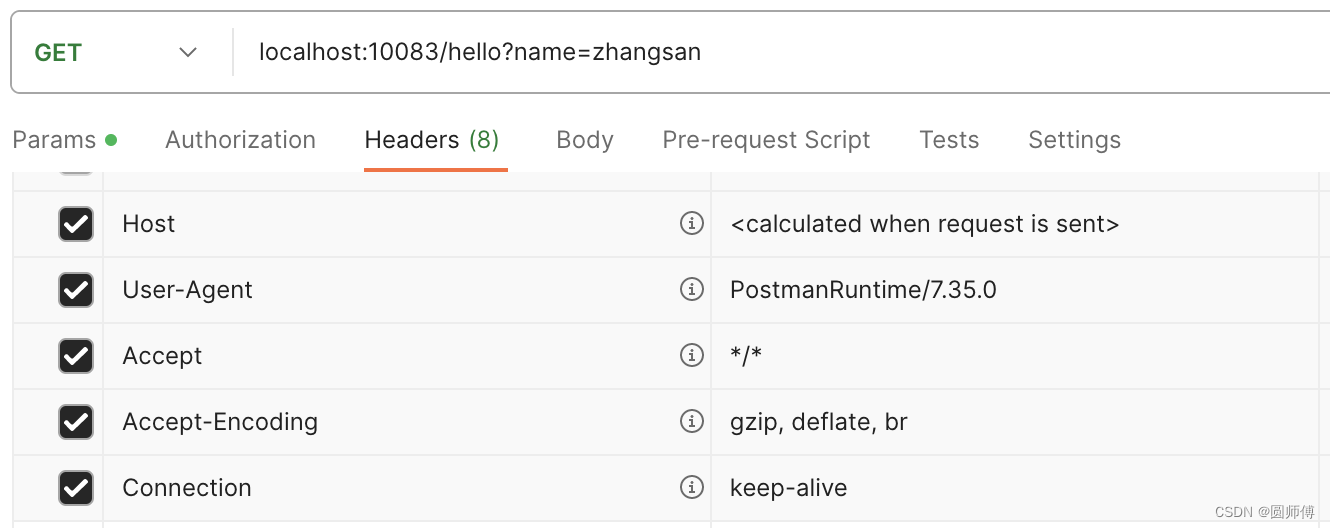
甚至我们使用curl指令的时候,也可以不写这些信息
curl --location 'localhost:10083/hello?name=zhangsan'
这是因为Accept的值为*/*和缺省是一样的,这个结果被默认为返回appliaction/json格式数据。
2.3 总结
至此,可以说算是明白为什么返回Json格式数据了:
我们给服务器说,接收*/*格式数据的response。
默认的HttpMessageConverter把JAVA对象转成了Json格式写入response body中。
3.如何返回xml格式的数据
这个时候,应该已经很明确了:
- 1.你要告诉服务端,你需要xml格式的数据:设置Request header的Accept值为application/xml
-
- 配置好服务端的MessageConverter,让它将JAVA对象转成xml格式。
Jackson已经可以支持返回xml格式数据了,只需要引入相应依赖即可。
- 配置好服务端的MessageConverter,让它将JAVA对象转成xml格式。
在pom.xml文件中引入xml格式依赖
<dependency><groupId>com.fasterxml.jackson.dataformat</groupId><artifactId>jackson-dataformat-xml</artifactId></dependency>
然后再entity类加上注解
import com.fasterxml.jackson.dataformat.xml.annotation.JacksonXmlRootElement;@JacksonXmlRootElement
public class Person {private String name;private int age;public Person() {}public Person(String name, int age) {this.name = name;this.age = age;}public String getName() {return this.name;}public void setName(String name) {this.name = name;}public int getAge() {return age;}public void setAge(int age) {this.age = age;}
}
这个时候再发送请求:
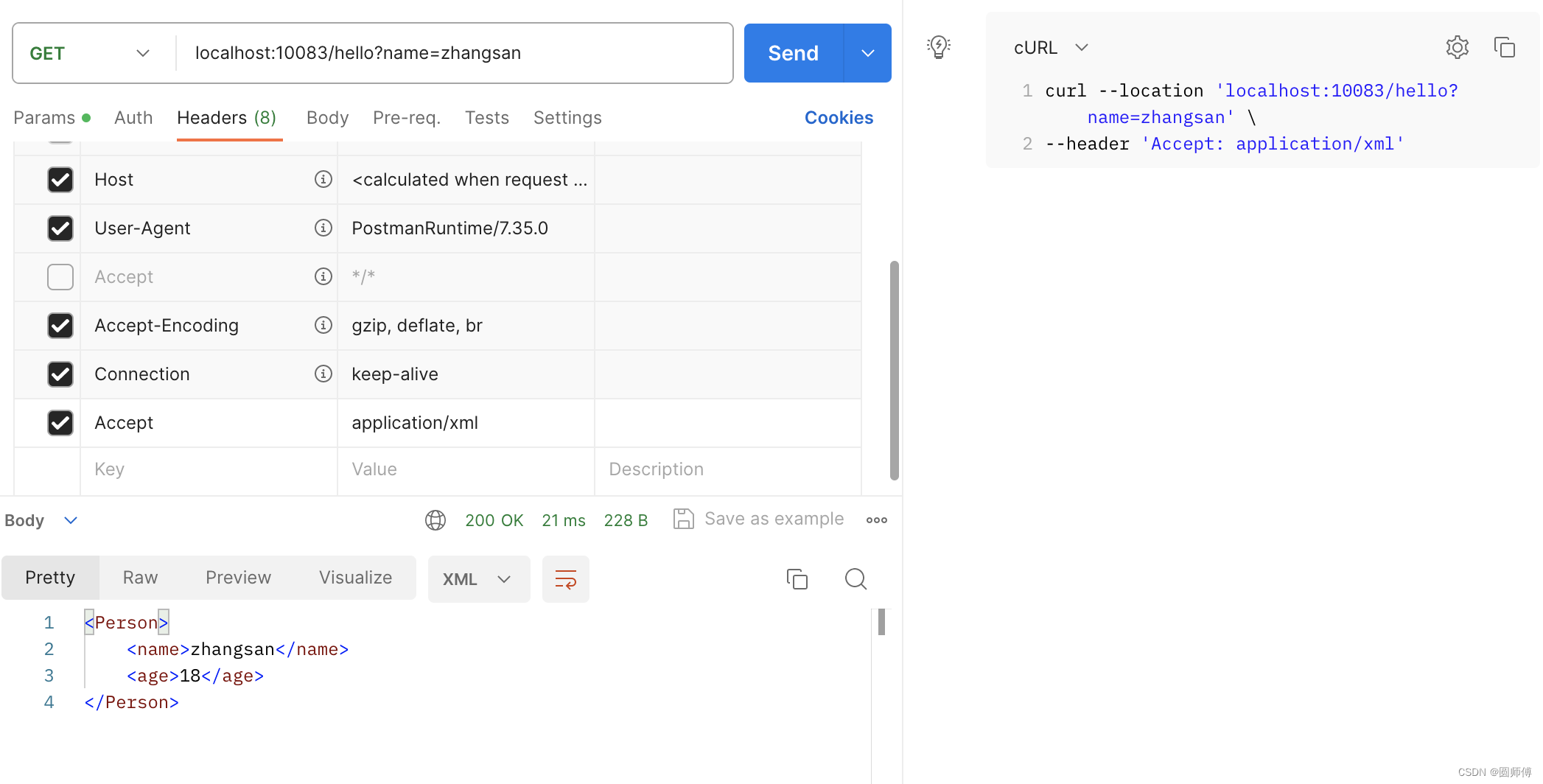
可以看到,已经可以返回XML格式数据了。
4. 如何返回自定义格式的数据
返回自定义格式的数据,就是要和服务端约定好,是什么样的格式,然后有converter写出来即可。
从上面的类图可以看到,我们可以直接实现HttpMessageConverter接口,也可以继承类图里的抽象类也可以。
这里提供一个继承AbstractHttpMessageConverter的例子,实现返回yaml格式:
package com.example.sj1123.config;import com.fasterxml.jackson.databind.ObjectMapper;
import com.fasterxml.jackson.dataformat.yaml.YAMLFactory;
import com.fasterxml.jackson.dataformat.yaml.YAMLGenerator;
import org.springframework.http.HttpInputMessage;
import org.springframework.http.HttpOutputMessage;
import org.springframework.http.MediaType;
import org.springframework.http.converter.AbstractHttpMessageConverter;
import org.springframework.http.converter.HttpMessageNotReadableException;
import org.springframework.http.converter.HttpMessageNotWritableException;import java.io.IOException;
import java.io.OutputStream;
import java.nio.charset.StandardCharsets;public class YamlMessageConverter extends AbstractHttpMessageConverter<Object> {private ObjectMapper objectMapper = null;public YamlMessageConverter() {super(new MediaType("application", "yaml", StandardCharsets.UTF_8));YAMLFactory factory = new YAMLFactory().disable(YAMLGenerator.Feature.WRITE_DOC_START_MARKER);this.objectMapper = new ObjectMapper(factory);}@Overrideprotected boolean supports(Class<?> clazz) {return true;}@Overrideprotected Object readInternal(Class<?> clazz, HttpInputMessage inputMessage) throws IOException, HttpMessageNotReadableException {return null;}@Overrideprotected void writeInternal(Object o, HttpOutputMessage outputMessage) throws IOException, HttpMessageNotWritableException {try (OutputStream outputStream = outputMessage.getBody()) {this.objectMapper.writeValue(outputStream, o);}}
}
然后再配置这个MessageConverter作为Bean
@Configuration
public class AppConfig {@Beanpublic WebMvcConfigurer webMvcConfigurer() {return new WebMvcConfigurer() {@Overridepublic void configureMessageConverters(List<HttpMessageConverter<?>> converters) {converters.add(new YamlMessageConverter());}};}
}
这个时候,再启动应用,就可以返回yaml格式的数据了
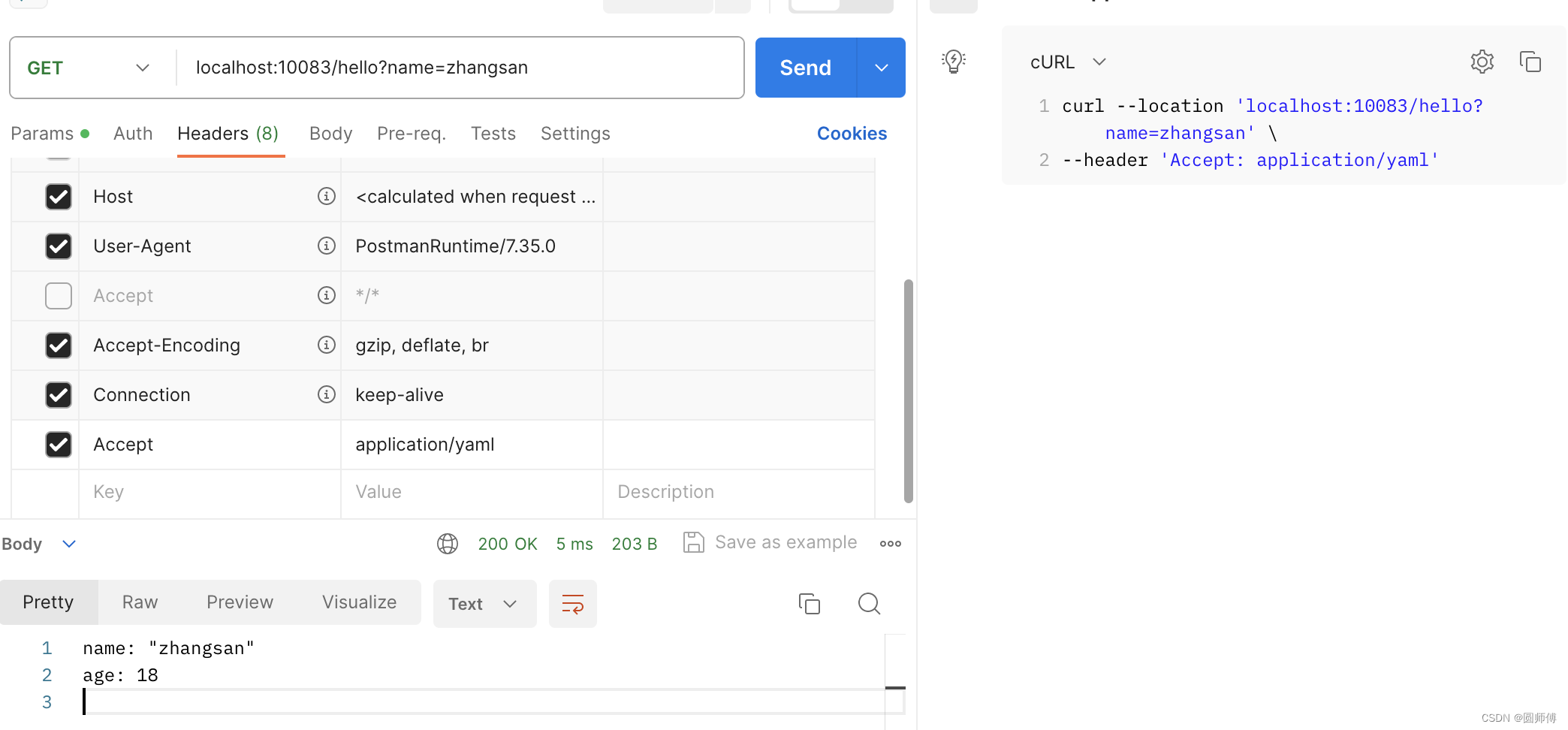
5. 总结
HttpMessageConverter可以让读取参数、返回请求转换成指定格式。在服务端可以配置多中格式的MessageConverter。
另外,指定格式的方式不仅仅只有通过Request Header这个方式,也可以通过参数 type=yaml这种格式。
相关文章:
Spring boot -- 学习HttpMessageConverter
文章目录 1. Json格式数据获取2. 为什么返回Json格式的数据2.1 注解SpringBootAppliaction2.1.1 SpringBootConfiguration2.1.2 ComponentScan2.1.3 EnableAutoConfiguration2.1.3.1 HttpMessageConvertersAutoConfiguration2.1.3.2 WebMvcAutoConfiguration 2.2 注解RestContr…...
如何选择合适的运筹优化求解器?
文章目录 前言求解器对比问题延伸:商用求解器和开源求解器的差别是什么? 求解器PK总结参考资料 前言 求解器对于运筹算法工程师而言,常常像一个黑盒,我们扔进去输入数据和数学模型,求解器给我们吐出一个解出来。这种状…...

Python 精讲 | 奇葩的 is
大家好,欢迎来到 Crossin的编程教室 ! 接下来的几个例子,可能会颠覆你对 Python 的认知。 我们知道,Python 判断两个数值是否相等的运算符是「」。比如有一个变量 a 是整数 1,另一个变量 b 是小数 1.0,尽管…...
(持续更新))
遥感卫星综述(下载和预处理)(持续更新)
遥感卫星综述(下载和预处理) 目录 遥感卫星综述(下载和预处理)一、国产卫星GF-1 WFV 二、国外卫星Sentinel-1Sentinel-2 一、国产卫星 GF-1 WFV 下载 分辨率波段16m4(蓝、绿、红、近红) 预处理: ENVI预处理GF-1号W…...

Nmap脚本未来的发展趋势
Nmap脚本技术的发展趋势和前景 Nmap脚本是一种基于Lua语言开发的脚本,可以扩展Nmap的功能,用于自动化扫描、漏洞检测、服务探测、设备管理等方面。随着网络安全的不断发展和漏洞的不断出现,Nmap脚本技术也在不断发展和壮大。在本文中…...

要求CHATGPT高质量回答的艺术:提示工程技术的完整指南—第 17 章:对话提示
要求CHATGPT高质量回答的艺术:提示工程技术的完整指南—第 17 章:对话提示 对话提示是一种允许模型生成模拟两个或多个实体之间对话的文本的技术。 通过向模型提供上下文和一组角色或实体,以及他们的角色和背景,并要求模型生成他…...
urllib爬虫 应用实例(三)
目录 一、 ajax的get请求豆瓣电影第一页 二、ajax的get请求豆瓣电影前十页 三、ajax的post请求肯德基官网 一、 ajax的get请求豆瓣电影第一页 目标:获取豆瓣电影第一页的数据,并保存为json文件 设置url,检查 --> 网络 --> 全部 -…...
【数据挖掘】国科大苏桂平老师数据库新技术课程作业 —— 第三次作业
part 1 设计一个学籍管理小系统。系统包含以下信息: 学号、学生姓名、性别、出生日、学生所在系名、学生所在系号、课程名、课程号、课程类型(必修、选修、任选)、学分、任课教师姓名、教师编号、教师职称、教师所属系名、系号、学生所选课…...
TP5上传图片压缩尺寸
图片上传,最简单的就是, 方法一: 修改上传限制,不让上传大于多少多少的图片 改一下size即可,默认单位是B换算成M还需要除以两次1024 方法二: 对上传的图片进行缩放,此办法网上找了不少的代码…...
使用 Tailwind CSS 完成导航栏效果
使用 Tailwind CSS 完成导航栏效果 本文将向您介绍如何使用 Tailwind CSS 创建一个漂亮的导航栏。通过逐步演示和示例代码,您将学习如何使用 Tailwind CSS 的类来设计和定制导航栏的样式。 准备工作 在开始之前,请确保已经安装了 Tailwind CSS。如果没…...
docker容器配置MySQL与远程连接设置(纯步骤)
以下为ubuntu20.04环境,默认已安装docker,没安装的网上随便找个教程就好了 拉去mysql镜像 docker pull mysql这样是默认拉取最新的版本latest 这样是指定版本拉取 docker pull mysql:5.7查看已安装的mysql镜像 docker images通过镜像生成容器 docke…...

什么是网站劫持
网站劫持是一种网络安全威胁,它通过非法访问或篡改网站的内容来获取机密信息或者破坏计算机系统。如果您遇到了网站劫持问题,建议您立即联系相关的安全机构或者技术支持团队,以获得更专业的帮助和解决方案。...
LeNet
概念 代码 model import torch.nn as nn import torch.nn.functional as Fclass LeNet(nn.Module):def __init__(self):super(LeNet, self).__init__() # super()继承父类的构造函数self.conv1 nn.Conv2d(3, 16, 5)self.pool1 nn.MaxPool2d(2, 2)self.conv2 nn.Conv2d(16…...
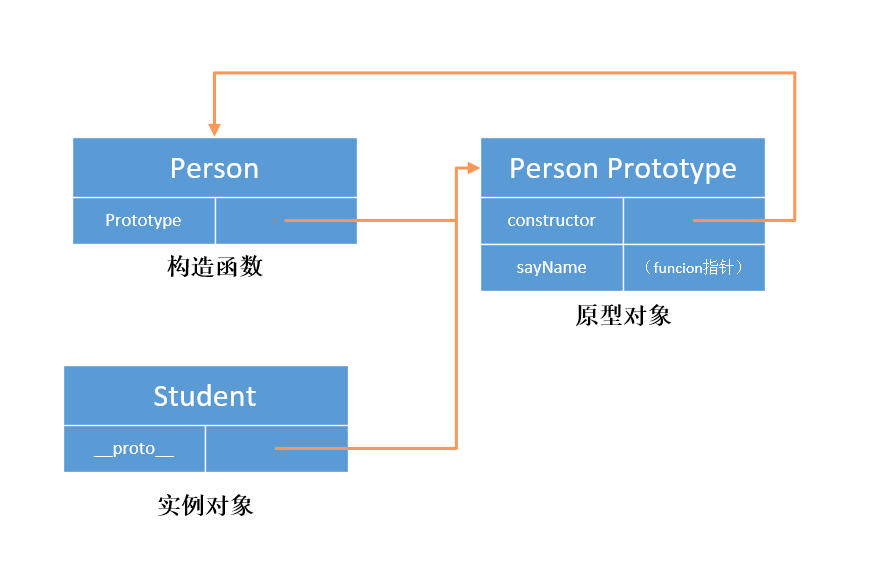
JavaScript 简单理解原型和创建实例时 new 操作符的执行操作
function Person(){// 构造函数// 当函数创建,prototype 属性指向一个原型对象时,在默认情况下,// 这个原型对象将会获得一个 constructor 属性,这个属性是一个指针,指向 prototype 所在的函数对象。 } // 为原型对象添…...
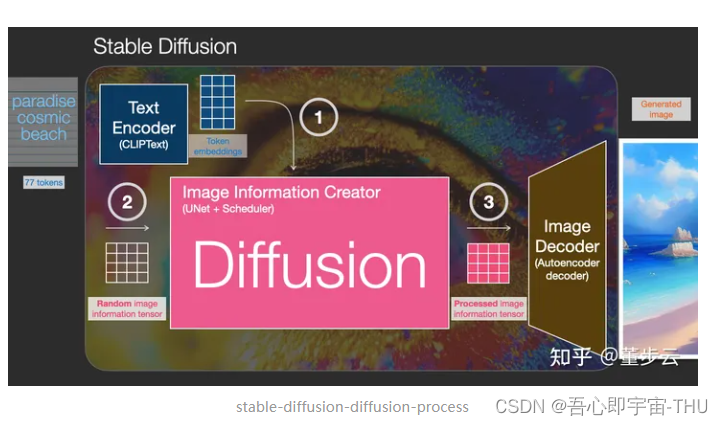
生成对抗网络——研讨会
时隔一年,再跟着李沐大师学习了GAN之后,仍旧没能在离散优化中实现通用的应用,实在惭愧,借着组内研讨会的机会,再队GAN的前世今生做一个简单的综述。 GAN产生的背景 目前与GAN相关的应用 去reddit社区的机器学习板块…...
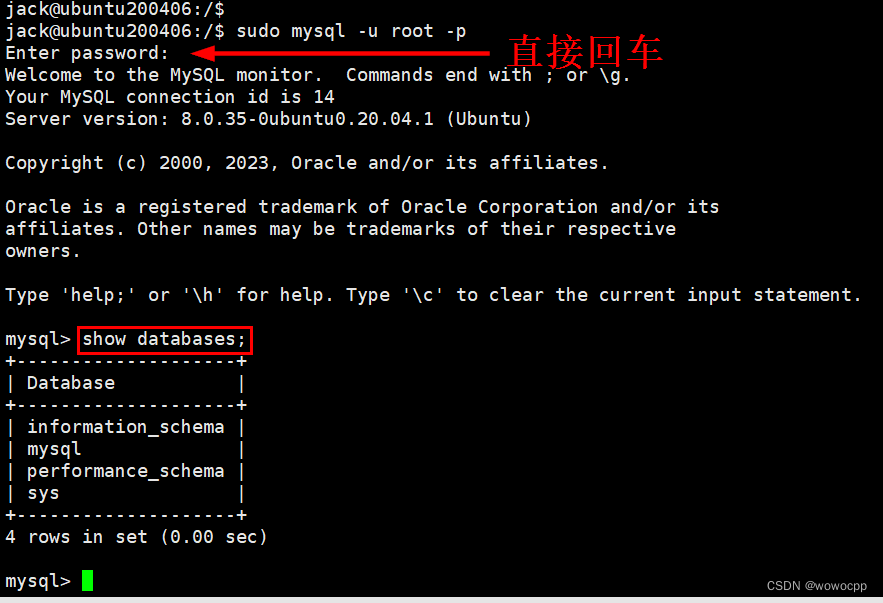
Ubuntu 20.04 安装 mysql8 LTS
Ubuntu 20.04 安装 mysql8 LTS sudo apt-get update sudo apt-get install mysql-server -y mysql --version mysql Ver 8.0.35-0ubuntu0.20.04.1 for Linux on x86_64 ((Ubuntu)) Ubuntu20.04 是自带了 MySQL8. 几版本的,低于 20.04 则默认安装是 MySQL5.7.33…...

蓝桥杯:货物摆放
小蓝有一个超大的仓库,可以摆放很多货物。 现在,小蓝有 n 箱货物要摆放在仓库,每箱货物都是规则的正方体。小蓝规定了长、宽、高三个互相垂直的方向,每箱货物的边都必须严格平行于长、宽、高。 小蓝希望所有的货物最终摆成一个大…...
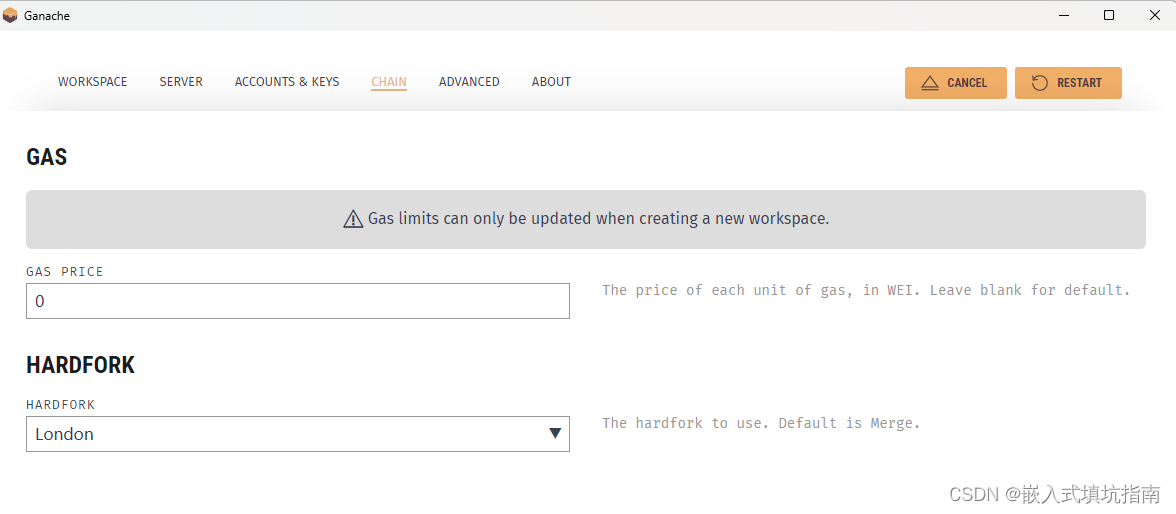
ganache部署智能合约报错VM Exception while processing transaction: invalid opcode
这是因为编译的字节码不正确,ganache和remix编译时需要选择相同的evm version 如下图所示: remix: ganache: 确保两者都选择london或者其他evm,只要确保EVM一致就可以正确编译并部署, 不会再出现VM Exception while processing…...
金融银行业更适合申请哪种SSL证书?
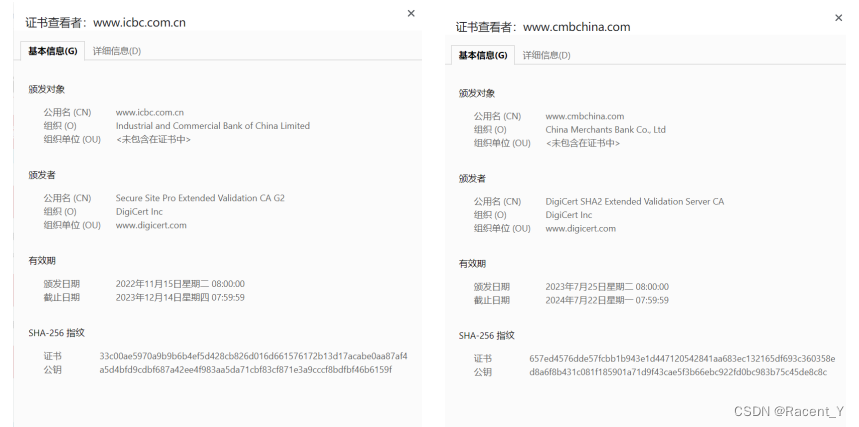
在当今数字化时代,金融行业的重要性日益增加。越来越多的金融交易和敏感信息在线进行,金融银行机构必须采取必要的措施来保护客户数据的安全。SSL证书作为一种重要的安全技术工具,可以帮助金融银行机构加密数据传输,验证网站身份&…...
文心一言API(高级版)使用
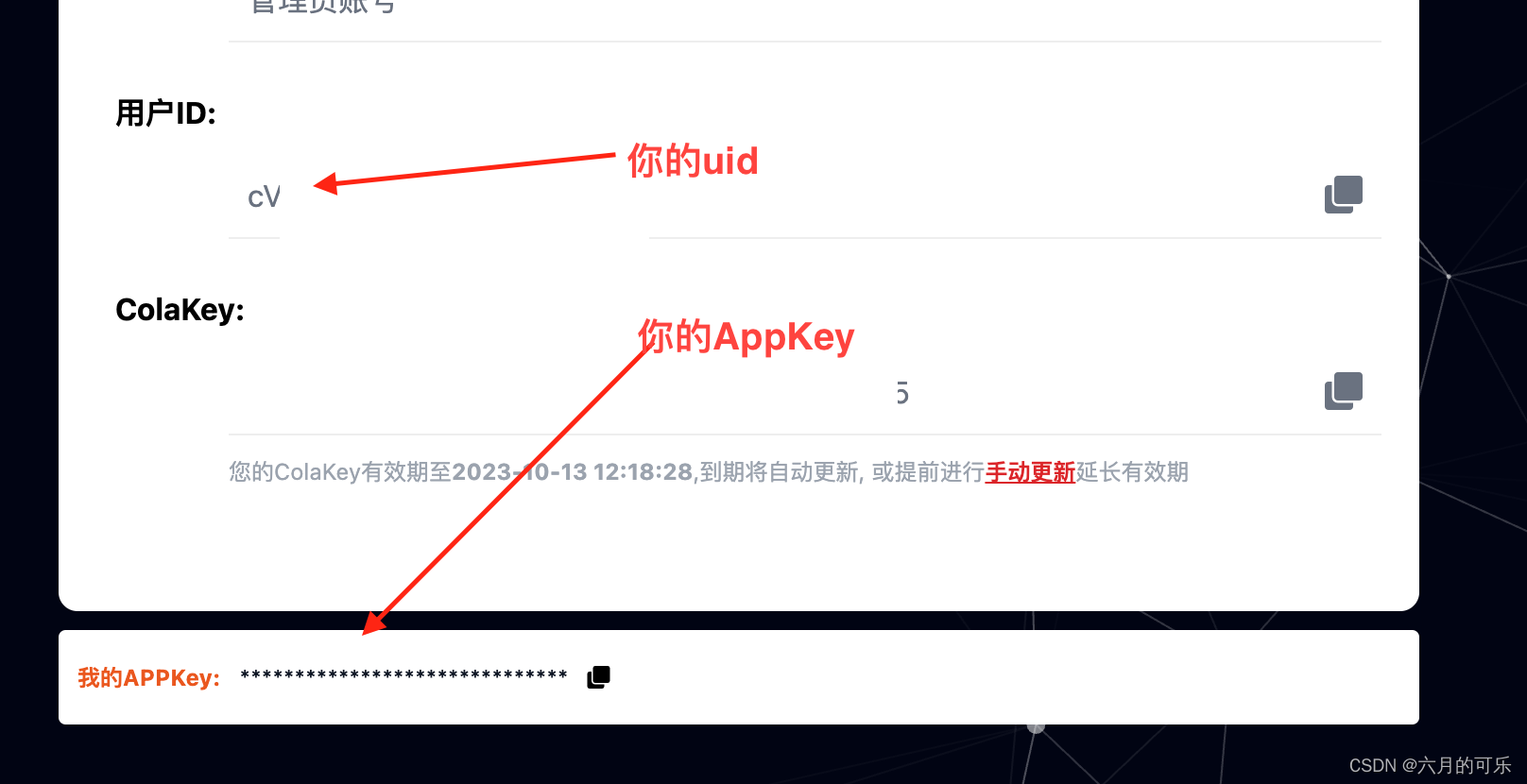
文心一言API高级版使用 一、百度文心一言API(高级版)二、使用步骤1、接口2、请求参数3、请求参数示例4、接口 返回示例 三、 如何获取appKey和uid1、申请appKey:2、获取appKey和uid 四、重要说明 一、百度文心一言API(高级版) 基于百度文心一言语言大模型的智能文本对话AI机器…...

机器学习系统能源优化:Magneton框架与能效提升实践
1. 机器学习系统中的能源浪费现状在当今大规模机器学习应用场景中,能源效率已成为与计算性能同等重要的关键指标。根据行业实测数据,一个典型的大型语言模型推理任务可能消耗相当于数十个家庭日用电量的能源。这种惊人的能源消耗背后,隐藏着大…...

3DMAX傻瓜式插件SimpleRope:一键生成绳子软管螺旋线!
3MAX简单绳子插件SimpleRope,从样条线生成螺旋线网格(包括简单的绳子)。本教程将带你全面掌握SimpleRope插件的使用方法,从普通的绳子、柔性的软管,到参数可调的螺旋线,只需一条样条线路径,点击…...

人工智能通识课:深度学习框架 PyTorch
深度学习框架是连接算法理论与工程实践的重要工具。它让开发者不必从零实现张量运算、自动求导、参数更新、GPU 调度和模型保存等底层细节,而可以把主要精力放在数据处理、模型结构设计、训练策略和实验验证上。在众多深度学习框架中,PyTorch 凭借直观的…...

【信息科学与工程学】计算机科学与自动化 ——第六十五篇 虚拟化/MIG 系列02
编号 类型 领域 虚拟化/MIG模式 算法名称 算法逐步推理思考的数学方程式及参数/常量/向量/常数/数字/数值列表 算法的时序数学方程式 关联知识 401 性能优化 GPU虚拟化+容器 MIG+容器 基于GPU内存带宽隔离的容器化AI训练任务调度算法 1. 带宽模型:每个MIG实例带宽…...

DV-LAE:基于差异向量的机器学习势函数高效数据筛选方法
1. 项目概述:为什么我们需要更聪明的数据筛选?在材料模拟和计算化学的世界里,我们常常面临一个两难困境:一方面,基于第一性原理(如密度泛函理论,DFT)的计算虽然精度高,但…...
【含Matlab源码 15560期】)
【流体】基于matlab对沼气厂管道系统进行流体动力学设计和成本优化(最小化总年化成本TAC)【含Matlab源码 15560期】
💥💥💥💥💥💥💞💞💞💞💞💞💞💞欢迎来到海神之光博客之家💞💞💞Ὁ…...

ComfyUI-WanVideoWrapper:新手必看的AI视频生成终极指南
ComfyUI-WanVideoWrapper:新手必看的AI视频生成终极指南 【免费下载链接】ComfyUI-WanVideoWrapper 项目地址: https://gitcode.com/GitHub_Trending/co/ComfyUI-WanVideoWrapper 在AI视频生成领域,你是否曾因复杂的代码和繁琐的配置而望而却步&…...

Zotero PDF Translate:打破语言壁垒的学术翻译神器
Zotero PDF Translate:打破语言壁垒的学术翻译神器 【免费下载链接】zotero-pdf-translate Translate PDF, EPub, webpage, metadata, annotations, notes to the target language. Support 20 translate services. 项目地址: https://gitcode.com/gh_mirrors/zo/…...

网络性能周报 - {日期范围}
网络性能周报 - {日期范围} 【免费下载链接】iperf3-win-builds iperf3 binaries for Windows. Benchmark your network limits. 项目地址: https://gitcode.com/gh_mirrors/ip/iperf3-win-builds 执行摘要 平均带宽:{bandwidth} Mbps ({变化率}%)最大延迟&…...

为什么你的DeepSeek总把“苹果”误判为涉政词汇?揭秘中文语义歧义消解的7步标准化清洗流程
更多请点击: https://codechina.net 第一章:DeepSeek敏感信息过滤的底层逻辑困境 DeepSeek系列模型在部署面向公众的API服务时,普遍引入了基于规则与轻量级分类器协同的敏感信息过滤层。该层并非嵌入于主推理路径中,而是作为独立…...