
基于SSM的健身房预约系统设计与实现
末尾获取源码
开发语言:Java
Java开发工具:JDK1.8
后端框架:SSM
前端:Vue
数据库:MySQL5.7和Navicat管理工具结合
服务器:Tomcat8.5
开发软件:IDEA / Eclipse
是否Maven项目:是
目录
一、项目简介
二、系统功能
三、系统项目截图
用户信息管理
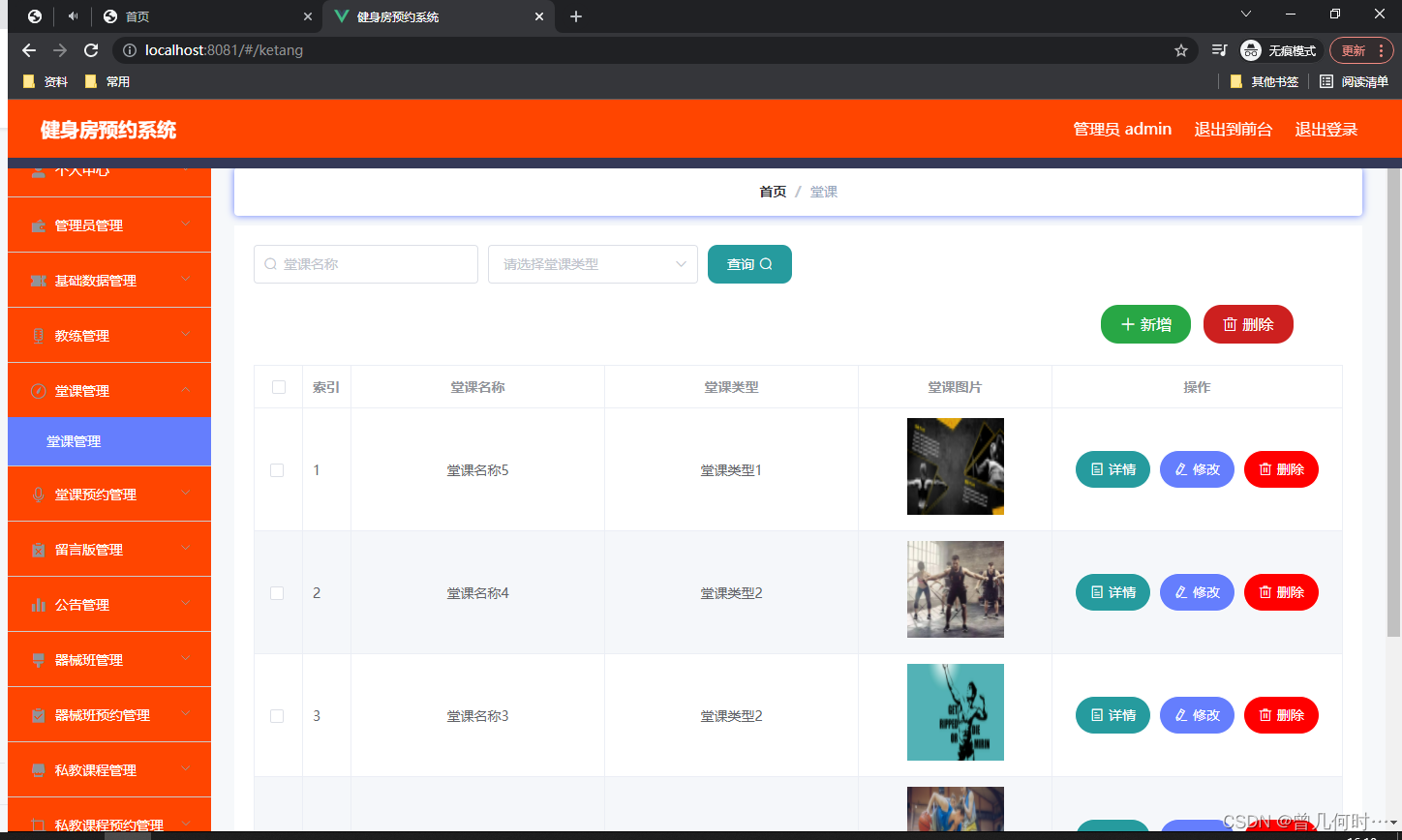
课堂信息管理
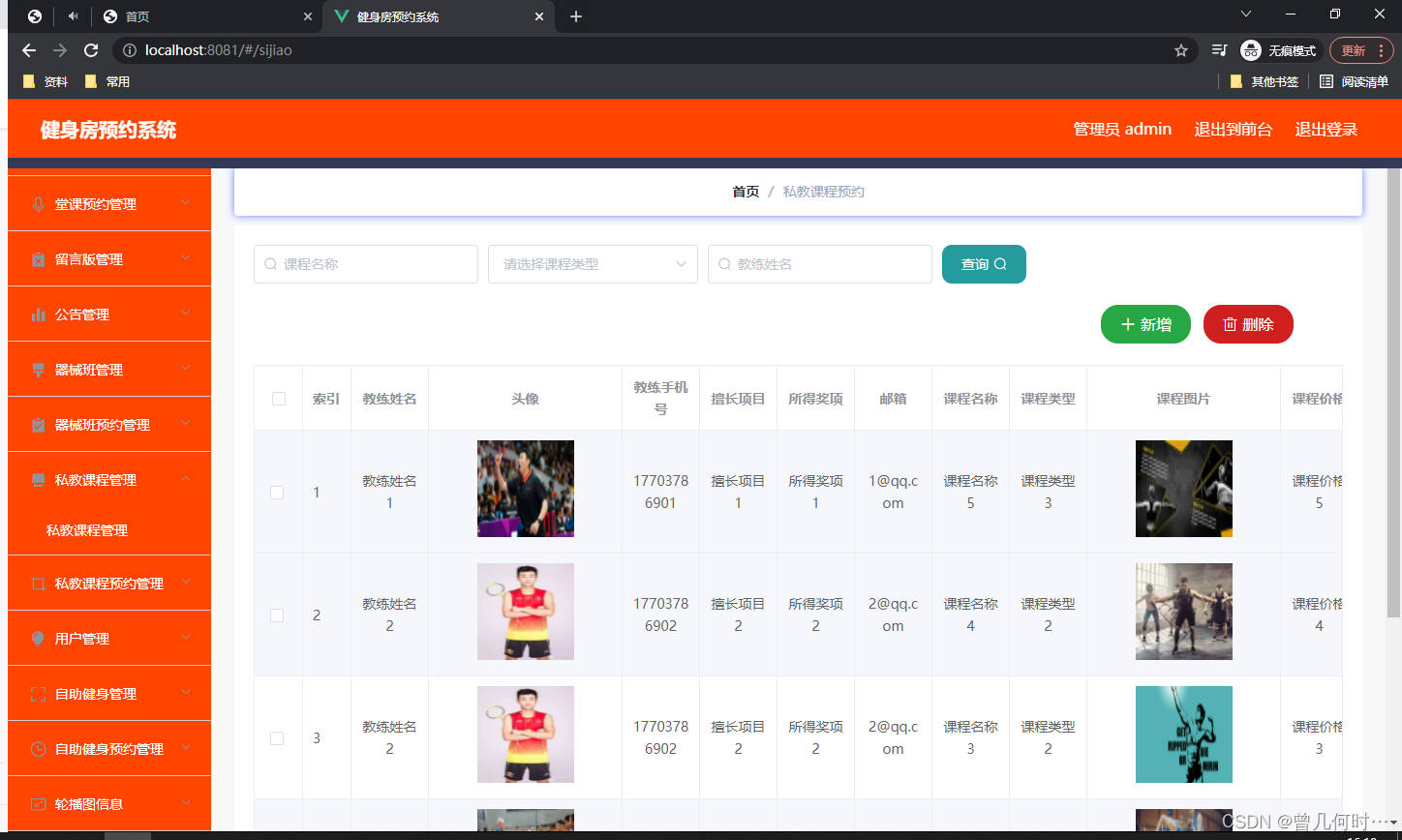
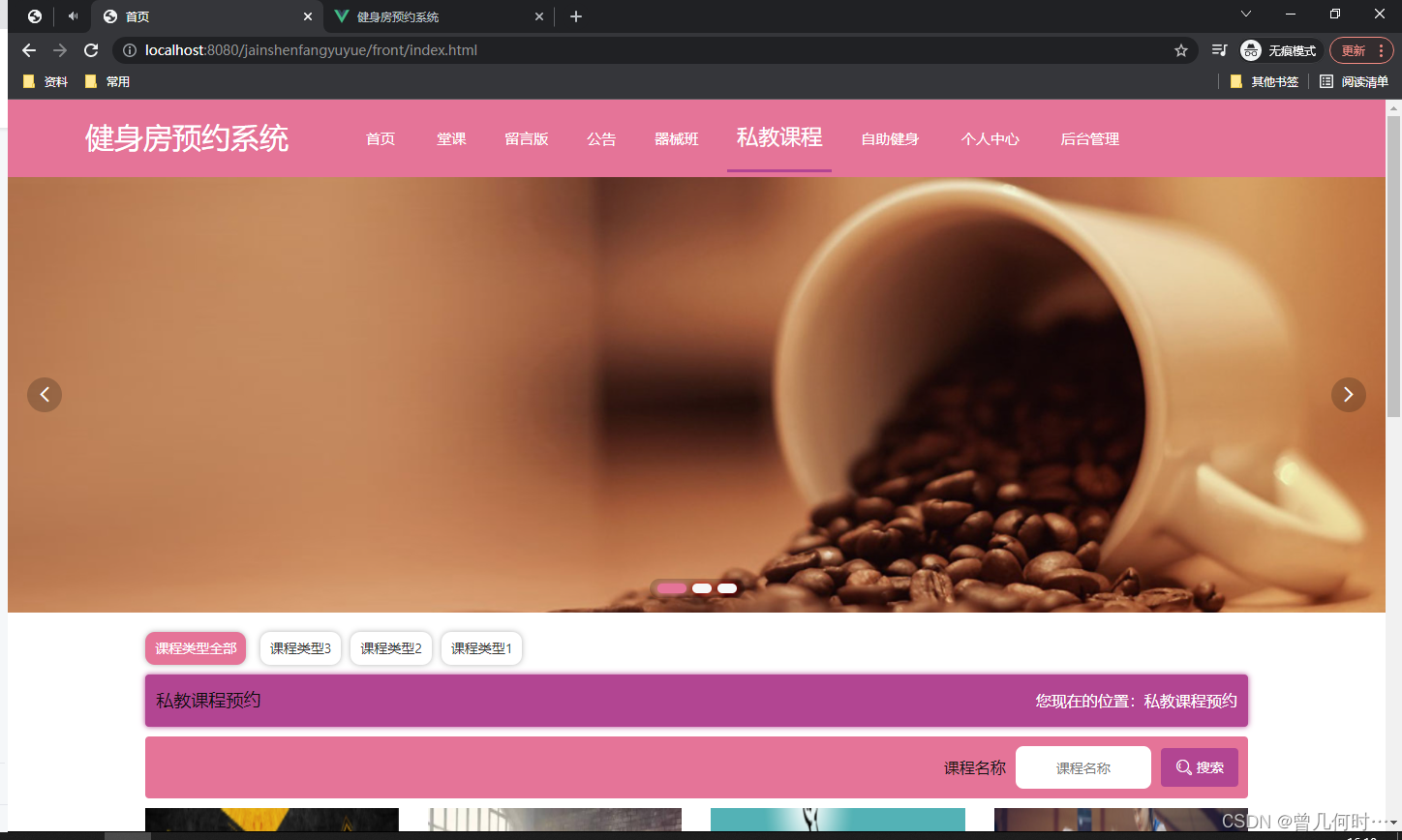
私教课程管理
自助健身管理
四、核心代码
登录相关
文件上传
封装
一、项目简介
传统办法管理信息首先需要花费的时间比较多,其次数据出错率比较高,而且对错误的数据进行更改也比较困难,最后,检索数据费事费力。因此,在计算机上安装健身房预约系统软件来发挥其高效地信息处理的作用,可以规范信息管理流程,让管理工作可以系统化和程序化,同时,健身房预约系统的有效运用可以帮助管理人员准确快速地处理信息。
健身房预约系统在对开发工具的选择上也很慎重,为了便于开发实现,选择的开发工具为Eclipse,选择的数据库工具为Mysql。以此搭建开发环境实现健身房预约系统的功能。其中管理员管理用户,公告。
健身房预约系统是一款运用软件开发技术设计实现的应用系统,在信息处理上可以达到快速的目的,不管是针对数据添加,数据维护和统计,以及数据查询等处理要求,健身房预约系统都可以轻松应对。
二、系统功能
为了让系统的编码可以顺利进行,特意对本系统功能进行细分设计,设计的系统功能结构见下图。

三、系统项目截图
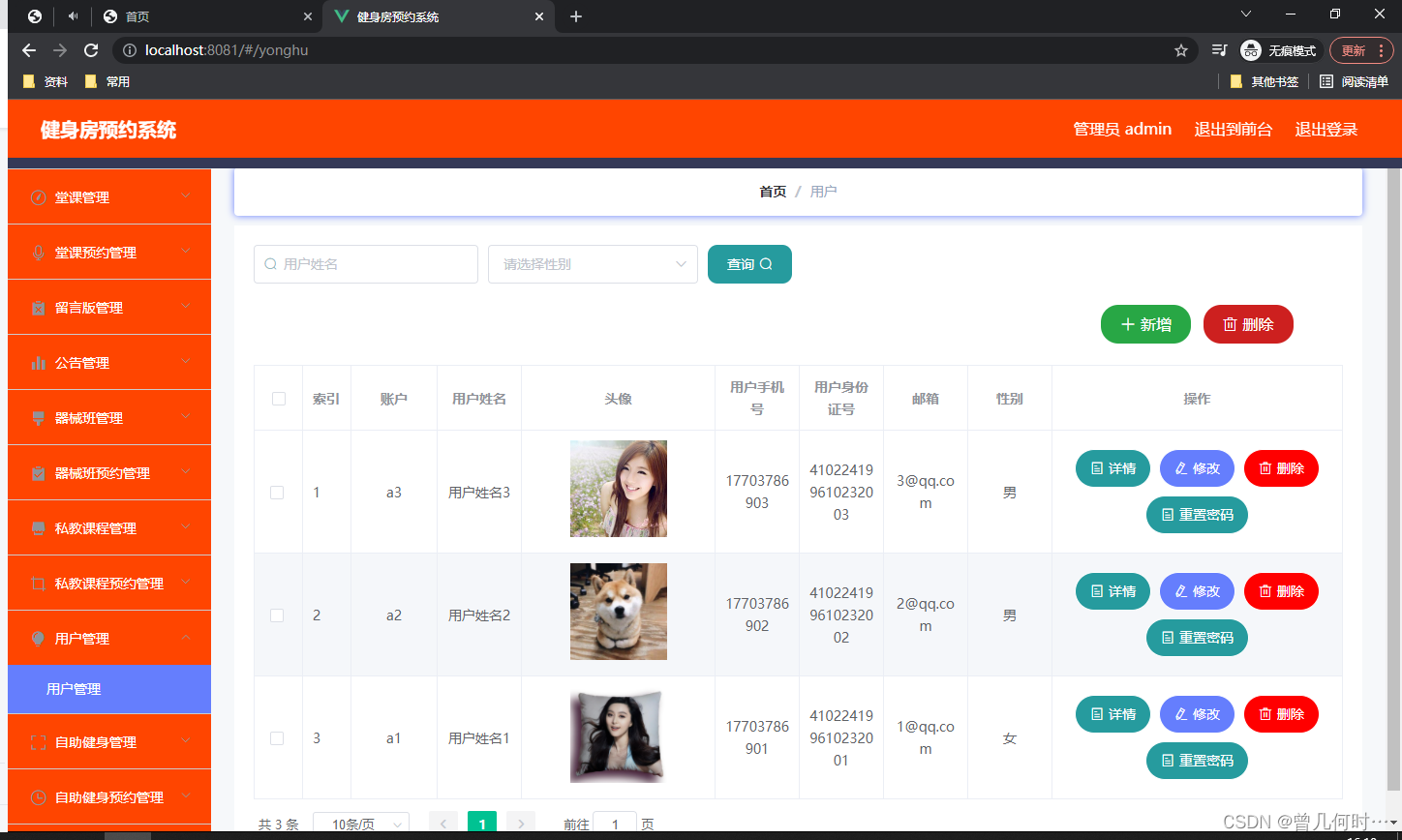
用户信息管理
此页面提供给管理员的功能有:用户信息的查询管理,可以删除用户信息、修改用户信息、新增用户信息,还进行了对用户名称的模糊查询的条件

课堂信息管理
此页面提供给管理员的功能有:查看已发布的课堂信息数据,修改课堂信息,课堂信息作废,即可删除,还进行了对课堂信息名称的模糊查询 课堂信息信息的类型查询等等一些条件。

私教课程管理
此页面提供给管理员的功能有:根据私教课程进行条件查询,还可以对私教课程进行新增、修改、查询操作等等。
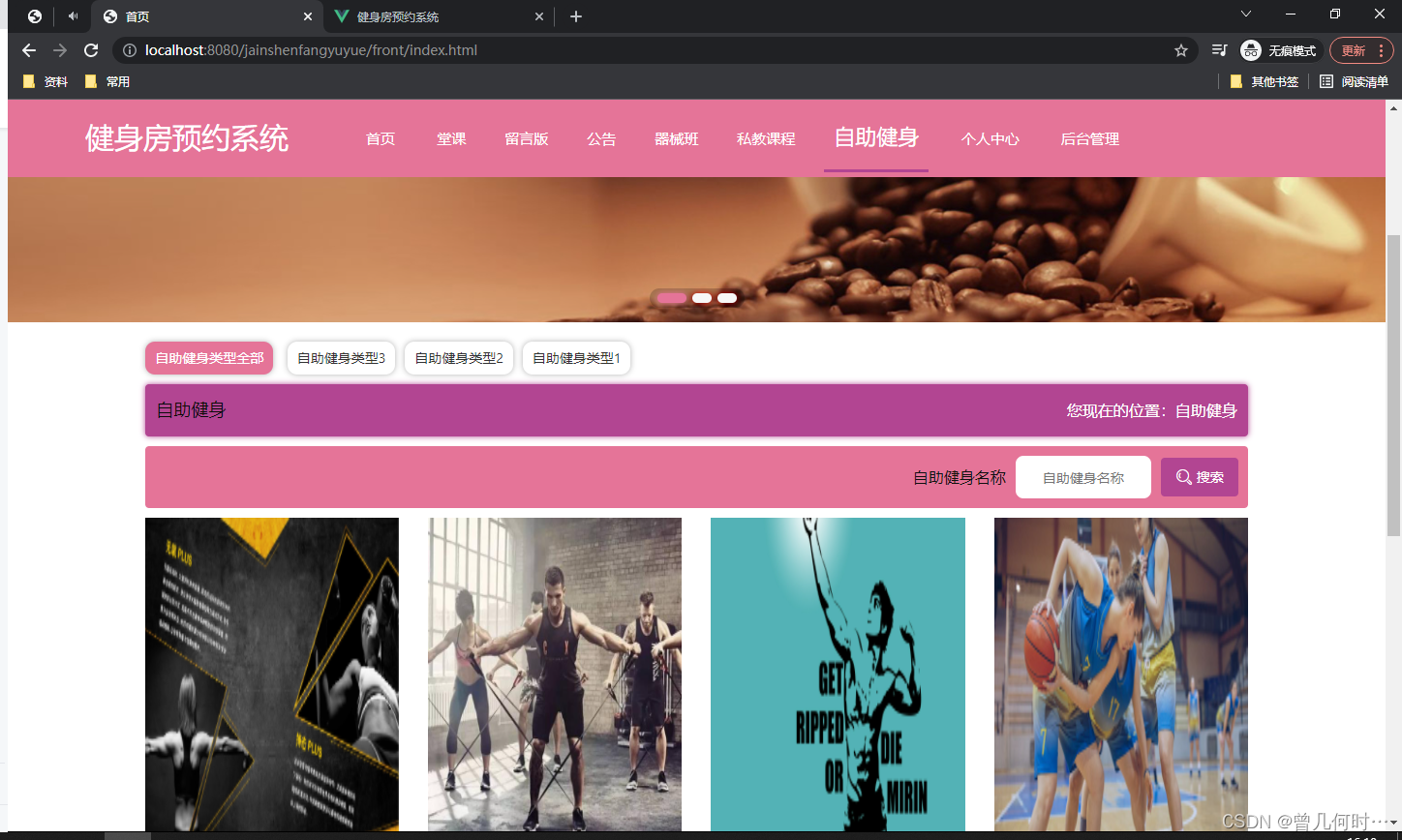
自助健身管理
此页面提供给管理员的功能有:根据自助健身进行新增、修改、查询操作等等。

四、核心代码
登录相关
package com.controller;import java.util.Arrays;
import java.util.Calendar;
import java.util.Date;
import java.util.Map;import javax.servlet.http.HttpServletRequest;import org.springframework.beans.factory.annotation.Autowired;
import org.springframework.stereotype.Controller;
import org.springframework.web.bind.annotation.GetMapping;
import org.springframework.web.bind.annotation.PathVariable;
import org.springframework.web.bind.annotation.PostMapping;
import org.springframework.web.bind.annotation.RequestBody;
import org.springframework.web.bind.annotation.RequestMapping;
import org.springframework.web.bind.annotation.RequestParam;
import org.springframework.web.bind.annotation.ResponseBody;
import org.springframework.web.bind.annotation.RestController;import com.annotation.IgnoreAuth;
import com.baomidou.mybatisplus.mapper.EntityWrapper;
import com.entity.TokenEntity;
import com.entity.UserEntity;
import com.service.TokenService;
import com.service.UserService;
import com.utils.CommonUtil;
import com.utils.MD5Util;
import com.utils.MPUtil;
import com.utils.PageUtils;
import com.utils.R;
import com.utils.ValidatorUtils;/*** 登录相关*/
@RequestMapping("users")
@RestController
public class UserController{@Autowiredprivate UserService userService;@Autowiredprivate TokenService tokenService;/*** 登录*/@IgnoreAuth@PostMapping(value = "/login")public R login(String username, String password, String captcha, HttpServletRequest request) {UserEntity user = userService.selectOne(new EntityWrapper<UserEntity>().eq("username", username));if(user==null || !user.getPassword().equals(password)) {return R.error("账号或密码不正确");}String token = tokenService.generateToken(user.getId(),username, "users", user.getRole());return R.ok().put("token", token);}/*** 注册*/@IgnoreAuth@PostMapping(value = "/register")public R register(@RequestBody UserEntity user){
//    	ValidatorUtils.validateEntity(user);if(userService.selectOne(new EntityWrapper<UserEntity>().eq("username", user.getUsername())) !=null) {return R.error("用户已存在");}userService.insert(user);return R.ok();}/*** 退出*/@GetMapping(value = "logout")public R logout(HttpServletRequest request) {request.getSession().invalidate();return R.ok("退出成功");}/*** 密码重置*/@IgnoreAuth@RequestMapping(value = "/resetPass")public R resetPass(String username, HttpServletRequest request){UserEntity user = userService.selectOne(new EntityWrapper<UserEntity>().eq("username", username));if(user==null) {return R.error("账号不存在");}user.setPassword("123456");userService.update(user,null);return R.ok("密码已重置为:123456");}/*** 列表*/@RequestMapping("/page")public R page(@RequestParam Map<String, Object> params,UserEntity user){EntityWrapper<UserEntity> ew = new EntityWrapper<UserEntity>();PageUtils page = userService.queryPage(params, MPUtil.sort(MPUtil.between(MPUtil.allLike(ew, user), params), params));return R.ok().put("data", page);}/*** 列表*/@RequestMapping("/list")public R list( UserEntity user){EntityWrapper<UserEntity> ew = new EntityWrapper<UserEntity>();ew.allEq(MPUtil.allEQMapPre( user, "user")); return R.ok().put("data", userService.selectListView(ew));}/*** 信息*/@RequestMapping("/info/{id}")public R info(@PathVariable("id") String id){UserEntity user = userService.selectById(id);return R.ok().put("data", user);}/*** 获取用户的session用户信息*/@RequestMapping("/session")public R getCurrUser(HttpServletRequest request){Long id = (Long)request.getSession().getAttribute("userId");UserEntity user = userService.selectById(id);return R.ok().put("data", user);}/*** 保存*/@PostMapping("/save")public R save(@RequestBody UserEntity user){
//    	ValidatorUtils.validateEntity(user);if(userService.selectOne(new EntityWrapper<UserEntity>().eq("username", user.getUsername())) !=null) {return R.error("用户已存在");}userService.insert(user);return R.ok();}/*** 修改*/@RequestMapping("/update")public R update(@RequestBody UserEntity user){
//        ValidatorUtils.validateEntity(user);userService.updateById(user);//全部更新return R.ok();}/*** 删除*/@RequestMapping("/delete")public R delete(@RequestBody Long[] ids){userService.deleteBatchIds(Arrays.asList(ids));return R.ok();}
}
文件上传
package com.controller;import java.io.File;
import java.io.FileNotFoundException;
import java.io.IOException;
import java.util.Arrays;
import java.util.Date;
import java.util.HashMap;
import java.util.List;
import java.util.Map;
import java.util.Random;
import java.util.UUID;import org.apache.commons.io.FileUtils;
import org.apache.commons.lang3.StringUtils;
import org.springframework.beans.factory.annotation.Autowired;
import org.springframework.http.HttpHeaders;
import org.springframework.http.HttpStatus;
import org.springframework.http.MediaType;
import org.springframework.http.ResponseEntity;
import org.springframework.util.ResourceUtils;
import org.springframework.web.bind.annotation.PathVariable;
import org.springframework.web.bind.annotation.RequestBody;
import org.springframework.web.bind.annotation.RequestMapping;
import org.springframework.web.bind.annotation.RequestParam;
import org.springframework.web.bind.annotation.RestController;
import org.springframework.web.multipart.MultipartFile;import com.annotation.IgnoreAuth;
import com.baomidou.mybatisplus.mapper.EntityWrapper;
import com.entity.ConfigEntity;
import com.entity.EIException;
import com.service.ConfigService;
import com.utils.R;/*** 上传文件映射表*/
@RestController
@RequestMapping("file")
@SuppressWarnings({"unchecked","rawtypes"})
public class FileController{@Autowiredprivate ConfigService configService;/*** 上传文件*/@RequestMapping("/upload")public R upload(@RequestParam("file") MultipartFile file,String type) throws Exception {if (file.isEmpty()) {throw new EIException("上传文件不能为空");}String fileExt = file.getOriginalFilename().substring(file.getOriginalFilename().lastIndexOf(".")+1);File path = new File(ResourceUtils.getURL("classpath:static").getPath());if(!path.exists()) {path = new File("");}File upload = new File(path.getAbsolutePath(),"/upload/");if(!upload.exists()) {upload.mkdirs();}String fileName = new Date().getTime()+"."+fileExt;File dest = new File(upload.getAbsolutePath()+"/"+fileName);file.transferTo(dest);FileUtils.copyFile(dest, new File("C:\\Users\\Desktop\\jiadian\\springbootl7own\\src\\main\\resources\\static\\upload"+"/"+fileName));if(StringUtils.isNotBlank(type) && type.equals("1")) {ConfigEntity configEntity = configService.selectOne(new EntityWrapper<ConfigEntity>().eq("name", "faceFile"));if(configEntity==null) {configEntity = new ConfigEntity();configEntity.setName("faceFile");configEntity.setValue(fileName);} else {configEntity.setValue(fileName);}configService.insertOrUpdate(configEntity);}return R.ok().put("file", fileName);}/*** 下载文件*/@IgnoreAuth@RequestMapping("/download")public ResponseEntity<byte[]> download(@RequestParam String fileName) {try {File path = new File(ResourceUtils.getURL("classpath:static").getPath());if(!path.exists()) {path = new File("");}File upload = new File(path.getAbsolutePath(),"/upload/");if(!upload.exists()) {upload.mkdirs();}File file = new File(upload.getAbsolutePath()+"/"+fileName);if(file.exists()){/*if(!fileService.canRead(file, SessionManager.getSessionUser())){getResponse().sendError(403);}*/HttpHeaders headers = new HttpHeaders();headers.setContentType(MediaType.APPLICATION_OCTET_STREAM);    headers.setContentDispositionFormData("attachment", fileName);    return new ResponseEntity<byte[]>(FileUtils.readFileToByteArray(file),headers, HttpStatus.CREATED);}} catch (IOException e) {e.printStackTrace();}return new ResponseEntity<byte[]>(HttpStatus.INTERNAL_SERVER_ERROR);}}
封装
package com.utils;import java.util.HashMap;
import java.util.Map;/*** 返回数据*/
public class R extends HashMap<String, Object> {private static final long serialVersionUID = 1L;public R() {put("code", 0);}public static R error() {return error(500, "未知异常,请联系管理员");}public static R error(String msg) {return error(500, msg);}public static R error(int code, String msg) {R r = new R();r.put("code", code);r.put("msg", msg);return r;}public static R ok(String msg) {R r = new R();r.put("msg", msg);return r;}public static R ok(Map<String, Object> map) {R r = new R();r.putAll(map);return r;}public static R ok() {return new R();}public R put(String key, Object value) {super.put(key, value);return this;}
}
相关文章:
基于SSM的健身房预约系统设计与实现
末尾获取源码 开发语言:Java Java开发工具:JDK1.8 后端框架:SSM 前端:Vue 数据库:MySQL5.7和Navicat管理工具结合 服务器:Tomcat8.5 开发软件:IDEA / Eclipse 是否Maven项目:是 目录…...
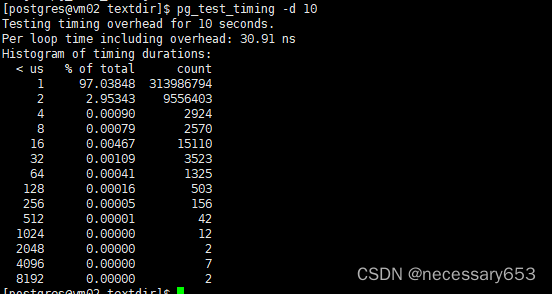
postgresql自带指令命令系列二
简介 在安装postgresql数据库的时候会需要设置一个关于postgresql数据库的PATH变量 export PATH/home/postgres/pg/bin:$PATH,该变量会指向postgresql安装路径下的bin目录。这个安装目录和我们在进行编译的时候./configure --prefix [指定安装目录] 中的prefix参…...
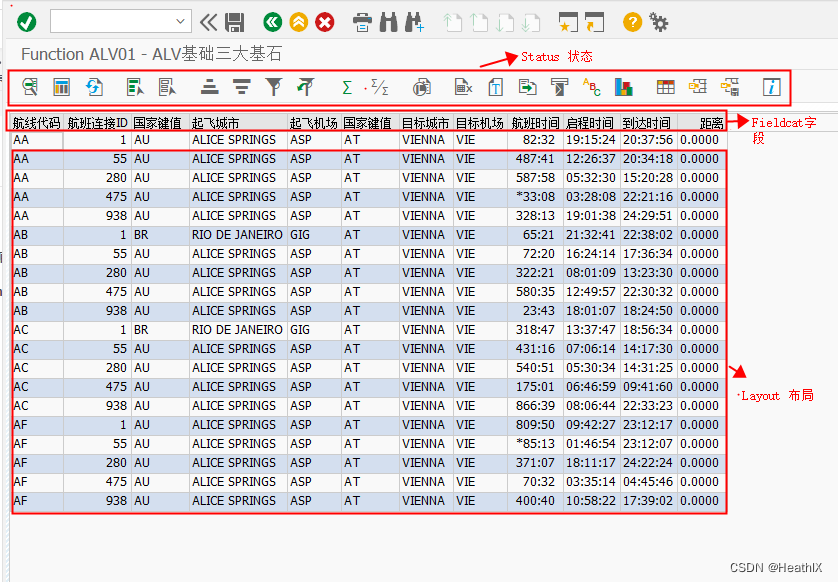
ABAP - Function ALV 02 简单开发一个Function ALV
了解Function ALV: https://blog.csdn.net/HeathlX/article/details/134879766?spm1001.2014.3001.5501程序开发步骤:① TCODE:SE38创建程序 ② 编写程序 DATA gt_spfli TYPE TABLE OF spfli.** Layout 变量定义 (固定使用 直接粘贴复制即可) DATA gs…...

IDEA启动失败报错解决思路
IDEA启动失败报错解决思路 背景:在IDEA里安装插件失败,重启后直接进不去了,然后分析问题解决问题的过程记录下来。方便下次遇到快速解决。也是一种解决问题的思路,分享出去。 启动报错信息 Internal error. Please refer to https…...
密码学学习笔记(二十三):哈希函数的安全性质:抗碰撞性,抗第一原象性和抗第二原象性
在密码学中,哈希函数是一种将任意长度的数据映射到固定长度输出的函数,这个输出通常称为哈希值。理想的哈希函数需要具备几个重要的安全性质,以确保数据的完整性和验证数据的来源。这些性质包括抗碰撞性、抗第一原象性和抗第二原象性。 抗碰…...
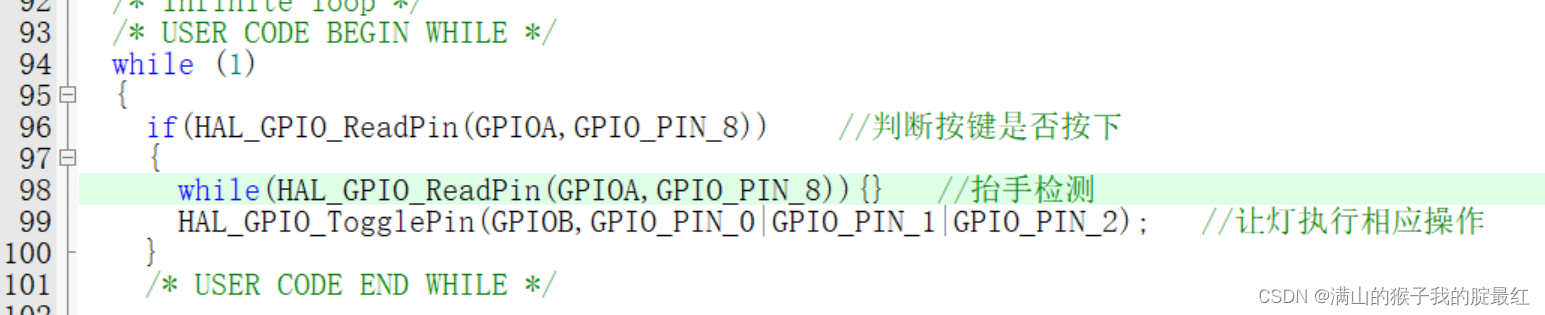
STM32-GPIO编程
一、GPIO 1.1 基本概念 GPIO(General-purpose input/output)通用输入输出接口 --GP 通用 --I input输入 --o output输出 通用输入输出接口GPIO是嵌入式系统、单片机开发过程中最常用的接口,用户可以通过编程灵活的对接口进行控制,…...
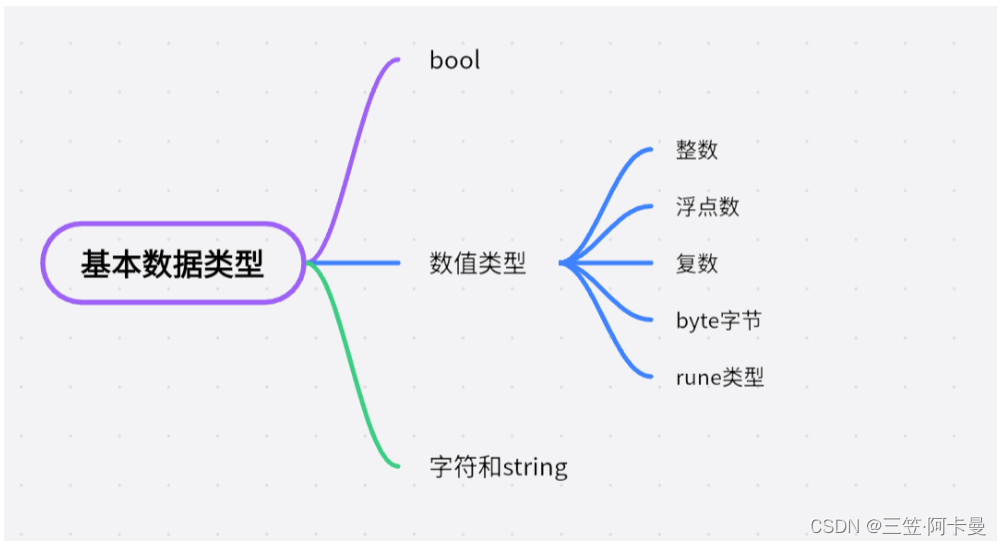
Go语言基础知识学习(一)
Go基本数据类型 bool bool型值可以为true或者false,例子: var b bool true数值型 类型表示范围int8有符号8位整型-128 ~ 127int16有符号16位整型-32768 ~ 32767int32有符号32位整型-2147783648 ~ 2147483647int64有符号64位整型uint8无符号8位整型0 ~ 255uint16…...
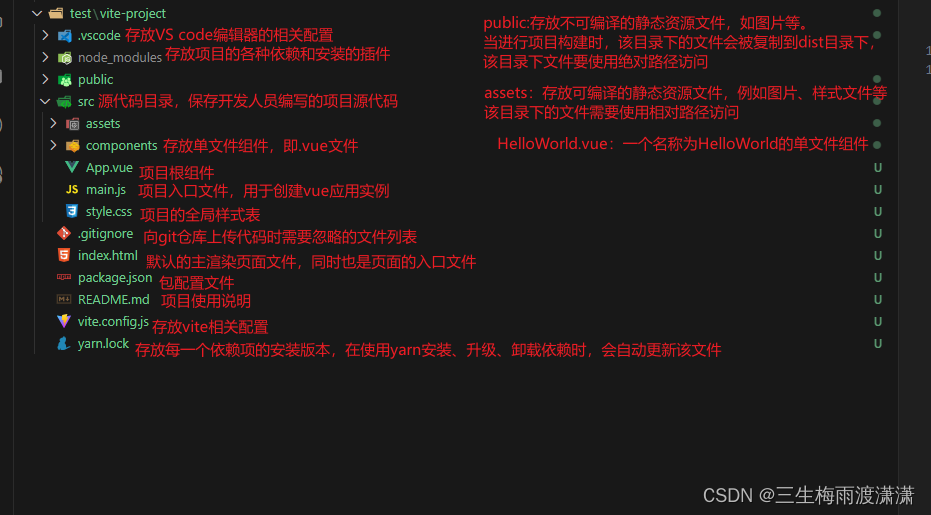
Vue 3项目的目录结构
使用vite创建完VUE项目后,使用VS Code编辑器打开项目目录,可以看到一个默认生成的项目目录结构 下图是目录结构: 详细介绍.vscode:存放VS Code编辑器的相关配置。 node_modules:存放项目的各种依赖和安装的插件。…...
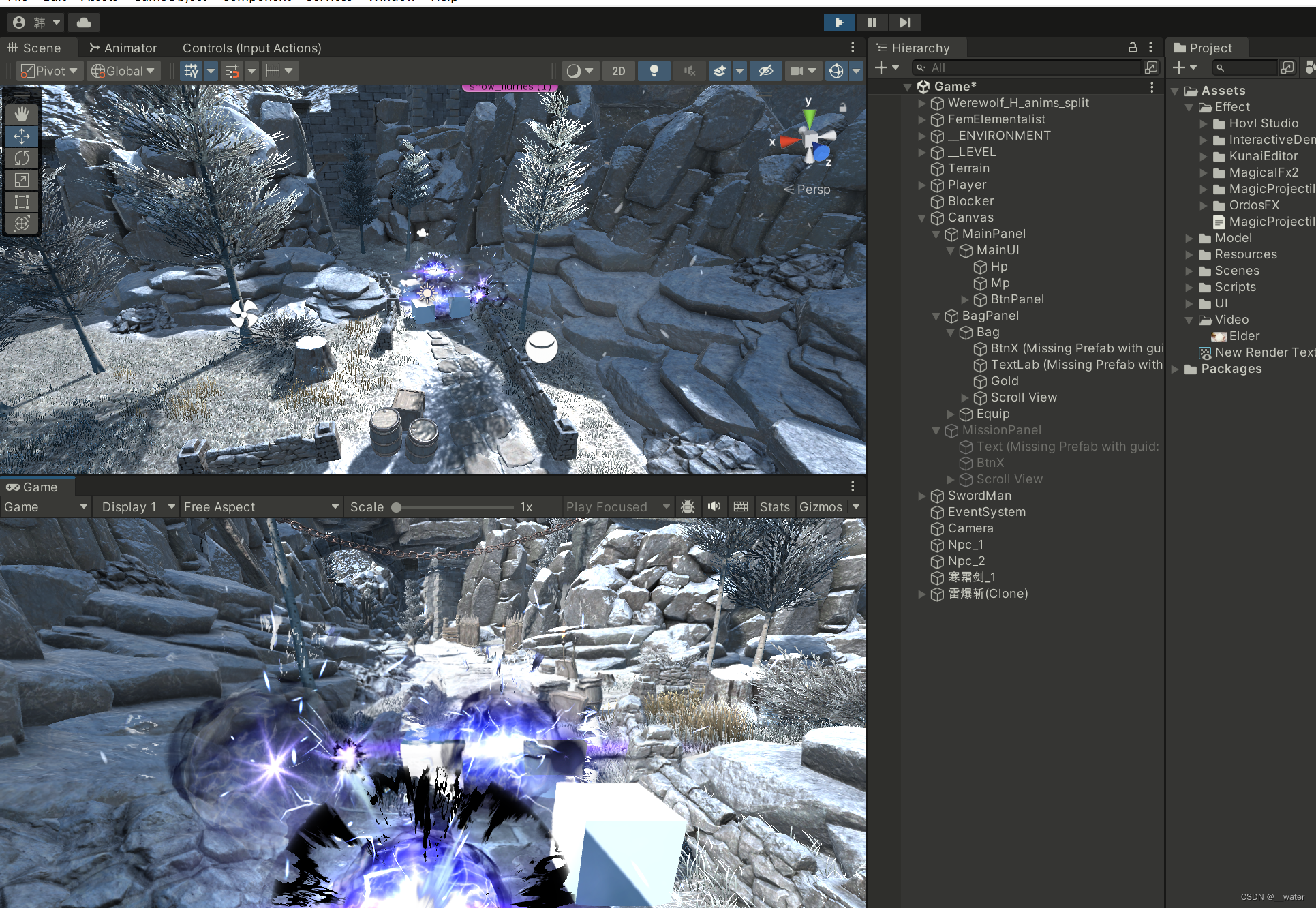
RPG项目01_技能释放
基于“RPG项目01_新输入输出”, 修改脚本文件夹中的SkillBase脚本: using System; using System.Collections; using System.Collections.Generic; using UnityEngine; using UnityEngine.Events; //回复技能,魔法技能,物理技能…...

Leetcode—209.长度最小的子数组【中等】
2023每日刷题(五十六) Leetcode—209.长度最小的子数组 实现代码 class Solution { public:int minSubArrayLen(int target, vector<int>& nums) {int left 0, right 0;int ans nums.size() 1, s 0;for(; right < nums.size(); righ…...
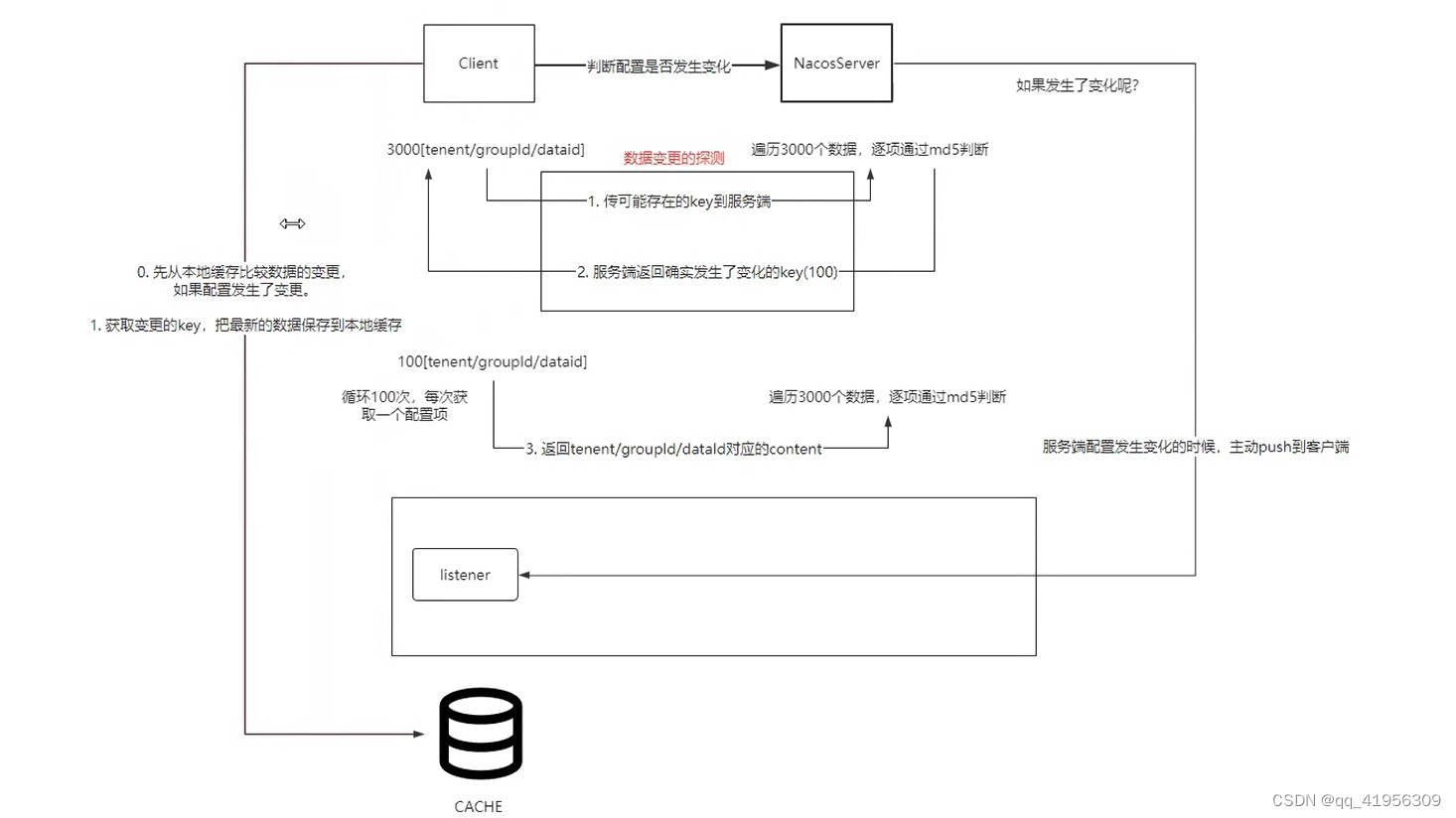
Nacos源码解读12——Nacos中长连接的实现
短连接 VS 长连接 什么是短连接 客户端和服务器每进行一次HTTP操作,就建立一次连接,任务结束就中断连接。 长连接 客户端和服务器之间用于传输HTTP数据的TCP连接不会关闭,客户端再次访问这个服务器时,会继续使用这一条已经建立…...
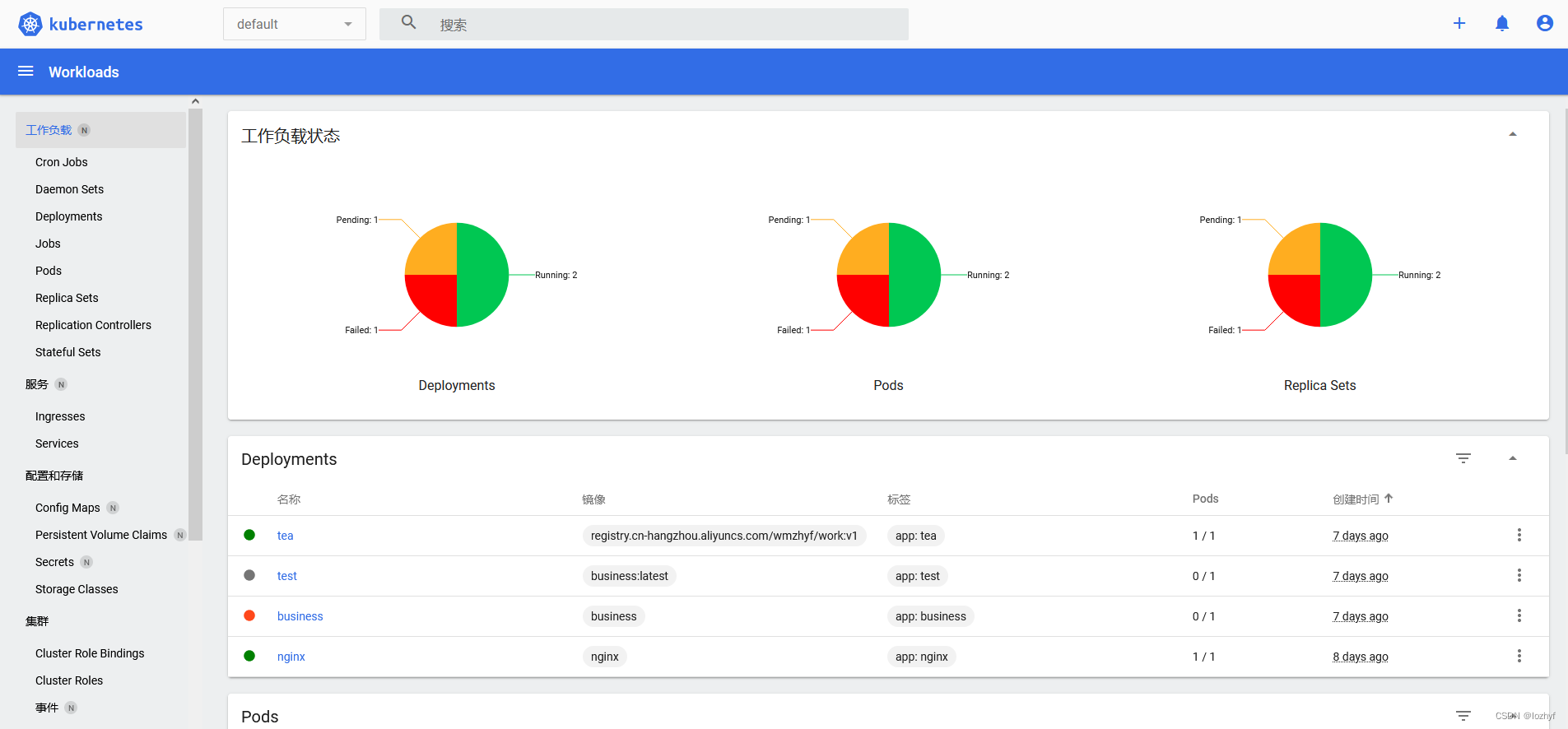
k8s 安装部署
一,准备3台机器,安装docker,kubelet、kubeadm、kubectl firewall-cmd --state 使用下面命令改hostname的值:(改为k8s-master01)另外两台改为相应的名字。 172.188.32.43 hostnamectl set-hostname k8s-master01 172.188.32.4…...
模型,IP和TCP到底在哪层?)
TCP/IP五层(或四层)模型,IP和TCP到底在哪层?
文章目录 前言一、应用层二.传输层三.网络层:四.数据链路层五.物理层:六.OSI七层模型:1.物理层(Physical Layer):2.数据链路层(Data Link Layer):3.网络层(Ne…...

STM32串口接收不定长数据(空闲中断+DMA)
玩转 STM32 单片机,肯定离不开串口。串口使用一个称为串行通信协议的协议来管理数据传输,该协议在数据传输期间控制数据流,包括数据位数、波特率、校验位和停止位等。由于串口简单易用,在各种产品交互中都有广泛应用。 但在使用串…...

LeetCode56. Merge Intervals
文章目录 一、题目二、题解 一、题目 Given an array of intervals where intervals[i] [starti, endi], merge all overlapping intervals, and return an array of the non-overlapping intervals that cover all the intervals in the input. Example 1: Input: interva…...

【华为OD题库-083】玩牌高手-Java
题目 给定一个长度为n的整型数组,表示一个选手在n轮内可选择的牌面分数。选手基于规则选牌,请计算所有轮结束后其可以获得的最高总分数。 选择规则如下: 1.在每轮里选手可以选择获取该轮牌面,则其总分数加上该轮牌面分数,为其新的…...
ARM day3
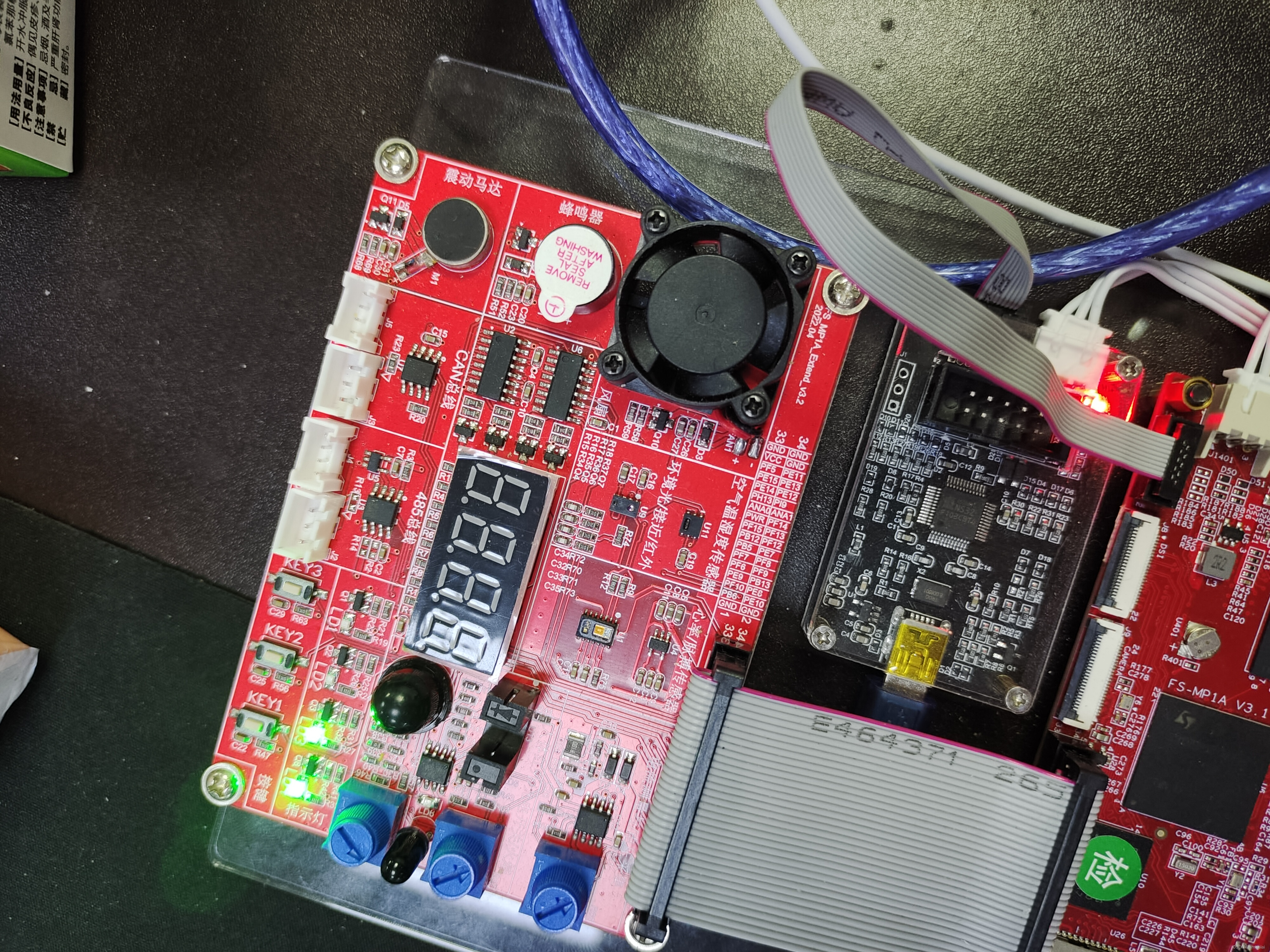
题目:实现3盏灯的流水 代码: .text .global _start _start: 设置RCC寄存器使能 LDR R0,0X50000A28 LDR R1,[R0] ORR R1,R1,#(0X1<<4) ORR R1,R1,#(0X1<<5) STR R1,[R0]设置PE10管脚为输出模式 LDR R0,0X50006000 LDR R1,[R0] BIC R1,R1,…...
[足式机器人]Part2 Dr. CAN学习笔记-自动控制原理Ch1-2稳定性分析Stability
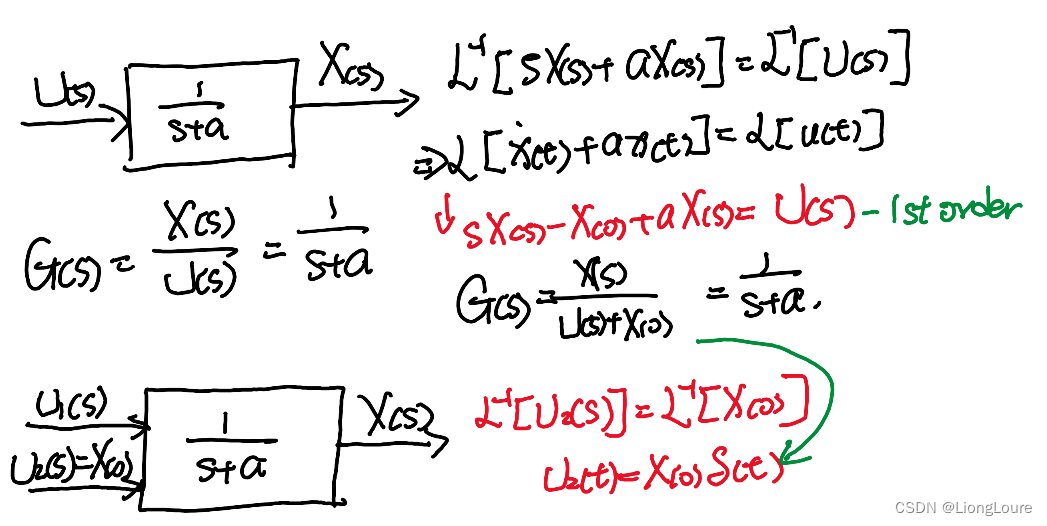
本文仅供学习使用 本文参考: B站:DR_CAN Dr. CAN学习笔记-自动控制原理Ch1-2稳定性分析Stability 0. 序言1. 稳定的分类2. 稳定的对象3. 稳定的系统4. 系统稳定性的讨论5. 补充内容——Transfer Function(传递函数) - nonzero Initial Condition(非零初始…...
Android Audio实战——音频链路分析(二十五)
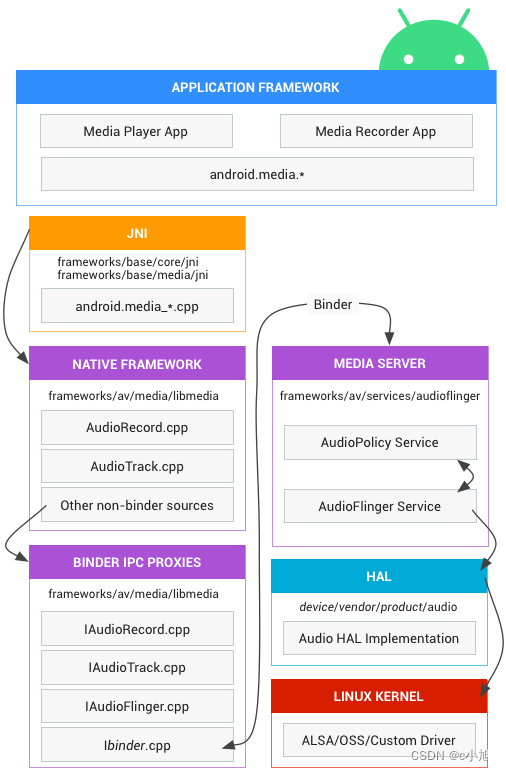
在 Android 系统的开发过程当中,音频异常问题通常有如下几类:无声、调节不了声音、爆音、声音卡顿和声音效果异常(忽大忽小,低音缺失等)等。尤其声音效果这部分问题通常从日志上信息量较少,相对难定位根因。想要分析此类问题,便需要对声音传输链路有一定的了解,能够在链…...

PHP基础 - 常量字符串
常量 在PHP中,常量是一个简单值的标识符,定义后默认是全局变量,可以在整个运行的脚本的任何地方使用。常量由英文字母、下划线和数字组成,但数字不能作为首字母出现。 PHP中定义常量的方式是使用define()函数,其语法如下: bool define( string $name, mixed $value [,…...

eDEX-UI:科幻电影级的终端模拟器如何重塑开发者工作流
eDEX-UI:科幻电影级的终端模拟器如何重塑开发者工作流 【免费下载链接】edex-ui A cross-platform, customizable science fiction terminal emulator with advanced monitoring & touchscreen support. 项目地址: https://gitcode.com/gh_mirrors/ed/edex-ui…...

专业级抖音资源自动化采集方案:douyin-downloader企业级部署指南
专业级抖音资源自动化采集方案:douyin-downloader企业级部署指南 【免费下载链接】douyin-downloader A practical Douyin downloader for both single-item and profile batch downloads, with progress display, retries, SQLite deduplication, and browser fall…...

E-Hentai Downloader:三步解决漫画批量下载与打包难题的实用指南
E-Hentai Downloader:三步解决漫画批量下载与打包难题的实用指南 【免费下载链接】E-Hentai-Downloader Download E-Hentai archive as zip file 项目地址: https://gitcode.com/gh_mirrors/eh/E-Hentai-Downloader 还在为手动保存上百张漫画图片而烦恼吗&am…...

TBP-9000-R0AE无风扇工控机:6网口4PoE+,严苛工业环境下的边缘计算与机器视觉平台
1. 项目概述:一台为严苛环境而生的工业“大脑”在工业自动化、机器视觉、轨道交通这些领域里,选一台靠谱的工控机,远比在办公室挑台电脑复杂得多。它不仅要算力够用,更得扛得住震动、耐得了高低温、接得了五花八门的工业设备&…...

从低空协议劫持实战看 MAVLink 二进制审计在飞控发布环节的必要性
攻防实测复盘:协议劫持漏洞成因解析无人机接管攻击的本质不是高危漏洞,而是协议与生俱来的默认信任逻辑。近期多项低空攻防实测中,攻击者依托通用射频采集设备,即可持续捕获空口无线交互数据,实现对飞行设备的非正常控…...

Mardi 品牌创始人是谁?一文读懂法国 Mardi Ladin
法国 Mardi Ladin 品牌创始人是La Bergon(Baudino Cd L),一位出身法国时尚世家的设计师,品牌的灵感直接来自于 1975 年法国经典电影《表兄妹》中入围奥斯卡最佳女主角的角色 "玛尔蒂 MARDI"。创始人 La Bergon 解析La B…...

CANN 算子融合技术:Conv-BN-ReLU 与 MatMul-LayerNorm 等融合模式深度解析
CANN 算子融合技术:Conv-BN-ReLU 与 MatMul-LayerNorm 等融合模式深度解析算子融合是提升性能的关键手段。本文深入讲解昇腾支持的算子融合技术、实现原理和应用实践。一、融合技术概述 1.1 为什么要融合 原始: Conv → BN → ReLU → Conv → BN → ReLU融合前内存…...

链游3.0时代:GameFi+NFT+SocialFi如何引爆万亿级“数字乌托邦“?
——区块链游戏开发的全栈解密与商业落地指南引言:当游戏世界开始"造富" 当Axie Infinity的玩家在菲律宾靠打怪月入过万,当Decentraland的虚拟土地拍出243万美元天价,当StepN的运动鞋NFT创造45天回本神话——链游已不再是加密圈的小…...

鸿蒙备考题库页面构建:今日计划与题目预览模块的详细解析
鸿蒙备考题库页面构建:今日计划与题目预览模块的详细解析 前言 在 HarmonyOS 6.0 应用开发中,在线教育类页面的学习计划展示和题目练习模块是用户停留时间最长的核心区域。本文将以“备考题库”应用中的“今日学习计划”任务列表和“题目预览”答题卡片为…...

Word文档保护技巧:防止内容被轻易复制
Word文档如何防止复制呢?其实,Word根本没有真正意义上的禁止复制,因为用户按一下手机截图,或者拍张照片,内容照样能拿走。但是,我们可以提高复制门槛,也就是让其他用户通过“CtrlC”无法直接复制…...