
C#网络应用程序(Web页面浏览器、局域网聊天程序)
目录
一、创建Web页面浏览器
1.示例源码
2.生成效果
二、局域网聊天程序
1.类
2.服务器端
3.客户端
一、创建Web页面浏览器
1.示例源码
// WebBrowser
// 这个控件目前只能在.NET Framework 4.8下使用,.NET8.0不支持了
// 在“网址”文本框中输入要浏览的网页地址,
// 按Enter键或单击“转到”按钮,即可浏览指定的网页。
using System;
using System.Windows.Forms;namespace _WebBrowser
{public partial class Form1 : Form{public Form1(){InitializeComponent();}private void WebBrowser1_DocumentCompleted(object sender, WebBrowserDocumentCompletedEventArgs e){}/// <summary>/// 创建一个Uri类型的变量,用来存储要浏览的网页地址/// 在WebBrowser控件中显示指定的网页/// </summary>private void Button1_Click(object sender, EventArgs e){Uri address = new Uri(textBox1.Text);webBrowser1.Url = address;}private void Form1_Load(object sender, EventArgs e){label1.Text = "网址:";button1.Text = "确定";Text = "WebBrowser";}private void TextBox1_KeyPress(object sender, KeyPressEventArgs e){if (e.KeyChar == 13){if (textBox1.Text != ""){Button1_Click(sender, e);   //判断是否按下Enter键}}}}
}
// Form1.Designer.cs
namespace _WebBrowser
{partial class Form1{/// <summary>/// 必需的设计器变量。/// </summary>private System.ComponentModel.IContainer components = null;/// <summary>/// 清理所有正在使用的资源。/// </summary>/// <param name="disposing">如果应释放托管资源,为 true;否则为 false。</param>protected override void Dispose(bool disposing){if (disposing && (components != null)){components.Dispose();}base.Dispose(disposing);}#region Windows 窗体设计器生成的代码/// <summary>/// 设计器支持所需的方法 - 不要修改/// 使用代码编辑器修改此方法的内容。/// </summary>private void InitializeComponent(){this.label1 = new System.Windows.Forms.Label();this.textBox1 = new System.Windows.Forms.TextBox();this.button1 = new System.Windows.Forms.Button();this.panel1 = new System.Windows.Forms.Panel();this.webBrowser1 = new System.Windows.Forms.WebBrowser();this.panel1.SuspendLayout();this.SuspendLayout();// // label1// this.label1.AutoSize = true;this.label1.Location = new System.Drawing.Point(10, 13);this.label1.Name = "label1";this.label1.Size = new System.Drawing.Size(41, 12);this.label1.TabIndex = 0;this.label1.Text = "label1";// // textBox1// this.textBox1.Location = new System.Drawing.Point(63, 8);this.textBox1.Name = "textBox1";this.textBox1.Size = new System.Drawing.Size(278, 21);this.textBox1.TabIndex = 1;this.textBox1.KeyPress += new System.Windows.Forms.KeyPressEventHandler(this.TextBox1_KeyPress);// // button1// this.button1.Location = new System.Drawing.Point(347, 8);this.button1.Name = "button1";this.button1.Size = new System.Drawing.Size(75, 23);this.button1.TabIndex = 2;this.button1.Text = "button1";this.button1.UseVisualStyleBackColor = true;this.button1.Click += new System.EventHandler(this.Button1_Click);// // panel1// this.panel1.Controls.Add(this.webBrowser1);this.panel1.Location = new System.Drawing.Point(12, 35);this.panel1.Name = "panel1";this.panel1.Size = new System.Drawing.Size(410, 214);this.panel1.TabIndex = 3;// // webBrowser1// this.webBrowser1.Dock = System.Windows.Forms.DockStyle.Fill;this.webBrowser1.Location = new System.Drawing.Point(0, 0);this.webBrowser1.MinimumSize = new System.Drawing.Size(20, 20);this.webBrowser1.Name = "webBrowser1";this.webBrowser1.Size = new System.Drawing.Size(410, 214);this.webBrowser1.TabIndex = 4;// // Form1// this.AutoScaleDimensions = new System.Drawing.SizeF(6F, 12F);this.AutoScaleMode = System.Windows.Forms.AutoScaleMode.Font;this.ClientSize = new System.Drawing.Size(434, 261);this.Controls.Add(this.panel1);this.Controls.Add(this.button1);this.Controls.Add(this.textBox1);this.Controls.Add(this.label1);this.Name = "Form1";this.StartPosition = System.Windows.Forms.FormStartPosition.CenterScreen;this.Text = "Form1";this.Load += new System.EventHandler(this.Form1_Load);this.panel1.ResumeLayout(false);this.ResumeLayout(false);this.PerformLayout();}#endregionprivate System.Windows.Forms.Label label1;private System.Windows.Forms.TextBox textBox1;private System.Windows.Forms.Button button1;private System.Windows.Forms.Panel panel1;private System.Windows.Forms.WebBrowser webBrowser1;}
}
2.生成效果
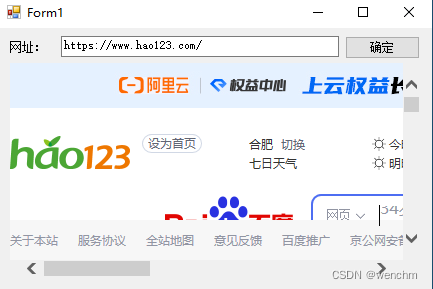
二、局域网聊天程序
 http://C#%E4%B8%AD%E7%9A%84%E8%AD%A6%E5%91%8ACS0120%E3%80%81CS0176%E3%80%81CS0183%E3%80%81CS0618%E3%80%81CS0649%E3%80%81CS8600%E3%80%81CS8601%E3%80%81CS8602%E3%80%81CS8604%E3%80%81CS8625%E3%80%81CS8618%E3%80%81CS0103%E5%8F%8A%E5%A4%84%E7%90%86-CSDN%E5%8D%9A%E5%AE%A2%20%20https://blog.csdn.net/wenchm/article/details/134606735?csdn_share_tail=%7B%22type%22%3A%22blog%22%2C%22rType%22%3A%22article%22%2C%22rId%22%3A%22134606735%22%2C%22source%22%3A%22wenchm%22%7D
1.类
// 聊天室,解决方案下建立的公共类库
using System.Net.Sockets;
using System.Net;
using System.Text;
using System;
using System.Windows;
using System.Windows.Forms;namespace StartListener
{public class Class1{public const int port = 11000;public void StartListener(){UdpClient udpclient = new UdpClient(port);                  //设置端口号IPEndPoint ipendpoint = new IPEndPoint(IPAddress.Any, port);//将网络端点表示为IP地址和端口号try{while (true){byte[] bytes = udpclient.Receive(ref ipendpoint);string strlP = "信息来自" + ipendpoint.Address.ToString();string strlnfo = Encoding.GetEncoding("gb2312").GetString(bytes, 0, bytes.Length);MessageBox.Show(strlnfo, strlP);}}catch (Exception e){MessageBox.Show(e.ToString());}finally{udpclient.Close();}}public static string Send(string strServer, string strContent){Socket socket = new Socket(AddressFamily.InterNetwork, SocketType.Dgram, ProtocolType.Udp);IPAddress ipaddress = IPAddress.Parse(strServer);   //将输入的字符串转换为IP地址  byte[] btContent = Encoding.GetEncoding("gb2312").GetBytes(strContent); //将发送的内容存储到byte数组中IPEndPoint ipendpoint = new IPEndPoint(ipaddress, 11000);socket.SendTo(btContent, ipendpoint);socket.Close();return "发送成功";}}
}
2.服务器端
// 服务器端,要增加对公共类的引用
using StartListener;
using System;
using System.Windows.Forms;namespace ChatServer
{public partial class Form1 : Form{readonly Class1 class1 = new Class1();public Form1(){InitializeComponent();}/// <summary>/// 隐藏当前窗体//调用公共类中的方法接收信息/// </summary>private void Form1_Load(object sender, EventArgs e){Hide();class1.StartListener();}}
}
3.客户端
// 客户端端,要增加对公共类的引用
using StartListener;
using System.Diagnostics;
using System;
using System.Windows.Forms;namespace ChatClient
{public partial class Form1 : Form{       Process myProcess;public Form1(){InitializeComponent();}/// <summary>///  开启服务器///  要把服务器端生成的.exe文件复制到客户端当前文件夹下///  并且文件名要修改为实际生成的文件名/// </summary>private void Form1_Load(object sender, EventArgs e){myProcess = Process.Start("ChatServer.exe");   }private void Button1_Click(object sender, EventArgs e){string send = Class1.Send(textBox1.Text, textBox2.Text);MessageBox.Show(send);                      //发送信息//textBox2.Text = string.Empty;textBox2.Focus();}private void TextBox1_KeyPress(object sender, KeyPressEventArgs e){if (e.KeyChar == 13)textBox2.Focus();}private void TextBox2_KeyPress(object sender, KeyPressEventArgs e){if (e.KeyChar == 13)button1.Focus();}private void Form1_FormClosing(object sender, FormClosingEventArgs e){myProcess.Kill();}}
}
// Form1.Designer.cs
namespace ChatClient
{partial class Form1{/// <summary>/// 必需的设计器变量。/// </summary>private System.ComponentModel.IContainer components = null;/// <summary>/// 清理所有正在使用的资源。/// </summary>/// <param name="disposing">如果应释放托管资源,为 true;否则为 false。</param>protected override void Dispose(bool disposing){if (disposing && (components != null)){components.Dispose();}base.Dispose(disposing);}#region Windows 窗体设计器生成的代码/// <summary>/// 设计器支持所需的方法 - 不要修改/// 使用代码编辑器修改此方法的内容。/// </summary>private void InitializeComponent(){this.button1 = new System.Windows.Forms.Button();this.label1 = new System.Windows.Forms.Label();this.label2 = new System.Windows.Forms.Label();this.textBox1 = new System.Windows.Forms.TextBox();this.textBox2 = new System.Windows.Forms.TextBox();this.SuspendLayout();// // button1// this.button1.Location = new System.Drawing.Point(297, 12);this.button1.Name = "button1";this.button1.Size = new System.Drawing.Size(75, 23);this.button1.TabIndex = 0;this.button1.Text = "button1";this.button1.UseVisualStyleBackColor = true;this.button1.Click += new System.EventHandler(this.Button1_Click);// // label1// this.label1.AutoSize = true;this.label1.Location = new System.Drawing.Point(12, 23);this.label1.Name = "label1";this.label1.Size = new System.Drawing.Size(41, 12);this.label1.TabIndex = 1;this.label1.Text = "label1";// // label2// this.label2.AutoSize = true;this.label2.Location = new System.Drawing.Point(12, 55);this.label2.Name = "label2";this.label2.Size = new System.Drawing.Size(41, 12);this.label2.TabIndex = 2;this.label2.Text = "label2";// // textBox1// this.textBox1.Location = new System.Drawing.Point(88, 14);this.textBox1.Name = "textBox1";this.textBox1.Size = new System.Drawing.Size(203, 21);this.textBox1.TabIndex = 3;this.textBox1.KeyPress += new System.Windows.Forms.KeyPressEventHandler(this.TextBox1_KeyPress);// // textBox2// this.textBox2.Location = new System.Drawing.Point(88, 46);this.textBox2.Multiline = true;this.textBox2.Name = "textBox2";this.textBox2.Size = new System.Drawing.Size(284, 203);this.textBox2.TabIndex = 4;this.textBox2.KeyPress += new System.Windows.Forms.KeyPressEventHandler(this.TextBox2_KeyPress);// // Form1// this.AutoScaleDimensions = new System.Drawing.SizeF(6F, 12F);this.AutoScaleMode = System.Windows.Forms.AutoScaleMode.Font;this.ClientSize = new System.Drawing.Size(384, 261);this.Controls.Add(this.textBox2);this.Controls.Add(this.textBox1);this.Controls.Add(this.label2);this.Controls.Add(this.label1);this.Controls.Add(this.button1);this.Name = "Form1";this.StartPosition = System.Windows.Forms.FormStartPosition.CenterScreen;this.Text = "Form1";this.FormClosing += new System.Windows.Forms.FormClosingEventHandler(this.Form1_FormClosing);this.Load += new System.EventHandler(this.Form1_Load);this.ResumeLayout(false);this.PerformLayout();}#endregionprivate System.Windows.Forms.Button button1;private System.Windows.Forms.Label label1;private System.Windows.Forms.Label label2;private System.Windows.Forms.TextBox textBox1;private System.Windows.Forms.TextBox textBox2;}
}
相关文章:
C#网络应用程序(Web页面浏览器、局域网聊天程序)
目录 一、创建Web页面浏览器 1.示例源码 2.生成效果 二、局域网聊天程序 1.类 2.服务器端 3.客户端 一、创建Web页面浏览器 TextBox 控件用来输入要浏览的网页地址,Button控件用来执行浏览网页操作, WebBrowser控件用来显示要浏览的网页。这个控…...
)
MacOS 14挂载NTFS 硬盘的最佳方式(免费)
categories: [Tips] tags: MacOS 写在前面 众所周知, MacOS 上面插入 NTFS磁盘格式的话, 磁盘可以向 Mac 写入数据, 但是 Mac 上的数据不能写入磁盘(这是因为 MacOS 的内核扩展禁用了 NTFS 这个格式, 可能是出于安全性或其他原因) 之前一直是使用某 pojie 的 NTFS 工具的, 虽然…...
SpringAOP专栏二《原理篇》
上一篇SpringAOP专栏一《使用教程篇》-CSDN博客介绍了SpringAop如何使用,这一篇文章就会介绍Spring AOP 的底层实现原理,并通过源代码解析来详细阐述其实现过程。 前言 Spring AOP 的实现原理是基于动态代理和字节码操作的。不了解动态代理和字节码操作…...
冒泡排序(函数)
冒泡排序,将一个列表中的两个元素进行比较,并将最小的元素交换到顶部。两个元素中较小的会冒到顶部,而较大的会沉到底部,该过程将被重复执行,直到所有元素都被排序。 输入格式: 输入在第1行中给出N(1<N…...
Vue3中的defineModel
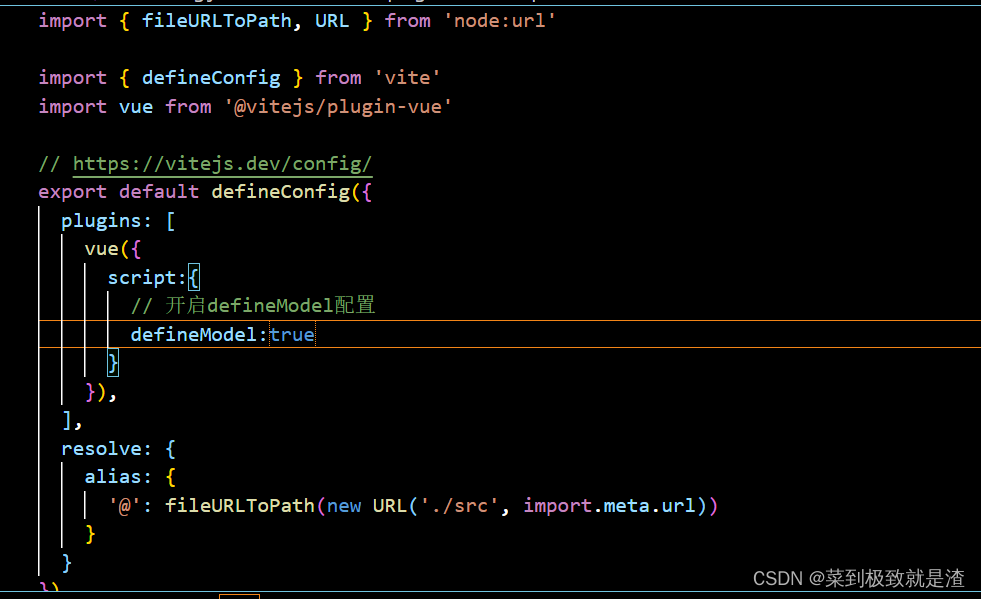
目录 一、vue3的defineModel介绍 二、defineModel使用 (1)在vite.config.js中开启 (2)子组件 (3)父组件 一、vue3的defineModel介绍 为什么要使用到defineModel呢?这里有这样一种场景&…...
动态内存管理(C语言)
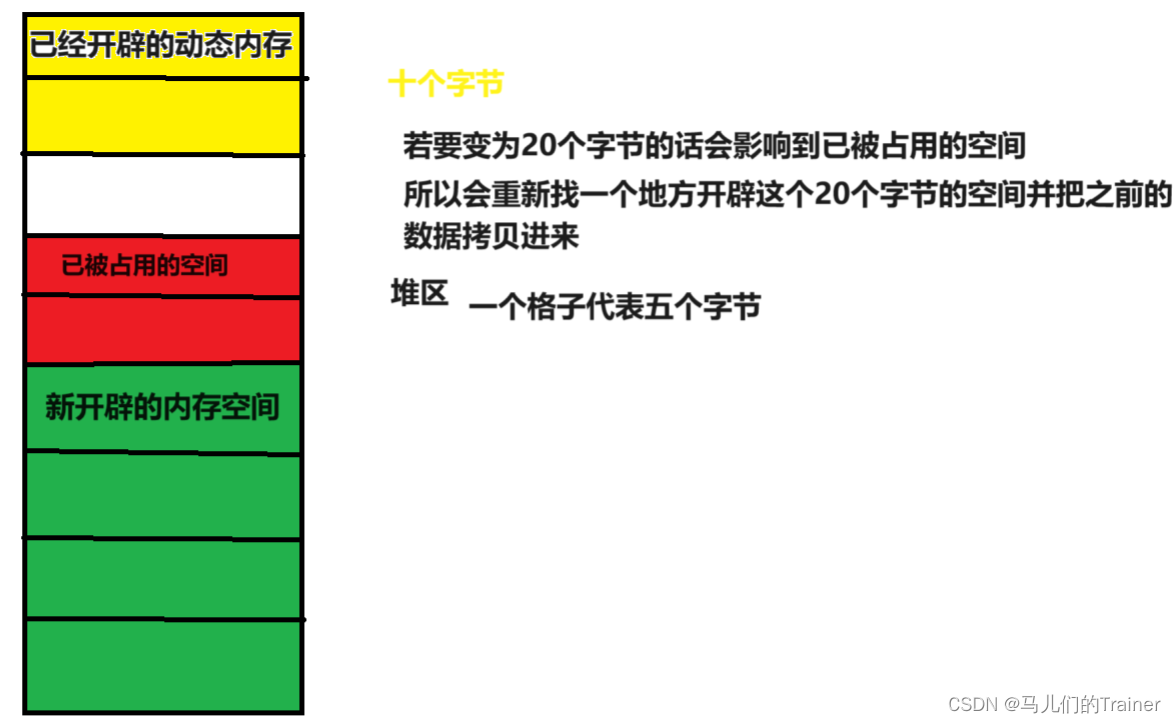
前言 在学习数据结构时,掌握指针、结构体和动态内存管理是非常关键的,它们就像是搭建程序框架和操作内存的工具箱,需要熟练掌握才能更加游刃有余地进行编程。 指针和结构体我们已经在之前详细的讲过了,今天我将带大家学习动态内存…...
区块链实验室(32) - 下载arm64的Prysm
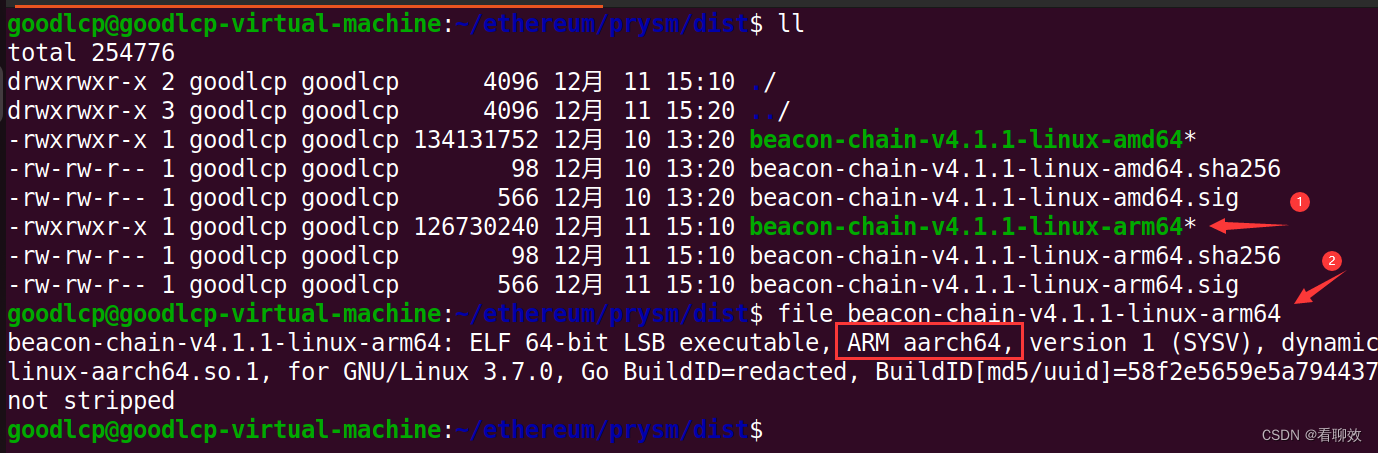
Prysm是Ethereum的共识层。 1. 下载prysm.sh curl https://raw.githubusercontent.com/prysmaticlabs/prysm/master/prysm.sh --output prysm.sh && chmod x prysm.sh2. 下载x86版prysm共识客户端 ./prysm.sh beacon-chain --download-only3.下载arm64版prysm共识客…...

flutter学习-day3-dart基础
📚 目录 变量声明操作符数据类型控制流错误处理和捕获函数mixin异步 FutureStream 本文学习和引用自《Flutter实战第二版》:作者:杜文 1. 变量声明 var 类似于 JavaScript 中的var,它可以接收任何类型的变量,但最大…...

gitblit自建git仓库
在Ubuntu服务器 安装 java sudo apt-get update sudo apt-get install openjdk-8-jdk # 或者其它你喜欢的版本//sudo snap install gitblit 验证: java -version下载 gitblit https://github.com/gitblit-org/gitblit/releases解压/usr/local tar -zxvf gitb…...

二百一十一、Flume——Flume实时采集Linux中的Hive日志写入到HDFS中(亲测、附截图)
一、目的 为了实现用Flume实时采集Hive的操作日志到HDFS中,于是进行了一场实验 二、前期准备 (一)安装好Hadoop、Hive、Flume等工具 (二)查看Hive的日志在Linux系统中的文件路径 [roothurys23 conf]# find / -name…...
python 实现 AIGC 大模型中的概率论:生日问题的基本推导
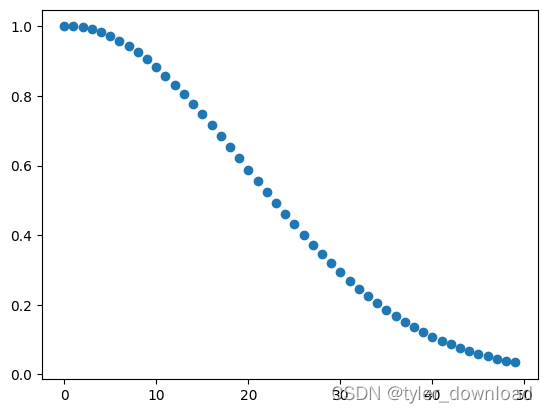
在上一节中,我们对生日问题进行了严谨的阐述:假设屋子里面每个人的生日相互独立,而且等可能的出现在一年 365 天中的任何一天,试问我们需要多少人才能让某两个人的生日在同一天的概率超过 50%。 处理抽象逻辑问题的一个入手点就是…...
的Light-weight Context Guided改进C2_f)
YOLOv8算法改进【NO.87】引入上下文引导网络(CGNet)的Light-weight Context Guided改进C2_f
前 言 YOLO算法改进系列出到这,很多朋友问改进如何选择是最佳的,下面我就根据个人多年的写作发文章以及指导发文章的经验来看,按照优先顺序进行排序讲解YOLO算法改进方法的顺序选择。具体有需求的同学可以私信我沟通: 第一,创新主干特征提取网络,将整个Backbone改…...
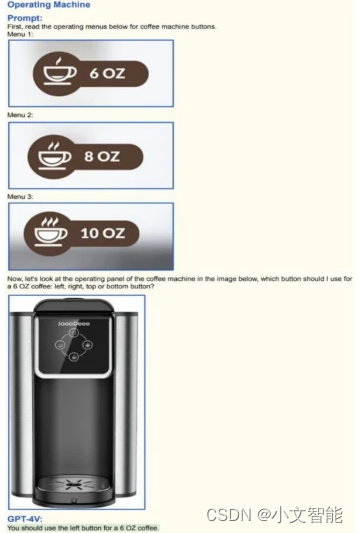
GPT-4V 在机器人领域的应用
在科技的浩渺宇宙中,OpenAI如一颗璀璨的星辰,于2023年9月25日,以一种全新的方式,向世界揭示了其最新的人工智能力作——GPT-4V模型。这次升级,为其旗下的聊天机器人ChatGPT装配了语音和图像的新功能,使得用…...

Java基础语法之访问修饰限定符
private 表示私有的,只能在同一个包中的同一个类使用 像这样就是在同一个包中的不同类用了private修饰的变量,这是非法的,那到底该如何给a赋值呢?可以在定义时就赋值,但这样的代码就没有可操作性,所以我们…...

算法通关村第十八关 | 青铜 | 回溯
1.回溯 回溯可以视为递归的拓展,有着明确的解题模板。 很大的不同之处是有一个撤销处理结果的操作,但是大框架就是遍历 N 叉树。 回溯主要解决暴力枚举都解决不了的问题。 回溯模板: void backtracking(参数) {if (终止条件) {存放结果;…...

蓝牙在物联网中的应用,相比WIFI和NFC的优势?
蓝牙在物联网中有着广泛的应用,主要包括以下几个方面: 1、智能家居:蓝牙Mesh技术可以用于智能家居设备之间的连接和通信,实现设备的远程控制和管理。例如,通过蓝牙技术可以将智能音箱、智能电视、智能家电等设备连接起…...

Altair推出 Altair RapidMiner 2023 平台,提供生成式 AI 功能
Altair推出 Altair RapidMiner 2023 平台,提供生成式 AI 功能 更新包括自动聚类、扩展 SAS、Python 和 R 编程功能等 近日,Altair(纳斯达克股票代码:ALTR)近日宣布其数据分析和 AI 平台 Altair RapidMiner 取得了一系…...

包管理工具npm与yarn
1.npm 1.1 安装 安装node后自带了npm 2.2 初始化package.json npm init 1.3 安装包 单个包:npm install less或npm i less 所有包:npm installnpm i 1.4 删除包 npm remove less,npm r less或npm uninstall less 1.5 配置别名 pack…...
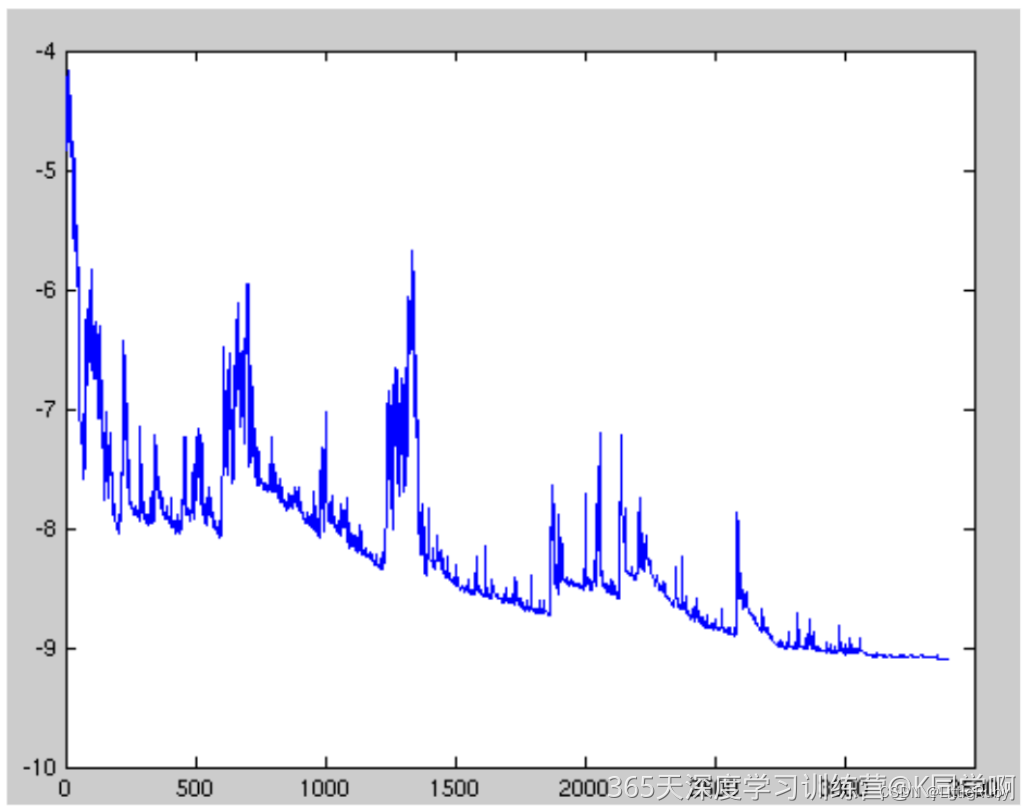
深度学习 Day11——T11优化器对比实验
🍨 本文为🔗365天深度学习训练营 中的学习记录博客🍖 原作者:K同学啊 | 接辅导、项目定制 文章目录 前言一、我的环境二、代码实现与执行结果1.引入库2.设置GPU(如果使用的是CPU可以忽略这步)3.导入数据4.查…...
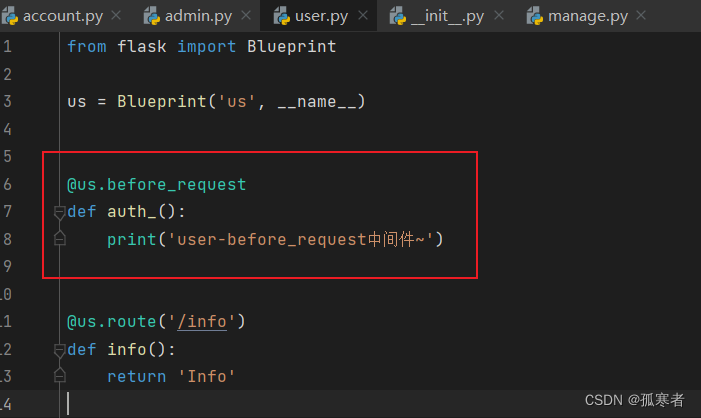
(十六)Flask之蓝图
蓝图 Flask蓝图(Blueprint)是Flask框架中用于组织和管理路由、视图函数以及静态文件的一种机制。它提供了一种将应用程序拆分为更小、可重用组件的方式,使得项目结构更清晰,代码更易于维护。 使用Flask蓝图,可以将相…...

ShareList插件开发全攻略:从零开始打造专属网盘工具
ShareList插件开发全攻略:从零开始打造专属网盘工具 【免费下载链接】sharelist 快速分享 GoogleDrive OneDrive 项目地址: https://gitcode.com/gh_mirrors/sh/sharelist ShareList是一款强大的开源网盘工具,支持快速挂载Google Drive、OneDriv…...

YOLOv11桌面应用实战:PyQt5打造智能监控与目标追踪系统
1. YOLOv11与PyQt5的强强联合 在计算机视觉领域,YOLO系列模型一直以其实时性和准确性著称。最新发布的YOLOv11在保持原有优势的基础上,进一步优化了模型结构和训练策略,使其在小目标检测和复杂场景下的表现更加出色。而PyQt5作为Python生态中…...

OpenClaw+Phi-3-vision-128k-instruct:电商商品截图自动比价系统
OpenClawPhi-3-vision-128k-instruct:电商商品截图自动比价系统 1. 为什么需要自动化比价系统 作为一个经常网购的技术爱好者,我发现自己花在比价上的时间越来越多。每次看到心仪的商品,都要手动打开多个电商平台,截图保存价格信…...

SEO标题优化与内容营销的关系是什么
SEO标题优化与内容营销的关系:深度解析与实践指南 在数字营销的世界里,SEO标题优化与内容营销之间的关系日益紧密,两者共同塑造了网站的可见性和用户参与度。究竟SEO标题优化与内容营销的关系是什么呢?本文将深入解析这一关系&am…...

PanSearch网盘影视资源搜索聚合工具源码解析:集成多引擎搜索技术,畅享跨平台资源检索
在数字化信息爆炸的时代,影视资源的获取方式日益多样化,但如何在海量资源中快速定位所需内容,成为用户面临的一大挑战。PanSearch网盘影视资源搜索聚合工具应运而生,它通过集成多引擎搜索技术,支持百度网盘、阿里云盘等…...

基于两相交错并联技术的Buck-Boost变换器仿真研究:采用双向DCDC及多环控制策略实现高...
两相交错并联buck/boost变换器仿真 采用双向DCDC,管子均为双向管 模型内包含开环,电压单环,电压电流双闭环三种控制方式 两个电感的电流均流控制效果好可见下图电流细节 matlab/simulink/两相交错并联buck/boost变换器的仿真总能让工程师又爱…...

从销售预测到异常检测:时间序列分解在业务中的5个高能应用场景
时间序列分解:驱动业务决策的5个实战场景解析 当电商平台的库存经理面对双十一前暴涨的销售曲线时,当数据中心运维工程师盯着突然飙升的服务器指标时,他们需要的不是数学公式的推导,而是能直接指导行动的时序洞察。时间序列分解技…...

水下图像增强,水下增强,失真矫正,矫正复原含讲解复现,含代码注释,程序一看就懂。
水下图像增强,水下增强,失真矫正,矫正复原 含讲解复现,含代码注释,程序一看就懂。...

如何用ControlNet-Union-SDXL-1.0实现多条件图像生成?解锁12种创意控制方案
如何用ControlNet-Union-SDXL-1.0实现多条件图像生成?解锁12种创意控制方案 【免费下载链接】controlnet-union-sdxl-1.0 项目地址: https://ai.gitcode.com/hf_mirrors/xinsir/controlnet-union-sdxl-1.0 ControlNet-Union-SDXL-1.0是一款革命性的多条件控…...

基于元模型优化的虚拟电厂主从博弈动态定价与能量管理双层调度策略
MATLAB代码:基于元模型优化的虚拟电厂主从博弈优化调度模型 关键词:元模型 虚拟电厂 主从博弈 优化调度 参考文档:《基于元模型优化算法的主从博弈多虚拟电厂动态定价和能量管理》复现元模型 仿真平台:MATLABCPLEX平台 主要内容&a…...