
spring boot 实现直播聊天室(二)
spring boot 实现直播聊天室(二)
技术方案:
- spring boot
- netty
- rabbitmq
目录结构
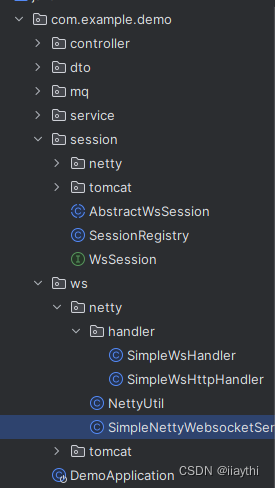
引入依赖
<dependency><groupId>io.netty</groupId><artifactId>netty-all</artifactId><version>4.1.96.Final</version>
</dependency>
SimpleNettyWebsocketServer
netty server 启动类
@Slf4j
public class SimpleNettyWebsocketServer {private SimpleWsHandler simpleWsHandler;public SimpleNettyWebsocketServer(SimpleWsHandler simpleWsHandler) {this.simpleWsHandler = simpleWsHandler;}public void start(int port) throws InterruptedException {NioEventLoopGroup boss = new NioEventLoopGroup(1);NioEventLoopGroup work = new NioEventLoopGroup(2);try {ServerBootstrap bootstrap = new ServerBootstrap();bootstrap.group(boss, work).channel(NioServerSocketChannel.class).childHandler(new ChannelInitializer<NioSocketChannel>() {@Overrideprotected void initChannel(NioSocketChannel ch) throws Exception {ChannelPipeline pipeline = ch.pipeline();//HTTP协议编解码器,用于处理HTTP请求和响应的编码和解码。其主要作用是将HTTP请求和响应消息转换为Netty的ByteBuf对象,并将其传递到下一个处理器进行处理。pipeline.addLast(new HttpServerCodec());//用于HTTP服务端,将来自客户端的HTTP请求和响应消息聚合成一个完整的消息,以便后续的处理。pipeline.addLast(new HttpObjectAggregator(65535));pipeline.addLast(new IdleStateHandler(30,0,0));//处理请求参数pipeline.addLast(new SimpleWsHttpHandler());pipeline.addLast(new WebSocketServerProtocolHandler("/n/ws"));pipeline.addLast(simpleWsHandler);}});Channel channel = bootstrap.bind(port).sync().channel();log.info("server start at port: {}", port);channel.closeFuture().sync();} finally {boss.shutdownGracefully();work.shutdownGracefully();}}
}
NettyUtil: 工具类
public class NettyUtil {public static AttributeKey<String> G_U = AttributeKey.valueOf("GU");/*** 设置上下文参数* @param channel* @param attributeKey* @param data* @param <T>*/public static <T> void setAttr(Channel channel, AttributeKey<T> attributeKey, T data) {Attribute<T> attr = channel.attr(attributeKey);if (attr != null) {attr.set(data);}}/*** 获取上下文参数 * @param channel* @param attributeKey* @return* @param <T>*/public static <T> T getAttr(Channel channel, AttributeKey<T> attributeKey) {return channel.attr(attributeKey).get();}/*** 根据 渠道获取 session* @param channel* @return*/public static NettySimpleSession getSession(Channel channel) {String attr = channel.attr(G_U).get();if (StrUtil.isNotBlank(attr)){String[] split = attr.split(",");String groupId = split[0];String username = split[1];return new NettySimpleSession(channel.id().toString(),groupId,username,channel);}return null;}
}
处理handler
SimpleWsHttpHandler
处理 websocket 协议升级时地址请求参数 ws://127.0.0.1:8881/n/ws?groupId=1&username=tom, 解析groupId 和 username ,并设置这个属性到上下文
/*** @Date: 2023/12/13 9:53* 提取参数*/
@Slf4j
public class SimpleWsHttpHandler extends ChannelInboundHandlerAdapter {@Overridepublic void channelRead(ChannelHandlerContext ctx, Object msg) throws Exception {if (msg instanceof  FullHttpRequest request){//ws://localhost:8080/n/ws?groupId=xx&username=tomString decode = URLDecoder.decode(request.uri(), StandardCharsets.UTF_8);log.info("raw request url: {}", decode);Map<String, String> queryMap = getParams(decode);String groupId = MapUtil.getStr(queryMap, "groupId", null);String username = MapUtil.getStr(queryMap, "username", null);if (StrUtil.isNotBlank(groupId) && StrUtil.isNotBlank(username)) {NettyUtil.setAttr(ctx.channel(), NettyUtil.G_U, groupId.concat(",").concat(username));}//去掉参数 ===>  ws://localhost:8080/n/wsrequest.setUri(request.uri().substring(0,request.uri().indexOf("?")));ctx.pipeline().remove(this);ctx.fireChannelRead(request);}else{ctx.fireChannelRead(msg);}}/*** 解析 queryString* @param uri* @return*/public static Map<String, String> getParams(String uri) {Map<String, String> params = new HashMap<>(10);int idx = uri.indexOf("?");if (idx != -1) {String[] paramsArr = uri.substring(idx + 1).split("&");for (String param : paramsArr) {idx = param.indexOf("=");params.put(param.substring(0, idx), param.substring(idx + 1));}}return params;}
}
SimpleWsHandler
处理消息
@Slf4j
@ChannelHandler.Sharable
public class SimpleWsHandler extends SimpleChannelInboundHandler<TextWebSocketFrame> {@Autowiredprivate PushService pushService;/*** 在新的 Channel 被添加到 ChannelPipeline 中时被调用。这通常发生在连接建立时,即 Channel 已经被成功绑定并注册到 EventLoop 中。* 在连接建立时被调用一次** @param ctx* @throws Exception*/@Overridepublic void handlerAdded(ChannelHandlerContext ctx) throws Exception {NettySimpleSession session = NettyUtil.getSession(ctx.channel());if (session == null) {log.info("handlerAdded channel id: {}", ctx.channel().id());} else {log.info("handlerAdded channel group-username: {}-{}", session.group(), session.identity());}}/*** 连接断开时,Netty 会自动触发 channelInactive 事件,并将该事件交给事件处理器进行处理* 在 channelInactive 事件的处理过程中,会调用 handlerRemoved 方法** @param ctx* @throws Exception*/@Overridepublic void handlerRemoved(ChannelHandlerContext ctx) throws Exception {NettySimpleSession session = NettyUtil.getSession(ctx.channel());if (session!=null){log.info("handlerRemoved channel group-username: {}-{}", session.group(), session.identity());}offline(ctx.channel());}@Overrideprotected void channelRead0(ChannelHandlerContext ctx, TextWebSocketFrame msg) throws Exception {//todo msg 可以是json字符串,这里仅仅只是纯文本NettySimpleSession session = NettyUtil.getSession(ctx.channel());if (session!=null){MessageDto messageDto = new MessageDto();messageDto.setSessionId(session.getId());messageDto.setGroup(session.group());messageDto.setFromUser(session.identity());messageDto.setContent(msg.text());pushService.pushGroupMessage(messageDto);}else {log.info("channelRead0 session is null channel id: {}-{}", ctx.channel().id(),msg.text());}}@Overridepublic void exceptionCaught(ChannelHandlerContext ctx, Throwable cause) throws Exception {log.info("SimpleWsHandler 客户端异常断开 {}", cause.getMessage());//todo offlineoffline(ctx.channel());}@Overridepublic void userEventTriggered(ChannelHandlerContext ctx, Object evt) throws Exception {if (evt instanceof IdleStateEvent idleStateEvent) {if (idleStateEvent.state().equals(IdleStateEvent.READER_IDLE_STATE_EVENT)) {log.info("SimpleWsIdleHandler channelIdle 5 秒未收到客户端消息,强制关闭: {}", ctx.channel().id());//todo offlineoffline(ctx.channel());}} else if (evt instanceof WebSocketServerProtocolHandler.HandshakeComplete) {String attr = NettyUtil.getAttr(ctx.channel(), NettyUtil.G_U);if (StrUtil.isBlank(attr)) {ctx.writeAndFlush("参数异常");offline(ctx.channel());} else {//todo 可以做用户认证等等//记录用户登陆sessionNettySimpleSession session = NettyUtil.getSession(ctx.channel());Assert.notNull(session, "session 不能为空");SessionRegistry.getInstance().addSession(session);}}super.userEventTriggered(ctx,evt);}/*** 用户下线,处理失效 session* @param channel*/public void offline(Channel channel){NettySimpleSession session = NettyUtil.getSession(channel);if (session!=null){SessionRegistry.getInstance().removeSession(session);}channel.close();}}
PushService
推送服务抽取
public interface PushService {/*** 组推送* @param messageDto*/void pushGroupMessage(MessageDto messageDto);}@Service
public class PushServiceImpl implements PushService {@Autowiredprivate MessageClient messagingClient;@Overridepublic void pushGroupMessage(MessageDto messageDto) {messagingClient.sendMessage(messageDto);}
}
NettySimpleSession
netty session 封装
public class NettySimpleSession extends AbstractWsSession {private Channel channel;public NettySimpleSession(String id, String group, String identity, Channel channel) {super(id, group, identity);this.channel = channel;}@Overridepublic void sendTextMessage(MessageDto messageDto) {String content = messageDto.getFromUser() + " say: " + messageDto.getContent();// 不能直接 write content, channel.writeAndFlush(content);// 要封装成 websocketFrame,不然不能编解码!!!channel.writeAndFlush(new TextWebSocketFrame(content));}
}
启动类
@Slf4j
@SpringBootApplication
public class DemoApplication {public static void main(String[] args) {SpringApplication.run(DemoApplication.class, args);}@Beanpublic SimpleWsHandler simpleWsHandler(){return new SimpleWsHandler();}@PostConstructpublic void init() {new Thread(() -> {log.info(">>>>>>>> start netty ws server....");try {new SimpleNettyWebsocketServer(simpleWsHandler()).start(8881);} catch (InterruptedException e) {log.info(">>>>>>>> SimpleNettyWebsocketServer start error", e);}}).start();}}
其他代码参考 spring boot 实现直播聊天室
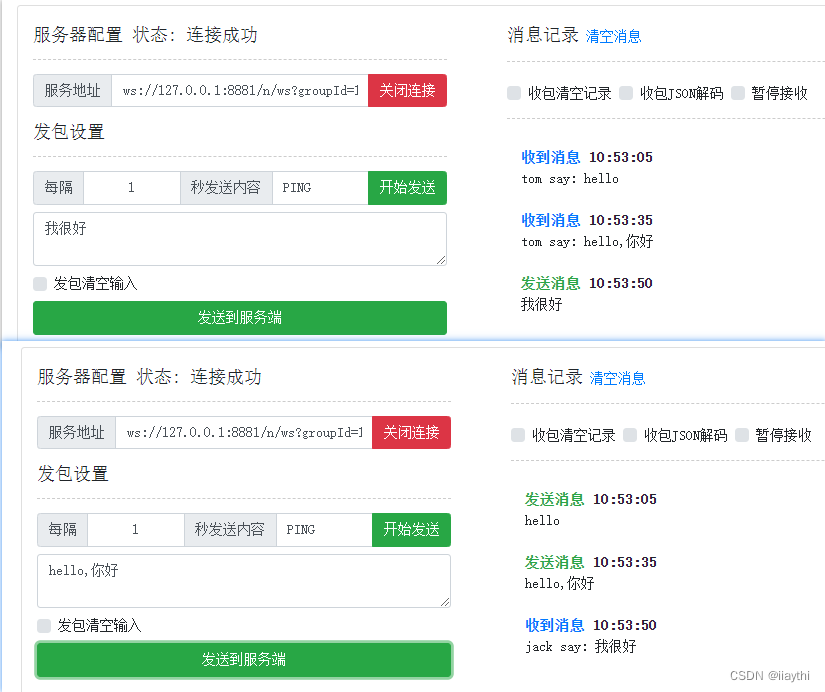
测试
websocket 地址 ws://127.0.0.1:8881/n/ws?groupId=1&username=tom
good luck!
相关文章:
spring boot 实现直播聊天室(二)
spring boot 实现直播聊天室(二) 技术方案: spring bootnettyrabbitmq 目录结构 引入依赖 <dependency><groupId>io.netty</groupId><artifactId>netty-all</artifactId><version>4.1.96.Final</version> </dependency>Si…...

alibaba fastjson GET List传参 和 接收解析
之前一直都是 get传的都是单字符串(例如 xxxxxxxxx?name{name};name“woaini”;),并没有传list的. GET List传参 问题场景 String url"xxxxxxxx?id{id}"; HashMap<String,Object> param new HashMap<>(); param.pu…...
API自动化测试是什么?我们该如何做API自动化测试呢?
API测试已经成为测试工作中的常规任务之一。为了提高测试效率并减少重复的手工操作,API自动化测试变得越来越重要。本文总结了API自动化测试方面的经验和心得,旨在与读者分享。 掌握自动化技能已经成为高级测试工程师的必备技能。敏捷和持续测试改变了传…...

PyTorch 的 10 条内部用法
欢迎阅读这份有关 PyTorch 原理的简明指南[1]。无论您是初学者还是有一定经验,了解这些原则都可以让您的旅程更加顺利。让我们开始吧! 1. 张量:构建模块 PyTorch 中的张量是多维数组。它们与 NumPy 的 ndarray 类似,但可以在 GPU …...
Django、Echarts异步请求、动态更新
前端页面 <!DOCTYPE html> <html><head><meta charset"utf-8"><title>echarts示例</title> <script src"jquery.min.js"></script><script type "text/javascript" src "echarts.m…...
Mac部署Odoo环境-Odoo本地环境部署
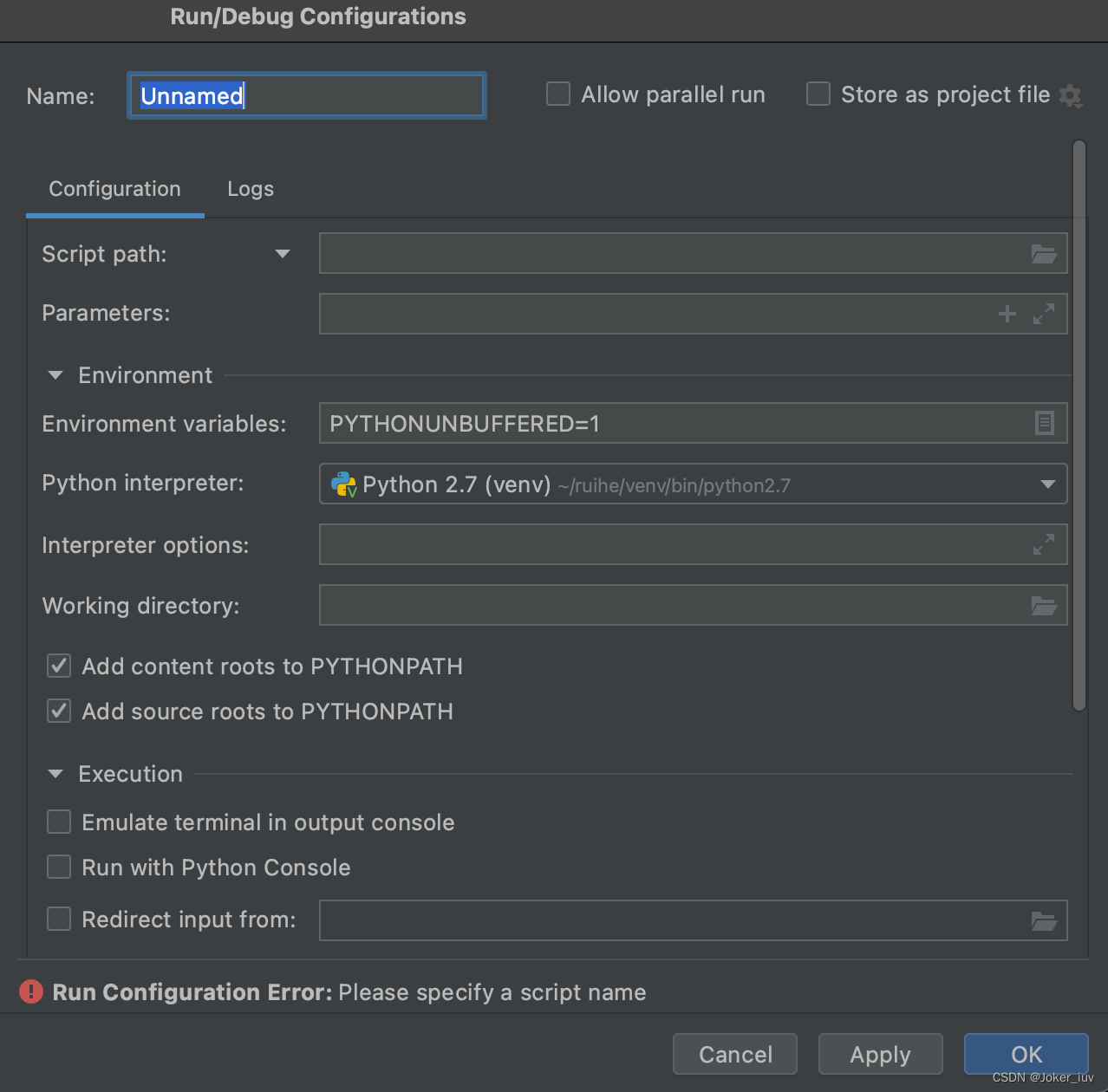
Odoo本地环境部署 安装Python安装Homebrew安装依赖brew install libxmlsec1 Python运行环境Pycharm示例配置 Mac部署Odoo环境-Odoo本地环境部署 安装Python 新机,若系统没有预装Python,则安装需要版本的Python 点击查询Python官网下载 安装Homebrew 一…...

【✅面试编程题:如何用队列实现一个栈】
✅面试编程题:如何用队列实现一个栈 💡典型回答 💡典型回答 使用两个队列可以实现一个栈,一个队列用来存储栈中的元素,另一个队列用来在pop操作时暂存元素。 上才艺: import java.util.LinkedList; impo…...

Windows本地的RabbitMQ服务怎么在Docker for Windows的容器中使用
1. 进入管理界面 windows安装过程请访问:Windows安装RabbitMQ、添加PHP的AMQP扩展 浏览器访问:http://127.0.0.1:15672/ 2. 创建虚拟主机 上面访问的是 RabbitMQ 的管理界面,可以在这个界面上进行一些操作,比如创建虚拟主机、…...

YOLOv5改进 | 2023卷积篇 | AKConv轻量级架构下的高效检测(既轻量又提点)
一、本文介绍 本文给大家带来的改进内容是AKConv是一种创新的变核卷积,它旨在解决标准卷积操作中的固有缺陷(采样形状是固定的),AKConv的核心思想在于它为卷积核提供了任意数量的参数和任意采样形状,能够使用任意数量…...
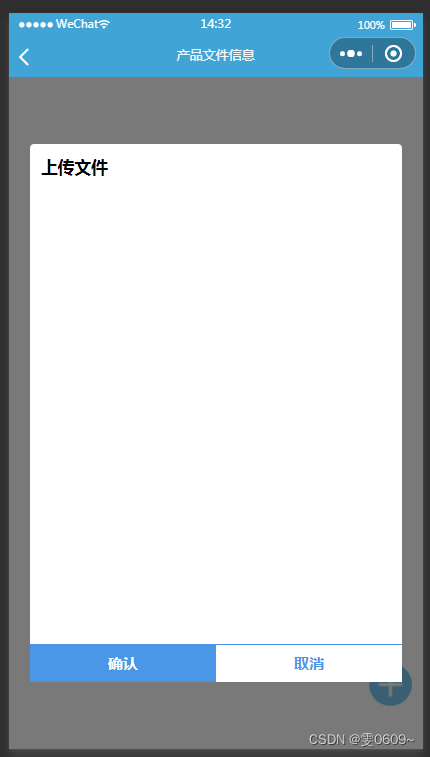
微信小程序:模态框(弹窗)的实现
效果 wxml <!--新增(点击按钮)--> <image classimg src"{{add}}" bindtapadd_mode></image> <!-- 弹窗 --> <view class"modal" wx:if"{{showModal}}"><view class"modal-conten…...
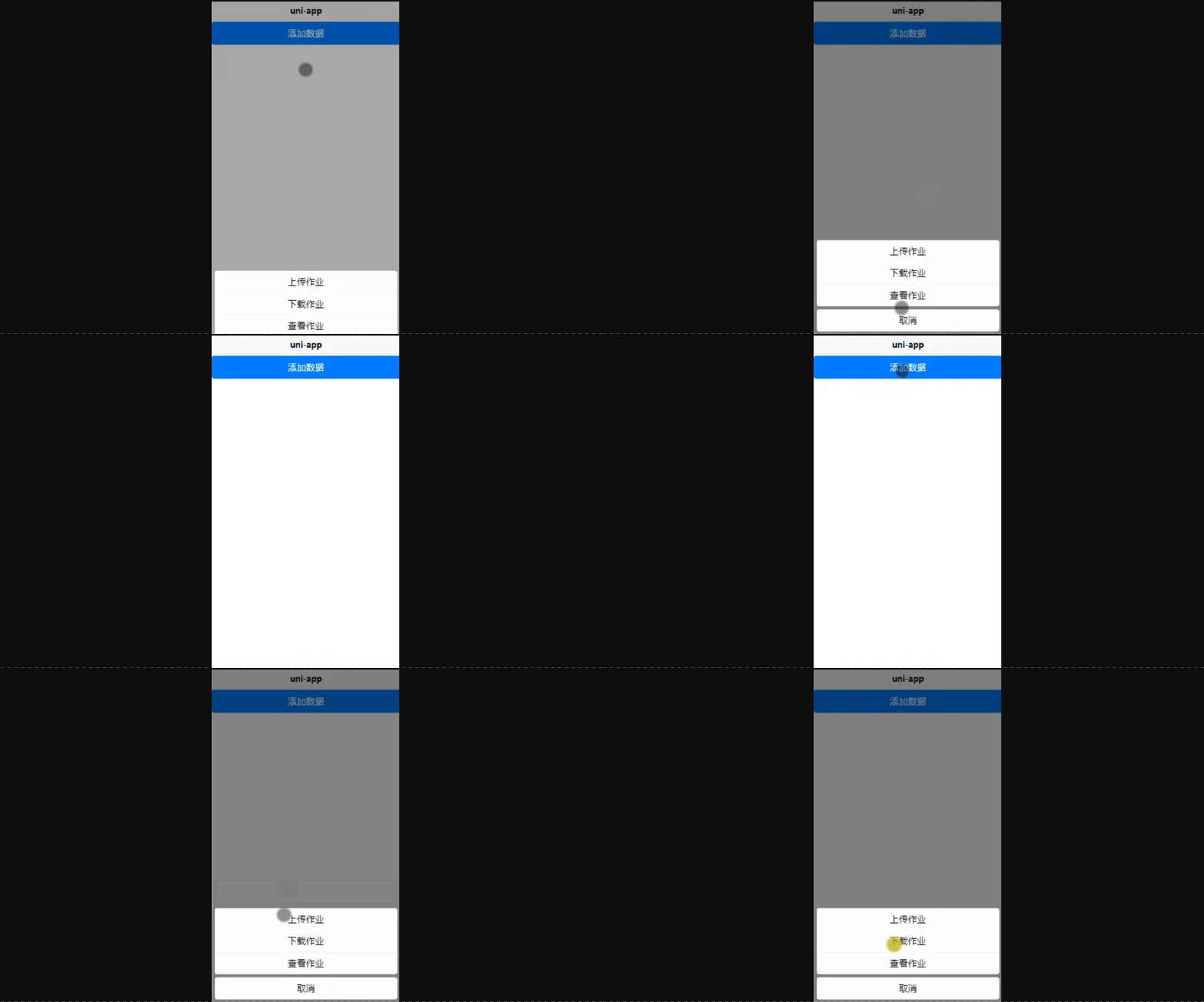
uniapp交互反馈api的使用示例
官方文档链接:uni.showToast(OBJECT) | uni-app官网 1.uni.showToast({}) 显示消息提示框。 常用属性: title:页面提示的内容 image:改变提示框默认的icon图标 duration:提示框在页面显示多少秒才让它消失 添加了image属性后。 注…...
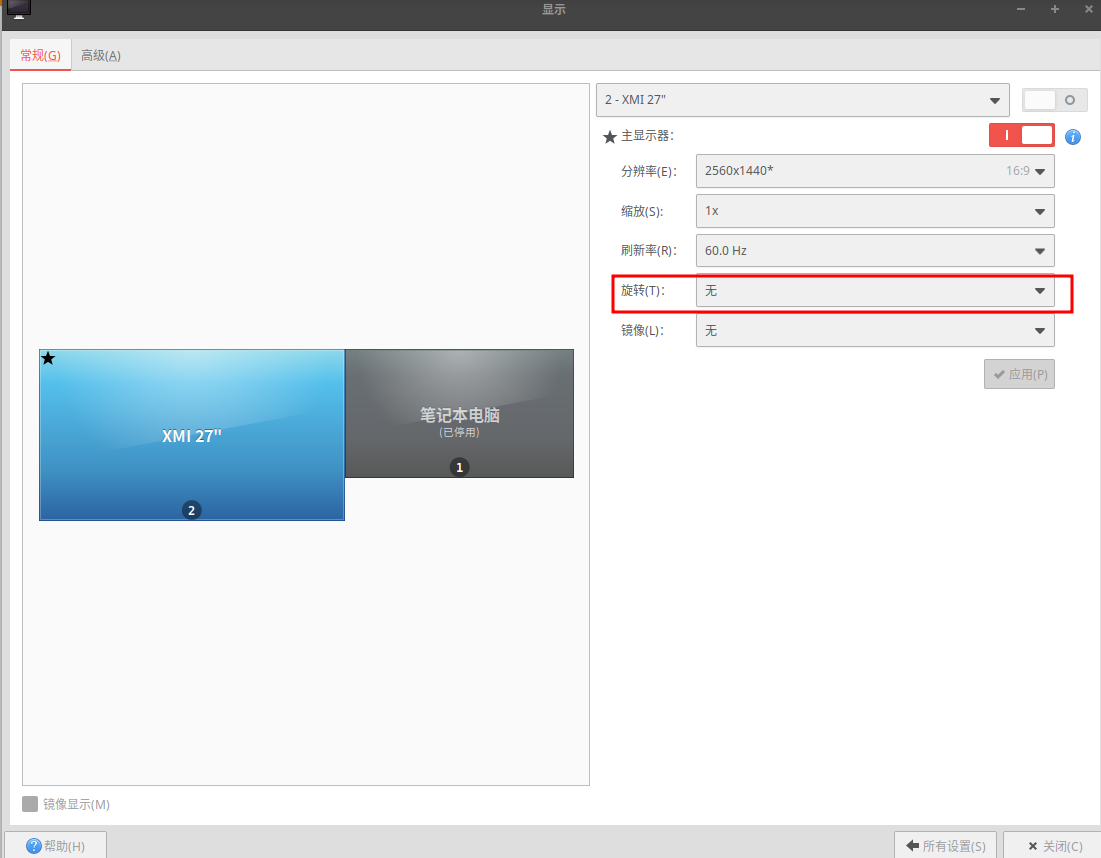
XUbuntu22.04之HDMI显示器设置竖屏(一百九十八)
简介: CSDN博客专家,专注Android/Linux系统,分享多mic语音方案、音视频、编解码等技术,与大家一起成长! 优质专栏:Audio工程师进阶系列【原创干货持续更新中……】🚀 优质专栏:多媒…...

如何用 Cargo 管理 Rust 工程系列 甲
以下内容为本人的学习笔记,如需要转载,请声明原文链接 微信公众号「ENG八戒」https://mp.weixin.qq.com/s/ceMTUzRjDoiLwjn_KfZSrg 这几年 Rust 可谓是炙手可热的新兴编程语言了,而且被投票为最受程序员喜爱的语言。它很现代,专门…...

Windows下ping IP+端口的方法
有两种方法: 1. windows 开通 telnet 参考: https://zhuanlan.zhihu.com/p/570982111 2. 安装插件 参考:Windows下ping IP端口的方法 推荐使用第二种。...
函数详解和示例)
【python】os.getcwd()函数详解和示例
os.getcwd() 是 Python 的一个内建函数,用于获取当前工作目录的路径。这个函数属于 os 模块,需要导入这个模块才能使用它。 import os data_rootos.path.abspath(os.path.join(os.getcwd(),"../.."))# get data root path data_root1os.path.…...
——virtualenv安装成功之后,依然提示未找到命令(-bash: virtualenv: 未找到命令))
Linux(二十一)——virtualenv安装成功之后,依然提示未找到命令(-bash: virtualenv: 未找到命令)
Linux(二十一)——virtualenv安装成功之后,依然提示未找到命令(-bash: virtualenv: 未找到命令) 解决办法: 创建软连接 ln -s /usr/local/python3/bin/virtualenv /usr/bin/virtualenv...
RNN介绍及Pytorch源码解析
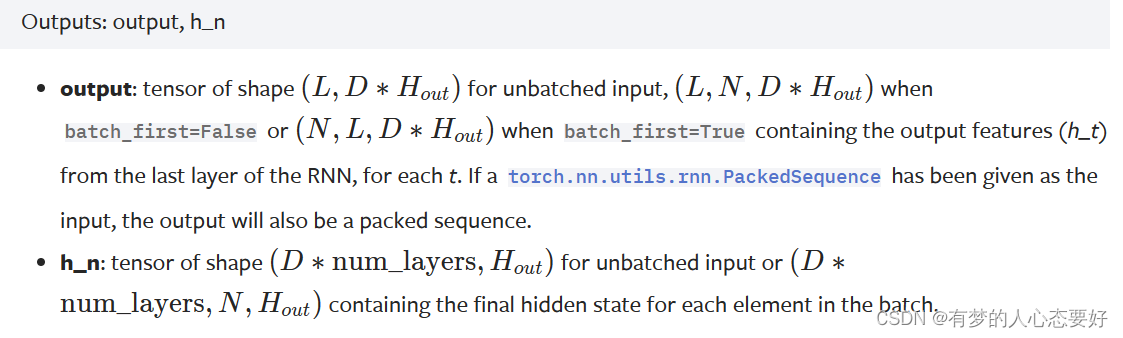
介绍一下RNN模型的结构以及源码,用作自己复习的材料。 RNN模型所对应的源码在:\PyTorch\Lib\site-packages\torch\nn\modules\RNN.py文件中。 RNN的模型图如下: 源码注释中写道,RNN的数学公式: 表示在时刻的隐藏状态…...
Qt 文字描边(基础篇)
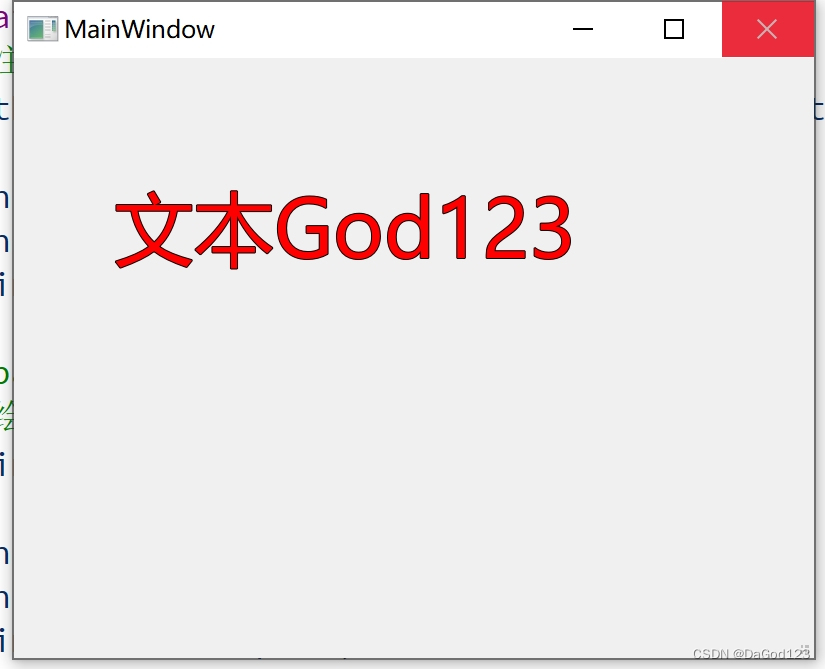
项目中有时需要文字描边的功能 1.基础的绘制文字 使用drawtext处理 void MainWindow::paintEvent(QPaintEvent *event) {QPainter painter(this);painter.setRenderHint(QPainter::Antialiasing, true);painter.setRenderHint(QPainter::SmoothPixmapTransform, true);painte…...

.360勒索病毒解密方法|勒索病毒解决|勒索病毒恢复|数据库修复
导言: 在数字化时代,.360勒索病毒如影随形,威胁个人和组织的数据安全。本文将深入介绍.360病毒的特征、威胁,以及如何有效地恢复被加密的数据文件,同时提供预防措施,助您更好地保护数字资产。如不幸感染这…...
Nginx(四层+七层代理)+Tomcat实现负载均衡、动静分离
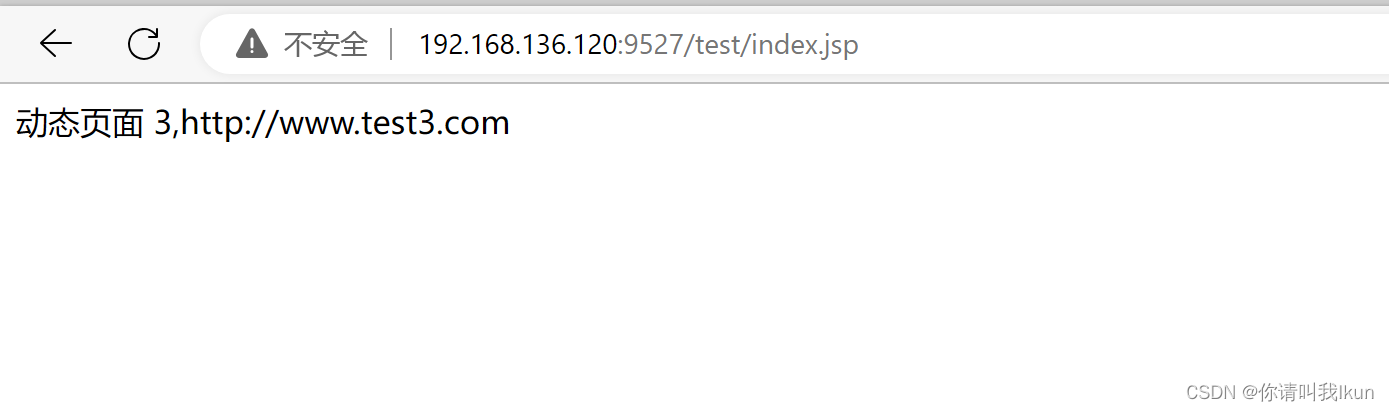
一、Tomcat多实例部署 具体步骤请看我之前的博客 写文章-CSDN创作中心https://mp.csdn.net/mp_blog/creation/editor/134956765?spm1001.2014.3001.9457 1.1 访问测试多实例的部署 1.2 分别在三个tomcat服务上部署jsp的动态页面 mkdir /usr/local/tomcat/webapps/test vim …...

安得医疗冲刺港股:年营收9亿,利润1.5亿 上海亿瑞控制41%股权
雷递网 雷建平 5月16日山东安得医疗用品股份有限公司(简称:“安得医疗”)日前递交招股书,准备在港交所上市。截至2023年、2024年及2025年12月31日止年度,安得医疗分别宣派及派付股息6670万元、4670万元及4000万元。年营…...

系统管理员AI编程实战:基于Claude的运维自动化脚本开发指南
1. 项目概述:一个面向系统管理员的Claude-Code学习与实践仓库最近在整理自己的技术栈时,发现很多系统管理员同行对如何将大型语言模型(LLM)高效地融入日常运维工作流感到困惑。大家普遍觉得这些AI工具很强大,但具体到写…...

005 DevEco Studio OHPM同步404报错 解决文档
[cs]005 DevEco Studio OHPM同步404报错 解决文档 文档简介 本文解决鸿蒙开发中新建空白项目自动触发ohpm install时报错:ohos/hypium、ohos/hamock包404找不到、拉取依赖失败问题。 核心原则:不修改项目任何自带文件、不删除系统生成依赖、不改动业务代…...

Go语言轻量级规则引擎Airules:高性能架构与微服务实践
1. 项目概述:从“Airules”看现代规则引擎的轻量化实践最近在GitHub上看到一个挺有意思的项目,叫“Airules”。光看名字,你可能会联想到“AI规则”或者“空气规则”,其实它的全称是“Air Rules”,直译过来就是“空气规…...

LC-SLM高精度波面生成:从原理、标定到闭环校正的完整指南
1. 项目概述与核心价值最近在实验室里折腾一个光学精密测量项目,核心需求是生成一个特定形状、高精度的光波面。这玩意儿在光学检测、自适应光学、全息成像甚至一些前沿的微纳加工领域都是刚需。比如,你想检测一个非球面镜的面形误差,最直接的…...

如何用FanControl快速解决电脑风扇噪音问题:完整免费指南
如何用FanControl快速解决电脑风扇噪音问题:完整免费指南 【免费下载链接】FanControl.Releases This is the release repository for Fan Control, a highly customizable fan controlling software for Windows. 项目地址: https://gitcode.com/GitHub_Trending…...
)
别再只盯着图片了!用3DCNN处理视频动作识别,从原理到代码实战(PyTorch版)
3DCNN实战:从视频动作识别到PyTorch代码实现 当监控摄像头捕捉到一场突如其来的争执,或是体育赛事中运动员的关键动作,传统图像识别技术往往力不从心。这些场景中的信息不仅存在于每一帧画面里,更隐藏在帧与帧之间的动态变化中——…...

如何快速掌握NCBI基因组批量下载:面向生物信息学新手的完整实战指南
如何快速掌握NCBI基因组批量下载:面向生物信息学新手的完整实战指南 【免费下载链接】ncbi-genome-download Scripts to download genomes from the NCBI FTP servers 项目地址: https://gitcode.com/gh_mirrors/nc/ncbi-genome-download NCBI基因组数据批量…...
)
从FreeRTOS到RT-Thread:手把手教你正确使用操作系统的动态内存API(避坑malloc)
从FreeRTOS到RT-Thread:嵌入式实时操作系统动态内存管理实战指南 在嵌入式开发领域,动态内存管理一直是开发者面临的棘手问题之一。当项目从裸机迁移到实时操作系统(RTOS)环境时,许多开发者会不自觉地延续使用标准C库的…...

Spring Data Redis入门指南:5分钟快速搭建你的第一个Redis应用
Spring Data Redis入门指南:5分钟快速搭建你的第一个Redis应用 【免费下载链接】spring-data-redis Provides support to increase developer productivity in Java when using Redis, a key-value store. Uses familiar Spring concepts such as a template classe…...