
置顶!!!主页禁言提示原因:在自己论坛发动态误带敏感词,在自己论坛禁止评论90天
置顶!!!主页禁言提示原因:在自己论坛发动态误带敏感词,在自己论坛禁止评论90天
置顶!!!主页禁言提示原因:在自己论坛发动态误带敏感词,在自己论坛禁止评论90天
置顶!!!主页禁言提示原因:在自己论坛发动态误带敏感词,在自己论坛禁止评论90天
置顶!!!主页禁言提示原因:在自己论坛发动态误带敏感词,在自己论坛禁止评论90天
置顶!!!主页禁言提示原因:在自己论坛发动态误带敏感词,在自己论坛禁止评论90天
置顶!!!主页禁言提示原因:在自己论坛发动态误带敏感词,在自己论坛禁止评论90天
置顶!!!主页禁言提示原因:在自己论坛发动态误带敏感词,在自己论坛禁止评论90天
置顶!!!主页禁言提示原因:在自己论坛发动态误带敏感词,在自己论坛禁止评论90天
置顶!!!主页禁言提示原因:在自己论坛发动态误带敏感词,在自己论坛禁止评论90天
置顶!!!主页禁言提示原因:在自己论坛发动态误带敏感词,在自己论坛禁止评论90天
置顶!!!主页禁言提示原因:在自己论坛发动态误带敏感词,在自己论坛禁止评论90天
置顶!!!主页禁言提示原因:在自己论坛发动态误带敏感词,在自己论坛禁止评论90天
置顶!!!主页禁言提示原因:在自己论坛发动态误带敏感词,在自己论坛禁止评论90天
置顶!!!主页禁言提示原因:在自己论坛发动态误带敏感词,在自己论坛禁止评论90天
置顶!!!主页禁言提示原因:在自己论坛发动态误带敏感词,在自己论坛禁止评论90天
置顶!!!主页禁言提示原因:在自己论坛发动态误带敏感词,在自己论坛禁止评论90天
博主所在单位目前使用Oracle GoldenGate将各个业务生产库汇聚到一起做数仓实时ODS平台,源端库可能涉及Oracle、Mysql、达梦、Guassdb库。为了做增量etl以及记录每条数据的变更历史:
- 我们采用异构同步,即源端同步过来的表在ODS新增了一个etltime字段,用来记录当前数据变更时间。
- 为了记录数据的事务变更历史记录,我们将数据的变更记录映射同步到一张tab_name_audit表中。
- 为了防止源端业务库误删数据,我们将被删除的数据映射同步到一张tab_name_his表中。
- 原表映射到ods后还是正常的映射同步dml操作。
至于以上方式是怎么实现的,我这里给大家在本地电脑做一次模拟。至于GoldenGate如何安装,请看博主其他相关文章,这里就不赘述了!!!
一、GoldenGate简介

GoldenGate公司成立于1995年的美国加州旧金山, 它的名称源自旧金山闻名于世的金门大桥。
该公司于2009年9月被Oracle公司收购,在此之前Oracle和GoldGate公司就有了长达超过10年的合作关系。
GoldenGate几乎支持市面上流行的所有主流的操作系统平台和数据库。
在不同的平台生成的core文件,有不同的本地堆栈跟踪工具来分析。
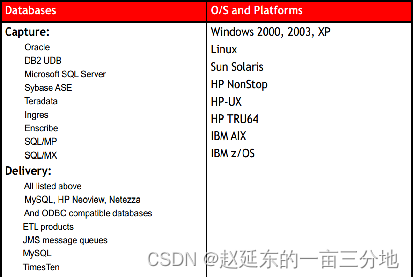
GoldenGate的模式包括下图中描述的几种,其中“一对一”是GoldenGate最简单的一种模式,也是最常用的模式。

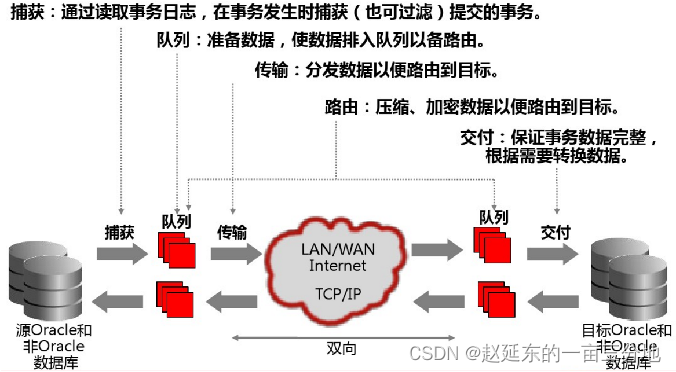
GoldenGate的大致工作原理:
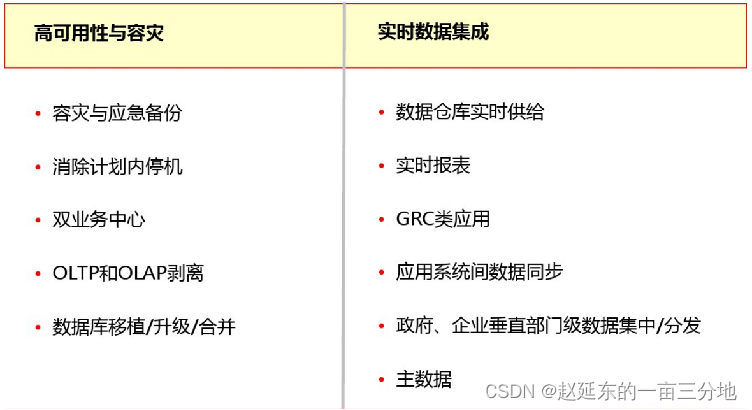
GoldenGate能够解决如下不同的需求
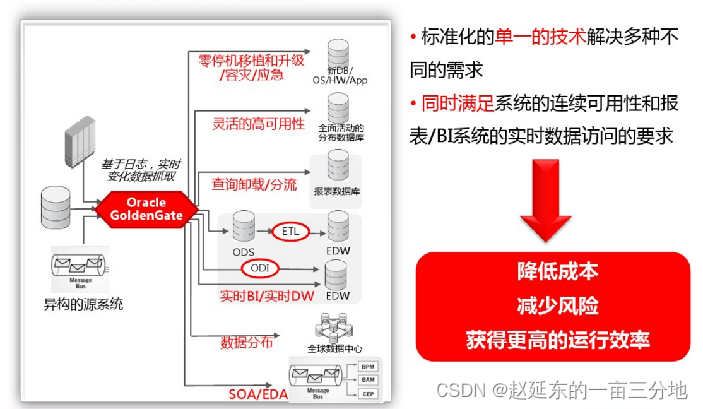
好了,大致介绍就说到这里,相信需要本篇文章帮助的网友们,对以上肯定都很熟悉了!!!直接奔主题!
二、环境简介
1、本实验用到的OGG版本
[oracle@OGG ogg11]$ ./ggsci -vOracle GoldenGate Command Interpreter for Oracle
Version 11.2.1.0.3 14400833 OGGCORE_11.2.1.0.3_PLATFORMS_120823.1258_FBO
Linux, x64, 64bit (optimized), Oracle 11g on Aug 23 2012 20:20:21Copyright (C) 1995, 2012, Oracle and/or its affiliates. All rights reserved.
2、实验中使用的重点参数
下面仅列出来两个重要参数,其他参数请参考官方文档或本博主的另一篇介绍ogg三大进程参数的博客!
--------------------NOCOMPRESSDELETES
COMPRESSDELETES | NOCOMPRESSDELETES Valid for Extract Use the
COMPRESSDELETES and NOCOMPRESSDELETES parameters to control the way
columns are written to the trail record for delete operations.
COMPRESSDELETES, the default, causes Extract to write only the primary
key to the trail for delete operations. The key provides enough
information to delete the correct target record, while restricting the
amount of data that must be processed. NOCOMPRESSDELETES sends all of
the columns to the trail. This becomes the default when a table
definition does not include a primary key or unique index. If a
substitute key was defined with the KEYCOLS option of TABLE, then
those columns are written to the trail, whether or not a real key was
defined. NOCOMPRESSDELETES also is required when using the Conflict
Detection and Resolution (CDR) feature for a DB2 database on any of
the platforms that are supported by Oracle GoldenGate. For more
information about CDR, see the Oracle GoldenGate Windows and UNIX
Administrator’s Guide. COMPRESSDELETES and NOCOMPRESSDELETES can be
used globally for all TABLE statements in the parameter file, or they
can be used as on-off switches for individual TABLE statements. These
parameters do not affect data pumps. Default COMPRESSDELETES Syntax
COMPRESSDELETES | NOCOMPRESSDELETES------------------------INSERTDELETES INSERTDELETES | NOINSERTDELETES Valid for Replicat Use the INSERTDELETES and NOINSERTDELETES
parameters to control whether or not Oracle GoldenGate converts source
delete operations to insert operations on the target database. The
parameters are table-specific. One parameter remains in effect for all
subsequent MAP statements, until the other parameter is encountered.
When using INSERTDELETES, use the NOCOMPRESSDELETES parameter so that
Extract does not compress deletes. Default NOINSERTDELETES Syntax
INSERTDELETES | NOINSERTDELETES
测试开始前使用根据生产配置提前配置好的正常同步的ogg环境,环境部署忽略,目的端配置在原有的一对三模式下增加一个对只存被删除的整条记录的
历史表tablename_DEL(被删除记录的完整记录+操作类型和被删除时间以及是前映像还是后映像)来测试
二、源库创建测试用表
1、创建有物理主键表
CREATE TABLE DEPT
(DEPTNO NUMBER(2) NOT NULL,DNAME  VARCHAR2(14),LOC    VARCHAR2(13)
)
TABLESPACE USERSPCTFREE 10INITRANS 1MAXTRANS 255STORAGE(INITIAL 64KNEXT 1MMINEXTENTS 1MAXEXTENTS UNLIMITED);
-- CREATE/RECREATE PRIMARY, UNIQUE AND FOREIGN KEY CONSTRAINTS
ALTER TABLE DEPTADD CONSTRAINT PK_DEPT PRIMARY KEY (DEPTNO)USING INDEX TABLESPACE USERSPCTFREE 10INITRANS 2MAXTRANS 255STORAGE(INITIAL 64KNEXT 1MMINEXTENTS 1MAXEXTENTS UNLIMITED);
BEGIN
FOR I IN 1..10
LOOP
INSERT INTO DEPT VALUES(I,'A','B');
END LOOP;
COMMIT;
END;
/
2、创建无物理主键有逻辑主键表(逻辑主键:EMPNO,ENAME)
CREATE TABLE NOPK_TAB
(EMPNO NUMBER(6),
ENAME VARCHAR2(20),
SAL  NUMBER(7,2),
DEPTNO NUMBER(4)
);INSERT INTO NOPK_TAB VALUES(1110,'ZHAO',100,10);
INSERT INTO NOPK_TAB VALUES(1110,'YAN',200,20);
INSERT INTO NOPK_TAB VALUES(1111,'YAN',100,10);
INSERT INTO NOPK_TAB VALUES(1111,'DONG',100,30);
三、目标端创建审计表和只存被删除记录历史表
1、创建审计表
CREATE TABLE SCOTT.NOPK_TAB_AUDIT
(
EMPNO  NUMBER(6),
ENAME VARCHAR2(20),CSN        NUMBER,OPTIME    TIMESTAMP(6),OPTYPE    VARCHAR2(20),INSERTTIME TIMESTAMP(6),CURDATE    TIMESTAMP(6)
);
CREATE TABLE DEPT_AUDIT
(DEPTNO    NUMBER(2),CSN        NUMBER,OPTIME    TIMESTAMP(6),OPTYPE    VARCHAR2(20),INSERTTIME TIMESTAMP(6),CURDATE    TIMESTAMP(6)
)
2、创建只存删除记录的历史表
CREATE TABLE DEPT_DEL
(DEPTNO      NUMBER(2),DNAME        VARCHAR2(14),LOC          VARCHAR2(13),BEFORE_AFTER VARCHAR2(20),DEL_DATE    TIMESTAMP,OP_FLAG      VARCHAR2(20)
);
CREATE TABLE NOPK_TAB_DEL
(EMPNO        NUMBER(6),ENAME        VARCHAR2(20),SAL          NUMBER(7,2),DEPTNO      NUMBER(4),BEFORE_AFTER VARCHAR2(20),DEL_DATE    TIMESTAMP,OP_FLAG      VARCHAR2(20)
);
四、停止抽取进程和投递进程
stop er *
五、添加附加日志
dblogin userid ogg password ogg
add trandata SCOTT.dept
add trandata SCOTT.NOPK_TAB,nokey,cols(EMPNO,ENAME)
六、配置抽取进程
extract e_sc
userid ogg,password ogg
setenv(NLS_LANG=AMERICAN_AMERICA.AL32UTF8)
setenv(ORACLE_SID="orcl")
reportcount every 10 minutes,rate
numfiles 5000
discardfile ./dirrpt/e_sc.dsc,append,megabytes 1000
warnlongtrans 2h,checkinterval 3m
exttrail ./dirdat/sc
threadoptions maxcommitpropagationdelay 60000
dboptions allowunusedcolumn
tranlogoptions archivedlogonly
tranlogoptions altarchivelogdest primary /u01/archivelog
TRANLOGOPTIONS ALTARCHIVEDLOGFORMAT %t_%s_%r.dbf
dynamicresolution
ddl include mapped
ddloptions addtrandata,report
notcpsourcetimer
nocompressupdates
--fetchoptions nousesnapshot
fetchoptions USEROWID
--GETUPDATEBEFORES
NOCOMPRESSDELETES
----------scott.EMP
table SCOTT.EMP,tokens(
TKN-CSN = @GETENV("TRANSACTION", "CSN"),
TKN-COMMIT-TS = @GETENV ("GGHEADER", "COMMITTIMESTAMP"),
TKN-OP-TYPE = @GETENV ("GGHEADER", "OPTYPE")
);
----------SCOTT.DEPT
table SCOTT.DEPT,tokens(
TKN-CSN = @GETENV("TRANSACTION", "CSN"),
TKN-COMMIT-TS = @GETENV ("GGHEADER", "COMMITTIMESTAMP"),
TKN-OP-TYPE = @GETENV ("GGHEADER", "OPTYPE")
);
----------SCOTT.DEL
table SCOTT.DEL,tokens(
TKN-CSN = @GETENV("TRANSACTION", "CSN"),
TKN-COMMIT-TS = @GETENV ("GGHEADER", "COMMITTIMESTAMP"),
TKN-OP-TYPE = @GETENV ("GGHEADER", "OPTYPE")
);
----------SCOTT.NOPK_TAB
TABLE SCOTT.NOPK_TAB_TAB,KEYCOLS(EMPNO,ENAME),TOKENS(
TKN-CSN = @GETENV("TRANSACTION", "CSN"),
TKN-COMMIT-TS = @GETENV ("GGHEADER", "COMMITTIMESTAMP"),
TKN-OP-TYPE = @GETENV ("GGHEADER", "OPTYPE")
);
七、目标库应用进程配置
replicat r_sc2
setenv(NLS_LANG=AMERICAN_AMERICA.AL32UTF8)
userid ogg,password ogg
reportcount every 30 minutes,rate
reperror default,abend
--reperror default,DISCARD
numfiles 50000
checkpointsecs 40
assumetargetdefs
discardfile ./dirrpt/r_sc2.dsc,append,megabytes 1000
allownoopupdates
ddl &
include mapped &
exclude objname scott.*_audit &
exclude optype create &objtype 'table' &
exclude optype drop &objtype 'table' &
exclude objtype 'index' &objname SCOTT.*_his &
exclude instr 'constraint' &
---exclude instr 'null' &
exclude instr 'trigger' &
exclude instr 'rename to' &
exclude instr 'grant' &
exclude instr 'revoke' &
exclude instr 'analyze'
DDLOPTIONS MAPSESSIONSCHEMA XUM target ogg
ddloptions report
allowduptargetmap
----------DEPT
getinserts
getupdates
getdeletes
noupdatedeletes
NOINSERTDELETES
map SCOTT.DEPT,target SCOTT.DEPT;
updatedeletes
--INSERTDELETES
map SCOTT.DEPT,target SCOTT.DEPT_HIS,keycols(DEPTNO);
getinserts
ignoreupdates
ignoredeletes
map SCOTT.DEPT,target SCOTT.DEPT_AUDIT,keycols(DEPTNO),colmap(
usedefaults,
csn=@token("TKN-CSN"),
optime=@token("TKN-COMMIT-TS"),
optype=@token("TKN-OP-TYPE"),
inserttime=@token("TKN-COMMIT-TS"),
curdate=@DATENOW()
);
ignoreinserts
getupdates
getdeletes
map SCOTT.DEPT,target SCOTT.DEPT_AUDIT,keycols(DEPTNO),colmap(
usedefaults,
csn=@token("TKN-CSN"),
optime=@token("TKN-COMMIT-TS"),
optype=@token("TKN-OP-TYPE"),
curdate=@DATENOW()
),filter(@strfind(@token("TKN-OP-TYPE"),"PK UPDATE") =0);
ignoreinserts
getupdates
getdeletes
map SCOTT.DEPT,target SCOTT.DEPT_AUDIT,keycols(DEPTNO),colmap(
usedefaults,
csn=@token("TKN-CSN"),
optime=@token("TKN-COMMIT-TS"),
optype=@case(@token("TKN-OP-TYPE"),"PK UPDATE","INSERT"),
inserttime=@token("TKN-COMMIT-TS"),
curdate=@DATENOW()
),filter(@strfind(@token("TKN-OP-TYPE"),"PK UPDATE") >0),insertallrecords;
ignoreinserts
getupdates
getdeletes
map SCOTT.DEPT,target SCOTT.DEPT_AUDIT,keycols(DEPTNO),colmap(
DEPTNO=before.DEPTNO,
csn=@token("TKN-CSN"),
optime=@token("TKN-COMMIT-TS"),
optype=@case(@token("TKN-OP-TYPE"),"PK UPDATE","DELETE"),
curdate=@DATENOW()
),filter(@strfind(@token("TKN-OP-TYPE"),"PK UPDATE") >0);
ignoreinserts
ignoreupdates
getdeletes
noupdatedeletes
INSERTDELETES
MAP SCOTT.DEPT, TARGET SCOTT.DEPT_DEL,keycols(DEPTNO),colmap(
usedefaults
BEFORE_AFTER=@getenv("GGHEADER", "BEFOREAFTERINDICATOR"),
DEL_DATE=@getenv ("GGHEADER", "COMMITTIMESTAMP"),
OP_FLAG=@getenv ("GGHEADER", "OPTYPE")
);
----------NOPK_TAB
getinserts
getupdates
getdeletes
noupdatedeletes
NOINSERTDELETES
map SCOTT.NOPK_TAB,target SCOTT.NOPK_TAB,keycols(EMPNO,ENAME);
updatedeletes
map SCOTT.NOPK_TAB,target SCOTT.NOPK_TAB_HIS,keycols(EMPNO,ENAME);
getinserts
getupdates
getdeletes
map SCOTT.NOPK_TAB,target SCOTT.NOPK_TAB_AUDIT,keycols(EMPNO,ENAME),colmap(
EMPNO=@if(@strfind(@token("tkn-op-type"),"PK UPDATE")>0,before.EMPNO,EMPNO),
ENAME=@if(@strfind(@token("tkn-op-type"),"PK UPDATE")>0,before.ENAME,ENAME)
csn=@token("tkn-csn"),
optime=@token("tkn-commit-ts"),
optype=@if(@strfind(@token("tkn-op-type"),"PK UPDATE")>0,"DELETE",@token("tkn-op-type")),
inserttime=@eval(@strfind(@token("tkn-op-type"),"INSERT")>0,@token("tkn-commit-ts")),
curdate=@DATENOW()
);
ignoreinserts
getupdates
ignoredeletes
map SCOTT.NOPK_TAB,target SCOTT.NOPK_TAB_AUDIT,keycols(EMPNO,ENAME),colmap(
usedefaults,
csn=@token("tkn-csn"),
optime=@token("tkn-commit-ts"),
optype=@case(@token("tkn-op-type"),"PK UPDATE","INSERT"),
inserttime=@token("tkn-commit-ts"),
curdate=@DATENOW()
),filter(@strfind(@token("tkn-op-type"),"PK UPDATE") >0),insertallrecords;
ignoreinserts
ignoreupdates
getdeletes
noupdatedeletes
INSERTDELETES
MAP SCOTT.NOPK_TAB, TARGET SCOTT.NOPK_TAB_DEL,keycols(EMPNO,ENAME),colmap(
usedefaults,
BEFORE_AFTER=@getenv("GGHEADER", "BEFOREAFTERINDICATOR"),
DEL_DATE=@getenv ("GGHEADER", "COMMITTIMESTAMP"),
OP_FLAG=@getenv ("GGHEADER", "OPTYPE")
);
八、启动抽取进程和投递进程
start er *
九、从源端倒数到目的端并启动应用进程
省略
十、验证是否能够只存被删除的数据完整记录
验证数据是否能够正常同步
源端分别进行插入更新删除操作:
------------------------------------------------有物理主键表:
SQL> select * from dept;DEPTNO DNAME          LOC
------ -------------- -------------1 a              b2 a              b3 a              b4 a              b5 a              b6 a              b7 a              b8 a              b9 a              b10 a              b10 rows selectedSQL> insert into dept values(11,'a','b');1 row insertedSQL>delete from dept where deptno=10;1 row deletedSQL> update dept set dname='aaa'where deptno=9;1 row updatedSQL> commit;Commit completeSQL> alter system switch logfile;System alteredSQL> /System alteredSQL> select * from dept;DEPTNO DNAME          LOC
------ -------------- -------------1 a              b2 a              b3 a              b4 a              b5 a              b6 a              b7 a              b8 a              b9 aaa            b11 a              b10 rows selected-----------------------------在目的端查看:
SQL> select * from dept;DEPTNO DNAME          LOC
------ -------------- -------------1 A              B2 A              B3 A              B4 A              B5 A              B6 A              B7 A              B8 A              B9 aaa            B11 a              b10 rows selectedSQL> select * from dept_audit;DEPTNO        CSN OPTIME                                                                          OPTYPE              INSERTTIME                                                                      CURDATE
------ ---------- -------------------------------------------------------------------------------- -------------------- -------------------------------------------------------------------------------- --------------------------------------------------------------------------------1    1521438 11-2月 -18 02.24.46.000000 下午                                                  INITIAL              11-2月 -18 02.24.46.000000 下午                                                  2    1521438 11-2月 -18 02.24.46.000000 下午                                                  INITIAL              11-2月 -18 02.24.46.000000 下午                                                  3    1521438 11-2月 -18 02.24.46.000000 下午                                                  INITIAL              11-2月 -18 02.24.46.000000 下午                                                  4    1521438 11-2月 -18 02.24.46.000000 下午                                                  INITIAL              11-2月 -18 02.24.46.000000 下午                                                  5    1521438 11-2月 -18 02.24.46.000000 下午                                                  INITIAL              11-2月 -18 02.24.46.000000 下午                                                  6    1521438 11-2月 -18 02.24.46.000000 下午                                                  INITIAL              11-2月 -18 02.24.46.000000 下午                                                  7    1521438 11-2月 -18 02.24.46.000000 下午                                                  INITIAL              11-2月 -18 02.24.46.000000 下午                                                  8    1521438 11-2月 -18 02.24.46.000000 下午                                                  INITIAL              11-2月 -18 02.24.46.000000 下午                                                  9    1603672 11-2月 -18 02.30.35.000000 下午                                                  SQL COMPUPDATE      11-2月 -18 02.24.46.000000 下午                                                  11-2月 -18 02.30.56.000000 下午10    1603672 11-2月 -18 02.30.35.000000 下午                                                  DELETE              11-2月 -18 02.24.46.000000 下午                                                  11-2月 -18 02.30.56.000000 下午11    1603672 11-2月 -18 02.30.35.000000 下午                                                  INSERT              11-2月 -18 02.30.35.000000 下午                                                  11-2月 -18 02.30.56.000000 下午11 rows selectedSQL> select * from dept_his;DEPTNO DNAME          LOC
------ -------------- -------------1 A              B2 A              B3 A              B4 A              B5 A              B6 A              B7 A              B8 A              B9 aaa            B10 a              b11 a              b11 rows selectedSQL> select * from dept_del;DEPTNO DNAME          LOC          BEFORE_AFTER        DEL_DATE                                                                        OP_FLAG
------ -------------- ------------- -------------------- -------------------------------------------------------------------------------- --------------------10 a              b            BEFORE              11-2月 -18 02.30.35.015854 下午                                                  DELETE
发现在源端执行的delete操作在目的端原来的一对三配置的表中表现正常,在dept_del表中只保留了delete操作对应的那条记录的完整记录以及操作类型和时间。
无物理主键有逻辑主键表验证是否能够正常同步
------源端操作
SQL> select * from nopk_tab;EMPNO ENAME                      SAL DEPTNO
------- -------------------- --------- ------1110 zhao                    100.00    101110 yan                    200.00    201111 yan                    100.00    101111 dong                    100.00    30SQL> insert into nopk_tab values(1112,'test',300,20);1 row insertedSQL> delete from nopk_tab where empno=1111 and ename='dong';1 row deletedSQL> update nopk_tab set sal=400 where empno=1110 and ename='zhao';1 row updatedSQL> commit;Commit completeSQL> alter system switch logfile;System alteredSQL> select * from nopk_tab;EMPNO ENAME                      SAL DEPTNO
------- -------------------- --------- ------1110 zhao                    400.00    101110 yan                    200.00    201111 yan                    100.00    101112 test                    300.00    20----------------------------------------------------在目标端查看SQL> select * from nopk_tab;EMPNO ENAME                      SAL DEPTNO
------- -------------------- --------- ------1110 yan                    200.00    201111 yan                    100.00    101110 zhao                    400.00    101112 test                    300.00    20SQL> select * from nopk_tab_audit;EMPNO ENAME                      CSN OPTIME                                                                          OPTYPE              INSERTTIME                                                                      CURDATE
------- -------------------- ---------- -------------------------------------------------------------------------------- -------------------- -------------------------------------------------------------------------------- --------------------------------------------------------------------------------1110 yan                    1521438 11-2月 -18 03.01.24.000000 下午                                                  INITIAL              11-2月 -18 03.01.24.000000 下午                                                  1111 yan                    1521438 11-2月 -18 03.01.24.000000 下午                                                  INITIAL              11-2月 -18 03.01.24.000000 下午                                                  1111 dong                    1606066 11-2月 -18 03.05.59.000000 下午                                                  DELETE              11-2月 -18 03.01.24.000000 下午                                                  11-2月 -18 03.06.11.000000 下午1110 zhao                    1606066 11-2月 -18 03.05.59.000000 下午                                                  SQL COMPUPDATE      11-2月 -18 03.01.24.000000 下午                                                  11-2月 -18 03.06.11.000000 下午1112 test                    1606066 11-2月 -18 03.05.59.000000 下午                                                  INSERT              11-2月 -18 03.05.59.000000 下午                                                  11-2月 -18 03.06.11.000000 下午SQL> select * from nopk_tab_HIS;EMPNO ENAME                      SAL DEPTNO
------- -------------------- --------- ------1110 zhao                    400.00    101110 yan                    200.00    201111 yan                    100.00    101111 dong                    100.00    301112 test                    300.00    20SQL> select * from nopk_tab_del;EMPNO ENAME                      SAL DEPTNO BEFORE_AFTER        DEL_DATE                                                                        OP_FLAG
------- -------------------- --------- ------ -------------------- -------------------------------------------------------------------------------- --------------------1111 dong                    100.00    30 BEFORE              11-2月 -18 03.05.59.015810 下午                                                  DELETE
发生pkupdate操作时:
-----------修改主键+某个列:有物理主键表:
SQL> select * from dept;DEPTNO DNAME          LOC
------ -------------- -------------1 a              b2 a              b3 a              b4 a              b5 a              b6 a              b7 a              b8 a              b9 aaa            b11 a              b10 rows selectedSQL> update dept set deptno=22, dname='b' where deptno=2;1 row updatedSQL> commit;Commit completeSQL> alter system switch logfile;System alteredSQL> alter system switch logfile;System altered
在目的端查看:
SQL> select * from dept;DEPTNO DNAME          LOC
------ -------------- -------------1 A              B22 b              B3 A              B4 A              B5 A              B6 A              B7 A              B8 A              B9 aaa            B11 a              b10 rows selectedSQL> select * from dept_audit;DEPTNO        CSN OPTIME                                                                          OPTYPE              INSERTTIME                                                                      CURDATE
------ ---------- -------------------------------------------------------------------------------- -------------------- -------------------------------------------------------------------------------- --------------------------------------------------------------------------------1    1521438 11-2月 -18 02.24.46.000000 下午                                                  INITIAL              11-2月 -18 02.24.46.000000 下午                                                  2    1606224 11-2月 -18 03.10.39.000000 下午                                                  DELETE              11-2月 -18 02.24.46.000000 下午                                                  11-2月 -18 03.11.09.000000 下午3    1521438 11-2月 -18 02.24.46.000000 下午                                                  INITIAL              11-2月 -18 02.24.46.000000 下午                                                  4    1521438 11-2月 -18 02.24.46.000000 下午                                                  INITIAL              11-2月 -18 02.24.46.000000 下午                                                  5    1521438 11-2月 -18 02.24.46.000000 下午                                                  INITIAL              11-2月 -18 02.24.46.000000 下午                                                  6    1521438 11-2月 -18 02.24.46.000000 下午                                                  INITIAL              11-2月 -18 02.24.46.000000 下午                                                  7    1521438 11-2月 -18 02.24.46.000000 下午                                                  INITIAL              11-2月 -18 02.24.46.000000 下午                                                  8    1521438 11-2月 -18 02.24.46.000000 下午                                                  INITIAL              11-2月 -18 02.24.46.000000 下午                                                  9    1603672 11-2月 -18 02.30.35.000000 下午                                                  SQL COMPUPDATE      11-2月 -18 02.24.46.000000 下午                                                  11-2月 -18 02.30.56.000000 下午10    1603672 11-2月 -18 02.30.35.000000 下午                                                  DELETE              11-2月 -18 02.24.46.000000 下午                                                  11-2月 -18 02.30.56.000000 下午11    1603672 11-2月 -18 02.30.35.000000 下午                                                  INSERT              11-2月 -18 02.30.35.000000 下午                                                  11-2月 -18 02.30.56.000000 下午22    1606224 11-2月 -18 03.10.39.000000 下午                                                  INSERT              11-2月 -18 03.10.39.000000 下午                                                  11-2月 -18 03.11.09.000000 下午12 rows selectedSQL> select * from dept_his;DEPTNO DNAME          LOC
------ -------------- -------------1 A              B22 b              B3 A              B4 A              B5 A              B6 A              B7 A              B8 A              B9 aaa            B10 a              b11 a              b11 rows selectedSQL> select * from dept_del;DEPTNO DNAME          LOC          BEFORE_AFTER        DEL_DATE                                                                        OP_FLAG
------ -------------- ------------- -------------------- -------------------------------------------------------------------------------- --------------------10 a              b            BEFORE              11-2月 -18 02.30.35.015854 下午                                                  DELETE挖掘trail日志,确认是pkupdate操作:
Logdump 301 >n
TokenID x47 'G' Record Header    Info x01  Length  235
TokenID x48 'H' GHDR            Info x00  Length  45
4504 0041 0027 73ff 02f2 8b1d ea2d c765 0000 0000 | E..A.'s......-.e....
0000 9010 0000 0000 0352 0000 0001 5343 4f54 542e | .........R....SCOTT.
4445 5054 00                                      | DEPT.
TokenID x44 'D' Data            Info x00  Length  39
TokenID x54 'T' GGS Tokens      Info x00  Length  48
TokenID x55 'U' User Tokens      Info x00  Length  79
TokenID x5a 'Z' Record Trailer  Info x01  Length  235
___________________________________________________________________
Hdr-Ind    :    E  (x45)    Partition  :    .  (x04)
UndoFlag  :    .  (x00)    BeforeAfter:    A  (x41)
RecLength  :    39  (x0027)  IO Time    : 2018/02/11 15:10:39.015.781
IOType    :  115  (x73)    OrigNode  :  255  (xff)
TransInd  :    .  (x03)    FormatType :    R  (x52)
SyskeyLen  :    0  (x00)    Incomplete :    .  (x00)
AuditRBA  :          0      AuditPos  : 36880
Continued  :    N  (x00)    RecCount  :    1  (x01) 2018/02/11 15:10:39.015.781 GGSPKUpdate          Len    39 RBA 6284
Name: SCOTT.DEPT
After  Image:                                            Partition 4  GU s
000e 0000 000a 0000 0000 0000 0000 0002 0000 000a | ....................
0000 0000 0000 0000 0016 0001 0005 0000 0001 62  | ..................b
Before Image          Len    16 (x00000010)
KeyLen    14 (x0000000e)
KeyCol    0 (x0000), Len    10 (x000a)
0000 0000 0000 0000 0002                          | ..........  After Image          Len    23 (x00000017)
Column    0 (x0000), Len    10 (x000a)
0000 0000 0000 0000 0016                          | ..........
Column    1 (x0001), Len    5 (x0005)
0000 0001 62                                      | ....b  User tokens:  79 bytes
TKN-CSN            : 1606224
TKN-COMMIT-TS      : 2018-02-11 15:10:39.000000
TKN-OP-TYPE        : PK UPDATE GGS tokens:
TokenID x52 'R' ORAROWID        Info x00  Length  20
4141 4156 5243 4141 4541 4141 4143 4441 4142 0001 | AAAVRCAAEAAAACDAAB..
TokenID x4c 'L' LOGCSN          Info x00  Length    7
3136 3036 3232 34                                | 1606224
TokenID x36 '6' TRANID          Info x00  Length    9
332e 3333 2e31 3335 35                            | 3.33.1355
只修改主键列同上pkupdate操作,结果一致。
-------------------无物理主键表修改逻辑主键:
SQL> select * from nopk_tab;EMPNO ENAME                      SAL DEPTNO
------- -------------------- --------- ------1110 zhao                    400.00    101110 yan                    200.00    201111 yan                    100.00    101112 test                    300.00    20SQL> update nopk_tab set empno=1222,ename='zhaozhao' where empno=1110 and ename='zhao';1 row updatedSQL> commit;Commit completeSQL> alter system switch logfile;System altered
SQL> select * from nopk_tab;EMPNO ENAME                      SAL DEPTNO
------- -------------------- --------- ------1222 zhaozhao                400.00    101110 yan                    200.00    201111 yan                    100.00    101112 test                    300.00    20-----------查看目的端
SQL> select * from nopk_tab;EMPNO ENAME                      SAL DEPTNO
------- -------------------- --------- ------1110 yan                    200.00    201111 yan                    100.00    101222 zhaozhao                400.00    101112 test                    300.00    20SQL> select * from nopk_tab_audit;EMPNO ENAME                      CSN OPTIME                                                                          OPTYPE              INSERTTIME                                                                      CURDATE
------- -------------------- ---------- -------------------------------------------------------------------------------- -------------------- -------------------------------------------------------------------------------- --------------------------------------------------------------------------------1110 yan                    1521438 11-2月 -18 03.01.24.000000 下午                                                  INITIAL              11-2月 -18 03.01.24.000000 下午                                                  1111 yan                    1521438 11-2月 -18 03.01.24.000000 下午                                                  INITIAL              11-2月 -18 03.01.24.000000 下午                                                  1111 dong                    1606066 11-2月 -18 03.05.59.000000 下午                                                  DELETE              11-2月 -18 03.01.24.000000 下午                                                  11-2月 -18 03.06.11.000000 下午1110 zhao                    1606635 11-2月 -18 03.20.04.000000 下午                                                  DELETE              11-2月 -18 03.01.24.000000 下午                                                  11-2月 -18 03.20.10.000000 下午1112 test                    1606066 11-2月 -18 03.05.59.000000 下午                                                  INSERT              11-2月 -18 03.05.59.000000 下午                                                  11-2月 -18 03.06.11.000000 下午1222 zhaozhao                1606635 11-2月 -18 03.20.04.000000 下午                                                  INSERT              11-2月 -18 03.20.04.000000 下午                                                  11-2月 -18 03.20.10.000000 下午6 rows selectedSQL> select * from nopk_tab_HIS;EMPNO ENAME                      SAL DEPTNO
------- -------------------- --------- ------1222 zhaozhao                400.00    101110 yan                    200.00    201111 yan                    100.00    101111 dong                    100.00    301112 test                    300.00    20SQL> select * from nopk_tab_DEL;EMPNO ENAME                      SAL DEPTNO BEFORE_AFTER        DEL_DATE                                                                        OP_FLAG
------- -------------------- --------- ------ -------------------- -------------------------------------------------------------------------------- --------------------1111 dong                    100.00    30 BEFORE              11-2月 -18 03.05.59.015810 下午                                                  DELETE挖掘trail日志:
Logdump 306 >n
TokenID x47 'G' Record Header    Info x01  Length  258
TokenID x48 'H' GHDR            Info x00  Length  49
4504 0041 003a 73ff 02f2 8b1e 0bda fed5 0000 0000 | E..A.:s.............
0000 9410 0000 0000 0352 0000 0001 5343 4f54 542e | .........R....SCOTT.
4e4f 504b 5f54 4142 00                            | NOPK_TAB.
TokenID x44 'D' Data            Info x00  Length  58
TokenID x54 'T' GGS Tokens      Info x00  Length  48
TokenID x55 'U' User Tokens      Info x00  Length  79
TokenID x5a 'Z' Record Trailer  Info x01  Length  258
___________________________________________________________________
Hdr-Ind    :    E  (x45)    Partition  :    .  (x04)
UndoFlag  :    .  (x00)    BeforeAfter:    A  (x41)
RecLength  :    58  (x003a)  IO Time    : 2018/02/11 15:20:04.015.829
IOType    :  115  (x73)    OrigNode  :  255  (xff)
TransInd  :    .  (x03)    FormatType :    R  (x52)
SyskeyLen  :    0  (x00)    Incomplete :    .  (x00)
AuditRBA  :          0      AuditPos  : 37904
Continued  :    N  (x00)    RecCount  :    1  (x01) 2018/02/11 15:20:04.015.829 GGSPKUpdate          Len    58 RBA 6758
Name: SCOTT.NOPK_TAB
After  Image:                                            Partition 4  GU s
001a 0000 000a 0000 0000 0000 0000 0456 0001 0008 | ...............V....
0000 0004 7a68 616f 0000 000a 0000 0000 0000 0000 | ....zhao............
04c6 0001 000c 0000 0008 7a68 616f 7a68 616f      | ..........zhaozhao
Before Image          Len    28 (x0000001c)
KeyLen    26 (x0000001a)
KeyCol    0 (x0000), Len    10 (x000a)
0000 0000 0000 0000 0456                          | .........V
KeyCol    1 (x0001), Len    8 (x0008)
0000 0004 7a68 616f                              | ....zhao  After Image          Len    30 (x0000001e)
Column    0 (x0000), Len    10 (x000a)
0000 0000 0000 0000 04c6                          | ..........
Column    1 (x0001), Len    12 (x000c)
0000 0008 7a68 616f 7a68 616f                    | ....zhaozhao  User tokens:  79 bytes
TKN-CSN            : 1606635
TKN-COMMIT-TS      : 2018-02-11 15:20:04.000000
TKN-OP-TYPE        : PK UPDATE GGS tokens:
TokenID x52 'R' ORAROWID        Info x00  Length  20
4141 4156 7379 4141 4541 4141 4149 6c41 4141 0001 | AAAVsyAAEAAAAIlAAA..
TokenID x4c 'L' LOGCSN          Info x00  Length    7
3136 3036 3633 35                                | 1606635
TokenID x36 '6' TRANID          Info x00  Length    9
322e 3230 2e31 3335 39                            | 2.20.1359  -------------------无物理主键表修改逻辑主键+非逻辑主键列:SQL> select * from nopk_tab;EMPNO ENAME                      SAL DEPTNO
------- -------------------- --------- ------1222 zhaozhao                400.00    101110 yan                    200.00    201111 yan                    100.00    101112 test                    300.00    20SQL> update nopk_tab set empno=3333,ename='yanyan',sal=500 where empno=1110 and ename='yan';1 row updatedSQL> commit;Commit completeSQL> alter system switch logfile;System alteredSQL> alter system switch logfile;System alteredSQL> select * from nopk_tab;EMPNO ENAME                      SAL DEPTNO
------- -------------------- --------- ------1222 zhaozhao                400.00    103333 yanyan                  500.00    201111 yan                    100.00    101112 test                    300.00    20
目的端查看SQL> select * from nopk_tab;EMPNO ENAME                      SAL DEPTNO
------- -------------------- --------- ------3333 yanyan                  500.00    201111 yan                    100.00    101222 zhaozhao                400.00    101112 test                    300.00    20SQL> select * from nopk_tab_audit;EMPNO ENAME                      CSN OPTIME                                                                          OPTYPE              INSERTTIME                                                                      CURDATE
------- -------------------- ---------- -------------------------------------------------------------------------------- -------------------- -------------------------------------------------------------------------------- --------------------------------------------------------------------------------1110 yan                    1606931 11-2月 -18 03.24.32.000000 下午                                                  DELETE              11-2月 -18 03.01.24.000000 下午                                                  11-2月 -18 03.24.38.000000 下午1111 yan                    1521438 11-2月 -18 03.01.24.000000 下午                                                  INITIAL              11-2月 -18 03.01.24.000000 下午                                                  1111 dong                    1606066 11-2月 -18 03.05.59.000000 下午                                                  DELETE              11-2月 -18 03.01.24.000000 下午                                                  11-2月 -18 03.06.11.000000 下午1110 zhao                    1606635 11-2月 -18 03.20.04.000000 下午                                                  DELETE              11-2月 -18 03.01.24.000000 下午                                                  11-2月 -18 03.20.10.000000 下午3333 yanyan                  1606931 11-2月 -18 03.24.32.000000 下午                                                  INSERT              11-2月 -18 03.24.32.000000 下午                                                  11-2月 -18 03.24.38.000000 下午1112 test                    1606066 11-2月 -18 03.05.59.000000 下午                                                  INSERT              11-2月 -18 03.05.59.000000 下午                                                  11-2月 -18 03.06.11.000000 下午1222 zhaozhao                1606635 11-2月 -18 03.20.04.000000 下午                                                  INSERT              11-2月 -18 03.20.04.000000 下午                                                  11-2月 -18 03.20.10.000000 下午7 rows selectedSQL> select * from nopk_tab_HIS;EMPNO ENAME                      SAL DEPTNO
------- -------------------- --------- ------1222 zhaozhao                400.00    103333 yanyan                  500.00    201111 yan                    100.00    101111 dong                    100.00    301112 test                    300.00    20SQL> select * from nopk_tab_DEL;EMPNO ENAME                      SAL DEPTNO BEFORE_AFTER        DEL_DATE                                                                        OP_FLAG
------- -------------------- --------- ------ -------------------- -------------------------------------------------------------------------------- --------------------1111 dong                    100.00    30 BEFORE              11-2月 -18 03.05.59.015810 下午                                                  DELETE
挖掘trail日志,确实是pkupdate操作:
Logdump 308 >n
TokenID x47 'G' Record Header    Info x01  Length  268
TokenID x48 'H' GHDR            Info x00  Length  49
4504 0041 0045 73ff 02f2 8b1e 1bd4 59ab 0000 0000 | E..A.Es.......Y.....
0003 c610 0000 0000 0352 0000 0001 5343 4f54 542e | .........R....SCOTT.
4e4f 504b 5f54 4142 00                            | NOPK_TAB.
TokenID x44 'D' Data            Info x00  Length  69
TokenID x54 'T' GGS Tokens      Info x00  Length  47
TokenID x55 'U' User Tokens      Info x00  Length  79
TokenID x5a 'Z' Record Trailer  Info x01  Length  268
___________________________________________________________________
Hdr-Ind    :    E  (x45)    Partition  :    .  (x04)
UndoFlag  :    .  (x00)    BeforeAfter:    A  (x41)
RecLength  :    69  (x0045)  IO Time    : 2018/02/11 15:24:32.015.787
IOType    :  115  (x73)    OrigNode  :  255  (xff)
TransInd  :    .  (x03)    FormatType :    R  (x52)
SyskeyLen  :    0  (x00)    Incomplete :    .  (x00)
AuditRBA  :          0      AuditPos  : 247312
Continued  :    N  (x00)    RecCount  :    1  (x01) 2018/02/11 15:24:32.015.787 GGSPKUpdate          Len    69 RBA 7016
Name: SCOTT.NOPK_TAB
After  Image:                                            Partition 4  GU s
0019 0000 000a 0000 0000 0000 0000 0456 0001 0007 | ...............V....
0000 0003 7961 6e00 0000 0a00 0000 0000 0000 000d | ....yan.............
0500 0100 0a00 0000 0679 616e 7961 6e00 0200 0a00 | .........yanyan.....
0000 0000 0000 00c3 50                            | ........P
Before Image          Len    27 (x0000001b)
KeyLen    25 (x00000019)
KeyCol    0 (x0000), Len    10 (x000a)
0000 0000 0000 0000 0456                          | .........V
KeyCol    1 (x0001), Len    7 (x0007)
0000 0003 7961 6e                                | ....yan  After Image          Len    42 (x0000002a)
Column    0 (x0000), Len    10 (x000a)
0000 0000 0000 0000 0d05                          | ..........
Column    1 (x0001), Len    10 (x000a)
0000 0006 7961 6e79 616e                          | ....yanyan
Column    2 (x0002), Len    10 (x000a)
0000 0000 0000 0000 c350                          | .........P  User tokens:  79 bytes
TKN-CSN            : 1606931
TKN-COMMIT-TS      : 2018-02-11 15:24:32.000000
TKN-OP-TYPE        : PK UPDATE GGS tokens:
TokenID x52 'R' ORAROWID        Info x00  Length  20
4141 4156 7379 4141 4541 4141 4149 6c41 4142 0001 | AAAVsyAAEAAAAIlAAB..
TokenID x4c 'L' LOGCSN          Info x00  Length    7
3136 3036 3933 31                                | 1606931
TokenID x36 '6' TRANID          Info x00  Length    8
322e 362e 3133 3630                              | 2.6.1360
上面操作证明对DEL表的配置确实可以捕获到源端delelte操作的记录对应的完整记录并插入表中,接下来测试当同一个主键号多次插入删除,DEL表会不会累积历史操作:
-----------------------------------------------------测试同一条记录连续插入删除多次,在DEL表中是否会存在多条相同记录:
----------------在有物理主键表测试:
SQL> insert into dept values(33,'a','a');1 row insertedSQL> select * from dept;DEPTNO DNAME LOC
------ -------------- -------------1 a b23 bbbbb b3 a b4 a b5 a b6 a b7 a b8 a b9 aaa b11 a b33 a a11 rows selectedSQL> commit;Commit completeSQL> alter system switch logfile;System altered
目的端查看:
SQL> select * from dept;DEPTNO DNAME LOC
------ -------------- -------------1 A B23 bbbbb B3 A B4 A B5 A B6 A B7 A B8 A B9 aaa B11 a b33 a a11 rows selected
同步过来了,源端再执行删除:SQL> delete from dept where deptno=33;1 row deletedSQL> commit;Commit completeSQL> alter system switch logfile;System altered
再来目的端查看:
SQL> select * from dept;DEPTNO DNAME LOC
------ -------------- -------------1 A B23 bbbbb B3 A B4 A B5 A B6 A B7 A B8 A B9 aaa B11 a b10 rows selectedSQL> select * from dept_audit;DEPTNO CSN OPTIME OPTYPE INSERTTIME CURDATE
------ ---------- -------------------------------------------------------------------------------- -------------------- -------------------------------------------------------------------------------- --------------------------------------------------------------------------------1 1521438 11-2月 -18 02.24.46.000000 下午 INITIAL 11-2月 -18 02.24.46.000000 下午 2 1606224 11-2月 -18 03.10.39.000000 下午 DELETE 11-2月 -18 02.24.46.000000 下午 11-2月 -18 03.11.09.000000 下午3 1521438 11-2月 -18 02.24.46.000000 下午 INITIAL 11-2月 -18 02.24.46.000000 下午 4 1521438 11-2月 -18 02.24.46.000000 下午 INITIAL 11-2月 -18 02.24.46.000000 下午 5 1521438 11-2月 -18 02.24.46.000000 下午 INITIAL 11-2月 -18 02.24.46.000000 下午 6 1521438 11-2月 -18 02.24.46.000000 下午 INITIAL 11-2月 -18 02.24.46.000000 下午 7 1521438 11-2月 -18 02.24.46.000000 下午 INITIAL 11-2月 -18 02.24.46.000000 下午 8 1521438 11-2月 -18 02.24.46.000000 下午 INITIAL 11-2月 -18 02.24.46.000000 下午 9 1603672 11-2月 -18 02.30.35.000000 下午 SQL COMPUPDATE 11-2月 -18 02.24.46.000000 下午 11-2月 -18 02.30.56.000000 下午10 1603672 11-2月 -18 02.30.35.000000 下午 DELETE 11-2月 -18 02.24.46.000000 下午 11-2月 -18 02.30.56.000000 下午11 1603672 11-2月 -18 02.30.35.000000 下午 INSERT 11-2月 -18 02.30.35.000000 下午 11-2月 -18 02.30.56.000000 下午22 1606528 11-2月 -18 03.17.25.000000 下午 DELETE 11-2月 -18 03.10.39.000000 下午 11-2月 -18 03.17.31.000000 下午23 1606528 11-2月 -18 03.17.25.000000 下午 INSERT 11-2月 -18 03.17.25.000000 下午 11-2月 -18 03.17.31.000000 下午33 1607183 11-2月 -18 03.29.38.000000 下午 DELETE 11-2月 -18 03.28.15.000000 下午 11-2月 -18 03.29.45.000000 下午14 rows selectedSQL> select * from dept_his;DEPTNO DNAME LOC
------ -------------- -------------1 A B23 bbbbb B3 A B4 A B5 A B6 A B7 A B8 A B9 aaa B10 a b11 a b33 a a12 rows selectedSQL> select * from dept_del;DEPTNO DNAME LOC BEFORE_AFTER DEL_DATE OP_FLAG
------ -------------- ------------- -------------------- -------------------------------------------------------------------------------- --------------------10 a b BEFORE 11-2月 -18 02.30.35.015854 下午 DELETE33 a a BEFORE 11-2月 -18 03.29.38.015754 下午 DELETE
再在源端进行插入同一记录,在删除:
SQL> insert into dept values(33,'a','a');1 row insertedSQL> commit;Commit completeSQL> delete from dept where deptno=33;1 row deletedSQL> commit;Commit completeSQL> alter system switch logfile;System altered在目睹端查看:
SQL> select * from dept;DEPTNO DNAME LOC
------ -------------- -------------1 A B23 bbbbb B3 A B4 A B5 A B6 A B7 A B8 A B9 aaa B11 a b10 rows selectedSQL> select * from dept_audit;DEPTNO CSN OPTIME OPTYPE INSERTTIME CURDATE
------ ---------- -------------------------------------------------------------------------------- -------------------- -------------------------------------------------------------------------------- --------------------------------------------------------------------------------1 1521438 11-2月 -18 02.24.46.000000 下午 INITIAL 11-2月 -18 02.24.46.000000 下午 2 1606224 11-2月 -18 03.10.39.000000 下午 DELETE 11-2月 -18 02.24.46.000000 下午 11-2月 -18 03.11.09.000000 下午3 1521438 11-2月 -18 02.24.46.000000 下午 INITIAL 11-2月 -18 02.24.46.000000 下午 4 1521438 11-2月 -18 02.24.46.000000 下午 INITIAL 11-2月 -18 02.24.46.000000 下午 5 1521438 11-2月 -18 02.24.46.000000 下午 INITIAL 11-2月 -18 02.24.46.000000 下午 6 1521438 11-2月 -18 02.24.46.000000 下午 INITIAL 11-2月 -18 02.24.46.000000 下午 7 1521438 11-2月 -18 02.24.46.000000 下午 INITIAL 11-2月 -18 02.24.46.000000 下午 8 1521438 11-2月 -18 02.24.46.000000 下午 INITIAL 11-2月 -18 02.24.46.000000 下午 9 1603672 11-2月 -18 02.30.35.000000 下午 SQL COMPUPDATE 11-2月 -18 02.24.46.000000 下午 11-2月 -18 02.30.56.000000 下午10 1603672 11-2月 -18 02.30.35.000000 下午 DELETE 11-2月 -18 02.24.46.000000 下午 11-2月 -18 02.30.56.000000 下午11 1603672 11-2月 -18 02.30.35.000000 下午 INSERT 11-2月 -18 02.30.35.000000 下午 11-2月 -18 02.30.56.000000 下午22 1606528 11-2月 -18 03.17.25.000000 下午 DELETE 11-2月 -18 03.10.39.000000 下午 11-2月 -18 03.17.31.000000 下午23 1606528 11-2月 -18 03.17.25.000000 下午 INSERT 11-2月 -18 03.17.25.000000 下午 11-2月 -18 03.17.31.000000 下午33 1607249 11-2月 -18 03.31.06.000000 下午 DELETE 11-2月 -18 03.28.15.000000 下午 11-2月 -18 03.31.14.000000 下午33 1607246 11-2月 -18 03.31.01.000000 下午 INSERT 11-2月 -18 03.31.01.000000 下午 11-2月 -18 03.31.14.000000 下午15 rows selectedSQL> select * from dept_his;DEPTNO DNAME LOC
------ -------------- -------------1 A B23 bbbbb B3 A B4 A B5 A B6 A B7 A B8 A B9 aaa B10 a b11 a b33 a a33 a a13 rows selectedSQL> select * from dept_del;DEPTNO DNAME LOC BEFORE_AFTER DEL_DATE OP_FLAG
------ -------------- ------------- -------------------- -------------------------------------------------------------------------------- --------------------10 a b BEFORE 11-2月 -18 02.30.35.015854 下午 DELETE33 a a BEFORE 11-2月 -18 03.29.38.015754 下午 DELETE33 a a BEFORE 11-2月 -18 03.31.06.015751 下午 DELETE
发现是会正常保存的。接下来测试无物理主键的:
-----源端进行如下操作:
SQL> select * from nopk_tab;EMPNO ENAME                      SAL DEPTNO
------- -------------------- --------- ------1222 zhaozhao                400.00    103333 yanyan                  500.00    201111 yan                    100.00    101112 test                    300.00    20SQL> insert into nopk_tab values(4444,'a',300,10);1 row insertedSQL> commit;Commit completeSQL> delete from nopk_tab where empno=4444;1 row deletedSQL> commit;Commit completeSQL> insert into nopk_tab values(4444,'a',300,10);1 row insertedSQL> commit;Commit completeSQL> delete from nopk_tab where empno=4444;1 row deletedSQL> commit;Commit completeSQL> alter system switch logfile;System altered----------目的端查看:
SQL> select * from nopk_tab;EMPNO ENAME                      SAL DEPTNO
------- -------------------- --------- ------3333 yanyan                  500.00    201111 yan                    100.00    101222 zhaozhao                400.00    101112 test                    300.00    20SQL> select * from nopk_tab_audit;EMPNO ENAME                      CSN OPTIME                                                                          OPTYPE              INSERTTIME                                                                      CURDATE
------- -------------------- ---------- -------------------------------------------------------------------------------- -------------------- -------------------------------------------------------------------------------- --------------------------------------------------------------------------------1110 yan                    1606931 11-2月 -18 03.24.32.000000 下午                                                  DELETE              11-2月 -18 03.01.24.000000 下午                                                  11-2月 -18 03.24.38.000000 下午1111 yan                    1521438 11-2月 -18 03.01.24.000000 下午                                                  INITIAL              11-2月 -18 03.01.24.000000 下午                                                  1111 dong                    1606066 11-2月 -18 03.05.59.000000 下午                                                  DELETE              11-2月 -18 03.01.24.000000 下午                                                  11-2月 -18 03.06.11.000000 下午1110 zhao                    1606635 11-2月 -18 03.20.04.000000 下午                                                  DELETE              11-2月 -18 03.01.24.000000 下午                                                  11-2月 -18 03.20.10.000000 下午3333 yanyan                  1606931 11-2月 -18 03.24.32.000000 下午                                                  INSERT              11-2月 -18 03.24.32.000000 下午                                                  11-2月 -18 03.24.38.000000 下午4444 a                      1607467 11-2月 -18 03.35.50.000000 下午                                                  DELETE              11-2月 -18 03.35.13.000000 下午                                                  11-2月 -18 03.36.02.000000 下午1112 test                    1606066 11-2月 -18 03.05.59.000000 下午                                                  INSERT              11-2月 -18 03.05.59.000000 下午                                                  11-2月 -18 03.06.11.000000 下午1222 zhaozhao                1606635 11-2月 -18 03.20.04.000000 下午                                                  INSERT              11-2月 -18 03.20.04.000000 下午                                                  11-2月 -18 03.20.10.000000 下午4444 a                      1607464 11-2月 -18 03.35.46.000000 下午                                                  INSERT              11-2月 -18 03.35.46.000000 下午                                                  11-2月 -18 03.36.02.000000 下午9 rows selectedSQL> select * from nopk_tab_HIS;EMPNO ENAME                      SAL DEPTNO
------- -------------------- --------- ------1222 zhaozhao                400.00    103333 yanyan                  500.00    201111 yan                    100.00    101111 dong                    100.00    304444 a                      300.00    101112 test                    300.00    204444 a                      300.00    107 rows selectedSQL> select * from nopk_tab_DEL;EMPNO ENAME                      SAL DEPTNO BEFORE_AFTER        DEL_DATE                                                                        OP_FLAG
------- -------------------- --------- ------ -------------------- -------------------------------------------------------------------------------- --------------------4444 a                      300.00    10 BEFORE              11-2月 -18 03.35.50.016297 下午                                                  DELETE1111 dong                    100.00    30 BEFORE              11-2月 -18 03.05.59.015810 下午                                                  DELETE4444 a                      300.00    10 BEFORE              11-2月 -18 03.35.43.016297 下午                                                  DELETE
也是正常的,通过上面验证,证明DEL可以累积同一主键号的删除历史纪录,证明参数NOCOMPRESSDELETES 的确如文档所说能够完整的捕获到被删除记录的完整记录并写到trail文件中|,
和参数NSERTDELETES一起使用的确可以实现历史表中只存放被删除的记录。
接下来再测试一下修改表结构,在进行增删改,del表能否正常捕获:
1.实验开始前的表结构,以及表信息(还是跟着上面过程来的,期间自己又做过别的测试,数据与上面上次做完的实验会有所不同,但是表结构还是已经改为一致了):
-----------源端表结构以及数据:
SQL> desc dept;
Name   Type         Nullable Default Comments
------ ------------ -------- ------- --------
DEPTNO NUMBER(2)
DNAME  VARCHAR2(14) Y
LOC    VARCHAR2(13) Y
SQL> select * from dept;
DEPTNO DNAME          LOC
------ -------------- -------------1 a              b23 bbbbb          b3 cccc           b4 a              b5 a              b6 a              b12 ada            b13 a              b15 a              b16 a              b
10 rows selected
SQL> desc nopk_tab;
Name   Type         Nullable Default Comments
------ ------------ -------- ------- --------
EMPNO  NUMBER(6)    Y
ENAME  VARCHAR2(20) Y
SAL    NUMBER(7,2)  Y
DEPTNO NUMBER(4)    Y
SQL> select * from nopk_tab;EMPNO ENAME                      SAL DEPTNO
------- -------------------- --------- ------1222 zhaozhao               1000.00     103333 yanyan                  500.00     201111 yan                     100.00     10-------------目的端表结构和表数据:
SQL> desc dept;
Name   Type         Nullable Default Comments
------ ------------ -------- ------- --------
DEPTNO NUMBER(2)
DNAME  VARCHAR2(14) Y
LOC    VARCHAR2(13) Y
SQL> desc dept_his;
Name   Type         Nullable Default Comments
------ ------------ -------- ------- --------
DEPTNO NUMBER(2)    Y
DNAME  VARCHAR2(14) Y
LOC    VARCHAR2(13) Y
SQL> desc dept_audit;
Name       Type         Nullable Default Comments
---------- ------------ -------- ------- --------
DEPTNO     NUMBER(2)    Y
CSN        NUMBER       Y
OPTIME     TIMESTAMP(6) Y
OPTYPE     VARCHAR2(20) Y
INSERTTIME TIMESTAMP(6) Y
CURDATE    TIMESTAMP(6) Y
SQL> desc dept_del;
Name         Type         Nullable Default Comments
------------ ------------ -------- ------- --------
DEPTNO       NUMBER(2)    Y
DNAME        VARCHAR2(14) Y
LOC          VARCHAR2(13) Y
BEFORE_AFTER VARCHAR2(20) Y
DEL_DATE     TIMESTAMP(6) Y
OP_FLAG      VARCHAR2(20) Y              SQL> select * from dept;
DEPTNO DNAME          LOC
------ -------------- -------------1 A              B23 bbbbb          B3 cccc           B4 A              B5 A              B6 A              B12 ada            b13 a              b15 a              b16 a              b
10 rows selected
SQL> select * from dept_HIS;
DEPTNO DNAME          LOC
------ -------------- -------------1 A              B23 bbbbb          B3 cccc           B4 A              B5 A              B6 A              B7 A              B8 a              b9 aaa            b10 a              b12 ada            b13 a              b14 a              b15 a              b16 a              b14 a              b14 a              b14 a              b14 a              b41 a              a
DEPTNO DNAME          LOC
------ -------------- -------------11 a              b33 a              a33 a              a
23 rows selected
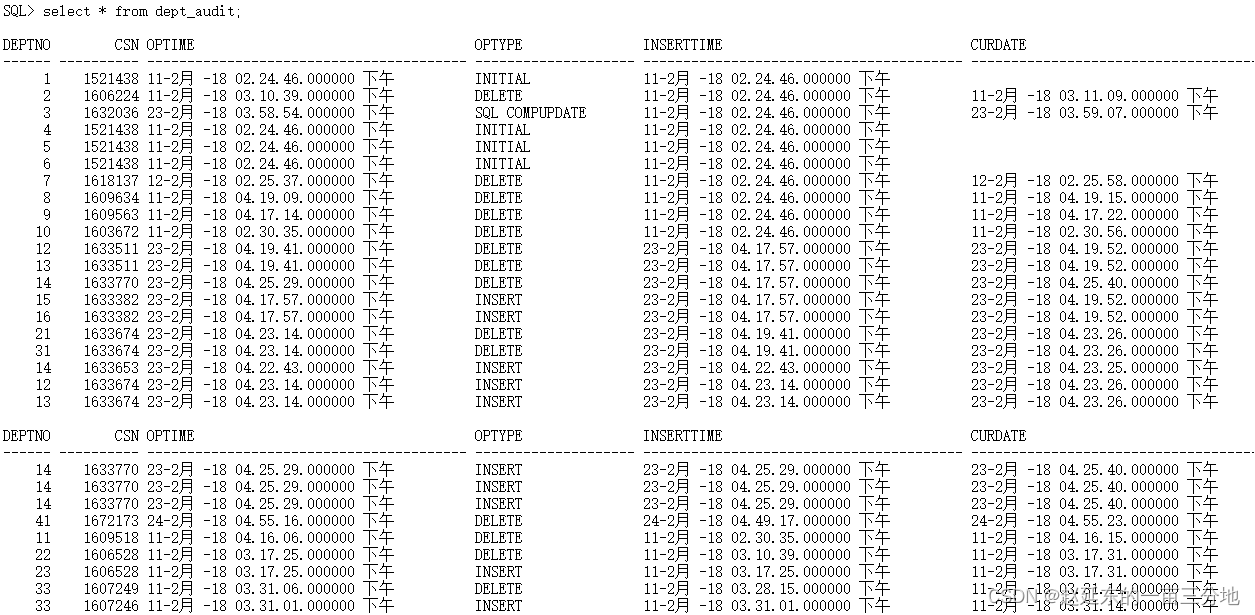
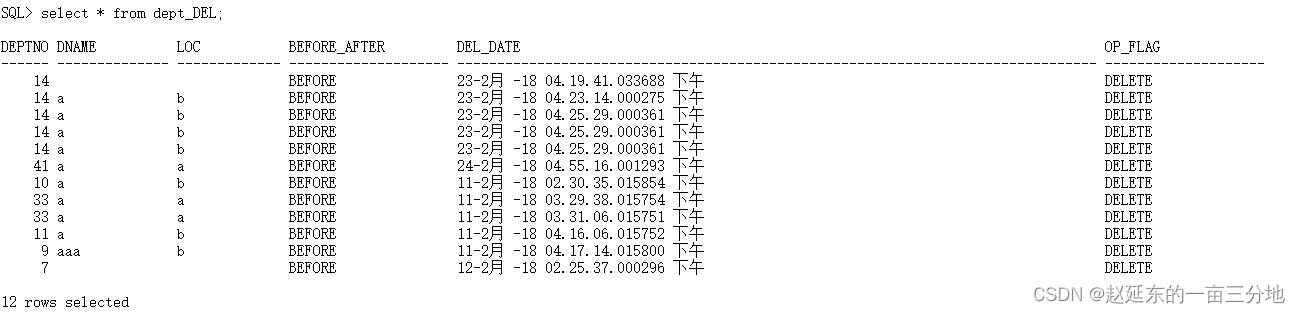
SQL> desc nopk_tab;
Name   Type         Nullable Default Comments
------ ------------ -------- ------- --------
EMPNO  NUMBER(6)    Y
ENAME  VARCHAR2(20) Y
SAL    NUMBER(7,2)  Y
DEPTNO NUMBER(4)    Y
SQL> desc nopk_tab_audit;
Name       Type         Nullable Default Comments
---------- ------------ -------- ------- --------
EMPNO      NUMBER(6)    Y
ENAME      VARCHAR2(20) Y
CSN        NUMBER       Y
OPTIME     TIMESTAMP(6) Y
OPTYPE     VARCHAR2(20) Y
INSERTTIME TIMESTAMP(6) Y
CURDATE    TIMESTAMP(6) Y
SQL> desc nopk_tab_del;
Name         Type         Nullable Default Comments
------------ ------------ -------- ------- --------
EMPNO        NUMBER(6)    Y
ENAME        VARCHAR2(20) Y
SAL          NUMBER(7,2)  Y
DEPTNO       NUMBER(4)    Y
BEFORE_AFTER VARCHAR2(20) Y
DEL_DATE     TIMESTAMP(6) Y
OP_FLAG      VARCHAR2(20) Y
SQL> desc nopk_tab_his;
Name   Type         Nullable Default Comments
------ ------------ -------- ------- --------
EMPNO  NUMBER(6)    Y
ENAME  VARCHAR2(20) Y
SAL    NUMBER(7,2)  Y
DEPTNO NUMBER(4)    Y          SQL> select * from nopk_tab;EMPNO ENAME                      SAL DEPTNO
------- -------------------- --------- ------3333 yanyan                  500.00     201111 yan                     100.00     101222 zhaozhao               1000.00     10
SQL> select * from nopk_tab_HIS;EMPNO ENAME                      SAL DEPTNO
------- -------------------- --------- ------1222 zhaozhao               1000.00     103333 yanyan                  500.00     201111 yan                     100.00     101111 dong                    100.00     301001 aa                       22.00      14444 a                       300.00     101112 test                    300.00     204444 a                       300.00     10
8 rows selected


源端和目的端表结构和数据均已经知道。现在在源端分别给dept表和nopk_tab 表增加一列 test number;
alter table dept add test number;
alter table nopk_tab add test number;
然后切换一下归档日志:
alter system switch logfile;
alter system switch logfile;
然后去目的端分别查看这两张表的源表和其他映射表的表结构:
SQL> desc dept;
Name   Type         Nullable Default Comments
------ ------------ -------- ------- --------
DEPTNO NUMBER(2)
DNAME  VARCHAR2(14) Y
LOC    VARCHAR2(13) Y
TEST   NUMBER       Y
SQL> desc dept_his;
Name   Type         Nullable Default Comments
------ ------------ -------- ------- --------
DEPTNO NUMBER(2)    Y
DNAME  VARCHAR2(14) Y
LOC    VARCHAR2(13) Y
TEST   NUMBER       Y
SQL> desc dept_audit;
Name       Type         Nullable Default Comments
---------- ------------ -------- ------- --------
DEPTNO     NUMBER(2)    Y
CSN        NUMBER       Y
OPTIME     TIMESTAMP(6) Y
OPTYPE     VARCHAR2(20) Y
INSERTTIME TIMESTAMP(6) Y
CURDATE    TIMESTAMP(6) Y
SQL> desc dept_del;
Name         Type         Nullable Default Comments
------------ ------------ -------- ------- --------
DEPTNO       NUMBER(2)    Y
DNAME        VARCHAR2(14) Y
LOC          VARCHAR2(13) Y
BEFORE_AFTER VARCHAR2(20) Y
DEL_DATE     TIMESTAMP(6) Y
OP_FLAG      VARCHAR2(20) Y
TEST         NUMBER       Y    SQL> desc nopk_tab;
Name   Type         Nullable Default Comments
------ ------------ -------- ------- --------
EMPNO  NUMBER(6)    Y
ENAME  VARCHAR2(20) Y
SAL    NUMBER(7,2)  Y
DEPTNO NUMBER(4)    Y
TEST   NUMBER       Y
SQL> desc nopk_tab_audit;
Name       Type         Nullable Default Comments
---------- ------------ -------- ------- --------
EMPNO      NUMBER(6)    Y
ENAME      VARCHAR2(20) Y
CSN        NUMBER       Y
OPTIME     TIMESTAMP(6) Y
OPTYPE     VARCHAR2(20) Y
INSERTTIME TIMESTAMP(6) Y
CURDATE    TIMESTAMP(6) Y
SQL> desc nopk_tab_del;
Name         Type         Nullable Default Comments
------------ ------------ -------- ------- --------
EMPNO        NUMBER(6)    Y
ENAME        VARCHAR2(20) Y
SAL          NUMBER(7,2)  Y
DEPTNO       NUMBER(4)    Y
BEFORE_AFTER VARCHAR2(20) Y
DEL_DATE     TIMESTAMP(6) Y
OP_FLAG      VARCHAR2(20) Y
TEST         NUMBER       Y
SQL> desc nopk_tab_his;
Name   Type         Nullable Default Comments
------ ------------ -------- ------- --------
EMPNO  NUMBER(6)    Y
ENAME  VARCHAR2(20) Y
SAL    NUMBER(7,2)  Y
DEPTNO NUMBER(4)    Y
TEST   NUMBER       Y
从上面ddl操作结果来看,源端的ddl操作的确应用过来了。而且在report中也有记录:
GGSCI (OGG) 4> view report r_sc2
最后面内容如下:
2018-02-24 17:21:22  INFO    OGG-00482  DDL found, operation [alter table dept add test number(size 34)].2018-02-24 17:21:22  INFO    OGG-00489  DDL is of mapped scope, after mapping new operation [alter table SCOTT.DEPT add test number(size 40)].2018-02-24 17:21:22  INFO    OGG-00487  DDL operation included [include mapped], optype [ALTER], objtype [TABLE], objowner [SCOTT], objname [DEPT].2018-02-24 17:21:22  INFO    OGG-01407  Setting current schema for DDL operation to [SCOTT].2018-02-24 17:21:22  INFO    OGG-00484  Executing DDL operation.2018-02-24 17:21:22  INFO    OGG-00483  DDL operation successful.2018-02-24 17:21:22  INFO    OGG-01408  Restoring current schema for DDL operation to [ogg].2018-02-24 17:21:22  INFO    OGG-00489  DDL is of mapped scope, after mapping new operation [alter table SCOTT.DEPT_HIS add test number(size 44)].2018-02-24 17:21:22  INFO    OGG-00487  DDL operation included [include mapped], optype [ALTER], objtype [TABLE], objowner [SCOTT], objname [DEPT_HIS].2018-02-24 17:21:22  INFO    OGG-01407  Setting current schema for DDL operation to [SCOTT].2018-02-24 17:21:22  INFO    OGG-00484  Executing DDL operation.2018-02-24 17:21:22  INFO    OGG-00483  DDL operation successful.2018-02-24 17:21:22  INFO    OGG-01408  Restoring current schema for DDL operation to [ogg].2018-02-24 17:21:22  INFO    OGG-00489  DDL is of mapped scope, after mapping new operation [alter table SCOTT.DEPT_AUDIT add test number(size 46)].2018-02-24 17:21:22  INFO    OGG-00488  DDL operation excluded [exclude objname scott.*_audit], optype [ALTER], objtype [TABLE], objowner [SCOTT], objname [DEPT_AUDIT].2018-02-24 17:21:22  INFO    OGG-00489  DDL is of mapped scope, after mapping new operation [alter table SCOTT.DEPT_DEL add test number(size 44)].2018-02-24 17:21:22  INFO    OGG-00487  DDL operation included [include mapped], optype [ALTER], objtype [TABLE], objowner [SCOTT], objname [DEPT_DEL].2018-02-24 17:21:22  INFO    OGG-01407  Setting current schema for DDL operation to [SCOTT].2018-02-24 17:21:22  INFO    OGG-00484  Executing DDL operation.2018-02-24 17:21:22  INFO    OGG-00483  DDL operation successful.2018-02-24 17:21:22  INFO    OGG-01408  Restoring current schema for DDL operation to [ogg].2018-02-24 17:21:22  INFO    OGG-00482  DDL found, operation [alter table nopk_tab add test number(size 38)].2018-02-24 17:21:22  INFO    OGG-00489  DDL is of mapped scope, after mapping new operation [alter table SCOTT.NOPK_TAB add test number(size 44)].2018-02-24 17:21:22  INFO    OGG-00487  DDL operation included [include mapped], optype [ALTER], objtype [TABLE], objowner [SCOTT], objname [NOPK_TAB].2018-02-24 17:21:22  INFO    OGG-01407  Setting current schema for DDL operation to [SCOTT].2018-02-24 17:21:22  INFO    OGG-00484  Executing DDL operation.2018-02-24 17:21:22  INFO    OGG-00483  DDL operation successful.2018-02-24 17:21:22  INFO    OGG-01408  Restoring current schema for DDL operation to [ogg].2018-02-24 17:21:22  INFO    OGG-00489  DDL is of mapped scope, after mapping new operation [alter table SCOTT.NOPK_TAB_HIS add test number(size 48)].2018-02-24 17:21:22  INFO    OGG-00487  DDL operation included [include mapped], optype [ALTER], objtype [TABLE], objowner [SCOTT], objname [NOPK_TAB_HIS].2018-02-24 17:21:22  INFO    OGG-01407  Setting current schema for DDL operation to [SCOTT].2018-02-24 17:21:22  INFO    OGG-00484  Executing DDL operation.2018-02-24 17:21:22  INFO    OGG-00483  DDL operation successful.2018-02-24 17:21:22  INFO    OGG-01408  Restoring current schema for DDL operation to [ogg].2018-02-24 17:21:22  INFO    OGG-00489  DDL is of mapped scope, after mapping new operation [alter table SCOTT.NOPK_TAB_AUDIT add test number(size 50)].2018-02-24 17:21:22  INFO    OGG-00488  DDL operation excluded [exclude objname scott.*_audit], optype [ALTER], objtype [TABLE], objowner [SCOTT], objname [NOPK_TAB_AUDIT].2018-02-24 17:21:22  INFO    OGG-00489  DDL is of mapped scope, after mapping new operation [alter table SCOTT.NOPK_TAB_DEL add test number(size 48)].2018-02-24 17:21:22  INFO    OGG-00487  DDL operation included [include mapped], optype [ALTER], objtype [TABLE], objowner [SCOTT], objname [NOPK_TAB_DEL].2018-02-24 17:21:22  INFO    OGG-01407  Setting current schema for DDL operation to [SCOTT].2018-02-24 17:21:22  INFO    OGG-00484  Executing DDL operation.2018-02-24 17:21:22  INFO    OGG-00483  DDL operation successful.2018-02-24 17:21:22  INFO    OGG-01408  Restoring current schema for DDL operation to [ogg].
但是我们也能发现,新增加的一列会放到表列的最后面,在XXXXDEL表中显示的不友好,笔者这边需求是这个DEL表的表结构要与源表一致,本人DEL表多出来的那几列是
本人为了测试方便,以及为后面update和PKUPDATE 前映像测试显示方便而加的,所以并不影响原来需求。
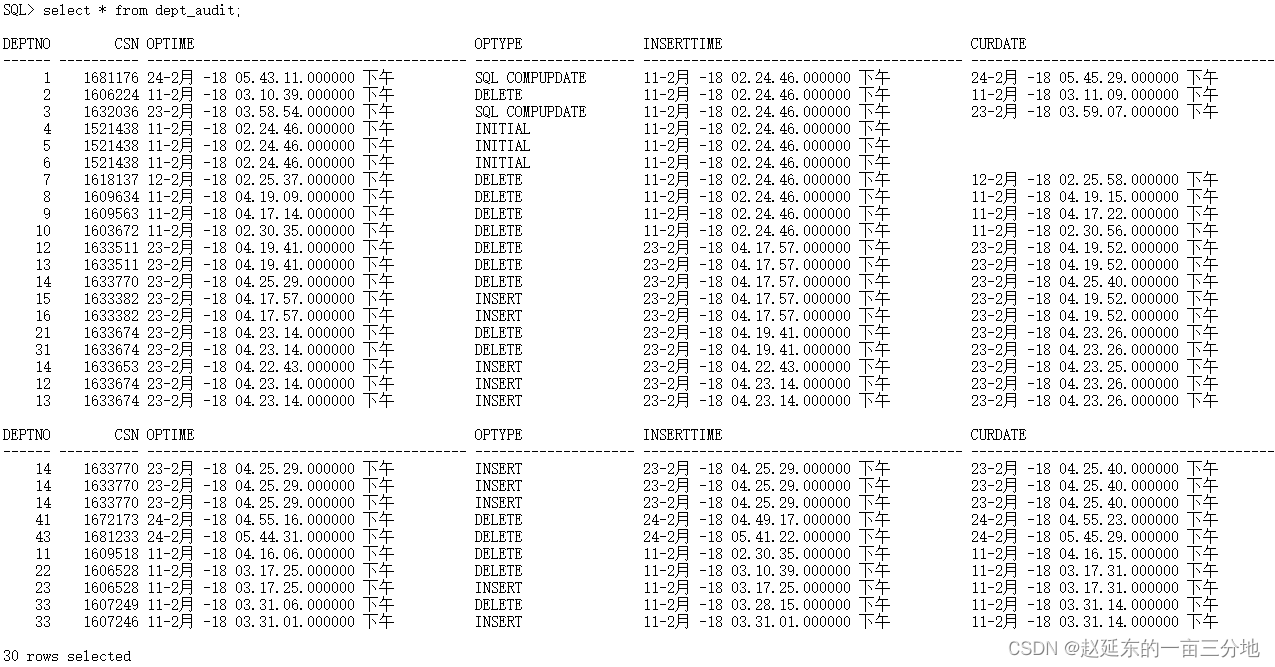
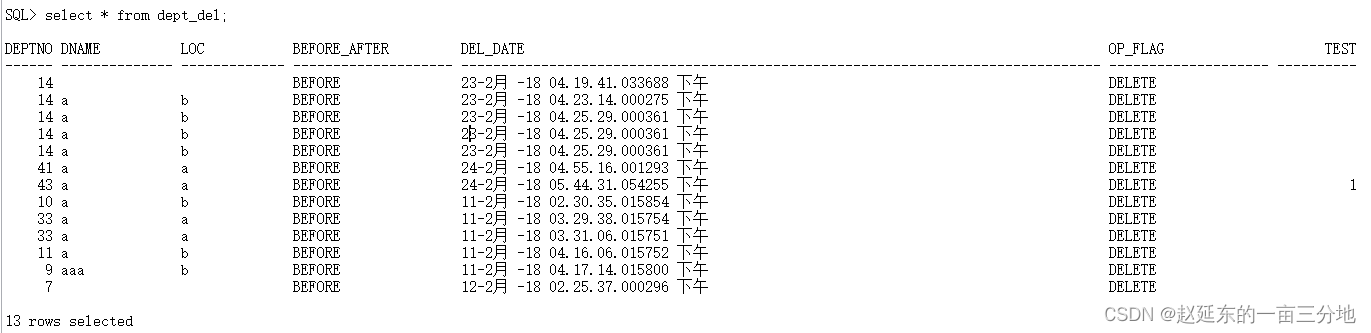
现在分别在源端对这两个表进行增删改操作:
insert into dept values(43,'a','a',1);
insert into nopk_tab values(1003,'aa',22,1,12);
SQL> select * from dept;
DEPTNO DNAME          LOC                 TEST
------ -------------- ------------- ----------1 a              b             23 bbbbb          b             3 cccc           b             4 a              b             5 a              b             6 a              b             43 a              a                      112 ada            b             13 a              b             15 a              b             16 a              b
11 rows selectedSQL> select * from nopk_tab;EMPNO ENAME                      SAL DEPTNO       TEST
------- -------------------- --------- ------ ----------1003 aa                       22.00      1         121222 zhaozhao               1000.00     10 3333 yanyan                  500.00     20 1111 yan                     100.00     10 update dept set test=111 where deptno=1;
update nopk_tab set test=122 where empno=1222;EMPNO ENAME                      SAL DEPTNO       TEST
------- -------------------- --------- ------ ----------1003 aa                       22.00      1         121222 zhaozhao               1000.00     10        1223333 yanyan                  500.00     20 1111 yan                     100.00     10
SQL> select * from dept;
DEPTNO DNAME          LOC                 TEST
------ -------------- ------------- ----------1 a              b                    11123 bbbbb          b             3 cccc           b             4 a              b             5 a              b             6 a              b             43 a              a                      112 ada            b             13 a              b             15 a              b             16 a              b
11 rows selecteddelete from dept where deptno=43;
delete from nopk_tab where empno=1003;SQL> select * from dept;
DEPTNO DNAME          LOC                 TEST
------ -------------- ------------- ----------1 a              b                    11123 bbbbb          b             3 cccc           b             4 a              b             5 a              b             6 a              b             12 ada            b             13 a              b             15 a              b             16 a              b
10 rows selected
SQL> select * from nopk_tab;EMPNO ENAME                      SAL DEPTNO       TEST
------- -------------------- --------- ------ ----------1222 zhaozhao               1000.00     10        1223333 yanyan                  500.00     20 1111 yan                     100.00     10 好了,现在去目的端查看表内容:
alter system switch logfile;
alter system switch logfile;
alter system switch logfile;SQL> select * from dept;
DEPTNO DNAME          LOC                 TEST
------ -------------- ------------- ----------1 A              B                    11123 bbbbb          B             3 cccc           B             4 A              B             5 A              B             6 A              B             12 ada            b             13 a              b             15 a              b             16 a              b
10 rows selected
SQL> select * from dept_his;
DEPTNO DNAME          LOC                 TEST
------ -------------- ------------- ----------1 A              B                    11123 bbbbb          B             3 cccc           B             4 A              B             5 A              B             6 A              B             7 A              B             8 a              b             9 aaa            b             10 a              b             12 ada            b             13 a              b             14 a              b             15 a              b             16 a              b             14 a              b             14 a              b             14 a              b             14 a              b             41 a              a
DEPTNO DNAME          LOC                 TEST
------ -------------- ------------- ----------43 a              a                      111 a              b             33 a              a             33 a              a
24 rows selected
SQL> select * from nopk_tab;EMPNO ENAME                      SAL DEPTNO       TEST
------- -------------------- --------- ------ ----------3333 yanyan                  500.00     20 1111 yan                     100.00     10 1222 zhaozhao               1000.00     10        122
SQL> select * from nopk_tab_his;EMPNO ENAME                      SAL DEPTNO       TEST
------- -------------------- --------- ------ ----------1222 zhaozhao               1000.00     10        1223333 yanyan                  500.00     20 1111 yan                     100.00     10 1111 dong                    100.00     30 1001 aa                       22.00      1 1003 aa                       22.00      1         124444 a                       300.00     10 1112 test                    300.00     20 4444 a                       300.00     10
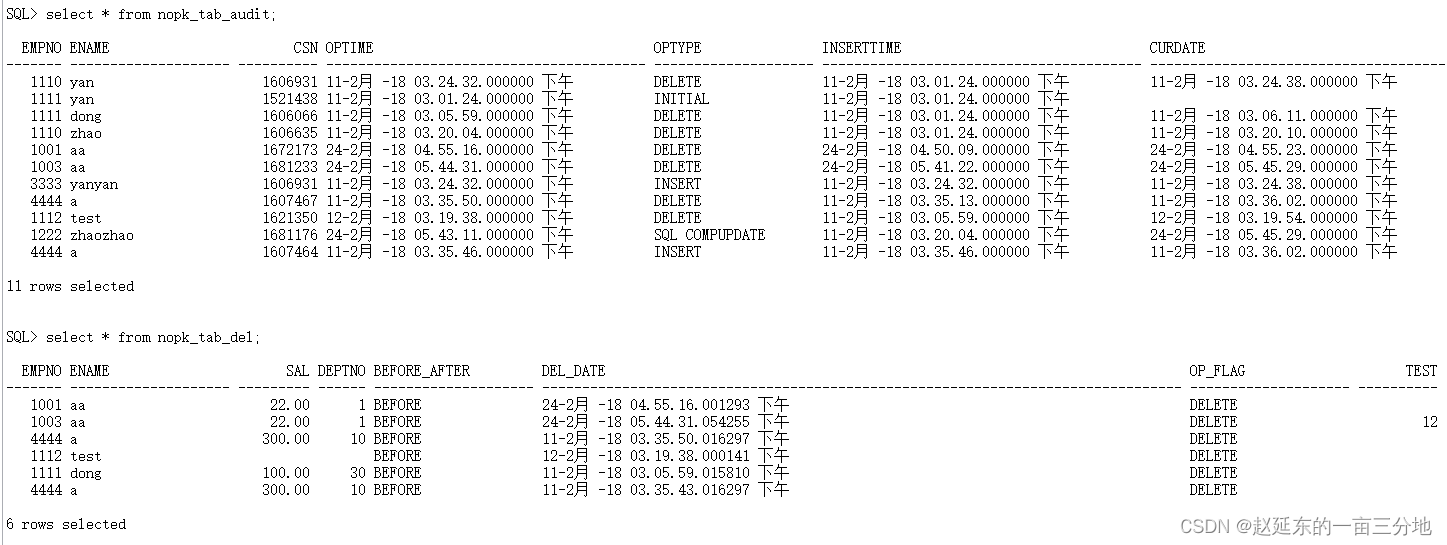
发现仍然可以成功捕获,这是应当的。在测试一下多次插入删除同一条sql:
-----源端操作:
insert into dept values(43,'a','a',1);
insert into nopk_tab values(1003,'aa',22,1,12);
delete from dept where deptno=41;
delete from nopk_tab where empno=1001;
alter system switch logfile;
—目的端查看:
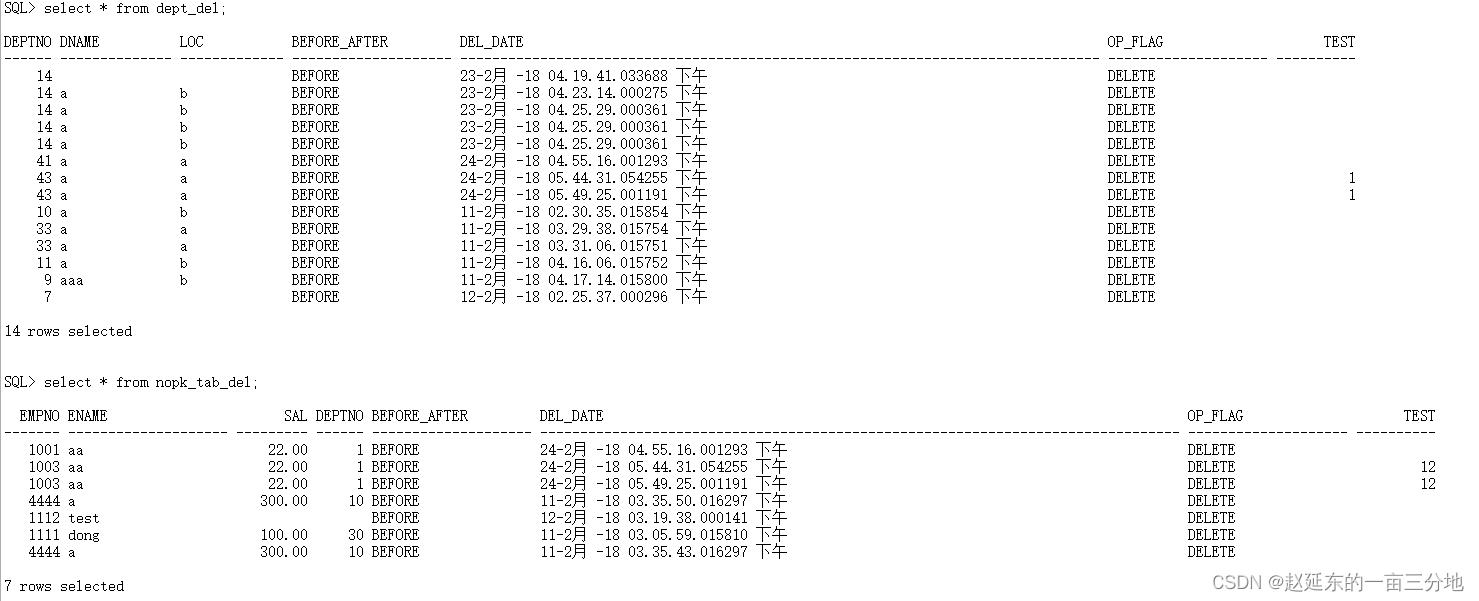
SQL> select * from dept_his;
DEPTNO DNAME          LOC                 TEST
------ -------------- ------------- ----------1 A              B                    11123 bbbbb          B             3 cccc           B             4 A              B             5 A              B             6 A              B             7 A              B             8 a              b             9 aaa            b             10 a              b             12 ada            b             13 a              b             14 a              b             15 a              b             16 a              b             14 a              b             14 a              b             14 a              b             14 a              b             41 a              a
DEPTNO DNAME          LOC                 TEST
------ -------------- ------------- ----------43 a              a                      143 a              a                      111 a              b             33 a              a             33 a              a
25 rows selected
SQL> select * from nopk_tab_his;EMPNO ENAME                      SAL DEPTNO       TEST
------- -------------------- --------- ------ ----------1222 zhaozhao               1000.00     10        1223333 yanyan                  500.00     20 1111 yan                     100.00     10 1111 dong                    100.00     30 1001 aa                       22.00      1 1003 aa                       22.00      1         121003 aa                       22.00      1         124444 a                       300.00     10 1112 test                    300.00     20 4444 a                       300.00     10
10 rows selected
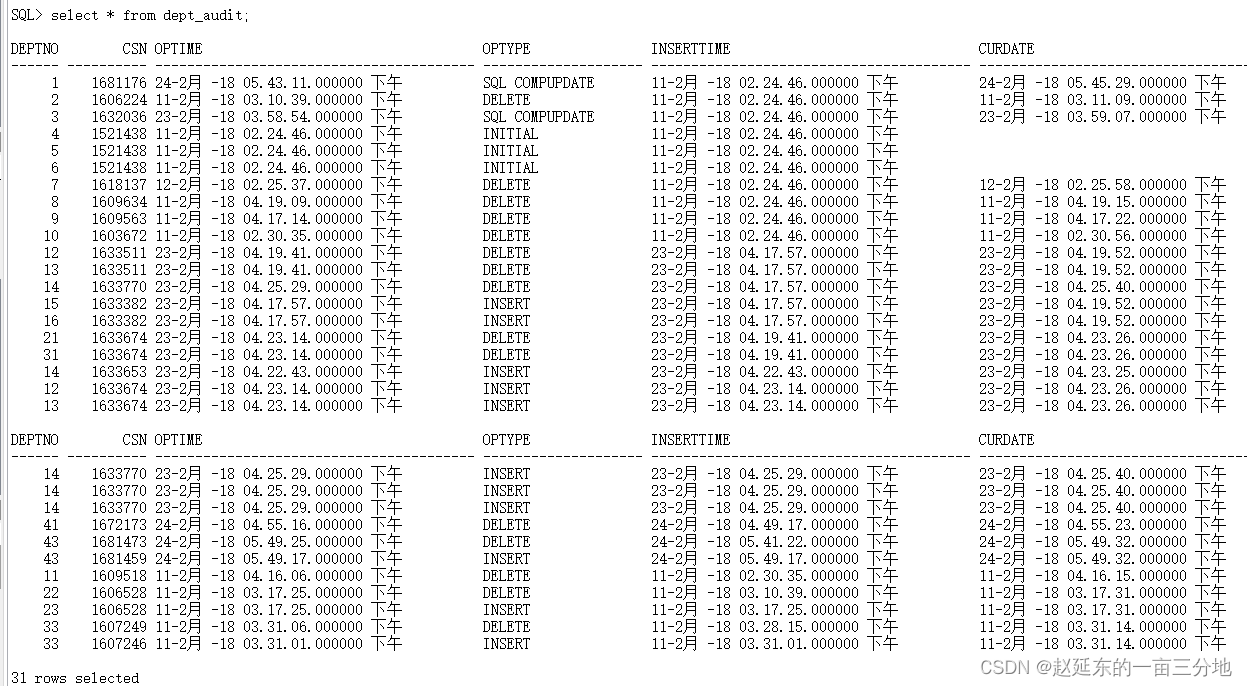
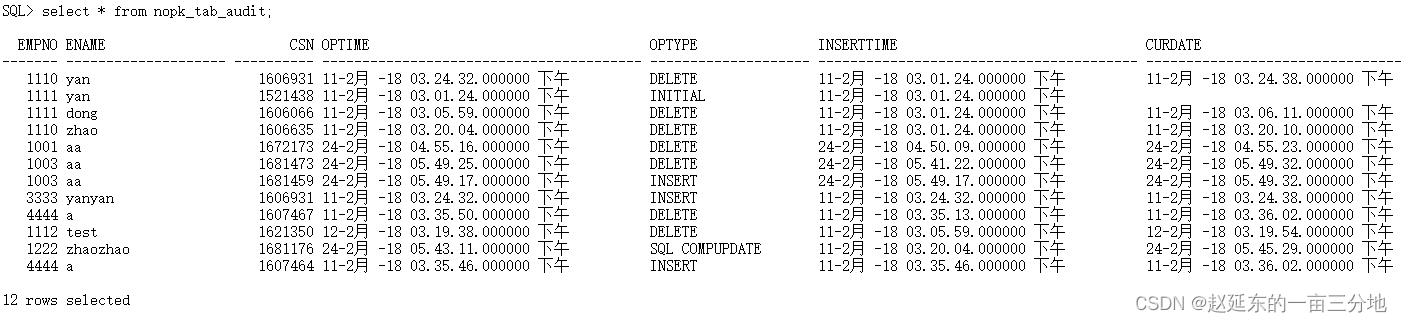
SQL> select * from dept;
DEPTNO DNAME          LOC                 TEST
------ -------------- ------------- ----------1 A              B                    11123 bbbbb          B             3 cccc           B             4 A              B             5 A              B             6 A              B             12 ada            b             13 a              b             15 a              b             16 a              b
10 rows selected
SQL> select * from nopk_tab;EMPNO ENAME                      SAL DEPTNO       TEST
------- -------------------- --------- ------ ----------3333 yanyan                  500.00     20 1111 yan                     100.00     10 1222 zhaozhao               1000.00     10        122
发现结果仍然是正常的。本来就应该是正常的,但是为了保险起见,才做了一下多余的测试,毕竟应用到生产,全公司的ODS平台都应用此配置,好了现在再再源端那两张表中
删除新加的test列:
alter table dept drop column test;
alter table nopk_tab drop column test;
alter system switch logfile;
接下来在目的端查看:
先看report文件:
view report r_sc2
2018-02-26 09:19:29  INFO    OGG-00482  DDL found, operation [alter table dept drop column test  (size 34)].2018-02-26 09:19:29  INFO    OGG-00489  DDL is of mapped scope, after mapping new operation [alter table SCOTT.DEPT drop column test  (size 40)].2018-02-26 09:19:29  INFO    OGG-00487  DDL operation included [include mapped], optype [ALTER], objtype [TABLE], objowner [SCOTT], objname [DEPT].2018-02-26 09:19:29  INFO    OGG-01407  Setting current schema for DDL operation to [SCOTT].2018-02-26 09:19:29  INFO    OGG-00484  Executing DDL operation.2018-02-26 09:19:30  INFO    OGG-00483  DDL operation successful.2018-02-26 09:19:30  INFO    OGG-01408  Restoring current schema for DDL operation to [ogg].2018-02-26 09:19:30  INFO    OGG-00489  DDL is of mapped scope, after mapping new operation [alter table SCOTT.DEPT_HIS drop column test  (size 44)].2018-02-26 09:19:30  INFO    OGG-00487  DDL operation included [include mapped], optype [ALTER], objtype [TABLE], objowner [SCOTT], objname [DEPT_HIS].2018-02-26 09:19:30  INFO    OGG-01407  Setting current schema for DDL operation to [SCOTT].2018-02-26 09:19:30  INFO    OGG-00484  Executing DDL operation.2018-02-26 09:19:30  INFO    OGG-00483  DDL operation successful.2018-02-26 09:19:30  INFO    OGG-01408  Restoring current schema for DDL operation to [ogg].2018-02-26 09:19:30  INFO    OGG-00489  DDL is of mapped scope, after mapping new operation [alter table SCOTT.DEPT_AUDIT drop column test  (size 46)].2018-02-26 09:19:30  INFO    OGG-00488  DDL operation excluded [exclude objname scott.*_audit], optype [ALTER], objtype [TABLE], objowner [SCOTT], objname [DEPT_AUDIT].2018-02-26 09:19:30  INFO    OGG-00489  DDL is of mapped scope, after mapping new operation [alter table SCOTT.DEPT_DEL drop column test  (size 44)].2018-02-26 09:19:30  INFO    OGG-00487  DDL operation included [include mapped], optype [ALTER], objtype [TABLE], objowner [SCOTT], objname [DEPT_DEL].2018-02-26 09:19:30  INFO    OGG-01407  Setting current schema for DDL operation to [SCOTT].2018-02-26 09:19:30  INFO    OGG-00484  Executing DDL operation.2018-02-26 09:19:30  INFO    OGG-00483  DDL operation successful.2018-02-26 09:19:30  INFO    OGG-01408  Restoring current schema for DDL operation to [ogg].2018-02-26 09:19:30  INFO    OGG-00482  DDL found, operation [alter table nopk_tab drop column test  (size 38)].2018-02-26 09:19:30  INFO    OGG-00489  DDL is of mapped scope, after mapping new operation [alter table SCOTT.NOPK_TAB drop column test  (size 44)].2018-02-26 09:19:30  INFO    OGG-00487  DDL operation included [include mapped], optype [ALTER], objtype [TABLE], objowner [SCOTT], objname [NOPK_TAB].2018-02-26 09:19:30  INFO    OGG-01407  Setting current schema for DDL operation to [SCOTT].2018-02-26 09:19:30  INFO    OGG-00484  Executing DDL operation.2018-02-26 09:19:30  INFO    OGG-00483  DDL operation successful.2018-02-26 09:19:30  INFO    OGG-01408  Restoring current schema for DDL operation to [ogg].2018-02-26 09:19:30  INFO    OGG-00489  DDL is of mapped scope, after mapping new operation [alter table SCOTT.NOPK_TAB_HIS drop column test  (size 48)].2018-02-26 09:19:30  INFO    OGG-00487  DDL operation included [include mapped], optype [ALTER], objtype [TABLE], objowner [SCOTT], objname [NOPK_TAB_HIS].2018-02-26 09:19:30  INFO    OGG-01407  Setting current schema for DDL operation to [SCOTT].2018-02-26 09:19:30  INFO    OGG-00484  Executing DDL operation.2018-02-26 09:19:30  INFO    OGG-00483  DDL operation successful.2018-02-26 09:19:30  INFO    OGG-01408  Restoring current schema for DDL operation to [ogg].2018-02-26 09:19:30  INFO    OGG-00489  DDL is of mapped scope, after mapping new operation [alter table SCOTT.NOPK_TAB_AUDIT drop column test  (size 50)].2018-02-26 09:19:30  INFO    OGG-00488  DDL operation excluded [exclude objname scott.*_audit], optype [ALTER], objtype [TABLE], objowner [SCOTT], objname [NOPK_TAB_AUDIT].2018-02-26 09:19:30  INFO    OGG-00489  DDL is of mapped scope, after mapping new operation [alter table SCOTT.NOPK_TAB_DEL drop column test  (size 48)].2018-02-26 09:19:30  INFO    OGG-00487  DDL operation included [include mapped], optype [ALTER], objtype [TABLE], objowner [SCOTT], objname [NOPK_TAB_DEL].2018-02-26 09:19:30  INFO    OGG-01407  Setting current schema for DDL operation to [SCOTT].2018-02-26 09:19:30  INFO    OGG-00484  Executing DDL operation.2018-02-26 09:19:30  INFO    OGG-00483  DDL operation successful.2018-02-26 09:19:30  INFO    OGG-01408  Restoring current schema for DDL operation to [ogg].
提示成功捕获到了ddl,看一下表结构:
SQL> desc dept;
Name                      Null?    Type
----------------------------------------- -------- ----------------------------
DEPTNO                    NOT NULL NUMBER(2)
DNAME                            VARCHAR2(14)
LOC                            VARCHAR2(13)SQL> desc dept_his;
Name                      Null?    Type
----------------------------------------- -------- ----------------------------
DEPTNO                        NUMBER(2)
DNAME                            VARCHAR2(14)
LOC                            VARCHAR2(13)SQL> desc dept_del;
Name                      Null?    Type
----------------------------------------- -------- ----------------------------
DEPTNO                        NUMBER(2)
DNAME                            VARCHAR2(14)
LOC                            VARCHAR2(13)
BEFORE_AFTER                        VARCHAR2(20)
DEL_DATE                        TIMESTAMP(6)
OP_FLAG                        VARCHAR2(20)
接下来再看一下nopk_tab的:
SQL> desc nopk_tab;
Name                      Null?    Type
----------------------------------------- -------- ----------------------------
EMPNO                            NUMBER(6)
ENAME                            VARCHAR2(20)
SAL                            NUMBER(7,2)
DEPTNO                        NUMBER(4)SQL> desc nopk_tab_his;
Name                      Null?    Type
----------------------------------------- -------- ----------------------------
EMPNO                            NUMBER(6)
ENAME                            VARCHAR2(20)
SAL                            NUMBER(7,2)
DEPTNO                        NUMBER(4)SQL> desc nopk_tab_del;
Name                      Null?    Type
----------------------------------------- -------- ----------------------------
EMPNO                            NUMBER(6)
ENAME                            VARCHAR2(20)
SAL                            NUMBER(7,2)
DEPTNO                        NUMBER(4)
BEFORE_AFTER                        VARCHAR2(20)
DEL_DATE                        TIMESTAMP(6)
OP_FLAG VARCHAR2(20)十一、在另一个文章:【大数据实时数据同步】OGG多路映射同步原表&审计表&只存删除数据表实现方案(二)
相关文章:
置顶!!!主页禁言提示原因:在自己论坛发动态误带敏感词,在自己论坛禁止评论90天
置顶!!!主页禁言提示原因:在自己论坛发动态误带敏感词,在自己论坛禁止评论90天 置顶!!!主页禁言提示原因:在自己论坛发动态误带敏感词,在自己论坛禁止评论90天…...

优思学院|解密六西格玛:探索DMAIC和DMADV之间的区别
六西格玛方法中最为广泛使用的两种方法是DMAIC和DMADV。这两种方法都是为了让企业流程更加高效和有效而设计的。虽然这两种方法有一些重要的共同特点,但它们并不可以互相替代,并且被开发用于不同的企业流程。在更详细地比较这两种方法之前,我…...
)
Pytorch的DataLoader输入输出(以文本为例)
本文不做太多原理介绍,直讲使用流畅。想看更多底层实现-〉传送门。DataLoader简介torch.utils.data.DataLoader是PyTorch中数据读取的一个重要接口,该接口定义在dataloader.py脚本中,只要是用PyTorch来训练模型基本都会用到该接口。本文介绍t…...

代谢组学:Microbiome又一篇!绘制重症先天性心脏病新生儿肠道微生态全景图谱
文章标题:Mapping the early life gut microbiome in neonates with critical congenital heart disease: multiomics insights and implications for host metabolic and immunological health 发表期刊:Microbiome 影响因子:16.837…...

Java基本类型所占字节简述
类型分类所占字节取值范围boolean布尔型1bit0 false、 1 true (1个bit 、1个字节、4个字节)char 字符型(Unicode字符集中的一个元素) 2字节-32768~32767(-2的15次方~2的15次方-1)byte整型1字节-128&a…...

Linux vi常用操作
vi/vim 共分为三种模式,分别是命令模式(Command mode),输入模式(Insert mode)和底线命令模式(Last line mode)。 这三种模式的作用分别是: 命令模式: 用户刚…...
、ANSI(多字节))
Unicode(宽字节)、ANSI(多字节)
1、什么时候用Unicode(宽字节),什么时候用ANSI(多字节)? 在linux/windows等操作系统中使用的,一般都是Unicode(宽字节)。 下位机PLC/单片机等硬件设备中使用,一般都是ANSI(多字节)。 所以,通讯中(比如VS项目&#x…...

STM32实战之LED循环点亮
接着上一章讲。本章我们来讲一讲LED流水灯,循环点亮LED。 在LED章节有的可能没有讲到,本章会对其进行说明,尽量每个函数说一下作用。也会在最后说一下STM32的寄存器,在编程中寄存器是避免不了的东西,寄存器也是非常好理…...
智慧厕所智能卫生间系统有哪些功能
南宁北站智能厕所主要功能有哪些?1、卫生间环境空气监测男厕、女厕环境空气监测系统包括对厕所内的温度、湿度、氨气、硫化氢、PM2.5、烟雾等气体数据的实时监测。2、卫生间厕位状态监测系统实时监测厕位内目前的使用状态(有人或无人),数据信…...
【网络】套接字 -- TCP
🥁作者: 华丞臧. 📕专栏:【网络】 各位读者老爷如果觉得博主写的不错,请诸位多多支持(点赞收藏关注)。如果有错误的地方,欢迎在评论区指出。 推荐一款刷题网站 👉 LeetCode刷题网站 文章…...
NDK C++ map容器
map容器// TODO map容器 #include <iostream> #include <map>using namespace std;int main() {// TODO map<int, string>按key值排序,同一个key不可以重复插入map<int, string> map1;map1.insert(pair<int, string>(1, "111&qu…...

linux(Centos)安装docker
官网地址:Install Docker Engine on CentOS 首先检查linux系统版本及内核: 安装docker要求系统版本至少为7.x版本,内核至少为3.8以上 cat /etc/redhat-release # 查看系统版本号uname -r #查看linux系统内核 检查系统是否能连上外网&#…...
Delphi 中 FireDAC 数据库连接(处理错误)
参见:Delphi 中 FireDAC 数据库连接(总览)本主题描述了如何用FireDAC处理数据库错误。一、概述EFDDBEngineException类是所有DBMS异常的基类。单个异常对象是一个数据库错误的集合,可以通过EFDDBEngineException.Errors[]属性访问…...
算法小抄3-理解使用Python容器之列表
引言 首先说一个概念哈,程序算法数据结构,算法是条件语句与循环语句组成的逻辑结构,而数据结构也就是容器. 算法决定数据该如何处理,而容器则决定如何数据如何存储. 不同的语言对容器有不同的实现方式, 但他们的功能都是相似的, 打好容器基础,你就可以在各式各样的语言中来回横…...
Vue3中watch的value问题
目录前言一,ref和reactive的简单复习1.ref函数1.2 reactive函数1.3 用ref定义对象类型数据不用reactive二,watch的value问题2.1 ref2.1.1 普通类型数据2.1.2 对象类型数据2.1.3 另一种方式2.2 reactive三,总结后记前言 在Vue3中,…...
【线性筛+DP】最大和
看错题了,呃呃,其实就是个简单DP最大和 - 蓝桥云课 (lanqiao.cn)题意:思路:设dp[i]为以1为终点的最大和,然后枚举状态和决策就行了主要是线性筛的应用,它可以预处理出一个数的最小质因子是多少Code…...
openpnp - configure - 丢弃(Discard)位置的设置
文章目录openpnp - configure - 丢弃(Discard)位置的设置概述笔记设置丢弃位置吸取元件失败后, 吸嘴一直吸气的处理ENDopenpnp - configure - 丢弃(Discard)位置的设置 概述 测试时, 吸取了一个元件, 吸取成功了, 现在想将这个料丢掉. 点击控制面板-Special页中的Discard不好…...
java Object 万字详解 (通俗易懂)
基本介绍构造方法成员方法hashCode()getClass()toString()equals()finalize()JavaBean重写Object类的方法重写toString重写equals一、基本介绍Object类是java类层次最顶层的基类(父类),所有类都是直接或间接继承自Object类,因此&a…...
Java并发简介(什么是并发)
文章目录并发概念并发和并行同步和异步阻塞和非阻塞进程和线程竞态条件和临界区管程并发的特点提升资源利用率程序响应更快并发的问题安全性问题缓存导致的可见性问题线程切换带来的原子性问题编译优化带来的有序性问题保证并发安全的思路互斥同步(阻塞同步…...

团队API管理工具-YAPI
团队API管理工具-YAPI 推荐一款接口管理平台,操作简单、界面友好、功能丰富、支持markdown语法、可使用Postman导入、Swagger同步数据展示、LDAP、权限管理等功能。 YApi是高效、易用、功能强大的api管理平台,旨在为开发、产品、测试人员提供更优雅的接…...

DIY复刻经典:Texar Audio Prism动态处理器克隆套件全攻略
1. 项目概述:Texar Audio Prism 克隆套件如果你在专业音频圈子里混过一段时间,尤其是对上世纪八九十年代那些经典的、带点“魔法”色彩的外置动态处理器感兴趣,那么“Texar Audio Prism”这个名字你大概率不会陌生。它不是最常见的1176或者LA…...

对称与负电源测试:动态直流电子负载的设计、原理与应用
1. 项目概述:对称与负电源的静态与动态直流负载在电子实验室里,测试一个电源的性能,尤其是它的动态响应能力,是件既基础又关键的事。我们常说的“直流电子负载”就是这个领域的核心工具。我之前设计并分享过一个用于正电源测试的静…...

【DeepSeek测试用例生成实战指南】:20年QA专家亲授5大高覆盖率生成模式与3个避坑红线
更多请点击: https://codechina.net 第一章:DeepSeek测试用例生成的核心价值与适用边界 DeepSeek系列大模型在代码理解与生成任务中展现出显著的上下文建模能力,其测试用例生成功能并非通用“黑盒测试器”,而是聚焦于**单元级、函…...

光轮智能 谢晨 访谈总结机器人仿真数据产业
光轮智能 谢晨 访谈总结机器人仿真关于创始人关于数据数据金字塔数据痛点仿真数据的重要性仿真数据的质量b站链接地址公司官网关于创始人 清华物理;哥伦比亚金融;英伟达智驾仿真;小鹏智驾仿真;现为光轮智能CEO 关于数据 数据的…...

AI率总超标?2026年AI写作辅助网站排行榜权威发布,轻松定稿不是梦!
写论文效率低、熬夜赶稿、查重不过关?别慌!2026 年最新 AI 论文写作工具合集来了,覆盖选题、大纲、初稿、润色、降重、格式、文献引用全流程,帮你精准匹配最适合的学术助手,彻底告别论文内耗!🏆…...

操作符从浅入深的讲解
1. 操作符的分类 2. ⼆进制和进制转换 3. 原码、反码、补码 4. 移位操作符 5. 位操作符:&、|、^、~ 6. 单⽬操作符 7. 逗号表达式 8. 下标访问[]、函数调⽤() 9. 结构成员访问操作符 10. 操作符的属性:优先级、结合性 11. 表达式求值1.操作符的分类以…...

Unlock-Music:浏览器中一键解锁加密音乐文件的完整指南
Unlock-Music:浏览器中一键解锁加密音乐文件的完整指南 【免费下载链接】unlock-music 在浏览器中解锁加密的音乐文件。原仓库: 1. https://github.com/unlock-music/unlock-music ;2. https://git.unlock-music.dev/um/web 项目地址: http…...

Claude Agent SDK 从 0 到 1 快速上手教程
Claude Agent SDK 从 0 到 1 快速上手教程 什么是 Claude Agent SDK? Claude Agent SDK 是 Anthropic 官方推出的用于构建 AI 智能体的开发工具包。它基于 Claude Code 构建,让开发者能够以编程方式创建、扩展和定制由 Claude 驱动的应用程序。与简单的聊天机器人不同,基于…...

Noto字体终极指南:告别“豆腐块“,让全球文字清晰显示
Noto字体终极指南:告别"豆腐块",让全球文字清晰显示 【免费下载链接】noto-fonts Noto fonts, except for CJK and emoji 项目地址: https://gitcode.com/gh_mirrors/no/noto-fonts 在数字世界中,你是否经常看到那些令人困…...

如何优化 MySQL 千万级数据分页查询的性能?
它的本质是:**传统 LIMIT offset, size 在大数据量下性能急剧下降,是因为 MySQL 必须 扫描并丢弃 前 offset 行数据。当 offset 很大时(如 LIMIT 1000000, 10),MySQL 需要读取 1,000,010 行记录,执行 1,000…...