
Jenkins Pipeline脚本优化:为Kubernetes应用部署增加状态检测
引言
在软件部署的世界中,Jenkins已经成为自动化流程的代名词。不断变化的技术环境要求我们持续改进部署流程以满足现代应用部署的需要。在本篇博客中,作为一位资深运维工程师,我将分享如何将Jenkins Pipeline进化至不仅能支持部署应用直至Running状态检测,同时也能兼顾Deployment和StatefulSet资源的轮询更新,并详细介绍滚动更新策略的配置方法。
初始Jenkins Pipeline分析
参照前文:Jenkins Pipeline 脚本优化实践:从繁琐到简洁,初始化pipeline如下:
pipeline {agent none // Use none at the top level, each stage will define its own agent.environment {REGISTRY = "swr.cn-north-4.myhuaweicloud.com/master-metaspace"KUBE_CONFIG = "--namespace=master-metaspace --context=master"KUBE_YAML_PATH = "/home/jenkins/workspace/yaml/master-metaspace"// Assume that 'data' is defined elsewhere or injected as a parameter.BASE_WORKSPACE = "xxxxxxx" // 定义一个基础工作空间路径}stages {stage("GetCode") {agent { label "build01" }steps {script {checkout scm: [$class: 'GitSCM',branches: [[name: env.branchName]],extensions: [[$class: 'CloneOption', depth: 1, noTags: false, shallow: true]],userRemoteConfigs: [[credentialsId: 'xxxx', url: env.gitHttpURL]]]}}}stage("Docker Builds") {parallel {stage('Build dataloader-game-ucenter') {agent { label "build01" }when { environment name: 'dataloader', value: 'true' }steps {buildAndPushDockerImage("dataloader-game-ucenter", env.data, env.BASE_WORKSPACE)}}stage('Build datawriter-game-ucenter') {agent { label "build01" }when { environment name: 'datawriter', value: 'true' }steps {buildAndPushDockerImage("datawriter-game-ucenter", env.data, env.BASE_WORKSPACE)}}stage('Build game-ucenter') {agent { label "build01" }when { environment name: 'game-ucenter', value: 'true' }steps {buildAndPushDockerImage("game-ucenter", env.data, env.BASE_WORKSPACE)}}}}stage('Development Deployment') {parallel {stage("Deploy datawriter-game-ucenter") {when { environment name: 'datawriter-game-ucenter', value: 'true' }agent { label  "huaweiyun-xx" }steps {deployToKubernetes("datawriter-game-ucenter")}}stage("Deploy dataloader-game-ucenter") {when { environment name: 'dataloader', value: 'true' }agent { label  "huaweiyun-xx" }steps {deployToKubernetes("dataloader-game-ucenter")}}stage("Deploy game-ucenter") {when { environment name: 'game-ucenter', value: 'true' }agent { label  "huaweiyun-xx" }steps {deployToKubernetes("game-ucenter")}}}}}
}// Define methods outside pipeline to avoid repetitiondef buildAndPushDockerImage(String imageName, String tag, String workspacePath) {sh "cd ${workspacePath} && echo 'Current directory: \$(pwd)'" // 使用基础工作空间变量sh "cd ${workspacePath}/${imageName}&& docker build --build-arg NODE_ENV=$imageName -t $REGISTRY/$imageName:$tag ."withCredentials([usernamePassword(credentialsId: 'hw-registry', passwordVariable: 'dockerPassword', usernameVariable: 'dockerUser')]) {sh "docker login -u $dockerUser -p $dockerPassword $REGISTRY"sh "docker push $REGISTRY/$imageName:$tag"}
}def deployToKubernetes(String kubernetesComponent) {String templateFile = "${KUBE_YAML_PATH}/${kubernetesComponent}.tpl"String outputFile = "${KUBE_YAML_PATH}/${kubernetesComponent}.yaml"sh "sed -e 's/{data}/$data/g' $templateFile > $outputFile"sh "sudo kubectl apply -f $outputFile $KUBE_CONFIG"
}
初始的Jenkins Pipeline定义了一个基本的CI/CD流程,涵盖了代码拉取、Docker镜像构建、推送及在Kubernetes环境中的部署。然而,流程中缺少了对部署状态的检查,这是在确保部署稳定性方面至关重要的一个环节。
进化 I:探针引入Deployment部署
现代应用部署不仅仅需要一个“部署到Kubernetes”的指令,更需要在部署后进行健康检查。对于Deployment类型的应用来说,我们需要在所有Pods运行并处于READY状态后才认为部署成功。
状态检测方法介绍
为此,我们引入了checkKubernetesResourceStatus方法来检查资源的状态。该方法通过kubectl的get命令和jsonpath查询输出来轮询检查ready副本数。如果指定时间内资源不达状态,则流程失败。
Jenkinsfile变更详解:
引入checkKubernetesResourceStatus方法来检测deployment各个阶段部署的状态。
def checkKubernetesResourceStatus(String deploymentName, String namespace) {int attempts = 30 // Set the number of retry attemptsint sleepTime = 10 // Set the sleep time between attempts in secondsString readyReplicasJsonPath = ".status.readyReplicas"for (int i = 1; i <= attempts; i++) {// Check the deployment statusString statusCheck = sh (script: "kubectl get deployment ${deploymentName} --namespace=${namespace} -o jsonpath=\"{${readyReplicasJsonPath}}\"",returnStdout: true).trim()// If the number of ready replicas is not empty and greater than 0if (statusCheck && statusCheck.isInteger() && statusCheck.toInteger() > 0) {echo "Deployment ${deploymentName} is ready."return} else {echo "Waiting for Deployment ${deploymentName} to be ready. Attempt ${i}/${attempts}"sleep sleepTime}}error "Deployment ${deploymentName} did not become ready after ${attempts} attempts"
}
以Deploy game-ucenter stage为例:
stage("Deploy game-ucenter") {when { environment name: 'game-ucenter', value: 'true' }agent { label "xxxx" }steps {deployToKubernetes("game-ucenter")checkKubernetesResourceStatus("game-ucenter", "master-metaspace")}}
game-ucenter模板文件如下:
apiVersion: apps/v1
kind: Deployment
metadata:name: game-ucenter
spec:replicas: 1selector:matchLabels:app: game-ucentertemplate:metadata:labels:app: game-ucenterspec:containers:- name: game-ucenterimage: xxxxxx/xxxx/game-ucenter:{data}envFrom:- configMapRef:name: deployports:- containerPort: 80resources:requests:memory: "4096M"cpu: "2000m"limits:memory: "4096M"cpu: "2000m" livenessProbe:httpGet:scheme: HTTPpath: /test.htmlport: 80initialDelaySeconds: 20periodSeconds: 120successThreshold: 1failureThreshold: 3readinessProbe:httpGet:scheme: HTTPpath: /test.htmlport: 80initialDelaySeconds: 20periodSeconds: 120imagePullSecrets:                                              - name: xxxx
---apiVersion: v1
kind: Service
metadata:name: game-ucenterlabels:app: game-ucenter
spec:ports:- port: 80protocol: TCPtargetPort: 80selector:app: game-ucenter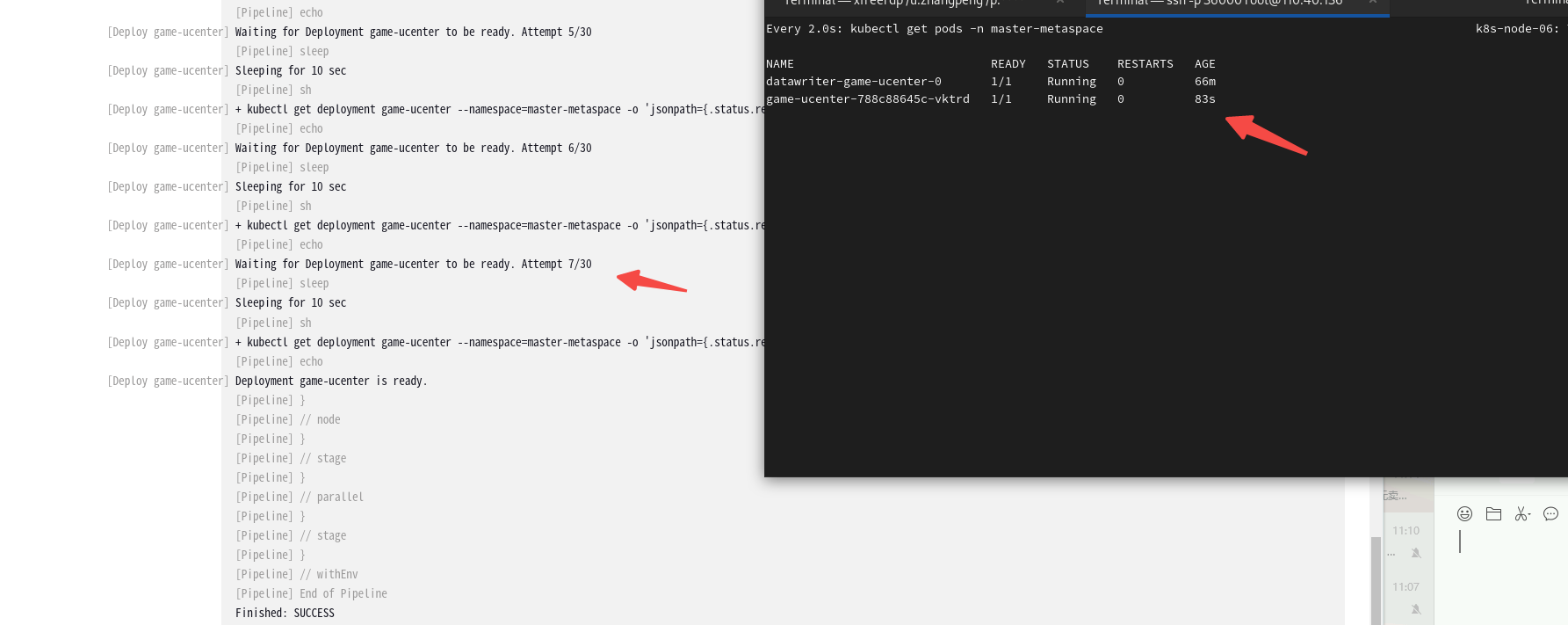
尝试修改以下**replicas: 3 **重新运行以下pipeline:
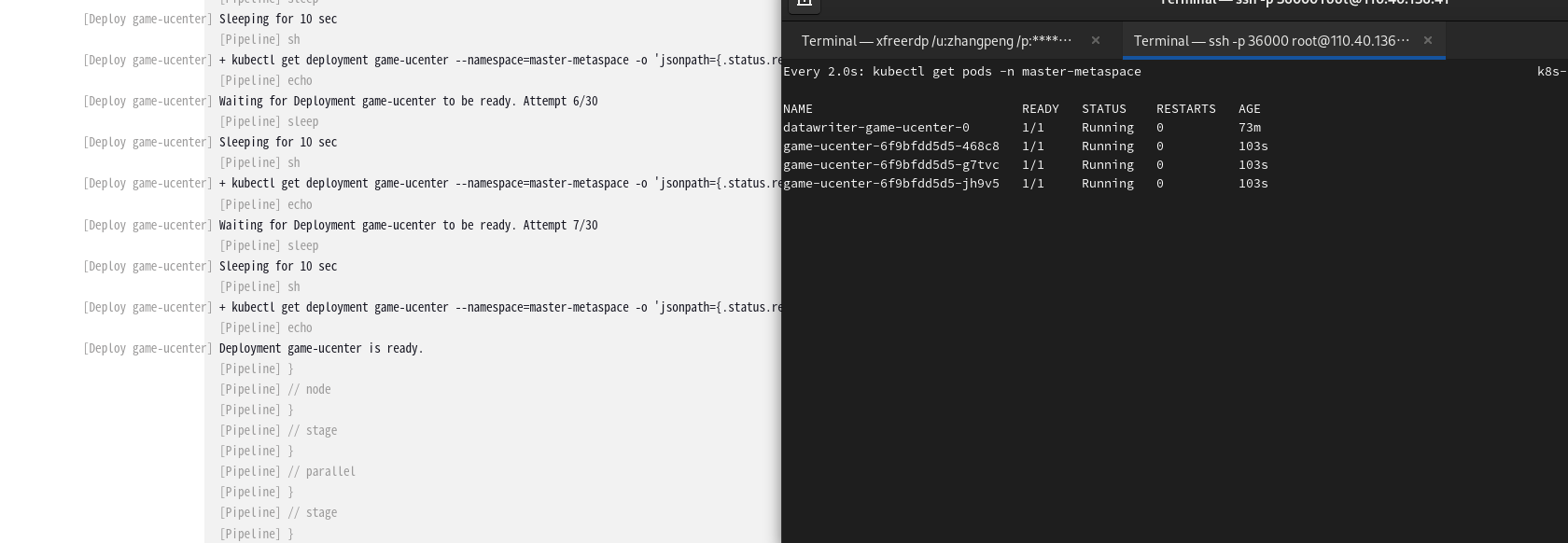
也没有问题,pipeline 脚本有效!
进化 II:兼容StatefulSet的健康检查
考虑到某些应用可能采用StatefulSet作为工作负载类型,我们必须确保Jenkins Pipeline能够针对不同的工作负载类型执行健康检查。
状态检测兼容性改进
为了适配StatefulSet,我们对checkKubernetesResourceStatus方法做了略微修改,使其可以接受一个resourceType参数来区分资源类型,进而查询对应的状态字段,代码片段如下:
def checkKubernetesResourceStatus(String resourceName, String namespace, String resourceType) {int attempts = 30 // Set the number of retry attemptsint sleepTime = 10 // Set the sleep time between attempts in secondsString readyReplicasJsonPath = resourceType == "deployment" ? ".status.readyReplicas" : ".status.readyReplicas"for (int i = 1; i <= attempts; i++) {// Check the resource statusString statusCheck = sh (script: "kubectl get ${resourceType} ${resourceName} --namespace=${namespace} -o jsonpath=\"{${readyReplicasJsonPath}}\"",returnStdout: true).trim()// If the number of ready replicas is not empty and equal to the desired numberif (statusCheck && statusCheck.isInteger() && statusCheck.toInteger() > 0) {echo "${resourceType} ${resourceName} is ready."return} else {echo "Waiting for ${resourceType} ${resourceName} to be ready. Attempt ${i}/${attempts}"sleep(sleepTime)}}error "${resourceType} ${resourceName} did not become ready after ${attempts} attempts"
}
修改game-ucenter stage:
stage("Deploy game-ucenter") {when { environment name: 'game-ucenter', value: 'true' }agent { label "k8s-node-06" }steps {deployToKubernetes("game-ucenter")checkKubernetesResourceStatus("game-ucenter", "master-metaspace", "deployment")}}
创建一个statefulset datawriter-game-ucenter stage:
stage("Deploy datawriter-game-ucenter") {when { environment name: 'datawriter-game-ucenter', value: 'true' }agent { label "xxxxx" }steps {deployToKubernetes("datawriter-game-ucenter")checkKubernetesResourceStatus("datawriter-game-ucenter", "master-metaspace", "statefulset")}}
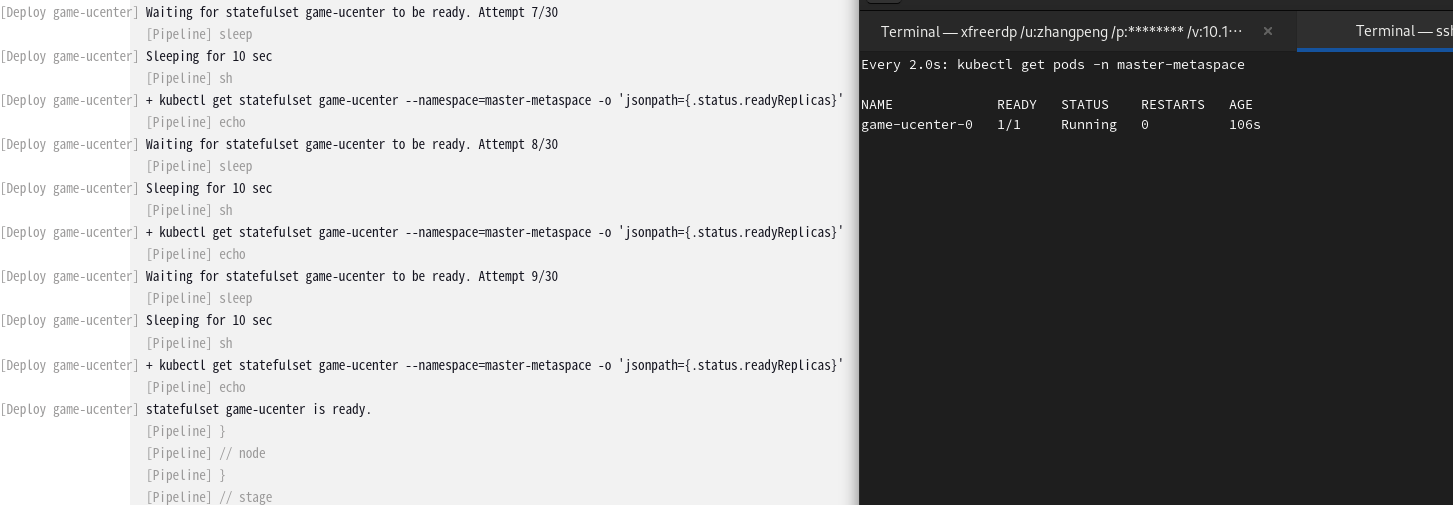
注意:我这里截图还是用了game-ucenter做的测试,其实我想用我的datawriter-game-ucenter,but这个服务是一个node应用没有没有livenessProbe readinessProbe,所以截图我还是使用了game-ucenter!
进化 III:引入滚动更新策略配置和检测
当我们更新Deployment资源时,通常会采用滚动更新策略,以逐步替换旧Pods,最小化部署时的中断。
更新策略检测逻辑
def checkDeploymentUpdateStatus(String deploymentName, String namespace) {int attempts = 30 // Set the number of retry attemptsint sleepTime = 10 // Set the sleep time between attempts in secondsecho "Checking the update status of Deployment: ${deploymentName}"for (int i = 1; i <= attempts; i++) {String updateStatus = sh (script: "kubectl rollout status deployment/${deploymentName} --namespace=${namespace}",returnStdout: true).trim()if (updateStatus.contains("successfully rolled out")) {echo "Update status: ${updateStatus}"return} else {echo "Waiting for Deployment ${deploymentName} to successfully roll out. Attempt ${i}/${attempts}"sleep(sleepTime)}}error "Deployment ${deploymentName} did not successfully roll out after ${attempts} attempts"
}
- 我们增加了
checkDeploymentUpdateStatus方法,该方法通过kubectl命令rollout status监控Deployment的更新状态。 - 当检测到
successfully rolled out时,表示滚动更新成功。 - 如果在给定时间内更新没有成功,则流程将失败。
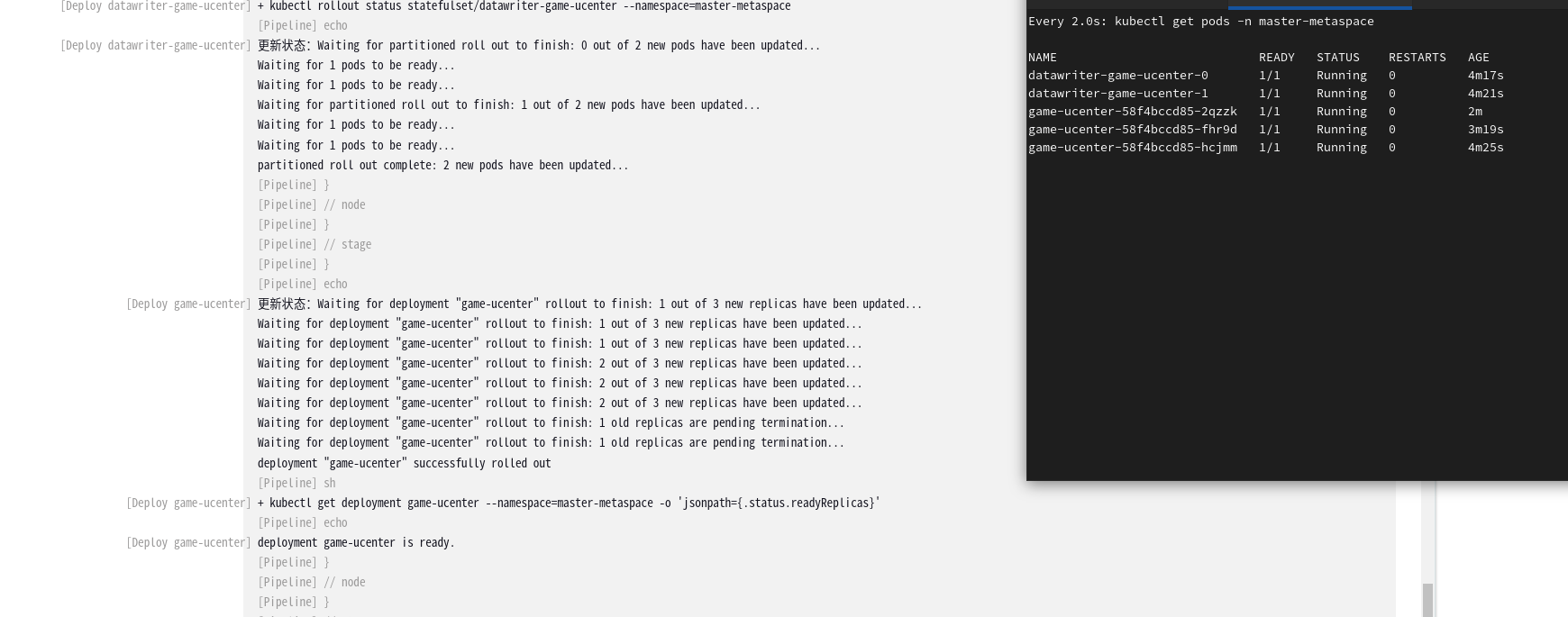
继续考虑一下如果statefulset多实例呢?不想写两个了整合成一个方法如下:
def checkRolloutStatus(String resourceName, String namespace, String resourceType) {int attempts = 30 // Set the number of retry attemptsint sleepTime = 10 // Set the sleep time between attempts in secondsif (!(resourceType in ["deployment", "statefulset"])) {error "Unknown resource type: ${resourceType}. Only 'deployment' and 'statefulset' are supported."}echo "Checking the update status of ${resourceType} '${resourceName}' in namespace '${namespace}'"for (int i = 1; i <= attempts; i++) {String rolloutCommand = "kubectl rollout status ${resourceType}/${resourceName} --namespace=${namespace}"String updateStatus = sh (script: rolloutCommand,returnStdout: true).trim()if (updateStatus.contains("successfully rolled out") || updateStatus.contains("partitioned roll out complete"))  {echo "Update status: ${updateStatus}"return} else {echo "Waiting for ${resourceType} '${resourceName}' to successfully roll out. Attempt ${i}/${attempts}."sleep(sleepTime)}}error "${resourceType} '${resourceName}' did not successfully roll out after ${attempts} attempts in namespace '${namespace}'"
}
Jenkinsfile更新实现
经过上述进化,Jenkinsfile中现在包含了完整的部署状态检查逻辑,以应对不同类型资源的部署监控需求。
pipeline {agent none // Use none at the top level, each stage will define its own agent.environment {REGISTRY = "ccr.ccs.tencentyun.com/xxxxx"KUBE_CONFIG = "--namespace=master-metaspace"KUBE_YAML_PATH = "/home/jenkins/workspace/yaml/master-metaspace"// Assume that 'data' is defined elsewhere or injected as a parameter.BASE_WORKSPACE = "xxxxxx" // 定义一个基础工作空间路径}stages {stage("GetCode") {agent { label "build01" }steps {script {checkout scm: [$class: 'GitSCM',branches: [[name: env.branchName]],extensions: [[$class: 'CloneOption', depth: 1, noTags: false, shallow: true]],userRemoteConfigs: [[credentialsId: 'xxxxx', url: env.gitHttpURL]]]}}}stage("Docker Builds") {parallel {stage('Build dataloader-game-ucenter') {agent { label "build01" }when { environment name: 'dataloader-game-ucenter', value: 'true' }steps {buildAndPushDockerImage("dataloader-game-ucenter", env.data, env.BASE_WORKSPACE)}}stage('Build datawriter-game-ucenter') {agent { label "build01" }when { environment name: 'datawriter-game-ucenter', value: 'true' }steps {buildAndPushDockerImage("datawriter-game-ucenter", env.data, env.BASE_WORKSPACE)}}stage('Build game-ucenter') {agent { label "build01" }when { environment name: 'game-ucenter', value: 'true' }steps {buildAndPushDockerImage("game-ucenter", env.data, env.BASE_WORKSPACE)}}}}stage('Development Deployment') {parallel {stage("Deploy datawriter-game-ucenter") {when { environment name: 'datawriter-game-ucenter', value: 'true' }agent { label  "xxxx" }steps {deployToKubernetes("datawriter-game-ucenter")checkKubernetesResourceStatus("datawriter-game-ucenter", "master-metaspace", "statefulset")checkRolloutStatus("datawriter-game-ucenter", "master-metaspace", "statefulset")}}stage("Deploy dataloader-game-ucenter") {when { environment name: 'dataloader-game-ucenter', value: 'true' }agent { label  "xxxx" }steps {deployToKubernetes("dataloader-game-ucenter")checkKubernetesResourceStatus("dataloader-game-ucenter", "master-metaspace", "statefulset")}}stage("Deploy game-ucenter") {when { environment name: 'game-ucenter', value: 'true' }agent { label  "xxxx" }steps {deployToKubernetes("game-ucenter")checkRolloutStatus("game-ucenter", "master-metaspace", "deployment")checkKubernetesResourceStatus("game-ucenter", "master-metaspace", "deployment")}}}}}
}// Define methods outside pipeline to avoid repetitiondef buildAndPushDockerImage(String imageName, String tag, String workspacePath) {sh "cd ${workspacePath} && echo 'Current directory: \$(pwd)'" // 使用基础工作空间变量sh "cd ${workspacePath}/${imageName}&& docker build --build-arg NODE_ENV=game-ucenter -t $REGISTRY/$imageName:$tag ."withCredentials([usernamePassword(credentialsId: 'xxxxx', passwordVariable: 'dockerPassword', usernameVariable: 'dockerUser')]) {sh "docker login -u $dockerUser -p $dockerPassword $REGISTRY"sh "docker push $REGISTRY/$imageName:$tag"}
}def deployToKubernetes(String kubernetesComponent) {String templateFile = "${KUBE_YAML_PATH}/${kubernetesComponent}.tpl"String outputFile = "${KUBE_YAML_PATH}/${kubernetesComponent}.yaml"sh "sed -e 's/{data}/$data/g' $templateFile > $outputFile"sh "sudo kubectl apply -f $outputFile $KUBE_CONFIG"
}def checkRolloutStatus(String resourceName, String namespace, String resourceType) {int attempts = 30 // 设置重试次数int sleepTime = 10 // 设置重试间隔时间(秒)if (!(resourceType in ["deployment", "statefulset"])) {error "未知资源类型:${resourceType}。只支持 'deployment' 和 'statefulset' 。"}echo "正在检查${resourceType} '${resourceName}' 在命名空间 '${namespace}' 的更新状态"for (int i = 1; i <= attempts; i++) {String rolloutCommand = "kubectl rollout status ${resourceType}/${resourceName} --namespace=${namespace}"try {String updateStatus = sh (script: rolloutCommand,returnStdout: true).trim()// 添加对 "partitioned roll out complete" 状态的检查if (updateStatus.contains("successfully rolled out") || updateStatus.contains("partitioned roll out complete")) {echo "更新状态:${updateStatus}"return} else {echo "等待 ${resourceType} '${resourceName}' 成功发布。尝试次数:${i}/${attempts}。"sleep(sleepTime)}} catch (Exception e) {echo "获取更新状态时发生错误:${e.getMessage()}。尝试次数:${i}/${attempts}。"sleep(sleepTime)}}error "${resourceType} '${resourceName}' 在命名空间 '${namespace}' 内未能在 ${attempts} 次尝试之后成功发布"
}
def checkKubernetesResourceStatus(String resourceName, String namespace, String resourceType) {int attempts = 30 // Set the number of retry attemptsint sleepTime = 10 // Set the sleep time between attempts in secondsString readyReplicasJsonPath = resourceType == "deployment" ? ".status.readyReplicas" : ".status.readyReplicas"for (int i = 1; i <= attempts; i++) {// Check the resource statusString statusCheck = sh (script: "kubectl get ${resourceType} ${resourceName} --namespace=${namespace} -o jsonpath=\"{${readyReplicasJsonPath}}\"",returnStdout: true).trim()// If the number of ready replicas is not empty and equal to the desired numberif (statusCheck && statusCheck.isInteger() && statusCheck.toInteger() > 0) {echo "${resourceType} ${resourceName} is ready."return} else {echo "Waiting for ${resourceType} ${resourceName} to be ready. Attempt ${i}/${attempts}"sleep(sleepTime)}}error "${resourceType} ${resourceName} did not become ready after ${attempts} attempts"
}// 更新后的Jenkins Pipeline代码详细定义参照本文开头给出的代码
总结
本篇博客通过对Jenkins Pipeline的进化过程展开讲解,展现了如何从简单的部署任务转变为一个健壮且兼顾各类工作负载状态监测的CI/CD流程。我们强化了状态检测的逻辑,引入了更新策略的检测,并保持了对不同Kubernetes资源类型的兼容性。这些改进确保了自动化流程能够与现代部署实践保持同步,给运维团队带来极大便利,并最大化地保障了部署的可靠性。
后记
由于篇幅限制,本篇文章未作其他更详细演示。然而,在实际应用中,运维团队可以根据自己的具体需求和环境进一步丰富和细化每个步骤的实现,确保Pipeline的健壮性和高可用性,以适应不断变化的技术挑战。
相关文章:
Jenkins Pipeline脚本优化:为Kubernetes应用部署增加状态检测
引言 在软件部署的世界中,Jenkins已经成为自动化流程的代名词。不断变化的技术环境要求我们持续改进部署流程以满足现代应用部署的需要。在本篇博客中,作为一位资深运维工程师,我将分享如何将Jenkins Pipeline进化至不仅能支持部署应用直至R…...
R语言基础 | 安徽某高校《统计建模与R软件》期末复习
第一节 数字、字符与向量 1.1 向量的赋值 c<-(1,2,3,4,5) 1.2 向量的运算 对于向量,我们可以直接对其作加(),减(-),乘(*),除(/)…...

深度神经网络下的风格迁移模型(C#)
版权声明:本文为博主原创文章,转载请在显著位置标明本文出处以及作者网名,未经作者允许不得用于商业目的。 这个是C#版本的,这里就只放出代码。VB.Net版本请参看 深度神经网络下的风格迁移模型-CSDN博客 斯坦福大学李飞飞团队的…...
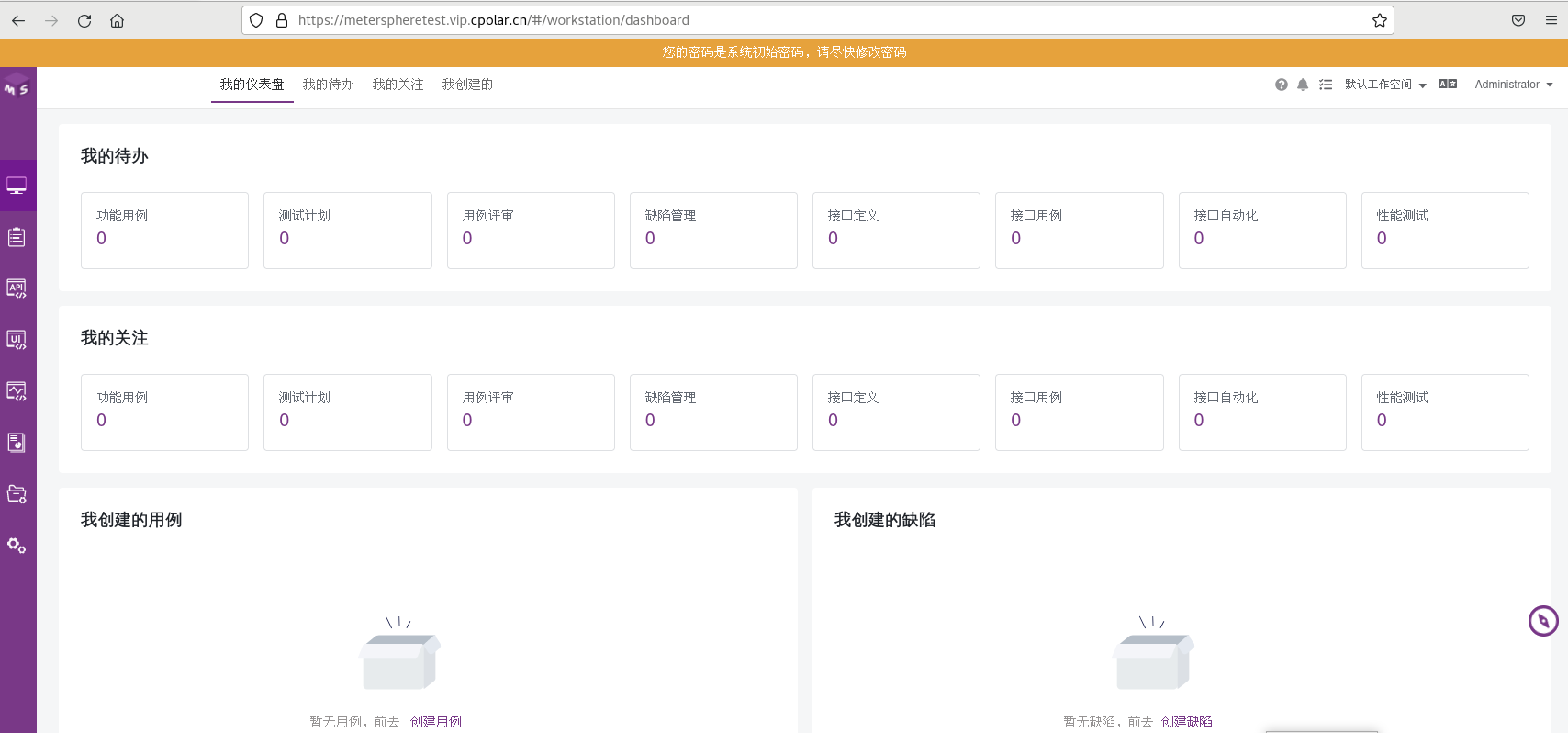
Linux部署MeterSphere结合内网穿透实现远程访问服务管理界面
文章目录 前言1. 安装MeterSphere2. 本地访问MeterSphere3. 安装 cpolar内网穿透软件4. 配置MeterSphere公网访问地址5. 公网远程访问MeterSphere6. 固定MeterSphere公网地址 前言 MeterSphere 是一站式开源持续测试平台, 涵盖测试跟踪、接口测试、UI 测试和性能测试等功能&am…...

MyBatis见解4
10.MyBatis的动态SQL 10.5.trim标签 trim标签可以代替where标签、set标签 mapper //修改public void updateByUser2(User user);<update id"updateByUser2" parameterType"User">update user<!-- 增加SET前缀,忽略,后缀…...
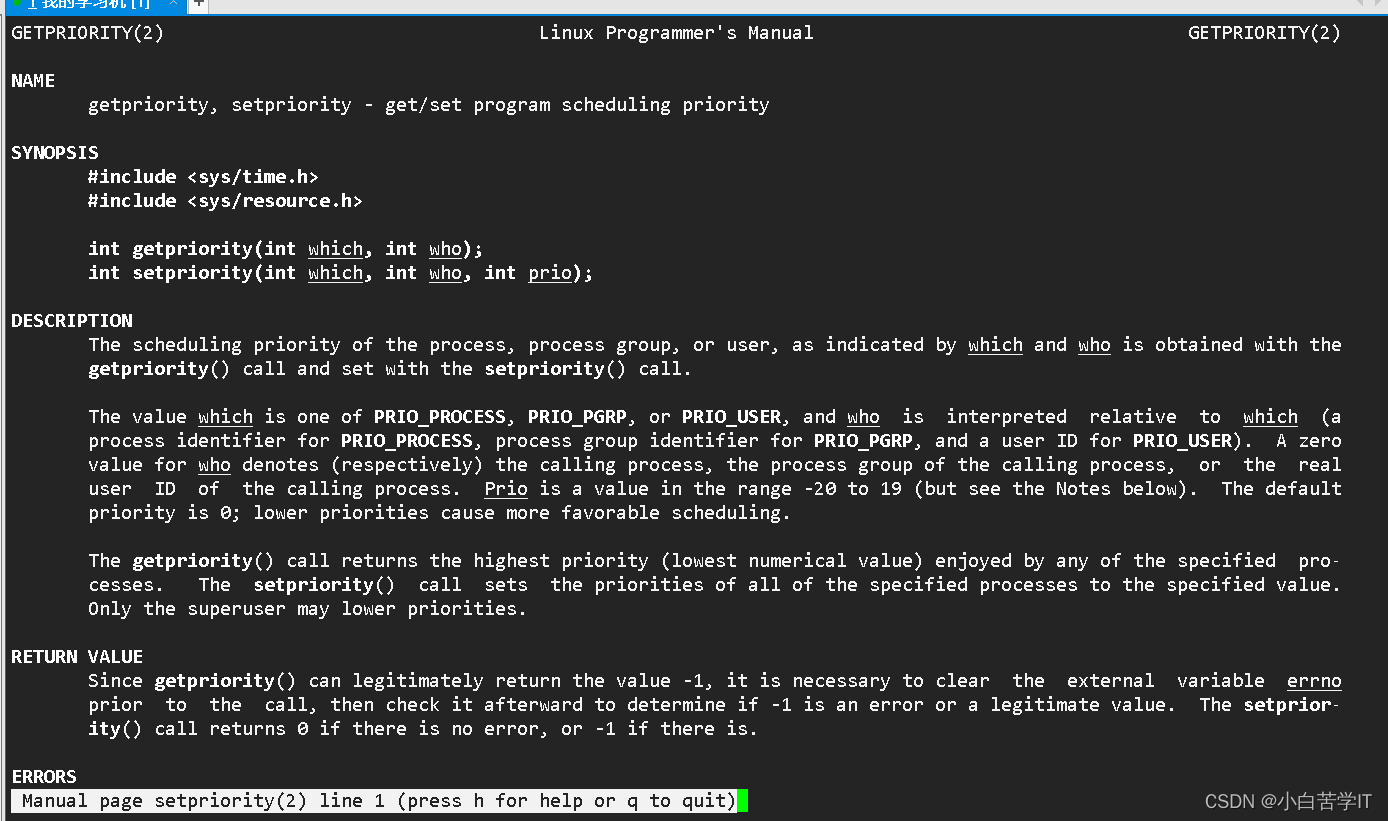
Linux操作系统——进程(三) 进程优先级
进程优先级 首先呢,我们知道一个进程呢(或者也可以叫做一个任务),它呢有时候要在CPU的运行队列中排队,要么有时候阻塞的时候呢又要在设备的等待队列中排队,其实我们排队的本质就是:确认优先级。…...

插入排序详解(C语言)
前言 插入排序是一种简单直观的排序算法,在小规模数据排序或部分有序的情况下插入排序的表现十分良好,今天我将带大家学习插入排序的使用。let’s go ! ! ! 插入排序 插入排序的基本思想是将待排序的序列分为已排序和未排序两部分。初始时,…...
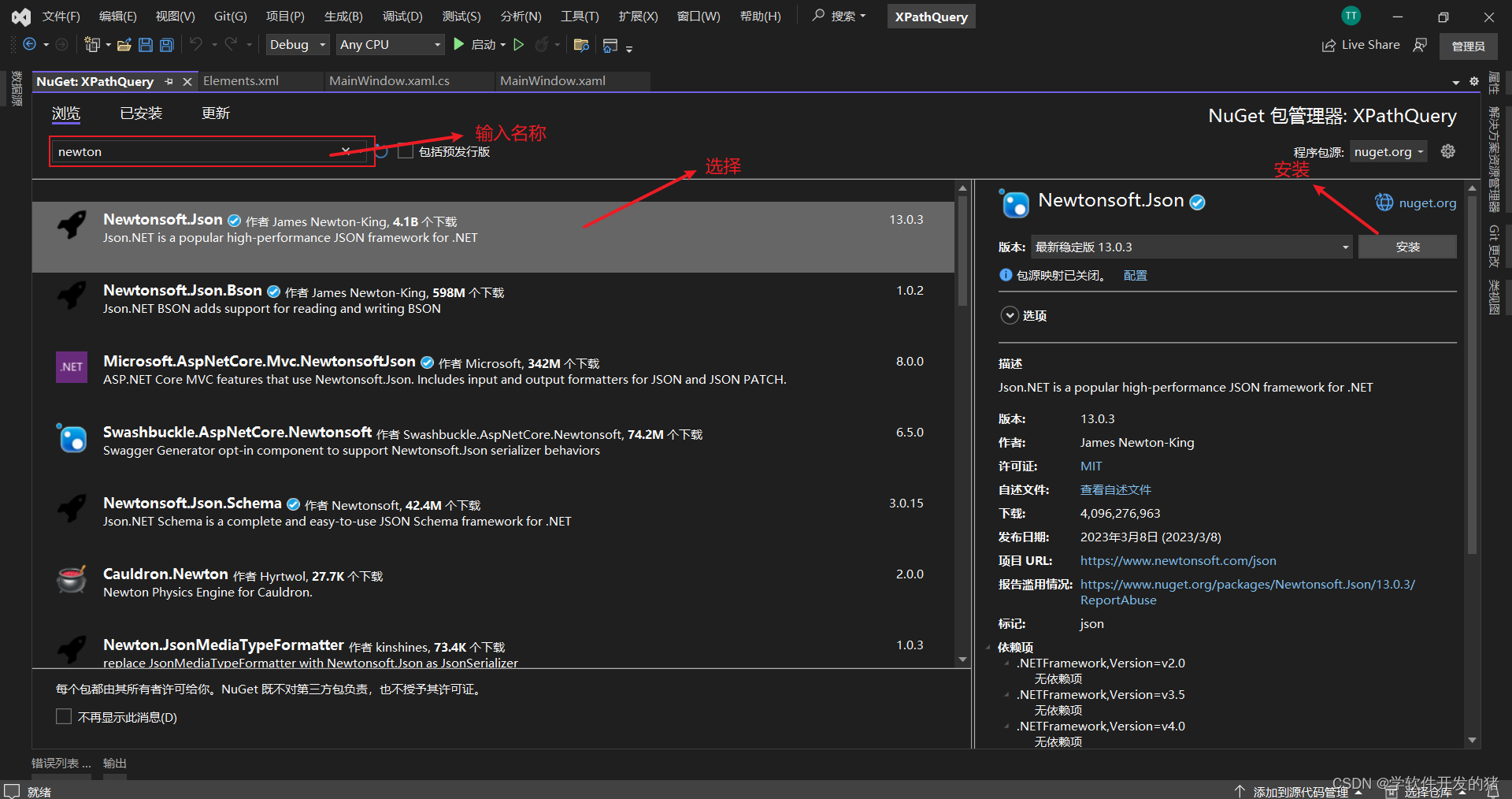
Json和Xml
一、前言 学习心得:C# 入门经典第8版书中的第21章《Json和Xml》 二、Xml的介绍 Xml的含义: 可标记性语言,它将数据以一种特别简单文本格式储存。让所有人和几乎所有的计算机都能理解。 XML文件示例: <?xml version"1.…...
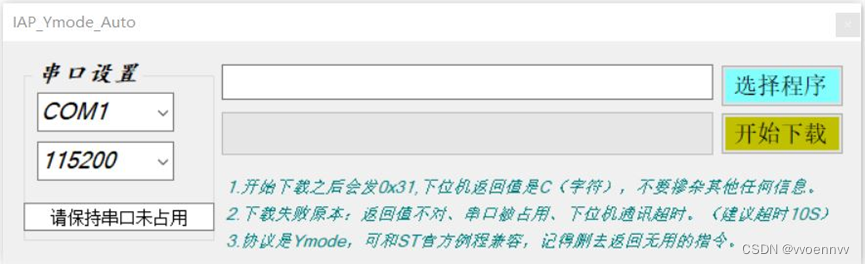
STM32 支持IAP的bootloader开发,使用串口通过Ymodem协议传输固件
资料下载: https://download.csdn.net/download/vvoennvv/88658447 一、概述 关于IAP的原理和Ymodem协议,本文不做任何论述,本文只论述bootloader如何使用串口通过Ymodem协议接收升级程序并进行IAP升级,以及bootloader和主程序两个工程的配置…...

【SVN】centos7搭建svn--亲测能通
centos7.6搭建svn 1 知识小课堂1.1 CentOS1.2 SVN 2 搭建过程2.1 前期准备2.2 通过yum命令安装svnserve2.3 创建版本库目录2.4 创建svn版本库2.5 配置修改2.5 防火墙配置2.6 启动或关闭svn服务器2.6.1 进程守护2.6.2 检测svn端口3690是否已经监听:2.6.3 关闭SVN 2.7…...

MY FILE SERVER: 1
下载地址 https://download.vulnhub.com/myfileserver/My_file_server_1.ova 首先我们需要发现ip 我的kali是59.162所以167就是靶机的 然后我们拿nmap扫一下端口 nmap -sV -p- 192.168.59.167 扫完发现有七个端口开放 按照习惯先看80 没看到有啥有用信息,用nikto扫一下 nik…...
Day70力扣打卡
打卡记录 收集足够苹果的最小花园周长(找规律 二分) 链接 class Solution:def minimumPerimeter(self, neededApples: int) -> int:l, r 1, 10 ** 5while l < r:mid (l r) >> 1if 2 * (2 * (mid ** 3) 3 * (mid ** 2) mid) > nee…...
3. 行为模式 - 迭代器模式
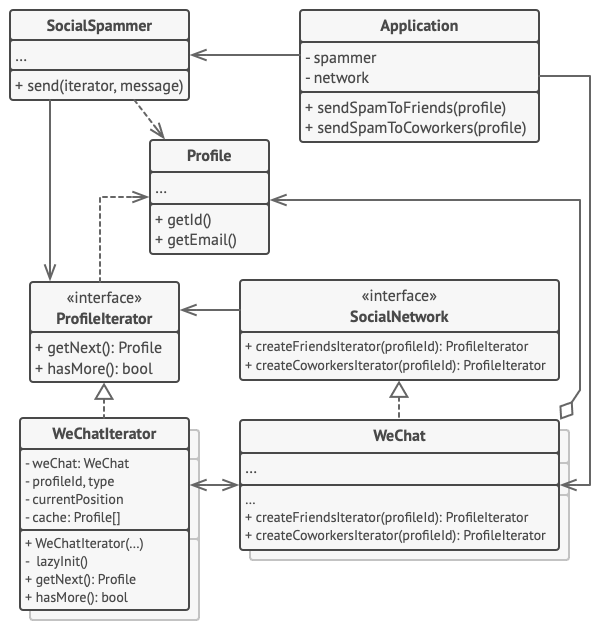
亦称: Iterator 意图 迭代器模式是一种行为设计模式, 让你能在不暴露集合底层表现形式 (列表、 栈和树等) 的情况下遍历集合中所有的元素。 问题 集合是编程中最常使用的数据类型之一。 尽管如此, 集合只是一组对象的…...

rsync文件同步
场景:主要是用来发布文件。 一、rsync服务器端架设 1、安装 wget https://download.samba.org/pub/rsync/src/rsync-3.0.6.tar.gz tar -zxvf rsync-3.0.6.tar.gz ./configure --prefix/usr/local/rsync make make install 2、配置 2.1、配置rsyncd.conf 不存在…...

docker 安装mysql 8.0.35
1.拉取镜像 docker pull mysql:8.0.35 2.创建相关挂载目录与文件 mkdir -p /opt/mysql8/conf mkdir -p /opt/mysql8/data mkdir -p /opt/mysql8/logs 或者:mkdir -p /opt/mysql8/{data,conf,logs,mysqld,mysql-files} 文件与文件夹授权:chmod -R 775 /opt/mysql8/* 3.运…...

力扣labuladong一刷day46天并查集
力扣labuladong一刷day46天并查集 文章目录 力扣labuladong一刷day46天并查集一、323. 无向图中连通分量的数目二、130. 被围绕的区域三、990. 等式方程的可满足性 一、323. 无向图中连通分量的数目 题目链接:https://leetcode.cn/problems/number-of-connected-co…...
C++11(上):新特性讲解
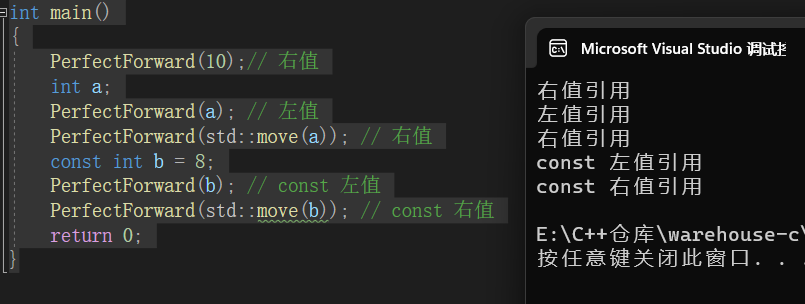
C11新特性讲解 前言1.列表初始化1.1{ }初始化1.2std::initializer_list 2.类型推导2.1 auto2.2 typeid2.3 decltype 3.范围for4.STL的变化4.1新容器4.2容器的新方法 5.右值引用和移动语义5.1 左值引用和右值引用5.2 左值引用与右值引用比较5.3 右值引用的使用场景5.4 右值、左值…...
将mapper.xml保存为idea的文件模板
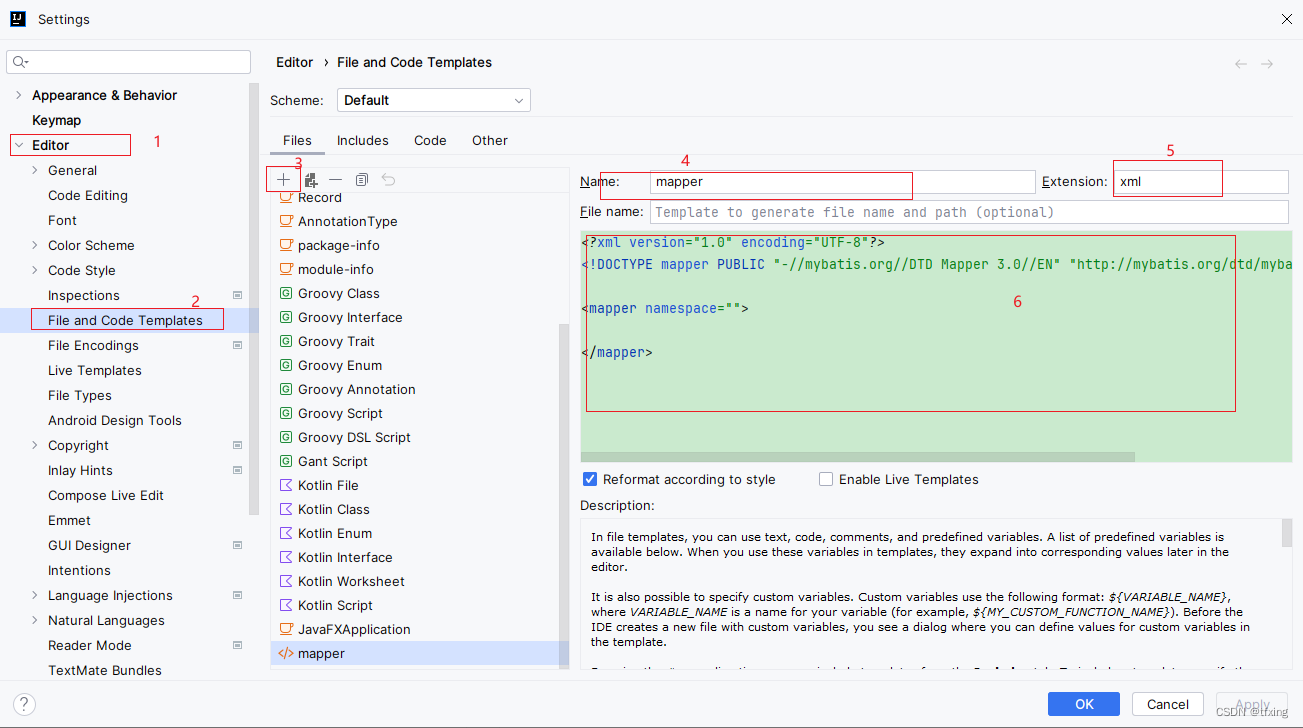
将mapper.xml保存为idea的文件模板 在idea的File and Code Templates中将需要使用模板的内容添加为模板文件。 那么接下来请看图,跟着步骤操作吧。 mapper.xml文件内容 <?xml version"1.0" encoding"UTF-8"?> <!DOCTYPE mapper P…...

LabVIEW在横向辅助驾驶系统开发中的应用
LabVIEW在横向辅助驾驶系统开发中的应用 随着横向辅助驾驶技术的快速发展,越来越多的研究致力于提高该系统的效率和安全性。项目针对先进驾驶辅助系统(ADAS)中的横向辅助驾驶进行深入研究。在这项研究中,LabVIEW作为一个强大的系…...
STM32移植LVGL图形库
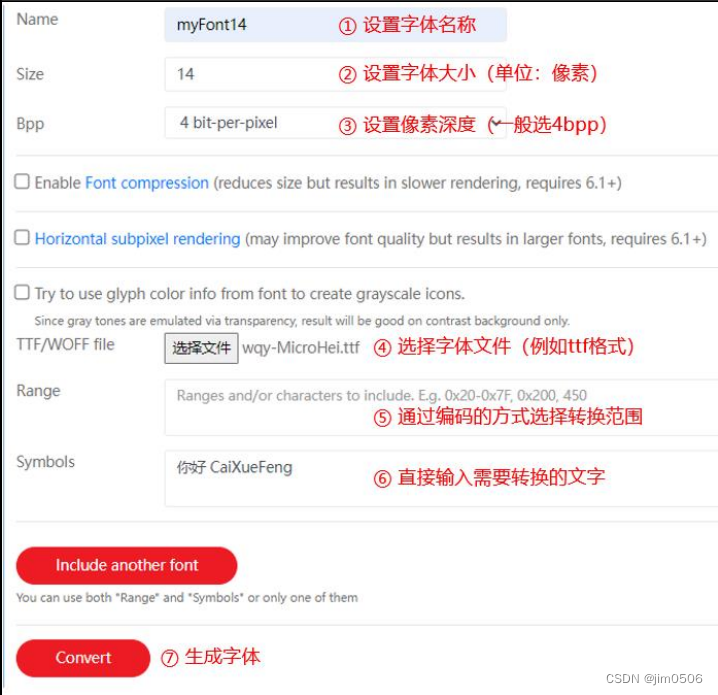
1、问题1:中文字符keil编译错误 解决方法:在KEIL中Options for Target Flash -> C/C -> Misc Controls添加“--localeenglish”。 问题2:LVGL中显示中文字符 使用 LVGL 官方的在线字体转换工具: Online font converter -…...

企业级AI智能体评测平台AgentLab:构建、评估与部署实战指南
1. 项目概述:当AI遇上企业级自动化最近在折腾企业级自动化流程时,发现了一个非常有意思的开源项目,叫AgentLab。它来自大名鼎鼎的ServiceNow,没错,就是那个做IT服务管理(ITSM)和企业工作流平台的…...

R 和 Python 数据可视化必备库的精华指南
原文:towardsdatascience.com/the-essential-guide-to-r-and-python-libraries-for-data-visualization-33be8511c976 成为某些编程语言的专业人士是每位有志于数据科学的专业人士的目标。在无数语言中达到一定水平是每个人的关键里程碑。 对于数据工程师来说&…...

年度名场面!黄仁勋逛胡同被投喂豆汁,眉头紧锁。网友:弥补了没有喝过 XX 的遗憾
5 月 15 日,「黄仁勋 南锣鼓巷」话题突然在多平台引爆热议。谁能想到,手握 5 万亿美刀市值的科技大佬,私下里竟是胡同干饭人。昨天在大会堂还是西装革履,今天老黄换上他的经典皮肤套装,带几名随行人员低调逛南锣鼓巷和…...

前台测试想转后台优化?这4个条件缺一不可,否则别折腾
很多做前台测试的兄弟都问过同一个问题:我能不能转后台?今天这篇文章,一次性把后台工程师的准入清单说清楚。一、基础条件:5条缺一不可年龄20-50岁太小的缺经验,太大的学新东西慢,这个区间刚刚好。有网优基…...

LaTeX-PPT:3分钟学会在PowerPoint中快速插入专业数学公式的终极指南
LaTeX-PPT:3分钟学会在PowerPoint中快速插入专业数学公式的终极指南 【免费下载链接】latex-ppt Use LaTeX in PowerPoint 项目地址: https://gitcode.com/gh_mirrors/la/latex-ppt 你是否曾经在PowerPoint中为编辑复杂的数学公式而头疼?手动调整…...

STEMMA继电器模块实战指南:安全连接微控制器与强电设备
1. 项目概述:从微控制器到物理世界的开关如果你玩过Arduino或者树莓派,肯定有过这样的想法:能不能用我写的几行代码,去控制一下家里的台灯、风扇,甚至是鱼缸的氧气泵?这个想法背后,其实是一个经…...
的深度防御与自动化检测脚本分享)
别再只关445端口了!针对MS17-010(永恒之蓝)的深度防御与自动化检测脚本分享
超越端口关闭:MS17-010漏洞的立体防御体系构建指南 当企业安全团队在晨会上讨论"永恒之蓝"防御策略时,最常见的场景往往是:"我们已经关闭了445端口,应该安全了吧?"这种认知恰恰暴露了当前安全防护…...

超长上下文时代来临:百万Token窗口实测,我的工作流彻底变了
前言:一个让我彻底改变工作方式的实验 2026年初,我做了一件以前根本不敢想的事:把一份长达800页的技术规范文档,直接塞进了一个大模型的上下文窗口,然后让它帮我找出其中所有与安全性相关的条款,并逐条解释…...

为什么顶尖考古团队已弃用传统文献管理?NotebookLM实现遗址报告生成效率提升300%的底层逻辑
更多请点击: https://intelliparadigm.com 第一章:NotebookLM考古学研究辅助的范式革命 NotebookLM 作为 Google 推出的基于文档理解的 AI 助手,正悄然重塑考古学研究的信息处理范式。传统考古工作依赖大量手写笔记、田野报告、碳十四测年数…...

自建轻量级Web监控信标:前端性能与错误数据采集实践
1. 项目概述:一个轻量级、可扩展的Web应用监控信标最近在梳理个人项目和团队内部工具链时,我重新审视了一个名为“beacon”的小工具。这个项目源自一个非常具体的痛点:在开发和运维Web应用时,我们常常需要一种简单、无侵入的方式来…...