
Python 简易图形界面库easygui 对话框大全(续)

目录
EasyGUI库
主要特点
使用场景
对话框样式
10. 文件打开框 fileopenbox
11. 文件保存框 filesavebox
12. 目录打开框 diropenbox
13. 索引对话框 indexbox
14. 例外报告框 exceptionbox
15. 代码文本框 codebox
16. 密码输入框 passwordbox
17. 多重文本框 multenterbox
18. 组合密码框 multpasswordbox
19. 多项选择框 multchoicebox
总结
EasyGUI库
随着Python在数据科学、机器学习和Web开发等多个领域的广泛应用,图形用户界面(GUI)开发也变得越来越重要。对于初学者和快速原型设计来说,使用复杂的GUI库可能会让人感到望而生畏。幸运的是,Python的EasyGUI库提供了一个简单而直观的方式来创建基本的图形用户界面,无需深入了解复杂的GUI编程概念。
EasyGUI是一个用于非常简单的Python GUI编程的库。与Tkinter等更高级的库相比,EasyGUI通过提供一系列预构建的对话框和简单的函数调用来简化GUI开发过程。这使得开发者可以专注于应用程序的逻辑,而不是花费大量时间在界面设计上。
主要特点
- 简单易用:EasyGUI提供了直观的API,通常只需要一行代码就可以调用各种对话框,如消息框、选择框、文件选择框等。
- 跨平台兼容性:EasyGUI可以在Windows、macOS和Linux等多个操作系统上运行,确保您的应用程序具有广泛的可达性。
- 自定义选项:尽管EasyGUI强调的是简单性,但它仍然提供了一定程度的自定义能力,如更改对话框的标题、添加自定义按钮等。
- 集成Python标准库:EasyGUI基于Python的标准Tkinter库构建,这意味着您可以在需要时轻松集成更复杂的Tkinter功能。
使用场景
- 快速原型设计:当您需要快速测试一个想法或展示一个概念验证时,EasyGUI可以帮助您快速构建一个简单的界面。
- 小型项目和教育目的:对于不需要复杂界面的小型项目,或者在教学环境中向学生介绍GUI编程的概念,EasyGUI是一个理想的选择。
- 脚本和工具:对于需要简单用户输入的脚本或工具,使用EasyGUI可以提供一个比命令行更友好的交互方式。
Python 简易图形界面库easygui 对话框大全-CSDN博客文章浏览阅读3.7k次,点赞112次,收藏91次。提供了“继续”和“取消”选项,并返回True(表示继续)或False(表示取消)。", title="结束", ok_button="干得好!easygui.ccbox(msg, title, choices=('退出[E]','取消[C]'))选择“Chocolate”后点OK就把所选择的项赋值给变量choice,点Cancel则返回None。如果选择了第一个按钮,则返回“True”。提供了Yes和No的选择,并返回“True”或“False”。在列表框中提供了可供选择的由元组或列表指定的选项列表。https://blog.csdn.net/boysoft2002/article/details/135179267上回说到easygui前9种对话框样式,这回分享另外10种:
对话框样式
10. 文件打开框 fileopenbox
fileopenbox(msg=None, title=None, default='*', filetypes=None, multiple=False)
Displays an "open file" dialog box and returns the selected file as a string.
The "default" argument specifies a filepath that (normally) contains one or more wildcards.
fileopenbox() will display only files that match the default filepath.
If omitted, defaults to "\*" (all files in the current directory).
:param str msg: the msg to be displayed.
:param str title: the window title
:param str default: filepath with wildcards
:param object filetypes: filemasks that a user can choose, e.g. "\*.txt"
:param bool multiple: If true, more than one file can be selected
:return: the name of a file, or None if user chose to cancel
显示“打开文件”对话框,并将所选文件作为字符串返回。“default”参数指定(通常)包含一个或多个通配符的文件路径。例如,默认打开Excel文件如下:
import easygui as eg
eg.fileopenbox(msg=None, title=None, default='*.xls', filetypes=None, multiple=False)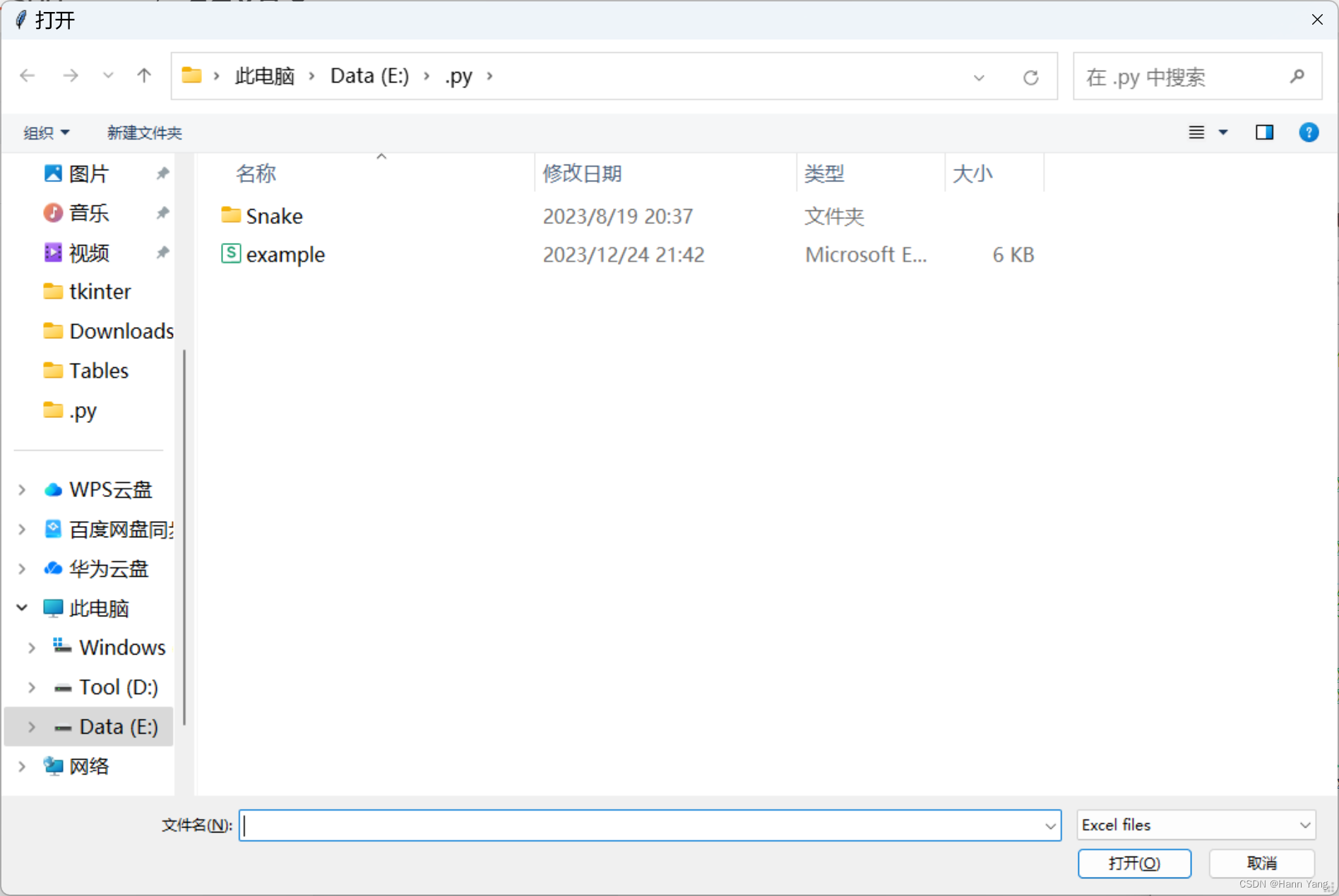
11. 文件保存框 filesavebox
filesavebox(msg=None, title=None, default='', filetypes=None)
A file to get the name of a file to save.
Returns the name of a file, or None if user chose to cancel.
**About the "default" argument**
The ``default`` argument specifies the path and "glob pattern" for file names. The "\*" value, for example, sets the open file dialog to the current working directory and showing all files.
For another example, setting the ``default`` argument to ``"C:/myjunk/*.py"`` sets the open file dialog to the C:\myjunk folder and showing only files that have the .py file extension. This glob pattern at the end of the ``default`` argument is required: passing ``"C:/myjunk"`` would not set the open file dialog to the C:\myjunk folder, but rather to the C:\ folder and "myjunk" as the initial filename.
Note that on Windows, ``fileopenbox()`` automatically changes the path separator to the Windows path separator (backslash).
The "filetypes" argument works like the "filetypes" argument to fileopenbox.
:param str msg: the msg to be displayed.
:param str title: the window title
:param str default: default filename to return
:param object filetypes: filemasks that a user can choose, e.g. " \*.txt"
:return: the name of a file, or None if user chose to cancel
用于获取要保存的文件的名称的文件。返回文件名,如果用户选择取消,则返回“无”。
import easygui as eg
eg.filesavebox(msg=None, title=None, default='*.xls', filetypes=None)
12. 目录打开框 diropenbox
diropenbox(msg=None, title=None, default=None)
A dialog to get a directory name.
Returns the name of a directory, or None if user chose to cancel.
If the "default" argument specifies a directory name, and that directory exists, then the dialog box will start with that directory.
:param str msg: used in the window title on some platforms
:param str title: the window title
:param str default: starting directory when dialog opens
:return: Normalized path selected by user
用于获取目录名的对话框。返回目录的名称,如果用户选择取消,则返回“无”。
如果“default”参数指定了一个目录名,并且该目录存在,则对话框将从该目录开始。
import easygui as eg
eg.diropenbox(msg=None, title=None, default=r'E:\Tables')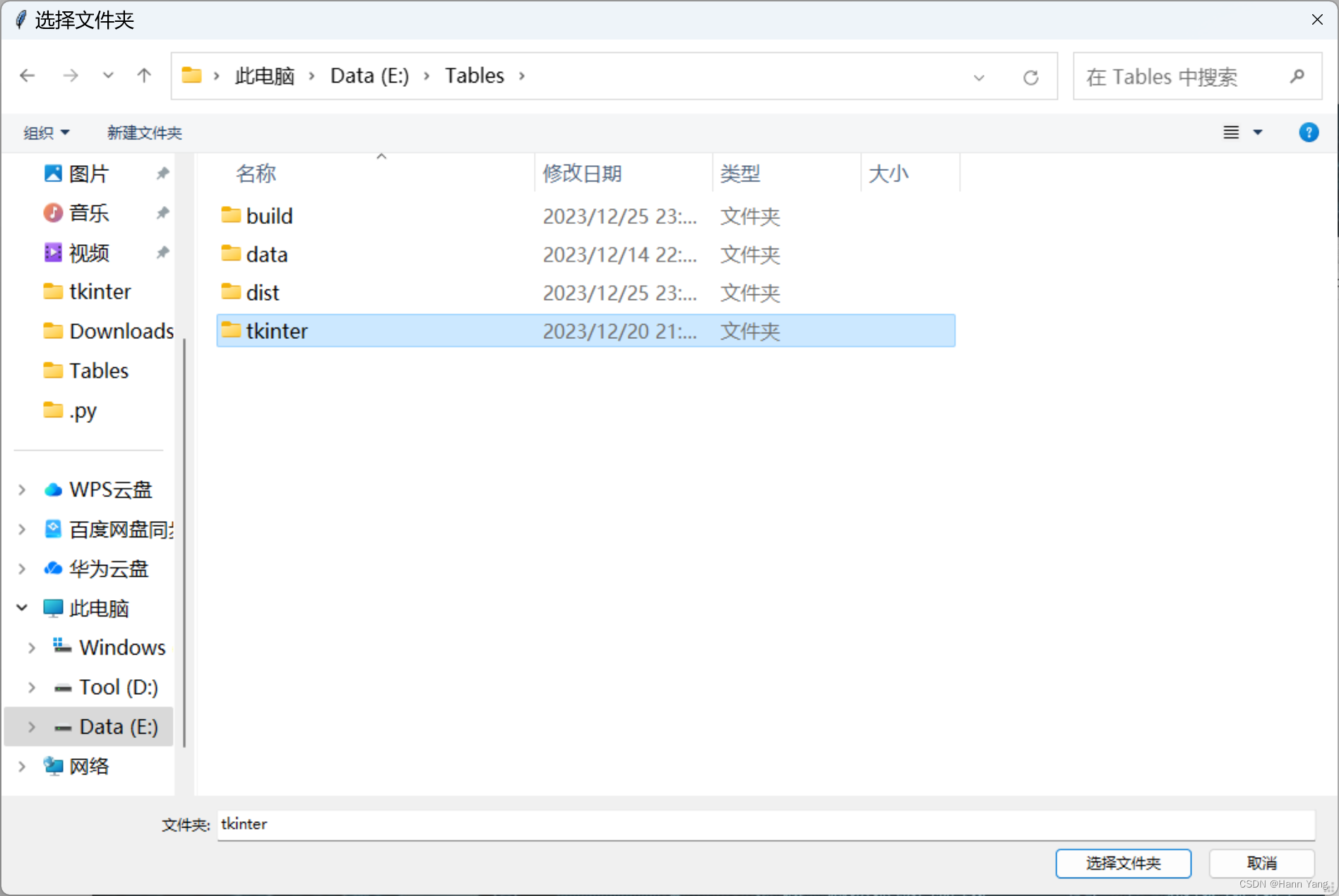
13. 索引对话框 indexbox
indexbox(msg='Shall I continue?', title=' ', choices=('Yes', 'No'), image=None, default_choice='Yes', cancel_choice='No')
The ``indexbox()`` function displays a set of buttons, and returns the index of the selected button. For example, if you invoked index box with three choices (A, B, C), indexbox would return 0 if the user picked A, 1 if he picked B, and 2 if he picked C.
:param str msg: the msg to be displayed
:param str title: the window title
:param list choices: a list or tuple of the choices to be displayed
:param str image: Filename of image to display
:param str default_choice: The choice you want highlighted when the gui appears
:param str cancel_choice: If the user presses the 'X' close, which button should be pressed
:return: the index of the choice selected, starting from 0
显示一组按钮,并返回所选按钮的索引。例如,如果您使用三个选项(A、B、C)调用索引框,则如果用户选择A,indexbox将返回0,如果用户选择B,则返回1,如果选择C,则返回2。
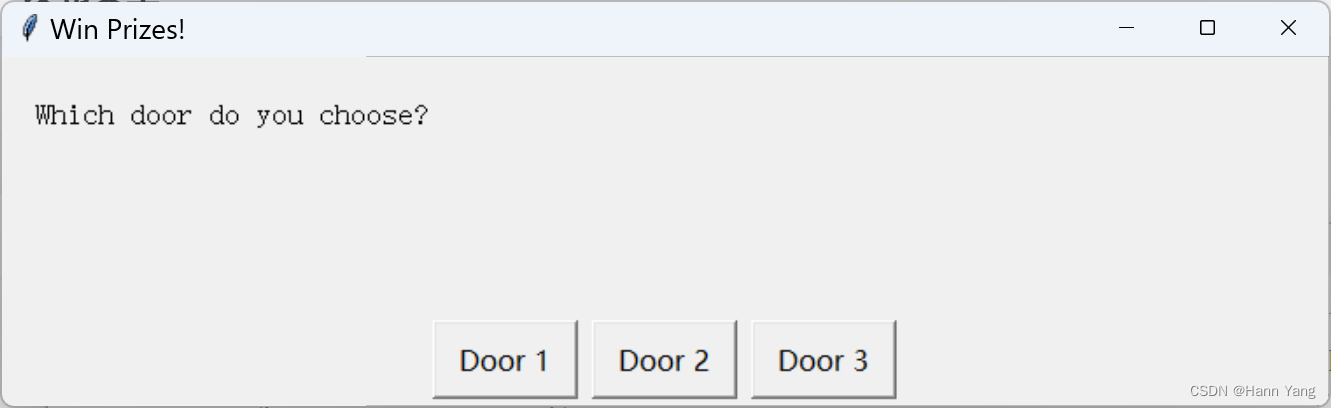
import easygui as eg
result = eg.indexbox('Which door do you choose?', 'Win Prizes!', choices=['Door 1', 'Door 2', 'Door 3'])
if result == 2:eg.msgbox('You win a new car!')
else:eg.msgbox('Better luck next time.')
14. 例外报告框 exceptionbox
exceptionbox(msg=None, title=None)
Display a box that gives information about an exception that has just been raised.
The caller may optionally pass in a title for the window, or a msg to accompany the error information.
Note that you do not need to (and cannot) pass an exception object as an argument. The latest exception will automatically be used.
:param str msg: the msg to be displayed
:param str title: the window title
:return: None
报告错误或例外异常的信息,调用者可以选择性地传入窗口的标题或伴随错误信息的消息。
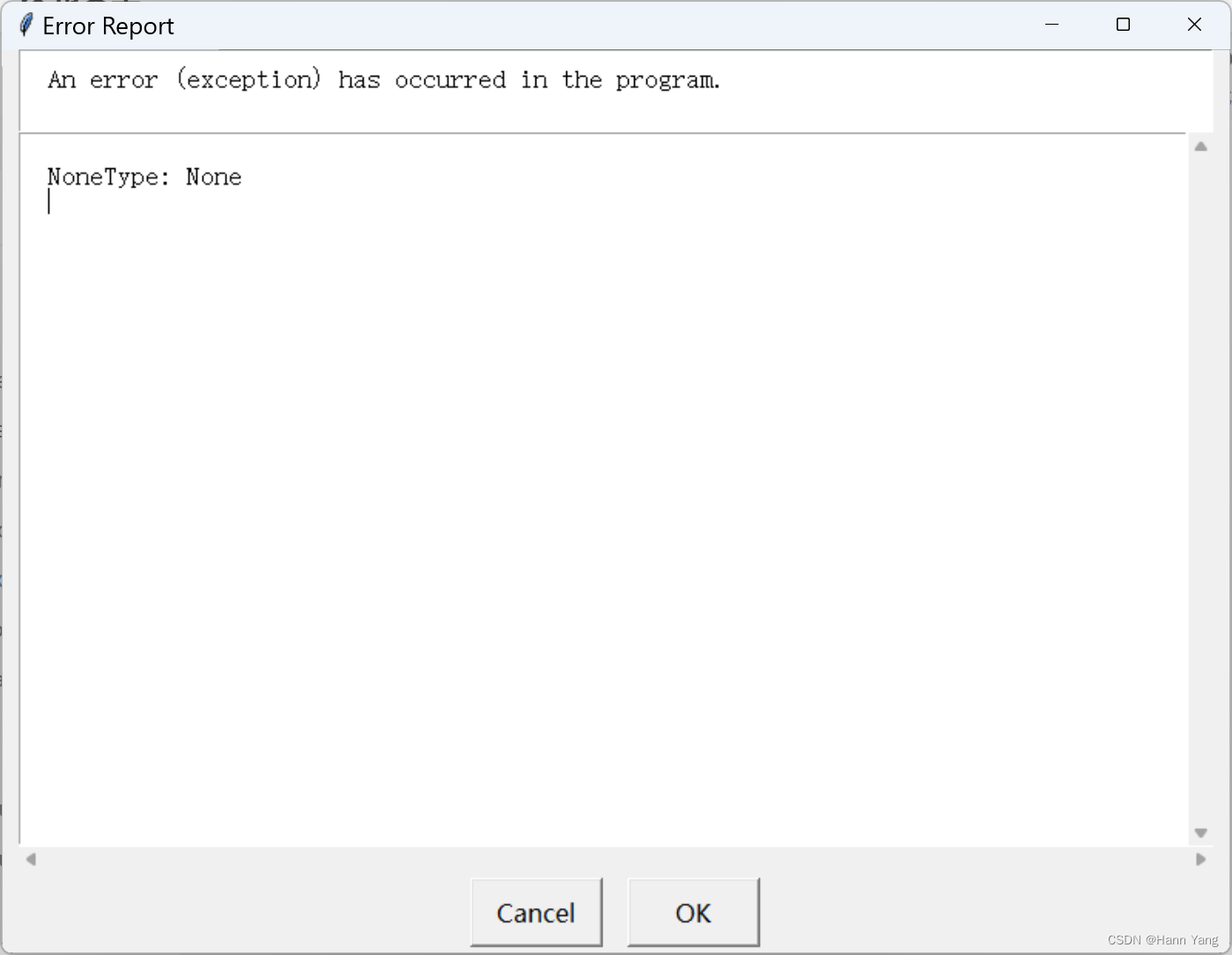
15. 代码文本框 codebox
codebox(msg='', title=' ', text='')
Display some text in a monospaced font, with no line wrapping.
This function is suitable for displaying code and text that is formatted using spaces.
The text parameter should be a string, or a list or tuple of lines to be displayed in the textbox.
:param str msg: the msg to be displayed
:param str title: the window title
:param str text: what to display in the textbox
与多行文本框textbox(msg='', title=' ', text='', codebox=False, callback=None, run=True)很相似,少了后面三个参数:

16. 密码输入框 passwordbox
passwordbox(msg='Enter your password.', title=' ', default='', image=None, root=None)
Show a box in which a user can enter a password.
The text is masked with asterisks, so the password is not displayed.
:param str msg: the msg to be displayed.
:param str title: the window title
:param str default: value returned if user does not change it
:return: the text that the user entered, or None if they cancel
the operation.
显示一个框,用户可以在其中输入密码。文本用星号屏蔽,因此不会显示密码。
import easygui as eg
eg.passwordbox(msg='请输入密码:', title='密码输入框', default='456123', image=None, root=None)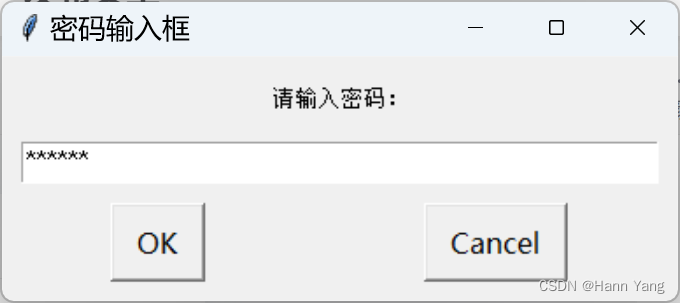
17. 多重文本框 multenterbox
multenterbox(msg='Fill in values for the fields.', title=' ', fields=[], values=[], callback=None, run=True)
Show screen with multiple data entry fields.
If there are fewer values than names, the list of values is padded with empty strings until the number of values is the same as the number of names.
If there are more values than names, the list of values is truncated so that there are as many values as names.
Returns a list of the values of the fields, or None if the user cancels the operation.
:param str msg: the msg to be displayed.
:param str title: the window title
:param list fields: a list of fieldnames.
:param list values: a list of field values
:return: String
显示包含多个数据输入字段,即同一个对话框中有多个单行文本框。例如:
import easygui as eg
msg = "Enter your personal information"
title = "Credit Card Application"
fieldNames = ["Name","Address","City","State","ZipCode"]
fieldValues = []  # we start with blanks for the values
fieldValues = eg.multenterbox(msg,title, fieldNames)
# make sure that none of the fields was left blank
while 1:if fieldValues is None: breakerrmsg = ""for i in range(len(fieldNames)):if fieldValues[i].strip() == "":errmsg += ('"%s" is a required field.\n\n' % fieldNames[i])if errmsg == "":break # no problems foundfieldValues = eg.multenterbox(errmsg, title, fieldNames, fieldValues)
print("Reply was: %s" % str(fieldValues))
18. 组合密码框 multpasswordbox
multpasswordbox(msg='Fill in values for the fields.', title=' ', fields=(), values=(), callback=None, run=True)
Same interface as multenterbox. But in multpassword box, the last of the fields is assumed to be a password, and is masked with asterisks.
:param str msg: the msg to be displayed.
:param str title: the window title
:param list fields: a list of fieldnames.
:param list values: a list of field values
:return: String
与多重文本框相似,但最后一个是密码框,输入会补星号代替,例如:
import easygui as eg
msg = "输入你的登录信息:"
title = "组合密码框"
fieldNames = ["账号:", "密码:"]
fieldValues = eg.multpasswordbox(msg,title, fieldNames)# make sure that none of the fields was left blank
while 1:if fieldValues[0].strip() == "":errmsg = '账号不可为空!'fieldValues = eg.multpasswordbox(errmsg, title, fieldNames, fieldValues)elif fieldValues[1].strip() == "":errmsg = '密码不可为空!'fieldValues = eg.multpasswordbox(errmsg, title, fieldNames, fieldValues)else:breakprint("账号、密码分别为: %s" % fieldValues)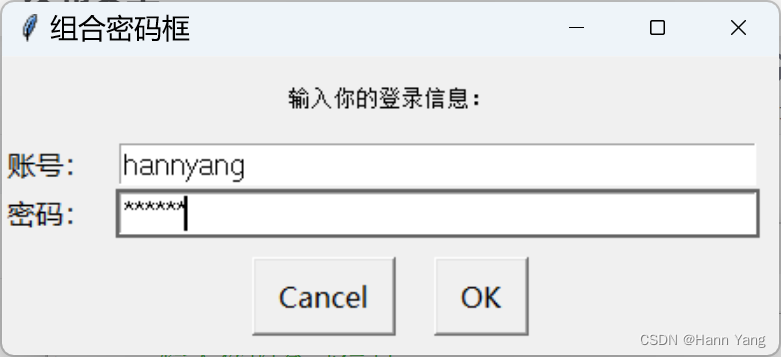
19. 多项选择框 multchoicebox
multchoicebox(msg='Pick an item', title='', choices=None, preselect=0, callback=None, run=True)
The ``multchoicebox()`` function provides a way for a user to select from a list of choices. The interface looks just like the ``choicebox()`` function's dialog box, but the user may select zero, one, or multiple choices.
The choices are specified in a sequence (a tuple or a list).
:param str msg: the msg to be displayed
:param str title: the window title
:param list choices: a list or tuple of the choices to be displayed
:param preselect: Which item, if any are preselected when dialog appears
:return: A list of strings of the selected choices or None if cancelled.
与单项选择框 choicebox() 相似,只有单项选择和多项选择的区别:
import easygui as eg
msg ="What is your favorite flavor?"
title = "Ice Cream Survey"
choices = ["Vanilla", "Chocolate", "Strawberry", "Rocky Road"]
choice = eg.multchoicebox(msg, title, choices)
总结
EasyGUI为Python开发者提供了一个快速创建基本图形用户界面的途径。它降低了GUI开发的门槛,使得即使是没有经验的开发者也能轻松构建出功能完善的界面。尽管它可能不适合复杂的应用程序或专业的软件开发项目,但对于快速原型设计、小型项目和教学目的来说,它是一个强大而高效的工具。通过利用EasyGUI的简单性和灵活性,开发者可以专注于解决问题,而不是纠结于复杂的界面细节。
完
相关文章:
Python 简易图形界面库easygui 对话框大全(续)
目录 EasyGUI库 主要特点 使用场景 对话框样式 10. 文件打开框 fileopenbox 11. 文件保存框 filesavebox 12. 目录打开框 diropenbox 13. 索引对话框 indexbox 14. 例外报告框 exceptionbox 15. 代码文本框 codebox 16. 密码输入框 passwordbox 17. 多重文本框 mul…...

电容器50ZLH56MEFC6.3X11
电容器 常用电子元器件类型 50ZLH56MEFC6.3X11 文章目录 电容器前言一、电容器二、50ZLH56MEFC6.3X11总结前言 电容器在电子电路中有许多重要的应用,如滤波、耦合、储能、定时等。不同类型的电容器具有不同的性能特点,例如电容量、工作电压、频率响应等。在选择和使用电容…...
vscode 支持c,c++编译调试方法
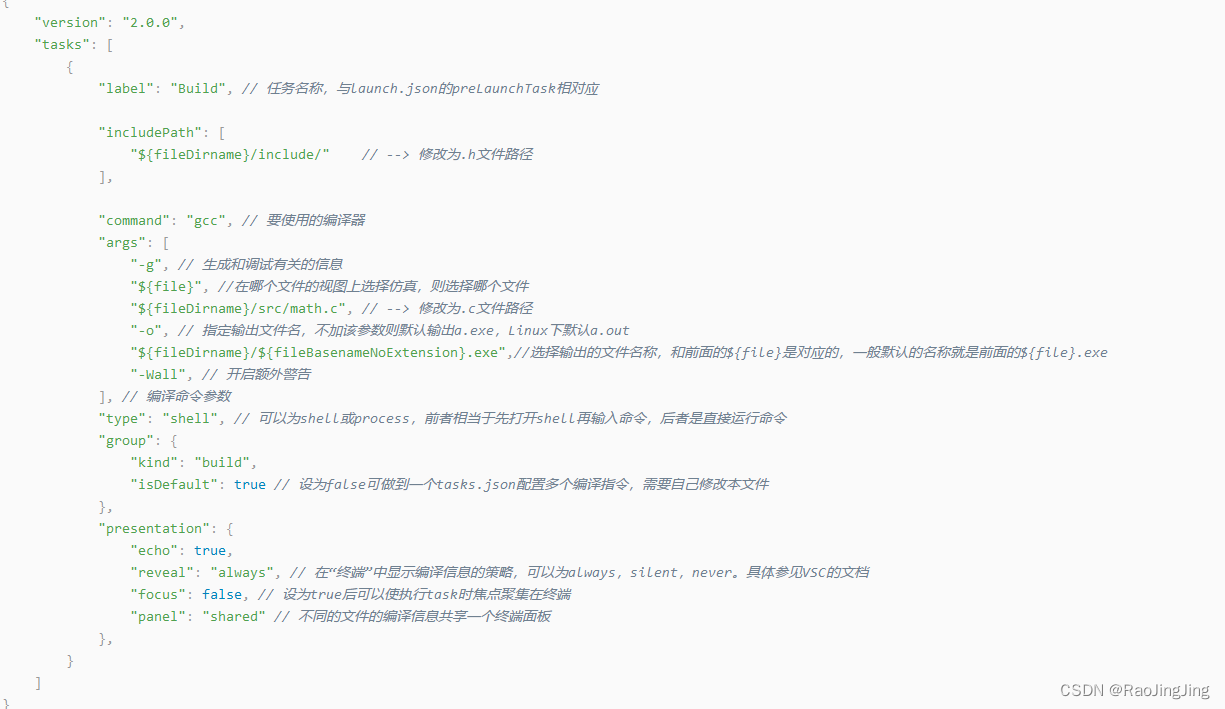
概述:tasks.jason launch.json settings.json一定要有,没有就别想跑。还有就是c 和c配置有区别,切记,下文有说 1.安装扩展插件。 2.安装编译器,gcc.我用的是x86_64-8.1.0-release-win32-seh-rt_v6-rev0.7z …...
MyBatis的缓存!!!!
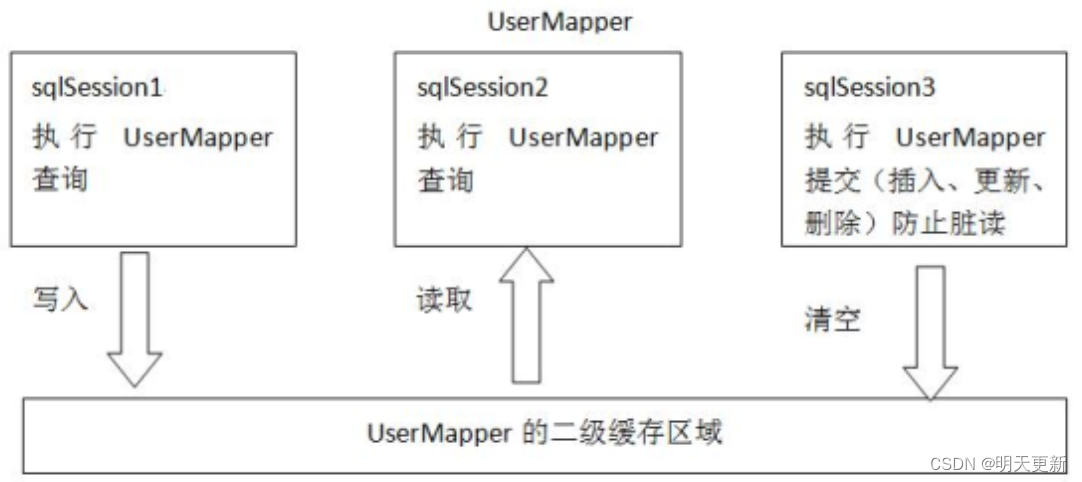
为什么使用缓存? 首次访问时,查询数据库,并将数据存储到内存中;再次访问时直接访问缓存,减少IO、硬盘读写次数、提高效率 Mybatis中的一级缓存和二级缓存? 一级缓存: 它指的是mybatis中的SqlSession对象的…...

ToB还是ToC?工业级与消费级AR眼镜都能干什么?
随着科技的飞速发展,增强现实(AR)技术逐渐融入我们的日常生活。我国AR眼镜消费市场分为消费级和工业级应用。其中消费级主要分为游戏、影视、直播以及社交购物与旅游;工业级主要应用于医疗、汽车、工业、船舶、电力和仓储等专业领…...
设计模式-Java版本
文章目录 前言设计原则单一职责原则开闭原则里氏替换原则迪米特法则接口隔离原则依赖倒置原则 设计模式构建类型工厂模式抽象工厂建造者模式原型模式单例模式 结构型适配器模式桥接模式组合模式装饰器模式代理模式外观模式享元模式 行为模式责任链模式命令模式迭代器模式中介模…...

数据库中如何修改和删除字段
PS:在"[ ]"中的所有数据都是可修改的 添加表字段 ALTER TABLE [表名] add [添加的新字段名] [添加新的数据类型] COMMENT [昵称] alter:修改(后面一般加table表示修改表) add:添加一个字段 在这个里面c…...

在 Golang 应用程序中管理多个数据库
掌握在 Golang 项目中处理多个数据库的艺术 在当前软件开发领域中,处理单个应用程序内的多个数据库的需求越来越普遍。具有强大功能的 Golang 是处理此类任务的绝佳解决方案,无论您是与多个数据源合作还是仅为增强组织和可扩展性而分隔数据。在本文中&a…...

理解开源协议GPL、MIT、BSD、Apache License
开源协议是一种法律文件,规定了使用、修改和分享开源软件的规则和条件。以下是一些常见的开源协议及其相同点和区别:GPL(GNU General Public License):GPL 是一种比较严格的开源协议,要求使用者如果对开源软…...

Talk | 北京大学博士生汪海洋:通向3D感知大模型的前置方案
本期为TechBeat人工智能社区第559期线上Talk。 北京时间12月28日(周四)20:00,北京大学博士生—汪海洋的Talk已准时在TechBeat人工智能社区开播! 他与大家分享的主题是: “通向3D感知大模型的前置方案”,介绍了他的团队在3D视觉大模型的前置方…...
【C语言数组传参】规则详解
目录 数组传参介绍 数组传参规则 数组传参的实参 特殊情况一:sizeof(数组名) 特殊情况二:&数组名 数组传参的形参 数组传参使用数组名作为形参接收 形参如果是⼀维数组 形参如果是⼆维数组 数组传参使用指针作为形参…...

【Linux】Ubuntu22.04版本下实现gcc版本的快速切换
本文将介绍如何在Ubuntu22.04版本下实现gcc版本的快速切换。 本文首发于 ❄️慕雪的寒舍 前言 有的时候,不同版本的gcc会造成一些细微的差异,导致相关的一些工具不兼容,比如用于单元测试覆盖率生成的gcov/lcov工具,在不同的gcc版…...
使用Node Exporter采集主机数据
安装 Node Exporter 在 Prometheus 的架构设计中,Prometheus Server 并不直接服务监控特定的目标,其主要任务负责数据的收集,存储并且对外提供数据查询支持。因此为了能够能够监控到某些东西,如主机的 CPU 使用率,我们…...
Django 文件上传(十二)
当 Django 处理文件上传时,文件数据最终会被放置在 request.FILES 。 查看文档:文件上传 | Django 文档 | Django Django工程如下: 创建本地存储目录 在static/应用目录下创建uploads目录用于存储接收上传的文件 在settings.py 配置静态目…...

k8s的陈述式资源管理
k8s的陈述式资源管理: 命令行:kubectl命令行工具 优点:90%以上的场景都可以满足 对资源的增,删,查比较方便,对改不是很友好 缺点: 命令比较冗长,复杂,难记 声明式&…...

electron-builder 打包exe后白屏
项目用的是An Electron application with Vue3 and TypeScript。 Debug运行项目没问题,可以显示页面。不过有浏览器控制台显示错误: Unable to load preload script:preload/index.js Unable to load preload script 翻译后:无法…...

mvvm,vue双向数据绑定的原理
MVVM (Model-View-ViewModel) 是一种设计模式,主要用于构建用户界面。在 MVVM 中,Model 表示应用程序的数据,View 表示用户界面,而 ViewModel 是 Model 和 View 之间的连接器。MVVM 的核心思想是将视图与模型分离,使它…...

【Java中序列化的原理是什么(解析)】
🍁序列化的原理是什么? 🍁典型-----解析🍁拓展知识仓🍁Serializable 和 Externalizable 接门有何不同? 🍁如果序列化后的文件或者原始类被篡改,还能被反序列化吗?🍁serialVersionU…...
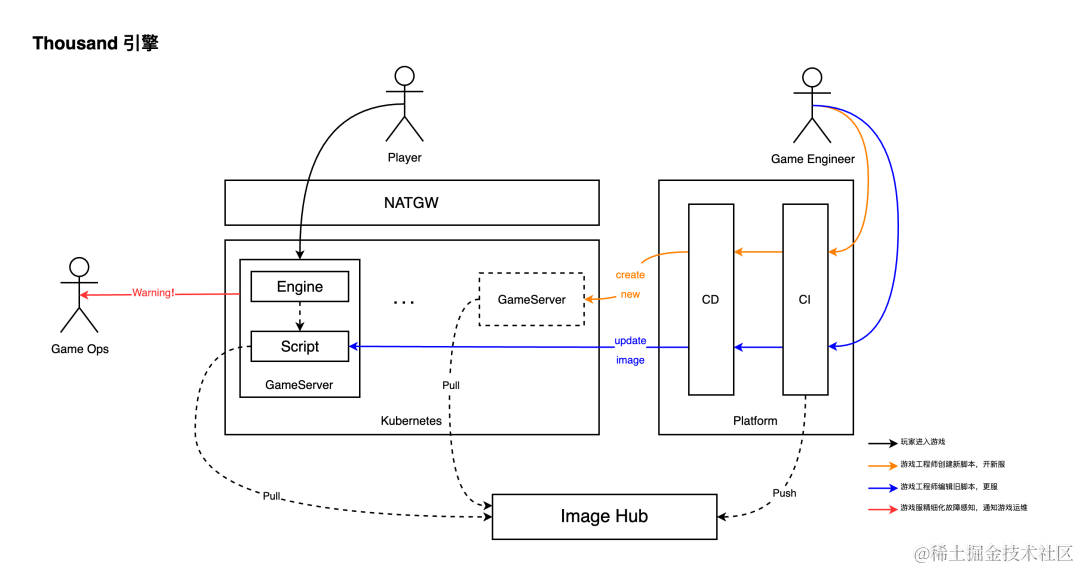
冠赢互娱基于 OpenKrusieGame 实现游戏云原生架构升级
作者:力铭 关于冠赢互娱 冠赢互娱是一家集手游、网游、VR 游戏等研发、发行于一体的游戏公司,旗下官方正版授权的传奇类手游——《仙境传奇》系列深受广大玩家们的喜爱。基于多年 MMORPG 类型游戏的自研与运营经验,冠赢互娱正式推出了 2D M…...

Mybatis 动态 SQL - trim, where, set
之前的例子都巧妙地避开了一个臭名昭著的动态SQL挑战。考虑一下如果我们回到之前的“if”例子,但这次我们将“ACTIVE 1”也作为一个动态条件。 <select id"findActiveBlogLike"resultType"Blog">SELECT * FROM BLOGWHERE<if test&qu…...

sklearn交叉验证提速秘籍:除了n_jobs=-1,cross_val_score里pre_dispatch和verbose怎么用?
sklearn交叉验证提速实战:参数调优与资源管理技巧 当数据集规模膨胀或模型复杂度攀升时,交叉验证可能从几分钟的等待变成数小时的煎熬。许多工程师习惯性设置n_jobs-1后便放任不管,直到内存溢出或日志淹没控制台才手忙脚乱。本文将揭示cross_…...

Android WMS实战:一个取巧的closeSystemDialogs,解决透明Activity横屏导致桌面布局错乱
Android WMS实战:巧用closeSystemDialogs解决透明Activity横屏导致的桌面布局错乱 在Android系统开发中,窗口管理服务(WindowManagerService,简称WMS)一直是开发者需要深入理解的核心模块。今天我们要探讨的是一个非常…...

Midscene.js:重新定义AI驱动的跨平台视觉自动化架构
Midscene.js:重新定义AI驱动的跨平台视觉自动化架构 【免费下载链接】midscene AI-powered, vision-driven UI automation for every platform. 项目地址: https://gitcode.com/GitHub_Trending/mid/midscene 在当今快速发展的数字生态中,企业面临…...

Brush 3D 重建引擎:多系统兼容、功能强大,渲染训练速度比 gsplat 更快!
特性训练方面,Brush 可接受 COLMAP 数据或 Nerfstudio 格式的数据集,在本地、移动端和浏览器中都能完全支持训练。训练时可与场景交互,实时查看训练动态,对比渲染效果与输入视图,还支持对带透明度的图像进行遮罩处理。…...

基于Electron的Claude桌面客户端开发:从封装网页到系统集成
1. 项目概述:为什么我们需要一个独立的Claude桌面客户端?作为一名长期在AI工具和效率软件领域折腾的开发者,我一直在寻找能让日常工作流更顺畅的解决方案。Claude作为一款强大的AI助手,其官方网页版虽然功能完善,但在某…...

开放标准如何重塑多媒体设备开发:从碎片化到模块化
1. 项目概述:为什么我们需要一个“开放标准”?如果你在消费电子、汽车座舱或者智能家居领域待过几年,一定会对“多媒体设备”这个词又爱又恨。爱的是,它代表了用户体验的核心——那块屏幕、那套音响、那个能看视频能听歌的交互界面…...

整合Hermes Agent与Taotoken构建自定义AI助手
🚀 告别海外账号与网络限制!稳定直连全球优质大模型,限时半价接入中。 👉 点击领取海量免费额度 整合Hermes Agent与Taotoken构建自定义AI助手 在构建基于大模型的自动化工作流时,开发者常常需要将AI能力深度集成到本…...

5分钟搞定:抖音无水印批量下载工具终极应用指南
5分钟搞定:抖音无水印批量下载工具终极应用指南 【免费下载链接】douyin-downloader A practical Douyin downloader for both single-item and profile batch downloads, with progress display, retries, SQLite deduplication, and browser fallback support. 抖…...

如何提升co项目代码质量:ESLint规则与异步检查完整指南
如何提升co项目代码质量:ESLint规则与异步检查完整指南 【免费下载链接】co The ultimate generator based flow-control goodness for nodejs (supports thunks, promises, etc) 项目地址: https://gitcode.com/gh_mirrors/co/co co作为Node.js生态中基于生…...

Claudio项目解析:Telegram集成Claude CLI的智能助手部署与成本控制
1. 项目概述:Claudio,一个连接Claude Code与Telegram的智能助手如果你和我一样,日常开发工作流中重度依赖Claude Code CLI,同时又希望能在手机上随时与Claude对话,那么Claudio这个项目绝对值得你花时间研究。它本质上是…...