
Spring Boot笔记2
3. SpringBoot原理分析
3.1. 起步依赖原理解析
3.1.1. 分析spring-boot-starter-parent
按住Ctrl键,然后点击pom.xml中的spring-boot-starter-parent,跳转到了spring-boot-starter-parent的pom.xml,xml配置如下(只摘抄了部分重点配置):
<parent><groupId>org.springframework.boot</groupId><artifactId>spring-boot-dependencies</artifactId><version>2.3.3.RELEASE</version><relativePath>../../spring-boot-dependencies</relativePath>
</parent>
按住Ctrll键,然后点击pom.xml中的spring-boot-starter-dependencies,跳转到了spring-boot-starter-dependencies的pom.xml,xml配置如下(只摘抄了部分重点配置):
<properties><activemq.version>5.15.3</activemq.version><antlr2.version>2.7.7</antlr2.version><appengine-sdk.version>1.9.63</appengine-sdk.version><artemis.version>2.4.0</artemis.version><aspectj.version>1.8.13</aspectj.version><assertj.version>3.9.1</assertj.version><atomikos.version>4.0.6</atomikos.version><bitronix.version>2.1.4</bitronix.version><build-helper-maven-plugin.version>3.0.0</build-helper-maven-plugin.version><byte-buddy.version>1.7.11</byte-buddy.version>... ... ...
</properties>
<dependencyManagement><dependencies><dependency><groupId>org.springframework.boot</groupId><artifactId>spring-boot</artifactId><version>2.3.1.RELEASE</version></dependency><dependency><groupId>org.springframework.boot</groupId><artifactId>spring-boot-test</artifactId><version>2.3.3.RELEASE</version></dependency>... ... ...</dependencies>
</dependencyManagement>
<build><pluginManagement><plugins><plugin><groupId>org.jetbrains.kotlin</groupId><artifactId>kotlin-maven-plugin</artifactId><version>${kotlin.version}</version></plugin><plugin><groupId>org.jooq</groupId><artifactId>jooq-codegen-maven</artifactId><version>${jooq.version}</version></plugin><plugin><groupId>org.springframework.boot</groupId><artifactId>spring-boot-maven-plugin</artifactId><version>2.3.3.RELEASE</version></plugin>... ... ...</plugins></pluginManagement>
</build>
从上面的spring-boot-starter-dependencies的pom.xml中我们可以发现,一部分坐标的版本、> > 依赖管理、插件管理已经定义好,所以我们的SpringBoot工程继承spring-boot-starter-parent后> > 已经具备版本锁定等配置了。所以起步依赖的作用就是进行依赖的传递。
3.1.2. 分析spring-boot-starter-web
按住Ctrll键,然后点击pom.xml中的spring-boot-starter-web,跳转到了spring-boot-starter-web的pom.xml,xml配置如下(只摘抄了部分重点配置):
<?xml version="1.0" encoding="UTF-8"?>
<project xsi:schemaLocation="http://maven.apache.org/POM/4.0.0 http://maven.apache.org/xsd/maven-4.0.0.xsd" xmlns="http://maven.apache.org/POM/4.0.0"xmlns:xsi="http://www.w3.org/2001/XMLSchema-instance"><modelVersion>4.0.0</modelVersion><parent><groupId>org.springframework.boot</groupId><artifactId>spring-boot-starters</artifactId><version>2.3.3.RELEASE</version></parent><groupId>org.springframework.boot</groupId><artifactId>spring-boot-starter-web</artifactId><version>2.3.3.RELEASE</version><name>Spring Boot Web Starter</name><dependencies><dependency><groupId>org.springframework.boot</groupId><artifactId>spring-boot-starter</artifactId><version>2.3.3.RELEASE</version><scope>compile</scope></dependency><dependency><groupId>org.springframework.boot</groupId><artifactId>spring-boot-starter-json</artifactId><version>2.3.3.RELEASE</version><scope>compile</scope></dependency><dependency><groupId>org.springframework.boot</groupId><artifactId>spring-boot-starter-tomcat</artifactId><version>2.3.3.RELEASE</version><scope>compile</scope></dependency><dependency><groupId>org.hibernate.validator</groupId><artifactId>hibernate-validator</artifactId><version>6.0.9.Final</version><scope>compile</scope></dependency><dependency><groupId>org.springframework</groupId><artifactId>spring-web</artifactId><version>5.2.8.RELEASE</version><scope>compile</scope></dependency><dependency><groupId>org.springframework</groupId><artifactId>spring-webmvc</artifactId><version>5.2.8.RELEASE</version><scope>compile</scope></dependency></dependencies>
</project>
从上面的spring-boot-starter-web的pom.xml中我们可以发现,spring-boot-starter-web就是将> web开发要使用的spring-web、spring-webmvc等坐标进行了“打包”,这样我们的工程只要引入spring-boot-starter-web起步依赖的坐标就可以进行web开发了,同样体现了依赖传递的作用。
3.2. 自动配置原理解析
按住Ctrll键,然后点击查看启动类DemoApplication上的注解@SpringBootApplication
@SpringBootApplication
public class DemoApplication {public static void main(String[] args) {SpringApplication.run(DemoApplication.class, args);}
}
注解@SpringBootApplication的源码
@Target(ElementType.TYPE)
@Retention(RetentionPolicy.RUNTIME)
@Documented
@Inherited
@SpringBootConfiguration
@EnableAutoConfiguration
@ComponentScan(excludeFilters = { @Filter(type = FilterType.CUSTOM, classes = TypeExcludeFilter.class),@Filter(type = FilterType.CUSTOM, classes = AutoConfigurationExcludeFilter.class) })
public @interface SpringBootApplication {  //...  }
@SpringBootConfiguration:等同与@Configuration,既标注该类是Spring的一个配置类@EnableAutoConfiguration:SpringBoot自动配置功能开启 @ComponentScan:定义扫描路径,从中找出标识了需要装配的类,并自动装配到spring容器中
3.3. 处理器配置原理解析
按住Ctrll键,然后点击查看处理器类 UserController上的注解@RestController
@RestController
public class UserController { }
注解@RestController的源码
@Target(ElementType.TYPE)
@Retention(RetentionPolicy.RUNTIME)
@Documented
@Controller
@ResponseBody
public @interface RestController { //... }
可以看到:@RestController注解就相当于:@Controller+@ResponseBody
4. SpringBoot工程配置文件
SpringBoot是基于约定的,所以很多配置都有默认值,但如果想使用自己的配置替换默认配置的话,就可以使用SpringBoot配置文件进行配置。
SpringBoot配置文件有两种:properties文件形式、yml文件形式。SpringBoot默认会从Resources目录下加载application.properties或application.yml文件。
4.1. application.properties配置文件
下面是一个 application.properties 配置文件实例:
## 修改服务器启动端口
server.port=8080
## 设置应用程序访问上下文路径
server.servlet.context-path=/elm
## 设置SpringBoot日志输出级别(error、warn、info、debug)
logging.level.org.springframework=debug
4.2. application.yml配置文件
YML文件格式是YAML (YAML Aint Markup Language)编写的文件格式,YAML是一种直观的能够被电脑识别的数据序列化格式,并且容易被人类阅读,容易和脚本语言交互的,可以被支持YAML库的不同的编程语言程序导入,比如: C/C++, Ruby, Python, Java, Perl, C#, PHP等。YML文件是以数据为核心的,比传统的xml方式更加简洁。
YML文件的扩展名可以使用.yml或者.yaml。
下面是一个 application.yml 配置文件实例:
server:port: 8080servlet:context-path: /elm
logging:level:org.springframework: debug
yml文件基本语法:
- 大小写敏感
- 使用缩进表示层级关系(缩进的空格数并不重要,只要相同层级的元素左对齐即可)
- 缩进不允许使用tab,只允许空格
- 冒号后必须要有一个空格
- 使用 # 作为注释
4.3. SpringBoot配置信息的查询
上面提及过,SpringBoot的配置文件,主要的目的就是对配置信息进行修改的,但在配置时的key从哪里去查询呢?我们可以查阅SpringBoot的官方文档文档URL: Spring Boot Reference Guide 常用的配置摘抄如下:
# QUARTZ SCHEDULER (QuartzProperties)
spring.quartz.jdbc.initialize-schema=embedded # Database schema initialization mode.
spring.quartz.jdbc.schema=classpath:org/quartz/impl/jdbcjobstore/tables_@@platform@@.sql # Path to the SQL file to use to initialize the database schema.
spring.quartz.job-store-type=memory # Quartz job store type.
spring.quartz.properties.*= # Additional Quartz Scheduler properties.
# ----------------------------------------
# WEB PROPERTIES
# ----------------------------------------
# EMBEDDED SERVER CONFIGURATION (ServerProperties)
server.port=8080 # Server HTTP port.
server.servlet.context-path= # Context path of the application.
server.servlet.path=/ # Path of the main dispatcher servlet.
# HTTP encoding (HttpEncodingProperties)
spring.http.encoding.charset=UTF-8 # Charset of HTTP requests and responses. Added to the "Content-Type" header if not set explicitly.
# JACKSON (JacksonProperties)
spring.jackson.date-format= # Date format string or a fully-qualified date format class name. For instance, `yyyy-MM-dd HH:mm:ss`.
# SPRING MVC (WebMvcProperties)
spring.mvc.servlet.load-on-startup=-1 # Load on startup priority of the dispatcher servlet.
spring.mvc.static-path-pattern=/** # Path pattern used for static resources.
spring.mvc.view.prefix= # Spring MVC view prefix.
spring.mvc.view.suffix= # Spring MVC view suffix.
# DATASOURCE (DataSourceAutoConfiguration & DataSourceProperties)
spring.datasource.driver-class-name= # Fully qualified name of the JDBC driver. Auto-detected based on the URL by default.
spring.datasource.password= # Login password of the database.
spring.datasource.url= # JDBC URL of the database.
spring.datasource.username= # Login username of the database.
4.4. @Value注解
我们可以通过@Value注解,将配置文件中的值映射到一个Spring管理的Bean的属性上。
@RestController
public class DeptController {//server.port 就是SpringBoot配置文件中的一个值@Value("${server.port}")private int port;@Autowiredprivate DeptService deptService;@RequestMapping("/listDept")public List<Dept> listDept(){System.out.println("端口:"+port);return deptService.listDept();}
}
将@Value注解放置在一个属性上,就可以使用它获取SpringBoot配置文件中的值。
5. SpringBoot整合MyBatis
5.1. 添加MyBatis相关依赖
<dependency><groupId>org.mybatis.spring.boot</groupId><artifactId>mybatis-spring-boot-starter</artifactId><version>2.0.1</version>
</dependency>
<dependency><groupId>mysql</groupId><artifactId>mysql-connector-java</artifactId><version>5.1.6</version><scope>runtime</scope>
</dependency>
5.2. 添加MyBatis相关配置
在application.properties配置文件中配置MyBatis相关信息
server.port=8080
server.servlet.context-path=/elm
## logging.level.org.springframework=debug
## 配置mapper输出日志级别
logging.level.com.neusoft.demo.mapper=debug
## 配置数据源信息
spring.datasource.username=root
spring.datasource.password=123
spring.datasource.url=jdbc:mysql://localhost:3306/elm?characterEncoding=utf-8
spring.datasource.driver-class-name=com.mysql.jdbc.Driver
## 配置mapper映射文件路径
mybatis.mapper-locations=classpath:mapper/*.xml
## 配置扫描实体包,给实体类设置别名
mybatis.type-aliases-package=com.neusoft.demo.po
也可以使用application.yml形式配置文件进行MyBatis相关配置:
server:port: 8080servlet:context-path: /elm
logging:level:org.springframework: debugcom.neusoft.demo.mapper: debug
spring:datasource:driver-class-name: com.mysql.jdbc.Driverurl: jdbc:mysql://localhost:3306/elm?characterEncoding=utf-8username: rootpassword: 123
mybatis:mapper-locations: classpath:mapper/*.xmltype-aliases-package: com.neusoft.demo.po
5.3. 创建mapper接口
@Mapper
public interface DeptMapper {@Select("select * from dept order by deptno")public List<Dept> listDept();
}
注意:必须要使用 @Mapper 标识此mapper接口
5.4. 创建service接口与实现类
public interface DeptService {public List<Dept> listDept();
}
@Service
public class DeptServiceImpl implements DeptService{@Autowiredprivate DeptMapper deptMapper;@Override@Transactional //注意:需要在主启动类上添加@EnableTransactionManagement注解public List<Dept> listDept() {return deptMapper.listDept();}
}5.5. 创建controller
@RestController
public class DeptController {@Autowiredprivate DeptService deptService;@RequestMapping("/listDept")public List<Dept> listDept(){return deptService.listDept();}
}
5.6. 测试
<script src="https://unpkg.com/axios/dist/axios.js"></script>
<script>axios.post('http://localhost:8080/elm/listDept').then(response => {console.log(response.data);}).catch(error => {console.log(error);});
</script>
6. 问题
- SpringBoot与SpringMVC的区别?
- 简述SpringBoot的特点?
- 简述SpringBoot的核心功能?
- 简述@RequestBody 注解的功能?
- 简述yml文件的基本语法?
- 什么是 Spring Boot Stater?
- 什么是嵌入式服务器?我们为什么要使用嵌入式服务器呢?
- 编程题:
-
- 使用SpringBoot+MyBatis集成框架实现一个登录案例。
- 使用前后端分离的模式实现。
- 服务器端要有数据层组件、业务层组件、控制层组件。
- 数据层组件使用MyBatis框架完成对数据库的操作。
- 控制层组件要向前端返回json数据。
- 前端使用ajax请求,并通过服务器端返回的json数据来判断是否登录成功。
相关文章:

Spring Boot笔记2
3. SpringBoot原理分析 3.1. 起步依赖原理解析 3.1.1. 分析spring-boot-starter-parent 按住Ctrl键,然后点击pom.xml中的spring-boot-starter-parent,跳转到了spring-boot-starter-parent的pom.xml,xml配置如下(只摘抄了部分重…...

MySQL5.7服务器 SQL 模式
官网地址:MySQL :: MySQL 5.7 Reference Manual :: 5.1.10 Server SQL Modes 欢迎关注留言,我是收集整理小能手,工具翻译,仅供参考,笔芯笔芯. MySQL 5.7 参考手册 / ... / 服务器 SQL 模式 5.1.10 服务器 SQL 模式…...
关于LayUI表格重载数据问题
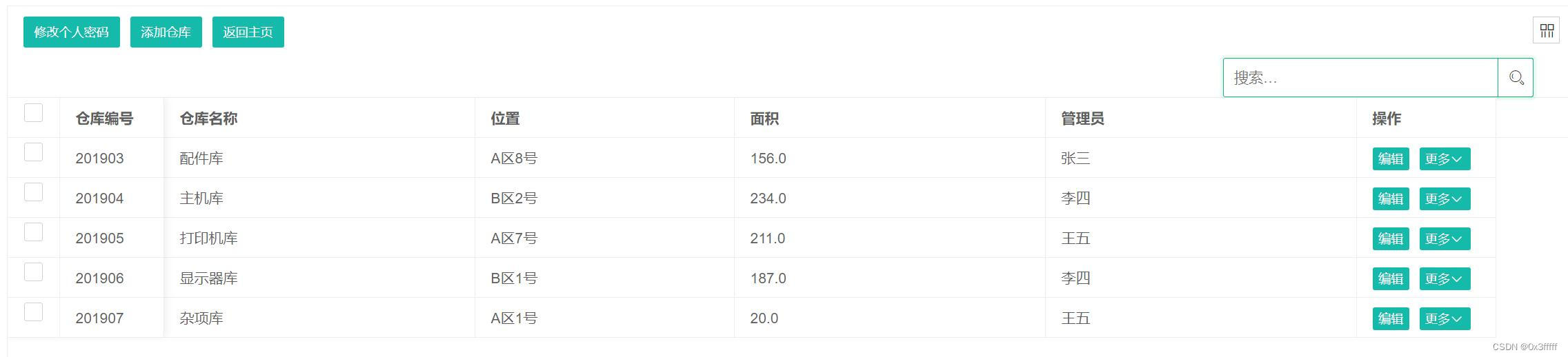
目的 搜索框搜索内容重载数据只显示搜索到的结果 遇到的问题 在layui官方文档里介绍的table属性有data项,但使用下列代码 table.reload(test, {data:data //data为json数据}); 时发现,会会重新调用table.render的url拿到原来的数据,并不会显示出来传…...

MyBatis-mapper.xml配置
1、配置获取添加对象的ID <!-- 配置我们的添加方法,获取到新增加了一个monster对象的iduseGeneratedKeys"true" 意思是需要获取新加对象的主键值keyProperty"monster_id" 表示将获取到的id值赋值给Monster对象的monster_id属性 --><…...

【如何选择Mysql服务器的CPU核数及内存大小】
文章目录 🔊博主介绍🥤本文内容📢文章总结📥博主目标 🔊博主介绍 🌟我是廖志伟,一名Java开发工程师、Java领域优质创作者、CSDN博客专家、51CTO专家博主、阿里云专家博主、清华大学出版社签约作…...

【从浅到深的算法技巧】4.静态方法
1.1.6静态方法 在许多语言中,静态方法被称为函教,静态方法是一组在被调用时会被顺序执行的语句。修饰符static将这类方法和1.2的实例方法区别开来。当讨论两类方法共有的属性时我们会使用不加定语的方法一词。 1.1.6.1静态方法 方法封装了由一系列语句…...

YOLO手部目标检测
手部目标检测原文地址如下:手部关键点检测2:YOLOv5实现手部检测(含训练代码和数据集)_yolov5 关键点检测-CSDN博客 手部检测数据集地址如下: 手部关键点检测1:手部关键点(手部姿势估计)数据集(含下载链接)_手关键点数据集-CSDN博…...

网络IP地址如何更改?怎么使用动态代理IP提高网速?
网络IP地址更改以及使用动态代理IP提高网速的步骤如下: 一、更改IP地址 1. 打开浏览器,输入路由器登陆地址并登陆路由器后台管理界面。 2. 找到“高级设置”或“无线设置”或“VPN设置”一栏,点击“断开”,即可断开网络࿰…...
Flink实时电商数仓之DWS层
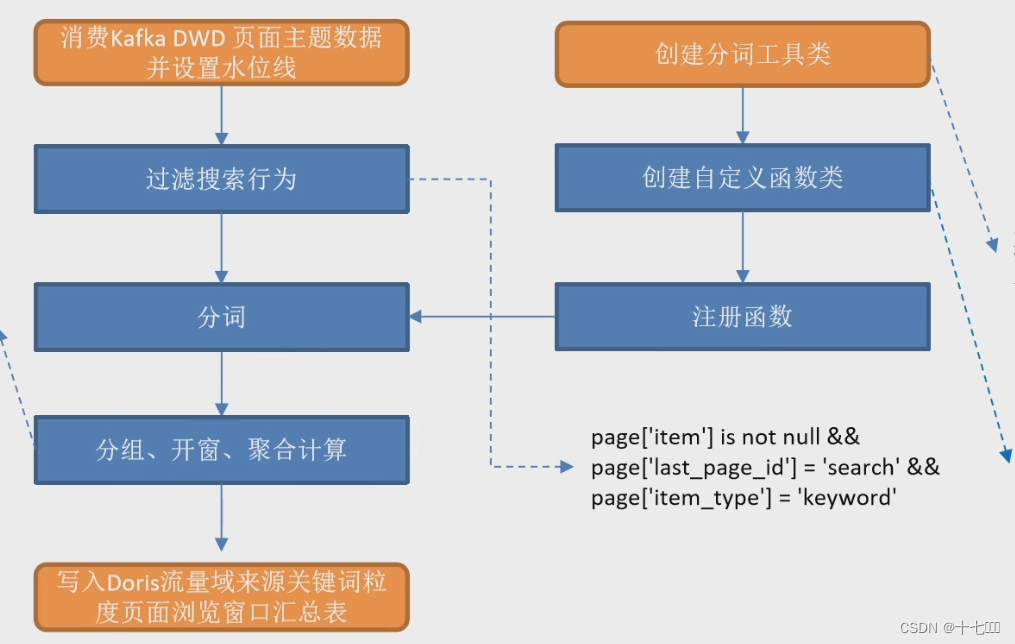
需求分析 关键词 统计关键词出现的频率 IK分词 进行分词需要引入IK分词器,使用它时需要引入相关的依赖。它能够将搜索的关键字按照日常的使用习惯进行拆分。比如将苹果iphone 手机,拆分为苹果,iphone, 手机。 <dependency><grou…...

MFC - CArchive/内存之间的序列化应用细节
文章目录 MFC - CArchive/内存之间的序列化应用细节概述笔记END MFC - CArchive/内存之间的序列化应用细节 概述 有个参数文件, 开始直接序列化到文件. 现在优化程序, 不想这个参数文件被用户看到. 想先由参数发布程序(自己用)设置好参数后, 加个密落地. 等用户拿到后, 由程序…...
C语言实验4:指针
目录 一、实验要求 二、实验原理 1. 指针的基本概念 1.1 指针的定义 1.2 取地址运算符(&) 1.3 间接引用运算符(*) 2. 指针的基本操作 2.1 指针的赋值 2.2 空指针 3. 指针和数组 3.1 数组和指针的关系 3.2 指针和数…...

项目——————————
C/C Linux Socket网络编程 TCP 与 UDP_c 语言tcp socket cleint read-CSDN博客C/C Socket - TCP 与 UDP 网络编程_c socket udp-CSDN博客 登录—专业IT笔试面试备考平台_牛客网...
【论文阅读】Realtime multi-person 2d pose estimation using part affinity fields
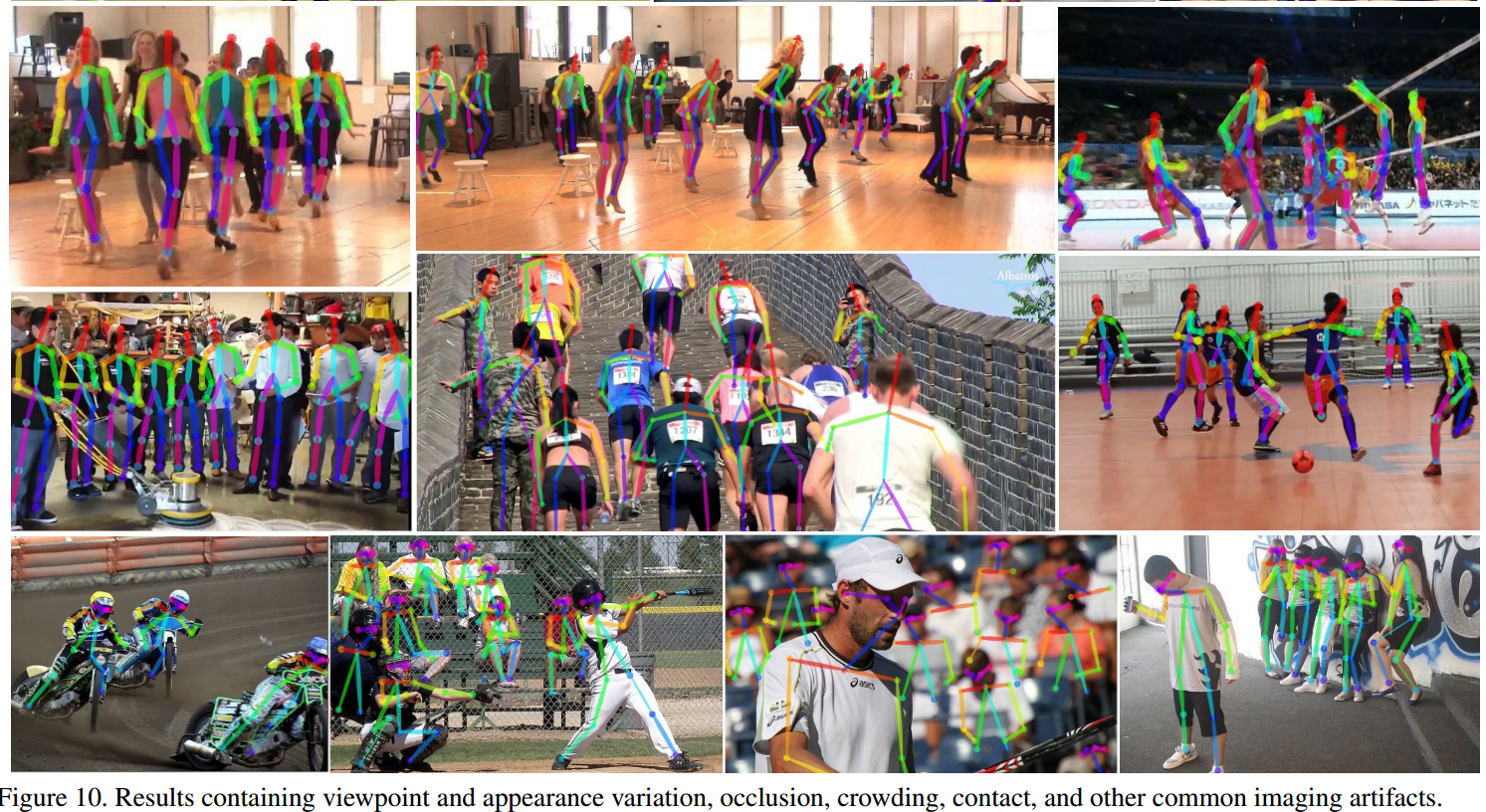
OpenPose:使用PAF的实时多人2D姿势估计。 code:GitHub - ZheC/Realtime_Multi-Person_Pose_Estimation: Code repo for realtime multi-person pose estimation in CVPR17 (Oral) paper:[1611.08050] Realtime Multi-Person 2D Pose Estima…...

图像分割实战-系列教程9:U2NET显著性检测实战1
🍁🍁🍁图像分割实战-系列教程 总目录 有任何问题欢迎在下面留言 本篇文章的代码运行界面均在Pycharm中进行 本篇文章配套的代码资源已经上传 U2NET显著性检测实战1 1、任务概述...

RK3568平台 Android13 GKI架构开发方式
一.GKI简介 GKI:Generic Kernel Image 通用内核映像。 Android13 GMS和EDLA认证的一个难点是google强制要求要支持GKI。GKI通用内核映像,是google为了解决内核碎片化的问题,而设计的通过提供统一核心内核并将SoC和板级驱动从核心内核移至可加…...

阿里云服务器节省计划价格便宜_成本优化全解析
阿里云服务器付费模式节省计划怎么收费?为什么说节省计划更节省成本?节省计划是一种折扣权益计划,可以抵扣按量付费实例(不含抢占式实例)的账单。相比包年包月实例,以及预留实例券和按量付费实例的组合&…...

3种依赖管理工具实现requirements.txt文件生成
1.pip 实现方式 要使用 pip 生成 requirements.txt 文件,可以使用以下命令: pip freeze > requirements.txt这个命令会将当前环境中所有已安装的 Python 包及其版本信息输出到 requirements.txt 文件中。这个文件可以用于共享项目的依赖信息…...

超图iClient3DforCesium地形、影像、模型、在线影像交互示例
超图iClient3DforCesium地形、影像、模型、在线影像交互示例 描述示例代码 描述 数据源:基于iserver发布的三维场景(地形、影像、BIM模型) 在线arcgis影像 应用:目录树展示源数据列表、目录树控制源数据可视化结果显隐、BIM模型点选查询关联属性 示例代…...
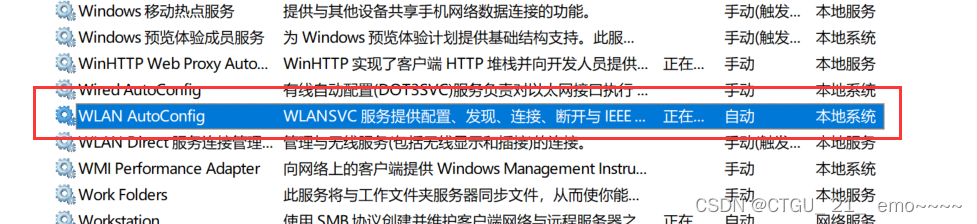
【解决】电脑上的WIFI图标不见了咋整?
相信不少同学都遇到过这种情况:电脑上的wifi图标莫名不见了,甚至有时候还是在使用的中途突然断网消失的。 遇到这种情况一般有两种解决方案: 1. 在开机状态下长按电源键30秒以上 这种办法应该是给主板放电,一般应用在wifi6上面。…...
2 - 表结构 | MySQL键值
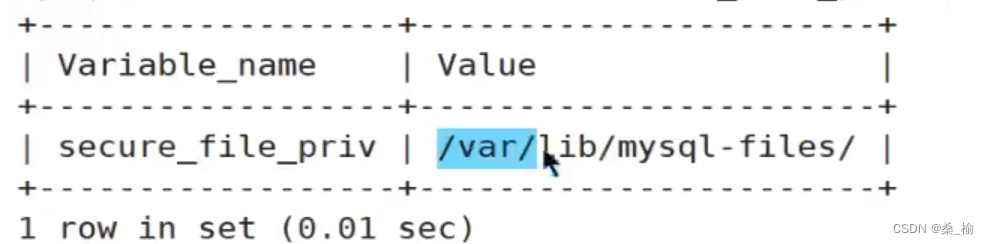
表结构 | MySQL键值 表管理1. 库的操作2. 表的操作表的创建与删除表的修改复制表 3. 管理表记录 数据类型数值类型字符类型(汉字或者英文字母)日期时间类型 表头存储与日期时间格式的数据枚举类型 数据批量处理 表管理 客户端把数据存储到数据库服务器上…...
)
libhv实战:手把手教你用C++写一个带自动重连的WebSocket客户端(附避坑指南)
libhv实战:构建高可靠WebSocket客户端的工程化实践 在实时数据采集和监控系统中,WebSocket客户端的稳定性直接决定了业务连续性。当网络出现闪断、服务端重启或负载波动时,简单的连接断开可能导致关键数据丢失。libhv作为高性能网络库&#x…...

从零到一:我的CentOS私服游戏搭建实战与避坑指南
1. 环境准备:从零开始的CentOS系统部署 第一次接触游戏私服搭建时,我像大多数新手一样对Linux系统充满敬畏。但实际用CentOS搭建环境比想象中简单——只要避开几个关键雷区。推荐使用CentOS 7.9这个经典版本,它在稳定性和软件兼容性上表现最好…...

ARM RAS架构中ERR<n>FR寄存器解析与应用
1. ARM RAS架构与错误记录机制概述 在服务器和关键任务计算领域,硬件可靠性直接决定了系统的可用性水平。ARMv8/v9架构中的RAS(Reliability, Availability, Serviceability)扩展提供了一套完整的硬件错误处理机制,其核心是通过一组专用寄存器实现错误检测…...

3个步骤让你的外文漫画秒变中文:BallonsTranslator零门槛入门指南
3个步骤让你的外文漫画秒变中文:BallonsTranslator零门槛入门指南 【免费下载链接】BallonsTranslator 深度学习辅助漫画翻译工具, 支持一键机翻和简单的图像/文本编辑 | Yet another computer-aided comic/manga translation tool powered by deeplearning 项目地…...

城市规划师实战:如何用TransCad+四阶段法,为你的新区规划提供交通量支撑?
城市规划师实战:TransCad与四阶段法在新区交通规划中的深度应用 1. 从理论到实践:四阶段法的核心逻辑 在Z新城规划项目中,我们面临的核心挑战是如何科学预测未来15年的交通需求。四阶段法作为交通规划领域的经典方法论,其价值在于…...

让 SACF 自动捕获授权对象,把新授权检查安全带进生产系统
很多 ABAP 老系统里,最敏感的改造不是性能优化,也不是把一个古早 FORM 重构成类方法,而是在已经稳定运行多年的业务代码里补授权检查。原因很直接,少一次授权检查,审计和安全团队会觉得风险很大,多一次授权检查,生产用户可能第二天就打不开业务功能。SACF,也就是 Switc…...

华硕笔记本终极优化神器:GHelper完整使用教程
华硕笔记本终极优化神器:GHelper完整使用教程 【免费下载链接】g-helper Lightweight Armoury Crate alternative for Asus laptops with nearly the same functionality. Works with ROG Zephyrus, Flow, TUF, Strix, Scar, ProArt, Vivobook, Zenbook, Expertbook…...

[实战] 2026年CNC加工质量控制:从工程图纸数字化到检验计划生成的全流程解析
在 2026 年的精密制造环境中,cnc 加工(CNC machining)已不再仅仅是切削工艺的竞争,更是数字化协作与质量控制能力的较量。随着多品种、小批量生产模式成为主流,如何快速解析复杂的工程图纸并制定高精度的检验计划&…...

Mybatis-Plus条件构造器实战:QueryWrapper与UpdateWrapper的进阶应用与避坑指南
1. 为什么需要条件构造器? 在日常开发中,数据库操作是绕不开的话题。记得我刚入行时,每次写SQL都要手动拼接字符串,不仅容易出错,还经常被SQL注入漏洞困扰。后来接触到MyBatis,虽然解决了安全问题…...

ColorBrewer完整指南:如何为地图和数据可视化选择完美配色方案
ColorBrewer完整指南:如何为地图和数据可视化选择完美配色方案 【免费下载链接】colorbrewer 项目地址: https://gitcode.com/gh_mirrors/co/colorbrewer ColorBrewer是一个专为地图着色和数据可视化设计的开源配色工具,基于Cynthia Brewer博士的…...