
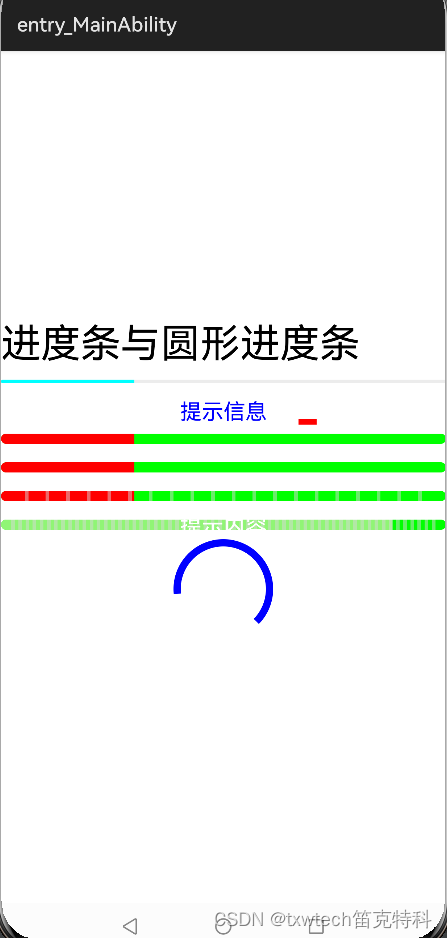
15.鸿蒙HarmonyOS App(JAVA)进度条与圆形进度条
15.鸿蒙HarmonyOS App(JAVA)进度条与圆形进度条
progressBar2.setIndeterminate(true);//设置无限模式,运行查看动态效果
//创建并设置无限模式元素
ShapeElement element = new ShapeElement();
element.setBounds(0,0,50,50);
element.setRgbColor(new RgbColor(255,0,0));
progressBar2.setInfiniteModeElement(element);
<?xml version="1.0" encoding="utf-8"?>
<DirectionalLayoutxmlns:ohos="http://schemas.huawei.com/res/ohos"ohos:height="match_parent"ohos:width="match_parent"ohos:alignment="center"ohos:orientation="vertical"><Textohos:id="$+id:text_helloworld"ohos:height="match_content"ohos:width="match_parent"ohos:background_element="$graphic:background_ability_main"ohos:layout_alignment="horizontal_center"ohos:text="$string:mainability_HelloWorld"ohos:text_size="40vp"/><ProgressBarohos:id="$+id:progressbar1"ohos:height="match_content"ohos:width="match_parent"ohos:max="100"ohos:min="0"ohos:step="1"ohos:progress="30"/><ProgressBarohos:id="$+id:progressbar2"ohos:height="match_content"ohos:width="match_parent"ohos:max="100"ohos:min="0"ohos:step="1"ohos:progress="30"ohos:progress_hint_text="提示信息"ohos:progress_hint_text_color="blue"/><ProgressBarohos:id="$+id:progressbar3"ohos:height="match_content"ohos:width="match_parent"ohos:max="100"ohos:min="0"ohos:step="1"ohos:progress="30"ohos:progress_width="10vp"ohos:progress_color="red"ohos:background_instruct_element="green"/><ProgressBarohos:id="$+id:progressbar4"ohos:height="match_content"ohos:width="match_parent"ohos:max="100"ohos:min="0"ohos:step="1"ohos:progress="30"ohos:progress_width="10vp"ohos:progress_color="red"ohos:vice_progress_element="yellow"ohos:background_instruct_element="green"/><ProgressBarohos:id="$+id:progressbar5"ohos:height="match_content"ohos:width="match_parent"ohos:max="100"ohos:min="0"ohos:step="1"ohos:progress="30"ohos:progress_width="10vp"ohos:progress_color="red"ohos:divider_lines_enabled="true"ohos:divider_lines_number="20"ohos:background_instruct_element="green"/><ProgressBarohos:id="$+id:progressbar6"ohos:height="match_content"ohos:width="match_parent"ohos:max="100"ohos:min="0"ohos:step="1"ohos:progress="88"ohos:progress_width="10vp"ohos:progress_color="#FF90F575"ohos:divider_lines_enabled="true"ohos:divider_lines_number="60"ohos:background_instruct_element="green"ohos:layout_alignment="horizontal_center"ohos:progress_hint_text="提示内容"/><RoundProgressBarohos:id="$+id:roundprogressbar7"ohos:height="100vp"ohos:width="100vp"ohos:max="100"ohos:min="0"ohos:step="1"ohos:progress="88"ohos:progress_width="10vp"ohos:progress_color="#FF90F575"ohos:layout_alignment="horizontal_center"ohos:progress_hint_text="圆形进度条"ohos:progress_hint_text_color="blue"/></DirectionalLayout>
MainAbilitySlice.java
package com.example.myapplication.slice;import com.example.myapplication.ResourceTable;
import ohos.aafwk.ability.AbilitySlice;
import ohos.aafwk.content.Intent;
import ohos.agp.colors.RgbColor;
import ohos.agp.components.ProgressBar;
import ohos.agp.components.RoundProgressBar;
import ohos.agp.components.element.ShapeElement;
import ohos.agp.utils.Color;public class MainAbilitySlice extends AbilitySlice {@Overridepublic void onStart(Intent intent) {super.onStart(intent);super.setUIContent(ResourceTable.Layout_ability_main);ProgressBar progressBar = (ProgressBar) findComponentById(ResourceTable.Id_progressbar1);progressBar.setDividerLineColor(Color.BLUE); //设置分割线颜色progressBar.setDividerLineThickness(30); //设置分割线宽度ProgressBar progressBar2 =(ProgressBar) findComponentById(ResourceTable.Id_progressbar2);progressBar2.setIndeterminate(true);//设置无限模式,运行查看动态效果RoundProgressBar roundProgressBar2 = (RoundProgressBar) findComponentById(ResourceTable.Id_roundprogressbar7);roundProgressBar2.setIndeterminate(true);//运行查看动态效果//创建并设置无限模式元素ShapeElement element = new ShapeElement();element.setBounds(0,0,50,50);element.setRgbColor(new RgbColor(255,0,0));progressBar2.setInfiniteModeElement(element);}@Overridepublic void onActive() {super.onActive();}@Overridepublic void onForeground(Intent intent) {super.onForeground(intent);}
}
相关文章:
15.鸿蒙HarmonyOS App(JAVA)进度条与圆形进度条
15.鸿蒙HarmonyOS App(JAVA)进度条与圆形进度条 progressBar2.setIndeterminate(true);//设置无限模式,运行查看动态效果 //创建并设置无限模式元素 ShapeElement element new ShapeElement(); element.setBounds(0,0,50,50); element.setRgbColor(new RgbColor(255,0,0)); …...

【FastAPI】路径参数
路径参数 from fastapi import FastAPIapp FastAPI()app.get("/items/{item_id}") async def read_item(item_id):return {"item_id": item_id}其中{item_id}就为路径参数 运行以上程序当访问 :http://127.0.0.1:8000/items/fastapi时候 将会…...
【docker笔记】DockerFile
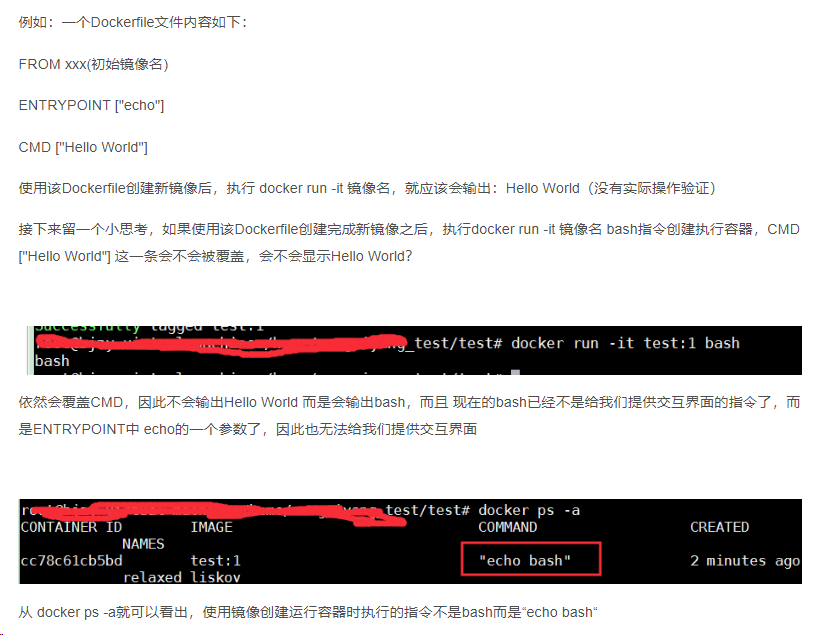
DockerFile Docker镜像结构的分层 镜像不是一个单一的文件,而是有多层构成。 容器其实是在镜像的最上面加了一层读写层,在运行容器里做的任何文件改动,都会写到这个读写层。 如果删除了容器,也就是删除了其最上面的读写层&…...

React项目搭建流程
第一步 利用脚手架创建ts类型的react项目: 执行如下的命令:create-react-app myDemo --template typescript ; 第二步 清理项目目录结构: src/ index.tsx, app.txs, react-app-env.d.ts public/index.ht…...
QT DAY1作业
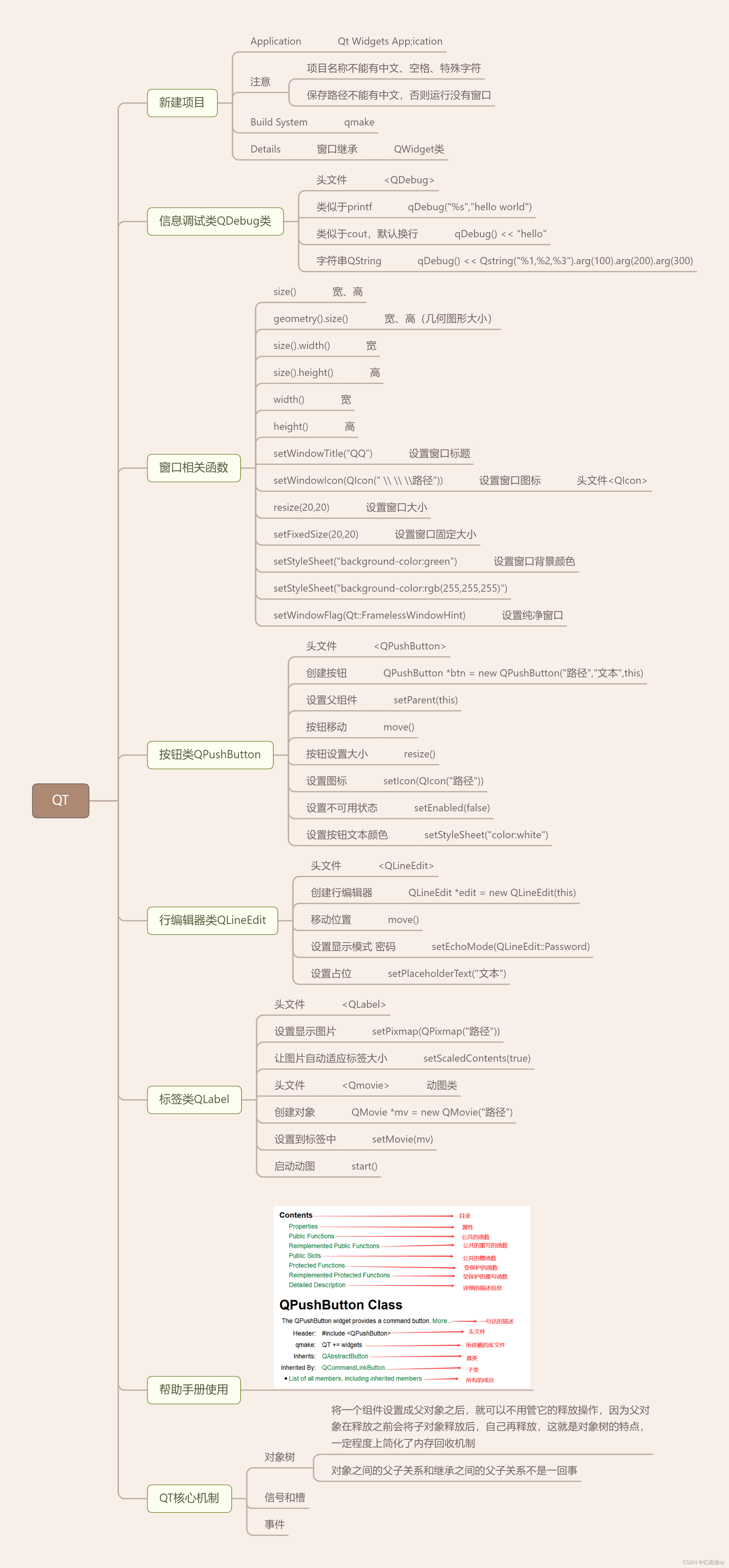
1.QQ登录界面 头文件代码 #ifndef MYWIDGET_H #define MYWIDGET_H#include <QWidget> #include <QIcon> #include <QLabel> #include <QPushButton> #include <QMovie> #include <QLineEdit>class MyWidget : public QWidget {Q_OBJECTpu…...
Java后端开发——Mybatis实验
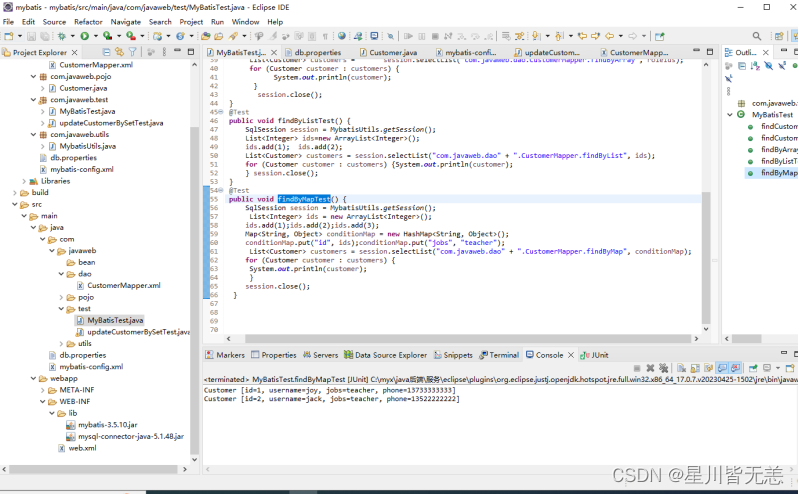
文章目录 Java后端开发——Mybatis实验一、MyBatis入门程序1.创建工程2.引入相关依赖3.数据库准备4.编写数据库连接信息配置文件5.创建POJO实体6.编写核心配置文件和映射文件 二、MyBatis案例:员工管理系统1.在mybatis数据库中创建employee表2.创建持久化类Employee…...

【UE Niagara 网格体粒子系列】02-自定义网格
目录 步骤 一、创建自定义网格体 二、创建Niagara系统 步骤 一、创建自定义网格体 1. 打开Blender,按下ShiftA来创建一个平面 将该平面旋转90 导出为fbx 设置导出选定的物体,这里命名为“SM_PlaneFaceCamera.fbx” 按H隐藏刚才创建的平面&#x…...

k8s 检测node节点内存使用率平衡调度脚本 —— 筑梦之路
直接上脚本: #! /bin/bash#对实际使用内存大于85%的机器停止调度,对实际使用内存小于70%的 关闭调度# 获取实际内存小于或等于70%的机器 memory_lt_70kubectl top nodes |awk NR>1{if($50<70) print $1} # 获取实际内存大于或等于85%的机器 memor…...
React Native集成到现有原生应用
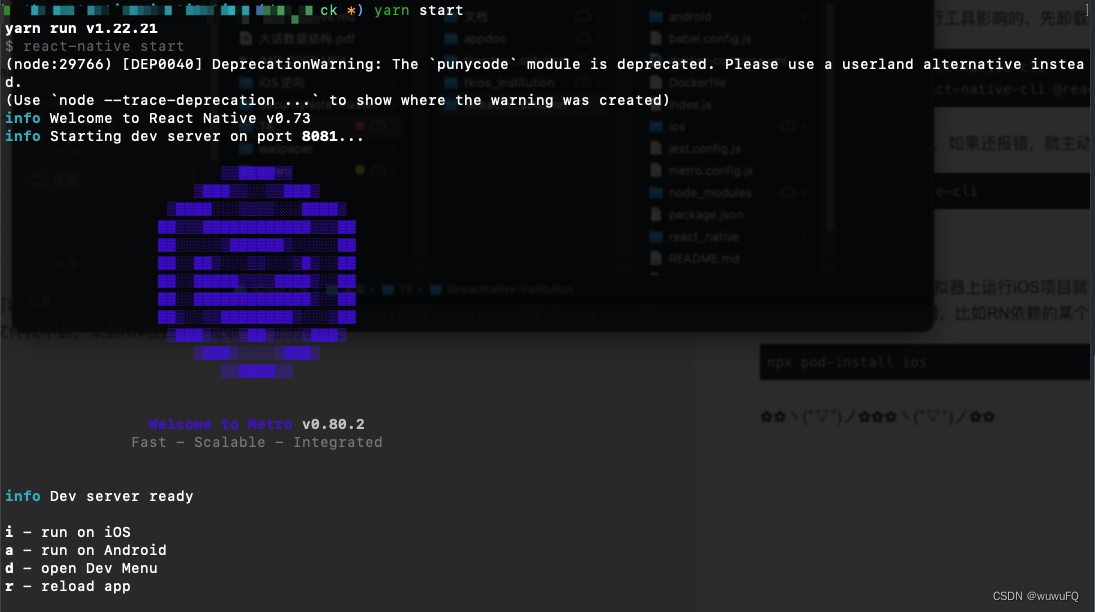
本篇文章以MacOS环境开发iOS平台为例,记录一下在原生APP基础上集成React Native React Native中文网 详细介绍了搭建环境和集成RN的步骤。 环境搭建 必须安装的依赖有:Node、Watchman、Xcode 和 CocoaPods。 安装Homebrew Homebrew是一款Mac OS平台下…...
完全卸载grafana
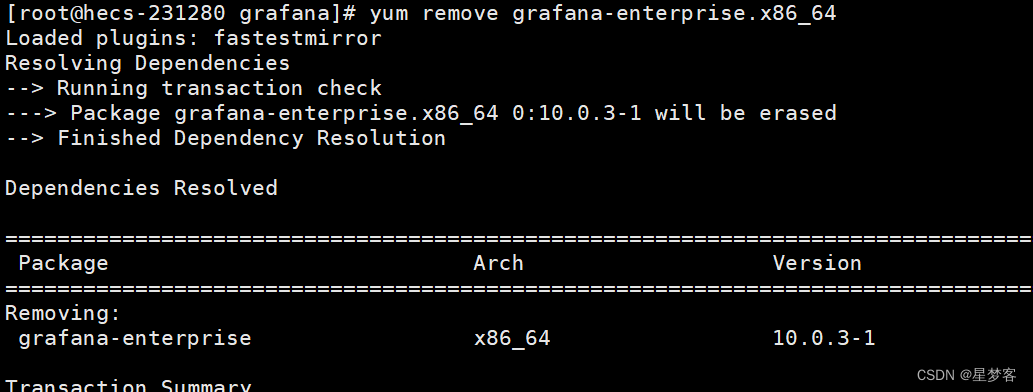
先停掉grafana sudo systemctl stop grafana-server 查看要卸载的包的名字 yum list installed yum remove grafana-enterprise.x86_64 成功 删除grafana的数据目录 sudo rm -rf /etc/grafana/sudo rm -rf /usr/share/grafana/sudo rm -rf /var/lib/grafana/...
Vue2.组件通信
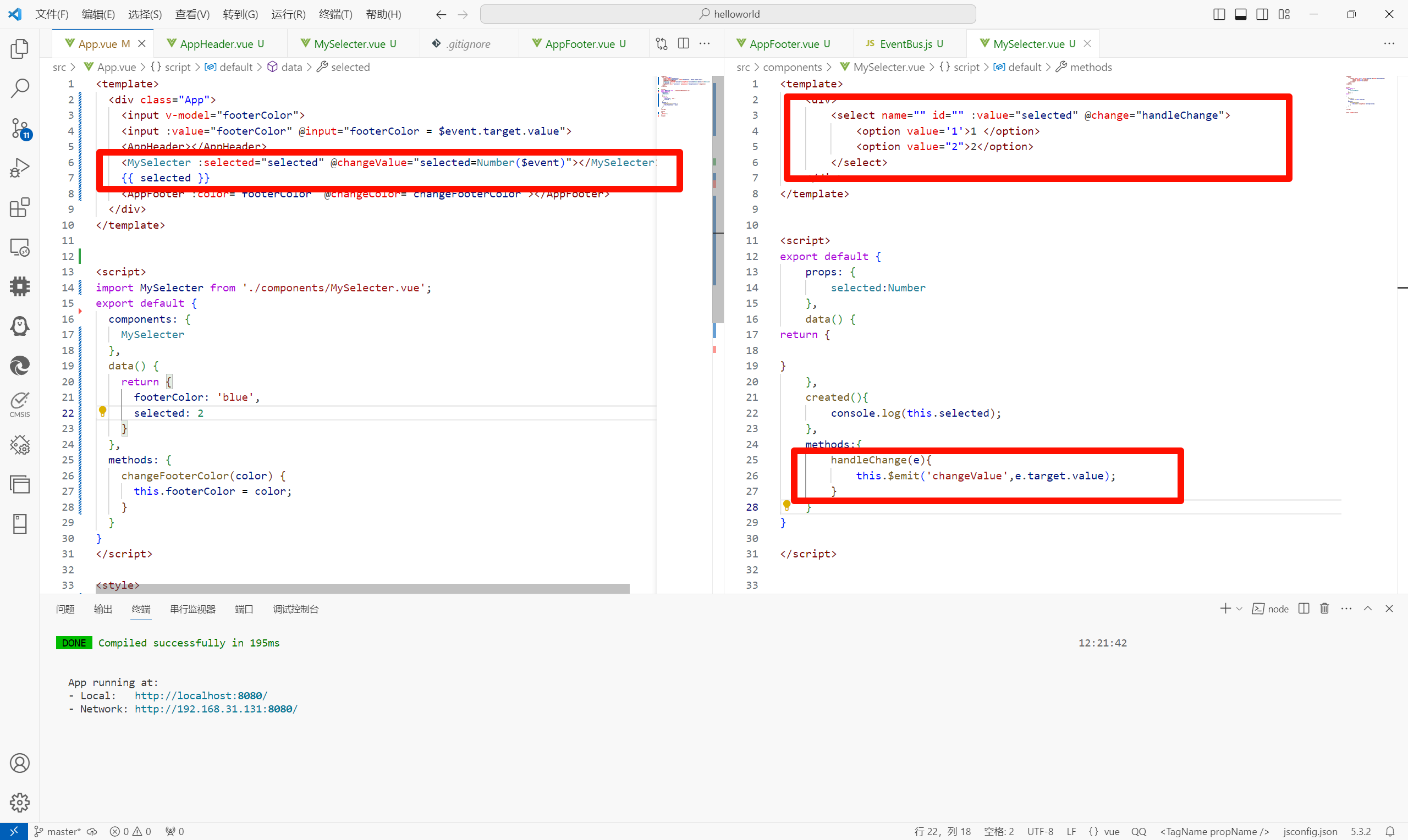
样式冲突 写在组件中的样式默认会全局生效。容易造成多个组件之间的样式冲突问题。 可以给组件加上scoped属性,让样式只作用于当前组件。 原理: 给当前组件模板的所有元素,加上一个自定义属性data-v-hash值,用以区分不同的组件。…...
CAS的超~详细介绍
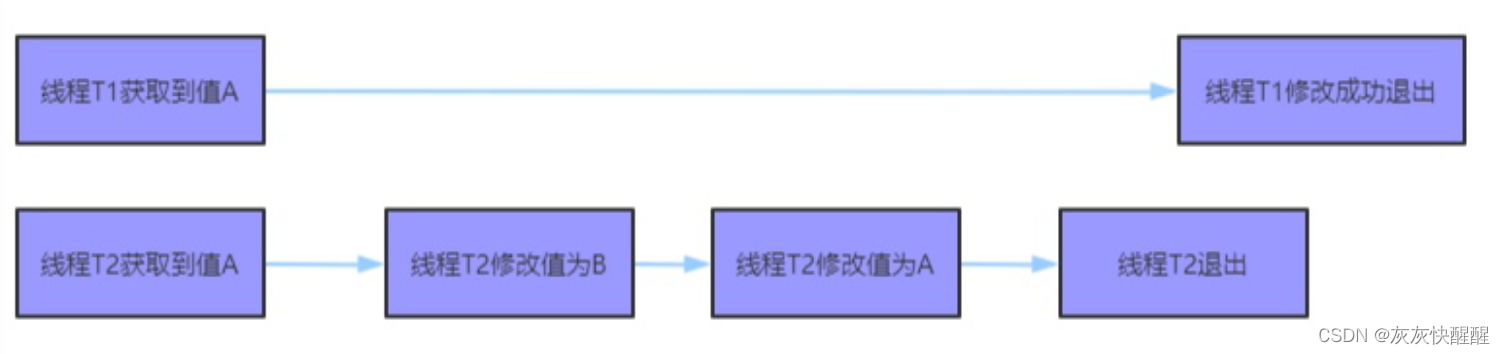
什么是CAS CAS全称Compare and swap,是一种比较特殊的CPU指令. 字面意思:"比较并交换", 一个CAS涉及到以下操作: 我们假设内存中的原数据为V,旧的预期值A,需要修改的新值B. 1.比较A和V是否相等(比较) 2.如果相等,将B写入V.(交换) 3.返回操作是否成功. 伪代码 下面…...

Scott用户数据表的分析
Oracle从入门到总裁:https://blog.csdn.net/weixin_67859959/article/details/135209645 如果想要知道某个用户所有的数据表: select * from tab; 此时结果中一共返回了四张数据表,分别为部门表(dept) ,员工表(emp&a…...
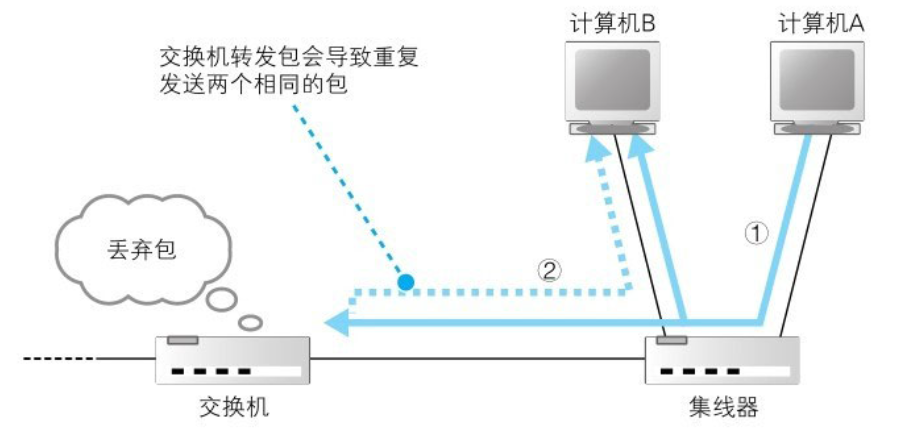
网络基础学习(3):交换机
1.交换机结构 (1)网线接口和后面的电路部分加在一起称为一个端口,也就是说交换机的一个端口就相当于计算机上的一块网卡。 如果在计算机上安装多个网卡,并让网卡接收所有网络包,再安装具备交换机功能的软件࿰…...

【软件测试学习笔记2】用例设计方法
1.能对穷举场景设计测试点(等价法) 等价类: 说明:在所有测试数据中,具有某种共同特征的数据集合进行划分 分类:有效等价类:满足需求的数据集合 无效等价类:不满足需求的数据集合 步…...

蓝桥杯 第三场 小白入门赛
召唤神坤 有意思🤔(ikun)。虽然是第一题但也要配得上神坤的身份。 思路1 枚举分母,选择一个数据结构来选出分母两侧最大的两个数做分子。2s常数大些也无碍。我选择好写的ST表 思路2 写两个 d p dp dp 分别表示 1 1 1 到 i…...

网络安全等级保护测评规划与设计
笔者单位网络结构日益复杂,应用不断增多,使信息系统面临更多的风险。同时,网络攻防技术发展迅速,攻击的技术门槛随着自动化攻击工具的应用也在不断降低,勒索病毒等未知威胁也开始泛滥。基于此,笔者单位拟进…...

Error: Cannot find module ‘vue-template-compiler‘ 问题解决
启动Vuepress项目时报了如下错误:Error: Cannot find module vue-template-compiler Error: Cannot find module vue-template-compiler Require stack: - /usr/local/lib/node_modules/vuepress/node_modules/vue-loader/lib/compiler.js - /usr/local/lib/node_…...
--练习题)
华为认证云计算专家(HCIE-Cloud Computing)--练习题
华为认证云计算专家(HCIE-Cloud Computing)–练习题 1.(判断题)华为云stack支持鲲鹏架构,业务可从X86过渡到鲲鹏。 正确答案:正确 2.(判断题)业务上云以后,安全方面由云服务商负责,客户自己不需要做任何防…...
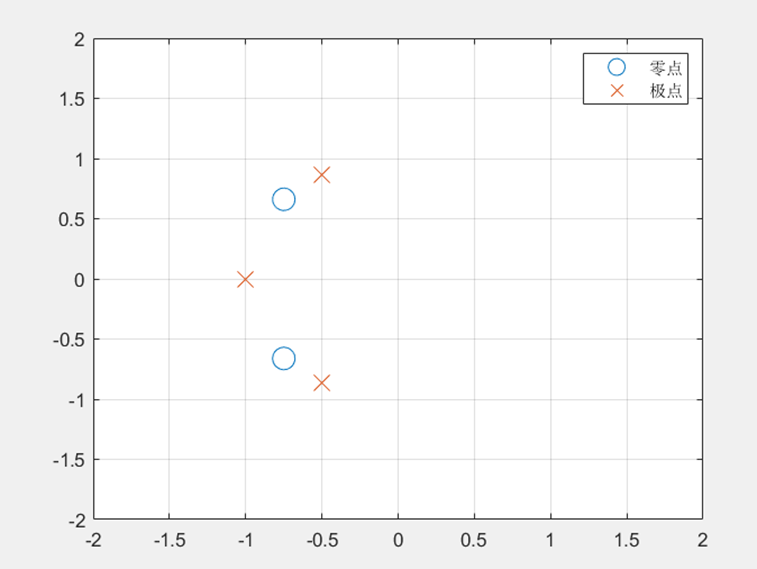
【MATLAB】【数字信号处理】产生系统的单位冲激响应h(t)与H(z)零极点分布
一、实验目的与要求 产生h(t) 与H(z) 零极点分布 二、实验仪器 微机,仿真软件MATLAB 2022a 三、实验内容与测试结果 1.已知描述连续系统的微分方程为y(t)5y(t)6y(t)2x(t)8x(t) ,计算系统的单位冲激响应h(t) 程序如下: clear all; ts0;…...

Claude Code / Cursor 写的代码,你敢直接上线吗?我踩过一次坑,再也不敢
👉 这是一个或许对你有用的社群🐱 一对一交流/面试小册/简历优化/求职解惑,欢迎加入「芋道快速开发平台」知识星球。下面是星球提供的部分资料: 《项目实战(视频)》:从书中学,往事上…...

GPU加速网络爬虫:OpenCL异构计算在数据采集中的实践
1. 项目概述:一个面向硬件加速的开源抓取工具包最近在折腾一些数据采集和自动化任务时,我常常遇到一个瓶颈:当需要处理海量网页、进行高频次请求或者解析复杂的动态内容时,传统的基于CPU的抓取框架(比如Scrapy、Reques…...

使用Taotoken后模型API调用的延迟与稳定性观测体验分享
🚀 告别海外账号与网络限制!稳定直连全球优质大模型,限时半价接入中。 👉 点击领取海量免费额度 使用Taotoken后模型API调用的延迟与稳定性观测体验分享 作为一名日常需要与多种大模型API打交道的开发者,模型服务的稳…...

2026绍兴本地GEO优化公司实测:服务规范与效果验证全解析
引言随着AI搜索算法的不断迭代,绍兴本地企业对GEO(生成式引擎优化)服务的需求日益增长。为了帮助这些企业在选择GEO优化服务商时做出明智决策,本测评以客观、中立的态度,基于EEAT原则(经验、专业性、权威性…...

工程师实战:Windows 8工作站部署、驱动危机与专业工具兼容性全解析
1. 从工程师视角看Windows 8的喧嚣与真实2013年,当Windows 8带着那个被称为“Metro”的崭新界面横空出世时,整个科技圈,尤其是我们这些整天和硬件、设计工具打交道的工程师群体,几乎炸开了锅。媒体上充斥着两极分化的评价…...

Python 爬虫高级实战:爬虫接口限流自适应调节
前言 网络目标站点普遍具备严格的接口访问限流、频率校验、IP 频次风控、接口令牌校验等防护机制,常规固定延时、固定并发的爬虫模式极易触发封禁、接口 429 限流、会话失效、IP 拉黑等问题。人工配置延时、手动调整并发阈值的传统方式,无法适配站点动态…...

【JVM】面试题-有哪些垃圾回收器
【JVM】面试题-有哪些垃圾回收器 在JVM的内存管理中,垃圾收集算法是内存回收的核心逻辑与方法论,而垃圾收集器则是将这套方法论落地实现的具体工具。 不同的垃圾收集器针对JVM堆的不同分代(新生代、老年代)设计,具备不…...

在Nodejs后端服务中集成Taotoken调用大模型API
🚀 告别海外账号与网络限制!稳定直连全球优质大模型,限时半价接入中。 👉 点击领取海量免费额度 在Nodejs后端服务中集成Taotoken调用大模型API 对于Node.js后端开发者而言,将大模型能力集成到服务中已成为构建智能应…...

从零到一:在STM32F103上构建FatFs文件系统并驱动W25Q64 Flash
1. 硬件准备与环境搭建 在开始构建FatFs文件系统之前,我们需要先准备好硬件环境。我手头用的是STM32F103C8T6最小系统板,搭配一块W25Q64 Flash芯片。这块Flash芯片容量为8MB,通过SPI接口通信,正好适合用来做文件存储介质。 首先得…...

3分钟搞定浏览器二维码:Chrome QRCode插件的终极使用秘籍
3分钟搞定浏览器二维码:Chrome QRCode插件的终极使用秘籍 【免费下载链接】chrome-qrcode :zap: A Chrome plugin to Genrate QRCode of URL / Text, or Decode the QRcode in website. 一个Chrome浏览器插件,用于生成当前URL或者选中内容的二维码&#…...