
(001)window 使用 OpenObserve
文章目录
- 安装
- 上传数据
- 报错
- 附录
安装
1.下载安装包:
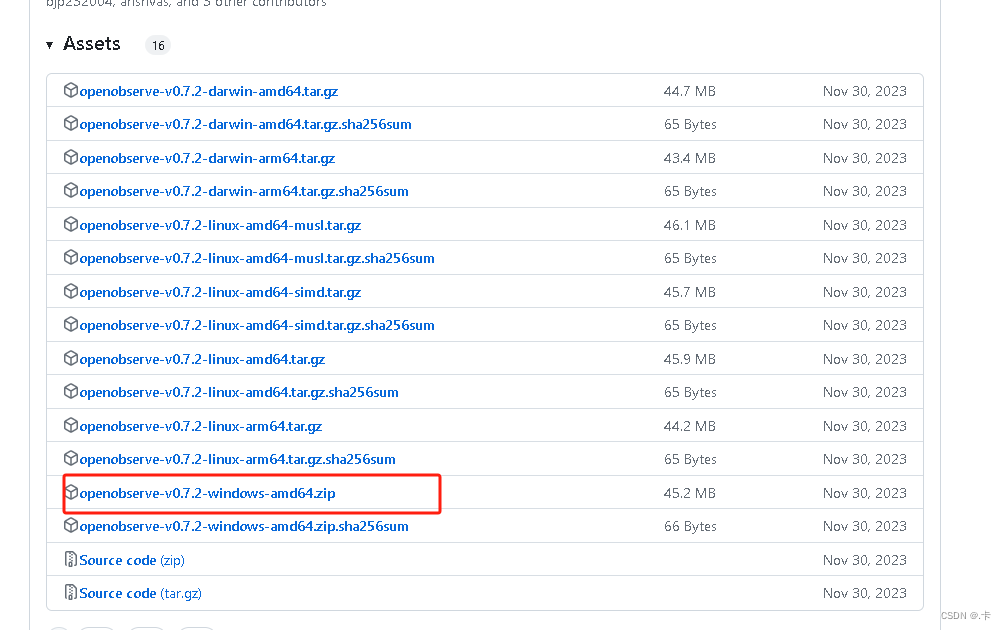 2. window 设置环境变量:
ZO_ETCD_COMMAND_TIMEOUT = 600
ZO_ETCD_CONNECT_TIMEOUT = 600
ZO_ETCD_LOCK_WAIT_TIMEOUT = 600
ZO_INGEST_ALLOWED_UPTO = 10000
ZO_ROOT_USER_EMAIL = 422615924@qq.com
ZO_ROOT_USER_PASSWORD = 8R4VMmC1Su975e026Ln3
- 直接运行 openobserve.exe 启动程序:

上传数据
1.Gradle 需要的安装包:
// https://mvnrepository.com/artifact/cn.hutool/hutool-allimplementation group: 'cn.hutool', name: 'hutool-all', version: '5.8.23'// https://mvnrepository.com/artifact/com.alibaba.fastjson2/fastjson2implementation group: 'com.alibaba.fastjson2', name: 'fastjson2', version: '2.0.45'implementation group: 'org.slf4j', name: 'log4j-over-slf4j', version: '1.7.25'implementation group: 'org.slf4j', name: 'slf4j-api', version: '1.7.25'implementation group: 'ch.qos.logback', name: 'logback-classic', version: '1.2.3'implementation group: 'ch.qos.logback', name: 'logback-core', version: '1.2.3'implementation group: 'ch.qos.logback', name: 'logback-access', version: '1.2.3'// https://mvnrepository.com/artifact/com.squareup.okhttp3/okhttpimplementation group: 'com.squareup.okhttp3', name: 'okhttp', version: '5.0.0-alpha.12'implementation group: 'com.alibaba', name: 'druid', version: '1.1.9'
2.数据目录和内容格式:

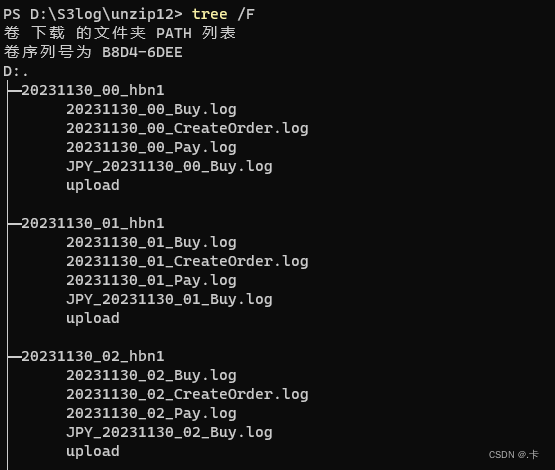
3.上传代码:
package org.example;import cn.hutool.core.io.FileUtil;
import cn.hutool.core.util.StrUtil;
import cn.hutool.http.HttpRequest;
import cn.hutool.http.HttpResponse;
import cn.hutool.http.HttpUtil;
import com.alibaba.fastjson2.JSON;
import com.alibaba.fastjson2.JSONObject;
import okhttp3.*;
import org.slf4j.Logger;
import org.slf4j.LoggerFactory;import java.io.File;
import java.nio.charset.StandardCharsets;
import java.util.ArrayList;
import java.util.List;
import java.util.concurrent.*;/*** 008*/
public class UploadOpenObserve {private static final Logger logger = LoggerFactory.getLogger(UploadOpenObserve.class);private static String targetDirectory = "D:\\S3log\\unzip12\\";private static ConcurrentHashMap<String, String> failFile = new ConcurrentHashMap<>();private static String mail = "422615924@qq.com";private static String password = "4MHyN8BGMaCRyEen";private static String credential = Credentials.basic("422615924@qq.com", "4MHyN8BGMaCRyEen");private static volatile OkHttpClient okHttpClient;private static String buyStreamName = "buy105";private static String payStreamName = "pay105";public static void main(String[] args) {uploadBuyAndPay();}private static void upload_jpy20231216(){List<File> directories = listDirectory(targetDirectory);for (int i = 0; i < directories.size(); i++) {File file = directories.get(i);if (file.getName().startsWith("20231215_") || file.getName().startsWith("20231216_")){logger.debug(file.getName());uploadDirectory_jpy("jpy20231216_002", file);}}}private static void uploadBuyAndPay(){List<File> directories = listDirectory(targetDirectory);ExecutorService executorService = Executors.newFixedThreadPool(Math.max(2, Runtime.getRuntime().availableProcessors() / 2));CountDownLatch countDownLatch = new CountDownLatch(directories.size());for (int i = 0; i < directories.size(); i++) {final File file = directories.get(i);final int j = i;executorService.submit(() -> {try {uploadDirectory(file);}finally {countDownLatch.countDown();logger.debug("目录传输完成: {}, {}/{}", file.getName(), j, directories.size());}});}try {countDownLatch.await();} catch (Exception e) {logger.error("", e);} finally {executorService.shutdown();}logger.debug("任务执行完成.");}private static List<File> listDirectory(String targetDirectory) {File[] files = FileUtil.ls(targetDirectory);List<File> arrFiles = new ArrayList<>();for (int i = 0; i < files.length; i++) {if (files[i].isDirectory()) {arrFiles.add(files[i]);}}return arrFiles;}private static void checkDirectoryFile(File directory) {if (!directory.isDirectory()) {logger.error("not a directory {}", directory.getName());return;}File[] files = FileUtil.ls(directory.getPath());for (int i = 0; i < files.length; i++) {String name = files[i].getName();if (!name.startsWith("2023") && !name.startsWith("JPY")) {logger.error("error file {}", name);}}}private static void uploadDirectory_jpy(String streamName, File directory) {if (!directory.isDirectory()) {logger.error("not a directory {}", directory.getName());return;}File[] files = FileUtil.ls(directory.getPath());for (int i = 0; i < files.length; i++) {String name = files[i].getName();if (!name.startsWith("JPY")) {continue;}uploadFile(directory, streamName, files[i]);}}private static void uploadDirectory(File directory) {if (!directory.isDirectory()) {logger.error("not a directory {}", directory.getName());return;}
//        if (FileUtil.exist(StrUtil.format("{}/upload", directory.getPath()))) {
//            logger.debug("has upload {}", directory.getPath());
//            return;
//        }File[] files = FileUtil.ls(directory.getPath());for (int i = 0; i < files.length; i++) {String name = files[i].getName();if (name.startsWith("JPY")) {continue;}if (name.endsWith("Buy.log")) {uploadFile(directory, buyStreamName, files[i]);} else if (name.endsWith("Pay.log")) {uploadFile(directory, payStreamName, files[i]);}}}public static OkHttpClient getOkHttpInstance(){if (null == okHttpClient){synchronized (UploadOpenObserve.class){if (okHttpClient == null){okHttpClient = new OkHttpClient.Builder().callTimeout(7200, TimeUnit.SECONDS).connectTimeout(3600, TimeUnit.SECONDS).readTimeout(3600, TimeUnit.SECONDS).writeTimeout(3600, TimeUnit.SECONDS).connectionPool(new ConnectionPool(32, 5, TimeUnit.MINUTES)).build();return okHttpClient;}}}return okHttpClient;}private static void uploadFile(File directory, String streamName, File file) {String url = StrUtil.format("http://localhost:5080/api/default/{}/_json", streamName);List<String> lines = FileUtil.readLines(file, StandardCharsets.UTF_8);lines.removeIf(item -> !item.startsWith("{"));if (lines.isEmpty()) {return;}List<JSONObject> jsonObjects = new ArrayList<>();lines.forEach(item -> {try {JSONObject jsonObject = JSONObject.parseObject(item);if (jsonObject.containsKey("JSTDate")){String value = jsonObject.getString("JSTDate");jsonObject.put("jst_time", value.substring(0, 8));jsonObject.put("jst_dateday", value.substring(0, 6));jsonObject.put("jst_day", value.substring(6, 8));}jsonObjects.add(jsonObject);} catch (Exception e){logger.error("", e);}});if (jsonObjects.isEmpty())return;RequestBody requestBody = RequestBody.create(JSON.toJSONString(jsonObjects),  MediaType.parse("application/x-www-form-urlencoded"));Request request = new Request.Builder().addHeader("Authorization", credential).url(url).post(requestBody).build();boolean success = false;try (Response response = getOkHttpInstance().newCall(request).execute()) {success = response.isSuccessful();} catch (Exception e) {e.printStackTrace();logger.debug("upload fail {}, reason {}", file.getName(), e.getMessage());} finally {if (success){FileUtil.touch(StrUtil.format("{}/upload", directory.getPath()));//                String res = response.body().string();//            logger.debug("upload success {}, {}", file.getName(), JSON.toJSONString(res));} else {failFile.put(file.getName(), "true");}}}/*** curl -u 422615924@qq.com:8R4VMmC1Su975e026Ln3 -k https://api.openobserve.ai/api/peilin_organization_3737_H87YxMBFXYifSaV/default/_json* -d '[{"level":"info","job":"test","log":"test message for openobserve","_timestamp": 1704958559370}]'*/private static void testUploadJson() {String url = "https://api.openobserve.ai/api/peilin_organization_3737_H87YxMBFXYifSaV/test1/_json";HttpRequest request = HttpUtil.createPost(url);request.basicAuth("422615924@qq.com", "8R4VMmC1Su975e026Ln3");request.body("[{\"level\":\"inf\",\"jo\":43212,\"log\":\"test message for openobserve\"}]", "application/json");HttpResponse response = request.execute();logger.info("{}", JSON.toJSON(response.body()));}
}
报错
一、 发送的数据格式错误:

二、 数据的太旧了:

附录
[1] Github openobserve/openobserve
[2] 官网手册 openobserve
相关文章:
(001)window 使用 OpenObserve
文章目录 安装上传数据报错附录 安装 1.下载安装包: 2. window 设置环境变量: ZO_ETCD_COMMAND_TIMEOUT 600 ZO_ETCD_CONNECT_TIMEOUT 600 ZO_ETCD_LOCK_WAIT_TIMEOUT 600 ZO_INGEST_ALLOWED_UPTO 10000 ZO_ROOT_USER_EMAIL 422615924qq.com ZO_…...

linux发送http请求命令
一、http get请求 1、curl命令不带参 curl “http://www.baidu.com” 如果这里的URL指向的是一个文件或者一幅图都可以直接下载到本地 curl -i “http://www.baidu.com” 显示全部信息 curl -l “http://www.baidu.com” 只显示头部信息 curl -v “http://www.baidu.com”…...
JVM实战(19)——JVM调优工具概述
作者简介:大家好,我是smart哥,前中兴通讯、美团架构师,现某互联网公司CTO 联系qq:184480602,加我进群,大家一起学习,一起进步,一起对抗互联网寒冬 学习必须往深处挖&…...

Windows10无法访问github
亲测有效 1、修改hosts文件 如果电脑是Windows系统:打开 C:\Windows\System32\drivers\etc 找到hosts文件,将对应的Host地址修改为: #github 140.82.112.4 github.com 199.232.69.194 github.global.ssl.fastly.net 如果在保存hosts时遇到…...
)
GIT 分支管理办法(二)
GIT 分支管理办法(二) 一. 大型项目分支管理中存在的痛点 大型项目中需求的上线存在很大的不确定性,而且往往存在多版本、多团队、多开发并行的情况。尤其是大型企业对上线分支中编号的管理十分严苛,严禁夹带上线。这时对于开发…...

Vue面试之Mixins
Vue面试之Mixins 定义Mixins使用Mixins全局MixinsMixins合并策略注意事项命名冲突:过度使用 最近在整理一些前端面试中经常被问到的问题,分为vue相关、react相关、js相关、react相关等等专题,可持续关注后续内容,会不断进行整理~ …...

YOLOv8改进 | 主干篇 | EfficientViT高效的特征提取网络完爆MobileNet系列(轻量化网络结构)
一、本文介绍 本文给大家带来的改进机制是主干网络,一个名字EfficientViT的特征提取网络(和之前发布的只是同名但不是同一个),其基本原理是提升视觉变换器在高效处理高分辨率视觉任务的能力。它采用了创新的建筑模块设计,包括三明治布局和级联…...
分布式限流要注意的问题
本文已收录至我的个人网站:程序员波特,主要记录Java相关技术系列教程,共享电子书、Java学习路线、视频教程、简历模板和面试题等学习资源,让想要学习的你,不再迷茫。 为什么需要匀速限流 同学们回想一下在Guava小节里…...

git将一个远程分支的部分修改提交到另一个远程分支
将一个远程分支的部分修改提交到另一个远程分支 将一个远程分支的部分修改提交到另一个远程分支,可以使用 git cherry-pick 命令。这个命令可以选择特定的提交(commit)从一个分支应用到另一个分支。 切换到目标本地分支: 首先&am…...

promise是什么怎么使用
Promise 是一种 JavaScript 中的对象,用于处理异步操作。它表示一个最终可能完成(解析)或失败(拒绝)的操作,以及其结果值。 Promise 有三种状态: Pending(待定)&#x…...
国际版WPS Office 18.6.1
【应用名称】:WPS Office 【适用平台】:#Android 【软件标签】:#WPS 【应用版本】:18.6.1 【应用大小】:160MB 【软件说明】:软件日常更新。WPS Office是使用人数最多的移动办公软件。独有手机阅读模式…...

记录一次数据中包含转义字符\引发的bug
后端返回给前端的数据是: { "bizObj": { "current": 1, "orders": [ ], "pages": 2, "records": [ { "from": "1d85b8a4bd33aaf99adc2e71ef02960e", …...
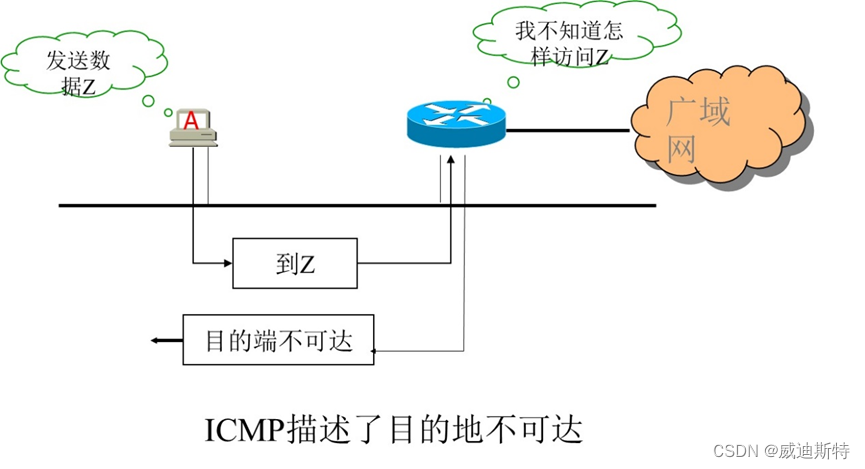
网络协议:ICMP协议及实用工具介绍
目 录 一、ICMP介绍 1、概述 2、功能 3、特点 二、ICMP的数据报文 三、ICMP相关工具 四、主要ICMP工具应用 1、Ping 2、Traceroute (1) 方法1: (2)方法2: 3、Nmap 一、ICMP介绍 1、概述 …...
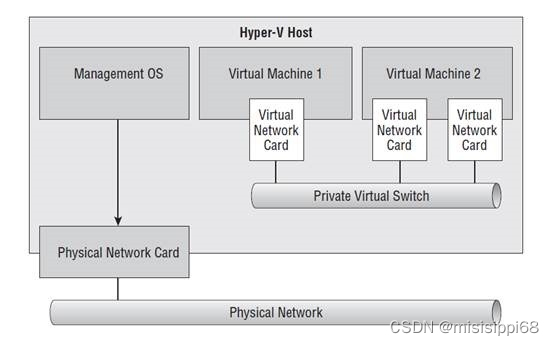
Hyper-V如何设置网络-虚拟交换机设置
Hyper-V如何设置网络-虚拟交换机设置 缘起虚拟交换机类型1. 外部交换机;2. 内部交换机;3. 专用交换机;4.default switch; 虚拟机上openwrt多种网络连接方式 缘起 发现win10还有个虚拟机Hyper-V的功能,不太占资源&…...
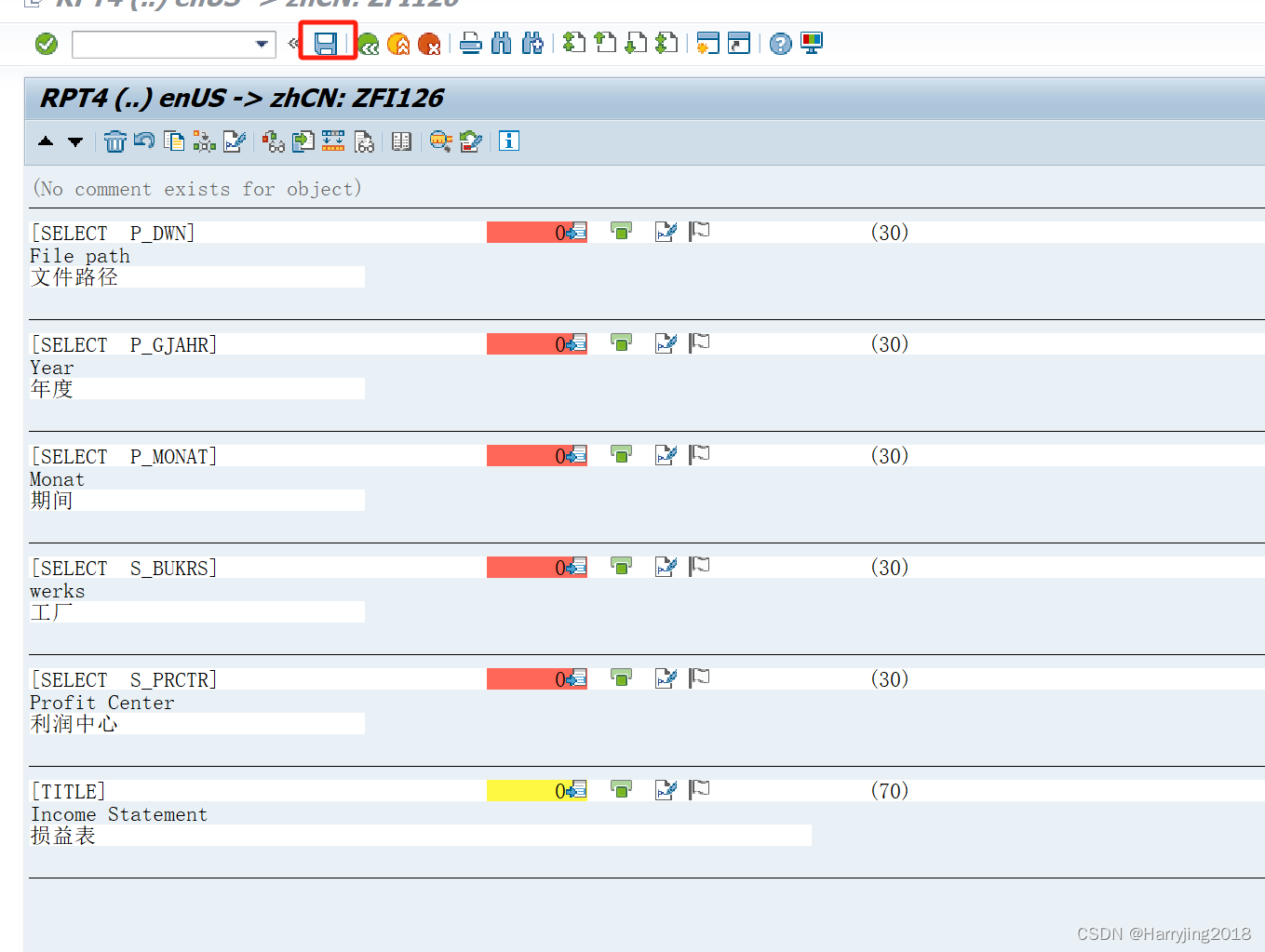
SAP不同语言开发
文章目录 1 Please write English Nmae2 go to goto menu and translation3 Write your target language .4 Please input Chinese5 Summary 1 Please write English Nmae 2 go to goto menu and translation 3 Write your target language . 4 Please input Chinese 5 Summary…...
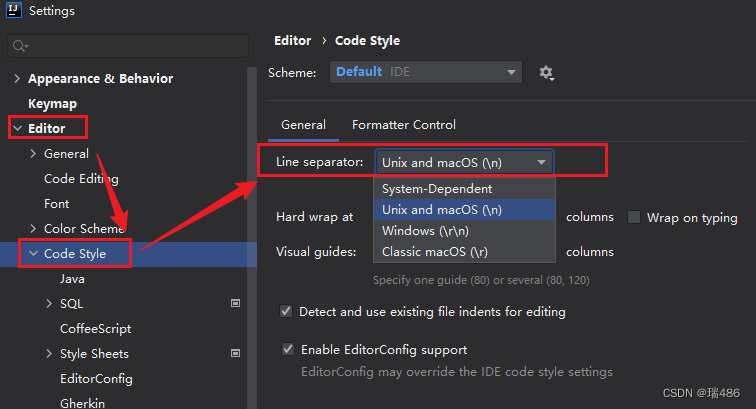
瑞_Java开发手册_(一)编程规约
文章目录 编程规约的意义(一)命名风格(二)常量定义(三)代码格式(四)OOP 规约(五)日期时间(六)集合处理(七)并发…...

【JVM】本地方法接口 Native Interface
一、JNI简介 JVM本地方法接口(Java Native Interface,JNI)是一种允许Java代码调用本地方法(如C或C编写的方法)的机制。这种技术通常用于实现高性能的计算密集型任务,或者与底层系统库进行交互。 二、JNI组…...
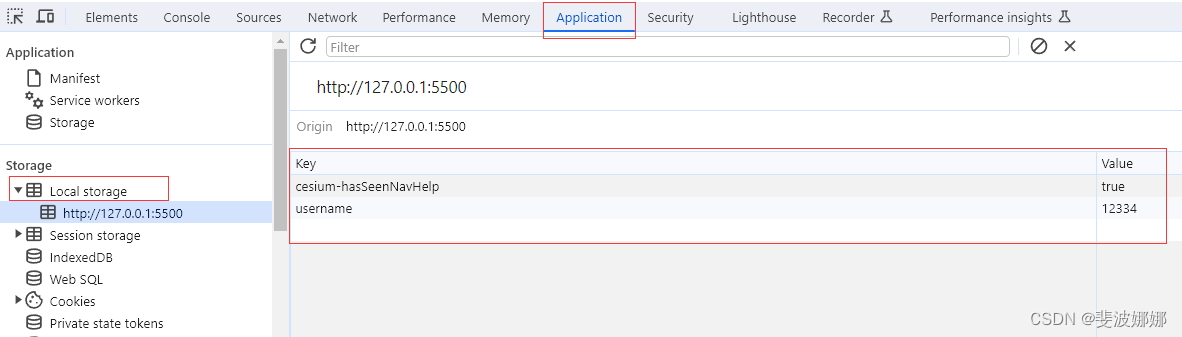
JS 本地存储 sessionStorage localStorage
本地存储 随着互联网的快速发展,基于网页的应用越来越普遍,同时也变的越来越复杂,为了满足各种各样的需求,会经常性在本地存储大量的数据,HTML5规范提出了相关解决方案。 本地存储特性 1、数据存储在用户浏览器中 2…...
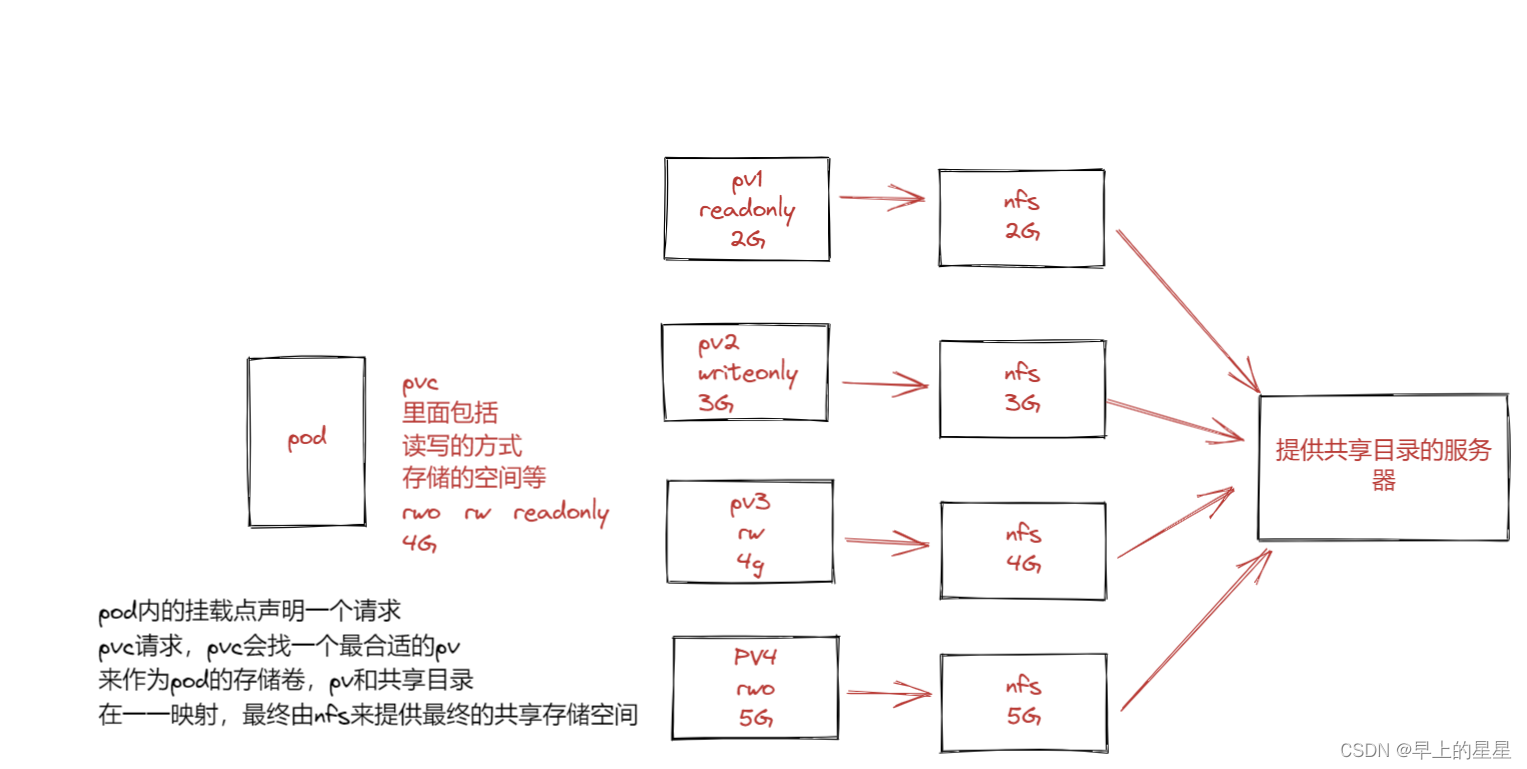
K8S 存储卷
意义:存储卷----数据卷 容器内的目录和宿主机的目录进行挂载 容器在系统上的生命周期是短暂的,delete,k8s用控制器创建的pod,delete相当于重启,容器的状态也会回复到初始状态 一旦回到初始状态,所有的后天编辑的文件…...

一个SqlSugar实际案例
SqlGugar是一个非常好的数据库操作框架,今天用一个示例来分享如何使用。 新建一张课程表 结构如下: CREATE TABLE t_course (id int NOT NULL AUTO_INCREMENT COMMENT ID,title varchar(1024) NOT NULL COMMENT 课程标题,description text NOT NULL C…...

快速从 Excel 文件导入 SQL 数据库的方法与分析
引言 在日常数据处理、数据迁移或系统初始化工作中,我们经常需要将存储在 Excel 文件中的数据导入到 SQL 数据库(如 MySQL, PostgreSQL, SQL Server 等)中。手动逐条录入不仅效率低下,而且容易出错。本文将系统性地分析几种主流、高效的 Excel 导入 SQL 方法,并对比其优缺…...

【肾结石检测】基于matlab图像处理技术检测超声图像中的肾结石【含Matlab源码 15553期】含报告
💥💥💥💥💥💥💞💞💞💞💞💞💞💞欢迎来到海神之光博客之家💞💞💞Ὁ…...

Google 广告场景下 Uniswap 钓鱼攻击机理与 Web3 防御体系研究
摘要 2026 年 5 月 22 日,GoPlus 安全团队发布预警,针对 Web3 领域头部去中心化交易平台 Uniswap 的搜索引擎钓鱼攻击呈规模化爆发态势。攻击者通过购买 Google Ads 关键词广告,将高仿钓鱼网站置顶于搜索结果前列,结合视觉相似域名…...

【算法分析与设计】第3篇:递归方程的建立与求解方法
许多优雅的算法都建立在一个朴素的思路上:把原问题拆成几个规模更小的同类子问题,分别求解后再合并结果。归并排序如此,快速排序如此,二分查找亦如此。这种“自己调用自己”的结构叫递归,而描述它的时间复杂度…...

使用Taotoken CLI工具一键配置多开发环境与工具密钥
🚀 告别海外账号与网络限制!稳定直连全球优质大模型,限时半价接入中。 👉 点击领取海量免费额度 使用Taotoken CLI工具一键配置多开发环境与工具密钥 基础教程类,面向需要在不同机器或为不同工具(如OpenCl…...

3分钟搞定GitHub中文界面:终极汉化插件使用指南
3分钟搞定GitHub中文界面:终极汉化插件使用指南 【免费下载链接】github-chinese GitHub 汉化插件,GitHub 中文化界面。 (GitHub Translation To Chinese) 项目地址: https://gitcode.com/gh_mirrors/gi/github-chinese 你是否曾经因为GitHub的英…...

3分钟掌握Ditto:物联网设备管理的数字孪生革命
3分钟掌握Ditto:物联网设备管理的数字孪生革命 【免费下载链接】ditto Eclipse Ditto™: Digital Twin framework of Eclipse IoT - main repository 项目地址: https://gitcode.com/gh_mirrors/ditto6/ditto 还在为管理成千上万的物联网设备而头疼吗&#x…...

如何解决多语言语音识别乱码问题:Vosk API的字符编码终极指南
如何解决多语言语音识别乱码问题:Vosk API的字符编码终极指南 【免费下载链接】vosk-api Offline speech recognition API for Android, iOS, Raspberry Pi and servers with Python, Java, C# and Node 项目地址: https://gitcode.com/GitHub_Trending/vo/vosk-a…...

为什么你的DeepSeek流式接口总在TP99处陡增?揭秘TCP_NODELAY误配+LLM输出熵突变双重陷阱
更多请点击: https://intelliparadigm.com 第一章:为什么你的DeepSeek流式接口总在TP99处陡增?揭秘TCP_NODELAY误配LLM输出熵突变双重陷阱 当 DeepSeek-R1 或 DeepSeek-V3 的流式响应(如 /v1/chat/completions 启用 streamtrue&a…...

B站视频转换终极指南:5步实现m4s到MP4的无损快速转换
B站视频转换终极指南:5步实现m4s到MP4的无损快速转换 【免费下载链接】m4s-converter 一个跨平台小工具,将bilibili缓存的m4s格式音视频文件合并成mp4 项目地址: https://gitcode.com/gh_mirrors/m4/m4s-converter 你是否曾在B站缓存了珍贵的视频…...