
uniapp多端评价页
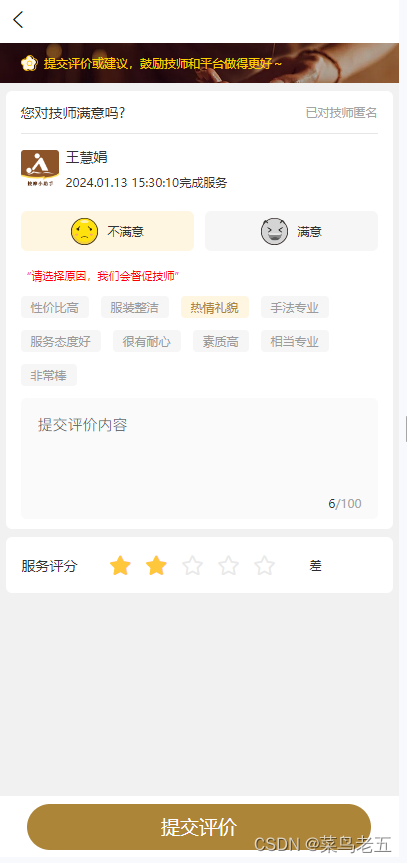
如图所示:评价页
<template><view><!-- 顶部 --><view class="evaluate_head"><image class="headBg" src="@/static/evaluate/head.png" mode=""></image><view class="headZindexbox"><image class="icon" src="@/static/evaluate/hua@2x.png" mode=""></image><view class="text">提交评价或建议,鼓励技师和平台做得更好~</view></view></view><!-- 评价 --><view class="evearNox"><view class="evearHead"><view class="label">您对技师满意吗?</view><view class="text">已对技师匿名</view></view><!-- 技师信息 --><view class="userBox"><image class="logo" src="@/static/logo.png" mode=""></image><view class="userContent"><view class="username">王慧娟</view><view class="userText">2024.01.13 15:30:10完成服务</view></view></view><!-- 选择 --><view class="checkBox"><view class="checkLabel" v-for="(item,index) in checkList" :key="index" @click="getItem(item,index)":class="item.active?'textActive':''"><view class="text"><image class="icon" v-if="index==0&&!item.active" src="@/static/evaluate/icon_ku.png"></image><image class="icon" v-else-if="index==1&&!item.active" src="@/static/evaluate/icon_xiao.png"></image><image class="icon" v-else-if="index==0&&item.active" src="@/static/evaluate/icon_kued.png"></image><image class="icon" v-else-if="index==1&&item.active" src="@/static/evaluate/icon_xiaoed.png"></image>{{item.title}}</view></view></view><!-- 不满意 --><view v-if="checkid==0"><view class="errorText">“请选择原因,我们会督促技师”</view><view class="labeList" ><view class="label" v-for="(item,index) in dissatisLabelList" @click="getLabelItem(item,index,0)":class="item.actived?'actived':''">{{item.title}}</view></view><view class="feekContent"><view class="feekText"><u--textarea class="feekTexts" v-model="evealBase.remark" maxlength="100" border="0"placeholder="您的反馈会督促我们做的更好" height="85"></u--textarea></view><view class="z-lists z-bottom"><view class="list-value" style="position: relative;"></view><view class="moreNumber"><view class="text">{{evealBase.remark.length}}</view>/100</view></view></view></view><!-- end --><!-- 满意 --><view class="labeList" v-else-if="checkid==1"><view class="label" v-for="(item,index) in satisLabelList" @click="getLabelItem(item,index,1)":class="item.actived?'actived':''">{{item.title}}</view></view><!-- end --></view><!-- 评分 --><view class="rateBox" v-if="checkid==0"><view class="label">服务评分</view><view class="rate-content"><u-rate class="rates" active-color="#FFBF00" inactive-color="#E9E9E9" gutter="10" size="50rpx":value="evealBase.satisfied" @change="geSatisRates"></u-rate><view class="text" v-if="evealBase.satisfied==1">非常差</view><view class="text" v-else-if="evealBase.satisfied==2">差</view><view class="text" v-else-if="evealBase.satisfied==3">一般</view><view class="text" v-else-if="evealBase.satisfied==4">满意</view><view class="text" v-else-if="evealBase.satisfied==5">非常满意</view></view></view><view class="rateBox" v-if="checkid==1"><view class="label">服务评分</view><view class="rate-content"><u-rate class="rates" active-color="#FFBF00" inactive-color="#E9E9E9" gutter="10" size="50rpx":value="evealBase.satisfied" @change="geSatisRates"></u-rate><view class="text" v-if="evealBase.satisfied==1">非常差</view><view class="text" v-else-if="evealBase.satisfied==2">差</view><view class="text" v-else-if="evealBase.satisfied==3">一般</view><view class="text" v-else-if="evealBase.satisfied==4">满意</view><view class="text" v-else-if="evealBase.satisfied==5">非常满意</view></view></view><!-- end --><!-- 提交 --><view class="feedBottom"><view class="submit" @click="getSubmit">提交评价</view></view><!-- end --></view>
</template><script>import {toast,showConfirm,tansParams,} from '@/utils/common'export default {data() {return {evealBase: {satisfied: 0,remark:""},checkList: [{title: "不满意"}, {title: "满意"}],checkid: "",satisLabelList: [{title: "性价比高",}, {title: "服装整洁",}, {title: "热情礼貌",}, {title: "手法专业",}, {title: "服务态度好",}, {title: "很有耐心",}, {title: "素质高",}, {title: "相当专业",}, {title: "非常棒",}],dissatisLabelList: [{title: "性价比高",}, {title: "服装整洁",}, {title: "热情礼貌",}, {title: "手法专业",}, {title: "服务态度好",}, {title: "很有耐心",}, {title: "素质高",}, {title: "相当专业",}, {title: "非常棒",}],}},methods: {/*** 选择满意不满意* @param {Object} item* @param {Object} index*/getItem(item, index) {this.checkid = index;for (var i in this.checkList) {if (index == i) {this.checkList[i].active = true;} else {this.checkList[i].active = false;}}this.$forceUpdate()},// 满意选择评分星级geSatisRates(item) {this.evealBase.satisfied = item},/*** 选择满意、不满意标签*/getLabelItem(item, index,type) {if(type==0){this.dissatisLabelList[index].actived = !this.dissatisLabelList[index].actived}else{this.satisLabelList[index].actived = !this.satisLabelList[index].actived}this.$forceUpdate()},// 提交评价getSubmit() {console.error("是否满意==>", this.checkid)if (this.checkid == "") {toast("请选择是否满意?")return;}}}}
</script><style lang="scss" scoped>.evaluate_head {width: 750rpx;height: 76rpx;display: flex;align-items: center;position: relative;.headBg {width: 750rpx;height: 76rpx;}.headZindexbox {position: absolute;z-index: 2;display: flex;align-items: center;// top: 20rpx;margin-left: 42rpx;.icon {width: 32rpx;height: 30rpx;margin-right: 12rpx;}.text {font-size: 24rpx;font-family: PingFangSC, PingFang SC;font-weight: 500;color: #FFD000;}}}.evearNox {width: 726rpx;margin: 0 auto;background: #FFFFFF;margin-top: 16rpx;padding-bottom: 20rpx;border-radius: 12rpx;.feekContent {width: 670rpx;margin: 0 auto;background: #F9FAF9 !important;border-radius: 12rpx;.list-value {// width: 230px;color: #333;background: #F9FAF9 !important;// justify-content: right;// text-align: right;display: flex;align-items: center;margin-left: 30rpx;// position: absolute;// right: 10px;.u-upload__wrap__preview__image {border: 2rpx solid #E9E9E9 !important;}}.list-icon-right {margin-left: 10px;}.feekText {background: #F9FAF9 !important;border-top-left-radius: 12rpx;padding-top: 30rpx;border-top-right-radius: 12rpx;color: #B4ABAB !important;.feekTexts {padding: 0 !important;margin-left: 32rpx;width: 600rpx;color: #B4ABAB !important;background: #F9FAF9 !important;}}.z-lists {width: 100%;display: flex;align-items: center;position: relative;padding: 10px 0px;border-radius: 6px;background: #F9FAF9 !important;.moreNumber {position: absolute;right: 30rpx;bottom: 15rpx;font-size: 24rpx;display: flex;align-items: center;font-family: PingFangSC, PingFang SC;font-weight: 400;color: #A4A4A4;.text {font-size: 24rpx;font-family: PingFangSC, PingFang SC;font-weight: 400;color: #303030;}}.z-list-border {position: absolute;bottom: 0;right: 0;width: 96%;height: 1px;border-bottom: 1rpx solid #EFEFEF;}.uploadBox {width: 148rpx;height: 148rpx;display: flex;align-items: center;justify-content: center;border-radius: 8rpx;border: 2rpx solid #E9E9E9;}}}.evearHead {width: 670rpx;display: flex;height: 82rpx;margin: 0 auto;justify-content: space-between;align-items: center;border-bottom: 1rpx solid #E6E6E6;.label {font-size: 28rpx;font-family: PingFangSC, PingFang SC;font-weight: 500;color: #333333;}.text {font-size: 24rpx;font-family: PingFangSC, PingFang SC;font-weight: 400;color: #A4A4A4;}}// 用户信息.userBox {width: 670rpx;margin: 0 auto;display: flex;align-items: center;background: #FFFFFF;margin-top: 26rpx;.logo {width: 72rpx;height: 72rpx;margin-right: 14rpx;}.userContent {.username {font-size: 28rpx;font-family: PingFangSC, PingFang SC;font-weight: 400;color: #333333;margin-bottom: 15rpx;}.userText {font-size: 24rpx;font-family: PingFangSC, PingFang SC;font-weight: 400;color: #333333;}}}.errorText{font-size: 22rpx;width: 670rpx;margin: 0 auto;text-align: left;font-family: PingFangSC, PingFang SC;font-weight: 400;color: #FF0000;margin-top: 32rpx;}.checkBox {width: 670rpx;margin: 0 auto;display: flex;align-items: center;justify-content: space-between;background: #FFFFFF;margin-top: 40rpx;.textActive {background: #FFF6E1 !important;}.checkLabel {width: 326rpx;display: flex;align-items: center;height: 76rpx;justify-content: center;background: #F6F6F6;border-radius: 12rpx;.text {font-size: 24rpx;font-family: PingFangSC, PingFang SC;font-weight: 400;color: #333333;display: flex;align-items: center;.icon {width: 52rpx;height: 52rpx;margin-right: 20rpx;}}}}.labeList {width: 670rpx;margin: 0 auto;display: flex;align-items: center;flex-wrap: wrap;background: #FFFFFF;margin-top: 26rpx;.label {width: auto;font-size: 24rpx;font-family: PingFangSC, PingFang SC;font-weight: 400;background: #F6F6F6;color: #9B9B9B;padding: 6rpx 20rpx;margin-bottom: 24rpx;border-radius: 8rpx;margin-right: 24rpx;}.actived {background: #FFF6E1 !important;color:#AD8539!important;}}}// 评分.rateBox {width: 726rpx;height: 106rpx;display: flex;align-items: center;margin: 0 auto;background: #FFFFFF;border-radius: 12rpx;margin-top: 16rpx;.label {margin-left: 30rpx;font-size: 28rpx;font-family: PingFangSC, PingFang SC;font-weight: 500;color: #333333;}.rate-content {display: flex;align-items: center;.rates {margin-left: 48rpx;margin-right: 52rpx;}.text {font-size: 24rpx;font-family: PingFangSC, PingFang SC;font-weight: 400;color: #2C2C2C;}}}// 提交.feedBottom {position: fixed;bottom: 0;left: 0;width: 750rpx;display: flex;align-items: center;justify-content: center;height: 116rpx;background: #FFFFFF;.submit {width: 646rpx;height: 88rpx;background: #AD8539;border-radius: 50rpx;font-size: 36rpx;display: flex;align-items: center;justify-content: center;font-family: PingFangSC, PingFang SC;font-weight: 400;color: #FFFFFF;}}
</style>
相关文章:
uniapp多端评价页
如图所示:评价页 <template><view><!-- 顶部 --><view class"evaluate_head"><image class"headBg" src"/static/evaluate/head.png" mode""></image><view class"headZindex…...
行为树(Behavior Trees)
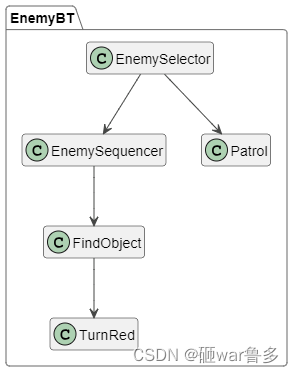
行为树(Behavior Trees)是一种在游戏开发中广泛使用的AI设计模式,主要用于描述AI的行为和决策过程,实现更加智能和自然的游戏AI。它由多个节点组成,每个节点代表一个行为或决策,按照特定的方式连接在一起&a…...

opensssl BIO方式https客户端
废话不多说,代码中使用了两种https客户端的实现方式。 #include <windows.h> #include <WinSock.h>#pragma comment(lib,"ws2_32.lib") #include "../include/openssl\ssl.h" #include "../include/openssl\err.h"#pragm…...

JavaScript之判断是否整数、取余、取整、进制、位或、ES6
MENU 方法一方式二方式三方式四方式五结束语 方法一 使用取余运算符判断,利用任何整数都会被1整除的原理,即余数是0的特点,通过这个规则来判断是否是整数。 let isInteger (val) > val % 1 0;// true isInteger(5); // false isInteger(…...
【打造你自己的Shell:编写定制化命令行体验】
本节重点: 学习进程创建,fork/vfork 学习到进程等待 学习到进程程序替换, 微型shell,重新认识shell运行原理 学习到进程终止,认识$? 一、进程创建 1.1.fork函数初识 在linux中fork函数时非常重要的函数,它从已存在进程中创建一个新进程…...
PGSQL主键序列
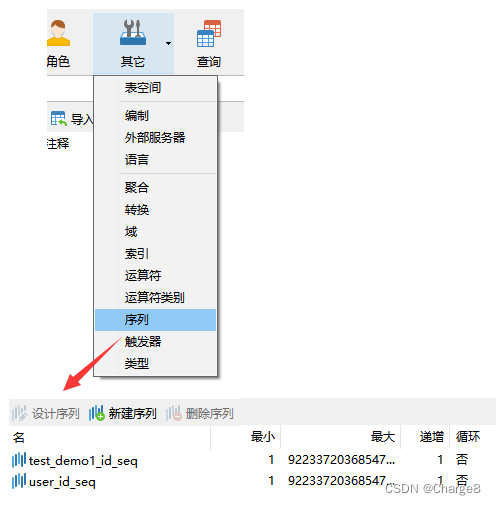
PostgreSQL和 MySQL数据库还是有一定的区别。 下面了解一下 PGSQL的主键序列。 一、主键 1、系统自带主键序列 在 PostgreSQL 中,GENERATED BY DEFAULT 和 GENERATED ALWAYS 是用于定义自动生成的列(Generated Column)的选项。一般可作用…...
pg14.2迁移至KingbaseV8R6后部分表记录数为空
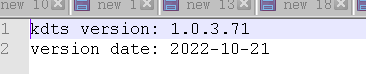
pg14.2迁移至KingbaseV8R6后部分表记录数为空 问题描述 kdts工具迁移详情里显示表数据已迁移成功,但是迁移后测试发现部份表记录数为空 分别查看源库和目标库表记录数 --源库 select count(*) from aaf_sys_param order by 1; 229条--目录库 select count(*) fr…...
【Spring 篇】深入解析SpringMVC的组件魅力
SpringMVC,这个名字在Java Web开发者的耳边仿佛是一首动听的旋律,携着轻盈的氛围,带给我们一种愉悦的编程体验。但是,当我们深入探寻这个框架时,它的魅力远不止表面的简单,它由许多组件构成,每个…...

HPsocket 在 C# 中的运用:一款优秀的 socket 通信框架
摘要:本文将为您详细介绍 HPsocket,一款适用于 win32 平台的 socket 通信框架。同时,我们还将探讨如何在 C# 项目中使用 HPsocket,实现网络通信功能。通过本文,您将深入了解 HPsocket 的特点、优势以及在 C# 中的实际应…...

黑豹程序员-MyBatisPlus封装SQL的where条件的对象 QueryWrapper
说明 我们使用MybatisPlus时,我们可以不直接通过SQL操作数据库,而使用面向对象的方式。 其中遇到一个问题,就是如何用面向对象的方式实现 SQL中的where条件拼接。 MybatisPlus很体贴,它提供了一个QueryWrapper,查询包…...

每日一题——LeetCode1252.奇数值单元格的数目
进阶:你可以设计一个时间复杂度为 O(n m indices.length) 且仅用 O(n m) 额外空间的算法来解决此问题吗? 方法一 直接模拟: 创建一个n x m的矩阵,初始化所有元素为0,对于indices中的每一对[ri,ci],将矩…...

C#学习笔记3-函数与单元测试
现在开始参考书籍变为:《C# 12 and .NET 8 – Modern Cross-Platform Development.Mark Price》 函数 Writing, Debugging, and Testing Functions 写函数Debug运行时 logging单元测试 写函数 一个有着 XML 注释的函数 这里直接举一个例子: Numbe…...

osg屏幕事件处理器和状态集操控器学习
1 osgViewer::WindowSizeHandler 该事件处理器提供了对窗体屏幕的控制,功能如下: 按住或再次键盘f键,则三维窗体在全屏和退出全屏之间切换; 按住键盘>键,则屏幕分辨率增加; 按住键盘<键,则屏幕分辨率减小; 2 osgGA::StateSetManipulator 该事件处理器是状态集操…...
中国泛娱乐出海视频字幕解决方案
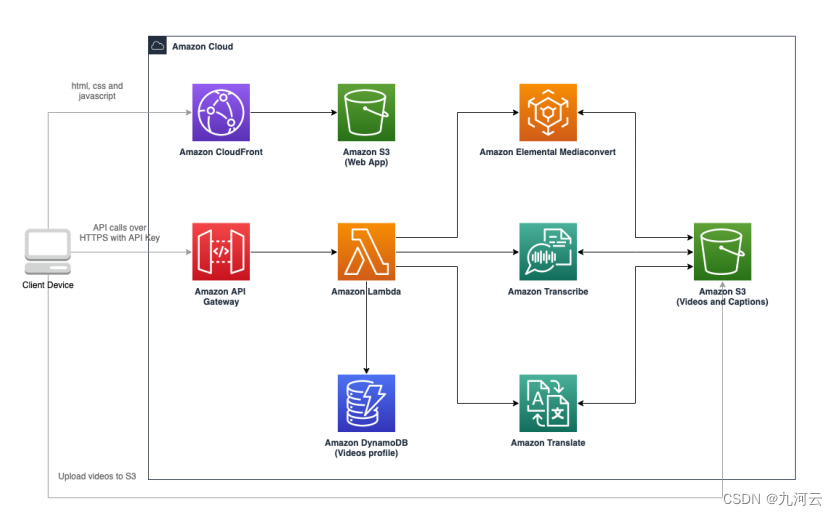
随着企业泛娱乐出海越来越成为热门,自动加载视频字幕需求变得越来越普遍,这能够为用户观众提供更好的视频体验。此次九河云为客户带来了aws视频字幕解决方案,满足客户视频字幕生成、翻译及后续编辑等完整工作流的需求。 客户价值:…...
iOS原生应用屏幕适配完整流程
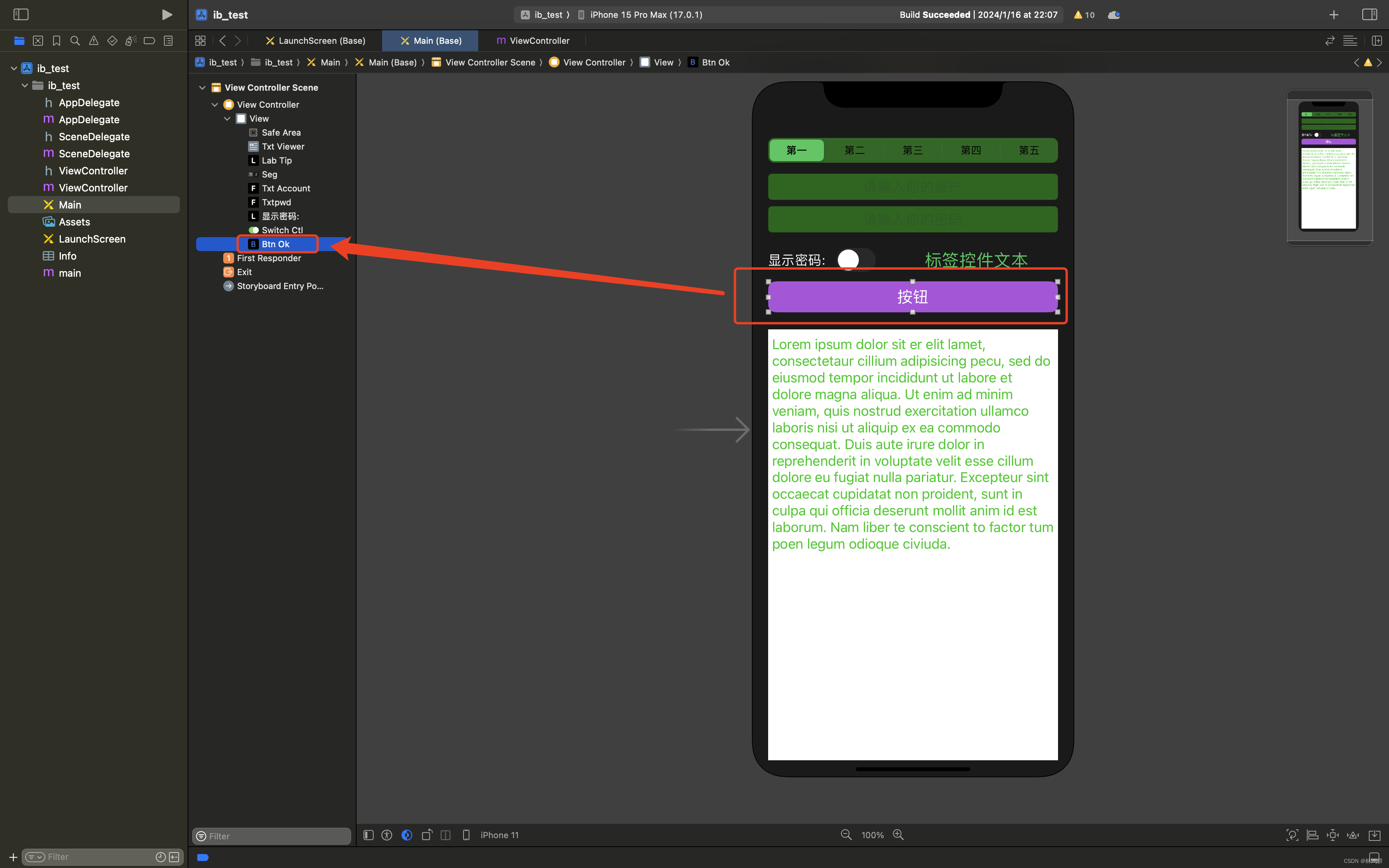
1. 已iPhone 11 布局为设计布局,其他机型已这个来适配 2.变量与控件对应关系 txtViewer: txtAccount txtpwd seg btnOk 3.适配方法实现: //iOS屏幕适配 -(vo...
【征服redis8】Redis的AOF持久化
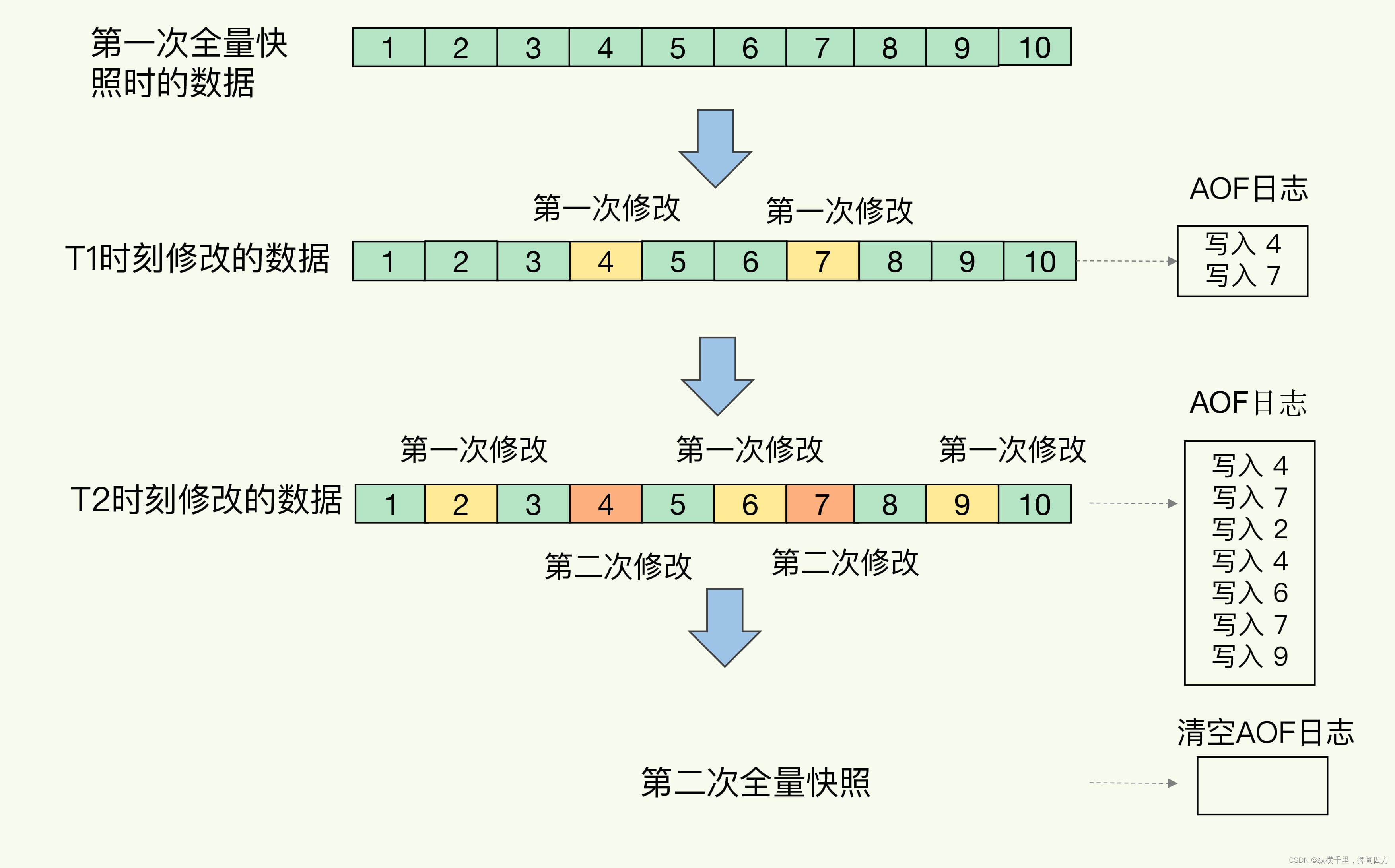
Redis 支持多种持久化方式来保证数据的可靠性和持久性。前面我们介绍了RDB方式。我们我们介绍第二种方式——AOF(Append Only File)机制是一种常用的持久化方式,它记录了所有对 Redis 数据库进行修改的命令,在 Redis 重启时可以使…...

【动态规划】【二分查找】【C++算法】730. 统计不同回文子序列
作者推荐 【动态规划】【数学】【C算法】18赛车 涉及知识点 动态规划 二分查找 LeetCode730. 统计不同回文子序列 给你一个字符串 s ,返回 s 中不同的非空回文子序列个数 。由于答案可能很大,请返回对 109 7 取余 的结果。 字符串的子序列可以经由…...
android 和 opencv 开发环境搭建
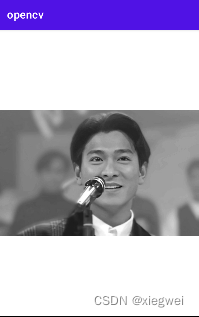
本文详细说明给android项目添加opencv库的详细步骤,并通过实现图片灰度化来查看配置是否成功。 下载OPENCV ANDROID SDK 到官网下载 打开 https://opencv.org/releases/ 选择android,下载完成后解压出下面的文件: 安装android sdk 和 ndk …...
elasticsearch[一]-索引库操作(轻松创建)、文档增删改查、批量写入(效率倍增)
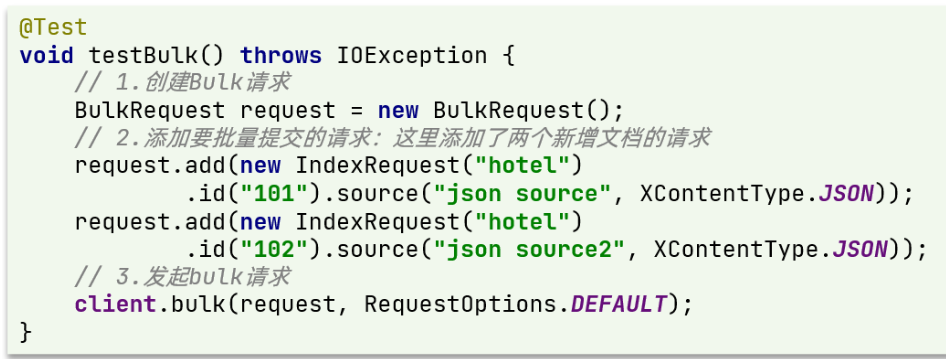
elasticsearch[一]-索引库操作(轻松创建)、文档增删改查、批量写入(效率倍增) 1、初始化 RestClient 在 elasticsearch 提供的 API 中,与 elasticsearch 一切交互都封装在一个名为 RestHighLevelClient 的类中,必须先完成这个对象的初始化,…...

tp6框架中Http类 请求的header、body参数传参 及post、file格式
引入Http类: 在需要使用的地方引入Http类: use think\facade\Http; GET请求示例:$response Http::get(https://example.com/api/resource); 设置Header参数: $headers [ Authorization > Bearer YourAccessToken, Conte…...

深入UE渲染管线:从.usf文件到FGlobalShader,理解全局Shader的完整生命周期与最佳实践
深入UE渲染管线:从.usf文件到FGlobalShader,理解全局Shader的完整生命周期与最佳实践 当我们需要在Unreal Engine中实现一个全新的后处理效果或定制底层渲染管线时,全局Shader(Global Shader)往往是必经之路。与材质编…...

【限时开放】Perplexity医疗知识图谱API密钥申请通道关闭倒计时——全球仅剩47个三甲机构白名单资格
更多请点击: https://intelliparadigm.com 第一章:Perplexity医疗信息搜索 Perplexity 是一款以实时网络检索与引用溯源为核心能力的AI搜索工具,在医疗健康领域展现出独特价值。它不同于传统搜索引擎,能直接解析PubMed、NEJM、CD…...

企业级应用如何利用Taotoken实现稳定高效的多模型调度
🚀 告别海外账号与网络限制!稳定直连全球优质大模型,限时半价接入中。 👉 点击领取海量免费额度 企业级应用如何利用Taotoken实现稳定高效的多模型调度 在构建基于大模型的企业级应用时,开发团队常常面临几个核心挑战…...

别再问客服了!手把手教你用VNC在AutoDL GPU服务器上跑起你的第一个GUI程序
云端GPU服务器VNC实战:从零部署GUI开发环境全指南 租用云GPU服务器进行深度学习训练已成为算法工程师的常态,但当代码涉及图形界面时,许多开发者会在cv2.imshow()或PyQt窗口弹出的环节卡壳。本文将基于AutoDL平台,详解如何通过Tur…...

地平线6地图有哪些 地平线6可以在手机上玩吗
很多玩家都在关注地平线6地图的细节,想知道这款即将上线的竞速大作究竟有哪些可探索的场景,而地平线6地图的丰富度也直接决定了游戏的可玩性。不少玩家习惯用手机碎片时间想体验游戏,却受设备限制无法解锁地平线6地图的全部风光,这…...

Chrome Regex Search:如何在网页上使用正则表达式快速查找信息
Chrome Regex Search:如何在网页上使用正则表达式快速查找信息 【免费下载链接】chrome-regex-search 项目地址: https://gitcode.com/gh_mirrors/ch/chrome-regex-search 你是否曾经在浏览网页时,需要查找特定格式的信息却无从下手?…...

北京理工大学:数据中心节能降碳之算电协同——背景、技术、实践和展望 2026
这份由北京理工大学 2026 年初发布的《数据中心节能降碳之算电协同:背景、技术、实践和展望》报告,围绕算电协同,从背景、技术、实践、展望四方面系统分析,核心是推动算力与电力、热力深度融合,助力数据中心节能降碳、…...

如何在PowerPoint中高效使用LaTeX进行数学公式排版
如何在PowerPoint中高效使用LaTeX进行数学公式排版 【免费下载链接】latex-ppt Use LaTeX in PowerPoint 项目地址: https://gitcode.com/gh_mirrors/la/latex-ppt 对于需要制作学术演示文稿的科研人员、教师和学生来说,在PowerPoint中排版复杂的数学公式一直…...

2026年计算机专业就业现状,不想35岁被淘汰?网络安全或许是程序员的最佳转型方向!
计算机专业虽进入分化阶段,但网络安全人才缺口达300万,高端领域供不应求。高校扩招与市场需求脱节导致供需失衡,未来"计算机行业"的复合型人才更具竞争力。建议早做规划,构建"T型能力体系",掌握前…...

避坑指南:Houdini风格化树木导入Unity URP后,光照和裁剪效果不对怎么办?
Houdini风格化树木在Unity URP中的渲染问题深度解析与实战修复 当你在Houdini中精心雕琢的风格化树木模型导入Unity URP管线后,可能会遭遇一系列令人沮丧的渲染问题:叶片边缘出现锯齿状裁剪、光照效果与预期不符、阴影投射异常等。这些问题的根源往往在于…...