
网络请求 mvp mvvm get post delete put 请求
get 参数拼接 如下接口
localhost:8080/uav/plotting/page/app?pageNum=1&pageSize=10&appId=e3c59e28-2032-4ddf-a762-7cec96f772a4&orgId=65&plottingType=point
@GET("https:/uav/plotting/page/app")
Observable<PlotList.DataBean> allPointList(@Query("pageNum") String pageNum, @Query("pageSize") String pageSize, @Query("appId") String appId, @Query("orgId") String orgId, @Query("itemCode") String itemCode, @Query("plottingType") String plottingType);
get 直接拼接url 如下接口
localhost:8080/uav/uav/info/bind/5YSZK9P0020BKU,1581F5FHB229F00201W1
@Header("Authorization") 是我项目的token 认证授权
@GET("/uav/uav/info/bind/{aircraftSn}")Observable<BindOrgBean.DataBean> getBindOrgStutas(@Header("Authorization") String authorization, @Path("aircraftSn") String aircraftSn);
psot 参数拼接 如下接口https://test.uav.gafss.work/uav/uav/info/bind
    @Headers({"Content-Type: application/json"})@POST("/uav/uav/info/bind")Observable<BindOrg.DataBean> bindTissue(@Header("Authorization") String authorization, @Body String params);HashMap<String, Object> hashMap = new HashMap<>();
hashMap.put("appId", appId);
hashMap.put("orgId", orgId);
hashMap.put("uavNum", uavNum);
hashMap.put("itemCode", itemCode);String params = new Gson().toJson(hashMap);return NetWorkManager.getRequest().bindTissue(authorization,params);
delete参数拼接如下接口 localhost:8080/uav/plotting?ids=a667d699-4995-4370-8ab8-908da163047f
@Headers({"Content-Type: application/json"})@POST("/uav/plotting/update/app")Observable<AddDot> editPoint(@Body String params);put 参数拼接如下接口口 localhost:8080/ /uav/v2/titem/item/{uav_num}
{
"itemCode": "一风基分质布联",
"inviteCode": "出了放指",
"appId": "自听没个",
"orgId": -2464645433090784
}
@PUT("/uav/v2/titem/item")Observable<AddProject.DataBean> addProject(@Header("Authorization") String authorization,@Body String params);下面是给服务器传集合 或者 json
public class BindTissueModel implements BindTissueContact.Model {@Overridepublic Observable<Response<ArrayList<BindOrg.DataBean>>> bingTissue(String authorization, String appId, String orgId, String uavNum, String itemCode) {HashMap<String, Object> hashMap = new HashMap<>();hashMap.put("appId", appId);hashMap.put("orgId", orgId);hashMap.put("uavNum", uavNum);hashMap.put("itemCode", itemCode);String params = new Gson().toJson(hashMap);return NetWorkManager.getRequest().bindTissue(authorization,params);}@Overridepublic Observable<Response<ArrayList<CutOrgItem.BindDevicesBean>>> cutOrgItem(String authorization,  ArrayList<CutOrgItem.BindDevicesBean> list) {HashMap<String, Object> hashMap = new HashMap<>();hashMap.put("bindDevices", list);String params = new Gson().toJson(hashMap);return NetWorkManager.getRequest().cutOrgItem(authorization,params);}
}
接下来是完整的
NetWorkManager.class
package com.bjdj.droneflyV5.net;import static androidx.core.view.OneShotPreDrawListener.add;import androidx.annotation.NonNull;import com.bjdj.droneflyV5.common.FlyApplication;
import com.bjdj.droneflyV5.net.interceptor.DownloadInterceptor;
import com.bjdj.droneflyV5.net.request.RequestApi;
import com.google.gson.Gson;
import com.google.gson.GsonBuilder;import java.io.IOException;
import java.util.ArrayList;
import java.util.Iterator;
import java.util.List;
import java.util.Objects;
import java.util.concurrent.TimeUnit;import kotlin.Pair;
import me.jessyan.retrofiturlmanager.RetrofitUrlManager;
import okhttp3.Headers;
import okhttp3.Interceptor;
import okhttp3.OkHttpClient;
import okhttp3.Protocol;
import okhttp3.Request;
import okhttp3.Response;
import okhttp3.logging.HttpLoggingInterceptor;
import retrofit2.Retrofit;
import retrofit2.adapter.rxjava2.RxJava2CallAdapterFactory;
import retrofit2.converter.gson.GsonConverterFactory;
import retrofit2.converter.scalars.ScalarsConverterFactory;/*** Created by Zaifeng on 2018/2/28.* API初始化类*/public class NetWorkManager {private static NetWorkManager mInstance;private static Retrofit retrofit;private static volatile RequestApi request = null;public static NetWorkManager getInstance() {if (mInstance == null) {synchronized (NetWorkManager.class) {if (mInstance == null) {mInstance = new NetWorkManager();}}}return mInstance;}/*** 初始化必要对象和参数*/public void init() {
//        List<Protocol> protocols = new ArrayList<Protocol>() {{add(Protocol.HTTP_1_1); // <-- The only protocol used
//            add(Protocol.HTTP_2);
//        }};// 初始化okhttpHttpLoggingInterceptor logging = new HttpLoggingInterceptor();logging.setLevel(HttpLoggingInterceptor.Level.BODY);// 构建 OkHttpClient 时,将 OkHttpClient.Builder() 传入 with() 方法,进行初始化配置OkHttpClient client = RetrofitUrlManager.getInstance().with(new OkHttpClient.Builder()).readTimeout(40, TimeUnit.SECONDS).addInterceptor(logging).build();Gson gson = new GsonBuilder().setLenient().create();// 初始化Retrofitretrofit = new Retrofit.Builder().client(client)
//                .baseUrl(RequestApi.HOST).baseUrl(Objects.requireNonNull(FlyApplication.getInstance().getApiHost().getHost())).addConverterFactory(ScalarsConverterFactory.create()).addCallAdapterFactory(RxJava2CallAdapterFactory.create()).addConverterFactory(GsonConverterFactory.create(gson)).build();//自定义OkHttpClient对象// GsonConverterFactory.create(gson))
//        RxHttpPlugins.init(client)
//                .setDebug(true,true,5) ;     //是否开启调试模式、是否分段打印、打印json数据缩进空格数量
//                .setCache(File, long,CacheMode)  //配置缓存目录,最大size及缓存模式
//                .setExcludeCacheKeys(String...)   //设置一些key,不参与cacheKey的组拼
//                .setResultDecoder(Function)       //设置数据解密/解码器,非必须
//                .setConverter(IConverter)         //设置全局的转换器,非必须
//                .setOnParamAssembly(Consumer);    //设置公共参数/请求头回调}public static RequestApi getRequest() {if (request == null) {synchronized (RequestApi.class) {request = retrofit.create(RequestApi.class);}}return request;}}
  /*** 绑定设备*/@Headers({"Content-Type: application/json"})@POST("/uav/uav/info/bind")Observable<Response<ArrayList<BindOrg.DataBean>>> bindTissue(@Header("Authorization") String authorization, @Body String params);创建接口 view层public interface BindTissueContact {interface Model {Observable<Response<ArrayList<BindOrg.DataBean>>> bingTissue(String authorization, String appId, String orgId, String uavNum, String itemCode);}interface View extends BaseView {@Overridevoid showLoading();@Overridevoid hideLoading();@Overridevoid onError(String errMessage);void getBindTissue(Response<ArrayList<BindOrg.DataBean>> bindTissue);}interface Presenter {void bingTissue(String authorization, String appId, String orgId, String uavNum, String itemCode);}
}创建model层public class BindTissueModel implements BindTissueContact.Model {@Overridepublic Observable<Response<ArrayList<BindOrg.DataBean>>> bingTissue(String authorization, String appId, String orgId, String uavNum, String itemCode) {HashMap<String, Object> hashMap = new HashMap<>();hashMap.put("appId", appId);hashMap.put("orgId", orgId);hashMap.put("uavNum", uavNum);hashMap.put("itemCode", itemCode);String params = new Gson().toJson(hashMap);return NetWorkManager.getRequest().bindTissue(authorization,params);}}
创建p层public class BindTissuePresenter implements BindTissueContact.Presenter {private final BindTissueModel bindTissueModel;private final BindTissueContact.View view;public BindTissuePresenter(BindTissueModel bindTissueModel, BindTissueContact.View view) {this.bindTissueModel = bindTissueModel;this.view = view;}@Overridepublic void bingTissue(String authorization, String appId, String orgId, String uavNum, String itemCode) {bindTissueModel.bingTissue(authorization,appId,orgId,uavNum,itemCode).subscribeOn(Schedulers.io()).observeOn(AndroidSchedulers.mainThread()).subscribe(new Observer<Response<ArrayList<BindOrg.DataBean>>>() {@Overridepublic void onSubscribe(Disposable d) {view.showLoading();}@Overridepublic void onNext(Response<ArrayList<BindOrg.DataBean>> orgProject) {view.getBindTissue(orgProject);}@Overridepublic void onError(Throwable e) {view.onError(e.getMessage());}@Overridepublic void onComplete() {view.hideLoading();}});}}接下来就是 activity 或者  fragment 实现view 层 接口 public class BindOrgActivity extends AppCompatActivity implements BindTissueContact.View {public static final String TAG = "BindOrgActivity";private BindTissuePresenter bindTissuePresenter;private String accessToken;private String aircraftSn, uavNum, isLogin;@Overrideprotected void onCreate(Bundle savedInstanceState) {super.onCreate(savedInstanceState);RxBarTool.hideStatusBar(this);setContentView(R.layout.activity_bind_org);initview();initData();}private void initview() {}private void initData() {bindTissuePresenter = new BindTissuePresenter(new BindTissueModel(), this);bindTissuePresenter.bingTissue(accessToken, appId, orgId, aircraftSn, itemCode);}@Overridepublic <T> AutoDisposeConverter<T> bindAutoDispose() {return null;}@Overridepublic void showLoading() {}@Overridepublic void hideLoading() {}@Overridepublic void onError(String errMessage) {}/** 绑定组织* */@SuppressLint("ResourceAsColor")@Overridepublic void getBindTissue(Response<ArrayList<BindOrg.DataBean>> bindTissue) {if (bindTissue.getCode() == 200) {Toast.makeText(this, "绑定成功", Toast.LENGTH_SHORT).show();status.setText("已绑定");status.setTextColor(R.color.black);}}}
BaseView
public interface BaseView {/*** 显示加载中*/void showLoading();/*** 隐藏加载*/void hideLoading();/*** 数据获取失败* @param errMessage*/void onError(String errMessage);/*** 绑定Android生命周期 防止RxJava内存泄漏** @param <T>* @return*/<T> AutoDisposeConverter<T> bindAutoDispose();}
相关文章:

网络请求 mvp mvvm get post delete put 请求
get 参数拼接 如下接口 localhost:8080/uav/plotting/page/app?pageNum1&pageSize10&appIde3c59e28-2032-4ddf-a762-7cec96f772a4&orgId65&plottingTypepoint GET("https:/uav/plotting/page/app") Observable<PlotList.DataBean> allPoin…...

研究生开题报告撰写:文言一心VSChatgpt3.5
文言一心 问:我是一名研二学生,请帮我生成一份研究生毕设开题答辩ppt框架。 答:好的,以下是一份研究生毕设开题答辩PPT的框架,供您参考: 幻灯片1:封面页 标题:研究生毕设开题答辩…...
Unity animator动画倒放的方法
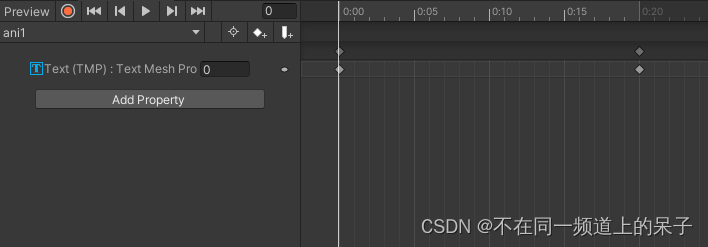
在Unity中, 我们有时候不仅需要animator正放的效果,也需要倒放的效果。但我们在实际制作动画的时候可以只制作一个正放的动画,然后通过代码控制倒放。 实现方法其实很简单,只需要把animator动画的speed设置为-1即为倒放ÿ…...
Dubbo源码解析第一期:如何使用Netty4构建RPC
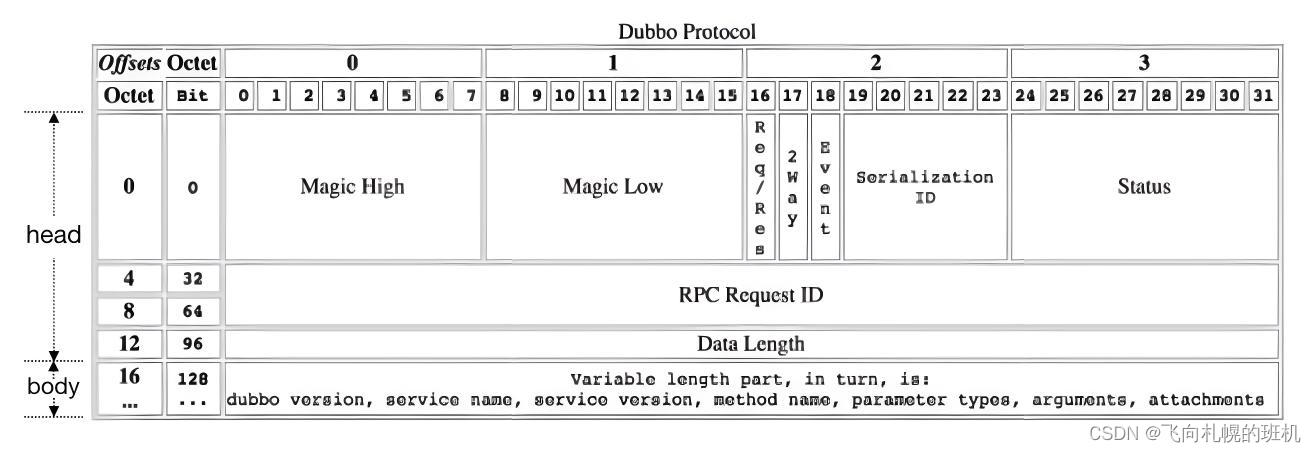
一、背景 早期学习和使用Dubbo的时候(那时候Dubbo还没成为Apache顶级项目),写过一些源码解读,但随着Dubbo发生了翻天覆地的变化,那些文章早已过时,所以现在计划针对最新的Apache Dubbo源码来进行“阅读理解…...
unity刷新grid,列表
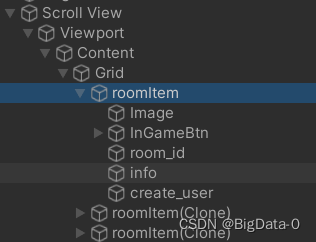
获取UIGrid 组件,更新列表 listParent.GetComponent().repositionNow true;...

蓝桥杯备赛 day 3 —— 高精度(C/C++,零基础,配图)
目录 🌈前言: 📁 高精度的概念 📁 高精度加法和其模板 📁 高精度减法和其模板 📁 高精度乘法和其模板 📁 高精度除法和其模板 📁 总结 🌈前言: 这篇文…...

人形机器人创新发展顶层设计与关键技术布局
系列文章目录 前言 随着新一轮科技革命和产业变革的深入推进,我国高度重视人形机器人的创新发展,提出了一系列具有前瞻性和战略性的指导意见。规划指出,到2025年,我国将初步建立人形机器人创新体系,攻克“大脑”、“小…...

C语言-算法-最小生成树
【模板】最小生成树 题目描述 如题,给出一个无向图,求出最小生成树,如果该图不连通,则输出 orz。 输入格式 第一行包含两个整数 N , M N,M N,M,表示该图共有 N N N 个结点和 M M M 条无向边。 接下来 M M M 行…...

android 扫描某个包下的所有类
注意事项 如果在用Android Studio开发过程中,如果新增了类,扫描不到。只能把APP卸载了,才能扫描到。 可能是Instance Run 的影响。 后面研究一下这篇文章,看看能不能解决 Android 遍历Apk下的所有类文件 package com.trs.nmip.…...

远程ssh 不通的原因之一
背景:我都想大喊一声,我上网是通的, ping网址是通的,ping www.baidu.com 是通的, 怎么都远程不了,报超时;嘿, 别人远程就能行。我都想挠头了。 目录 1. 先 ping 自己,…...
wamp集成环境部署
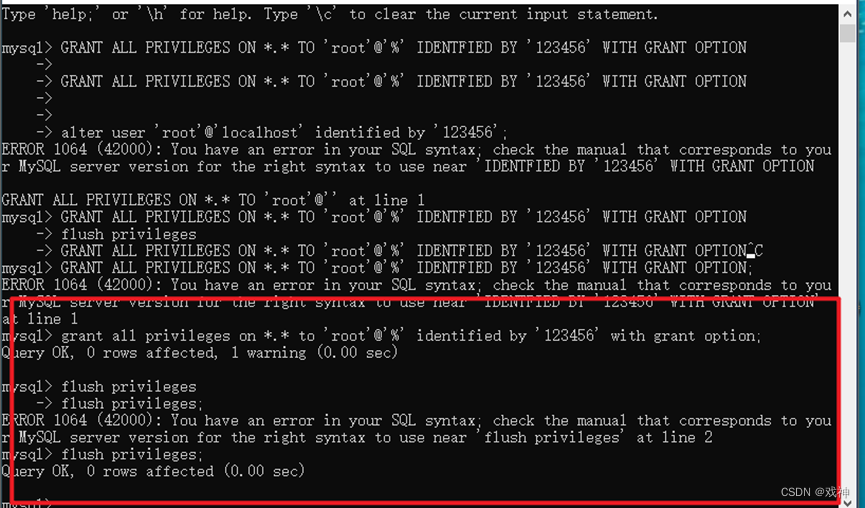
Windows下Apache服务器搭建 第一步:下载Windows下的最新ZIP压缩包 推荐下载网址:http://www.apachelounge.com/download/ 为了让Apache服务器发挥更好的性能,请根据自己的系统选择下载,如果不清楚自己的系统是64位还是32位&am…...

使用antd design pro 及后端nodejs express 结合minio进行文件的上传和下载管理
使用Ant Design Pro前端框架结合Node.js Express后端服务以及MinIO作为对象存储,实现文件上传和下载管理的基本步骤如下: 1. 安装所需依赖 在Node.js Express项目中安装minio客户端库: npm install minio --save 在前端项目(假…...

Unity常用的优化技巧集锦
Unity性能优化是面试的时候经常被问道的一些内容,今天给大家分享一些常用的Unity的优化技巧和思路,方便大家遇到问题时候参考与学习。 对啦!这里有个游戏开发交流小组里面聚集了一帮热爱学习游戏的零基础小白,也有一些正在从事游…...

c++动态调用dll
在C中动态调用DLL(动态链接库)可以使用Windows API函数。以下是一个简单的示例,演示如何动态加载和调用DLL中的函数: #include <windows.h> #include <iostream>int main() { // 加载DLL HMODULE hModule LoadLibrar…...
使用Python自动化操作手机,自动执行常见任务,例如滑动手势、呼叫、发送短信等等
使用Python自动化操作手机,自动执行常见任务,例如滑动手势、呼叫、发送短信等等。 此自动化脚本将帮助你使用 Python 中的 Android 调试桥 (ADB) 自动化你的智能手机。下面我将展示如何自动执行常见任务,例如滑动手势、呼叫、发送短信等等。 您可以了解有关 ADB 的更多信息,…...
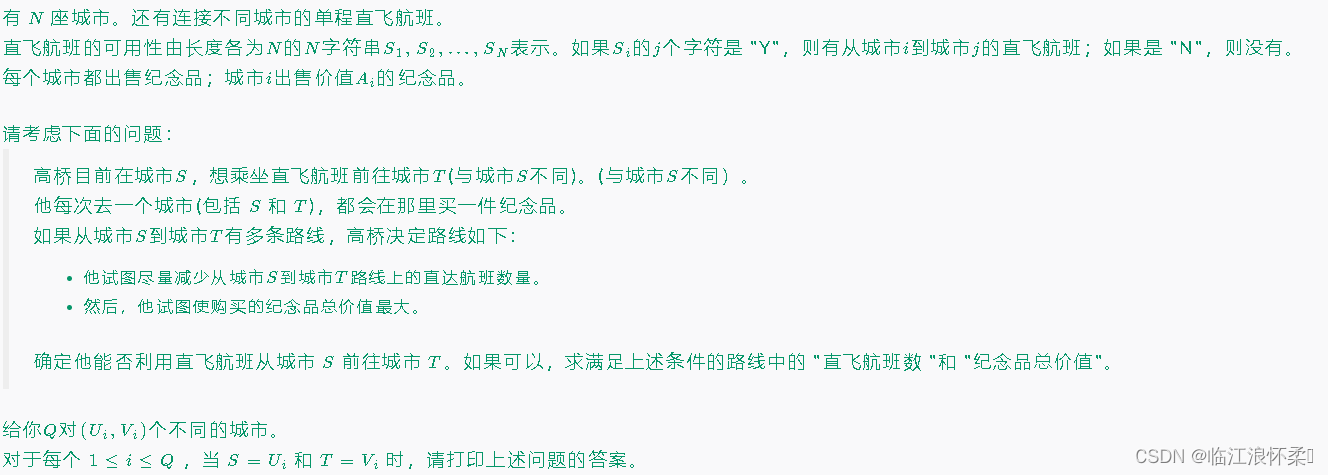
E - Souvenir(图论典型例题)
思路:对于有很多询问的题,一般都是先初始化。我们求出每个点到其他点的最短路径以及相同路径下最大的价值和即可。 代码: #include <bits/stdc.h> #define pb push_back #define a first #define b second using namespace std; type…...

【SpringBoot篇】添加富文本编辑器操作
文章目录 🍔使用步骤⭐首先我们需要安装富文本编辑器⭐在<script>中引入富文本编辑器⭐富文本图片上传接口⭐初始化富文本编辑器⭐调用 初始化富文本编辑器的方法🎈新增🎈编辑🎈保存 ⭐添加按钮⭐实现viewEditor函数&#x…...

前台vue配置
前台 vue环境 1.傻瓜式安装node: 官网下载:https://nodejs.org/zh-cn/2.安装cnpm: >: npm install -g cnpm --registryhttps://registry.npm.taobao.org3.安装vue最新脚手架: >: cnpm install -g vue/cli注:如果2、3步报错,清除缓…...

牛客周赛 Round 18 解题报告 | 珂学家 | 分类讨论计数 + 状态DP
前言 整体评价 前三题蛮简单的,T4是一个带状态的DP,这题如果用背包思路去解,不知道如何搞,感觉有点头痛。所以最后还是选择状态DP来求解。 欢迎关注 珂朵莉 牛客周赛专栏 珂朵莉 牛客小白月赛专栏 A. 游游的整数翻转 这题最好…...

CentOS防火墙基本操作
CentOS操作系统中的防火墙可以使用firewalld或iptables来进行配置。 firewalld(默认): 查看当前状态:systemctl status firewalld 开启/关闭防火墙服务:sudo systemctl start/stop firewalld 设置开机自动启动/不启…...
)
极简风项目交付倒计时!:紧急修复MJ --v 6.2中隐藏的1.33倍宽高比偏移Bug,避免客户验收驳回(含补救Prompt包)
更多请点击: https://intelliparadigm.com 第一章:极简风项目交付倒计时! 当交付周期压缩至 72 小时,极简风不再是一种美学选择,而是工程效率的刚性约束。我们摒弃冗余文档、跳过非核心评审环节,聚焦于可…...

别再手动算位宽了!Vivado FIR IP核的位宽计算逻辑与配置避坑指南
Vivado FIR IP核位宽计算实战:从黑盒解析到精准配置 在FPGA数字信号处理领域,FIR滤波器作为基础构建模块,其性能表现直接影响整个系统的信号处理质量。而位宽配置这个看似简单的参数,往往成为项目后期调试阶段的"隐形杀手&qu…...

如何在Mac上完美读写NTFS硬盘:Free NTFS for Mac终极指南
如何在Mac上完美读写NTFS硬盘:Free NTFS for Mac终极指南 【免费下载链接】Free-NTFS-for-Mac Nigate: An open-source NTFS utility for Mac. It supports all Mac models (Intel and Apple Silicon), providing full read-write access, mounting, and management…...

C语言结构体、枚举、联合体:从内存布局看区别,新手避坑指南
C语言结构体、枚举、联合体:从内存布局看区别,新手避坑指南 在C语言开发中,结构体、枚举和联合体是构建复杂数据模型的三大基石。但很多开发者在实际项目中常遇到这样的困惑:为什么结构体占用的内存比预期大?枚举变量在…...

终极罗技PUBG鼠标宏配置指南:5步告别压枪烦恼
终极罗技PUBG鼠标宏配置指南:5步告别压枪烦恼 【免费下载链接】logitech-pubg PUBG no recoil script for Logitech gaming mouse / 绝地求生 罗技 鼠标宏 项目地址: https://gitcode.com/gh_mirrors/lo/logitech-pubg 还在为《绝地求生》中疯狂上跳的枪口而…...

构建个人技能库:用GitHub+Markdown打造开发者的第二大脑
1. 项目概述:从“我的Copaw技能”看个人技能库的构建与管理最近在GitHub上看到一个挺有意思的项目,叫“my-copaw-skill”。这个项目名本身就很有故事感,“Copaw”这个词,我猜是“Code”和“Paw”(爪子)的结…...

大语言模型分步推理与自我验证框架:提升AI生成准确性的工程实践
1. 项目概述:当AI学会“自我验证”最近在开源社区里,一个名为“Lets-Verify-Step-by-Step”的项目引起了我的注意。这个项目直指当前大语言模型(LLM)应用中的一个核心痛点:如何让模型在生成复杂答案时,能像…...

基于MCP协议构建Reddit社区趋势分析工具:架构、部署与应用
1. 项目概述:一个实时洞察社区脉搏的利器最近在做一个社区运营相关的项目,需要实时追踪几个特定话题在Reddit上的讨论热度变化。手动刷帖、统计关键词频率这种笨办法效率太低,而且很难量化趋势。就在我琢磨着是不是要自己写个爬虫加分析脚本的…...

用Git和Markdown构建个人知识库:Wandercode项目实践指南
1. 项目概述:从“漫游代码”到个人知识管理系统的蜕变最近在GitHub上看到一个挺有意思的项目,叫“Wandercode”,直译过来就是“漫游代码”。乍一看这个标题,可能会让人联想到某种代码生成器或者自动化脚本工具。但当我深入探究其仓…...

创业团队如何利用Taotoken以更低成本快速验证AI产品创意
🚀 告别海外账号与网络限制!稳定直连全球优质大模型,限时半价接入中。 👉 点击领取海量免费额度 创业团队如何利用Taotoken以更低成本快速验证AI产品创意 对于资源有限的创业团队而言,在产品原型阶段验证AI创意的可行…...