
【Java】Springboot入门
学习目标
- 基于SpringBoot框架的程序开发步骤
- 熟练使用SpringBoot配置信息修改服务器配置
- 基于SpringBoot的完成SSM整合项目开发
一、SpringBoot简介
1. 入门案例
问题导入
SpringMVC的HelloWord程序大家还记得吗?
-
SpringBoot是由Pivotal团队提供的全新框架,其设计目的是用来简化Spring应用的初始搭建以及开发过程
-
原生开发SpringMVC程序过程

1.1 入门案例开发步骤
①:创建新模块,选择Spring初始化,并配置模块相关基础信息

②:选择当前模块需要使用的技术集
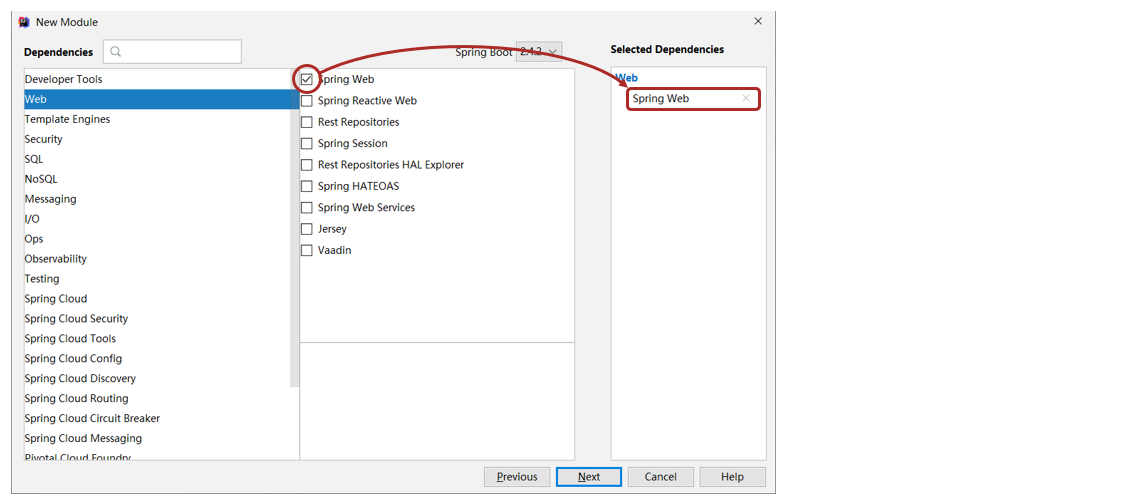
③:开发控制器类
@RestController
@RequestMapping("/books")
public class BookController {@GetMapping("/{id}")public String getById(@PathVariable Integer id) {System.out.println("id ==> " + id);return "hello , spring boot! ";}
}
④:运行自动生成的Application类

- 最简SpringBoot程序所包含的基础文件
<?xml version="1.0" encoding="UTF-8"?>
<project xmlns="http://maven.apache.org/POM/4.0.0" xmlns:xsi="http://www.w3.org/2001/XMLSchema-instance"xsi:schemaLocation="http://maven.apache.org/POM/4.0.0 https://maven.apache.org/xsd/maven-4.0.0.xsd"><modelVersion>4.0.0</modelVersion><parent><groupId>org.springframework.boot</groupId><artifactId>spring-boot-starter-parent</artifactId><version>2.5.0</version></parent><groupId>com.itheima</groupId><artifactId>springboot-01-quickstart</artifactId><version>0.0.1-SNAPSHOT</version><dependencies><dependency><groupId>org.springframework.boot</groupId><artifactId>spring-boot-starter-web</artifactId></dependency></dependencies>
</project>
@SpringBootApplication
public class Application {public static void main(String[] args) {SpringApplication.run(Application.class, args);}
}
- Spring程序与SpringBoot程序对比

注意事项:
基于idea开发SpringBoot程序需要确保联网且能够加载到程序框架结构
1.2 基于SpringBoot官网创建项目

1.3 SpringBoot项目快速启动
① 对SpringBoot项目打包(执行Maven构建指令package)
② 执行启动指令
java -jar springboot_01_quickstart.jar # 项目的名称根据实际情况修改
注意事项:
jar支持命令行启动需要依赖maven插件支持,请确认打包时是否具有SpringBoot对应的maven插件。
<build><plugins><plugin><groupId>org.springframework.boot</groupId><artifactId>spring-boot-maven-plugin</artifactId></plugin></plugins>
</build>
2. SpringBoot概述
问题导入
学习了SpringBoot入门案例之后,感觉对比SpringMVC哪一个更加方便简洁?
- SpringBoot是由Pivotal团队提供的全新框架,其设计目的是用来简化Spring应用的初始搭建以及开发过程
- Spring程序缺点
- 配置繁琐
- 依赖设置繁琐
- SpringBoot程序优点
- 自动配置
- 起步依赖(简化依赖配置)
- 辅助功能(内置服务器,……)
2.1 起步依赖
- starter
- SpringBoot中常见项目名称,定义了当前项目使用的所有项目坐标,以达到减少依赖配置的目的
<?xml version="1.0" encoding="UTF-8"?>
<project xmlns="http://maven.apache.org/POM/4.0.0" xmlns:xsi="http://www.w3.org/2001/XMLSchema-instance"xsi:schemaLocation="http://maven.apache.org/POM/4.0.0 https://maven.apache.org/xsd/maven-4.0.0.xsd"><modelVersion>4.0.0</modelVersion><parent><groupId>org.springframework.boot</groupId><artifactId>spring-boot-starter-parent</artifactId><version>2.5.0</version></parent><groupId>com.itheima</groupId><artifactId>springboot-01-quickstart</artifactId><version>0.0.1-SNAPSHOT</version><dependencies><dependency><groupId>org.springframework.boot</groupId><artifactId>spring-boot-starter-web</artifactId></dependency></dependencies>
</project>
<project xmlns="http://maven.apache.org/POM/4.0.0"xsi:schemaLocation="http://maven.apache.org/POM/4.0.0 http://maven.apache.org/xsd/maven-4.0.0.xsd"xmlns:xsi="http://www.w3.org/2001/XMLSchema-instance"><modelVersion>4.0.0</modelVersion><groupId>org.springframework.boot</groupId><artifactId>spring-boot-dependencies</artifactId><version>2.5.0</version><packaging>pom</packaging><properties><servlet-api.version>4.0.1</servlet-api.version>        ...</properties>
</project>- parent
- 所有SpringBoot项目要继承的项目,定义了若干个坐标版本号(依赖管理,而非依赖),以达到减少依赖冲突的目的
- spring-boot-starter-parent(2.5.0)与 spring-boot-starter-parent(2.4.6)共计57处坐标版本不同
<?xml version="1.0" encoding="UTF-8"?>
<project xmlns="http://maven.apache.org/POM/4.0.0"xsi:schemaLocation="http://maven.apache.org/POM/4.0.0 http://maven.apache.org/xsd/maven-4.0.0.xsd"xmlns:xsi="http://www.w3.org/2001/XMLSchema-instance"><modelVersion>4.0.0</modelVersion><parent><groupId>org.springframework.boot</groupId><artifactId>spring-boot-dependencies</artifactId><version>2.5.0</version></parent><artifactId>spring-boot-starter-parent</artifactId><packaging>pom</packaging>    ...
</project>
- 实际开发
- 使用任意坐标时,仅书写GAV中的G和A,V由SpringBoot提供
- 如发生坐标错误,再指定version(要小心版本冲突)
<dependency><groupId>junit</groupId><artifactId>junit</artifactId><version>${junit.version}</version>
</dependency>
<dependency><groupId>javax.servlet</groupId><artifactId>javax.servlet-api</artifactId><version>${servlet-api.version}</version>
</dependency>
<?xml version="1.0" encoding="UTF-8"?>
<project xmlns="http://maven.apache.org/POM/4.0.0" xmlns:xsi="http://www.w3.org/2001/XMLSchema-instance"xsi:schemaLocation="http://maven.apache.org/POM/4.0.0 https://maven.apache.org/xsd/maven-4.0.0.xsd"><parent><groupId>org.springframework.boot</groupId><artifactId>spring-boot-starter-parent</artifactId><version>2.5.0</version></parent><dependencies><dependency><groupId>org.springframework.boot</groupId><artifactId>spring-boot-starter-web</artifactId></dependency><dependency><groupId>org.springframework.boot</groupId><artifactId>spring-boot-starter-test</artifactId><scope>test</scope></dependency></dependencies>
</project>
2.2 辅助功能
- SpringBoot程序启动
@SpringBootApplication
public class Springboot01QuickstartApplication {public static void main(String[] args) {SpringApplication.run(Springboot01QuickstartApplication.class, args);}
}
- SpringBoot在创建项目时,采用jar的打包方式
- SpringBoot的引导类是项目的入口,运行main方法就可以启动项目
- 使用maven依赖管理变更起步依赖项
- Jetty比Tomcat更轻量级,可扩展性更强(相较于Tomcat),谷歌应用引擎(GAE)已经全面切换为Jetty
<dependencies><dependency><groupId>org.springframework.boot</groupId><artifactId>spring-boot-starter-web</artifactId><!--web起步依赖环境中,排除Tomcat起步依赖--><exclusions><exclusion><groupId>org.springframework.boot</groupId><artifactId>spring-boot-starter-tomcat</artifactId></exclusion></exclusions></dependency><!--添加Jetty起步依赖,版本由SpringBoot的starter控制--><dependency><groupId>org.springframework.boot</groupId><artifactId>spring-boot-starter-jetty</artifactId></dependency>
</dependencies>
二、基础配置
1. 配置文件格式
问题导入
框架常见的配置文件有哪几种形式?
1.1 修改服务器端口
http://localhost:8080/books/1 >>> http://localhost/books/1
SpringBoot提供了多种属性配置方式
- application.properties
server.port=80
- application.yml
server:port: 81
- application.yaml
server:port: 82
1.2 自动提示功能消失解决方案
操作步骤:
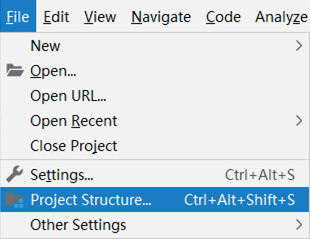


1.3 SpringBoot配置文件加载顺序(了解)
- application.properties > application.yml > application.yaml
注意事项:
- SpringBoot核心配置文件名为application
- SpringBoot内置属性过多,且所有属性集中在一起修改,在使用时,通过提示键+关键字修改属性
2. yaml
问题导入
什么是yaml,和properties有什么区别?
- YAML(YAML Ain’t Markup Language),一种数据序列化格式
- 优点:
- 容易阅读
- 容易与脚本语言交互
- 以数据为核心,重数据轻格式
- YAML文件扩展名
- .yml(主流)
- .yaml
2.1 yaml语法规则
- 大小写敏感
- 属性层级关系使用多行描述,每行结尾使用冒号结束
- 使用缩进表示层级关系,同层级左侧对齐,只允许使用空格(不允许使用Tab键)
- 属性值前面添加空格(属性名与属性值之间使用冒号+空格作为分隔)
- #表示注释
- 核心规则:数据前面要加空格与冒号隔开
2.2 yaml数组数据
- 数组数据在数据书写位置的下方使用减号作为数据开始符号,每行书写一个数据,减号与数据间空格分隔

2.3 yaml数据读取
- 使用@Value读取单个数据,属性名引用方式:${一级属性名.二级属性名……}

- 封装全部数据到Environment对象

- 自定义对象封装指定数据【常用】
public class Enterprise {private String name;private Integer age;private String tel;private String[] subject;//自行添加getter、setter、toString()等方法
}

- 自定义对象封装数据警告解决方案

<dependency><groupId>org.springframework.boot</groupId><artifactId>spring-boot-configuration-processor</artifactId><optional>true</optional>
</dependency>
3. 多环境开发配置
问题导入
在实际开发中,项目的开发环境、测试环境、生产环境的配置信息是否会一致?如何快速切换?
3.1 多环境启动配置
- yaml文件多环境启动


- properties文件多环境启动
#主启动配置文件 application.properties
spring.profiles.active=pro
#环境分类配置文件 application-pro.properties
server.port=80
#环境分类配置文件 application-dev.properties
server.port=81
#环境分类配置文件application-test.properties
server.port=82
3.2 多环境启动命令格式
- 带参数启动SpringBoot
java –jar springboot.jar --spring.profiles.active=test
java –jar springboot.jar --server.port=88
java –jar springboot.jar --server.port=88 --spring.profiles.active=test
- 参数加载优先顺序
- 参看文档:https://docs.spring.io/spring-boot/docs/current/reference/html/spring-boot-features.html#boot-features-external-config

3.3 多环境开发控制
Maven与SpringBoot多环境兼容(步骤)
①:Maven中设置多环境属性
<profiles><profile><id>dev_env</id><properties><profile.active>dev</profile.active></properties><activation><activeByDefault>true</activeByDefault></activation></profile><profile><id>pro_env</id><properties><profile.active>pro</profile.active></properties></profile><profile><id>test_env</id><properties><profile.active>test</profile.active></properties></profile>
</profiles>
②:SpringBoot中引用Maven属性

③:执行Maven打包指令
- Maven指令执行完毕后,生成了对应的包,其中类参与编译,但是配置文件并没有编译,而是复制到包中

- 解决思路:对于源码中非java类的操作要求加载Maven对应的属性,解析${}占位符
④:对资源文件开启对默认占位符的解析
<build><plugins><plugin><artifactId>maven-resources-plugin</artifactId><configuration><encoding>utf-8</encoding><useDefaultDelimiters>true</useDefaultDelimiters></configuration></plugin></plugins>
</build>
- Maven打包加载到属性,打包顺利通过

4. 配置文件分类
问题导入
SpringBoot的配置文件可以放在项目的哪些地方?

java –jar springboot.jar --spring.profiles.active=test --server.port=85 --server.servlet.context-path=/heima --server.tomcat.connection-timeout=-1 ... ...
-
SpringBoot中4级配置文件
1级: file :config/application.yml 【最高】
2级: file :application.yml
3级:classpath:config/application.yml
4级:classpath:application.yml 【最低】
-
作用:
1级与2级留做系统打包后设置通用属性
3级与4级用于系统开发阶段设置通用属性
三、整合第三方技术
1. 整合JUnit
问题导入
回忆一下Spring整合JUnit的步骤?
1.1 Spring整合JUnit(复习)

1.2 SpringBoot整合JUnit
【第一步】添加整合junit起步依赖(可以直接勾选)
<dependency><groupId>org.springframework.boot</groupId><artifactId>spring-boot-starter-test</artifactId><scope>test</scope>
</dependency>
【第二步】编写测试类,默认自动生成了一个
@SpringBootTest
class Springboot07JunitApplicationTests {@Autowiredprivate BookService bookService;@Testpublic void testSave() {bookService.save();}
}
2. 基于SpringBoot实现SSM整合
问题导入
回忆一下Spring整合MyBatis的核心思想?
2.1 Spring整合MyBatis(复习)
- SpringConfig
- 导入JdbcConfig
- 导入MyBatisConfig
@Configuration
@ComponentScan("com.itheima")
@PropertySource("classpath:jdbc.properties")
@Import({JdbcConfig.class, MyBatisConfig.class})
public class SpringConfig {}
- JDBCConfig
- 定义数据源(加载properties配置项:driver、url、username、password)
#jdbc.properties
jdbc.driver=com.mysql.jdbc.Driver
jdbc.url=jdbc:mysql://localhost:3306/spring_db
jdbc.username=root
jdbc.password=itheima
public class JdbcConfig {@Value("${jdbc.driver}")private String driver;@Value("${jdbc.url}")private String url;@Value("${jdbc.username}")private String userName;@Value("${jdbc.password}")private String password;@Beanpublic DataSource getDataSource() {DruidDataSource ds = new DruidDataSource();ds.setDriverClassName(driver);ds.setUrl(url);ds.setUsername(userName);ds.setPassword(password);return ds;}
}- MyBatisConfig
- 定义SqlSessionFactoryBean
- 定义映射配置
@Bean
public SqlSessionFactoryBean getSqlSessionFactoryBean(DataSource dataSource) {SqlSessionFactoryBean ssfb = new SqlSessionFactoryBean();ssfb.setTypeAliasesPackage("com.itheima.domain");ssfb.setDataSource(dataSource);return ssfb;
}
@Bean
public MapperScannerConfigurer getMapperScannerConfigurer() {MapperScannerConfigurer msc = new MapperScannerConfigurer();msc.setBasePackage("com.itheima.dao");return msc;
}
2.2 SpringBoot整合MyBatis
- SpringBoot整合Spring(不存在)
- SpringBoot整合SpringMVC(不存在)
- SpringBoot整合MyBatis(主要)
①:创建新模块,选择Spring初始化,并配置模块相关基础信息
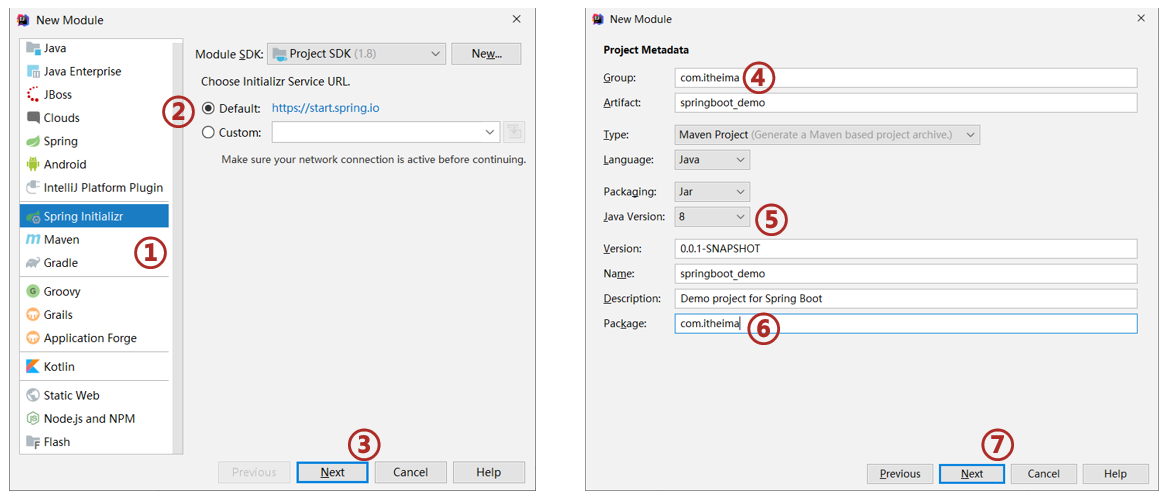
②:选择当前模块需要使用的技术集(MyBatis、MySQL)
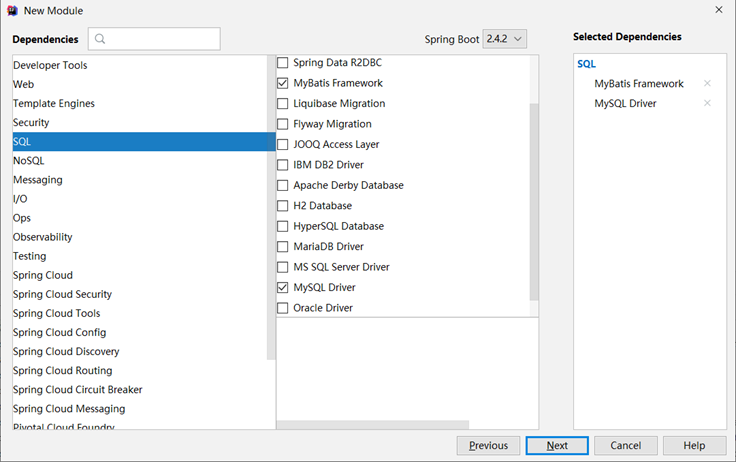
③:设置数据源参数
spring:datasource:driver-class-name: com.mysql.cj.jdbc.Driverurl: jdbc:mysql://localhost:3306/ssm_db?serverTimezone=UTCusername: rootpassword: roottype: com.alibaba.druid.pool.DruidDataSource
注意事项:
- SpringBoot版本低于2.4.3(不含),Mysql驱动版本大于8.0时,需要在url连接串中配置时区,或在MySQL数据库端配置时区解决此问题
jdbc:mysql://localhost:3306/ssm_db?serverTimezone=UTC
④:定义数据层接口与映射配置
@Mapper
public interface UserDao {@Select("select * from tbl_book where id=#{id}")Book getById(Integer id);
}
⑤:测试类中注入dao接口,测试功能
@SpringBootTest
class Springboot08MybatisApplicationTests {@Autowiredprivate BookDao bookDao;@Testpublic void testGetById() {Book book = bookDao.getById(1);System.out.println(book);}
}
2.3 案例-SpringBoot实现ssm整合
【第一步】创建SpringBoot工程,添加druid依赖
<!-- todo 1 添加druid连接池依赖-->
<dependency><groupId>com.alibaba</groupId><artifactId>druid</artifactId><version>1.2.6</version>
</dependency>
【第二步】复制springmvc_11_page工程各种资源(主java类、页面、测试类)
【第三步】删除config包中的所有配置,在BookDao接口上加@Mapper注解
//todo 3 在BookDao接口上加@Mapper注解,让SpringBoot给接口创建代理对象
@Mapper
public interface BookDao {//...
}
【第四步】将application.properties修改成application.yml,配置端口号和连接参数
server:port: 80
# todo 4 配置数据库连接参数
spring:datasource:driver-class-name: com.mysql.cj.jdbc.Driverurl: jdbc:mysql://localhost:3306/ssm_dbusername: rootpassword: roottype: com.alibaba.druid.pool.DruidDataSource
【第五步】修改BookServiceTest配置类,进行配置
// todo 5 修改单元测试类,添加@SpringBootTest主键,修复@Test注解导包
@SpringBootTest
public class BookServiceTest {@Autowiredprivate BookService bookService;@Testpublic void testGetById(){Book book = bookService.getById(2); //传递参数1会抛出异常System.out.println(book);}@Testpublic void testGetAll(){List<Book> all = bookService.getAll();System.out.println(all);}
}
【第六步】在static目录中提供index.html页面,跳转到"pages/books.html"
<script>location.href="pages/books.html"
</script>
最后:运行引导类即可访问
相关文章:
【Java】Springboot入门
学习目标 基于SpringBoot框架的程序开发步骤 熟练使用SpringBoot配置信息修改服务器配置 基于SpringBoot的完成SSM整合项目开发 一、SpringBoot简介 1. 入门案例 问题导入 SpringMVC的HelloWord程序大家还记得吗? SpringBoot是由Pivotal团队提供的全新框架&…...
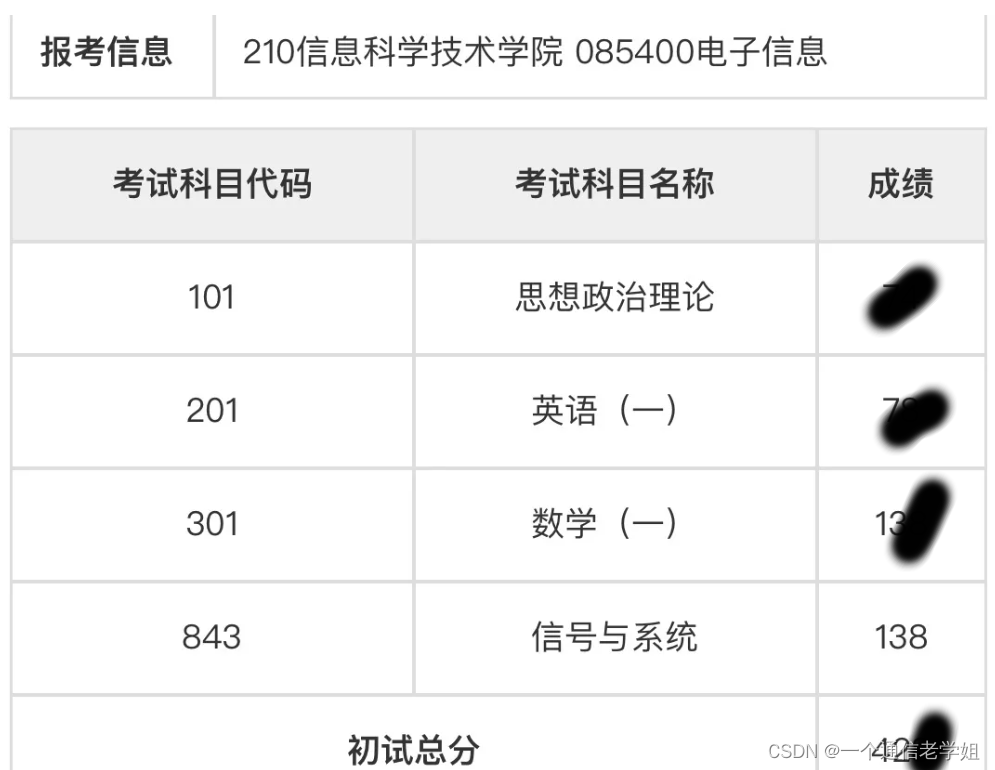
专业138总分420+中国科学技术大学843信号与系统考研经验中科大电子信息通信
**今年中科大专业课843信号与系统138分,总分420顺利上岸,梦圆中科大,也是报了高考失利的遗憾,总结一下自己的复习经历,希望可以给大家提供参考。**首先,中科大843包括信号与系统,和数字信号处理…...
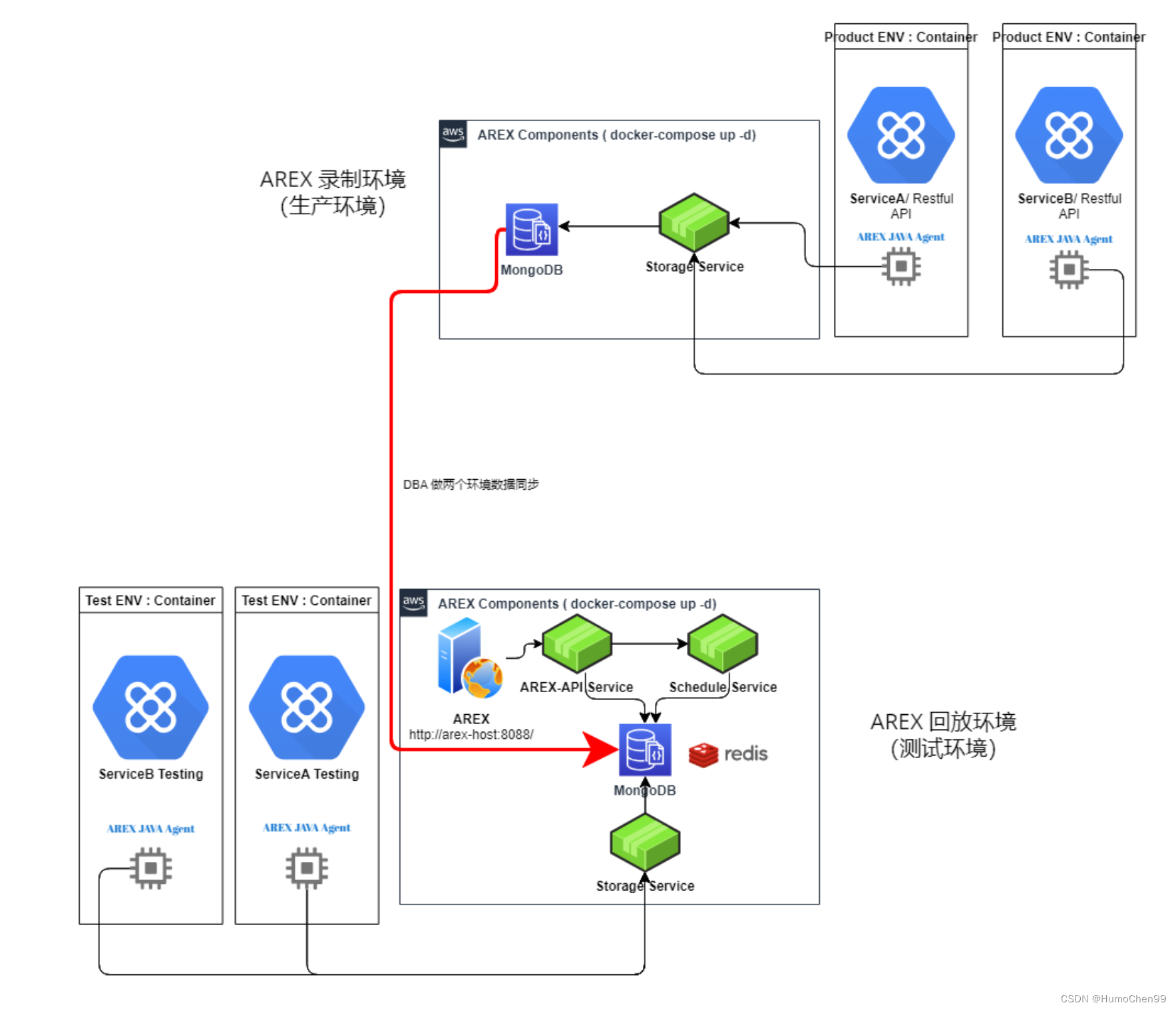
携程开源 基于真实请求与数据的流量回放测试平台、自动化接口测试平台AREX
携程开源 基于真实请求与数据的流量回放测试平台、自动化接口测试平台AREX 官网文档 基于真实请求与数据的流量回放测试平台、自动化接口测试平台AREX 目前已跑通,通过冒烟测试,这篇文章稍稍水一下,主要讲下部署过程里踩的坑,因为…...

Android中C++层fstream用法详解
fstream用于读写文件内容 ifstream用于读文件内容 ofstream用于写内容到文件 读本文章前,请读一下C 文件和流 | 菜鸟教程 目录 1. 打开文件open 2. 返回当前指针位置tellg, tellp 3. 设置文件读位置指针seekg 4. 设置文件写位置指针seekp 5. 如何在文件…...
git clone常见问题一览及解决方法
在使用Ubuntu下,终端运行git clone命令时会遇见许多问题,本文主要针对一些常见的问题进行整理。关于换源问题,推荐使用小鱼的一键换源。 1.git clone 速度过慢 1.1 魔法 这个方法不做过多赘述,ubuntu下个人使用发现体验良好&am…...
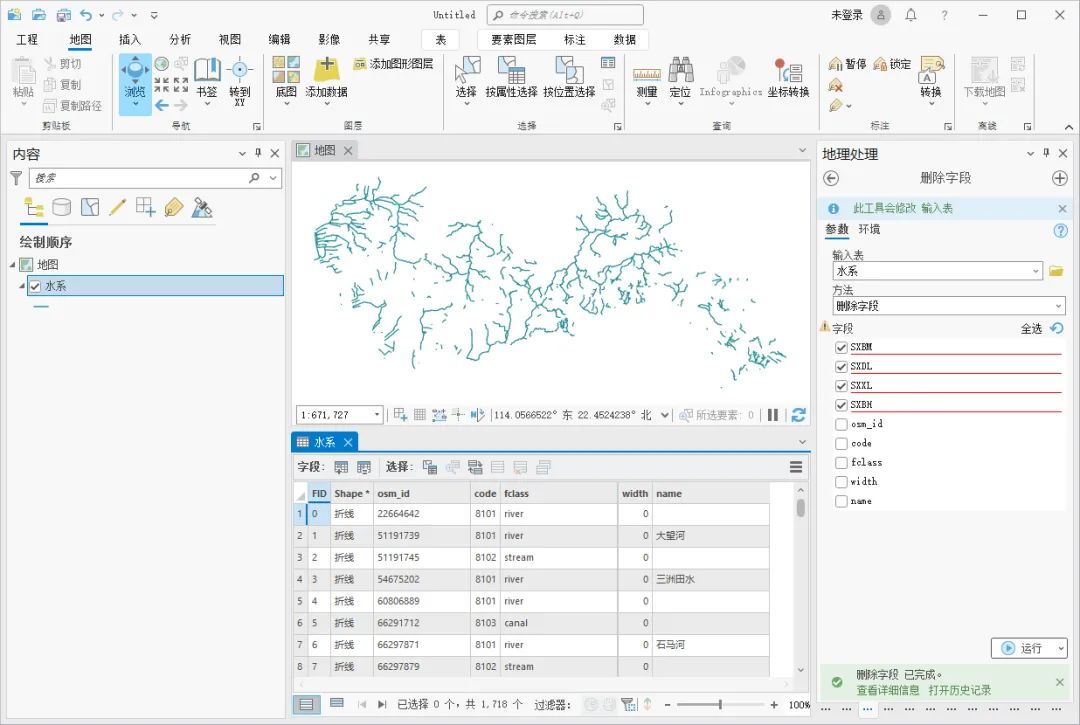
ArcGIS Pro 如何批量删除字段
在某些时候,我们得到的图层属性表内可能会有很多不需要的字段,如果挨个去删除会十分的麻烦,对于这种情况,我们可以使用工具箱内的字段删除工具批量删除,这里为大家介绍一下使用方法,希望能对你有所帮助。 …...

OG Trade在ZKX揭幕:一家基于Starknet的游戏化永续合约交易所
ZKX的 OG Trade通过内置游戏化和30分钟交易竞赛,为所有交易者创造机会,革新了永续合约交易模式。 2024年1月30日 — ZKX宣布推出OG Trade,这是一家基于Starknet的游戏化永续合约交易所,旨在满足短期交易者、高水平交易者和波段交易…...

ubuntu 22.04 安装redis并设置远程连接
ubuntu 22.04 安装redis并设置远程连接 1、基础安装 更新包: sudo apt update安装redis: sudo apt install redis-server安装完毕后会自动启动,查看状态: sudo systemctl status redis-server注意:如果你的服务器上仅用…...
MemcachedRedis构建缓存服务器
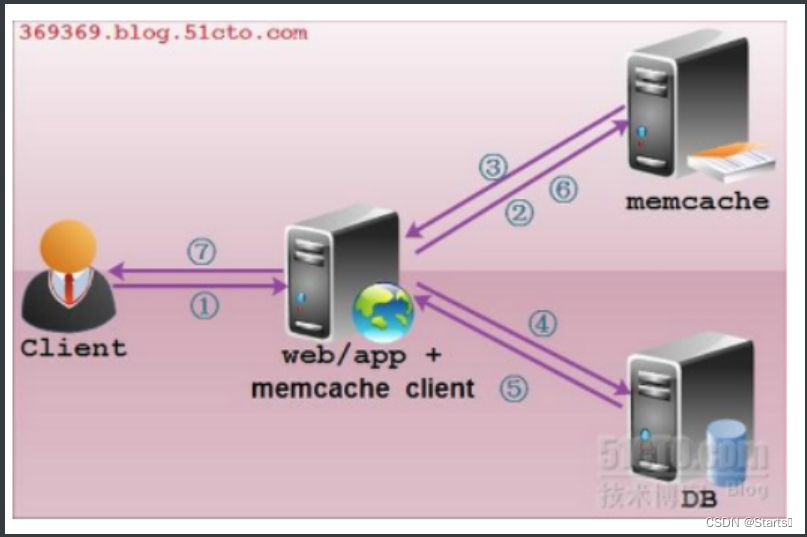
目录 Memcached&Redis构建缓存服务器 一、介绍 二、memcached 1、特点 2、服务框架 3.配置安装memcached 三、redis服务 1、介绍 2、特点 3、缓存 4、安装redis 5、数据持久化 6、redis主从配置 Memcached&Redis构建缓存服务器 一、介绍 许多Web应用都将…...

Python编辑开发 --- pycharm pro 中文
PyCharm Pro是一款专业的Python集成开发环境(IDE),由JetBrains公司开发。它为Python开发者提供了丰富的功能和工具,使得Python编程变得更加高效和便捷。PyCharm Pro具有智能代码编辑功能,能够自动完成代码、快速导航至…...
Linux的 .bashrc 有什么作用?
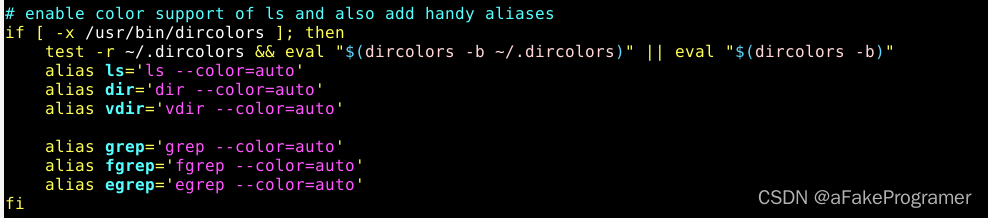
一、.bashrc 是什么? 有什么用? .bashrc是一个存储在你的home目录下的隐藏文件,它用来配置和自定义你的终端环境和行为。 每次你启动一个新的终端时,.bashrc文件就会被执行,加载你设置的环境变量,别名,函数…...
.ui文件相关
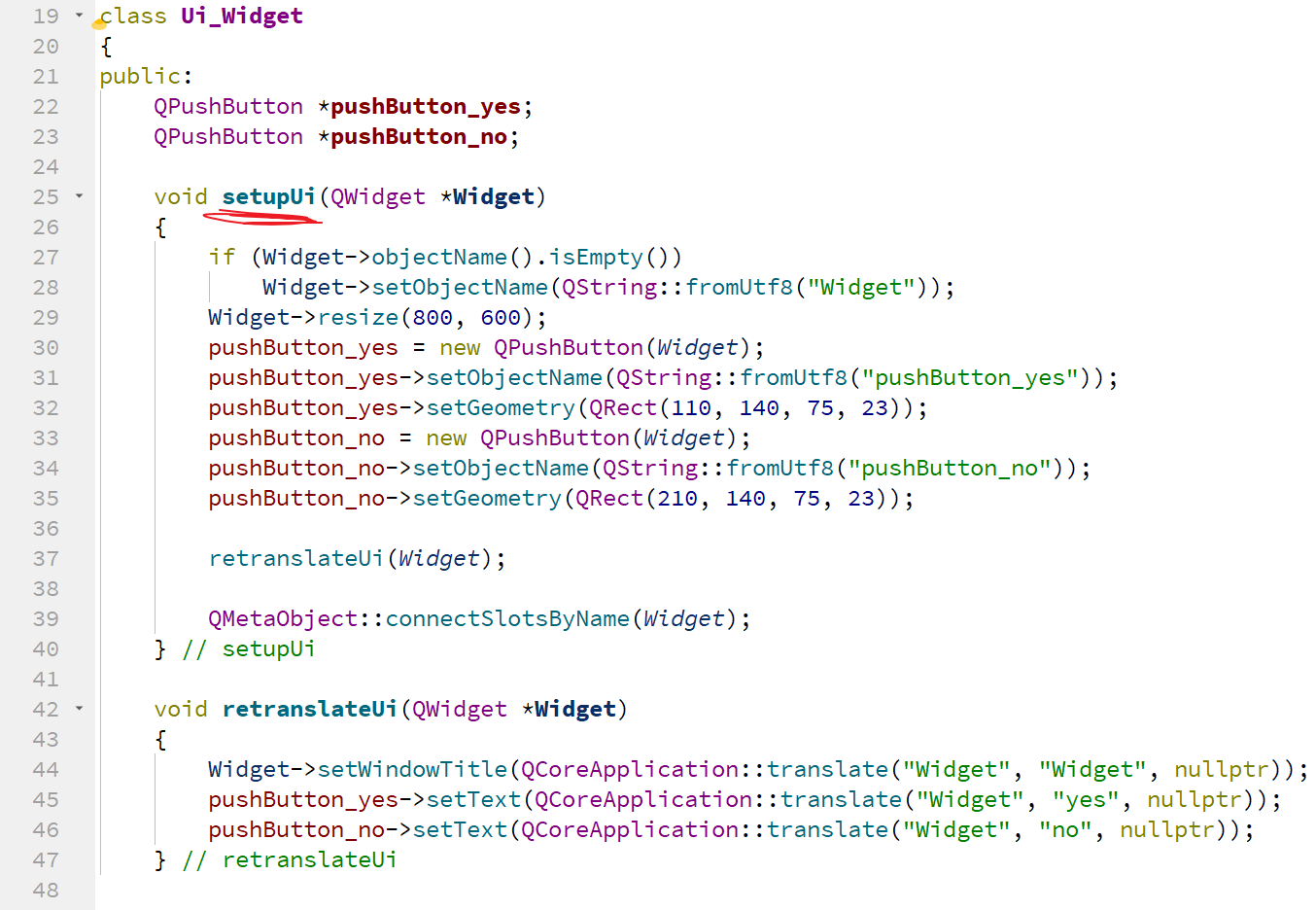
目录 ui类生成过程: 提问: 等以后自己熟练了用代码写这些样式内容,尽量用代码写,原因很简单: 用代码写的可以直接修改代码,但是在设计界面修改的东西,电脑没有QC这玩意,还真不好改…...

【DOCKER】docker 安装sonarque
安装docker 安装docker https://blog.csdn.net/BThinker/article/details/123358697 加入阿里云镜像 https://blog.csdn.net/TommyXu8023/article/details/113291112 { "registry-mirrors": ["https://alzgoonw.mirror.aliyuncs.com"] }安装sonarqube ht…...

解决IDEA报错端口被占用的问题
遇到的解决方案通常是执行netstat -ano | findstr "8080" ,然后去关闭对应的进程 但是我遇到的是8080改成任意一个端口,都报错端口被占用,且使用上面的命令并不能查到对应的进程 网上找到的方案能解决我的问题,原链接所…...
IDEA:git 回滚本地提交-git 选择 Reset Current Branch to
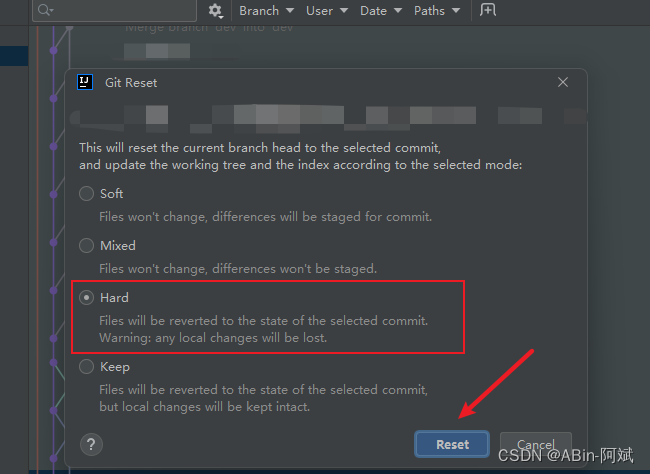
前言 回滚提交到本地但是还没有 Push 上去的提交 选择我们要回滚的节点,然后点击 git 选择 Reset Current Branch to… 再选择 Hard 。当我们点击 Reset 的时候,代码就会回滚到单前选中的这个版本...
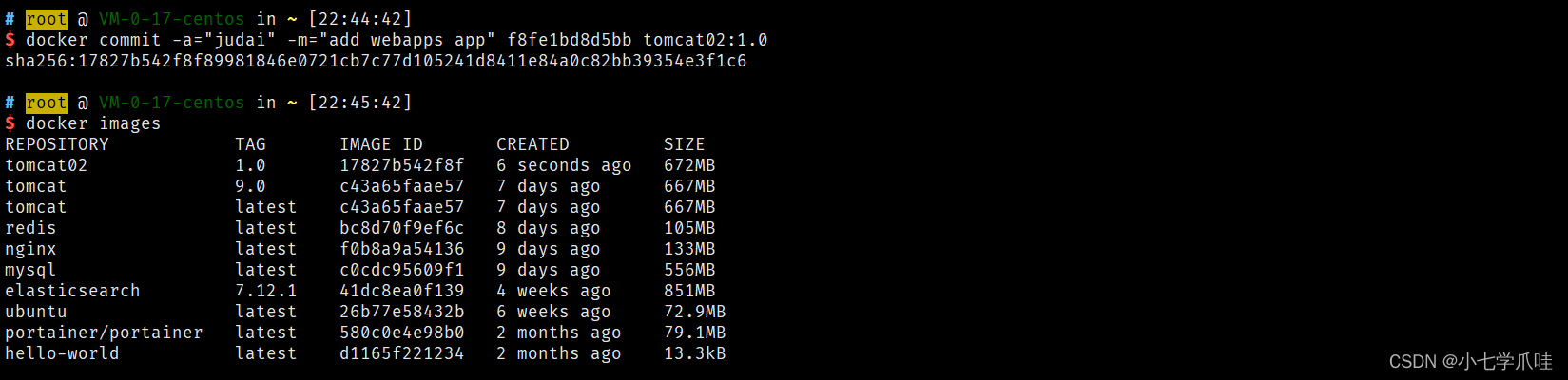
Docker核心教程
1. 概述 官网:https://docs.docker.com/ Docker Hub 网站:https://hub.docker.com/ 容器较为官方的解释: 一句话概括容器:容器就是将软件打包成标准化单元,以用于开发、交付和部署。 容器镜像是轻量的、可执行的独立…...

React通用后台模板
一. 项目初始化 1. 创建项目 环境 npm init vite 打开package.json,参考以下各模块版本: "dependencies": { "react": "^18.2.0", "react-dom": "^18.2.0", "react-redux": "^7.2.8", …...

【Axure教程0基础入门】00Axure9汉化版下载、安装、汉化、注册+01制作线框图
写在前面:在哔哩哔哩上面找到的Axure自学教程0基础入门课程,播放量最高,5个多小时。课程主要分为4个部分,快速入门、动态面板、常用动效、项目设计。UP主账号【Song老师产品经理课堂】。做个有素质的白嫖er,一键三连必…...
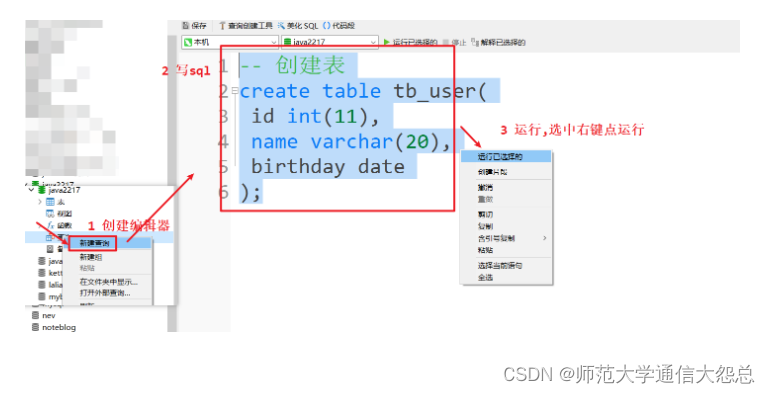
day38_MySQL
今日内容 0 复习昨日 1 引言 2 数据库 3 数据库管理系统 4 MySQL 5 SQL语言 0 复习昨日 1 引言 1.1 现有的数据存储方式有哪些? Java程序存储数据(变量、对象、数组、集合),数据保存在内存中,属于瞬时状态存储。文件&…...
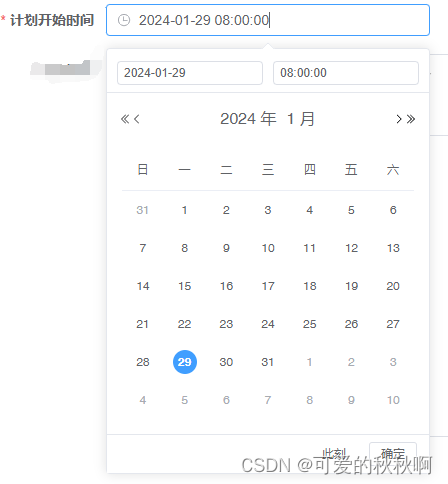
element ui组件 el-date-picker设置default-time的默认时间
default-time :选择日期后的默认时间值。 如未指定则默认时间值为 00:00:00 默认值修改 <el-form-item label"计划开始时间" style"width: 100%;" prop"planStartTime"><el-date-picker v-model"formData.planStart…...

奇异线性系统与矩阵方程数值解法【附仿真】
✨ 长期致力于奇异线性方程组、鞍点问题、块二乘二线性方程组、矩阵方程、偏微分方程、最小范数最小二乘解、迭代方法、预处理、Schwarz-Christoffel映射、Sherman-Morrison-Woodbury公式研究工作,擅长数据搜集与处理、建模仿真、程序编写、仿真设计。 ✅ 专业定制毕…...

ChatGPT翻译质量断崖式下滑的真相:当LLM遇上专业领域术语库缺失,这4种场景下错误率超61%——你的项目还在裸奔吗?
更多请点击: https://codechina.net 第一章:ChatGPT翻译质量怎么样 ChatGPT 在翻译任务中展现出较强的上下文理解能力与语言生成流畅性,但其质量受输入提示(prompt)设计、源语言复杂度、专业领域术语密度及目标语言语…...

如何用.NET Windows Desktop Runtime彻底解决Windows桌面应用部署难题?终极指南来了!
如何用.NET Windows Desktop Runtime彻底解决Windows桌面应用部署难题?终极指南来了! 【免费下载链接】windowsdesktop 项目地址: https://gitcode.com/gh_mirrors/wi/windowsdesktop 想象一下这样的场景:你花费数月精心开发的Window…...

新手快速上手使用 Python 调用 Taotoken 聚合大模型 API
🚀 告别海外账号与网络限制!稳定直连全球优质大模型,限时半价接入中。 👉 点击领取海量免费额度 新手快速上手使用 Python 调用 Taotoken 聚合大模型 API 对于刚接触 Taotoken 的 Python 开发者而言,最直接的需求就是…...

明日方舟游戏素材资源库:创作者与开发者的数字宝藏
明日方舟游戏素材资源库:创作者与开发者的数字宝藏 【免费下载链接】ArknightsGameResource 明日方舟客户端素材 项目地址: https://gitcode.com/gh_mirrors/ar/ArknightsGameResource 还在为明日方舟相关的创作项目寻找高质量素材而烦恼吗?无论是…...

终极STL到STEP转换指南:从3D扫描到CAD设计的完整解决方案
终极STL到STEP转换指南:从3D扫描到CAD设计的完整解决方案 【免费下载链接】stltostp Convert stl files to STEP brep files 项目地址: https://gitcode.com/gh_mirrors/st/stltostp 前言:跨越3D格式鸿沟的桥梁 在现代制造业和工程设计领域&…...

.NET Windows Desktop Runtime终极指南:如何彻底解决Windows桌面应用部署难题?
.NET Windows Desktop Runtime终极指南:如何彻底解决Windows桌面应用部署难题? 【免费下载链接】windowsdesktop 项目地址: https://gitcode.com/gh_mirrors/wi/windowsdesktop 在Windows桌面应用开发领域,最令人头疼的问题往往不是代…...

高性能日志分析系统架构设计:LogExpert企业级监控解决方案
高性能日志分析系统架构设计:LogExpert企业级监控解决方案 【免费下载链接】LogExpert Windows tail program and log file analyzer. 项目地址: https://gitcode.com/gh_mirrors/lo/LogExpert LogExpert是一款专为Windows平台设计的高性能图形化日志分析工具…...

完全免费!DeepLX:无需API密钥的DeepL翻译解决方案终极指南
完全免费!DeepLX:无需API密钥的DeepL翻译解决方案终极指南 【免费下载链接】DeepLX Powerful Free DeepL API, No Token Required 项目地址: https://gitcode.com/gh_mirrors/de/DeepLX 还在为DeepL官方API的高昂费用和复杂配置而烦恼吗ÿ…...

3步搞定无人机影像处理:ODM免费开源工具完全指南
3步搞定无人机影像处理:ODM免费开源工具完全指南 【免费下载链接】ODM A command line toolkit to generate maps, point clouds, 3D models and DEMs from drone, balloon or kite images. 📷 项目地址: https://gitcode.com/gh_mirrors/od/ODM …...